

I software di assistenza online aiutano i team di supporto e assistenza a gestire i ticket, automatizzare i flussi di lavoro e rispondere più rapidamente. Questi strumenti sono progettati per centralizzare le comunicazioni con i clienti, ridurre il lavoro manuale ripetitivo e fornire al team il contesto necessario per risolvere i problemi in modo efficiente.
Ho testato e recensito queste piattaforme in base all'automazione, all'interfaccia utente, alle integrazioni, alla scalabilità e al supporto per le richieste provenienti da più canali. Questa guida analizza i migliori software di assistenza online per team di dimensioni e modelli di servizio diversi, così le attività di assistenza non passano inosservate.
Che cos'è un software di assistenza online?
Il software di assistenza online è una piattaforma che aiuta i team di supporto a gestire, monitorare e risolvere i problemi dei clienti da un unico luogo. Centralizza le comunicazioni, automatizza i flussi di lavoro dei ticket e viene utilizzato per migliorare i tempi di risposta, la coerenza e la qualità del servizio su tutti i canali.
Perché fidarsi dei nostri consigli sui software
6,700+
Reviews
20
Industry experts
16+
Evaluation factors
14
Years
Il nostro team testa e recensisce software dal 2012. In quanto leader CX noi stessi, sappiamo quanto sia difficile — e importante — scegliere il software giusto.
Per questa guida, abbiamo valutato gli strumenti attraverso test pratici e ricerche indipendenti, assegnando un punteggio agli strumenti in base ai nostri criteri di selezione.
Le nostre recensioni riflettono il nostro giudizio editoriale umano, non un discorso di vendita.
 Gui DrusinaCreative Director
 Tim FisherVP of AI
Riepilogo dei migliori software di assistenza online
| Tool | Best For | Trial Info | Price | ||
|---|---|---|---|---|---|
| 1 | Ideale per il supporto ai call center | Prova gratuita di 14 giorni + demo gratuita disponibile | Da $19/agente/mese (fatturato annualmente) | Website | |
| 2 | Ideale per personalizzare le interazioni con l'IA | Prova gratuita di 30 giorni disponibile | A partire da $15/utente/mese | Website | |
| 3 | Ideale per unificare chat ed email | Prova gratuita disponibile | Da $16/utente/mese (fatturazione annuale) | Website | |
| 4 | Miglior builder di flussi di lavoro automatizzati | Prova gratuita di 15 giorni + demo gratuita disponibile | A partire da $7/utente/mese (fatturato annualmente) | Website | |
| 5 | Ideale per le comunicazioni clienti ecommerce unificate | Prova gratuita di 14 giorni | A partire da $39/agente/mese | Website | |
| 6 | Ideale con l'accesso ospiti per la collaborazione esterna | Prova gratuita di 30 giorni disponibile | Da $14/user/month (con fatturazione annuale) | Website | |
| 7 | Ideale per l'assistenza clienti potenziata dall'IA | Prova gratuita di 7 giorni + piano gratuito disponibile | Da $24,17/mese (fatturato annualmente) | Website | |
| 8 | Ideale per la collaborazione tra team | Piano gratuito + demo gratuita disponibile | Da $29/utente/mese | Website | |
| 9 | Ideale per la gestione dei ticket guidata dall'IA | Prova gratuita di 14 giorni | A partire da $9/postazione/mese (fatturazione annuale) | Website | |
| 10 | Ideale per la gestione delle interazioni con i clienti | Piano gratuito + demo gratuita disponibile | A partire da $39.99/mese (fatturati annualmente) | Website |


Panoramica dei 20 migliori software di assistenza online
Puoi utilizzare le semplici panoramiche di ogni strumento riportate di seguito per capire in che modo ciascuno si distingue dagli altri software di assistenza online.
 Ideale per il supporto ai call center
- Prova gratuita di 14 giorni + demo gratuita disponibile
- Da $19/agente/mese (fatturato annualmente)
Visit WebsiteCustomer Rating:4.4/5
Monitora le performance del team e la soddisfazione dei clienti con una dashboard e report personalizzabili. Freshdesk (un prodotto di Freshworks Inc.) è una piattaforma di assistenza clienti online che può essere utilizzata dalle organizzazioni operanti in ambienti di call center. Supporta la gestione delle richieste dei clienti su più canali all'interno di un unico sistema, aiutando i team a gestire le conversazioni senza dover cambiare strumento.
Perché ho scelto Freshdesk: Ho scelto Freshdesk per la gamma di strumenti che offre a supporto dei flussi di lavoro dei call center. La piattaforma include una casella di posta condivisa, strumenti per la gestione di una knowledge base e funzionalità di chat, che permettono ai team di gestire le richieste in un unico posto. Comprende anche il supporto alle chiamate in entrata, consentendo agli operatori di gestire le telefonate dei clienti direttamente tramite la piattaforma. Per i team che fanno affidamento su sistemi esterni, Freshdesk offre un'ampia gamma di integrazioni che possono connettere la piattaforma di assistenza clienti ai flussi di lavoro esistenti.
Freshdesk può essere configurato per adattarsi a diverse esigenze operative ed è utilizzato da team di varie dimensioni. Include Freddy AI, che può aiutare ad automatizzare l'instradamento dei ticket in base a regole predefinite, riducendo la suddivisione manuale delle richieste in arrivo. Gli strumenti di reportistica e analisi garantiscono visibilità sulle attività di supporto attraverso i canali, mentre le integrazioni con i social media permettono di convertire messaggi e menzioni in ticket di assistenza.
Caratteristiche e integrazioni principali di Freshdesk
Le caratteristiche includono una casella di posta per il team, rilevamento di collisione tra agenti, gestione degli SLA, suggerimenti sui campi dei ticket, stati personalizzati dei ticket, brainstorming di team, collegamento dei ticket, condivisione della proprietà, smistamento dei ticket, assegnazione intelligente dei ticket e automazione basata su orari.
Le integrazioni includono Google Calendar, Slack, Mailchimp, Google Analytics, Office 365, Freshsales, Dropbox, HubSpot CRM, Microsoft Teams, Harvest, Zoho CRM, Pipedrive, Chargebee, 3CX, Asana, Magento e Zapier.
Freshdesk offre un piano gratuito per un massimo di due agenti per sei mesi, con piani a pagamento a partire da $19 per utente al mese se fatturato annualmente. Alcuni piani prevedono una prova gratuita di 14 giorni.
Pros and Cons
Pros:
- Capacità di automazione impressionanti
- Estremamente intuitivo e facile da usare
- Eccellente organizzazione delle email di assistenza clienti
Cons:
- Integrare con i processi già esistenti è laborioso
- Alcuni problemi tecnici
Learn more about Freshdesk: Ideale per personalizzare le interazioni con l'IA
- Prova gratuita di 30 giorni disponibile
- A partire da $15/utente/mese
Visit WebsiteCustomer Rating:4.4/5
Chiudi rapidamente i casi e mantieni i clienti soddisfatti utilizzando automazione e raccomandazioni contestuali. Salesforce Service Cloud aiuta le aziende a offrire esperienze clienti complete grazie all'intelligenza artificiale.
Perché ho scelto Salesforce Service Cloud: Il software utilizza strumenti di intelligenza artificiale e automazione dei processi per aiutare i tuoi operatori a eliminare compiti ripetitivi e concentrarsi sul fornire un supporto eccellente. L'IA va oltre il semplice aiuto agli agenti nel fornire un servizio clienti di alto livello, grazie a strumenti come chatbot e smistamento automatico, che riducono i tempi di gestione. L'intelligenza artificiale di Salesforce Service Cloud assicura inoltre che gli operatori con la giusta esperienza gestiscano specifiche richieste dei clienti.
Salesforce Service Cloud è adatto ad organizzazioni di qualsiasi dimensione e di diversi settori che necessitano di strumenti per rafforzare il coinvolgimento dei clienti. Puoi utilizzare la piattaforma per fornire assistenza personalizzata ai clienti su più canali quando necessario. Salesforce Service Cloud offre anche un editor drag-and-drop che consente di creare un centro self-service per permettere ai clienti di aiutarsi autonomamente.
Caratteristiche distintive e integrazioni di Salesforce Service Cloud
Caratteristiche includono automazione intelligente e flussi di lavoro, gestione dei casi, instradamento omnicanale, gestione della conoscenza, reportistica e analisi, strumenti di telefonia e voce, gestione degli incidenti di assistenza, assistenza remota e chat in tempo reale.
Integrazioni includono Freshdesk, CloudTalk, Twilio, Brandwatch, Paligo, Mailchimp, HubSpot CRM, Trello, TeamViewer, Smartsheet, Klaviyo, Aircall, Gainsight e Conversocial.
Salesforce Service Cloud parte da $25/utente/mese, fatturato annualmente. Salesforce Service Cloud offre una prova gratuita di 30 giorni per i nuovi abbonati.
Pros and Cons
Pros:
- Fornisce una visione unificata delle interazioni
- Semplifica efficacemente le procedure di supporto
- Adattabile alle esigenze degli utenti
Cons:
- Richiede formazione aggiuntiva per l'utilizzo
- Difficile da configurare
Learn more about Agentforce Service (formerly Service Cloud): Ideale per unificare chat ed email
- Prova gratuita disponibile
- Da $16/utente/mese (fatturazione annuale)
Visit WebsiteCustomer Rating:4.6/5
SparrowDesk mostra agli agenti una coda chat dal vivo unificata mentre guida i clienti attraverso conversazioni assistite dall’IA in tempo reale. SparrowDesk si distingue come un software di help desk online alimentato da intelligenza artificiale, pensato per le aziende che desiderano migliorare le proprie operazioni di assistenza clienti. Con il suo design intuitivo e funzionalità avanzate come gli Agenti AI, può risolvere automaticamente una parte significativa delle richieste dei clienti, risultando particolarmente interessante per le aziende che vogliono ottimizzare la comunicazione ed aumentare la produttività.
Perché ho scelto SparrowDesk
Ho scelto SparrowDesk per la sua capacità unica di integrare soluzioni guidate dall’IA direttamente nell’ambiente help desk. I suoi Agenti AI possono risolvere automaticamente la maggior parte delle richieste dei clienti tramite chat ed email, rispondendo direttamente all'esigenza di efficienza nella gestione di grandi volumi di interazioni. La casella di posta omnicanale della piattaforma assicura che il tuo team possa unificare le comunicazioni provenienti da diverse fonti (chat ed email) in un unico luogo, facilitando il mantenimento di coerenza e precisione nelle risposte ai clienti. Inoltre, funzionalità come i suggerimenti di risposta generati dall'IA aiutano il team a fornire risposte rapide e contestuali, migliorando ulteriormente la soddisfazione del cliente.
Caratteristiche principali di SparrowDesk
Oltre alle sue capacità guidate dall’IA, ho trovato anche altre caratteristiche che rendono SparrowDesk una scelta interessante per un software help desk:
- Service Level Agreements (SLA): Definisci obiettivi chiari di risposta e risoluzione per garantire un supporto tempestivo.
- Gestione orari di lavoro: Imposta gli orari di lavoro per gestire le aspettative dei clienti e ottimizzare la gestione dei ticket.
- Viste e filtri personalizzati: Personalizza la visualizzazione degli agenti per una migliore priorità e gestione delle conversazioni.
- Macro azioni rapide: Automatizza le attività comuni per risparmiare tempo e velocizzare i flussi di lavoro.
Integrazioni di SparrowDesk
Le integrazioni native non sono attualmente elencate da SparrowDesk.
Pros and Cons
Pros:
- Builder di workflow senza codice per automatizzare instradamenti e notifiche
- Le funzioni Copilot riassumono le lunghe conversazioni all'interno della casella dell'agente
- Agenti AI progettati per risolvere automaticamente molti ticket ripetitivi
Cons:
- Le limitate integrazioni native possono ostacolare una connettività completamente fluida
- I canali attualmente si concentrano su email e live chat, non voce o social
Learn more about SparrowDesk: Miglior builder di flussi di lavoro automatizzati
- Prova gratuita di 15 giorni + demo gratuita disponibile
- A partire da $7/utente/mese (fatturato annualmente)
Visit WebsiteCustomer Rating:4.4/5
Crea flussi di lavoro automatizzati per richieste frequenti dei clienti, alleviando il carico di lavoro manuale del team e creando coerenza. Zoho Desk è un software di help desk online che supporta operazioni di assistenza clienti omnicanale e può centralizzare la tua email, i social media, la chat web e le chiamate vocali in un unico posto.
Perché ho scelto Zoho Desk: Questo software offre un set completo di funzionalità per la gestione dell'help desk, inclusi risorse self-service e strumenti di collaborazione per il team. Ma ciò che realmente lo distingue è la sua capacità di automatizzare i flussi di lavoro. Questo consente di standardizzare i protocolli di supporto, alleviare il carico di lavoro manuale del team e velocizzare l'inserimento di nuovi agenti.
Il builder dei flussi di lavoro presenta un'interfaccia semplice, drag-and-drop. Puoi configurare azioni e risultati specifici, in base a condizioni predefinite. Il tuo team avrà lo stesso set di best practice da seguire per le richieste comuni dei clienti, risparmiando tempo e creando coerenza nell'esperienza cliente.
Funzionalità e integrazioni distintive di Zoho Desk
Le funzionalità includono gestione dei ticket, auto-tagging dei ticket, analisi del sentiment, notifiche Zia, dashboard Zia, assistente alle risposte, strumenti self-service, integrazione CRM, funzioni personalizzate, SDK, marketplace e piattaforma, API, report e dashboard, rilevamento del tempo, help center multi-brand, mapping dei domini, e gestione utenti e accessi.
Le integrazioni includono Twilio, RingCentral, Amazon Connect, Ozonetel, Exotel, Knowlarity, Jive, sipgate, JustCall, ringover, e altre opzioni software.
Zoho Desk ha un costo a partire da $20 per utente, al mese, ed è disponibile una prova gratuita di 15 giorni.
Pros and Cons
Pros:
- Interfaccia pulita, intuitiva e facile da navigare
- Sistema di ticketing personalizzabile
- App mobile per accesso ovunque
Cons:
- Reportistica limitata nei piani di livello inferiore
- Opzioni di branding limitate per i portali clienti
Learn more about Zoho Desk: Ideale per le comunicazioni clienti ecommerce unificate
- Prova gratuita di 14 giorni
- A partire da $39/agente/mese
Visit WebsiteCustomer Rating:4.4/5
eDesk mostra i messaggi clienti dell'ecommerce da più canali di vendita insieme. eDesk è progettato per le aziende di ecommerce che desiderano migliorare il supporto clienti grazie a capacità avanzate di IA. Centralizzando le interazioni dei clienti provenienti da diversi canali, eDesk aiuta il tuo team a gestire le comunicazioni in modo più efficace, consentendo tempi di risposta più rapidi e una maggiore soddisfazione del cliente. Questo strumento è particolarmente vantaggioso per le aziende che vogliono integrare il supporto con i principali marketplace e trasformare le richieste in opportunità di vendita.
Perché ho scelto eDesk
Ho scelto eDesk per la sua capacità di unificare le comunicazioni con i clienti su più piattaforme, caratteristica fondamentale per le aziende di ecommerce con diversi canali di vendita. Le funzionalità di automazione IA, come la categorizzazione e l'analisi del sentiment, aiutano il tuo team a gestire le attività di supporto in modo più efficiente. Inoltre, gli strumenti di reportistica in tempo reale forniscono informazioni utili sulle metriche di performance, permettendoti di prendere decisioni consapevoli e migliorare i livelli di servizio.
Funzionalità principali di eDesk
Oltre alla comunicazione unificata con i clienti dell'ecommerce, eDesk offre:
- Chatbot 24/7: Offre supporto continuativo ai tuoi clienti, assicurando che le loro richieste vengano gestite anche fuori dall'orario lavorativo.
- Strumenti per il feedback dei clienti: Raccoglie preziose informazioni dai clienti per aiutarti a migliorare servizi e prodotti.
- Collaborazione del team: Facilita la comunicazione interna con funzionalità come note interne e gestione dei carichi di lavoro.
- Flussi di lavoro personalizzabili: Ti permette di configurare processi automatizzati su misura per le esigenze del tuo business, aumentando la produttività.
Integrazioni di eDesk
Le integrazioni includono Brightpearl, Klaviyo, ChannelAdvisor, StoreFeeder, VoloCommerce, Veeqo, Linnworks, ShipStation, Aftership ed è disponibile un'API per integrazioni personalizzate.
Pros and Cons
Pros:
- Le automazioni basate su IA migliorano l'efficienza delle risposte
- I modelli di risposta preimpostati velocizzano le risposte ai clienti
- Risposte rapide e utili del supporto clienti
Cons:
- Reportistica e analisi presenti, ma meno personalizzabili rispetto a dashboard enterprise
- Progettato principalmente per l'ecommerce, meno flessibile per altri settori
Learn more about eDesk: Ideale con l'accesso ospiti per la collaborazione esterna
- Prova gratuita di 30 giorni disponibile
- Da $14/user/month (con fatturazione annuale)
Visit WebsiteCustomer Rating:4.8/5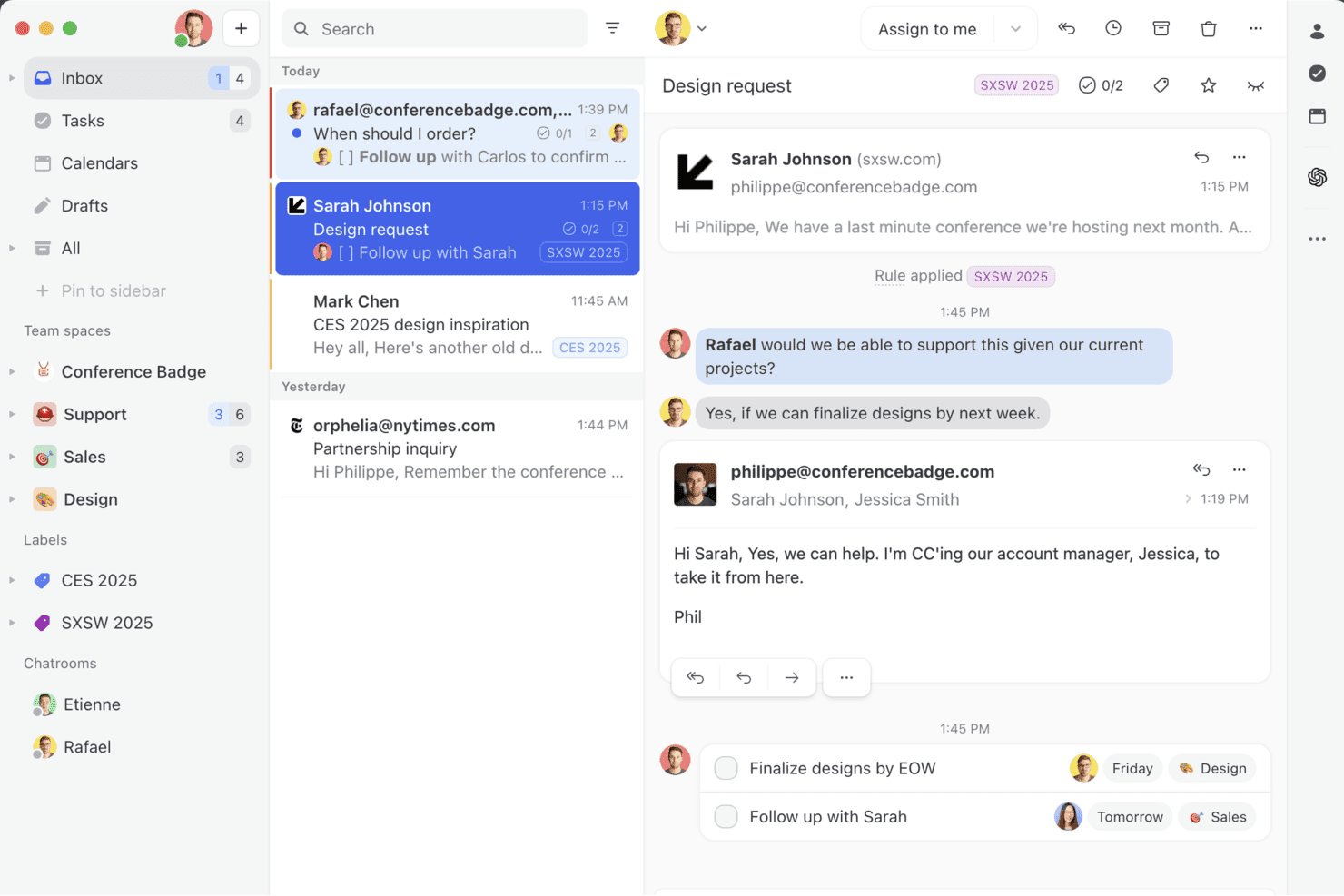
Missive riunisce email, chat e attività del team in un'unica casella di posta collaborativa, così puoi gestire le conversazioni, assegnare compiti ai colleghi e trasformare i messaggi in azioni senza uscire dalla tua casella di posta. Missive è una piattaforma di casella di posta condivisa collaborativa che riunisce email, SMS, WhatsApp, Instagram, Messenger e chat in tempo reale in un unico spazio di lavoro per il team, con gestione integrata delle conversazioni, regole di automazione e composizione assistita dall'intelligenza artificiale.
Per chi è più adatto Missive?
Missive è adatto ai team che coinvolgono regolarmente collaboratori esterni, come consulenti, clienti o partner di agenzie, nelle conversazioni con i clienti senza aggiungere postazioni a pagamento.
Perché ho scelto Missive
Ho incluso Missive tra le mie scelte migliori perché la sua funzione di accesso ospiti risolve un problema concreto: coinvolgere collaboratori esterni, come consulenti o partner di agenzie, nelle conversazioni attive con i clienti senza acquistare per loro una postazione a pagamento. Apprezzo anche il fatto che il rilevamento delle modifiche in tempo reale mostri esattamente chi sta preparando una risposta, così due agenti non svolgono mai lo stesso lavoro sulla stessa conversazione. Grazie alle conversazioni interne associate a qualsiasi conversazione, il team può inoltre risolvere problemi complessi senza appesantire la conversazione visibile al cliente.
Funzionalità principali di Missive
- Casella di posta unificata omnicanale: Riunisce email, SMS, WhatsApp, Instagram, Messenger e chat in tempo reale in un'unica casella di posta condivisa del team.
- Motore di regole basato sull'intelligenza artificiale: Regole di automazione che interpretano il contenuto e l'intento dei messaggi per applicare etichette automaticamente, preparare bozze automaticamente o inoltrare le conversazioni senza attivazioni manuali.
- Risposte predefinite con variabili: Modelli di risposta preimpostati che inseriscono dinamicamente i dettagli del contatto o della conversazione per risposte più rapide e coerenti.
- Registro di controllo delle conversazioni: Un registro completo di ogni azione eseguita su una conversazione, che offre ai responsabili del team una chiara visibilità sulle responsabilità nelle caselle di posta condivise.
- Server MCP di Missive: Collega strumenti di intelligenza artificiale esterni, come Claude o ChatGPT, per consultare le conversazioni online del servizio di assistenza, controllare i calendari e preparare risposte, mantenendo obbligatoria la revisione dell'agente prima dell'invio. I responsabili del team ottengono così una chiara visibilità sulle responsabilità nelle caselle di posta condivise.
Integrazioni di Missive
Missive offre integrazioni native con HubSpot, Salesforce, Pipedrive, Shopify, Aircall, Twilio, Asana, Google Drive e Dropbox. Fornisce inoltre accesso all'API REST e ai webhook per integrazioni personalizzate, supporta Zapier e include il suo nuovo Server MCP nei piani Productive e Business (è necessaria l'attivazione da parte dell'amministratore).
Pros and Cons
Pros:
- Accesso ospiti per la collaborazione con portatori di interesse esterni
- La casella di posta omnicanale include email, SMS, chat e social
- Funzionalità di composizione in tempo reale e conversazioni interne
Cons:
- Nessuna knowledge base rivolta ai clienti inclusa
- Nessuna funzionalità dedicata per SLA o CSAT
Learn more about Missive: Ideale per l'assistenza clienti potenziata dall'IA
- Prova gratuita di 7 giorni + piano gratuito disponibile
- Da $24,17/mese (fatturato annualmente)
Visit WebsiteCustomer Rating:4.7/5
La dashboard di supporto AI di Tidio mostra analisi su conversazioni, tassi di risoluzione e prestazioni degli operatori. Tidio è una piattaforma progettata per aiutare i team a gestire l'assistenza clienti su chat, email e social media in un'unica casella di posta. È pensata per essere configurata rapidamente e supporta automazione, comunicazione multilingue e analisi per migliorare il modo in cui i team di assistenza danno priorità e gestiscono le richieste. Tidio è utilizzato da aziende di tutte le dimensioni e supporta oltre 120 integrazioni, incluse piattaforme chiave come Shopify, HubSpot e Salesforce.
Perché ho scelto Tidio: Una delle funzionalità che più mi ha colpito è l'agente AI Lyro. Può rispondere a domande ripetitive dei clienti, analizzare e smistare le email in arrivo e aiutare ad assegnare i ticket senza l'intervento di un operatore. Questo può essere particolarmente utile se il tuo team gestisce un alto volume di richieste di assistenza e ha bisogno di ridurre il lavoro manuale. Tidio offre anche la comunicazione multilingue, così i team che servono clienti internazionali possono rispondere in fino a 12 lingue senza dover ricorrere a strumenti di traduzione esterni.
Caratteristiche e integrazioni principali di Tidio
Caratteristiche includono risposte preimpostate, un widget di chat dal vivo personalizzabile, monitoraggio dei visitatori, accesso mobile per gli operatori e una casella di posta collaborativa per la gestione dei messaggi in team. Queste funzionalità aiutano i team a rimanere organizzati e rispondere rapidamente mantenendo sempre visibilità sulle conversazioni attive.
Integrazioni includono Shopify, WordPress, WooCommerce, Mailchimp, HubSpot, Salesforce, Zendesk, Zapier, WhatsApp, Messenger, Instagram e Google Analytics.
Pros and Cons
Pros:
- Combina chat, email e canali social in un'unica casella di posta
- Supporta 12 lingue per team globali
- Rapido da implementare con configurazione minima
Cons:
- Nessun supporto telefonico; assistenza dal vivo limitata all'orario lavorativo
- Funzionalità limitate nel piano gratuito
Learn more about Tidio: Ideale per la collaborazione tra team
- Piano gratuito + demo gratuita disponibile
- Da $29/utente/mese
Visit WebsiteCustomer Rating:4.6/5
La vista elenco dei ticket di HelpDesk offre una panoramica di tutte le richieste di assistenza clienti nell'account dell'azienda. HelpDesk offre alle aziende un set di funzionalità robuste che consente ai team di collaborare e diventare più efficienti.
Perché ho scelto HelpDesk: La piattaforma fornisce alla tua organizzazione una soluzione help desk pronta all'uso che aiuta i team a collaborare efficacemente senza complicare eccessivamente i processi. HelpDesk offre strumenti di gestione dei ticket che consentono agli operatori di etichettare le richieste di assistenza clienti e raggrupparle in base a soluzioni comuni, così gli operatori possono lavorare insieme e risolvere le richieste dei clienti. Gli strumenti di automazione del software permettono di stabilire regole di instradamento dei ticket, garantendo che ogni richiesta arrivi all'operatore giusto.
HelpDesk è indicato sia per startup che per grandi aziende che hanno bisogno di una piattaforma per migliorare il servizio clienti. Utilizza una dashboard unificata per generare ticket a partire da richieste arrivate tramite email, moduli di contatto, chat dal vivo e altri canali. HelpDesk inoltre offre funzionalità come assegnazione automatica dei compiti, flussi di lavoro personalizzati e automatizzati, e risposte preimpostate per ottimizzare i tempi di risposta.
Funzionalità e integrazioni distintive di HelpDesk
Funzionalità includono miglioramenti del testo tramite IA, campi personalizzati, modelli email, flussi di lavoro automatizzati, gestione dei ticket, azioni di massa, risposte predefinite, rilevamento delle collisioni, assegnazione dei ticket, report e analisi.
Integrazioni includono LiveChat, Zapier, Shopify, Jira, HubSpot, Salesforce e GitHub.
HelpDesk parte da $34/utente/mese con fatturazione mensile oppure $29/utente/mese con fatturazione annuale. HelpDesk offre una prova gratuita di 14 giorni ai nuovi iscritti.
Pros and Cons
Pros:
- Fornisce report e analisi in tempo reale
- L'interfaccia utente è molto intuitiva
- Tiene traccia e segue efficacemente le richieste
Cons:
- Possono verificarsi alcuni problemi di connessione
- Thread email multipli sono disordinati
Learn more about HelpDesk: Ideale per la gestione dei ticket guidata dall'IA
- Prova gratuita di 14 giorni
- A partire da $9/postazione/mese (fatturazione annuale)
Visit WebsiteCustomer Rating:4.6/5
La dashboard di monday Service offre una panoramica dei ticket e di altri importanti parametri relativi al tuo help desk. monday Service è una piattaforma progettata per aiutare le organizzazioni a gestire e monitorare le richieste di supporto, risolvere problemi e analizzare in modo efficiente le metriche dei ticket. Si presenta come un hub completo per la gestione delle richieste, l'aggiornamento dello stato e l'organizzazione delle risorse di supporto.
Perché ho scelto monday Service: Una delle sue caratteristiche di spicco è l'automazione intelligente alimentata dall'intelligenza artificiale, che contribuisce a migliorare le operazioni di servizio dall'inizio alla fine. Questo include la classificazione automatica dei ticket e l'assegnazione intelligente dei ticket, assicurando che le richieste di supporto siano indirizzate ai membri del team appropriati senza ritardi. Il software offre anche esperienze self-service ai clienti, permettendo loro di risolvere autonomamente i problemi più comuni.
Caratteristiche e integrazioni principali di monday Service
Le caratteristiche includono dashboard visive che forniscono approfondimenti in tempo reale sullo stato dei ticket, aiutando i team a rimanere aggiornati sulle metriche di performance e a migliorare i tempi di risposta. Inoltre, monday Service supporta un sistema di assistenza con knowledge base per gli operatori, fornendo facile accesso a informazioni e soluzioni pertinenti quando rispondono alle richieste dei clienti.
Le integrazioni includono Slack, Microsoft Teams, Zendesk, Jira, Salesforce, Google Workspace, GitHub, Zoom, Outlook, HubSpot, Trello, Dropbox e OneDrive.
Pros and Cons
Pros:
- Capacità di gestione della conoscenza
- Instradamento automatico dei ticket
- Funzionalità di gestione delle risorse
Cons:
- Personalizzazione dei report limitata
- Le funzionalità di automazione completa richiedono abbonamenti di livello superiore
Learn more about monday service: Ideale per la gestione delle interazioni con i clienti
- Piano gratuito + demo gratuita disponibile
- A partire da $39.99/mese (fatturati annualmente)
Visit WebsiteCustomer Rating:4.7/5
Monitora le prestazioni giornaliere degli agenti o del team e individua cosa migliorare. ProProfs Help Desk aiuta le aziende a concentrarsi sul miglioramento delle interazioni con i clienti affinché tutti abbiano un'esperienza positiva.
Perché ho scelto ProProfs Help Desk: La piattaforma offre alla tua azienda capacità di gestione delle interazioni con i clienti che consentono ai tuoi agenti di rispondere alle richieste dei clienti, offrire assistenza 24/7 e connettersi con loro. ProProfs Help Desk aiuta i tuoi agenti a offrire tempestività, personalizzazione, empatia e rassicurazione durante le interazioni con i clienti. Puoi utilizzare la piattaforma per avere una panoramica delle precedenti interazioni e attività dei clienti, così i tuoi agenti potranno offrire un tocco personale alle conversazioni future. Per una gestione più efficace delle interazioni con i clienti, puoi utilizzare le capacità di collaborazione di team di ProProfs Help Desk per aiutare i tuoi agenti a lavorare insieme e rendere i clienti soddisfatti.
ProProfs Help Desk è adatto a organizzazioni di tutte le dimensioni che necessitano di una soluzione in grado di soddisfare le crescenti esigenze dei clienti nei loro settori. È un sistema di ticketing basato su cloud noto soprattutto per la sua funzione di inbox condiviso, grazie alla quale i tuoi agenti possono accedere, visualizzare e assegnare ticket al membro del team più adatto lavorando in uno spazio collaborativo. I tuoi manager possono utilizzare ProProfs Help Desk per dare priorità, etichettare e contrassegnare i ticket che richiedono attenzione immediata.
Caratteristiche e integrazioni principali di ProProfs Help Desk
Funzionalità includono inbox condivise, modelli di notifica, disponibilità agente personalizzabile, esportazione dei ticket, gestione del team, cronologia dei ticket, ruoli e permessi, chat interna, supporto omnicanale, gestione SLA, supporto chat in tempo reale e risposte automatiche.
Integrazioni includono Salesforce e Microsoft Dynamics CRM.
Pros and Cons
Pros:
- Interfaccia facile da usare
- Garantisce esperienze clienti eccellenti
- Assistenza clienti eccezionale
Cons:
- Non è disponibile un'API
- Numero limitato di integrazioni
Learn more about ProProfs Help Desk:
Altre opzioni
Ecco altre opzioni che non sono entrate nella lista dei migliori software di assistenza online:
- 11IssuetrakIdeale per la sottoscrizione ticket omnicanale
- 12HubSpot Service HubLe migliori funzionalità CRM all'interno di una piattaforma help desk
- 13FrontMiglior software per la casella di posta condivisa di team
- 14FrontIdeale per indirizzamento e categorizzazione automatica
- 15SAAS FirstIdeale per chatbot alimentati da intelligenza artificiale
- 16HiverIdeale per la gestione di caselle di posta condivise
- 17Document360Ideale per la deviazione dei ticket di supporto
- 18NinjaOneIdeale per l'automazione della gestione dei ticket
- 19LiveAgentIdeale per la semplicità
- 20Help ScoutMiglior software di help desk tutto-in-uno
Come Valuto i Software di Help Desk Online
Divido la mia valutazione in due livelli: criteri di base che ogni strumento deve soddisfare—gestione dei ticket, monitoraggio SLA, acquisizione multicanale—e fattori differenzianti che distinguono un'opzione dall'altra.
Funzionalità di Base (Requisiti Fondamentali per Questa Lista)
Quando seleziono gli strumenti per la mia lista, valuto ciascuno su una scala da 0 (non offre la funzionalità) a 5 (eccelle in quest'area) per ogni funzionalità di base elencata qui sotto. Poi, calcolo il punteggio totale dello strumento in percentuale. Ogni strumento deve raggiungere un punteggio totale minimo del 75% per essere considerato per l'inclusione.
- Gestione dei Ticket: Esamino l'intero ciclo di vita del ticket—creazione, assegnazione, prioritizzazione, monitoraggio dello stato e risoluzione—e se gli agenti possono unire i duplicati, suddividere richieste complesse o aggiungere campi personalizzati per rispecchiare i flussi di lavoro reali.
- Supporto Multicanale: Ogni strumento che valuto dovrebbe unificare email, chat, moduli web, social e chiamate in un'unica coda, così gli agenti non devono passare da una piattaforma all'altra per rispondere ai clienti.
- Knowledge Base & Self-Service: Verifico se la piattaforma offre un centro assistenza pubblico con ricerca, categorie e gestione degli articoli che i clienti possono utilizzare per risolvere i problemi comuni prima di inviare un ticket.
- Automazione & Flussi di Lavoro: Qui valuto regole di instradamento, assegnazione automatica, trigger di escalation e macro—elementi come il tagging e l'assegnazione automatica di ticket di fatturazione a un team specializzato in base alle parole chiave nell'oggetto.
- Gestione SLA & Reportistica: Cerco policy SLA configurabili legate ai tempi di risposta e risoluzione, avvisi di violazione, e dashboard che evidenziano KPI come il tempo di prima risposta, arretrato dei ticket e punteggi CSAT.
- Strumenti di Collaborazione tra Agenti: Contano le funzionalità come note interne, @mentions, rilevamento delle collisioni e visualizzazione condivisa dei ticket—specialmente per i team dove la risoluzione di un singolo problema può richiedere l'intervento di supporto, ingegneria e operazioni.
Una volta che dispongo di una lista di strumenti che soddisfano questi criteri, considero cosa distingue le varie piattaforme.
Fattori Differenzianti (Cosa Distingue i Fornitori)
Ecco come confronto e metto a confronto i diversi fornitori:
Funzionalità Distintive
L'assistenza potenziata dall'IA è un fattore di differenziazione importante—strumenti che generano risposte, riassumono thread lunghi o rilevano il sentiment del cliente danno un vero vantaggio agli agenti nei periodi di grande volume. Valuto anche se una piattaforma mostra un pannello contestuale del cliente accanto al ticket attivo, recuperando interazioni passate e dati del CRM in modo che gli agenti non debbano chiedere ripetutamente le stesse informazioni ai clienti. Anche la chat live con chatbot integrati è rilevante, soprattutto per i team che gestiscono richieste pre-vendita, dove un bot può qualificare la richiesta prima di indirizzarla all'agente giusto.
Oltre le Funzionalità
L'ecosistema di integrazione è una delle prime cose che controllo—un help desk che si collega nativamente con il tuo CRM, la piattaforma ecommerce e Slack o MS Teams aiuta gli agenti ad evitare di cambiare continuamente scheda. Valuto inoltre quanto bene una piattaforma si adatta a specifiche strutture di team, ad esempio se supporta portali multibrand per aziende che gestiscono più linee di prodotto da un unico account. Anche la trasparenza dei prezzi conta, in particolare se i livelli per agente crescono in modo ragionevole mentre un team di supporto passa da cinque a cinquanta agenti senza costringere a un costoso cambio di piattaforma.
Come scegliere un software di assistenza online
È facile perdersi in lunghi elenchi di funzionalità e strutture tariffarie complesse. Per aiutarti a rimanere concentrato mentre affronti il tuo specifico processo di selezione del software, ecco una lista di fattori da tenere a mente:
| Fattore | Cosa considerare |
|---|---|
| FattoreScalabilità | Cosa considerareIl software può crescere insieme alla tua azienda? Considera l'espansione futura e verifica se lo strumento è in grado di gestire un volume maggiore. |
| FattoreIntegrazioni | Cosa considerareFunziona con gli strumenti che già utilizzi? Valuta la compatibilità con i sistemi attuali per evitare interruzioni dei flussi di lavoro. |
| FattorePersonalizzazione | Cosa considerarePuoi adattarlo alle tue esigenze? Valuta la flessibilità nell'adattarlo a processi e identità visive specifici. |
| FattoreFacilità d'uso | Cosa considerareÈ intuitivo per il tuo team? Cerca interfacce intuitive per ridurre al minimo i tempi di formazione e gli errori. |
| FattoreImplementazione e avvio | Cosa considerareQuanto è fluido il processo di configurazione? Verifica la disponibilità di un supporto completo durante l'avvio per ridurre i tempi di inattività durante la transizione. |
| FattoreCosto | Cosa considerareRientra nel tuo budget? Confronta le strutture tariffarie e considera i costi nascosti, come componenti aggiuntivi o aggiornamenti. |
| FattoreMisure di sicurezza | Cosa considerareSono presenti protezioni solide? Verifica la conformità agli standard di protezione dei dati, come il GDPR o l'HIPAA. |
| FattoreDisponibilità dell'assistenza | Cosa considerarePotrai ricevere aiuto quando ne avrai bisogno? Verifica che il fornitore offra un'assistenza affidabile e tempestiva, preferibilmente 24 ore su 24, 7 giorni su 7. |
Funzionalità dei software di assistenza online
Quando scegli un software di assistenza online, presta attenzione alle seguenti funzionalità principali:
- Accesso da dispositivi mobili: consente agli operatori dell'assistenza di gestire le richieste e rispondere alle domande dei clienti ovunque si trovino, utilizzando dispositivi mobili.
- Gestione delle richieste: centralizza le domande e i problemi dei clienti in un unico sistema, consentendo un monitoraggio e una risoluzione organizzati.
- Flussi di lavoro automatizzati: semplifica le attività ripetitive automatizzando i processi, migliorando l'efficienza e riducendo gli errori manuali.
- Supporto multicanale: consente di gestire le interazioni con i clienti attraverso vari canali, come e-mail, chat, telefono e social network.
- Base di conoscenza: offre ai clienti un portale autonomo per trovare risposte alle domande frequenti, riducendo il volume delle richieste di assistenza.
- Analisi e reportistica: fornisce informazioni sulle prestazioni del team di assistenza e sulla soddisfazione dei clienti tramite report dettagliati e analisi dei dati.
- Capacità di integrazione: consente una connessione fluida con altri strumenti e piattaforme, migliorando le funzionalità e la sincronizzazione dei dati.
- Interfaccia personalizzabile: offre la possibilità di adattare l'aspetto e le funzionalità del software alle esigenze specifiche dell'azienda.
- Strumenti di collaborazione: facilita il lavoro di squadra tra gli operatori dell'assistenza, consentendo la comunicazione e la condivisione delle informazioni all'interno della piattaforma.
- Sistema di raccolta dei riscontri dei clienti: raccoglie e analizza i riscontri dei clienti per migliorare la qualità del servizio e la soddisfazione dei clienti.
Vantaggi del software di assistenza online
L'implementazione di un software di assistenza online offre diversi vantaggi al tuo team e alla tua azienda. Ecco alcuni dei vantaggi che puoi aspettarti:
- Gestione migliorata delle richieste: il software di assistenza online organizza e assegna la priorità alle domande dei clienti, facilitando la gestione efficiente delle richieste da parte del tuo team.
- Tempi di risposta più rapidi: le funzionalità di automazione consentono di rispondere più rapidamente alle domande dei clienti, riducendo i tempi di attesa e aumentando la soddisfazione dei clienti.
- Comunicazione centralizzata: tutte le interazioni con i clienti vengono archiviate in un unico luogo, garantendo al tuo team l'accesso al contesto completo di ogni problema.
- Disponibilità dell'assistenza 24 ore su 24, 7 giorni su 7: con gli strumenti di assistenza online, il tuo team può offrire assistenza ininterrotta, aiutando i clienti in qualsiasi momento.
- Funzionalità di reportistica avanzate: gli strumenti di analisi integrati forniscono informazioni sulle prestazioni del servizio clienti, aiutandoti a individuare le aree da migliorare.
- Opzioni di assistenza scalabili: con la crescita dell'azienda, il software di assistenza online può gestire facilmente un numero maggiore di utenti e un volume crescente di richieste.
- Integrazione della base di conoscenza: questi strumenti spesso includono una funzionalità di base di conoscenza, che consente ai clienti di trovare autonomamente le risposte alle domande frequenti.
Costi e prezzi del software di assistenza online
La scelta di un software di assistenza online richiede la comprensione dei vari modelli e piani tariffari disponibili. I costi variano in base alle funzionalità, alle dimensioni del team, ai componenti aggiuntivi e ad altri fattori. La tabella seguente riassume i piani più comuni, i relativi prezzi medi e le funzionalità tipicamente incluse nelle soluzioni software di assistenza online:
Tabella di confronto dei piani per il software di assistenza online
| Tipo di piano | Prezzo medio | Funzionalità comuni |
|---|---|---|
| Tipo di pianoPiano gratuito | Prezzo medio$0/user/month | Funzionalità comuniGestione di base delle richieste, assistenza via e-mail e integrazioni limitate. |
| Tipo di pianoPiano personale | Prezzo medio$5-$20/user/month | Funzionalità comuniGestione delle richieste, reportistica di base e assistenza via e-mail e chat. |
| Tipo di pianoPiano aziendale | Prezzo medio$21-$50/user/month | Funzionalità comuniReportistica avanzata, automazione, supporto multicanale e identità del marchio personalizzata. |
| Tipo di pianoPiano per grandi aziende | Prezzo medio$51-$100+/user/month | Funzionalità comuniFlussi di lavoro personalizzati, assistenza dedicata, analisi avanzate e sicurezza potenziata. |
Domande frequenti sul software di help desk online
Ecco alcune domande frequenti con relative risposte, per tua comodità!
Scegliere il miglior software di help desk online per il proprio team
Implementare una nuova piattaforma di assistenza rappresenterà un investimento significativo per il team di assistenza clienti, i clienti e l'azienda. Dopo aver letto questo elenco dei migliori software di assistenza online, noterai che molte opzioni offrono le stesse funzionalità comuni. Anche così, dovresti sempre considerare gli aspetti che ho elencato sopra e che li rendono unici nonostante queste caratteristiche condivise.
Ricorda che il costo del mancato impegno nel migliorare l'esperienza dei tuoi clienti con la tua azienda può essere elevato. Pertanto, dedicare il tempo necessario a prendere decisioni consapevoli porterà un vantaggio significativo alla tua organizzazione e ai tuoi clienti.
Cosa succede ora?
Se stai cercando un software di assistenza online, contatta gratuitamente un consulente SoftwareSelect per ricevere consigli.
Compilerai un modulo e farai una breve conversazione durante la quale verranno approfondite le tue esigenze specifiche. Dopodiché riceverai una lista ristretta di software da valutare. Ti supporteranno inoltre durante l'intero processo di acquisto, comprese le trattative sul prezzo.