

Il software aziendale per la prenotazione delle postazioni condivise consente di automatizzare e gestire le prenotazioni delle scrivanie nelle grandi organizzazioni, ottimizzando l’uso flessibile degli uffici per offrire ai team un accesso semplice agli spazi di lavoro e mantenere al contempo la logistica sotto controllo. Se stai cercando la piattaforma giusta, hai bisogno di funzionalità che supportino la crescita, rendano possibile il lavoro flessibile e forniscano informazioni chiare sull’utilizzo, senza aggiungere ulteriori difficoltà amministrative.
In questa guida troverai i migliori strumenti aziendali per la prenotazione delle postazioni condivise, che ti aiuteranno a creare uno spazio di lavoro più intelligente e adattabile nel 2026.
Perché fidarsi dei nostri consigli sui software
6,700+
Reviews
20
Industry experts
16+
Evaluation factors
14
Years
Il nostro team testa e recensisce software dal 2012. In quanto leader CX noi stessi, sappiamo quanto sia difficile — e importante — scegliere il software giusto.
Per questa guida, abbiamo valutato gli strumenti attraverso test pratici e ricerche indipendenti, assegnando un punteggio agli strumenti in base ai nostri criteri di selezione.
Le nostre recensioni riflettono il nostro giudizio editoriale umano, non un discorso di vendita.
 Gui DrusinaCreative Director
 Tim FisherVP of AI
Tabella comparativa dei software aziendali per la prenotazione delle postazioni condivise
La tabella seguente confronta i dettagli dei prezzi delle mie migliori selezioni di software aziendali per la prenotazione delle postazioni condivise.
| Tool | Best For | Trial Info | Price | ||
|---|---|---|---|---|---|
| 1 | Ideale per la conformità salute e sicurezza integrata | Piano gratuito + demo gratuita disponibili | Da $500/mese | Website | |
| 2 | Ideale per planimetrie interattive personalizzabili | Demo gratuita disponibile | Prezzi su richiesta | Website | |
| 3 | Ideale per l'automazione intuitiva dell'assegnazione delle postazioni | Demo gratuita disponibile | A partire da $5/risorsa prenotabile/mese (fatturato annualmente) | Website | |
| 4 | Ideale per prenotazioni di postazioni innanzitutto tramite dispositivi mobili | Prova gratuita di 7 giorni + demo gratuita disponibile | A partire da $1.79/utente/mese (con fatturazione annuale) | Website | |
| 5 | Ideale per potenti analisi sull'utilizzo degli spazi di lavoro | Demo gratuita disponibile | Prezzo su richiesta | Website | |
| 6 | Ideale per l'integrazione nativa con Microsoft Teams | Demo gratuita disponibile | Da $99/mese | Website | |
| 7 | Ideale per il check-in istantaneo alle scrivanie tramite QR code | Prova gratuita di 30 giorni + demo gratuita disponibile | Da $13.50/mese (fatturazione annuale) | Website | |
| 8 | Ideale per la prenotazione di postazioni integrata con hardware | Prova gratuita di 30 giorni disponibile | Da $51/mese | Website | |
| 9 | Ideale per permessi di workspace configurabili | Demo gratuita disponibile | Prezzi su richiesta | Website | |
| 10 | Ideale per il monitoraggio in tempo reale dell'occupazione degli spazi | Demo gratuita disponibile | Prezzi su richiesta | Website |


Recensioni dei migliori software aziendali per la prenotazione delle postazioni condivise
Di seguito trovi le mie analisi dettagliate dei migliori software aziendali per la prenotazione delle postazioni condivise inclusi nella mia selezione. Le mie recensioni offrono una panoramica approfondita delle funzionalità, dei casi d’uso più adatti e delle integrazioni di ciascuna piattaforma, per aiutarti a trovare quella migliore per te.
 1Ideale per la conformità salute e sicurezza integrata
elia
- Piano gratuito + demo gratuita disponibili
- Da $500/mese
Visit WebsiteCustomer Rating:4.7/5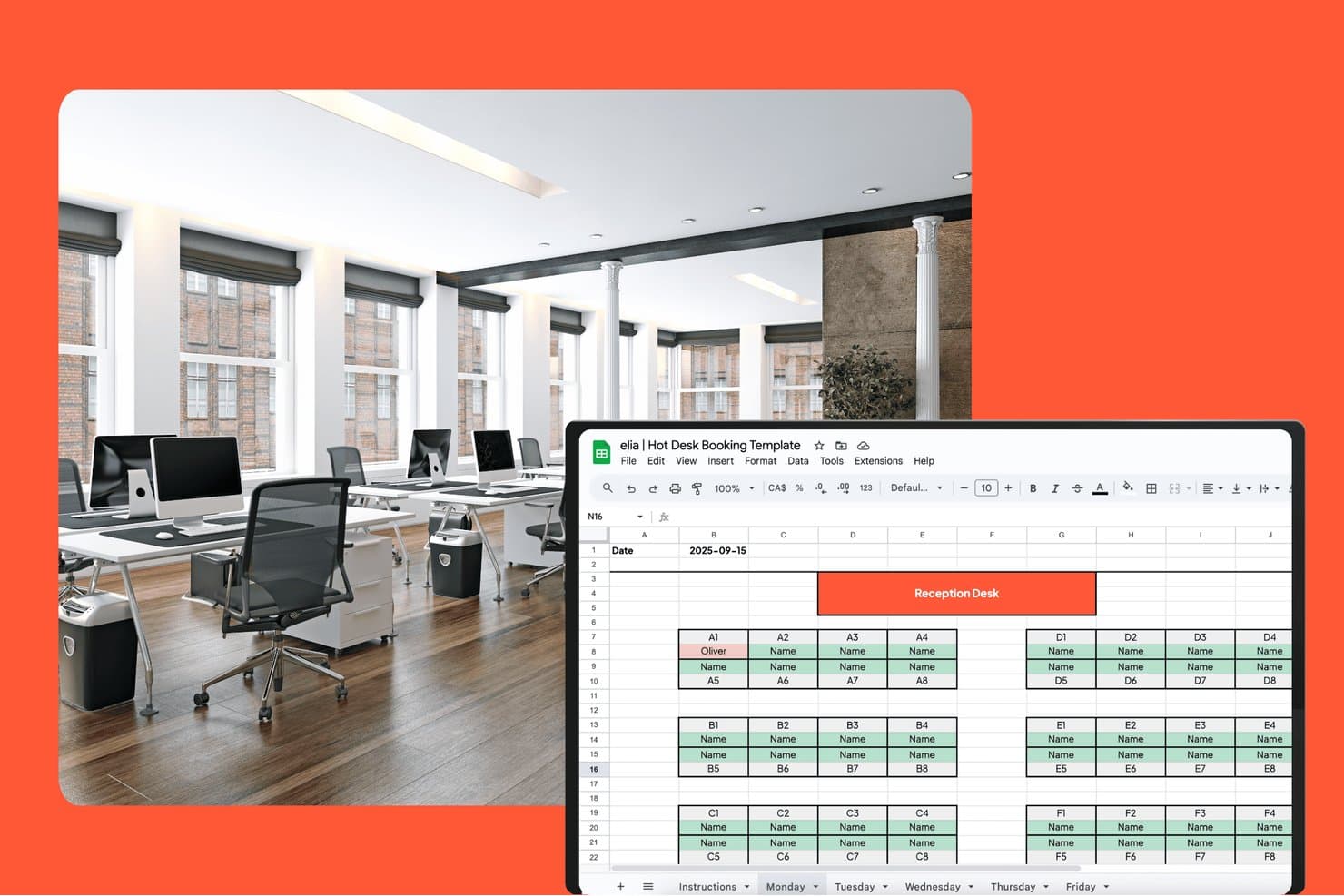
elia offre un modello di prenotazione hot desk basato su Google Sheets con una planimetria visiva che mostra le assegnazioni delle scrivanie per zona nella data selezionata. elia è una piattaforma modulare di gestione degli ambienti di lavoro che combina prenotazione di scrivanie e sale riunioni, planimetrie interattive, gestione dei visitatori, analisi dell’occupazione e strumenti di conformità per salute e sicurezza in un unico sistema.
Per chi è ideale elia?
elia è adatta ai team di gestione degli spazi e delle strutture di organizzazioni medio-grandi che amministrano uffici ibridi e necessitano di conformità normativa integrata insieme alla gestione quotidiana delle prenotazioni degli spazi.
Perché ho scelto elia
Ho scelto elia come una delle migliori perché nessun altro strumento di prenotazione delle scrivanie che ho esaminato integra la conformità a salute e sicurezza nel flusso di lavoro principale come fa questo software. Il monitoraggio dei primi soccorritori mi permette di vedere esattamente chi è presente in loco e dove si trova, in tempo reale, fondamentale nel momento in cui si verifica un problema. La segnalazione degli incidenti avviene sulla stessa piattaforma che uso per gestire le prenotazioni, quindi non è necessario passare da uno strumento all’altro per registrare o consultare un evento in ufficio.
Funzionalità principali di elia
- Planimetrie interattive: I dipendenti possono prenotare scrivanie e sale direttamente da una mappa visiva dell’ufficio, con filtri per posizione e servizi.
- Zone di team e quartieri: Gli amministratori assegnano aree specifiche di scrivanie a team o dipartimenti per una coordinazione facilitata.
- Prenotazione tramite app mobile: Le app native per iOS e Android permettono agli utenti di prenotare, consultare le mappe o gestire le riservazioni ovunque si trovino.
- Integrazione dei sensori di occupazione: I dati in tempo reale sull’utilizzo delle scrivanie e delle sale vengono acquisiti dall’hardware sensoristico collegato.
Integrazioni di elia
elia offre integrazioni native con Microsoft 365, Google Workspace, Google Calendar, Microsoft Teams, Outlook e Slack. È disponibile un’API per integrazioni personalizzate.
Pros and Cons
Pros:
- Funzionalità integrate per salute e sicurezza
- Monitoraggio in tempo reale dell’occupazione tramite sensori
- Gestione automatizzata di visitatori e primi soccorritori
Cons:
- Connettività limitata con ecosistema di terze parti
- Le planimetrie non hanno opzioni 3D o di wayfinding
Learn more about elia: Ideale per planimetrie interattive personalizzabili
- Demo gratuita disponibile
- Prezzi su richiesta
Visit WebsiteCustomer Rating:3.6/5
OfficeSpace offre planimetrie personalizzabili con assegnazione delle scrivanie. OfficeSpace è una piattaforma ibrida di gestione degli ambienti di lavoro per le aziende, che offre prenotazione delle scrivanie, mappe interattive dei piani, gestione dei trasferimenti, analisi dell'utilizzo e richieste di servizi in un unico sistema.
Per chi è più adatto OfficeSpace?
OfficeSpace è ideale per i team che si occupano dell'esperienza in ufficio nelle grandi aziende che hanno bisogno di gestire, aggiornare e visualizzare piante dei piani complesse in più sedi aziendali nel mondo.
Perché ho scelto OfficeSpace
Ho inserito OfficeSpace nella mia lista dei preferiti perché mi affido alle sue planimetrie interattive che posso personalizzare completamente per le mie sedi e il mio marchio. Ogni settimana aggiorno le zone, aggiungo il distanziamento sociale e assegno le dotazioni delle sale direttamente sulla piantina.
Caratteristiche principali di OfficeSpace
- Prenotazione scrivanie tramite QR code: I dipendenti possono prenotare, effettuare il check-in e liberare le scrivanie semplicemente scansionando i QR code.
- Strumenti per la gestione dei trasferimenti: Gestisci, pianifica e monitora gli spostamenti dei dipendenti su scala globale.
- Regole automatizzate di assegnazione delle scrivanie: Imposta logiche personalizzate per assegnare automaticamente le scrivanie in base ai gruppi di utenti o ai protocolli.
- Controlli di capienza e distanziamento: Configura limiti di capienza e politiche di distanziamento per rispettare le linee guida sanitarie.
Integrazioni OfficeSpace
OfficeSpace offre integrazioni native con Microsoft 365, Okta, Google Workspace, Slack, Cisco Webex, Brivo, ADP, Density, Oracle, Rippling e altri ancora, oltre a fornire API e webhook per integrazioni personalizzate.
Pros and Cons
Pros:
- Planimetrie visive personalizzabili per ogni sede
- Disponibilità in tempo reale delle scrivanie e monitoraggio dell'occupazione
- Gestione avanzata dei trasferimenti per uffici di grandi dimensioni
Cons:
- Alcuni aggiornamenti delle planimetrie richiedono l'intervento di un amministratore
- L'interfaccia dell'app mobile risulta un po' datata
Learn more about OfficeSpace: Ideale per l'automazione intuitiva dell'assegnazione delle postazioni
- Demo gratuita disponibile
- A partire da $5/risorsa prenotabile/mese (fatturato annualmente)
Visit WebsiteCustomer Rating:4.8/5
Envoy offre assegnazioni automatiche delle postazioni con approfondimenti sulla presenza. Envoy è una piattaforma di gestione degli spazi di lavoro per la prenotazione di postazioni flessibili aziendali che migliora l'esperienza dei dipendenti offrendo assegnazione automatica delle scrivanie, prenotazione delle postazioni, mappatura delle planimetrie, analisi dell'ufficio, gestione dei visitatori e pianificazione dei dipendenti.
Per chi è ideale Envoy?
Envoy è adatto a office manager e team delle strutture di organizzazioni in crescita o di grandi dimensioni che desiderano automatizzare il coordinamento degli spazi di lavoro in più sedi.
Perché ho scelto Envoy
Ho scelto Envoy tra i migliori perché utilizzo le sue regole di automazione per l'assegnazione delle scrivanie per abbinare i dipendenti alle postazioni disponibili in base ai turni di lavoro, alle zone dell'ufficio o alle preferenze di quartiere. Posso visualizzare l'occupazione sulle planimetrie in tempo reale e impostare politiche di prenotazione per team.
Caratteristiche principali di Envoy
- Planimetrie interattive: Gli utenti possono vedere la disponibilità delle postazioni e le zone dell'ufficio in modo visivo.
- App mobile per la prenotazione delle postazioni: I dipendenti prenotano, fanno il check-in o rilasciano la postazione dal loro smartphone.
- Integrazione con la gestione dei visitatori: I team possono tracciare, notificare e accogliere i visitatori in ufficio in un'unica soluzione.
- Filtro per servizi della postazione: Gli utenti possono filtrare e prenotare postazioni dotate di attrezzature o caratteristiche specifiche.
Integrazioni di Envoy
Envoy offre oltre 100 integrazioni tramite il suo app directory, inclusi Slack, Microsoft Teams, Google Calendar, Microsoft Outlook, Okta, Salesforce, Brivo, Kisi, Avigilon Alta e DocuSign. Si collega anche con Zapier e offre una API per integrazioni personalizzate.
Pros and Cons
Pros:
- Controlli amministrativi granulari per grandi organizzazioni
- Planimetrie interattive per la mappatura dell'ufficio
- Supporta la gestione degli spazi di lavoro su più sedi
Cons:
- I componenti aggiuntivi avanzati sono costosi
- La sincronizzazione dell'app mobile è lenta per alcuni utenti
Learn more about Envoy: Ideale per prenotazioni di postazioni innanzitutto tramite dispositivi mobili
- Prova gratuita di 7 giorni + demo gratuita disponibile
- A partire da $1.79/utente/mese (con fatturazione annuale)
Visit WebsiteCustomer Rating:4.8/5
WorkInSync offre strumenti per la prenotazione delle postazioni e la registrazione innanzitutto tramite dispositivi mobili. WorkInSync è una piattaforma aziendale per la prenotazione di postazioni condivise che offre prenotazioni di postazioni tramite dispositivi mobili, pianificazione degli spazi, visualizzazione delle planimetrie, attestazioni sanitarie e gestione dei visitatori per ambienti di lavoro ibridi.
Per chi è più adatto WorkInSync?
WorkInSync è ideale per i team responsabili delle strutture e per gli uffici aziendali che devono dare priorità alla prenotazione tramite dispositivi mobili per le proprie forze di lavoro ibride.
Perché ho scelto WorkInSync
Ho scelto WorkInSync come una delle soluzioni migliori perché mi affido al suo flusso di prenotazione progettato innanzitutto per i dispositivi mobili, che consente al mio team di prenotare postazioni, verificarne la disponibilità e gestire la presenza sul posto di lavoro usando semplicemente i propri telefoni. Utilizzo il geofencing per la registrazione automatica e le rapide scansioni dei codici QR.
Caratteristiche principali di WorkInSync
- Planimetrie interattive: Gli utenti possono visualizzare e selezionare postazioni e zone specifiche su una mappa visiva.
- Pannello di analisi dell'occupazione: Gli amministratori visualizzano in tempo reale l'utilizzo, le tendenze e i report sulla capacità di tutti gli spazi di lavoro.
- Gestione di più sedi: Gestisci le politiche di prenotazione delle postazioni e l'inventario di più uffici da un unico sistema.
- Sistema di gestione dei visitatori: Registra, monitora e gestisci l'accesso e gli ingressi degli ospiti all'interno della piattaforma.
Integrazioni di WorkInSync
WorkInSync offre integrazioni native con Google Workspace, Microsoft Outlook, Cisco, Okta, OneLogin, SAP, Workday, Zoom e altri servizi. È disponibile un'API per le integrazioni personalizzate.
Pros and Cons
Pros:
- Registrazione tramite dispositivi mobili con geofencing e codice QR
- Planimetrie visive per la selezione degli spazi
- Pannello di analisi per l'utilizzo dello spazio di lavoro
Cons:
- Per i flussi di lavoro complessi è necessaria una configurazione da parte dell'amministratore
- L'interfaccia del portale web può occasionalmente risultare lenta
Learn more about WorkInSync: Ideale per potenti analisi sull'utilizzo degli spazi di lavoro
- Demo gratuita disponibile
- Prezzo su richiesta
Visit WebsiteCustomer Rating:4.5/5
Robin offre analisi degli ambienti di lavoro con metriche sull'uso di scrivanie e spazi. Robin è una piattaforma aziendale per la prenotazione di hot desk che centralizza le prenotazioni degli spazi di lavoro, supporta la gestione dell'assegnazione delle scrivanie, consente la prenotazione per quartiere e offre strumenti amministrativi per supervisionare ambienti d'ufficio multi-sede.
Per chi è consigliato Robin?
Robin è una scelta solida per i responsabili degli ambienti di lavoro in aziende di medie o grandi dimensioni che necessitano di approfondimenti dettagliati su come vengono effettivamente utilizzate le scrivanie e gli spazi dell'ufficio.
Perché ho scelto Robin
Ho scelto Robin tra i migliori perché mi affido alle sue analisi degli spazi di lavoro per suddividere i dati dettagliati di utilizzo delle scrivanie per team, sede e giorno. Posso individuare facilmente i modelli di utilizzo dell'ufficio e motivare cambi di layout grazie a dashboard di reportistica in tempo reale.
Caratteristiche principali di Robin
- Planimetrie interattive: Mappe visive degli spazi che permettono agli utenti di trovare e prenotare le scrivanie in tempo reale.
- Prenotazione per quartieri: Raggruppa le scrivanie per team o funzione per una gestione flessibile degli spazi di lavoro.
- App mobile per prenotazione scrivanie: Prenota, libera o fai check-in alle scrivanie da iOS e Android.
- Gestione ospiti e visitatori: Registra e traccia i visitatori esterni in ufficio.
Integrazioni di Robin
Robin offre integrazioni native con l'ecosistema Microsoft, inclusi Microsoft Teams, Outlook, Exchange, Entra ID, Intune e Microsoft 365, oltre a Google Calendar e Google Workspace. Si integra inoltre con Slack, Zoom, Okta, OneLogin, Rippling e con sistemi di controllo accessi come Avigilon, Brivo e Kisi. È disponibile anche una API per integrazioni personalizzate.
Pros and Cons
Pros:
- Controlli granulari delle autorizzazioni di amministratori a livello di scrivania
- Planimetrie interattive per uffici complessi
- Gestione di spazi multi-sede su un'unica piattaforma
Cons:
- L'interfaccia di prenotazione delle scrivanie non è del tutto intuitiva
- Alcuni utenti mobile segnalano sincronizzazione lenta
Learn more about Robin: Ideale per l'integrazione nativa con Microsoft Teams
- Demo gratuita disponibile
- Da $99/mese
Visit WebsiteCustomer Rating:4.5/5
YAROOMS offre la prenotazione degli spazi di lavoro direttamente all'interno di Microsoft Teams. YAROOMS è una soluzione software enterprise per la prenotazione di postazioni di lavoro che offre prenotazioni avanzate di scrivanie, gestione delle risorse degli spazi di lavoro, planimetrie visive, monitoraggio dell'occupazione e pianificazione centralizzata per ambienti lavorativi.
Per chi è più adatto YAROOMS?
YAROOMS è ideale per le organizzazioni con un flusso di lavoro basato su Microsoft Teams che desiderano una gestione avanzata a livello aziendale di postazioni e sale riunioni.
Perché ho scelto YAROOMS
Ho scelto YAROOMS tra i migliori perché posso prenotare scrivanie e sale direttamente da Microsoft Teams senza cambiare piattaforma. Utilizzo i suoi sistemi di approvazione e permessi avanzati per controllare l'accesso agli spazi di lavoro e tenere tutte le attività di prenotazione sincronizzate con il mio ambiente Microsoft.
Funzionalità principali di YAROOMS
- Planimetrie interattive: Gli utenti selezionano le scrivanie cliccando sulle mappe dinamiche dell'ufficio.
- Analisi dell'occupazione: Visualizza dati in tempo reale e storici sull'uso delle scrivanie per l'ottimizzazione.
- Controllo degli accessi basato sui ruoli: Imposta permessi granulari per reparto o ubicazione.
- Sistema di gestione dei visitatori: Registra e monitora gli ospiti dell'ufficio attraverso la stessa piattaforma.
Integrazioni YAROOMS
YAROOMS offre integrazioni native in tutto l'ecosistema Microsoft, tra cui Microsoft Teams, Microsoft 365, Outlook e Azure AD, oltre a Google Calendar, Google Meet, Slack, Zoom, MappedIn e SAML 2.0 per l'accesso Single Sign-On (SSO). È anche disponibile una REST API per integrazioni personalizzate.
Pros and Cons
Pros:
- Prenotazioni di scrivanie e sale da Microsoft Teams
- Mappe visive dell'ufficio per selezionare gli spazi di lavoro
- Analisi integrate sull'occupazione e sull'utilizzo delle risorse
Cons:
- La tariffa per utente può crescere rapidamente
- Le funzionalità dell'app mobile talvolta restano indietro rispetto al web
Learn more about YAROOMS: Ideale per il check-in istantaneo alle scrivanie tramite QR code
- Prova gratuita di 30 giorni + demo gratuita disponibile
- Da $13.50/mese (fatturazione annuale)
Visit WebsiteCustomer Rating:4.7/5
Clearooms offre impostazioni di check-in tramite QR code per il tracciamento delle presenze. Clearooms è una piattaforma di gestione degli spazi di lavoro per le aziende che offre prenotazione di scrivanie e sale riunioni, planimetrie interattive, gestione dei visitatori, sincronizzazione del calendario e check-in abilitato tramite codice QR per ambienti di ufficio condivisi.
Per chi è più adatto Clearooms?
Clearooms è ideale per i responsabili delle strutture e gli amministratori che necessitano di una piattaforma digitale per la prenotazione di scrivanie e sale riunioni con check-in tramite QR code in ambienti di ufficio ibridi.
Perché ho scelto Clearooms
Ho scelto Clearooms perché posso configurare il check-in istantaneo alla scrivania tramite codice QR, così il mio team deve solo scansionare il codice di una scrivania per prenotarla o fare check-in sul posto. Utilizzo planimetrie interattive e imposto regole di prenotazione per controllare chi può prenotare quali scrivanie.
Funzionalità principali di Clearooms
- Gestione dei visitatori: Consente al personale della reception di registrare e monitorare tutti i visitatori che entrano nell'edificio.
- Sincronizzazione calendario: Sincronizza le prenotazioni delle scrivanie con Microsoft 365 e Google Calendar.
- Prenota per conto: Gli amministratori possono prenotare scrivanie o sale per conto di altri.
- Ruoli e permessi personalizzati: Permette agli amministratori di impostare controlli di accesso dettagliati per utenti e team.
Integrazioni di Clearooms
Clearooms dispone di integrazioni native nell’ecosistema Microsoft, e Jumpcloud, Okta, Slack, Salto e altro ancora. È disponibile un’API per integrazioni personalizzate.
Pros and Cons
Pros:
- Il check-in tramite QR code è integrato in ogni scrivania
- Accesso basato sui ruoli per il controllo amministrativo
- Planimetria visiva per la selezione delle scrivanie
Cons:
- L’app mobile può rallentare durante i picchi di check-in
- Nessuna stampa badge visitatore integrata
Learn more about Clearooms: 8Ideale per la prenotazione di postazioni integrata con hardware
Joan
- Prova gratuita di 30 giorni disponibile
- Da $51/mese
Visit WebsiteCustomer Rating:4.5/5
Joan offre prenotazione di scrivanie collegata ad hardware con mappe interattive dei piani in tempo reale. Joan è una piattaforma aziendale per la prenotazione di postazioni hot desk che offre la prenotazione digitale degli spazi di lavoro, la programmazione di scrivanie e sale riunioni, l'integrazione con display hardware e la gestione delle risorse dell'ambiente di lavoro.
Per Chi è Ideale Joan?
Joan è adatto a team di facility e responsabili IT che desiderano coordinare le prenotazioni delle scrivanie in ufficio con display hardware in loco.
Perché Ho Scelto Joan
Ho scelto Joan perché posso collegare display e-paper personalizzati direttamente alla sua piattaforma di prenotazione delle scrivanie, rendendo le prenotazioni e i check-in visibili direttamente alla scrivania. Il mio team può prenotare, liberare e gestire le postazioni in tempo reale grazie all'integrazione con l'hardware di Joan.
Funzionalità Principali di Joan
- App mobile per prenotazioni: I dipendenti possono prenotare scrivanie e sale riunioni direttamente dallo smartphone.
- Integrazione con il calendario: Si sincronizza con Outlook, Microsoft 365 o Google Calendar per prenotazioni dirette.
- Check-in con codice QR: Gli utenti confermano la prenotazione della postazione scansionando un codice QR sulla scrivania.
- Dashboard analitica: Gli amministratori visualizzano in tempo reale i report sull’utilizzo degli spazi di lavoro e sulle prenotazioni.
Integrazioni di Joan
Joan offre integrazioni native nell'ecosistema Microsoft, inclusi Microsoft 365, Microsoft Teams, Outlook, Exchange e Azure AD, insieme a Google Workspace, Google Calendar, Slack, Zoom, Cisco Webex, Okta, JumpCloud e iCal. Si collega inoltre con Zapier e IFTTT, e dispone di un’API per integrazioni personalizzate.
Pros and Cons
Pros:
- Prenotazione scrivanie con display e-paper dedicati
- Analisi in tempo reale su ufficio e occupazione
- App mobile per prenotazioni e check-in con QR code
Cons:
- L'installazione richiede l'acquisto di hardware proprietario
- Personalizzazione limitata dei report
Learn more about Joan: Ideale per permessi di workspace configurabili
- Demo gratuita disponibile
- Prezzi su richiesta

Eptura consente la creazione di richieste di intervento e il monitoraggio degli ordini di lavoro. Eptura è una soluzione aziendale per la prenotazione delle scrivanie e una piattaforma software che centralizza le prenotazioni degli spazi di lavoro, supporta la gestione degli spazi a livello organizzativo e consente controlli avanzati dei permessi per ambienti di lavoro complessi.
Per chi è ideale Eptura?
Eptura è una scelta solida per organizzazioni o aziende di grandi dimensioni che necessitano di un controllo granulare sull’accesso agli spazi di lavoro su più sedi o reparti.
Perché ho scelto Eptura
Ho scelto Eptura tra le migliori soluzioni perché posso impostare permessi molto dettagliati sulle postazioni di lavoro per diversi membri del team, in base alla sede, al reparto o al gruppo utente. Questo permette al mio team di gestire uffici su più piani e più tenant senza preoccuparsi di prenotazioni non autorizzate.
Funzionalità principali di Eptura
- Planimetrie interattive: Visualizza scrivanie disponibili e occupate sull’intero layout degli uffici.
- Prenotazioni da mobile: Prenota, fai il check-in o libera le scrivanie direttamente dall’app mobile Eptura.
- Integrazione con sensori per scrivania: Collega sensori hardware per automatizzare gli aggiornamenti sullo stato delle scrivanie.
- Dashboard di reportistica: Accedi a dati dettagliati sull’utilizzo degli spazi e sulle tendenze di prenotazione delle scrivanie.
Integrazioni di Eptura
Eptura offre oltre 30 integrazioni native, tra cui l’ecosistema Microsoft, Zoom, Salesforce, Dropbox, Azure, AWS, Power BI e Slack. Si integra con Zapier ed è disponibile un’API per integrazioni personalizzate.
Pros and Cons
Pros:
- Controlli avanzati dei permessi a livello di scrivania
- Planimetrie interattive per grandi uffici
- Supporta la gestione degli spazi di lavoro su più sedi
Cons:
- La dashboard di amministrazione può risultare complessa
- L’assistenza clienti è spesso lenta nelle risposte
Learn more about Eptura: 10Ideale per il monitoraggio in tempo reale dell'occupazione degli spazi
GoBright
- Demo gratuita disponibile
- Prezzi su richiesta

GoBright offre lo stato in tempo reale di scrivanie e sale su planimetrie interattive. GoBright è una piattaforma aziendale per la prenotazione di postazioni hot desk che combina la prenotazione delle scrivanie, sensori di occupazione, dashboard per la gestione degli spazi e integrazioni smart per aiutare i team di facility management e workplace a monitorare e gestire gli spazi di lavoro in tempo reale.
Per chi è ideale GoBright?
GoBright è particolarmente adatto ai responsabili delle strutture di grandi aziende o organizzazioni multi-sede che necessitano di prenotazioni dinamiche delle scrivanie e monitoraggio degli spazi basato su sensori.
Perché ho scelto GoBright
Ho scelto GoBright tra i migliori perché mi affido ai suoi sensori di occupazione per visualizzare lo stato delle scrivanie in tempo reale e liberare automaticamente quelle inutilizzate. Posso monitorare l'utilizzo degli spazi di lavoro in tempo reale da una dashboard centrale. Il mio team gestisce le prenotazioni al volo in base ai cambiamenti del numero di persone presenti.
Caratteristiche principali di GoBright
- Mappe interattive della pianta: Gli utenti possono visualizzare visivamente le scrivanie e gli spazi disponibili e prenotare direttamente le postazioni.
- Sincronizzazione con Microsoft 365 e Google Workspace: Le prenotazioni delle scrivanie si integrano con i calendari esistenti degli utenti.
- App mobile per la prenotazione delle scrivanie: I dipendenti possono prenotare, fare il check-in o liberare le scrivanie tramite smartphone.
- Impostazioni personalizzabili per le scrivanie: Gli amministratori possono impostare regole per gli orari di prenotazione, le tempistiche di pulizia o le zone dedicate ai dipartimenti.
Integrazioni GoBright
GoBright offre integrazioni native con Microsoft 365, Outlook, Exchange, Google Workspace, Microsoft Teams e Azure Active Directory.
Pros and Cons
Pros:
- Visibilità in tempo reale dell'occupazione degli spazi di lavoro
- Rilascio automatico delle scrivanie grazie all'integrazione con sensori
- Supporta molteplici layout di uffici per organizzazioni di grandi dimensioni
Cons:
- Manca una funzionalità integrata di registrazione visitatori
- Problemi occasionali di sincronizzazione nelle prenotazioni tramite app mobile
Learn more about GoBright:
Altri software aziendali per la prenotazione delle postazioni condivise
Ecco alcune opzioni aggiuntive di software aziendale per la prenotazione delle postazioni condivise che non sono entrate nella mia selezione, ma che vale comunque la pena prendere in considerazione:
- 11Mapiq Ideale per ottimizzare l'analisi sull'utilizzo degli uffici
- 12DibsidoIdeale per il supporto di piattaforme multilingue
- 13FlexwhereIdeale per l'accesso alla scrivania tramite QR code istantaneo
- 14Hybrid HeroIdeale per la creazione di report sull'occupazione dei dati
Come Valuto i Software di Prenotazione Scrivanie Hot Desk per Aziende
La mia valutazione si basa su due livelli: i requisiti fondamentali—prenotazione multi-sito, SSO, mappe dei piani—che uno strumento deve soddisfare, e i fattori distintivi che mostrano quanto bene gestisce la vera scala aziendale.
Funzionalità di Base (Requisiti Fondamentali per Questa Lista)
Quando seleziono gli strumenti per la mia lista, valuto ognuno su una scala da 0 (non offre la funzionalità) a 5 (eccelle in quest'area) per ciascuna delle funzionalità di base elencate qui sotto. Successivamente, calcolo il punteggio totale dello strumento in percentuale. Ogni strumento deve raggiungere un punteggio minimo totale del 65% per essere preso in considerazione per l'inclusione.
- Mappe Interattive dei Piani: Verifico se le planimetrie sono cliccabili e dinamiche, mostrando la disponibilità delle scrivanie in tempo reale, i servizi e la posizione dei colleghi su più piani e edifici.
- Motore di Prenotazione in Tempo Reale: Qui valuto le prenotazioni per lo stesso giorno, anticipate e ricorrenti con check-in e rilascio automatico, dato che la gestione dei "no-show" è una realtà quotidiana negli uffici ibridi.
- Scalabilità Aziendale & SSO: Ogni strumento deve supportare SSO/SAML, sincronizzazione delle directory e gestione multi-sito, in modo che i team IT possano distribuire in decine di uffici globali da un'unica console di amministrazione.
- Integrazioni con Calendari & Strumenti di Collaborazione: Cerco la sincronizzazione bidirezionale con Microsoft 365 e Google Workspace, oltre a bot nativi per Slack o Teams che permettono ai dipendenti di prenotare una scrivania senza uscire dalla chat.
- Analytics sull'Utilizzo degli Spazi: Dashboard che presentano i tassi di occupazione, le tendenze dei giorni di punta e le percentuali di no-show aiutano i responsabili degli spazi di lavoro a ottimizzare il patrimonio immobiliare, quindi valuto la profondità e l’esportabilità dei report.
- Gestione dei Team e delle Aree: La possibilità di assegnare zone per scrivanie ai dipartimenti e coordinare i giorni di presenza dei team è importante, soprattutto per i team CX che devono raggrupparsi in sede per sessioni collaborative.
Una volta che ho una lista di strumenti che soddisfano questi criteri, considero ciò che distingue ogni piattaforma.
Fattori di Differenziazione (Cosa Rende Unici i Fornitori)
Ecco come confronto e metto a confronto i diversi fornitori:
Caratteristiche Distintive
L'integrazione con sensori IoT è un grande elemento distintivo. Gli strumenti che acquisiscono dati da sensori sotto-scrivania forniscono ai team una misurazione accurata dell’occupazione invece di affidarsi solo ai check-in manuali. Valuto anche se una piattaforma offre suggerimenti per la prenotazione basati su intelligenza artificiale che propongono scrivanie secondo le agende dei colleghi e le prenotazioni precedenti. Oltre alle scrivanie, cerco piattaforme unificate che includano sale riunioni, parcheggi e gestione visitatori, dato che i team CX spesso coordinano sessioni in sede che coinvolgono anche ospiti esterni.
Oltre le Funzionalità
La sicurezza aziendale è fondamentale quando i dati delle prenotazioni transitano su SSO, HRIS e sistemi di controllo accessi. Verifico la certificazione SOC 2 Tipo II e le opzioni di residenza dei dati, soprattutto per le organizzazioni con uffici in più regioni. Il supporto all’implementazione è un altro fattore cruciale. L’introduzione di un nuovo strumento di prenotazione a migliaia di dipendenti ibridi richiede la conversione delle planimetrie CAD e una guida alla gestione del cambiamento. Anche la trasparenza dei prezzi incide molto sulla mia valutazione, visto che i modelli per utente e per scrivania si scalano in modo molto diverso al variare del numero di dipendenti.
Come scegliere un software aziendale per la prenotazione delle postazioni condivise
È facile perdersi in lunghi elenchi di funzionalità e strutture di prezzo complesse. Per aiutarti a rimanere concentrato mentre affronti il tuo processo di selezione software specifico, ecco un elenco dei fattori da tenere a mente:
| Fattore | Cosa considerare |
|---|---|
| FattoreScalabilità | Cosa considerareLa piattaforma supporta le dimensioni attuali e future del tuo ufficio, i piani di crescita e più sedi, se necessario? |
| FattoreIntegrazioni | Cosa considerareSi collegherà in modo nativo ai calendari, ai sistemi HR, alla gestione delle identità o agli strumenti di collaborazione esistenti? |
| FattorePersonalizzazione | Cosa considerarePuoi configurare regole di prenotazione, set di autorizzazioni e immagine del marchio per diversi reparti o configurazioni degli uffici? |
| FattoreSemplicità d’uso | Cosa considerareQuanto velocemente il personale può imparare a utilizzarlo? La prenotazione delle scrivanie, la registrazione e le modifiche si integreranno senza problemi nei flussi di lavoro quotidiani? |
| FattoreImplementazione e avviamento | Cosa considerareQuanto tempo servirà per configurare la disposizione del tuo ufficio, formare gli utenti e diventare pienamente operativi dopo la firma? |
| FattoreCosto | Cosa considerareSono previsti costi per postazione o basati sui moduli, costi di configurazione o impegni annuali obbligatori? In che modo questi aspetti si allineano al tuo budget? |
| FattoreMisure di sicurezza | Cosa considerareCopre il GDPR, l’SSO e i requisiti di privacy dei dati per la tua area geografica e le politiche aziendali? |
| FattoreDisponibilità dell’assistenza | Cosa considerarePuoi accedere a un’assistenza affidabile durante l’orario lavorativo nella tua area geografica? Quali canali sono disponibili in caso di problemi? |
Che cos’è un software aziendale per la prenotazione delle postazioni condivise?
Il software aziendale per la prenotazione delle postazioni condivise è una piattaforma digitale progettata per consentire alle organizzazioni di gestire su larga scala le prenotazioni flessibili delle scrivanie e l’assegnazione degli spazi di lavoro. Questi sistemi permettono ai dipendenti di prenotare le scrivanie, visualizzare la disponibilità in tempo reale e seguire le politiche aziendali relative all’utilizzo degli spazi. Aiutano i team che si occupano delle strutture a ottimizzare la disposizione degli uffici, monitorare l’occupazione e supportare ambienti di lavoro ibridi o basati sulle attività, mantenendo al contempo la sicurezza e il controllo amministrativo.
Funzionalità dei software aziendali per la prenotazione delle postazioni condivise
Quando selezioni un software aziendale per la prenotazione delle postazioni flessibili, presta attenzione alle seguenti funzionalità chiave:
- Portale per la prenotazione delle postazioni: Fornisce un'interfaccia web o mobile attraverso la quale i dipendenti possono gestire l'assegnazione flessibile delle postazioni e prenotarle in base alle preferenze di data, ora e posizione.
- Planimetrie interattive: Permette agli utenti di visualizzare in dettaglio la disposizione degli uffici e scegliere visivamente le postazioni disponibili, anziché selezionarle da un elenco statico.
- Disponibilità in tempo reale: Aggiorna istantaneamente lo stato delle postazioni e delle sale, così utenti e amministratori visualizzano sempre le opzioni più aggiornate.
- Regole di prenotazione automatizzate: Consente agli amministratori di impostare restrizioni e linee guida per le prenotazioni delle postazioni, come la durata massima della prenotazione, i periodi di prenotazione anticipata o l'accesso in base al reparto.
- Integrazione con i calendari: Sincronizza le prenotazioni con i calendari aziendali, come Microsoft 365 o Google Workspace, assicurando che siano visibili insieme agli altri impegni.
- Check-in e check-out: Offre funzionalità come codici QR o sensori di prossimità per verificare l'occupazione, ridurre le assenze e rendere automaticamente disponibili le postazioni inutilizzate.
- Analisi e report: Tiene traccia dell'utilizzo delle postazioni, delle tendenze di occupazione e della cronologia delle prenotazioni per orientare la pianificazione degli spazi e le decisioni immobiliari.
- Controllo degli accessi basato sui ruoli: Consente di definire autorizzazioni diverse per amministratori, responsabili dei team e utenti, aiutando le organizzazioni a proteggere impostazioni e dati sensibili.
- Gestione dei visitatori: Integra la registrazione e il monitoraggio degli ospiti nel processo di prenotazione delle postazioni, così i team di accoglienza conoscono gli arrivi previsti.
- Supporto per le app mobili: Fornisce un'app per prenotazioni, orientamento e notifiche in mobilità, supportando i dipendenti che non si trovano sempre alla propria postazione.
Vantaggi del software aziendale per la prenotazione delle postazioni flessibili
L'implementazione di un software aziendale per la prenotazione delle postazioni flessibili offre diversi vantaggi al team e all'azienda. Ecco alcuni dei benefici che puoi aspettarti:
- Utilizzo ottimizzato degli spazi: Le planimetrie interattive e la disponibilità in tempo reale aiutano a ottimizzare la condivisione delle postazioni, sfruttare al meglio quelle esistenti ed evitare aree di lavoro sottoutilizzate.
- Supporto al lavoro ibrido: I portali per la prenotazione delle postazioni e le regole di prenotazione automatizzate consentono di accogliere dipendenti che alternano il lavoro da remoto e in ufficio.
- Esperienza lavorativa più fluida: Il supporto per le app mobili, le integrazioni con i calendari e le funzionalità di check-in rendono più semplice per i dipendenti prenotare e trovare rapidamente le postazioni.
- Decisioni basate sui dati più efficaci: Le funzionalità di report e analisi forniscono ai team responsabili delle strutture informazioni sulle tendenze di occupazione e aiutano a orientare la pianificazione futura degli uffici.
- Maggiore controllo amministrativo: Le autorizzazioni basate sui ruoli e le politiche automatizzate consentono di allineare l'accesso alle postazioni alle esigenze aziendali e ai requisiti di conformità.
- Riduzione delle assenze e dello spreco di risorse: I sistemi di check-in e check-out assicurano che gli spazi prenotati vengano effettivamente utilizzati e rendono disponibili le postazioni rimaste inutilizzate.
- Migliore gestione dei visitatori: L'integrazione delle funzionalità di gestione dei visitatori aiuta il personale della reception a monitorare gli arrivi e a offrire un'accoglienza fluida.
Costi e prezzi del software aziendale per la prenotazione delle postazioni flessibili
La scelta di un software aziendale per la prenotazione delle postazioni flessibili richiede la conoscenza dei diversi modelli e piani tariffari disponibili. I costi variano in base alle funzionalità, alle dimensioni del team, agli extra e ad altri fattori. La tabella seguente riassume i piani più comuni, i relativi prezzi medi e le funzionalità tipicamente incluse nelle soluzioni software aziendali per la prenotazione delle postazioni flessibili:
Tabella comparativa dei piani per il software aziendale di prenotazione delle postazioni flessibili
| Tipo di piano | Prezzo medio | Funzionalità comuni |
|---|---|---|
| Tipo di pianoPiano gratuito | Prezzo medio$0 | Funzionalità comuniPrenotazione delle postazioni per un piccolo team, accesso al portale di prenotazione di base e supporto limitato. |
| Tipo di pianoPiano personale | Prezzo medio$5-$10/utente/mese | Funzionalità comuniPrenotazione individuale delle postazioni, sincronizzazione del calendario, accesso all'app mobile e report semplici. |
| Tipo di pianoPiano aziendale | Prezzo medio$10-$25/utente/mese | Funzionalità comuniPlanimetrie interattive, disponibilità in tempo reale, controlli amministrativi, analisi avanzate e supporto prioritario. |
| Tipo di pianoPiano aziendale | Prezzo medio$20-$40/utente/mese | Funzionalità comuniIntegrazioni personalizzate, autorizzazioni basate sui ruoli, gestione dei visitatori, account manager dedicato e supporto coperto da SLA. |
Domande frequenti sul software aziendale di prenotazione delle postazioni flessibili
Ecco alcune risposte alle domande più comuni sul software aziendale di prenotazione delle postazioni flessibili:
In che modo il software aziendale di prenotazione delle postazioni flessibili gestisce più sedi?
Il software aziendale di prenotazione delle postazioni flessibili generalmente supporta la gestione delle sedi, consentendo di configurare e gestire le planimetrie di più edifici o campus all’interno di un unico sistema. In questo modo, i dipendenti possono prenotare postazioni in qualsiasi sede in base ai propri orari e alle proprie esigenze di spostamento.
Il software di prenotazione delle postazioni può integrarsi con gli strumenti di calendario e comunicazione già in uso?
Sì, la maggior parte delle soluzioni aziendali offre integrazioni con strumenti come Microsoft 365, Google Workspace e Slack. Queste integrazioni aiutano a sincronizzare le prenotazioni delle postazioni con i calendari dei team e rendono la pianificazione visibile tra i sistemi già utilizzati.
È possibile automatizzare le regole di prenotazione, ad esempio limitando le prenotazioni anticipate?
Sì, gli amministratori possono generalmente configurare criteri di prenotazione per limitare con quanto anticipo è possibile riservare le postazioni, bloccare determinati giorni o applicare regole specifiche per reparto. Questi controlli aiutano ad allineare l’utilizzo delle postazioni alle politiche aziendali ed evitare conflitti nelle prenotazioni.
Quali tipi di analisi sono disponibili su queste piattaforme?
La maggior parte delle piattaforme fornisce analisi sull’utilizzo delle postazioni, sulla frequenza delle prenotazioni, sui periodi di massima occupazione e sulla disponibilità degli spazi. Queste informazioni aiutano i team responsabili delle strutture a ottimizzare la disposizione degli uffici e a pianificare il luogo di lavoro in modo più consapevole.
In che modo questi sistemi supportano i modelli di lavoro ibrido?
Queste piattaforme consentono ai lavoratori ibridi di prenotare facilmente le postazioni nei giorni in cui si recano in ufficio. Grazie alle opzioni per prenotazioni ricorrenti o singole e alla disponibilità in tempo reale, il personale può coordinare i propri orari e assicurarsi che una postazione sia pronta al proprio arrivo.