

10 Best AI Customer Support Software in 2026

AI Customer Support Software Shortlist


AI customer support software uses artificial intelligence to automate, streamline, and enhance customer service interactions across chat, email, and other channels. If you’re searching for the best AI customer support software, you’re likely aiming to handle higher volumes of requests, reduce response times, and deliver consistent experiences—without sacrificing quality or personalization.
Choosing the right platform can help your team resolve issues faster, surface insights from conversations, and free up time for more complex customer needs. In this guide, you’ll find a carefully researched shortlist of trusted AI customer support tools to help you compare features and make an informed decision.
Why Trust Our Software Recommendations
Our team has been testing and reviewing software since 2012. As CX leaders ourselves, we know how difficult—and important—it is to choose the right software.
For this guide, we evaluated tools using hands-on testing and independent research, scoring tools using our selection criteria.
Our reviews reflect our human editorial judgment, not a sales pitch.
AI Customer Support Software Comparison Table
This comparison table summarizes pricing details for my top AI customer support software selections:
| Tool | Best For | Trial Info | Price | ||
|---|---|---|---|---|---|
| 1 | Best for AI automation in regulated industries | 30-day free trial | From $31/agent/month (billed annually) | Website | |
| 2 | Best with task-specific AI model fine-tuning | Free demo available | Pricing upon request | Website | |
| 3 | Best for AI chatbots and lead capture | Free plan available; 7-day free trial | From $24.17/month (billed annually) | Website | |
| 4 | Best for B2B account-level churn risk signals | 14-day free trial | From $45/user/month (billed annually) | Website | |
| 5 | Best for analytics-driven call routing | 14-day free trial | From $25/user/month (billed annually) | Website | |
| 6 | Best for custom AI chatbot creation | 7-day free trial + free plan + free demo available | From $32/month (billed annually) | Website | |
| 7 | Best for shared inbox support teams | 14-day free trial | From $49/month | Website | |
| 8 | Best for conversational customer messaging | 14-day free trial | From $29/user/month | Website | |
| 9 | Best for unified customer conversation management | Free demo available | Pricing upon request | Website | |
| 10 | Best for AI-assisted support responses | Free trial + free demo available | From $99/month | Website |


AI Customer Support Software Reviews
Below are my detailed summaries of the best AI customer support software that made it onto my shortlist. My reviews offer a detailed look at the features, capabilities, and integrations of each platform to help you find the best one for you.

Comm100
Best for AI automation in regulated industries
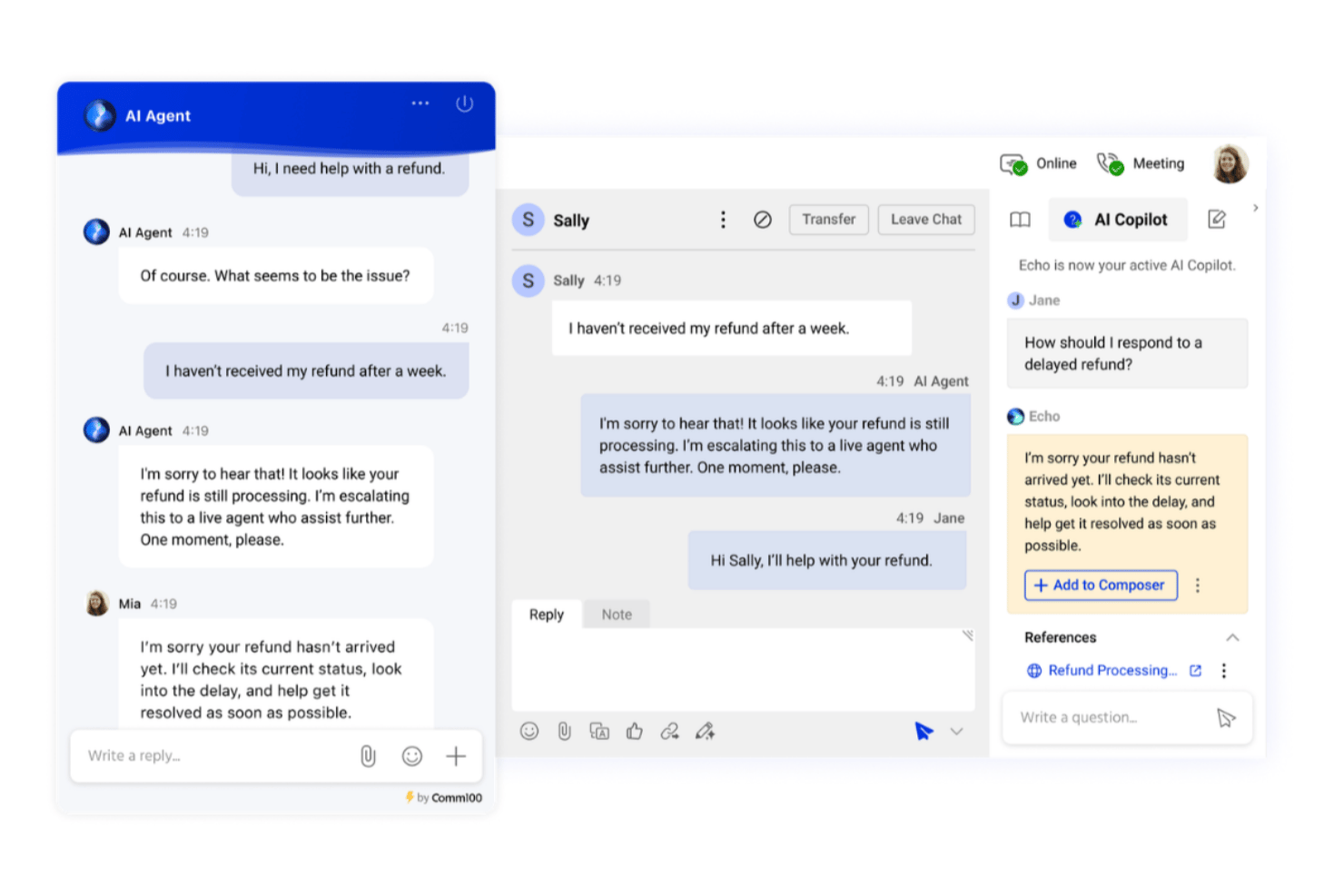
Comm100 is an omnichannel AI customer support platform that combines an AI agent, agent assist copilot, AI knowledge management, conversation analytics, and automated QA across live chat, voice, messaging, and social channels.
Who Is Comm100 Best For?
Comm100 is a strong fit for contact centers in regulated industries—healthcare, finance, government, and education—where data residency, compliance certifications, and on-premises deployment aren't optional.
Why I Picked Comm100
I picked Comm100 as one of the best because it's the only platform on my list that offers full on-premises deployment, which is non-negotiable for teams in healthcare, government, or finance where data residency rules out cloud-only tools. I also love that its AI Agent generates responses exclusively from verified knowledge sources, preventing hallucinations in high-stakes conversations. On top of that, AI QA automatically scores 100% of interactions, not a sampled subset.
Comm100 Key Features
- AI Agent: Uses natural language processing to answer customer questions based on connected knowledge sources.
- Custom actions: Configure the AI Agent to complete tasks during conversations, including booking appointments, checking balances, and triggering custom workflows.
- On-premises deployment: Supports on-premises deployment for organizations with specific data residency or regulatory requirements.
- Reporting dashboard: Track chatbot resolution rates, agent response times, and customer satisfaction scores from a centralized dashboard.
Comm100 Integrations
Comm100 offers native integrations with Salesforce, HubSpot, Microsoft Dynamics 365, Zendesk, Shopify, Confluence, ServiceNow, SharePoint Online, Google Drive, and Twilio. It also supports open REST APIs, webhooks, SAML/LDAP SSO, MCP, and Zapier.
Pros and Cons
Pros:
- Hallucination prevention with verified knowledge sources
- Supports SOC 2 Type II, HIPAA, ISO 27001, and GDPR compliance
- Supports configurable tones and natural-language instructions
Cons:
- AI responses rely on the quality of connected knowledge sources
- Some users report challenges with CRM integrations

Cresta
Best with task-specific AI model fine-tuning
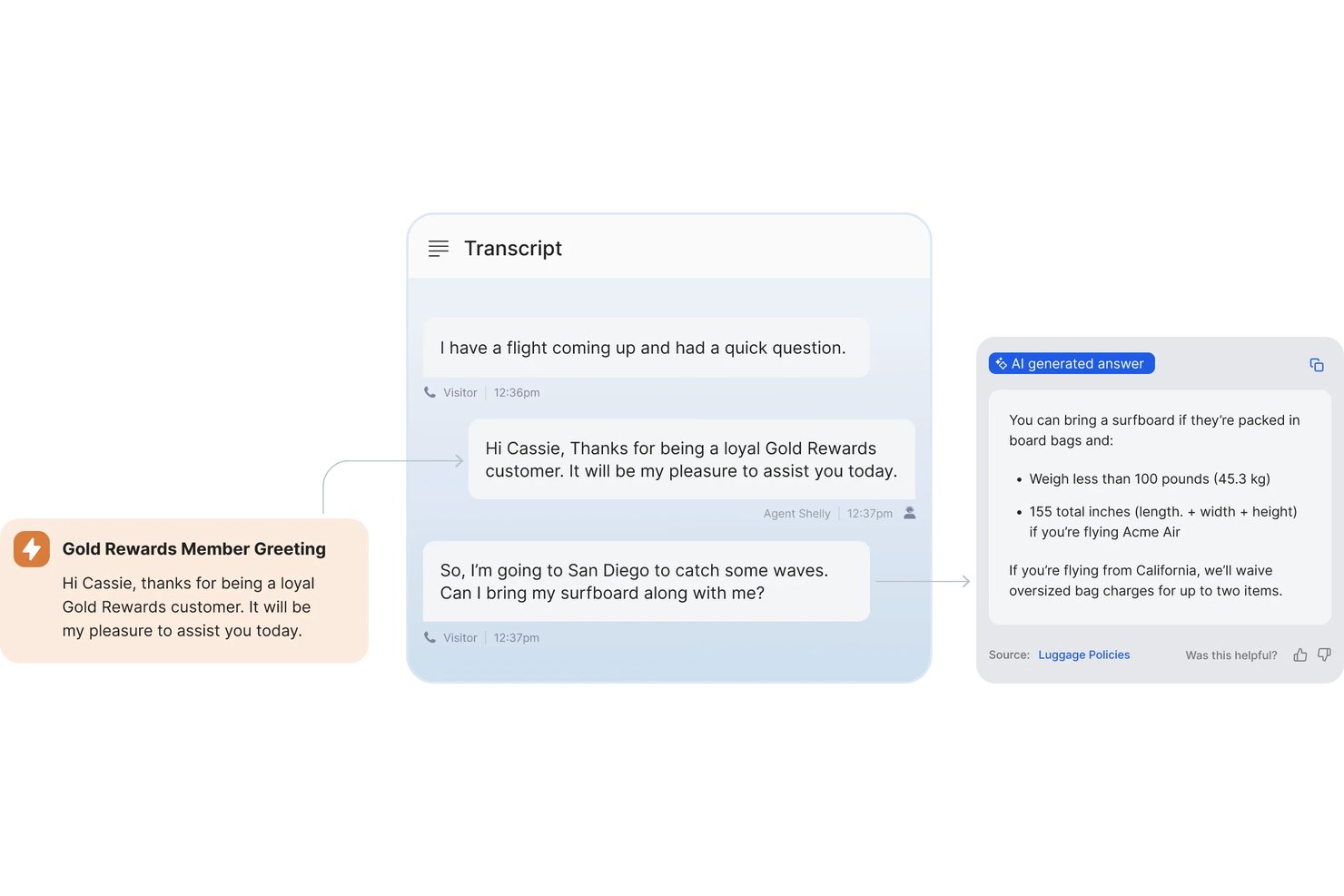
Cresta is an AI customer support software platform designed for customer-facing teams that need advanced conversational AI, omnichannel agent assistance, ticket automation, AI knowledge management, and analytics tools.
Who Is Cresta Best For?
Large customer support teams and contact centers in highly regulated or complex industries looking for customizable AI-driven CX solutions.
Why I Picked Cresta
I picked Cresta as one of the best because I can fine-tune its AI models for highly specific workflows, process language, and customer intents. My team uses Cresta to automate nuanced chat and voice support scenarios where off-the-shelf bots usually fail.
Cresta Key Features
- Real-time agent coaching: Delivers on-screen prompts and guidance to agents while live with customers.
- Omnichannel support integration: Connects seamlessly to chat, voice, email, and major CRM platforms.
- Automated conversation summarization: Instantly generates post-interaction summaries for every customer conversation.
- AI-driven quality management: Monitors interactions for compliance and coaching opportunities using custom quality criteria.
Cresta Integrations
Cresta offers native integrations with Salesforce, Twilio, Zendesk, Genesys Cloud, and Amazon Connect. An API is available for custom integrations.
Pros and Cons
Pros:
- Offers automated conversation summaries and insights
- Provides real-time coaching during live conversations
- Enables model fine-tuning for niche workflows
Cons:
- Limited end-user-facing chatbot customization options
- Requires time and data for optimal setup

Tidio
Best for AI chatbots and lead capture
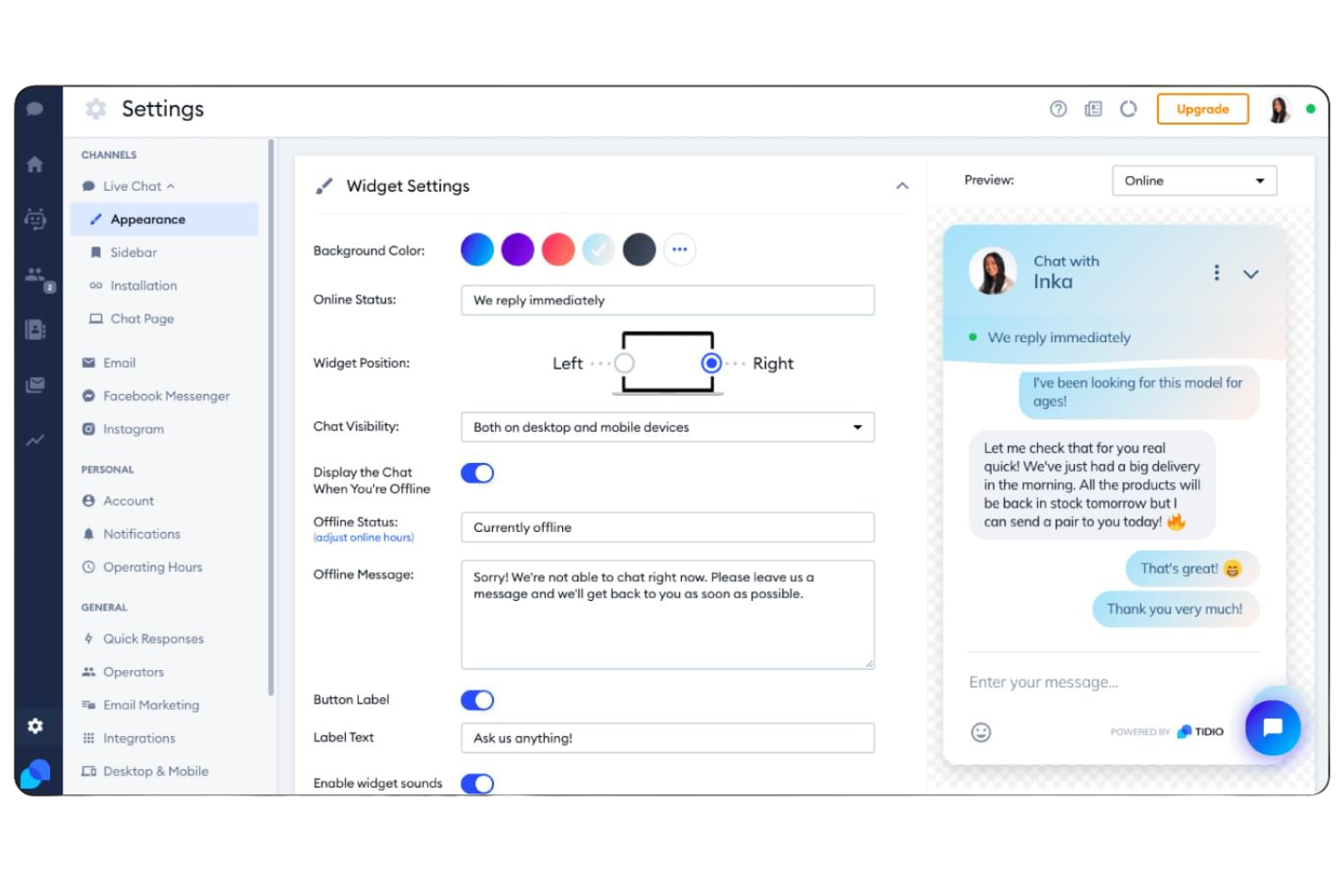
If you’re looking for AI-powered live chat and helpdesk tools built for small businesses, Tidio is worth a look. It combines chatbots, automation, and multichannel messaging in one platform. Tidio helps teams respond faster and manage customer conversations without needing a large support staff.
Who Is Tidio Best For?
Tidio fits small businesses and ecommerce shops that want to automate customer support and manage live chat across multiple channels.
Why I Picked Tidio
What stands out to me about Tidio is how it brings AI-powered live chat and helpdesk features together in a way that’s accessible for small businesses. The platform’s AI chatbot can handle common customer questions instantly, while live chat lets agents step in for more complex issues.
I also like that Tidio supports multichannel messaging, so you can manage conversations from your website, Facebook Messenger, and Instagram in one place. This combination makes Tidio a strong fit for teams that want to automate support without losing the personal touch.
Tidio Key Features
Some other features in Tidio that are especially useful for AI customer support teams include:
- Ticketing system: Lets you organize, assign, and track customer support requests from multiple channels in one dashboard.
- Visitor monitoring: Shows real-time website visitor activity so you can proactively reach out or offer help.
- Canned responses: Allows agents to quickly insert pre-written replies for common questions to save time.
- Customizable chat widgets: Enable you to tailor the look, feel, and behavior of chat windows to match your brand and website needs.
Tidio Integrations
Integrations include Shopify, Zendesk, Salesforce, HubSpot, WordPress, Messenger, Instagram, WhatsApp, Intercom, and more.
Pros and Cons
Pros:
- Customizable chat widgets for brand consistency
- Real-time visitor tracking for proactive support
- AI chatbot handles repetitive customer questions
Cons:
- Limited multi-brand visibility
- Pricing scales quickly with usage

Best for B2B account-level churn risk signals
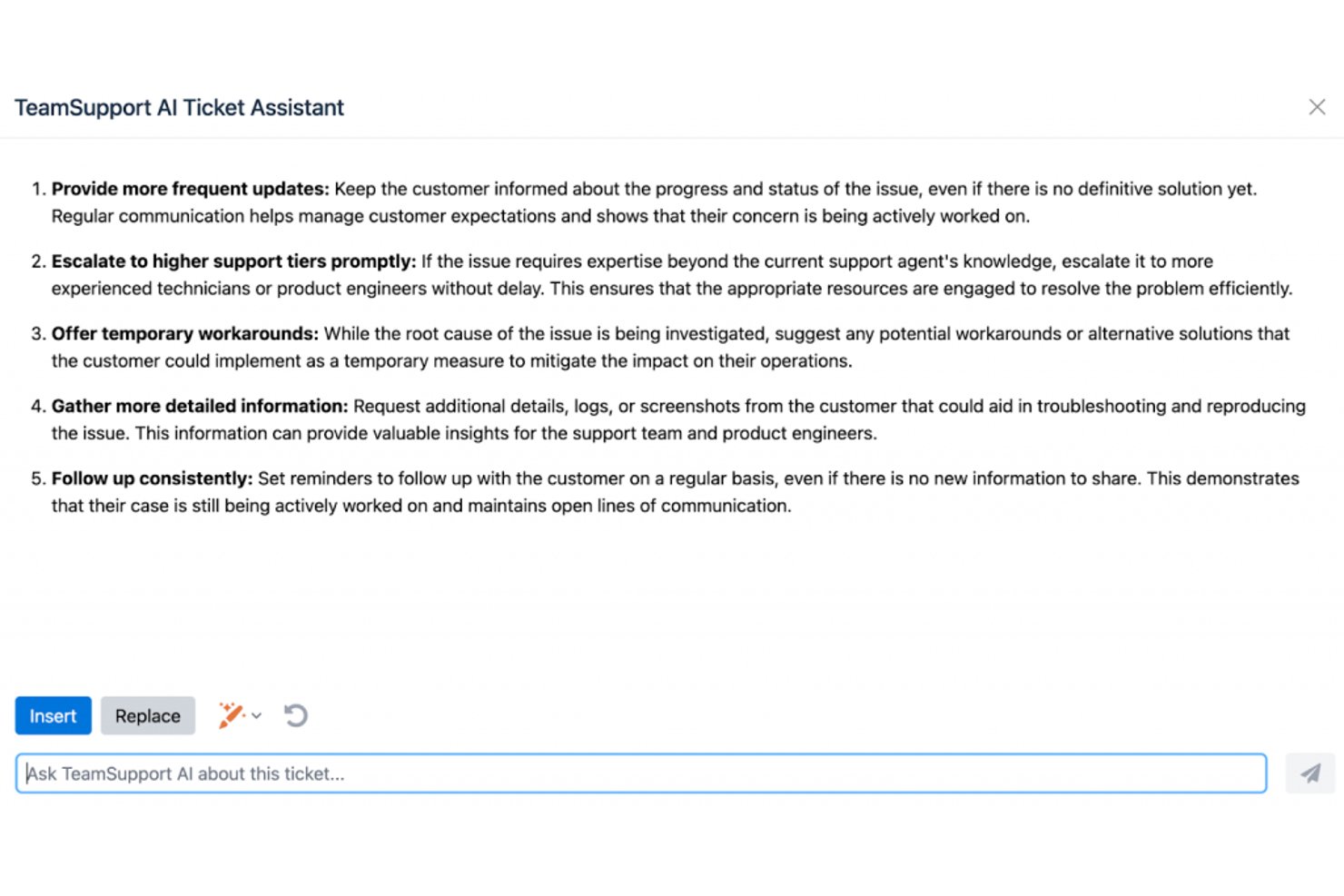
TeamSupport is a B2B-focused AI customer support platform that combines ticket management, AI-powered agent assist, automated triage, live chat, and account-level customer health intelligence.
Who Is TeamSupport Best For?
TeamSupport is a strong fit for B2B SaaS support teams that need to monitor account health and catch churn risk before it reaches the renewal conversation.
Why I Picked TeamSupport
TeamSupport earns its spot on my shortlist because no other helpdesk tool I've evaluated gives B2B support teams this level of account-level churn visibility. I'm particularly drawn to the Customer Distress Index, which aggregates ticket volume, sentiment, escalation patterns, and resolution speed into a single account health score, flagging at-risk customers before renewal conversations begin. Paired with Revenue Shield's Value Decay signals, your team can intervene proactively rather than reactively.
TeamSupport Key Features
- AI Assist copilot: Drafts contextual ticket replies by pulling from conversation history, past resolved tickets, and knowledge base articles simultaneously.
- AI ticket triage: Automatically classifies, routes, and pre-populates new tickets with account context—including product, urgency, and customer tier—without agent input.
- Multilingual response generation: Translates agent replies on the fly, letting your team support global customers without switching tools or workflows.
- Answer Bot: A self-service chatbot grounded directly in your knowledge base, surfacing AI-matched answers to customer questions before a ticket is ever created.
TeamSupport Integrations
TeamSupport offers integrations with Salesforce, HubSpot, Microsoft Dynamics 365, Jira, Azure DevOps, Slack, and Microsoft Teams. It also provides a REST API and custom data mapping for custom integrations.
Pros and Cons
Pros:
- AI copilot suggests contextual replies and coaching
- Account-level ticketing and customer health insights
- Proactive churn-risk signals for B2B accounts
Cons:
- No automated QA scoring for conversations
- No native voice AI or call support

Best for analytics-driven call routing

CloudTalk is a cloud-based call center platform that combines AI Voice Agents, conversation intelligence, smart call routing, and CRM integrations to handle inbound and outbound customer support calls.
Who Is CloudTalk Best For?
CloudTalk is a strong fit for mid-sized support and sales teams that run high-volume phone operations and need AI-assisted call handling alongside deep CRM connectivity.
Why I Picked CloudTalk
I picked CloudTalk as one of the best because of how tightly its analytics layer connects to call routing decisions. The real-time analytics dashboard tracks live KPIs like wait times, abandonment rates, and agent occupancy, and that data feeds directly into AI Smart Queueing to adjust routing on the fly. I also find the skills-based and condition-based routing genuinely useful—calls get matched to agents based on intent and customer history, not just availability. Add sentiment analysis from the AI Conversation Intelligence add-on, and you get a clear picture of what's actually driving call outcomes.
CloudTalk Key Features
- AI Voice Agents: Deploy AI Receptionist and AI Specialist bots to handle inbound calls, answer FAQs, and resolve routine queries without a live agent.
- Visual call flow designer: Build and edit IVR menus and routing logic using a drag-and-drop interface.
- Call recording: Automatically record calls for quality assurance, compliance, and agent coaching.
- Live call monitoring: Supervisors can listen in, whisper to agents, or join active calls in real time.
CloudTalk Integrations
Integrations include Salesforce, Zendesk, HubSpot, Pipedrive, Zoho CRM, Gong, Zapier, Freshdesk, Help Scout, and Intercom.
Pros and Cons
Pros:
- Real-time sentiment analysis during calls
- International phone numbers across 160+ countries
- AI call summaries auto-sync to CRM
Cons:
- Call quality depends on internet speed
- No native video or team messaging

Chatbase
Best for custom AI chatbot creation
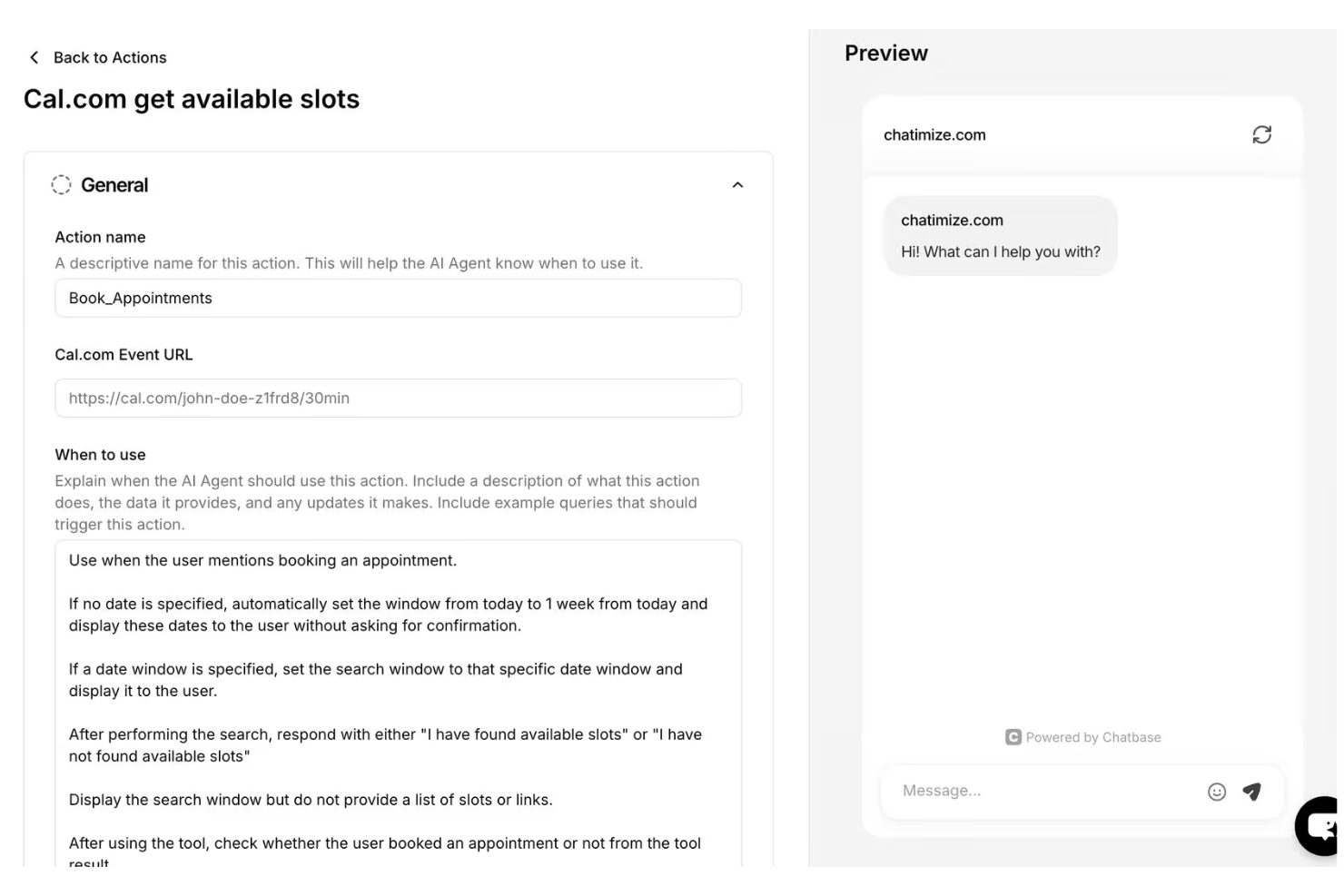
If you’re looking to add an AI chatbot to your website or messaging channels, Chatbase offers a no-code platform designed for quick deployment. It’s a strong option for small businesses, agencies, and teams looking to automate customer support without requiring extensive technical resources. Chatbase helps you create custom chatbots that answer questions, capture leads, and provide instant support around the clock.
Who Is Chatbase Best For?
Chatbase is a good fit for small businesses and agencies that want to deploy custom AI chatbots on their websites or messaging platforms without coding.
Why I Picked Chatbase
What drew me to Chatbase is its focus on letting you build custom AI chatbots for your website or messaging channels without any coding. This is especially useful if you want to tailor your chatbot’s responses to your business’s unique FAQs, product details, or support workflows. I like that you can upload documents or provide URLs to train the bot, so it gives accurate, context-aware answers to customer questions.
For teams that need a fast, flexible way to automate support and lead capture, Chatbase’s no-code builder and custom training options make it stand out.
Chatbase Key Features
In addition to its custom chatbot builder and training options, here are some other features that stand out:
- Multi-channel deployment: Deploy your chatbot on websites, WhatsApp, Facebook Messenger, and other messaging platforms.
- Conversation analytics: Track user interactions, common questions, and chatbot performance with built-in analytics tools.
- Customizable chat widget: Adjust the look, feel, and branding of the chat widget to match your website or app.
- Team collaboration: Invite team members to manage, edit, and monitor chatbots within a shared workspace.
Chatbase Integrations
Integrations include Zendesk, Notion, Slack, Stripe, Salesforce, Cal.com, Calendly, WhatsApp, Messenger, and more.
Pros and Cons
Pros:
- Team collaboration with shared workspaces
- Built-in analytics for conversation tracking
- Custom chatbot training with documents and URLs
Cons:
- No built-in ticketing or case management
- No live agent handoff functionality

Groove
Best for shared inbox support teams
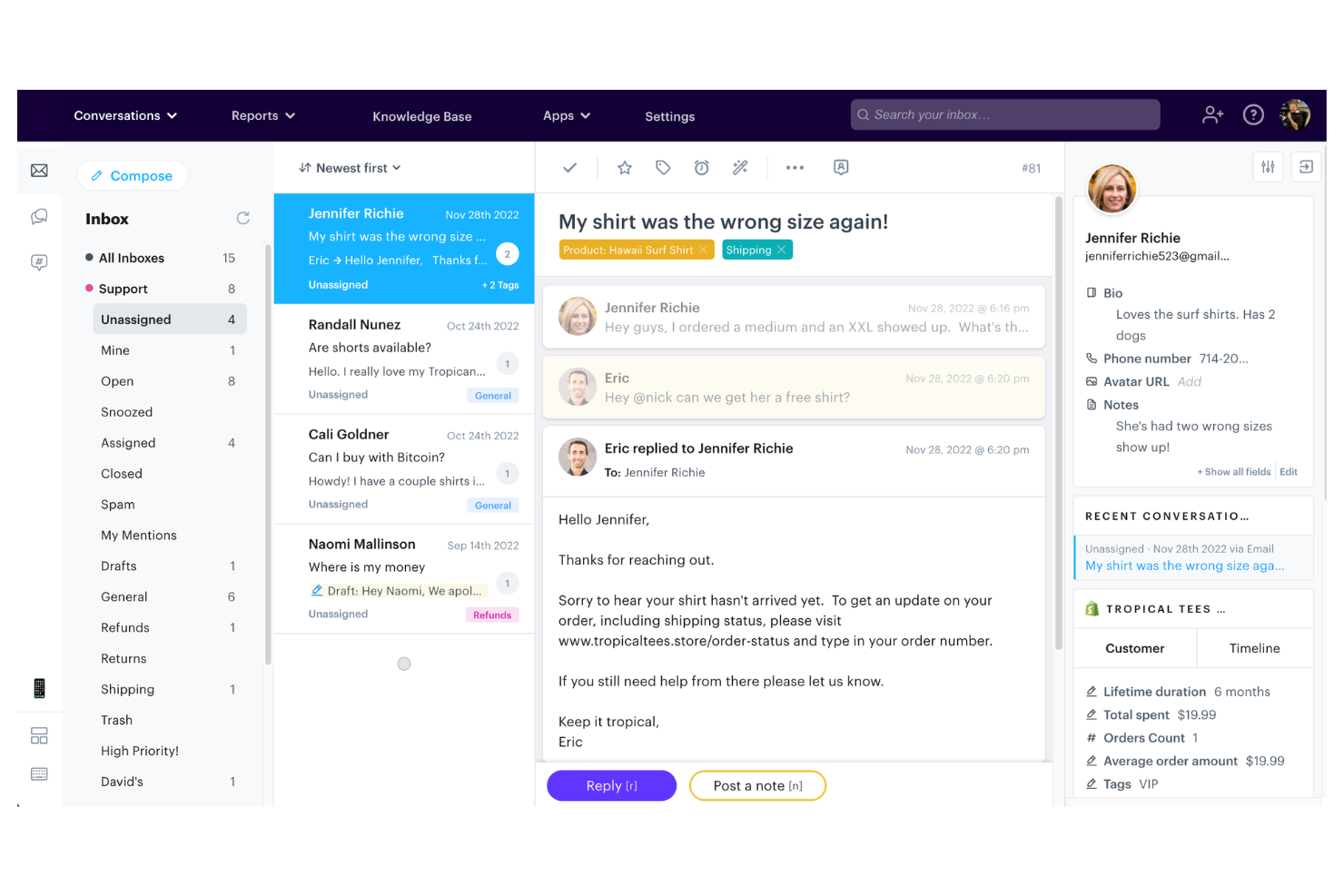
Groove offers a shared inbox and knowledge base platform designed for small teams that want to manage customer conversations efficiently. It’s a good fit for startups and growing businesses looking for a straightforward way to organize support requests and centralize customer information. With features that help teams collaborate and respond quickly, Groove addresses the challenge of keeping customer support organized without unnecessary complexity.
Who Is Groove Best For?
Groove is well-suited for small businesses and startups that need a simple, collaborative customer support solution.
Why I Picked Groove
I picked Groove because its shared inbox and knowledge base are purpose-built for small teams that need to manage customer conversations without extra complexity. The shared inbox lets multiple team members collaborate on support tickets, assign conversations, and leave internal notes, which helps prevent duplicate responses and missed messages.
I also appreciate how the knowledge base feature allows teams to create and update self-serve articles, reducing repetitive questions and freeing up agent time. For small businesses looking for an AI customer support solution that keeps things organized and accessible, Groove’s focus on simplicity and collaboration stands out.
Groove Key Features
Some other features that make Groove useful for AI customer support teams include:
- Automated workflows: Set up rules to automatically assign, tag, or prioritize incoming conversations based on custom criteria.
- Collision detection: Get real-time alerts when another team member is viewing or replying to the same conversation to avoid duplicate responses.
- Customer profiles: View a complete history of each customer’s interactions, including previous tickets and contact details, in one place.
- Reporting and analytics: Access built-in reports to track metrics like response times, ticket volume, and team performance.
Groove Integrations
Integrations include Slack, Stripe, Shopify, Recharge, Messenger, Instagram, MailChimp, Trello, Jira, HubSpot, and more.
Pros and Cons
Pros:
- Collision detection prevents duplicate agent replies
- Knowledge base reduces repetitive support questions
- Shared inbox supports multi-agent collaboration
Cons:
- Lacks sentiment analysis for incoming messages
- No built-in AI chatbot functionality

Intercom
Best for conversational customer messaging
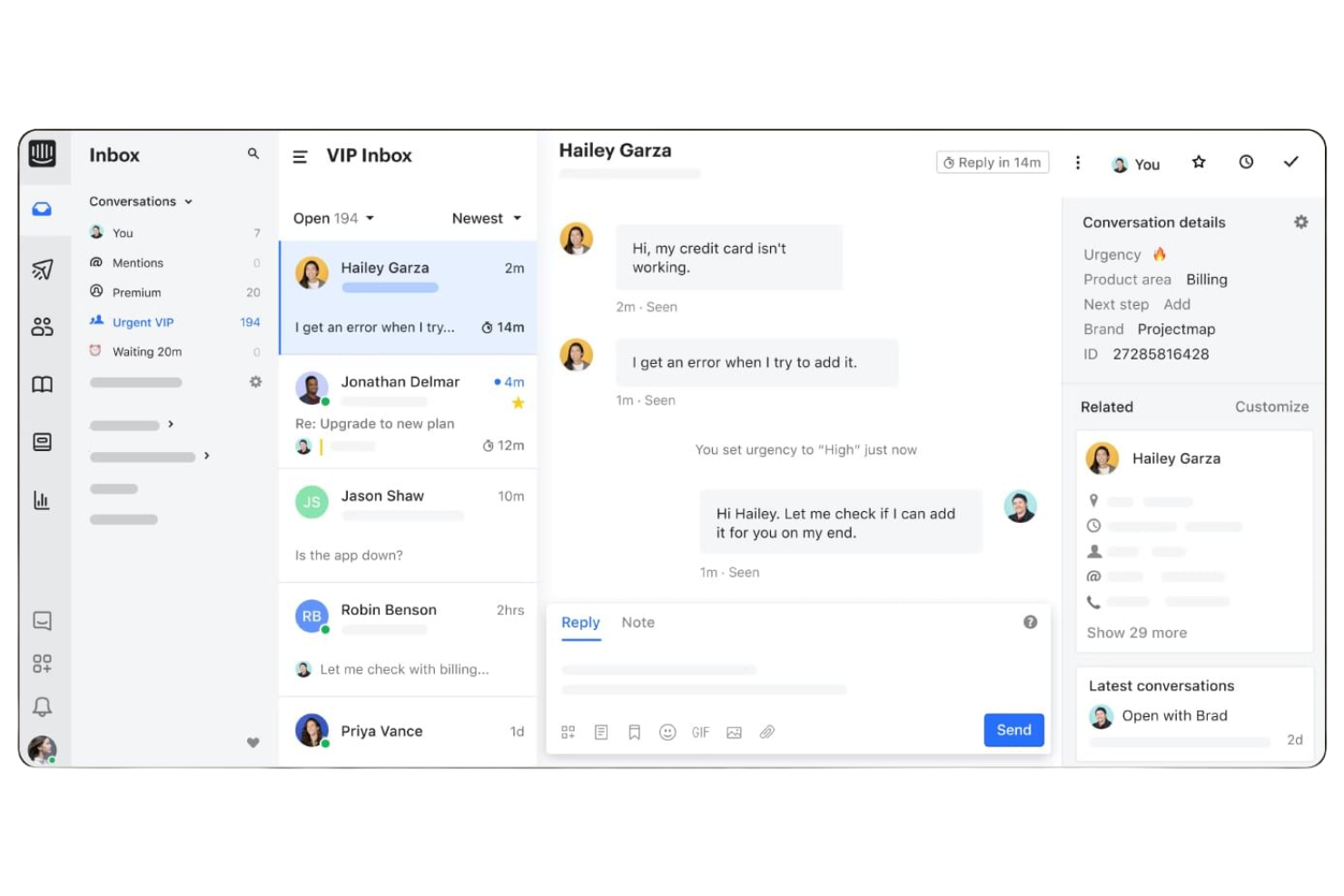
Intercom offers an AI-first customer service platform designed for teams that want to automate and personalize support at scale. It’s a strong choice for SaaS companies, ecommerce brands, and digital businesses looking to deliver proactive help through chat, bots, and messaging. Intercom helps reduce repetitive workload and ensures customers get fast, relevant answers across channels.
Who Is Intercom Best For?
Intercom fits SaaS and digital businesses that want to automate and personalize customer support through AI-driven chat and messaging.
Why I Picked Intercom
What stands out about Intercom is its AI-first approach to customer service, which goes beyond simple automation. The platform’s AI bots handle common questions, triage conversations, and proactively reach out to customers before issues escalate. I picked Intercom because its AI can suggest relevant help articles in real time and automate personalized responses across chat, email, and messaging. This makes it a strong fit for teams that want to deliver proactive, always-on support without overwhelming human agents.
Intercom Key Features
Some other Intercom features that support AI-driven customer support include:
- Inbox workspace: Agents manage all conversations from multiple channels in a single, unified inbox.
- Customizable workflows: Teams can design automated flows for routing, escalation, and follow-up based on customer data.
- Help center builder: Create and update a branded knowledge base with AI-powered article suggestions.
- Conversation ratings: Collect customer feedback directly within chat conversations to monitor support quality.
Intercom Integrations
Integrations include Salesforce, Slack, HubSpot, Jira Cloud, Stripe, Google Analytics, WhatsApp, Instagram, Statuspage, and more.
Pros and Cons
Pros:
- Proactive messaging reduces repetitive inquiries
- Multilingual support for global customer bases
- AI bots handle high chat volumes automatically
Cons:
- Occasional delays in AI-generated responses
- Limited AI customization for niche workflows

Kustomer
Best for unified customer conversation management
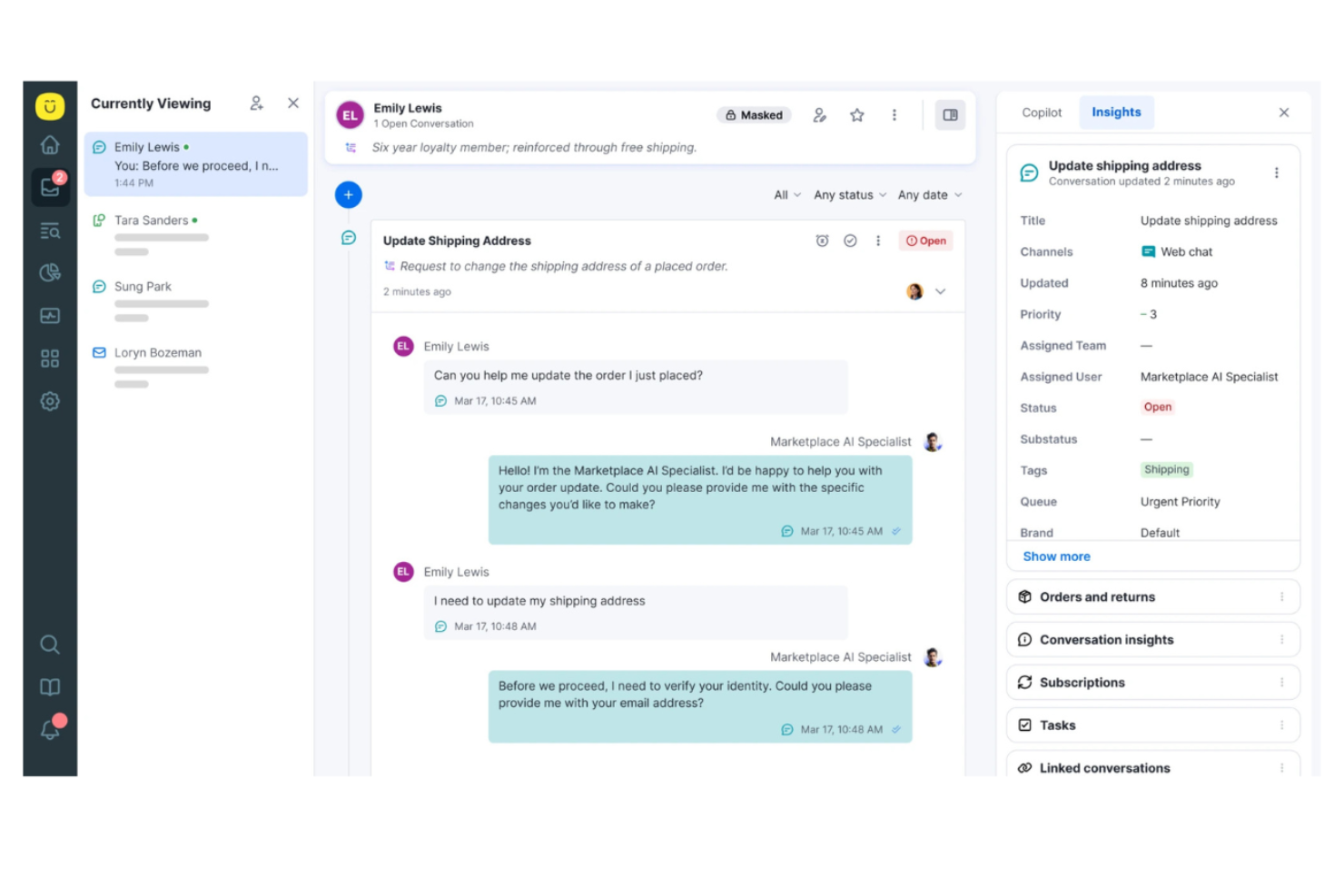
Kustomer is a customer service platform designed for teams that want to manage conversations across channels in a single workspace. It’s a strong fit for businesses that prioritize personalized support and need a unified view of each customer’s history. If your team handles high volumes of inquiries and values automation, Kustomer can help simplify complex support workflows.
Who Is Kustomer Best For?
Kustomer suits mid-sized to large customer service teams that need unified, AI-driven support across multiple channels.
Why I Picked Kustomer
What drew me to Kustomer is its unified timeline, which brings every customer interaction—across chat, email, SMS, and social—into a single, searchable thread. This approach makes it much easier for support teams to see the full context of each customer’s journey and respond with relevant, personalized help.
I also appreciate how Kustomer’s AI tools automate routine tasks and surface suggested responses right in the agent workspace. These features make Kustomer a strong choice for teams that want to deliver fast, context-aware support without toggling between multiple systems.
Kustomer Key Features
Some other features that make Kustomer stand out for AI customer support teams include:
- AI-powered intent detection: Automatically identifies customer intent to route conversations and suggest next steps.
- Custom workflow automation: Lets you build automated processes for repetitive tasks and escalations.
- Integrated knowledge base: Provides agents and customers with searchable, AI-suggested help articles during conversations.
- Real-time reporting and analytics: Tracks team performance, conversation trends, and customer satisfaction across all channels.
Kustomer Integrations
Integrations include Shopify, Salesforce, Slack, Facebook, Instagram, WhatsApp, Gmail, Twilio, TikTok Shop, and more.
Pros and Cons
Pros:
- Integrated knowledge base surfaces relevant articles
- Intent detection routes conversations automatically
- The unified timeline shows all customer interactions
Cons:
- Automation is hard to debug at scale
- Timeline UI slows simple ticket views

CoSupport AI
Best for AI-assisted support responses
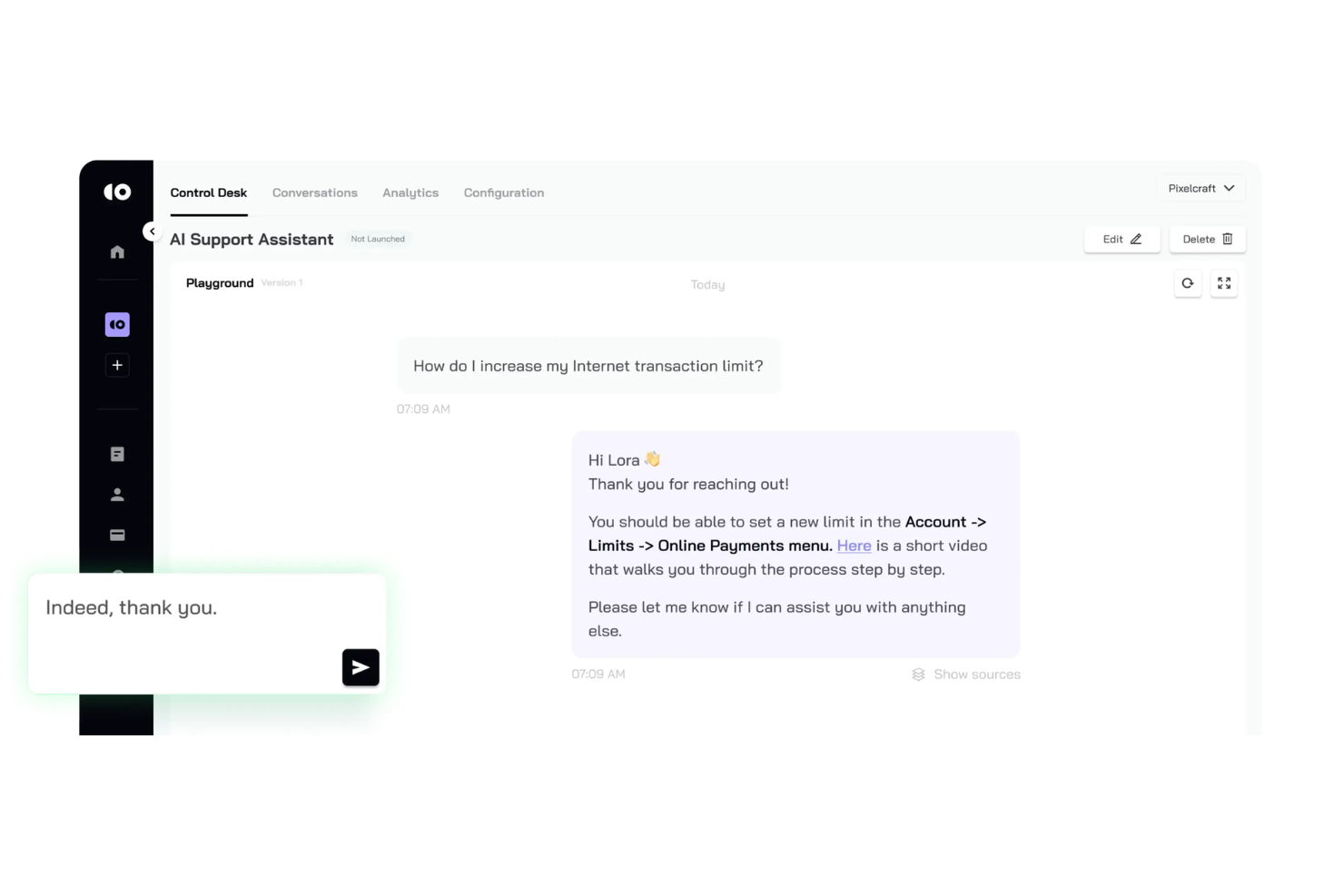
CoSupport AI offers an AI-driven support agent designed for teams that want to automate customer responses without sacrificing accuracy. It’s a strong fit for ecommerce businesses, SaaS providers, and fast-growing startups handling high volumes of customer inquiries. The platform helps reduce manual workload by delivering instant, context-aware answers to common support questions.
Who Is CoSupport AI Best For?
CoSupport AI is a strong choice for ecommerce and SaaS teams that need scalable, automated customer support.
Why I Picked CoSupport AI
What drew me to CoSupport AI is its focus on delivering instant, accurate customer responses using AI-powered support agents. The platform’s ability to analyze customer queries in real time and generate context-aware answers helps teams handle high volumes of support requests without manual intervention.
I also appreciate that CoSupport AI can be trained on your company’s knowledge base, ensuring responses are tailored to your specific products and policies. For businesses that need reliable, automated support with minimal setup, this tool’s approach to AI-driven accuracy stands out.
CoSupport AI Key Features
Some other features that make CoSupport AI useful for customer support teams include:
- Conversation history search: Agents can quickly reference past customer interactions to provide more informed responses.
- Multi-channel support: The platform handles inquiries from email, chat, and other channels in one place.
- Custom escalation rules: Set up automated workflows to route complex issues to human agents when needed.
- Analytics dashboard: Track key metrics like response times, resolution rates, and customer satisfaction directly within the platform.
CoSupport AI Integrations
Integrations include Zendesk, Freshdesk, Zoho Desk, Intercom, Slack, Microsoft Teams, and an API for custom connections.
Pros and Cons
Pros:
- Intent recognition for accurate query routing
- Proactive messaging based on user behavior
- AI agent can be trained on custom data
Cons:
- Ongoing model tuning is needed to maintain accuracy
- Requires high-quality historical data to perform well
Other AI Customer Support Software
Here are some additional AI customer support software options that didn’t make it onto my shortlist, but are still worth checking out:
- Zendesk
For AI-powered omnichannel support
- Freshdesk
For automated support workflows
- Genesys
For AI-driven customer engagement
- Talkdesk
For AI contact center solutions
- Ada
For no-code AI chatbots
- Aisera
For generative AI support automation
- Quidget
For voice-based chatbot support
- Hiver
For Gmail-based support teams
- Agentforce Service (formerly Service Cloud)
For AI-driven service management
- HappyFox
For omnichannel support automation
- ProProfs Help Desk
For AI ticketing and knowledge base
- Gorgias
For ecommerce helpdesk automation
- Observe.AI
For conversation intelligence insights
- ServiceNow
For enterprise service automation
- Crescendo
For AI voice and chat support
- Kore.ai
For enterprise conversational AI
- Zoho Desk
For AI-powered ticket management
- NiCE Cognigy.AI
For low-code AI agent building
- Level AI
For support, QA, and agent coaching
- Fin
For AI-powered ticket management


How I Evaluate AI Customer Support Software
Every tool here has to go beyond AI branding—I look for platforms where AI actually deflects tickets, drafts replies, and flags emerging issues. I split my evaluation into core functionality a tool needs to qualify, and the differentiating factors that set one vendor apart from another.
Core Functionality (Table Stakes For This List)
When I'm selecting tools for my list, I rank each one on a scale from 0 (does not offer the functionality) to 5 (excels in this area) for each core functionality listed below. Then, I calculate the tool's total score into a percentage. Each tool needs to achieve a minimum total score of 75% to be considered for inclusion.
- AI Chatbot or Virtual Agent: I evaluate whether the AI can hold real multi-turn conversations and resolve common requests like order status checks or password resets autonomously.
- Agent Assist Copilot: Real-time draft suggestions, tone adjustments, and context-aware rewrites within the agent workspace are what I look for here.
- Intelligent Ticket Automation: The platform should use AI to detect intent and route tickets by topic, urgency, and required skill—not just keyword-matching rules.
- AI-Powered Knowledge Management: I check whether AI responses are grounded in connected help center content and whether the tool can flag knowledge gaps or draft new articles.
- Conversation Summarization & Insights: Auto-generated summaries after each interaction save agents real time, and I look for sentiment tagging and trend surfacing on top of that.
- Omnichannel Support Integration: A tool should connect AI capabilities across email, chat, social, and messaging—or plug into platforms like Zendesk, Salesforce, or Freshdesk.
Once I have a list of tools that meet this criteria, I consider what sets each platform apart.
Differentiating Factors (What Sets Vendors Apart)
Here's how I compare and contrast different vendors:
Standout Features
Agentic AI that goes beyond answering questions is a major differentiator. I look for tools where the AI can execute tasks like processing a refund or updating a shipping address without handing off to a human. A no-code bot builder also matters—CX teams need to adjust AI flows without waiting on engineering. I evaluate AI-powered QA scoring too, since it lets leaders review 100% of conversations instead of sampling a handful manually each week.
Beyond Features
Pricing structure is worth close attention—some vendors charge per resolution, others per seat or per conversation, and the math changes fast as AI deflection scales. I also evaluate data security posture, checking for SOC 2 Type II certification and clear policies on whether customer data is used to train underlying LLMs. AI governance rounds out my review: I look for confidence scoring, hallucination guardrails, and dashboards that report on actual resolution and deflection rates so CX leaders can prove ROI.
How to Choose AI Customer Support Software
It’s easy to get bogged down in long feature lists and complex pricing structures. To help you stay focused as you work through your unique software selection process, here’s a checklist of factors to keep in mind:
| Factor | What to Consider |
|---|---|
| Scalability | Will the software handle your current and projected support volume as your business grows? Consider user limits, conversation caps, and pricing jumps. |
| Integrations | Does the tool connect natively with your CRM, help desk, or messaging platforms? Check for compatibility with your existing tech stack. |
| Customizability | Can you tailor workflows, branding, and responses to fit your processes and customer expectations? Look for flexible configuration options. |
| Ease of use | Will your team be able to manage and update the system without heavy training or technical support? Test the interface and admin controls. |
| Implementation and onboarding | How long will it take to get up and running? Ask about migration support, onboarding resources, and typical time to first value. |
| Cost | Are the pricing tiers clear and predictable as usage grows? Watch for hidden fees, overage charges, or required add-ons. |
| Security safeguards | Does the software meet your data privacy and security standards? Review encryption, access controls, and compliance certifications. |
| Support availability | What support channels and hours are offered? Consider if you need 24/7 help, dedicated account management, or multilingual support. |
What Is AI Customer Support Software?
AI customer support software is a type of customer service software that uses artificial intelligence and machine learning to automate and enhance support interactions across digital channels. These tools can answer common questions, route inquiries, and provide personalized support through an AI assistant or AI copilot, helping teams manage requests more efficiently.
By enabling ticket deflection, improving quality assurance, and supporting end-to-end service workflows, AI customer support software helps businesses deliver faster, more consistent experiences and improve key metrics like CSAT. Many platforms also highlight customer stories and case studies to show how teams improve efficiency while freeing up human agents for more complex issues.
Features
When selecting AI customer support software, keep an eye out for the following key features:
- Automated chatbots: AI-powered bots that handle routine customer questions and provide instant responses across chat, messaging, or web channels.
- Natural language processing: Technology that allows the software to understand, interpret, and respond to customer queries in conversational language.
- Multi-channel support: The ability to manage customer interactions across various platforms such as web chat, email, SMS, and social media from a single interface.
- Ticket routing: Automated assignment of customer inquiries to the appropriate agent or department based on topic, urgency, or customer profile.
- Knowledge base integration: Smooth connection to internal or external knowledge resources so the AI can pull accurate answers from up-to-date documentation.
- Analytics and reporting: Tools that track conversation trends, response times, customer satisfaction, and other metrics to help teams monitor and improve support quality.
- Customizable workflows: Options to design and adjust automated processes, escalation paths, and response templates to fit your organization’s needs.
- Live agent handoff: Smooth transfer of conversations from AI to human agents when issues require personal attention or advanced troubleshooting.
- Sentiment analysis: AI-driven detection of customer emotions and intent, helping teams prioritize urgent or sensitive interactions.
- Security and compliance controls: Features that protect customer data, manage user permissions, and support compliance with privacy regulations.
Benefits
Implementing AI customer support software provides several benefits for your team and your business. Here are a few you can look forward to:
- Faster response times: Automated chatbots and instant messaging ensure customers get answers without waiting in a queue.
- 24/7 availability: AI-powered systems can handle inquiries around the clock, supporting customers outside of standard business hours.
- Consistent support quality: Automated workflows and knowledge base integration help deliver accurate, standardized responses every time.
- Reduced agent workload: By handling repetitive questions and simple tasks, AI frees up human agents to focus on complex or sensitive issues.
- Actionable insights: Built-in analytics and sentiment analysis provide data on customer needs, satisfaction, and support trends.
- Scalability: AI solutions can manage high volumes of interactions without requiring additional staff or resources.
- Improved customer satisfaction: Personalized, timely, and reliable support experiences help build trust and loyalty with your customers.
Costs and Pricing
Selecting AI customer support software requires an understanding of the various pricing models and plans available. Costs vary based on features, team size, add-ons, and more. The table below summarizes common plans, their average prices, and typical features included in AI customer support software solutions:
Plan Comparison Table for AI Customer Support Software
| Plan Type | Average Price | Common Features |
|---|---|---|
| Free Plan | $0 | Basic chatbot functionality, limited conversations per month, single-channel support, and basic analytics. |
| Personal Plan | $10-$30/user/month | Multi-channel support, simple integrations, basic customization, and email support. |
| Business Plan | $30-$80/user/month | Advanced integrations, analytics and reporting, ticket routing, team collaboration, and workflow automation. |
| Enterprise Plan | $80-$200+/user/month | Custom SLAs, dedicated account management, advanced security, compliance features, and priority support. |
AI Customer Support Software FAQs
Here are some answers to common questions about AI customer support software:
Can AI customer support software fully replace human agents?
No, AI customer support software can’t fully replace human agents. While it handles routine questions and tasks, complex or sensitive issues still require human judgment and empathy. Most businesses use AI to support agents, not replace them.
How does AI customer support software integrate with existing systems?
Most AI customer support software connects with popular CRMs, help desks, and messaging platforms through native integrations or APIs. Before choosing a tool, check compatibility with your current systems to avoid data silos and manual workarounds.
Is AI customer support software secure for handling sensitive data?
Yes, reputable AI customer support software includes security safeguards like encryption, access controls, and compliance certifications. Always review a vendor’s security documentation and ensure their practices align with your organization’s data privacy requirements.
How long does it take to implement AI customer support software?
Implementation time varies by tool and complexity. Some platforms offer quick setup with templates and guided onboarding, while others may require weeks for integration and training. Ask vendors for typical timelines and available onboarding resources.
What types of businesses benefit most from AI customer support software?
Businesses with high volumes of customer inquiries, repetitive support tasks, or global customer bases benefit most. AI is especially useful for ecommerce, SaaS, telecom, and financial services, but can add value in any industry with digital customer interactions.