
20 Best Enterprise Help Desk Software Of 2026

10 Best Enterprise Help Desk Software Shortlist
Here's my pick of the 10 best software from the 20 tools reviewed.


Managing customer inquiries and support requests can feel overwhelming. You might find your team struggling to keep up with tickets, leading to delays and frustration for both staff and customers. Enterprise help desk software can be your ally in organizing and simplifying these challenges.
I've spent years testing and reviewing software, focusing on what truly matters for improving customer experiences. In this listicle, I'll share my top picks of help desk solutions that can make a real difference for you and your team.
You'll discover tools that can enhance your workflow, improve response times, and elevate customer satisfaction. Let's dive in and find the right fit for your needs.
Table of Contents
- Best Software Shortlist
- Why Trust Us
- Compare Specs
- Reviews
- Other Enterprise Help Desk Software
- Related Reviews
- Selection Criteria
- How to Choose
- Trends
- What Is Enterprise Help Desk Software?
- Features
- Benefits
- Enterprise Help Desk Software Integration with Business Tools
- Costs and Pricing
- Help Desk Software for Varied Business Needs
- FAQs
Why Trust Our Software Reviews
We’ve been testing and reviewing software since 2020. As CX leaders ourselves, we know how critical and difficult it is to make the right decision when selecting software.
We invest in deep research to help our audience make better software purchasing decisions. We’ve tested more than 2,000 tools for different CX use cases and written over 1,000 comprehensive software reviews. Learn how we stay transparent & our software review methodology.
The Best Enterprise Help Desk Software Comparison Chart
This comparison chart summarizes basic details about each of my top enterprise help desk software selections. You can view pricing details and the availability of free trials or demos side-by-side to help you find the best software for your budget and business needs.
| Tool | Best For | Trial Info | Price | ||
|---|---|---|---|---|---|
| 1 | Best for smart ticket management | 30-day free trial + free demo available | From $149/technician/month (billed annually) | Website | |
| 2 | Best for scalable customer support | Free demo + 14-day free trial available | From $19/user/month (billed annually) | Website | |
| 3 | Best for customizable ticketing systems | Free trial available | From $26/seat/month (3 seat minimum) | Website | |
| 4 | Best for IT service teams | 30-day free trial available | From $17/user/month | Website | |
| 5 | Best for automating help desk tasks | 15-day free trial + free plan | From $7/user/month (billed annually) | Website | |
| 6 | Best AI-powered enterprise help desk | Free plan available | From $25/user/month (billed annually) | Website | |
| 7 | Best for ecommerce channel integration | 14-day free trial | From $39/agent/month | Website | |
| 8 | Best for fast setup and deployment | 7-day free trial available | From $24.17/month (billed annually) | Website | |
| 9 | Best enterprise help desk software for customer self-service | Free trial + free demo available | From $19/agent/month (billed annually) | Website | |
| 10 | Best for creating personalized experiences with AI | Free trial + free demo available | From $25/user/month (billed annually) | Website |


-

SupportYourApp
Visit WebsiteThis is an aggregated rating for this tool including ratings from Crozdesk users and ratings from other sites.4.7 -
Freshdesk
Visit WebsiteThis is an aggregated rating for this tool including ratings from Crozdesk users and ratings from other sites.4.4 -
Zendesk
Visit WebsiteThis is an aggregated rating for this tool including ratings from Crozdesk users and ratings from other sites.4.3


Overviews of the 10 Best Enterprise Help Desk Software
Here’s a brief description of each enterprise help desk software that showcases each vendor’s best use case, their noteworthy features, and some pros and cons. I’ve also included screenshots to give you a preview of their user interface too.


Atera is an all-in-one IT management solution that caters to businesses seeking to enhance their help desk capabilities. Designed for IT teams and managed service providers, Atera streamlines the ticketing process and integrates remote monitoring and management.
Why I Picked Atera
I picked Atera for its unique blend of smart ticket management and automation capabilities, which are pivotal for enterprise help desk operations. Atera excels with features like omnichannel support, allowing your team to manage inquiries from various sources seamlessly. Additionally, its AI-powered ticketing system provides intelligent recommendations to resolve issues faster, making it a perfect fit for businesses that need to handle high volumes of support requests.
Atera Key Features
In addition to its standout features, Atera offers several other capabilities that are beneficial for enterprise help desks:
- Integrated PSA and Billing: Manage IT service delivery and billing from a single platform.
- Self-Service Portal: Empower users to resolve their issues independently with access to a comprehensive knowledge base.
- Remote Monitoring and Management (RMM): Gain visibility and control over IT operations to ensure system reliability.
- Custom device- and alert-triggered tickets: Your system can automatically create a support ticket when a monitoring alert fires or a device threshold is breached, so “we found the issue” rather than “user reported it."
Atera Integrations
Native integrations with Atera include Microsoft Teams, WhatsApp Notifications, monday.com, Okta, Jira Software Cloud, Jira Software Server, Jira Service Management, Microsoft Entra ID, Slack, and others.
Pros and Cons
Pros:
- The self-service portal empowers users with a comprehensive knowledge base.
- The AI-driven automation reduces workload significantly for IT teams.
- Atera integrates multiple functionalities into a single platform.
Cons:
- Less granular control for highly complex custom workflows or integrations.
- Reporting features may incur additional costs for advanced needs.
New Product Updates from Atera

Atera Enhances IT Autopilot With Automation and File Support
Atera’s IT Autopilot gets three major boosts: you can now attach common files for deeper analysis, automate IT tasks with clear workflows, and choose how the system follows up when users go silent. These updates help streamline IT operations and improve resolution efficiency. For more information, visit Atera’s official site.


Freshdesk (a product of Freshworks Inc.) is a cloud based customer support platform developed by Freshworks. It provides help desk tools that enterprises can use to manage customer inquiries and coordinate support activities across teams and channels.
Why I picked Freshdesk: I picked Freshdesk for how it supports enterprise scale support operations without adding unnecessary complexity. The platform includes tools for managing customer inquiries across channels and organizing support workflows within a single system. Its analytics features provide visibility into ticket volumes, response activity, and customer feedback, which can support ongoing operational review.
Freshdesk also includes a self service knowledge base and configurable widgets that allow customers to search for answers independently, helping teams redirect common questions away from direct agent handling.
Freshdesk Standout Features and Integrations
Features include automation tools that support ticket routing, prioritization, and response handling based on predefined rules. Freddy AI is available within the platform to assist with these workflows as part of the existing ticketing system. Freshdesk also offers omnichannel support, allowing teams to manage email, chat, phone, and social interactions within a unified workspace.
Integrations include Salesforce, Slack, Jira, Office 365, Zapier, Shopify, Magento, WordPress, Mailchimp, and Trello. Additional integrations and custom workflows are available through the Freshdesk marketplace and its Neo Platform, which can be used to extend functionality based on organizational requirements.
Pros and Cons
Pros:
- Powerful analytics and reporting tools for data-driven decisions
- Customizable to fit enterprise-level needs and workflows
- Comprehensive support across multiple channels, improving customer engagement
Cons:
- Pricing may be prohibitive for smaller organizations.
- Can be complex to use without proper training
New Product Updates from Freshdesk

Freshdesk Enhances Contact Data Management and Social Identity Fields
Freshdesk now lets you manage social handles and handle large contact lists with ease, streamlining customer profiles and data tasks. For more information, visit Freshdesk’s official site.

monday Service is a highly customizable and intuitive service platform designed to optimize service operations for help desk teams. This platform allows teams to manage and automate their service operations and processes effectively, ensuring that incidents and requests are resolved within Service Level Agreements (SLAs).
Why I picked monday Service: monday Service offers a robust suite of features tailored specifically for enterprise use, making it an ideal choice for large organizations. One of the standout features is its highly customizable ticketing system, which allows teams to manage IT requests, changes, problems, and incidents efficiently. The platform supports multiple customizable email servers through the monday-inbox, which helps streamline communication and ensures that all support requests are captured and addressed promptly. Additionally, monday Service provides enterprise-scale automations and integrations, facilitating workflows and reducing the need for manual intervention.
monday Service Standout Features and Integrations
Features include a customizable ticketing system, customizable email servers, enterprise-scale automations, multi-channel support, AI-driven automations, analytics and reporting, and custom workflows.
Integrations include Slack, Microsoft Teams, GitHub, Outlook, Jira, Zendesk, Typeform, Gmail, and HubSpot.
Pros and Cons
Pros:
- Visual data representation
- Email automation
- Customizable workflows
Cons:
- Complex for new users
- Mobile app limitations


InvGate Service Management is an IT service management (ITSM) solution designed to enhance your organization's IT operations. It offers tools to automate processes, gain AI-driven insights, and create intuitive workflows.
Why I picked InvGate Service Management: One reason to consider InvGate Service Management is its comprehensive ticket management system. This feature allows your team to organize work based on priority, SLA, and urgency, helping to prevent bottlenecks. It also highlights actions that can be resolved with minimal effort, enabling your agents to focus on critical tasks.
I also like its ITSM analytics capability. You can customize and share performance dashboards to provide transparency into your service desk's status. With access to over 150 metrics, your team can cross-analyze data to make informed decisions quickly.
InvGate Service Management Standout Features and Integrations
Features include a self-service portal that encourages users to resolve common issues independently by accessing a comprehensive knowledge base. This reduces the volume of incoming tickets and empowers users to find solutions quickly. Additionally, the problem management feature enables your team to proactively identify and address recurring issues, minimizing future disruptions.
Integrations include FileWave, Lansweeper, Microsoft Teams, Microsoft Active Directory, Azure DevOps, Okta, Office 365, OpenAI, Outlook, and Jira.
Pros and Cons
Pros:
- Rule-based SLA configuration for tracking performance metrics
- Incorporates AI and low-code automation
- Provides a robust platform for incident and ticket management
Cons:
- Could offer more native integrations
- No social media ticket support
New Product Updates from InvGate Service Management
InvGate Service Management Enhances Workflows and Usability
InvGate Service Management introduces VSA access from the AI Hub, Microsoft Teams workflow task completion, expanded Okta workflow actions, and custom labels for workflow steps. These updates improve usability and streamline workflow execution across platforms. For more information, visit InvGate Service Management's official site.
 .
.

Zoho Desk is a cloud-based help desk solution designed to cater to businesses of all sizes, including enterprises. It offers a comprehensive suite of features including customer support ticket management, a customer support portal, contract management, and report creation.
Why I picked Zoho Desk: Zoho Desk offers multichannel support, which allows customer interactions through email, phone, social media, and live chat. Additionally, its robust ticket management system automatically organizes tickets and provides tools to increase efficiency and agent productivity.
The inclusion of an AI tool, Zia, further enhances the platform by automating tasks such as ticket tagging, alerting agents to unusual activity, and even conducting sentiment analysis on customer interactions. This level of automation not only reduces the workload on support agents but also ensures quicker and more accurate responses to customer queries.
Zoho Desk Standout Features and Integrations
Features include extensive customization of the user interface, ticket views, and workflow processes, making it adaptable to the specific needs of any organization. Additionally, the platform's reporting and analytics features offer customizable reports and dashboards that provide valuable insights into support performance and customer satisfaction.
Integrations include Google Workspace, Microsoft Office 365, Slack, Jira, Trello, Asana, Dropbox, OneDrive, Box, GitHub, Bitbucket, Zendesk, Salesforce, HubSpot, Intercom, Freshdesk, and other Zoho apps.
Pros and Cons
Pros:
- Detailed control over ticket management
- Includes robust automation features
- Allows for extensive customization
Cons:
- The user interface can be overwhelming for some users
- Can be complex to customize its features


Hiver is a modern AI-powered help desk software that comes with a robust, expansive feature set fit for enterprise-grade businesses. It mimics the look and feel of a regular email inbox. This makes it incredibly intuitive, so your team of support agents will have no trouble adopting it.
Why I picked Hiver: Hiver rejects the tradeoff that powerful, enterprise-grade software should be clunky and complex to work with. Although the tool brings in all the features you could want in an enterprise help desk, it's packaged in a very simple interface. You can manage customer queries from all channels, like email, live chat, WhatsApp, voice, and social media, from a panel on the left-hand side. Collaborating with teammates is also effortless. You can add private notes, @mention colleagues, and co-edit shared drafts, all right alongside the customer conversation.
Other key features offered are detailed analytics to track team performance and customer satisfaction, and workflow automations that route tickets, set SLAs, and handle repetitive tasks so your team can focus on complex issues.
Hiver Standout Features and Integrations
Features include Hiver AI, which embeds AI capabilities across all touchpoints of the customer support journey. For example, AI Copilot helps agents respond to customers through contextual answers, reply drafts, and more, while AI Agents help you set up autonomous workflows to handle FAQs, follow-ups, and other actions. It also has AI Insights that use conversations to forecast issues and risks.
Integrations include Aircall, Asana, Jira, Okta, QuickBooks, Salesforce, Slack, WhatsApp, and Zapier and 100+ other platforms.
Pros and Cons
Pros:
- AI features embedded at all stages of customer support journey
- Customer support from real humans available 24/7 via chat or email, across all plans (including free one)
- Strong internal collaboration features
Cons:
- Compared to some other platforms, Hiver offers fewer third party integrations
- Mobile experience isn’t as strong as the desktop one
New Product Updates from Hiver

Hiver Enhances Automation With Smarter Conversation Routing
Hiver introduces SLA targeting, auto-assign outbound conversations, and auto-unassign for agent availability. These updates improve response handling by ensuring conversations are assigned, reassigned, and followed up more efficiently. For more information, visit Hiver’s official site.

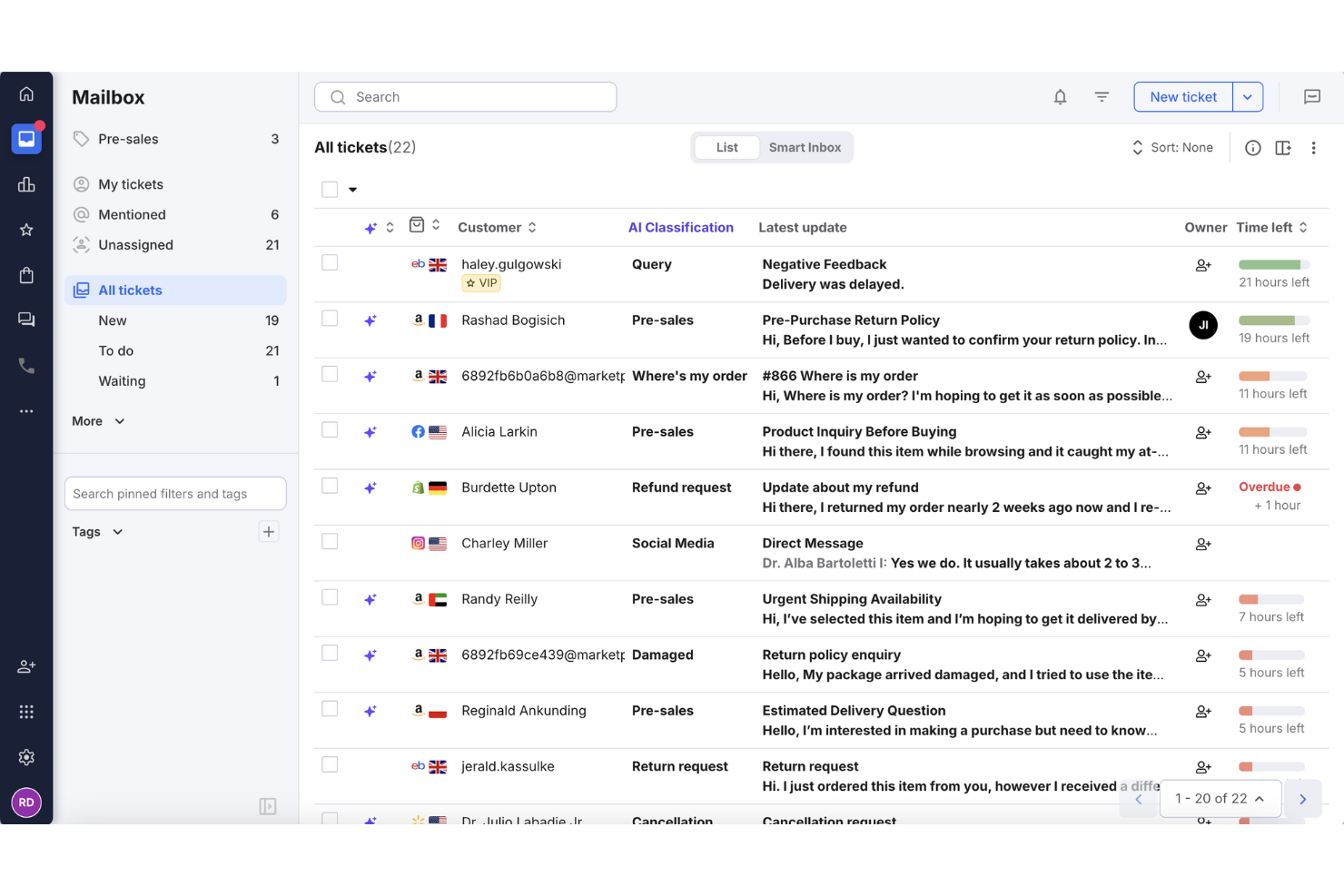
eDesk is an AI-driven customer support software designed for ecommerce businesses, focusing on centralizing and automating customer interactions. If you're looking to improve your ecommerce operations, eDesk offers a unified inbox, AI automation, and real-time reporting to manage customer support and boost sales. By addressing challenges in handling customer inquiries across multiple sales channels, eDesk helps improve support operations and customer satisfaction.
Why I Picked eDesk
I picked eDesk for its unique focus on ecommerce needs, offering a unified inbox that consolidates messages from over 200 channels including Amazon, eBay, and Shopify. Its AI-powered automation addresses common inquiries such as WISMO (Where Is My Order) and returns, reducing team workload. Additionally, eDesk's real-time order data integration provides instant access to purchase history and tracking information, enabling informed, effective customer interactions.
eDesk Key Features
In addition to ecommerce channel integration, eDesk offers:
- 24/7 Chatbot Support: Provides continuous assistance to customers, ensuring that their questions are addressed even outside of business hours.
- Customer Feedback Tools: Enables you to gather and analyze customer feedback to improve service quality and customer satisfaction.
- Advanced Reporting: Offers detailed analytics that help you track performance metrics and make data-driven decisions.
- Multi-Language Support: Allows you to cater to a global audience by providing support in multiple languages.
eDesk Integrations
Integrations include Amazon, eBay, Walmart, Shopify, WhatsApp, Facebook, Etsy, BigCommerce, Magento, and WooCommerce.
Pros and Cons
Pros:
- Integrates rich order data for enhanced customer service
- Organized ticket views improve daily workflow efficiency
- AI-powered automations improve response efficiency
Cons:
- Reporting and analytics, while present, can be less customizable than more enterprise dashboards
- Primarily built for ecommerce, less flexible for other industries


Tidio is an AI-powered help desk platform built to support businesses managing customer service across multiple channels. The platform brings live chat, email, social media, and web form interactions into one centralized inbox and supports fast setup, often within minutes. Designed with scalability in mind, Tidio supports 12 languages, integrates with over 120 tools, and includes automation options to help teams respond faster and stay organized.
Why I picked Tidio: Tidio stood out to me for how quickly you can get started—there’s no need to migrate from an existing support platform to begin using it. That kind of flexibility is useful if you're expanding your support team or testing new solutions. The Lyro AI Agent is another reason I chose it. It can automatically respond to recurring customer questions, filter emails, and route tickets based on rules, helping your agents focus on more complex requests. Its multilingual support also makes it a good fit for teams working across global markets, as it handles customer interactions in up to 12 languages without the need for additional plugins or translation layers. I also found the ticketing system practical—it lets you turn any conversation into a ticket, assign it by priority, and track it through resolution.
Tidio Standout Features and Integrations
Features include a shared inbox for live chat, email, and social media; Lyro AI Agent for automated replies; priority-based ticket conversion and assignment; customizable automation rules; multilingual support; and detailed reporting tools.
Integrations include Shopify, WordPress, Squarespace, HubSpot, Salesforce, Zendesk, Slack, Mailchimp, Facebook Messenger, Instagram, Google Analytics, and over 120 additional tools.
Pros and Cons
Pros:
- Combines chat, email, and social channels in one inbox
- Supports 12 languages for global teams
- Quick to deploy with minimal setup
Cons:
- No phone support; live support limited to business hours
- Limited feature set on the free plan
New Product Updates from Tidio

Tidio Expands Lyro AI Across Email and Chat
Tidio expands Lyro AI to email ticketing and enhances its chatbot with Claude 3.0 integration. These updates improve automation across support channels and enhance AI-driven interactions. For more information, visit Tidio’s official site.
 .
.

Zendesk is a cloud-based, AI-powered help desk software that offers a variety of customer support solutions, including Zendesk Enterprise. Zendesk Enterprise provides advanced features, scalability, and enhanced customization options that help large organizations with more complex support requirements deliver exceptional customer experiences.
Why did I pick Zendesk: Zendesk Suite Enterprise plan offers a full range of customer support features, including ticketing, analytics, and self-service tools. These include Zendesk's Knowledge Base, where businesses can create a centralized repository of information, frequently asked questions (FAQs), tutorials, guides, and other resources. Customers can access these self-service resources, submit support requests, and track their ticket status through Zendesk's Help Center, which offers a customizable and branded customer portal.
For teams, Zendesk Enterprise provides analytics and reporting capabilities to measure the effectiveness of self-service resources. You can uncover insights into customer behavior, popular search queries, article views, and user satisfaction ratings. This data helps organizations identify gaps in their knowledge base, optimize content, and improve the overall self-service experience.
Zendesk Standout Features and Integrations
Features include multi-channel support, which lets you manage customer interactions across multiple channels all from one place. Zendesk Enterprise also supports multilingual self-service content and enterprise-grade security, such as SSO and two-factor authentication.
Integrations include Slack, Mailchimp, Klaus, NiceReply, Dialpad, Kaizo, Zignatures, Textline, Trello, and Zoho CRM.
Pros and Cons
Pros:
- Designed to scale with growing businesses
- Teams receive dedicated support from a Customer Success Manager (CSM)
- Extensive customization options
Cons:
- Slight learning curve for advanced features
- Limited flexibility in lower-tier plans

Best for creating personalized experiences with AI

Salesforce Service Cloud is a robust, multi-channel helpdesk tool that's well-suited to the needs of enterprise businesses. It helps service teams deliver exceptional experiences with AI-powered personalization.
Why I chose Salesforce Service Cloud: I chose this software because of its AI and automation features that handle repetitive tasks, allowing your agents to focus on providing high-quality support. Its AI chatbots and automatic triaging save time, create consistent experiences, and boost efficiency for your team. The AI ensures that customer queries are directed to the most qualified agents, offering a personalized support experience.
The software's AI can also analyze customer interactions to provide proactive service recommendations, anticipate customer needs, and customize interactions at scale. This makes it particularly good for large businesses and enterprises. The platform also has a drag-and-drop editor to create a self-service center, enabling customers to find solutions independently, further enhancing personalized support.
Salesforce Service Cloud Standout Features and Integrations
Features include a robust knowledge base that helps agents to quickly find information and solutions to common issues, speeding up resolution times. The field service feature supports mobile workforce management, equipping field technicians with the necessary tools and information to deliver outstanding service.
Integrations include Freshdesk, CloudTalk, Twilio, Brandwatch, Paligo, Mailchimp, HubSpot CRM, Trello, TeamViewer, Smartsheet, Klaviyo, Aircall, Gainsight, and Conversocial.
Pros and Cons
Pros:
- Adaptable to users’ needs
- Multiple pricing tiers to support various stages of growth
- Effectively simplifies support procedures
Cons:
- Comes with a learning curve
- Can be cumbersome to implement
Other Help Desk Options
Here are a few more options that didn’t make the best enterprise help desk software list but are still worth considering:
- Intercom
Enterprise help desk software for customer engagement
- SysAid
For AI-first IT service management
- Kustomer
Enterprise help desk for ecommerce businesses
- Issuetrak
For omnichannel ticket submission
- Guru
For AI-powered enterprise search
- SysAid
Enterprise help desk for internal IT services
- Sprinklr Service
Enterprise help desk software for built-in analytics features
- ManageEngine
Enterprise help desk software for IT service management
- Gladly
Enterprise help desk software for omnichannel support
- Rescue
Enterprise help desk software for remote support teams


Enterprise Help Desk Software Selection Criteria
When selecting the best enterprise help desk software to include in this list, I considered common buyer needs and pain points like scalability and customization options. I also used the following framework to keep my evaluation structured and fair:
Core Functionality (25% of total score)
To be considered for inclusion in this list, each solution had to fulfill these common use cases:
- Manage support tickets
- Provide multi-channel support
- Offer customer self-service options
- Track and analyze performance metrics
- Automate repetitive tasks
Additional Standout Features (25% of total score)
To help further narrow down the competition, I also looked for unique features, such as:
- AI-driven insights
- Advanced customization options
- Integration with IoT devices
- Support for multiple languages
- Compliance with industry-specific regulations
- Tools for a help desk knowledge base
Usability (10% of total score)
To get a sense of the usability of each system, I considered the following:
- Intuitive interface design
- Ease of navigation
- Customizable dashboards
- Minimal learning curve
- Mobile accessibility
Onboarding (10% of total score)
To evaluate the onboarding experience for each platform, I considered the following:
- Availability of training videos
- Access to interactive product tours
- Presence of templates for setup
- Support through chatbots
- Participation in webinars
Customer Support (10% of total score)
To assess each software provider’s customer support services, I considered the following:
- 24/7 availability
- Multilingual support options
- Access to a dedicated account manager
- Comprehensive knowledge base
- Response time to inquiries
Value For Money (10% of total score)
To evaluate the value for money of each platform, I considered the following:
- Pricing transparency
- Features included in base price
- Discounts for annual billing
- Comparison to similar tools
- Return on investment potential
Customer Reviews (10% of total score)
To get a sense of overall customer satisfaction, I considered the following when reading customer reviews:
- Frequency of updates and improvements
- Quality of customer support interactions
- Overall satisfaction scores
- Specific feedback on features
- Reports of downtime or outages
How to Choose Enterprise Help Desk Software
It’s easy to get bogged down in long feature lists and complex pricing structures. To help you stay focused as you work through your unique help desk software selection process, here’s a checklist of factors to keep in mind:
| Factor | What to Consider |
|---|---|
| Scalability | Ensure the software can grow with your business, handling increased ticket volume and supporting additional agents without a hitch. |
| Integrations | Look for tools that integrate with your existing systems like CRM, email, and chat platforms to keep workflows smooth and data centralized. |
| Customizability | Check if you can tailor the software to match your team’s processes, including setting up custom workflows, fields, and reports. |
| Ease of Use | Choose a tool with an intuitive interface that requires minimal training, so your team can get up and running quickly. |
| Budget | Assess the total cost, including any hidden fees, to ensure it fits within your financial plans without sacrificing necessary features. |
| User Feedback | Gather data on what other users in your industry or niche think about the tool you are considering. |
| Software Reviews | Leverage review averages from trusted sites to get a gauge on whether the software is well-received generally. |
| Support Options | Consider the availability of customer support and resources like tutorials, forums, and live chat to assist when issues arise. |
Trends in Enterprise Help Desk Software
In my research, I sourced countless product updates, press releases, and release logs from different enterprise help desk software vendors. Trends around modern help desk software adoption include:
- AI and Automation in Help Desks: AI help desk software is being used to analyze customer interactions and provide actionable insights. This helps teams predict issues and improve service quality. Some vendors are offering AI-powered dashboards that highlight trends and suggest improvements.
- Omnichannel Support: Users want support across multiple channels like email, chat, and social media. Vendors are integrating these into a single platform, allowing agents to manage all interactions in one place. This trend is making customer support more efficient and cohesive.
- Self-Service Portals: More businesses are implementing self-service options to reduce agent workload. These portals let customers find answers independently. Vendors are enhancing these with community forums and detailed knowledge bases.
- Personalization Features: Personalization is becoming a focus, with vendors offering tools to tailor interactions based on customer data and preferences. This trend enhances customer satisfaction by making support feel more relevant and personalized.
What Is Enterprise Help Desk Software?
Enterprise help desk software is a tool designed to manage and resolve customer inquiries and support requests efficiently. It's commonly used by customer support teams, IT departments, and service desks to enhance communication and service delivery.
Ticket management, omnichannel support, and self-service portals help with organizing requests, improving response times, and empowering customers to find solutions on their own. These tools provide significant value by boosting customer satisfaction and optimizing team productivity.
Features of Enterprise Help Desk Software
When selecting enterprise help desk software, keep an eye out for the following key features:
- Ticketing workflow optimization: Organizes and tracks customer inquiries to ensure timely responses and resolution.
- Omnichannel support: Allows interaction with customers across various platforms like email, chat, and social media from a single interface.
- Self-service portals: Empowers customers to find solutions independently through knowledge bases and community forums.
- AI-driven insights: Analyzes customer data to provide actionable insights and improve service quality.
- Customizable workflows: Lets teams tailor processes to fit their specific needs and improve efficiency.
- Remote work support: Offers tools and capabilities to enable support teams to work effectively from anywhere.
- Personalization features: Tailors customer interactions based on data and preferences to enhance satisfaction.
- Reporting tools: Provides detailed analytics to help track performance and make informed decisions.
Benefits of Enterprise Help Desk Software
Implementing enterprise help desk software provides several benefits for your team and your business. Here are a few you can look forward to:
- Improved efficiency: Ticket management and automated workflows help your team resolve issues faster.
- Enhanced customer satisfaction: Omnichannel support and personalization features ensure customers feel heard and valued.
- Better decision-making: AI-driven insights and reporting tools provide data to guide strategic improvements.
- Increased accessibility: Remote work support ensures your team can provide assistance from anywhere.
- Cost savings: Self-service portals reduce the workload on your support staff by allowing customers to solve common issues themselves.
- Scalability: Customizable workflows and scalability features allow your business to grow without outgrowing the software.
- Compliance assurance: Security safeguards and compliance features help protect sensitive information and meet regulatory requirements.
Enterprise Help Desk Software Integration with Business Tools
Integrations let help desk software work smoothly with other tools, so support teams can get things done faster without switching between apps. This makes it easier to track customer issues, fix problems quickly, and keep everything organized in one place.
Here are essential business tools that enterprise help desk software should be able to integrate with:
- CRM (Customer Relationship Management): Syncs customer data for better support (e.g., Salesforce, HubSpot).
- IT Asset Management: Tracks company hardware and software (e.g., ServiceNow, Lansweeper).
- Project Management: Helps coordinate support-related projects (e.g., Jira, Trello).
- Communication Tools: Enables easy team collaboration (e.g., Slack, Microsoft Teams).
- Email & Ticketing: Automates support requests from emails (e.g., Outlook, Gmail).
- Knowledge Base & Self-Service: Provides FAQs and documentation (e.g., Confluence, Zendesk Guide).
- Remote Desktop & Monitoring: Allows IT teams to troubleshoot remotely (e.g., TeamViewer, AnyDesk).
- AI Chatbots & Automation: Enhances support with self-service AI (e.g., ChatGPT, Freshdesk AI).
Costs and Pricing of Enterprise Help Desk Software
Selecting enterprise help desk software requires an understanding of the various pricing models and plans available. Costs vary based on features, team size, add-ons, and more. The table below summarizes common plans, their average prices, and typical features included in enterprise help desk software solutions:
Plan Comparison Table for Help Desk Software
| Plan Type | Average Price | Common Features |
|---|---|---|
| Free Plan | $0 | Basic ticketing, email support, and limited reporting. |
| Personal Plan | $5-$25/user/month | Ticket management, self-service portal, and basic analytics. |
| Business Plan | $30-$75/user/month | Omnichannel support, customizable workflows, and advanced reporting tools. |
| Enterprise Plan | $80-$150/user/month | AI-driven insights, dedicated account manager, and enhanced security features. |
Frequently Asked Questions (FAQs)
Here are answers to some frequently asked questions about enterprise help desk software:
What's the difference between enterprise vs. SMB help desk solutions?
The key difference between enterprise help desk software and basic help desk software lies in scalability, features, and customization:
Enterprise Help Desk Software
✅ Built for large organizations with complex needs
✅ Advanced automation (AI-powered ticketing, workflow automation)
✅ Multi-channel support (email, chat, phone, social media)
✅ Custom reporting & analytics for deeper insights
✅ Integrations with CRM, ITSM, and ERP systems
✅ Multi-department & multi-location support
✅ Security & compliance (SSO, SOC 2, GDPR, HIPAA)
✅ Customizable user roles & permissions
Basic Help Desk Software
✅ Ideal for small to mid-sized businesses
✅ Basic ticketing system (email or web-based)
✅ Limited automation (basic triggers & rules)
✅ Fewer integrations (may connect with email & chat tools)
✅ Standard reporting with basic analytics
✅ Lower cost and easy to set up
Which One Do You Need?
- Choose enterprise help desk software if you need scalability, automation, and integrations for multiple teams.
- Choose basic help desk software if you need a cost-effective, simple solution for handling customer or internal tickets.
What is the difference between a service desk and a help desk?
The key difference between a service desk and a help desk lies in their scope, approach, and objectives.
Help Desk
- Reactive support focused on resolving IT issues
- Handles break/fix requests (e.g., password resets, software glitches)
- Designed for incident management and troubleshooting
- Usually a standalone function or part of a larger service desk
- Ideal for short-term issue resolution
Service Desk
- Proactive approach focused on IT service management (ITSM)
- Includes help desk functions but extends to change management, service requests, and problem management
- Follows ITIL (Information Technology Infrastructure Library) best practices
- Aims to align IT services with business goals
- More strategic, offering a broader scope of IT support
Which One Do You Need?
- Choose a help desk if you need a basic ticketing system for resolving IT issues
- Choose a service desk if you need a comprehensive IT service management solution that improves overall IT efficiency and business alignment
Does Microsoft have a help desk software?
Yes, Microsoft offers help desk solutions through its ecosystem, primarily under Microsoft Dynamics 365 Customer Service and Microsoft Service Manager (part of System Center).
1. Microsoft Dynamics 365 Customer Service
Best for external customer support.
- AI-powered ticketing system
- Omnichannel support (email, chat, social media, voice)
- Automation & workflows for case management
- Integration with Microsoft 365 & Teams
- Self-service portals & knowledge bases
🔹 Works for: Enterprises and mid-sized businesses needing a robust, AI-driven help desk for customer support.
2. Microsoft Service Manager
Best for IT help desk & internal support.
- IT service management (ITSM) for internal teams
- Incident & problem management
- Change & asset management
- Integration with Microsoft Endpoint Manager & Azure
🔹 Works for: IT departments needing an internal help desk for managing IT service requests.
Alternatives within the Microsoft ecosystem:
- Microsoft Teams + Power Automate → Can be customized for basic help desk ticketing
- SharePoint → Can be used to build internal support portals
What is ITIL compliance in enterprise help desks?
ITIL compliance means that an enterprise help desk follows best practices for IT service management (ITSM), ensuring that IT support is well-organized, efficient, and customer-friendly. It helps businesses handle IT issues, track service requests, and improve workflows using structured processes like incident management, problem resolution, and change control.
What are the different types of help desk software?
Help desk software comes in various types, each designed to streamline customer support, ticket management, and issue resolution. Here are the main types:
- Cloud-Based Help Desk Software – Hosted on the cloud, accessible from anywhere, and easy to scale.
- On-Premises Help Desk Software – Installed on a company’s local servers for full control and security.
- Open-Source Help Desk Software – Allows businesses to customize and modify the software code as needed.
- Enterprise Help Desk Software – Designed for large organizations with advanced automation, analytics, and multi-department support.
- IT Service Management (ITSM) Software – Focuses on IT support, incident management, and compliance with ITIL frameworks.
- AI-Powered Help Desk Software – Uses artificial intelligence for chatbots, automated responses, and predictive issue resolution.
- Self-Service Help Desk Software – Provides knowledge bases, FAQs, and automated responses for users to resolve issues independently.
- Internal Help Desk Software – Supports internal teams like HR, IT, and facilities management within an organization.
- Multi-Channel Help Desk Software – Integrates various support channels like email, chat, phone, and social media into a single platform.
- Omnichannel Help Desk Software – Offers a seamless and unified experience across multiple communication channels.
Help Desk Software for Varied Business Needs
Are you looking for a different type of help desk software? You may want to check out these other top 10 lists as well:
- Help Desk Software for Small Businesses: Focuses on cost-effective, user-friendly solutions designed for smaller teams with limited resources.
- Online Help Desk Software: Web-based platforms that enable customer support teams to manage inquiries from anywhere.
- Simple Help Desk Software for Ease of Use: Offers intuitive interfaces and minimal setup for teams needing a straightforward solution.
- Internal Help Desk Software: Designed for IT and HR teams to manage internal employee requests efficiently.
- Email Help Desk Software: Centralizes customer support emails into a shared inbox with ticketing and automation features.
- Cloud Help Desk Software: Fully hosted solutions that provide scalability, remote access, and automatic updates.
- Best Free Help Desk Software: Budget-friendly tools that offer essential help desk features without upfront costs.
What's Next?
If you're in the process of researching enterprise help desk software, connect with a SoftwareSelect advisor for free recommendations.
You fill out a form and have a quick chat where they get into the specifics of your needs. Then you'll get a shortlist of software to review. They'll even support you through the entire buying process, including price negotiations.