

Die Verwaltung des Kundensupports kann wirklich Kopfzerbrechen bereiten, insbesondere wenn Ihre Tools nicht ganz zu Ihren Anforderungen passen. Wenn Zoho Desk die Anforderungen Ihres Teams nicht erfüllt, sind Sie damit nicht allein. Viele Manager für Kundenerlebnis stehen vor ähnlichen Herausforderungen und suchen nach Alternativen, die ihre individuellen Geschäftsanforderungen besser abdecken.
Ich habe verschiedene Kundendienstsoftwares unabhängig getestet und bewertet und mich dabei auf das konzentriert, was für Sie und Ihr Team wirklich wichtig ist. In diesem Artikel stelle ich meine besten Zoho Desk-Alternativen vor und biete Ihnen eine unvoreingenommene, gründlich recherchierte Perspektive.
Was ist Zoho Desk?
Zoho Desk ist eine Kundendienstsoftware, die Ihrem Team dabei hilft, Support-Tickets zu verwalten und die Kundeninteraktionen zu verbessern. Sie wird häufig von Supportmitarbeitern, Managern und Experten für Kundenerlebnis eingesetzt, die ein zuverlässiges Tool benötigen, um Anfragen effizient zu bearbeiten. Automatisierung, Unterstützung mehrerer Kanäle und Berichtsfunktionen helfen bei der Organisation von Aufgaben, der Kommunikation mit Kunden und der Überwachung der Leistung. Insgesamt kann Zoho Desk die Fähigkeit Ihres Teams verbessern, zeitnahen und effektiven Kundensupport zu leisten.
Warum Sie unseren Software-Empfehlungen vertrauen können
6,700+
Reviews
20
Industry experts
16+
Evaluation factors
14
Years
Unser Team testet und bewertet Software seit 2012. Als CX-Führungskräfte selbst wissen wir, wie schwierig – und wichtig – es ist, die richtige Software auszuwählen.
Für diesen Leitfaden haben wir Tools mithilfe von praktischen Tests und unabhängiger Recherche bewertet und dabei unsere Bewertungskriterien angewendet.
Unsere Bewertungen spiegeln unser menschliches redaktionelles Urteilsvermögen wider, keine Verkaufsstrategie.
 Gui DrusinaCreative Director
 Tim FisherVP of AI
Vergleichstabelle: Zoho Desk-Alternativen
Diese Vergleichstabelle fasst die Preisinformationen meiner besten Zoho Desk-Alternativen zusammen.
| Tool | Best For | Trial Info | Price | ||
|---|---|---|---|---|---|
| 1 | Am besten geeignet für KI-gestützten, mehrsprachigen Support | 14-tägige kostenlose Testphase verfügbar | Ab $19/Nutzer/Monat (jährliche Abrechnung) | Website | |
| 2 | Am besten für einen KI-Copilot-Assistenten geeignet | 14-tägige kostenlose Testversion verfügbar | Ab $16/Nutzer/Monat (jährliche Abrechnung) | Website | |
| 3 | Ideal für die Verwaltung hoher Anfragevolumen | Kostenloser Tarif + kostenlose Testversion verfügbar | Ab $25/Nutzer/Monat (jährliche Abrechnung) | Website | |
| 4 | Am besten geeignet für das Management von E-Commerce-Posteingängen | 14-tägige kostenlose Testversion | Ab $39/Agent/Monat | Website | |
| 5 | Am besten für externe Zusammenarbeit dank Gastzugriff | 30-tägige kostenlose Testversion verfügbar | Ab $14/Nutzer/Monat (jährlich abgerechnet) | Website | |
| 6 | Am besten für die Integration mit Microsoft Teams | 21-tägige kostenlose Testphase + kostenloser Plan + kostenlose Demo verfügbar | Ab $12/Agent/Monat (jährliche Abrechnung) | Website | |
| 7 | Am besten für KI-basierte Ticketbearbeitung | Kostenloser Tarif + kostenlose Demo verfügbar | Ab $150/Monat (jährlich abgerechnet) | Website | |
| 8 | Am besten geeignet für intelligentes Ticketmanagement | Kostenlose Testphase + kostenloser Tarif verfügbar | Ab $24.17/Monat (jährliche Abrechnung) | Website | |
| 9 | Am besten für wachsende Unternehmen geeignet | Kostenlose 30-tägige Testversion verfügbar | Ab $24/Nutzer/Monat (jährliche Abrechnung) | Website | |
| 10 | Am besten für IT-Integrationen | 14-tägige kostenlose Testphase | Ab $24/Agent/Monat (jährliche Abrechnung) | Website |


Wir testen und bewerten Software für Kundenerlebnis bereits seit 2020. Da wir selbst als Manager für Kundenerlebnis tätig sind, wissen wir, wie entscheidend und schwierig die richtige Entscheidung bei der Auswahl einer Software ist. Wir investieren in gründliche Recherchen, um unserem Publikum dabei zu helfen, bessere Kaufentscheidungen bei Software zu treffen.
Wir haben mehr als 2.000 Tools für verschiedene Anwendungsfälle im Bereich Kundenerlebnis getestet und über 1.000 umfassende Softwarebewertungen verfasst. Erfahren Sie, wie wir transparent bleiben & sehen Sie sich unsere Methodik für Softwarebewertungen an.
Bewertungen der besten Zoho Desk-Alternativen
Nachfolgend finden Sie meine detaillierten Zusammenfassungen der besten Zoho Desk-Alternativen, die es in meine Vorauswahl geschafft haben. Meine Bewertungen bieten einen detaillierten Überblick über die wichtigsten Funktionen, Vor- & Nachteile, Integrationen und idealen Anwendungsfälle jedes Tools, damit Sie das für Sie am besten geeignete Tool finden.
 Am besten geeignet für KI-gestützten, mehrsprachigen Support
- 14-tägige kostenlose Testphase verfügbar
- Ab $19/Nutzer/Monat (jährliche Abrechnung)
Visit WebsiteCustomer Rating:4.4/5
Freshdesk bündelt Ihre Tickets zentral und unterstützt die interne Zusammenarbeit. Freshdesk ist speziell für Unternehmen entwickelt, die ihre Support-Effizienz steigern möchten. Die Plattform bietet einen zentralisierten Arbeitsbereich, der Ihrem Team ermöglicht, sich auf den Aufbau von Kundenbeziehungen zu konzentrieren, statt sich in komplexen Aufgaben zu verlieren. Durch die Integration von KI-Funktionen wie Freddy AI Copilot und Freddy AI Insights unterstützt Freshdesk die Automatisierung routinemäßiger Anfragen und liefert proaktive Einblicke – damit ist es besonders attraktiv für Branchen vom Einzelhandel bis zur Technologie, die ein leistungsstarkes Management von Kundeninteraktionen benötigen.
Warum ich Freshdesk ausgewählt habe
Ich habe Freshdesk als Alternative zu Zoho Desk ausgewählt, weil es fortschrittliche, KI-gestützte Features zur Optimierung von Support-Prozessen bietet. Der Freddy AI Copilot ist besonders hervorzuheben, da er Supportmitarbeitende mit Live-Übersetzungen und Antwortvorschlägen unterstützt – ein entscheidender Vorteil für Unternehmen mit einer vielfältigen Kundschaft.
Darüber hinaus ist die zentrale Arbeitsumgebung von Freshdesk darauf ausgelegt, sämtliche Kundeninteraktionen aus verschiedenen Kanälen zu bündeln. So verfügt Ihr Team über alle relevanten Informationen, um Anliegen zügig zu bearbeiten. Diese Funktionen adressieren gezielt den Bedarf nach effizientem und effektivem Kundensupport – Freshdesk ist damit eine geeignete Wahl für Unternehmen, die ihren Service verbessern wollen.
Freshdesk Hauptfunktionen
Zusätzlich zu den KI-basierten Funktionen bietet Freshdesk weitere Features, die es zu einer starken Alternative zu Zoho Desk machen:
- Self-Service-Support: Freshdesk ermöglicht das Anlegen gebrandeter Portale für Wissensdatenbank-Artikel. KI-E-Mail-Bots beantworten zudem häufige Fragen automatisiert.
- Automatisierte Workflows: Mithilfe automatisierter Workflows kann Ihr Team den manuellen Aufwand bei wiederkehrenden Aufgaben reduzieren und einen reibungslosen Betrieb sicherstellen.
- Anpassbare Dashboards: Freshdesk stellt individualisierbare Dashboards bereit, die einen Echtzeit-Überblick über Ihre Supportkennzahlen bieten und datenbasierte Entscheidungen unterstützen.
- Kollaboratives Ticketing: Die Plattform ermöglicht kollaboratives Ticketing, bei dem mehrere Mitarbeitende gleichzeitig an einem Ticket arbeiten können, um Anliegen schneller zu lösen.
Freshdesk Integrationen
Integrationen umfassen Slack, Microsoft Teams, Shopify, Google Workspace, Jira, Freshservice, HubSpot, Salesforce, Zapier und WhatsApp Business.
Pros and Cons
Pros:
- KI-Automatisierung verbessert Reaktionszeiten und reduziert Arbeitsaufwand.
- Omnichannel-Support integriert verschiedene Kommunikationskanäle.
- Anpassbare Dashboards liefern Echtzeit-Supportkennzahlen.
Cons:
- Fehlende integrierte Telefonielösung – zusätzliche Tools erforderlich.
- Starke Betonung von KI passt nicht zu jedem Arbeitsstil.
Learn more about Freshdesk: Am besten für einen KI-Copilot-Assistenten geeignet
- 14-tägige kostenlose Testversion verfügbar
- Ab $16/Nutzer/Monat (jährliche Abrechnung)
Visit WebsiteCustomer Rating:4.6/5
SparrowDesk bietet eine einheitliche Live-Chat-Warteschlange und führt Kunden in Echtzeit durch KI-unterstützte Gespräche. SparrowDesk ist eine KI-gesteuerte Kundenservice-Plattform, die für Unternehmen entwickelt wurde, die ihre Kundenservice-Fähigkeiten mit intelligenter Automatisierung verbessern möchten. Wenn Sie in einer Branche tätig sind, in der ein effizientes Management von Kundeninteraktionen entscheidend ist, könnten die KI-gestützten Tools von SparrowDesk die Lösung sein, um Reaktionszeiten zu verkürzen und die Kundenzufriedenheit zu steigern.
Warum ich SparrowDesk ausgewählt habe
Ich habe SparrowDesk als überzeugende Alternative zu Zoho Desk ausgewählt, weil der innovative Einsatz von KI im Kundenservice beeindruckt. Die KI-Agenten der Plattform können den Großteil der Kundeninteraktionen übernehmen, sodass Ihr Team sich wichtigeren Anliegen widmen kann. Außerdem bietet der KI-Copilot den Agenten Echtzeitunterstützung, indem er Gesprächszusammenfassungen und intelligente Antworten bereitstellt, was die Effizienz Ihres Serviceteams insgesamt steigert. Diese Funktionen passen perfekt zu Unternehmen, die auf schnellen, effektiven Kundenservice setzen, ohne an Qualität einzubüßen.
SparrowDesk Hauptfunktionen
Neben den KI-Fähigkeiten bietet SparrowDesk mehrere weitere Funktionen, die es zu einem starken Wettbewerber im Bereich der Kundenservice-Software machen.
- Omnichannel-Posteingang: Vereinfacht die Kommunikation, indem Kundeninteraktionen aus verschiedenen Kanälen in einer einzigen, einheitlichen Plattform zusammengeführt werden.
- Service-Level-Agreements (SLA): Ermöglicht das Festlegen von Antwort- und Lösungszielen, um einen stets zuverlässigen und schnellen Kundenservice zu gewährleisten.
- Interaktive Analysen: Bietet Echtzeit-Einblicke in die Teamleistung und Kundentrends, wodurch datenbasierte Entscheidungen erleichtert werden.
- Multi-Brand-/Produkt-Support: Ermöglicht die Verwaltung mehrerer Marken oder Produkte innerhalb einer Plattform und vereinfacht so die Abläufe für komplexe Unternehmen.
SparrowDesk-Integrationen
Native Integrationen werden von SparrowDesk derzeit nicht aufgeführt.
Pros and Cons
Pros:
- KI-Agenten automatisieren Routineaufgaben und steigern so die Effizienz
- Copilot-Funktionen fassen lange Gespräche im Agenten-Posteingang zusammen
- Interaktive Analysen bieten wertvolle Einblicke für fundierte Entscheidungen
Cons:
- Begrenzte Informationen zu nativen Integrationen könnten die Konnektivität einschränken
- Kanäle sind derzeit auf E-Mail und Live-Chat beschränkt, keine Sprach- oder Social-Media-Unterstützung
Learn more about SparrowDesk: Ideal für die Verwaltung hoher Anfragevolumen
- Kostenloser Tarif + kostenlose Testversion verfügbar
- Ab $25/Nutzer/Monat (jährliche Abrechnung)
Visit WebsiteCustomer Rating:4.5/5
Help Scout bietet eine umfassende Plattform für Kundengespräche. Help Scout ist eine Kundenservice-Plattform, die für Teams entwickelt wurde, die persönlichen und menschlichen Kundenservice in den Vordergrund stellen. Sie wird von Unternehmen genutzt, die eine intuitive Helpdesk-Lösung suchen, um E-Mail-, Chat- und Wissensdatenbank-Anfragen zu verwalten und dabei die Interaktionen warmherzig und persönlich zu halten.
Warum Help Scout eine gute Alternative zu Zoho Desk ist: Help Scout bietet einen gemeinsamen Posteingang, mit dem Teams effizient zusammenarbeiten können, damit sich auch bei hohem Anfragevolumen der persönliche Kontakt nicht verliert. Die Workflow-Automatisierung hilft, wiederkehrende Aufgaben zu reduzieren und gibt Ihrem Team mehr Zeit für anspruchsvolle Kundengespräche. Die Plattform bietet zudem proaktive Nachrichten und eine übersichtliche, einfach zu bedienende Oberfläche, was für Teams von Vorteil ist, die eine unkomplizierte Umgebung gegenüber dem komplexeren Omnichannel-Layout von Zoho Desk bevorzugen. Darüber hinaus umfasst Help Scout Feedback-Tools und KI-Unterstützung, die aussagekräftige Kundeneinblicke und gleichbleibende Servicequalität fördern.
Hervorstechende Funktionen und Integrationen:
Funktionen umfassen einen gemeinsamen Posteingang für die organisierte E-Mail-Verwaltung, eine Wissensdatenbank, die Kunden zur Selbsthilfe befähigt, sowie Live-Chat für sofortigen Support. Help Scout bietet außerdem Automatisierungs-Workflows zur Vereinfachung wiederkehrender Prozesse und Reporting-Tools, die Einblick in Antwortzeiten, Gesprächsvolumen und Kundenzufriedenheit geben.
Integrationen umfassen Slack, Salesforce, Shopify, Zapier, Asana, HubSpot, Mailchimp, Stripe, Trello, Google Sheets, Typeform und Pipedrive.
Pros and Cons
Pros:
- Unterstützt Wissensdatenbank zur Selbstbedienung
- Fördert organisierte Teamzusammenarbeit
- Bietet übersichtliche Reporting-Einblicke
Cons:
- Fehlende native Social-Media-Kanäle
- Begrenzte CRM-ähnliche Funktionalität
Learn more about Help Scout: Am besten geeignet für das Management von E-Commerce-Posteingängen
- 14-tägige kostenlose Testversion
- Ab $39/Agent/Monat
Visit WebsiteCustomer Rating:4.4/5
eDesk synchronisiert E-Commerce-Kanäle, um Kundenkommunikation organisiert zu halten. eDesk unterstützt das Management von E-Commerce-Posteingängen für Unternehmen, die Kundensupport über mehrere Vertriebskanäle hinweg abwickeln. Speziell für Online-Händler entwickelt, hilft es, die Komplexität der Verwaltung von Kundenanfragen zu reduzieren, indem es einen zentralen Posteingang und Automatisierungsfunktionen für den Support bereitstellt. Dadurch ist eDesk eine praktische Option für E-Commerce-Teams, die ihre Bearbeitung von Anfragen verbessern und einen konsistenten Support-Workflow aufrechterhalten möchten.
Warum ich eDesk ausgewählt habe
Ich habe mich für eDesk aufgrund seiner Funktionen zum Management von E-Commerce-Posteingängen entschieden, die das Handling von Kundenanfragen aus verschiedenen Vertriebskanälen – auf der Suche nach einer Alternative zu Zoho Desk – deutlich vereinfachen. Die Automatisierungstools übernehmen Standardaufgaben im Support, sodass sich Teams auf komplexere Kundenanliegen konzentrieren können. Mit Integrationen für mehr als 300 Plattformen, darunter Marktplätze wie Amazon und eBay, hält eDesk Kundenkommunikation organisiert und verknüpft mit den relevanten Bestelldaten.
eDesk Hauptfunktionen
Neben dem Management des E-Commerce-Posteingangs bietet eDesk:
- Zentraler Posteingang: Bündelt alle Kundenanfragen aus verschiedenen Plattformen in einer einzigen Oberfläche und vereinfacht so die Kommunikation.
- Echtzeit-Berichte: Liefert Einblicke und Analysen, die bei der Überwachung der Support-Performance und bei datenbasierten Entscheidungen helfen.
- 24/7 Chatbot-Support: Bietet Kunden durch KI-gesteuerte Chatbots sofortige Unterstützung und erhöht so die Kundenzufriedenheit.
- Gezielte Bewertungsanfragen: Ermöglicht die gezielte Anforderung von Bewertungen zufriedener Kunden, um den guten Online-Ruf auszubauen und zu pflegen.
eDesk-Integrationen
Zu den Integrationen gehören Amazon, eBay, Walmart, Shopify, Magento, Facebook, WhatsApp, Shipstation, Veeqo und Shippingbo.
Pros and Cons
Pros:
- Organisierte Ticketansichten verbessern den täglichen Arbeitsablauf
- Zentralisiert Kundenanfragen von Marktplätzen und Shops
- Automatisierung und Vorlagen reduzieren sich wiederholende Supportaufgaben
Cons:
- Berichte und Analysen sind vorhanden, aber weniger anpassbar als umfangreiche Enterprise-Dashboards
- Vorwiegend für E-Commerce konzipiert, weniger flexibel für andere Branchen
Learn more about eDesk: Am besten für externe Zusammenarbeit dank Gastzugriff
- 30-tägige kostenlose Testversion verfügbar
- Ab $14/Nutzer/Monat (jährlich abgerechnet)
Visit WebsiteCustomer Rating:4.8/5
Missive vereint E-Mails, Chats und Aufgaben Ihres Teams in einem gemeinsamen Postfach – so können Sie Unterhaltungen verwalten, Teammitglieder zuweisen und Nachrichten in Aufgaben umwandeln, ohne Ihr Postfach zu verlassen. Missive ist eine Plattform für gemeinsame Postfächer und Team-Chats, die für Verantwortliche im Kundenservice und funktionsübergreifende Teams entwickelt wurde, die E-Mail, Nachrichten und Aufgabenverwaltung in einer einzigen Oberfläche kombinieren möchten.
Für wen ist Missive am besten geeignet?
Missive eignet sich hervorragend für funktionsübergreifende Teams, die sich über gemeinsame Postfächer und Gastzugriff mit externen Partnern oder Kunden abstimmen müssen.
Warum Missive eine gute Alternative zu Zoho Desk ist
Ich habe Missive als eine der besten Alternativen zu Zoho Desk ausgewählt, weil die Plattform meinem Team dank des Gastzugriffs besonders leistungsfähige Möglichkeiten für die externe Zusammenarbeit bietet. Ich kann externe Partner direkt in E-Mail-Threads oder gemeinsame Postfächer einbinden und so komplexe Anfragen oder Projekte problemlos koordinieren, ohne die Plattform wechseln zu müssen. Dieser direkte Gastzugriff erspart bei teamübergreifenden Anfragen viel Hin und Her.
Die wichtigsten Funktionen von Missive
- Einheitliches Postfach: Verwalten Sie E-Mails, SMS, Live-Chats und Social-Media-Nachrichten in einer einzigen Ansicht.
- Aufgabenzuweisung: Weisen Sie bestimmte E-Mails oder Nachrichten als umsetzbare Aufgaben mit klarer Zuständigkeit einzelnen Teammitgliedern zu.
- Erkennung von Bearbeitungskollisionen: Erhalten Sie Echtzeitwarnungen, wenn eine andere Person dieselbe Unterhaltung gerade ansieht oder darauf antwortet.
- Missive MCP Server: Verbinden Sie externe KI-Tools wie Claude oder ChatGPT, um Support-Unterhaltungen abzufragen, Kalender zu prüfen und Antworten zu entwerfen – wobei vor dem Versand weiterhin eine Überprüfung durch einen Mitarbeitenden erforderlich ist.
- Integrationsmarktplatz: Verbinden Sie beliebte Tools wie Slack, Asana, Trello und Salesforce, um Ihre Workflows zu synchronisieren.
Missive-Integrationen
Missive bietet native Integrationen mit Slack, Asana, Trello und Salesforce und lässt sich mit Zapier verbinden. Außerdem stehen eine API für benutzerdefinierte Integrationen sowie der neue MCP Server in den Tarifen Productive und Business zur Verfügung (erfordert die Aktivierung durch einen Administrator).
Pros and Cons
Pros:
- Gastzugriff ermöglicht die direkte Zusammenarbeit mit Kunden
- Die Erkennung von Bearbeitungskollisionen minimiert doppelte Antworten von Mitarbeitenden
- Einheitliches Postfach führt E-Mail- und Chat-Kanäle zusammen
Cons:
- Kein integriertes Ticketsystem für Workflows
- Gastnutzer haben nur eingeschränkten Zugriff auf Funktionen
Learn more about Missive: Am besten für die Integration mit Microsoft Teams
- 21-tägige kostenlose Testphase + kostenloser Plan + kostenlose Demo verfügbar
- Ab $12/Agent/Monat (jährliche Abrechnung)
Visit WebsiteCustomer Rating:4.8/5
Desk365 verwaltet Support-Tickets direkt innerhalb von Microsoft Teams-Chats. Für Teams, die nach einer Zoho Desk-Alternative suchen, die sich in Microsoft Teams integrieren lässt, bietet Desk365 eine überzeugende Lösung. Es richtet sich an Unternehmen aus verschiedenen Branchen wie E-Commerce, Gesundheitswesen und Finanzen, um Produktivität und Kundenservice zu verbessern. Desk365 überzeugt durch seine KI-gestützten Funktionen, die es Ihrem Team ermöglichen, wiederkehrende Aufgaben zu automatisieren, Kundenanfragen zu verwalten und über eine anpassbare Wissensdatenbank Self-Service-Optionen bereitzustellen. Die Plattform wurde entwickelt, um den Herausforderungen des Multi-Channel-Supports zu begegnen, und ist daher eine ideale Wahl für Organisationen, die ihren Kundenservice optimieren möchten.
Warum ich mich für Desk365 entschieden habe
Ich habe mich für Desk365 entschieden, weil die einzigartige Integration mit Microsoft Teams besonders für Organisationen von Vorteil ist, die bereits die Tools von Microsoft nutzen. Das KI-gestützte Ticket-System der Plattform ermöglicht es Ihrem Team, Anfragen aus verschiedenen Kanälen wie E-Mail, Webformularen und Supportportalen in einem zentralen Posteingang zu bearbeiten. Zudem unterstützen die Automatisierungsfunktionen wie SLA-Überwachung und rotierende Ticket-Zuweisung Ihr Team dabei, sich auf schnelle Unterstützung zu konzentrieren, ohne durch manuelle Prozesse aufgehalten zu werden.
Desk365 Hauptfunktionen
Abgesehen von der herausragenden Integration mit Microsoft Teams bietet Desk365:
- Wissensdatenbank: Mit dieser Funktion kann Ihr Team eine Informationssammlung erstellen und verwalten, auf die Kunden zugreifen können, um sich selbst zu helfen und so die Anzahl eingehender Tickets zu reduzieren.
- Sofortige Benachrichtigungen: Halten Sie Ihr Team mit Echtzeit-Benachrichtigungen über Ticket-Updates und Kundenanfragen auf dem Laufenden, um schnelle Antworten sicherzustellen.
- Anpassbare Workflows: Passen Sie den Ticketing-Prozess an die individuellen Anforderungen Ihrer Organisation an, indem Sie eigene Regeln und Automatisierungstrigger festlegen.
- Mobile Zugänglichkeit: Greifen Sie auch unterwegs mit mobilen, benutzerfreundlichen Oberflächen für Agenten und Kunden auf die Plattform zu und bieten Sie so Flexibilität für remote oder reisende Teammitglieder.
Desk365 Integrationen
Zu den Integrationen gehören Microsoft Teams, Microsoft 365, Azure Active Directory, Power Automate und Microsoft Outlook. Desk365 unterstützt außerdem eigene Integrationen über APIs und Webhooks.
Pros and Cons
Pros:
- Anpassbare Ticket-Workflows unterstützen verschiedene betriebliche Support-Prozesse
- Native Integration von Microsoft Teams ermöglicht Ticketverwaltung direkt in Teams
- Integrationen mit Microsoft 365-Tools unterstützen interne Helpdesk-Workflows
Cons:
- Die Anpassungsmöglichkeiten für das Admin-Portal-Design sind begrenzt
- Berichtsfunktionen könnten für Teams, die erweiterte Analysen benötigen, eingeschränkt sein
Learn more about Desk365: Am besten für KI-basierte Ticketbearbeitung
- Kostenloser Tarif + kostenlose Demo verfügbar
- Ab $150/Monat (jährlich abgerechnet)
Visit WebsiteCustomer Rating:4.5/5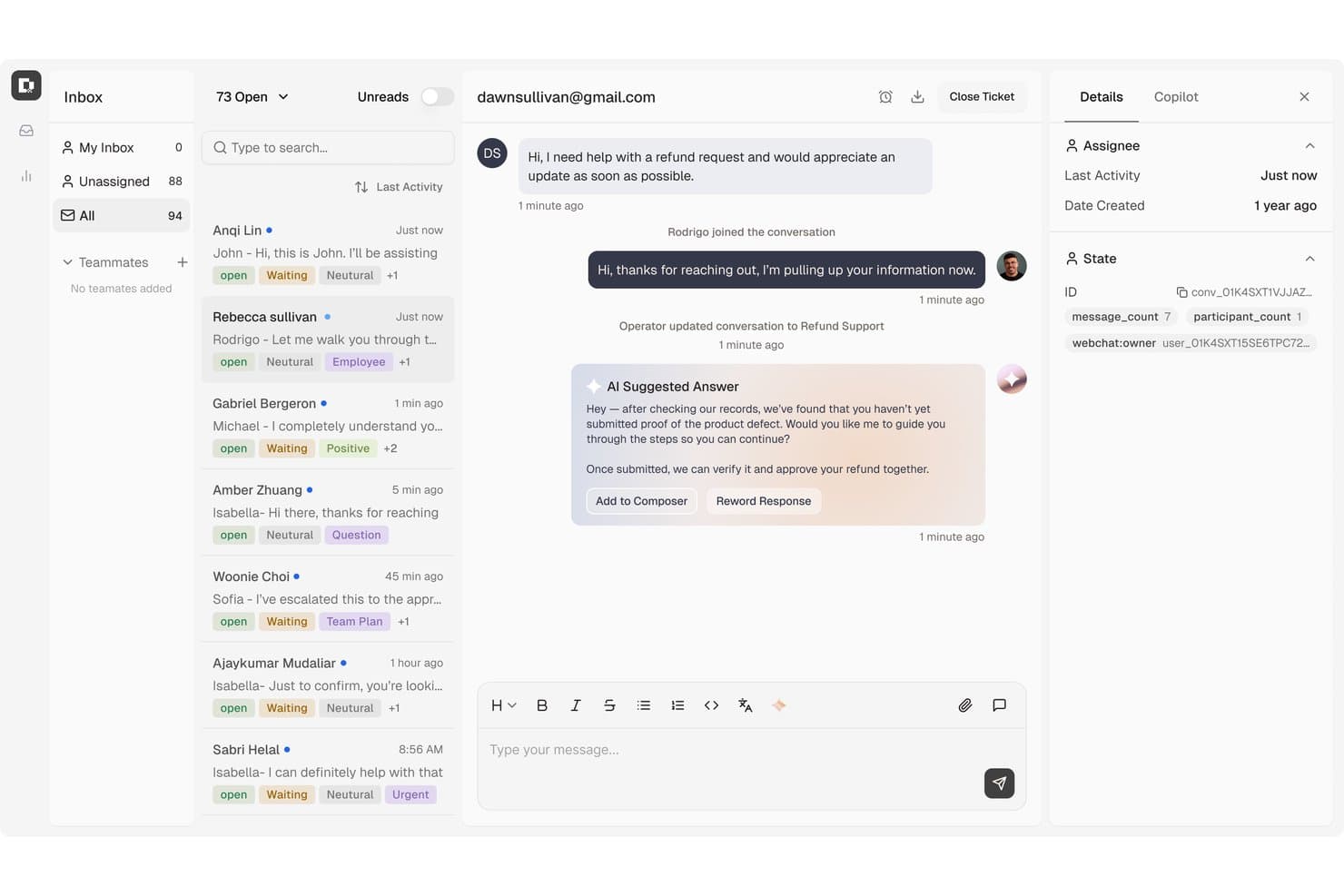
Botpress zentralisiert Kundensupport-Tickets mit von der KI vorgeschlagenen Antworten. Botpress ist eine dialogorientierte KI-Plattform für Kundensupport-Teams, die kundenorientierte Chatbots erstellen, Routinefragen beantworten und Serviceabläufe über digitale Kanäle hinweg automatisieren möchten.
Für wen ist Botpress am besten geeignet?
Kundensupport-Teams, die wiederkehrende Kundenanfragen mit KI-Agenten lösen möchten, die mit ihren Serviceabläufen verbunden sind.
Warum ich Botpress gewählt habe
Ich habe Botpress für „Am besten für KI-basierte Ticketbearbeitung“ ausgewählt, weil seine Agenten Routineanfragen lösen und mehrstufige Abläufe abschließen können, beispielsweise das Aktualisieren von Abrechnungsdaten oder das Korrigieren von Bestellungen. Wenn ein Fall menschliche Unterstützung erfordert, gibt Botpress den Gesprächsverlauf, Kontodetails und bereits durchgeführte Schritte zur Fehlerbehebung weiter. Das macht Botpress für mich zu einer klaren Alternative zu Zoho Desk, wenn die Ticketbearbeitung mit einem KI-Agenten beginnen soll.
Wichtige Funktionen von Botpress
- Wissensdatenbanken: Fügen Sie Unternehmensdokumente und andere Quellen hinzu, um die Antworten der Agenten zu fundieren.
- Zentrale für Integrationen: Verbinden Sie Botpress mit Anwendungen wie Zendesk, Intercom und Slack.
- Analyseübersicht: Verfolgen Sie Benutzer, Sitzungen und Nachrichten und überprüfen Sie anschließend Gespräche und die Leistung der Agenten.
- Kanalintegrationen: Stellen Sie Agenten über unterstützte Kanäle bereit, einschließlich Viber.
Botpress-Integrationen
Botpress bietet offizielle Integrationen mit Zendesk, Intercom, Slack, HubSpot, Salesforce, Freshchat und anderen Anwendungen über seine Zentrale für Integrationen. Außerdem unterstützt es Zapier und ermöglicht Entwicklern, mit dem Botpress SDK benutzerdefinierte Integrationen zu erstellen.
Pros and Cons
Pros:
- KI-Agenten können mehrstufige Abläufe abschließen
- Kontext wird bei der Übergabe an Supportmitarbeiter weitergegeben
- Visueller Editor kombiniert mit Kontrolle auf Code-Ebene
Cons:
- Erweiterte Konfigurationen erfordern Entwicklungszeit
- KI-Antworten können größere Kataloge fehlerhaft wiedergeben
Learn more about Botpress: Am besten geeignet für intelligentes Ticketmanagement
- Kostenlose Testphase + kostenloser Tarif verfügbar
- Ab $24.17/Monat (jährliche Abrechnung)
Visit WebsiteCustomer Rating:4.7/5
Das Tidio KI-Support-Dashboard zeigt Analysen zu Unterhaltungen, Lösungsquoten und der Leistung von Agenten an. Tidio ist eine KI-gestützte Kundenservice-Plattform, die Live-Chat, Automatisierung und Helpdesk-Tools kombiniert, um Unternehmen bei der Verwaltung von Kundeninteraktionen zu unterstützen.
Warum Tidio eine gute Zoho Desk Alternative ist: Das intelligente Helpdesk-System von Tidio ist darauf ausgelegt, Kundenanfragen effizient zu bearbeiten, indem Live-Chats, E-Mails und Social Media-Nachrichten in Tickets umgewandelt werden. Diese Tickets lassen sich zuweisen, priorisieren und mit Tags versehen, was das Management und die Lösung von Problemen erleichtert. Das System ermöglicht es zudem, benutzerdefinierte Filter und Ansichten einzurichten, wodurch Ihr Team organisiert bleibt und sich auf das Wesentliche konzentrieren kann. Mir gefällt auch, dass Tidio einen KI-Support-Agenten namens Lyro bietet, der Routineanfragen kanalübergreifend und in mehreren Sprachen beantworten kann.
Herausragende Funktionen & Integrationen:
Zu den Funktionen gehört ein visueller Automatisierungs-Builder namens Flows, mit dem Sie individuelle Workflows ohne Programmierkenntnisse erstellen können. Beispielsweise können Sie mit diesem Tool automatisierte Antworten und Aktionen basierend auf dem Kundenverhalten umsetzen. Tidio bietet außerdem ein gemeinsames Postfach für mehrere Kanäle, sodass Sie Nachrichten aus Live-Chat, E-Mail und sozialen Medien an einem Ort verwalten können.
Integrationen umfassen Shopify, WordPress, Squarespace, WIX, Adobe Commerce, BigCommerce, WooCommerce, Google Analytics, Mailchimp, HubSpot und Zendesk.
Pros and Cons
Pros:
- Bietet Einblicke in Teamleistung und Kundenzufriedenheit
- Lyro KI übernimmt einen Großteil der Kundenanfragen
- Multikanal-Support, inklusive Chats, E-Mails und Social Media
Cons:
- Einschränkungen bei der Integration bestimmter Drittanbietertools
- Viele Automatisierungsfunktionen nur in höheren Tarifen enthalten
Learn more about Tidio: Am besten für wachsende Unternehmen geeignet
- Kostenlose 30-tägige Testversion verfügbar
- Ab $24/Nutzer/Monat (jährliche Abrechnung)
Visit WebsiteCustomer Rating:4.7/5
Groove ist einfach zu bedienen, zentralisiert den Support und bietet individuelle Workflows. Groove ist eine Kundensupport-Software, die für kleine und mittelständische Unternehmen entwickelt wurde, die ihre Kundenservice-Prozesse verbessern möchten. Sie wird von Teams genutzt, die eine benutzerfreundliche Plattform suchen, um Kundenanfragen zu verwalten und die Kundenzufriedenheit zu steigern.
Warum Groove eine gute Zoho Desk Alternative ist: Groove bietet eine übersichtliche Benutzeroberfläche, die Ihrem Team einen schnellen Einstieg ermöglicht, ohne langwierige Einarbeitung. Mit dem gemeinsamen Posteingang werden alle Kundeninteraktionen zentralisiert, sodass Ihr Team organisiert bleibt. Durch anpassbares Ticketing können Arbeitsabläufe gezielt auf die Anforderungen Ihres Unternehmens zugeschnitten werden. Zudem liefern die Reporting-Tools von Groove Einblicke in die Performance des Kundensupports und unterstützen eine strategische Entscheidungsfindung.
Herausragende Funktionen & Integrationen:
Funktionen umfassen eine Wissensdatenbank für Kundenselbsthilfe, Live-Chat für sofortige Unterstützung und Umfragen zur Kundenzufriedenheit, die wertvolle Rückmeldungen liefern. Diese Tools helfen, Supportanfragen zu reduzieren, Interaktionen zu verbessern und die Servicequalität zu steigern.
Integrationen umfassen Slack, Shopify, Mailchimp, Trello, Google Workspace, Microsoft Teams, Salesforce, Zapier, Jira und HubSpot.
Pros and Cons
Pros:
- Effiziente Organisation von E-Mail-Tickets
- Integrierte Wissensdatenbank
- Reaktionsschneller Kundensupport
Cons:
- Eingeschränkte Integration von sozialen Medien
- Leistungsprobleme bei umfangreicher Automatisierung
 10Am besten für IT-Integrationen
HappyFox
- 14-tägige kostenlose Testphase
- Ab $24/Agent/Monat (jährliche Abrechnung)
Visit WebsiteCustomer Rating:4.5/5
HappyFox bietet Ticketing-, Automatisierungs-, Self-Service- und Reporting-Tools. HappyFox ist eine Helpdesk-Software, die für Unternehmen entwickelt wurde, die ein effizientes Ticketmanagement und einen reibungslosen Kundenservice benötigen. Sie wird von Teams genutzt, die ihre IT-Support-Prozesse optimieren und die Servicebereitstellung verbessern möchten.
Warum HappyFox eine gute Zoho Desk Alternative ist: HappyFox bietet ein umfassendes Ticketingsystem, das die Bearbeitung von Kundenanfragen vereinfacht und somit eine starke Wahl für IT-Teams darstellt. Die Automatisierungsfunktionen reduzieren den Arbeitsaufwand, indem Routineaufgaben automatisiert werden, sodass sich Ihr Team auf komplexe Anliegen konzentrieren kann. Das Self-Service-Portal ermöglicht es Kunden, eigenständig Lösungen zu finden und verringert damit die Anzahl der Supportanfragen.
Hervorzuhebende Funktionen & Integrationen:
Funktionen umfassen eine Wissensdatenbank für den Self-Service der Kunden, wodurch die Abhängigkeit von Servicemitarbeitern reduziert wird. SLA-Management priorisiert Tickets für eine zeitnahe Bearbeitung, während ein Community-Forum die Interaktion fördert und es Nutzern ermöglicht, Erfahrungen auszutauschen und gemeinsam Lösungen zu finden.
Integrationen umfassen Slack, Salesforce, Shopify, Microsoft Teams, Google Workspace, Trello, Mailchimp, QuickBooks, Jira und Zapier.
Pros and Cons
Pros:
- Effizientes Ticketmanagement
- Reduziert den Arbeitsaufwand durch Automatisierung
- Unterstützt Self-Service für Kunden
Cons:
- Leistungsprobleme bei umfangreicher Automatisierung
- Einschränkungen der mobilen App
Weitere Zoho Desk-Alternativen
Hier sind einige weitere Zoho Desk-Alternativen, die es nicht in meine Vorauswahl geschafft haben, aber dennoch einen Blick wert sind:
- 11IntercomAm besten für KI-basierte Serviceansätze geeignet
- 12HubSpot Service HubAm besten für All-in-One-Support geeignet
- 13KayakoAm besten zur Automatisierung von Aufgaben geeignet
- 14SysAidAm besten geeignet für IT-Service-Management
- 15ZendeskAm besten für große Unternehmen
- 16FreshdeskAm besten für kleine Teams
- 17Salesforce Service CloudAm besten für KI-gesteuerten Service
- 18Help ScoutAm besten geeignet für persönlichen Support
- 19FrontAm besten für Teamzusammenarbeit
- 20HiverAm besten für KI-Tagging
Comment j'évalue les alternatives à Zoho Desk
J'évalue les outils sur deux niveaux : les fonctionnalités de base de gestion de tickets et de SLA qu'un centre d'assistance doit absolument proposer, puis les éléments différenciateurs—comme l'assistance par IA et le support à la migration—qui distinguent la meilleure solution du lot.
Fonctionnalités principales (Critères indispensables pour cette liste)
Lorsque je sélectionne des outils pour ma liste, je note chacun sur une échelle de 0 (ne propose pas la fonctionnalité) à 5 (excellent dans ce domaine) pour chacune des fonctionnalités principales ci-dessous. Je calcule ensuite le score total de l'outil en pourcentage. Chaque outil doit obtenir un score total minimum de 75% pour être retenu.
- Gestion des tickets : J'examine la façon dont chaque outil gère les files de tickets, les champs personnalisés et la détection des collisions—comme la fusion des demandes dupliquées ou la division d'un ticket lorsque le client signale deux problèmes distincts.
- Support omnicanal : Chaque plateforme doit unifier e-mail, chat, téléphone, réseaux sociaux et messagerie dans un espace de travail unique pour les agents afin qu'ils n'aient pas à passer d'un onglet à l'autre pour reconstituer l'historique d'un client.
- Base de connaissances & libre-service : Un bon centre d'aide permet de réduire le nombre de tickets avant même leur création. Je vérifie si la base de connaissances prend en charge les catégories, la recherche et les portails accessibles et utilisés par les clients.
- Automatisation des workflows : Je me concentre sur les règles de routage, les déclencheurs d'escalade et les réponses préenregistrées. Par exemple, l'affectation automatique des tickets de facturation à une file spécialisée ou l'escalade d'un SLA non respecté vers un chef d'équipe.
- SLA & reporting : J'évalue la possibilité de définir des politiques de SLA par priorité ou canal, ainsi que d'extraire des rapports sur les délais de résolution, la charge de travail des agents et les tendances de CSAT sans avoir besoin d'un outil d'analyse séparé.
- Intégrations tierces : L'outil doit s'interfacer avec les CRM, plateformes e-commerce et applications de communication que votre équipe utilise déjà—que ce soit via une place de marché native ou une API ouverte.
Une fois que j'ai établi une liste d'outils répondant à ces critères, j'analyse ce qui distingue chaque plateforme.
Facteurs différenciateurs (Ce qui distingue les fournisseurs)
Voici comment je compare et différencie les différents fournisseurs :
Fonctionnalités remarquables
La rédaction automatique de réponses et la synthèse assistée par IA sont des éléments différenciateurs importants—elles aident les agents à gérer un grand volume sans sacrifier la qualité de chaque réponse. Je recherche également un panneau de contexte client qui affiche les données du CRM et l'historique des interactions avec le ticket actif, évitant ainsi aux agents de faire répéter les clients. Les enquêtes CSAT et NPS intégrées et liées directement aux tickets permettent aux managers de recueillir des retours sans outil supplémentaire.
Au-delà des fonctionnalités
Le support à la migration est essentiel lors d'un passage depuis Zoho Desk. Je vérifie si une plateforme propose des assistants d'importation ou une aide dédiée pour transférer tickets, contacts et articles de la base de connaissances. La transparence tarifaire est un autre aspect que j'analyse attentivement—certains fournisseurs cachent le coût des fonctions IA ou de certains canaux derrière des offres haut de gamme. Pour les équipes de secteurs réglementés comme la santé ou la finance, j'examine enfin les certifications de conformité telles que SOC 2 Type II et HIPAA, ainsi que les options de résidence des données et les contrôles d'accès par rôle.
Warum nach einer Zoho Desk-Alternative suchen?
Obwohl Zoho Desk eine gute Wahl für Kundendienstsoftware ist, gibt es mehrere Gründe, warum manche Nutzer nach alternativen Lösungen suchen. Sie suchen möglicherweise nach einer Zoho Desk-Alternative, weil …
- begrenzte Integrationsmöglichkeiten mit anderen Tools
- die Einrichtung für kleine Teams kompliziert ist
- erweiterte Berichtsfunktionen fehlen
- die Anpassungsmöglichkeiten für individuelle Arbeitsabläufe eingeschränkt sind
- die Unterstützung für bestimmte globale Regionen eingeschränkt ist
Wenn du dich in einem dieser Punkte wiedererkennst, bist du hier genau richtig. Meine Liste enthält mehrere Kundendienstsoftware-Optionen, die besser für Teams geeignet sind, die mit diesen Herausforderungen bei Zoho Desk konfrontiert sind und nach alternativen Lösungen suchen.
Die wichtigsten Funktionen von Zoho Desk
Hier sind einige der wichtigsten Funktionen von Zoho Desk, damit du die Angebote alternativer Lösungen gegenüberstellen und vergleichen kannst:
- Omnichannel-Support: Optimiert Kundeninteraktionen über mehrere Plattformen hinweg, einschließlich sozialer Medien und Live-Chat, damit dein Team Kunden überall erreichen kann.
- KI-Integration: Zia, der KI-Assistent, bietet kontextbezogene Unterstützung, versieht Tickets automatisch mit Tags, führt eine Stimmungsanalyse durch und bietet generative KI zur Anpassung von Antworten. So kann dein Team Anfragen effizient bearbeiten.
- Self-Service-Optionen: Kunden können auf geführte Gespräche und eine Wissensdatenbank zugreifen, um schnell Antworten zu erhalten und so die Arbeitsbelastung deines Teams zu verringern.
- Produktivitätstools für Mitarbeitende: Funktionen wie Arbeitsmodi, Antwortoptimierung und mobile Nutzung verbessern die Zusammenarbeit und Ticketverwaltung, sodass dein Team effektiver arbeiten kann.
- Automatisierung: Automatisiert wiederkehrende Aufgaben, Ticketzuweisungen und Benachrichtigungen, um die Effizienz zu steigern und deinem Team mehr Zeit für komplexe Probleme zu geben.
- Erweiterbarkeit: Ermöglicht die Integration mit anderer Software sowie benutzerdefinierte Funktionen und Module, damit der Helpdesk an deine spezifischen geschäftlichen Anforderungen angepasst werden kann.
- Einblicke und Analysen: Bietet Berichte und Dashboards zur Leistungsüberwachung und Zeiterfassung und liefert deinem Team wertvolle Erkenntnisse zur Verbesserung des Service.
- Anpassungsmöglichkeiten: Bietet umfangreiche Optionen für Branding, Vorlagen und Layouts, die an die Anforderungen deiner Organisation angepasst werden können.
- Sicherheit: Gewährleistet den Datenschutz durch rollenbasierten Zugriff, DSGVO-Konformität und Prüfprotokolle, sodass dein Team Kundendaten sicher verwalten kann.