

I 10 migliori strumenti software per la soddisfazione dei clienti nel 2026

10 Elenco dei migliori software per la soddisfazione dei clienti


Il software per la soddisfazione dei clienti aiuta i team CX a misurare, analizzare e migliorare il modo in cui i clienti percepiscono le loro esperienze. Se hai difficoltà con metriche CSAT poco chiare, un volume ridotto di feedback o cicli di trasformazione degli insight in azioni troppo lenti, il software per la soddisfazione dei clienti può aiutarti a trasformare i feedback preziosi in azioni concrete.
In questo articolo condivido le mie considerazioni sui migliori software per la soddisfazione dei clienti, per aiutarti a comprendere le esigenze, le esperienze e le aspettative dei tuoi clienti, così da mantenerli soddisfatti e coinvolti.
Che cos'è il software per la soddisfazione dei clienti?
Il software per la soddisfazione dei clienti è uno strumento utilizzato per raccogliere e analizzare i feedback dei clienti, così da misurare e migliorare il loro livello di soddisfazione rispetto alle esperienze vissute. Viene utilizzato per mettere in evidenza insight che favoriscono il miglioramento dei prodotti, l'ottimizzazione dei servizi e relazioni più solide con i clienti. Questo avviene attraverso funzionalità come la raccolta dei feedback, l'analisi del sentiment e gli strumenti di analisi integrati.
Perché fidarsi dei nostri consigli sui software
Il nostro team testa e recensisce software dal 2012. In quanto leader CX noi stessi, sappiamo quanto sia difficile — e importante — scegliere il software giusto.
Per questa guida, abbiamo valutato gli strumenti attraverso test pratici e ricerche indipendenti, assegnando un punteggio agli strumenti in base ai nostri criteri di selezione.
Le nostre recensioni riflettono il nostro giudizio editoriale umano, non un discorso di vendita.
I 10 migliori software per la soddisfazione dei clienti: tabella comparativa rapida
Questa tabella comparativa riassume i dettagli di base di ciascuna delle mie migliori selezioni di software per la soddisfazione dei clienti. Puoi visualizzare affiancati i dettagli sui prezzi e la disponibilità di prove gratuite o demo, per trovare il software più adatto al tuo budget e alle esigenze della tua azienda.
| Tool | Best For | Trial Info | Price | ||
|---|---|---|---|---|---|
| 1 | Ideale per il monitoraggio online in tempo reale | Prova gratuita di 14 giorni disponibile | Da $199/mese (fatturazione annuale) | Website | |
| 2 | Ideale per il tracciamento del customer journey con NPS | Prova gratuita di 14 giorni + demo gratuita disponibile | Prezzo su richiesta | Website | |
| 3 | Migliori sondaggi automatizzati con informazioni in tempo reale | Prova gratuita di 14 giorni | Da $19/mese (fatturato annualmente) | Website | |
| 4 | Ideale per flussi di lavoro di feedback scalabili | Prova gratuita di 7 giorni + demo gratuita disponibile | A partire da $55/utente/mese | Website | |
| 5 | I migliori sondaggi CSAT e workflow di follow-up | Prova di 10 giorni | Da $56/mese | Website | |
| 6 | Ideale per l'automazione AI dei compiti di routine | Prova gratuita di 14 giorni | Da $39/agente/mese | Website | |
| 7 | Ideale per insight sui clienti basati su intelligenza artificiale | Demo gratuita disponibile | Prezzo su richiesta | Website | |
| 8 | Ideale per sondaggi sulla soddisfazione clienti altamente personalizzabili | Demo gratuita disponibile | Da $18/mese | Website | |
| 9 | Ideale per le piccole imprese | Piano gratuito disponibile | Da $30/utente/mese (fatturato annualmente) | Website | |
| 10 | Ideale per lo smistamento di richieste clienti tra team | Prova gratuita di 14 giorni + demo gratuita disponibile | A partire da $25/postazione/mese (fatturato annualmente) | Website |


Panoramica dei 10 migliori software per la soddisfazione dei clienti
Ecco la mia valutazione dei migliori software per la soddisfazione dei clienti che puoi utilizzare oggi, insieme a brevi descrizioni delle loro funzionalità principali e a una breve spiegazione del motivo per cui sono presenti nell’elenco.

Brand24
Ideale per il monitoraggio online in tempo reale

Brand24 è un potente strumento di social listening basato su AI che aiuta le aziende a monitorare e analizzare la propria presenza e reputazione online. Lo strumento offre anche risorse e supporto per aiutare le aziende a sfruttare al massimo le loro attività di marketing e presenza sui social media, con l'obiettivo finale di migliorare la soddisfazione dei clienti e la reputazione del marchio.
Perché ho scelto Brand24: Brand24 aiuta le aziende a tracciare le menzioni del proprio marchio su varie piattaforme online, fornendo avvisi in tempo reale e analisi del sentiment. Lo strumento è progettato per professionisti del marketing e aziende di tutte le dimensioni, offrendo funzionalità come punteggio degli influencer, analisi dei concorrenti e report personalizzabili.
La piattaforma fornisce dati per la reputazione del marchio, marketing, influencer marketing, ricerche di mercato e relazioni pubbliche. Nel complesso, Brand24 è apprezzato per la rapidità nella trasmissione dei dati e per la sua analisi sofisticata del sentiment, rendendolo particolarmente adatto alle aziende che danno priorità all'engagement immediato dei clienti.
Caratteristiche e integrazioni principali di Brand24:
Le caratteristiche principali includono analisi avanzata del sentiment per suddividere le menzioni online in categorie positive, negative o neutre, funzioni di reporting automatico e monitoraggio della portata, che aiuta gli utenti a valutare gli sforzi di marketing e a confrontarsi con i concorrenti tenendo traccia della portata delle menzioni del marchio. Gli utenti possono anche misurare e riportare la copertura PR creando report che forniscono metriche potenti e affidabili.
Le integrazioni includono Slack, Trackdesk, LinkedIn, Spotify, Telegram, Instagram, Facebook, Reddit, TikTok, YouTube, X (precedentemente noto come Twitter) e Tripadvisor.
Pros and Cons
Pros:
- Facile da configurare e usare
- Fornisce avvisi in tempo reale e filtri personalizzabili
- Supporta più lingue
Cons:
- L'app mobile può essere difficile da usare
- Potrebbe non essere accessibile per le piccole imprese
New Product Updates from Brand24

Brand24 Adds TikTok Video Transcriptions for Mention Tracking
Brand24 now detects keywords spoken in TikTok videos, not just in descriptions, and collects matching videos as mentions with spoken fragments and timestamps shown. For more information, visit Brand24's official site.

Ideale per il tracciamento del customer journey con NPS
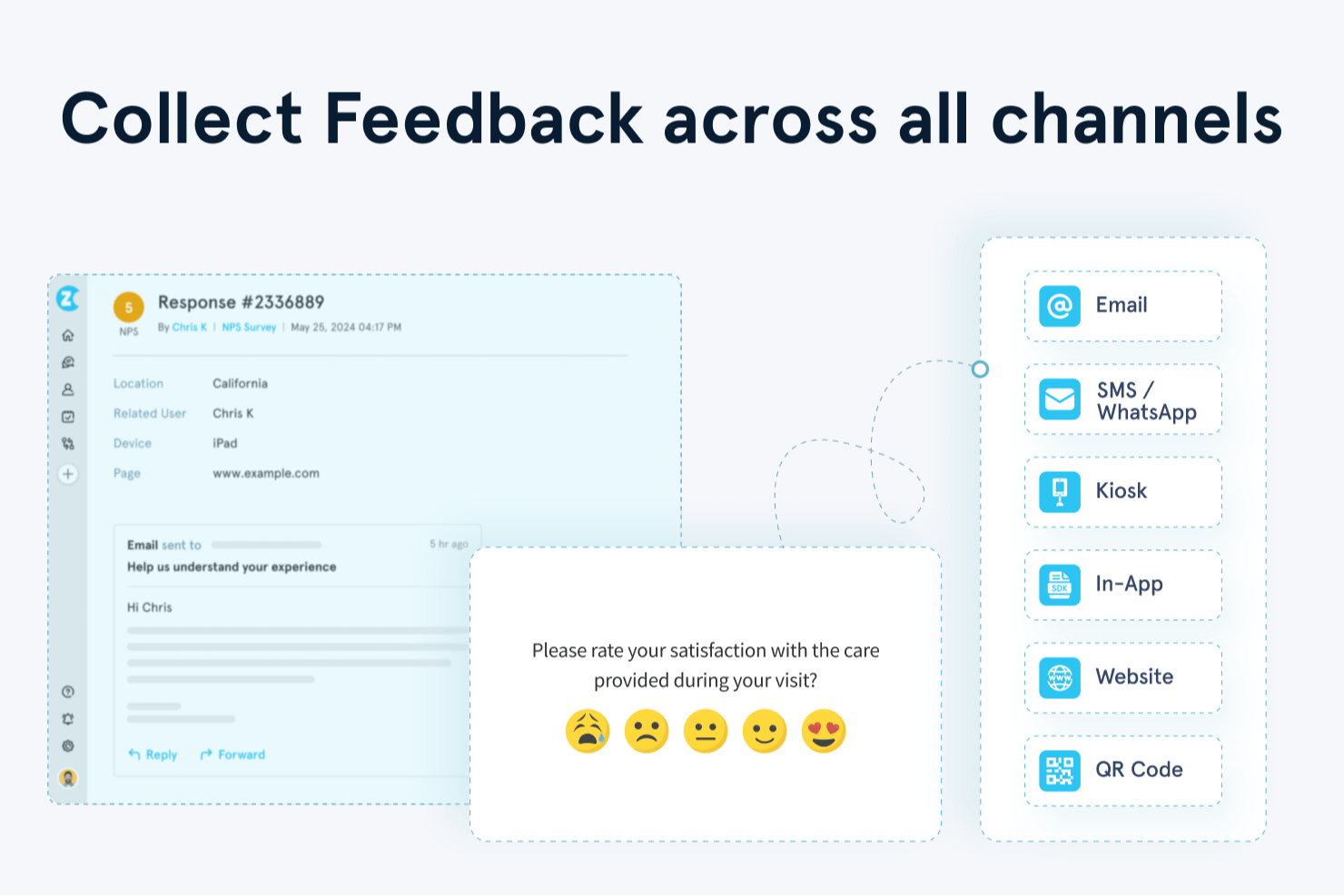
Zonka Feedback è una piattaforma di feedback del cliente potenziata dall'IA che raccoglie, centralizza e analizza le risposte ai sondaggi NPS, CSAT e CES tramite email, SMS, WhatsApp, web, app e canali kiosk.
Per chi è ideale Zonka Feedback?
I team CX e VoC di aziende di medie dimensioni che gestiscono programmi di feedback su touchpoint sia fisici che digitali troveranno Zonka particolarmente adatto.
Perché ho scelto Zonka Feedback
Ho scelto Zonka Feedback perché la sua funzione di tracciamento dei contatti e dei percorsi utente mappa le risposte NPS direttamente su specifici touchpoint nel ciclo di vita del cliente. Questo significa che posso vedere esattamente dove cala la soddisfazione, che sia dopo l'onboarding, dopo un ticket di supporto o al rinnovo. Mi affido anche alla sua Analisi d'Impatto AI, che collega i temi del feedback direttamente alle variazioni dei punteggi NPS, così so quali questioni hanno davvero un impatto.
Funzionalità principali di Zonka Feedback
- Costruttore di sondaggi omnicanale: Crea sondaggi CSAT, NPS e CES tramite email, SMS, WhatsApp, web e kiosk con logiche ramificate e personalizzazione del brand.
- Hub di feedback unificato: Centralizza i feedback provenienti da sondaggi, ticket di assistenza, chat dal vivo e recensioni online in un'unica piattaforma.
- Dashboard basate sui ruoli: Fornisce insight in tempo reale personalizzati per dirigenti, operatori di prima linea o analisti VoC con widget configurabili.
- Controlli di conformità: Supporta la conformità GDPR e HIPAA, la certificazione ISO e la residenza dei dati configurabile per una gestione sicura dei dati dei clienti.
Integrazioni di Zonka Feedback
Zonka Feedback offre integrazioni native con Salesforce, HubSpot, Zendesk, Intercom, Freshdesk, Jira, Slack, Microsoft Teams, Google Sheets e Mailchimp. Supporta anche Zapier e fornisce un'API per integrazioni personalizzate.
Pros and Cons
Pros:
- Feedback basato sul percorso mappato alle fasi del ciclo di vita
- Analisi del testo in tempo reale su più lingue
- Workflow automatizzati per ticketing e chiusura dei casi
Cons:
- Le opzioni di design dei sondaggi possono risultare limitanti
- Incluso a partire dai piani di fascia inferiore

Migliori sondaggi automatizzati con informazioni in tempo reale
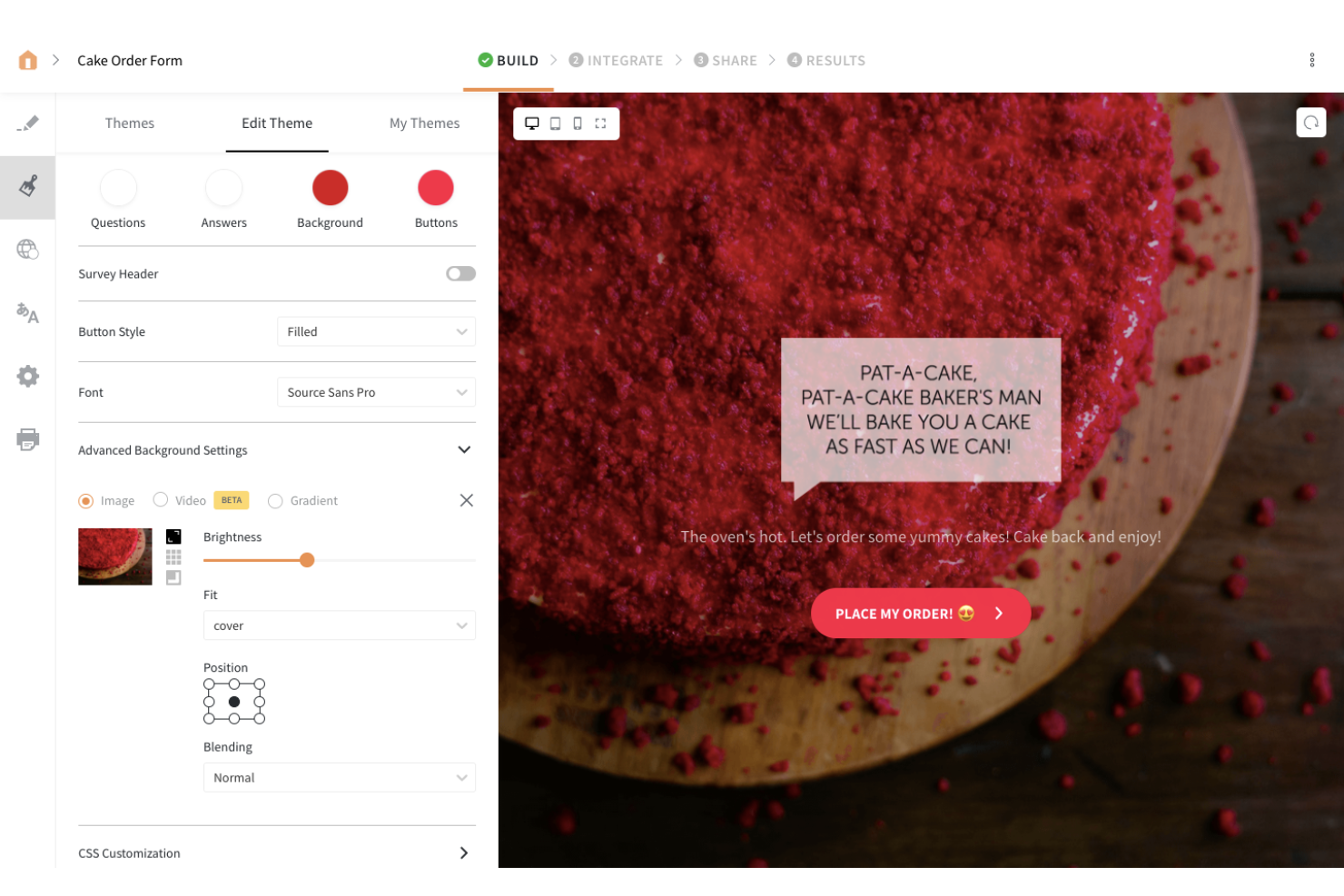
SurveySparrow è uno strumento di sondaggi online che ti permette di raccogliere feedback dal tuo team e dai tuoi clienti. La piattaforma consente di distribuire i tuoi sondaggi su più canali, tra cui social media e forum, permettendoti di ottenere preziose informazioni sui tuoi utenti.
Perché ho scelto SurveySparrow: SurveySparrow è entrato nella mia lista grazie al suo creatore di sondaggi semplice e intuitivo. Il creatore utilizza una funzionalità drag-and-drop per aiutarti a personalizzare i tuoi sondaggi, e puoi condividere ogni sondaggio creato sui social media o sui forum per raccogliere feedback dai tuoi utenti.
Funzionalità e integrazioni distintive di SurveySparrow:
Funzionalità distintive includono sondaggi mobile-first, sondaggi video, sondaggi chat e sondaggi offline. Mi piacciono i sondaggi smart di SurveySparrow. Questo tipo di sondaggio permette di utilizzare la logica condizionale ramificata per mostrare solo le domande rilevanti ai tuoi intervistati, consentendo di raccogliere risposte specifiche per ciascun segmento di clientela.
Integrazioni includono piattaforme di social media, CRM e soluzioni per il successo del cliente, come Facebook, Salesforce, Intercom, Aweber, Google Contacts, HubSpot, WordPress, MailChimp, Rybbon, Zendesk e Slack. Puoi accedere a ulteriori integrazioni tramite Zapier. SurveySparrow offre inoltre una REST API per abilitare integrazioni personalizzate laddove necessario.
Pros and Cons
Pros:
- La piattaforma è facile da imparare
- Il design dei sondaggi rende l’esperienza eccellente per i rispondenti
- I sondaggi audio trascrivono automaticamente le risposte dei partecipanti
Cons:
- Personalizzazione dei font limitata
- I sondaggi non raccolgono risposte parziali se il rispondente abbandona prima di completare tutte le domande

Alchemer
Ideale per flussi di lavoro di feedback scalabili
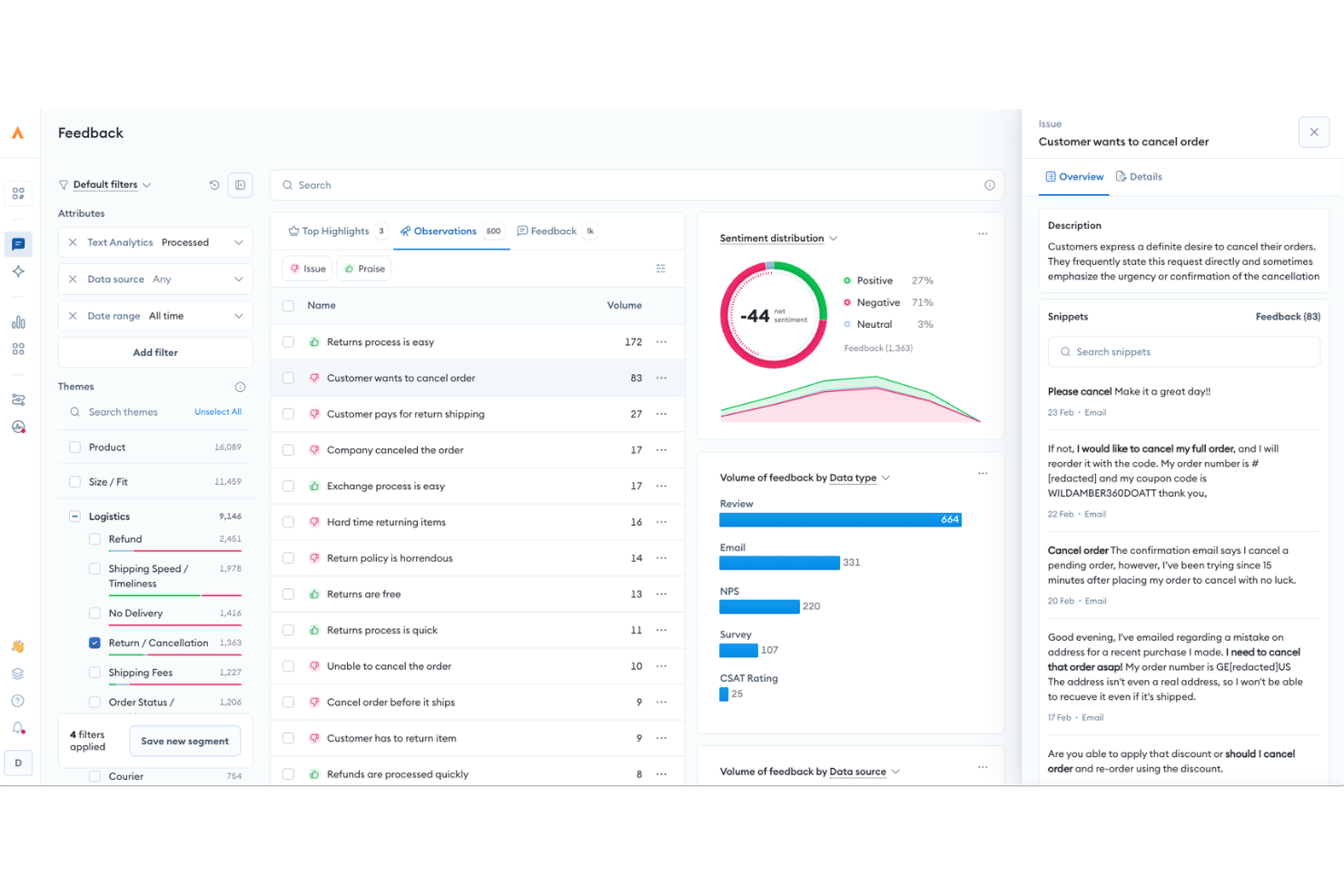
Alchemer è una piattaforma di gestione dei feedback che combina distribuzione di sondaggi, analisi del sentiment, automazione a ciclo chiuso e oltre 400 integrazioni per supportare i programmi CSAT, NPS e VoC lungo l'intero percorso del cliente.
Per chi è più adatto Alchemer?
Alchemer è adatto ai team CX e VoC di aziende di medie e grandi dimensioni che gestiscono programmi strutturati di raccolta dei feedback su più canali e sistemi aziendali.
Perché ho scelto Alchemer
Ho incluso Alchemer tra le mie scelte principali perché il suo strumento Connect per la creazione di flussi di lavoro senza codice cambia davvero il modo in cui i feedback circolano all'interno di un ecosistema CX. Posso configurare una regola che inoltra una risposta NPS di un detrattore direttamente in Zendesk come ticket di assistenza, oppure invia un avviso Slack a un responsabile del successo del cliente, senza scrivere una sola riga di codice. Anche la sincronizzazione bidirezionale con Salesforce è una funzionalità su cui faccio affidamento: importo i dati CRM nei sondaggi per personalizzarli, quindi invio i risultati nuovamente al CRM per aggiornare automaticamente i record dei contatti.
Funzionalità principali di Alchemer
- Analisi dei feedback basata sull'IA: Utilizza l'elaborazione del linguaggio naturale per assegnare automaticamente un punteggio al sentiment, rilevare i temi e raggruppare gli argomenti nelle risposte aperte ai sondaggi.
- Distribuzione omnicanale dei sondaggi: Supporta la distribuzione dei sondaggi tramite e-mail, SMS, messaggi nell'app, link web, codici QR e modalità chiosco/fuori linea.
- Pannelli di controllo dei report personalizzabili: Offre pannelli di controllo in tempo reale con segmentazione avanzata, opzioni di esportazione e report condivisibili personalizzabili.
- Autorizzazioni basate sui ruoli: Consente agli amministratori di assegnare autorizzazioni specifiche e l'accesso ai dati a diversi team o reparti.
Integrazioni di Alchemer
Alchemer offre oltre 400 integrazioni native, tra cui Salesforce, Zendesk, HubSpot, ServiceNow, Jira, Tableau, Slack, Shopify, Power BI e Google Sheets, oltre a fornire un'API per le integrazioni personalizzate.
Pros and Cons
Pros:
- Logica e ramificazione dei sondaggi altamente personalizzabili
- Supporta programmi VoC complessi e distribuiti su più punti di contatto
- Automazione a ciclo chiuso efficace per il ricontatto dei detrattori
Cons:
- L'interfaccia dei report appare datata rispetto a quella dei concorrenti
- I flussi di lavoro avanzati richiedono molto tempo per la configurazione

I migliori sondaggi CSAT e workflow di follow-up
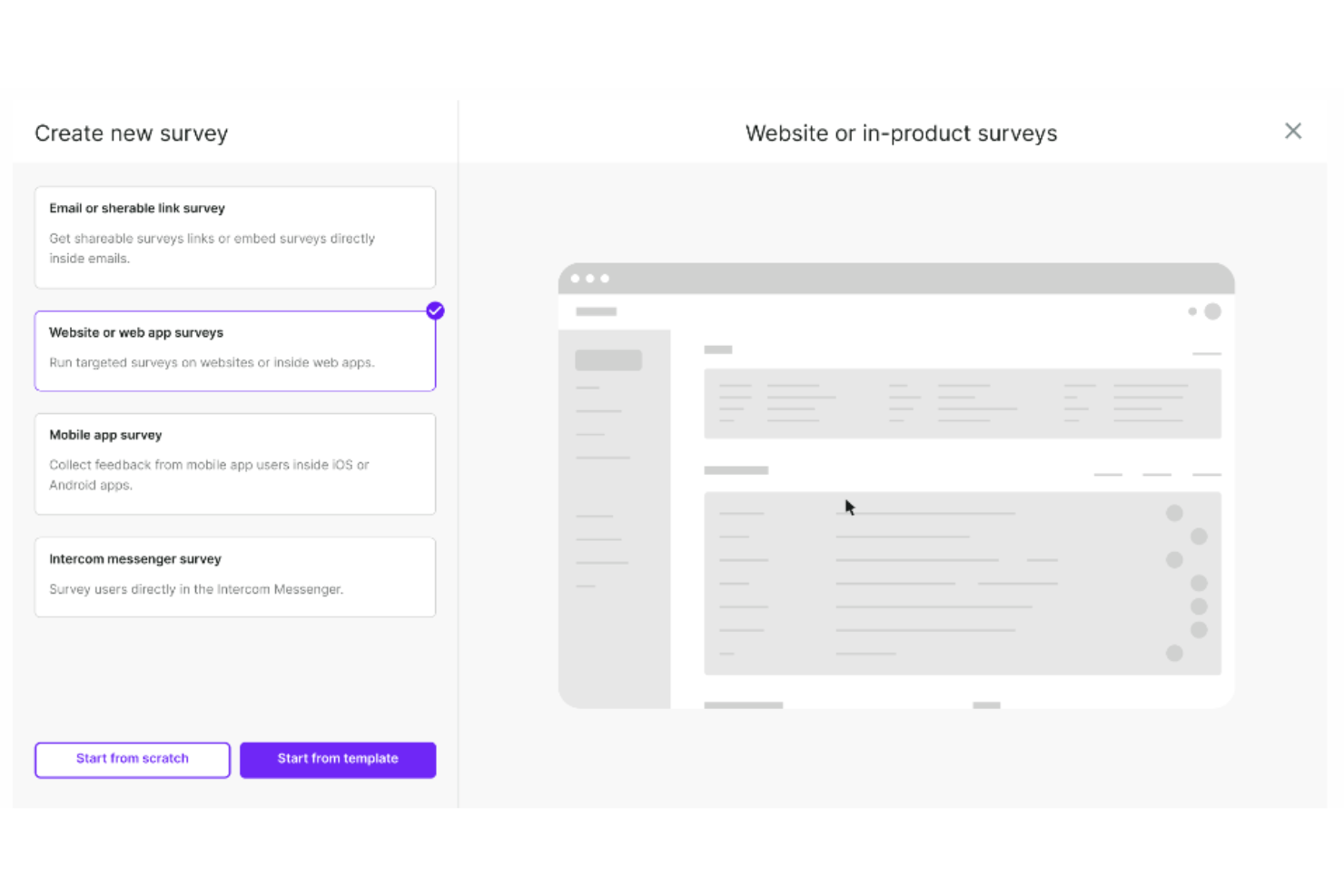
Survicate è uno strumento software per sondaggi progettato per raccogliere feedback da clienti e visitatori del sito web. Il suo obiettivo è aiutare le aziende a comprendere le preferenze dei clienti, migliorare prodotti e servizi e prendere decisioni informate basate sui feedback raccolti.
Perché ho scelto Survicate: Ho selezionato Survicate per questa lista perché permette alle aziende di condurre sondaggi su più canali, inclusi email, web, mobile e in-app, per ottenere informazioni da clienti e visitatori del sito. I sondaggi Survicate possono essere utilizzati per misurare metriche chiave di soddisfazione come il Net Promoter Score (NPS), il punteggio di soddisfazione del cliente (CSAT) e il punteggio di sforzo del cliente (CES). Possono essere anche personalizzati con vari modelli e presentare loghi su misura, colori del marchio e messaggi per mantenere la coerenza del brand nei sondaggi.
Apprezzo anche che i flussi di lavoro di follow-up di Survicate attivino automaticamente azioni sulla base delle risposte ai sondaggi CSAT, permettendo alle aziende di coinvolgere prontamente i clienti insoddisfatti, segnalare problemi ai team di supporto o avviare follow-up personalizzati per migliorare la fidelizzazione e la soddisfazione del cliente.
Funzionalità e integrazioni principali di Survicate
Le funzionalità includono un creatore drag-and-drop per la creazione dei sondaggi, un hub centralizzato per i feedback, raccolta automatizzata dei feedback, analisi in tempo reale per comprendere le risposte ai sondaggi a colpo d'occhio e incorporamento nelle email. Apprezzo anche che Survicate utilizzi un targeting avanzato per mostrare i sondaggi quando gli utenti hanno più probabilità di rispondere, ad esempio dopo una determinata azione sul sito o in un punto specifico del percorso del cliente.
Le integrazioni includono ActiveCampaign, Drip, Amplitude, HubSpot, Intercom, Mailchimp, Salesforce, FullStory, Zendesk e Microsoft Teams.
Pros and Cons
Pros:
- Facile da configurare e utilizzare
- È in grado di catturare risposte parziali
- Fornisce raccolta feedback in tempo reale
Cons:
- L'aspetto visivo dei sondaggi può risultare incoerente
- Limite massimo di risposte mensili limitato
New Product Updates from Survicate

Survicate MCP Support Now Available
Survicate now supports MCP, letting teams use AI tools like Claude, ChatGPT, and Slack to explore survey results, analyze responses and insights, and draft new surveys. For more information, visit Survicate's official site.
 .
.
eDesk
Ideale per l'automazione AI dei compiti di routine
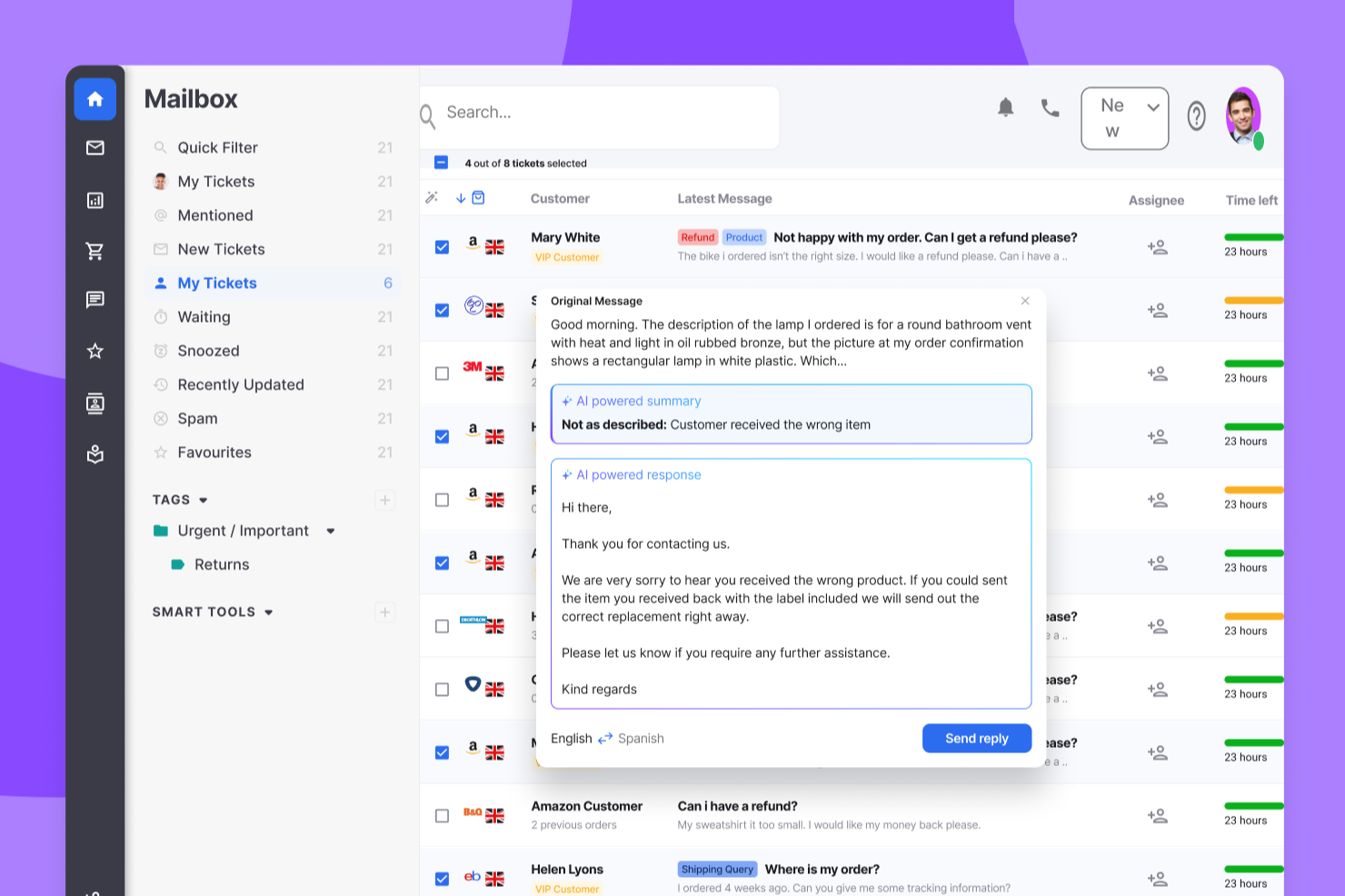
eDesk è una piattaforma di assistenza clienti basata sull'intelligenza artificiale, progettata per le aziende di ecommerce. Aiuta i team a snellire le operazioni di supporto e migliorare la soddisfazione dei clienti centralizzando le interazioni in un unico luogo. eDesk è pensato per rivenditori online e team di assistenza clienti che necessitano di tempi di risposta più rapidi e di un coinvolgimento più costante dei clienti. Riducendo la comunicazione frammentata e i flussi di lavoro inefficienti, aiuta i team a gestire le richieste in modo più efficace e a trasformare le conversazioni di supporto in opportunità di vendita.
Perché ho scelto eDesk
Ho scelto eDesk per la sua capacità di riunire tutte le conversazioni con i clienti in una singola casella di posta unificata, rendendo più semplice la gestione e la priorità delle richieste di supporto. L'automazione AI gestisce le attività di routine, permettendo ai team di dedicare più tempo alla risoluzione di problemi complessi e rispondere più rapidamente. Il chatbot attivo 24/7 garantisce inoltre che i clienti possano ricevere assistenza in qualsiasi momento, migliorando la soddisfazione complessiva e favorendo la fidelizzazione.
Caratteristiche principali di eDesk
Oltre alle sue funzioni principali, eDesk offre diverse altre funzionalità che possono essere molto utili al tuo team:
- Supporto pre-vendita: Questa funzione consente al tuo team di gestire le richieste dei potenziali clienti, contribuendo a convertirle in vendite.
- Gestione dei feedback: eDesk facilita la raccolta e l'analisi dei feedback dei clienti, permettendoti di apportare miglioramenti informati al tuo servizio.
- Reportistica in tempo reale: Con questa funzione puoi ottenere informazioni sulle operazioni di supporto, ottimizzando i processi e aumentando la soddisfazione dei clienti.
- Knowledge base: eDesk fornisce un archivio centralizzato di informazioni, aiutando il tuo team a ridurre le domande dei clienti e migliorare l'efficienza del servizio.
Integrazioni di eDesk
Le integrazioni includono Amazon, eBay, Walmart, Shopify, Magento, WooCommerce, Facebook, WhatsApp ed Etsy.
Pros and Cons
Pros:
- Casella di posta unificata tra i diversi canali di vendita
- L'automazione AI riduce il carico di lavoro delle risposte
- Solide integrazioni con marketplace e-commerce
Cons:
- Il prezzo aumenta rapidamente per i team
- Curva di apprendimento dell'interfaccia per i principianti
New Product Updates from eDesk
eDesk Adds Galeria and Kaufland Support in Spain and Netherlands
eDesk adds support for Galeria, Kaufland Spain, and Kaufland Netherlands marketplaces. These integrations bring more European buyer messages into eDesk with routing, templates, AI insights, and automated translation. For more information, visit eDesk’s official site.
 .
.
Velaris
Ideale per insight sui clienti basati su intelligenza artificiale
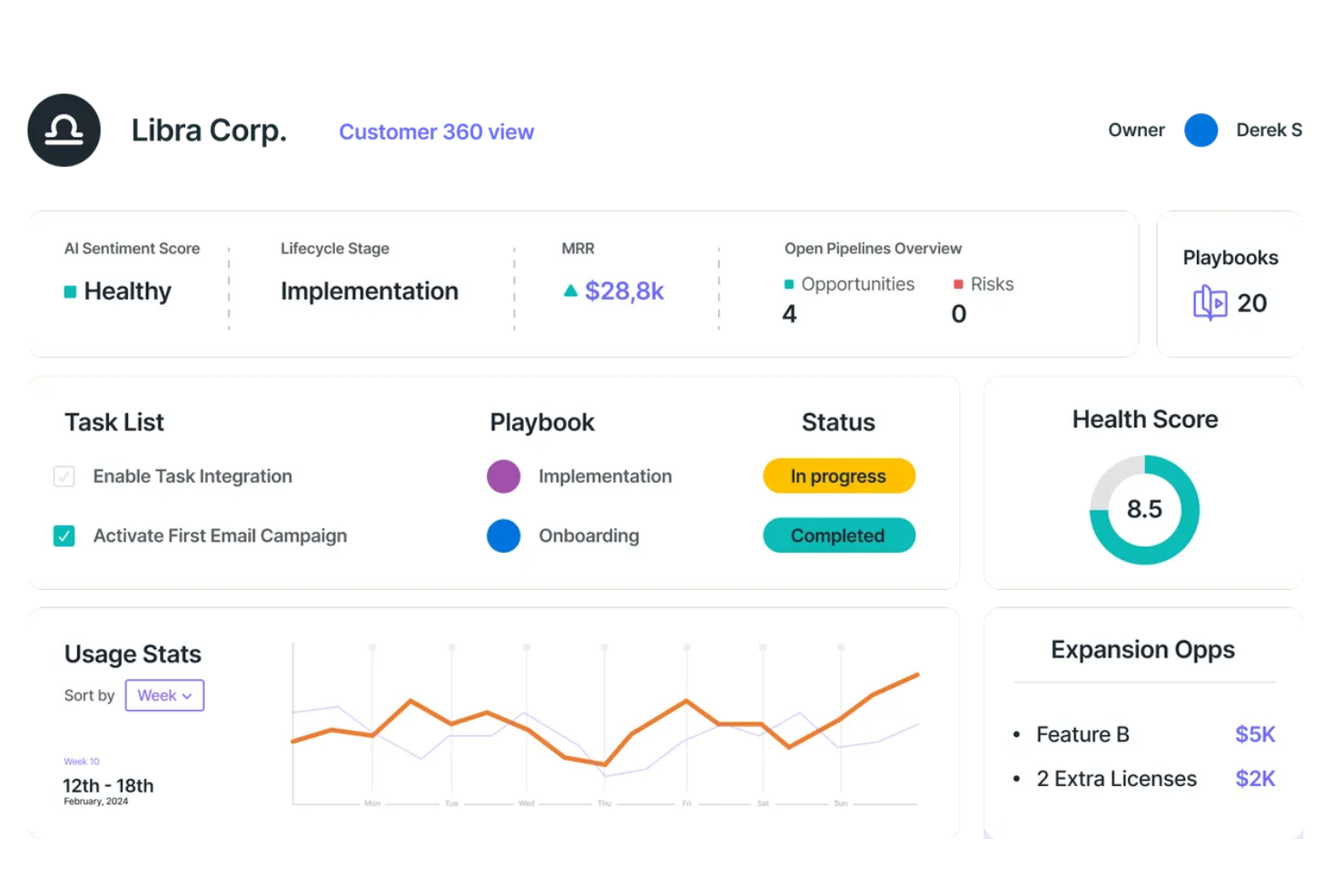
Velaris è una piattaforma completa per il successo dei clienti progettata per aiutare le aziende SaaS a prosperare, coinvolgendo proattivamente i clienti e assicurandosi che raggiungano i risultati desiderati. Lo strumento offre funzionalità come dati e analisi, automazione e collaborazione per fornire insight utili ai team di customer success.
Perché ho scelto Velaris: Velaris offre analisi potenziate dall’IA, fornendo approfondimenti dettagliati sul comportamento e la soddisfazione dei clienti. La capacità della piattaforma di consolidare tutti i dati dei clienti in un’unica interfaccia intuitiva consente alle aziende di ottenere una visione a 360 gradi dei propri clienti.
L’inclusione dell’analisi del sentiment permette inoltre alle aziende di valutare lo stato d’animo dei clienti e affrontare i problemi prima che si aggravino, garantendo un servizio clienti più personalizzato ed efficace. Inoltre, Velaris offre piani di successo e playbook personalizzabili, che standardizzano i processi e assicurano coerenza nelle interazioni con i clienti.
Caratteristiche distintive e integrazioni di Velaris:
Caratteristiche distintive includono un costruttore di automazioni, che consente alle aziende di creare workflow di automazione flessibili tramite un’interfaccia drag-and-drop intuitiva. Inoltre, l’AI Copilot sfrutta l’intelligenza artificiale per una gestione proattiva del successo del cliente, inclusa l’analisi del sentiment e la creazione automatica di attività ad alto impatto.
Le integrazioni includono Slack, Microsoft Teams, Intercom, MailChimp, Outlook, Google Drive, HubSpot, Jira e Salesforce.
Pros and Cons
Pros:
- Permette di gestire tutte le informazioni sui clienti in un unico posto
- Funzionalità di collaborazione per interagire con i clienti
- Analisi potenziate dall'IA per fornire insight di valore
Cons:
- Potrebbe offrire più integrazioni
- La configurazione iniziale può essere complessa

Ideale per sondaggi sulla soddisfazione clienti altamente personalizzabili

Formsuite è una piattaforma per sondaggi e raccolta feedback progettata per raccogliere e analizzare i dati sulla soddisfazione dei clienti. Supporta sondaggi NPS, CSAT e CES con logica condizionale, analisi delle risposte basata su intelligenza artificiale e avvisi automatici per punteggi di soddisfazione bassi.
Per chi è ideale Formsuite?
Formsuite è ideale per team di piccole e medie dimensioni che necessitano di strumenti flessibili e senza codice per misurare la soddisfazione dei clienti senza implementare una piattaforma completa di gestione dell'esperienza cliente.
Perché ho scelto Formsuite
Ho scelto Formsuite perché offre un alto grado di controllo sul design mantenendo il supporto per metriche di soddisfazione strutturate. I team possono personalizzare completamente l'aspetto dei sondaggi per adattarli al proprio brand, incluso il white-labeling nei piani più avanzati. Combinando ramificazioni condizionali e riepiloghi supportati da intelligenza artificiale, diventa semplice raccogliere dati CSAT o NPS e capire rapidamente cosa sta guidando le risposte positive o negative.
Caratteristiche principali di Formsuite
- Template NPS, CSAT & CES: Formati di sondaggi integrati per monitorare fedeltà, soddisfazione e sforzo.
- Logica condizionale: Adatta dinamicamente le domande successive in base ai punteggi di soddisfazione.
- Analisi delle risposte tramite intelligenza artificiale: Rileva automaticamente il sentimento e mette in evidenza i temi ricorrenti.
- Avvisi per detrattori: Invia notifiche quando vengono inviati punteggi di soddisfazione bassi.
Integrazioni Formsuite
Formsuite si collega con strumenti come Google Sheets, Slack, Google Analytics e Stripe. Si integra principalmente con piattaforme di terze parti tramite Zapier e supporta webhook per flussi di lavoro personalizzati.
Pros and Cons
Pros:
- La logica condizionale aumenta la pertinenza delle domande di follow-up
- Riepiloghi di sentiment assistiti da IA riducono l'analisi manuale
- Ampia personalizzazione nella progettazione dei sondaggi e opzioni white-label
Cons:
- Mancano strumenti integrati per ticketing o workflow di assistenza clienti
- Si affida a Zapier per la maggior parte delle integrazioni di terze parti

Ideale per le piccole imprese
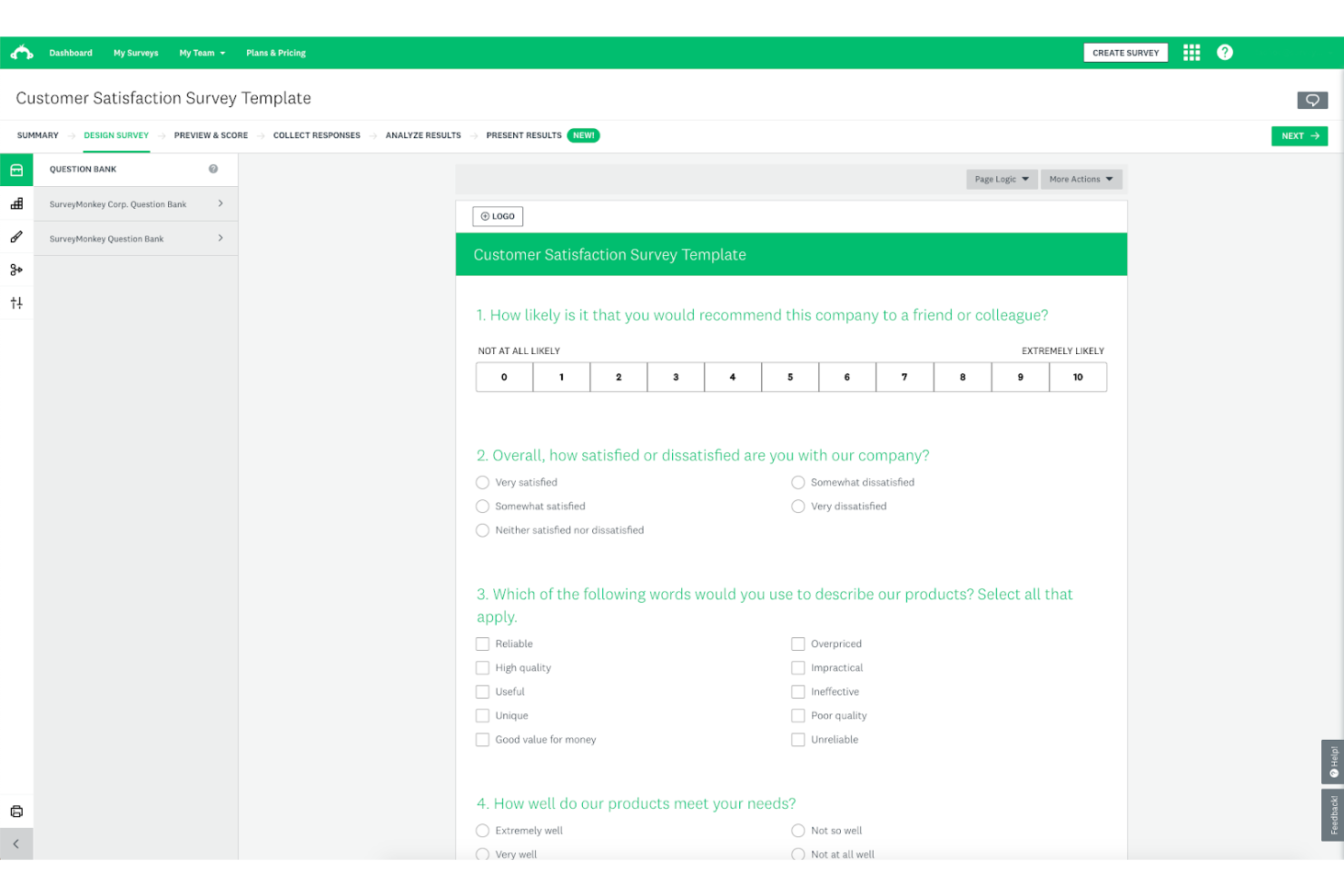
SurveyMonkey è una soluzione per la gestione di sondaggi e feedback che consente di raccogliere e interpretare i riscontri per migliorare il tuo prodotto. La piattaforma offre una vasta gamma di modelli di sondaggio, permettendoti di iniziare facilmente a raccogliere informazioni dai clienti.
Perché ho scelto SurveyMonkey: Ho scelto SurveyMonkey per la mia top 10 perché offre un piano gratuito e una selezione di modelli di sondaggio per la soddisfazione dei clienti, risultando ideale per le piccole imprese che stanno iniziando a raccogliere feedback dai clienti. La piattaforma ha un’interfaccia pulita ed è facile da usare, quindi non è necessario essere esperti di CX per individuare informazioni utili.
Nonostante il suo design giocoso, SurveyMonkey è uno strumento robusto per la raccolta di feedback che può aiutare aziende di ogni dimensione a conoscere meglio i propri utenti.
Funzionalità principali e integrazioni di SurveyMonkey:
Funzionalità principali includono sondaggi online, una valutazione del punteggio CSAT, raccolta di risposte multicanale e logiche avanzate per i sondaggi. Mi piace che SurveyMonkey permetta di esportare i risultati in formati dati compatibili con programmi di presentazione come Microsoft PowerPoint o Google Slides, perché questo rende molto più semplice per gli utenti meno esperti mostrare il proprio lavoro.
Integrazioni includono sistemi CRM, piattaforme di email marketing e soluzioni di automazione del marketing, come Salesforce, HubSpot, Microsoft Dynamics, Mailchimp, Constant Contact, Marketo, Pardot, Tableau, Power BI e Google Analytics. SurveyMonkey offre anche una REST API, così puoi configurare integrazioni personalizzate aggiuntive se necessario.
Pros and Cons
Pros:
- Strumento flessibile e personalizzabile
- Permette di invitare i membri del team ad analizzare i feedback
- Buone opzioni di personalizzazione del branding
Cons:
- I modelli di sondaggio gratuiti offrono opzioni limitate di personalizzazione del design
- La creazione di sondaggi con logiche avanzate potrebbe essere più semplice

Front
Ideale per lo smistamento di richieste clienti tra team
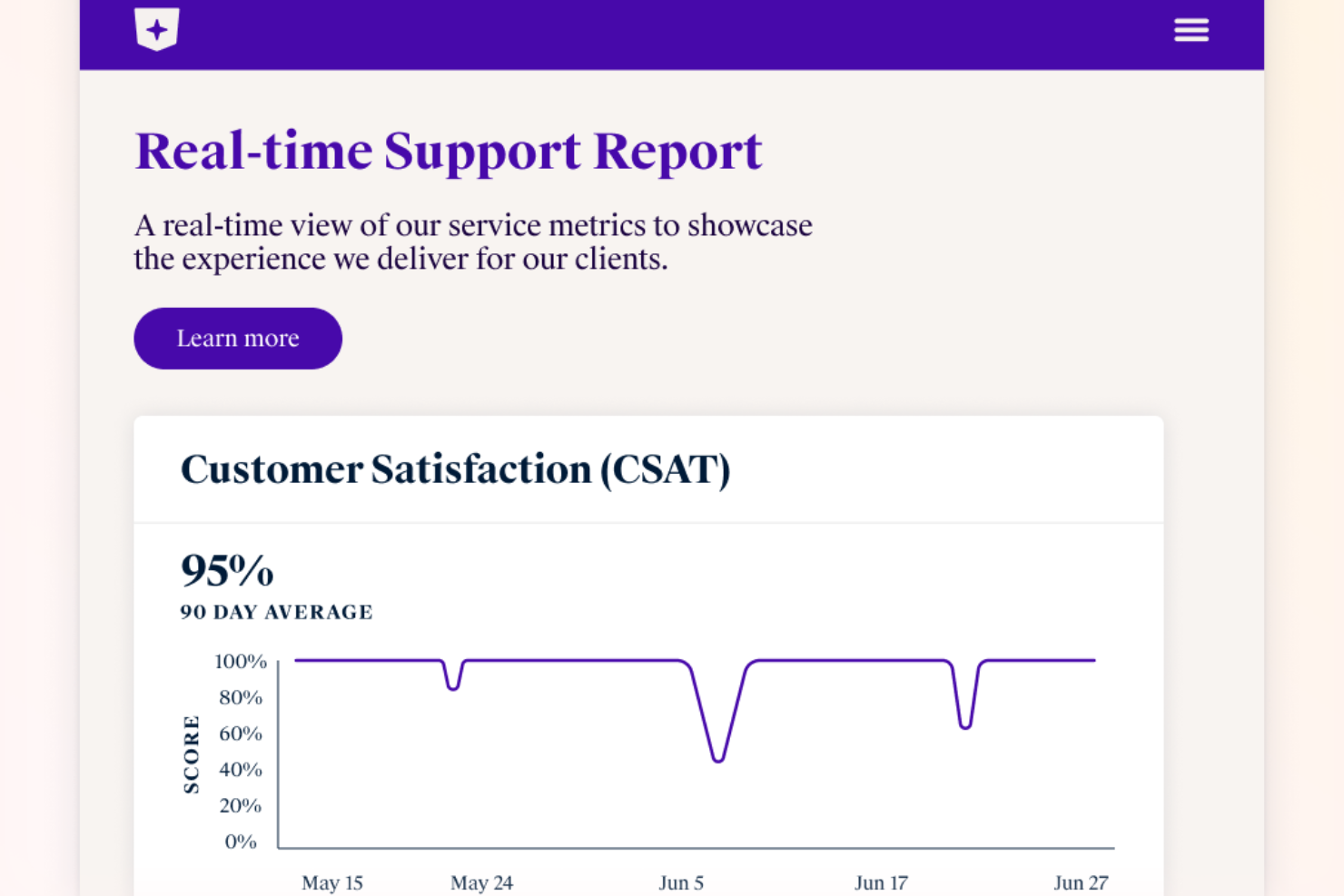
Front riunisce le conversazioni con i clienti provenienti da email, chat, SMS e altro in un unico spazio di lavoro collaborativo. Questa piattaforma è progettata per i team che devono gestire grandi volumi di richieste dei clienti mantenendo un approccio personale. Se cerchi una soluzione che aiuti il tuo team a rispondere più rapidamente e a collaborare sui problemi dei clienti, Front è costruito per soddisfare queste esigenze.
Per chi è ideale Front?
Front è una scelta valida per i team di assistenza e successo clienti in aziende di medie e grandi dimensioni che devono gestire elevate quantità di comunicazioni con i clienti in modo collaborativo.
Perché ho scelto Front
Per i team che devono smistare le richieste dei clienti tra più reparti, Front offre un vantaggio evidente. Ho scelto Front perché la sua casella di posta condivisa permette di assegnare, inoltrare ed elaborare messaggi in tempo reale, così nulla passa inosservato. Le regole e i flussi di lavoro automatici aiutano a indirizzare ogni richiesta del cliente alla persona o al team giusto in base all'argomento, all'urgenza o a criteri personalizzati. Questo approccio mantiene tutti allineati e garantisce risposte tempestive e accurate ai clienti, anche quando le richieste coinvolgono più team.
Funzionalità principali di Front
Altre funzionalità di Front aiutano i team a offrire esperienze coerenti e di alta qualità ai clienti:
- Analisi e reportistica: Monitora i tempi di risposta, i volumi delle conversazioni e le prestazioni del team con dashboard integrate e report esportabili.
- Cronologia messaggi cliente: Vedi una cronologia completa di ogni interazione con il cliente su tutti i canali, così il tuo team ha sempre il contesto a disposizione.
- Commenti interni: Collabora con i colleghi sui messaggi dei clienti tramite commenti privati che restano nascosti ai clienti.
- Integrazione con knowledge base: Accedi e condividi articoli di supporto direttamente dalla casella di posta per risposte rapide e accurate.
Integrazioni di Front
Le integrazioni includono Salesforce, HubSpot, Asana, Slack, Microsoft Dynamics 365, Aircall, Twilio, ClickUp, Zendesk Sell, GitHub, Zoom e molti altri.
Pros and Cons
Pros:
- Strumenti integrati per sondaggi CSAT e analisi
- Casella di posta multicanale per email, SMS e chat
- Commenti interni per discussioni riservate in team
Cons:
- Ritardi occasionali nella sincronizzazione con CRM esterni
- Manca una funzione di chiamata vocale integrata
Altre opzioni
Ecco alcune altre ottime soluzioni per la soddisfazione dei clienti che ho incontrato durante la mia ricerca. Anche se non sono rientrate nella mia top 10, ti consiglio di valutarle comunque:
- Pendo
Ideale per la valutazione della soddisfazione del cliente in-app
- Totango
Ideale per scale-up SaaS
- Qualtrics XM Frontline Digital
Ideale per il rilevamento automatico degli abbandoni
- Delighted
Ideale per sondaggi CSAT mobile-first
- GetFeedback
Ideale per il monitoraggio dei feedback
- Simplesat
Ideale per dashboard facili da seguire
- Kimola Analytics
Ideale per raccogliere feedback esterni
- InputKit
Ideale per gestire i clienti insoddisfatti
- Creatio CRM
Ideale per il feedback clienti automatizzato
- Hiver
Ideale per l'integrazione di sondaggi CSAT
- LiveAgent
Ideale per la comunicazione multicanale
- Sogolytics
Ideale per dashboard e analisi CSAT
- Product Fruits
Ideale per sondare gli utenti direttamente dalla tua app o sito web
- Nextiva
Ideale per l’analisi del sentiment dei clienti
- Zendesk
Ideale per il monitoraggio CSAT integrato


Come Valuto i Software per la Soddisfazione del Cliente
Valuto questi strumenti su due livelli: requisiti di base come la distribuzione NPS/CSAT e gli avvisi di chiusura del ciclo, e differenziatori che distinguono le piattaforme VoC dedicate dagli strumenti di sondaggio di base.
Funzionalità Principali (Requisiti Minimi per Questa Lista)
Quando seleziono gli strumenti per la mia lista, li classifico ciascuno su una scala da 0 (non offre la funzionalità) a 5 (eccelle in quest'area) per ogni funzionalità principale elencata di seguito. Poi, calcolo il punteggio totale dello strumento in percentuale. Ogni strumento deve raggiungere un punteggio totale minimo del 75% per essere considerato per l'inclusione.
- Creazione e Distribuzione dei Sondaggi: Verifico se lo strumento supporta sondaggi CSAT, NPS e CES su canali come email, in-app, SMS e web—non solo un metodo di consegna.
- Raccolta Centralizzata dei Feedback: Ogni strumento dovrebbe raccogliere feedback da più fonti in un unico posto, così che i team non debbano passare tra risposte ai sondaggi, chat e ticket di supporto.
- Analisi del Sentimento e dei Testi: Cerco un'analisi automatica delle risposte aperte, come la categorizzazione dei temi tramite AI tra migliaia di commenti post-interazione invece della revisione manuale.
- Dashboard e Reportistica: Dashboard in tempo reale che permettono di filtrare per segmento, intervallo di tempo o canale sono importanti qui—le sole esportazioni statiche in CSV non bastano per i leader CX che vogliono monitorare i trend.
- Workflow di Follow-Up a Ciclo Chiuso: Valuto se la piattaforma attiva avvisi o indirizza i casi quando i punteggi diminuiscono, affinché una risposta negativa dopo l'onboarding raggiunga rapidamente il team giusto.
- Integrazione con la CX Stack: Lo strumento dovrebbe collegarsi con il CRM, helpdesk e piattaforme di comunicazione per mantenere i dati di soddisfazione dove il tuo team lavora già.
Una volta che ho una lista di strumenti che soddisfano i requisiti, considero ciò che rende ogni piattaforma unica.
Fattori Differenzianti (Cosa Distingue i Fornitori)
Ecco come confronto i vari fornitori:
Caratteristiche Distintive
Cerco riepiloghi basati su AI che evidenziano i temi tra migliaia di risposte, facendo risparmiare ore di etichettatura manuale agli analisti VoC. La mappatura dei feedback in base al percorso è un altro elemento distintivo, che permette di attivare sondaggi in specifici touchpoint come dopo l'onboarding o dopo una chiamata di rinnovo. Anche i dati di benchmarking sono importanti. Gli strumenti che offrono confronti con il settore o i peer danno ai responsabili CX il contesto necessario per presentare i trend NPS o CSAT agli stakeholder con valore reale.
Oltre le Funzionalità
La conformità normativa è importante quando si raccolgono feedback che includono dati personali. Verifico la conformità a GDPR e SOC 2, oltre a opzioni configurabili di residenza dati per i team che operano in più regioni. La velocità di implementazione è altrettanto importante—valuto se la piattaforma offre template di sondaggi predefiniti e supporto per l'onboarding per avviare il programma in poche settimane, non mesi. Anche la trasparenza dei prezzi svolge un ruolo, dato che i costi basati sulle risposte possono crescere rapidamente per i team di supporto ad alto volume.
Usabilità
Migliorare la soddisfazione dei clienti non è affatto semplice, ma questo non significa che anche l'app su cui fai affidamento debba essere difficile da usare. Ho selezionato software facili da utilizzare, così tu e il tuo team potete raccogliere e utilizzare i feedback senza intoppi.
Integrazioni software
È quasi impossibile valutare la soddisfazione dei tuoi clienti affidandosi ai dati forniti da un singolo strumento. Per questo motivo, le soluzioni che ho scelto offrono diverse integrazioni e l'accesso alle API, così puoi includerle nell'ecosistema delle tue app.
Report e insight utilizzabili
Avere uno strumento eccellente nella raccolta dei dati sui clienti è un buon punto di partenza, ma non è sufficiente per una valutazione accurata della soddisfazione dei clienti. Tuttavia, gli strumenti che ho incluso nella mia recensione prendono i tuoi dati e li interpretano in report chiari, così puoi ottenere insight utilizzabili e iniziare rapidamente a implementare soluzioni.
Analisi del sentiment
Riuscire a rilevare il sentiment alla base del feedback di un utente può essere di grande aiuto per ridurre i tassi di abbandono, perché ti consente di individuare rapidamente i clienti insoddisfatti e adottare azioni per risolvere la loro situazione.
Prezzi
Il software per la soddisfazione dei clienti è disponibile in diverse fasce di prezzo. Tuttavia, ho incluso solo strumenti che ritengo possano aiutarti a raggiungere i tuoi obiettivi e offrirti un buon ritorno sull'investimento.
Domande frequenti
Vuoi saperne di più sul software per la soddisfazione dei clienti? Ecco alcune domande comuni che le persone pongono, con relative risposte, naturalmente:
Qual è la differenza tra il software per la soddisfazione dei clienti, il software per l'esperienza dei clienti e il software per il successo dei clienti?
Non si può negare che ci sia una certa sovrapposizione tra questi tipi di soluzioni. Tuttavia, la differenza principale sta in ciò che sono progettati per misurare:
- Il software per la soddisfazione dei clienti è progettato per misurare quanto la tua base di utenti è soddisfatta del tuo prodotto mentre lo utilizza.
- Il software per l’esperienza dei clienti è progettato per misurare le sensazioni dell’utente riguardo al tuo prodotto lungo tutto il percorso del cliente, dal momento in cui viene a conoscenza della tua soluzione fino all’acquisizione, all’onboarding, all’utilizzo e all’eventuale abbandono o trasformazione in sostenitore del prodotto.
- Il software per il successo dei clienti è progettato per misurare quanto bene i tuoi clienti riescono a utilizzare il tuo prodotto per raggiungere i propri obiettivi: si tratta quindi più che altro di misurare se la tua soluzione è un buon abilitatore del successo dei clienti (da qui il nome).
Quali metriche chiave dovresti monitorare per controllare la soddisfazione dei clienti?
Sebbene sia possibile monitorare diverse metriche relative alla soddisfazione dei clienti, non puoi sbagliare se ti attieni ai KPI utilizzati dalla maggior parte dei team che si occupano del successo dei clienti:
- Punteggio di soddisfazione del cliente (CSAT)
- Net Promoter Score (NPS)
- Tasso di abbandono dei clienti
- Valore del ciclo di vita del cliente (CLV)
Come si conduce un audit dell'esperienza dei clienti?
Condurre un audit dell’esperienza dei clienti è un processo complesso che prevede diversi passaggi, tra cui:
- Definire i tuoi obiettivi: dovresti avere obiettivi specifici in mente, come ridurre l’abbandono o aumentare il numero di promotori.
- Raccogliere i dati: invia sondaggi, intervista i tuoi clienti, monitora le parole chiave sui social media e così via, per raccogliere una grande quantità di dati sugli utenti.
- Analizzare i dati: cerca tendenze e valori anomali. Scopri cosa si aspettano i tuoi clienti dal tuo prodotto e dove non riesci a fornire valore.
- Scegliere le aree di miglioramento: nessuna azienda al mondo può risolvere tutto in una volta. Seleziona le aree di miglioramento che vuoi affrontare in base alle tue esigenze: rilevanza, limiti di tempo, budget, disponibilità del team e così via.
- Misurare i risultati: tieni traccia dell’effetto dei cambiamenti sull’esperienza dei clienti e prendi appunti dettagliati.
- Rivalutare: un singolo audit dell’esperienza dei clienti è prezioso, ma il suo valore diminuisce nel tempo. Dovresti sempre rivalutare la situazione e trovare nuove opportunità di miglioramento attraverso ulteriori audit.
Altre recensioni di software incentrati sul cliente
Ecco altri tipi di software incentrati sul cliente che potresti prendere in considerazione se vuoi davvero migliorare la soddisfazione dei tuoi clienti:
- Software per la gestione dell'esperienza dei clienti
- Software per il successo dei clienti
- Software per il feedback dei clienti
- Piattaforme di intelligence sui clienti
- Piattaforme per il coinvolgimento dei clienti
Considerazioni finali
Il software per la soddisfazione dei clienti può aiutarti a comprendere più a fondo i tuoi clienti, il che a sua volta può portare a una base di utenti più soddisfatta e a un prodotto più redditizio. Come ha affermato Bernard Marr, autore di bestseller a livello internazionale e consulente strategico aziendale e tecnologico per governi e aziende:
“La tecnologia dei dati oggi disponibile offre alle aziende capacità senza precedenti quando si tratta di comprendere i propri clienti. Combinando dati transazionali, demografici e attitudinali provenienti da fonti interne ed esterne, possiamo prevedere con maggiore precisione ciò che desiderano i clienti e assicurarci di trovarci nel posto giusto al momento giusto per fornirglielo.”
Iscriviti alla newsletter di CX Lead se vuoi ricevere direttamente nella tua casella di posta suggerimenti su come ottimizzare il tuo prodotto per la soddisfazione dei clienti.