

I 10 migliori software VoIP nel 2026

Elenco dei migliori software VoIP


Il software VoIP consente al tuo team di effettuare e ricevere chiamate tramite Internet anziché attraverso le linee telefoniche tradizionali, offrendoti maggiore flessibilità e controllo sulle comunicazioni aziendali. Se stai cercando il miglior software VoIP, probabilmente vuoi migliorare la qualità delle chiamate, supportare il lavoro da remoto o unificare le interazioni con i clienti tra diversi canali.
Con così tante opzioni disponibili, è difficile sapere quale piattaforma soddisferà davvero le tue esigenze e crescerà insieme alla tua azienda. In questa guida troverai una selezione dei migliori software VoIP, ciò che distingue ciascuno di essi e come possono aiutarti a offrire comunicazioni affidabili e moderne al tuo team e ai tuoi clienti.
Perché fidarsi dei nostri consigli sui software
Il nostro team testa e recensisce software dal 2012. In quanto leader CX noi stessi, sappiamo quanto sia difficile — e importante — scegliere il software giusto.
Per questa guida, abbiamo valutato gli strumenti attraverso test pratici e ricerche indipendenti, assegnando un punteggio agli strumenti in base ai nostri criteri di selezione.
Le nostre recensioni riflettono il nostro giudizio editoriale umano, non un discorso di vendita.
Riepilogo dei migliori software VoIP
Questa tabella comparativa riassume i dettagli dei prezzi delle mie migliori selezioni di software VoIP, per aiutarti a trovare quello più adatto al tuo budget e alle esigenze della tua azienda.
| Tool | Best For | Trial Info | Price | ||
|---|---|---|---|---|---|
| 1 | Ideale per oltre 100 integrazioni CRM e helpdesk integrate | Prova gratuita di 14 giorni | Da $25/utente/mese (fatturazione annuale) | Website | |
| 2 | Ideale per accesso istantaneo alle chiamate dal browser | Demo gratuita disponibile | Da $15/mese (fatturato annualmente) | Website | |
| 3 | Ideale per conformità e registri di audit a livello aziendale | Prova gratuita di 14 giorni + demo gratuita | Da $80/utente/mese (fatturazione annuale) | Website | |
| 4 | Ideale per workflow aziendali con oltre 500 integrazioni | Demo gratuita E prova gratuita di 14 giorni | Da $54/organizzatore/mese (fatturato annualmente) | Website | |
| 5 | Ideale per API di comunicazione personalizzabili | Non disponibile | Da $13.99/linea/mese (fatturato annualmente) | Website | |
| 6 | Ideale per comunicazioni sicure a prova di settore sanitario | Demo gratuita disponibile | Prezzo su richiesta | Website | |
| 7 | Il migliore con note AI integrate per approfondimenti sulle chiamate | Prova gratuita di 7 giorni + demo gratuita disponibile | Da $16/utente/mese (fatturato annualmente) | Website | |
| 8 | Ideale per interazioni unificate con i clienti su tutti i canali | Demo gratuita disponibile | Da $15/utente/mese (fatturato annualmente) | Website | |
| 9 | Ideale per il coaching AI in tempo reale durante le chiamate live | Demo gratuita | Da $30/licenza (fatturazione annuale) | Website | |
| 10 | Ideale per integrazione Microsoft Teams con copertura globale | Non disponibile | Prezzo su richiesta | Website |

Recensioni dei migliori software VoIP
Di seguito trovi i miei riepiloghi dettagliati dei software VoIP inclusi nella mia selezione. Le mie recensioni offrono un’analisi approfondita delle funzionalità, delle integrazioni e dei migliori casi d’uso di ciascuna piattaforma, per aiutarti a trovare quella più adatta a te.

Ideale per oltre 100 integrazioni CRM e helpdesk integrate
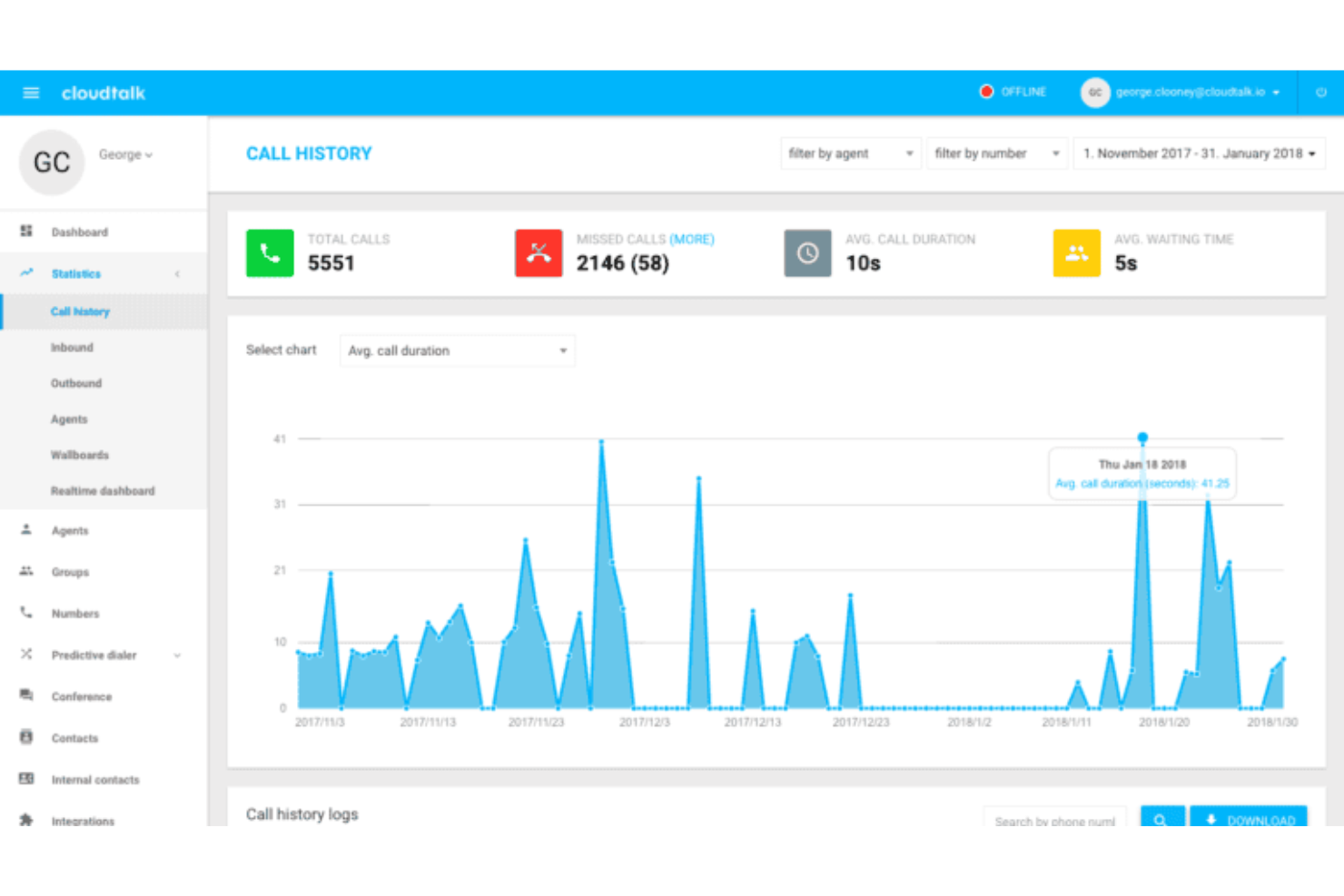
CloudTalk è una piattaforma VoIP basata su cloud per team di vendita e supporto che offre instradamento chiamate, analisi, registrazione delle chiamate e funzionalità avanzate di composizione automatica.
Per chi è ideale CloudTalk?
Team di vendita e supporto in aziende di medie o grandi dimensioni che necessitano di integrazioni avanzate con CRM e helpdesk.
Perché ho scelto CloudTalk
CloudTalk si guadagna il suo posto tra i migliori della mia lista perché posso collegarlo direttamente a oltre 100 CRM e strumenti di helpdesk senza middleware aggiuntivi. Utilizzo la sincronizzazione delle attività delle chiamate in tempo reale con Salesforce e HubSpot per mantenere aggiornati i dati dei clienti. Il mio team si affida anche alla creazione automatica di ticket su Zendesk e Freshdesk, che ci fa risparmiare tempo e riduce l'inserimento manuale dei dati.
Funzionalità principali di CloudTalk
- Compositore intelligente: compila automaticamente elenchi di chiamate dal tuo CRM o helpdesk.
- Designer del flusso di chiamata: ti permette di creare flussi di instradamento delle chiamate personalizzati con un editor visuale.
- Trascrizione dei messaggi vocali: converte i messaggi vocali in testo per una rapida revisione.
- Etichettatura delle chiamate: consente di classificare le chiamate per un monitoraggio e una reportistica più semplice.
Integrazioni CloudTalk
CloudTalk offre oltre 35 integrazioni native, tra cui Salesforce, HubSpot, Zendesk, Freshdesk, Pipedrive, Intercom, Zoho CRM, Microsoft Dynamics 365, Slack e Google Workspace. È disponibile un'API per integrazioni personalizzate.
Pros and Cons
Pros:
- Potenti strumenti di composizione automatica per i team di vendita
- Flussi di chiamate personalizzati con interfaccia visiva del builder
- Sincronizzazione profonda con CRM per i flussi di lavoro di vendita e supporto
Cons:
- L’esperienza dell’app mobile non è equivalente a quella su desktop
- Nessuna funzione nativa di comunicazione video

Ideale per accesso istantaneo alle chiamate dal browser
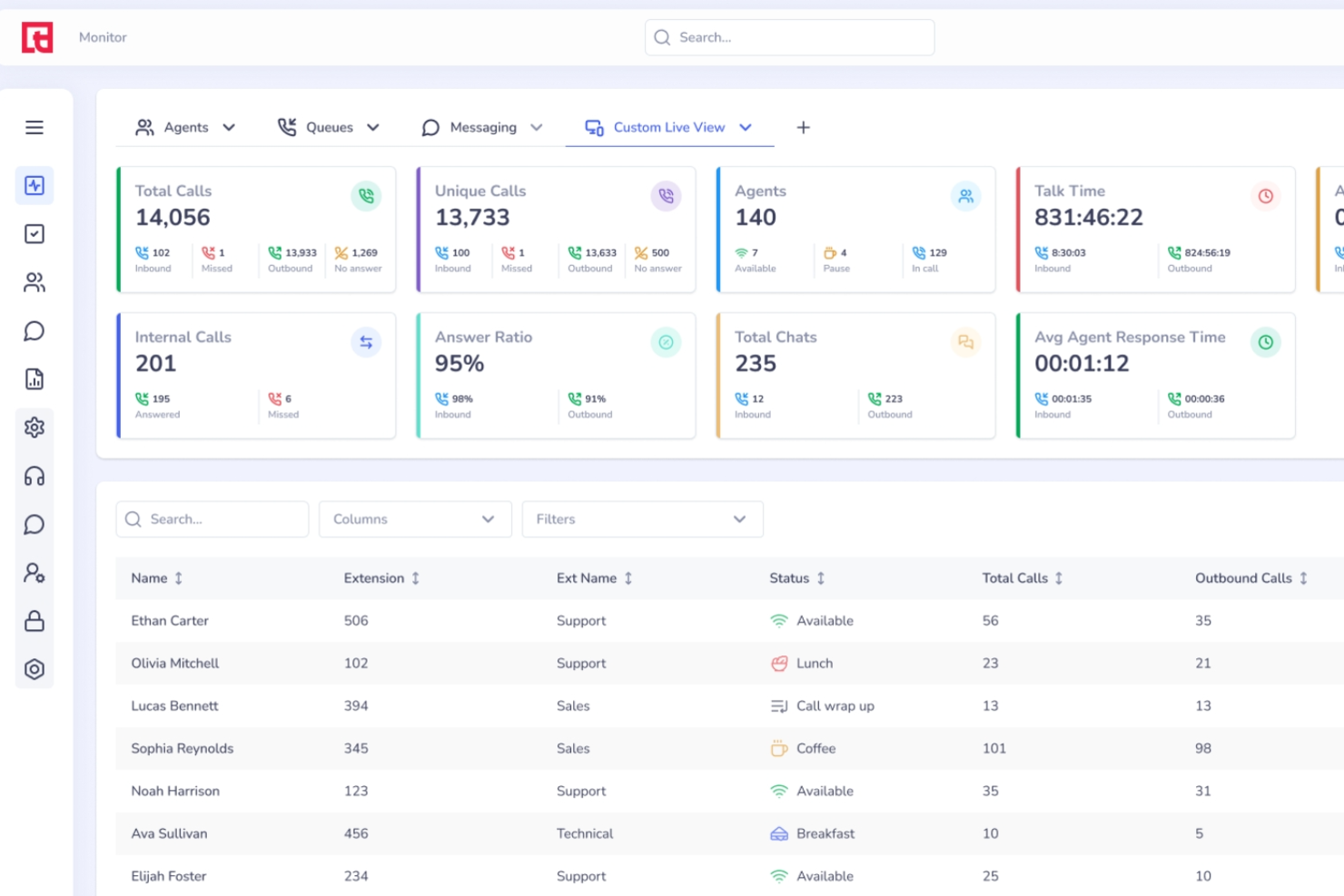
Squaretalk è una piattaforma basata su cloud per contact center VoIP che combina chiamate vocali in entrata e in uscita, un webphone direttamente nel browser, composizione predittiva, IVR, messaggistica omnicanale e analisi delle chiamate basate su intelligenza artificiale.
Per chi è più adatto Squaretalk?
Squaretalk è una soluzione ideale per i team di contact center che gestiscono grandi volumi di chiamate in entrata e in uscita in più regioni o lingue.
Perché ho scelto Squaretalk
Ho incluso Squaretalk tra le mie scelte principali perché il Webphone integrato consente agli operatori di effettuare e ricevere chiamate VoIP direttamente dal browser, senza necessità di installare app desktop o utilizzare telefoni hardware. Gli operatori dispongono di una rubrica e di una lista di chiamata rapida direttamente nell'interfaccia, in modo che la mia squadra possa iniziare a telefonare senza alcun ostacolo nella configurazione. Mi piace anche che l'audio HD cristallino sia lo standard, caratteristica importante quando il tuo team gestisce decine di chiamate al giorno da una finestra del browser.
Funzionalità principali di Squaretalk
- Compositore predittivo: compone automaticamente più numeri simultaneamente e collega gli operatori solo quando risponde una persona reale.
- Risposta vocale interattiva (IVR): consente di creare menù telefonici multilivello che indirizzano i chiamanti prima ancora che raggiungano un operatore.
- Suite per il monitoraggio delle chiamate: i supervisori possono ascoltare le chiamate in diretta, sussurrare agli operatori o intervenire direttamente nella conversazione.
- Numeri telefonici virtuali: ottieni numeri locali in oltre 150 Paesi per mostrare il caller ID specifico della regione nelle chiamate in uscita.
Integrazioni Squaretalk
Squaretalk offre integrazioni native con Zoho Phonebridge, Freshworks e Pipedrive, insieme alla piattaforma di automazione Lynx, che sincronizza dati tra oltre 100 app, tra cui HubSpot, Zendesk, monday.com e molte altre. È disponibile un'API per integrazioni personalizzate, e puoi anche creare nodi personalizzati per workflow proprietari.
Pros and Cons
Pros:
- Numeri locali disponibili in oltre 150 Paesi
- Il compositore predittivo aumenta i tassi di collegamento nelle chiamate in uscita
- Trascrizione AI in oltre 100 lingue
Cons:
- Nessun'app softphone nativa per macOS
- I costi per minuto non sono indicati in anticipo
New Product Updates from Squaretalk
Squaretalk Adds TradeCore Integration for Brokerage Workflows
Squaretalk adds a TradeCore integration that connects customer conversations with BrokerIQ CRM workflows. This helps brokerage teams trigger AI-driven follow-ups, tasks, and other actions from calls and messages. For more information, visit Squaretalk’s official site.
 .
.
Dialpad
Ideale per conformità e registri di audit a livello aziendale
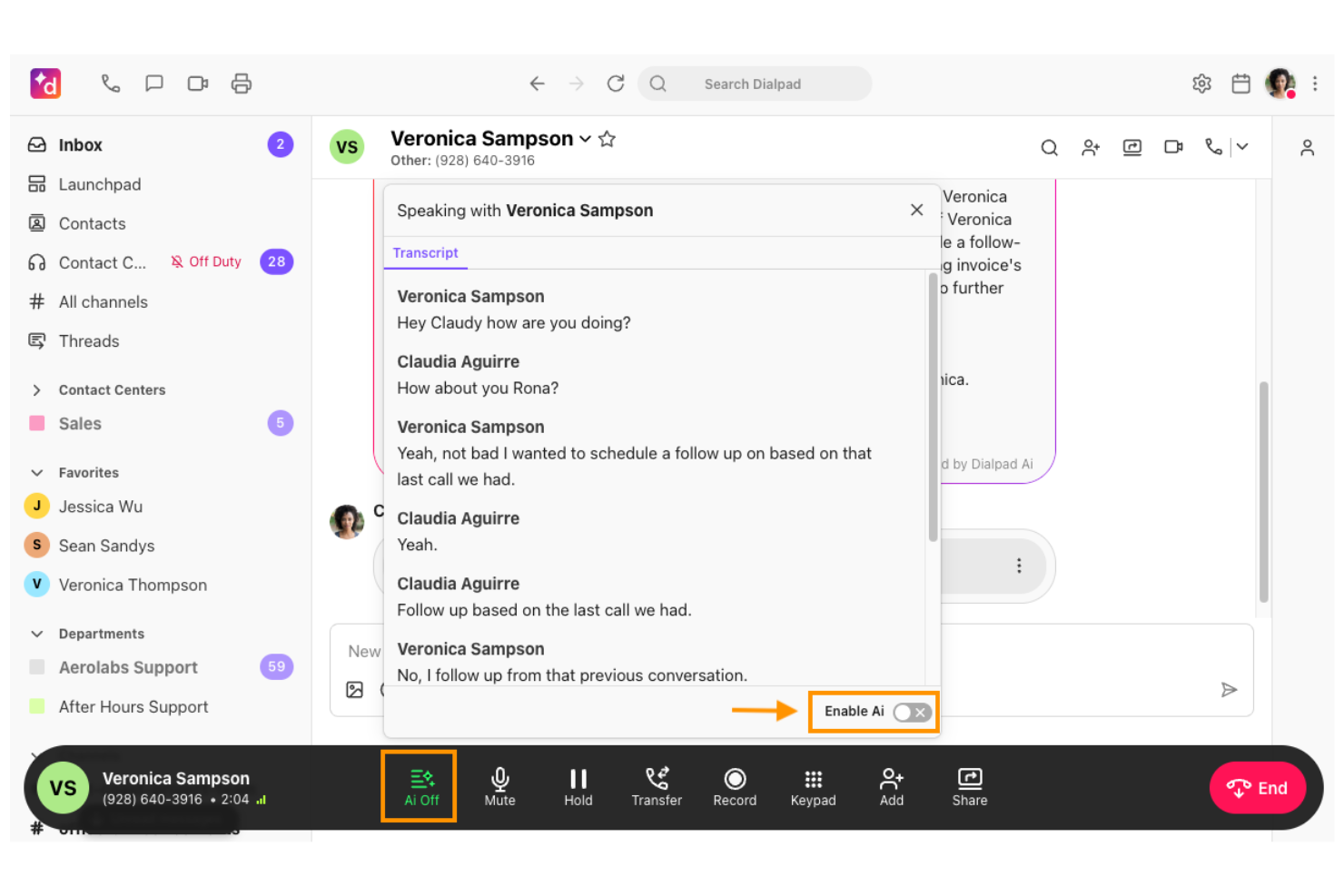
Dialpad è una piattaforma VoIP basata su cloud che unisce chiamate aziendali, SMS, videoriunioni, trascrizioni alimentate da IA e controlli amministrativi avanzati per una comunicazione unificata.
A chi è consigliato Dialpad?
Aziende e settori regolamentati che necessitano di conformità avanzata, registri di audit e comunicazioni unificate tra team distribuiti.
Perché ho scelto Dialpad
Ho scelto Dialpad tra i migliori perché posso accedere a registri dettagliati di audit e controlli di conformità che rispondono agli standard aziendali. Il mio team utilizza il monitoraggio delle chiamate in tempo reale e le politiche di conservazione per supportare i flussi di lavoro regolamentati. Mi piace anche la trascrizione integrata alimentata da IA per una registrazione accurata delle chiamate.
Funzionalità principali di Dialpad
- Risponditore automatico multilivello: Instrada automaticamente le chiamate sulla base di menu personalizzabili.
- Trascrizione della segreteria telefonica: Trasforma i messaggi vocali in testo ricercabile in tempo reale.
- Call flip: Passa le chiamate in corso tra dispositivi senza interruzione.
- Qualità vocale HD: Garantisce audio nitido per tutte le chiamate VoIP.
Integrazioni Dialpad
Dialpad offre integrazioni native con Salesforce, HubSpot, Zendesk, Microsoft 365, Google Workspace, Slack, Okta e ServiceNow, e fornisce un'API per integrazioni personalizzate.
Pros and Cons
Pros:
- Trascrizione AI integrata con insight sulle chiamate in tempo reale
- Tracciabilità dettagliata per ambienti regolamentati
- Monitoraggio chiamate in diretta con capacità di coaching
Cons:
- Le funzionalità avanzate sono disponibili solo nei piani di livello superiore
- La personalizzazione delle analisi è limitata per esigenze di reportistica complesse

Ideale per workflow aziendali con oltre 500 integrazioni
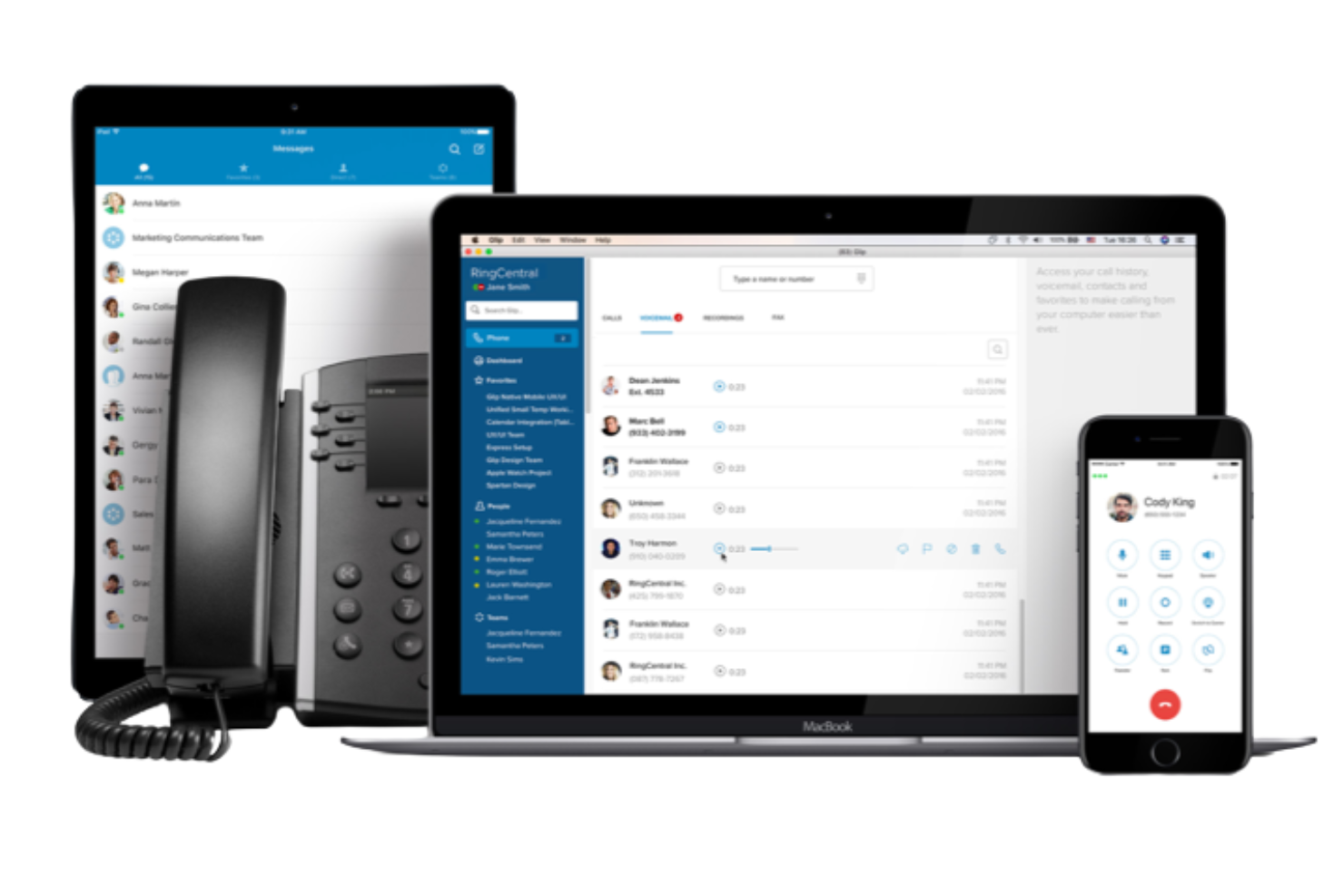
RingCentral è una piattaforma VoIP basata su cloud per le aziende che riunisce chiamate, videoconferenze, messaggistica di gruppo e fax in un unico spazio di lavoro unificato.
Per chi è ideale RingCentral?
Grandi imprese e team IT che necessitano di una piattaforma VoIP con ampie opzioni di integrazione per flussi di lavoro complessi.
Perché ho scelto RingCentral
Ho scelto RingCentral come uno dei migliori perché posso collegarlo a oltre 500 app aziendali, cosa rara nel settore VoIP. Il mio team utilizza le sue integrazioni con Salesforce e Microsoft 365 per sincronizzare i dati delle chiamate e automatizzare i follow-up. Inoltre, mi piace come l'API aperta di RingCentral consenta di costruire flussi di lavoro personalizzati per processi aziendali unici.
Caratteristiche principali di RingCentral
- Risponditore automatico multilivello: Instrada automaticamente le chiamate in arrivo al reparto o all'interno corretto.
- Voce e videoconferenze HD: Organizza chiamate vocali e riunioni video ad alta qualità da qualsiasi dispositivo.
- Messaggistica di gruppo: Chatta con i colleghi, condividi file e crea conversazioni di gruppo all'interno della piattaforma.
- Registrazione delle chiamate: Registra le chiamate su richiesta o automaticamente per esigenze di formazione o conformità.
Integrazioni RingCentral
RingCentral offre oltre 500 integrazioni predefinite, incluse integrazioni native con Salesforce, Google Workspace, Microsoft Teams, Jira e Shadow All-In-One Analytics. È disponibile un'API per integrazioni personalizzate.
Pros and Cons
Pros:
- Si integra nativamente con le principali piattaforme aziendali
- Offre opzioni avanzate di instradamento chiamate e IVR
- Supporta videoconferenze HD e webinar
Cons:
- Occasionalmente si possono verificare problemi di qualità delle chiamate
- La dashboard di amministrazione può sembrare complessa inizialmente

Vonage
Ideale per API di comunicazione personalizzabili
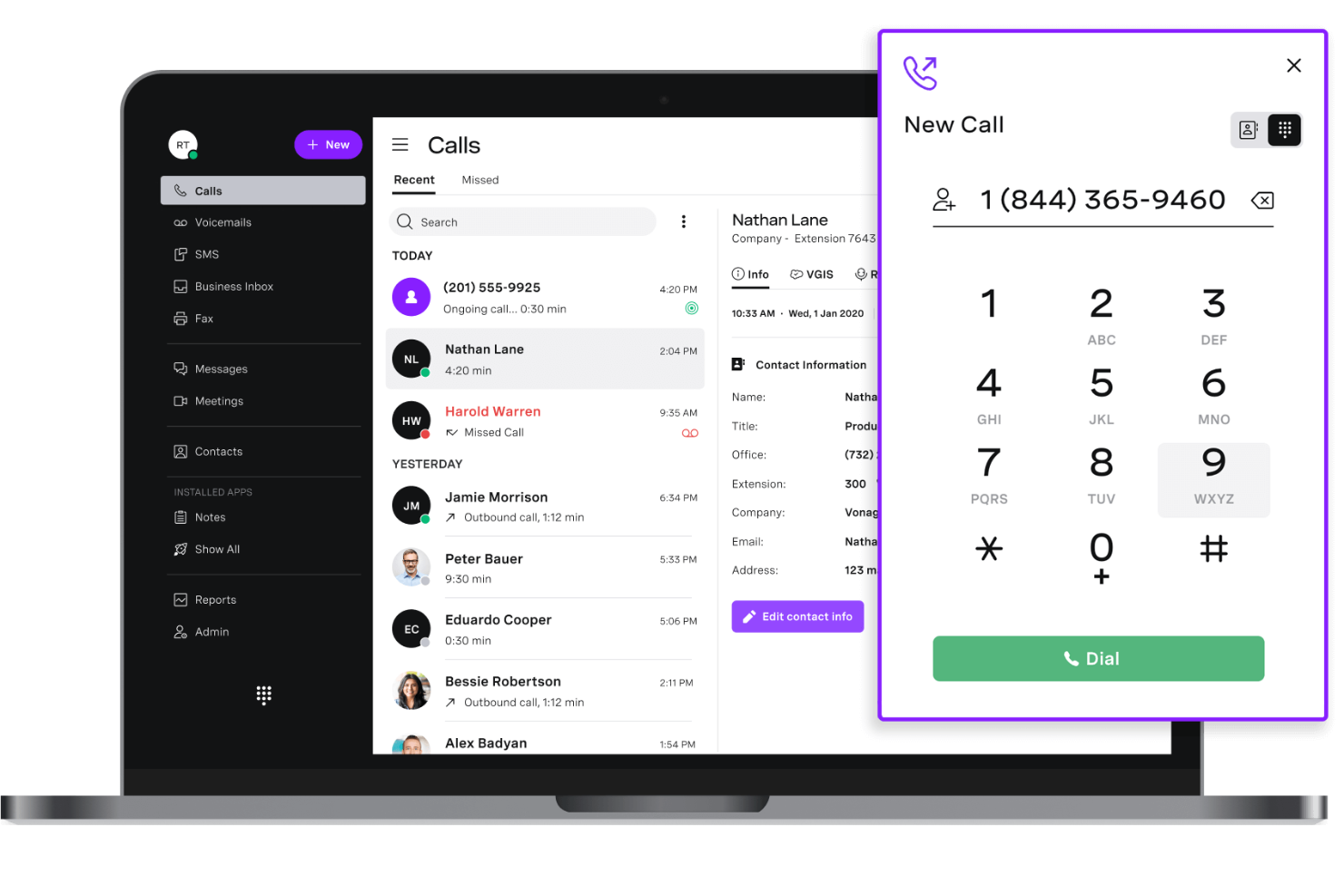
Vonage è una piattaforma di comunicazione basata su cloud che offre API programmabili per voce, SMS, video e messaggistica per creare soluzioni personalizzate di VoIP e comunicazioni unificate.
Per chi è più adatto Vonage?
Sviluppatori e team di prodotto in aziende SaaS che hanno bisogno di creare flussi di comunicazione personalizzati utilizzando le API.
Perché ho scelto Vonage
Ho scelto Vonage tra i migliori perché posso usare le sue API programmabili per costruire flussi personalizzati di voce, SMS e video per la mia azienda. Mi piace poter integrare chiamate vocali in tempo reale nelle mie app e automatizzare l'instradamento delle chiamate o le notifiche. Il mio team utilizza WebRTC e SIP trunking di Vonage per collegare sistemi cloud e on-premise senza essere vincolati a un'unica interfaccia.
Funzionalità principali di Vonage
- Portabilità dei numeri: Porta numeri di telefono esistenti sulla piattaforma Vonage.
- Registrazione chiamate: Registra chiamate in entrata e in uscita per conformità o formazione.
- Risposta vocale interattiva (IVR): Crea menu automatici per instradare le chiamate.
- Gestione code di chiamata: Metti le chiamate in arrivo in una coda fino a quando un operatore non è disponibile.
Integrazioni Vonage
Vonage offre integrazioni native con Salesforce, Microsoft Teams, Zendesk, HubSpot, Microsoft Dynamics 365, G Suite, Slack, ServiceNow, Bullhorn e Zoho CRM. È disponibile una API per integrazioni personalizzate.
Pros and Cons
Pros:
- API flessibili per creare flussi di comunicazione su misura
- Supporta SIP trunking per configurazioni cloud ibride
- Scalabilità adatta per team orientati al prodotto e sviluppatori
Cons:
- Richiede competenze tecniche per sfruttare a pieno la piattaforma
- L'interfaccia utente è meno intuitiva per i team non tecnici

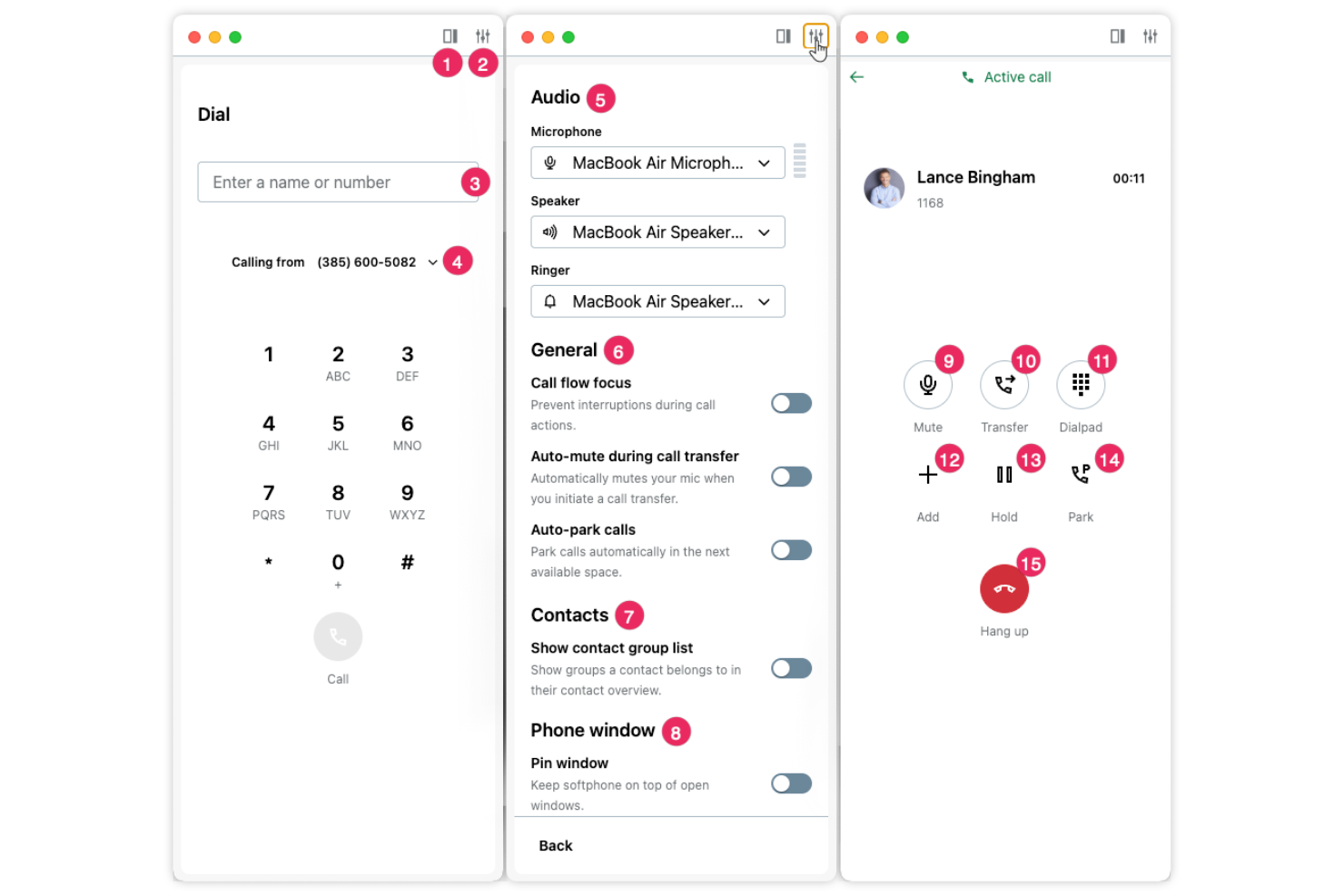
GoTo Connect è una piattaforma VoIP basata su cloud che combina sistemi telefonici aziendali, videoconferenze, SMS e messaggistica di gruppo con avanzate funzionalità di instradamento delle chiamate e gestione dei dispositivi.
Per Chi è GoTo Connect?
Le organizzazioni sanitarie e le cliniche necessitano di comunicazioni sicure e conformi alla normativa HIPAA tramite telefono, video e messaggistica.
Perché Ho Scelto GoTo Connect
Ho scelto GoTo Connect tra i migliori perché ho bisogno di una piattaforma VoIP progettata per la conformità sanitaria: il mio team si affida alle sue funzionalità di sicurezza pronte per HIPAA nelle comunicazioni con i pazienti. Mi piace poter configurare visite video sicure e messaggistica criptata tra personale e pazienti. Uso anche l'instradamento delle chiamate e la registrazione dei log di controllo per aiutarci a soddisfare i requisiti normativi senza lavoro manuale aggiuntivo.
Caratteristiche Principali di GoTo Connect
- Risponditore automatico: Instrada automaticamente le chiamate in entrata in base all'input del chiamante.
- Registrazione delle chiamate: Registra le chiamate per fini formativi o di conformità.
- App mobile: Effettua e ricevi chiamate da dispositivi iOS e Android.
- Segreteria telefonica via email: Ricevi i messaggi vocali come file audio direttamente nella tua casella email.
Integrazioni di GoTo Connect
GoTo Connect offre integrazioni native con Microsoft Teams, Salesforce, Slack, Zoho CRM, Google Workspace, Outlook e Zendesk. È disponibile un'API per integrazioni personalizzate.
Pros and Cons
Pros:
- Supporta comunicazioni sicure per settori regolamentati
- Videoconferenze integrate per uso interno ed esterno
- Instradamento flessibile delle chiamate con editor grafico del piano di selezione
Cons:
- Funzionalità SMS limitate a seconda della regione
- Interfaccia grafica datata rispetto agli strumenti più recenti

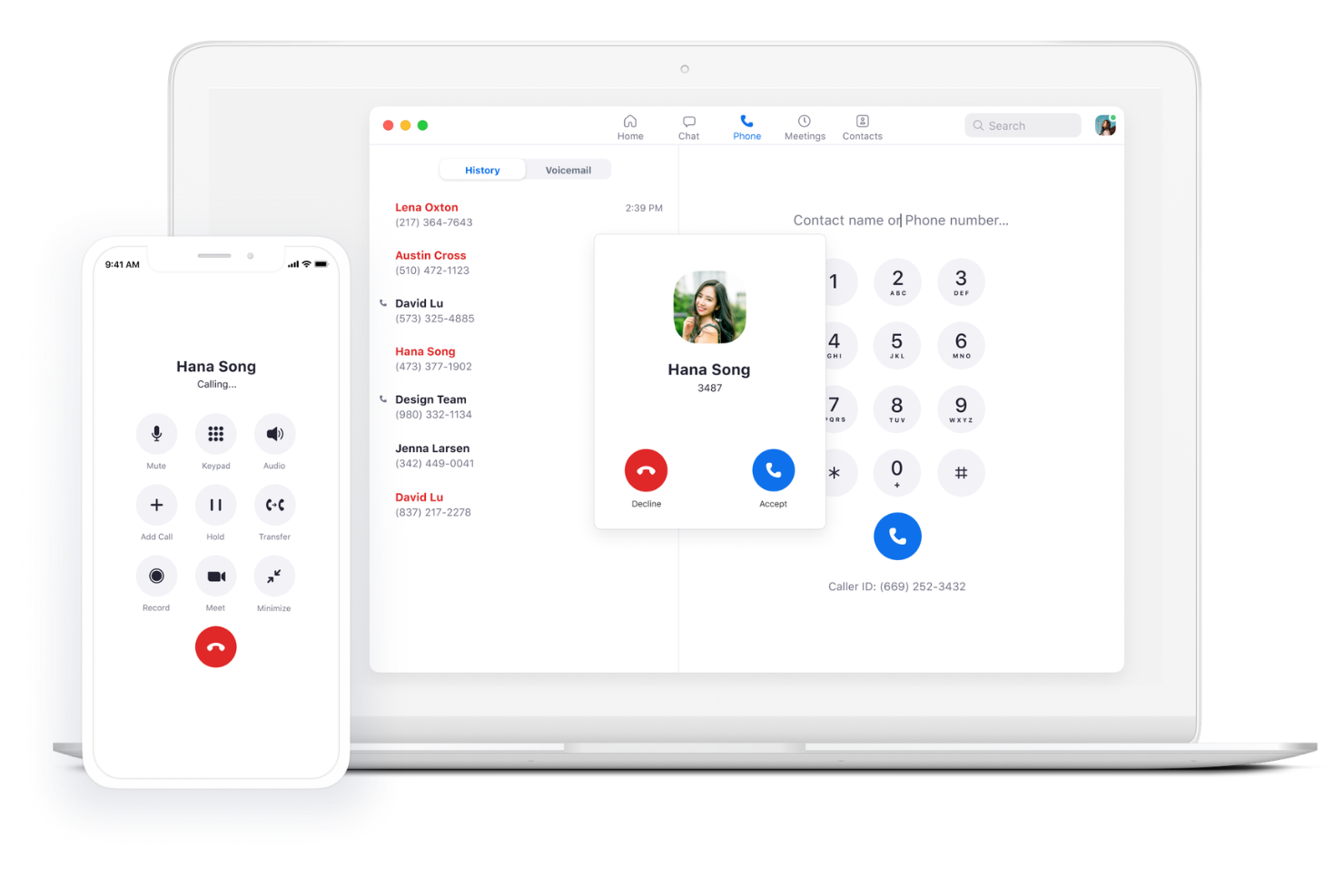
Zoom Phone è una piattaforma VoIP basata su cloud che offre chiamate aziendali, SMS, instradamento delle chiamate, segreteria telefonica e integrazione con le riunioni video all'interno dell'ecosistema Zoom.
A chi è più adatto Zoom Phone?
Team distribuiti e luoghi di lavoro ibridi che necessitano di funzionalità integrate di chiamata, messaggistica e riunioni all'interno della piattaforma Zoom.
Perché ho scelto Zoom Phone
Ho scelto Zoom Phone tra i migliori perché posso acquisire automaticamente riepiloghi delle chiamate e attività grazie alla funzione di appunti con intelligenza artificiale integrata. Il mio team utilizza AI Companion per generare trascrizioni ricercabili ed evidenziare i momenti chiave di ogni chiamata. Apprezzo anche la facilità con cui collega chiamate vocali, SMS e riunioni video in un unico posto.
Funzionalità principali di Zoom Phone
- Delega delle chiamate: assegna le chiamate in arrivo ad assistenti o membri del team per la gestione.
- Parcheggio chiamate: metti le chiamate in attesa e recuperale da qualsiasi dispositivo della tua organizzazione.
- Copertura PSTN globale: effettua e ricevi chiamate in oltre 40 paesi con numeri locali.
- Chiamate di emergenza: instrada le chiamate di emergenza ai punti di risposta di sicurezza pubblica locali.
Integrazioni di Zoom Phone
Zoom Phone offre integrazioni native con Salesforce, Slack, Microsoft Teams, Google Workspace, ServiceNow, HubSpot, Zendesk e Okta, e fornisce un'API per integrazioni personalizzate.
Pros and Cons
Pros:
- Riepiloghi delle chiamate generati dall'IA riducono il bisogno di prendere appunti manualmente
- Interfaccia familiare per i team che già utilizzano le riunioni Zoom
- Implementazione rapida con formazione minima richiesta
Cons:
- Personalizzazione limitata nei cruscotti di analisi delle chiamate
- Le funzioni di messaggistica aziendale non offrono opzioni avanzate

Nextiva
Ideale per interazioni unificate con i clienti su tutti i canali
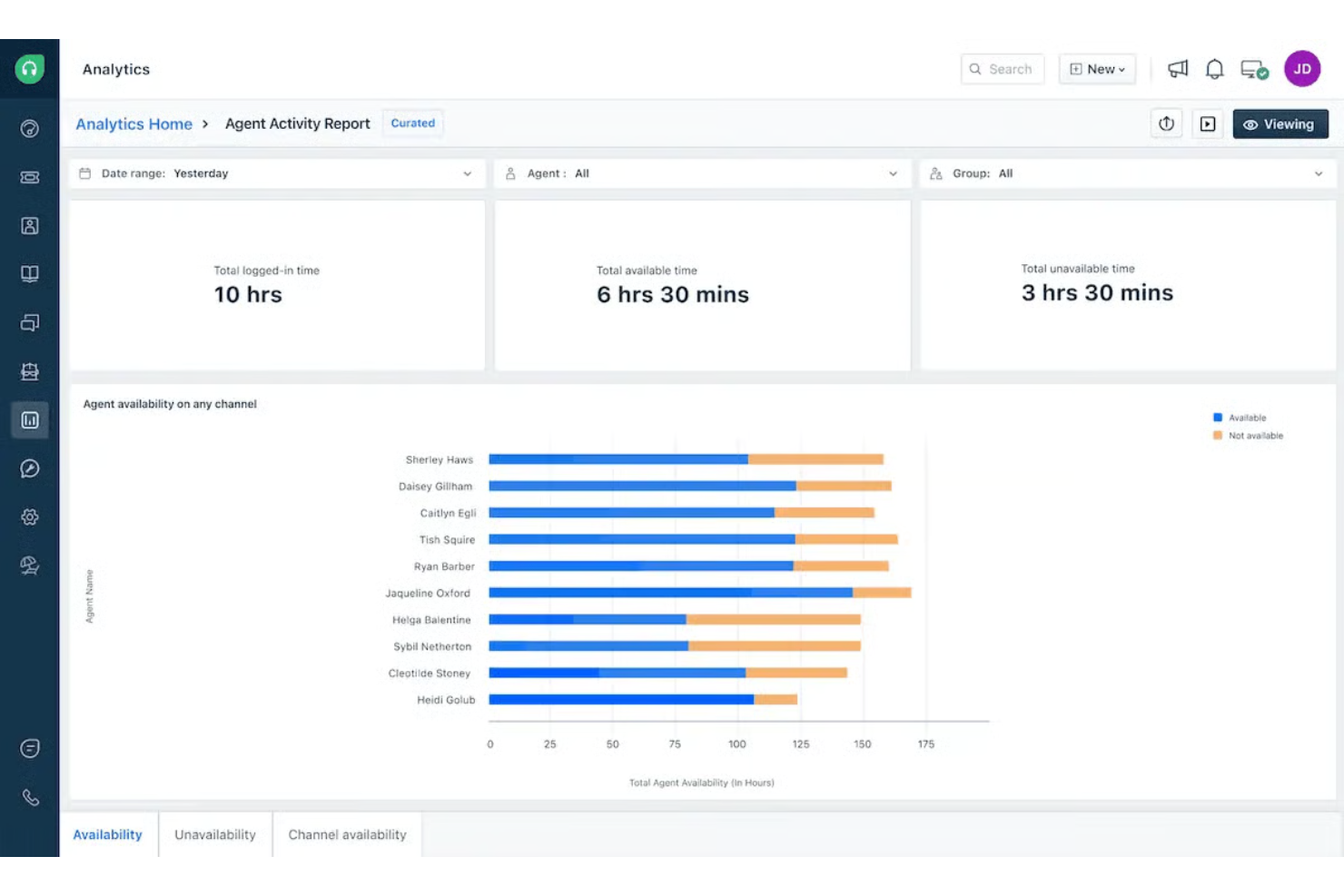
Nextiva è una piattaforma VoIP basata su cloud che unisce chiamate aziendali, SMS, videoriunioni, chat di team e strumenti per il contact center in un unico spazio di lavoro.
A chi è più adatto Nextiva?
Team di assistenza clienti e supporto in organizzazioni di medie e grandi dimensioni che necessitano di comunicazione unificata su più canali.
Perché ho scelto Nextiva
Ho scelto Nextiva tra i migliori perché posso gestire chiamate, SMS, email e messaggi social da un'unica dashboard. Il mio team utilizza la visualizzazione conversazioni in thread per tracciare ogni interazione con il cliente su tutti i canali. Mi piace anche la funzionalità 'call pop' di Nextiva, che mostra subito i dettagli del cliente quando arriva una chiamata.
Funzionalità principali di Nextiva
- Risponditore automatico: Instrada automaticamente le chiamate in arrivo al reparto o alla persona giusta.
- Segreteria telefonica via email: Invia i messaggi vocali come file audio direttamente alla tua casella di posta elettronica.
- Registrazione chiamate: Registra le chiamate in entrata e in uscita per garantire la qualità e la conformità.
- Chiamate in conferenza: Permette di ospitare conferenze audio multi-partecipante da qualsiasi dispositivo.
Integrazioni Nextiva
Nextiva offre integrazioni native con Salesforce, HubSpot, Zendesk, Microsoft Teams, Google Contacts, ServiceNow, Oracle Sales Cloud e Microsoft Outlook. Un'API è disponibile per integrazioni personalizzate.
Pros and Cons
Pros:
- Posta in arrivo unificata per gestire chiamate, SMS e conversazioni con i clienti
- Contesto del cliente in tempo reale visualizzato durante le chiamate in entrata
- Elevata affidabilità per ambienti di supporto ad alto volume
Cons:
- Chiamate talvolta interrotte durante le ore di punta
- Funzionalità SMS limitate rispetto ai concorrenti
Aircall
Ideale per il coaching AI in tempo reale durante le chiamate live
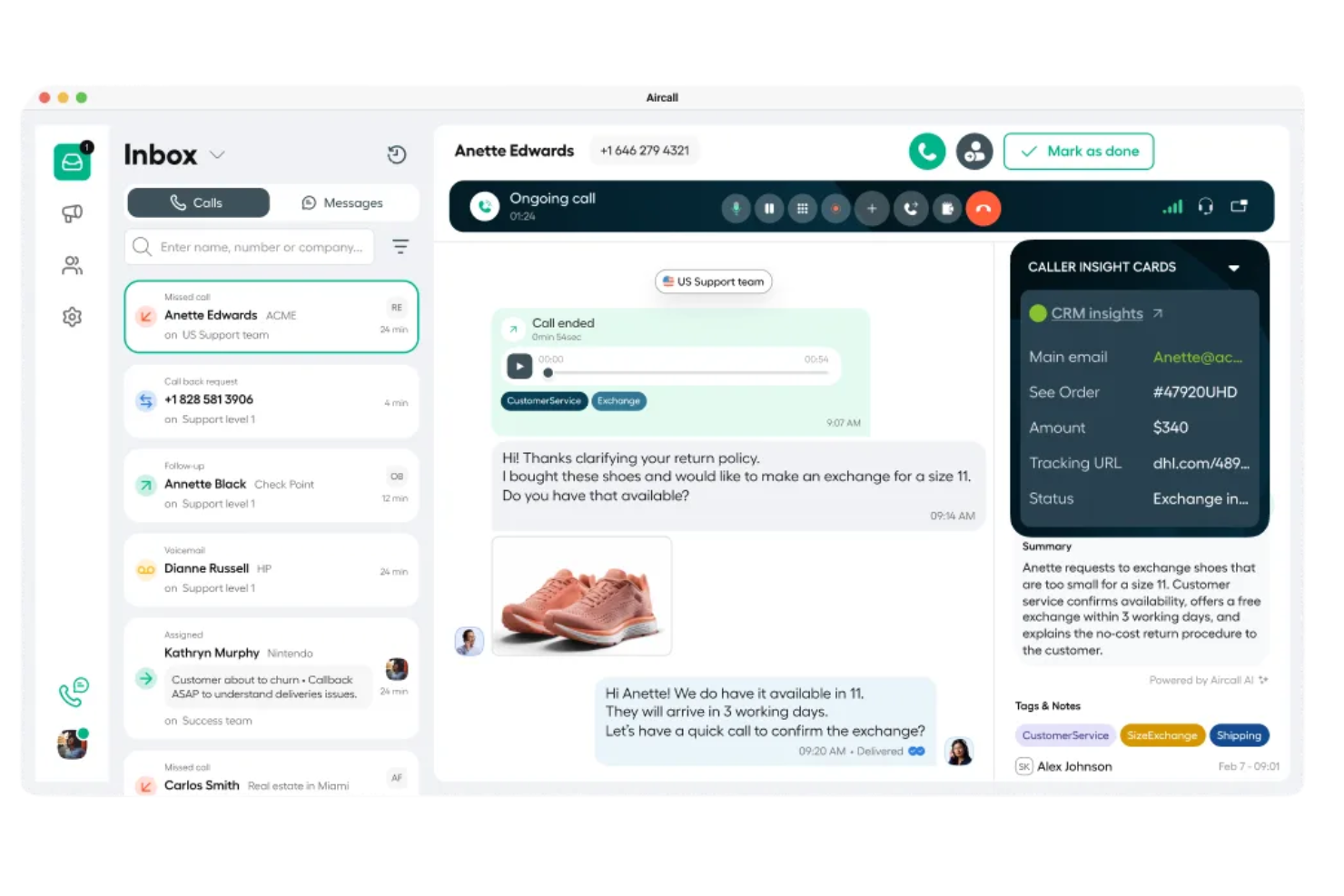
Aircall è una piattaforma VoIP basata su cloud per team aziendali che combina chiamate vocali, SMS, instradamento delle chiamate, analisi e integrazioni con app in un'unica interfaccia.
Per chi è più indicato Aircall?
Team di vendita e assistenza in piccole e medie imprese che desiderano coaching durante le chiamate in tempo reale e semplici integrazioni con le app.
Perché ho scelto Aircall
Ho scelto Aircall tra i migliori perché posso utilizzare il coaching AI in tempo reale per fornire feedback al mio team durante le chiamate. Mi piace come l'IA ascolta e suggerisce consigli o promemoria proprio quando gli operatori ne hanno bisogno. Il mio team si affida anche alle funzionalità di monitoraggio live delle chiamate e whisper di Aircall per supportare i nuovi assunti e migliorare la qualità delle chiamate sul momento.
Funzionalità principali di Aircall
- Click-to-dial: Avvia chiamate istantaneamente da qualsiasi interfaccia CRM o helpdesk.
- Casella chiamate condivisa: Gestisci e assegna chiamate perse o messaggi vocali come squadra.
- Tag delle chiamate: Classifica le chiamate con tag personalizzati per monitoraggio e report.
- Menu IVR: Configura menu di risposta vocale interattiva per instradare i chiamanti in modo efficiente.
Integrazioni Aircall
Aircall offre oltre 200 integrazioni native, inclusi Salesforce, HubSpot, Intercom, Microsoft 365, Slack, Zendesk, Pipedrive, Zoho CRM, Freshdesk e Shopify, e mette a disposizione un'API per integrazioni personalizzate.
Pros and Cons
Pros:
- Strumenti di whisper e coaching live per la formazione degli operatori
- La casella chiamate condivisa migliora la collaborazione tra team
- Configurazione semplice per flussi di lavoro di vendita e supporto
Cons:
- Report storici limitati per il monitoraggio a lungo termine
- Le prestazioni della dashboard possono rallentare con un uso intenso

8x8
Ideale per integrazione Microsoft Teams con copertura globale
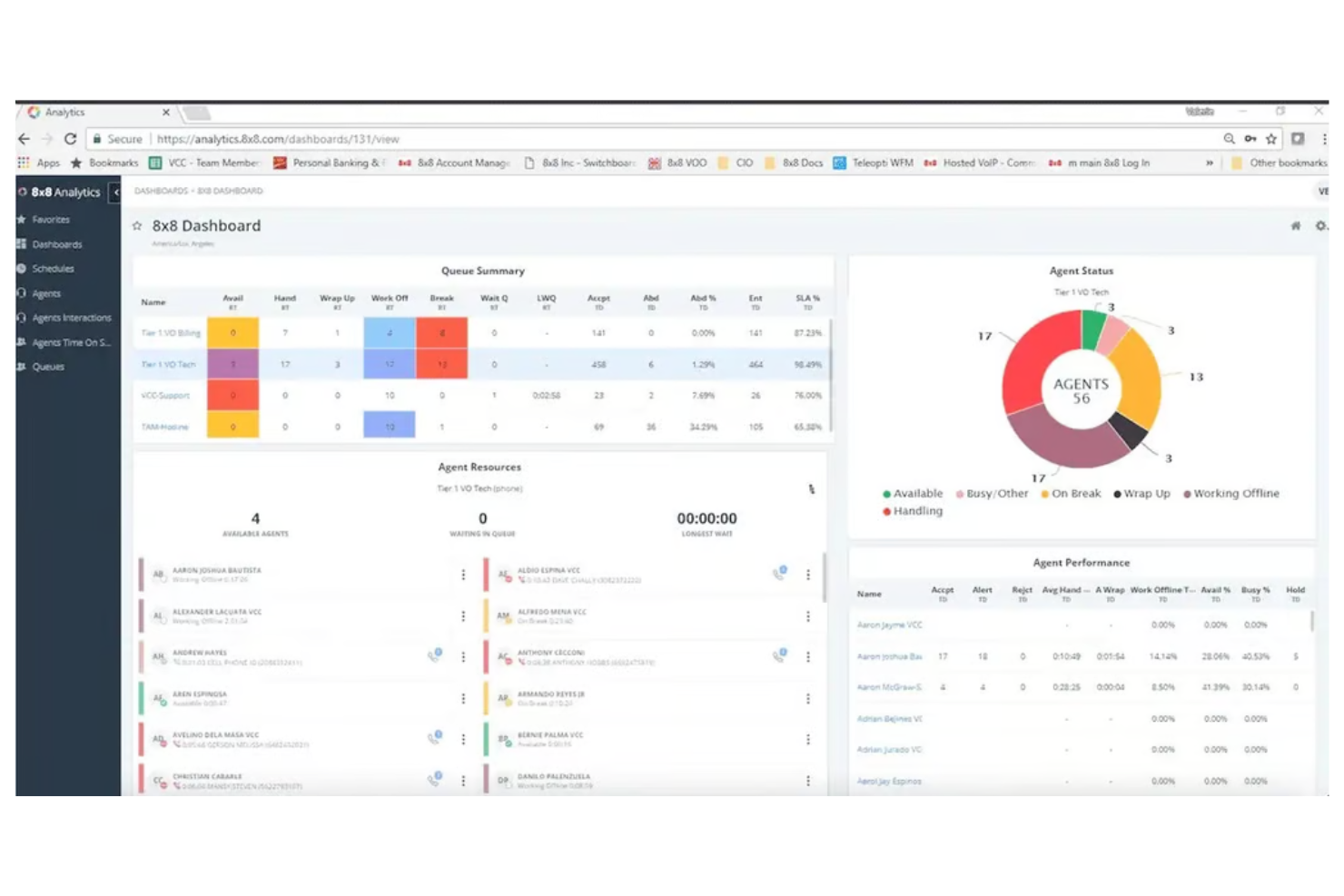
8x8 è una piattaforma VoIP basata su cloud che fornisce sistemi telefonici aziendali, videoconferenze, messaggistica di gruppo, soluzioni per contact center e analisi avanzate per le organizzazioni che necessitano di comunicazioni unificate.
Per chi è ideale 8x8?
Grandi aziende globali e team IT che necessitano di comunicazioni unificate integrate strettamente con Microsoft Teams.
Perché ho scelto 8x8
Ho scelto 8x8 tra i migliori perché posso collegare direttamente la mia forza lavoro globale tramite Microsoft Teams senza hardware aggiuntivo o soluzioni complesse. Il mio team utilizza il direct routing di 8x8 per abilitare le chiamate PSTN all’interno di Teams e mi piace che possiamo gestire numeri internazionali e conformità da un unico portale di amministrazione. Mi affido anche al suo cruscotto di analisi per monitorare la qualità e l’utilizzo delle chiamate in più regioni.
Caratteristiche principali di 8x8
- Risponditore automatico: Configura instradamento e saluti automatici per le chiamate in entrata.
- Registrazione chiamate: Registra le chiamate per esigenze di controllo qualità e conformità.
- Segreteria telefonica via email: Ricevi i messaggi vocali come file audio direttamente nella tua casella di posta elettronica.
- Analisi delle chiamate: Accedi a report dettagliati su attività, durata e tendenze delle chiamate.
Integrazioni di 8x8
8x8 offre integrazioni native con Microsoft Teams, Salesforce, Google Workspace, ServiceNow, Zendesk e WhatsApp. Un'API è disponibile per integrazioni personalizzate.
Pros and Cons
Pros:
- Chiamate native tramite Microsoft Teams con supporto direct routing
- Copertura numeri globali per operazioni internazionali
- Analisi centralizzate tra regioni e team
Cons:
- La navigazione nel portale di amministrazione può risultare poco intuitiva
- Il set di funzionalità può risultare complesso per team più piccoli
Altri software VoIP
Ecco alcune opzioni aggiuntive di software VoIP che non sono entrate nella mia selezione, ma che vale comunque la pena prendere in considerazione:
- Ooma
Ideale per formazione rapida dei dipendenti in meno di 30 minuti
- Ringover
Il migliore per piani di chiamate internazionali illimitate
- Five9
Ideale per funzionalità avanzate di composizione predittiva
- Talkdesk
Ideale per strumenti self-service per clienti basati sull’intelligenza artificiale
- Grasshopper
Ideale per piccole imprese che necessitano di numeri locali o gratuiti
- 3CX
Ideale con flessibilità di implementazione on-premise o cloud
- JustCall
Ideale per la qualificazione dei lead outbound tramite AI
- Zadarma
Il migliore per le chiamate interne gratuite tra sedi globali
- Intermedia Unite
Ideale per l'affidabilità del servizio e la continuità operativa
- Net2Phone
Ideale per fax e SMS integrati in un'unica piattaforma
- Quo
Ideale per la messaggistica istantanea di gruppo oltre alle chiamate
- Google Voice
Ideale per una facile portabilità dei numeri dagli operatori mobili


Come valuto il software VoIP
Il software VoIP permette a una startup di cinque persone di rispondere alle chiamate come una grande impresa, mantiene un team di supporto distribuito raggiungibile su tutti i dispositivi e sostituisce interamente una sala server telefonica con una sola app. Quando analizzo gli strumenti in questo settore, ragiono su due livelli: ciò che ogni opzione deve necessariamente offrire anche solo per essere considerata, e ciò che realmente distingue un'opzione dall'altra.
Funzionalità di base (Requisiti minimi per questa lista)
Per il software VoIP, le funzionalità di base che testo e valuto sono:
- Qualità e affidabilità delle chiamate: SLA di disponibilità, chiarezza vocale in HD e bassa latenza sono fondamentali. Verifico se il fornitore è in grado di mantenere queste promesse.
- Gestione delle chiamate: Devono essere presenti risponditori automatici, menu IVR, gruppi di squillo e code di chiamata. Queste funzioni permettono di gestire le chiamate in entrata senza bisogno di un centralinista.
- Softphone multi-dispositivo: Cerco app complete per desktop, mobile e web, con la possibilità di trasferire le chiamate tra dispositivi senza interruzioni durante la conversazione.
- Sistema di segreteria telefonica: Segreteria visiva, inoltro messaggi vocali via email e trascrizione tramite AI sono ormai la base. Controllo se la trascrizione è inclusa o richiede un costo aggiuntivo.
- SMS/MMS aziendali: Il tuo team deve poter inviare messaggi dal numero aziendale sia su desktop sia su mobile. Verifico se le funzioni MMS e i messaggi di gruppo sono supportati.
- Gestione dei numeri: Il trasferimento di numeri esistenti, la scelta di numeri locali o verdi e l'assegnazione delle estensioni devono essere processi semplici e documentati accuratamente.
- Registrazione delle chiamate: Registrazione a richiesta o automatica per formazione, controllo qualità e conformità. Controllo se vi sono limiti di archiviazione o restrizioni in base al piano scelto.
Uno strumento deve offrire la maggior parte di queste funzionalità per essere incluso nella lista. Da qui in poi, considero ciò che distingue ogni software dagli altri.
Funzionalità peculiari (Cosa distingue le opzioni)
Oltre alle basi, cerco riassunti delle chiamate basati su AI e trascrizioni in tempo reale che si integrano automaticamente con CRM o help desk. Integrazioni native profonde con Salesforce, Zendesk o Microsoft Teams sono fondamentali per i team che vogliono che la voce lavori senza soluzione di continuità assieme a chat e video. Prendo anche in considerazione piattaforme che offrono opzioni avanzate di sicurezza e conformità, come il supporto HIPAA, permessi granulari basati sui ruoli e la crittografia end-to-end per settori regolamentati.
Cosa considero oltre alle funzionalità
La struttura dei prezzi è molto importante. Valuto se i piani prevedono tariffe al minuto o chiamate illimitate, e se le funzionalità chiave sono confinate nei livelli più costosi. I requisiti minimi di utenti, come la soglia di tre postazioni per Aircall, possono rapidamente escludere i team più piccoli. Inoltre, considero per chi sia veramente pensato ciascun software. Un team di supporto da 50 persone e un consulente singolo hanno esigenze molto diverse, quindi verifico quanto ogni prodotto sia adatto a dimensioni di team e casi d'uso specifici. La velocità di implementazione e la compatibilità con l'hardware telefonico completano la mia valutazione.
Come scegliere un software VoIP
È facile perdersi in lunghi elenchi di funzionalità e strutture tariffarie complesse. Per aiutarti a rimanere concentrato mentre affronti il tuo particolare processo di scelta del software, ecco una lista di fattori da tenere a mente:
| Fattore | Cosa considerare |
|---|---|
| Scalabilità | La soluzione supporterà il tuo team durante la crescita? Verifica i limiti relativi agli utenti, le opzioni per le estensioni e i percorsi di aggiornamento. |
| Integrazioni | Si connette al tuo CRM, sistema di assistenza o strumenti di collaborazione? Verifica la disponibilità di integrazioni native e API. |
| Personalizzazione | Puoi adattare i flussi delle chiamate, i messaggi di benvenuto e l'instradamento alle esigenze della tua azienda? Cerca opzioni di configurazione flessibili. |
| Facilità d'uso | Il tuo team lo adotterà rapidamente? Valuta l'interfaccia, la navigazione e la facilità con cui gli utenti non tecnici possono gestire le impostazioni. |
| Implementazione e avvio | Quanto tempo richiederà la configurazione e quali risorse saranno necessarie? Informati sul supporto alla migrazione, sulla formazione e sui materiali per l'avvio. |
| Costo | I livelli di prezzo sono chiari e prevedibili? Fai attenzione ai costi per utente, agli addebiti aggiuntivi e ai requisiti contrattuali. Confronta il costo totale di proprietà. |
| Misure di sicurezza | La piattaforma offre crittografia, controlli degli accessi e conformità agli standard di settore? Valuta i rischi per i dati sensibili dei clienti. |
| Disponibilità dell'assistenza | Quali canali di assistenza sono disponibili e in quali orari? Valuta se hai bisogno di supporto 24 ore su 24, 7 giorni su 7, o di un responsabile dedicato alla gestione dell'account. |
Che cos'è il software VoIP?
Il software VoIP è un servizio telefonico digitale che consente alle aziende di effettuare e ricevere chiamate tramite Internet anziché attraverso le linee telefoniche tradizionali. Funziona come un sistema telefonico VoIP e spesso combina telefonia, videochiamate, messaggistica istantanea e segreteria telefonica in un'unica piattaforma, accessibile tramite un telefono software su computer desktop o dispositivi mobili.
Molti strumenti VoIP aziendali includono anche funzionalità PBX, consentendo ai team di gestire l'instradamento delle chiamate, gli interni e la comunicazione interna senza infrastrutture fisiche. Questo rende il VoIP una scelta pratica per le aziende che desiderano comunicazioni flessibili tra diverse sedi, mantenendo al contempo un servizio affidabile.
Funzionalità
Quando scegli un software VoIP, presta attenzione alle seguenti funzionalità chiave:
- Instradamento delle chiamate: indirizza le chiamate in arrivo alla persona o al reparto corretto in base alle regole impostate, aiutando i team a gestire volumi elevati di chiamate e a ridurre i tempi di attesa.
- Segreteria telefonica via e-mail: invia le registrazioni audio o le trascrizioni dei messaggi vocali direttamente nella tua casella di posta elettronica, così non perderai mai i messaggi importanti.
- Risponditore automatico: risponde automaticamente alle chiamate con un sistema di menu che guida i chiamanti verso l'interno o le informazioni corrette senza intervento umano.
- Messaggistica aziendale: consente di inviare e ricevere messaggi SMS o MMS dal numero aziendale, mantenendo le comunicazioni con i clienti organizzate e professionali.
- Inoltro delle chiamate: reindirizza le chiamate a un altro numero o dispositivo, così puoi rimanere connesso quando non sei alla scrivania o sei in movimento.
- Chiamate in conferenza: consente a più persone di partecipare a una singola chiamata, facilitando l'organizzazione di riunioni del team o conversazioni con i clienti da qualsiasi luogo.
- Registri e report delle chiamate: tiene traccia della cronologia, della durata e degli esiti delle chiamate, fornendo informazioni sulle prestazioni del team e sul coinvolgimento dei clienti.
- Trasferimento dei numeri: consente di trasferire i numeri di telefono esistenti nel sistema, così puoi mantenere invariata l'identità aziendale durante la migrazione.
- Messaggi di benvenuto personalizzati: consente di registrare o caricare messaggi di benvenuto personalizzati per i chiamanti, creando un'esperienza accogliente e coerente con il marchio.
- App per dispositivi mobili e computer: offre applicazioni dedicate per smartphone e computer, così puoi gestire chiamate e messaggi da qualsiasi dispositivo.
Funzionalità comuni dell'intelligenza artificiale nei software VoIP
Oltre alle funzionalità standard dei software VoIP elencate sopra, molti fornitori di servizi stanno integrando l'intelligenza artificiale con funzionalità come:
- Trascrizione in tempo reale: converte istantaneamente le conversazioni pronunciate in testo scritto durante le chiamate, facilitando la registrazione dei dettagli, la creazione di documenti e l'accessibilità.
- Analisi delle chiamate basata sull'intelligenza artificiale: analizza i dati delle chiamate per identificare tendenze, sentiment dei clienti e prestazioni degli operatori, aiutando i team a prendere decisioni basate sui dati e a migliorare la qualità del servizio.
- Instradamento intelligente delle chiamate: utilizza l'intelligenza artificiale per indirizzare le chiamate in base all'intento del chiamante, alle interazioni precedenti o alle competenze dell'operatore, assicurando che i clienti raggiungano più rapidamente la persona corretta.
- Riepiloghi automatici dopo la chiamata: genera riepiloghi concisi di ogni chiamata utilizzando l'intelligenza artificiale, risparmiando tempo nella presa di appunti manuale e facilitando la revisione delle conversazioni.
- Biometria vocale: autentica i chiamanti analizzando i modelli vocali unici, aggiungendo un ulteriore livello di sicurezza e riducendo la necessità di verificare manualmente l'identità.
Vantaggi
L'implementazione di un software VoIP offre diversi vantaggi al tuo team e alla tua azienda. Ecco alcuni dei vantaggi che puoi aspettarti:
- Comunicazione flessibile: effettua e ricevi chiamate, messaggi e messaggi vocali da qualsiasi dispositivo, supportando gli ambienti di lavoro da remoto e ibridi.
- Riduzione dei costi: riduci le spese utilizzando le chiamate basate su Internet ed eliminando la necessità di linee telefoniche e hardware tradizionali.
- Crescita scalabile: aggiungi utenti, numeri e funzionalità man mano che la tua azienda cresce, senza apportare modifiche significative all'infrastruttura né causare interruzioni.
- Migliore esperienza del cliente: utilizza funzionalità come l'instradamento delle chiamate, i risponditori automatici e i messaggi di benvenuto personalizzati per assicurarti che i clienti raggiungano rapidamente la persona corretta.
- Informazioni utili per l'azione: accedi ai registri delle chiamate, agli strumenti di analisi e di reportistica per monitorare le prestazioni del team e identificare le aree di miglioramento.
- Maggiore sicurezza: usufruisci di crittografia, controlli degli accessi e biometria vocale per proteggere i dati sensibili dei clienti e dell'azienda.
- Onboarding semplificato: sfrutta interfacce intuitive, risorse formative e supporto alla migrazione per rendere rapidamente operativo il tuo team.
Costi & prezzi
La scelta di un software VoIP richiede la conoscenza dei vari modelli e piani tariffari disponibili. I costi variano in base alle funzionalità, alle dimensioni del team, agli extra e ad altri fattori. La tabella seguente riassume i piani più comuni, i relativi prezzi medi e le funzionalità tipicamente incluse nelle soluzioni software VoIP:
Tabella comparativa dei piani per il software VoIP
| Tipo di piano | Prezzo medio | Funzionalità comuni |
|---|---|---|
| Piano gratuito | $0 | Chiamate di base, minuti limitati, segreteria telefonica e semplice inoltro delle chiamate. |
| Piano personale | $8-$30/utente/mese | Chiamate nazionali illimitate, segreteria telefonica tramite e-mail, registri delle chiamate e accesso all'app mobile. |
| Piano aziendale | $20-$50/utente/mese | Risponditore automatico, instradamento delle chiamate, messaggistica aziendale, analisi delle chiamate e integrazioni con altri software. |
| Piano per grandi aziende | $40-$89+/utente/mese | Sicurezza avanzata, integrazioni personalizzate, assistenza prioritaria, chiamate internazionali e strumenti per la conformità. |
Domande frequenti sul software VoIP
Ecco alcune risposte alle domande più comuni sul software VoIP:
Posso mantenere il mio numero di telefono attuale quando passo al software VoIP?
Sì, la maggior parte dei fornitori di software VoIP supporta la portabilità del numero. Ciò significa che puoi trasferire il tuo attuale numero aziendale al nuovo sistema, mantenendo la coerenza del marchio ed evitando confusione per i tuoi clienti.
Ho bisogno di hardware speciale per utilizzare il software VoIP?
No, per la maggior parte dei software VoIP non è necessario alcun hardware speciale. Puoi effettuare e ricevere chiamate utilizzando il computer, lo smartphone o il tablet. Alcune aziende scelgono di utilizzare telefoni VoIP da scrivania dedicati, ma sono opzionali.
Quanto è affidabile la qualità delle chiamate con il software VoIP?
La qualità delle chiamate dipende dalla connessione Internet. Con una connessione stabile e ad alta velocità, puoi aspettarti un audio nitido e un numero minimo di chiamate interrotte. Se la rete è lenta o instabile, potresti riscontrare ritardi o interruzioni delle chiamate.
Il software VoIP è sicuro per le comunicazioni aziendali?
Sì, la maggior parte dei software VoIP include funzionalità di sicurezza come la crittografia delle chiamate, i controlli di accesso e la conformità agli standard di settore. Verifica sempre quali misure di protezione sono presenti per salvaguardare i dati sensibili dei clienti e dell’azienda.
Il software VoIP può integrarsi con il mio CRM o con gli strumenti del servizio di assistenza?
Sì, molte soluzioni VoIP offrono integrazioni con le più diffuse piattaforme CRM, di assistenza e collaborazione. Questo ti aiuta a centralizzare i dati dei clienti e a semplificare i flussi di lavoro in tutta l’azienda.
Cosa succede se la connessione Internet si interrompe?
Se la connessione Internet si interrompe, la maggior parte dei software VoIP può inoltrare automaticamente le chiamate a un numero di riserva, ad esempio un telefono cellulare. Questo aiuta a garantire che tu non perda chiamate importanti durante le interruzioni del servizio.