
38 Best Help Desk Software of 2026: Reviewed & Compared

20 Best Help Desk Software Shortlist
Here's my pick of the 20 best software from the 38 tools reviewed.


Help desk software gives support teams the tools to manage customer issues efficiently—from intake to resolution—across email, chat, and other key channels. Whether you're handling a few dozen tickets a day or coordinating a global support operation, the right help desk tool can streamline workflows, boost team productivity, improve response times, and elevate the customer experience.
I've tested and reviewed these solutions to provide you with an unbiased guide to the best helpdesk tools available. In this article, I'll break down my top picks, focusing on how each can support your team in delivering exceptional service.
Why Trust Our Reviews
We’ve been testing and reviewing help desk software since 2021. As CX professionals ourselves, we know how critical and difficult it is to make the right decision when selecting software.
We invest in deep research to help our audience make better software purchasing decisions. We’ve tested more than 2,000 tools for different customer experience use cases and written over 1,000 comprehensive software reviews. Learn how we stay transparent & our software review methodology.
The Best Help Desk Software: Pricing Comparison Chart
This feature comparison chart summarizes basic details about each of my top help desk software selections. You can view pricing details and the availability of free trials or demos side-by-side to help you find the right help desk software for your budget and business needs.
| Tool | Best For | Trial Info | Price | ||
|---|---|---|---|---|---|
| 1 | Best for scaling MSPs and IT teams | 30-day free trial + free demo available | From $149/technician/month (billed annually) | Website | |
| 2 | Best for no-code customization | 14-day free trial | From $9/seat/month (billed annually) | Website | |
| 3 | Best for AI-driven IT service management | 14-day free trial + free demo available | From $19/agent/month (billed annually) | Website | |
| 4 | Best help desk software for creating no-code automations | Free plan + free trial available | From $25/user/month (billed annually) | Website | |
| 5 | Best for an advanced customer self-service portal | 14-day free trial available | From $19/user/month (billed annually) | Website | |
| 6 | Best for removing silos with a shared inbox | 14-day free trial + free demo available | From $25/seat/month (billed annually) | Website | |
| 7 | Best for AI-driven customer support | 14-day free trial available | From $16/user/month (billed annually) | Website | |
| 8 | Best for IT help desk management | 14-day free trial | From $89/user/month (billed annually) | Website | |
| 9 | Best for real-time sentiment analysis | Free demo available | From $45/month (billed annually) | Website | |
| 10 | Best for AI-driven ticket management | 15-day free trial + free plan | From $7/user/month (billed annually) | Website | |
| 11 | Best for comprehensive CMDB | 30-day free trial | From $39/user/month | Website | |
| 12 | Best help desk and knowledge base in one | 30-day free trial + free demo available | From $15/month (billed annually) | Website | |
| 13 | Best AI-powered customer service solution for companies of all sizes | 14-day free trial + free demo available | From $19/agent/month (billed annually) | Website | |
| 14 | Best for AI-powered ecommerce inbox management | 14-day free trial | From $39/agent/month | Website | |
| 15 | Best for smart ticket routing | 30-day free trial available | From $17/user/month | Website | |
| 16 | Best for its mix of live support and chatbots | Free trial + free plan available | From $24.17/month (billed annually) | Website | |
| 17 | Best for creating personalized experiences with AI | Free trial + free demo available | From $25/user/month (billed annually) | Website | |
| 18 | Best for collaborative email-based help desks | 30-day free trial + free plan available | From $14/user/month (billed annually) | Website | |
| 19 | Best for endpoint management & alerting | 14-day free trial + Free demo available | Price upon request | Website | |
| 20 | Best for omnichannel support | 14-day free trial available | From $25/user/month | Website |


-

SupportYourApp
Visit WebsiteThis is an aggregated rating for this tool including ratings from Crozdesk users and ratings from other sites.4.7 -
Hiver
Visit WebsiteThis is an aggregated rating for this tool including ratings from Crozdesk users and ratings from other sites.4.7 -
Freshdesk
Visit WebsiteThis is an aggregated rating for this tool including ratings from Crozdesk users and ratings from other sites.4.4


Best Help Desk Software Reviews
To help you find the best help desk software for you, I’ve provided detailed summaries of my top 10 choices and explained why I included each system in this list.
Plus, I’ve included additional options below, for different use cases, to help you find the right help desk software for you.


Atera is an all-in-one IT management platform built for MSPs and IT departments who need integrated help desk ticketing, remote monitoring, and automation to handle support requests and manage client systems from a single dashboard.
Who Is Atera Best For?
Atera is a strong fit for MSPs and internal IT teams that need to manage support tickets, monitor endpoints, and run automations without juggling multiple tools.
Why I Picked Atera
I've included Atera in my top picks because it's one of the few help desk platforms built specifically to scale with MSPs and IT teams without requiring you to add headcount. What I like most is Robin, Atera's autonomous AI agent, which takes full ownership of a ticket from intake to resolution—verifying the user, diagnosing the issue, executing fixes like password resets or app installs directly on the endpoint, and closing the loop in your ITSM. I also like that the ticketing system is natively connected to RMM, so when a monitoring alert fires, my team can jump straight into a remote session or trigger an automated remediation from the same ticket view. The per-technician pricing model means you can onboard unlimited devices without your costs spiraling as your client base grows.
Atera Key Features
- Patch management: Schedule and deploy OS and third-party software patches across all managed endpoints directly from the platform.
- IT automation profiles: Build rule-based automation scripts that run on a schedule or trigger based on device conditions, without manual intervention.
- Customer portal: Give end users a branded self-service portal to submit tickets, track request status, and access knowledge base articles.
- SLA management: Set response and resolution time targets per ticket priority and get alerts when tickets are at risk of breaching those thresholds.
Atera Integrations
Integrations include Splashtop, AnyDesk, Webroot, Bitdefender, Acronis, TeamViewer, ConnectWise, Domotz, IT Glue, and Xero.
Pros and Cons
Pros:
- Omnichannel capabilities let you handle all inquiries and issues.
- Automation and scripting tools reduce repetitive maintenance tasks.
- Integrated helpdesk and RMM/PSA features simplify IT workflows.
Cons:
- May offer more features than needed for those looking for a simple help desk solution.
- Some advanced scheduling or ticket workflow customization options are missing.
New Product Updates from Atera

Atera Enhances IT Autopilot With Automation and File Support
Atera’s IT Autopilot gets three major boosts: you can now attach common files for deeper analysis, automate IT tasks with clear workflows, and choose how the system follows up when users go silent. These updates help streamline IT operations and improve resolution efficiency. For more information, visit Atera’s official site.

monday service is a flexible help desk platform designed for teams who want to manage support tickets, automate workflows, and centralize customer communications without relying on complex coding or IT resources.
Who Is monday service Best For?
monday service is a strong fit for mid-sized teams across industries who need a customizable help desk they can configure and adapt without developer support.
Why I Picked monday service
I picked monday service as one of the best because of how extensive its no-code customization is. The drag-and-drop workflow builder lets my team set up ticket routing, automated replies, follow-ups, and approval chains without writing a single line of code. I also like the customizable customer portal, where you can tailor the self-service experience so end users can submit requests, track ticket status, and browse knowledge base articles—without a monday.com account. The no-code dashboard builder makes it easy to track service performance metrics in real time and adjust as team needs change.
monday service Key Features
- SLA tracking: A built-in SLA column monitors time-to-resolution per ticket, with live timers that pause automatically outside working hours and flag tickets nearing breach.
- AI auto-categorization: Incoming tickets are automatically sorted by type, urgency, sentiment, and department without any manual triage from agents.
- Incident management board: Links related tickets together in a dedicated incidents board to help teams identify patterns and resolve recurring issues faster.
- Multi-channel ticket intake: Connects email inboxes, WorkForms, and a custom monday inbox so tickets from different sources land in one centralized ticket board.
monday service Integrations
Integrations include Zendesk, Active Directory, Salesforce, QuickBooks, HubSpot, GitHub, GitLab, Slack, Gmail, and Microsoft Teams.
Pros and Cons
Pros:
- Visual tracking of support requests
- Scales well with growing teams
- Customizable no-code workflows
Cons:
- Setup can be time-consuming
- Automations may require fine-tuning

Freshservice is a cloud-based help desk platform built for IT teams and service departments that need to manage requests, automate workflows, and deliver fast support across multiple channels.
Who Is Freshservice Best For?
Freshservice is a strong fit for mid-size to enterprise IT teams that need a structured, scalable platform for managing internal service requests and incidents.
Why I Picked Freshservice
Freshservice earns its spot on my shortlist because of how deeply AI is woven into the service desk workflow, not just bolted on. I particularly like Freddy AI Copilot, which lets agents draft responses, summarize long ticket threads, and generate knowledge base articles without leaving the ticket view. Freddy AI Agent also handles 24/7 self-service on Slack and Microsoft Teams, so my team isn't fielding repetitive requests around the clock. The AI-driven incident auto-routing also means tickets land with the right agent based on availability and workload, which cuts down on manual triage.
Freshservice Key Features
- SLA management: Set and track service level agreements with automated escalations when response or resolution deadlines are at risk.
- Self-service portal: Give employees a branded portal to submit tickets, track request status, and search the knowledge base without contacting an agent.
- Change management: Plan, review, and approve IT changes with built-in workflows, risk assessment, and a visual change calendar.
- Asset management: Discover, track, and manage hardware and software assets directly within the help desk, linking them to related tickets and incidents.
Freshservice Integrations
Integrations include Microsoft Teams, SecPod, Slack, TeamViewer, Jira, Azure AD, Workato, and over 1,200 additional enterprise apps through the Freshservice Marketplace.
Pros and Cons
Pros:
- Supports self-service tools and expert directories for efficient issue resolution
- Asset management functionality
- Robust automation capabilities
Cons:
- Freddy copilot is a paid add-on
- Reporting capabilities are a bit limited
New Product Updates from Freshservice

Freshservice Enhances Global Search and Dashboards With Task Support
Freshservice enhances Global Search and Dashboards by adding support for ticket, problem, change, and release tasks, along with custom task views. This update helps teams search, track, and report on tasks from one centralized interface. For more information, visit Freshservice's official site.


Help Scout gives customer support teams a shared inbox, live chat, and knowledge base tools that help small businesses and growing companies manage customer conversations and deliver fast, personalized support.
Who Is Help Scout Best For?
Help Scout is a great fit for small to mid-sized support teams that need a straightforward, easy-to-use help desk without a steep learning curve.
Why I Picked Help Scout
Help Scout earns its spot on my shortlist because of how well its no-code workflow automation handles the repetitive routing and tagging work that quietly eats up a support team's day. I like that you can build workflows using simple if/then logic—no developer needed—for example, automatically assigning refund requests to a billing specialist or tagging and escalating conversations that have been waiting over 24 hours. Additionally, saved replies let my team answer common questions in a few clicks rather than rewriting the same response from scratch. The combination of automated routing and ready-made replies means my team spends less time on inbox management and more time on conversations that actually need a human touch.
Help Scout Key Features
- Shared inbox: Manage all customer email conversations in one collaborative inbox where teammates can assign, comment on, and track threads.
- Live chat widget: Embed a chat widget on your site to handle real-time customer conversations directly from the Help Scout interface.
- Docs knowledge base: Build and publish a self-service help center where customers can find answers without contacting your team.
- Customer profiles: View a customer's full conversation history and profile data alongside every support ticket for added context.
Help Scout Integrations
Integrations include Salesforce, Shopify, Slack, HubSpot, Mailchimp, Jira, Google Apps, Segment, WhatsApp, and SurveyMonkey.
Pros and Cons
Pros:
- Includes mobile apps for iOS and Android devices
- Decent feature coverage in their most affordable plan
- Has an intuitive and user-friendly interface
Cons:
- Additional charges apply to send proactive messages to engage customers
- Enterprise security and HIPPA compliance features are only available as add-ons
New Product Updates from Help Scout

Help Scout Enhances Support Management With AI and Integrations
Help Scout introduces smarter routing, WhatsApp and Aircall integrations, and new AI enhancements to help teams manage conversations, automate workflows, and support customers across more channels. For more information, visit Help Scout’s official site.
 .
.

Freshdesk is a cloud-based help desk platform built for support teams in businesses of all sizes who need to manage customer inquiries across multiple channels and automate repetitive tasks.
Who Is Freshdesk Best For?
Freshdesk is a good fit for growing support teams that need a scalable help desk with multichannel ticket management and self-service tools built in from the start.
Why I Picked Freshdesk
Freshdesk earns its spot as one of the best on my shortlist because of how far its self-service portal goes beyond a basic knowledge base. I like that you can build fully branded portals where customers search articles, browse community forums, and submit tickets—all in one place. Article versioning and approval workflows mean my team can keep content accurate without publishing outdated answers. Freddy AI Agent automatically responds to incoming emails using knowledge base content, so customers get cited answers instantly without creating a ticket.
Freshdesk Key Features
- Omnichannel ticket management: Consolidate customer conversations from email, chat, phone, and social media into a single shared inbox.
- Automation rules: Set up ticket assignment, priority tagging, and follow-up actions based on conditions you define.
- Collision detection: Get real-time alerts when multiple agents are viewing or replying to the same ticket simultaneously.
- Custom reporting and dashboards: Build reports that track ticket volume, response times, and agent performance across your support team.
Freshdesk Integrations
Integrations include Playvox, Slack, MS Teams, Shopify, Salesforce, Jira, and connector apps for custom integrations using APIs and pre-built templates.
Pros and Cons
Pros:
- Supports SLA management
- Includes a thank you detector tool that prevents tickets from being reopened when a customer says "thanks"
- Supports canned responses to offer consistent responses to common questions
Cons:
- Intelligent AI-based features and chat-bots are limited to their top-level paid plan (Enterprise)
- Multilingual features are only available in their Pro or Enterprise plans
New Product Updates from Freshdesk

Freshdesk Adds Voice AI Agents in Freshcaller
Freshdesk introduces Voice AI Agents available through Freshcaller Marketplace apps to handle routine calls and reduce queues. This feature enables automated call handling with real-time, conversational support. For more information, visit Freshdesk's official site.

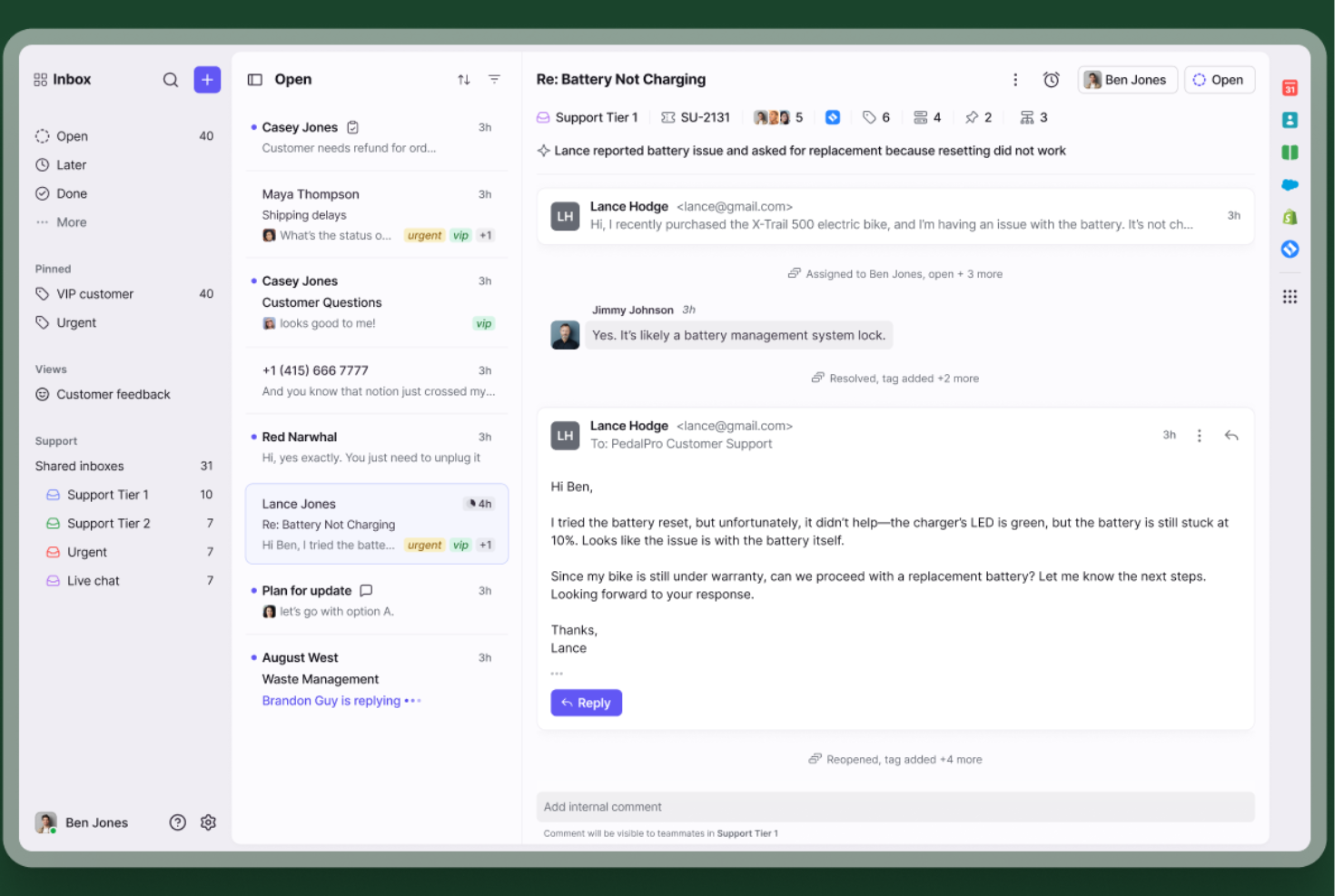
Front is a help desk platform built for teams who want to manage customer conversations across email, chat, SMS, and social channels in one collaborative workspace, so support, success, and operations teams can deliver fast, coordinated responses.
Who Is Front Best For?
Front is a strong fit for mid-sized customer service, success, and operations teams that handle high volumes of external communication across multiple channels.
Why I Picked Front
Front earns its spot on my shortlist because of how well its shared inbox breaks down communication silos that slow support teams. I like that multiple teammates can work in the same inbox without stepping on each other's toes—collision detection shows when someone is already replying, so you avoid duplicate responses. My team is also able to leave internal comments directly on a conversation thread, keeping context in one place rather than scattered across Slack or email chains. The shared inbox works across email, SMS, chat, and social, preventing messages from falling through the cracks during volume spikes.
Front Key Features
- AI Copilot: An AI assistant that auto-drafts replies using your help content and past conversation history.
- Smart QA: Reviews every ticket against customizable scorecards to flag service quality gaps in real time.
- Knowledge base: A built-in documentation tool where teams can store and surface answers for faster, more consistent replies.
- Ticket routing: Assigns incoming requests to the right team or agent based on rules you configure.
Front Integrations
Integrations include Asana, RingCentral, WhatsApp, Twitter (X), Zendesk Sell, FullContact, Microsoft Outlook 365, Monday.com, Facebook, and Instagram.
Pros and Cons
Pros:
- No robotic tickets for customers
- Interface feels like standard email
- Highly customizable automated rules
Cons:
- Initial workspace setup takes time
- Can overwhelm very small businesses


SparrowDesk is a help desk platform designed for teams who want to manage customer inquiries across multiple channels and automate routine support tasks using AI, making it a strong choice for businesses that want fast, consistent service.
Who Is SparrowDesk Best For?
SparrowDesk is a good fit for small to mid-sized support teams that need a centralized help desk with AI-powered tools to handle growing ticket volumes without adding headcount.
Why I Picked SparrowDesk
SparrowDesk earns its spot on my shortlist because of how well its AI handles the repetitive, high-volume side of customer support. The AI automatically categorizes and routes incoming tickets based on content, so my team isn't manually triaging every request. The AI-suggested responses are useful too—when a customer asks a common billing question, SparrowDesk surfaces a relevant draft reply that agents can send or tweak in seconds. Ticket automation paired with a multichannel inbox makes it a strong pick for AI-driven customer support.
SparrowDesk Key Features
- Self-service knowledge base: Build and publish a searchable help center where customers can find answers to common questions without contacting support.
- SLA management: Set response and resolution time targets, with automatic alerts when tickets are at risk of breaching agreed service levels.
- Collision detection: Alerts agents when multiple team members are viewing or replying to the same ticket to prevent duplicate responses.
- Customer satisfaction (CSAT) surveys: Automatically send post-resolution surveys to collect feedback on individual support interactions.
SparrowDesk Integrations
Integrations include Attio, Zapier, SurveySparrow, HubSpot, and Okta.
Pros and Cons
Pros:
- AI Copilot boosts agent productivity
- SLA tracking supports accountability
- Omnichannel inbox centralizes conversations
Cons:
- Pricing may challenge smaller teams
- Limited native integrations available


SuperOps is a cloud-based help desk platform built for IT teams and managed service providers who need to manage tickets, automate workflows, and track assets in one place.
Who Is SuperOps Best For?
SuperOps is a strong fit for managed service providers and internal IT teams that need a unified platform for handling tickets, managing assets, and supporting end users.
Why I Picked SuperOps
SuperOps is on my shortlist because it's one of the few help desk platforms built specifically for IT operations, where ticket context and device data live together. I like that every ticket is automatically enriched with asset information from the connected RMM layer, so technicians aren't switching between tools to understand what's happening on a user's machine. The Monica AI feature surfaces relevant fixes from similar past tickets and auto-generates worklogs from technician replies, reducing manual documentation. For IT teams managing high ticket volumes, that built-in intelligence makes a real operational difference.
SuperOps Key Features
- SLA management: Set and track response and resolution time targets across different ticket priorities and client tiers.
- Canned responses: Build a library of pre-written replies that technicians can insert into tickets to handle common requests faster.
- Customer portal: Give end users a self-service portal to submit tickets, check request status, and access knowledge base articles.
- Automation rules: Trigger ticket assignments, priority changes, and notifications based on conditions like ticket type, source, or keyword.
SuperOps Integrations
Integrations include TeamViewer, Splashtop, ConnectWise Control, Xero, QuickBooks Online, Bitdefender, Webroot, Stripe, Pax8, and Acronis.
Pros and Cons
Pros:
- User-friendly interface
- Good automation capabilities
- All-in-one RMM and PSA features
Cons:
- Client portal could be improved
- Limited support for other languages
New Product Updates from SuperOps

SuperOps Adds HTML Support for Ticket Closure Emails
SuperOps introduces HTML embedding for ticket closure emails. This update allows teams to include custom content such as CSAT survey links and branded elements in resolution emails. For more information, visit SuperOps’ official site.
 .
.
TeamSupport is a help desk platform built for B2B support teams who need to manage complex customer relationships, streamline ticket resolution, and improve collaboration across departments.
Who Is TeamSupport Best For?
TeamSupport is a strong fit for mid-sized B2B companies with dedicated customer support teams managing ongoing client relationships across multiple products or services.
Why I Picked TeamSupport
I've included TeamSupport in my top picks for its account-level customer sentiment tracking rather than only at the individual ticket level. The Customer Sentiment Analysis feature automatically detects satisfaction levels across every interaction and flags at-risk accounts before they churn. I also like how this pairs with the Customer Distress Index (CDI), which factors in things like contact frequency and resolution speed to give you a composite health score per account. My team sees a struggling account before a renewal conversation starts, which changes our outreach priorities.
TeamSupport Key Features
- Smart ticketing: Prioritizes support tickets by severity, revenue risk, and customer sentiment within a centralized queue.
- AI agent: Handles routine customer questions around the clock and routes complex issues to human agents.
- Customer dashboard: Connects ticket data to account health scores, product feedback, and expansion signals in a single view.
- Automated customer onboarding: Guides new customers through onboarding workflows to reduce early friction and time-to-value.
TeamSupport Integrations
Integrations include Salesforce, Microsoft Dynamics, HubSpot, Jira, Slack, Zoho CRM, Freshdesk, Zendesk, QuickBooks, and Mailchimp.
Pros and Cons
Pros:
- Customizable customer self service hub
- Real time sentiment insights
- AI powered ticket automation
Cons:
- Limited mobile app functionality
- Knowledge base lacks configurability


Zoho Desk is a cloud-based help desk platform built for customer service teams who need to manage high volumes of support tickets across multiple channels and automate repetitive tasks.
Who Is Zoho Desk Best For?
Zoho Desk is a good fit for small to mid-sized businesses that need a scalable, multi-channel support platform without the enterprise price tag.
Why I Picked Zoho Desk
Zoho Desk earns its spot on my shortlist because of how well its AI assistant, Zia, handles the repetitive cognitive work of ticket management. I like that Zia automatically tags incoming tickets, detects customer sentiment, and suggests relevant knowledge base articles to agents in real time. My team also uses the AI-powered response suggestions to cut down on reply time without sacrificing quality. The auto-tagging alone saves a noticeable amount of manual triage work when ticket volumes spike.
Zoho Desk Key Features
- Omnichannel ticket inbox: Manage tickets from email, phone, live chat, social media, and web forms in a single unified interface.
- Blueprint process builder: Design step-by-step process flows that guide agents through ticket resolution according to your business workflows.
- SLA management: Set response and resolution time targets, with automatic escalations when deadlines are at risk.
- Knowledge base: Create, organize, and publish help articles that agents and customers can access directly within the support portal.
Zoho Desk Integrations
Integrations include Zoho CRM, Zoho Voice, Zoho Analytics, Zoho SalesIQ, Zoho Books, Zoho BugTracker, Jira, Slack, Microsoft Teams, and Trello.
Pros and Cons
Pros:
- Good reporting and analytics features for performance tracking
- Comprehensive ticket management features
- Effective automation tools that enhance productivity
Cons:
- Mobile experience is less polished
- Limited flexibility in rule customization

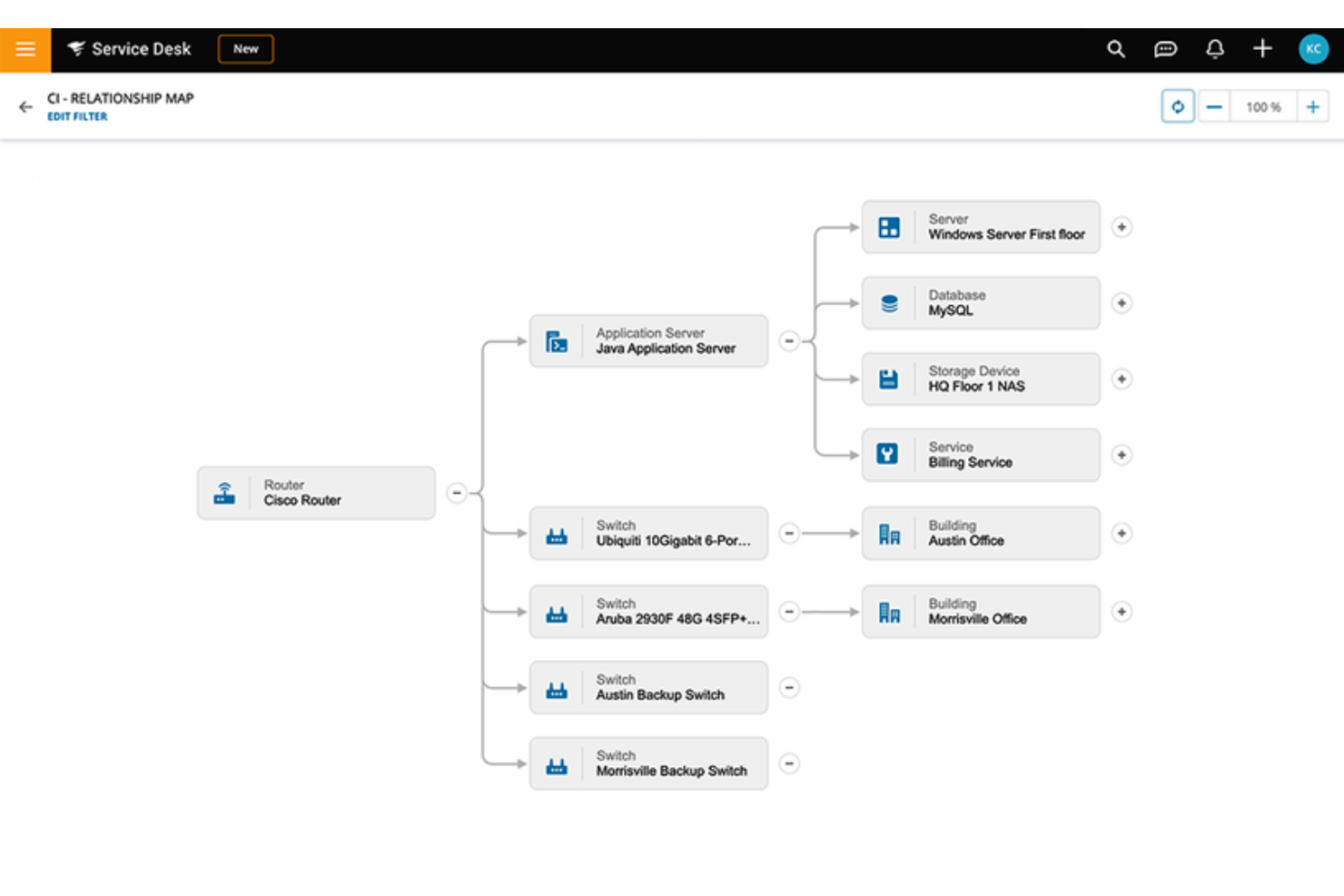
SolarWinds IT Service Desk supports organizations seeking structured IT service management and help desk solutions. It stands out for its comprehensive CMDB, giving teams clear visibility into assets and their relationships to incidents. Tailored for IT professionals, it addresses operational challenges such as asset management and incident resolution while improving overall help desk operations.
Why I Picked SolarWinds IT Service Desk
I picked SolarWinds IT Service Desk for its comprehensive CMDB, which gives IT teams clear visibility into assets and their relationships to incidents, users, and services. The platform maps relationships between configuration items, helping teams assess impact before making changes and troubleshoot issues with better context. It also supports asset lifecycle tracking and incident workflows, allowing organizations to maintain accurate records while managing help desk operations more effectively.
SolarWinds IT Service Desk Key Features
I also found SolarWinds IT Service Desk offers:
- Incident Management: Streamlines the troubleshooting process for IT incidents, ensuring quick and effective resolutions.
- Service Automations and Workflows: Automates repetitive tasks, enhancing the overall performance of your service desk operations.
- Mobile Application: Provides the flexibility to manage and resolve IT issues from anywhere, at any time, enhancing accessibility and responsiveness.
SolarWinds IT Service Desk Integrations
Integrations include Microsoft Teams, Slack, Jira, and other tools, supported by a REST API for custom integrations.
Pros and Cons
Pros:
- Simple ticket management with clear request tracking
- Centralized inventory tracking for IT devices and systems
- Clean layout reduces time spent navigating requests
Cons:
- Can feel complex for small, basic helpdesk setups
- Basic remote management capabilities


LiveAgent brings together ticket management, live chat, and a customer portal for support teams and businesses that want to handle customer inquiries across email, chat, social, and phone from one place.
Who Is LiveAgent Best For?
LiveAgent is a good fit for small to mid-sized businesses that need a multi-channel support setup without managing multiple disconnected tools.
Why I Picked LiveAgent
LiveAgent earns its spot on my shortlist because it's one of the few help desk tools that builds a fully functional knowledge base directly into the platform rather than treating it as an add-on. I like that you can create a branded self-service portal with articles, FAQs, and forums without needing a separate tool. When a customer submits a ticket, agents can pull from that same knowledge base to respond faster and more consistently. The built-in feedback widgets also let customers rate articles, so I can see what's actually helping and what needs updating.
LiveAgent Key Features
- Automated ticket distribution: Assigns incoming tickets to agents based on predefined rules like workload, priority, or department.
- SLA management: Tracks response and resolution deadlines, with alerts and a "To Solve" button that flags tickets at risk of breaching SLA targets.
- Hybrid ticket stream: Consolidates all customer interactions across channels into a single ticket thread, regardless of which channel the customer switches to.
- Agent performance reporting: Generates reports on individual agent activity, including tickets handled, response times, and work hours logged.
LiveAgent Integrations
Integrations include ActiveCampaign, Agile CRM, BigCommerce, Braintree, ClickUp, Clockify, Facebook, Facebook Lead Ads, CloudApp, and Everhour.
Pros and Cons
Pros:
- Numerous third-party integrations are available
- White glove implementation services
- Includes the ability to merge or split help tickets as needed
Cons:
- Some social media integrations require an additional fee
- An additional fee is required if you want to host more than one knowledge base (multi-knowledge base feature)

Zendesk
Best AI-powered customer service solution for companies of all sizes

Zendesk is a help desk platform built for teams who need to manage customer conversations across channels, automate repetitive tasks, and deliver fast, consistent support whether you’re a startup, enterprise, or anything in between.
Who Is Zendesk Best For?
Zendesk is a strong fit for customer support and service teams at companies of any size that need a scalable, multi-channel help desk solution.
Why I Picked Zendesk
I chose Zendesk because its AI capabilities are built into the core of the product rather than bolted on. The AI agents can autonomously resolve over 80% of customer interactions across any channel, which means my team spends less time on repetitive tickets and more time on complex issues that need a human. I also like the Copilot feature, which sits in the agent workspace and surfaces suggested replies, customer sentiment, and recommended next steps before an agent starts typing. Both tools launch with no technical setup — no model training or data science is needed to get started.
Zendesk Key Features
- Omnichannel ticket management: Consolidates customer conversations from email, chat, voice, social media, and messaging apps into a single agent workspace.
- Skills-based and intent-based routing: Automatically assigns incoming tickets to the right agent based on their skills, availability, and the customer's intent.
- Macros: Pre-written responses and actions that agents apply to tickets in one click to handle common issues consistently.
- Customizable reporting and analytics: Tracks ticket volume, agent performance, and channel trends with prebuilt dashboards and a drag-and-drop report builder.
Zendesk Integrations
Integrations include Slack, Shopify, Google Play Reviews, Harvest, ChannelReply, Trustpilot, Pipedrive, Sprout Social, Amazon, and eBay.
Pros and Cons
Pros:
- Supports localized content in over 40 languages
- Has a user-friendly interface with robust features
- Internal ticketing system combines email, chat, voice, and social messaging queries into one system
Cons:
- Analytics dashboard is pre-built (not customizable)
- Self-service portal isn't available in their basic plan


eDesk is a help desk platform built for ecommerce businesses and online retailers who need to manage customer messages, orders, and support tickets across multiple sales channels in one place.
Who Is eDesk Best For?
eDesk is a strong fit for ecommerce businesses selling across multiple online marketplaces and storefronts who need a centralized place to manage customer support.
Why I Picked eDesk
eDesk earns its spot on my shortlist because of how well its AI Agent handles the specific demands of ecommerce support. I picked it because the AI Agent doesn't just auto-reply—it pulls live order details, checks your return policies, and applies your rules before sending a response, so it makes decisions rather than merely pattern-matching. I also like the AI ticket classification in the inbox, which groups similar tickets automatically so my team can work through high volumes without losing context. The combination of a unified multichannel inbox and an AI layer that understands ecommerce-specific intent—returns, cancellations, pre-sales questions—distinguishes eDesk from general-purpose help desk tools.
eDesk Key Features
- Automation rules: Set up custom triggers to auto-assign, tag, or escalate tickets based on channel, keyword, or order status.
- Live chat widget: Add a chat widget to your storefront so customers can reach your team directly while browsing or checking out.
- Customer view: See a full history of a customer's orders, past tickets, and interactions pulled together in a single profile.
- Reporting dashboard: Track ticket volume, response times, and agent performance across all channels in one view.
eDesk Integrations
Integrations include Amazon, eBay, Walmart, Shopify, Magento, WooCommerce, BigCommerce, Facebook, Instagram, and Klaviyo.
Pros and Cons
Pros:
- Centralizes customer messages from marketplaces and stores
- Organized ticket views improve daily workflow efficiency
- AI automations reduce repetitive support tasks
Cons:
- Primarily built for ecommerce, less flexible for other industries
- Reporting and analytics, while present, can be less customizable than more enterprise dashboards


InvGate Service Management is an IT service management platform designed for organizations that need to centralize support requests, automate workflows, and improve service delivery across departments.
Who Is InvGate Service Management Best For?
InvGate Service Management is a strong fit for IT teams in mid-sized to large organizations requiring structured, process-driven service management across multiple departments.
Why I Picked InvGate Service Management
I picked it for how it handles ticket routing with a combination of rule-based automation and AI. The automation engine assigns incoming tickets to the right help desk based on request type, urgency, and agent availability—so tickets aren't left waiting for manual redirection. I also appreciate the AI-powered category keyword expansion, which reduces user errors in ticket creation by 30% (per InvGate's internal testing), resulting in fewer misrouted tickets. Additionally, the AI SLA monitoring flags at-risk requests before deadlines are missed, which keeps routing decisions proactive rather than reactive.
InvGate Service Management Key Features
- Self-service portal: A customizable portal where end users can submit tickets, track request status, and browse knowledge base articles without contacting an agent.
- Knowledge discovery: AI analyzes closed tickets and extracts structured knowledge fragments called Snippets, which feed directly into Virtual Service Agent responses and agent solution recommendations.
- Change management: A no-code workflow builder guides change requests through assessment, CAB approval, and implementation with AI-assisted risk scoring at each stage.
- Gamification: Agents earn points and rankings by completing quests tied to business goals, such as closing tickets with satisfaction scores above a set threshold.
InvGate Service Management Integrations
Integrations include InvGate Insight, Microsoft Teams, Jira, Slack, Active Directory, Google Workspace, Okta, Azure Active Directory, Zapier, and an API is available for custom integrations.
Pros and Cons
Pros:
- Rule-based SLA configuration for tracking performance metrics
- Incorporates AI and low-code automation
- Provides a robust platform for incident management
Cons:
- Could offer more native integrations
- No social media ticket support


Tidio brings together live chat, chatbot automation, and multichannel messaging, making it a go-to help desk platform for ecommerce businesses and support teams that want to handle customer questions promptly and keep conversations organized in one place.
Who Is Tidio Best For?
Tidio is a strong fit for small to mid-sized ecommerce businesses that need to manage customer support across chat, email, and social channels without a large support team.
Why I Picked Tidio
Tidio is one of my top picks because I love how it blends live chat and AI-driven automation in a single workspace. The Lyro AI Agent handles repetitive questions automatically, while live agents can monitor those conversations in real time and jump in whenever a case needs a human touch. I also use the Flows builder to set up no-code automation paths that trigger at key moments—like when a visitor is about to abandon their cart or when no agents are available. That combination of always-on chatbot coverage and real-time agent handoff is what makes Tidio genuinely useful for teams that can't staff support around the clock.
Tidio Key Features
- Multichannel inbox: Manage conversations from email, live chat, Messenger, Instagram, and WhatsApp in one unified inbox.
- Ticketing system: Convert incoming messages into tickets, assign them to agents, and track resolution status from a single dashboard.
- Canned responses: Store and reuse pre-written replies to answer common questions promptly during live support sessions.
- Visitor tracking: Monitor active website visitors in real time, including the pages they're browsing and how long they've been on-site.
Tidio Integrations
Integrations include Shopify, WordPress, Zendesk, Instagram, Messenger, WhatsApp, ActiveCampaign, Adobe Commerce, Salesforce, and Zapier.
Pros and Cons
Pros:
- Includes the ability to set up 2K to 40K chatbot triggers
- Multilanguage capabilities are included in all plans
- The Free and Starter plans offer a wide range of features
Cons:
- Customization options are limited to their top-tier plan only
- Live chat support is limited to 24/5 and not available in the free plan

Best for creating personalized experiences with AI

Salesforce Service Cloud is a multi-channel helpdesk that enables businesses to deliver great customer experiences using AI-powered personalization.
Why I picked Salesforce Service Cloud: The software uses AI and automation to take care of repetitive tasks, so your agents can focus on giving top-notch support. AI features like chatbots and automatic triaging not only save time but also improve efficiency. The AI also makes sure customer queries go to the right agents with the right skills, providing a personalized support experience.
This software works well for businesses of all sizes and across different industries to offer personalized support through various channels. The AI can analyze customer interactions to give proactive service suggestions, anticipate needs, and tailor interactions on a large scale. The platform also has a drag-and-drop editor for building a self-service center, so customers can find answers on their own, enhancing the personalized support even more.
Salesforce Service Cloud Standout Features and Integrations
Standout features include omni-Channel Routing, which directs customer inquiries to the right agents based on skill set and availability, ensuring efficient and accurate responses. The platform also provides a comprehensive knowledge base, allowing agents to quickly access information and solutions to common issues, speeding up resolution times. Additionally, the Field Service feature supports mobile workforce management, ensuring that field technicians have the tools and information they need to provide excellent service.
Integrations include Freshdesk, CloudTalk, Twilio, Brandwatch, Paligo, Mailchimp, HubSpot CRM, Trello, TeamViewer, Smartsheet, Klaviyo, Aircall, Gainsight, and Conversocial.
Pros and Cons
Pros:
- Effectively simplifies support procedures
- Adaptable to users’ needs
- Provides a unified view of interactions
Cons:
- Comes with a learning curve
- Can be cumbersome to implement


If you're seeking a help desk software that blends communication, collaboration, and task management in one interface, Missive might be your ideal match. Designed for support teams that rely heavily on email, Missive unifies multiple communication channels—including email, chat, SMS, and social media—into a shared inbox that keeps your entire team aligned. With features like task assignments, automation rules, and integrated chat, Missive simplifies how teams handle customer inquiries while maintaining personalized service.
Why I Picked Missive
I picked Missive for its ability to transform everyday email operations into a structured, collaborative help desk system. Unlike traditional ticket-based tools, Missive keeps communication natural while still giving you the tools to manage workloads efficiently. You can assign conversations, turn messages into tasks, and discuss threads internally without switching platforms. I also like how Missive helps automate repetitive actions like routing and labeling, freeing up time for your team to focus on solving customer problems. The platform’s built-in workload balancing and smart assignments prevent burnout while maintaining consistent response times. Additionally, Missive’s focus on transparency—through features like shared inboxes and internal discussions—ensures every team member stays informed, making it especially useful for customer support teams that handle high volumes of requests.
Missive Key Features
In addition to its unified inbox and collaboration tools, Missive offers a comprehensive set of help desk capabilities:
- Task Management: Converts emails into actionable tasks, so teams can track customer issues from intake to resolution.
- Workload Balancing: Distributes tasks automatically across team members to maintain productivity.
- Conversation Linking: Connects related messages for better visibility into ongoing customer interactions.
- Automation Rules: Handles repetitive actions, such as tagging, assigning, or labeling, to improve efficiency.
- Security and Compliance: Includes SOC 2 compliance, two-factor authentication, and Single Sign-On for secure data handling.
Missive Integrations
Integrations include ChatGPT by OpenAI, Integrately, Zapier, Close, HubSpot, Salesforce, Aircall, Zoom, Dropbox, Google Drive, Asana, and GitHub.
Pros and Cons
Pros:
- Integrates with 25+ major tools
- Turns emails into actionable tasks
- Centralized team inbox collaboration
Cons:
- Slight learning curve for beginners
- Offline functionality is limited


NinjaOne is a unified IT management platform, designed to simplify and optimize the way IT teams work. It offers a suite of tools that cater to various aspects of IT management, including remote monitoring and management (RMM), endpoint management, patch management, backup, and disaster recovery.
Why I picked NinjaOne: As a help desk software, NinjaOne excels in streamlining IT support and enhancing customer service efficiency. It offers a robust ticketing system that allows IT teams to efficiently track, prioritize, and resolve user issues and requests. The platform's strength lies in its intuitive interface and seamless integration with other IT management tools, enabling a unified approach to IT service management.
NinjaOne provides detailed reporting and analytics, which help in identifying common issues and trends, leading to proactive problem resolution and improved IT support strategies. Additionally, its automation capabilities significantly reduce the time spent on repetitive tasks, allowing IT professionals to focus on more complex issues. The software's ability to offer remote support and access further enhances its effectiveness, enabling IT teams to provide timely and effective assistance regardless of location.
NinjaOne Standout Features and Integrations:
Standout features include its user-friendly interface and design, which is tailored to enhance user experience and productivity. The platform's intuitive design stands out in a field often characterized by complex and technical interfaces. This focus on user experience simplifies the learning curve for new users and enhances efficiency for experienced IT professionals.
Integrations include TeamViewer, Splashtop, Connectwise, Sentinal One, Bitdefender, Webroot, Alwarebytes, OKTA, OneLogin, Accelo, CloudBlue PSA, SherpaDesk, HaloPSA, IT Glue, BightGauge, ScalePad, PagerDuty, and Slack.
Pros and Cons
Pros:
- Robust automation capabilities
- User-friendly interface
- Comprehensive feature set
Cons:
- Learning curve for advanced features
- Focused on IT customer service only

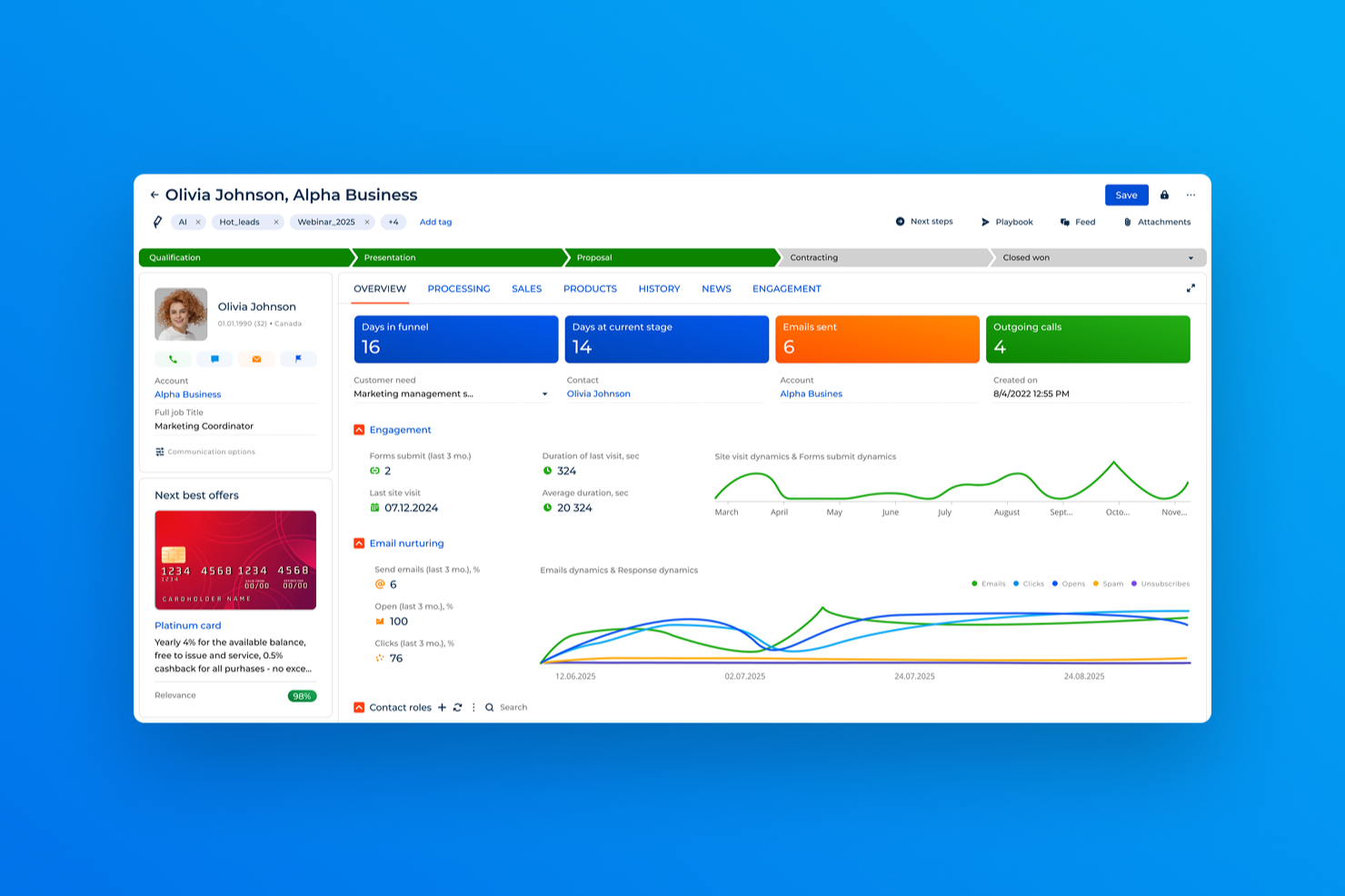
Creatio CRM offers a versatile platform for businesses looking to enhance their help desk operations by integrating customer service, marketing, and sales into a unified system. It appeals to organizations of various sizes, especially those interested in leveraging AI-powered solutions and no-code customization to address complex customer service challenges. By providing omnichannel support and comprehensive customer profiles, Creatio CRM can help your team deliver personalized and efficient service, ultimately improving customer satisfaction.
Why I Picked Creatio CRM
I picked Creatio CRM for its unique ability to deliver personalized customer service through its omnichannel support and unified customer profiles. These features enable your team to seamlessly interact with customers across different channels while maintaining a consistent service experience. Moreover, Creatio CRM's AI capabilities allow for the automation of routine tasks, freeing up your team to focus on resolving more complex customer issues. This combination of features addresses common challenges faced by help desk teams in providing timely and efficient support.
Creatio CRM Key Features
In addition to its standout features, Creatio CRM offers several others that can enhance your help desk operations:
- Ticket Management: Streamlines the process of tracking and resolving customer issues, ensuring that no inquiry goes unanswered.
- Case Tracking: Provides a comprehensive view of each customer interaction, allowing your team to manage cases more effectively.
- Knowledge Base: Offers a centralized repository of information, enabling quick access to FAQs and troubleshooting guides for faster issue resolution.
- Service Level Agreement (SLA) Management: Helps you define and monitor service level commitments, ensuring that support targets are consistently met.
Creatio CRM Integrations
Integrations include Microsoft 365, Google Workspace, Salesforce, QuickBooks, Mailchimp, Slack, Zendesk, Shopify, Dropbox, and DocuSign.
Pros and Cons
Pros:
- Low-code customization adapts workflows to business needs
- AI-powered workflow automation reduces manual ticket handling
- Omnichannel case management across email, chat, phone, social
Cons:
- Pricing and add-ons can increase total cost
- Advanced features may require significant configuration time
Other Help Desk Software
Here are a few more worthwhile options for help desk management. Even though they didn’t make it into my top 20 selections, they’re still worth checking out if you need more options:
- Desk365
For AI-powered ticketing
- 3CX
For managing multiple communication methods
- Intercom
Help desk chat widget for websites & apps
- Issuetrak
For omnichannel ticket submission
- Jira Service Management
Help desk software for internal departments
- SysAid
Help desk software for IT services
- Gladly
For advanced telephony features
- Hiver
For Gmail-based team collaboration
- SAAS First
For AI-powered chatbots
- 14.ai
For intent-aware responses
- Applied Labs AI
For automating support tickets
- Zoho Assist
For providing remote access support
- HelpDesk
For ticket collaboration
- Re:amaze
Help desk software for online businesses
- ProProfs Help Desk
For managing customer emails using shared inbox
- ManageEngine ServiceDesk Plus
Help desk software for IT support
- Gorgias
Help desk tool for ecommerce businesses
- Front
Ticketless help desk software


Help Desk Software Selection Criteria
When selecting the best helpdesk tools to include in this list, I considered common buyer needs and pain points like the requirement for 24/7 availability through multiple support channels and the necessity for responsive and knowledgeable support teams. I also used the following framework to keep my evaluation structured and fair:
Core Functionality (25% of total score)
- Ticket management
- Knowledge base creation
- Multi-channel support
- Reporting and analytics
- Automation of repetitive tasks
Additional Standout Features (25% of total score)
- AI-driven response suggestions
- Customizable dashboards
- Integration with third-party apps
- Mobile app support
- Real-time collaboration tools
Usability (10% of total score)
- Intuitive interface design
- Minimal learning curve
- Clear navigation paths
- Customization options
- Fast response times
Onboarding (10% of total score)
- Availability of training videos
- Interactive product tours
- Comprehensive knowledge base
- Access to webinars and workshops
- Ease of data migration
Customer Support (10% of total score)
- 24/7 availability
- Multiple contact channels
- Quick response times
- Personalized support
- Access to technical experts
Value For Money (10% of total score)
- Competitive pricing
- Flexibility in subscription plans
- Transparency in additional costs
- Discounts for long-term commitments
- Free trial options
Customer Reviews (10% of total score)
- Overall satisfaction ratings
- Feedback on ease of use
- Support experience evaluations
- Functionality versus expectations
- Comments on reliability and uptime
How to Choose Help Desk Software
It’s easy to get bogged down in comprehensive helpdesk functionality and complex pricing structures. To help you stay focused as you work through your unique software selection process, here’s a checklist on how to choose helpdesk software for your business or team:
| Factor | What to Consider |
|---|---|
| Scalability | Ensure the software can grow with your team. Look for solutions that allow adding users or features as your business expands. |
| Integrations | Check if it connects with your current tools like CRM systems or email platforms to streamline workflow. |
| Customizability | Choose software that lets you tailor workflows and interfaces to fit your team's specific needs. |
| Ease of Use | Opt for user-friendly interfaces that minimize training time and help your team get up to speed quickly. |
| Budget | Consider both upfront costs and ongoing expenses. Ensure it fits within your financial plan long-term. |
| Security Safeguards | Look for robust security features like data encryption and user authentication to protect sensitive information. |
| Customer Support | Evaluate the level of support offered, such as 24/7 service or dedicated account managers, to assist when issues arise. |
| Reporting Tools | Ensure the software provides analytics and reporting features to help track performance and identify areas for improvement. |
Trends in Helpdesk Software
In my research, I sourced countless product updates, press releases, and release logs from different help desk software vendors. Here are some of the emerging trends I’m keeping an eye on:
- AI-Powered Insights: AI helpdesk software utilizes AI to provide deeper insights into customer interactions. This can help businesses predict customer needs and automate responses, improving efficiency. Zoho's integration with ChatGPT enhances its AI chatbot Zia, offering intelligent content suggestions.
- Omnichannel Support: Providing support across multiple channels, such as chat, email, and phone, is becoming standard. This trend allows businesses to meet customers where they are, ensuring no interaction falls through the cracks. Many platforms are now making it easier to integrate these channels into a unified interface.
- Self-Service Portals: More helpdesk solutions are incorporating self-service options where customers can find answers and solutions without direct human intervention. This reduces the workload on support staff and empowers users to resolve issues on their own. Some vendors are integrating community forums to facilitate peer assistance.
- Data-Driven Personalization: Helpdesk tools are leveraging customer data to tailor support experiences. By analyzing past interactions and preferences, support teams can offer more personalized assistance, enhancing customer satisfaction. This trend is particularly strong in platforms that offer CRM integrations.
- Scalability for Growing Businesses: As companies grow, they need helpdesk solutions that can scale with them. Vendors are focusing on creating scalable pricing plans and flexible features that can accommodate both small teams and large enterprises. This ensures that businesses of all sizes can benefit from the same level of support capabilities.
What Is Help Desk Software?
Help desk software is a platform that helps businesses manage, track, and resolve customer or employee support requests. It centralizes communication, automates ticket workflows, and enables support teams to respond efficiently across multiple channels.
Features of Help Desk Software
When selecting help desk software, keep an eye out for the following key features:
- Ticket management: This lets you capture, track, and organize all customer queries as tickets. You can assign them to team members, set priorities, and monitor progress, so nothing falls through the cracks.
- Multi-channel support: Connect with your customers via email, chat, phone, and even social media—all in one place. This means you don’t have to juggle between different tools to keep conversations going.
- Knowledge base: Create a searchable library of FAQs, how-to guides, and troubleshooting tips. This empowers your users to solve common issues themselves, lightening your support team’s load.
- Automation tools: Use workflows, triggers, and automatic responses to handle repetitive tasks. For example, you can auto-assign tickets or send acknowledgment emails, speeding things up and reducing manual work.
- Service level agreement (SLA) management: Set and track response and resolution times, making it easier to meet your commitments to customers and spot bottlenecks you need to fix.
- Reporting and analytics: Get insights into metrics like ticket volume, response times, and customer satisfaction. This helps you identify trends and continuously improve your service.
- Integration capabilities: Connect your help desk software with CRM systems, project management tools, or other applications you rely on. That way, your workflows stay seamless, and everyone’s on the same page.
- Customizable workflows: Adapt the software to fit your unique processes, whether that’s setting up custom ticket fields, statuses, or approval steps.
- User access controls: Decide who can see and do what in the system, so you keep sensitive information protected and everyone focused on the right tasks.
- Customer portal: Give your users a self-service hub where they can submit tickets, track progress, and find solutions—keeping your support open 24/7.
Common Help Desk Software AI Features
Beyond the standard help desk software features listed above, many of these solutions are incorporating AI with features like:
- AI-powered ticket routing: Automatically assign tickets to the most appropriate agent based on issue type, urgency, or agent skill set. This means faster resolutions and happier customers.
- Intelligent chatbots: Use AI-driven bots to handle routine inquiries instantly, 24/7. Your support team gets more time for complex issues, and users get quick answers around the clock.
- Automated response suggestions: The software can suggest replies to incoming tickets based on knowledge base articles or previous solutions, speeding up response times and ensuring consistent answers.
- Sentiment analysis: AI scans messages for tone and urgency, helping you prioritize tickets that might need a human touch right away.
- Predictive analytics: AI anticipates common issues or spikes in ticket volume, giving you a heads-up so you can prepare your support resources in advance.
Benefits Of Helpdesk Software
Implementing help desk software provides several benefits for your team and your business. Here are a few benefits of a helpdesk system you can look forward to:
- Improved customer support: Helpdesk software allows for efficient ticket management, ensuring that customer issues are addressed promptly and systematically.
- Centralized information management: With all customer interactions and data in one place, teams can access the necessary information quickly, reducing response times and improving service quality.
- Enhanced team collaboration: Features like shared ticket views and internal notes help team members work together effectively, leading to better problem resolution.
- Data-driven insights: Helpdesk solutions offer reporting tools that provide valuable insights into customer interactions and team performance, helping to identify areas for improvement.
- Integration with other tools: Many helpdesk systems integrate with CRM and other business tools, streamlining workflows and ensuring consistency across platforms.
Costs and Pricing of Help Desk Software
Selecting helpdesk software requires an understanding of the various pricing models and plans available. Costs vary based on features, team size, add-ons, and more. The table below summarizes common plans, their average prices, and typical features included in help desk software solutions:
Plan Comparison Table for Helpdesk Software
| Plan Type | Average Price | Common Features |
|---|---|---|
| Free Plan | $0 | Basic ticketing system, limited customer support, and community forum access. |
| Personal Plan | $5-$25/user/month | Email support, basic reporting, mobile app access, and limited integrations. |
| Business Plan | $30-$60/user/month | Advanced reporting, multiple integrations, customization options, and automation. |
| Enterprise Plan | $80-$150/user/month | Dedicated account manager, custom security features, advanced analytics, and premium support. |
Help Desk Software: Frequently Asked Questions
Do you have general questions about what help desk software has to offer or how to choose the best option for your organization? These answers to FAQs should point you in the right direction:
What should I consider when migrating to a new help desk software?
When migrating to new help desk software, plan for clean data transfer, integration needs, and team training. Confirm that your new tool supports importing tickets, user data, and custom fields from your old system. Test integrations with your key platforms—like CRM, chat, or email—before switching. Build a rollout and training schedule to limit downtime.
How can help desk software improve response time and customer satisfaction?
Help desk software speeds up response time by automating ticket routing, prioritizing urgent requests, and offering template replies. Features like SLAs and internal notes keep your team organized and accountable. You’ll see higher customer satisfaction by closing tickets faster and delivering more consistent service.
Which help desk integrations are most valuable for customer support teams?
Email, live chat, CRM, and knowledge base integrations are top choices for support teams. Integrating with your CRM lets agents see customer history without switching tabs. Chat and messaging apps support multi-channel responses. Knowledge base integration helps automate self-service, reducing ticket volume.
How do I measure my support team's performance with help desk software?
Most help desk platforms track metrics like first response time, resolution time, ticket volume, and customer satisfaction scores. Set up dashboards with these KPIs so you can spot trends and coach your team. Many tools also let you schedule reports and share results with stakeholders.
What's the difference between help desk software and customer service software?
Help desk software focuses on managing and resolving customer issues via tickets. Customer service software may include help desk tools, but also covers broader features like live chat, feedback surveys, and multi-channel support. Help desk solutions are best if your team’s main need is centralized ticket management.
What are the different types of help desk software available?
Here are different types of help desk software you can explore if you’re looking for something tailored to specific needs or organizational sizes:
- Help Desk Software for Small Businesses: Designed for smaller teams, this software is affordable, easy to use, and helps manage customer requests efficiently.
- Email Help Desk Software: Focuses on organizing customer queries sent via email, turning them into manageable tickets.
- Internal Help Desk Software: Helps employees get IT or HR support within the company by tracking and resolving their requests.
- Enterprise Help Desk Software: Built for large organizations, it handles high volumes of tickets and supports complex workflows.
- Help Desk Knowledge Bases for Customer Service: Provides a central library of articles and guides to help customers and agents solve problems faster.
- Simple Help Desk Software: Offers basic tools with an easy-to-navigate interface, perfect for teams new to help desks.
- Online Help Desk Software: Accessible from any browser, this tool helps teams manage customer requests remotely.
- Cloud Help Desk Software: Hosted online, it allows businesses to manage customer support without installing software on their devices.
How does helpdesk software use automation and AI?
Help desk software uses automation to streamline your team’s workflow by automatically routing tickets to the right departments, categorizing and prioritizing requests, sending status updates, and triggering reminders for unresolved issues. AI features can suggest relevant help articles to customers, auto-complete agent responses, and analyze ticket sentiment to spot urgent cases. These functions help your team focus on complex queries while simple tasks run in the background, boosting speed and keeping customers happy.
What is ITIL and ITSM compliance in helpdesks?
ITIL (Information Technology Infrastructure Library) and ITSM (IT Service Management) compliance means your help desk software is built to follow global best practices for delivering IT support. This covers structured processes for incident tracking, change management workflows, problem escalation, and asset management. For support team leads, ITIL/ITSM compliance ensures consistency, higher service quality, and easier audits—especially if you work with strict regulatory or enterprise requirements.
What security features does helpdesk softwarehave?
Here’s a list of common security features found in helpdesk software:
- Role-Based Access Control (RBAC): Ensures users only access the information and tools relevant to their role.
- Data Encryption: Protects sensitive data during transmission and storage using encryption protocols.
- Audit Logs: Keeps detailed records of actions taken in the system to track changes and detect unauthorized activity.
- Two-Factor Authentication (2FA): Adds an extra layer of security by requiring a second verification step for user logins.
- Secure API Integrations: Ensures third-party connections follow security standards to prevent data leaks or breaches.
- Regular Security Updates: Provides frequent patches and updates to address vulnerabilities and improve protection.
- IP Whitelisting: Limits access to the helpdesk system to specific, approved IP addresses for added control.
What to look for in helpdesk customization and user interface?
When evaluating helpdesk customization and user interface, consider these key features:
- Customizable Workflows: Ability to adapt ticketing and support processes to fit your team’s unique needs.
- Branded User Interface: Options to personalize the portal with your company’s logo, colors, and branding.
- Drag-and-Drop Tools: Simplifies layout adjustments for dashboards and reports without coding.
- Dynamic Fields: Lets you tailor forms and tickets with relevant fields for specific queries or issues.
- Language and Localization: Support for multiple languages and regional settings for global teams and customers.
- Role-Specific Dashboards: Custom views based on the user’s role, such as agents, managers, or customers.
- Ease of Navigation: Intuitive design with clear menus, quick-access buttons, and minimal clutter.
Transform Your Helpdesk Experience
This list contains the best help desk software around. Before deciding which one to choose, I recommend clearly defining your needs. You can then research which products offer these features.
The next step is to test out a few of the services. All tools on this list offer either a free trial or a free product demo. This will give you a better idea of the pros and cons of each solution. If you're running a small customer support operation, you may even be able to get away with using a free helpdesk plan too (though the features will be limited).
You can sign up for The CX Lead newsletter to stay up-to-date on all the latest trends and insights in customer experience from leading industry experts.