

10 beste Skript-Softwarelösungen für Callcenter 2026

10 Die beste Callcenter-Skriptsoftware: Unsere Auswahl


Wer in einem Callcenter den Betrieb leitet, muss ständig den Spagat schaffen zwischen der Gewährleistung eines gleichbleibend hohen Servicelevels und einer effizienten Teamarbeit. Callcenter-Skriptsoftware hilft dabei, diese Herausforderungen zu meistern, indem sie Ihre Agents bei jedem Kundendialog anleitet. So wird sichergestellt, dass sie korrekte Informationen übermitteln und ein reibungsloses Kundenerlebnis bieten.
Meiner Erfahrung nach kann die Auswahl der passenden Software sowohl die Produktivität Ihres Teams steigern als auch die Kundenzufriedenheit erhöhen. Ich habe verschiedene Programme unabhängig getestet und bewertet, um Ihnen eine objektive Liste der besten Lösungen zusammenzustellen.
In diesem Artikel finden Sie eine fundierte Übersicht über die derzeit besten Callcenter-Skriptsoftware-Anbieter am Markt. Ich stelle Ihnen die Besonderheiten, Vor- und Nachteile sowie alle wesentlichen Aspekte vor, damit Sie eine fundierte Entscheidung für Ihr Team treffen können.
Warum Sie unseren Software-Empfehlungen vertrauen können
Unser Team testet und bewertet Software seit 2012. Als CX-Führungskräfte selbst wissen wir, wie schwierig – und wichtig – es ist, die richtige Software auszuwählen.
Für diesen Leitfaden haben wir Tools mithilfe von praktischen Tests und unabhängiger Recherche bewertet und dabei unsere Bewertungskriterien angewendet.
Unsere Bewertungen spiegeln unser menschliches redaktionelles Urteilsvermögen wider, keine Verkaufsstrategie.
Zusammenfassung: Beste Callcenter-Skriptsoftware
Diese Vergleichstabelle fasst die Preisinformationen zu meinen Top-Auswahlen an Callcenter-Skriptsoftware zusammen, damit Sie die passende Lösung für Ihr Budget und Ihre geschäftlichen Anforderungen finden.
| Tool | Best For | Trial Info | Price | ||
|---|---|---|---|---|---|
| 1 | Am besten für Echtzeit-Coaching und -Unterstützung von Agent:innen geeignet | Kostenlose Demo verfügbar | Preis auf Anfrage | Website | |
| 2 | Am besten geeignet für benutzerorientierte Callcenter mit Multi-Channel-Skripting | 14-tägige kostenlose Testversion verfügbar | Ab $19/Monat (jährliche Abrechnung) | Website | |
| 3 | Am besten für die Erstellung von Skripten aus dynamisch generierten Interessentendaten geeignet | Kostenlose Vorführung verfügbar | Ab $199/Nutzer/Monat | Website | |
| 4 | Am besten geeignet, um das Kundenerlebnis durch künstliche Intelligenz zu transformieren | Kostenlose Demo verfügbar | Ab $85/Nutzer/Monat (jährliche Abrechnung) | Website | |
| 5 | Hat eine gewisse Lernkurve | Kostenlose Demo verfügbar | Ab $110/Nutzer/Monat | Website | |
| 6 | Am besten geeignet für ein All-in-One-Callcenter mit Gamification | Kostenlose Demo verfügbar | Preise auf Anfrage | Website | |
| 7 | Am besten für ein cloudbasiertes Callcenter mit Skripting-Unterstützung | Kostenlose Demo verfügbar | Ab $119/Nutzer/Monat | Website | |
| 8 | Am besten für automatisierte SMS-Bot-Skripterstellung | 14-tägige kostenlose Testphase | Ab $15/Monat (jährliche Abrechnung) | Website | |
| 9 | Am besten zur Verbesserung der Einarbeitungszeit von Agenten | Kostenlose Testversion + kostenlose Demo verfügbar | Ab $30/Monat | Website | |
| 10 | Am besten geeignet für entscheidungsbaum-basierte interaktive Leitfäden für Agenten | 30-tägige kostenlose Testversion verfügbar | Tarife ab $20/Nutzer/Monat | Website |
Bewertungen: Beste Callcenter-Skriptsoftware
Nachfolgend finden Sie meine ausführlichen Bewertungen der besten Callcenter-Skriptsoftware-Lösungen aus meiner Vorauswahl. Die Rezensionen bieten einen umfassenden Überblick zu Kernfunktionen, Vorteilen & Nachteilen, Integrationen und idealen Einsatzszenarien jeder Software, damit Sie das optimale Tool für Ihre Agents wählen können.

Cresta
Am besten für Echtzeit-Coaching und -Unterstützung von Agent:innen geeignet
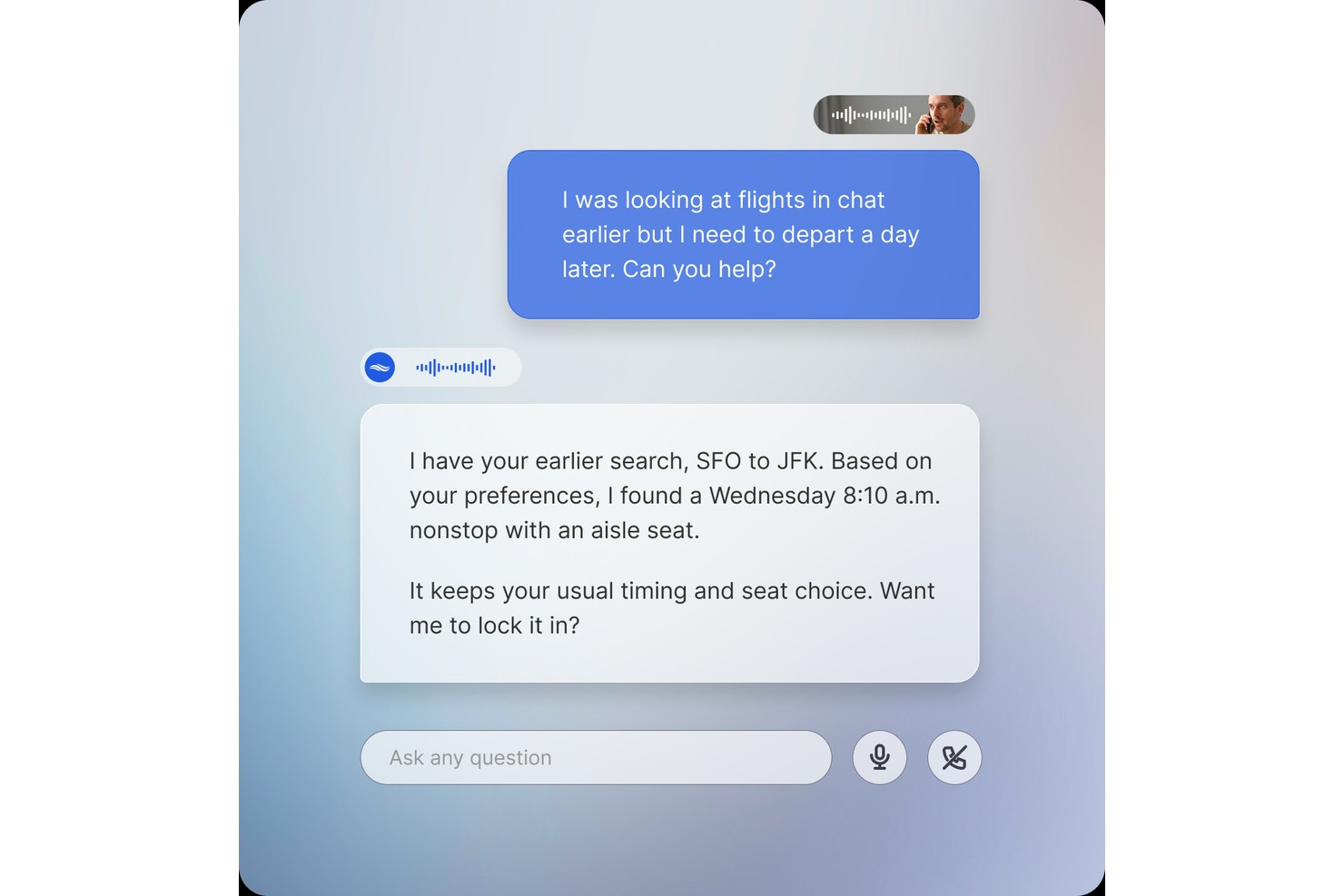
Cresta ist eine KI-gestützte Contact-Center-Plattform, die Echtzeit-Gesprächsunterstützung, dynamische Wissensbereitstellung, Compliance-Hinweise und Vorschläge für die nächste beste Aktion für Agent:innen über Sprach-, Chat- und E-Mail-Kanäle bietet.
Für wen ist Cresta am besten geeignet?
Cresta eignet sich für Contact Center in Unternehmen mit großen Agententeams, die KI-basierte Echtzeit-Unterstützung benötigen, um Konsistenz in Gesprächen mit hohem Volumen zu gewährleisten.
Warum habe ich Cresta ausgewählt?
Ich habe Cresta in meine Top-Auswahl aufgenommen, weil das Produkt Agent Assist Echtzeit-Coaching auf eine Weise ermöglicht, die statische Skripte nicht können. Während Live-Anrufen erhalten Agent:innen kontextspezifische Hinweise, Verhaltens-Erinnerungen und Vorschläge für die nächste beste Aktion, die sich dem tatsächlich Gesagten anpassen. Besonders gefällt mir das Knowledge Agent-Feature, das während des Gesprächs kontinuierlich arbeitet, den gesprochenen Kontext mit angezeigten Daten kombiniert und sofort quellenbasierte Antworten liefert, sodass Agent:innen einen Kunden nie in die Warteschleife legen müssen, um zu recherchieren.
Cresta Hauptfunktionen
- Intelligentes Verfassen: Schlägt KI-generierte Nachrichtenantworten für Chat- und E-Mail-Kanäle auf Basis des Live-Gesprächskontextes vor.
- Automatische Zusammenfassung: Erstellt Zusammenfassungen nach Gesprächen und füllt Felder zur Nachbearbeitung aus, wodurch der manuelle Dokumentationsaufwand sinkt.
- Automatische Qualitätsbewertung: Bewertet 100 % der Interaktionen anhand individueller Kriterien, um die Einhaltung vorgesehener Gesprächsverhalten durch Agent:innen nachzuverfolgen.
- Opera Workflow-Builder: Ein No-Code-Tool, mit dem CX-Teams ohne Unterstützung durch die IT Leitfäden für Agent:innen gestalten und aktualisieren können.
Cresta integriert sich mit Telefonie- und Chat-Lösungen wie Five9, Amazon Connect und Genesys sowie CRM- und Kundendialogplattformen wie Salesforce und Zendesk. Es gibt zudem Verbindungen zu NICE CXone und Twilio. Weitere Integrationen bestehen mit Marketing-Tools wie HubSpot und Marketo sowie Datenplattformen wie Databricks. Cresta bietet eine API für kundenspezifische Integrationen.
Pros and Cons
Pros:
- Automatische Bewertung aller Gespräche über alle Kanäle
- Bietet Echtzeit-Unterstützung in unter 200 Millisekunden
- No-Code-Tools zur Erstellung individueller Anwendungsfälle
Cons:
- Wissens-Assistenz identifiziert Gesprächsabsicht gelegentlich falsch
- Transkriptionsgenauigkeit erfordert individuelle Feinabstimmung

Am besten geeignet für benutzerorientierte Callcenter mit Multi-Channel-Skripting
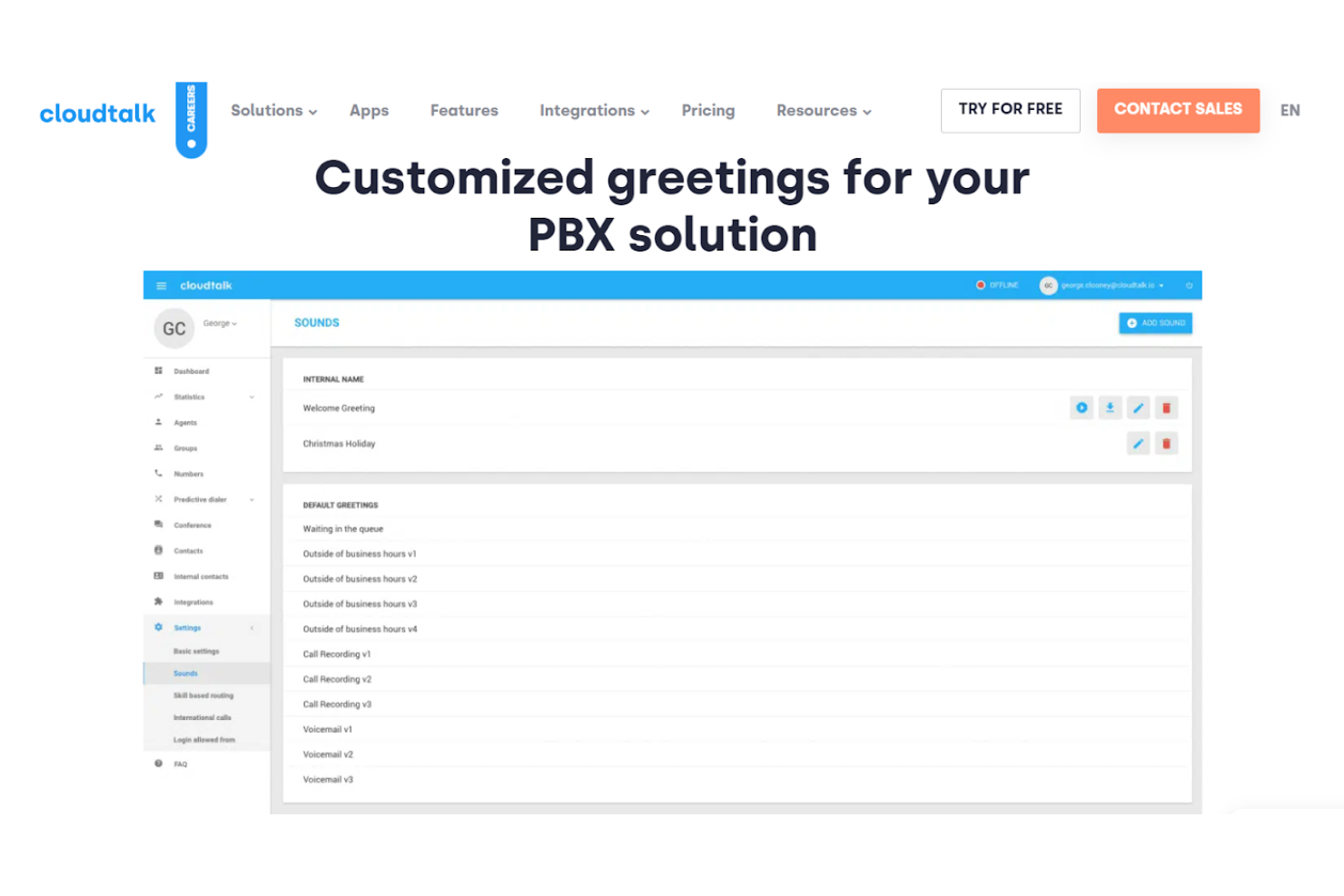
CloudTalk bietet Nutzern eine künstliche Intelligenz, die intuitive Callcenter-Workflows mit interaktiver Sprachsteuerung (IVR), automatischer Anrufannahme für geschäftige Tage, Cloud-SMS mit vorformulierten Antworten sowie individuellen Begrüßungen für PBX-Lösungen ermöglicht.
Warum ich CloudTalk gewählt habe: Mit den individuellen Begrüßungen können Nutzer verschiedene Arten von Ansagen aufzeichnen, darunter Willkommensgrüße, IVR-Menüansagen, Warteschleifenmeldungen, personalisierte Voicemails, Feiertagsgrüße und Voicemails außerhalb der Geschäftszeiten. Zusätzlich können Nutzer mit Callcenter-Analysefunktionen in Echtzeit verfolgen, wie diese Tools Geschäftszahlen verändern.
CloudTalk unterstützt Kundenanrufe für Helpdesks, Kundensupport und Vertriebsteams aller Unternehmensgrößen, einschließlich Start-ups und KMU. Die Plattform ist zudem auf E-Commerce-Lösungen spezialisiert.
Besondere Funktionen und Integrationen von CloudTalk
Funktionen umfassen Anruf-Skripting, IVR, internationale Nummern, Chatbots, individuelle Begrüßungen und eine komplette ViOP-Suite. CloudTalk ist über Webbrowser und Desktop-Anwendungen zugänglich.
Integrationen umfassen ActiveCampaign, Dataddo, Freshsales, Freshservice, Front, Gong, HubSpot, Intercom, MS Dynamics und Zoho Desk.
Pros and Cons
Pros:
- Einfache Navigation
- Echtzeit-Überwachung der Agentenleistung
- Anpassbare Abläufe und Regeln
Cons:
- Begrenzte Dashboard-Informationen für Agenten
- Vereinzelt Störungen bei der Generierung lokaler Nummern

Am besten für die Erstellung von Skripten aus dynamisch generierten Interessentendaten geeignet
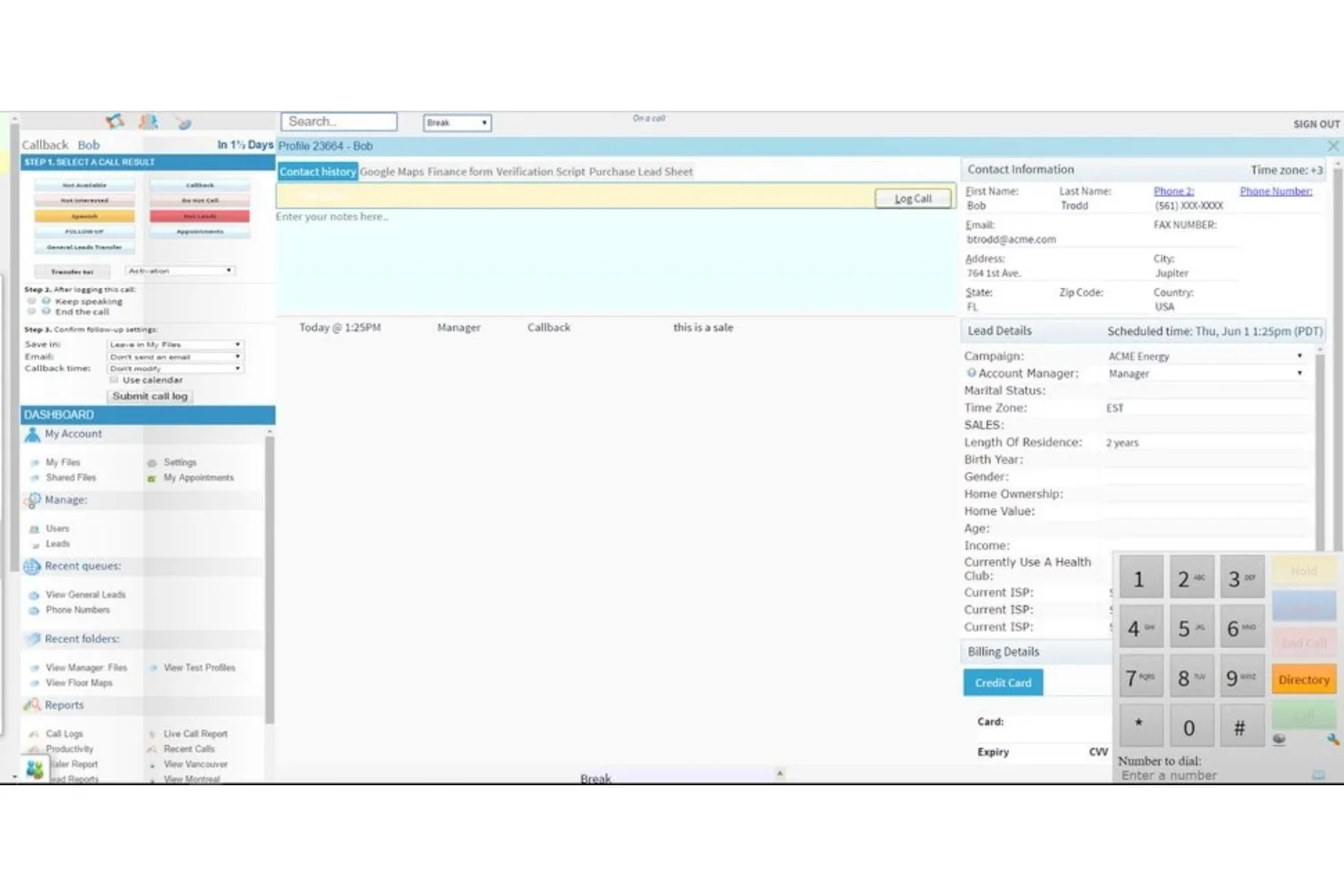
ReadyMode, früher Xencall genannt, ist eine Software für vorausschauendes Wählen und Kundensupport auf Unternehmensebene, die Kundenservice-Mitarbeitende intelligent mit Interessenten verbindet.
Warum ich mich für ReadyMode entschieden habe: Neben unglaublich hohen Wählgeschwindigkeiten bietet ReadyMode eine dynamische Software zur Erstellung von Skripten für Vertriebsmitarbeiter, in die Interessentendaten direkt im Skript eingebettet sind. Benutzer können außerdem eine Vielzahl interaktiver Sprachantworten erstellen und anpassen, die auf verschiedenen Regeln basieren, darunter Anruferoptionen und die Tageszeit.
ReadyMode bietet Lösungen für KMU und Unternehmen jeder Größe mit abgestuften Tarifen, deren Support sich nach der Anzahl der Mitarbeiterlizenzen und der Größe der Organisation richtet. Außerdem unterstützt die Software Teams aus verschiedenen Branchen, darunter Callcenter, Solarenergie, Krankenversicherungen, BPO, Immobilien sowie Reise und Tourismus.
Besondere Funktionen und Integrationen von ReadyMode
Zu den Funktionen gehören intelligentes Anruf-Routing, vorausschauendes Wählen, Skripterstellungstools, Anrufaufzeichnung, Anrufweiterleitung und die Echtzeitüberwachung der Arbeitsfläche. Die Überwachung der Arbeitsfläche ermöglicht es Managern, Agenten mit „Flüster“-Anweisungen zu unterstützen, die als Orientierung für die Skripte dienen.
Zu den Integrationen gehören ActiveCampaign, ActiveProspect, ClickSend, Google Maps, HubSpot, leadsquared, REISift, Salesforce, Sherpa und Zoho. Alle Integrationen sind systemeigene Integrationen mit bidirektionalem Datenaustausch.
Pros and Cons
Pros:
- Hervorragender Kundenservice
- Für jede Branche anpassbar
- Einfach verständlich
Cons:
- Veraltete Benutzeroberfläche
- Webbasierte Plattform – keine Android- oder iPhone-App

Am besten geeignet, um das Kundenerlebnis durch künstliche Intelligenz zu transformieren
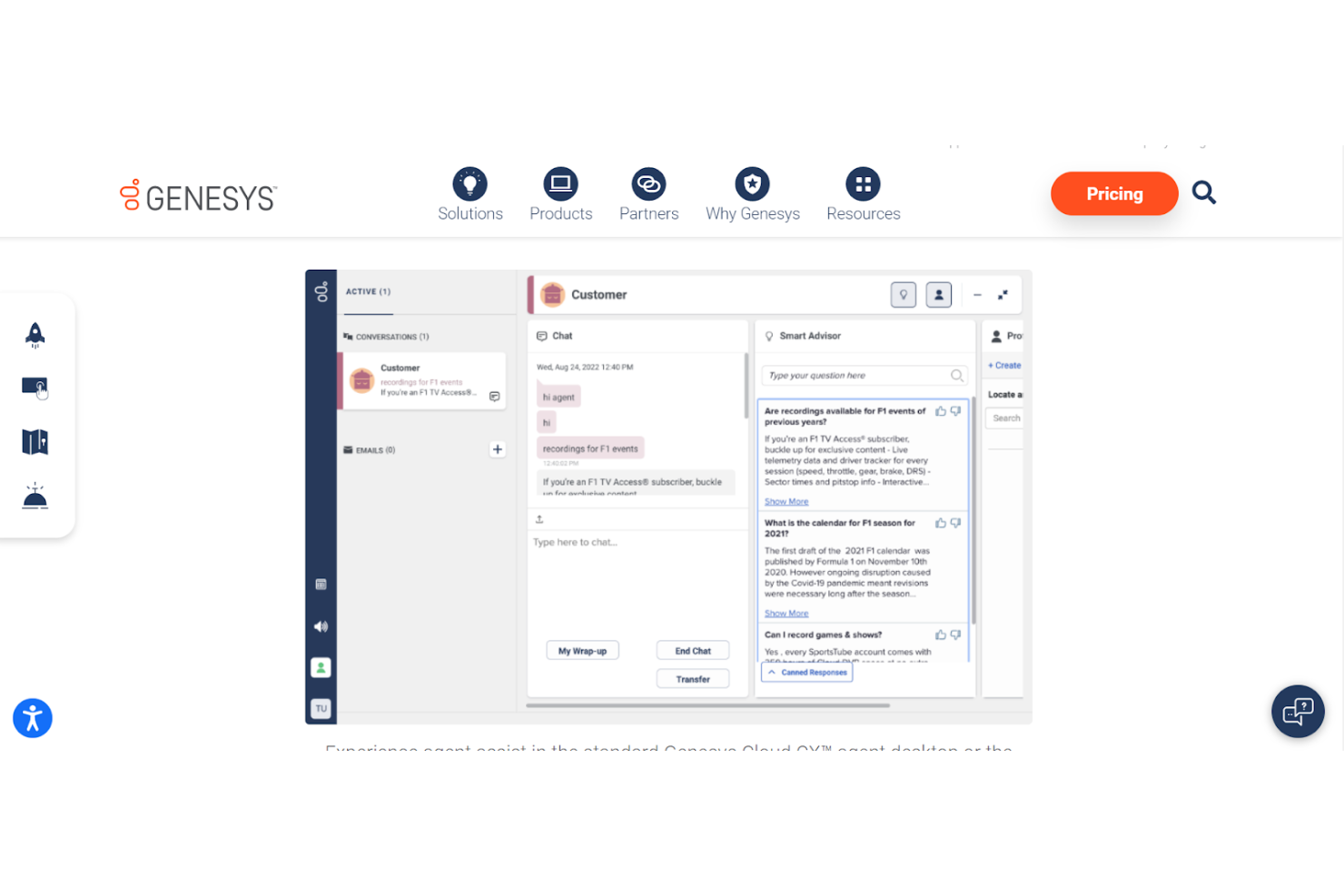
Genesys Cloud CX ist eine einzigartige Callcenter-Software mit Skripting-Funktionen, die Agent Assist, Wissensmanagement, prädiktive Interaktion und Chatbots umfasst. Diese Plattform bietet eine intelligente Erlebnis-Orchestrierung, um die Kundenzufriedenheit zu analysieren und Servicemitarbeiter mit einer zusammensetzbaren Architektur zu unterstützen.
Warum ich Genesys Cloud CX ausgewählt habe: Das Agent Assist-Tool bietet einen Smart Advisor, der während des Gesprächs Vorschläge für eine höhere Erstlösungsquote und bessere KPIs macht. Dieses Tool gibt Agenten die Möglichkeit, schneller Antworten zu finden, manuelle Aufgaben durch Automatisierung zu ersetzen und sich auf Kundenanalysen zu konzentrieren. Jeder Anruf endet mit einer automatisch generierten Zusammenfassung der Interaktion, um manuelle Notizen zu reduzieren.
Genesys Cloud CX bietet Lösungen nach Branche, Anwendungsfall und Organisationstyp. Das zeigt, dass es sowohl kleine und mittlere Unternehmen als auch Großunternehmen unterstützt, die in Bankwesen, Regierung, Gesundheitswesen, Einzelhandel und Versicherungen tätig sind.
Herausragende Funktionen und Integrationen von Genesys Cloud CX
Funktionen sind unter anderem Smart Advisor, automatisiertes Reporting, Robotic Process Automation, eingebettetes Wissen und Integration der Agentenerfahrung. Die Plattform verfügt über eine integrierte KI, unterstützt aber auch Google CCAI und weitere KI-Partner.
Integrationen beinhalten Azure Active Directory, Gong.io, Google Workspace, Jenkins, OneLogin, Microsoft Azure, Salesforce Service Cloud, Shelf, Qualtrics CoreXM und Zendesk Suite.
Pros and Cons
Pros:
- Einfache WFM-Operationen
- Benutzerfreundliche Reporting-Dashboards
- Sekundenaktuelle Einblicke
Cons:
- Zu wenig Transparenz bei der Preisgestaltung
- Leichte Verzögerung bei Echtzeitanzeigen

Hat eine gewisse Lernkurve
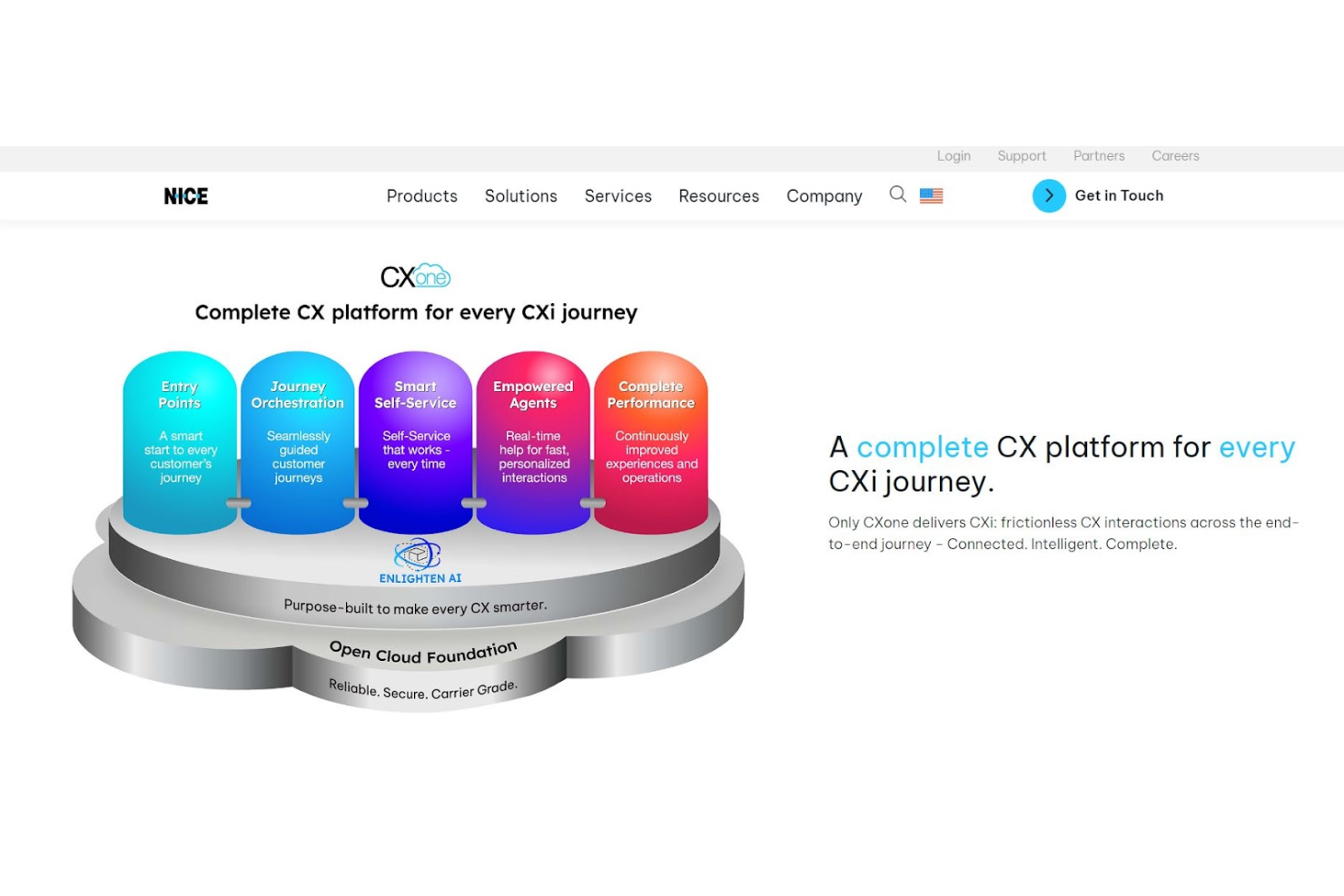
NICE CXone ist eine Callcenter-Software mit Skripting, die darauf abzielt, neue Mitarbeitende schnell einzuarbeiten und das Kundenerlebnis zu verbessern. Mit Skripten, die Einleitungen und proaktive Gesprächsleitfäden enthalten, werden Agenten dazu angeleitet, Kundenreaktionen zu fördern, um sicherzustellen, dass sie genau verstehen, was jeder Kunde benötigt.
Warum ich NICE CXone ausgewählt habe: Intelligent erstellte Gesprächsskripte durch die Führungsebene bieten neuen Agenten zudem eine Grundlage für den Kundenkontakt und sorgen dafür, dass sie nicht ständig in der Wissensdatenbank des Unternehmens nach Antworten suchen müssen. Mit diesem Tool können Nutzer einen natürlichen Gesprächsverlauf gestalten und die Customer Journey optimieren.
NICE CXone kann sowohl kleine als auch große Unternehmen unterstützen, und zwar in Branchen von Gesundheitswesen und Finanzdienstleistungen bis zu Business Process Outsourcing, Telekommunikation und gemeinnützigen Organisationen.
Herausragende Funktionen und Integrationen von NICE CXone
Funktionen umfassen konversationelle KI und Chatbots, interaktive Sprachsteuerung, Gesprächsskripte, Self-Service-Builder und Wissensmanagement.
Integrationen umfassen Bullhorn, Microsoft Dynamics, Netsuite, Oracle Service Cloud, Salesforce, SAP Cloud for Customer, ServiceNow und Zendesk. NICE CXone bietet außerdem restful API-Integrationen.
Pros and Cons
Pros:
- Intuitive Navigation
- Bietet prädiktive Funktionen für Sprach- und Chatkanäle
- Einfache Bedienung
Cons:
- Weniger sofort einsatzbereite Lösungen
- Echtzeitdaten müssen aktualisiert werden

Convoso
Am besten geeignet für ein All-in-One-Callcenter mit Gamification
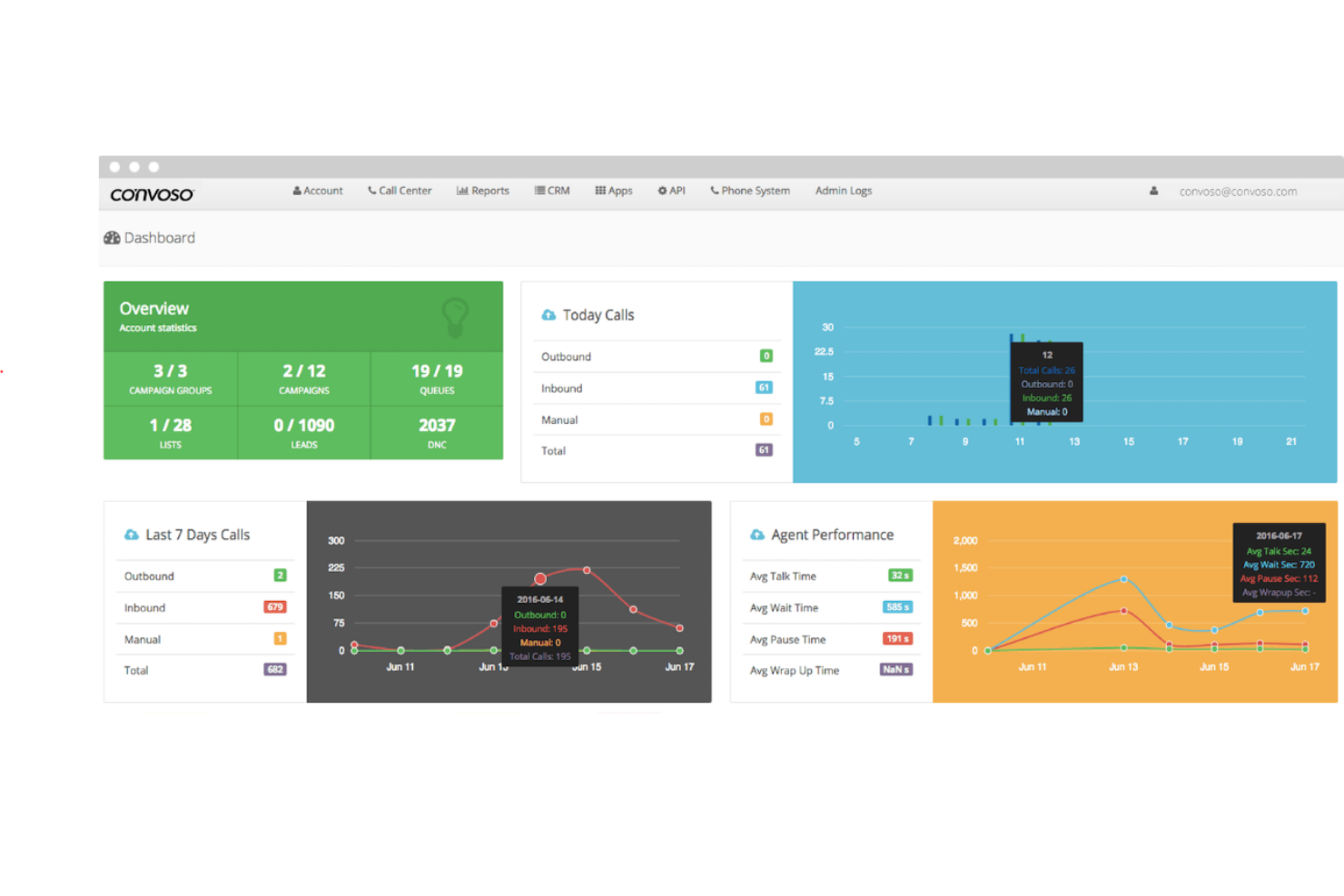
Convoso bietet eine All-in-One-Callcenter-Lösung mit leistungsstarken Tools zur Anrufskripterstellung, die Agenten während der gesamten Kundenreise unterstützen, sowie automatisierten Analysen, die verbesserte Kennzahlen für ein Gamification-System bereitstellen, das zur Mitarbeitermotivation beiträgt.
Warum ich Convoso ausgewählt habe: Die Skripterstellungsfunktion von Convoso arbeitet Hand in Hand mit dem intelligenten virtuellen Agenten, um Anrufe zu filtern und hochwertige Leads sicherzustellen. Der virtuelle Agent profitiert von maschinellem Lernen, natürlicher Sprachverarbeitung und fortschrittlicher Spracherkennung, wodurch Kundenfragen beantwortet werden können und die Bearbeitungszeit für Agenten sinkt.
Convoso unterstützt Organisationen jeder Größe in verschiedensten Branchen. Es gibt spezialisierte Lösungen für unterschiedliche Arten von Unternehmen, darunter Marketing, Solar, Versicherungen, Dienstleistungen im Haushalt und Finanzunternehmen.
Herausragende Funktionen und Integrationen von Convoso
Funktionen umfassen die Erkennung von Anrufbeantwortern, Verwaltung der Anrufer-ID-Reputation, dynamische Skripte, leistungsfähige Berichte, internationales Routing rund um die Uhr (Follow-the-Sun Dialing), intelligente Antworten und virtuelle Agenten. Virtuelle Agenten können sowohl Sprach- als auch SMS-Interaktionen unterstützen.
Integrationen umfassen ActiveProspect, Balto, Blueink, boberdoo.com, Campaign Registry, DebtPay Pro, Google Maps, Journaya, Shopify und Zapier. CRM-Integrationen sind über eine offene API verfügbar.
Pros and Cons
Pros:
- Anpassbare Reporting-Tools
- Umstellung ist unkompliziert
- Einfach zu bedienen
Cons:
- Vereinfachte Skripte sind für anspruchsvolle Kunden nicht ideal
- Keine mobile App
Five9
Am besten für ein cloudbasiertes Callcenter mit Skripting-Unterstützung
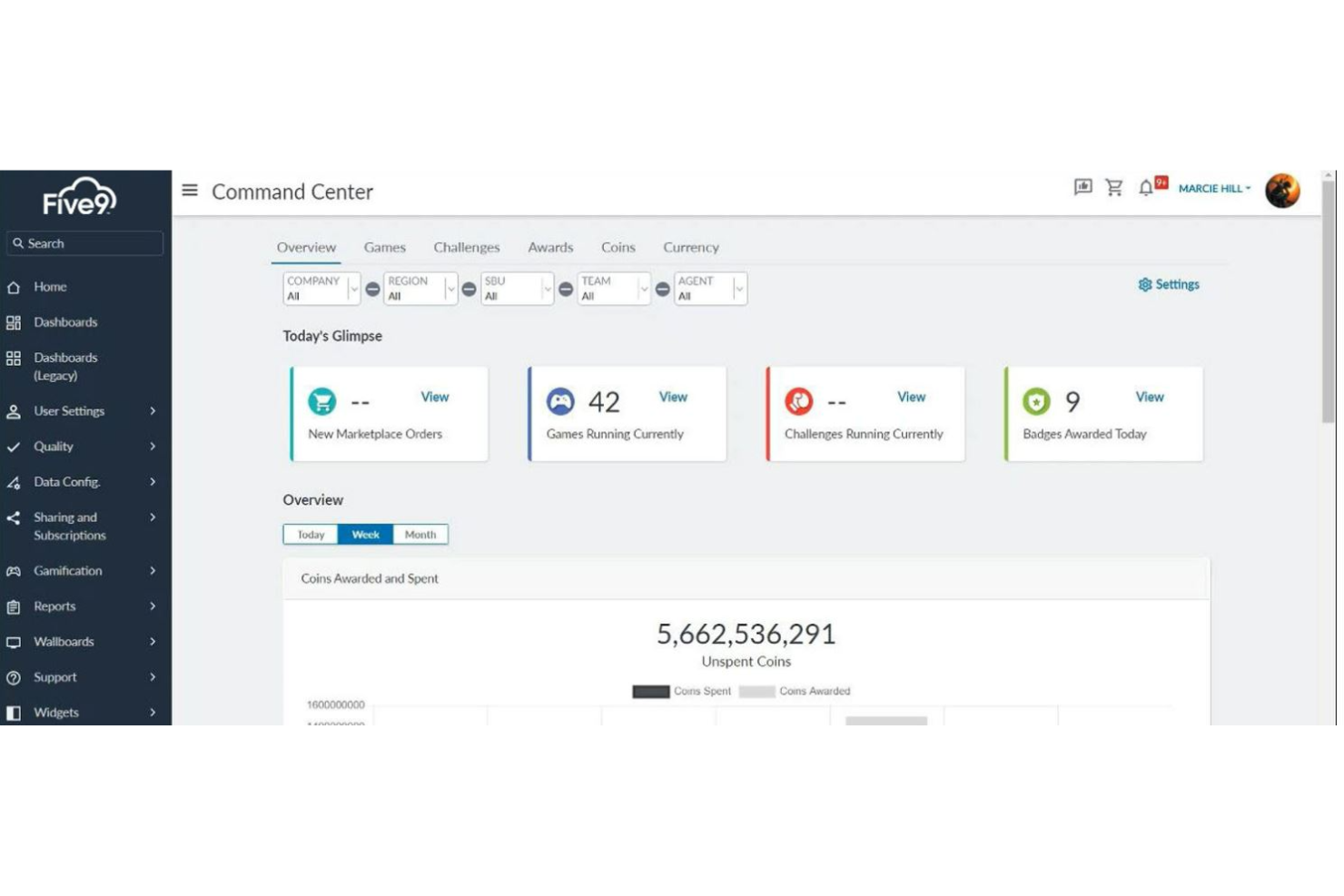
Five9 bietet sowohl Unterstützung für Agenten als auch virtuelle Agenten, um Skripting- und Eingabeaufforderungsbedürfnisse für echte Agenten und KI-basierte Selbstbedienung zu erfüllen.
Warum ich Five9 ausgewählt habe: Mit virtuellen Vertretern und Agentenassistenten hat Five9 nachweislich die Kundenzufriedenheitswerte gesteigert und Personalkosten gesenkt. Das Feature Intelligent Virtual Agent (IVA) ermöglicht es Nutzern, Selbstbedienungs-Support für Kunden bereitzustellen – mit nahtloser Übergabe an Live-Agenten, die in Echtzeit durch Karten und Checklisten unterstützt werden.
Five9 unterstützt Unternehmen jeder Größe durch individuell zugeschnittene Pläne, die den jeweiligen Anforderungen entsprechen. Finden Sie Lösungen nach Rolle – zur Verbesserung der Arbeit von Agenten, Aufsichtsführung und Geschäftsstrategie – oder nach Branche, inklusive Gesundheitswesen, Einzelhandel, Finanzdienstleistungen, Hochschulbildung, Telemarketing und Vertrieb.
Five9: Herausragende Funktionen und Integrationen
Funktionen umfassen virtuelle Agenten per Telefon oder Text, Selbstbedienung, Agentenunterstützung, Workflow-Automatisierung und Mitarbeiteroptimierungslösungen wie Gamification, Workforce Management und Interaktionsanalyse. Virtuelle Agenten stehen mit 25 natürlichen, menschlichen Stimm-Avataren zur Verfügung.
Integrationen umfassen Microsoft, Microsoft Teams, Oracle, RingCentral, Salesforce CTI, Salesforce Service Cloud Voice, ServiceNow, Zendesk und ZoomPhone. Integrationen sind für CRM- und UC-Anforderungen verfügbar.
Pros and Cons
Pros:
- Individuelle Berichte verfügbar
- Einfach zu lernen, wie man baut
- Intuitive Benutzererfahrung
Cons:
- Kein direkter Zugriff auf Arbeitsblätter
- Verzögerung bei Sonderberichten

JustCall
Am besten für automatisierte SMS-Bot-Skripterstellung
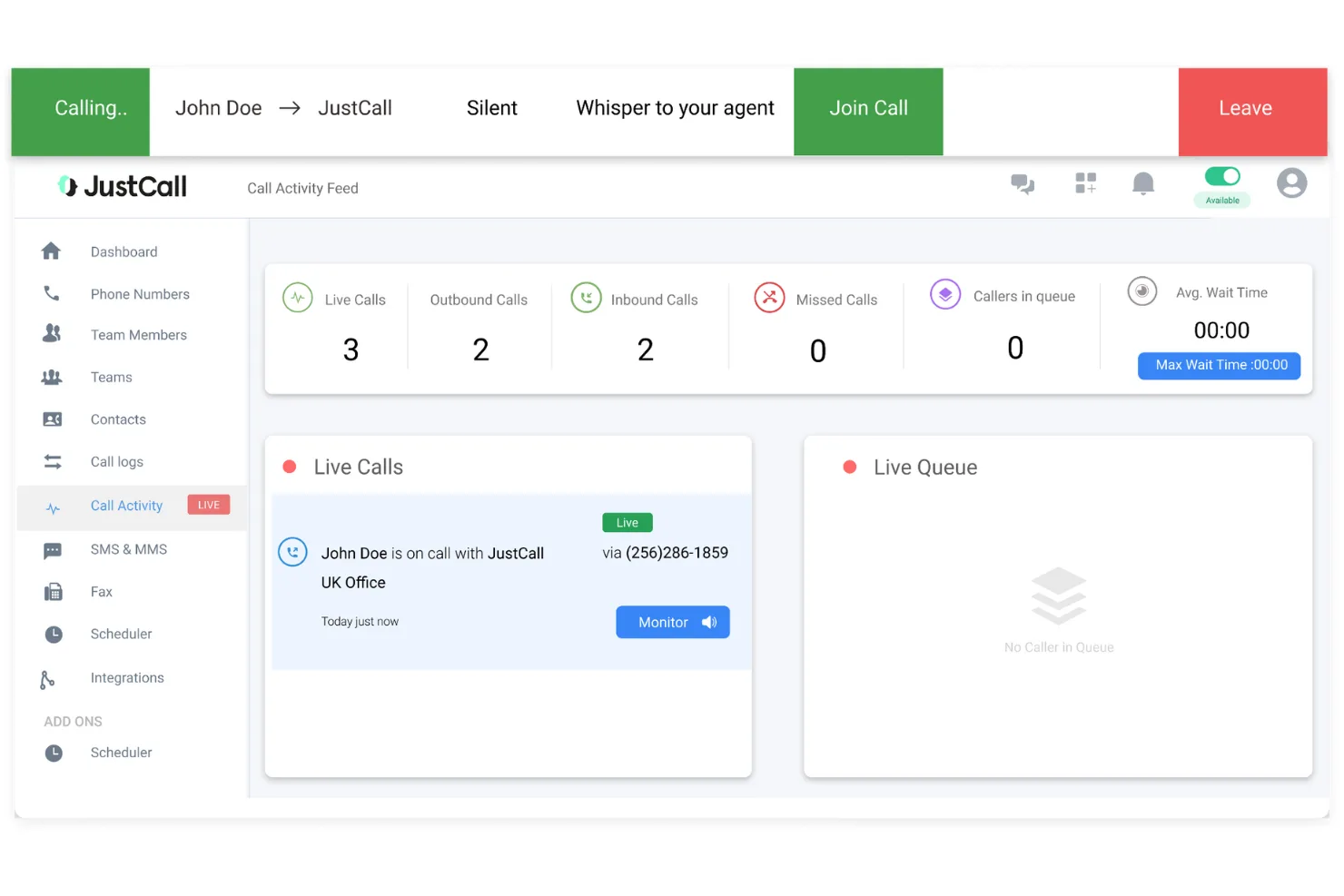
JustCall bietet verschiedene Skripting-Dienste für Callcenter-Anwendungen an, darunter einen SMS-Bot zur automatischen Beantwortung von Kundenanfragen und KI-Vorschläge für Agenten basierend auf Echtzeit-Gesprächen sowie von der Führungsebene maßgeschneiderten Skripten.
Warum ich JustCall gewählt habe: Die SMS-App antwortet intelligent durch benutzerdefinierte Regeln und Muster, während die KI Agenten dabei unterstützt, Gespräche zu führen, deren Ergebnisse von Skripterstellern vorgegeben werden. Die KI für Telefongespräche informiert das Management außerdem, wenn Agenten während eines Anrufs zusätzliche Unterstützung und Coaching benötigen, damit diese dann zur Stelle sind, wenn es darauf ankommt.
JustCall ist so konzipiert, dass es Unternehmen jeder Größe unterstützt, darunter KMU und große Unternehmen. Sie sind auf zahlreiche Branchen spezialisiert, von Gesundheitswesen und Finanzdienstleistungen bis hin zu Immobilien.
JustCall-Herausragende Funktionen und Integrationen
Funktionen umfassen Gesprächsintelligenz, mehrstufiges IVR, Gesprächscoaching, SMS-Chatbots und Automatisierung sowie Gesprächsskripting. JustCall ist über das Internet sowie auf iOS- und Android-Geräten verfügbar.
Integrationen umfassen ActiveCampaign, Agile, Close, Copper, Freshdesk, Front, Groove, Helpwise, Help Scout und Zendesk Sell. JustCall bietet native Integrationen für CRM- und Helpdesk-Software.
Pros and Cons
Pros:
- Individuelle SMS-Lösungen
- Einfache Integration in bestehende Systeme
- Sehr hohe Reaktionsfähigkeit
Cons:
- Kann fehleranfällig sein
- Hat eine gewisse Lernkurve

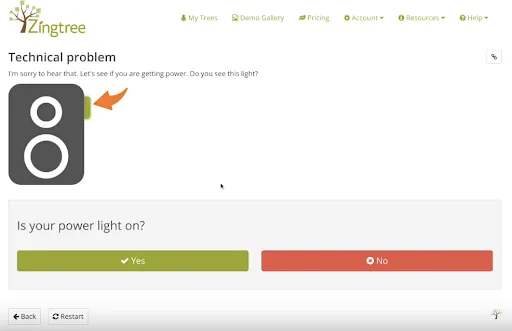
Zingtree ist eine Contact-Center-Lösung, die interaktive, codefreie Entscheidungsbäume für die Erstellung von Agenten-Skripten, das Management interner Prozesse und die Kundenführung bietet. Diese Software zielt darauf ab, die Komplexität von Flussdiagramm-Skripten zu vereinfachen, um natürlichere Interaktionen in Echtzeit zu ermöglichen.
Warum ich Zingtree ausgewählt habe: Die Entscheidungsbaum-Skripting-Lösung von Zingtree behauptet, dass sie die Einarbeitungszeit von Agenten um 85 % verkürzen kann, indem sie Workflows bereithält, die jedem Mitarbeiter helfen, wie ein Experte aufzutreten. Es gibt auch eine Funktion, die bis zu 50 % des Ticketvolumens durch ein Kunden-Selbsthilfesystem automatisieren kann, damit Kunden ihre Anliegen selbst lösen können.
Zingtree richtet sich an kleine und große Unternehmen mit zwei Tarifoptionen. Die eine ist für bis zu 25 Nutzer ausgelegt, die andere für unbegrenzte Agenten- und Unternehmensanforderungen. Diese Plattform bietet Skriptvorlagen für verschiedene Branchen, darunter Hausdienstleistungen, Gesundheitswesen, Versicherungen und Sachgüter.
Herausragende Funktionen und Integrationen von Zingtree
Funktionen bieten einen dreigleisigen Ansatz mit Agenten-Skripting- und Workflow-Tools, internen Prozesslösungen und Kunden-Selbsthilfe-Guides. Die interne Automatisierung umfasst das Erstellen von Programmbäumen, die automatisch E-Mails versenden, Daten eingeben und Dokumente erstellen können.
Integrationen umfassen Avaya Workspaces, Cisco Webex Contact Center, Freshdesk, Intercom, Kustomer, Nectar Desk, Talkdesk, Zapier, Zendesk Suite und Zoho Flow. Native Integrationen ermöglichen einen bidirektionalen Datenaustausch, während einfache Integrationen nur in eine Richtung funktionieren.
Pros and Cons
Pros:
- Keine Programmierkenntnisse notwendig
- Flussdiagramme können beliebig detailliert erstellt werden
- Einfache Benutzeroberfläche
Cons:
- Verzögerungen beim E-Mail-Versand über die Plattform
- Wissensdatenbank konzentriert sich nur auf Einsteigerthemen

Yonyx
Am besten geeignet für entscheidungsbaum-basierte interaktive Leitfäden für Agenten
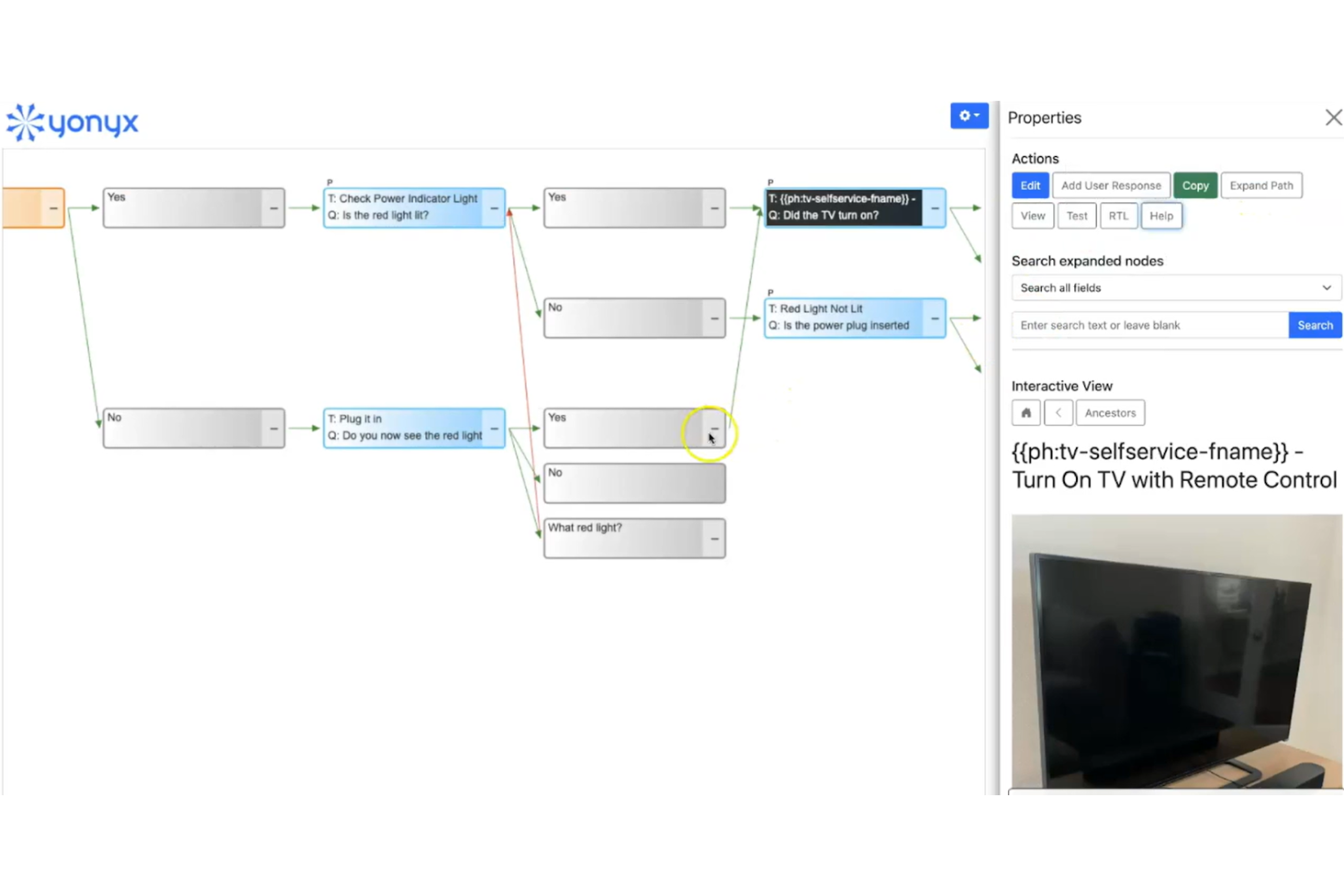
Yonyx ist eine einzigartige Callcenter-Skriptsoftware, die multimediale Flussdiagramme zur Erstellung interaktiver Leitfäden für Entscheidungsfindungen bietet. Dieses Tool unterscheidet sich von traditionellen Gesprächsskripten, da es eine interaktivere Navigationshilfe für Servicemitarbeiter bereitstellt.
Warum ich Yonyx gewählt habe: Das Multimedia-Flussdiagramm verfügt über eine Vielzahl von Werkzeugen, die einfache Erstellungsprozesse unterstützen, darunter hierarchische Leitfäden, multimediale Anleitungsschritte und die Zusammenführung mehrerer Kundenpfade. Mit synchronisierten interaktiven und Kartenansichten können Autor:innen Entscheidungsbäume mit Nutzerantworten und Anleitungsschritten erstellen.
Yonyx unterstützt Unternehmen jeder Größe mit einem einzigen skalierbaren Tarif basierend auf der Nutzerzahl. Die Plattform bietet außerdem individuelle Enterprise-Tarife mit integrierter Bereitstellung, die einige zusätzliche Tools und Funktionen umfassen, wie REST APIs, Javascript APIs, benutzerdefinierte Kommandos und mehrsprachige Leitfäden.
Herausragende Funktionen und Integrationen von Yonyx
Funktionen umfassen intuitive Leitfaden-Erstellung, multimediale Anleitungsschritte, Entscheidungsbaum vs. Netzwerke und Kopieren/Einfügen von Knoten.
Integrationen umfassen Freshdesk, Netsuite, Oracle Service, Salesforce Service Cloud, ServiceNow und Zendesk Suite.
Pros and Cons
Pros:
- Leicht zu bedienen
- Anspruchsvolles, ansprechendes Layout
- Für Troubleshooting ausgelegt
Cons:
- Wenige Integrationsmöglichkeiten
- Self-Service für Kunden nicht ausreichend ausgereift
Weitere Callcenter-Skriptsoftware
Hier noch einige weitere empfehlenswerte Tools, die es zwar nicht auf die Top-Liste der Callcenter-Skriptsoftware geschafft haben, aber dennoch einen Blick wert sind:
- CallTools
Am besten geeignet für globale und virtuelle Callcenter-Lösungen
- CallShaper
Am besten geeignet für vertriebsorientierte Callcenter
- LiveAgent
Am besten für IVR-Skripte geeignet
- Nextiva
Am besten geeignet für einheitliches Kundenerlebnismanagement


Was ist Callcenter-Skriptsoftware?
Callcenter-Skriptsoftware ist ein Tool, das vordefinierte Skripte bereitstellt, um Callcenter-Agenten im Kundendialog zu unterstützen. Kundenservicemitarbeiter, Vertriebsteams und technischer Support nutzen solche Programme in der Regel, um eine einheitliche Kommunikation zu ermöglichen, die Effizienz zu verbessern und das Kundenerlebnis zu optimieren.
Vorgefertigte Skripte, Echtzeit-Unterstützung sowie automatisierte, KI-gesteuerte Hinweise helfen den Agents, Anfragen präzise zu bearbeiten und einen gleichmäßigen Gesprächsstandard über verschiedene Anrufe hinweg zu gewährleisten. Insgesamt steigern diese Tools die Servicequalität und verbessern die Kundenzufriedenheit.
Wie ich Callcenter-Skriptsoftware bewerte
Ich unterteile meine Bewertung in Basisanforderungen – wie dynamische Verzweigungen und Compliance-Kontrollen – und in Unterscheidungsmerkmale, die ein gutes Tool von dem richtigen für Ihr Team abheben.
Kernfunktionen (Grundvoraussetzungen für diese Liste)
Wenn ich Tools für meine Liste auswähle, bewerte ich jedes auf einer Skala von 0 (bietet die Funktion nicht) bis 5 (hervorragend in diesem Bereich) für jede der nachfolgend aufgeführten Kernfunktionen. Anschließend rechne ich die Gesamtpunktzahl des Tools in einen Prozentwert um. Jedes Tool muss mindestens eine Gesamtpunktzahl von 65% erreichen, um berücksichtigt zu werden.
- Dynamische Skriptverzweigung: Ich bewerte, wie gut das Tool Gesprächsabläufe in Echtzeit anpasst – zum Beispiel, ob ein Agent anhand des Bestellwerts oder der Kundengruppe zu einem anderen Retouren-Skript geleitet wird.
- Skript-Oberfläche für Agenten: Die Bildschirmansicht ist entscheidend. Ich achte auf geführte Hinweistexte und Hinweise zum nächsten Schritt, damit Agenten während des Gesprächs nicht scrollen oder suchen müssen.
- CRM- & Telefonie-Integration: Ich prüfe, ob Kundendaten aus Plattformen wie Salesforce oder Zendesk automatisch in Skripte übernommen werden, sodass Agenten nicht zwischen Tabs wechseln müssen.
- Skript-Builder & Editor: Hier suche ich nach einem visuellen, No-Code-Flow-Builder – etwas, das ein Operations Manager nutzen kann, um ein Skript zu aktualisieren, ohne ein Entwickler-Ticket einzureichen.
- Compliance- & Offenlegungskontrollen: Regulierte Branchen benötigen verpflichtende Prüfungen. Ich bewerte, ob das Tool wörtliche Offenlegungstexte vorschreiben und die Bestätigung durch den Agenten für Audits protokollieren kann.
- Datenerfassung & Berichte: Ich schaue mir an, was das Tool erfasst – Abschlussquoten des Skripts, Abbruchpunkte und Einhaltung durch den Agenten – und ob man diese Kennzahlen ohne weitere Anpassung auswerten kann.
Sobald ich eine Liste der Tools habe, die die Kriterien erfüllen, untersuche ich, was jede Plattform besonders macht.
Unterscheidungsmerkmale (Was Anbieter voneinander abhebt)
So vergleiche und kontrastiere ich verschiedene Anbieter:
Herausragende Funktionen
KI-gestützte Vorschläge können während Live-Gesprächen einen echten Unterschied machen – ich achte auf Tools, die Einwände oder Upselling-Vorschläge basierend auf dem laufenden Gespräch einblenden. A/B-Skripttests sind ein weiteres Merkmal, das ich schätze, da es ermöglicht zu messen, welche Skriptversion die besseren Ergebnisse liefert, bevor sie flächendeckend eingeführt wird. Außerdem bewerte ich Multikanal-Skripting, da viele Teams konsistente Botschaften über Sprache, Chat und E-Mail hinweg aus einer Plattform benötigen.
Mehr als nur Funktionen
Hier zählt das Integrationsökosystem. Ich prüfe, ob eine Plattform sich nativ mit den CCaaS- und CRM-Tools verbindet, die Ihr Team bereits nutzt – das Wechseln zwischen isolierten Systemen während des Gesprächs widerspricht dem Zweck geführter Skripte. Compliance-Zertifikate wie SOC 2 und HIPAA sollte man frühzeitig überprüfen, besonders wenn Agenten Zahlungs- oder Gesundheitsdaten bearbeiten. Ich bewerte außerdem die Unterstützung beim Einstieg, denn ein Skript-Builder ist nur dann sinnvoll, wenn Ihr Team ab Tag eins weiß, wie es effektive Abläufe gestaltet und pflegt.
So wählen Sie Callcenter-Skriptsoftware aus
Beim Vergleich verschiedener Callcenter-Software verliert man sich schnell in langen Funktionslisten und komplizierten Preisstrukturen. Damit Sie sich bei Ihrer individuellen Softwareauswahl fokussieren können, habe ich eine Checkliste mit wichtigsten Auswahlkriterien zusammengestellt:
| Faktor | Zu beachtende Aspekte |
|---|---|
| Skalierbarkeit | Stellen Sie sicher, dass die Software mit Ihrem Unternehmen mitwachsen kann. Suchen Sie nach Lösungen, die mit erhöhtem Anrufaufkommen, zusätzlichen Nutzern und mehreren Sprachen umgehen können. |
| Integration | Überprüfen Sie, ob die Software sich in Ihre bestehenden Tools wie CRM, E-Mail und Chat-Plattformen integrieren lässt, um Arbeitsabläufe und Datenfluss zu optimieren. |
| Anpassbarkeit | Finden Sie ein Tool, das es Ihnen ermöglicht, Skripte und Arbeitsabläufe individuell auf Ihre Bedürfnisse zuzuschneiden. Achten Sie auf flexible Vorlagen und einfache Bearbeitungsmöglichkeiten. |
| Benutzerfreundlichkeit | Bewerten Sie die Benutzeroberfläche und die Navigation. Die Software sollte intuitiv für Ihr Team sein, um die Einarbeitungszeit zu reduzieren und die Akzeptanz zu erhöhen. |
| Budget | Berücksichtigen Sie die Gesamtkosten einschließlich Einrichtung, Abonnementgebühren und etwaiger Zusatzkosten. Stellen Sie sicher, dass es zu Ihren finanziellen Rahmenbedingungen passt. |
| Sicherheitsvorkehrungen | Überprüfen Sie, ob die Software den relevanten Datenschutzbestimmungen entspricht und Funktionen wie Verschlüsselung und Zugangskontrollen bietet, um sensible Informationen zu schützen. |
| Support | Achten Sie auf Anbieter, die schnellen und zuverlässigen Kundensupport bieten, einschließlich Live-Chat, Telefon- und E-Mail-Support. Prüfen Sie die Supportzeiten, Reaktionszeiten und die Verfügbarkeit von Ressourcen wie Schulungsmaterialien. |
| Berichterstattung | Berücksichtigen Sie die Fähigkeit der Software, detaillierte Analysen und Berichte bereitzustellen, um die Leistung zu verfolgen und fundierte Entscheidungen zu treffen. |
Trends bei Callcenter-Skriptsoftware
Für meine Recherche habe ich zahlreiche Produktupdates, Pressemitteilungen und Release-Logs verschiedener Anbieter von Callcenter-Skriptsoftware ausgewertet. Hier sind einige der aufkommenden Trends, die ich besonders im Auge behalte:
- KI-gesteuerte Vorschläge: Mehr Tools nutzen Künstliche Intelligenz, um basierend auf Kundeninteraktionen in Echtzeit Skriptvorschläge zu machen. Dieser Trend hilft Agenten, einen persönlicheren Service zu liefern.
- Omnichannel-Support: Anbieter erweitern ihre Plattformen, um Interaktionen über verschiedene Kanäle wie soziale Medien und Messaging-Apps abzuwickeln. So wird eine konsistente Kommunikation gewährleistet – unabhängig von der Plattform, die Ihre Kunden nutzen.
- Echtzeit-Analytik: Tools bieten fortschrittliche Analysen, die Einblicke während des Gesprächs liefern. Dadurch können Führungskräfte schnell entscheiden und die Leistung der Agenten direkt verbessern.
- Spracherkennung: Einige Softwarelösungen beinhalten bereits Spracherkennung, um Skripte automatisch an erkannte Schlüsselwörter anzupassen. Diese Funktion kann die Genauigkeit und Effizienz bei Anrufen steigern.
- Funktionen zur emotionalen Intelligenz: Aufkommende Tools analysieren den Tonfall und die Stimmung der Anrufenden, um Agenten in Echtzeit zu unterstützen. So können sich Agenten besser anpassen und die Kundenzufriedenheit erhöhen.
Funktionen von Callcenter-Skriptsoftware
Achten Sie bei der Auswahl einer Callcenter-Skriptsoftware auf die folgenden Schlüsselfunktionen:
- Skriptanpassung: Ermöglicht es, Skripte auf bestimmte Szenarien und Geschäftsbedürfnisse zuzuschneiden und so eine relevante und effektive Kommunikation zu gewährleisten.
- Personalisierung in Skripten: Anpassung von Gesprächsskripten auf Basis von Kundendaten, um die Kundenbindung durch einen persönlichen Touch zu verbessern.
- KI-basierte Vorschläge: Bietet intelligente Eingabeaufforderungen basierend auf Kundeninteraktionen und unterstützt Agenten dabei, einen noch persönlicheren Service zu bieten.
- Spracherkennung: Passt Skripte basierend auf erkannten Schlüsselwörtern an und verbessert so die Genauigkeit von Antworten und die Effizienz im Gespräch.
- Stimmungsanalyse: Analysiert Tonfall und Stimmung der Anrufer und unterstützt Agenten, um Kundenzufriedenheit und Engagement zu steigern.
- Mehrsprachige Unterstützung: Erleichtert die Kommunikation mit Kunden in verschiedenen Sprachen und ist besonders für global agierende Unternehmen geeignet.
- Dynamische Skripterstellung: Passt Skripte automatisch auf Basis von Live-Daten an, sodass stets aktuelle und relevante Informationen vermittelt werden.
- Workflow-Automatisierung: Automatisiert wiederkehrende Aufgaben wie Anrufprotokollierung und Nachverfolgung, reduziert die Arbeitsbelastung der Agenten und steigert die Effizienz.
- Einwandbehandlung: Bietet vorgefertigte Antworten auf häufige Einwände von Kunden und hilft Agenten, auch schwierige Situationen souverän zu meistern.
- Skripte während eines Anrufs bearbeiten: Ermöglicht es, Skripte in Echtzeit während des Gesprächs zu aktualisieren, damit Agenten stets über die relevantesten Informationen verfügen.
- Individuelle Skripterstellung: Unternehmen können maßgeschneiderte Skripte von Grund auf neu erstellen, die genau auf ihre Prozesse und Ziele abgestimmt sind.
- Compliance-Management: Sichert die Einhaltung von Branchenvorschriften durch Integration rechtlicher Vorgaben und verpflichtender Hinweise in die Skripte.
Vorteile von Callcenter-Skriptsoftware
Die Implementierung von Callcenter-Scripting-Software bietet zahlreiche Vorteile für Ihr Team und Ihr Unternehmen. Hier sind einige, auf die Sie sich freuen können:
- Konsistente Kommunikation: Stellt sicher, dass alle Mitarbeitenden dieselbe Botschaft vermitteln, was die Markenverlässlichkeit stärkt und das Vertrauen der Kundschaft erhöht.
- Verbesserte Effizienz: Verringert die Gesprächsdauer durch Echtzeit-Anweisungen und KI-gestützte Vorschläge, wodurch Ihr Team produktiver wird.
- Optimierte Schulung: Bietet neuen Mitarbeitenden strukturierte Skripte, verkürzt die Einarbeitungszeit und stärkt das Selbstvertrauen.
- Höhere Kundenzufriedenheit: Nutzt Stimmungsanalysen und personalisierte Skripte zur Anpassung an Kundenbedürfnisse, was zu zufriedeneren Kund:innen führt.
- Einhaltung von Vorschriften: Hilft Ihrem Unternehmen, Branchenrichtlinien einzuhalten, und verringert so das Risiko rechtlicher Probleme.
- Skalierbarkeit: Unterstützt steigende Anrufvolumen und Teamgrößen, ohne die Leistung zu beeinträchtigen, und ist damit ideal für wachsende Unternehmen.
- Datenbasierte Entscheidungen: Stellt Analyse- und Berichtswerkzeuge bereit, die Einblicke in die Performance geben und Ihnen helfen, gezielte Verbesserungen vorzunehmen.
Kosten und Preise von Callcenter-Scripting-Software
Für die Auswahl von Callcenter-Scripting-Software ist es wichtig, die unterschiedlichen Preismodelle und Tarifoptionen zu verstehen. Die Kosten variieren je nach Funktionen, Teamgröße, Zusatzoptionen und mehr. Die folgende Tabelle fasst gängige Tarife, deren Durchschnittspreise sowie typische enthaltene Funktionen von Callcenter-Scripting-Lösungen zusammen:
Vergleichstabelle für Callcenter-Scripting-Software
| Tariftyp | Durchschnittlicher Preis | Gängige Funktionen |
|---|---|---|
| Gratis-Tarif | $0 | Grundlegende Scripting-Funktionen, begrenzter Support und minimale Anpassungsmöglichkeiten. |
| Persönlicher Tarif | $5-$25/user/month | Skriptanpassung, grundlegende Analysen und E-Mail-Support. |
| Business-Tarif | $30-$60/user/month | Erweiterte Analysefunktionen, KI-gestützte Vorschläge und Integrationsoptionen. |
| Enterprise-Tarif | $70-$100/user/month | Omnikanal-Support, Echtzeit-Analysen, dedizierte:r Account-Manager:in und Compliance-Funktionen. |
-
- Callcenter-Software für Unternehmen oder Callcenter-Software für kleine Unternehmen, je nach Unternehmensgröße.
Callcenter-Skripterstellung spart Ihnen Kopfschmerzen
Wenn Sie gerade Callcenter-Skriptsoftware recherchieren, verbinden Sie sich mit einem SoftwareSelect-Berater für kostenlose Empfehlungen.
Sie füllen ein Formular aus und führen ein kurzes Gespräch, bei dem Ihre spezifischen Anforderungen besprochen werden. Anschließend erhalten Sie eine Auswahlliste passender Softwarelösungen zur Überprüfung. Bei Bedarf begleiten sie Sie während des gesamten Kaufprozesses, inklusive Preisverhandlungen.