

10 beste Werkzeuge zur Analyse des Kundenerlebnisses für 2026

10 Auswahl der besten Tools zur Analyse der Kundenerfahrung


Tools zur Analyse der Kundenerfahrung helfen Ihnen zu verstehen, wie sich Menschen tatsächlich durch Ihr Produkt, Ihren Service oder Ihre Supportreise bewegen. Sie zeigen die Momente auf, in denen Kunden nicht weiterkommen, abspringen oder konvertieren, damit Sie selbstbewusst Maßnahmen ergreifen können.
Auf Grundlage von mehr als 10 Jahren Erfahrung in der CX-Forschung habe ich die besten Tools zur Analyse der Kundenerfahrung bewertet und ausgewählt, die besonders effektiv dabei sind, Rohdaten zu Interaktionen in klare Erkenntnisse umzuwandeln. Ganz gleich, ob Sie digitales Verhalten verfolgen, Kundenreisen abbilden oder die Wirkung Ihrer CX-Initiativen nachweisen möchten – diese Plattformen können Ihnen helfen, bessere und schnellere Entscheidungen zu treffen.
Warum Sie unseren Software-Empfehlungen vertrauen können
Unser Team testet und bewertet Software seit 2012. Als CX-Führungskräfte selbst wissen wir, wie schwierig – und wichtig – es ist, die richtige Software auszuwählen.
Für diesen Leitfaden haben wir Tools mithilfe von praktischen Tests und unabhängiger Recherche bewertet und dabei unsere Bewertungskriterien angewendet.
Unsere Bewertungen spiegeln unser menschliches redaktionelles Urteilsvermögen wider, keine Verkaufsstrategie.
Zusammenfassung der 20 besten Tools zur Analyse der Kundenerfahrung
Diese Vergleichstabelle fasst grundlegende Details zu jeder meiner besten Softwareauswahlen für die Analyse der Kundenerfahrung zusammen. Sie können Preisinformationen sowie die Verfügbarkeit kostenloser Testversionen oder Demos direkt miteinander vergleichen, um das beste Tool für Ihr Budget und Ihre geschäftlichen Anforderungen zu finden.
| Tool | Best For | Trial Info | Price | ||
|---|---|---|---|---|---|
| 1 | Am besten geeignet, um die Kundenzufriedenheit und -stimmung zu verstehen | Kostenlose Demo verfügbar | Preise auf Anfrage | Website | |
| 2 | Am besten geeignet für KI-gesteuerte Erkenntnisse | Kostenlose Demo verfügbar | Preise auf Anfrage | Website | |
| 3 | Am besten geeignet für die Vereinheitlichung von Kundenfeedback | Kostenlose Demo verfügbar | Preise auf Anfrage | Website | |
| 4 | Am besten für Echtzeit-Datenaktivierung | Kostenloser Plan + kostenlose Demo verfügbar | Ab $20/Monat | Website | |
| 5 | Am besten geeignet für B2B-Support-Umgebungen | Kostenlose Demo verfügbar | Ab $45/Monat (jährliche Abrechnung) | Website | |
| 6 | Am besten für Sicherheit und Compliance auf Unternehmensniveau | Kostenlose Demo verfügbar | Preise auf Anfrage | Website | |
| 7 | Am besten für die unternehmensweite Skalierbarkeit von CX-Programmen geeignet | Kostenlose Demo verfügbar | Preis auf Anfrage | Website | |
| 8 | Am besten für integrierte Verhaltensanalysen geeignet | Kostenlose 15-tägige Testversion + kostenloser Tarif + kostenlose Demo verfügbar | Ab $39/Monat (jährlich abgerechnet) | Website | |
| 9 | Am besten geeignet, um digitale Reibungspunkte aufzudecken | Kostenlose Demo verfügbar | Preise auf Anfrage | Website | |
| 10 | Am besten geeignet, um die Gesundheit von Kundenportfolios zu verstehen | Kostenlose Demo verfügbar | Preise auf Anfrage | Website |


Übersichten der 20 besten Tools zur Analyse der Kundenerfahrung
Damit Sie die richtige Wahl treffen können, finden Sie hier eine Bewertung der besten Tools zur Analyse der Kundenerfahrung, einschließlich einer Zusammenfassung ihrer wichtigsten Funktionen, Screenshots sowie Informationen zu Testversionen und Preisen.

Unwrap
Am besten geeignet, um die Kundenzufriedenheit und -stimmung zu verstehen
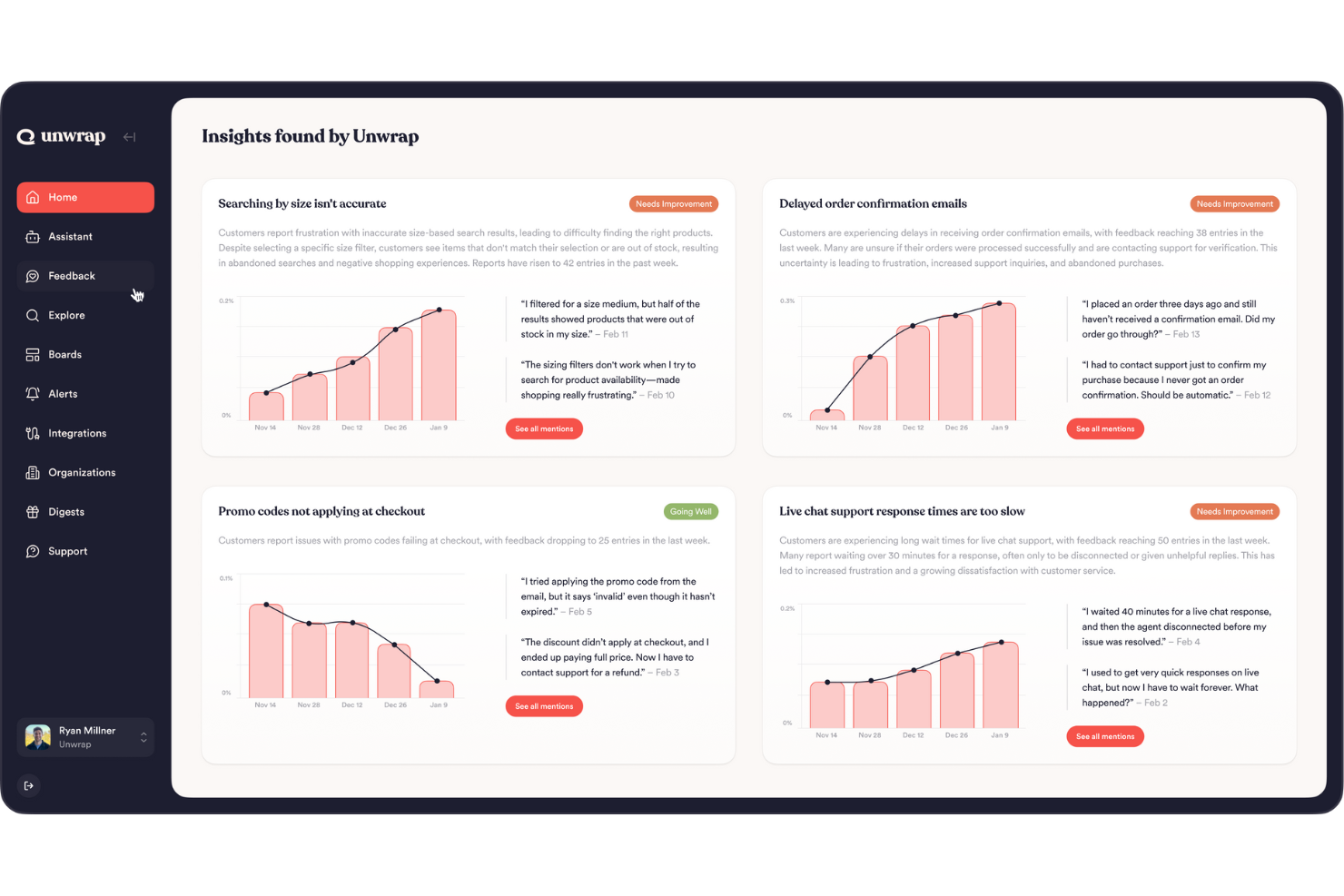
Unwrap hilft Ihnen, die Stimme Ihrer Kunden in umsetzbare Entscheidungen zu verwandeln, indem es automatisch Feedback aus allen Quellen sammelt und analysiert – so können Sie Trends, Stimmungen und Themen erkennen, ohne sich durch Tabellenkalkulationen oder isolierte Tools wühlen zu müssen.
Warum ich Unwrap gewählt habe
Ich habe mich für Unwrap entschieden, weil die KI-gestützte Feedback-Analyse eines der größten Probleme der Kundenanalyse direkt angeht – nämlich riesige Mengen an unstrukturiertem Feedback sinnvoll auszuwerten. Die automatisierte Kategorisierung von Rückmeldungen nutzt fortschrittliche natürliche Sprachverarbeitung, um aussagekräftige Stimmungsbilder zu erkennen, ohne dass eine manuelle Kennzeichnung notwendig ist. Diese Funktion ist besonders wertvoll, wenn Ihr Team Produktverbesserungen oder Supportantworten priorisieren möchte, basierend auf dem, was Ihre Kunden tatsächlich äußern.
Wichtige Funktionen von Unwrap
Neben diesen herausragenden Fähigkeiten gefällt mir an Unwrap außerdem:
- Alarmsysteme: Benachrichtigt Ihr Team, sobald neue Erkenntnisse auftauchen, um schnelle Reaktionen auf Kundenbedürfnisse zu ermöglichen.
- Individuell anpassbare Dashboards: Passen Sie die Datenvisualisierung genau an die Anforderungen und Fokusbereiche Ihres Teams an.
- Echtzeit-Erkennung von Anomalien: Warnt Sie, wenn neue Trends oder Probleme auftreten.
- Feedback-Assistent: Bietet eine Oberfläche, auf der Sie Ihr Feedback abfragen und Antworten in natürlicher Sprache erhalten können.
Unwrap-Integrationen
Zu den Integrationen gehören Salesforce, Zendesk, Intercom, Slack, HubSpot, Mailchimp, Google Analytics, Asana, Trello und Jira.
Pros and Cons
Pros:
- Kategorisiert unstrukturiertes Feedback automatisiert mithilfe von NLP in aussagekräftige Gruppen.
- KI-Tools erkennen aufkommende Trends, ohne dass große Datensätze manuell durchsucht werden müssen.
- Stimmungsanalysen helfen Teams, das Nutzerempfinden über die Zeit hinweg zu quantifizieren.
Cons:
- Gelegentliche Lücken bei nativen Plattform-Integrationen im Vergleich zu Wettbewerbern.
- Die Einrichtung der Feedback-Taxonomie kann zusätzlichen Anpassungsaufwand erfordern.

Am besten geeignet für KI-gesteuerte Erkenntnisse
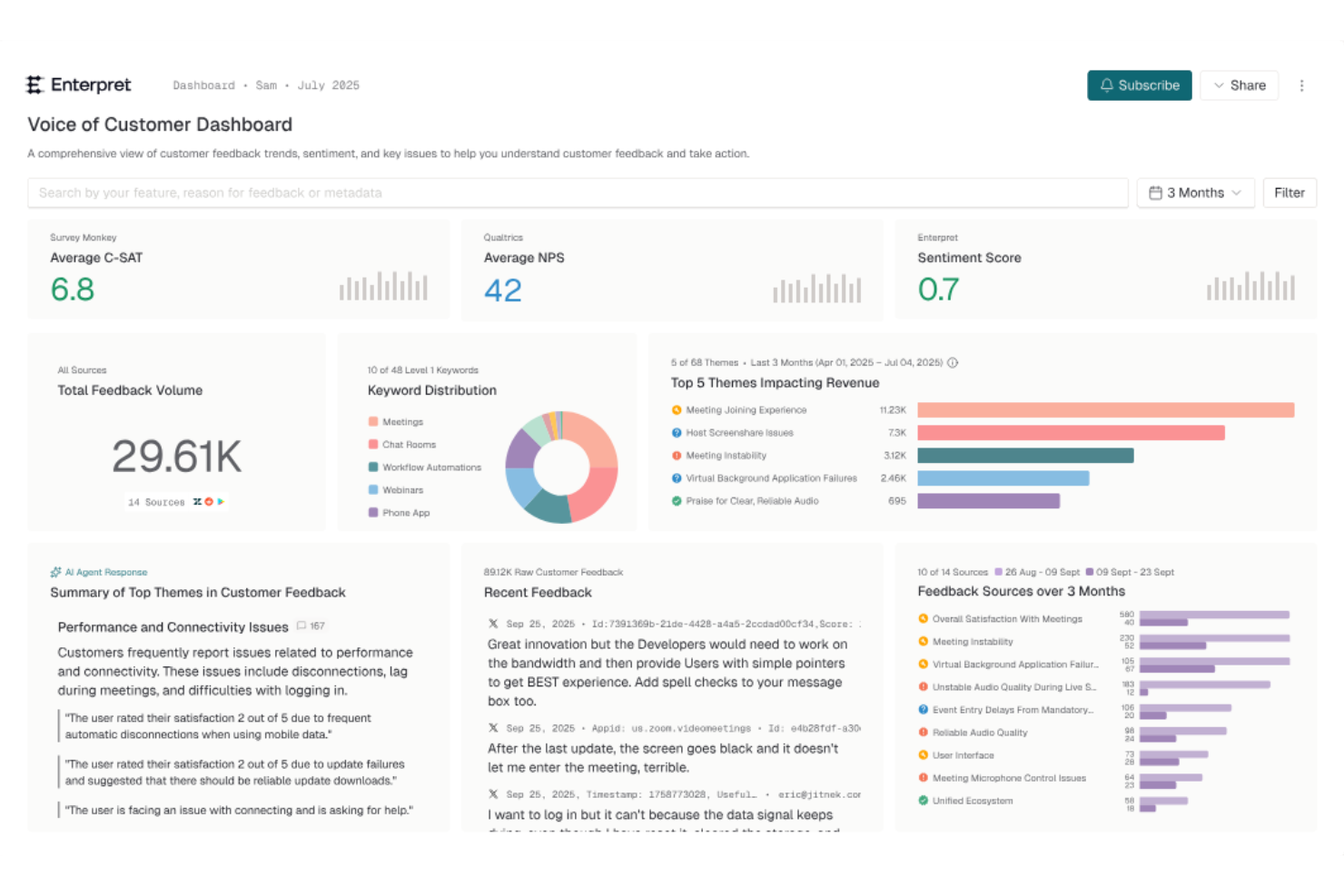
Enterpret ist ein Kundenanalyse-Tool, das KI-gesteuerte Erkenntnisse nutzt, um Feedback aus mehreren Quellen an einem Ort zu analysieren. Durch das Sammeln von Daten aus Quellen wie Support-Tickets, Umfragen und Bewertungen hilft Enterpret Teams, wiederkehrende Probleme, Kundenbedürfnisse und Trends zu identifizieren. So können Produkt-, Support- und CX-Teams Feedback leichter umsetzen und das Kundenerlebnis mit klarerer Richtung verbessern.
Warum ich Enterpret ausgewählt habe
Ich habe Enterpret wegen seiner einzigartigen Fähigkeit gewählt, KI-gestützte Erkenntnisse direkt in den Kundenanalyseprozess zu integrieren. Mit der Funktion AI Insights der Plattform können Sie Kundenfeedback abfragen und kontextbezogene Erkenntnisse gewinnen, was bahnbrechend für das Verständnis zugrunde liegender Trends sein kann. Außerdem sorgt die Funktion Echtzeit-Benachrichtigungen von Enterpret dafür, dass Ihr Team sofort über aufkommende Probleme informiert wird, sodass proaktive Reaktionen möglich sind. Diese Funktionen helfen Teams dabei, Kundenfeedback schneller und konsistenter zu analysieren und es fällt leichter, auf das Feedback der Kunden zu reagieren.
Enterpret Hauptfunktionen
Neben KI-gesteuerten Erkenntnissen bietet Enterpret:
- Feedback-Zentralisierung: Organisiert Kundenfeedback in anpassbaren Themenbereichen, sodass Ihr Team Erkenntnisse nach ihrer Wirkung priorisieren kann.
- Automatisierte Aktionen: Nutzt KI-Agenten, um Arbeitsabläufe zu optimieren und Kundenprobleme zeitnah zu lösen, was die operative Effizienz erhöht.
- Kunden-Wissensgraph: Verknüpft Feedback mit seiner Auswirkung auf Kunden und Produkte und ermöglicht ein tieferes Verständnis der Kundenbedürfnisse.
- Workflow-Integration: Verbindet sich nahtlos mit Tools wie Jira, sodass auf Erkenntnissen basierende Maßnahmen effizient umgesetzt werden.
Enterpret Integrationen
Integrationen umfassen Jira, Slack, Zendesk, Intercom, Salesforce, HubSpot, Amplitude, Segment, Freshdesk und Asana.
Pros and Cons
Pros:
- Unterstützt automatisierte Berichte und proaktive Benachrichtigungen via Slack oder E-Mail
- Bietet anpassbare Dashboards zur Visualisierung von Feedback-Kennzahlen
- Aggregiert Kundenfeedback aus verschiedenen Quellen für umfassende Einblicke
Cons:
- Weniger nützlich für Teams mit geringem Feedback-Volumen
- KI-Erkenntnisse erfordern möglicherweise eine menschliche Überprüfung für den Kontext

Am besten geeignet für die Vereinheitlichung von Kundenfeedback
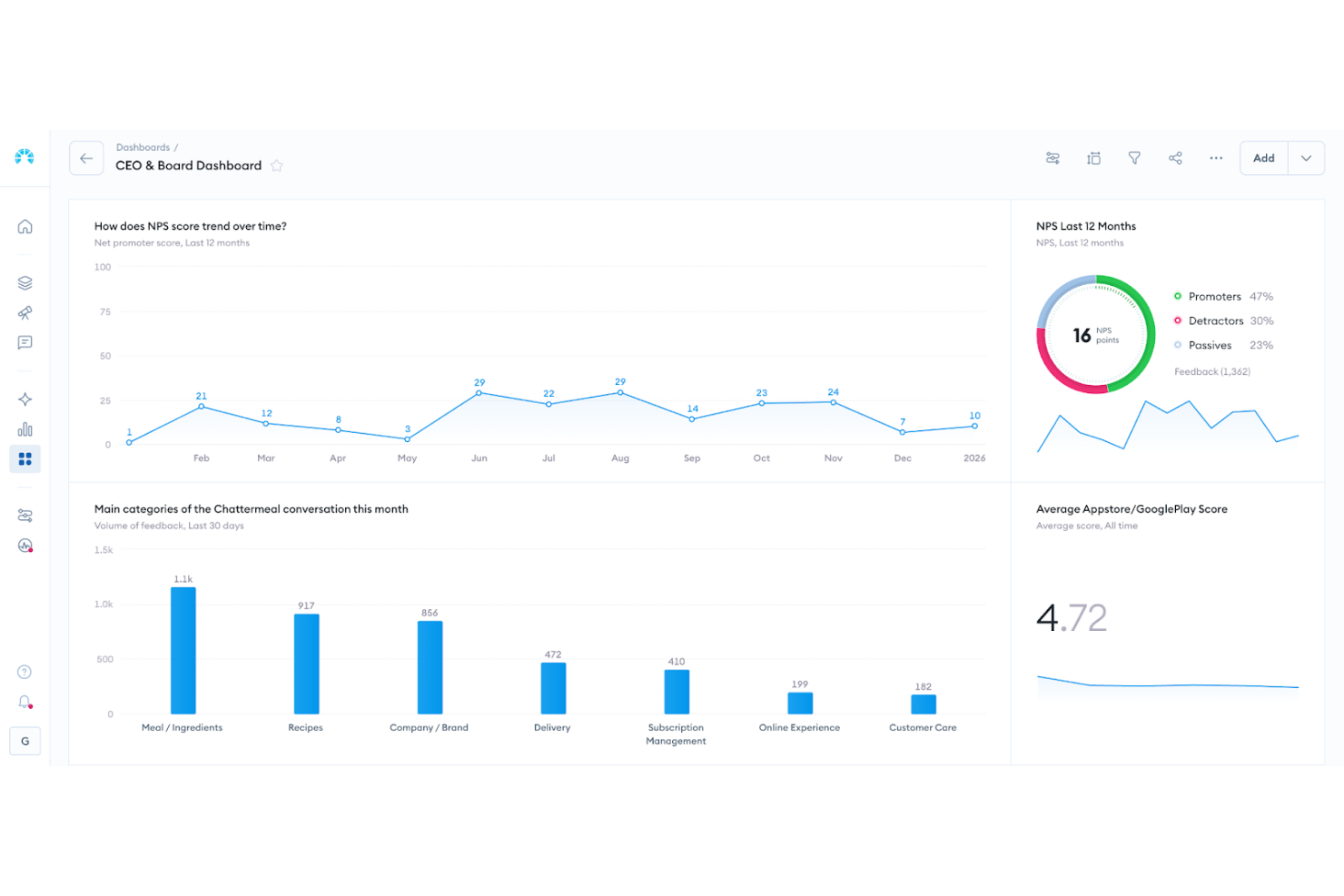
Chattermill ist eine Analyseplattform für Kundenfeedback, die Unternehmen dabei unterstützt, die Kundenstimmung besser zu verstehen und gezielt darauf zu reagieren. Besonders geeignet ist sie für kundenorientierte Teams in Branchen wie Einzelhandel, Finanzdienstleistungen und Reisen, bei denen das Erlebnis und die Kundenbindung eng mit der Qualität des Feedbacks verknüpft sind. Durch die Zentralisierung und Analyse unstrukturierter Rückmeldungen aus Umfragen, Bewertungen, Support-Tickets und anderen Kanälen ermöglicht Chattermill es Teams, Trends zu erkennen, Verbesserungen zu priorisieren und fundiertere Entscheidungen zur Customer Journey zu treffen.
Warum ich Chattermill ausgewählt habe
Ich habe Chattermill aufgrund seiner Fähigkeiten ausgewählt, Kundenfeedback aus unterschiedlichen Quellen zusammenzuführen und zu analysieren. Die automatische Verschlagwortung und KI-generierten Zusammenfassungen liefern Ihrem Team klare, umsetzbare Erkenntnisse und reduzieren den Zeitaufwand für die manuelle Datenanalyse. Außerdem können Sie mit der Trendverfolgungsfunktion von Chattermill Veränderungen in der Kundenstimmung beobachten, um potenzielle Probleme proaktiv anzugehen. Dieser Fokus auf verwertbare Einblicke macht Chattermill zu einem wertvollen Werkzeug für Teams, die ihre Strategien für das Kundenerlebnis optimieren möchten.
Wichtige Funktionen von Chattermill
Neben den Kernfunktionen habe ich noch einige weitere Eigenschaften gefunden, die für Sie interessant sein könnten:
- Feedback-Konsolidierung: Führt Rückmeldungen aus Umfragen, Online-Bewertungen und Support-Gesprächen auf einer einzigen Plattform zusammen.
- KI-gesteuerte Erkenntnisse: Nutzt künstliche Intelligenz, um Zusammenfassungen und verwertbare Erkenntnisse aus unstrukturierten Daten zu generieren.
- Anpassbare Dashboards: Bietet individuell anpassbare Dashboards, mit denen Ihr Team wichtige Kennzahlen visualisieren und verfolgen kann.
- Stimmungsanalyse: Bietet Stimmungsanalysen, um das emotionale Klima im Kundenfeedback besser nachvollziehen zu können.
Chattermill-Integrationen
Zu den Integrationen gehören Zendesk, Trustpilot, Qualtrics, Salesforce, Slack, Intercom, HubSpot, Medallia, SurveyMonkey und Typeform.
Pros and Cons
Pros:
- Echtzeit-Stimmungsverfolgung
- KI-gestützte Themenkennung
- Branchenspezifische Stimmungsmodelle
Cons:
- Preise werden nicht öffentlich angegeben
- Eventuell ist eine Enterprise-Einführung erforderlich

Klaviyo
Am besten für Echtzeit-Datenaktivierung
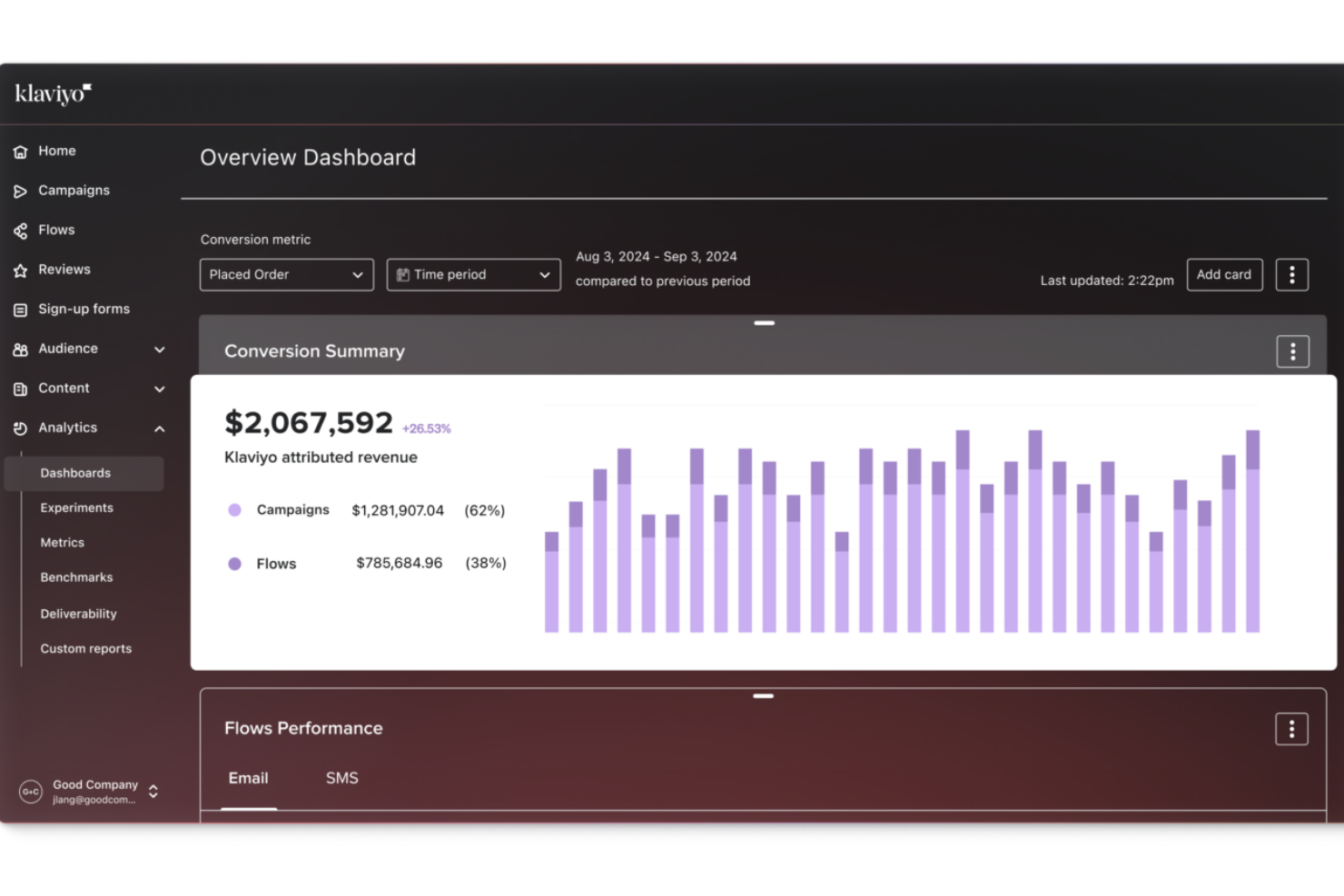
Klaviyo bietet Ihnen die Möglichkeit, die Kundendaten, die Sie bereits sammeln, in transparente Einblicke in das Kaufverhalten, die Entwicklung innerhalb des Kundenlebenszyklus und die Performance Ihrer Kampagnen umzuwandeln. So können Sie bessere Entscheidungen treffen, ohne mit verschiedenen Analyse-Tools jonglieren zu müssen. Die Plattform richtet sich an B2C-Marketingteams und Online-Shop-Betreiber, die verstehen wollen, wie sich ihre Kunden auf Kanälen wie E-Mail, SMS und Werbung verhalten, sodass Sie Ihre Ansprache auf der Grundlage echter Verhaltensweisen und Reisetendenzen optimieren können.
Warum ich Klaviyo gewählt habe
Ich habe mich für Klaviyo entschieden wegen seiner Fähigkeiten zur Echtzeit-Datenzusammenführung und -aktivierung, die für Unternehmen, die Kundenanalysen nutzen möchten, entscheidend sind. Die fortschrittlichen Segmentierungswerkzeuge der Plattform ermöglichen es, Kunden nach Verhaltens- und Transaktionsdaten zu kategorisieren und so ein tieferes Verständnis der Kundenbedürfnisse zu erlangen. Darüber hinaus helfen KI-gestützte Erkenntnisse von Klaviyo, zukünftige Trends vorherzusagen, sodass Ihr Team fundierte Entscheidungen treffen kann, um die Kundenbindung und -zufriedenheit zu steigern.
Klaviyo Hauptfunktionen
Neben den Echtzeit-Datenfunktionen bietet Klaviyo noch weitere Features:
- Omnichannel-Marketing: Mit dieser Funktion können Sie Kunden auf verschiedenen Plattformen erreichen, was eine einheitliche Kommunikation und ein verbessertes Kundenerlebnis gewährleistet.
- E-Mail- und SMS-Marketing: Klaviyo stellt Werkzeuge zur Verfügung, mit denen Sie zielgerichtete E-Mail- und SMS-Kampagnen erstellen können, um Kunden mit personalisierten Nachrichten anzusprechen.
- Kundenprofile: Sie können detaillierte Kundenprofile anlegen, Daten aus verschiedenen Quellen integrieren und so ein umfassendes Bild aller Kundeninteraktionen gewinnen.
- Attributionsberichte: Verfolgen Sie, wie verschiedene Kampagnen und Abläufe zu Conversions und Umsatz über verschiedene Kanäle beitragen.
Klaviyo-Integrationen
Integrationen sind unter anderem mit Shopify, Magento, WooCommerce, BigCommerce, Salesforce, Stripe, Facebook, Instagram, Google Ads und Zendesk möglich.
Pros and Cons
Pros:
- Ermöglicht umfassende Datenintegration für einheitliche Kundenprofile.
- Bietet KI-gestützte Einblicke für personalisierte Marketingstrategien.
- Unterstützt Omnichannel-Marketing, einschließlich E-Mail, SMS und Social Media.
Cons:
- Einige Nutzer wünschen sich mehr Anpassungsmöglichkeiten.
- Die Preise können schnell steigen, wenn die Kontaktlisten wachsen.

Am besten geeignet für B2B-Support-Umgebungen
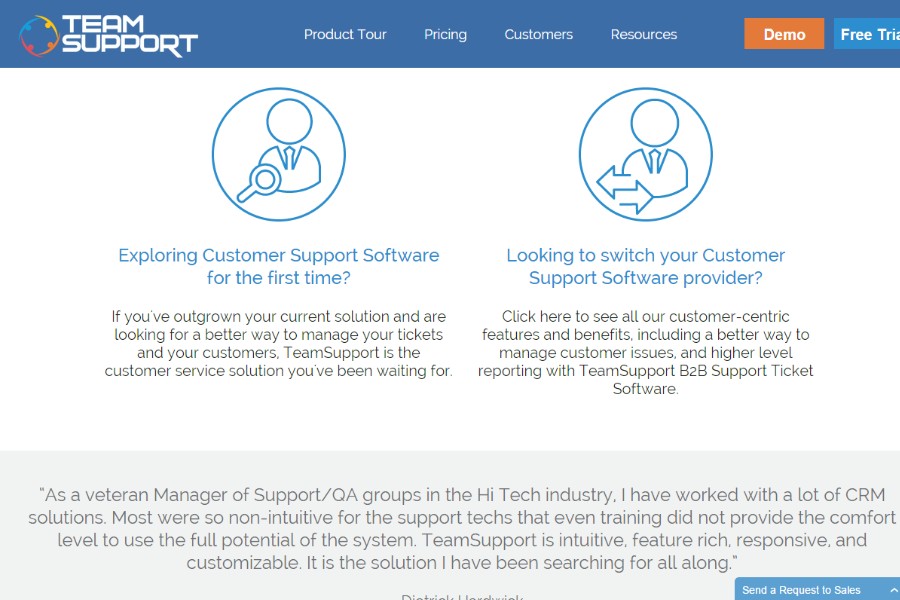
TeamSupport ist eine B2B-Kundensupport-Plattform, die für Unternehmen entwickelt wurde, die komplexe Serviceumgebungen verwalten. Sie vereint Ticketautomatisierung, Workflow-Management und integrierte Kundendatenverfolgung, um Support-Teams dabei zu unterstützen, sich über verschiedene Accounts hinweg abzustimmen und Probleme effizient zu lösen. Dank nativer CRM-Integrationen und einer offenen API für individuelle Anbindungen erhalten Teams klare Einsicht in die Kundenhistorie, laufende Fälle und Leistungskennzahlen, sodass sie den Support in großem Umfang managen können.
Warum ich TeamSupport gewählt habe
Ich habe mich für TeamSupport entschieden, weil die Plattform den Schwerpunkt auf eine verbesserte Teamzusammenarbeit durch Kundenanalysen legt. Der zentrale Hub für Kundeninteraktionen ermöglicht es Ihnen, einen umfassenden Überblick über die Kundenhistorie zu behalten, was für Analysen entscheidend ist. Zudem bieten die KI-Funktionen der Plattform, wie Ticket-Zusammenfassungen und intelligente Hilfestellungen, umsetzbare Erkenntnisse zu Kundeninteraktionen – damit lassen sich Trends und Verbesserungsmöglichkeiten erkennen. Diese Funktionen passen perfekt zu Unternehmen, die ihre Kundensupport-Prozesse mithilfe von Analysen optimieren möchten.
TeamSupport – Hauptfunktionen
Neben den Funktionen zur Zusammenarbeit und künstlichen Intelligenz bietet TeamSupport weitere Features, die es zu einer starken Lösung für Kundenanalysen machen:
- Interner Chat: Ermöglicht reibungslose Kommunikation innerhalb Ihres Support-Teams, um Kundenanliegen effizienter zu klären.
- Kollisions-Erkennung: Verhindert, dass mehrere Mitarbeiter gleichzeitig am selben Ticket arbeiten, und sorgt so für einen optimierten Support-Prozess.
- Regeln zur Ticket-Zuweisung: Automatisieren Sie die Verteilung von Support-Tickets nach vordefinierten Kriterien und optimieren Sie damit die Arbeitslast im Team.
- Reporting-Tools: Bieten umsetzbare Einblicke in Support-Kennzahlen, sodass Sie die Leistung nachverfolgen und Verbesserungspotenziale identifizieren können.
TeamSupport-Integrationen
Integrationen umfassen Salesforce, HubSpot, Microsoft Teams, SAP Sales and Service Clouds, Jira und MailChimp. Für individuelle Integrationen steht eine offene API zur Verfügung.
Pros and Cons
Pros:
- KI-gestützte Ticketautomatisierung
- Echtzeit-Stimmungsanalysen
- Anpassbares Self-Service-Portal für Kunden
Cons:
- Wissensdatenbank ist wenig konfigurierbar
- Begrenzte Funktionalität der mobilen App

Am besten für Sicherheit und Compliance auf Unternehmensniveau
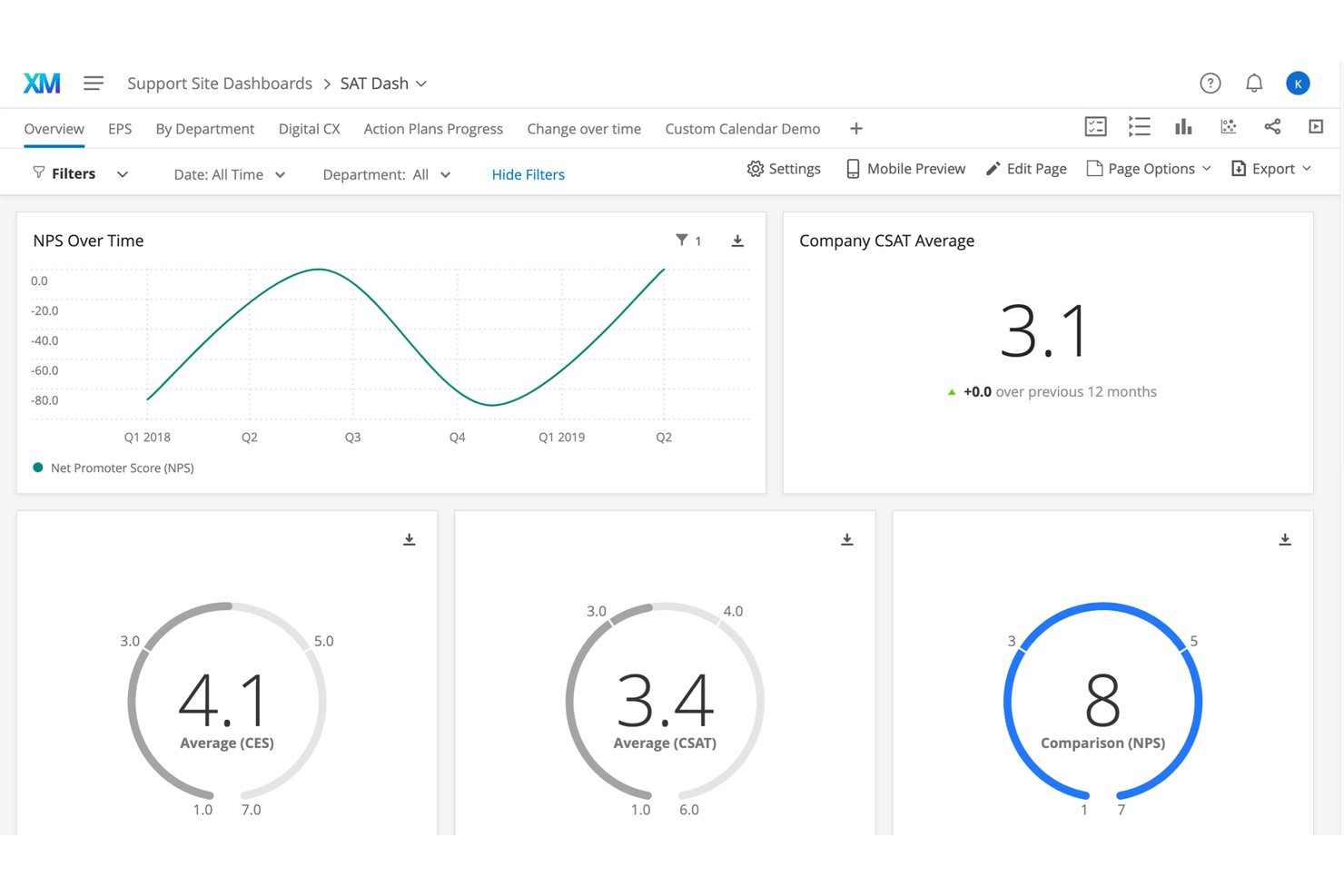
Qualtrics Customer Experience ist eine XM-Plattform für Unternehmen, die kanalübergreifendes Kundenfeedback, Verhaltensanalysen, KI-gestützte Stimmungsanalysen und Echtzeit-CX-Übersichten in einem zentralen Handlungssystem vereint.
Für wen eignet sich Qualtrics Customer Experience am besten?
Die Lösung eignet sich besonders für große Unternehmen und Fortune-500-Unternehmen, die komplexe, teamübergreifende CX-Programme über digitale Kanäle, Standortkanäle und Kontaktcenter hinweg durchführen.
Warum ich Qualtrics Customer Experience ausgewählt habe
Ich habe Qualtrics Customer Experience als eine der besten Lösungen ausgewählt, weil das Sicherheitskonzept für regulierte Branchen entwickelt wurde. Wenn mein Team sensibles Feedback aus Kontaktcenter-Anrufen, Freitextumfragen und digitalen Sitzungen verarbeitet, sind in die Plattform integrierte Compliance-Kontrollen entscheidend. G2-Rezensenten nennen Datenschutz und Sicherheit ausdrücklich als Gründe, warum sie Qualtrics gegenüber kostenlosen Alternativen vertrauen. Die Lösung hat sich außerdem in CX-Programmen im Gesundheitswesen, im Finanzsektor und im öffentlichen Dienst als zuverlässige Wahl bewährt.
Wichtige Funktionen von Qualtrics Customer Experience
- Kanalübergreifende Feedback-Erfassung: Sammelt Kundendaten aus Umfragen, Chats, Anrufen, digitalen Interaktionen und CRM-Systemen an einem Ort.
- Dynamische Segmentierung: Gruppiert Kunden anhand von aktuellen Verhaltens-, Stimmungs- und demografischen Merkmalen für gezielte CX-Analysen.
- KI-gestützte Analysen von Kundenreisen: Erstellt, visualisiert und analysiert Kundenreisen mit automatisierter Erkennung und Identifizierung von Reibungspunkten.
- Anpassbare CX-Übersichten: Ermöglicht rollenbasierte Übersichten in Echtzeit zur Nachverfolgung von NPS, CSAT und anderen CX-Kennzahlen.
Integrationen von Qualtrics Customer Experience
Qualtrics Customer Experience bietet direkt integrierte Verbindungen zu Salesforce, SAP, Zendesk, JIRA, Adobe und ServiceNow. Außerdem steht eine offene API für benutzerdefinierte Integrationen zur Verfügung.
Pros and Cons
Pros:
- Nach GDPR, HIPAA und SOC 2 zertifiziert
- KI-gestützte Textanalysen bringen verborgene Feedbackthemen ans Licht
- Echtzeitwarnungen lösen Arbeitsabläufe für Reaktionen mit geschlossenem Regelkreis aus
Cons:
- Umfragezentriertes Design begrenzt die Tiefe der Verhaltensdaten
- Steile Lernkurve für Personen ohne Forschungshintergrund

Am besten für die unternehmensweite Skalierbarkeit von CX-Programmen geeignet
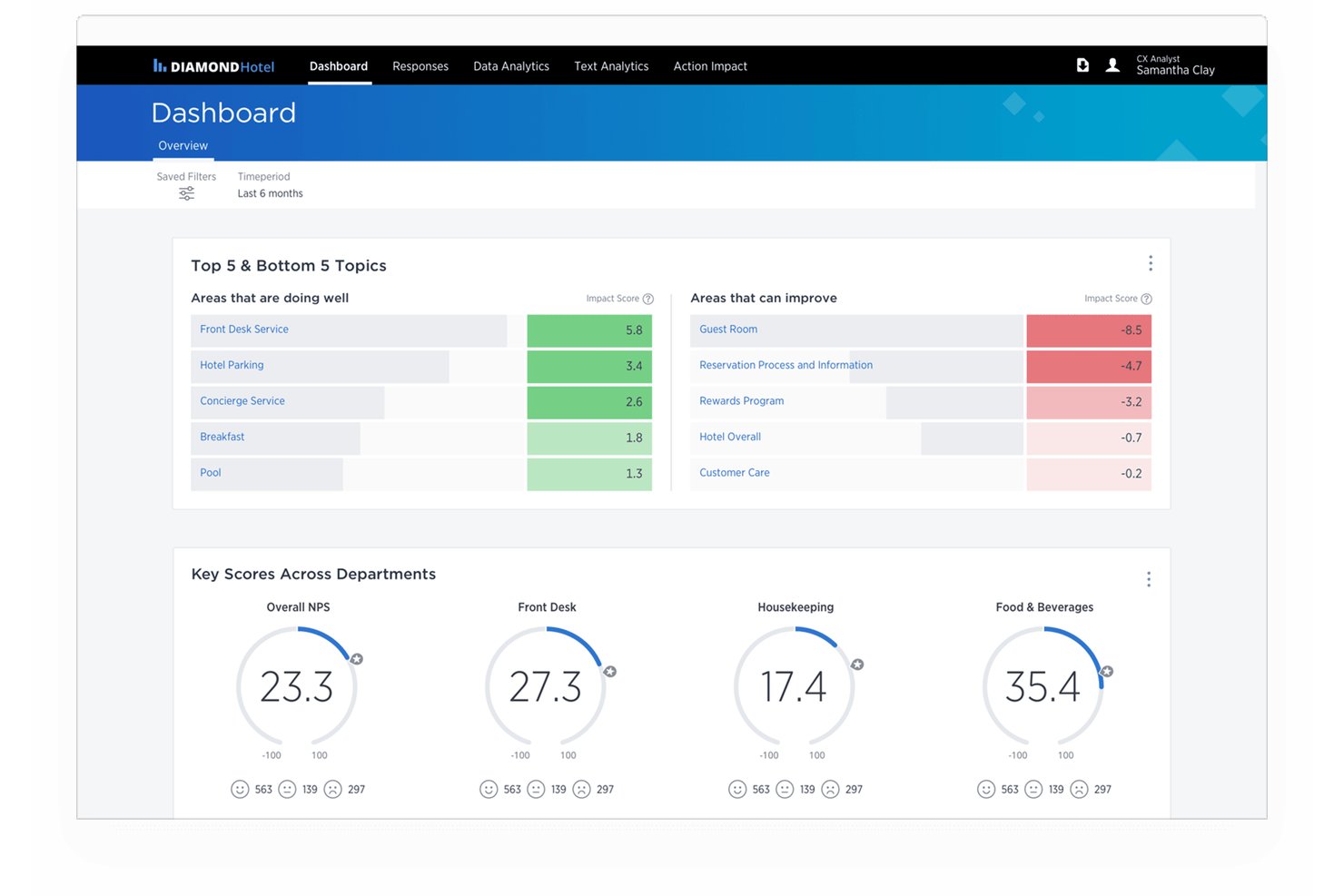
Medallia Experience Cloud ist eine CX-Analyseplattform für Unternehmen, die Kundensignale aus Umfragen, Sprach-, digitalen, sozialen und Videokanälen erfasst und mithilfe KI-gestützter Text-, Sprach- und Verhaltensanalysen auswertet.
Für wen eignet sich Medallia Experience Cloud am besten?
Die Lösung eignet sich besonders für große Unternehmen mit komplexen, standortübergreifenden CX-Programmen, die eine einheitliche Plattform benötigen, um Feedback und Erkenntnisse in großem Umfang zu verwalten.
Warum ich Medallia Experience Cloud ausgewählt habe
Medallia Experience Cloud verdient seinen Platz, weil das EDR-Preismodell unbegrenzt viele Benutzer, alle Feedbackkanäle und Analysen in einer einzigen Kennzahl bündelt. Dadurch fallen bei wachsenden Programmen keine Gebühren pro Benutzer oder pro Antwort an. Mir gefällt, wie Medallia Athena Unterstützung bei der Ursachenanalyse und intelligente Zusammenfassungen bereitstellt, sodass große Teams Tausende von Signalen ohne manuellen Aufwand verarbeiten können. Mein Team kann personalisierte, rollenbasierte Dashboards ohne zusätzliche Konfiguration an Benutzer an der Frontlinie und in der Führungsebene verteilen.
Wichtige Funktionen von Medallia Experience Cloud
- Wiedergabe digitaler Sitzungen: Detaillierte Aufzeichnungen von Kundeninteraktionen über digitale Kanäle erfassen und überprüfen.
- Sprachanalyse: Anrufe im Contactcenter transkribieren und auf Stimmungen, Absichten und Erkenntnisse zur Compliance analysieren.
- Feedback-Workflows mit geschlossenem Regelkreis: Die Weiterleitung von Feedback automatisieren und Nachfassaktionen verfolgen, um einheitliches Handeln sicherzustellen.
- Branchen-Benchmarking: Die Leistung des Kundenerlebnisses mithilfe integrierter Benchmarking-Daten mit der von Wettbewerbern aus der Branche vergleichen.
Integrationen von Medallia Experience Cloud
Medallia Experience Cloud bietet native Integrationen mit Salesforce, ServiceNow, Adobe, Zendesk, Jira, Slack, Tableau, Twilio, Trustpilot und Fullstory. Für individuelle Integrationen steht eine API zur Verfügung.
Pros and Cons
Pros:
- Verarbeitet riesige Feedbackmengen in globalen Programmen
- KI-gestützte Ursachenanalyse für offene Textantworten
- Rollenbasierte Dashboards erreichen Benutzer an der Frontlinie und in der Führungsebene
Cons:
- Die Implementierung erfordert umfangreiche Unterstützung durch professionelle Dienstleistungen
- Für die Konfiguration der Berichtsindividualisierung ist technischer Support erforderlich

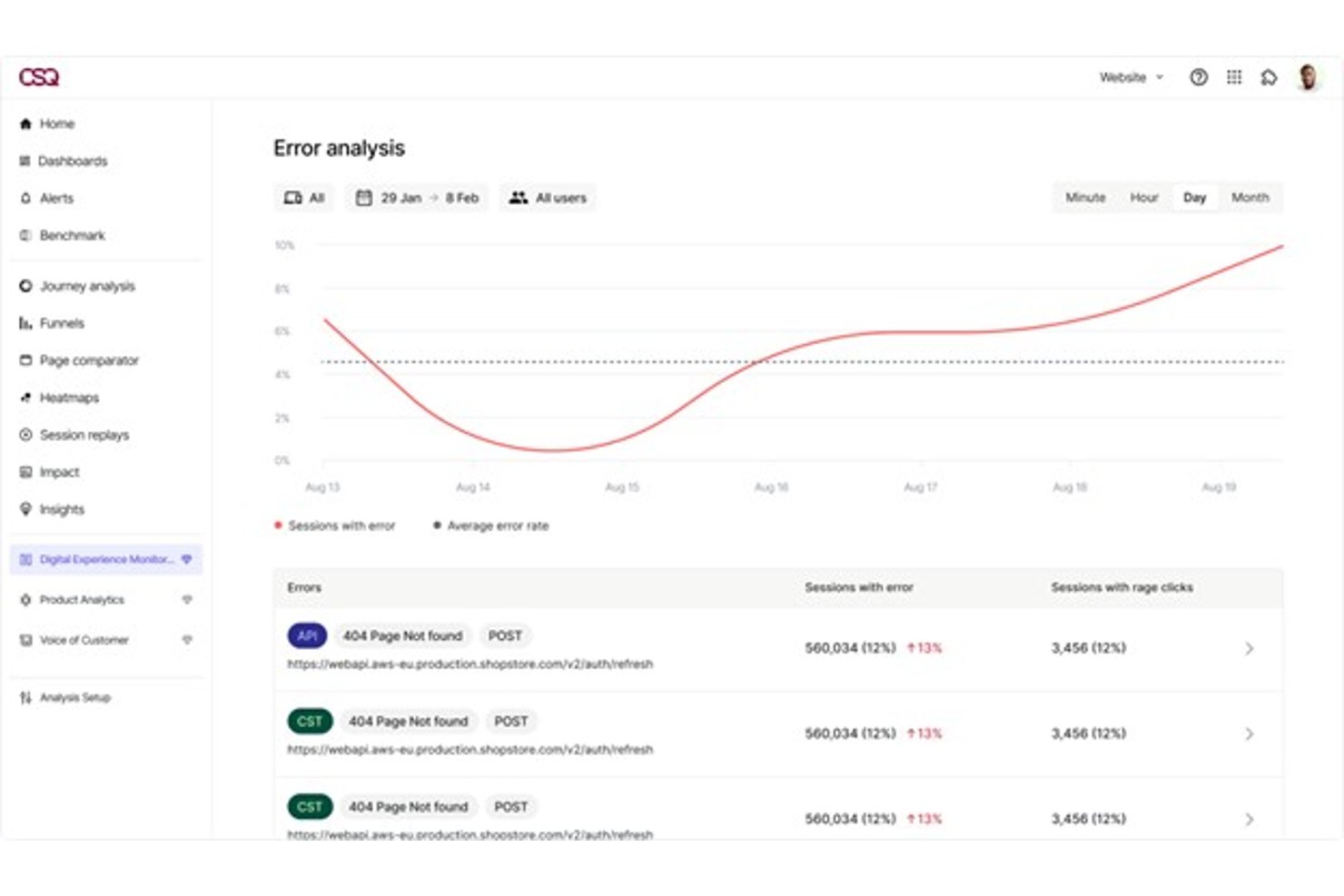
Contentsquare ist eine Plattform für digitale Erlebnisanalysen, die Verhaltensanalysen, Sitzungswiedergaben, Wärmekarten, Nutzerpfad-Analysen, Kundenstimmen und Produktanalysen in einer einzigen vernetzten Suite kombiniert.
Für wen ist Contentsquare am besten geeignet?
Contentsquare eignet sich für mittelständische und große digitale Teams – insbesondere in den Bereichen E-Commerce, Einzelhandel und Finanzdienstleistungen –, die tiefe Einblicke in das Nutzerverhalten über Web und Mobilgeräte hinweg benötigen.
Warum ich Contentsquare ausgewählt habe
Ich habe Contentsquare in meine Top-Auswahl aufgenommen, weil keine andere Plattform Verhaltenssignale, Sitzungsdaten und Kundenfeedback so eng an einem Ort miteinander verbindet. Besonders gefällt mir, wie Sense AI einen Anstieg der Reibung in einem Konversionstrichter erkennen und die relevanten Sitzungswiedergaben zusammenfassen kann, ohne dass ich die Daten manuell durchsuchen muss. Die Funktion zur Quantifizierung der Auswirkungen ordnet bestimmte Nutzerverhalten dem voraussichtlichen Umsatzverlust zu und liefert meinem Team eine klare geschäftliche Grundlage, um zu priorisieren, welche Verbesserungen tatsächlich wichtig sind.
Wichtige Funktionen von Contentsquare
- Überwachung des Nutzungserlebnisses: Erkennt und meldet Website-Fehler, Verlangsamungen und Frustrationssignale in Echtzeit über Web und Mobilgeräte hinweg.
- Elemente für Kundenfeedback: Ermöglicht es Ihnen, KI-generierte Umfragen und Feedbackformulare direkt auf der Website zu starten, ohne Unterstützung durch die Entwicklung zu benötigen.
- Integration von Produktanalysen: Bildet Nutzerreisen und -verhalten über Sitzungen und Geräte hinweg ab, mit ereignisbasiertem Tracking aus der Übernahme von Heap.
- Konnektoren zu Daten-Warehouses: Synchronisieren Erkenntnisse mit Plattformen wie Snowflake und AWS und unterstützen einheitliche Berichte und Analysen in großem Maßstab.
Integrationen von Contentsquare
Contentsquare bietet Integrationen mit Salesforce, HubSpot, Adobe Analytics, Google Analytics, Medallia, Qualtrics, Slack, Jira, Microsoft Teams, Snowflake und Datadog. Für benutzerdefinierte Integrationen ist eine API verfügbar.
Pros and Cons
Pros:
- Vereint Sitzungswiedergaben, Wärmekarten und Nutzerpfad-Analysen
- KI kennzeichnet Reibungspunkte automatisch in Konversionstrichtern
- Quantifiziert die Umsatzwirkung bestimmter Probleme des Nutzererlebnisses
Cons:
- Für die Konfiguration der Übersicht sind technische Kenntnisse erforderlich
- Die Preise steigen bei höheren Datenverkehrsmengen stark an

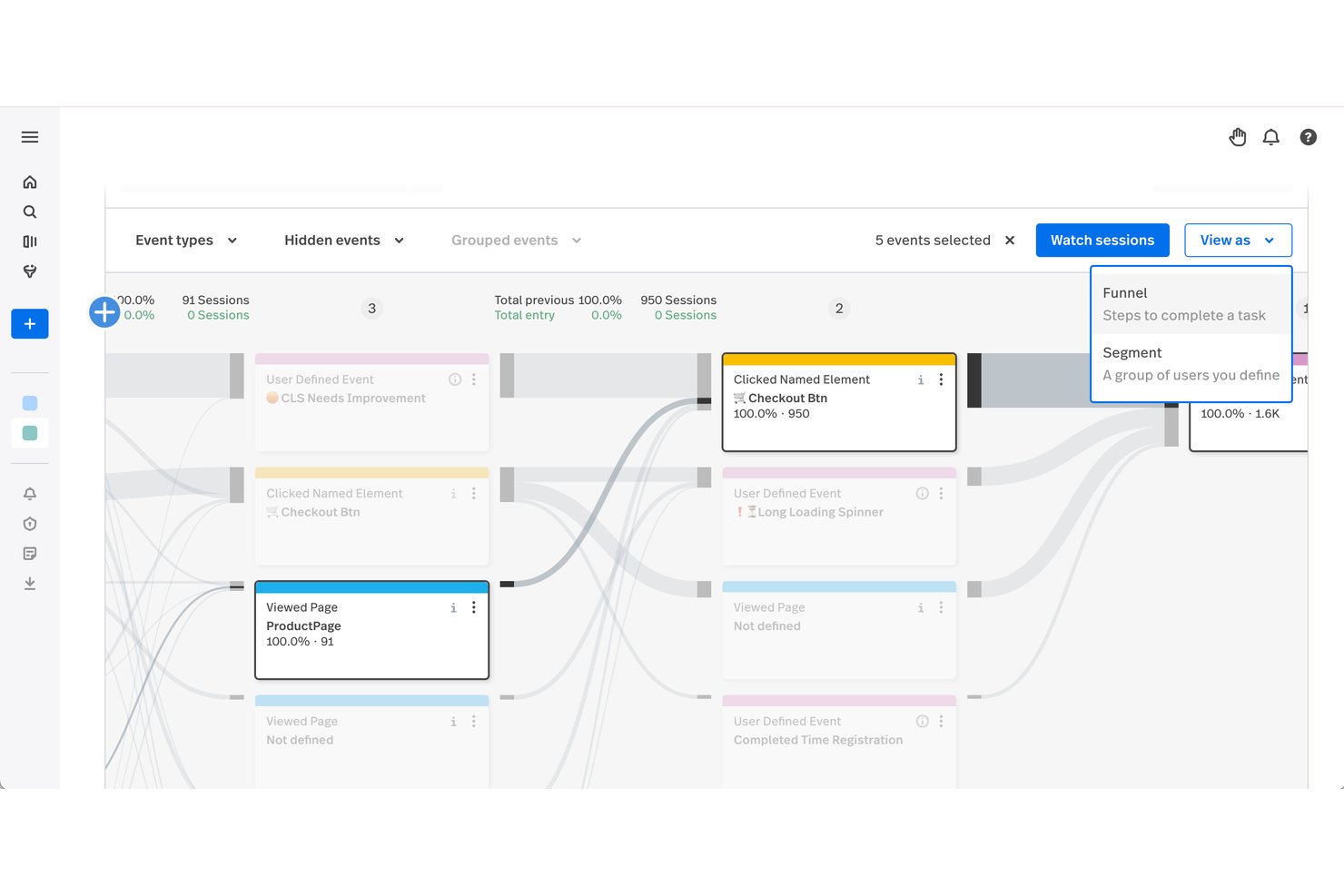
Fullstory Analytics ist eine Plattform für Verhaltensanalysen, die digitale Nutzerinteraktionen im Web und auf Mobilgeräten durch Sitzungswiedergaben, Journey-Mapping, Conversion-Trichter, Heatmaps und KI-gestützte Erkennung von Reibungspunkten erfasst.
Für wen eignet sich Fullstory Analytics am besten?
Fullstory eignet sich besonders für digitale Teams im mittleren Marktsegment und in Unternehmen — insbesondere für UX-Forscher und Produktmanager — die das Nutzerverhalten auf granularer Ebene untersuchen müssen.
Warum ich mich für Fullstory Analytics entschieden habe
Ich habe Fullstory Analytics als eine der besten Lösungen ausgewählt, weil die Fullcapture™-Technologie jede Nutzerinteraktion automatisch aufzeichnet, ohne dass eine manuelle Markierung erforderlich ist, sodass nichts übersehen wird. Besonders nützlich finde ich die Ebene „Sentiment Signals“, die Frustklicks, Fehlerklicks und hektisch bewegte Cursor erkennt und so genau aufzeigt, wo Nutzer nicht weiterkommen. StoryAI verknüpft diese Signale anschließend sitzungsübergreifend, um Muster aufzudecken, nach denen ich sonst stundenlang manuell suchen müsste.
Wichtige Funktionen von Fullstory Analytics
- Nutzer-Journey-Karten: Visualisieren Sie vollständige Kundenpfade über Ihre digitalen Angebote hinweg, um Abbrüche bei Conversions zu erkennen.
- Conversion-Trichter: Verfolgen Sie den Nutzerfluss durch definierte Trichter, um zu ermitteln, an welcher Stelle Interessenten wichtige Prozesse abbrechen.
- Heatmaps: Erstellen Sie Klick-, Scroll- und Umsatz-Heatmaps, um zu sehen, welche Bereiche Ihrer Web- oder mobilen Erlebnisse die meiste Aufmerksamkeit auf sich ziehen.
- Anpassbare Dashboards: Erstellen Sie Echtzeit-Dashboards, um die für Ihr Team relevantesten Verhaltensmetriken und KPIs zu überwachen.
Integrationen von Fullstory Analytics
Fullstory Analytics bietet native Integrationen mit Salesforce, Segment, Zendesk, Intercom, BigQuery, Snowflake, Redshift und Slack. Für individuelle Integrationen ist eine API verfügbar.
Pros and Cons
Pros:
- Erfasst jede Nutzerinteraktion automatisch ohne manuelle Markierung
- KI deckt Reibungsmuster über mehrere Sitzungen hinweg auf
- Granulare Sitzungswiedergaben mit vollständigem Verhaltenskontext
Cons:
- Begrenzte Datenspeicherung bei Tarifen der unteren Preisklassen
- Mobile Analysen weniger ausgereift als Webanalysen

Velaris
Am besten geeignet, um die Gesundheit von Kundenportfolios zu verstehen
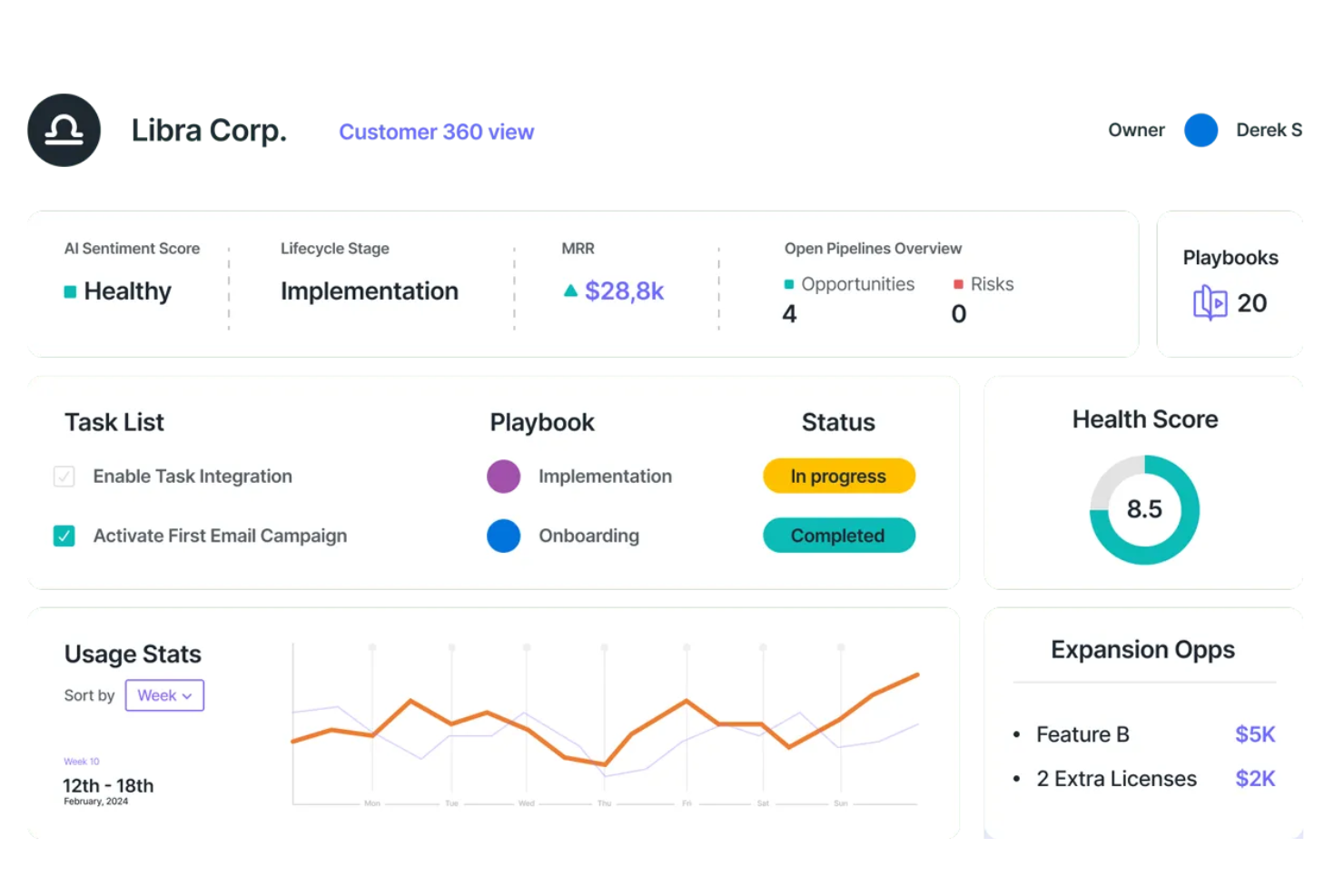
Velaris ermöglicht Ihrem Team KI-gesteuerte Einblicke, um Kundeninteraktionen in strategische Chancen zu verwandeln. Entwickelt für Führungskräfte im Bereich Customer Success, Vertriebsteams und Geschäftsleitung, integriert sich Velaris mit über 70 Anwendungen, um eine nahtlose Ansicht von Kundendaten und -gesundheit bereitzustellen. So werden proaktive Interaktionen und fundierte Entscheidungen möglich. Durch die Vorhersage von Abwanderungsrisiken und die Automatisierung von Aufgaben mit geringem Wert können Sie sich darauf konzentrieren, personalisierte Kundenreisen zu gestalten und dauerhafte Beziehungen aufzubauen, ohne Ihre Arbeitsbelastung zu erhöhen.
Warum ich Velaris gewählt habe
Ich habe Velaris gewählt, weil es ein umfassendes Verständnis von Kundenportfolios durch KI-gestütztes Gesundheitsmonitoring und anpassbare Gesundheitswerte bietet. Diese Funktion ermöglicht es Ihrem Team, Kundenbeziehungen proaktiv zu steuern, indem gefährdete Konten identifiziert und potenzielle Probleme erkannt werden, bevor sie eskalieren. Darüber hinaus bietet Velaris Echtzeit-Dashboards, die Kundendaten zentralisieren und Ihnen eine 360-Grad-Sicht verschaffen, die strategisches Handeln unterstützt. Durch die Automatisierung routinemäßiger Aufgaben schafft Velaris Freiräume, damit Sie sich auf wertvolle Kundeninteraktionen konzentrieren können – ideal für alle, die die Analytik im Bereich Kundenerlebnis verbessern möchten.
Hauptfunktionen von Velaris
Neben seinen Stärken beim Verständnis der Gesundheit von Kundenportfolios bietet Velaris eine Reihe von Funktionen, die die Analyse der Kundenerfahrung Ihres Teams optimieren.
- Customer 360 View: Diese Funktion liefert einen umfassenden Überblick über Kundenkonten und bündelt Informationen für einfachen Zugriff und Pipeline-Management.
- Sentiment-Analyse: Mithilfe von KI analysiert diese Funktion die Stimmung der Kunden und erkennt häufige Probleme, um wertvolle Einblicke in die Interaktionen zu erhalten.
- Custom Objects: Ermöglicht die Erstellung individueller Datenfelder für komplexe Prozesse und bietet so Flexibilität bei der Verwaltung einzigartiger Geschäftsanforderungen.
- Kollaborationstools: Erleichtert Kundeninteraktionen über ein eigenes Portal und verbessert so Kommunikation und Einbindung mit Ihren Kunden.
Velaris-Integrationen
Zu den Integrationen gehören Hubspot, Intercom und mehr als 70 weitere native Tools. Velaris unterstützt außerdem individuelle Integrationen, um sich Ihren Geschäftsanforderungen anzupassen.
Pros and Cons
Pros:
- Fortschrittliche Analysen und Erfolgspläne, unterstützt durch KI
- Gute Zusammenführung von Kundendaten
- Anpassbare Dashboards erlauben individuelle Datenvisualisierung
Cons:
- Mangel an genügend Nutzerfeedback für eine umfassende Bewertung
- Wirksamkeit der Integrationen hängt von den bestehenden Systemen ab
Weitere Optionen
Hier sind einige weitere Tools zur Analyse der Kundenerfahrung, die es nicht in meine Top-20-Liste geschafft haben, aber dennoch einen Blick wert sind:
- InMoment
Es Tool mit intelligentem Zusammenfassungsgenerator
- ChurnZero
Am besten geeignet, um Cross-Selling-Chancen zu erkennen
- Google Analytics
Am besten geeignet zur Analyse von Google Ads-Kampagnen
- Tableau
Am besten geeignet, um das Ausgabeverhalten von Kunden zu erkennen
- Mixpanel
Am besten geeignet, um die Ursachen von Reibungspunkten in der Customer Journey aufzudecken
- Hotjar (by Contentsquare)
Am besten für aussagekräftige Heatmaps
- Amplitude
Am besten geeignet zur Reduzierung von Warenkorbabbrüchen im E-Commerce
- Treasure Data
Idéal pour prédire les probabilités d’attrition client
- UXCam
Am besten zur Verbesserung der Kundenbindung in mobilen Apps
- CleverTap
Am besten geeignet, um Nutzertrends bei mobilen Apps zu erkennen
- Pendo
Am besten geeignet zur Erstellung rückwirkender Analysen
- Gainsight
Am besten geeignet, um NLP zur Analyse der Stimme des Kunden zu nutzen
- Woopra
Am besten geeignet, um aufschlussreiche Berichte zur Customer Journey zu erstellen
- Sprout Social
Am besten geeignet für Social-Media-Kundenanalysen
- Kissmetrics
Am besten geeignet, um wichtige Umsatzstatistiken vorherzusagen
- Zoho PageSense
Am besten geeignet zur Analyse von Website-Formularübermittlungen
- MonkeyLearn
Am besten für codelose Textanalysen
- Creatio CRM
Ideal für automatisierte 360-Grad-Kundenansichten auf einer No-Code-Plattform


Wie ich Tools für die Analyse der Kundenerfahrung bewerte
Ich teile meine Bewertung in zwei Ebenen auf: grundlegende Funktionen – wie Journey-Analysen und NPS-Dashboards –, die jedes Tool bieten muss, sowie Differenzierungsmerkmale, die die besten Optionen vom Rest abheben.
Grundlegende Funktionen (Grundvoraussetzungen für diese Liste)
Bei der Auswahl der Tools für meine Liste bewerte ich jedes einzelne auf einer Skala von 0 (bietet die Funktion nicht an) bis 5 (ist in diesem Bereich hervorragend) für jede der unten aufgeführten grundlegenden Funktionen. Anschließend rechne ich die Gesamtpunktzahl des Tools in einen Prozentsatz um. Jedes Tool muss eine Mindestgesamtpunktzahl von 75 % erreichen, um für die Aufnahme berücksichtigt zu werden.
- Datenerfassung aus mehreren Kanälen: Ich prüfe, ob ein Tool Daten aus CRM-Systemen, Support-Tickets, Umfragen, Chats und sozialen Kanälen abrufen kann, damit Sie mit einer einheitlichen Kundenansicht arbeiten.
- Kundensegmentierung: Die Möglichkeit, dynamische Segmente nach Verhalten, Lebenszyklusphase oder Stimmung zu erstellen, ist hier entscheidend – statische demografische Filter allein reichen nicht aus.
- Verhaltens- & Journey-Analysen: Ich bewerte, wie gut ein Tool Kundenreisen über verschiedene Kontaktpunkte hinweg abbildet, einschließlich Trichteranalyse, Pfadvisualisierung und Erkennung von Abbrüchen.
- Stimmungs- & Feedbackanalyse: Ich achte auf NLP-gestützte Analysen, die Themen und Stimmungen aus Freitextantworten, Bewertungen und Support-Gesprächen extrahieren und über eine einfache Schlagwortzuordnung hinausgehen.
- CX-Metriken- & KPI-Dashboards: Dashboards sollten es ermöglichen, NPS, CSAT, CES und Abwanderung in Echtzeit zu verfolgen und gleichzeitig genügend Flexibilität für rollenspezifische Ansichten für Analysten und Führungskräfte bieten.
- Prädiktive Analysen: Ich prüfe, ob das Tool ML-basierte Modelle für Abwanderungsrisiken, CLV-Prognosen oder Neigungsbewertungen anbietet, anstatt lediglich rückblickende Trendberichte zu liefern.
Sobald ich eine Liste von Tools habe, die die Kriterien erfüllen, prüfe ich, wodurch sich die einzelnen Plattformen voneinander unterscheiden.
Differenzierungsmerkmale (Was Anbieter voneinander unterscheidet)
So vergleiche ich die verschiedenen Anbieter miteinander:
Herausragende Funktionen
Feedback-Workflows mit geschlossenem Regelkreis sind ein wichtiges Differenzierungsmerkmal. Ich suche nach Tools, die eine niedrige CSAT-Bewertung direkt an das zuständige Team weiterleiten und die Behebung nachverfolgen. Ein generativer KI-Assistent bietet VoC-Analysten einen echten Mehrwert, wenn sie Daten in Alltagssprache abfragen möchten, anstatt komplexe Berichte zu erstellen. Echtzeitwarnungen sind ebenso wichtig. Wenn der NPS nach einer Produktveröffentlichung sinkt, sollte Ihr CX-Team innerhalb von Minuten davon erfahren, nicht erst nach Tagen.
Über die Funktionen hinaus
Die Integrationstiefe ist eines der ersten Dinge, die ich bewerte. Ein Kundenanalysetool, das sich nativ mit Ihrem CRM-System, Support-Desk und Data Warehouse verbinden lässt, bedeutet, dass Ihr Team weniger Zeit mit dem Zusammenführen von Daten verbringt. Auch die Compliance spielt eine wichtige Rolle – ich prüfe die Bereitschaft für DSGVO und CCPA, die Schwärzung personenbezogener Daten sowie die SOC-2-Zertifizierung, insbesondere wenn Kundenfeedback sensible Daten enthält. Auch die Implementierungsgeschwindigkeit ist wichtig. Vorgefertigte Dashboards und Unterstützung bei der Einrichtung helfen VoC-Analysten, innerhalb von Wochen statt Monaten Erkenntnisse bereitzustellen.
Was sind Tools zur Analyse der Kundenerfahrung?
Tools zur Analyse der Kundenerfahrung sind Softwareplattformen, die Daten zu Kundeninteraktionen analysieren, um Muster, Präferenzen und Reibungspunkte sichtbar zu machen. Sie helfen Unternehmen, das Verhalten über verschiedene Kanäle hinweg zu verstehen, um die Entscheidungsfindung zu verbessern und die Kundenreise zu optimieren.
So wählen Sie die besten Tools zur Analyse der Kundenerfahrung aus
Nutzen Sie diese praktische Checkliste, um die besten Tools zur Analyse der Kundenerfahrung für Sie und Ihr Team auszuwählen.
☐ Verfügt die Software X über die 2–3 Funktionen, die mir am wichtigsten sind?
☐ Welche speziellen oder außergewöhnlichen zusätzlichen Funktionen bietet die Software X?
☐ Ist die Software X für meine Teamgröße geeignet, unabhängig davon, ob mein Team groß oder klein ist?
☐ Lässt sich die Software X in Apps integrieren, die ich täglich nutze (E-Mail, Slack usw.)?
☐ Ist die Software X dafür bekannt, leicht zu erlernen und zu bedienen zu sein?
☐ Stimmen die Werte der Software X mit meinen eigenen überein?
☐ Liegt die Software X innerhalb meines Budgets?
Wenn Sie nach einer ganzheitlicheren Software für die Kundenerfahrung mit Funktionen suchen, die über Analysen hinausgehen, habe ich die 10 besten Softwares für die Kundenerfahrung im Jahr 2026 für Sie zusammengestellt.
Trends bei Tools zur Analyse der Kundenerfahrung
Tools zur Analyse der Kundenerfahrung entwickeln sich weiter, wobei neue Trends die Branche prägen.
Integration von KI und maschinellem Lernen
KI und maschinelles Lernen werden zunehmend zu einem integralen Bestandteil und liefern tiefere Einblicke sowie automatisieren komplexe Analysen. Dieser Trend ist wichtig für die Verbesserung der Vorhersagefähigkeiten.
Datenverarbeitung in Echtzeit
Die Datenverarbeitung in Echtzeit gewinnt an Bedeutung und ermöglicht es Unternehmen, sofortige Entscheidungen zu treffen. Dieser Trend ist entscheidend, um in schnelllebigen Märkten wettbewerbsfähig zu bleiben.
Integration von Daten aus mehreren Kanälen
Die Integration von Daten aus mehreren Kanälen wird zum Standard und bietet einen ganzheitlichen Überblick über das Kundenverhalten. Dieser Trend ist für umfassende Kundeneinblicke von entscheidender Bedeutung.
Verbesserte Datenschutzmaßnahmen
Angesichts zunehmender Bedenken hinsichtlich des Datenschutzes integrieren Tools fortschrittliche Sicherheitsfunktionen. Dieser Trend ist entscheidend für die Aufrechterhaltung des Kundenvertrauens.
Anpassbare Dashboards
Anpassbare Dashboards werden immer verbreiteter und ermöglichen es Benutzern, ihre Analyseerfahrung individuell zu gestalten. Dieser Trend ist wichtig, um unterschiedlichen geschäftlichen Anforderungen gerecht zu werden.
Funktionen von Analysetools für das Kundenerlebnis
Achten Sie bei der Auswahl von Analysetools für das Kundenerlebnis auf die folgenden wichtigen Funktionen:
- Umfassende Datenintegration: Verbinden Sie nahtlos Daten aus mehreren Quellen wie Websites, mobilen Apps, Kundensupport und sozialen Medien, um ein vollständiges Bild des Kundenverhaltens zu zeichnen. Diese Funktion hilft Ihnen, Datensilos aufzubrechen, und bietet Ihnen eine einheitliche Sicht auf die Kundenreise.
- Analysen in Echtzeit: Erhalten Sie minutengenaue Einblicke, während Kundeninteraktionen stattfinden. Echtzeitanalysen ermöglichen es Ihnen, Trends oder Probleme schnell zu erkennen, sodass Sie agil reagieren und Ihre Kunden genau dann begeistern können, wenn es darauf ankommt.
- Anpassbare Dashboards: Personalisieren Sie Dashboards, um die für Sie und Ihr Team wichtigsten Kennzahlen und Visualisierungen anzuzeigen. So können Sie KPIs einfach überwachen und Erkenntnisse mit anderen Beteiligten teilen, ohne sich durch Datenmengen arbeiten zu müssen.
- Segmentierung und Filterung: Gruppieren Sie Kunden anhand von Verhalten, demografischen Merkmalen oder Feedback. Mit der Segmentierung können Sie unterschiedliche Kundenbedürfnisse erkennen und Ihre Strategien für maximale Wirkung anpassen.
- Abbildung der Kundenreise: Visualisieren Sie jeden Schritt der Kundenreise, um Schwachstellen, Abbrüche und Verbesserungsmöglichkeiten zu erkennen. Diese Funktion hilft Ihnen, sich in Ihre Kunden hineinzuversetzen und reibungslosere, erfreulichere Erlebnisse zu schaffen.
- Erfassung und Analyse von Feedback: Sammeln und analysieren Sie Feedback aus Umfragen, Bewertungen, Chats und mehr ganz einfach. So verstehen Sie die Stimmung besser und erkennen Bereiche, in denen Ihr Service überzeugt oder etwas mehr Aufmerksamkeit benötigt.
- Warnmeldungen und Benachrichtigungen: Richten Sie automatische Warnmeldungen für wichtige Ereignisse ein, etwa bei einem Rückgang der Zufriedenheitswerte oder einem Anstieg der Support-Tickets. So bleiben Sie informiert und können handeln, bevor aus kleinen Problemen große Schwierigkeiten werden.
- Leistungsstarke Berichte: Erstellen Sie detaillierte, leicht verständliche Berichte, die Erkenntnisse für alle Ebenen Ihres Unternehmens aufschlüsseln. Teilen Sie Erfolge, Erkenntnisse und Aktionspläne, ohne sich mit dem Tabellenkalkulationschaos herumärgern zu müssen.
Häufige KI-Funktionen von Analysetools für das Kundenerlebnis
Über die oben aufgeführten Standardfunktionen von Analysetools für das Kundenerlebnis hinaus integrieren viele dieser Lösungen KI mit Funktionen wie:
- Vorhersagebasierte Kundeneinblicke: Nutzen Sie KI, um Kundenverhalten vorherzusagen, etwa wer abwandern oder zu Ihren größten Fans werden könnte. Dies hilft Ihnen, Beziehungen zu pflegen und spätere Überraschungen zu vermeiden.
- Verarbeitung natürlicher Sprache (NLP): Analysieren Sie automatisch offenes Feedback, Support-Chats oder Bewertungen auf Stimmung und wiederkehrende Themen und gewinnen Sie so blitzschnell Erkenntnisse aus großen Mengen unstrukturierter Daten.
- Automatisierte Stimmungsanalyse: Lassen Sie KI die Stimmung und Zufriedenheit Ihrer Kunden anhand von E-Mails, Anrufen oder Kommentaren bewerten. So erkennen Sie schnell Muster und können Anliegen ansprechen, manchmal noch bevor Ihre Kunden sich überhaupt melden.
- Anomalieerkennung: KI erkennt unerwartete Veränderungen im Kundenverhalten oder beim Feedback, sodass Sie plötzliche Veränderungen untersuchen und Ihren Service konsistent halten können.
- Intelligente Empfehlungen: Erhalten Sie KI-gestützte Vorschläge für die nächsten Schritte, etwa welche Verbesserungen priorisiert oder welche Kunden zuerst kontaktiert werden sollten. So stellen Sie sicher, dass Ihre Maßnahmen auf das ausgerichtet sind, was Ihren Kunden am wichtigsten ist.
Vorteile von Tools zur Analyse der Kundenerfahrung
Tools zur Analyse der Kundenerfahrung bieten Nutzern und Organisationen mehrere Vorteile. Hier sind die wichtigsten Vorteile:
- Verbessertes Kundenverständnis: Liefert tiefgehende Einblicke in das Verhalten und die Präferenzen der Kunden.
- Verbesserte Entscheidungsfindung: Ermöglicht datengestützte Entscheidungen auf Grundlage genauer und zeitnaher Informationen.
- Höhere Kundenbindung: Identifiziert gefährdete Kunden und hilft bei der Entwicklung gezielter Kundenbindungsstrategien.
- Optimierte Marketingkampagnen: Ermöglicht eine präzise Zielgruppenansprache und Personalisierung von Marketingmaßnahmen.
- Umsatzwachstum: Fördert das Unternehmenswachstum durch die Identifizierung neuer Möglichkeiten und die Optimierung bestehender Möglichkeiten.
Diese Vorteile verdeutlichen den Wert von Tools zur Analyse der Kundenerfahrung für Unternehmen.
Kosten und Preise von Tools zur Analyse der Kundenerfahrung
Die Kosten für Tools zur Analyse der Kundenerfahrung variieren je nach Funktionen und Tarifart.
| Tarifart | Durchschnittlicher Preis | Übliche Funktionen |
|---|---|---|
| Kostenloser Tarif | $0 | Grundlegende Analysen, begrenzter Datenspeicher, Standardberichte |
| Persönlicher Tarif | $20/Monat | Erweiterte Analysen, mehr Datenspeicher, anpassbare Berichte |
| Geschäftstarif | $100/Monat | Umfassende Analysen, Zugriff für mehrere Nutzer, Echtzeitdaten |
| Unternehmenstarif | $500/Monat | Vollständiger Funktionsumfang, dedizierter Support, erweiterte Sicherheit |
Diese Tabelle bietet eine Schätzung der durchschnittlichen Tarife und Kosten für Tools zur Kundenanalyse.
Häufig gestellte Fragen
Hier finden Sie Antworten auf häufig gestellte Fragen zu Tools für die Kundenanalyse:
Wie wähle ich das richtige Tool zur Analyse des Kundenerlebnisses für mein Team aus?
Beginnen Sie damit, die wichtigsten Ziele Ihres Teams zu erfassen, etwa die Verbesserung des NPS, die Erhöhung der Kundenbindungsraten oder die Optimierung des Kundenfeedbacks. Bewerten Sie Tools anhand von Funktionen, die gezielt auf Ihre Herausforderungen eingehen – beispielsweise die Feedback-Erfassung über mehrere Kanäle, erweiterte Berichte oder eine KI-gestützte Stimmungsanalyse. Berücksichtigen Sie die Lernkurve für Ihr Team; ein Tool mit einem benutzerfreundlichen Dashboard ist für die Akzeptanz entscheidend. Prüfen Sie die Integrationsmöglichkeiten mit vorhandenen Systemen wie CRM-, Helpdesk- oder Marketingplattformen, um Datensilos zu vermeiden. Bewerten Sie den Support, die Sicherheit und die Compliance-Nachweise des Anbieters und bevorzugen Sie Anbieter, die individuelle Demos oder Testzeiträume anbieten, damit Sie Arbeitsabläufe vor der endgültigen Entscheidung testen können.
Welche Kennzahlen sollte ich mit Tools zur Analyse des Kundenerlebnisses verfolgen?
Sie sollten eine Mischung aus quantitativen und qualitativen Kennzahlen verfolgen, um ein umfassendes Bild zu erhalten. Beginnen Sie mit grundlegenden Werten wie dem Net Promoter Score (NPS), der Kundenzufriedenheit (CSAT) und dem Customer Effort Score (CES), um Loyalität und unmittelbare Eindrücke zu messen. Analysieren Sie operative Kennzahlen wie die Abwanderungsrate, die Zeit bis zur ersten Antwort und Lösungsquoten, um Engpässe in den Prozessen zu erkennen. Nutzen Sie Journey-Analysen, um Abbruchpunkte und Konversionsraten entlang der verschiedenen Kontaktpunkte zu überwachen. Mit einigen Tools können Sie die Stimmung analysieren, indem Sie Inhalte aus sozialen Medien, Chats oder E-Mails auswerten und so verborgene Frustrationen oder positive Trends aufdecken, die Umfragen möglicherweise nicht erfassen. Wenn Sie diese Kennzahlen gemeinsam verfolgen, können Sie Ihre CX-Strategie in Echtzeit anpassen.
Können Tools zur Analyse des Kundenerlebnisses in mein bestehendes CRM oder meine Supportplattformen integriert werden?
Ja, die Integration ist für CX-Verantwortliche ein wichtiger Faktor, und die meisten führenden Tools bieten vorgefertigte Konnektoren für beliebte CRMs wie Salesforce, monday CRM oder HubSpot sowie Helpdesk-Plattformen wie Zendesk oder Freshdesk. Dadurch können Sie Kundeninteraktionen, Tickets und Feedbackdaten automatisch plattformübergreifend synchronisieren, manuelle Datenübertragungen vermeiden und Fehler reduzieren. Einige Plattformen unterstützen auch den API-Zugriff für individuellere Integrationen, sodass Sie maßgeschneiderte Dashboards oder Arbeitsabläufe erstellen können, die speziell auf die Anforderungen Ihres Teams zugeschnitten sind. Prüfen Sie vor der Implementierung den Integrationsprozess, die verfügbare Dokumentation und den Support des Anbieters, um eine reibungslose Einrichtung und minimale Ausfallzeiten sicherzustellen.
Wie können Tools zur Analyse des Kundenerlebnisses dazu beitragen, die Abwanderung zu reduzieren?
Tools zur Analyse des Kundenerlebnisses helfen dabei, abwanderungsgefährdete Kunden zu identifizieren, indem sie Verhaltensmuster, Nutzungsdaten und Feedbacktrends analysieren. Wenn das Tool beispielsweise nach bestimmten Produktänderungen einen Rückgang der Interaktion oder negative Bewertungen erkennt, kann Ihr Team schnell reagieren und Probleme beheben. Sie können automatische Warnmeldungen für wichtige Indikatoren wie steigende Beschwerdequoten oder sinkende NPS-Werte einrichten, die eine sofortige Nachverfolgung auslösen. Einige Plattformen bieten prädiktive Analysen, um Nutzer hervorzuheben, bei denen eine Abwanderung besonders wahrscheinlich ist, sodass Sie proaktiv personalisierte Kontaktaufnahmen starten können. Wenn Sie Erkenntnisse konsequent in konkrete Maßnahmen umwandeln – etwa durch die Verbesserung von Selbsthilfeangeboten oder die Schulung von Supportmitarbeitern –, können Sie die Ursachen der Abwanderung bekämpfen und die Kundenbindung steigern.
Gibt es Datenschutz- oder Compliance-Bedenken bei Tools zur Analyse des Kundenerlebnisses?
Ja, Datenschutz und Compliance sollten immer höchste Priorität haben, wenn Sie Kundendaten mit Analysetools verarbeiten. Achten Sie auf Plattformen, die für die Datenschutzbestimmungen zertifiziert sind, die für Ihr Unternehmen gelten, etwa die DSGVO in der EU oder der CCPA in Kalifornien. Stellen Sie sicher, dass das Tool eine sichere Datenspeicherung, strukturierte Zugriffskontrollen und Transparenzfunktionen wie eine Einwilligungsverwaltung unterstützt. Möglicherweise sollten Sie mit dem Anbieter die Regionen besprechen, in denen Daten gehostet werden, insbesondere wenn Ihre Kunden weltweit ansässig sind. Prüfen Sie, wie die Plattform Daten erfasst, verarbeitet und weitergibt, und stellen Sie sicher, dass Ihre Rechts- und IT-Teams in den Prüfprozess einbezogen werden. Bevorzugen Sie Anbieter, die eine klare Dokumentation und Unterstützung bei Compliance-Audits bieten, um spätere Risiken zu minimieren.
Wie nutzen Unternehmen Daten und Analysen, um das Kundenerlebnis zu verbessern?
Unternehmen nutzen Tools zur Analyse des Kundenerlebnisses, um Echtzeitfeedback zu sammeln, Kundenreisen abzubilden und Trends zu erkennen, die zuvor nicht sichtbar waren. Einzelhandelsmarken analysieren beispielsweise Supporttickets und Webinteraktionen, um herauszufinden, wo Kunden nicht weiterkommen, und aktualisieren anschließend Produktseiten oder optimieren Supportabläufe. SaaS-Unternehmen nutzen Stimmungsanalysen, um zunehmende Frustration zu erkennen und gezielte Kontaktaufnahmen zu starten, bevor das Abwanderungsrisiko steigt. Viele CX-Verantwortliche integrieren Analysedaten in ihr CRM und ihre Marketingautomatisierung, um Kontaktaufnahmen zu personalisieren und wichtige Beschwerden schnell zu bearbeiten. Indem Unternehmen Erkenntnisse in konkrete, messbare Maßnahmen umwandeln, schließen sie Lücken im Kundenerlebnis und fördern eine höhere Kundenloyalität.
Weitere Bewertungen von Tools zur Analyse des Kundenerlebnisses
Bevor Sie den Tab wechseln, finden Sie hier einige großartige Beiträge, mit denen Sie Ihre Kunden besser kennenlernen können:
- Plattformen für Kundenintelligenz
- Software für das Kundenerlebnismanagement
- VOC-Software für Kundenanalysen
- Software zur qualitativen Datenanalyse
- Software für Kundenfeedback
- Plattformen für Kundenbindung
- Software für das Kundenbeziehungsmanagement
- Software zur Verwaltung von Kundenabläufen
Zusammenfassung
Werkzeuge für Kundenerlebnisanalysen sind für Teammitglieder unverzichtbar, die personalisierte Erlebnisse bieten möchten. Diese Werkzeuge nutzen Umfragevorlagen, um effizient Feedback zu sammeln, und ermöglichen es Unternehmen, die Erwartungen ihrer Kunden besser zu verstehen. Durch die Integration von Inhaltsverwaltung und die Analyse von Kundengesprächen helfen diese Werkzeuge dabei, wichtige Kontaktpunkte mit Kunden zu identifizieren.
Eine effektive Sammlung von Feedback und Nachfassaktionen wird durch fortschrittliche Management-Tools optimiert und verbessert die Kundenbindung. Mithilfe von maschinellem Lernen können diese Tools Trends vorhersagen und Interaktionen personalisieren, sodass die Erwartungen der Kunden kontinuierlich erfüllt werden. Letztlich ermöglichen diese Analysetools Teams, Feedback in umsetzbare Erkenntnisse umzuwandeln und dadurch die gesamte Kundenreise zu verbessern.
Vergessen Sie nicht, unseren Newsletter zu abonnieren, um weitere Lösungen und Strategien von führenden Strategen für Kundenerlebnis zu erhalten.