

10 beste Enterprise-Helpdesk-Softwarelösungen 2026

10 Beste Enterprise Helpdesk-Software Shortlist


Die Verwaltung von Kundenanfragen und Support-Tickets kann überwältigend sein. Vielleicht kämpft Ihr Team damit, alle Anfragen zu bearbeiten, was zu Verzögerungen und Frust bei Mitarbeitern und Kunden führt. Enterprise Helpdesk-Software kann Sie dabei unterstützen, diese Herausforderungen besser zu organisieren und zu vereinfachen.
Ich habe jahrelange Erfahrung in der Testung und Bewertung von Software und fokussiere mich auf das, was den Kundenerfahrungen wirklich zugutekommt. In dieser Liste teile ich meine Top-Empfehlungen von Helpdesk-Lösungen, die für Sie und Ihr Team einen echten Unterschied machen können.
Sie werden Tools entdecken, die Ihren Arbeitsablauf optimieren, die Reaktionszeiten verkürzen und die Kundenzufriedenheit steigern können. Tauchen wir ein und finden Sie die passende Lösung für Ihren Bedarf.
Warum Sie unseren Software-Empfehlungen vertrauen können
Unser Team testet und bewertet Software seit 2012. Als CX-Führungskräfte selbst wissen wir, wie schwierig – und wichtig – es ist, die richtige Software auszuwählen.
Für diesen Leitfaden haben wir Tools mithilfe von praktischen Tests und unabhängiger Recherche bewertet und dabei unsere Bewertungskriterien angewendet.
Unsere Bewertungen spiegeln unser menschliches redaktionelles Urteilsvermögen wider, keine Verkaufsstrategie.
Vergleichstabelle der besten Enterprise Helpdesk-Software
Diese Vergleichstabelle fasst die wichtigsten Details zu meinen Top-Auswahlen für Enterprise Helpdesk-Software zusammen. Sie können die Preisinformationen und die Verfügbarkeit von kostenlosen Testversionen oder Demos nebeneinander betrachten. Das hilft Ihnen dabei, die passende Software für Ihr Budget und Ihre geschäftlichen Anforderungen zu finden.
| Tool | Best For | Trial Info | Price | ||
|---|---|---|---|---|---|
| 1 | Am besten für die automatisierte Ticketlösung ohne manuellen Aufwand | 30-tägige kostenlose Testversion verfügbar | Ab $209/Monat/Techniker (jährliche Abrechnung) | Website | |
| 2 | Am besten für integriertes Projektportfolio-Management | 14-tägige kostenlose Testversion + kostenlose Demo verfügbar | Ab $19/Agent/Monat (jährliche Abrechnung) | Website | |
| 3 | Am besten geeignet für skalierbaren Kundensupport | Kostenlose Demo + 14-tägige kostenlose Testversion verfügbar | Ab $19/Nutzer/Monat (bei jährlicher Abrechnung) | Website | |
| 4 | Am besten für KI-gestütztes IT-Service-Management | 14-tägige kostenlose Testversion | Preise auf Anfrage | Website | |
| 5 | Am besten geeignet zur Automatisierung von Helpdesk-Aufgaben | 15-tägige kostenlose Testversion + kostenloser Tarif | Ab $7/Nutzer/Monat (jährliche Abrechnung) | Website | |
| 6 | Am besten für die Integration von E-Commerce-Kanälen | 14-tägige kostenlose Testversion | Ab $39/Agent/Monat | Website | |
| 7 | Beste Enterprise-Helpdesk-Software für Kunden-Self-Service | 14-tägige kostenlose Testversion + kostenlose Demo verfügbar | Ab $19/Agent/Monat (jährliche Abrechnung) | Website | |
| 8 | Am besten geeignet, um mit KI personalisierte Erlebnisse zu schaffen | Kostenlose Testphase + kostenlose Demo verfügbar | Ab $25/Nutzer/Monat (jährliche Abrechnung) | Website | |
| 9 | Am besten für schnelle Einrichtung und Bereitstellung | 7-tägige kostenlose Testphase + kostenloser Tarif verfügbar | Ab $25/Nutzer/Monat | Website | |
| 10 | Beste Enterprise-Helpdesk-Software mit integrierten Analysefunktionen | 90-tägige kostenlose Testversion | Ab $249/Nutzer/Monat (jährliche Abrechnung) | Website |


Überblick über die 10 besten Enterprise Helpdesk-Software-Lösungen
Hier folgt eine kurze Beschreibung jeder Enterprise Helpdesk-Software, die den besten Anwendungsfall des jeweiligen Anbieters, deren bemerkenswerte Funktionen sowie einige Vor- und Nachteile aufzeigt. Screenshots bieten Ihnen zusätzlich einen Einblick in die jeweilige Benutzeroberfläche.
Am besten für die automatisierte Ticketlösung ohne manuellen Aufwand

Robin Autonomous IT ist ein autonomer KI-IT-Service-Agent innerhalb der Atera-Plattform, der Geräte- und Cloud-Probleme von Anfang bis Ende löst und dabei einen mehrkanaligen Ticket-Eingang sowie integrierte Mehrsprachigkeit bietet.
Für wen ist Robin Autonomous IT am besten geeignet?
Robin Autonomous IT eignet sich besonders für IT-Teams in mittelgroßen bis großen Unternehmen, die ein hohes Aufkommen an wiederkehrenden Supportanfragen bearbeiten und die Abhängigkeit von manuellen Techniker-Eingriffen reduzieren möchten.
Warum habe ich Robin Autonomous IT ausgewählt?
Ich habe Robin Autonomous IT als eine der besten Lösungen ausgewählt, weil das System Tickets wirklich von Anfang bis Ende übernimmt. Wenn eine Anfrage eingeht, überprüft Robin die Identität des Nutzers, erkennt die Absicht, stellt klärende Fragen und handelt dann – zum Beispiel durch das Ausführen von Reparaturen wie App-Installationen, Passwortzurücksetzungen oder Netzwerkadapter-Resets direkt am Endgerät. Eine Eskalation an einen Techniker erfolgt nur, wenn es nötig ist; dabei wird eine vollständige Zusammenfassung aller bereits durchgeführten Schritte mitgegeben.
Wichtige Funktionen von Robin Autonomous IT
- Playbook-basierte Workflow-Automatisierung: Robin löst vordefinierte Ticket-Workflows automatisch aus, wenn definierte Bedingungen erfüllt sind, ganz ohne manuellen Techniker-Einsatz.
- Genehmigungs-Workflow: Robin leitet sensible oder nicht regelkonforme Anfragen an die zuständige Person weiter, bevor Aktionen ausgeführt werden, und sorgt damit für Compliance und Kontrolle.
- Permanente Lernfunktion: Robin erkennt Muster über gelöste Tickets hinweg und schlägt neue Wissensdatenbank-Artikel, Skripte und Playbooks vor.
- Zentralisiertes Leistungs-Dashboard: Überwachen Sie Ticketvolumen, Lösungswege, Eskalationsraten und eingesparte Zeit – alles auf einem einzigen Dashboard.
Robin Autonomous IT Integrationen
Robin bietet integrierte Anbindungen an Identitätsanbieter wie Google, Azure AD und Okta sowie Kanal-Integrationen mit Slack, Microsoft Teams, WhatsApp und HubSpot. Es gibt zudem Anbindungen an ITSM-Tools von Drittanbietern und zusätzliche Konnektivität über MCP sowie eigene API-basierte Cloud-Aktionen. Robin verbindet sich auch mit Zapier, und Atera stellt eine REST-API für individuelle Integrationen bereit.
Pros and Cons
Pros:
- Löst Tickets eigenständig direkt an den Endpunkten
- Unterstützt mehr als 20 Sprachen standardmäßig
- No-Code-Visueller-Workflow-Builder inklusive
Cons:
- Berichts-Anpassungen in niedrigeren Tarifen eingeschränkt
- KI-Funktionen werden als separate Add-ons verkauft
Am besten für integriertes Projektportfolio-Management
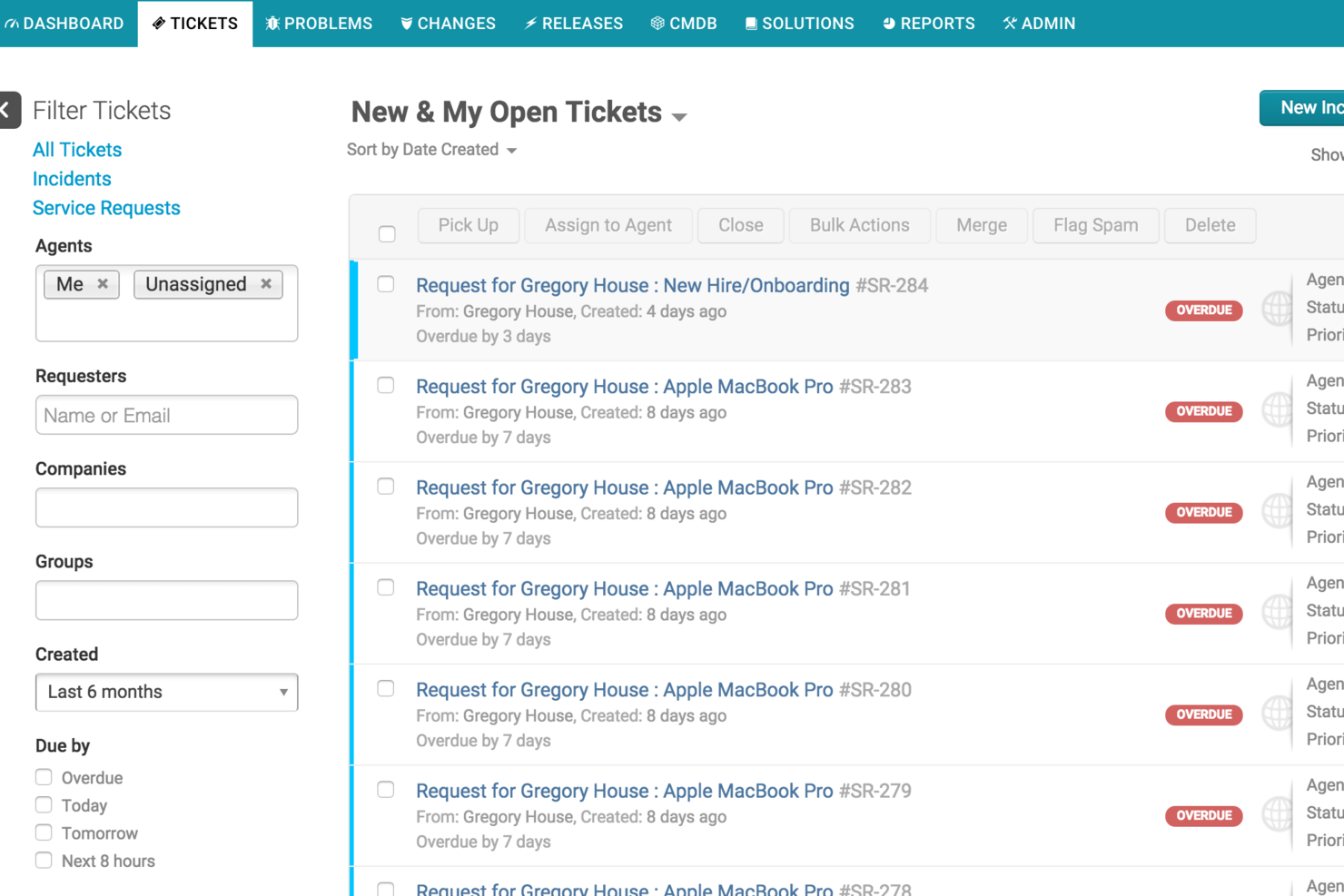
Freshservice ist eine Helpdesk-Softwareplattform für Unternehmen, die IT-Service-Management, Workflow-Automatisierung, Omnichannel-Ticketing, Asset-Tracking und einen Servicekatalog in einem System vereint.
Für wen ist Freshservice am besten geeignet?
Freshservice eignet sich für IT-Teams und Serviceabteilungen mittelgroßer bis großer Unternehmen, die zentralisierten Support, Asset-Management und Workflow-Automatisierung benötigen.
Warum habe ich Freshservice ausgewählt?
Ich habe Freshservice als eine der besten Lösungen ausgewählt, weil ich damit sowohl IT-Serviceanfragen als auch Projektportfolios an einem Ort verwalten kann. Das integrierte Projektportfolio-Management ermöglicht meinem Team, Projektzeitpläne, Meilensteine und Abhängigkeiten zusammen mit unseren Helpdesk-Tickets zu verfolgen. Mir gefällt, dass wir Vorfälle und Änderungen direkt mit Projekten verknüpfen können, sodass alles für alle Beteiligten verbunden und sichtbar bleibt.
Freshservice Hauptfunktionen
- KI-gestütztes Ticketing: Mit Freddy AI lassen sich Tickets automatisch kategorisieren, priorisieren und zuweisen.
- Servicekatalog: Bieten Sie Nutzern ein Self-Service-Portal zur Anforderung von IT- und Unternehmensdiensten.
- Asset-Management: Verfolgen Sie Hardware, Software und Verträge in Ihrer gesamten Organisation.
- Change-Management: Planen, genehmigen und implementieren Sie IT-Änderungen mit integrierten Workflows.
Freshservice Integrationen
Freshservice bietet native Integrationen mit Microsoft Teams, SecPod, Slack, TeamViewer, Jira und Microsoft Entra ID. Connector-Apps und APIs stehen für individuelle Integrationen zur Verfügung, und der Marktplatz umfasst über 1.200 Enterprise-App-Integrationen.
Pros and Cons
Pros:
- Spezieller Modus für Managed Service Provider (MSPs)
- Native HR- und Finanz-Service-Desk-Module
- Visuelle CMDB für Asset- und Beziehungs-Mapping
Cons:
- Begrenzte erweiterte Automatisierung in niedrigeren Tarifstufen
- Change-Management-Funktionen erfordern höhere Tarifstufen
New Product Updates from Freshservice
 Experience)
Freshservice Introduces a Reimagined IT Asset Management (ITAM) Experience
Freshservice introduces a reimagined IT Asset Management (ITAM) experience with continuous infrastructure discovery, dependency mapping, IPAM, and Software License Management. This update helps teams improve asset visibility and manage connected IT environments more effectively. For more information, visit Freshservice’s official site.

Am besten geeignet für skalierbaren Kundensupport
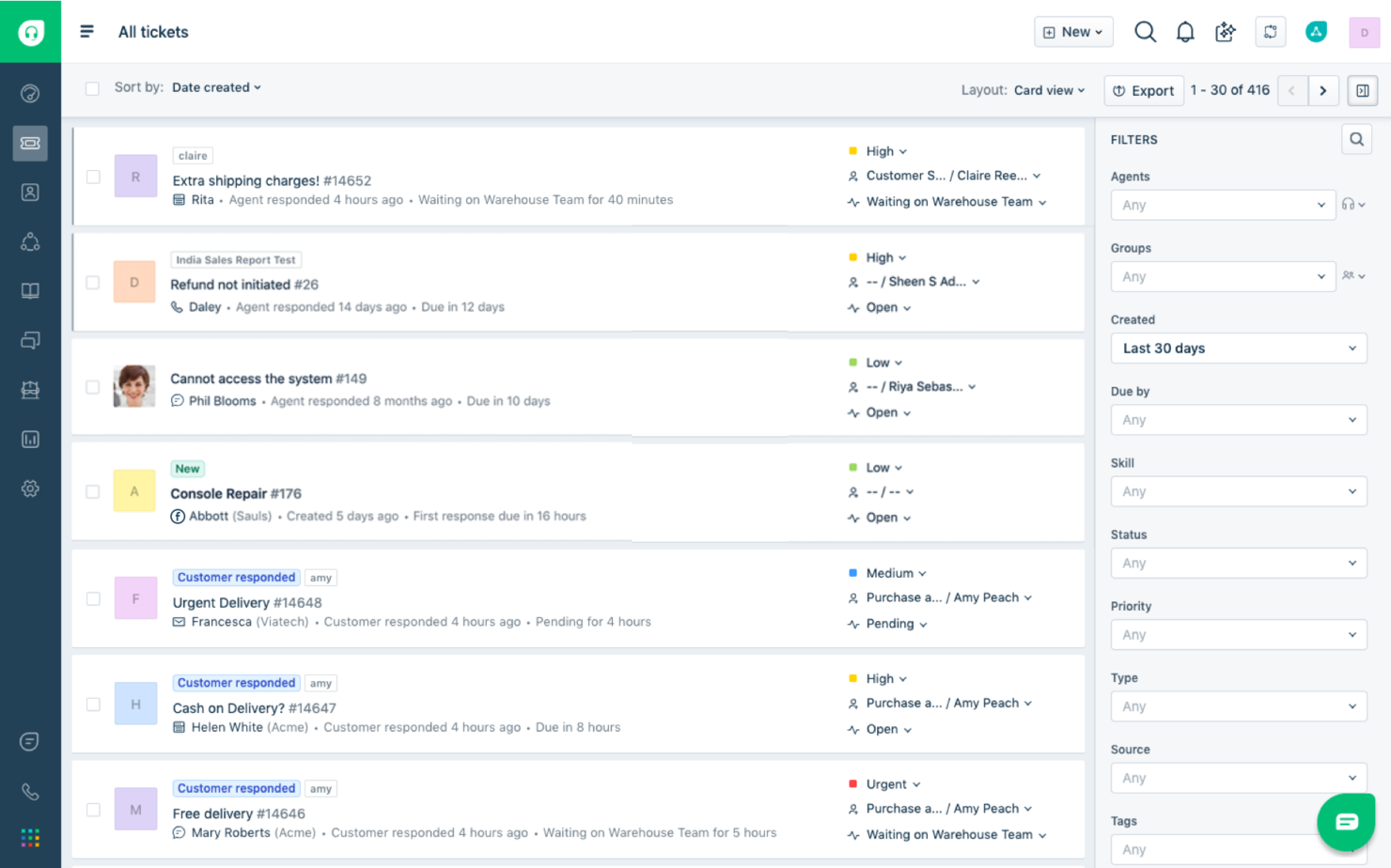
Freshdesk (ein Produkt von Freshworks Inc.) ist eine cloudbasierte Kundenservice-Plattform, die von Freshworks entwickelt wurde. Sie bietet Helpdesk-Tools, mit denen Unternehmen Kundenanfragen verwalten und Support-Aktivitäten team- und kanalübergreifend koordinieren können.
Warum ich Freshdesk gewählt habe: Ich habe Freshdesk ausgewählt, weil es Support-Operationen im großen Maßstab unterstützt, ohne unnötige Komplexität zu verursachen. Die Plattform beinhaltet Tools zur Verwaltung von Kundenanfragen über verschiedene Kanäle hinweg und zur Organisation von Support-Workflows in einem einzigen System. Die Analysefunktionen bieten Einblicke in das Ticket-Volumen, Antwortaktivitäten und Kundenfeedback, was eine laufende Überprüfung der Abläufe unterstützt.
Freshdesk enthält außerdem eine Self-Service-Wissensdatenbank sowie konfigurierbare Widgets, die es Kunden ermöglichen, eigenständig nach Antworten zu suchen. Dadurch können Teams häufige Anfragen von der direkten Bearbeitung durch Agenten fernhalten.
Herausragende Funktionen und Integrationen von Freshdesk
Funktionen umfassen Automatisierungswerkzeuge, die Ticketzuweisung, Priorisierung und Antwortbearbeitung auf Basis vordefinierter Regeln unterstützen. Freddy AI steht innerhalb der Plattform zur Verfügung, um diese Workflows als Teil des bestehenden Ticketingsystems zu unterstützen. Freshdesk bietet zudem Omnichannel-Support, sodass Teams E-Mail-, Chat-, Telefon- und Social-Media-Interaktionen in einer einheitlichen Arbeitsumgebung verwalten können.
Integrationen umfassen Salesforce, Slack, Jira, Office 365, Zapier, Shopify, Magento, WordPress, Mailchimp und Trello. Weitere Integrationen und individuelle Workflows sind über den Freshdesk Marketplace und die Neo Platform verfügbar, die genutzt werden können, um die Funktionalität nach organisatorischen Anforderungen zu erweitern.
Pros and Cons
Pros:
- Umfassender Support über mehrere Kanäle hinweg zur Verbesserung der Kundenbindung
- Anpassbar an die Bedürfnisse und Workflows auf Unternehmensebene
- Leistungsstarke Analyse- und Reporting-Tools für datengestützte Entscheidungen
Cons:
- Kann ohne richtige Schulung komplex in der Anwendung sein
- Preisgestaltung kann für kleinere Unternehmen abschreckend sein.
New Product Updates from Freshdesk

Freshdesk Adds Voice AI Agents in Freshcaller
Freshdesk introduces Voice AI Agents available through Freshcaller Marketplace apps to handle routine calls and reduce queues. This feature enables automated call handling with real-time, conversational support. For more information, visit Freshdesk's official site.
SysAid
Am besten für KI-gestütztes IT-Service-Management
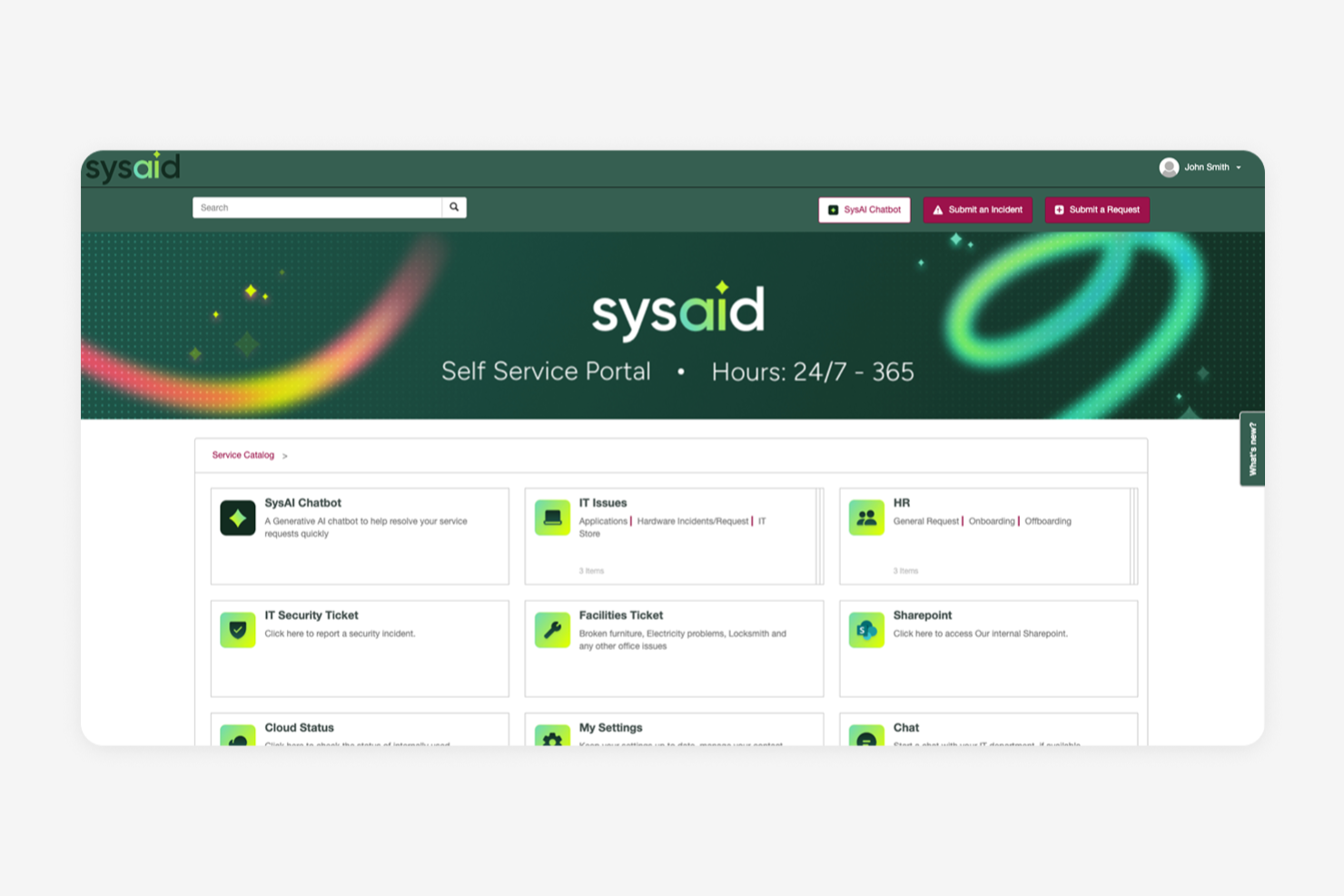
SysAid unterstützt IT- und Support-Teams dabei, eingehende Anfragen zu verwalten, indem es Helpdesk-Ticketing mit Incident-, Problem- und Change-Management im Rahmen einer umfassenden IT-Service-Management-Strategie kombiniert. Dieser einheitliche Ansatz verschafft Ihnen eine klarere Übersicht und mehr Kontrolle über die Servicebereitstellung – alles auf einer einzigen Plattform.
Warum ich SysAid ausgewählt habe
Ich habe mich für SysAid entschieden, weil die KI-gestützte Ticketerstellung und Workflow-Automatisierung helfen, wiederholende Aufgaben zu reduzieren und gleichzeitig eine strukturierte Kontrolle über Serviceprozesse zu ermöglichen. SysAid nutzt KI-basierte Kategorisierung, Priorisierung und Weiterleitung, um Tickets effizienter durch das System zu leiten, wodurch Ihr Team weniger Zeit für Routineaufgaben aufwendet. Mit dem Workflow-Designer können Sie Eskalationen, Freigaben und Benachrichtigungen ohne Programmierkenntnisse konfigurieren, was die Ausrichtung der Serviceprozesse an den tatsächlichen Abläufen Ihrer Organisation erleichtert.
SysAid Hauptfunktionen
Neben KI-basierter Automatisierung bietet SysAid weitere Funktionen, die den Wert als Lösung für den Enterprise-Helpdesk erhöhen:
- Self-Service-Portal: Ermöglicht den Nutzern, Probleme eigenständig zu lösen und reduziert das Volumen der Support-Tickets.
- Service-Level-Management: Unterstützt Ihr Team beim Nachverfolgen und Verwalten von Service-Level-Agreements zur Sicherstellung der Einhaltung organisatorischer Standards.
- Change- und Problem-Management: Erleichtert die effiziente Umsetzung von IT-Änderungen und Problemlösungen, um die Service-Stabilität aufrechtzuerhalten.
- Individuell anpassbarer Servicekatalog: Ermöglicht Ihnen, Serviceangebote gezielt an die spezifischen Anforderungen Ihrer Organisation anzupassen.
SysAid-Integrationen
Integrationen umfassen Microsoft Teams, Slack, Salesforce, Google Workspace, Active Directory, Microsoft Dynamics 365 CRM, Oracle, PagerDuty, ServiceNow und Zoom.
Pros and Cons
Pros:
- KI-gestützte Ticket-Kategorisierung und Priorisierung, um den manuellen Aufwand bei der Triagierung zu verringern.
- Das Self-Service-Portal ermöglicht Endanwendern, eigenständig Lösungen zu finden.
- Anpassbare Workflows und SLA-Richtlinien ermöglichen es, Prozesse individuell auf die Anforderungen Ihrer Organisation zuzuschneiden.
Cons:
- Das Nutzungserlebnis der mobilen App bietet keine vollständige Funktionalität.
- Wenn Funktionen nicht korrekt konfiguriert sind, können Automatisierungen und SLA-Workflows für Agenten komplex und verwirrend werden.
New Product Updates from SysAid

SysAid Adds Bulk Contract Import
SysAid added bulk contract import to License Manager Essentials, letting admins upload a CSV template, validate entries, and create multiple contracts at once. For more information, visit SysAid's official site.

Am besten geeignet zur Automatisierung von Helpdesk-Aufgaben
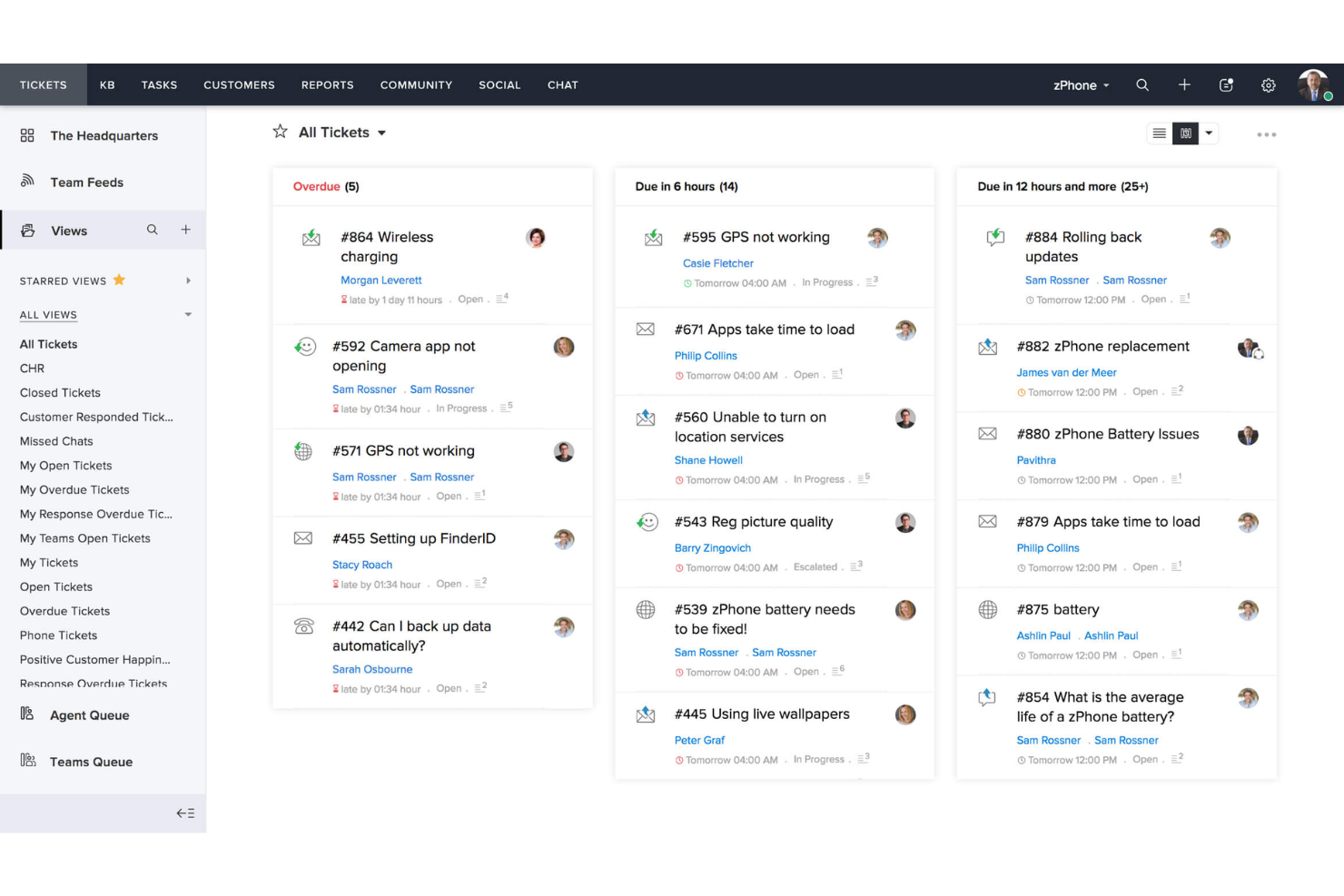
Zoho Desk ist eine cloudbasierte Helpdesk-Lösung, die auf Unternehmen jeder Größe, einschließlich Großunternehmen, zugeschnitten ist. Sie bietet eine umfassende Suite von Funktionen, darunter das Management von Kundensupport-Tickets, ein Kundenportal, Vertragsmanagement und Berichtserstellung.
Warum ich Zoho Desk ausgewählt habe: Zoho Desk bietet Multikanal-Support, womit Kunden über E-Mail, Telefon, soziale Medien und Live-Chat interagieren können. Außerdem organisiert das leistungsstarke Ticketmanagement-System Tickets automatisch und stellt Werkzeuge bereit, um Effizienz und Produktivität der Agenten zu steigern.
Die Einbindung des KI-Tools Zia erweitert die Plattform zusätzlich, indem Aufgaben wie das Taggen von Tickets, das Warnen der Agenten bei ungewöhnlichen Aktivitäten und sogar die Sentimentanalyse von Kundeninteraktionen automatisiert werden. Dieses Automatisierungsniveau reduziert nicht nur die Arbeitsbelastung der Support-Mitarbeiter, sondern sorgt auch für schnellere und genauere Antworten auf Kundenanfragen.
Herausragende Funktionen und Integrationen von Zoho Desk
Funktionen umfassen umfangreiche Anpassungsmöglichkeiten der Benutzeroberfläche, Ticketansichten und Arbeitsabläufe, wodurch sich das System an die spezifischen Anforderungen jeder Organisation anpassen lässt. Darüber hinaus bieten die Berichts- und Analysefunktionen der Plattform anpassbare Berichte und Dashboards, die wertvolle Einblicke in die Support-Performance und Kundenzufriedenheit ermöglichen.
Integrationen umfassen Google Workspace, Microsoft Office 365, Slack, Jira, Trello, Asana, Dropbox, OneDrive, Box, GitHub, Bitbucket, Zendesk, Salesforce, HubSpot, Intercom, Freshdesk und weitere Zoho-Apps.
Pros and Cons
Pros:
- Ermöglicht vielfältige Anpassungen
- Umfangreiche Automatisierungsfunktionen enthalten
- Detaillierte Kontrolle über das Ticketmanagement
Cons:
- Funktionen erfordern teilweise einen hohen Anpassungsaufwand
- Die Benutzeroberfläche kann für manche Nutzer unübersichtlich sein

eDesk
Am besten für die Integration von E-Commerce-Kanälen
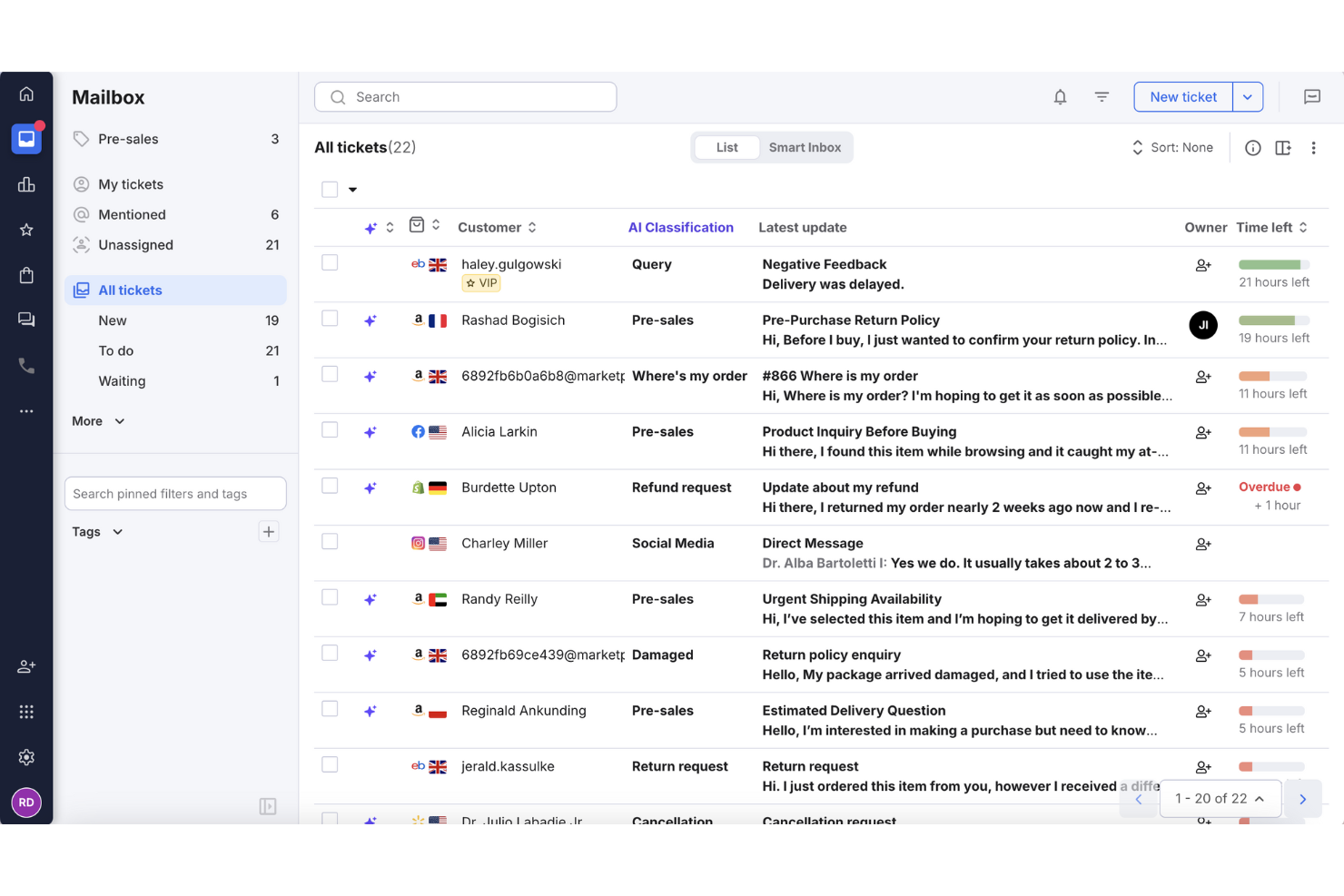
eDesk ist eine KI-gesteuerte Kundensupport-Software, die für E-Commerce-Unternehmen entwickelt wurde und sich auf die Zentralisierung und Automatisierung von Kundeninteraktionen konzentriert. Wenn Sie Ihre E-Commerce-Abläufe verbessern möchten, bietet eDesk einen einheitlichen Posteingang, KI-Automatisierung und Echtzeit-Berichte, um den Kundensupport zu verwalten und den Umsatz zu steigern. Indem es Herausforderungen bei der Bearbeitung von Kundenanfragen über mehrere Verkaufskanäle hinweg angeht, hilft eDesk, Supportprozesse und Kundenzufriedenheit zu verbessern.
Warum ich eDesk gewählt habe
Ich habe eDesk wegen seines einzigartigen Fokus auf die Bedürfnisse im E-Commerce gewählt, da es einen einheitlichen Posteingang bietet, der Nachrichten aus über 200 Kanälen, darunter Amazon, eBay und Shopify, zusammenführt. Die KI-gesteuerte Automatisierung beantwortet häufige Anfragen wie WISMO (Wo ist meine Bestellung) und Rücksendungen und reduziert so die Arbeitsbelastung des Teams. Außerdem ermöglicht eDesks Integration von Echtzeit-Bestelldaten den sofortigen Zugriff auf Kaufhistorie und Sendungsverfolgungen, sodass informierte und effektive Kundeninteraktionen möglich sind.
eDesk Hauptfunktionen
Neben der Integration von E-Commerce-Kanälen bietet eDesk:
- 24/7 Chatbot-Support: Bietet rund um die Uhr Unterstützung für Kunden und stellt sicher, dass deren Fragen auch außerhalb der Geschäftszeiten beantwortet werden.
- Kundenfeedback-Tools: Ermöglicht es Ihnen, Kundenfeedback zu sammeln und zu analysieren, um die Servicequalität und Kundenzufriedenheit zu verbessern.
- Erweiterte Berichte: Bietet detaillierte Analysen, mit denen Sie Leistungskennzahlen verfolgen und datengestützte Entscheidungen treffen können.
- Mehrsprachiger Support: Ermöglicht es Ihnen, ein globales Publikum zu erreichen, indem Support in mehreren Sprachen bereitgestellt wird.
eDesk-Integrationen
Zu den Integrationen gehören Amazon, eBay, Walmart, Shopify, WhatsApp, Facebook, Etsy, BigCommerce, Magento und WooCommerce.
Pros and Cons
Pros:
- KI-gesteuerte Automatisierungen steigern die Antwortgeschwindigkeit
- Organisierte Ticketansichten verbessern die Effizienz des täglichen Workflows
- Integriert umfangreiche Bestelldaten für verbesserten Kundenservice
Cons:
- Hauptsächlich für E-Commerce entwickelt, weniger flexibel für andere Branchen
- Berichte und Analysen sind zwar vorhanden, aber weniger anpassbar als bei umfassenderen Enterprise-Dashboards
New Product Updates from eDesk
eDesk Adds Galeria and Kaufland Support in Spain and Netherlands
eDesk adds support for Galeria, Kaufland Spain, and Kaufland Netherlands marketplaces. These integrations bring more European buyer messages into eDesk with routing, templates, AI insights, and automated translation. For more information, visit eDesk’s official site.
 .
.
Zendesk
Beste Enterprise-Helpdesk-Software für Kunden-Self-Service
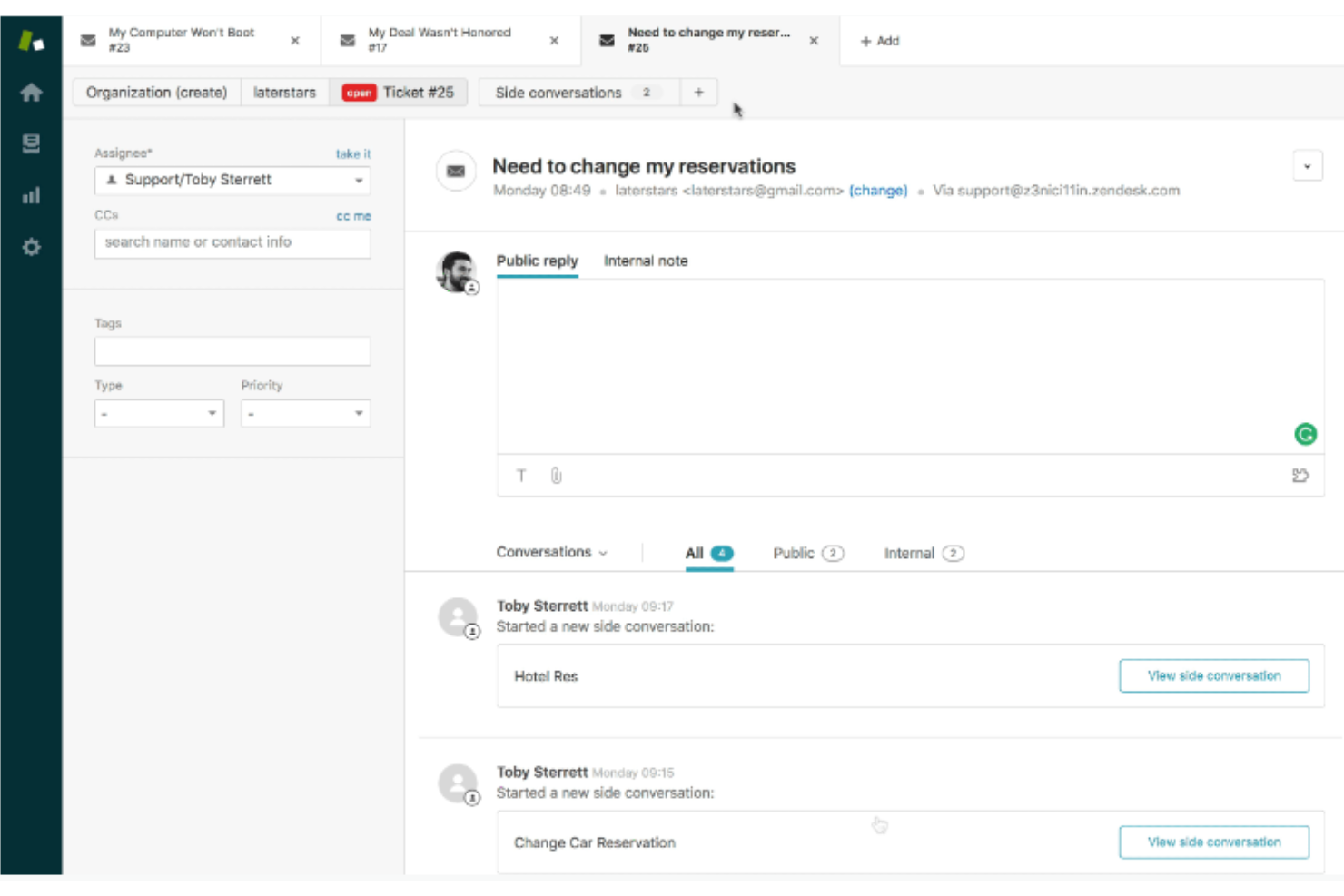
Zendesk ist eine cloudbasierte, KI-gestützte Helpdesk-Software, die eine Vielzahl von Kundensupport-Lösungen bietet, darunter Zendesk Enterprise. Zendesk Enterprise stellt erweiterte Funktionen, Skalierbarkeit und erweiterte Anpassungsmöglichkeiten bereit, die großen Unternehmen mit komplexeren Support-Anforderungen dabei helfen, außergewöhnliche Kundenerlebnisse zu bieten.
Warum habe ich Zendesk gewählt: Der Zendesk Suite Enterprise Plan bietet ein komplettes Spektrum an Kundensupport-Funktionen, darunter Ticketing, Analysen und Self-Service-Tools. Dazu gehört die Wissensdatenbank von Zendesk, in der Unternehmen ein zentrales Informationsarchiv, häufig gestellte Fragen (FAQs), Tutorials, Anleitungen und weitere Ressourcen erstellen können. Kunden können auf diese Self-Service-Ressourcen zugreifen, Supportanfragen einreichen und den Status ihrer Tickets über das Help Center von Zendesk verfolgen, das ein anpassbares und gebrandetes Kundenportal bietet.
Für Teams stellt Zendesk Enterprise Analyse- und Berichtsfunktionen bereit, um die Effektivität der Self-Service-Ressourcen zu messen. Sie können Einblicke in das Kundenverhalten, beliebte Suchanfragen, Artikelaufrufe und Bewertungen der Nutzerzufriedenheit gewinnen. Diese Daten helfen Unternehmen, Lücken in ihrer Wissensdatenbank zu erkennen, Inhalte zu optimieren und das gesamte Self-Service-Erlebnis zu verbessern.
Herausragende Funktionen und Integrationen von Zendesk
Funktionen umfassen Omnichannel-Support, wodurch Sie Kundeninteraktionen über mehrere Kanäle hinweg zentral verwalten können. Zendesk Enterprise unterstützt zudem mehrsprachige Self-Service-Inhalte und Sicherheit auf Unternehmensniveau, wie SSO und Zwei-Faktor-Authentifizierung.
Integrationen sind u. a. Slack, Mailchimp, Klaus, NiceReply, Dialpad, Kaizo, Zignatures, Textline, Trello und Zoho CRM.
Pros and Cons
Pros:
- Umfangreiche Anpassungsmöglichkeiten
- Teams erhalten dedizierte Betreuung durch einen Customer Success Manager (CSM)
- Konzipiert für das Wachstum mit Ihrem Unternehmen
Cons:
- Begrenzte Flexibilität in niedrigeren Tarifstufen
- Etwas Lernkurve für fortgeschrittene Funktionen
New Product Updates from Zendesk
Zendesk Adds Email AI Replies and Predictive Routing
Zendesk’s latest email AI agents update brings configurable knowledge and welcome replies and adds predictive routing for email tickets, so you can tailor your automated emails and get inquiries resolved faster. For more information, visit Zendesk’s official site.

Am besten geeignet, um mit KI personalisierte Erlebnisse zu schaffen
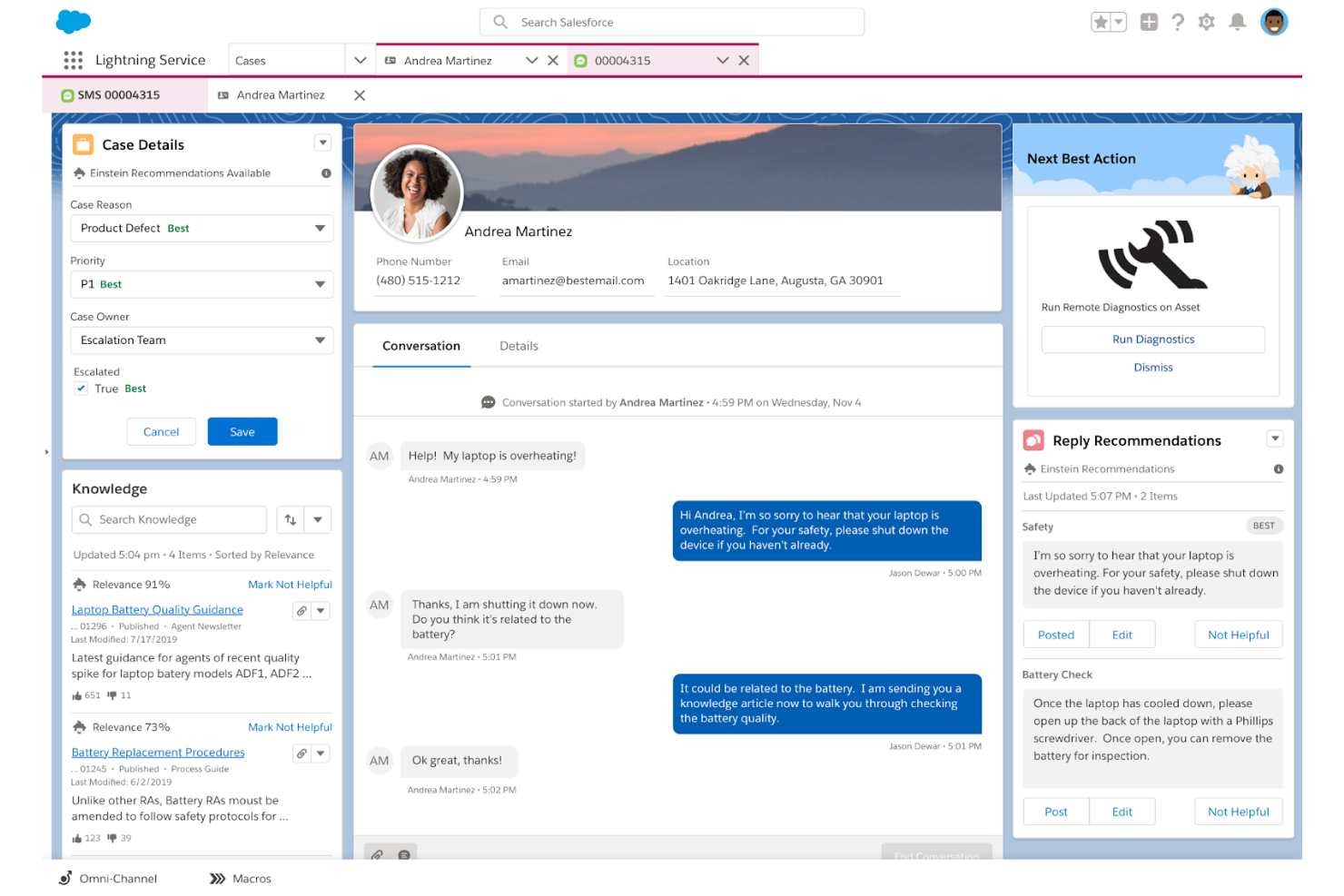
Salesforce Service Cloud ist ein leistungsstarkes, kanalübergreifendes Helpdesk-Tool, das besonders auf die Anforderungen von Großunternehmen zugeschnitten ist. Es unterstützt Serviceteams dabei, außergewöhnliche Erlebnisse durch KI-gestützte Personalisierung zu bieten.
Warum ich Salesforce Service Cloud gewählt habe: Ich habe diese Software aufgrund ihrer KI- und Automatisierungsfunktionen ausgewählt, da sie sich wiederholende Aufgaben übernimmt und Ihren Mitarbeitern so ermöglicht, sich auf hochwertige Kundenbetreuung zu konzentrieren. Ihre KI-Chatbots und die automatische Priorisierung sparen Zeit, schaffen konsistente Erlebnisse und steigern die Effizienz Ihres Teams. Die KI stellt sicher, dass Kundenanfragen an die am besten qualifizierten Mitarbeiter weitergeleitet werden und so ein persönliches Support-Erlebnis bieten.
Die KI der Software kann außerdem Kundeninteraktionen analysieren, um proaktive Serviceempfehlungen zu geben, Kundenbedürfnisse vorherzusehen und Interaktionen in großem Maßstab individuell zu gestalten. Dadurch eignet sie sich besonders gut für große Unternehmen und Konzerne. Die Plattform verfügt außerdem über einen Drag-and-Drop-Editor zur Erstellung eines Self-Service-Centers, damit Kunden eigenständig Lösungen finden können, was die Individualisierung des Supports weiter stärkt.
Salesforce Service Cloud – Herausragende Funktionen und Integrationen
Funktionen beinhalten eine leistungsfähige Wissensdatenbank, die Mitarbeitern hilft, schnell Informationen und Lösungen zu häufigen Problemen zu finden und so die Lösungszeiten verkürzt. Das Field-Service-Modul unterstützt das Management von mobilen Mitarbeitenden, indem es Außendiensttechniker mit allen nötigen Tools und Informationen ausstattet, um herausragenden Service zu liefern.
Integrationen umfassen Freshdesk, CloudTalk, Twilio, Brandwatch, Paligo, Mailchimp, HubSpot CRM, Trello, TeamViewer, Smartsheet, Klaviyo, Aircall, Gainsight und Conversocial.
Pros and Cons
Pros:
- Vereinfacht Support-Prozesse effektiv
- Verschiedene Preisstufen für unterschiedliche Wachstumsphasen
- Anpassbar an die Bedürfnisse der Nutzer
Cons:
- Kann in der Implementierung umständlich sein
- Einarbeitungszeit erforderlich
New Product Updates from Agentforce Service (formerly Service Cloud)
Agentforce Service Keeps Full Agentforce Voice Transcripts After Calls
Agentforce Service now shows the full conversation history in post-call transcripts for Agentforce Voice calls within the Service Console, giving agents better context for follow-ups. For more information, visit Salesforce’s official site.
 .
.
Tidio
Am besten für schnelle Einrichtung und Bereitstellung
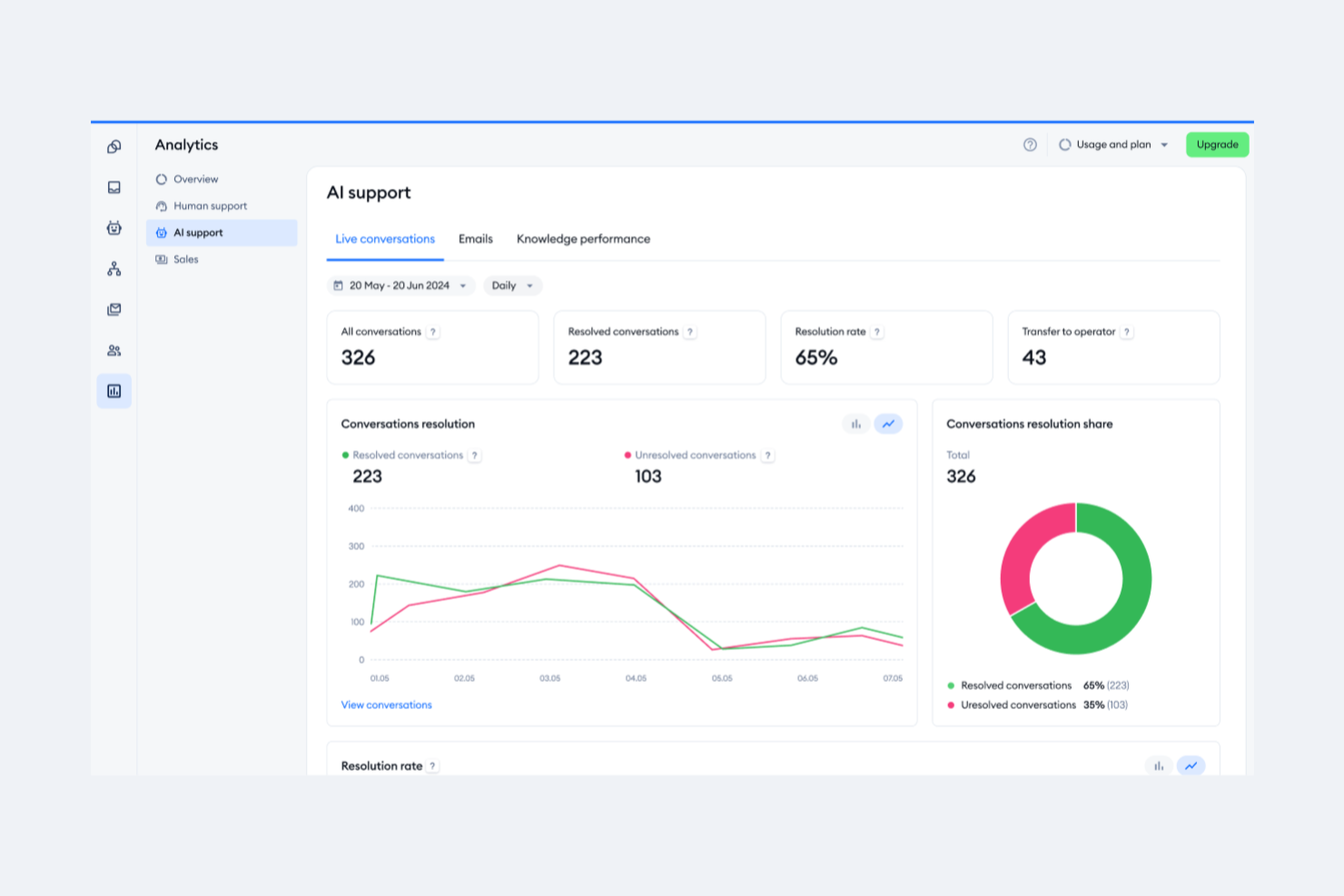
Tidio ist eine KI-gestützte Helpdesk-Plattform, die Unternehmen bei der Verwaltung des Kundenservice über mehrere Kanäle hinweg unterstützt. Die Plattform bündelt Live-Chat, E-Mail, soziale Medien und Webformular-Interaktionen in einem zentralen Posteingang und ermöglicht eine schnelle Einrichtung – oft innerhalb weniger Minuten. Mit Blick auf Skalierbarkeit entwickelt, unterstützt Tidio 12 Sprachen, integriert sich mit über 120 Tools und bietet Automatisierungsoptionen, die Teams helfen, schneller zu reagieren und organisiert zu bleiben.
Warum ich Tidio ausgewählt habe: Tidio hat mich durch die besonders schnelle Inbetriebnahme überzeugt – es ist kein Umzug von einer bestehenden Support-Plattform nötig, um sofort loszulegen. Diese Flexibilität ist sehr hilfreich, wenn Sie Ihr Supportteam erweitern oder neue Lösungen testen. Auch der Lyro-KI-Agent war ein Grund für meine Wahl. Er kann automatisch auf wiederkehrende Kundenfragen antworten, E-Mails filtern und Tickets regelbasiert weiterleiten, sodass Ihre Mitarbeitenden sich auf komplexere Anliegen konzentrieren können. Dank der Mehrsprachigkeitsunterstützung eignet sich Tidio zudem ideal für Teams, die international agieren, da Kundeninteraktionen ohne zusätzliche Plugins oder Translationsebene in bis zu 12 Sprachen bearbeitet werden. Auch das Ticketsystem fand ich praktisch – Sie können jede Unterhaltung in ein Ticket umwandeln, es nach Priorität zuweisen und bis zur Lösung verfolgen.
Hervorstechende Funktionen und Integrationen von Tidio
Zu den Funktionen gehören ein gemeinsamer Posteingang für Live-Chat, E-Mail und soziale Medien; der Lyro KI Agent für automatisierte Antworten; prioritätsbasierte Ticketumwandlung und -zuweisung; anpassbare Automatisierungsregeln; Mehrsprachigkeit sowie detaillierte Reporting-Tools.
Zu den Integrationen zählen Shopify, WordPress, Squarespace, HubSpot, Salesforce, Zendesk, Slack, Mailchimp, Facebook Messenger, Instagram, Google Analytics sowie über 120 weitere Tools.
Pros and Cons
Pros:
- Schnelle Bereitstellung mit minimalem Setup
- Unterstützt 12 Sprachen für internationale Teams
- Vereint Chat, E-Mail und soziale Kanäle in einem Posteingang
Cons:
- Begrenzter Funktionsumfang im kostenlosen Tarif
- Kein Telefonsupport; Live-Support auf Geschäftszeiten begrenzt

Beste Enterprise-Helpdesk-Software mit integrierten Analysefunktionen
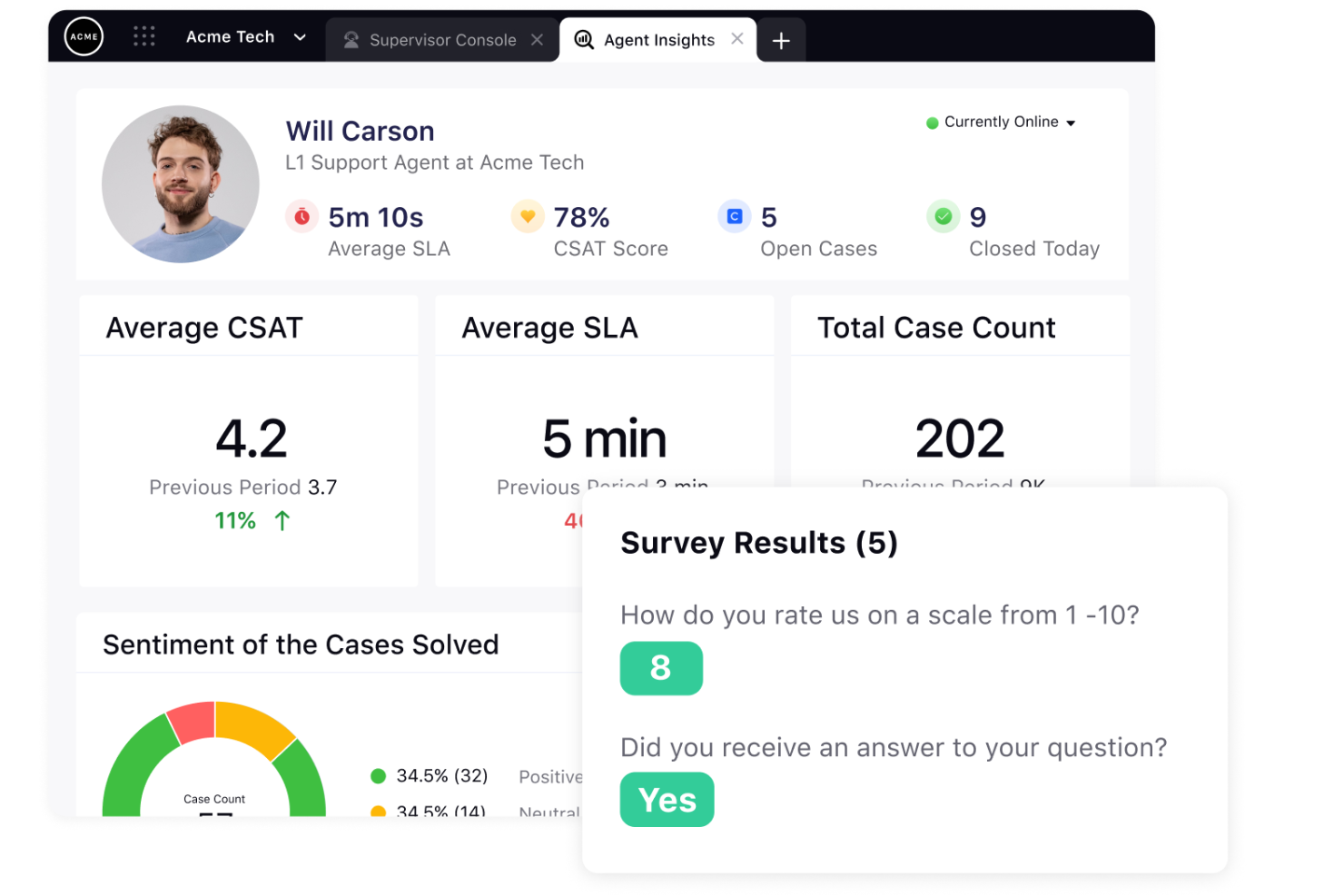
Sprinklr Service ist eine Support-Software auf Unternehmensebene, die für die Verwaltung von Kundeninteraktionen über mehrere Kanäle hinweg entwickelt wurde. Sie bietet fortschrittliche Automatisierungs-, Kollaborations- und Analysefunktionen, um den Kundenservice zu optimieren und die Kundenzufriedenheit zu verbessern.
Warum ich Sprinklr Service gewählt habe: Die Plattform enthält eine Vielzahl integrierter Analysewerkzeuge, darunter Stimmungsanalyse, Nachverfolgung der Antwortzeiten und Interaktionsmetriken, sowie die Möglichkeit, benutzerdefinierte Berichte und Visualisierungen zu erstellen. Sprinklr Service bietet zudem fortgeschrittene Analysefunktionen wie prädiktive Analysen und maschinelles Lernen, um Unternehmen dabei zu helfen, Muster und Trends in ihren Kundendienst-Daten zu erkennen und datenbasierte Entscheidungen zur Optimierung ihres Betriebs zu treffen.
Insgesamt sind die Analysefunktionen von Sprinklr Service leistungsstark, flexibel und darauf ausgelegt, Unternehmen die Einblicke zu geben, die sie benötigen, um ihren Kundenservice kontinuierlich zu verbessern und die Kundenzufriedenheit zu steigern.
Sprinklr Service: Herausragende Funktionen und Integrationen
Funktionen umfassen die CSAT-Vorhersage, die maschinelles Lernen verwendet, um die Kundenzufriedenheitsbewertung vorherzusagen, sowie geführte Workflows, die Agenten dabei unterstützen, Kundenanliegen effizienter zu lösen. Eine weitere hervorragende Option ist die IVR-Weiterleitung, bei der interaktive Sprachantwortsysteme verwendet werden, um Kunden zu Self-Service-Optionen zu leiten und so die Arbeitsbelastung der Agenten zu reduzieren.
Integrationen beinhalten Adobe Analytics, Bitly, Coveo, Freshsales, Google Analytics, IBM Watson, Mailchimp, Microsoft Dynamics 365, Salesforce CRM, Slack und andere Softwareoptionen. Sprinklr Service bietet APIs (Application Programming Interfaces), mit denen Unternehmen die Software in andere Anwendungen und Systeme integrieren können.
Pros and Cons
Pros:
- Leistungsstarke Analyse- und Berichtsfunktionen
- Anpassbare Workflows und Wissensdatenbank
- Fortschrittliche Automatisierungs- und Kollaborationstools
Cons:
- Hohe Lernkurve
- Begrenzte Preisoptionen
Weitere Helpdesk-Optionen
Hier sind einige weitere Optionen, die es zwar nicht in die Liste der besten Enterprise Helpdesk-Software geschafft haben, aber dennoch eine Überlegung wert sind:
- monday service
Am besten für anpassbare Ticketsysteme
- Intercom
E Enterprise-Helpdesk-Software für Kundenbindung
- Kustomer
E Helpdesk-Lösung für E-Commerce-Unternehmen im Enterprise-Bereich
- Issuetrak
Am besten geeignet für kanalübergreifende Ticketeinreichung
- InvGate Service Management
Am besten für IT-Service-Teams geeignet
- Guru
Am besten für KI-gestützte Unternehmenssuche
- SysAid
E Helpdesk-Lösung für unternehmensinterne IT-Services
- ManageEngine
E Enterprise-Helpdesk-Software für das IT-Service-Management
- Gladly
E Enterprise-Helpdesk-Software für Omnichannel-Support
- Rescue
E Enterprise-Helpdesk-Software für Remote-Support-Teams


Wie ich Enterprise-Helpdesk-Software beurteile
Meine Bewertung teilt sich in grundlegende Akzeptanzkriterien – das Mindestmaß, das jede Plattform erfüllen muss – und Unterscheidungsmerkmale wie KI-gestützte Weiterleitung und Multi-Region-SLA-Management, die die wirklich relevanten Optionen voneinander abheben.
Kernfunktionen (Grundvoraussetzungen für diese Liste)
Wenn ich Tools für meine Liste auswähle, bewerte ich jedes auf einer Skala von 0 (bietet die Funktion nicht) bis 5 (überzeugt in diesem Bereich) hinsichtlich jeder unten aufgeführten Kernfunktion. Anschließend rechne ich die Gesamtpunktzahl des Tools in einen Prozentsatz um. Jedes Tool muss eine Mindestgesamtwertung von 65 % erreichen, um für die Aufnahme in Betracht gezogen zu werden.
- Omnikanal-Ticketing: Ich prüfe, ob E-Mail, Live-Chat, Telefon, soziale Medien und Messaging-Kanäle alle in eine einheitliche Inbox mit vollständigem Gesprächsverlauf einlaufen.
- Skalierbarkeit auf Enterprise-Niveau: Große Support-Organisationen benötigen Plattformen, die Tausende von Agenten, mehrere Marken und regionale Teams unterstützen – daher bewerte ich Multi-Marken- und Multi-Region-Support.
- Workflow-Automatisierung & Routing: Ich achte auf regelbasiertes und fähigkeitenbasiertes Routing, das Tickets an den richtigen Agenten oder das passende Team zuweist, sowie auf automatisierte Eskalationspfade für SLA-abhängige Warteschlangen.
- SLA- & Leistungsmanagement: Konfigurierbare SLA-Richtlinien mit Verletzungswarnungen und Echtzeit-Dashboards sind hier entscheidend – ich prüfe, ob Teams Erstreaktionen, Lösung und CSAT nebeneinander verfolgen können.
- Wissensdatenbank & Self-Service: Ein starkes Help Center verhindert Tickets schon bevor sie entstehen. Ich achte auf sowohl agenten- als auch kundenorientierte Wissensdatenbanken mit Such- und Artikelvorschlags-Funktionen.
- Enterprise-Integrationen & Sicherheit: Ich bewerte native Anbindungen an CRM- und ITSM-Plattformen, API-Zugang für individuelle Entwicklungen und Sicherheitsstandards wie SSO, rollenbasierte Zugriffssteuerung und Compliance-Zertifizierungen.
Nachdem ich eine Liste der Tools habe, die die Kriterien erfüllen, sehe ich mir an, was jede Plattform besonders macht.
Unterscheidungsmerkmale (Was Anbieter abhebt)
So vergleiche und kontrastiere ich verschiedene Anbieter:
Herausragende Funktionen
KI-gestützte Agentenunterstützung ist ein großer Unterschied – ich achte auf Tools, die Antwortvorschläge machen, lange Ticketverläufe zusammenfassen und Kundensentiment erkennen, damit Agenten Eskalationen schneller priorisieren können. Auch eine einheitliche 360°-Kundenansicht ist wichtig. Wenn Agenten vollständige Interaktionshistorien, offene Bestellungen und frühere Eskalationen sehen können, ohne den Tab zu wechseln, verbessert sich die Lösungszeit deutlich. Ebenso bewerte ich proaktive Supportfunktionen wie ausgehende Nachrichten und automatisierte Statusupdates, die das Ticketaufkommen während Störungen oder bekannten Problemen reduzieren.
Mehr als Funktionen
Die Gesamtkosten werden genau geprüft – ich analysiere Preisstufen pro Agent und ob Premium-Funktionen wie KI oder erweiterte Analysen teure Zusatzmodule erfordern, die das Budget mit wachsendem Team schnell steigern. Die Unterstützung bei der Implementierung ist genauso wichtig. Migrationen von Unternehmen von Legacy-Plattformen wie alten On-Premises-Systemen benötigen dedizierte Lösungsarchitekten und Sandbox-Umgebungen, um Live-Betrieb nicht zu stören. Außerdem prüfe ich die Compliance-Ausrichtung, insbesondere Datenresidenz-Optionen und Zertifizierungen wie SOC 2 Typ II und ISO 27001, da globale Support-Teams oft sensible Kundendaten über unterschiedliche Rechtsräume hinweg verarbeiten.
So wählen Sie die passende Enterprise Helpdesk-Software aus
Es ist leicht, sich in langen Funktionslisten und komplexen Preisstrukturen zu verlieren. Damit Sie während Ihres individuellen Auswahlprozesses für Helpdesk-Software den Überblick behalten, habe ich im Folgenden eine Checkliste wichtiger Faktoren zusammengestellt:
| Faktor | Worauf Sie achten sollten |
|---|---|
| Skalierbarkeit | Stellen Sie sicher, dass die Software mit Ihrem Unternehmen mitwachsen kann, ein wachsendes Ticketvolumen verarbeitet und zusätzliche Agenten problemlos unterstützt. |
| Integrationen | Suchen Sie nach Tools, die sich in Ihre bestehenden Systeme wie CRM, E-Mail und Chat-Plattformen integrieren lassen, um reibungslose Arbeitsabläufe und zentrale Datenspeicherung zu gewährleisten. |
| Anpassbarkeit | Prüfen Sie, ob Sie die Software an die Prozesse Ihres Teams anpassen können, z. B. durch das Einrichten von individuellen Workflows, Feldern und Berichten. |
| Benutzerfreundlichkeit | Wählen Sie ein Tool mit einer intuitiven Benutzeroberfläche, das nur minimale Schulung erfordert, damit Ihr Team schnell loslegen kann. |
| Budget | Bewerten Sie die Gesamtkosten, einschließlich versteckter Gebühren, um sicherzustellen, dass sie in Ihre Finanzplanung passen, ohne auf notwendige Funktionen zu verzichten. |
| Nutzer-Feedback | Sammeln Sie Informationen darüber, was andere Nutzer in Ihrer Branche oder Nische über das von Ihnen in Betracht gezogene Tool denken. |
| Software-Bewertungen | Nutzen Sie Bewertungsdurchschnitte von vertrauenswürdigen Websites, um einzuschätzen, ob die Software im Allgemeinen gut ankommt. |
| Support-Optionen | Berücksichtigen Sie die Verfügbarkeit von Kundensupport und Ressourcen wie Anleitungen, Foren und Live-Chat, um bei Problemen Unterstützung zu bieten. |
Trends bei Enterprise-Helpdesk-Software
Für meine Recherche habe ich zahlreiche Produkt-Updates, Pressemitteilungen und Release-Logs verschiedener Anbieter von Enterprise-Helpdesk-Software ausgewertet. Zu den Trends bei der Einführung moderner Helpdesk-Software zählen:
- KI und Automatisierung in Helpdesks: KI-Helpdesk-Software wird eingesetzt, um Kundeninteraktionen zu analysieren und umsetzbare Erkenntnisse zu liefern. So können Teams Probleme vorhersehen und die Servicequalität verbessern. Manche Anbieter bieten KI-gestützte Dashboards, die Trends hervorheben und Verbesserungen vorschlagen.
- Omnichannel-Support: Nutzer wünschen Support über mehrere Kanäle wie E-Mail, Chat und soziale Medien. Anbieter integrieren diese Kanäle in eine einzige Plattform, sodass Agenten alle Interaktionen an einem Ort verwalten können. Dieser Trend macht den Kundensupport effizienter und konsistenter.
- Self-Service-Portale: Immer mehr Unternehmen setzen auf Self-Service-Optionen, um die Arbeitsbelastung der Agenten zu reduzieren. Diese Portale ermöglichen es Kunden, eigenständig Antworten zu finden. Anbieter verbessern diese durch Community-Foren und detaillierte Wissensdatenbanken.
- Personalisierungsfunktionen: Personalisierung rückt in den Fokus, da Anbieter Werkzeuge bereitstellen, um Interaktionen basierend auf Kundendaten und -präferenzen individuell zu gestalten. Dieser Trend steigert die Kundenzufriedenheit, da der Support relevanter und persönlicher wirkt.
Was ist Enterprise-Helpdesk-Software?
Enterprise-Helpdesk-Software ist ein Tool, das dazu dient, Kundenanfragen und Support-Tickets effizient zu verwalten und zu lösen. Sie wird häufig von Kundensupport-Teams, IT-Abteilungen und Service Desks genutzt, um die Kommunikation und Servicebereitstellung zu verbessern.
Ticketmanagement, Omnichannel-Support und Self-Service-Portale helfen dabei, Anfragen zu organisieren, die Reaktionszeiten zu verbessern und Kunden zu befähigen, Lösungen selbstständig zu finden. Diese Werkzeuge bieten erheblichen Mehrwert, indem sie die Kundenzufriedenheit steigern und die Produktivität des Teams optimieren.
Funktionen von Enterprise-Helpdesk-Software
Achten Sie bei der Auswahl einer Enterprise-Helpdesk-Software auf die folgenden Schlüsselfunktionen:
- Optimierung von Ticketing-Workflows: Organisiert und verfolgt Kundenanfragen, um zeitnahe Antworten und Lösungen sicherzustellen.
- Omnichannel-Support: Ermöglicht die Interaktion mit Kunden über verschiedene Kanäle wie E-Mail, Chat und soziale Medien über eine einzige Oberfläche.
- Self-Service-Portale: Ermöglicht Kunden, eigenständig Lösungen über Wissensdatenbanken und Community-Foren zu finden.
- KI-gestützte Einblicke: Analysiert Kundendaten, um umsetzbare Erkenntnisse zu gewinnen und die Servicequalität zu verbessern.
- Anpassbare Workflows: Ermöglicht es Teams, Prozesse individuell zu gestalten und die Effizienz zu steigern.
- Unterstützung für Remote-Arbeit: Bietet Tools und Möglichkeiten, damit Support-Teams effektiv von überall arbeiten können.
- Personalisierungsfunktionen: Gestaltet Kundeninteraktionen anhand von Daten und Präferenzen individueller und erhöht so die Zufriedenheit.
- Reporting-Tools: Stellt detaillierte Analysen bereit, um die Leistung zu überwachen und fundierte Entscheidungen zu treffen.
Vorteile von Enterprise-Helpdesk-Software
Die Einführung einer Enterprise-Helpdesk-Software bringt für Ihr Team und Ihr Unternehmen zahlreiche Vorteile. Hier einige, auf die Sie sich freuen können:
- Verbesserte Effizienz: Ticketmanagement und automatisierte Workflows helfen Ihrem Team, Probleme schneller zu lösen.
- Erhöhte Kundenzufriedenheit: Omnichannel-Support und Personalisierungsfunktionen sorgen dafür, dass sich Kunden gehört und wertgeschätzt fühlen.
- Bessere Entscheidungsfindung: KI-basierte Einblicke und Berichtswerkzeuge liefern Daten, die strategische Verbesserungen unterstützen.
- Gesteigerte Zugänglichkeit: Unterstützung für ortsunabhängige Arbeit ermöglicht Ihrem Team, von überall Unterstützung zu bieten.
- Kosteneinsparungen: Self-Service-Portale entlasten Ihr Support-Team, indem Kunden häufige Probleme selbst lösen können.
- Skalierbarkeit: Anpassbare Workflows und Skalierungsfunktionen ermöglichen es Ihrem Unternehmen zu wachsen, ohne die Software zu überfordern.
- Einhaltung von Vorschriften: Sicherheitsfunktionen und Compliance-Maßnahmen helfen, sensible Daten zu schützen und gesetzlichen Anforderungen zu genügen.
Integration von Enterprise-Helpdesk-Software mit Geschäftsanwendungen
Integrationen ermöglichen es Helpdesk-Software, reibungslos mit anderen Tools zusammenzuarbeiten, sodass Support-Teams Aufgaben schneller erledigen können, ohne ständig zwischen verschiedenen Anwendungen wechseln zu müssen. Dadurch lassen sich Kundenanliegen einfacher nachverfolgen, Probleme schneller lösen und alles bleibt übersichtlich an einem Platz organisiert.
Hier sind zentrale Geschäftsanwendungen, mit denen Enterprise-Helpdesk-Software verbunden werden sollte:
- CRM (Customer Relationship Management): Synchronisiert Kundendaten für besseren Support (z. B. Salesforce, HubSpot).
- IT-Asset-Management: Verfolgt unternehmenseigene Hard- und Software (z. B. ServiceNow, Lansweeper).
- Projektmanagement: Unterstützt die Koordination von supportbezogenen Projekten (z. B. Jira, Trello).
- Kommunikationstools: Ermöglichen einfache Zusammenarbeit im Team (z. B. Slack, Microsoft Teams).
- E-Mail & Ticketing: Automatisiert Supportanfragen aus E-Mails (z. B. Outlook, Gmail).
- Wissensdatenbank & Self-Service: Stellt FAQs und Dokumentationen bereit (z. B. Confluence, Zendesk Guide).
- Fernzugriff & Monitoring: Ermöglicht IT-Teams die Fernwartung (z. B. TeamViewer, AnyDesk).
- KI-Chatbots & Automatisierung: Verbessert den Support durch KI-gestützten Self-Service (z. B. ChatGPT, Freshdesk AI).
Kosten und Preisgestaltungen für Enterprise-Helpdesk-Software
Die Auswahl einer Enterprise-Helpdesk-Software erfordert ein Verständnis der verschiedenen verfügbaren Preismodelle und Tarife. Die Kosten variieren je nach Funktionen, Teamgröße, Zusatzoptionen und mehr. Die folgende Tabelle fasst gängige Tarife, deren Durchschnittspreise und typische enthaltene Funktionen bei Enterprise-Helpdesk-Lösungen zusammen:
Tarifvergleichstabelle für Helpdesk-Software
| Tarifart | Durchschnittlicher Preis | Typische Funktionen |
|---|---|---|
| Kostenloser Tarif | $0 | Grundlegende Ticketverwaltung, E-Mail-Support und eingeschränkte Berichte. |
| Persönlicher Tarif | $5-$25/user/month | Ticketmanagement, Self-Service-Portal und Basis-Analysen. |
| Business-Tarif | $30-$75/user/month | Omnichannel-Support, anpassbare Workflows und erweiterte Berichtswerkzeuge. |
| Enterprise-Tarif | $80-$150/user/month | KI-basierte Einblicke, dedizierter Account-Manager und erweiterte Sicherheitsfunktionen. |
Häufig gestellte Fragen (FAQs)
Hier finden Sie Antworten auf einige häufig gestellte Fragen zu Enterprise-Helpdesk-Software:
Was ist der Unterschied zwischen Enterprise- und KMU-Helpdesk-Lösungen?
Der wichtigste Unterschied zwischen Enterprise-Helpdesk-Software und einfacher Helpdesk-Software liegt in Skalierbarkeit, Funktionsumfang und Anpassbarkeit:
Enterprise-Helpdesk-Software
✅ Entwickelt für große Unternehmen mit komplexen Anforderungen
✅ Fortschrittliche Automatisierung (KI-gestütztes Ticketing, Workflowautomatisierung)
✅ Multi-Channel-Support (E-Mail, Chat, Telefon, soziale Medien)
✅ Individuelle Berichte & Analysen für tiefere Einblicke
✅ Integrationen mit CRM-, ITSM- und ERP-Systemen
✅ Unterstützung für mehrere Abteilungen & Standorte
✅ Sicherheit & Compliance (SSO, SOC 2, DSGVO, HIPAA)
✅ Anpassbare Benutzerrollen & Berechtigungen
Einfache Helpdesk-Software
✅ Ideal für kleine bis mittelständische Unternehmen
✅ Einfaches Ticket-System (E-Mail- oder webbasiert)
✅ Begrenzte Automatisierung (einfache Auslöser & Regeln)
✅ Weniger Integrationen (evtl. Anbindung an E-Mail- & Chat-Tools)
✅ Standard-Reporting mit einfachen Analysen
✅ Niedrigere Kosten und leicht einzurichten
Welche Lösung brauchen Sie?
- Wählen Sie eine Enterprise-Helpdesk-Software, wenn Sie Skalierbarkeit, Automatisierung und Integrationen für mehrere Teams benötigen.
- Wählen Sie eine einfache Helpdesk-Software, wenn Sie eine kosteneffiziente, simple Lösung für die Bearbeitung von Kunden- oder internen Tickets suchen.
Was ist der Unterschied zwischen einem Service Desk und einem Helpdesk?
Der Hauptunterschied zwischen einem Service Desk und einem Helpdesk liegt im Umfang, Ansatz und den Zielen.
Helpdesk
- Reaktiver Support, der sich auf die Lösung von IT-Problemen konzentriert
- Bearbeitet Break/Fix-Anfragen (z. B. Passwortzurücksetzungen, Softwareprobleme)
- Konzipiert für Incident Management und Fehlerbehebung
- Meist als eigenständige Funktion oder als Teil eines größeren Service Desks
- Ideal für kurzfristige Problemlösungen
Service Desk
- Proaktiver Ansatz mit Fokus auf IT-Service-Management (ITSM)
- Enthält Helpdesk-Funktionen, erweitert um Change Management, Service Requests und Problem Management
- Befolgt ITIL (Information Technology Infrastructure Library)-Best Practices
- Hat zum Ziel, IT-Services mit Unternehmenszielen in Einklang zu bringen
- Strategischer, mit breiterem IT-Support-Spektrum
Welche Lösung brauchen Sie?
- Wählen Sie einen Helpdesk, wenn Sie ein einfaches Ticket-System zur Lösung von IT-Problemen benötigen
- Wählen Sie einen Service Desk, wenn Sie eine umfassende IT-Service-Management-Lösung suchen, die die gesamte IT-Effizienz und Business-Alignment verbessert
Hat Microsoft eine Helpdesk-Software?
Ja, Microsoft bietet Helpdesk-Lösungen innerhalb seines Ökosystems an, hauptsächlich unter Microsoft Dynamics 365 Customer Service und Microsoft Service Manager (Teil von System Center).
1. Microsoft Dynamics 365 Customer Service
Bestens geeignet für externen Kundensupport.
- KI-gestütztes Ticket-System
- Omnichannel-Support (E-Mail, Chat, Social Media, Telefon)
- Automatisierung & Workflows für das Fallmanagement
- Integration mit Microsoft 365 & Teams
- Self-Service-Portale & Wissensdatenbanken
🔹 Geeignet für: Unternehmen und Mittelständler, die einen robusten, KI-gesteuerten Helpdesk für den Kundensupport benötigen.
2. Microsoft Service Manager
Optimal für IT-Helpdesk & internen Support.
- IT Service Management (ITSM) für interne Teams
- Incident & Problem Management
- Change- & Asset-Management
- Integration mit Microsoft Endpoint Manager & Azure
🔹 Geeignet für: IT-Abteilungen, die einen internen Helpdesk zur Verwaltung von IT-Service-Anfragen brauchen.
Weitere Alternativen innerhalb des Microsoft-Ökosystems:
- Microsoft Teams + Power Automate → Kann für ein einfaches Helpdesk-Ticketsystem angepasst werden
- SharePoint → Kann verwendet werden, um interne Support-Portale zu erstellen
Was bedeutet ITIL-Konformität bei Enterprise-Helpdesks?
ITIL-Konformität bedeutet, dass ein Enterprise-Helpdesk bewährte Methoden für das IT-Service-Management (ITSM) einhält. Dies stellt sicher, dass der IT-Support gut organisiert, effizient und kundenorientiert ist. Dadurch können Unternehmen IT-Probleme verwalten, Serviceanfragen nachverfolgen und Arbeitsabläufe verbessern – mithilfe strukturierter Prozesse wie Incident Management, Problemlösung und Change Control.
Welche Arten von Helpdesk-Software gibt es?
Helpdesk-Software gibt es in verschiedenen Varianten, die jeweils Kundensupport, Ticket-Management und Problemlösung optimieren sollen. Hier die wichtigsten Typen:
- Cloud-basierte Helpdesk-Software – Gehostet in der Cloud, von überall zugänglich und einfach skalierbar.
- On-Premises-Helpdesk-Software – Auf den lokalen Servern des Unternehmens installiert, mit voller Kontrolle und Sicherheit.
- Open-Source-Helpdesk-Software – Unternehmen können den Quellcode nach Bedarf anpassen und erweitern.
- Enterprise-Helpdesk-Software – Für große Unternehmen mit fortschrittlicher Automatisierung, Analytik und Unterstützung für mehrere Abteilungen entwickelt.
- IT Service Management (ITSM) Software – Fokus auf IT-Support, Incident Management und Einhaltung von ITIL-Frameworks.
- KI-gestützte Helpdesk-Software – Nutzt künstliche Intelligenz für Chatbots, automatische Antworten und prädiktive Problemlösungen.
- Self-Service-Helpdesk-Software – Bietet Wissensdatenbanken, FAQs und automatisierte Antworten, damit Benutzer ihre Probleme selbst beheben können.
- Interne Helpdesk-Software – Unterstützt interne Teams wie HR, IT und Gebäudemanagement.
- Multi-Channel-Helpdesk-Software – Integriert verschiedene Supportkanäle (E-Mail, Chat, Telefon, soziale Medien) in einer Plattform.
- Omnichannel-Helpdesk-Software – Bietet eine nahtlose und einheitliche Erfahrung über mehrere Kommunikationskanäle hinweg.
Helpdesk-Software für unterschiedliche Unternehmensanforderungen
Suchen Sie eine andere Art von Helpdesk-Software? Dann sollten Sie sich auch diese weiteren Top-10-Listen anschauen:
- Helpdesk-Software für kleine Unternehmen: Konzentriert sich auf kostengünstige, benutzerfreundliche Lösungen, die für kleinere Teams mit begrenzten Ressourcen entwickelt wurden.
- Online-Helpdesk-Software: Webbasierte Plattformen, die es Kundensupport-Teams ermöglichen, Anfragen von überall aus zu bearbeiten.
- Einfache Helpdesk-Software für leichte Bedienbarkeit: Bietet intuitive Benutzeroberflächen und minimalen Einrichtungsaufwand für Teams, die eine unkomplizierte Lösung benötigen.
- Interne Helpdesk-Software: Entwickelt, um IT- und HR-Teams bei der effizienten Bearbeitung interner Mitarbeiteranfragen zu unterstützen.
- E-Mail-Helpdesk-Software: Zentralisiert Support-E-Mails in einem gemeinschaftlichen Posteingang mit Ticketing- und Automatisierungsfunktionen.
- Cloud-Helpdesk-Software: Vollständig gehostete Lösungen, die Skalierbarkeit, Fernzugriff und automatische Updates bieten.
- Beste kostenlose Helpdesk-Software: Preisgünstige Tools, die grundlegende Helpdesk-Funktionen ohne Vorabkosten bieten.
Wie geht es weiter?
Falls Sie gerade dabei sind, eine passende Helpdesk-Software für Unternehmen zu recherchieren, verbinden Sie sich mit einem SoftwareSelect-Berater für kostenlose Empfehlungen.
Sie füllen ein Formular aus und führen ein kurzes Gespräch, in dem Ihre genauen Anforderungen besprochen werden. Anschließend erhalten Sie eine Vorauswahl an Softwareoptionen zur Überprüfung. Außerdem begleiten Sie die Berater durch den gesamten Beschaffungsprozess – einschließlich Preisverhandlungen.