

10 alternative a Sprinklr per il coinvolgimento dei clienti nel 2026

Elenco alternative a Sprinklr


Una valida alternativa a Sprinklr offre al tuo team strumenti flessibili per raccogliere il feedback dei clienti, supporto omnicanale e automazione dei flussi di lavoro, senza la curva di apprendimento o i costi di Sprinklr. Se stai cercando alternative a Sprinklr, probabilmente cerchi piattaforme che ti aiutino a gestire le interazioni con i clienti, raccogliere informazioni utili e coordinare i team in modo intuitivo. Questo elenco ti aiuterà a confrontare le principali opzioni, comprenderne i punti di forza distintivi e trovare quella più adatta ai tuoi obiettivi di esperienza cliente nel 2026.
Che cos'è Sprinklr?
Sprinklr è una piattaforma per la gestione dell'esperienza cliente che aiuta le aziende a gestire le interazioni sui social network, tramite messaggistica e attraverso i canali digitali. Offre strumenti per l'ascolto dei social, la raccolta del feedback dei clienti, la gestione dei casi e l'automazione dei flussi di lavoro. Sprinklr viene utilizzata dalle grandi organizzazioni per unificare i dati dei clienti, monitorare il sentiment del brand e coordinare le attività di supporto o di marketing sui social tra i vari team. Il suo ampio insieme di funzionalità è progettato per ambienti complessi e multicanale.
Tabella comparativa delle alternative a Sprinklr
Questa tabella comparativa riassume i dettagli sui prezzi delle mie principali alternative a Sprinklr:
| Tool | Best For | Trial Info | Price | ||
|---|---|---|---|---|---|
| 1 | Ideale per le integrazioni tramite il marketplace di app | Prova gratuita di 14 giorni + demo gratuita disponibile | A partire da $19/agente/mese (fatturazione annuale) | Website | |
| 2 | Ideale per il monitoraggio del comportamento degli utenti sul sito web | Piano gratuito disponibile | Da $25/mese (fatturazione annuale) | Website | |
| 3 | Ottimo con funzionalità CRM integrate | Piano gratuito + demo gratuita disponibili | Da $7/utente/mese (fatturazione annuale) | Website | |
| 4 | Ideale per la personalizzazione avanzata dei sondaggi | Demo gratuita disponibile | Prezzo su richiesta | Website | |
| 5 | Ideale per l'automazione personalizzabile dei flussi di lavoro | Prova gratuita di 30 giorni + piano gratuito disponibile | Da $25/utente/mese (fatturazione annuale) | Website | |
| 6 | Ideale per l'analisi automatica del sentiment | Demo gratuita disponibile | Da $3,000/mese | Website | |
| 7 | Ideale per la gestione del feedback aziendale | Demo gratuita disponibile | Prezzi su richiesta | Website | |
| 8 | Ideale per la gestione collaborativa della casella di posta | 14 giorni di prova gratuita + demo gratuita disponibile | Da $25/postazione/mese (fatturazione annuale) | Website | |
| 9 | Ideale per la raccolta veloce del feedback dei clienti | Piano gratuito + demo gratuita disponibile | Da $19/mese | Website | |
| 10 | Ideale per il benchmarking del feedback clienti | Demo gratuita disponibile | Prezzo su richiesta | Website |

Perché fidarsi dei nostri consigli sui software
Il nostro team testa e recensisce software dal 2012. In quanto leader CX noi stessi, sappiamo quanto sia difficile — e importante — scegliere il software giusto.
Per questa guida, abbiamo valutato gli strumenti attraverso test pratici e ricerche indipendenti, assegnando un punteggio agli strumenti in base ai nostri criteri di selezione.
Le nostre recensioni riflettono il nostro giudizio editoriale umano, non un discorso di vendita.
Recensioni delle alternative a Sprinklr
Di seguito trovi i miei riepiloghi dettagliati delle migliori alternative a Sprinklr incluse nel mio elenco. Le mie recensioni offrono un’analisi approfondita delle funzionalità, dei principali casi d’uso e delle integrazioni di ogni piattaforma, per aiutarti a trovare quella più adatta alle tue esigenze.

Ideale per le integrazioni tramite il marketplace di app
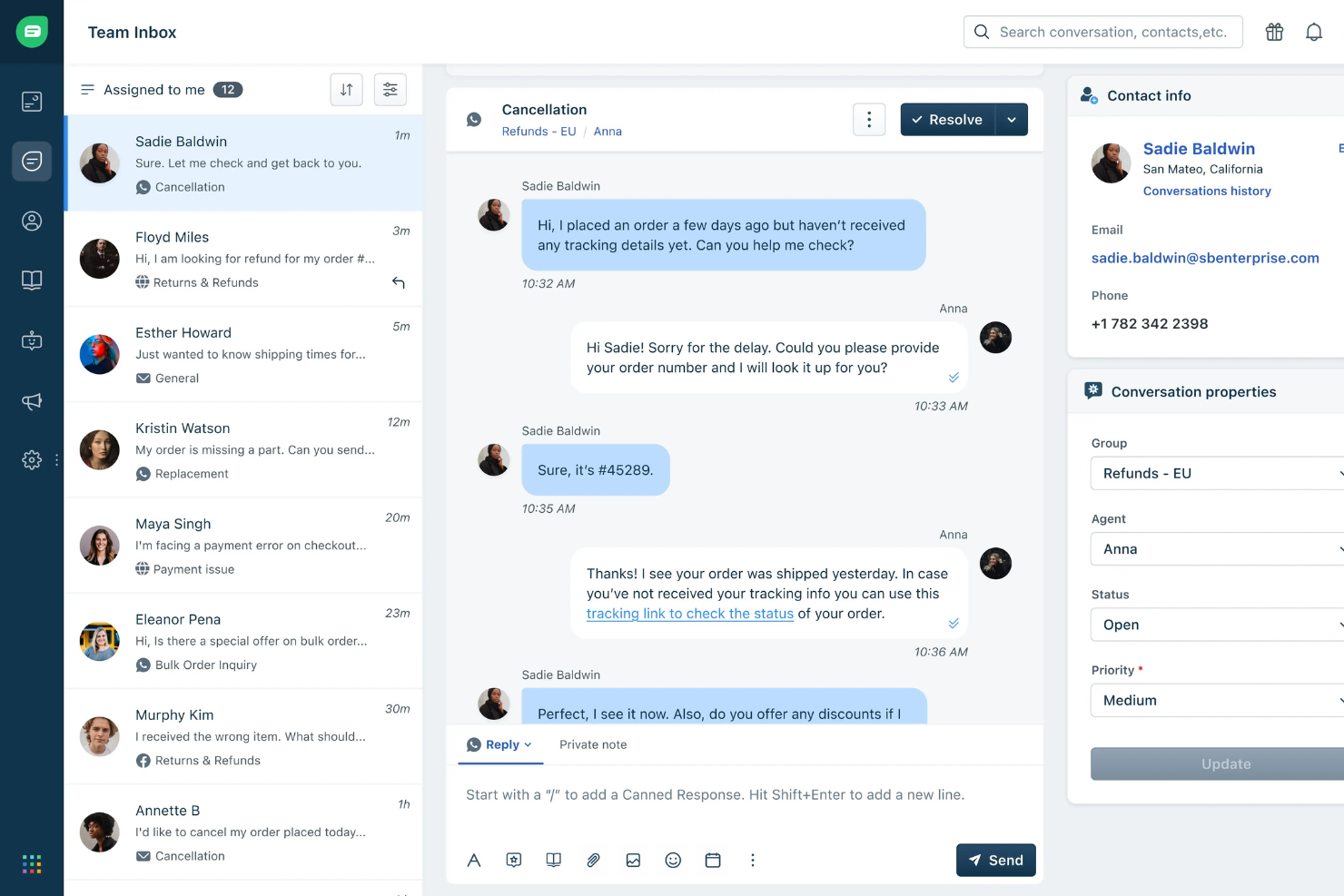
Freshdesk è una piattaforma di supporto omnicanale progettata per le aziende che necessitano di una soluzione flessibile e scalabile per gestire le conversazioni con i clienti. Se cerchi un'alternativa a Sprinklr facile da usare per i team di servizio, supporto o successo clienti, Freshdesk ti aiuta a semplificare i flussi di lavoro e unificare i canali.
Per chi è ideale Freshdesk?
Freshdesk è perfetto per i responsabili del supporto e i team operativi in aziende in crescita che necessitano d'integrazioni pronte all'uso per unificare l'engagement digitale con i clienti.
Perché Freshdesk è una valida alternativa a Sprinklr
Ho scelto Freshdesk perché il suo marketplace di app offre ai team di supporto una reale flessibilità nel creare un ecosistema tecnologico integrato senza la necessità di sviluppo personalizzato. Il marketplace include oltre 1.000 app e ho trovato davvero utili le integrazioni preconfigurate con strumenti come Shopify, Salesforce e Slack per mantenere il contesto del cliente fluido tra i sistemi. Apprezzo anche il fatto che le app del marketplace si installino direttamente nelle visualizzazioni dei ticket e degli agenti di Freshdesk, così il mio team non deve passare continuamente da una piattaforma all'altra. Per i team che vogliono abbandonare la configurazione più 'enterprise' di Sprinklr, questa connettività plug-and-play rappresenta un reale vantaggio.
Funzionalità principali di Freshdesk
- Gestione ticket omnicanale: Gestisci le conversazioni da email, telefono, chat e social media in un'unica casella di posta.
- Instradamento ticket basato su AI: Assegna automaticamente i ticket in arrivo all'agente giusto in base a competenze, carico di lavoro o regole per parola chiave.
- Risposte preimpostate: Salva e riutilizza risposte già scritte per gestire più rapidamente le richieste ricorrenti dei clienti.
- Sondaggi di soddisfazione cliente: Invia automaticamente sondaggi CSAT dopo la risoluzione del ticket per raccogliere feedback sulle prestazioni di agenti e team.
Integrazioni di Freshdesk
Le integrazioni includono Messenger, Slack, WhatsApp, Line, Instagram, Microsoft Teams, Shopify, Salesforce, HubSpot e Jira.
Pros and Cons
Pros:
- Policy SLA personalizzate per diversi canali
- Controlli dettagliati delle autorizzazioni degli agenti
- Ampia disponibilità di app per l'automazione dei flussi di lavoro
Cons:
- I report potrebbero non essere abbastanza dettagliati per team di grandi dimensioni
- Richiede una configurazione complessa
New Product Updates from Freshdesk

Freshdesk Adds Voice AI Agents in Freshcaller
Freshdesk introduces Voice AI Agents available through Freshcaller Marketplace apps to handle routine calls and reduce queues. This feature enables automated call handling with real-time, conversational support. For more information, visit Freshdesk's official site.

Ideale per il monitoraggio del comportamento degli utenti sul sito web
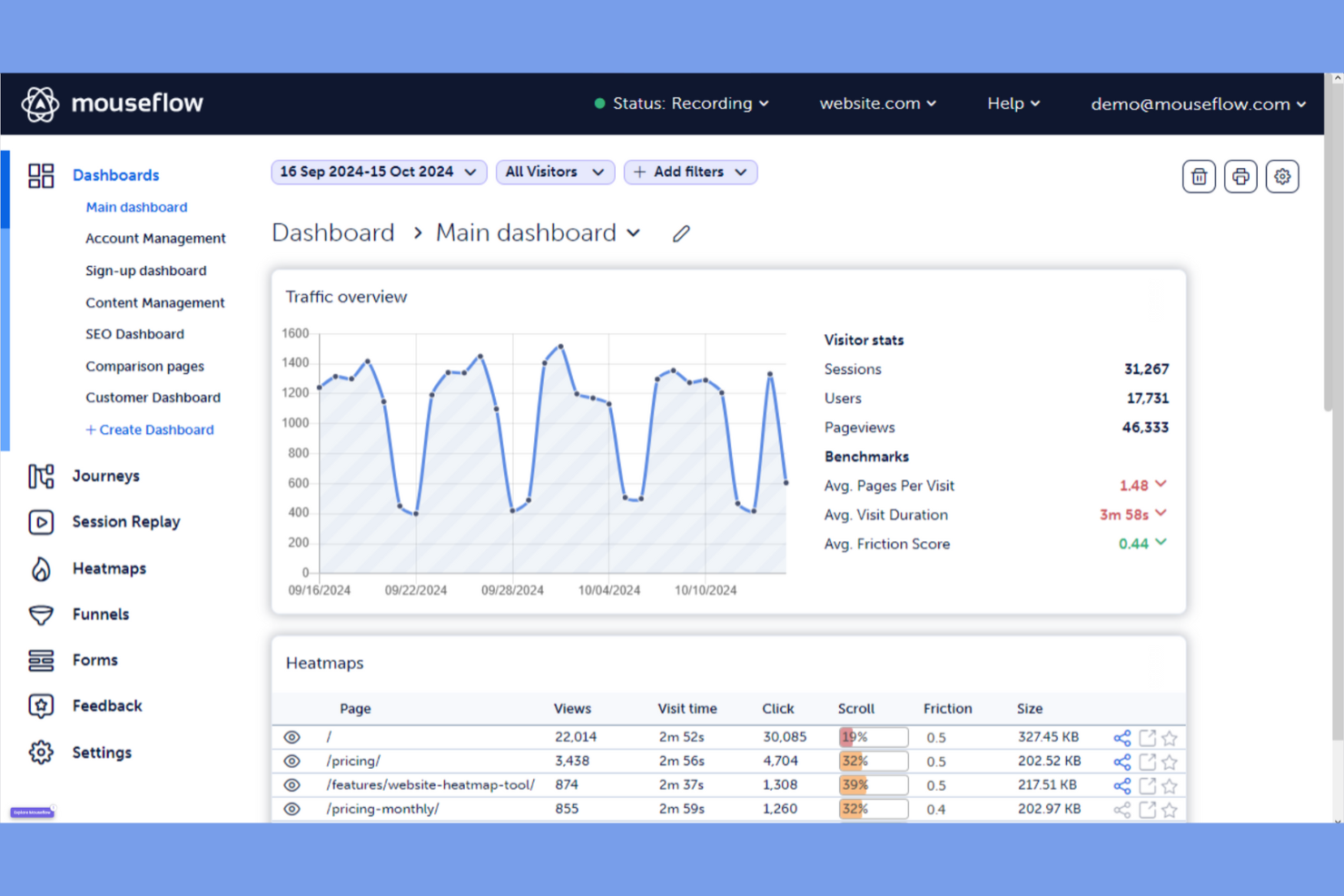
Se desideri comprendere esattamente come gli utenti interagiscono con il tuo sito web, Mouseflow offre un approccio mirato al monitoraggio del comportamento degli utenti. È particolarmente utile per team digitali, designer UX e responsabili ecommerce che vogliono visualizzare i percorsi degli utenti e individuare i punti di attrito. A differenza di Sprinklr, Mouseflow è specializzato in session replay, mappe di calore e analisi dei funnel, offrendo approfondimenti dettagliati sul comportamento onsite che le piattaforme CX più generiche non forniscono.
Perché Mouseflow è una valida alternativa a Sprinklr
Quando hai bisogno di andare oltre le metriche aggregate e vedere esattamente come si comportano gli utenti sul tuo sito, Mouseflow fornisce un monitoraggio mirato del comportamento degli utenti. Ho scelto Mouseflow perché offre session replay e heatmap, permettendoti di osservare i veri percorsi degli utenti e individuare dove esitano o abbandonano. Lo strumento include anche l’analisi dei funnel, così puoi identificare i passaggi specifici del flusso che causano attrito. Per i team focalizzati sull’ottimizzazione delle esperienze digitali a livello di pagina e interazione, Mouseflow offre un livello di analisi comportamentale che la suite CX più ampia di Sprinklr non raggiunge.
Funzionalità principali di Mouseflow
Altre funzionalità di Mouseflow possono aiutare il tuo team a ottenere di più dal monitoraggio del comportamento utente sul sito web:
- Analisi dei moduli: Monitora come gli utenti interagiscono con i moduli e identifica i campi che causano abbandono.
- Widget per il feedback degli utenti: Raccogli feedback diretto dai visitatori mentre navigano il tuo sito.
- Heatmap geografiche: Visualizza l’attività degli utenti per area geografica per individuare tendenze regionali.
- Tag personalizzati: Segnala e categorizza le sessioni in base a specifiche azioni o eventi degli utenti.
Integrazioni di Mouseflow
Le integrazioni includono Google Analytics, WordPress, Shopify, HubSpot, Wix, Squarespace e Weebly.
Pros and Cons
Pros:
- Replay completi delle sessioni per il comportamento utente
- Sei tipi di heatmap automatiche
- Analisi dei moduli integrata per individuare abbandoni
Cons:
- Lo spazio di archiviazione dei dati è limitato nei piani economici
- L’interfaccia può sembrare inizialmente ricca di dati

HubSpot
Ottimo con funzionalità CRM integrate
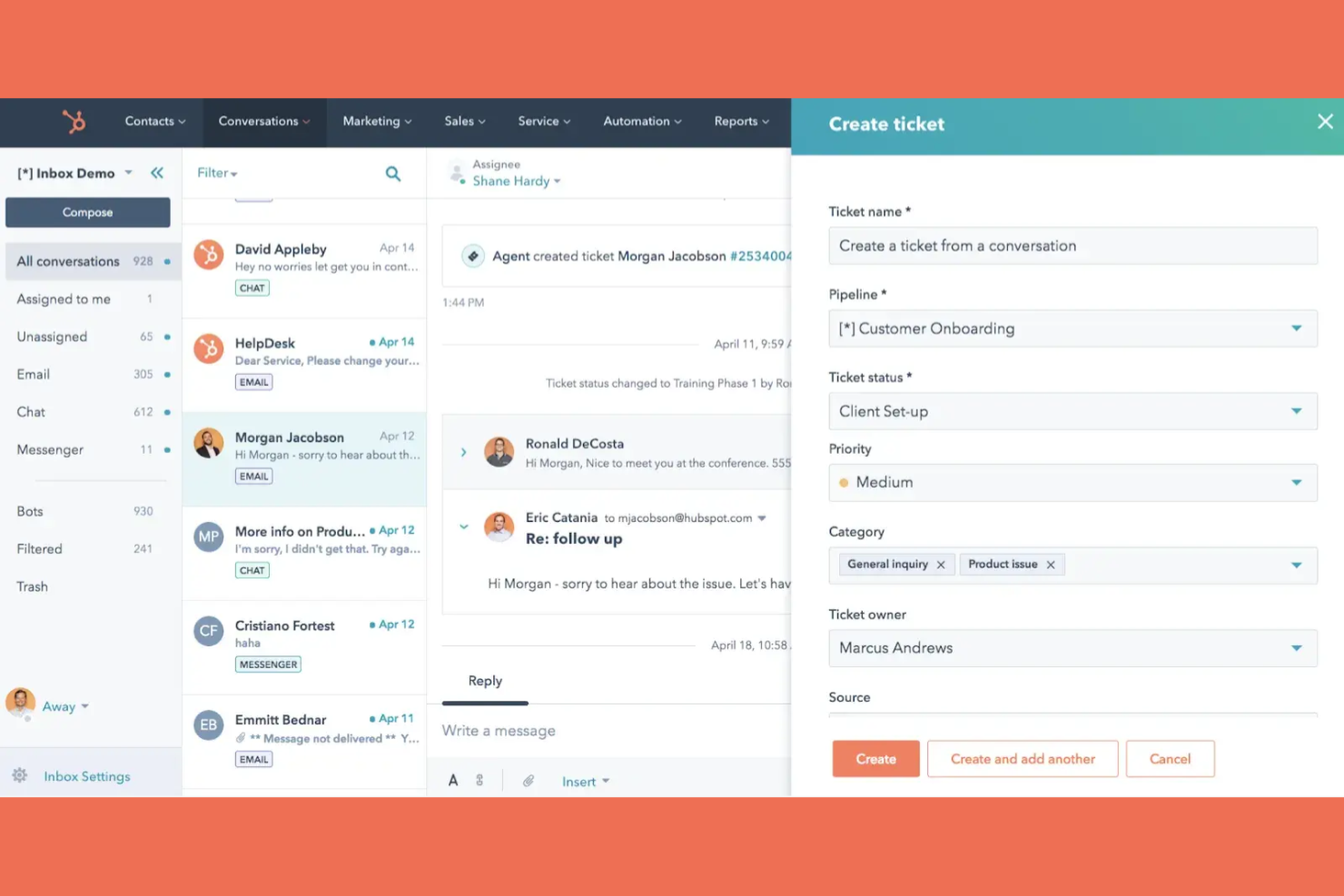
Se cerchi un'alternativa a Sprinklr con funzionalità CRM integrate, HubSpot unisce dati dei clienti e strumenti di engagement in un'unica piattaforma. È una soluzione ideale per i team che desiderano collegare flussi di lavoro di marketing, vendita e assistenza senza dover gestire più sistemi. HubSpot si distingue perché consente di gestire le interazioni con i clienti, automatizzare le comunicazioni e monitorare ogni punto di contatto direttamente insieme alle schede CRM.
Perché HubSpot è una valida alternativa a Sprinklr
Per i team che desiderano engagement e CRM in un unico posto, HubSpot offre una piattaforma unificata che collega ogni interazione a una scheda cliente centrale. Ho scelto HubSpot perché il suo CRM integrato permette di tracciare le conversazioni, automatizzare i follow-up e visualizzare una cronologia completa dei clienti senza dover cambiare strumento. Tutte le funzioni di ticketing, live chat e automazione marketing della piattaforma sono collegate direttamente al CRM, così hai sempre il contesto per ogni interazione. Se hai bisogno di un'alternativa a Sprinklr che mantenga strettamente connessi dati dei clienti e strumenti di engagement, HubSpot è una scelta solida.
Funzionalità principali di HubSpot
Altre funzionalità di HubSpot che possono aiutare il tuo team a gestire l'esperienza e il coinvolgimento dei clienti su diversi canali:
- Gestione della Knowledge Base: Crea e organizza una libreria ricercabile di articoli di supporto per i clienti.
- Sondaggi sulla soddisfazione dei clienti: Crea e distribuisci sondaggi NPS, CSAT e personalizzati per raccogliere feedback dei clienti.
- Automazione dei workflow: Imposta processi automatici per attività come l'instradamento dei ticket e i promemoria di follow-up.
- Dashboard di reportistica: Visualizza metriche chiave e tendenze tramite dashboard personalizzabili e in tempo reale.
Integrazioni HubSpot
Le integrazioni includono Salesforce, Microsoft Dynamics, Shopify, WordPress, Slack, Zapier e LinkedIn.
Pros and Cons
Pros:
- Automatizza facilmente le attività ripetitive
- Eccellenti risorse di formazione e supporto
- Strumenti AI avanzati per la creazione di contenuti e l'analisi
Cons:
- Costi di onboarding per i piani professionali
- Personalizzare dati complessi può essere limitato

Ideale per la personalizzazione avanzata dei sondaggi
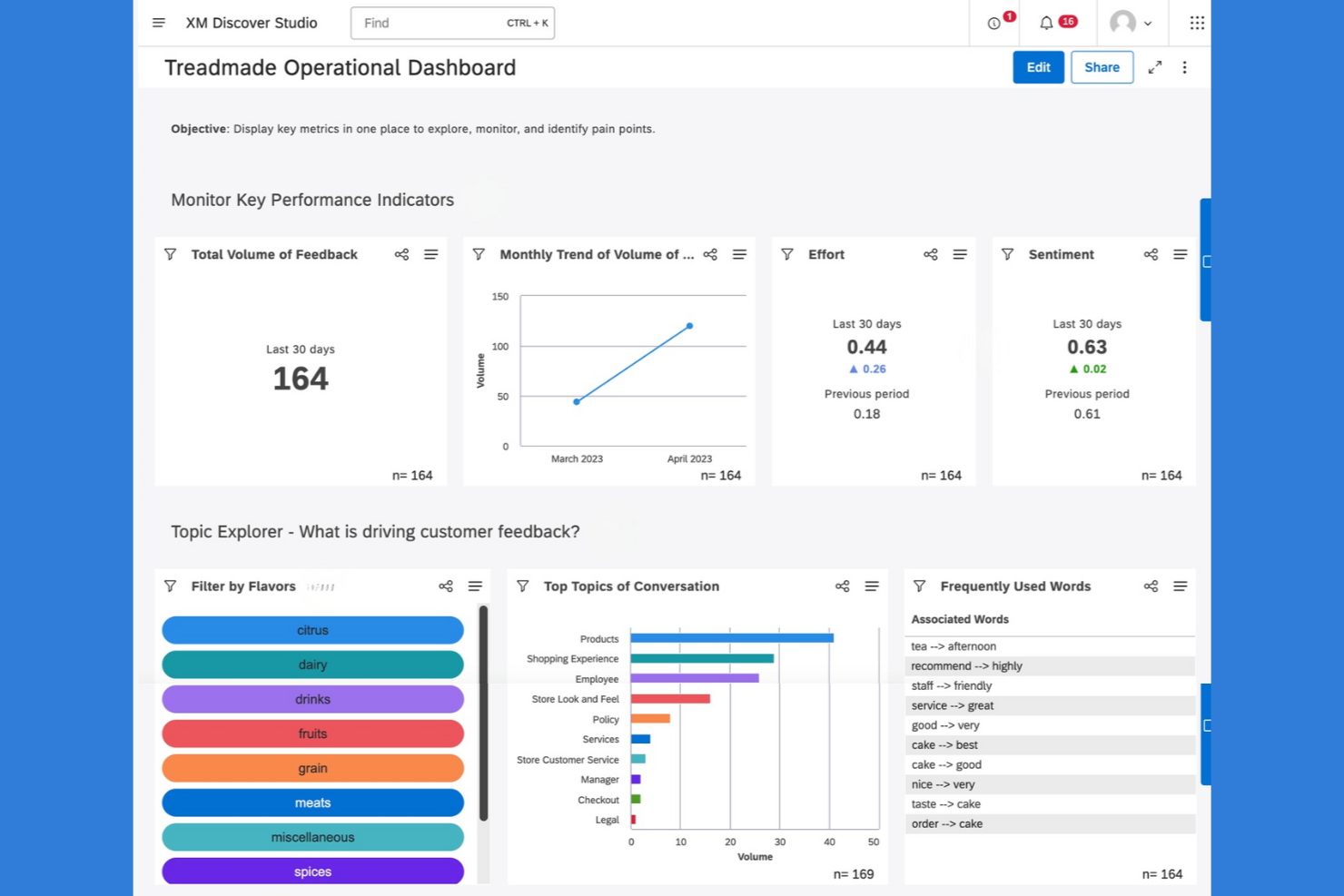
Qualtrics è una piattaforma per sondaggi e gestione delle esperienze progettata per i team che necessitano di personalizzazione avanzata e analisi approfondite. Se la tua azienda si basa sulla raccolta di feedback dettagliati dai clienti o sulla conduzione di progetti di ricerca complessi, Qualtrics offre un design di sondaggi flessibile e potenti strumenti di analisi dei dati. È una scelta eccellente per le organizzazioni che desiderano un maggiore controllo sulla logica dei sondaggi e sulla reportistica rispetto a quanto offre Sprinklr.
Perché Qualtrics è una buona alternativa a Sprinklr
Quando hai bisogno di una personalizzazione avanzata dei sondaggi, Qualtrics si distingue come una valida alternativa a Sprinklr. Ho scelto Qualtrics per il suo costruttore di sondaggi flessibile, che consente di creare logiche complesse delle domande e percorsi ramificati adattati al tuo pubblico. La piattaforma offre anche strumenti di reportistica dettagliata, così puoi analizzare i feedback a un livello molto approfondito. Se il tuo team cerca il massimo controllo sul design dei sondaggi e sulla raccolta dati, Qualtrics offre funzionalità che vanno oltre quanto proposto di solito da Sprinklr.
Caratteristiche principali di Qualtrics
Altre funzionalità di Qualtrics possono aiutare il tuo team a gestire feedback e dati di esperienza su diversi canali:
- Distribuzione multicanale: Invia sondaggi tramite email, SMS, web o social media per raggiungere i rispondenti ovunque si trovino.
- Controlli di accesso basati sui ruoli: Imposta permessi diversi per i membri del team per gestire la sicurezza dei dati e il flusso di lavoro.
- Avvisi automatici: Attiva notifiche verso le persone giuste quando le risposte ai sondaggi soddisfano determinati criteri.
- Gestione dei panel: Crea e gestisci panel di rispondenti per ricerche continue o campagne mirate.
Integrazioni di Qualtrics
Le integrazioni includono Salesforce, Adobe Analytics, SAP, Marketo e HubSpot.
Pros and Cons
Pros:
- Sondaggi avanzati e logiche complesse
- Statistiche avanzate con strumenti integrati
- Elevati livelli di sicurezza e protezione dei dati
Cons:
- Nessun prezzo pubblico e condizioni lunghe
- Troppe funzionalità per compiti semplici

Ideale per l'automazione personalizzabile dei flussi di lavoro
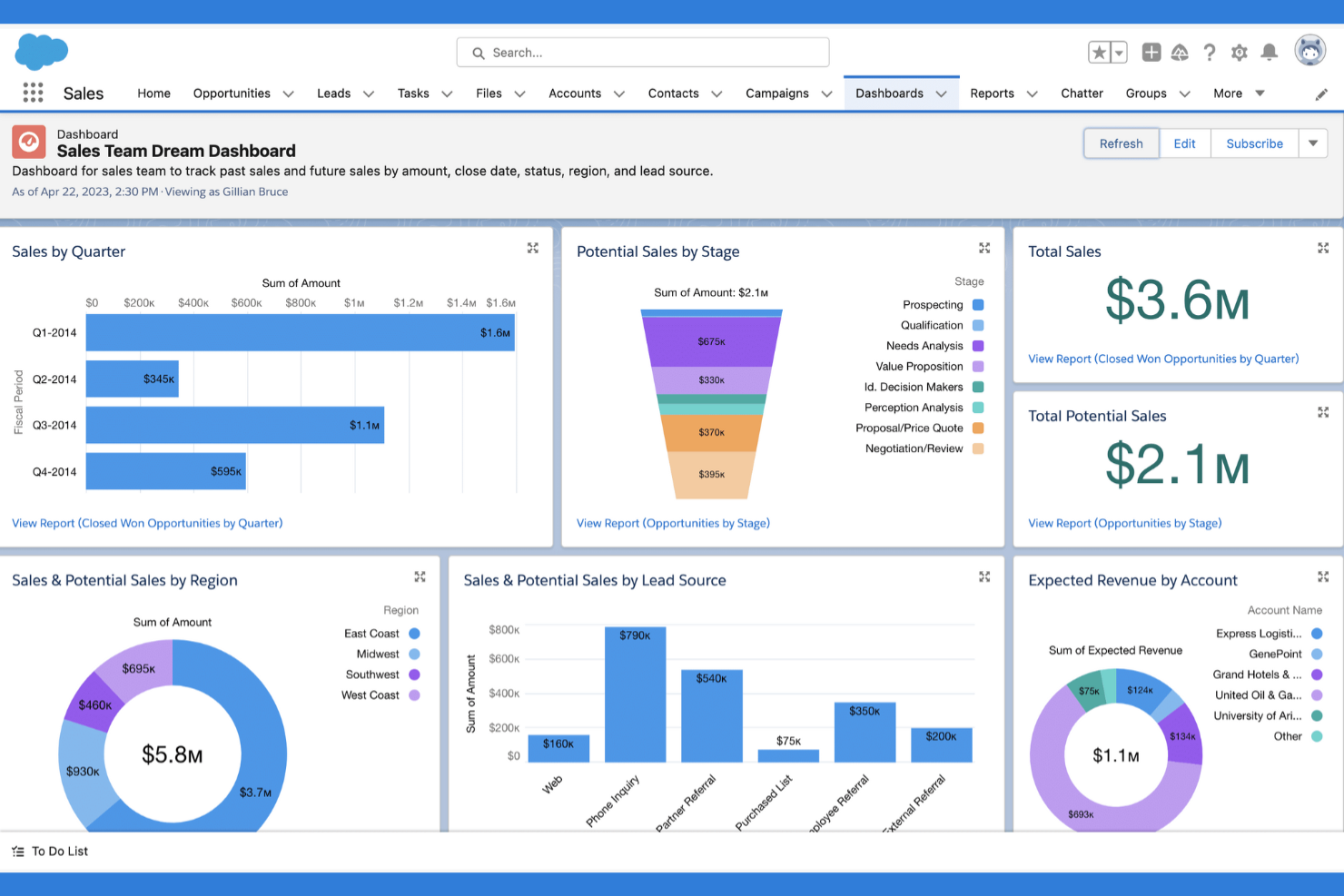
Salesforce ti offre una piattaforma flessibile per creare flussi di lavoro e automazioni personalizzate per vendite, assistenza e supporto. È una soluzione ideale per le organizzazioni con processi complessi o esigenze di customer experience uniche che vanno oltre le soluzioni preconfezionate. Se cerchi un'alternativa a Sprinklr che si adatti alle regole aziendali e si integri profondamente con i tuoi dati, Salesforce offre ampie opzioni di personalizzazione.
Perché Salesforce è una buona alternativa a Sprinklr
Quando hai bisogno di automazione dei flussi di lavoro adattiva alle tue esigenze aziendali, Salesforce spicca per le sue ampie capacità di personalizzazione. Ho scelto Salesforce perché il suo Flow Builder ti permette di progettare processi automatizzati, dalla gestione dei casi all'onboarding dei clienti, tutti su misura per le tue esigenze specifiche. Puoi impostare flussi di lavoro a più step, avviare azioni in base ai dati dei clienti e automatizzare approvazioni o escalation senza affidarti a modelli predefiniti. Per i team che cercano un'alternativa a Sprinklr che supporti processi unici e in evoluzione, Salesforce offre la flessibilità e scalabilità per costruire esattamente ciò di cui hai bisogno.
Funzionalità principali di Salesforce
Altre funzionalità di Salesforce possono aiutare il tuo team a gestire la customer experience e il coinvolgimento su larga scala:
- Service Cloud Console: Centralizza le interazioni con i clienti, i dettagli dei casi e gli strumenti di comunicazione in un'unica interfaccia.
- Instradamento omnicanale: Instrada automaticamente casi, chat e attività all'agente giusto in base a competenze o disponibilità.
- Gestione della conoscenza: Ti permette di creare, organizzare e condividere articoli di supporto interni ed esterni.
- Previsioni AI di Einstein: Utilizza l'IA per prevedere le necessità dei clienti e suggerire le prossime azioni agli agenti.
Integrazioni di Salesforce
Le integrazioni includono Microsoft Outlook, Gmail, Slack, LinkedIn, QuickBooks, Mailchimp e HubSpot.
Pros and Cons
Pros:
- Potente IA con automazione Agentforce
- Infinita possibilità di personalizzare i dati
- Si collega a oltre 3000 app di terze parti
Cons:
- Applicabilità limitata come strumento di gestione dei social media
- Supporto e amministrazione spesso hanno un costo aggiuntivo

SentiSum
Ideale per l'analisi automatica del sentiment
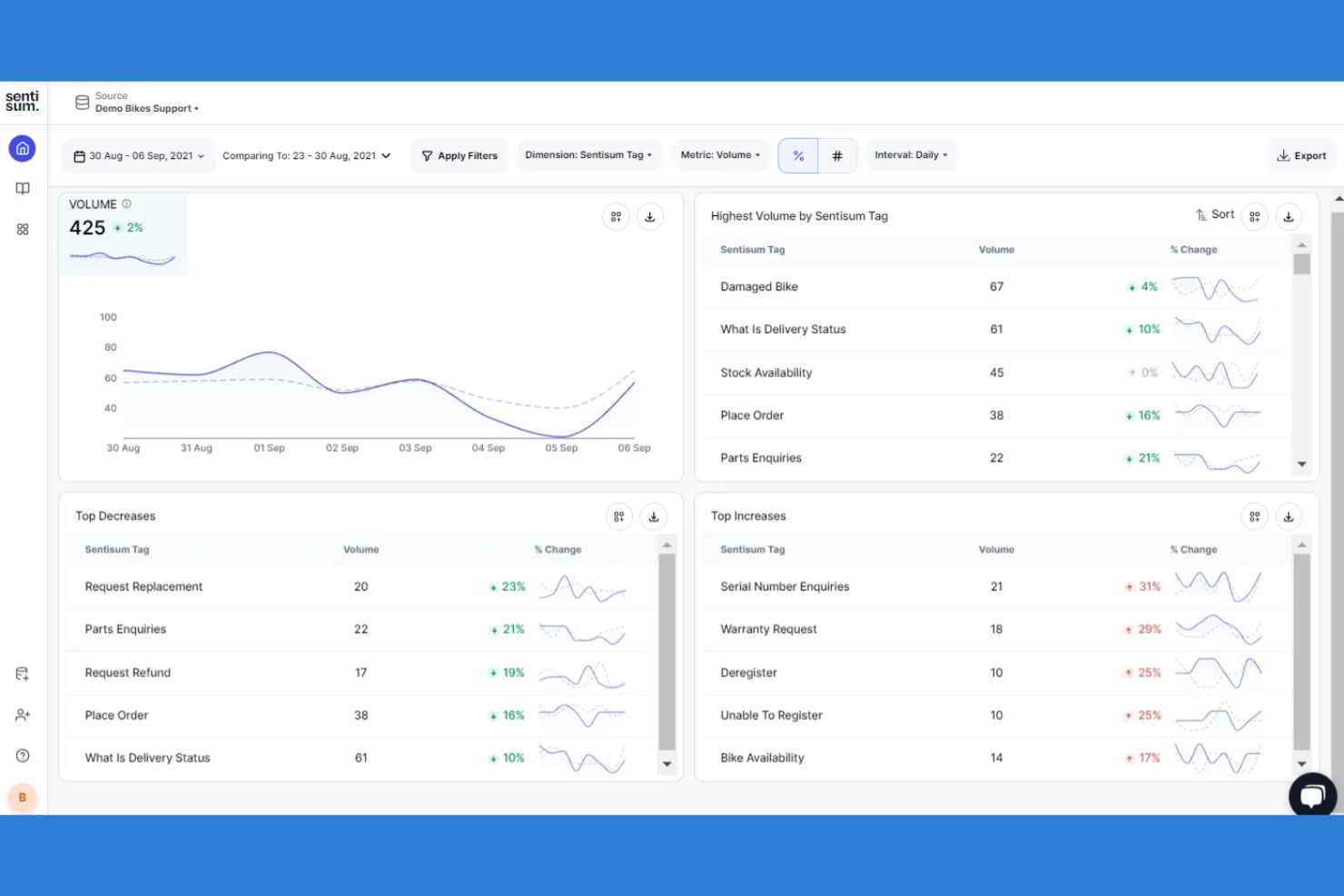
Se stai cercando un modo per comprendere automaticamente il sentiment dei clienti su larga scala, SentiSum offre strumenti avanzati basati su AI per l'analisi del sentiment, sviluppati per i team di supporto e customer experience. È una soluzione ideale per le aziende che vogliono ottenere informazioni utili da ticket, chat e sondaggi senza dover ricorrere alla classificazione manuale. SentiSum si distingue da Sprinklr concentrandosi sul rilevamento automatico e in tempo reale del sentiment, nonché su un'analisi dettagliata degli argomenti trattati nelle conversazioni con i clienti.
Perché SentiSum è una valida alternativa a Sprinklr
Diversamente da piattaforme CX più ampie, SentiSum è specializzata nell'analisi automatica del sentiment, che ti aiuta a comprendere rapidamente le emozioni dei clienti su tutti i canali di supporto. Ho scelto SentiSum perché i suoi modelli AI etichettano e categorizzano il feedback in tempo reale, permettendoti di individuare tendenze e punti dolenti senza sforzo manuale. L’analisi dettagliata degli argomenti della piattaforma consente di approfondire tematiche specifiche, facilitando la prioritizzazione dei miglioramenti. Se desideri una soluzione mirata per ottenere informazioni utili dalle conversazioni con i clienti, SentiSum è una valida alternativa a Sprinklr.
Caratteristiche principali di SentiSum
Altre funzionalità di SentiSum possono aiutare il tuo team a ottenere ancora più valore dai feedback e dai dati provenienti dal supporto clienti:
- Analisi del sentiment multilingue: Analizza il sentiment dei clienti in più lingue senza necessità di traduzione manuale.
- Reportistica automatica: Genera e programma report che riassumono tendenze e insight principali.
- Costruttore di tassonomie personalizzate: Crea e gestisci categorie personalizzate per soddisfare le esigenze specifiche della tua azienda.
- Integrazioni con piattaforme di supporto: Connetti direttamente strumenti come Zendesk, Intercom e Salesforce per un flusso dati senza interruzioni.
Integrazioni di SentiSum
Le integrazioni includono Zendesk, Freshdesk, Intercom, TikTok, Slack e Mailchimp.
Pros and Cons
Pros:
- Tag automatici che riducono il lavoro manuale
- Analisi approfondita delle cause profonde e delle tendenze
- Ricerca AI in linguaggio naturale per trovare risposte
Cons:
- Richiede tempo iniziale per addestrare l'AI
- Strumenti limitati per analisi di dati storici approfonditi

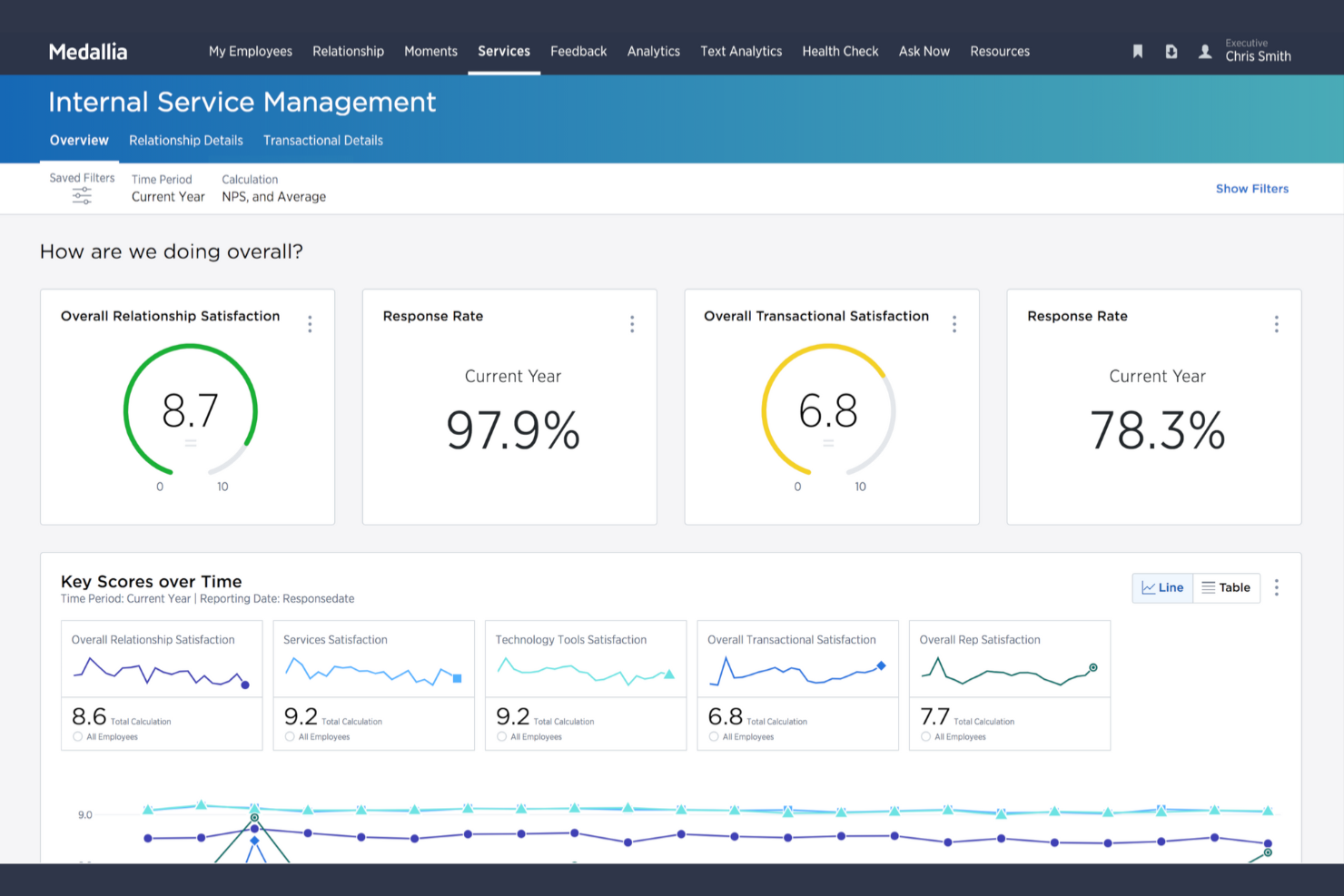
Per le organizzazioni che devono gestire feedback su larga scala, Medallia è una soluzione SaaS che offre una piattaforma specializzata per la gestione del feedback aziendale. È progettata per grandi imprese e responsabili dell'esperienza cliente (CX) che desiderano raccogliere, analizzare e agire sui feedback provenienti da più canali in tempo reale. Medallia si distingue da Sprinklr grazie ad analisi avanzate, approfondimenti basati sull’IA e flussi di lavoro chiusi per la gestione del feedback, pensati per contesti aziendali complessi.
Perché Medallia è una valida alternativa a Sprinklr
Se la tua azienda deve gestire feedback in una realtà ampia e complessa, Medallia è creata per una gestione del feedback aziendale su larga scala. Ho scelto Medallia perché offre distribuzione avanzata di sondaggi, analisi testuale in tempo reale e analisi del sentiment guidata dall’IA, strumenti che permettono di raccogliere e interpretare feedback da più canali. La piattaforma supporta anche flussi di lavoro chiusi per la gestione del feedback, aiutando i team a rispondere rapidamente e monitorare gli esiti delle risoluzioni. Per i leader CX che desiderano trasformare i feedback aziendali in approfondimenti utili, Medallia offre un livello di analisi e automazione superiore rispetto a quanto generalmente proposto da Sprinklr.
Caratteristiche principali di Medallia
Altre funzionalità di Medallia possono aiutare il tuo team a gestire e agire sui feedback su larga scala:
- Raccolta di feedback mobile: Raccogli feedback dai clienti direttamente attraverso dispositivi e app mobili.
- Dashboard basate sui ruoli: Offri a diversi team e responsabili accesso a visualizzazioni e informazioni personalizzate.
- Gestione dei casi: Assegna, monitora e risolvi le problematiche dei clienti all'interno della piattaforma.
- Analisi vocale e del parlato: Analizza le interazioni telefoniche per sentiment, parole chiave e tendenze.
Integrazioni di Medallia
Le integrazioni includono Salesforce, Adobe Experience Manager, Google Analytics, Microsoft Dynamics, Tableau e Oracle.
Pros and Cons
Pros:
- Avvisi in tempo reale per azioni immediate
- Costruito per gestire enormi moli di dati a livello aziendale
- Ampia integrazione CRM
Cons:
- Difficile da padroneggiare per i nuovi utenti
- Processo di configurazione lento e tecnico

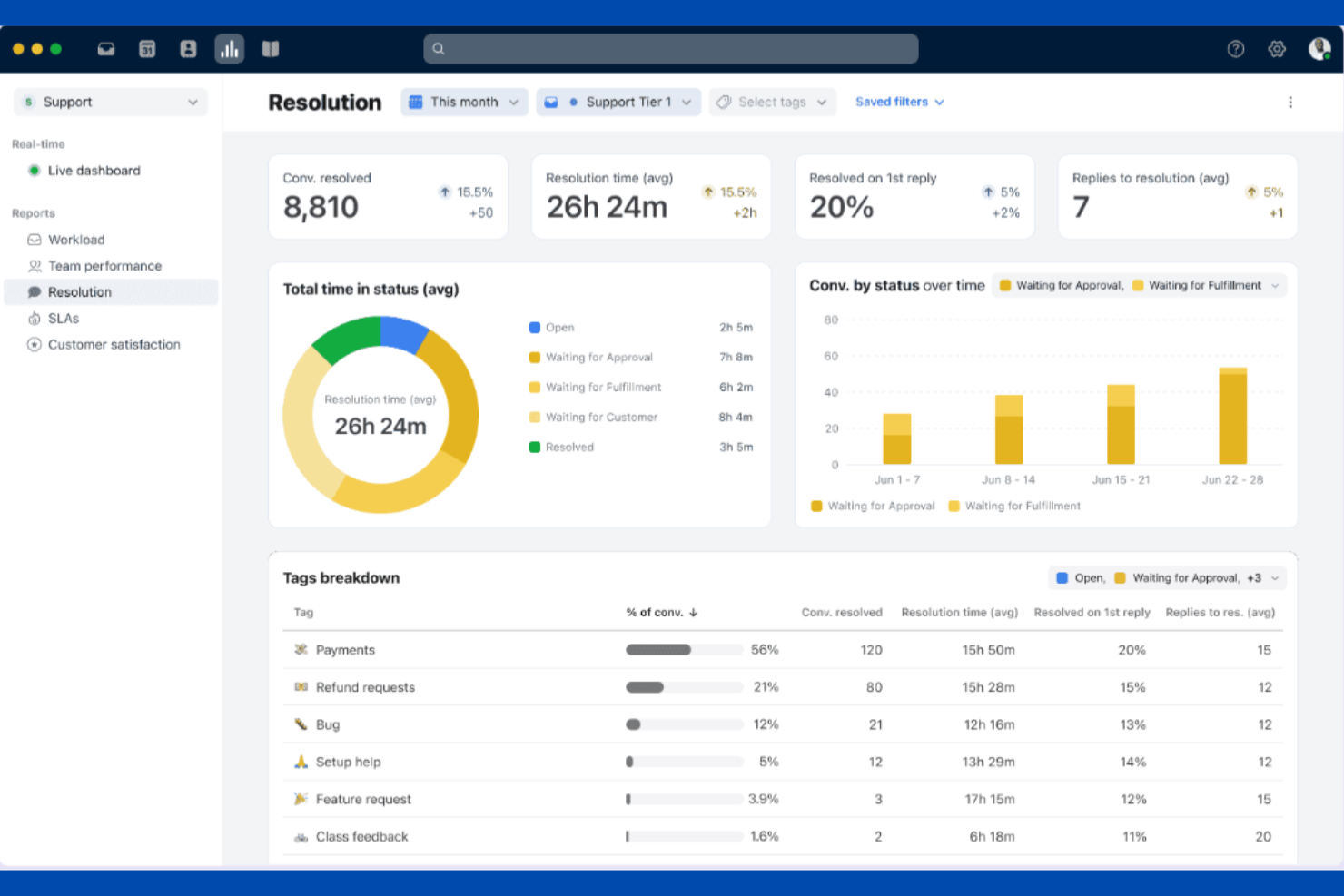
Se il tuo team ha bisogno di una casella di posta condivisa che supporti la collaborazione in tempo reale, Front merita attenzione. È pensato per team di assistenza clienti, gestione account e operations che desiderano gestire email, chat e SMS insieme senza perdere visibilità o responsabilità. A differenza di Sprinklr, Front pone l'accento sulle funzionalità di collaborazione interna come bozze condivise, assegnazioni e commenti interni direttamente nella casella unificata.
Perché Front è una valida alternativa a Sprinklr
Per i team che devono gestire insieme grandi volumi di messaggi dei clienti, Front offre un'esperienza collaborativa nella gestione della posta che Sprinklr non riesce a eguagliare. Ho scelto Front perché consente a più membri del team di lavorare sulla stessa conversazione, assegnare messaggi e lasciare commenti interni senza cambiare strumento. Le bozze condivise e gli indicatori di attività in tempo reale aiutano a evitare risposte duplicate e a mantenere tutti allineati. Se la tua priorità è una comunicazione trasparente e di squadra con i clienti, gli strumenti collaborativi di Front lo rendono una forte alternativa a Sprinklr.
Funzionalità principali di Front
Altre funzionalità di Front possono aiutare il tuo team a gestire le conversazioni con i clienti in modo più efficiente:
- Casella di posta multi-canale: Unisci email, SMS, chat dal vivo e messaggi social in un unico posto.
- Automazione basata su regole: Configura instradamento, etichettatura e risposte automatiche in base al contenuto del messaggio o al mittente.
- Dashboard di analisi: Monitora le prestazioni del team, i tempi di risposta e i volumi di messaggi con strumenti di reportistica integrati.
- Integrazioni con app: Collegati a strumenti come Salesforce, Slack e Asana direttamente dalla tua casella di posta.
Integrazioni di Front
Le integrazioni includono Salesforce, Slack, Asana, Trello, HubSpot, Intercom e Google Workspace.
Pros and Cons
Pros:
- Commenti interni nei thread con i clienti
- Assegnazione e monitoraggio delle responsabilità semplice
- Potenti regole per automatizzare i flussi di lavoro
Cons:
- I livelli inferiori limitano il numero totale di canali
- L'app mobile può essere lenta con volumi elevati

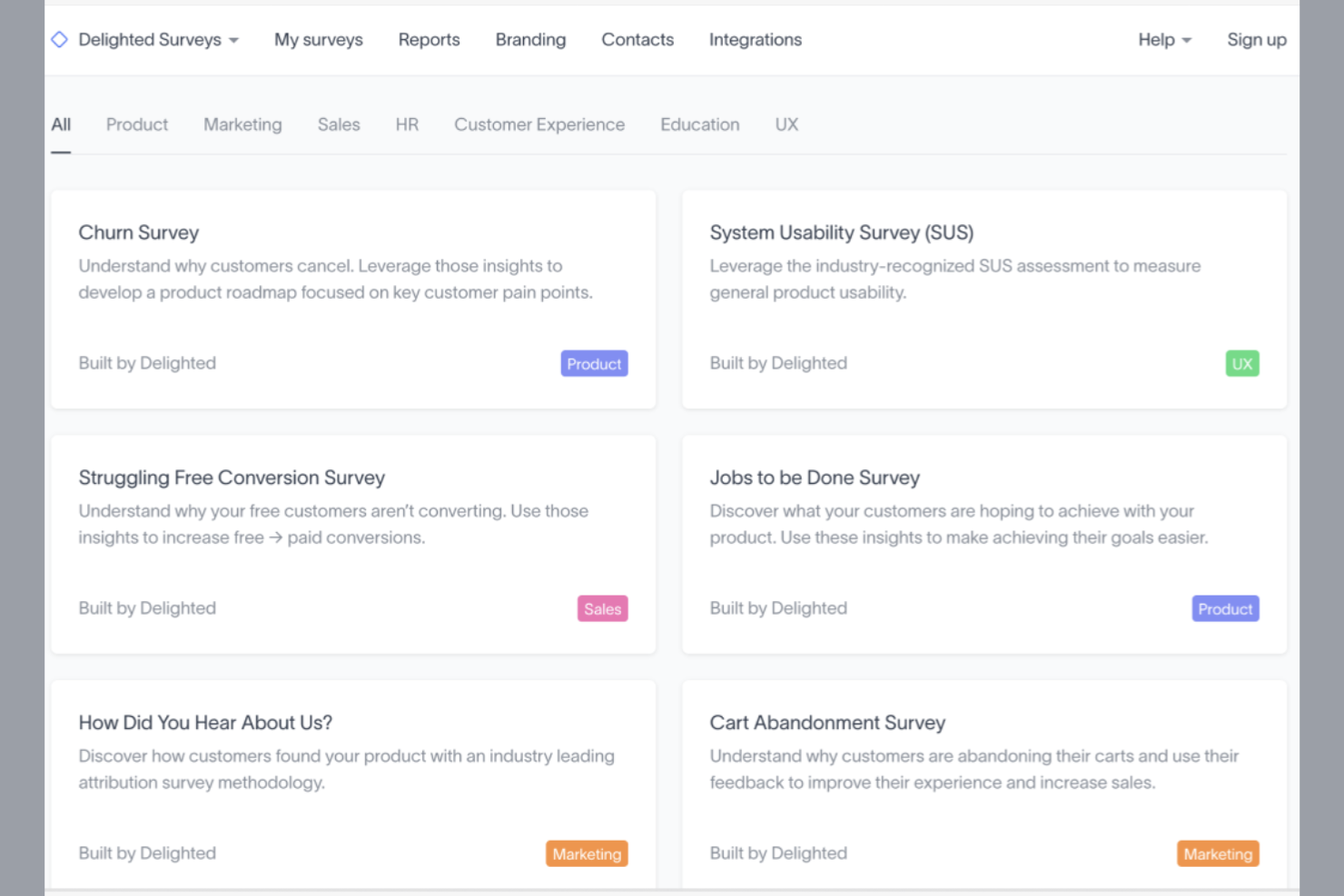
Quando hai bisogno di raccogliere rapidamente feedback dai clienti con una configurazione minima, Delighted offre una soluzione mirata. È pensato per i team CX, i product manager e i responsabili dei servizi che vogliono avviare sondaggi su diversi canali senza configurazioni complesse. A differenza di Sprinklr, Delighted si specializza nel lancio rapido dei sondaggi e nella raccolta di feedback in tempo reale, rendendolo ideale per i team che danno priorità alla velocità e alla facilità d’uso.
Perché Delighted è una valida alternativa a Sprinklr
Se la priorità del tuo team è raccogliere feedback dai clienti rapidamente, Delighted rappresenta una valida alternativa a Sprinklr. Ho scelto Delighted perché consente di lanciare sondaggi NPS, CSAT, CES e personalizzati in pochi clic, senza lunghi processi di configurazione. Puoi distribuire i sondaggi via email, web, SMS o link, ricevendo le risposte in tempo reale per un’azione immediata. Per i team che hanno bisogno di insight rapidi e azionabili piuttosto che di una suite CX completa, l’attenzione di Delighted alla raccolta veloce del feedback fa la differenza.
Funzionalità chiave di Delighted
Altre funzionalità di Delighted possono aiutarti a gestire e sfruttare il feedback in modo più efficace:
- Dashboard di reportistica: visualizza i risultati dei sondaggi e le tendenze in un’unica dashboard di analisi centralizzata.
- Tag delle risposte: categorizza le risposte con tag personalizzati per analisi e follow-up più semplici.
- Avvisi automatici: imposta notifiche su punteggi o parole chiave specifiche per stimolare l’azione del team.
- Supporto multilingue: invia sondaggi in più lingue per raggiungere un pubblico globale.
Integrazioni di Delighted
Le integrazioni includono Slack, Zapier, HubSpot, Salesforce, Zendesk e Segment.
Pros and Cons
Pros:
- Semplicità di configurazione e lancio
- Sondaggi NPS e CSAT ai vertici della categoria
- Design pulito che aumenta i tassi di completamento
Cons:
- Logica e ramificazioni limitate
- Nessuna funzionalità avanzata o aggiornamento ulteriore
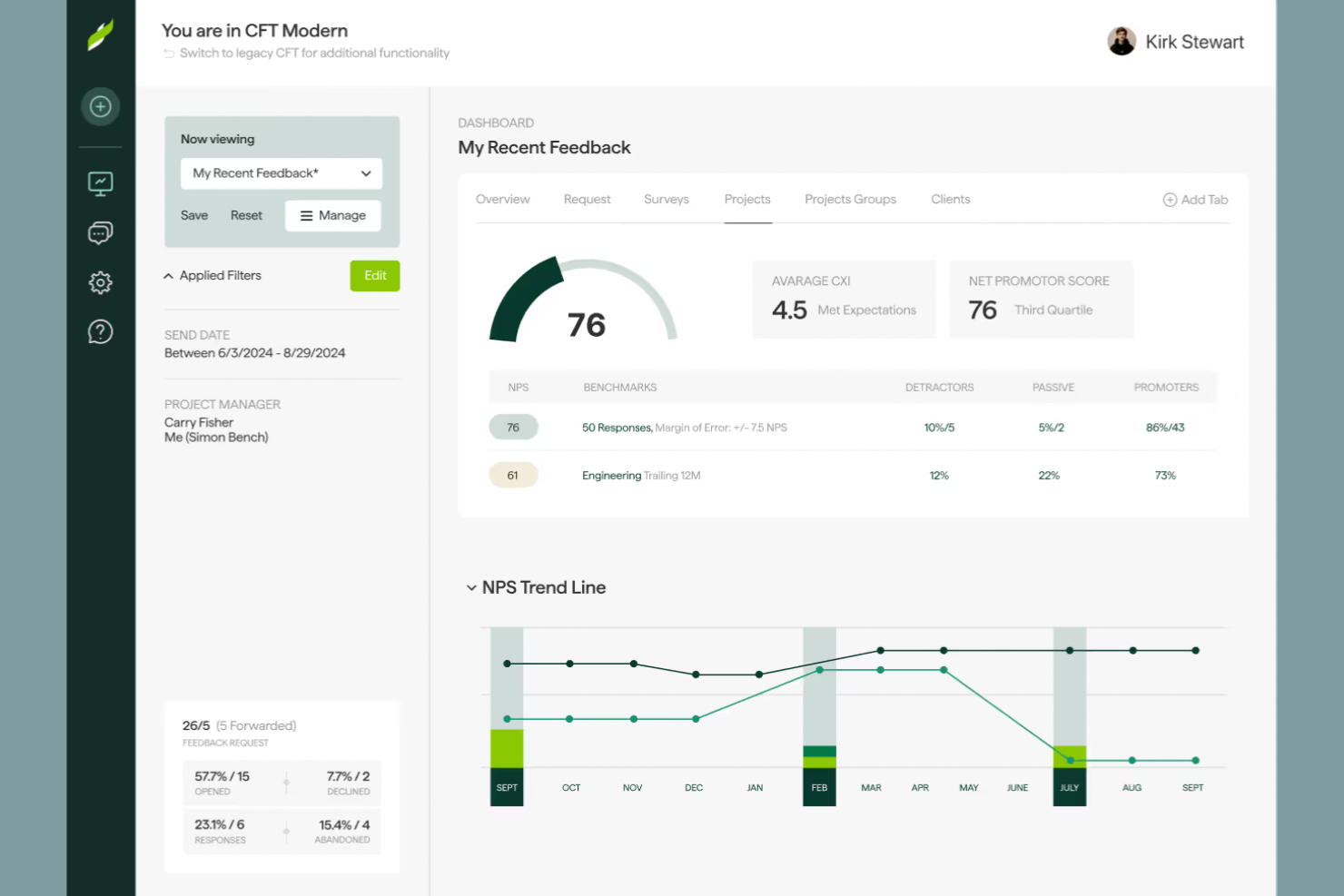
Per i team che desiderano confrontare il proprio feedback dei clienti con quello dei colleghi del settore, ClearlyRated offre una piattaforma specializzata focalizzata sulla misurazione e il confronto della soddisfazione dei clienti. È particolarmente utile per studi professionali e agenzie che hanno bisogno di dimostrare il proprio valore e migliorare la fidelizzazione. A differenza di Sprinklr, ClearlyRated si concentra sul benchmarking del Net Promoter Score (NPS) e su approfondimenti specifici del settore, aiutandoti a capire esattamente dove si posiziona l'esperienza dei tuoi clienti.
Perché ClearlyRated è una valida alternativa a Sprinklr
Se cerchi uno strumento che vada oltre la semplice raccolta di feedback e ti permetta di confrontare la soddisfazione dei tuoi clienti con gli standard del settore, ClearlyRated vale la pena di essere considerato. Ho scelto ClearlyRated perché è specializzato nel benchmarking del Net Promoter Score (NPS), permettendoti di vedere come l’esperienza dei tuoi clienti si confronta con altre aziende simili.
La piattaforma offre inoltre reportistica specifica per settore e programmi di riconoscimento, che possono aiutarti a individuare punti di forza e aree di miglioramento. Per i team di servizi professionali orientati a feedback dei clienti misurabili, ClearlyRated rappresenta un’alternativa mirata alla più ampia suite CX di Sprinklr.
Funzionalità principali di ClearlyRated
Altre funzionalità di ClearlyRated possono aiutare il tuo team a trarre maggior valore dal feedback dei clienti e dal benchmarking di settore:
- Modelli di sondaggi personalizzati: Utilizza modelli di sondaggio personalizzabili che riflettono l’identità visiva della tua azienda.
- Raccolta di testimonianze dei clienti: Raccogli e mostra testimonianze verificate dei clienti direttamente dalle risposte ai sondaggi.
- Badge per la reputazione online: Ottieni e metti in evidenza badge digitali basati sui punteggi di soddisfazione dei clienti.
- Programmazione automatica dei sondaggi: Configura campagne di sondaggi ricorrenti per raccogliere feedback a intervalli regolari.
Integrazioni di ClearlyRated
Le integrazioni includono Salesforce, Microsoft Dynamics, HubSpot, Google Analytics e Qualtrics.
Pros and Cons
Pros:
- Alti tassi di risposta da parte dei clienti grazie all'NPS
- Dashboard dati in tempo reale ricche di insight
- Assistenza clienti esperta dedicata
Cons:
- Le funzionalità AI sono ancora piuttosto limitate
- Numero minimo di risposte richiesto per i premi
Altre alternative a Sprinklr
Ecco alcune ulteriori alternative a Sprinklr che non sono state incluse nel mio elenco, ma che vale comunque la pena prendere in considerazione:


Come valuto le alternative a Sprinklr
Valuto le alternative a Sprinklr su due livelli: le funzionalità fondamentali che ogni candidato deve avere—come l'instradamento omnicanale e l'ascolto dei social media—e i fattori distintivi che rendono uno strumento adatto.
Funzionalità fondamentali (requisiti essenziali per questo elenco)
Quando seleziono gli strumenti per il mio elenco, assegno a ciascuno un punteggio su una scala da 0 (non offre la funzionalità) a 5 (eccelle in quest'area) per ogni funzionalità fondamentale elencata di seguito. Successivamente, converto il punteggio totale dello strumento in una percentuale. Ogni strumento deve raggiungere un punteggio totale minimo del 75% per essere preso in considerazione.
- Coinvolgimento omnicanale: verifico quanti canali—social media, messaggistica, e-mail, chat, voce e siti di recensioni—confluiscono in un'unica area di lavoro per gli operatori, così da garantire interazioni coerenti con i clienti.
- Ascolto e monitoraggio dei social media: il monitoraggio in tempo reale delle menzioni del marchio, delle parole chiave e del sentiment sui diversi network è fondamentale, soprattutto per le squadre che gestiscono la risposta alle crisi.
- Profili cliente unificati: cerco l'unificazione automatica dei profili, che riunisca la cronologia dei diversi canali in un'unica visualizzazione, così gli operatori non devono chiedere ai clienti di ripetere le proprie informazioni.
- Analisi e dati utili basati sull'AI: il rilevamento del sentiment e dell'intento nei riscontri non strutturati, come le risposte testuali ai sondaggi o i commenti sui social media, è ciò che distingue le analisi utili dai cruscotti di base.
- Pubblicazione e gestione delle campagne: valuto la programmazione su più reti, i flussi di approvazione e la gestione delle risorse: il tipo di gestione di cui le squadre globali hanno bisogno per mantenere coerente l'immagine del marchio.
- Instradamento dei casi e automazione dei flussi di lavoro: cerco un instradamento intelligente basato su competenze, priorità o valutazione iniziale guidata dall'AI, in particolare per le attività dei centri di contatto ad alto volume.
Dopo aver creato un elenco di strumenti che soddisfano questi criteri, considero ciò che distingue ciascuna piattaforma.
Fattori distintivi (ciò che differenzia i fornitori)
Ecco come confronto i diversi fornitori:
Funzionalità distintive
Gli assistenti basati sull'intelligenza artificiale generativa sono oggi un importante fattore distintivo. Cerco strumenti che forniscano agli operatori risposte redatte dall'AI e riepiloghi delle conversazioni, riducendo i tempi di gestione nei periodi di picco. Anche i chatbot configurabili senza codice sono importanti: le squadre CX che possono implementare flussi autonomi senza attendere il reparto tecnico si muovono più rapidamente. Oltre all'assistenza, valuto le funzionalità di analisi comparativa della concorrenza. Le squadre che monitorano la quota di voce rispetto ai principali concorrenti ottengono un valore strategico molto maggiore dai dati di ascolto rispetto a quelle limitate ai soli report interni.
Oltre le funzionalità
La trasparenza del modello di prezzo è una delle prime cose che valuto. Alcuni fornitori raggruppano assistenza, social media e dati utili in un'unica licenza, mentre altri applicano un costo per modulo: conoscere in anticipo la struttura evita sorprese di budget al momento del rinnovo. La profondità delle integrazioni è altrettanto importante. Verifico la presenza di connettori nativi per CRM e centri di contatto, perché uno strumento che non si sincronizza con l'istanza Salesforce o Genesys dell'azienda crea silos di dati che gli operatori percepiranno ogni giorno. Per le squadre globali, considero anche il supporto per più marchi e più lingue, insieme alle opzioni di residenza dei dati.
Perché cercare un'alternativa a Sprinklr?
Sebbene Sprinklr sia una buona scelta, ci sono diversi motivi per cui alcuni utenti cercano soluzioni alternative. Potresti cercare un'alternativa a Sprinklr perché…
- Hai bisogno di prezzi più convenienti per i team più piccoli
- Vuoi una configurazione più semplice e un inserimento più rapido
- Hai bisogno di integrazioni più approfondite con CRM o strumenti specifici
- Preferisci una piattaforma incentrata sulle comunicazioni unificate
- Hai bisogno di un supporto migliore per le lingue diverse dall'inglese
- Vuoi opzioni più flessibili per report e analisi
Se ti riconosci in una di queste situazioni, sei nel posto giusto. Il mio elenco contiene diverse alternative a Sprinklr più adatte ai team che affrontano queste difficoltà con Sprinklr e cercano soluzioni alternative.
Funzionalità principali di Sprinklr
Ecco alcune delle funzionalità principali di Sprinklr, per aiutarti a mettere a confronto ciò che offrono le soluzioni alternative:
- Coinvolgimento omnicanale dei clienti attraverso social media, messaggistica, e-mail e voce
- Analisi delle prestazioni e del sentiment sui social media
- Instradamento dei casi e suggerimenti di risposta basati sull'IA
- Profili cliente unificati e cronologia delle interazioni
- Dashboard personalizzabili e analisi avanzate
- Flussi di lavoro e processi di approvazione automatizzati
- Strumenti per la pubblicazione dei contenuti, il calendario editoriale e la gestione delle campagne
- Funzionalità di knowledge base e portale self-service
- Collaborazione in tempo reale per i team di assistenza e marketing
- Integrazione con le principali piattaforme CRM e di automazione del marketing