

Le migliori alternative a Vonage offrono un servizio telefonico affidabile, integrazioni flessibili e prezzi adatti alla crescita della tua azienda. Se stai cercando alternative a Vonage, probabilmente hai bisogno di una soluzione UCaaS facile da configurare, che possa crescere insieme al tuo team e collegarsi senza problemi agli strumenti che già utilizzi. Scegliere la piattaforma di comunicazione aziendale giusta può aiutarti a gestire volumi elevati di chiamate, supportare team remoti o ibridi e offrire esperienze cliente coerenti. In questa guida troverai un elenco accuratamente selezionato delle principali alternative a Vonage, con particolare attenzione alle funzionalità, alle integrazioni e ai casi d'uso più importanti per i professionisti dell'esperienza cliente.
Che cos'è Vonage?
Vonage Business è una piattaforma di comunicazione e un centralino PBX cloud che consente alle aziende di effettuare e ricevere chiamate telefoniche tramite Internet anziché attraverso le linee tradizionali. In qualità di principale fornitore VoIP, offre funzionalità come l'instradamento delle chiamate, la segreteria telefonica, i numeri virtuali e le integrazioni con strumenti CRM e di assistenza clienti. Vonage viene utilizzato dai team dell'esperienza cliente per gestire le attività operative, supportare il lavoro da remoto e connettersi con i clienti attraverso più canali. La sua flessibilità e scalabilità lo rendono popolare sia tra le startup nelle fasi iniziali sia tra le PMI consolidate.
Tabella di confronto delle alternative a Vonage
Questa tabella di confronto riassume i dettagli sui prezzi delle mie migliori alternative a Vonage:
| Tool | Best For | Trial Info | Price | ||
|---|---|---|---|---|---|
| 1 | Ideale per la pianificazione di appuntamenti tramite AI | Demo gratuita | Da $15/utente/mese (fatturazione annuale) | Website | |
| 2 | Ideale per la copertura globale dei numeri | Prova gratuita di 14 giorni | Da $25/utente/mese (fatturazione annuale) | Website | |
| 3 | Migliore per la compatibilità con l’ecosistema AWS | Prova gratuita di 6 mesi | Da $0.038/minuto | Website | |
| 4 | Ideale per l'integrazione con sistemi di ticketing | Prova gratuita di 14 giorni + demo gratuita | Da $19/agente/mese (fatturato annualmente) | Website | |
| 5 | Ideale per interazioni con i clienti incentrate sul mobile | Demo gratuita disponibile | A partire da $65/utente/mese | Website | |
| 6 | Ideale per funzionalità di composizione in uscita | Demo gratuita | Da $119/utente/mese | Website | |
| 7 | Ideale per la rapida attivazione di numeri | Prova gratuita di 14 giorni + demo gratuita | Da $29/utente/mese (fatturazione annuale) | Website | |
| 8 | Ideale per customer journey potenziati dall'intelligenza artificiale | Demo gratuita disponibile | Da $75/utente/mese (fatturazione annuale) | Website | |
| 9 | Ideale per l’automazione specifica del settore | Demo gratuita disponibile | From $85/user/month | Website | |
| 10 | Ideale per analytics omnicanale | Demo gratuita disponibile | Prezzo su richiesta | Website |


Perché fidarsi dei nostri consigli sui software
6,700+
Reviews
20
Industry experts
16+
Evaluation factors
14
Years
Il nostro team testa e recensisce software dal 2012. In quanto leader CX noi stessi, sappiamo quanto sia difficile — e importante — scegliere il software giusto.
Per questa guida, abbiamo valutato gli strumenti attraverso test pratici e ricerche indipendenti, assegnando un punteggio agli strumenti in base ai nostri criteri di selezione.
Le nostre recensioni riflettono il nostro giudizio editoriale umano, non un discorso di vendita.
 Gui DrusinaCreative Director
 Tim FisherVP of AI
Recensioni delle alternative a Vonage
Di seguito trovi i miei riepiloghi dettagliati delle migliori alternative a Vonage incluse nel mio elenco. Le mie recensioni offrono uno sguardo approfondito alle funzionalità, alle integrazioni e ai migliori casi d’uso di ciascun software, per aiutarti a trovare quello più adatto a te.
 Ideale per la pianificazione di appuntamenti tramite AI
- Demo gratuita
- Da $15/utente/mese (fatturazione annuale)
Visit WebsiteCustomer Rating:4.5/5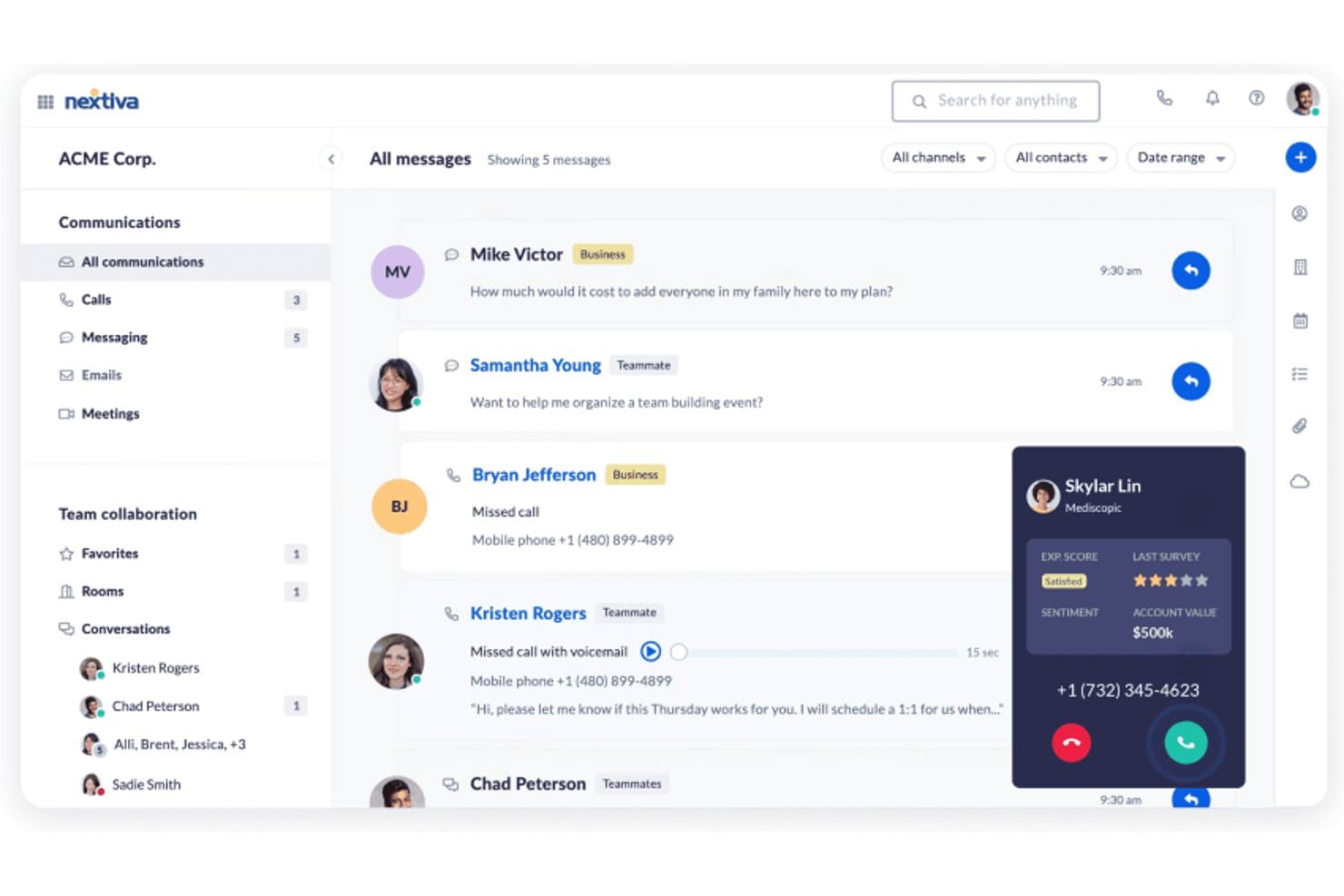
Nextiva offre una dashboard di comunicazione unificata che mostra messaggi, chiamate e collaborazione di team insieme a sentiment dei clienti in tempo reale e valore dell'account durante le chiamate attive. Nextiva è una piattaforma di comunicazione cloud e contact center costruita per team di medie e grandi dimensioni che desiderano sostituire strumenti VoIP isolati con un sistema unificato che combina voce, canali digitali, automazione AI e prezzi trasparenti.
Per chi è migliore Nextiva?
Nextiva si adatta a responsabili delle operazioni dei contact center e direttori CX di aziende nordamericane che necessitano di una piattaforma unica sia per la comunicazione interna che per il supporto ai clienti.
Perché Nextiva è una delle migliori alternative a Vonage
Ho scelto Nextiva tra le migliori perché la sua suite XBert AI trasforma le chiamate in entrata in appuntamenti prenotati senza la necessità di un agente dal vivo. L'AI Employee gestisce l'intera conversazione, verifica la disponibilità in tempo reale e conferma la prenotazione in autonomia. L'AI Receptionist funziona 24/7, quindi la pianificazione degli appuntamenti avviene a qualsiasi ora, inclusi notti e fine settimana, quando il tuo team è offline.
Caratteristiche principali di Nextiva
- Posta in arrivo omnicanale unificata: Instrada e gestisci l'interazione con i clienti da voce, SMS, chat, email e social in una singola vista.
- Smistamento chiamate basato sulle competenze: Assegna le chiamate in entrata all'agente più qualificato in base alle competenze e alla disponibilità.
- Dashboard analitica in tempo reale: Monitora in tempo reale le statistiche delle code, le prestazioni degli agenti e il sentiment su tutti i canali.
- Integrazioni CRM native: Sincronizza i dati di comunicazione con HubSpot, Salesforce, Zendesk e Microsoft Dynamics per flussi di lavoro degli agenti senza interruzioni.
Integrazioni Nextiva
Nextiva offre integrazioni native con Salesforce, HubSpot, Zendesk, Microsoft Dynamics, Zoho CRM, Oracle, ServiceNow, ConnectWise, Google Workspace, Microsoft Teams e altro ancora. È disponibile un'API per integrazioni personalizzate.
Pros and Cons
Pros:
- L'intelligenza artificiale gestisce la pianificazione senza un agente dal vivo
- Instradamento unificato di voce e canali digitali
- Gestione della forza lavoro e strumenti di QA integrati
Cons:
- La copertura internazionale è limitata al di fuori del Nord America
- Mancano API CPaaS programmabili per sviluppatori
 Ideale per la copertura globale dei numeri
- Prova gratuita di 14 giorni
- Da $25/utente/mese (fatturazione annuale)
Visit WebsiteCustomer Rating:4.4/5
La copertura globale dei numeri di CloudTalk aiuta i team a servire clienti ovunque CloudTalk è un sistema telefonico basato su cloud progettato per team che necessitano di funzionalità di chiamata affidabili e flessibili su più sedi. Se cerchi una soluzione che supporti operazioni globali e flussi di lavoro moderni per call center, CloudTalk merita un'attenta valutazione.
Per chi è ideale CloudTalk?
CloudTalk è adatto a team di assistenza clienti internazionali che necessitano di numeri di telefono locali in diversi paesi.
Perché CloudTalk è una valida alternativa a Vonage
Ho scelto CloudTalk perché il mio team ha bisogno di un accesso affidabile a numeri di telefono locali in decine di paesi. Con CloudTalk, posso attivare immediatamente numeri in oltre 160 paesi. Apprezzo la facilità con cui si possono gestire i numeri internazionali e instradare le chiamate in base alla regione. Questa copertura globale ci permette di supportare i clienti ovunque si trovino senza doverci affidare a diversi fornitori.
Funzionalità principali di CloudTalk
- Progettazione dei flussi di chiamata: Crea percorsi personalizzati di instradamento delle chiamate tramite un editor visuale.
- Dashboard di analisi in tempo reale: Monitora metriche delle chiamate in diretta e l'attività degli agenti.
- Registrazione delle chiamate: Registra automaticamente le chiamate in entrata e in uscita per assicurare la qualità.
- Estensione click-to-call per browser: Effettua chiamate direttamente dal CRM o dall'helpdesk con un solo click.
Integrazioni di CloudTalk
CloudTalk offre integrazioni native con Salesforce, HubSpot, Zendesk, Pipedrive, Zoho CRM, Freshdesk, Intercom, Microsoft Dynamics 365, Shopify e Slack. Si collega inoltre con Zapier e offre un'API per integrazioni personalizzate.
Pros and Cons
Pros:
- Avanzato builder di flussi di chiamata con editor visuale
- Coaching in tempo reale degli agenti e funzione call whispering
- Profonde integrazioni CRM per la registrazione delle chiamate
Cons:
- Nessuna opzione di videoconferenza integrata
- Funzionalità SMS e messaggistica limitate
 Migliore per la compatibilità con l’ecosistema AWS
- Prova gratuita di 6 mesi
- Da $0.038/minuto
Visit WebsiteCustomer Rating:4.5/5
La dashboard di Amazon Connect mostra il profilo del cliente, la chat e i dettagli del caso. Amazon Connect è una piattaforma per contact center basata su cloud e sviluppata su AWS, pensata per le aziende che desiderano gestire le interazioni con i clienti su larga scala. Si rivolge alle organizzazioni che cercano una tariffazione flessibile a consumo e un'integrazione senza soluzione di continuità con altri servizi AWS per comunicazioni unificate.
A chi è più adatto Amazon Connect?
Amazon Connect è ideale per aziende e team tecnologici che già utilizzano AWS e hanno bisogno di una soluzione scalabile per contact center basata su cloud.
Perché Amazon Connect è una valida alternativa a Vonage
Ho scelto Amazon Connect perché si integra direttamente nell’ecosistema AWS, il che significa che il mio team non deve gestire un’infrastruttura separata per le operazioni del contact center. Utilizzo Amazon Lex per creare flussi IVR conversazionali che gestiscono le richieste di routine senza agenti in tempo reale, e questi bot si connettono nativamente alle funzioni Lambda per la consultazione dei dati in tempo reale. Apprezzo anche che Amazon Connect si integri con Amazon S3 e Kinesis per l’archiviazione delle registrazioni delle chiamate e lo streaming dei dati di contatto in tempo reale—una funzione difficile da replicare senza creare pipeline personalizzate altrove. Per i team che già lavorano su AWS, questa connettività nativa elimina un importante livello di complessità di integrazione.
Funzionalità principali di Amazon Connect
- Strumento visivo drag-and-drop: Uno strumento visuale per costruire flussi IVR, esperienze chatbot e guide passo-passo per gli agenti su vari canali.
- Instradamento basato sulle competenze: Instrada i contatti agli agenti in base a disponibilità, competenze, sentiment del cliente e cronologia delle interazioni.
- Registrazione dello schermo: Registra lo schermo degli agenti insieme all’audio durante le interazioni con i clienti per il monitoraggio della qualità e la valutazione delle performance.
- Previsione dei contatti: Utilizza l’IA per generare previsioni a breve e lungo termine dei volumi di contatti a supporto della pianificazione dei turni e della capacità.
Integrazioni di Amazon Connect
Le integrazioni includono Salesforce, Zendesk, ServiceNow, Slack, Microsoft Teams e strumenti dell’ecosistema AWS.
Pros and Cons
Pros:
- Altamente programmabile
- Scalabilità globale
- Implementazione rapida
Cons:
- Costi AWS nascosti
- Priva di CRM integrato
Learn more about Amazon Connect: Ideale per l'integrazione con sistemi di ticketing
- Prova gratuita di 14 giorni + demo gratuita
- Da $19/agente/mese (fatturato annualmente)
Visit WebsiteCustomer Rating:4.4/5
Interfaccia di Zendesk Talk che mostra le schede per chat attiva, ticket e conversazioni. Zendesk Talk porta le funzionalità vocali direttamente nella piattaforma Zendesk, consentendo ai team di supporto di gestire le chiamate insieme a ticket e chat. È una soluzione ideale per le aziende che desiderano unificare le conversazioni con i clienti e semplificare i flussi di lavoro degli operatori all'interno di un unico spazio di lavoro.
A chi è più indicato Zendesk Talk?
Team di supporto di aziende di medie e grandi dimensioni che già utilizzano Zendesk e necessitano di una gestione integrata di voce e ticket.
Perché Zendesk Talk è una valida alternativa a Vonage
Ho scelto Zendesk Talk perché integra la voce direttamente nel sistema di ticketing Zendesk, così ogni chiamata genera automaticamente un ticket con trascrizione completa e registrazione allegata. Apprezzo il fatto che gli operatori non debbano mai cambiare strumento: contesto delle chiamate, storico dei clienti e attività di follow-up rimangono sempre nello stesso posto. Il mio team può usare il routing IVR per indirizzare le chiamate in base alla dimensione della coda e agli orari di attività, riducendo i tempi di attesa senza intervento manuale. Per i team che gestiscono già il supporto tramite Zendesk, questo livello di integrazione nativa è difficile da eguagliare altrove.
Funzionalità principali di Zendesk Talk
- Trasferimento assistito: Passa la chiamata a un altro operatore con un briefing privato prima di collegare il cliente.
- Blocco delle chiamate: Identifica e blocca numeri indesiderati o spam direttamente dalla piattaforma.
- Trascrizione della segreteria: Converte i messaggi in segreteria in testo e li allega al ticket corrispondente.
- Dashboard in tempo reale: Monitora in tempo reale le code di chiamata, la disponibilità degli operatori e i tempi di attesa da una sola schermata.
Integrazioni Zendesk Talk
Le integrazioni includono Slack, Shopify, Pipedrive, Trustpilot, Harvest, ChannelReply, Sprout Social, Azure DevOps, Maestro QA e SweetHawk Suite.
Pros and Cons
Pros:
- Ticketing unificato
- Facile per gli operatori
- Instradamento semplice
Cons:
- Manca di funzionalità PBX avanzate
- Tariffe a consumo elevate
Learn more about Zendesk Talk: 5Ideale per interazioni con i clienti incentrate sul mobile
UJET
- Demo gratuita disponibile
- A partire da $65/utente/mese
Visit WebsiteCustomer Rating:4.6/5
Interfaccia chat mobile di UJET con messaggistica, coda e opzioni di supporto. UJET è una piattaforma cloud per contact center progettata per le aziende che desiderano unificare il supporto digitale e vocale in un’unica soluzione, ottimizzata per i dispositivi mobili. È particolarmente indicata per i team che necessitano di automazione avanzata, instradamento basato su AI e integrazioni profonde con CRM per modernizzare le interazioni con i clienti.
Per chi è ideale UJET?
UJET è adatto a contact center aziendali e team di assistenza in settori come vendita al dettaglio, finanza e sanità che richiedono un coinvolgimento sicuro e omnicanale dei clienti.
Perché UJET è una valida alternativa a Vonage
Ho scelto UJET per il suo approccio mobile-first, che permette al mio team di gestire le interazioni di supporto direttamente all’interno di un’app mobile personalizzata, senza necessità di interfacce di terze parti. Apprezzo molto come l’assistenza direttamente nell’app consenta ai clienti di condividere foto, video e screenshot durante la conversazione, fornendo agli operatori il contesto necessario senza lunghi scambi. In pratica, ciò significa che il mio team può risolvere i problemi più rapidamente vedendo esattamente ciò che vede il cliente. Per i contact center che vogliono andare oltre il semplice VoIP, l’instradamento basato su AI di UJET e la postazione operatore omnicanale rappresentano un vero salto di qualità.
Funzionalità principali di UJET
- Analisi del sentiment in tempo reale: Rileva lo stato d’animo del cliente durante le chiamate per aiutare gli operatori a modulare l’approccio in tempo reale.
- Agente virtuale: Gestisce automaticamente le richieste di routine dei clienti utilizzando flussi self-service basati su AI prima di passare a un operatore umano.
- Postazione operatore omnicanale: Unifica le interazioni tramite voce, chat, SMS ed e-mail in un unico spazio di lavoro per l’operatore.
- CRM screen pop: Visualizza automaticamente i dati rilevanti del cliente dai CRM collegati all’inizio dell’interazione.
Integrazioni UJET
Le integrazioni includono Salesforce, Zendesk, Kustomer, ServiceNow, Microsoft Dynamics e Shopify.
Pros and Cons
Pros:
- Nessun dato utente memorizzato
- Menu visuali in-app
- Architettura moderna
Cons:
- Curva di apprendimento
- Costoso per le piccole organizzazioni
Learn more about UJET: Ideale per funzionalità di composizione in uscita
- Demo gratuita
- Da $119/utente/mese
Visit WebsiteCustomer Rating:4.1/5
La dashboard di Five9 mostra controlli chiamata in tempo reale, trascrizioni e suggerimenti per gli agenti. Five9 è una piattaforma di contact center basata su cloud progettata per le aziende che necessitano di instradamento avanzato delle chiamate, composizione predittiva e analisi in tempo reale. È una soluzione valida per team di vendita, centri di supporto e organizzazioni che vogliono ottimizzare le comunicazioni in entrata e in uscita.
Per chi è ideale Five9?
Five9 è particolarmente adatto per team di vendita o supporto di medie e grandi dimensioni che necessitano di funzionalità avanzate per la composizione in uscita e la gestione delle chiamate.
Perché Five9 è una buona alternativa a Vonage
Le capacità di composizione in uscita di Five9 vanno ben oltre un semplice compositore automatico. L'ho scelto perché offre quattro modalità di composizione distinte—predittiva, power, progressiva e anteprima—così il mio team può adattare l'approccio al tipo di campagna invece di forzare tutte le attività in un unico flusso di lavoro. Per le campagne di vendita ad alto volume, uso il compositore predittivo per massimizzare il tempo di conversazione degli operatori filtrando automaticamente le chiamate senza risposta, le segreterie telefoniche e i segnali di occupato. Apprezzo molto anche gli strumenti integrati per la conformità: la validazione Certified Caller (STIR/SHAKEN) di Five9 e la gestione delle liste DNC significano che il mio team non deve aggiungere strumenti di terze parti per conformarsi alle normative FCC sulle chiamate in uscita.
Funzionalità principali di Five9
- Assistenza operatore: uno strumento AI in tempo reale che suggerisce informazioni rilevanti e risposte agli agenti durante le interazioni con i clienti.
- Analisi delle interazioni: uno strumento di analisi vocale e testuale che esamina le conversazioni registrate per identificare tendenze, sentimenti e lacune di conformità.
- Gestione del personale: uno strumento di pianificazione e previsione che aiuta i supervisori ad allineare il livello di personale alle previsioni di volume dei contatti.
- Agente Virtuale Intelligente (IVA): uno strumento di self-service guidato da AI che gestisce richieste di routine in entrata tramite canali vocali e digitali senza l'intervento di un operatore.
Integrazioni di Five9
Le integrazioni includono Salesforce, ServiceNow, Microsoft Teams, Oracle, Zendesk, Zoom Phone, Microsoft Dynamics 365, NetSuite, Slack e Google Workspace.
Pros and Cons
Pros:
- Plug-in CRM avanzati
- Tecnologia vocale affidabile
- Ottimi strumenti per il personale
Cons:
- Avvio più lento
- App mobile poco intuitiva
Learn more about Five9: Ideale per la rapida attivazione di numeri
- Prova gratuita di 14 giorni + demo gratuita
- Da $29/utente/mese (fatturazione annuale)
Visit WebsiteCustomer Rating:4.1/5
Dashboard di JustCall che mostra analisi delle chiamate, attività e metriche sulle prestazioni. JustCall è una piattaforma VoIP basata su cloud progettata per team di vendita e assistenza che necessitano di un accesso rapido a numeri di telefono globali e funzionalità avanzate di chiamata. È una soluzione ideale per le aziende che cercano integrazione SMS, diverse opzioni di composizione e una profonda connettività con i CRM per gestire un alto volume di chiamate.
Per chi è ideale JustCall?
Team di vendita e assistenza in piccole e medie imprese che necessitano di chiamate globali, SMS e integrazioni CRM per le comunicazioni con i clienti.
Perché JustCall è una valida alternativa a Vonage
Ho scelto JustCall principalmente per la rapidità con cui si può attivare un numero. Diversamente da Vonage, che può richiedere tempi di attivazione più lunghi e gestione amministrativa, JustCall consente di attivare numeri locali o verdi in oltre 70 paesi in pochi secondi—senza attese né rimpalli con l'assistenza. Apprezzo molto anche la funzione di copertura internazionale: basta selezionare paese e prefisso per essere subito operativi con chiamate in entrata e uscita. Per i team che stanno entrando in nuovi mercati o hanno bisogno di creare linee regionali rapidamente, questo accesso immediato è davvero difficile da eguagliare.
Funzionalità principali di JustCall
- Compositore per le vendite: Offre opzioni di composizione automatica, predittiva, power e parallela per automatizzare le campagne di chiamate in uscita.
- Monitoraggio chiamate in tempo reale: Ascolta le chiamate attive in tempo reale, suggerisci agli agenti durante la chiamata, oppure entra direttamente nella conversazione.
- Flussi di lavoro SMS: Invia automaticamente messaggi di testo in base a condizioni specifiche, come promemoria per appuntamenti o sequenze di follow-up.
- Valutazione delle chiamate: Valuta automaticamente o manualmente le chiamate per analizzare le performance degli agenti e individuare opportunità di coaching.
Integrazioni JustCall
Le integrazioni includono Salesforce, HubSpot, Pipedrive, ActiveCampaign, Slack, Intercom, Help Scout, Zendesk, Zoho CRM e monday.com.
Pros and Cons
Pros:
- Molto economico
- Integrazioni semplici
- Ottimo per piccole operazioni
Cons:
- App mobile scadente
- Assistenza tecnica lenta
 Ideale per customer journey potenziati dall'intelligenza artificiale
- Demo gratuita disponibile
- Da $75/utente/mese (fatturazione annuale)

La dashboard di Genesys Cloud CX mostra la gestione delle chiamate in tempo reale e i dettagli delle interazioni. Genesys Cloud CX è una piattaforma per contact center basata su cloud pensata per le organizzazioni che desiderano unificare voce, chat e canali digitali in un unico luogo. Si rivolge ai team che cercano automazione avanzata, instradamento omnicanale e analisi in tempo reale per migliorare il coinvolgimento dei clienti.
Per chi è più indicato Genesys Cloud CX?
Grandi imprese e contact center globali che devono gestire interazioni complesse e ad alto volume con i clienti attraverso molteplici canali.
Perché Genesys Cloud CX è una valida alternativa a Vonage
Ciò che mi colpisce di Genesys Cloud CX come alternativa a Vonage è quanto profondamente l'IA sia integrata nella piattaforma, piuttosto che essere un semplice componente aggiuntivo. Utilizzo il Predictive Routing per abbinare automaticamente i clienti all'agente più adatto alle loro esigenze—non solo in base alla disponibilità, ma ottimizzando per un KPI specifico come la risoluzione al primo contatto. Questo è un livello di intelligenza nell'instradamento che Vonage semplicemente non offre.
Mi affido anche alla funzione Agent Copilot, che mostra articoli di conoscenza pertinenti in tempo reale durante le chiamate dal vivo e poi genera automaticamente un riepilogo post-chiamata utilizzando l'IA generativa—riducendo il tempo che i miei agenti impiegano nelle attività di chiusura. Per i team che gestiscono volumi elevati di interazioni tra voce e canali digitali, l'AI Studio nativo di Genesys Cloud CX consente al mio team di creare e regolare flussi basati su IA senza bisogno di un team di data science per ogni cambiamento.
Funzionalità principali di Genesys Cloud CX
- Instradamento omnicanale: indirizza le interazioni dei clienti tra voce, chat, email e social da una singola coda unificata.
- Gestione del coinvolgimento della forza lavoro: include strumenti di pianificazione, gestione della qualità e monitoraggio delle prestazioni incorporati direttamente nella piattaforma.
- Gestione del percorso cliente: collega i dati attraverso i punti di contatto per tracciare e orchestrare in tempo reale i percorsi cliente end-to-end.
- Marketplace AppFoundry®: offre accesso ad app di terze parti pre-integrate che ampliano le funzionalità native della piattaforma.
Integrazioni di Genesys Cloud CX
Le integrazioni includono Salesforce, Microsoft Dynamics 365, Zendesk, ServiceNow, Adobe e AWS.
Pros and Cons
Pros:
- Funzionalità vocali avanzate
- Vero omnicanale
- Analisi avanzate
Cons:
- Implementazione più lunga
- Eccessivo per le PMI
Learn more about Genesys Cloud CX: Ideale per l’automazione specifica del settore
- Demo gratuita disponibile
- From $85/user/month

La dashboard di Talkdesk mostra il profilo cliente, i controlli di chiamata e i dettagli della chiamata in tempo reale. Talkdesk offre una piattaforma per contact center basata su cloud, progettata per organizzazioni che necessitano di automazione avanzata e integrazione con flussi di lavoro specifici del settore. È particolarmente indicata per aziende in settori regolamentati o per chi vuole personalizzare le comunicazioni con i clienti tramite funzionalità specializzate.
Per chi è ideale Talkdesk?
Talkdesk è adatta a medie e grandi imprese nei settori sanitario, finanziario, retail e in altri ambiti regolamentati che richiedono automazione del contact center personalizzabile.
Perché Talkdesk è una valida alternativa a Vonage
Quello che mi ha colpito di Talkdesk sono i suoi Talkdesk Industry Experience Clouds™, che vanno ben oltre le classiche funzionalità di un contact center. Si tratta di integrazioni preconfigurate con sistemi aziendali centrali specifici per settori come sanità, servizi finanziari e retail—così il mio team non deve partire da zero per costruire i flussi di lavoro. Ad esempio, in un ambiente sanitario, Talkdesk si collega direttamente ai sistemi di gestione dei pazienti per supportare casi d’uso come la prenotazione self-service degli appuntamenti tramite Talkdesk Autopilot. Apprezzo anche il livello di orchestrazione multi-agente, che permette agli agenti AI di collaborare in tempo reale tra diversi canali e sistemi invece di operare separatamente. Per i team che lavorano in settori regolamentati, la copertura in materia di conformità della piattaforma—HIPAA, PCI-DSS, SOC2 Type II e GDPR—significa che non devo aggiungere strumenti esterni per rispettare questi requisiti.
Funzionalità principali di Talkdesk
- Intercettazione delle chiamate: consente ai supervisori di unirsi alle chiamate in tempo reale per parlare direttamente sia con l’agente che con il cliente.
- Chiamate con presenza locale: seleziona automaticamente un numero in uscita corrispondente all’area oppure al prefisso del destinatario per aumentare il tasso di risposta.
- Voice-to-case: crea e indirizza automaticamente ticket di supporto a partire da interazioni telefoniche che richiedono un follow-up.
- Flow builder senza codice: permette agli amministratori di progettare e modificare il routing delle chiamate e i flussi IVR tramite un’interfaccia visuale a clic, senza bisogno di sviluppatori.
Integrazioni di Talkdesk
Le integrazioni includono Salesforce, Zendesk, Microsoft Teams, Slack, ServiceNow e Shopify.
Pros and Cons
Pros:
- Automazione avanzata
- Template verticali
- SLA di uptime al 100%
Cons:
- Accesso API limitato
- Funzionalità aggiuntive a pagamento
Learn more about Talkdesk: Ideale per analytics omnicanale
- Demo gratuita disponibile
- Prezzo su richiesta

La dashboard di CXone mostra livelli di servizio, statistiche agenti e metriche delle code. CXone Mpower è una piattaforma cloud per contact center progettata per le organizzazioni che necessitano di una gestione avanzata dei canali vocali e digitali. È ideale per i team che cercano desktop unificati per gli agenti, instradamento alimentato da IA e analisi approfondite per migliorare le interazioni con i clienti e l'efficienza operativa.
Per chi è più adatto CXone Mpower?
CXone Mpower è adatto a medie e grandi imprese con operazioni di servizio clienti complesse che richiedono una gestione unificata di voce e canali digitali.
Perché CXone Mpower è una valida alternativa a Vonage
Ho scelto CXone Mpower perché la sua analisi omnicanale va ben oltre i report di base: la piattaforma cattura intento, sentiment ed esiti di ogni interazione vocale e digitale, restituendo queste informazioni in tempo reale. Ciò che la rende particolarmente utile è Interaction Analytics, che analizza il 100% delle interazioni invece di un semplice campione, così il mio team non prende decisioni su dati incompleti. Apprezzo anche come CXone AI Routing utilizzi quegli stessi dati di interazione per prendere decisioni di instradamento predittivo – non solo abbinamenti basati su competenze, ma previsioni su quale agente abbia più probabilità di ottenere il miglior CSAT o risolvere il problema di uno specifico cliente.
Caratteristiche chiave di CXone Mpower
- Instradamento omnicanale: Instrada i contatti dei clienti tra voce e canali digitali verso l'agente giusto in base a competenze, disponibilità e contesto del cliente.
- Gestione della forza lavoro: Utilizza previsioni e pianificazioni basate su IA per allineare il personale previsto ai volumi di contatto sia nel breve che nel lungo termine.
- Gestione della qualità: Valuta il 100% delle interazioni con i clienti tramite IA per individuare opportunità di coaching e criticità di conformità.
- Coinvolgimento outbound: Automatizza le attività di outreach proattivo, sia su voce che su canali digitali, utilizzando compositori predittivi e campagne gestite tramite IA.
Integrazioni di CXone Mpower
Le integrazioni includono Salesforce, Microsoft Dynamics, Zendesk, ServiceNow, Oracle e Bullhorn.
Pros and Cons
Pros:
- Alta affidabilità
- Potenziate capacità di AI
- Gestisce grandi volumi
Cons:
- Aggiornamenti interfaccia lenti
- Contratti complessi
Learn more about CXone Mpower:
Altre alternative a Vonage
Ecco alcune ulteriori alternative a Vonage che non sono state incluse nel mio elenco, ma che vale comunque la pena prendere in considerazione:
- 11Webex Contact CenterIdeale per il supporto alla forza lavoro ibrida
- 12AircallIdeale per integrazioni CRM rapide
- 13OomaIdeale per i sistemi telefonici delle piccole imprese
- 143CXIdeale con opzioni di distribuzione on-premises
Come valuto le alternative a Vonage
Divido la mia valutazione in due livelli: la base che ogni piattaforma deve garantire—canali omnicanale, API per sviluppatori, instradamento IVR—e i fattori distintivi più importanti per i team CX e dei centri di contatto.
Funzionalità essenziali (requisiti fondamentali per questo elenco)
Quando seleziono gli strumenti per il mio elenco, assegno a ciascuno un punteggio su una scala da 0 (non offre la funzionalità) a 5 (eccelle in quest'area) per ogni funzionalità essenziale indicata di seguito. Poi converto il punteggio totale dello strumento in una percentuale. Ogni strumento deve raggiungere un punteggio totale minimo del 75% per essere preso in considerazione.
- Canali di comunicazione omnicanale: verifico se la piattaforma unifica voce, SMS, chat, e-mail e messaggistica sui social, così che gli agenti possano gestire un cliente che passa da WhatsApp a una telefonata senza perdere il contesto.
- API e SDK programmabili: la documentazione per sviluppatori, gli ambienti sandbox e la copertura dei linguaggi degli SDK sono tutti aspetti importanti, soprattutto per i team che integrano funzionalità di chiamata con un clic o di messaggistica nelle app nei propri prodotti.
- Strumenti per centri di contatto cloud: valuto se la piattaforma include strumenti per la creazione di IVR, ACD, instradamento basato sulle competenze e gestione delle code che un team di supporto di medie dimensioni utilizzerebbe effettivamente ogni giorno.
- Integrazioni con CRM e servizi di assistenza: cerco connettori nativi per piattaforme come Salesforce, HubSpot e Zendesk che sincronizzino bidirezionalmente la cronologia delle interazioni e i dati dei clienti, non semplici finestre a comparsa CTI superficiali.
- Funzionalità di IA e automazione: valuto bot di chat, bot vocali, analisi del sentiment e funzionalità di assistenza agli agenti, prestando particolare attenzione a quanto bene l'IA conversazionale gestisca richieste di routine come lo stato di un ordine o la programmazione di un appuntamento.
- Copertura globale per voce e messaggistica: cerco la possibilità di fornire numeri in più Paesi, l'ID chiamante locale e una distribuzione affidabile degli SMS tra le diverse regioni, soprattutto per i team che assistono clienti in più aree geografiche.
Una volta ottenuto un elenco di strumenti che soddisfano questi criteri, valuto ciò che distingue ciascuna piattaforma.
Fattori distintivi (ciò che differenzia i fornitori)
Ecco come confronto i diversi fornitori:
Funzionalità distintive
Uno studio di IA conversazionale può far risparmiare ai team CX molto tempo di configurazione: cerco strumenti per la creazione di bot con funzionalità di trascinamento che consentano agli agenti non tecnici di progettare flussi IVR e automazioni per le chat senza dover aprire richieste agli sviluppatori. Anche i pannelli di analisi in tempo reale sono altrettanto importanti, soprattutto per i supervisori che hanno bisogno di una visibilità immediata sui tempi di attesa nelle code e sulla disponibilità degli agenti durante i picchi di volume. Valuto inoltre strumenti per il coinvolgimento della forza lavoro, come la valutazione integrata della qualità e il monitoraggio del rispetto degli orari, che aiutano i responsabili operativi a formare gli agenti e a pianificare il personale da un'unica piattaforma.
Oltre le funzionalità
Le certificazioni di conformità come SOC 2, HIPAA e la conformità al GDPR sono importanti quando il centro di contatto gestisce dati sensibili dei clienti: verifico se i fornitori offrono opzioni di residenza dei dati e registrazioni delle chiamate crittografate. La scalabilità è un altro fattore fondamentale, in particolare gli SLA di disponibilità e il comportamento della piattaforma durante i picchi stagionali, come gli aumenti delle richieste di assistenza durante le festività. Valuto anche la trasparenza dei prezzi, confrontando i modelli per postazione, al minuto e a consumo per capire come cambiano i costi con la crescita del team e del volume delle chiamate.
Perché cercare un'alternativa a Vonage?
Sebbene Vonage sia una buona scelta tra i software VoIP, esistono diversi motivi per cui alcuni utenti cercano soluzioni alternative. Potresti cercare un'alternativa a Vonage tutto-in-uno perché…
- Subisci troppe interruzioni delle chiamate e hai bisogno di migliori garanzie di disponibilità
- Hai bisogno di un'esperienza utente più fluida e di una maggiore facilità d'uso
- Vuoi tariffe migliori per le chiamate internazionali per supportare la tua presenza globale
- Hai bisogno di integrazioni più strette tra softphone e telefoni fissi tradizionali
- Hai bisogno di certificazioni di conformità specifiche per il settore
- Vuoi controlli più dettagliati sull'instradamento delle chiamate
Se ti riconosci in una di queste situazioni, sei nel posto giusto. Il mio elenco contiene diverse opzioni di software VoIP più adatte ai team che affrontano queste difficoltà con Vonage e cercano soluzioni alternative.
Caratteristiche principali di Vonage
Ecco una panoramica delle funzionalità offerte da Vonage, per aiutarti a confrontare ciò che mettono a disposizione le soluzioni alternative (per ulteriori dettagli, consulta le FAQ ufficiali per valutare la curva di apprendimento della piattaforma):
- Instradamento delle chiamate: indirizza le chiamate in arrivo alla persona o al reparto corretto utilizzando regole personalizzabili, riducendo i tempi di attesa e migliorando la soddisfazione dei clienti.
- Centralinista virtuale: risponde e instrada automaticamente le chiamate con menu vocali interattivi, aiutando le aziende a gestire elevati volumi di chiamate senza personale aggiuntivo.
- Segreteria telefonica via e-mail: invia i messaggi della segreteria telefonica come file audio nella casella di posta elettronica, facilitando l'accesso e la risposta ai messaggi da qualsiasi luogo.
- Registrazione delle chiamate: registra le chiamate in entrata e in uscita per la formazione, la conformità normativa e il controllo della qualità, con archiviazione sicura e riproduzione semplificata.
- App mobile: consente agli utenti di effettuare e ricevere chiamate aziendali, controllare la segreteria telefonica e gestire le impostazioni direttamente dai propri dispositivi mobili, supportando il lavoro da remoto e ibrido.
- Messaggistica di gruppo: offre messaggistica istantanea e chat di gruppo all'interno della piattaforma, permettendo ai team di comunicare e collaborare senza dover passare da uno strumento all'altro.
- Videoconferenze: supporta riunioni video in HD con condivisione dello schermo e chat, consentendo la collaborazione da remoto e le interazioni virtuali con i clienti.
- Integrazioni CRM: si collega ai più diffusi sistemi CRM, come Salesforce e HubSpot, consentendo la registrazione automatica delle chiamate e l'accesso ai dati dei clienti durante le chiamate.
- Analisi e report: offre dashboard e report dettagliati sull'attività delle chiamate, sulle prestazioni degli operatori e sulle interazioni con i clienti, per supportare le decisioni aziendali.
- Accesso API: consente agli sviluppatori di creare integrazioni e flussi di lavoro personalizzati, estendendo le funzionalità di Vonage per soddisfare esigenze aziendali specifiche.