

10 migliori software per l’assistenza clienti del 2026

10 Elenco dei migliori software di assistenza clienti


Il software di assistenza clienti aiuta il tuo team a gestire grandi volumi di richieste, mantenere la coerenza tra i diversi canali e chiudere i ticket senza perdere il tocco umano. Queste piattaforme sono progettate per ottimizzare i flussi di lavoro, automatizzare le attività ripetitive e fornire agli operatori il contesto necessario per offrire un supporto più veloce e personalizzato.
Ho valutato questi strumenti in base a usabilità, funzionalità di automazione, integrazioni, scalabilità e reportistica. Questa guida suddivide i migliori software di assistenza clienti per dimensione del team e modelli di supporto, così puoi scegliere una piattaforma che sia in linea con i tuoi obiettivi di customer experience e ti aiuti a trasformare il modo in cui gestisci le interazioni con i clienti.
Perché fidarsi dei nostri consigli sui software
Il nostro team testa e recensisce software dal 2012. In quanto leader CX noi stessi, sappiamo quanto sia difficile — e importante — scegliere il software giusto.
Per questa guida, abbiamo valutato gli strumenti attraverso test pratici e ricerche indipendenti, assegnando un punteggio agli strumenti in base ai nostri criteri di selezione.
Le nostre recensioni riflettono il nostro giudizio editoriale umano, non un discorso di vendita.
Migliori software di assistenza clienti: tabella comparativa dei prezzi
Questa tabella comparativa riassume i dettagli di base di ciascuna delle mie scelte di software di assistenza clienti. Visualizza i dettagli dei prezzi e la disponibilità di prove gratuite o demo fianco a fianco, per aiutarti a trovare il software migliore per il tuo budget e le esigenze della tua azienda.
| Tool | Best For | Trial Info | Price | ||
|---|---|---|---|---|---|
| 1 | Ideale per la collaborazione con stakeholder esterni | Prova gratuita di 14 giorni + demo gratuita disponibile | Da $19/agente/mese (fatturazione annuale) | Website | |
| 2 | Ideale per reportistica e analisi in tempo reale | Demo gratuita disponibile | Da $30/utente/mese (fatturato annualmente) | Website | |
| 3 | Il miglior software di assistenza clienti per le aziende | Prova gratuita di 15 giorni + demo gratuita disponibile | A partire da $7/utente/mese (fatturato annualmente) | Website | |
| 4 | Ideale per un supporto umano e personalizzato | Prova gratuita disponibile | A partire da $25/utente/mese (fatturazione annuale) | Website | |
| 5 | Ideale per risposte redatte dall'intero team | Prova gratuita di 30 giorni disponibile | A partire da 14 $/utente/mese (con fatturazione annuale) | Website | |
| 6 | Ideale per supporto clienti AI multilingue | Prova gratuita di 7 giorni + piano gratuito disponibile | Da $24,17/mese (fatturato annualmente) | Website | |
| 7 | Ideale per la sua interfaccia facile da usare e personalizzabile | Prova gratuita di 15 giorni disponibile | Da $7/operatore/mese | Website | |
| 8 | Ideale per creare esperienze personalizzate con l’IA | Prova gratuita di 30 giorni disponibile | A partire da $15/utente/mese | Website | |
| 9 | Ideale per l'analisi delle conversazioni | Piano gratuito disponibile | Da $29/mese (fatturato annualmente) | Website | |
| 10 | Ideale per aziende SaaS | Demo gratuita disponibile | Prezzo su richiesta | Website |

Panoramica dei 20 migliori software per il servizio clienti
Di seguito troverai una breve descrizione delle mie scelte migliori per il software di assistenza clienti.

Ideale per la collaborazione con stakeholder esterni
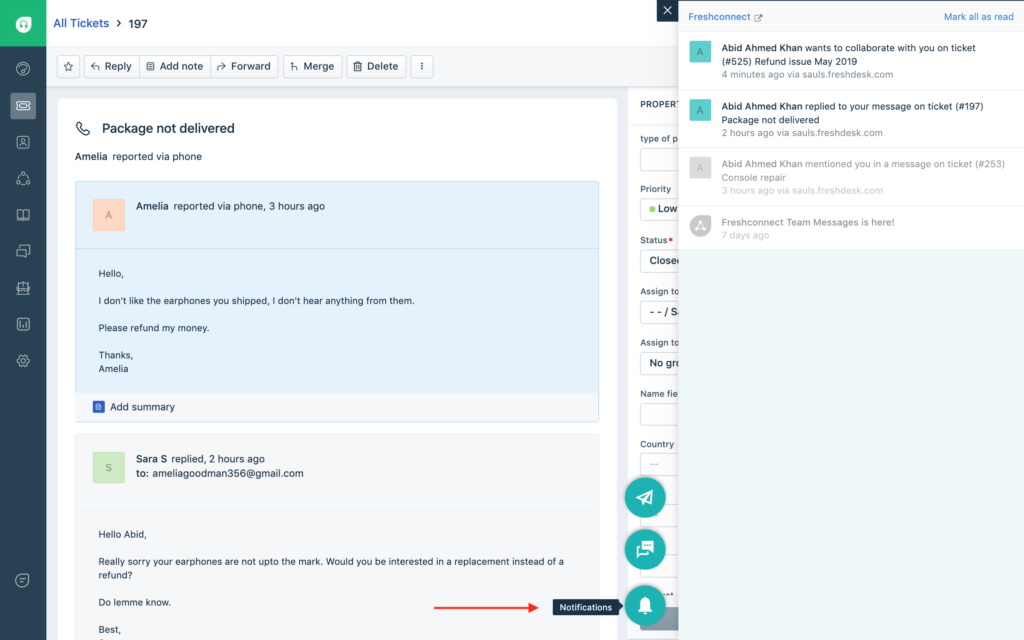
Freshdesk (un prodotto di Freshworks Inc.) è una piattaforma di assistenza clienti progettata per supportare i team che gestiscono le interazioni con i clienti su diverse scale. Combina gestione strutturata dei ticket, automazione, supporto multilingue e analisi per aiutare i team a monitorare l'attività e mantenere coerenza tra regioni e canali.
Perché ho scelto Freshdesk
Ho scelto Freshdesk per il modo in cui favorisce la collaborazione con soggetti esterni. La piattaforma include un ruolo Collaboratore che consente a partner o fornitori di partecipare alle conversazioni sui ticket senza avere accesso completo come agenti. Questa configurazione aiuta a condividere il contesto e gli aggiornamenti mantenendo sotto controllo i flussi di lavoro interni. L'integrazione con strumenti come Microsoft Teams consente inoltre che aggiornamenti e discussioni sui ticket rimangano all'interno degli strumenti di collaborazione già utilizzati dal team.
Funzionalità principali di Freshdesk
Oltre a facilitare la collaborazione con stakeholder esterni, Freshdesk offre diverse altre funzionalità chiave a supporto delle operazioni quotidiane di assistenza clienti:
- Freddy AI: Strumenti di intelligenza artificiale integrati assistono in attività come la stesura delle risposte e la gestione dei ticket, aiutando i team a ridurre le attività manuali nei flussi di lavoro di supporto esistenti.
- Strumenti self-service: Una knowledge base multilingue permette ai clienti di cercare autonomamente le risposte, mentre i forum della community e la gestione delle versioni degli articoli aiutano i team a mantenere le informazioni accurate e aggiornate.
- Assegnazione ticket basata sulle competenze: Instrada le richieste in arrivo agli agenti secondo competenze predefinite, aiutando i team ad abbinare i problemi alle competenze più pertinenti.
- Funzionalità di sicurezza: Include controllo degli accessi basato sui ruoli, Single Sign On, autenticazione JWT e whitelist degli indirizzi IP per gestire l'accesso e proteggere i dati dell'assistenza clienti.
Integrazioni di Freshdesk
Le integrazioni includono Shopify, Slack, Microsoft Teams, Playvox, Google Calendar, Trello, Jira, HubSpot, Salesforce e Mailchimp.
Pros and Cons
Pros:
- Processo efficace di creazione e invio dei ticket
- Il sistema unificato di gestione dei ticket migliora il monitoraggio e i tempi di risposta
- L'automazione basata su AI aumenta l'efficienza e riduce il lavoro manuale
Cons:
- L'app mobile può risultare ingombrante e manca di un design intuitivo
- Efficacia limitata per organizzazioni di grandi dimensioni che non fanno uso dell'AI
New Product Updates from Freshdesk

Freshdesk Adds Voice AI Agents in Freshcaller
Freshdesk introduces Voice AI Agents available through Freshcaller Marketplace apps to handle routine calls and reduce queues. This feature enables automated call handling with real-time, conversational support. For more information, visit Freshdesk's official site.

Ideale per reportistica e analisi in tempo reale

Per le aziende che desiderano potenziare le proprie capacità di assistenza clienti, RingCentral offre una soluzione versatile pensata per migliorare la comunicazione e la soddisfazione. Questo software è ideale per organizzazioni di diversi settori che necessitano di integrare opzioni di self-service e assistenza dal vivo per soddisfare le esigenze eterogenee dei clienti. Integrando strumenti basati sull'intelligenza artificiale e la connessione multi-canale, RingCentral affronta le sfide nella gestione delle interazioni con i clienti, consentendo al tuo team di offrire un servizio personalizzato ed efficiente.
Perché ho scelto RingCentral
Ho scelto RingCentral per le sue eccezionali funzionalità di reportistica in tempo reale e analitica, fondamentali per qualsiasi organizzazione che desideri ottimizzare il supporto clienti. I dashboard personalizzabili in tempo reale permettono di monitorare le code e le prestazioni degli agenti, fornendo dati utili per una gestione efficiente dello staff e dei livelli di servizio (SLA). Inoltre, la funzione di intelligenza conversazionale analizza le interazioni per individuare tendenze e aumentare la soddisfazione del cliente. Grazie alla reportistica completa, con oltre 200 report predefiniti, RingCentral fornisce al tuo team gli strumenti necessari a prendere decisioni consapevoli e basate sui dati per migliorare l'erogazione del servizio.
Caratteristiche principali di RingCentral
Oltre alle capacità di reportistica e analisi in tempo reale, RingCentral propone una varietà di funzioni pensate per soddisfare le esigenze dei team di assistenza clienti.
- Strumenti di self-service: Offri ai clienti la possibilità di risolvere autonomamente i loro problemi tramite sistemi automatizzati come chatbot e risposta vocale interattiva (IVR), aumentando l'efficienza e riducendo la necessità di personale.
- Chat dal vivo: Favorisci la comunicazione in tempo reale tra i tuoi agenti e i clienti, garantendo assistenza immediata e un tocco personale a ogni interazione.
- Instradamento basato sulle competenze: Invia automaticamente le richieste dei clienti agli agenti più qualificati, assicurando che i problemi vengano gestiti dal personale con le competenze più adeguate.
- Integrazione con CRM: Collega in modo fluido i sistemi di gestione relazioni con i clienti già esistenti per accedere a profili e cronologie, consentendo un servizio più personalizzato e una risoluzione più rapida delle problematiche.
Integrazioni RingCentral
Le integrazioni includono Salesforce, Microsoft Teams, Google Workspace, HubSpot, Zendesk, Slack, ServiceNow, Box, Okta e DocuSign.
Pros and Cons
Pros:
- Instradamento chiamate efficace che migliora tempi di risposta ed efficienza
- Analisi avanzata che fornisce indicazioni concrete per le decisioni
- Elevata affidabilità con disponibilità del 99,999% che assicura continuità del servizio
Cons:
- La configurazione iniziale presenta una curva di apprendimento ripida senza una guida
- Necessarie più opzioni predefinite per rispondere a esigenze diverse

Il miglior software di assistenza clienti per le aziende
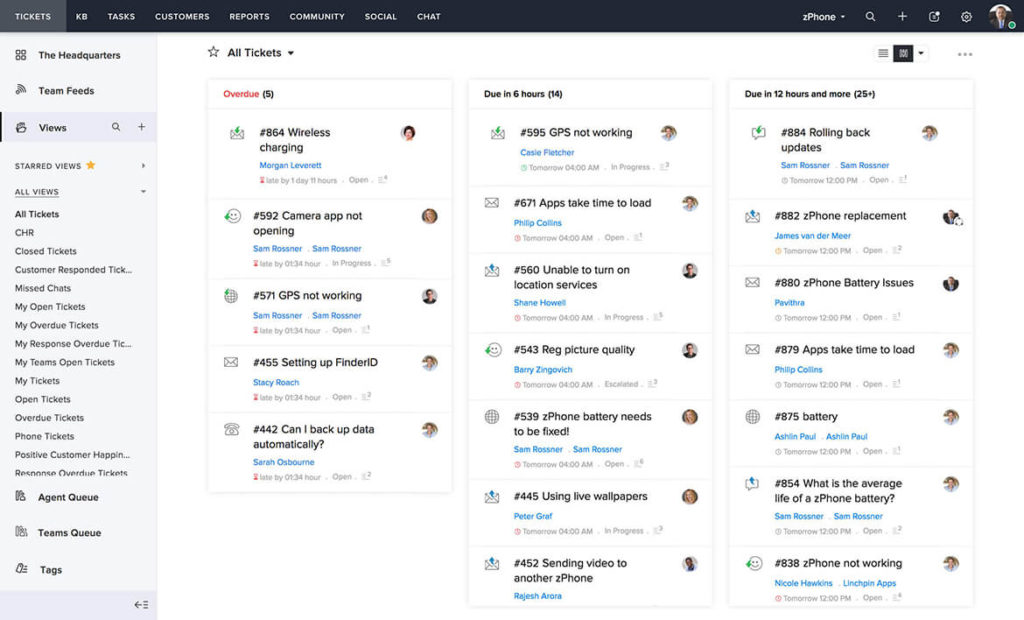
Per chi cerca una soluzione di assistenza clienti che si integri con i sistemi esistenti mantenendo la privacy dei dati come priorità, Zoho Desk merita considerazione. Questo strumento si rivolge ad aziende di tutte le dimensioni, offrendo funzionalità come il supporto omnicanale e l'automazione per migliorare le operazioni di servizio. Grazie a un'interfaccia intuitiva e a un forte accento sulla sicurezza, Zoho Desk consente al tuo team di offrire un supporto eccezionale e di costruire relazioni durature con i clienti.
Perché ho scelto Zoho Desk
Ho scelto Zoho Desk come il miglior software di assistenza clienti per le aziende perché offre una combinazione di funzionalità innovative pensate per le esigenze delle grandi imprese. Il suo supporto omnicanale consente al tuo team di gestire oltre 10 canali di comunicazione da un'unica interfaccia, garantendo interazioni fluide con i clienti tramite email, telefono, social media e chat dal vivo. L'integrazione di Zia AI, un assistente intelligente, migliora il supporto assistendo gli operatori nella stesura delle risposte e offrendo assistenza clienti 24/7. Inoltre, le sue capacità di automazione semplificano processi come l'assegnazione dei ticket e l'automazione dei flussi di lavoro, permettendo al tuo team di concentrarsi sulle attività più importanti.
Funzionalità principali di Zoho Desk
Oltre alle sue capacità pensate per le grandi aziende, Zoho Desk offre funzionalità che migliorano l'esperienza di assistenza clienti.
- Opzioni di self-service: Offri ai tuoi clienti la possibilità di trovare soluzioni in autonomia grazie a una knowledge base completa e forum della community.
- Strumenti per la produttività degli operatori: Semplifica la gestione dei ticket e la collaborazione con funzionalità progettate per ottimizzare il flusso di lavoro del tuo team.
- Personalizzazione: Adatta la piattaforma alle esigenze specifiche della tua azienda con supporto multilingue e moduli personalizzati.
- Report e dashboard: Accedi a oltre 30 report e dashboard integrati per ottenere intuizioni azionabili basate sui dati.
Integrazioni Zoho Desk
Le integrazioni includono Zoho CRM, Zoho BugTracker, Zoho Books, Zoho Projects, Zoho Analytics, Zoho SalesIQ, Zoho Campaigns, Zoho Meetings, Zoho Creator e Zoho People.
Pros and Cons
Pros:
- Funzionalità IA efficaci supportano nella gestione dei ticket
- App mobili intuitive migliorano accessibilità ed efficienza
- La comunicazione multicanale supporta interazioni clienti diversificate
Cons:
- Manca un'applicazione dedicata come area di lavoro per gli operatori
- Alcuni utenti trovano il layout confuso su schermi piccoli

Ideale per un supporto umano e personalizzato
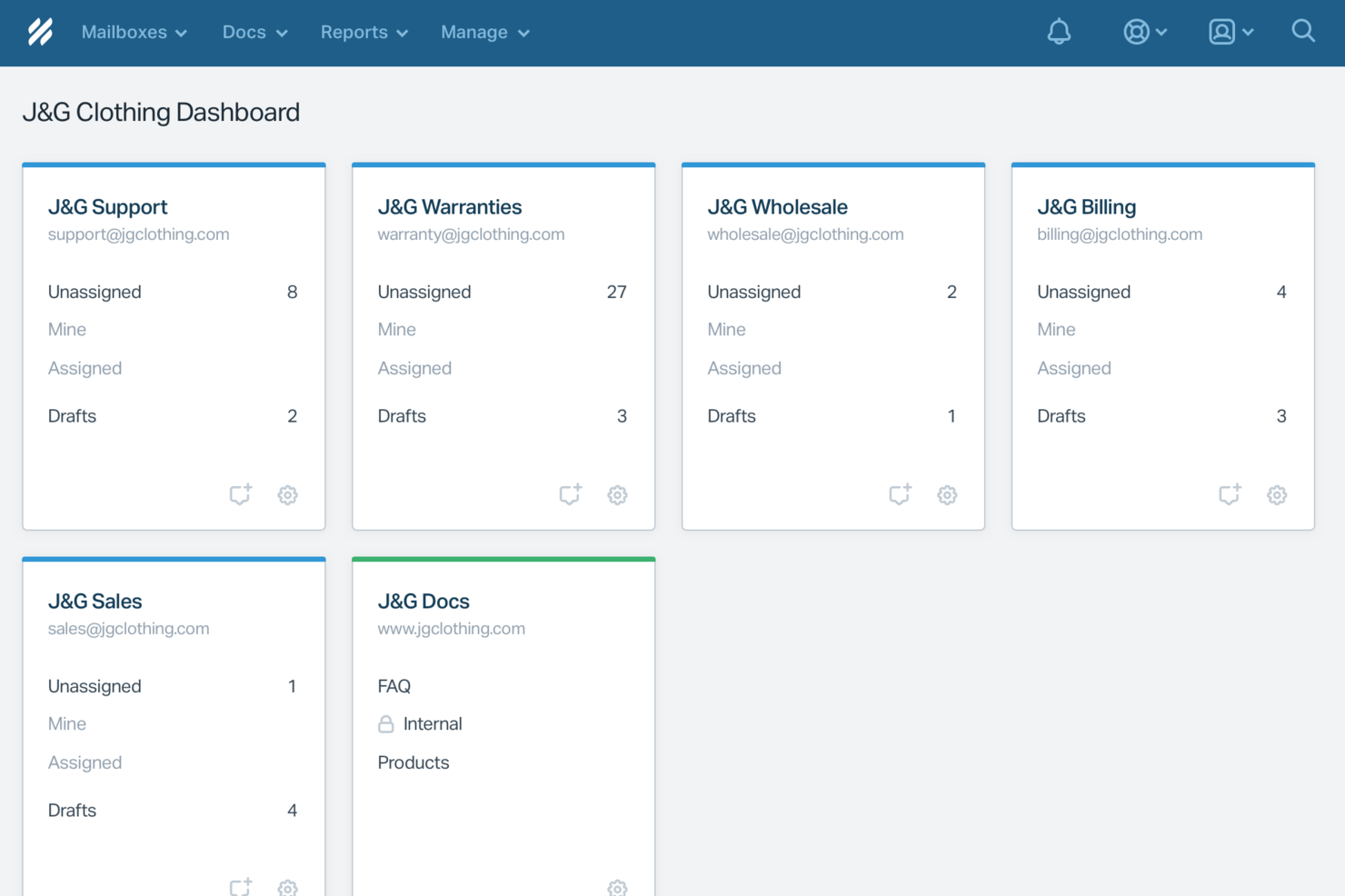
Help Scout è una soluzione software per l'assistenza clienti progettata per le aziende che danno valore alle interazioni personalizzate con i clienti. È particolarmente indicata per piccole e medie imprese che desiderano mantenere un tocco personale mentre espandono le proprie operazioni di supporto. Con funzionalità che automatizzano le attività di routine e migliorano la collaborazione del team, Help Scout risponde all'esigenza di un servizio clienti efficiente senza compromettere la qualità delle interazioni.
Perché ho scelto Help Scout
Ho scelto Help Scout per la sua capacità unica di combinare l'automazione guidata dall'IA con un supporto incentrato sulle persone, rendendolo ideale per i team che vogliono gestire rapidamente le richieste dei clienti senza perdere il tocco umano. La funzione di casella di posta condivisa consente al tuo team di collaborare senza soluzione di continuità, assicurando che nessuna richiesta dei clienti venga trascurata. Inoltre, gli strumenti di messaggistica proattiva della piattaforma permettono di coinvolgere i clienti con aggiornamenti tempestivi e richieste di feedback, rispondendo direttamente all'esigenza di una comunicazione efficace nell'assistenza clienti.
Funzionalità principali di Help Scout
Oltre alle sue capacità di spicco, ho individuato anche diverse altre funzionalità che ne migliorano l'utilità per l'assistenza clienti:
- Centro assistenza: Permette ai tuoi clienti di trovare autonomamente le risposte, riducendo il carico di lavoro del team di supporto.
- Workflow personalizzati: Ti consente di automatizzare le attività ripetitive, permettendo al team di dedicarsi a questioni più complesse.
- Analisi delle performance: Offre una panoramica sui tempi di risposta e sull'efficienza del tuo team, aiutandoti a prendere decisioni informate per migliorare il servizio.
- Supporto multicanale: Integra diversi canali di comunicazione, permettendoti di gestire le interazioni con i clienti da un'unica piattaforma.
Integrazioni di Help Scout
Le integrazioni includono Salesforce, Shopify, WhatsApp, Slack, Stripe, Trello, Mailchimp, Google Apps, ActiveCampaign e Asana. Inoltre, è possibile creare integrazioni personalizzate utilizzando l'API di Help Scout o collegando più app tramite Zapier.
Pros and Cons
Pros:
- AI Answers risolve i ticket comuni senza coinvolgimento degli agenti
- Il passaggio tra operatori mantiene il contesto della conversazione
- La knowledge base integrata fornisce risposte automatiche accurate
Cons:
- Non è un chatbot autonomo al di fuori dell'ecosistema Help Scout
- L'efficacia dell'IA dipende fortemente dalla qualità della knowledge base
New Product Updates from Help Scout

Help Scout Adds Automatic Conversation Reassignment
Help Scout can now automatically unassign conversations when the assigned teammate has been away long enough, keeping replies moving so others can pick them up. For more information, visit Help Scout's official site.
 .
.
Missive
Ideale per risposte redatte dall'intero team
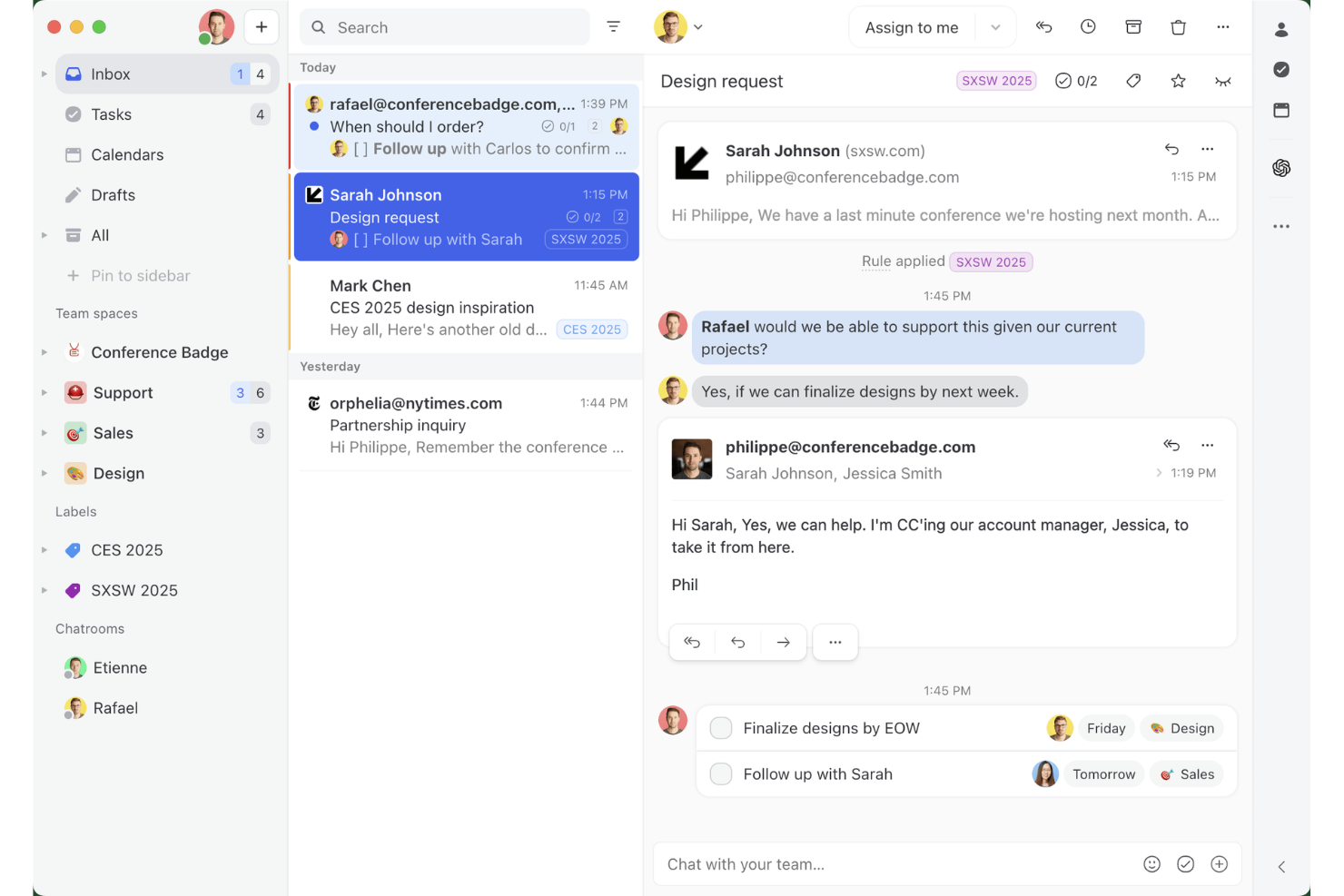
Missive è una casella di posta collaborativa e una piattaforma di posta elettronica condivisa che riunisce email, SMS, WhatsApp, chat dal vivo e canali di messaggistica social in un unico spazio di lavoro, con chat di team integrata, thread interni e strumenti di redazione assistiti dall'IA.
Per chi è più adatto Missive?
Missive è particolarmente adatto ai team di assistenza di piccole e medie dimensioni che gestiscono la maggior parte delle interazioni con i clienti tramite email e vogliono coinvolgere ogni membro del team nella stesura della risposta giusta.
Perché ho scelto Missive
Missive si è guadagnato un posto nella mia lista ristretta grazie al modo in cui supporta concretamente le risposte redatte dal team: più agenti possono collaborare in tempo reale alla stesura di un'unica email in uscita, con thread interni allegati direttamente alla conversazione, così che tutto il team possa contribuire prima dell'invio. Mi piace anche il fatto che i suggerimenti di bozze dell'IA utilizzino il contesto completo della conversazione e che un membro del team possa perfezionare ulteriormente la bozza prima che raggiunga il cliente. Questo tipo di ciclo collaborativo è raro in uno strumento per caselle di posta condivise.
Funzionalità principali di Missive
- Casella di posta unificata omnicanale: Riunisce email, SMS, WhatsApp, messaggi diretti di Instagram, Facebook Messenger e chat dal vivo in uno spazio di lavoro condiviso.
- Motore di automazione basato su regole: Supporta fino a 1.000 regole con trigger, condizioni e azioni su tutti i canali collegati.
- Regole della casella di posta basate sull'IA: Utilizza condizioni basate sull'IA per rilevare il sentiment, la lingua e l'intento, consentendo l'assegnazione automatica di etichette, l'instradamento e la creazione di bozze.
- Risposte predefinite con campi variabili: Consente agli agenti di salvare e inserire modelli di risposta predefiniti che compilano automaticamente i dettagli specifici del cliente.
- Server MCP di Missive: Collega strumenti di IA esterni (come Claude o ChatGPT) per consultare i thread di assistenza, controllare i calendari e redigere risposte, mantenendo però obbligatoria la revisione dell'agente prima dell'invio.
Integrazioni di Missive
Missive offre oltre 25 integrazioni native, tra cui HubSpot, Salesforce, Shopify, Aircall, Dialpad, Zoom, Twilio, WhatsApp Business, Facebook Messenger e Instagram Direct. Supporta inoltre un'API REST aperta, webhook, integrazioni di canali personalizzati, Zapier e il suo nuovo Server MCP nei piani Productive e Business (è necessaria l'attivazione da parte dell'amministratore).
Pros and Cons
Pros:
- Collaborazione in tempo reale alla stesura delle email in uscita
- La casella di posta omnicanale riunisce email e messaggistica
- Redazione assistita dall'IA con il contesto completo della conversazione
Cons:
- Non include una knowledge base rivolta ai clienti
- Non dispone di sondaggi CSAT o NPS integrati
New Product Updates from Missive
Missive Adds Conversation Pins
Missive now lets you pin key links, decisions, and notes inside a conversation, keeping them accessible in a dedicated Pins section in the Details sidebar. For more information, visit Missive's official site.
 .
.
Tidio
Ideale per supporto clienti AI multilingue
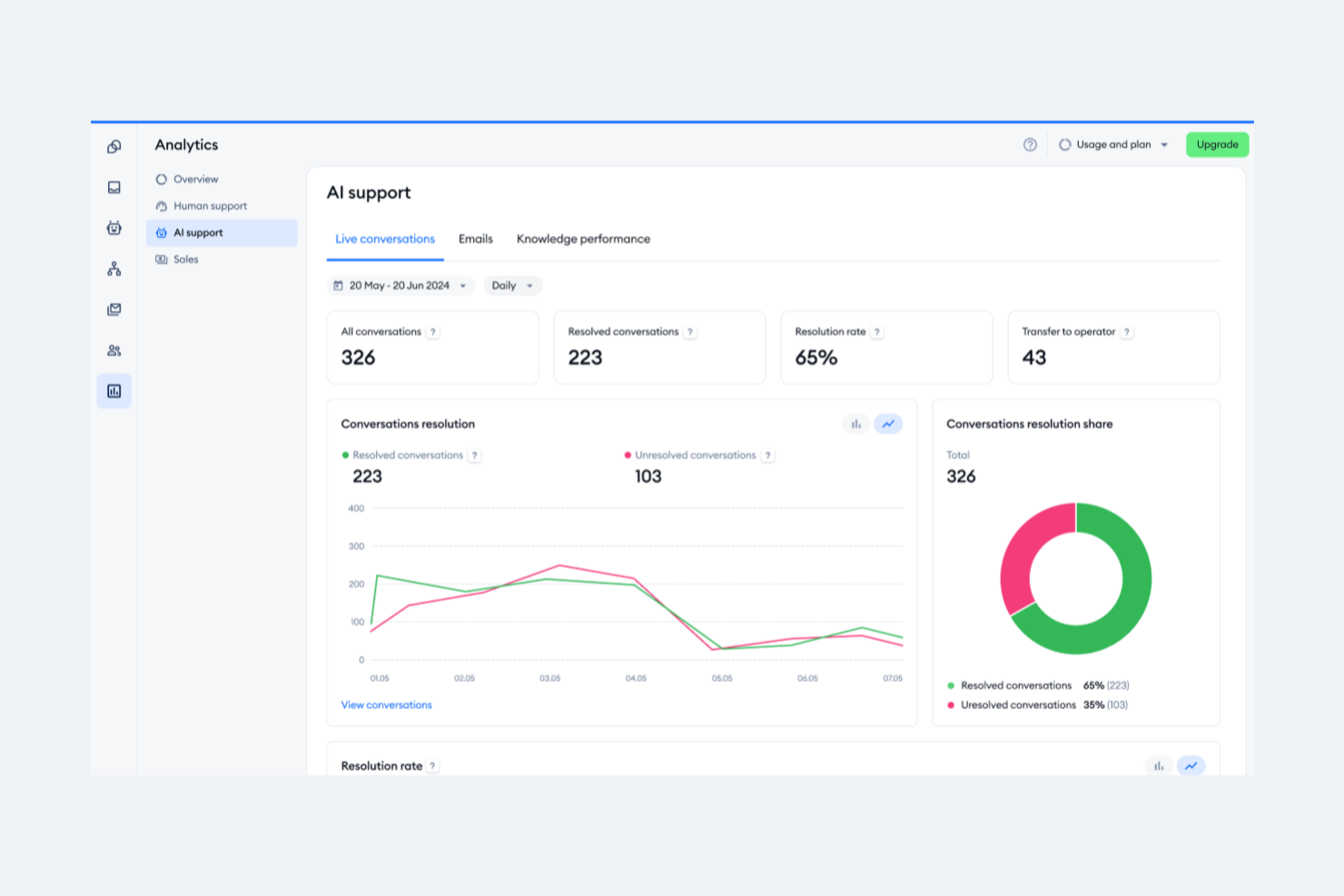
Tidio si rivolge alle aziende che desiderano migliorare il servizio clienti automatizzando le attività ripetitive e incrementando la qualità delle interazioni. Grazie a strumenti come l'agente Lyro AI, gestisce le richieste di routine permettendo al tuo team di concentrarsi su conversazioni più significative. Le funzionalità di live chat e help desk di Tidio assicurano processi di supporto fluidi, aiutandoti a mantenere un'elevata soddisfazione della clientela.
Perché ho scelto Tidio
Ho scelto Tidio per il suo eccezionale supporto clienti AI multilingue, indispensabile per le aziende che desiderano comunicare in diversi contesti linguistici. Il chatbot AI di Tidio, Lyro, traduce e risponde in più lingue, consentendo al tuo team di interagire con clienti di varie regioni senza barriere linguistiche. La funzione di traduzione in tempo reale, insieme ai widget di chat personalizzabili, permette una comunicazione fluida, rivolta a una clientela globale. Queste caratteristiche migliorano la soddisfazione dei clienti e i processi di supporto, rendendo Tidio una scelta affidabile per le aziende che cercano soluzioni complete di assistenza multilingue.
Caratteristiche principali di Tidio
Oltre alle sue capacità multilingue, Tidio offre una serie di funzionalità che potenziano l'esperienza del supporto clienti.
- Live Chat: Interagisci con i tuoi clienti in tempo reale utilizzando widget di chat personalizzabili che si adattano allo stile e alle preferenze del tuo brand.
- Sistema di Ticketing: Gestisci in modo efficiente le richieste dei clienti trasformando email e messaggi in ticket, garantendo che nessuna domanda resti senza risposta.
- Workflow di Automazione: Configura risposte automatiche e azioni per domande frequenti e attività di routine, liberando tempo per il team da dedicare a questioni più complesse.
- Integrazione con piattaforme E-commerce: Collegati facilmente a piattaforme come Shopify per gestire ordini direttamente dall'interfaccia della chat, offrendo un processo di supporto semplificato per il tuo negozio online.
Integrazioni di Tidio
Le integrazioni includono Shopify, WordPress, HubSpot, Squarespace, Jimdo, Webydo, Drupal, Shift4Shop, Site123 e Salesforce.
Pros and Cons
Pros:
- Il chatbot AI supporta 12 lingue
- Supporta email, chat, Messenger, Instagram e WhatsApp
- I workflow di automazione riducono le attività ripetitive per i team di supporto
Cons:
- Problemi di stabilità dell'app mobile compromettono il supporto in mobilità
- Nessuna analisi dettagliata dei flussi per i chatbot

Ideale per la sua interfaccia facile da usare e personalizzabile
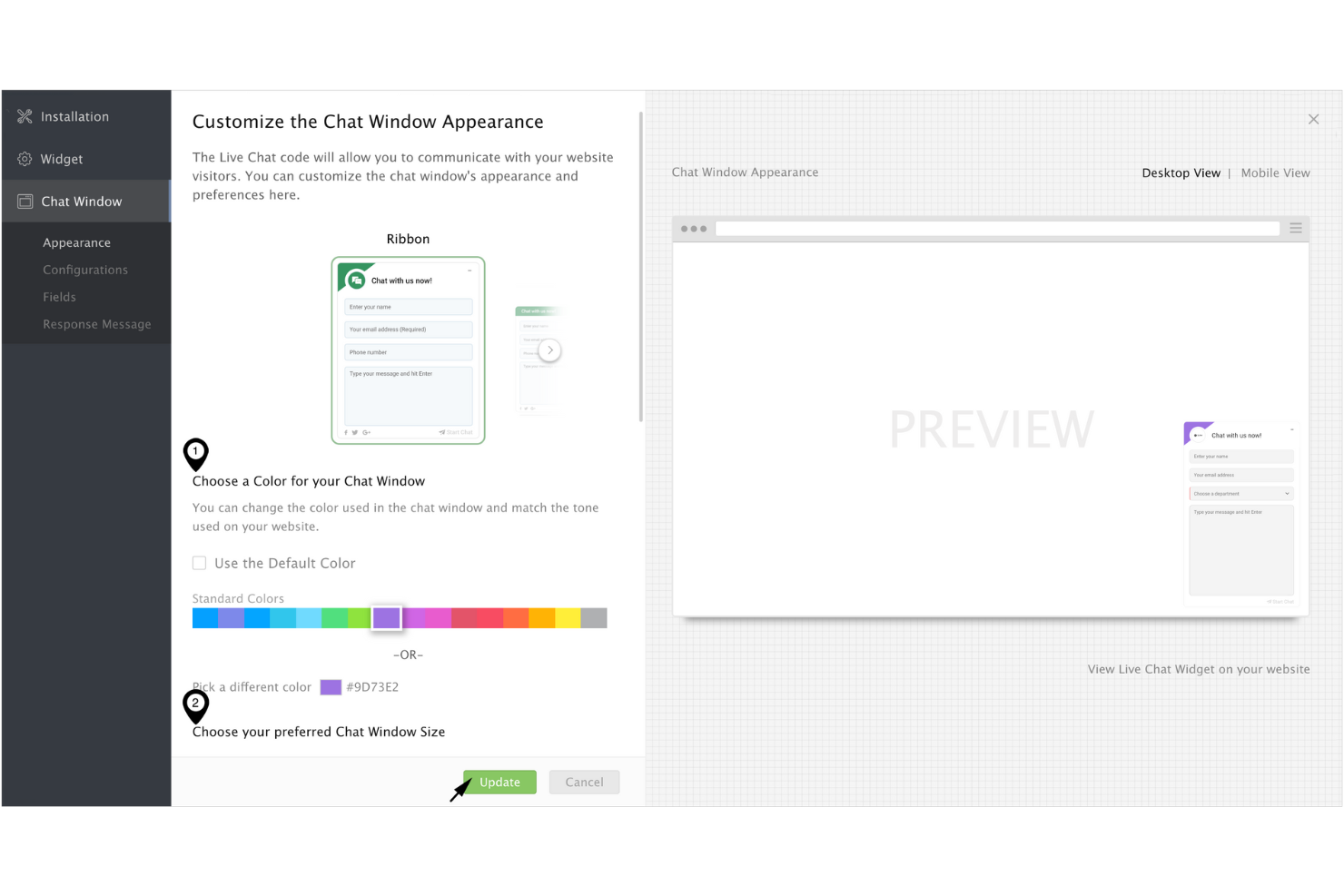
Quando desideri portare il tuo servizio clienti a un livello superiore, Zoho SalesIQ offre una soluzione su misura che si adatta perfettamente alle tue esigenze. Questa piattaforma è pensata per le aziende che puntano a migliorare le interazioni con i clienti, offrendo strumenti come chat dal vivo e monitoraggio dei visitatori per facilitare un coinvolgimento proattivo. Dando priorità alla privacy degli utenti e garantendo la sicurezza dei dati, Zoho SalesIQ consente al tuo team di connettersi con i clienti senza compromettere la loro fiducia.
Perché ho scelto Zoho SalesIQ
Ho scelto Zoho SalesIQ per la sua interfaccia facile da usare e personalizzabile, che lo rende una scelta interessante come software per il supporto clienti. La piattaforma permette di adattare funzionalità come la chat dal vivo e le capacità dei chatbot alle esigenze specifiche della tua azienda, garantendo un'esperienza intuitiva sia per il tuo team che per i clienti. L'integrazione con diversi sistemi, come Zoho CRM, personalizza ulteriormente le interazioni con i clienti fornendo informazioni approfondite e comunicazione senza interruzioni. Inoltre, l'impegno di Zoho SalesIQ per la privacy degli utenti, grazie all'utilizzo di propri strumenti di monitoraggio per proteggere i dati dei clienti, crea fiducia e affidabilità nelle tue operazioni di supporto.
Funzionalità principali di Zoho SalesIQ
Oltre alla sua interfaccia personalizzabile, Zoho SalesIQ offre una gamma di funzionalità che potenziano le capacità del tuo servizio clienti.
- Monitoraggio dei visitatori in tempo reale: Questa funzionalità consente di monitorare e analizzare l'attività dei visitatori sul tuo sito web, fornendo informazioni utili per personalizzare le interazioni di supporto.
- Punteggio automatico dei lead: Zoho SalesIQ classifica automaticamente i lead in base al loro comportamento e coinvolgimento, consentendo al tuo team di dare priorità ai follow-up in modo più efficace.
- Costruttore di chatbot senza codice: Questo strumento permette di creare chatbot senza programmazione, offrendo supporto 24/7 e gestendo facilmente le domande più comuni.
- Integrazione multi-canale: Puoi connetterti con i clienti tramite varie piattaforme come WhatsApp e Instagram, assicurando una comunicazione fluida su tutti i canali.
Integrazioni di Zoho SalesIQ
Le integrazioni includono WordPress, GoDaddy, Zoho CRM, Zoho Desk, OpenAI, Zendesk, Mailchimp e Salesforce.
Pros and Cons
Pros:
- Il monitoraggio efficace dei visitatori migliora il coinvolgimento dei clienti
- Widget di chat personalizzabili per esperienze utente su misura
- Chiamate in-app gratuite per un supporto clienti rapido
Cons:
- Alcuni utenti trovano la funzionalità chatbot limitata
- Le notifiche sull'app mobile possono essere inaffidabili

Ideale per creare esperienze personalizzate con l’IA
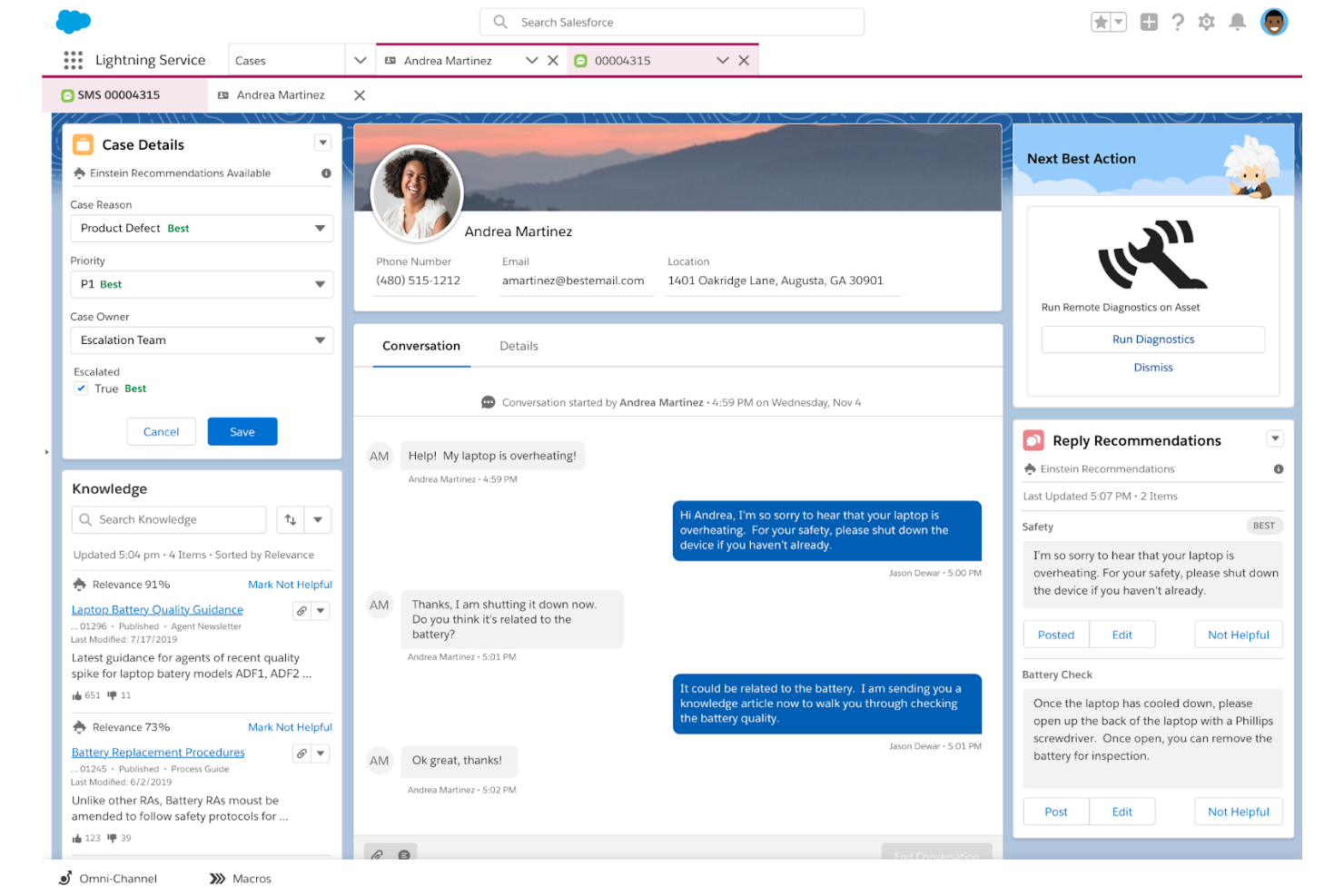
Salesforce Service Cloud si rivolge alle aziende che desiderano migliorare le interazioni con i clienti e semplificare le attività di assistenza. Fornendo strumenti per la gestione dei casi e il coinvolgimento su più canali, è ideale per i settori che danno valore a esperienze personalizzate per il cliente. Le intuizioni basate sull’IA della piattaforma aiutano il tuo team a ridurre i tempi di risposta e migliorare l'efficienza del servizio, affrontando le sfide comuni dell'assistenza clienti.
Perché ho scelto Salesforce Service Cloud
Ho scelto Salesforce Service Cloud per la sua capacità di creare esperienze personalizzate tramite l’IA, fondamentale per le aziende che vogliono potenziare l'assistenza clienti. Con le intuizioni guidate dall’intelligenza artificiale e i suggerimenti intelligenti, il tuo team può offrire interazioni su misura che risuonano con i clienti, soddisfacendo le loro specifiche esigenze. Funzionalità come Einstein Bots automatizzano le conversazioni di routine, liberando il team per concentrarsi su questioni complesse, mentre l'analisi predittiva offre indicazioni preziose sul comportamento dei clienti. Questi strumenti non solo personalizzano il percorso cliente, ma aumentano anche l'efficienza, rendendo Salesforce Service Cloud una scelta d’eccellenza per chi vuole migliorare le proprie capacità di assistenza clienti.
Funzionalità principali di Salesforce Service Cloud
Oltre a creare esperienze personalizzate grazie all’IA, Salesforce Service Cloud offre diverse funzionalità chiave che aumentano le capacità di assistenza clienti:
- Instradamento omni-canale: questa funzione indirizza le richieste dei clienti agli agenti più adatti sui vari canali, garantendo una gestione efficiente e risposte rapide.
- Service Console: offre un'interfaccia unificata per gli agenti, consentendo di gestire le interazioni con i clienti in modo fluido e di accedere a tutte le informazioni necessarie in un unico luogo.
- Base di conoscenza: funge da archivio centralizzato di articoli e domande frequenti, permettendo ai clienti di trovare risposte in autonomia e riducendo il volume dei ticket di assistenza.
- Integrazione social media: consente al tuo team di interagire con i clienti tramite canali social, rafforzando il coinvolgimento e ampliando il raggio d’azione del supporto.
Integrazioni Salesforce Service Cloud
Le integrazioni includono Service Cloud Voice, Data Cloud, Slack, Jira, LinkedIn, QuickBooks, MailChimp, Dropbox, Google Workspace e DocuSign.
Pros and Cons
Pros:
- Interfaccia intuitiva con dashboard personalizzabili
- Offre una visione completa dei problemi dei clienti e gestione dei casi
- Comunità numerosa e abbondanza di risorse istruttive di supporto
Cons:
- Sfide nella personalizzazione con una funzionalità Omni limitante
- Manca un facile assegnamento delle pratiche a rotazione, richiedendo una codifica complessa
New Product Updates from Agentforce Service (formerly Service Cloud)
Agentforce Service Keeps Full Agentforce Voice Transcripts After Calls
Agentforce Service now shows the full conversation history in post-call transcripts for Agentforce Voice calls within the Service Console, giving agents better context for follow-ups. For more information, visit Salesforce’s official site.
 .
.
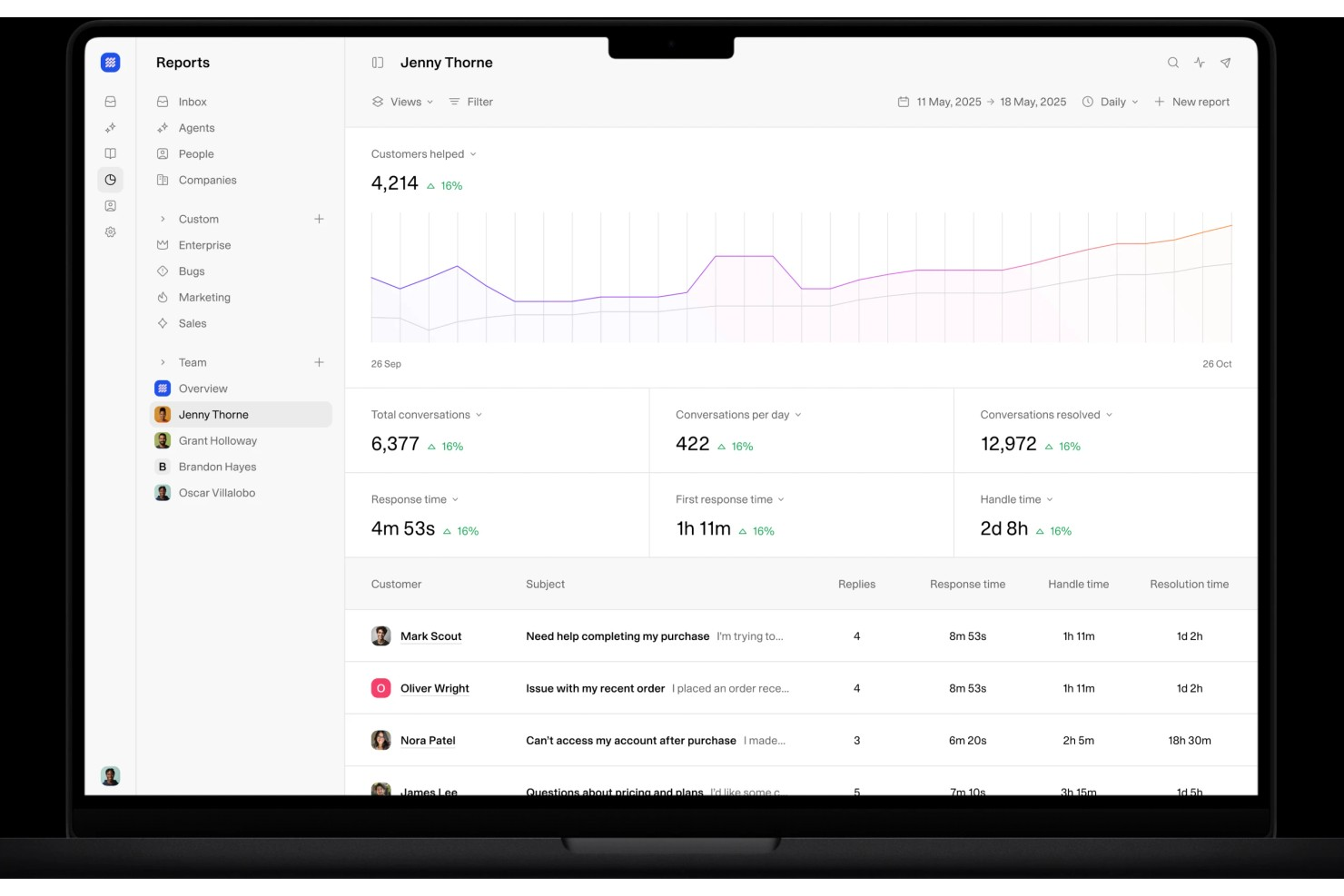
Weav è una piattaforma di assistenza clienti alimentata dall'intelligenza artificiale che combina agenti AI, una casella di posta condivisa, chatbot e strumenti di formazione delle conoscenze per gestire e risolvere i ticket dei clienti con un intervento umano minimo.
Per chi è più indicato Weav?
Weav è adatto a team ecommerce e SaaS di piccole e medie dimensioni che desiderano automatizzare un grande volume di ticket di supporto senza aumentare il personale di assistenza.
Perché ho scelto Weav
Ho scelto Weav come uno dei migliori per il modo in cui utilizza reportistica e apprendimento continuo delle conversazioni per mettere in evidenza i modelli attraverso le interazioni con i clienti. Il modulo di reportistica di Weav traccia i risultati di ogni ticket risolto e la sua intelligenza artificiale analizza continuamente tali interazioni per affinare le proprie risposte. Questo significa che il tuo team ottiene un quadro costante di cosa chiedono i clienti, dove si ottengono risoluzioni e dove esistono lacune, direttamente dai dati reali delle conversazioni.
Funzionalità principali di Weav
- Agenti AI: Distribuisci agenti AI formati sulla conoscenza del tuo prodotto per risolvere automaticamente i ticket dei clienti in arrivo senza intervento umano.
- Casella di posta unificata: Gestisci tutte le conversazioni con i clienti in un'unica casella di posta condivisa dove agenti AI e umani lavorano fianco a fianco nella stessa conversazione.
- Formazione delle conoscenze: Forma l'AI di Weav con un clic, indicandole il tuo sito web, i documenti di aiuto o i file caricati.
- Regole di escalation: Imposta condizioni che instradano automaticamente i ticket non risolti dall'AI all'agente umano più adatto.
Integrazioni di Weav
Weav offre un numero limitato di integrazioni native, tra cui Shopify, Google Drive e Stripe. Supporta inoltre azioni personalizzate, e le sue REST API e webhook in tempo reale sono disponibili nei piani Pro e superiori per realizzare integrazioni personalizzate.
Pros and Cons
Pros:
- Fonti verificate mostrate con le risposte
- La sincronizzazione con il sito web addestra automaticamente gli agenti
- Controlli di tono e risposta per ogni agente
Cons:
- Poche integrazioni native di terze parti
- Il piano gratuito limita l'AI a 20 messaggi

Custify
Ideale per aziende SaaS
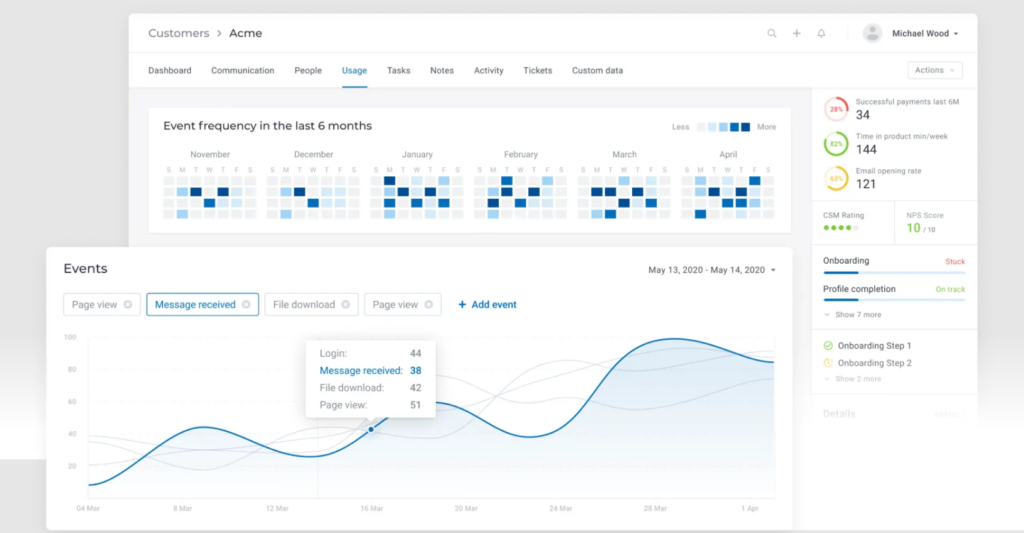
Per chi cerca una soluzione di assistenza clienti su misura per le esigenze uniche delle aziende SaaS, Custify si distingue come un partner prezioso nel percorso verso l'ottimizzazione dell'engagement e della fidelizzazione dei clienti. Progettato per centralizzare i dati dei clienti e semplificare i flussi di lavoro, Custify offre informazioni utili che permettono al tuo team di concentrarsi su interazioni di alto valore invece di perdere tempo con processi manuali. Che tu voglia migliorare l'adozione del prodotto o individuare opportunità di upselling, la piattaforma guidata dai dati di Custify trasforma il customer success in un vantaggio strategico, aiutandoti a trasformare i clienti soddisfatti in veri promotori a lungo termine.
Perché ho scelto Custify
Ho scelto Custify perché eccelle nel rispondere alle esigenze specifiche delle aziende SaaS, soprattutto nell'ambito del supporto clienti. La funzione Customer 360 di Custify offre una visione completa dei dati del cliente, consentendoti di monitorare l'adozione del prodotto e i cicli di vita dei clienti. Le sue capacità di automazione semplificano le operazioni quotidiane, liberando il team da compiti manuali e permettendo loro di focalizzarsi su interazioni di maggior valore con i clienti. Identificando opportunità di upselling e offrendo supporto proattivo tramite task e avvisi, Custify dà la possibilità al tuo team di rafforzare l'engagement e ridurre l'abbandono, diventando così una risorsa strategica per qualsiasi azienda SaaS.
Funzionalità principali di Custify
Oltre alla forte attenzione alle aziende SaaS, Custify offre una gamma di funzionalità che migliorano le capacità di supporto clienti:
- Customer Health Scoring: Monitora in tempo reale lo stato di salute dei clienti tramite diversi indicatori, consentendo al tuo team di affrontare preventivamente eventuali problematiche prima che causino abbandono.
- Mappatura del percorso cliente: Visualizza le interazioni con il cliente, aiutandoti a individuare i punti di contatto chiave e ottimizzare le strategie di coinvolgimento.
- Reportistica e analytics: Offre informazioni dettagliate sui parametri di customer success, aiutando il tuo team a prendere decisioni informate e guidate dai dati.
- Segmentazione dei clienti: Ti permette di personalizzare comunicazioni e attività di supporto in base a criteri specifici, aumentando l'efficacia delle tue azioni di engagement.
Integrazioni di Custify
Le integrazioni includono Salesforce, Intercom, HubSpot, Freshdesk, Stripe, Help Scout, Recurly, Zendesk Support, Microsoft Teams e Slack.
Pros and Cons
Pros:
- Centralizza i dati per migliorare le informazioni sui clienti e la comunicazione
- Migliora notevolmente l'engagement dei clienti e i flussi operativi
- Fornisce indicazioni chiare per opportunità di upselling, aumentando i ricavi
Cons:
- Alcuni utenti riscontrano problemi occasionali di sincronizzazione dei dati
- Supporto limitato per modelli di business non SaaS
Altri strumenti di assistenza clienti da considerare
Ecco altre opzioni valide per la gestione dell’assistenza clienti che non sono entrate nella mia shortlist, ma che meritano comunque un’occhiata:
- Groove
Ideale per le integrazioni
- Front
Ideale per l'automazione dei flussi di lavoro tra team
- HappyFox
Ideale per il coinvolgimento dei clienti in tempo reale
- UseResponse
Ideale per la comunicazione centralizzata
- Kustomer
Ideale per la sicurezza dei dati dei clienti
- Issuetrak
Ideale per la gestione di ticket da più canali
- Guru
Ideale per suggerimenti intelligenti della base di conoscenza alimentati dall'IA
- Front
Ideale per la gestione delle email di gruppo
- SAAS First
Ideale per il supporto omnicanale
- Hiver
Ideale per interazioni con i clienti guidate dall’IA
- LiveAgent
Ideale per la gestione dei ticket
- Zendesk
Ideale per l'automazione dei ticket tramite IA
- Zoho Assist
Ideale per fornire supporto remoto via accesso
- OneDesk
Ideale per soluzioni help desk integrate
- SparrowDesk
Ideale per posta in arrivo omnicanale


Come Valuto il Software di Assistenza Clienti
Scompongo la mia valutazione in criteri di base—come la gestione dei ticket omnicanale e l'automazione dei workflow—e fattori differenzianti che rivelano quanto bene uno strumento si adatta al reale modello di supporto del tuo team.
Funzionalità Core (Requisiti Minimi per Questa Lista)
Quando seleziono gli strumenti per la mia lista, valuto ciascuno su una scala da 0 (non offre la funzionalità) a 5 (eccelle in quest'area) per ogni funzionalità fondamentale elencata di seguito. Poi, calcolo il punteggio totale dello strumento come percentuale. Ogni strumento deve raggiungere un punteggio totale minimo del 75% per essere considerato per l'inclusione.
- Gestione dei Ticket: Valuto come ciascuno strumento gestisce l'intero ciclo di vita dei ticket—creazione, assegnazione, prioritizzazione, unificazione e risoluzione—su code di supporto reali con diversi livelli di complessità.
- Supporto Omnicanale: Ogni piattaforma deve unificare email, chat, telefono, social e canali di messaggistica così che gli operatori non debbano passare da una dashboard all'altra per aiutare un singolo cliente.
- Base di Conoscenza e Self-Service: Cerco help center rivolti ai clienti con categorizzazione degli articoli, ricerca e sistemi di feedback che riducano effettivamente il volume dei ticket in ingresso.
- Automazione e Workflow: Qui sono fondamentali regole di instradamento, trigger SLA e percorsi di escalation—verifico se i team possono costruire workflow come l'assegnazione automatica dei ticket di fatturazione a una coda specializzata.
- Reportistica e Analisi: La dashboard deve mostrare KPI del supporto come tempo di prima risposta, tempo di risoluzione, punteggi CSAT e carico di lavoro degli operatori senza bisogno di esportazioni manuali o workaround.
- Collaborazione e Strumenti per Operatori: Osservo come gli operatori collaborano su problemi complessi—funzionalità come note interne, rilevazione collisioni e conversazioni parallele tra i team di supporto e prodotto.
Dopo aver individuato gli strumenti che soddisfano questi criteri, considero cosa distingue ciascuna piattaforma.
Fattori Differenzianti (Cosa Distingue i Fornitori)
Ecco come confronto e metto a confronto diversi fornitori:
Funzionalità Rilevanti
L'assistenza alimentata dall'IA è un grande elemento distintivo—verifico se uno strumento può creare bozza di risposte, riassumere lunghe conversazioni sui ticket o suggerire agli operatori articoli pertinenti della Knowledge Base durante la conversazione. Un pannello con il contesto cliente è altrettanto importante, poiché chi gestisce un reso o una contestazione di fatturazione deve vedere cronologia ordini e interazioni passate senza dover cambiare scheda. Valuto anche i builder di chatbot no-code, che permettono ai team di gestire automaticamente domande comuni come reset password o richieste di tracciamento spedizioni prima che arrivino ad un operatore.
Oltre le Funzionalità
La profondità delle integrazioni è una delle prime cose che controllo—il tuo strumento di supporto deve collegarsi a CRM, piattaforme ecommerce e strumenti di comunicazione interna come Slack o Microsoft Teams. Sicurezza e compliance sono altrettanto importanti, specialmente per i team che gestiscono dati sensibili dove la conformità a SOC 2, GDPR o HIPAA può fare la differenza nella scelta del fornitore. Valuto anche la capacità della piattaforma di adattarsi a specifiche strutture di team, sia un team SaaS B2B che gestisce escalation sia una grande realtà ecommerce che gestisce centinaia di ticket al giorno.
Che cos’è un software di assistenza clienti?
Il software di assistenza clienti è una piattaforma che aiuta le aziende a tracciare, gestire e risolvere le richieste dei clienti attraverso molteplici canali. Migliora l’efficienza e la coerenza delle risposte, ed è utilizzato per snellire la gestione dei ticket, abilitare l’auto-servizio e migliorare l’esperienza complessiva del cliente.
Come scegliere il software di assistenza clienti
È facile perdersi tra liste infinite di funzionalità e strutture di prezzo complesse. Per aiutarti a restare concentrato nel tuo percorso di selezione del software, ecco una checklist di fattori da tenere a mente:
| Fattore | Cosa considerare |
|---|---|
| Scalabilità | Assicurati che il software possa crescere con la tua azienda. Scegli soluzioni capaci di gestire un maggior volume di ticket e di supportare più utenti senza perdere in prestazioni. |
| Integrazioni | Verifica la compatibilità con strumenti già in uso come CRM, piattaforme email e canali social. Un’integrazione fluida può migliorare l’efficienza e il flusso dei dati. |
| Personalizzazione | Scegli un software che consenta di personalizzare flussi di lavoro, dashboard e report in base alle esigenze e preferenze specifiche del tuo team. |
| Facilità d’uso | Dai priorità a interfacce intuitive che richiedano poca formazione. Il team dovrebbe poter navigare rapidamente il sistema e svolgere le attività con efficienza. |
| Budget | Considera il costo totale, inclusi eventuali costi di installazione e canoni ricorrenti. Assicurati che il software offra le funzioni necessarie entro i limiti del tuo budget. |
| Sicurezza | Punta a misure di sicurezza robuste come la crittografia dei dati e il rispetto di norme come il GDPR. Proteggi le informazioni dei clienti e mantieni la fiducia. |
Tendenze future nei software di assistenza clienti
Durante la mia ricerca, ho raccolto molti aggiornamenti di prodotto, comunicati stampa e log di rilascio da diversi fornitori di software per l’assistenza clienti. Ecco alcune delle tendenze emergenti che sto monitorando:
- AI e automazione nell'assistenza clienti: Le aziende stanno sfruttando l'AI per analizzare le interazioni con i clienti e prevedere le tendenze. Questo aiuta i team a comprendere meglio le esigenze dei clienti e a prendere decisioni basate sui dati. Fornitori come Zendesk utilizzano l'AI per offrire approfondimenti utili a partire dai dati di supporto.
- Supporto omnicanale: Sempre più aziende vogliono interagire con i clienti su vari canali in modo unificato. Questa tendenza favorisce transizioni fluide tra le piattaforme e un'esperienza coerente per il cliente. Freshdesk offre una solida esperienza omnicanale.
- Opzioni di self-service: I clienti preferiscono sempre più risolvere i problemi in autonomia. Gli strumenti ora offrono ampie basi di conoscenza e forum comunitari per soddisfare questa esigenza. Zoho Desk potenzia il self-service con articoli informativi dettagliati.
- Personalizzazione dell'esperienza cliente: Personalizzare le interazioni di supporto in base alle preferenze individuali del cliente è sempre più importante. La personalizzazione può aumentare la soddisfazione e la fedeltà dei clienti. Strumenti come Salesforce Service Cloud utilizzano i dati per personalizzare le esperienze dei clienti.
- Strumenti di supporto da remoto: Con sempre più team che lavorano a distanza, crescono anche gli strumenti che facilitano la risoluzione dei problemi e il supporto da remoto. Funzionalità come la condivisione dello schermo e l'accesso remoto stanno diventando essenziali. Zoho Assist si concentra sulle soluzioni di supporto remoto.
Funzionalità del software di supporto clienti
Quando scegli un software di supporto clienti, fai attenzione alle seguenti funzionalità chiave:
- Gestione dei ticket: Gestisci le richieste dei clienti creando, organizzando e monitorando le richieste di supporto. Hai un metodo strutturato per seguire ogni problema dall'inizio alla fine, assicurando che nulla venga trascurato.
- Supporto multicanale: Offri assistenza su diversi canali come email, chat, social media e telefono. Puoi raggiungere i clienti dove già si trovano, semplificando tutte le conversazioni in un unico hub pratico.
- Gestione della knowledge base: Crea e gestisci una libreria di articoli di aiuto e FAQ. Questo permette ai clienti di risolvere i problemi autonomamente e riduce il numero di ticket ripetitivi per il tuo team.
- Strumenti di automazione: Utilizza regole e trigger per assegnare automaticamente i ticket, inviare risposte o gestire i casi urgenti. Così risparmi tempo sulle attività ripetitive e mantieni il supporto efficiente anche nei momenti di maggiore afflusso.
- Reportistica e analisi: Monitora metriche chiave come tempi di risposta, volume dei ticket e soddisfazione dei clienti. Questi dati ti aiutano a individuare tendenze e migliorare i processi di assistenza sulla base di informazioni reali.
- Funzionalità di collaborazione: Permetti al tuo team di lavorare insieme sui ticket complessi con note interne, tag o caselle di posta condivise. Questo mantiene tutti aggiornati e riduce il rischio di informazioni contrastanti per il cliente.
- Capacità di integrazione: Collega il software al tuo CRM, piattaforma e-commerce o altri strumenti già in uso. In questo modo puoi accedere velocemente alle informazioni rilevanti e lavorare in modo più efficiente.
- Portali self-service: Offri ai clienti uno spazio dove possono visualizzare i propri ticket, controllare lo stato delle richieste o trovare risorse di aiuto. Questo alleggerisce il lavoro del team e rende il supporto più accessibile per gli utenti.
- Gestione SLA: Imposta, monitora e applica gli accordi sul livello di servizio. Puoi mantenere le promesse fatte ai clienti su tempi di risposta o risoluzione senza contare sulla memoria o sui post-it.
- Opzioni di personalizzazione: Personalizza moduli, flussi di lavoro e dashboard secondo le esigenze specifiche della tua azienda. Così non dovrai adattarti a un sistema standard: puoi modellarlo su misura.
Funzionalità comuni di AI nei software di supporto clienti
Oltre alle funzionalità standard elencate sopra, molte di queste soluzioni stanno integrando l'AI con funzionalità quali:
- Chatbot basati su AI: Rispondono istantaneamente alle domande più comuni e gestiscono compiti di routine, liberando il tuo team per questioni più complesse. Questi bot utilizzano l'elaborazione del linguaggio naturale per comprendere e rispondere proprio come farebbe un essere umano.
- Classificazione automatica dei ticket: Smistano automaticamente i nuovi ticket in base all'argomento, all'urgenza o al sentiment. L'AI analizza il contesto del messaggio e indirizza ogni richiesta al miglior agente o team, senza bisogno di ordinamento manuale.
- Analisi predittiva: Prevedi tendenze di supporto e bisogni dei clienti prima che emergano criticità. L'AI analizza i modelli di supporto e ti aiuta a pianificare in anticipo le risorse e identificare tempestivamente i problemi.
- Analisi del sentiment: Capisce automaticamente l'umore dietro i messaggi dei clienti. Puoi così dare priorità alle conversazioni con utenti frustrati e risolvere i problemi prima che peggiorino.
- Suggerimenti AI per la knowledge base: Raccomandano in tempo reale agli agenti o ai clienti articoli utili in base al contenuto del ticket. Questo accelera la risoluzione dei problemi e migliora la soddisfazione di tutti.
- Generazione automatica delle risposte: Propone risposte suggerite agli agenti tramite machine learning. Puoi rivedere, modificare e inviare più velocemente, garantendo tono e qualità costanti in ogni interazione.
Vantaggi del Software di Assistenza Clienti
L'implementazione di un software di assistenza clienti offre numerosi vantaggi per il tuo team e la tua attività. Ecco alcuni dei benefici a cui puoi aspirare:
- Tempi di risposta più rapidi: Le funzionalità di comunicazione in tempo reale come la chat dal vivo aiutano il tuo team a rispondere rapidamente alle richieste dei clienti.
- Migliore soddisfazione del cliente: I portali self-service e le analisi guidate dall'IA permettono agli utenti di trovare facilmente risposte e ricevere un supporto personalizzato.
- Aumento dell'efficienza delle risorse: Le automazioni dell'assistenza clienti si occupano delle attività ripetitive, consentendo al team di concentrarsi su esigenze più complesse dei clienti.
- Esperienza cliente coerente: Gli strumenti di supporto omnicanale garantiscono ai clienti lo stesso livello di servizio su tutte le piattaforme.
- Migliore utilizzo dei dati: Le capacità di integrazione si collegano ai sistemi esistenti, permettendo decisioni più informate grazie all’accesso completo ai dati.
- Maggiore produttività del team: I flussi di lavoro personalizzabili e la gestione dei ticket aiutano a organizzare e a dare priorità ai compiti in modo efficace.
- Comunicazione e collaborazione migliorate: Rendi più facile per il tuo team CX collaborare per assistere i clienti in modo efficiente.
- Scalabilità per la crescita: Le soluzioni software possono crescere insieme al tuo business, gestendo un numero maggiore di interazioni man mano che il team si espande.
Costi e Prezzi del Software di Assistenza Clienti
La scelta di un software di assistenza clienti richiede la comprensione dei vari modelli di prezzo e dei piani disponibili. I costi variano in base alle funzionalità, alla dimensione del team, agli extra e altri fattori. La tabella di seguito riassume i piani più comuni, i prezzi medi e le funzionalità tipiche incluse nelle soluzioni di software di assistenza clienti:
Tabella di Confronto dei Piani per il Software di Assistenza Clienti
| Tipologia di Piano | Prezzo Medio | Funzionalità Comuni |
|---|---|---|
| Piano Gratuito | $0 | Ticketing di base, supporto email e reportistica limitata. |
| Piano Personale | $5-$25/user/month | Supporto email, reportistica di base e integrazioni limitate. |
| Piano Business | $30-$60/user/month | Supporto multicanale, reportistica avanzata, strumenti di automazione e flussi di lavoro personalizzabili. |
| Piano Enterprise | $70-$150/user/month | Tutte le funzionalità, sicurezza avanzata, supporto dedicato e integrazioni illimitate. |
Domande Frequenti sul Software di Supporto Clienti
Se hai ancora domande sul software di supporto clienti, non preoccuparti. Ecco alcune risposte alle domande più frequenti che dovrebbero aiutarti a chiarire i tuoi dubbi.
In che modo l'AI e l'automazione possono migliorare il servizio clienti?
L’AI e l’automazione possono velocizzare il servizio clienti smistando i ticket, rispondendo automaticamente alle domande comuni e fornendo risorse di self-service istantanee. Puoi usare chatbot per rispondere alle domande frequenti, impostare flussi di lavoro automatizzati per attività ripetitive e sfruttare l’AI per suggerire soluzioni rilevanti agli operatori. Questo non solo riduce i tempi di risposta, ma libera anche il tuo team per gestire i casi più complessi, migliorando la soddisfazione dei clienti e la produttività degli agenti.
Quali funzionalità di collaborazione di squadra sono presenti nei software di assistenza clienti?
La maggior parte delle piattaforme di supporto clienti permette al tuo team di assegnare ticket, condividere note interne e menzionare colleghi con @ per ricevere rapidamente input. Alcuni strumenti offrono caselle di posta condivise, chat in tempo reale e rilevamento delle collisioni per evitare lavori duplicati. Cerca funzionalità come la condivisione di file, i thread di discussione e le liste di attività per mantenere tutti allineati e risolvere più velocemente i problemi dei clienti.
Come posso scegliere il miglior software di supporto clienti per la mia organizzazione?
Inizia elencando le funzionalità indispensabili e le piattaforme che il tuo team utilizza già. Dai priorità agli strumenti adatti al tuo volume di supporto, che si integrano bene con il tuo CRM o le app di comunicazione esistenti e che offrano personalizzazione per i tuoi flussi di lavoro unici. È utile provare demo o versioni di prova gratuite per capire se l’interfaccia è facile per agenti e amministratori. Considera l’assistenza del fornitore, i report e l’affidabilità per assicurarti che il software cresca con il tuo team.
Quali integrazioni dovrei cercare in un software di supporto clienti per il mio team?
Dovresti cercare integrazioni con il tuo CRM, app di chat/messaggistica, help desk, knowledge base e strumenti di gestione della forza lavoro. Collegare il software di supporto clienti a email, call center e piattaforme di analisi fa risparmiare tempo al team e assicura una visione completa di ogni cliente. Dai priorità a software con solide opzioni API così da poter automatizzare i processi e mantenere i sistemi sincronizzati al crescere delle esigenze.
In che modo il software di supporto clienti aiuta con l'onboarding e la formazione degli operatori?
Molte piattaforme includono knowledge base integrate, flussi di lavoro guidati e suggerimenti di script per aiutare i nuovi operatori ad imparare in fretta. Puoi assegnare moduli di formazione o utilizzare note interne per condividere le migliori pratiche direttamente nella visualizzazione del ticket. Gli strumenti di reporting permettono ai manager di individuare opportunità di coaching e monitorare i progressi, rendendo lo sviluppo continuo degli agenti più fluido ed efficace.
Quali metriche dovrei monitorare con il software di supporto clienti?
Otterrai il massimo valore monitorando il tempo di prima risposta, il tempo di risoluzione dei ticket, la soddisfazione del cliente (CSAT) e la produttività degli operatori. Monitorare l’andamento del volume dei ticket, gli arretrati e i tassi di escalation ti permette di individuare rapidamente eventuali criticità. Usa i report integrati per notare schemi e individuare aree di formazione o miglioramento dei flussi di lavoro, aiutando il tuo team a offrire un servizio eccellente su larga scala.
Esistono software di supporto clienti gratuiti?
Sì, alcuni fornitori di software di supporto clienti offrono anche u003ca href=u0022https://thecxlead.com/tools/best-free-customer-service-software/u0022u003epiani gratuitiu003c/au003e, noti anche come piani freemium. Tuttavia, questi piani sono generalmente considerati gradini di accesso per farti provare le funzionalità del software, con l’obiettivo di invitarti a passare a un piano a pagamento per accedere a funzionalità più avanzate.u003c!u002du002d /wp:heading u002du002du003e
Altri Tipi di Software di Supporto
Questo articolo presenta opzioni di software di supporto clienti generiche e versatili, ognuna con i propri punti di forza e di debolezza. Tuttavia, nel sito sono presenti anche articoli che approfondiscono una particolare tipologia di software di assistenza clienti. Se stai cercando qualcosa di più specifico, questi potrebbero esserti utili.
- Software per la gestione dell'esperienza cliente
- Automazione del servizio clienti
- Software di chat per il servizio clienti per piccole imprese
- Software di gestione delle email per il servizio clienti
- Software di ticketing per il servizio clienti
- Software per database clienti
- Software per servizio clienti sui social
Cosa ne pensi di questi strumenti per il servizio clienti?
Spero che la mia recensione ti abbia reso più consapevole dell'entusiasmante e ampia gamma di piattaforme di supporto clienti disponibili. Non esiste uno strumento "migliore" in assoluto, poiché dipende davvero dai membri del tuo team di supporto clienti e dal modello di business. Ma spero di aver fatto chiarezza sui diversi software di supporto tra cui puoi scegliere, così da consentirti di prendere la decisione più informata per la tua azienda.
Puoi iscriverti alla newsletter di The CX Lead per rimanere sempre aggiornato su tutte le ultime tendenze e approfondimenti relativi alla customer experience da parte dei principali esperti del settore.