

I 10 migliori software per centri di contatto per piccole imprese nel 2026

Software per contact center per piccole imprese: selezione


Il software per contact center per piccole imprese aiuta il tuo team a gestire chiamate, chat ed e-mail dei clienti da un'unica piattaforma, rendendo più semplice offrire un'assistenza rapida e coerente. Se stai cercando i migliori strumenti per gestire un numero crescente di richieste dei clienti, mantenere il team organizzato e migliorare i tempi di risposta, sei nel posto giusto. In questa guida troverai le soluzioni per contact center più apprezzate, progettate per le piccole imprese, con funzionalità adatte al tuo budget e capaci di adattarsi alla crescita della tua attività. Usa questo elenco per confrontare le opzioni e trovare quella più adatta alle esigenze del tuo team nel 2026.
Perché fidarsi dei nostri consigli sui software
Il nostro team testa e recensisce software dal 2012. In quanto leader CX noi stessi, sappiamo quanto sia difficile — e importante — scegliere il software giusto.
Per questa guida, abbiamo valutato gli strumenti attraverso test pratici e ricerche indipendenti, assegnando un punteggio agli strumenti in base ai nostri criteri di selezione.
Le nostre recensioni riflettono il nostro giudizio editoriale umano, non un discorso di vendita.
Tabella comparativa dei software per contact center per piccole imprese
La tabella seguente confronta i dettagli sui prezzi delle mie migliori selezioni di software per contact center per piccole imprese.
| Tool | Best For | Trial Info | Price | ||
|---|---|---|---|---|---|
| 1 | Ideale per una configurazione semplice con analisi delle chiamate | Demo gratuita disponibile | Da $15/utente/mese (fatturazione annuale) | Website | |
| 2 | Ideale per VoIP scalabile e instradamento chiamate | Prova gratuita di 14 giorni | Da $25/utente/mese (fatturato annualmente) | Website | |
| 3 | Ideale per operazioni di assistenza clienti globali | Demo gratuita disponibile | Da $15/utente/mese (fatturato annualmente) | Website | |
| 4 | Ideale per contact center a rapida implementazione | Demo gratuita disponibile | Prezzo su richiesta | Website | |
| 5 | Ideale per contact center alimentati dall'IA | Demo gratuita | Da $85/utente/mese | Website | |
| 6 | Ideale per contact center cloud personalizzabili | Non disponibile | Da $13.99/linea/mese (fatturazione annuale) | Website | |
| 7 | Ideale per comunicazioni aziendali unificate | Demo gratuita disponibile | Prezzo su richiesta | Website | |
| 8 | Ideale per help desk e chiamate tutto-in-uno | Prova gratuita di 30 giorni + demo gratis disponibile | Da $15/mese (fatturazione annuale) | Website | |
| 9 | Ideale per il supporto omnicanale con voce | Prova gratuita di 14 giorni + demo gratuita disponibile | Da $19/agente/mese (fatturazione annuale) | Website | |
| 10 | Ideale per sistemi PBX web-based flessibili | Versione di prova gratuita disponibile | Da $395 (fatturazione annuale) | Website |

Recensioni dei software per contact center per piccole imprese
Di seguito trovi le mie sintesi dettagliate dei migliori software per contact center per piccole imprese inclusi nella mia selezione. Le mie recensioni offrono un’analisi approfondita delle funzionalità, dei prezzi e delle integrazioni di ogni piattaforma, per aiutarti a trovare quella più adatta a te.

Nextiva
Ideale per una configurazione semplice con analisi delle chiamate
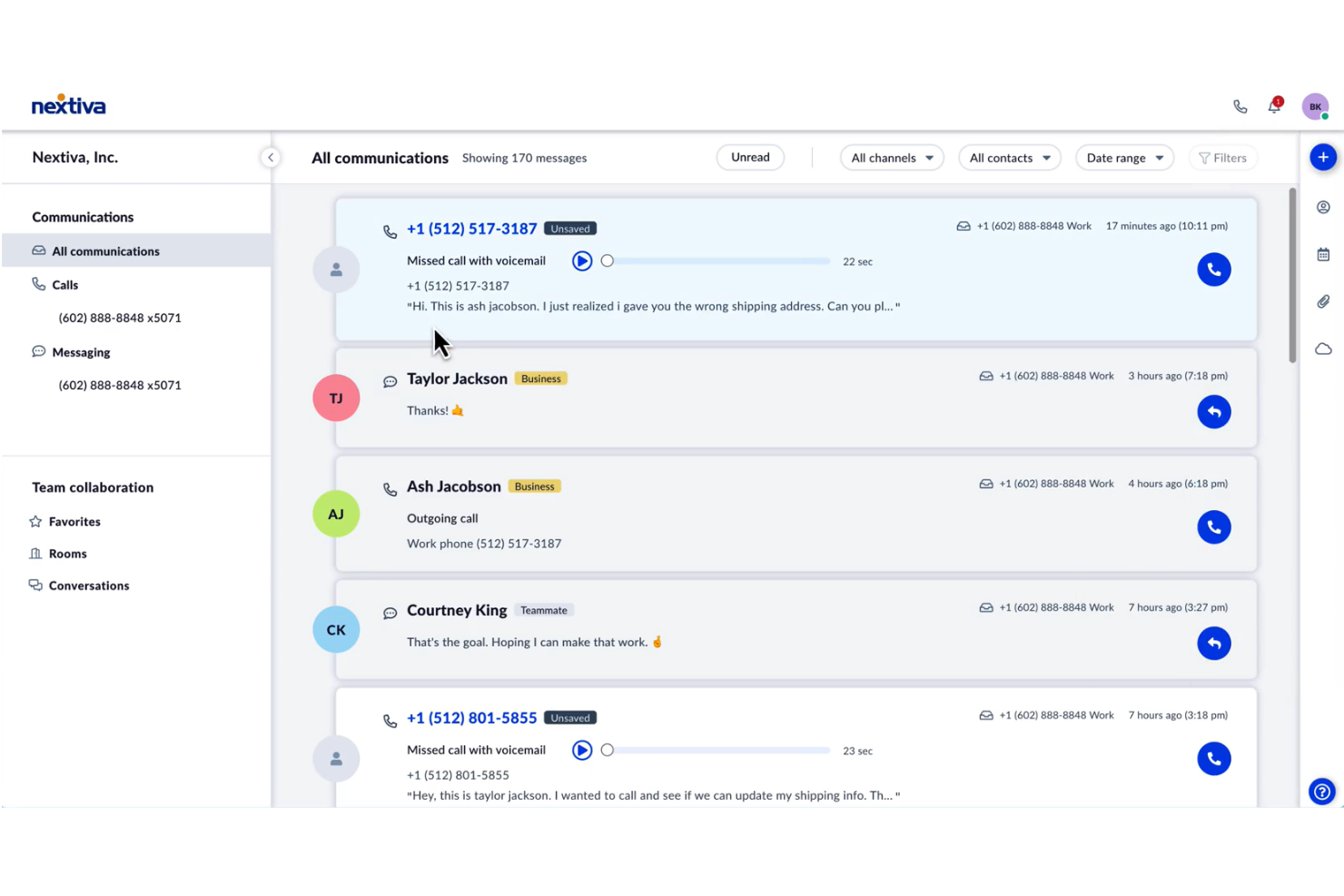
Nextiva è una piattaforma contact center basata su cloud per piccole imprese che combina voce, SMS, video e strumenti di collaborazione di squadra con funzionalità avanzate di instradamento chiamate, analisi e coinvolgimento clienti.
Per chi è indicata Nextiva?
Nextiva è una scelta solida per i team delle piccole imprese che necessitano di strumenti unificati per voce, SMS e collaborazione all’interno di un’unica piattaforma.
Perché ho scelto Nextiva
Ho scelto Nextiva come una delle migliori opzioni perché posso gestire chiamate, SMS e messaggi di squadra da un'unica dashboard senza dover usare più app. Mi piace che il mio team possa configurare l’instradamento avanzato delle chiamate e i menu IVR senza il supporto IT. Le analisi integrate mi aiutano a monitorare in tempo reale le prestazioni degli operatori e la soddisfazione dei clienti.
Caratteristiche principali di Nextiva
- Registrazione delle chiamate: Registra automaticamente le chiamate in entrata e in uscita per il controllo qualità e la formazione.
- Segreteria telefonica via email: Invia i messaggi vocali come file audio direttamente alla tua casella di posta elettronica.
- Call pop: Mostra dettagli e cronologia del chiamante prima di rispondere alla chiamata.
- Risponditore automatico: Risponde e instrada le chiamate in base a opzioni di menu personalizzabili.
Integrazioni Nextiva
Nextiva offre integrazioni native con Salesforce, HubSpot e Zendesk e fornisce un'API per integrazioni personalizzate.
Pros and Cons
Pros:
- Include canali SMS e chat dal vivo
- Il progettista visivo del flusso di chiamata è intuitivo
- Nessuna licenza per utente sul piano standard
Cons:
- Le impostazioni di amministrazione sono frammentate
- Alcune modifiche possono richiedere l'intervento dell'assistenza

Ideale per VoIP scalabile e instradamento chiamate
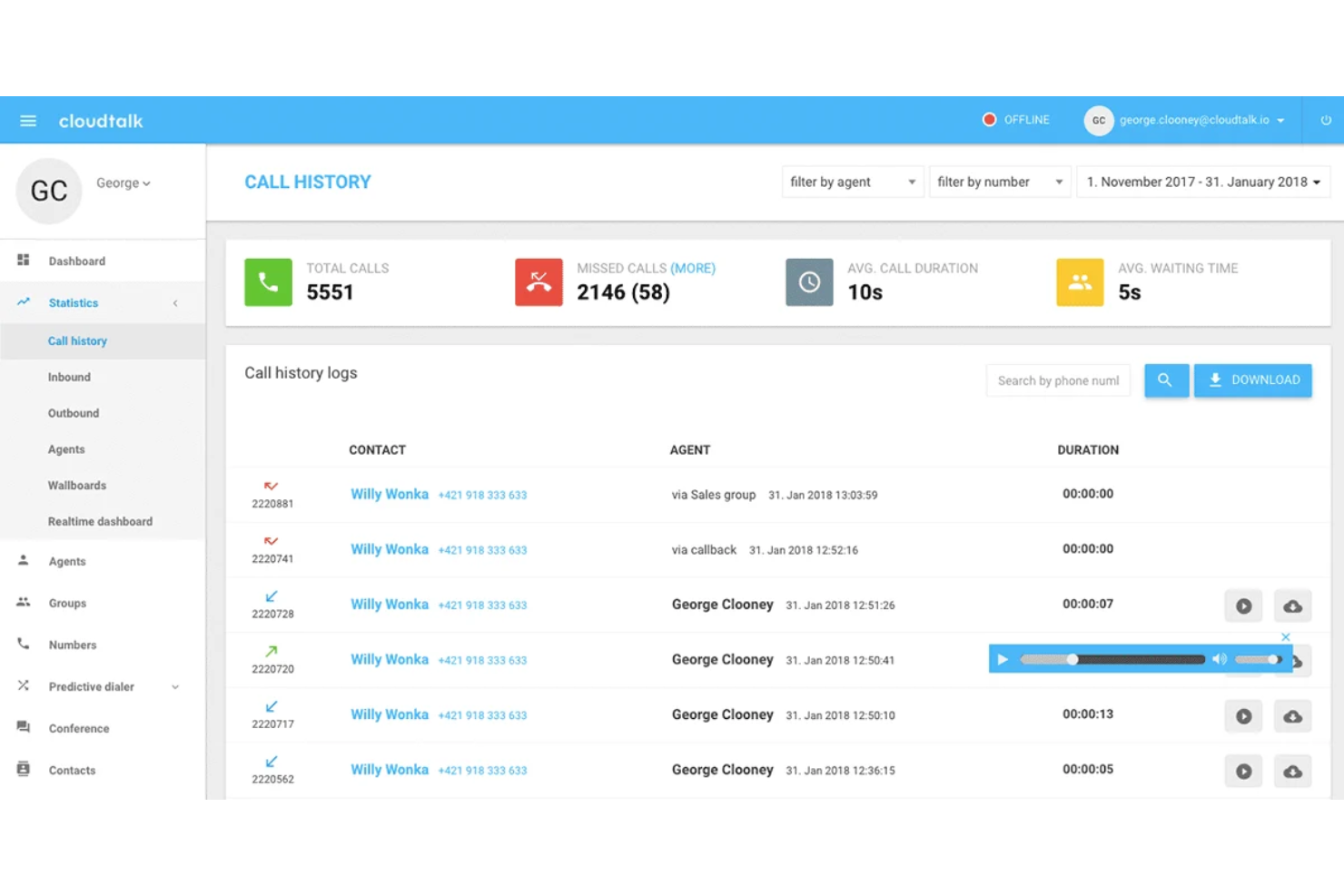
CloudTalk è una piattaforma di contact center basata su cloud per piccole imprese che integra instradamento avanzato delle chiamate, analisi in tempo reale, registrazione delle chiamate e integrazioni con i principali CRM e strumenti di assistenza clienti.
Per chi è CloudTalk?
CloudTalk è particolarmente adatto a team di vendita e assistenza distribuiti, appartenenti a piccole e medie imprese che necessitano di una gestione avanzata delle chiamate e di funzionalità di analisi.
Perché ho scelto CloudTalk
Ho scelto CloudTalk come uno dei migliori perché consente di impostare regole avanzate di instradamento delle chiamate per team distribuiti e monitorare le prestazioni tramite dashboard di analisi in tempo reale. Il mio team utilizza il compose numeri intelligente e il tagging delle chiamate per organizzare e dare priorità alle campagne in uscita. Trovo utile anche avere le registrazioni delle chiamate e le statistiche degli agenti raccolte in un unico posto.
Funzionalità principali di CloudTalk
- Trascrizione delle segreterie telefoniche: Converte i messaggi vocali in testo per una rapida revisione e un follow-up tempestivo.
- Risposta vocale interattiva (IVR): Permette di creare menu chiamata personalizzati per instradare i chiamanti in modo efficiente.
- Estensione browser click-to-call: Consente di effettuare chiamate con un solo clic direttamente dal CRM o dall'help desk.
- Messaggistica SMS: Permette agli agenti di inviare e ricevere messaggi di testo all'interno della piattaforma.
Integrazioni CloudTalk
CloudTalk offre oltre 100 integrazioni native, inclusi Salesforce, HubSpot, Pipedrive, Zendesk, Shopify, Slack e Zapier. È disponibile anche un'API per integrazioni personalizzate.
Pros and Cons
Pros:
- Configurazione semplice con interfaccia intuitiva e facile da usare
- Instradamento intelligente e dialer migliorano l'efficienza delle chiamate
- Chiamate globali con numeri locali in oltre 160 paesi
Cons:
- Le analisi richiedono filtraggio manuale per ottenere dati fruibili
- Ritardi nella fornitura dei numeri per aree meno comuni
New Product Updates from CloudTalk
CloudTalk Adds Campaign Statistics to MCP
CloudTalk adds campaign statistics to MCP with funnel, call, conversion, disposition, and duration metrics. This helps reporting assistants review campaign performance using read-only aggregate data. For more information, visit CloudTalk’s official site.
 .
.
Ideale per operazioni di assistenza clienti globali

Squaretalk è una piattaforma di contact center basata su cloud che combina chiamate vocali, SMS e messaggistica WhatsApp con IVR, instradamento delle chiamate, composizione predittiva e analisi in tempo reale in un'unica interfaccia accessibile dal browser.
Per chi è ideale Squaretalk?
Squaretalk è particolarmente adatto a piccole e medie imprese che gestiscono team di vendita outbound o di assistenza clienti e che hanno bisogno di comunicazione multicanale senza la complessità o il costo di soluzioni a livello enterprise.
Perché ho scelto Squaretalk
Ho incluso Squaretalk tra le mie scelte principali perché è davvero pensato per team che operano oltre i confini nazionali. Numeri virtuali locali in oltre 150 paesi permettono ai tuoi agenti di chiamare da un numero locale in qualsiasi mercato tu servi, il che fa una grande differenza nei tassi di risposta quando i destinatari riconoscono il prefisso locale. In aggiunta, la trascrizione delle chiamate potenziata dall'IA funziona in oltre 100 lingue, così controllo qualità e verifiche di conformità non si bloccano quando arriva una chiamata in lingua diversa dall'inglese.
Funzionalità principali di Squaretalk
- Compositore predittivo: Compone automaticamente più numeri contemporaneamente e collega gli agenti solo quando risponde una persona reale.
- Instradamento chiamate IVR: Instrada i chiamanti in entrata attraverso un menu personalizzabile per arrivare al giusto agente o coda.
- Dashboard di monitoraggio in tempo reale: Monitora in tempo reale l’attività degli agenti, lo stato delle code e le metriche delle chiamate nel contact center.
- Messaggistica omnicanale: Gestisce conversazioni SMS e WhatsApp insieme alle chiamate vocali da un'unica interfaccia.
Integrazioni di Squaretalk
Squaretalk si integra con Pipedrive, Zendesk, HubSpot CRM, Freshdesk, Salesforce, Zoho CRM e WhatsApp. Si connette anche con monday.com e Sedric.ai. Squaretalk offre inoltre un’API per integrazioni personalizzate.
Pros and Cons
Pros:
- Qualità delle chiamate eccezionale in tutte le regioni
- Il compositore predittivo aumenta la produttività degli agenti
- Numeri locali in oltre 150 destinazioni
Cons:
- Nessuna chat dal vivo integrata né sistema di ticketing via email
- L'app mobile non ha tutte le funzionalità della versione desktop
New Product Updates from Squaretalk
Squaretalk Adds TradeCore Integration for Brokerage Workflows
Squaretalk adds a TradeCore integration that connects customer conversations with BrokerIQ CRM workflows. This helps brokerage teams trigger AI-driven follow-ups, tasks, and other actions from calls and messages. For more information, visit Squaretalk’s official site.
 .
.
Ideale per contact center a rapida implementazione

Bright Pattern è una piattaforma di contact center basata su cloud per piccole e medie imprese che unisce voce, chat, SMS, email e canali di messaggistica con strumenti integrati di intelligenza artificiale, automazione e gestione della qualità.
Per chi è indicato Bright Pattern?
Bright Pattern è una scelta solida per le medie imprese che necessitano di assistenza clienti omnicanale con automazione guidata dall'intelligenza artificiale.
Perché ho scelto Bright Pattern
Ho scelto Bright Pattern come uno dei migliori perché posso gestire voce, chat, SMS e canali di messaggistica da un'unica interfaccia con intelligenza artificiale e automazione integrate. Mi piace che il mio team possa utilizzare la gestione della qualità basata su IA per monitorare e migliorare le prestazioni degli operatori in tempo reale. Gli strumenti di automazione dei flussi di lavoro ci permettono di indirizzare e risolvere le richieste dei clienti più rapidamente senza interventi manuali.
Caratteristiche principali di Bright Pattern
- Desktop omnicanale: Gli operatori gestiscono tutti i canali da un'unica interfaccia.
- Integrazioni CRM: Si collega con Salesforce, Zendesk, ServiceNow e Microsoft Dynamics.
- IVR personalizzabile: Crea e gestisci flussi di risposta vocale interattiva.
- Dashboard in tempo reale: Monitora metriche in tempo reale e attività degli operatori su tutti i canali.
Integrazioni Bright Pattern
Bright Pattern offre integrazioni native con Salesforce, Zendesk, ServiceNow, Microsoft Teams, Google Contacts e Zapier. È disponibile un'API per integrazioni personalizzate.
Pros and Cons
Pros:
- L'IA migliora l'instradamento e la produttività degli operatori
- Vero omnicanale che gestisce tutti i canali su un'unica piattaforma
- I flussi di lavoro drag-and-drop semplificano la configurazione
Cons:
- La personalizzazione dell'interfaccia utente manca di granularità
- Le funzionalità del canale email sono meno sviluppate

Talkdesk
Ideale per contact center alimentati dall'IA
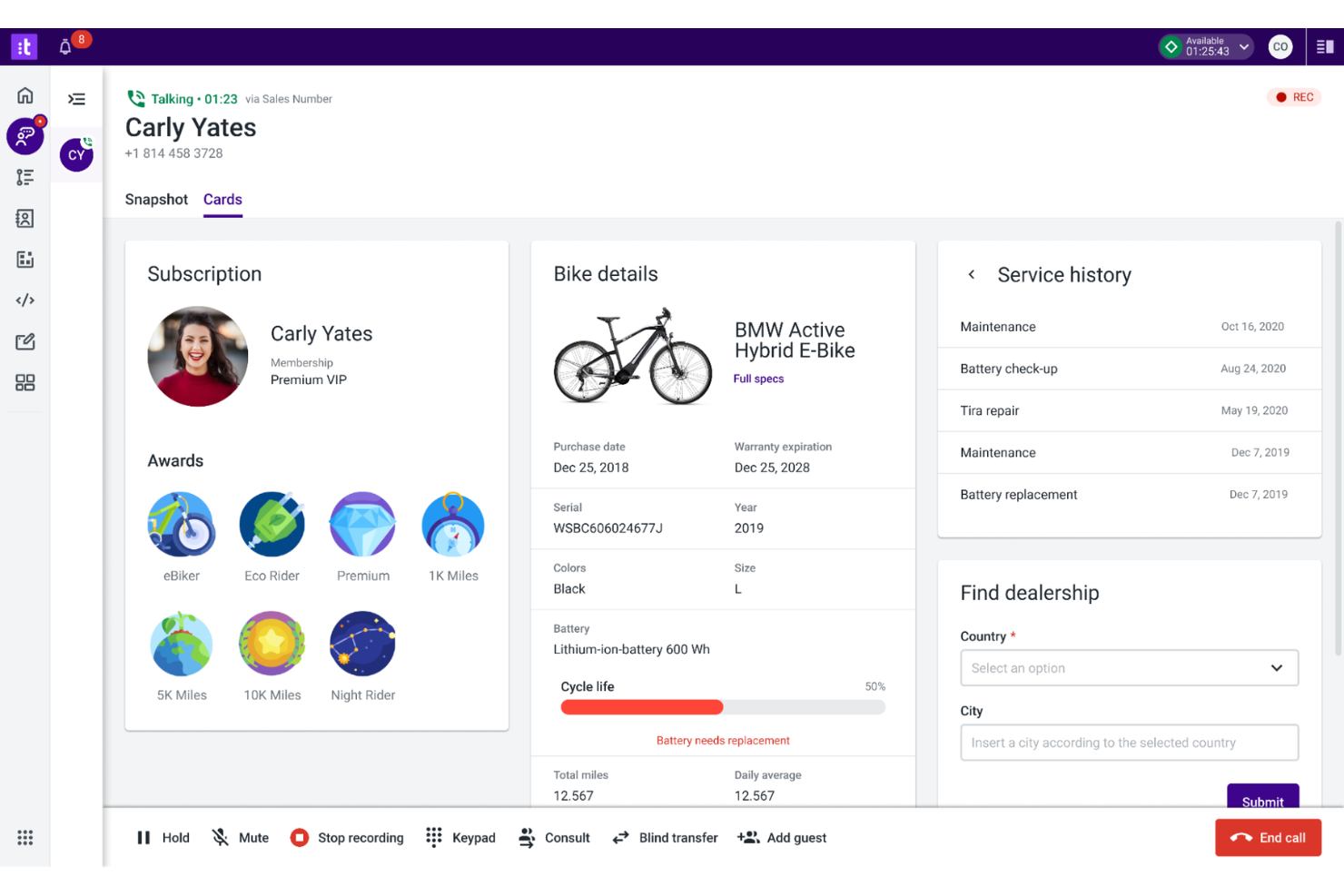
Talkdesk è una piattaforma di contact center basata su cloud per piccole aziende che combina voce, canali digitali, automazione e strumenti guidati dall'intelligenza artificiale per aiutare i team a gestire le interazioni con i clienti e semplificare le operazioni di supporto.
Per chi è più indicato Talkdesk?
Talkdesk è perfetto per piccole e medie imprese che desiderano automazione alimentata dall’IA e supporto omnicanale nel loro contact center.
Perché ho scelto Talkdesk
Ho scelto Talkdesk tra i migliori perché posso automatizzare attività ripetitive e instradare le chiamate tramite flussi di lavoro alimentati dall’IA, risparmiando tempo al mio team durante i periodi di maggiore attività. Mi piace poter configurare i canali voce, chat e SMS in un unico posto e utilizzare l’analisi vocale in tempo reale per monitorare il sentiment dei clienti. L’interfaccia drag-and-drop mi permette di modificare rapidamente i flussi di chiamata man mano che la mia azienda cresce.
Caratteristiche principali di Talkdesk
- Dashboard personalizzabili: Crea dashboard in tempo reale per tracciare le prestazioni di agenti e code.
- Registrazione chiamate: Registra e archivia le chiamate per garantire la qualità e facilitare la formazione.
- Integrazioni CRM: Collega Salesforce, Zendesk e Microsoft Dynamics 365.
- Composizione automatica delle chiamate in uscita: Avvia campagne outbound con composizione automatica e pianificazione delle chiamate.
Integrazioni Talkdesk
Talkdesk offre integrazione nativa con Salesforce, Zendesk, Slack, Microsoft Teams, ServiceNow, Google Workspace e Zapier. È disponibile un'API per integrazioni personalizzate.
Pros and Cons
Pros:
- Include agente virtuale con IA per il self-service
- Designer visivo dei flussi di chiamata facile da usare
- Analisi vocale in tempo reale per il monitoraggio della qualità
Cons:
- Dashboard di reportistica prive di personalizzazione per il B2B
- Nessun monitoraggio pipeline per le vendite B2B

Vonage
Ideale per contact center cloud personalizzabili

Vonage è una piattaforma di contact center basata su cloud per piccole imprese che unisce voce, video, chat e instradamento avanzato per aiutare i team a gestire le interazioni con i clienti su più canali.
A chi è consigliato Vonage?
Vonage è una scelta solida per piccole e medie imprese che necessitano di funzionalità di contact center flessibili, basate su cloud, con integrazione profonda con i CRM.
Perché ho scelto Vonage
Ho scelto Vonage tra i migliori perché posso collegare direttamente il mio contact center a Salesforce e Microsoft Dynamics, consentendo al mio team di visualizzare i dati dei clienti e i controlli delle chiamate all'interno del CRM. Mi piace poter configurare canali voce, video e chat in un unico posto e utilizzare l'instradamento basato sulle competenze per indirizzare i clienti all'agente giusto. La flessibilità della piattaforma mi permette di aggiungere o rimuovere canali secondo le esigenze del mio business.
Funzionalità chiave di Vonage
- Registrazione delle chiamate: Registra e archivia automaticamente le chiamate per qualità e conformità.
- Dashboard di analisi in tempo reale: Visualizza metriche in tempo reale sulle performance di agenti e code.
- Designer IVR: Consente di creare menu personalizzati di risposta vocale interattiva.
- Messaggistica omnicanale: Supporta le conversazioni con i clienti tramite SMS, social e web chat.
Integrazioni di Vonage
Vonage offre integrazione nativa con Salesforce, Microsoft Teams, Zendesk, ServiceNow, HubSpot, Zoho CRM e Zapier. È disponibile un'API per integrazioni personalizzate.
Pros and Cons
Pros:
- Pipeline personalizzabili supportano processi di vendita flessibili
- La gestione dei casi gestisce i flussi di lavoro di assistenza
- La sincronizzazione delle email registra tutte le comunicazioni
Cons:
- La qualità delle chiamate e l'etichettatura antispam possono influire sulle attività in uscita
- Configurazione e modifiche richiedono spesso l'intervento IT

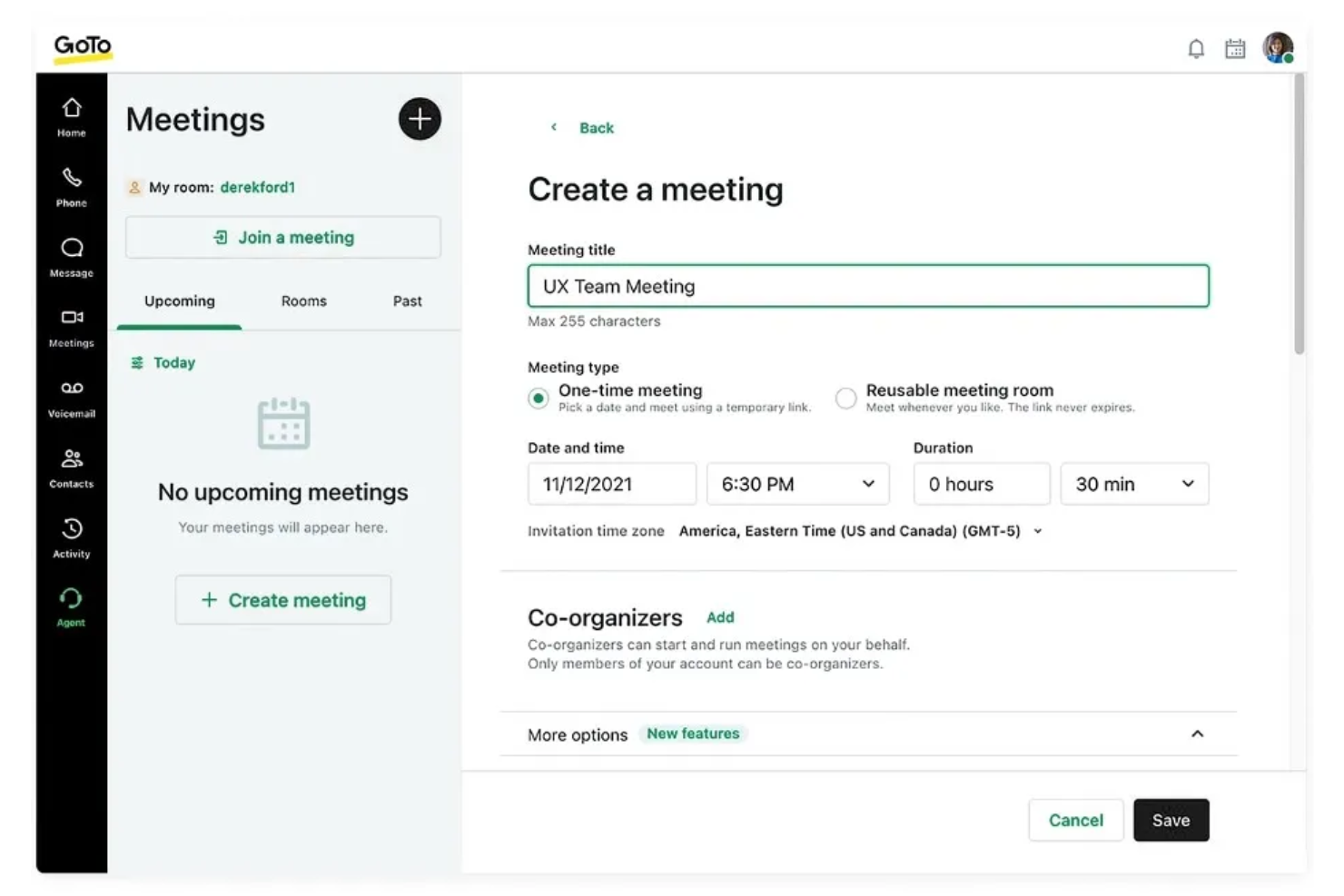
GoTo Connect è una piattaforma di contact center cloud per piccole imprese che combina telefono aziendale, videoriunioni, SMS e instradamento delle chiamate con una configurazione e una gestione semplici da un'unica dashboard.
Per chi è ideale GoTo Connect?
GoTo Connect è particolarmente adatto alle piccole imprese che desiderano una soluzione cloud completa per telefono e contact center.
Perché ho scelto GoTo Connect
Ho scelto GoTo Connect come uno dei migliori perché posso gestire chiamate, videoriunioni e SMS da un'unica dashboard senza dover cambiare strumento. Mi piace poter configurare visivamente i flussi di chiamata e gli auto-risponditori con il mio team, risparmiando tempo. Utilizzo anche la dashboard di analisi per monitorare in tempo reale il volume delle chiamate e l'attività degli operatori.
Funzionalità principali di GoTo Connect
- Registrazione delle chiamate: Registra automaticamente le chiamate in entrata e in uscita per qualità e conformità.
- Segreteria telefonica via email: Invia i messaggi vocali direttamente nella tua casella di posta come file audio.
- Gruppi di squillo: Instrada le chiamate in arrivo a più agenti o reparti contemporaneamente.
- Call whisper: Consente ai supervisori di fornire indicazioni agli agenti durante le chiamate in tempo reale senza che il cliente senta.
Integrazioni di GoTo Connect
GoTo Connect offre integrazioni native con Salesforce, Zoho CRM, Microsoft Teams, Slack, HubSpot e Zapier, e mette a disposizione un'API per integrazioni personalizzate.
Pros and Cons
Pros:
- Include canali SMS e chat dal vivo
- Il designer visivo del flusso di chiamata è intuitivo
- Nessuna licenza per utente nel piano standard
Cons:
- Vincolato al VoIP di GoTo
- Nessuna gamification delle prestazioni degli operatori

Ideale per help desk e chiamate tutto-in-uno
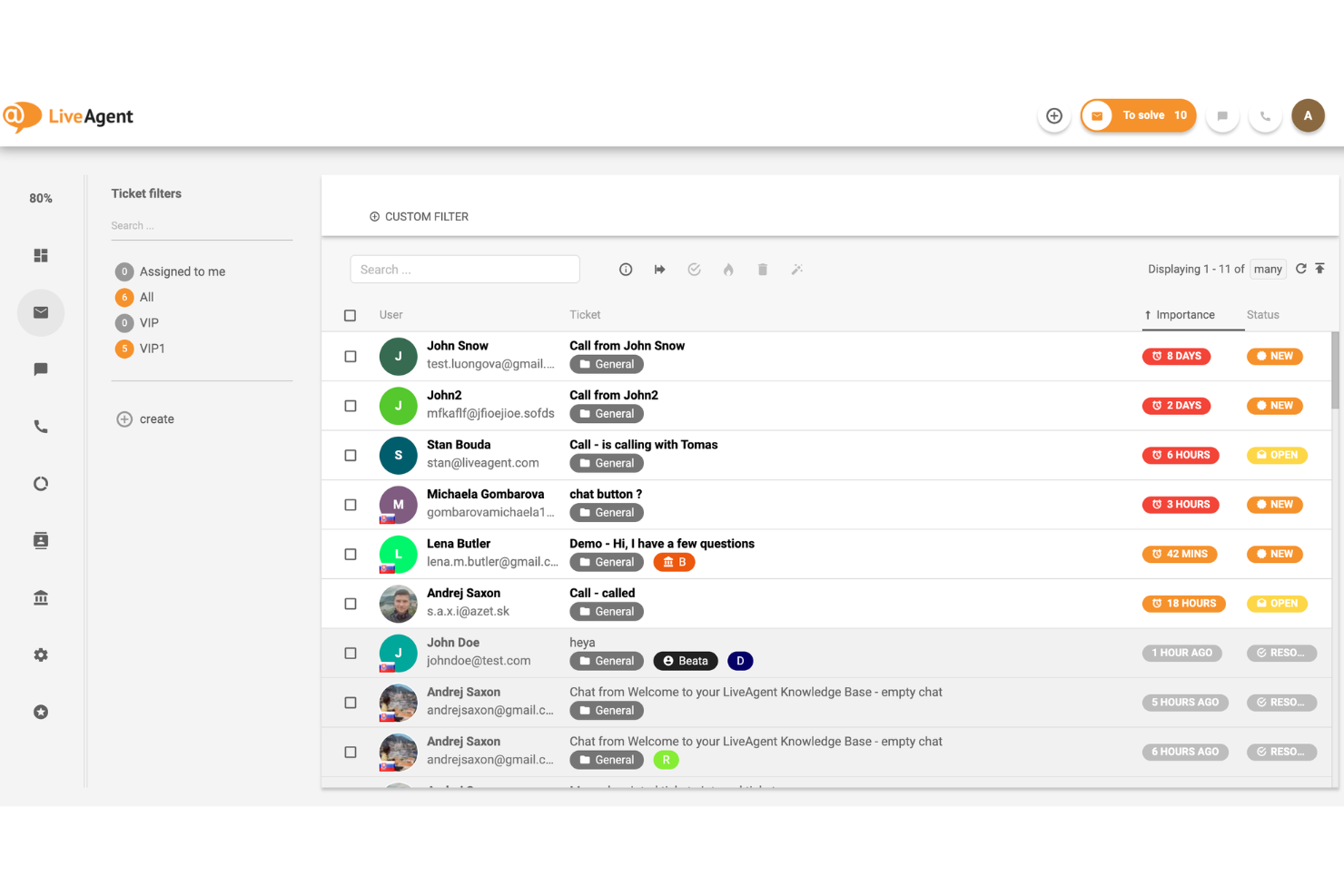
LiveAgent è un software per contact center dedicato alle piccole imprese che combina voce, chat dal vivo, email e messaggistica social con ticketing, instradamento delle chiamate e registrazioni illimitate delle chiamate su un'unica piattaforma.
Per chi è LiveAgent?
Team di assistenza di piccole imprese che necessitano di un contact center completo, conveniente e con registrazioni illimitate delle chiamate.
Perché ho scelto LiveAgent
Ho scelto LiveAgent tra i migliori perché posso configurare registrazioni illimitate delle chiamate senza preoccuparmi dei limiti di archiviazione o di costi aggiuntivi. Il mio team utilizza il sistema di ticketing integrato e l'instradamento delle chiamate per mantenere ogni conversazione con i clienti ben organizzata. Mi piace anche il fatto che possiamo gestire chiamate, chat ed email da una sola dashboard.
Funzionalità principali di LiveAgent
- Posta in arrivo omnicanale: Gestisci ticket da email, chat, chiamate e social media in un unico posto.
- Creatore IVR: Crea menu personalizzati di risposta vocale interattiva per l'instradamento delle chiamate.
- Widget chat in tempo reale: Aggiungi una chat dal vivo al tuo sito per supporto immediato.
- Trasferimenti di chiamata: Trasferisci le chiamate tra agenti o reparti con un solo clic.
Integrazioni LiveAgent
LiveAgent offre oltre 200 integrazioni native, inclusi Slack, Shopify, Mailchimp, Facebook, WooCommerce, Salesforce e Zapier. È inoltre disponibile un'API per integrazioni personalizzate.
Pros and Cons
Pros:
- Registrazioni illimitate delle chiamate senza limiti di archiviazione
- Strumenti IVR e instradamento chiamate integrati
- Widget chat in tempo reale per siti web
Cons:
- Nessuna funzione integrata di gestione della forza lavoro
- I report non permettono personalizzazioni avanzate

Zendesk
Ideale per il supporto omnicanale con voce

Zendesk è una piattaforma cloud-based per contact center dedicata alle piccole imprese che riunisce voce, chat, email e canali social con ticketing, automazione e reportistica in un unico ambiente di lavoro unificato.
Per chi è più indicato Zendesk?
Team di assistenza clienti in aziende in crescita che necessitano di supporto omnicanale e automazione.
Perché ho scelto Zendesk
Ho scelto Zendesk tra i migliori perché posso gestire voce, chat, email e messaggistica social tutto in un unico posto. Mi piace come il canale voce integrato permetta al mio team di gestire chiamate insieme a ticket e chat, così nulla viene trascurato. Gli strumenti di automazione ci aiutano a indirizzare le chiamate e a fare follow-up in automatico, garantendo tempi di risposta sempre costanti.
Funzionalità principali di Zendesk
- IVR personalizzabili: Configura menu di risposta vocale interattiva per indirizzare i chiamanti verso il team giusto.
- Registrazione chiamate: Registra chiamate in entrata e in uscita per controlli di qualità e formazione.
- Dashboard di analisi in tempo reale: Monitora volume di chiamate, tempi di attesa e attività degli operatori in tempo reale.
- Trascrizione messaggi vocali: Converte automaticamente i messaggi vocali in testo per una rapida revisione e follow-up.
Integrazioni Zendesk
Zendesk offre oltre 1.300 integrazioni native, tra cui Salesforce, Slack, Shopify, Mailchimp, Jira, Trello e Zapier. È anche disponibile un'API per integrazioni personalizzate.
Pros and Cons
Pros:
- Ticketing omnicanale unifica tutte le interazioni con i clienti
- Registrazione chiamate integrata e trascrizione messaggi vocali
- Automazione per instradamento chiamate e follow-up
Cons:
- Le funzionalità voce richiedono piani di livello superiore
- Ritardi occasionali nella sincronizzazione con CRM esterni
New Product Updates from Zendesk
Zendesk Adds Email AI Replies and Predictive Routing
Zendesk’s latest email AI agents update brings configurable knowledge and welcome replies and adds predictive routing for email tickets, so you can tailor your automated emails and get inquiries resolved faster. For more information, visit Zendesk’s official site.

3CX
Ideale per sistemi PBX web-based flessibili

3CX è un sistema telefonico aziendale e una piattaforma per contact center pensata per le piccole imprese che combina voce, video, chat dal vivo e SMS con opzioni di implementazione flessibili e funzionalità di gestione delle chiamate integrate.
Per chi è più adatto 3CX?
3CX è particolarmente indicato per piccole imprese e team IT che desiderano comunicazioni unificate con un'implementazione flessibile sia on-premise che in cloud.
Perché ho scelto 3CX
Ho scelto 3CX tra i migliori perché posso implementarlo sia in sede che nel cloud, offrendo al mio team flessibilità in termini di conformità e controllo. Apprezzo le funzioni integrate di chat dal vivo e SMS insieme alle chiamate vocali e video. Il mio team riesce a gestire le code di chiamata e a configurare i menu IVR senza necessità di componenti aggiuntivi.
Caratteristiche principali di 3CX
- Registrazione delle chiamate: Registra automaticamente le chiamate in entrata e in uscita per il monitoraggio della qualità.
- Videoconferenze web: Ospita riunioni video direttamente dall'interfaccia di 3CX.
- Integrazione CRM: Si collega a Salesforce, HubSpot e altri CRM più diffusi.
- Reportistica delle chiamate: Genera report dettagliati sulle attività delle chiamate e sulle prestazioni degli operatori.
Integrazioni di 3CX
3CX offre integrazioni native con Salesforce, HubSpot, Microsoft 365, Zendesk, Freshdesk, Zoho CRM, Vtiger e Zapier. È inoltre disponibile una API per integrazioni personalizzate.
Pros and Cons
Pros:
- Opzioni di implementazione flessibili on-premise o in cloud
- Canali di chat dal vivo e SMS nativi inclusi
- Gestione di IVR e code di chiamata integrata
Cons:
- L'app mobile può risultare poco affidabile per le chiamate
- Le funzionalità avanzate richiedono piani di livello superiore
Altri software per contact center per piccole imprese
Ecco alcune opzioni aggiuntive di software per contact center per piccole imprese che non sono entrate nella mia selezione, ma che vale comunque la pena valutare:
- Aircall
Ideale per chiamate cloud semplici per piccoli team
- HubSpot Service Hub
Ideale per strumenti di assistenza integrati nel CRM
- Zoho Desk
Ideale per l'assistenza clienti contestuale


Come valuto il software di contact center per le piccole imprese
I piccoli brand di e-commerce, gli studi medici e i team di supporto snelli utilizzano queste piattaforme per gestire chiamate, chat ed email da un'unica area di lavoro. Valuto questi strumenti su due livelli: ciò che ogni piattaforma deve avere per entrare in questa lista e ciò che effettivamente differenzia una scelta dall'altra.
Funzionalità di base (requisiti indispensabili per questa lista)
Per il software di contact center per piccole imprese, le funzionalità di base che testo e valuto sono:
- Supporto omnicanale: Verifico se voce, email, chat dal vivo e SMS vengono gestiti da un'unica area di lavoro per l'agente — non separati in strumenti diversi.
- Instradamento delle chiamate e ACD: Le regole di instradamento basate su competenze e code sono importanti, anche per un team di 5 agenti che gestisce chiamate su fatturazione, vendite e supporto.
- IVR / risposta automatica: Cerco un costruttore visivo del flusso di chiamata dove un amministratore non tecnico può impostare alberi di menu, instradamento in base agli orari di lavoro e regole di overflow.
- Desktop unificato per l'agente: Gli agenti hanno bisogno della cronologia delle interazioni, del contesto del cliente e dei controlli di trasferimento in un'unica vista senza dover cambiare scheda.
- Registrazione delle chiamate: Ogni piattaforma dovrebbe registrare automaticamente le chiamate, con archivio ricercabile e riproduzione per QA, formazione e risoluzione delle controversie.
- Report e analisi: Valuto cruscotti in tempo reale e report storici su KPI come il tempo medio di gestione, il tasso di abbandono e i tempi di attesa.
- Integrazione CRM: Le schermate che recuperano i dati dei clienti da Salesforce, HubSpot o Zoho durante le chiamate in ingresso sono una aspettativa di base, non un extra a pagamento.
- Accesso cloud-based: La piattaforma dovrebbe funzionare in un browser e su app mobili senza hardware in sede, così che team remoti e ibridi possano lavorare ovunque.
Uno strumento deve offrire la maggior parte di queste capacità per meritare un posto in elenco. Da lì, considero cosa rende unica ogni soluzione.
Funzionalità distintive (cosa distingue le varie scelte)
L'IA avanzata come la trascrizione in tempo reale delle chiamate, le note di riepilogo automatiche e il rilevamento del sentiment aiutano rapidamente i piccoli team a servire più clienti con meno lavoro manuale. Cerco integrazioni profonde con piattaforme e-commerce o sistemi di ticketing, così i team di supporto possono aggiornare ordini o risolvere ticket direttamente dal contact center. Dialer outbound integrati e automazione degli SMS fanno anche la differenza per i team orientati alle vendite che gestiscono campagne di chiamate o promemoria di appuntamenti.
Cosa considero oltre le funzionalità
La trasparenza dei prezzi conta molto qui. Verifico se i costi per agente includono i minuti di chiamata o li addebitano separatamente, poiché i costi nascosti della telefonia possono raddoppiare la bolletta di un piccolo team. La conformità è un altro fattore: gli studi medici necessitano di piani idonei HIPAA con un BAA, mentre ogni azienda che gestisce pagamenti telefonici ha bisogno di controlli di registrazione conformi PCI. Valuto anche la rapidità con cui un amministratore non tecnico può andare online e se il supporto all'onboarding è incluso o riservato ai piani di livello superiore.
Come scegliere un software per contact center per piccole imprese
È facile perdersi tra lunghi elenchi di funzionalità e strutture tariffarie complesse. Per aiutarti a rimanere concentrato mentre affronti il tuo processo di selezione del software, ecco un elenco di fattori da tenere presenti:
| Fattore | Cosa considerare |
|---|---|
| Scalabilità | Il software supporterà i tuoi piani di crescita? Verifica i limiti per gli utenti, l'espansione dei canali e i prezzi all'aumentare delle dimensioni del team o del volume delle chiamate. |
| Integrazioni | Si connette nativamente al tuo CRM, al sistema di assistenza o agli strumenti di produttività? Evita le soluzioni che richiedono procedure alternative per i tuoi sistemi principali. |
| Personalizzazione | Puoi adattare flussi di lavoro, instradamento e report alle esigenze della tua attività? Cerca impostazioni flessibili, non solo modelli pronti all'uso. |
| Semplicità d'uso | Gli agenti e gli amministratori riusciranno a imparare a usarlo rapidamente? Testa l'interfaccia per verificarne chiarezza e semplicità: gli strumenti complessi possono rallentare l'inserimento e il lavoro quotidiano. |
| Implementazione e avviamento | Quanto tempo occorrerà per rendere il sistema operativo? Informati sul supporto alla migrazione, sulle risorse formative e sui tempi medi per ottenere i primi risultati. |
| Costo | Tutti i costi sono chiari, inclusi configurazione, postazioni e componenti aggiuntivi? Confronta il costo totale di proprietà, non solo i canoni mensili. |
| Misure di sicurezza | La piattaforma soddisfa i tuoi standard di protezione dei dati? Cerca crittografia, controlli degli accessi e conformità a normative come il GDPR. |
| Disponibilità dell'assistenza | Quali canali e orari di assistenza sono offerti? Valuta se hai bisogno di supporto 24 ore su 24, 7 giorni su 7, o di assistenza dedicata per l'avviamento del team. |
Che cos'è un software per contact center per piccole imprese?
Il software per contact center per piccole imprese è una piattaforma che aiuta i team a gestire le comunicazioni con i clienti attraverso canali come telefonate, chat, email e SMS da un'unica interfaccia. Queste soluzioni per call center centralizzano le interazioni e supportano l'intero percorso del cliente. Includono funzionalità come ACD (distribuzione delle chiamate), accodamento delle chiamate, instradamento intelligente e opzioni di richiamata per gestire le chiamate in entrata in modo più efficiente. Molte piattaforme utilizzano anche chatbot per automatizzare le risposte e migliorare la velocità del servizio. Semplificando le operazioni e automatizzando i flussi di lavoro, questo software aiuta i piccoli team a offrire una migliore esperienza cliente, gestendo al contempo in modo efficace volumi elevati di interazioni.
Funzionalità del software per contact center per piccole imprese
Quando scegli un software per contact center per piccole imprese, presta attenzione alle seguenti funzionalità principali:
- Supporto omnicanale: Gestisci le conversazioni con i clienti tramite telefono, email, chat e SMS da un'unica dashboard unificata, così gli agenti non perdono mai un messaggio e i clienti possono contattarti attraverso il loro canale preferito.
- Instradamento automatico delle chiamate: Indirizza le chiamate in entrata all'agente o al reparto giusto in base alle regole impostate, riducendo i tempi di attesa e migliorando la risoluzione al primo contatto.
- Registrazione delle chiamate: Registra e archivia le chiamate per il controllo della qualità, la formazione e la conformità, con facile accesso alle opzioni di riproduzione e download.
- Analisi in tempo reale: Monitora i volumi delle chiamate, le prestazioni degli agenti e la soddisfazione dei clienti tramite dashboard aggiornate in tempo reale e report personalizzabili, per individuare le tendenze e prendere decisioni basate sui dati.
- Integrazione con il CRM: Sincronizza i dati dei clienti e la cronologia delle interazioni con il tuo CRM, fornendo agli agenti il contesto di ogni conversazione e consentendo un servizio personalizzato.
- Risposta vocale interattiva (IVR): Consenti ai chiamanti di interagire con un sistema a menu per risolvere autonomamente le proprie esigenze o raggiungere il team giusto, semplificando i flussi delle chiamate e riducendo i trasferimenti manuali.
- Strumenti di collaborazione per gli agenti: Consenti agli agenti di chattare internamente, condividere note o inoltrare le problematiche all'interno della piattaforma, favorendo il lavoro di squadra e una risoluzione più rapida dei problemi.
- Flussi di lavoro personalizzabili: Adatta la gestione delle chiamate, l'apertura dei ticket e i processi di follow-up alle esigenze della tua azienda, garantendo coerenza ed efficienza.
- Controlli di sicurezza e conformità: Proteggi i dati sensibili dei clienti con crittografia, autorizzazioni di accesso e funzionalità di conformità per normative come il GDPR o l'HIPAA.
- Accesso da dispositivi mobili: Consenti ad agenti e responsabili di gestire le chiamate, visualizzare le analisi e rispondere ai clienti dai dispositivi mobili, supportando modalità di lavoro flessibili e da remoto.
Vantaggi del software per contact center per piccole imprese
L'implementazione di un software per contact center per piccole imprese offre numerosi vantaggi al tuo team e alla tua azienda. Eccone alcuni:
- Comunicazione centralizzata: Gestisci tutte le interazioni con i clienti da un'unica piattaforma, riducendo la confusione e i messaggi persi tra i diversi canali.
- Tempi di risposta più rapidi: L'instradamento automatico delle chiamate e il supporto omnicanale aiutano il tuo team a risolvere più rapidamente i problemi dei clienti.
- Maggiore soddisfazione dei clienti: Le analisi in tempo reale e l'integrazione con il CRM consentono di offrire un servizio più personalizzato ed efficace.
- Migliore collaborazione del team: Gli strumenti di collaborazione integrati e le dashboard condivise facilitano il lavoro congiunto degli agenti e la risoluzione dei problemi.
- Scalabilità per la crescita: I flussi di lavoro flessibili e le integrazioni consentono al tuo contact center di espandersi insieme alla crescita della tua azienda.
- Maggiore sicurezza dei dati: I controlli di sicurezza e le funzionalità di conformità aiutano a proteggere le informazioni sensibili dei clienti e a soddisfare i requisiti normativi.
- Informazioni utili per le decisioni: Le funzionalità di reportistica e analisi offrono visibilità sulle tendenze delle prestazioni, aiutandoti a prendere decisioni consapevoli per migliorare la qualità del servizio.
Costi e prezzi del software per contact center per piccole imprese
La scelta di un software per contact center per piccole imprese richiede la conoscenza dei diversi modelli e piani tariffari disponibili. I costi variano in base alle funzionalità, alle dimensioni del team, agli extra e ad altri fattori. La tabella seguente riassume i piani più comuni, i relativi prezzi medi e le funzionalità tipicamente incluse nelle soluzioni software per contact center per piccole imprese:
Tabella comparativa dei piani per il software per contact center per piccole imprese
| Tipo di piano | Prezzo medio | Funzionalità comuni |
|---|---|---|
| Piano gratuito | $0 | Gestione di base delle chiamate, canali limitati, reportistica minima e assistenza della community. |
| Piano personale | $10-$25/utente/mese | Supporto multicanale, registrazione delle chiamate, analisi semplici e assistenza via e-mail. |
| Piano aziendale | $30-$60/utente/mese | Instradamento omnicanale, integrazione CRM, analisi avanzate, IVR e strumenti per la collaborazione del team. |
| Piano per grandi aziende | $70-$120/utente/mese | Flussi di lavoro personalizzati, accesso API, sicurezza migliorata, funzionalità di conformità, assistenza prioritaria e supporto all'avviamento. |
Domande frequenti sul software per centri di contatto per piccole imprese
Ecco alcune risposte alle domande comuni sul software per centri di contatto per piccole imprese:
Qual è la differenza tra il software per centri di contatto e un sistema telefonico tradizionale?
Il software per centri di contatto va oltre le chiamate di base, supportando più canali come chat, e-mail e SMS, oltre a funzionalità come l’instradamento delle chiamate, l’analisi e l’integrazione CRM. I sistemi telefonici tradizionali gestiscono solitamente solo le chiamate vocali e non dispongono di questi strumenti avanzati.
Il software per centri di contatto per piccole imprese può integrarsi con il mio CRM esistente?
Sì, la maggior parte delle piattaforme si integra con gli strumenti CRM per migliorare le relazioni con i clienti e fornire il contesto durante le interazioni. Molte soluzioni CCaaS sono progettate per collegarsi senza problemi ai sistemi esistenti.
Quanto tempo occorre per configurare il software per centri di contatto per piccole imprese?
I tempi di configurazione variano, ma la maggior parte delle piattaforme basate sul cloud può essere implementata rapidamente con la sola connessione a Internet. Alcuni fornitori, tra cui piattaforme come RingCentral, offrono un avviamento rapido per i team di startup e le aziende in crescita.
Il software per centri di contatto per piccole imprese è sicuro?
Sì, i fornitori affidabili includono funzionalità di sicurezza come autenticazione, crittografia e controlli degli accessi per proteggere i dati e le comunicazioni dei clienti.
Ho bisogno di personale IT per gestire il software per centri di contatto per piccole imprese?
No, molte delle migliori opzioni di software per centro di contatto sono progettate per essere facili da usare anche senza team IT dedicati. Tuttavia, alcune conoscenze tecniche possono essere utili per configurare funzionalità avanzate come l’instradamento o le integrazioni.
Cosa succede se il mio team cresce o le mie esigenze cambiano?
La maggior parte delle piattaforme è scalabile e consente di aggiungere utenti, canali e numeri di telefono secondo necessità. Inoltre, aiuta i team a ottimizzare le operazioni e a migliorare l’esperienza del cliente con l’evolversi dell’azienda.