

10 scelte di software gratuiti per centri di assistenza telefonica per il 2026

Elenco dei software gratuiti per call center


I software gratuiti per call center offrono al tuo team l'accesso a funzionalità essenziali di gestione, instradamento e reportistica delle chiamate senza costi iniziali, tramite un piano gratuito o una prova gratuita a tempo limitato. Se cerchi un modo per gestire volumi elevati di chiamate, fornire assistenza ai clienti su più canali o testare nuovi flussi di lavoro senza impegnare il budget, queste soluzioni ti permettono di valutare le funzionalità principali senza rischi.
In questo elenco troverai affidabili opzioni di software gratuiti per call center per il 2026, con informazioni su ciò che offre ciascuna piattaforma e su come si adatta alle esigenze dei diversi team.
Perché fidarsi dei nostri consigli sui software
Il nostro team testa e recensisce software dal 2012. In quanto leader CX noi stessi, sappiamo quanto sia difficile — e importante — scegliere il software giusto.
Per questa guida, abbiamo valutato gli strumenti attraverso test pratici e ricerche indipendenti, assegnando un punteggio agli strumenti in base ai nostri criteri di selezione.
Le nostre recensioni riflettono il nostro giudizio editoriale umano, non un discorso di vendita.
Riepilogo dei migliori software gratuiti per call center
Questa tabella comparativa riassume i dettagli sui prezzi delle mie migliori selezioni di software gratuiti per call center, per aiutarti a trovare quello più adatto al tuo budget e alle esigenze della tua attività.
| Tool | Best For | Trial Info | Price | ||
|---|---|---|---|---|---|
| 1 | Ideale per l'analisi avanzata delle chiamate | Prova gratuita di 14 giorni | A partire da $25/utente/mese (fatturazione annuale) | Website | |
| 2 | Ideale per team che gestiscono grandi volumi di chiamate in uscita | Utilizzo gratuito | Gratuito per download/utilizzo | Website | |
| 3 | Ideale per una configurazione cloud rapida | Prova gratuita di 14 giorni + piano gratuito + demo gratuita disponibile | Da $15/agente/mese (fatturati annualmente) | Website | |
| 4 | Ideale per soluzioni di telefonia personalizzate | Gratuito per sempre | Gratuito per sempre | Website | |
| 5 | Ideale per il controllo del sistema open-source | Gratuito per sempre (open source) | Gratuito per sempre (open source) | Website | |
| 6 | Ideale per la gestione multicanale dei ticket | Demo gratuita + prova gratuita di 30 giorni disponibile | Da €7/utente/mese (fatturazione annuale) | Website | |
| 7 | Ideale per esigenze di composizione predittiva | Gratis per sempre | Gratis per sempre | Website | |
| 8 | Ideale per funzionalità di comunicazione unificata | Download gratuito | Da $29/licenza | Website | |
| 9 | Ideale per l'integrazione CRM integrata | Piano gratuito + prova gratuita di 15 giorni disponibile | Da $49/mese (fatturazione annuale) | Website | |
| 10 | Ideale con supporto chat in tempo reale | Prova gratuita di 30 giorni + demo gratuita disponibile | A partire da $15/mese (fatturazione annuale) | Website |
Recensioni dei software gratuiti per call center
Di seguito sono riportati i miei riepiloghi dettagliati dei migliori software gratuiti per call center inclusi nel mio elenco. Le mie recensioni offrono una panoramica dettagliata delle funzionalità, dei casi d’uso migliori e delle integrazioni di ciascuna piattaforma, per aiutarti a trovare quella più adatta a te.

Ideale per l'analisi avanzata delle chiamate
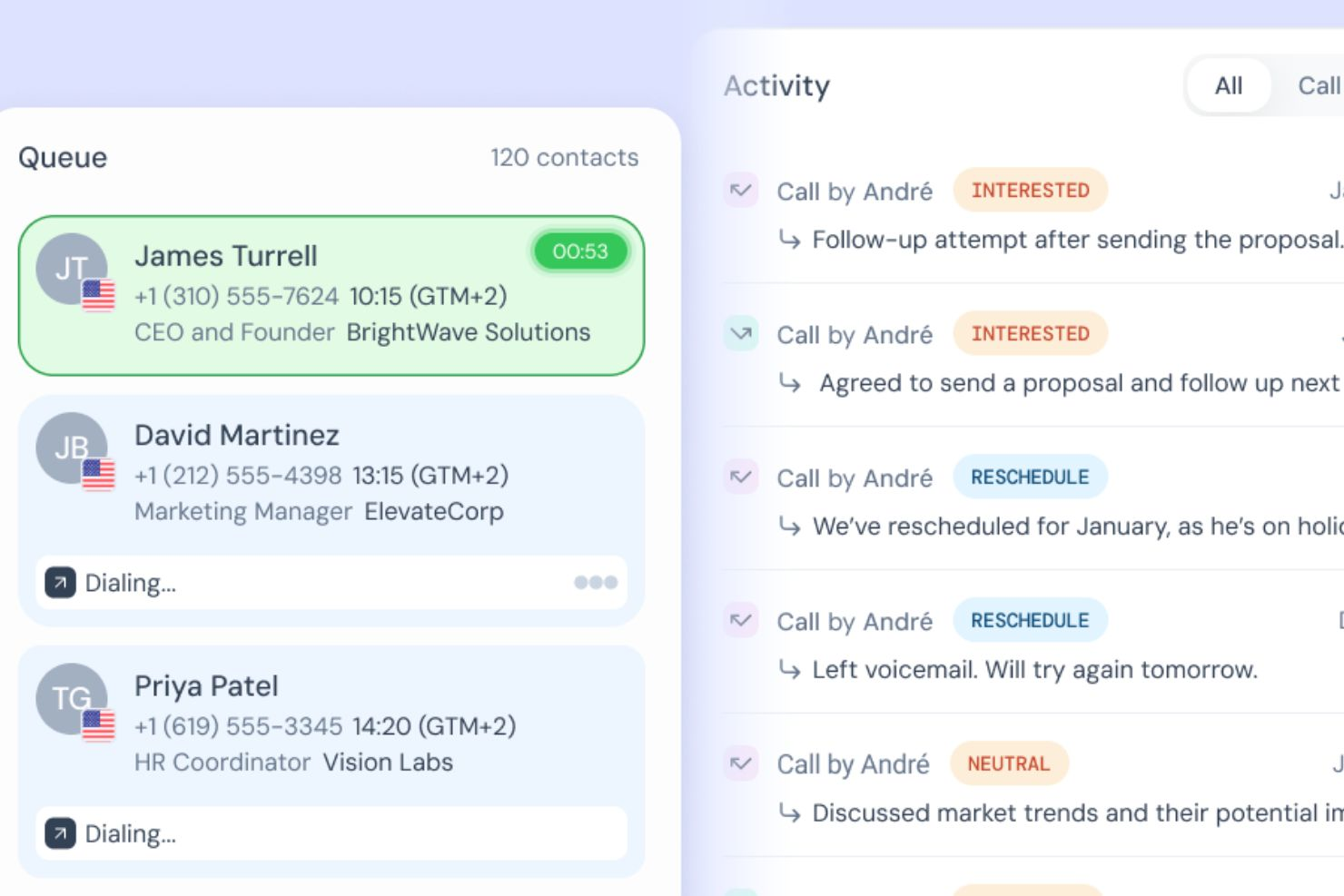
CloudTalk è una piattaforma per call center basata su cloud che combina chiamate inbound e outbound, IVR, instradamento delle chiamate, analisi in tempo reale, intelligenza artificiale per l’analisi delle conversazioni e automazione dei flussi di lavoro su canali vocali e SMS.
Per Chi È Ideale CloudTalk?
CloudTalk è particolarmente adatto a team di vendita e supporto di medie dimensioni che gestiscono elevati volumi di chiamate su più regioni o paesi.
Perché Ho Scelto CloudTalk
Ho incluso CloudTalk tra le mie scelte principali perché la sua analisi va ben oltre il semplice report delle chiamate. Il cruscotto in tempo reale tiene traccia di KPI live come tempi di attesa, tassi di abbandono e occupazione degli operatori, mentre l’AI Conversation Intelligence aggiunge analisi del sentiment ed estrazione degli argomenti. Posso vedere non solo quante chiamate ha gestito un operatore, ma anche cosa hanno realmente provato i clienti durante quelle interazioni, rendendo il coaching molto più mirato.
Funzionalità Principali di CloudTalk
- Sistema IVR: Crea menu di risposta vocale interattiva multilivello per indirizzare i chiamanti al team o all’agente giusto senza intervento manuale.
- Registrazione chiamate: Registra automaticamente chiamate in entrata e in uscita e archiviale per il controllo qualità e la revisione degli agenti.
- Power dialer: Gestisci campagne di chiamate in uscita componendo automaticamente il prossimo contatto in lista quando un agente termina una chiamata.
- Instradamento basato sulle competenze: Instrada le chiamate in entrata agli agenti in base a lingua, competenza o assegnazione di team.
Integrazioni di CloudTalk
Le integrazioni includono Salesforce, Zendesk, HubSpot, Pipedrive, Zoho CRM, Gong, Zapier, Freshdesk, Help Scout e Intercom.
Cosa È Gratuito?
CloudTalk non offre un piano gratuito per sempre, ma prevede una prova gratuita di 14 giorni senza bisogno di carta di credito. I piani a pagamento partono da $19 per utente al mese con fatturazione annuale, con un minimo di un utente nella maggior parte dei piani.
Pros and Cons
Pros:
- Monitora il sentiment in tempo reale sulle chiamate dal vivo
- Individua le tendenze grazie all’estrazione degli argomenti tramite IA
- Identifica i colli di bottiglia con dashboard personalizzati
Cons:
- Assistenza telefonica limitata ai livelli superiori
- Nessuna videoconferenza integrata

VICIdial
Ideale per team che gestiscono grandi volumi di chiamate in uscita
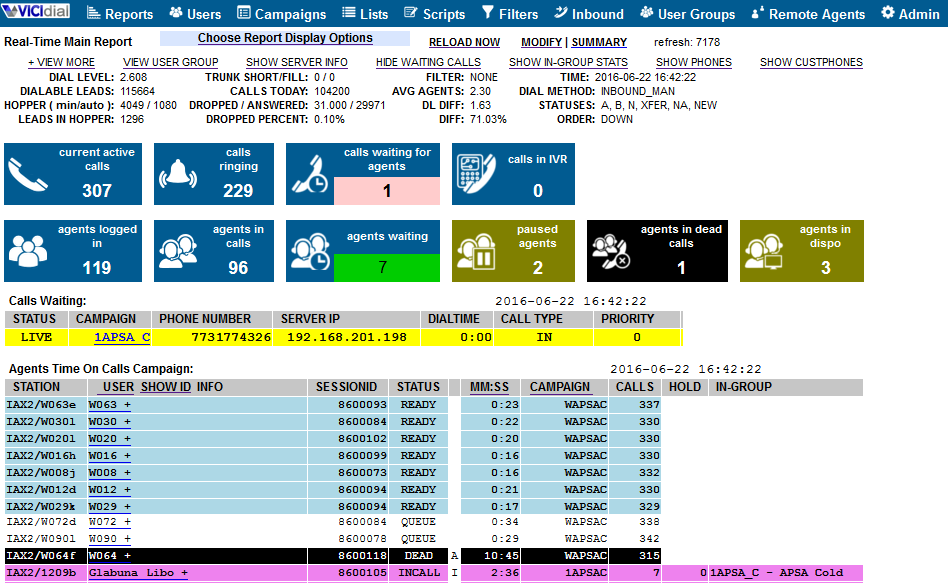
VICIdial è una piattaforma open-source per call center progettata per team che gestiscono grandi volumi di chiamate in uscita. È particolarmente adatta per organizzazioni di vendita, agenzie di telemarketing e centri di assistenza che necessitano di funzionalità avanzate di composizione e gestione delle campagne senza costi iniziali. Se il tuo team necessita di chiamate in uscita flessibili e monitoraggio in tempo reale, VICIdial offre un set di funzionalità difficilmente eguagliabile nel panorama dei software gratuiti.
Perché ho scelto VICIdial
Ho scelto VICIdial perché è progettato per affrontare le esigenze dei team ad alto volume di chiamate in uscita. La piattaforma supporta la composizione predittiva, che aiuta a massimizzare il tempo di conversazione degli operatori e i tassi di contatto—fattori fondamentali per i gruppi di vendita e telemarketing.
Apprezzo anche che VICIdial offra monitoraggio e reportistica delle campagne in tempo reale, così i supervisori possono controllare la performance ed effettuare rapide modifiche. Queste funzionalità lo rendono una valida opzione per i team che devono gestire campagne in uscita su larga scala senza pagare per una soluzione commerciale.
Funzionalità principali di VICIdial
Altre funzionalità di VICIdial aiutano i team a gestire le chiamate e l’attività degli operatori in modo più efficiente:
- Gestione delle chiamate in entrata: Instrada le chiamate in arrivo verso operatori disponibili utilizzando regole e code personalizzabili.
- Registrazione delle chiamate: Registra automaticamente le chiamate per garantire qualità, formazione o esigenze di conformità.
- Interfaccia web per operatori: Consente agli operatori di accedere al sistema e gestire le chiamate da qualsiasi browser senza installare software aggiuntivo.
- Gestione multi-campagna: Gestisce e monitora più campagne in uscita e in entrata contemporaneamente da un’unica dashboard.
Integrazioni di VICIdial
Le integrazioni non sono elencate pubblicamente.
Cosa è gratuito?
VICIdial è un software open-source gratuito da scaricare e utilizzare senza limiti di utenti o campagne. Dovrai fornire il tuo server e gestire la configurazione tecnica; il supporto è basato sulla community a meno che tu non acquisti servizi a pagamento.
Pros and Cons
Pros:
- Open-source senza costi di licenza
- Supporta un numero illimitato di operatori e campagne
- Opzioni di composizione predittiva e manuale incluse
Cons:
- Interfaccia utente datata
- Funzionalità di ticketing integrate limitate

Ideale per una configurazione cloud rapida
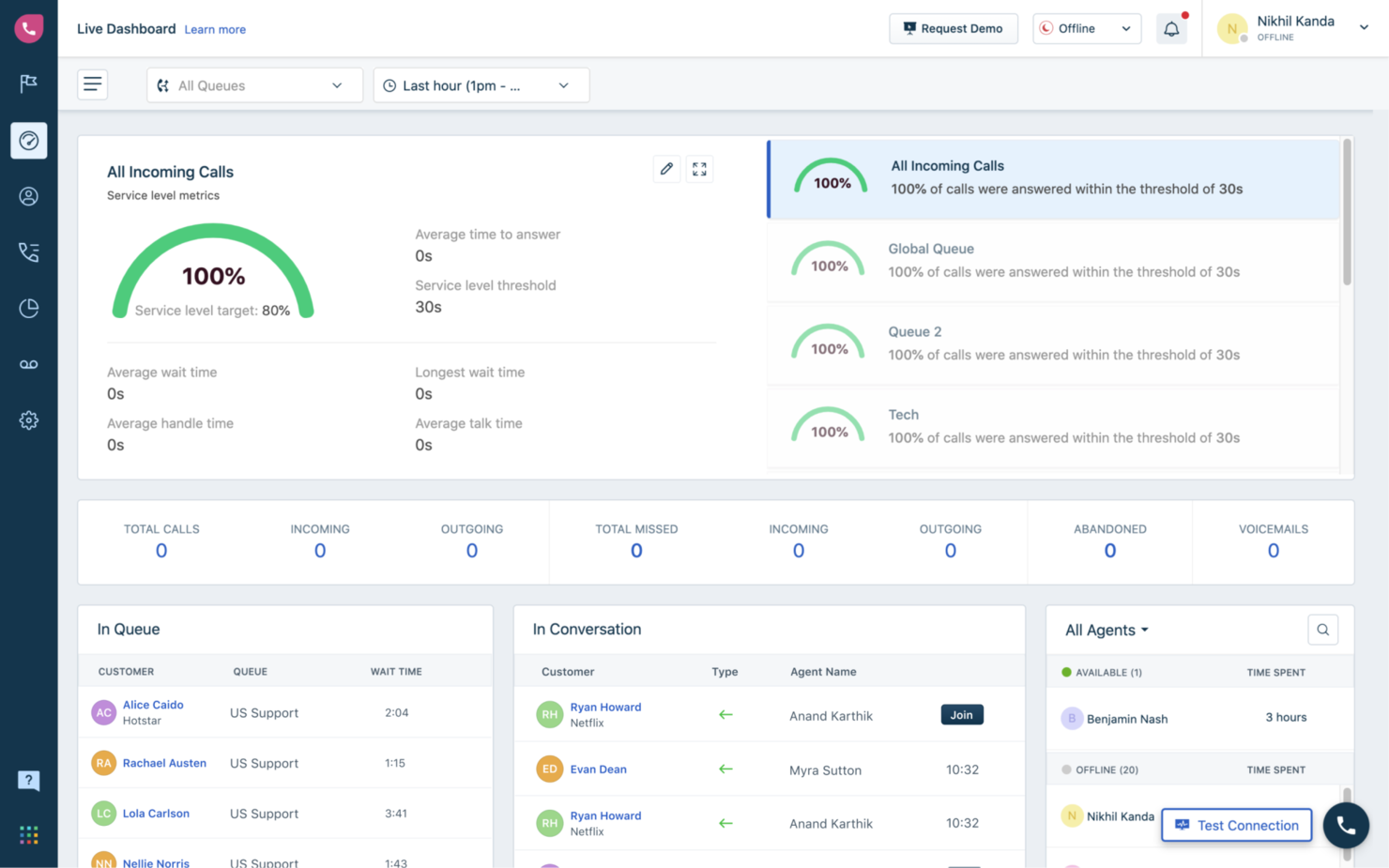
Freshcaller è una piattaforma di call center basata su cloud pensata per i team che desiderano una configurazione rapida, senza hardware complesso o lunghi processi di onboarding. Supporta piccole imprese e startup che vogliono avviare rapidamente l'assistenza telefonica, offrendo funzionalità essenziali di call center pronte all'uso.
Perché ho scelto Freshcaller
Per i team che vogliono iniziare subito con chiamate cloud, Freshcaller si distingue per la configurazione veloce e i requisiti tecnici minimi. Ho scelto Freshcaller perché la sua interfaccia intuitiva consente di lanciare un call center virtuale in pochi minuti, senza linee telefoniche fisiche.
La piattaforma offre chiamate direttamente dal browser e permette di acquistare o portare numeri direttamente dal pannello di controllo, iniziando a gestire le chiamate quasi immediatamente. Questo la rende una scelta ideale per piccole aziende o team remoti che necessitano di una soluzione veloce e flessibile per supporto in entrata e in uscita.
Funzionalità principali di Freshcaller
Altre funzionalità di Freshcaller aiutano i team a gestire e ottimizzare le attività del call center:
- Mascheramento delle chiamate: Proteggi la privacy di agenti e clienti nascondendo i numeri di telefono durante le chiamate.
- Flussi di chiamata personalizzati: Progetta e automatizza i percorsi di instradamento delle chiamate con un editor visuale drag-and-drop.
- Registrazione delle chiamate: Registra e archivia le chiamate per monitoraggio qualità e formazione.
- Instradamento per festività: Modifica automaticamente le regole di gestione delle chiamate in base a festività o date speciali.
Integrazioni di Freshcaller
Le integrazioni includono Freshdesk, Freshsales, Freshchat, Freshservice, Slack, Microsoft Teams, Shopify, Zapier, HubSpot e altre.
Cosa è gratuito?
Freshcaller offre un piano gratuito per sempre per agenti illimitati. Il livello gratuito include la gestione base delle chiamate in entrata ma limita funzionalità come la registrazione delle chiamate, analisi avanzate e la maggior parte delle integrazioni di terze parti.
Pros and Cons
Pros:
- Editor visuale per la creazione dei flussi di chiamata incluso
- Mascheramento delle chiamate per la protezione della privacy
- Opzioni di instradamento per festività e fuori orario
Cons:
- Funzionalità di reportistica e analisi limitate
- Nessun dialer in uscita nel piano gratuito


Asterisk è una piattaforma di telefonia open-source progettata per i team che desiderano creare soluzioni di call center personalizzate da zero. È particolarmente indicata per professionisti IT e aziende con esigenze di comunicazione VOIP specifiche che non possono essere soddisfatte da software preconfezionati. Se il tuo team necessita di totale controllo sul routing delle chiamate, IVR o integrazione con altri sistemi, Asterisk ti offre la flessibilità per progettare esattamente ciò di cui hai bisogno.
Perché ho scelto Asterisk
Ciò che distingue Asterisk è la sua flessibilità nel costruire soluzioni di telefonia personalizzate che vanno ben oltre il software standard per call center. Ho scelto Asterisk perché consente di progettare i propri flussi di chiamata, menu IVR basati su intelligenza artificiale e logiche di instradamento, ideale per team con requisiti unici o flussi di lavoro complessi. L’architettura open-source significa che puoi modificare ed estendere il sistema per adattarlo a quasi ogni processo aziendale o esigenza di integrazione. Per le organizzazioni con risorse tecniche, Asterisk offre un livello di personalizzazione e controllo difficile da trovare in altre piattaforme gratuite per call center.
Caratteristiche principali di Asterisk
Altre funzionalità offerte da Asterisk aiutano i team a creare un ambiente di call center su misura:
- Registrazione chiamate: Registra le chiamate in entrata e in uscita per motivi di controllo qualità, formazione o conformità.
- Gestione segreteria telefonica: Imposta segreterie telefoniche personalizzabili e notifiche per chiamate perse.
- Gestione code di chiamata: Metti i chiamanti in coda con musica, annunci o opzione di richiamata finché un operatore non è disponibile.
- Chiamate in conferenza: Ospita chiamate in conferenza multiparte direttamente dal sistema.
Integrazioni di Asterisk
Le integrazioni non sono elencate pubblicamente.
Cosa è gratuito?
Asterisk è un software open-source gratuito da scaricare e usare senza limiti di utenti o funzionalità. Dovrai però fornire un server personale e gestire autonomamente installazione, manutenzione e supporto.
Pros and Cons
Pros:
- Supporta SIP, PRI e telefonia analogica
- Documentazione e comunità di utenti molto ampia
- Instradamento chiamate e IVR altamente personalizzabili
Cons:
- Nessuna interfaccia o dashboard integrata per gli operatori
- Richiede elevate competenze tecniche per l'implementazione

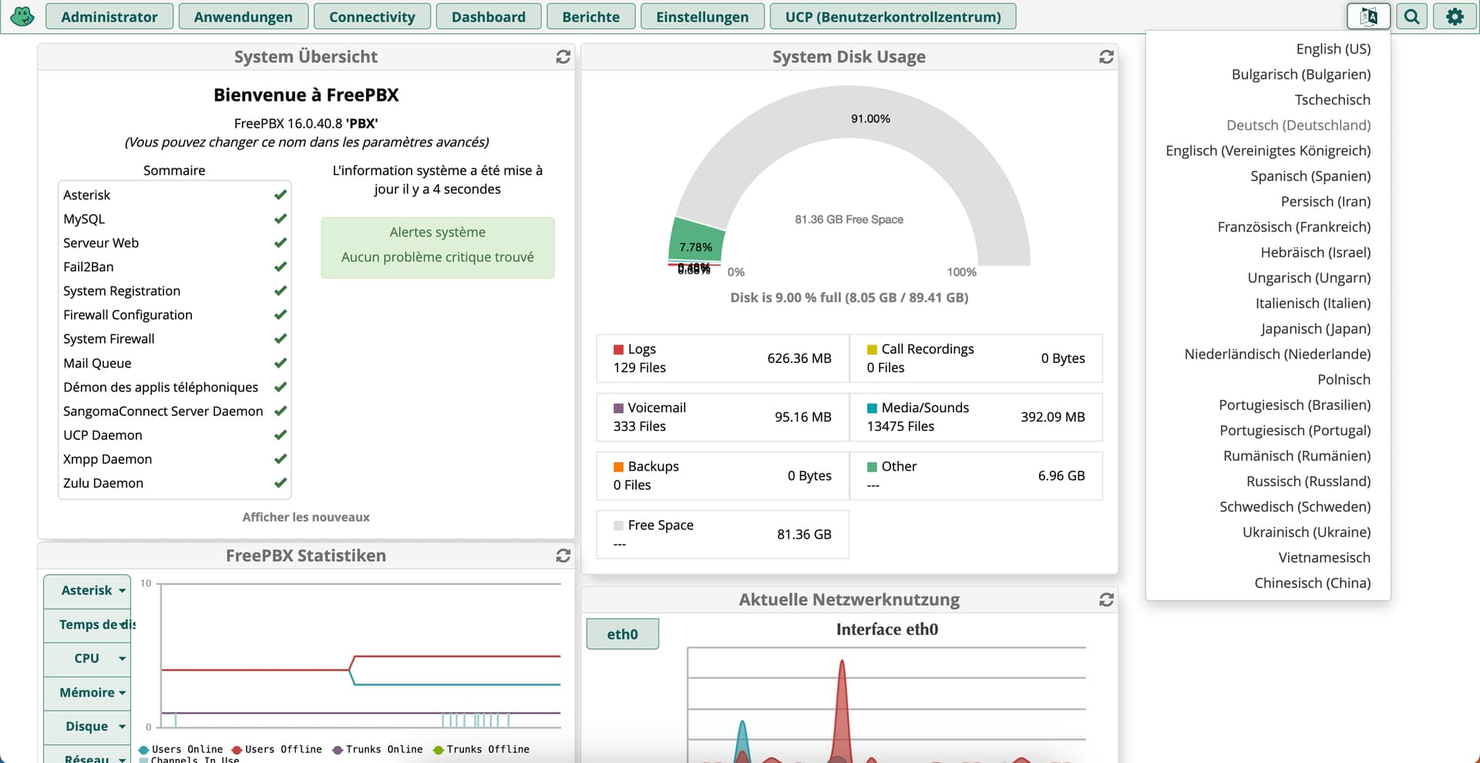
FreePBX è una piattaforma telefonica open-source progettata per i team che desiderano un controllo approfondito della configurazione del proprio call center. È particolarmente adatta a professionisti IT e aziende che necessitano di personalizzare la gestione delle chiamate, delle estensioni e il comportamento del sistema. Se cerchi una soluzione che permetta di gestire ogni aspetto dell'ambiente telefonico, FreePBX ti mette a disposizione tutti gli strumenti necessari.
Perché ho scelto FreePBX
Ciò che mi ha colpito di FreePBX è il livello di controllo sul sistema che offre rispetto ad altre soluzioni gratuite per call center. Con FreePBX puoi gestire l'instradamento delle chiamate, la configurazione delle estensioni e i menù IVR tramite un'interfaccia web, che garantisce un controllo diretto sull'ambiente telefonico.
Mi piace il fatto che sia pensato per i team che desiderano personalizzare ogni dettaglio, dalle code di chiamata alle impostazioni della segreteria, senza essere vincolati ai limiti imposti da un fornitore. Questo rende FreePBX una scelta solida per team IT o aziende che devono adattare la configurazione del call center in base alle loro necessità in evoluzione.
Funzionalità principali di FreePBX
Altre funzionalità di FreePBX aiutano i team a costruire un ambiente call center più flessibile e potente:
- Registrazione chiamate: Registra le chiamate in entrata e in uscita per monitoraggio di qualità o conformità.
- Segreteria telefonica via email: Invia automaticamente i messaggi vocali come file audio agli indirizzi email designati.
- Parcheggio chiamate: Metti le chiamate in attesa in un 'parcheggio condiviso' per il recupero da qualsiasi interno.
- Ponte conferenza: Organizza teleconferenze multi-partecipante direttamente dal sistema.
Integrazioni di FreePBX
Le integrazioni non sono elencate pubblicamente.
Cosa è gratuito?
FreePBX è un software open-source gratuito da scaricare e utilizzare senza limiti di utenti o funzionalità. Dovrai fornire il tuo server e occuparti autonomamente di installazione, manutenzione e supporto.
Pros and Cons
Pros:
- Interfaccia amministrativa web per la gestione del sistema
- Gestione integrata di code di chiamata e gruppi di squillo
- Nessun costo di licenza per utente o estensione
Cons:
- Richiede hardware separato o hosting cloud
- Le funzionalità avanzate richiedono moduli a pagamento

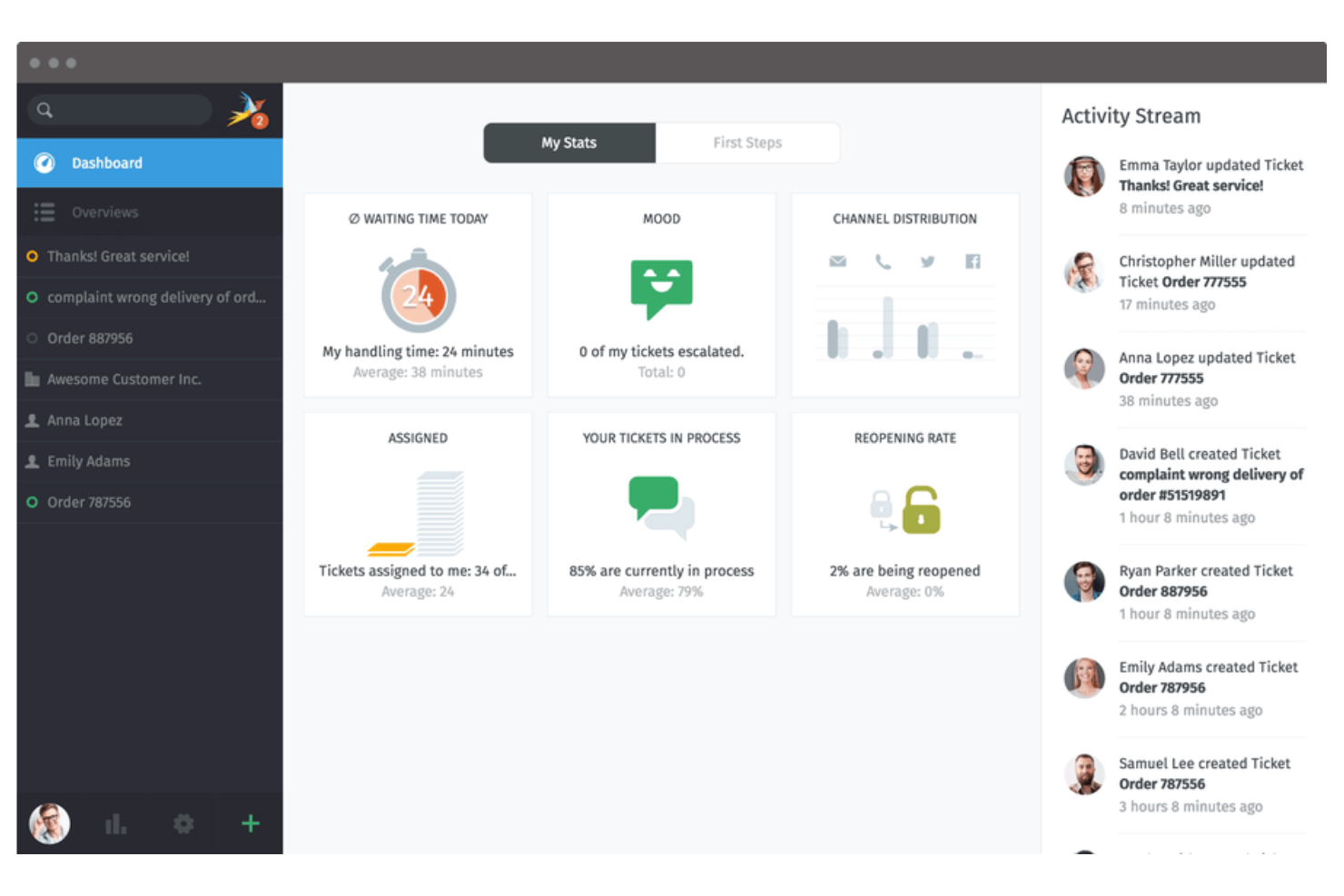
Zammad è un software di helpdesk e call center progettato per i team che devono gestire conversazioni con i clienti su più canali. È particolarmente adatto ai team di supporto di organizzazioni che ricevono richieste via email, telefono, chat e social media. Se cerchi una piattaforma flessibile per centralizzare e organizzare le interazioni con i clienti, Zammad offre uno spazio di lavoro unificato per mantenere tutto sincronizzato.
Perché ho scelto Zammad
Ho scelto Zammad perché la sua gestione dei ticket multicanale è ideale per i team che gestiscono richieste provenienti da diverse fonti. La piattaforma permette di raccogliere telefonate, email, chat e messaggi social in un unico sistema di ticketing, così niente viene tralasciato.
Apprezzo come Zammad colleghi automaticamente le conversazioni correlate e aggiorni i ticket in tempo reale all’arrivo di nuovi messaggi. Questo semplifica notevolmente il lavoro dei team di supporto nel tracciare, priorizzare e risolvere le problematiche senza dover passare da uno strumento all’altro.
Funzionalità principali di Zammad
Altre funzionalità che rendono Zammad utile per i team di call center includono:
- Permessi basati sui ruoli: Imposta controlli di accesso dettagliati per agenti, supervisori e amministratori per gestire dati sensibili dei clienti.
- Campi personalizzati per i ticket: Aggiungi e configura campi personalizzati per raccogliere le informazioni necessarie per ogni ticket.
- Integrazione della knowledge base: Collega una knowledge base self-service per aiutare agenti e clienti a trovare rapidamente le risposte.
- Audit trail: Traccia ogni modifica apportata ai ticket e agli account utente per responsabilità e conformità.
Integrazioni di Zammad
Le integrazioni includono GitHub, GitLab, Checkmk, Clearbit e altro.
Cosa è gratuito?
Zammad offre una versione open source gratuita per sempre che puoi ospitare su un tuo server. Questa versione include le funzionalità principali di ticketing e multicanale, ma alcune funzioni avanzate e il supporto ufficiale sono disponibili solo nei piani cloud a pagamento.
Pros and Cons
Pros:
- Knowledge base integrata per il supporto agli agenti
- Aggiornamenti dei ticket in tempo reale e strumenti di collaborazione
- Permessi basati sui ruoli per un controllo granulare degli accessi
Cons:
- Meno integrazioni native con i CRM
- Le funzioni di automazione avanzata richiedono piani a pagamento


GOautodial è una piattaforma open-source per call center progettata per team che necessitano di funzionalità di composizione predittiva. È particolarmente adatta per team di vendita outbound, agenzie di telemarketing e centri di supporto che vogliono automatizzare le chiamate ad alto volume. Se desideri massimizzare il tempo di conversazione degli operatori e ridurre la composizione manuale, GOautodial offre funzionalità pensate proprio per queste esigenze.
Perché ho scelto GOautodial
Ciò che distingue GOautodial tra i software gratuiti per call center è il suo motore di composizione predittiva, che aiuta i team ad automatizzare le chiamate outbound e a collegare gli operatori in modo più efficiente a potenziali clienti reali. Ho scelto GOautodial perché consente di configurare campagne che compongono automaticamente più numeri, rilevano le segreterie telefoniche e indirizzano le chiamate risposte agli operatori disponibili.
La piattaforma include anche strumenti di monitoraggio in tempo reale, affinché i supervisori possano controllare le prestazioni degli operatori e i progressi delle campagne mentre le chiamate sono in corso. Per i team focalizzati sulle campagne outbound e sulla massimizzazione della produttività degli operatori, le funzionalità di composizione predittiva di GOautodial sono particolarmente indicate.
Caratteristiche principali di GOautodial
Altre funzionalità di GOautodial aiutano i team a gestire le operazioni del call center in modo più efficiente:
- Instradamento delle chiamate in arrivo: Indirizza le chiamate in arrivo all'operatore o alla coda giusta in base a regole definite.
- Registrazione delle chiamate: Registra e archivia le chiamate con trascrizione automatica per assicurare la qualità e la formazione.
- Dashboard agente basata su web: Gli operatori possono accedere a tutti i controlli e le informazioni delle chiamate da un'interfaccia tramite browser.
- Monitoraggio delle chiamate in tempo reale: I supervisori possono ascoltare le chiamate in tempo reale per attività di coaching o per conformità.
Integrazioni GOautodial
Le integrazioni sono disponibili tramite REST API.
Cosa è gratis?
GOautodial offre una versione open-source gratuita per sempre, che puoi scaricare e utilizzare senza limiti di utenti. Dovrai ospitare e mantenere autonomamente il software e alcune funzionalità avanzate o integrazioni potrebbero richiedere una configurazione manuale o moduli aggiuntivi.
Pros and Cons
Pros:
- Compositore predittivo incluso senza costi aggiuntivi
- Supporta campagne inbound e outbound
- Monitoraggio e reportistica delle chiamate in tempo reale
Cons:
- Richiede configurazione manuale del server
- Documentazione limitata per i nuovi utenti

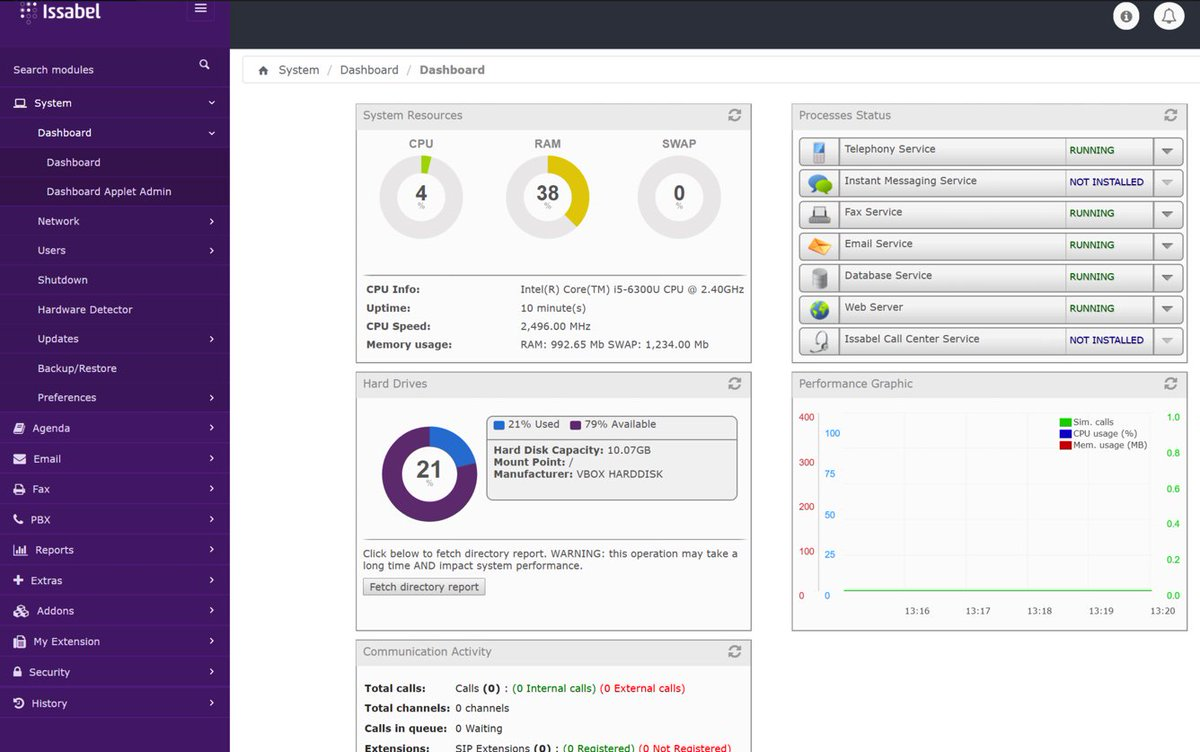
Issabel è una piattaforma open-source per call center che combina voce, video, chat ed email in un unico sistema. È ideale per i team che cercano un software gratuito con funzionalità di comunicazione unificata gestite tramite una sola interfaccia. Issabel supporta le organizzazioni che gestiscono le interazioni con i clienti su più canali senza dover dipendere da strumenti separati.
Perché ho scelto Issabel
Ciò che mi ha attirato verso Issabel come software gratuito per call center è l'approccio alle comunicazioni unificate, che va oltre le semplici chiamate vocali. Issabel combina voce, videoconferenza, messaggistica istantanea ed email in un'unica piattaforma, così il tuo team può gestire tutte le interazioni con i clienti in un unico posto.
Mi piace che sia possibile configurare code di chiamata, menù IVR e persino videochiamate senza bisogno di strumenti separati. Per i team che vogliono centralizzare le comunicazioni e ridurre la complessità di gestire più sistemi, il design tutto-in-uno di Issabel è una scelta azzeccata.
Funzionalità principali di Issabel
Altre funzionalità di Issabel aiutano i team a gestire le operazioni del call center in modo più efficiente:
- Registrazione delle chiamate: Registra e archivia le chiamate per il controllo qualità e la formazione.
- Report dettagliati delle chiamate: Accedi a registri dettagliati e analisi per ogni chiamata gestita dal tuo team.
- Gestione degli operatori: Assegna gli operatori alle code, monitora il loro stato e gestisci i permessi da una dashboard centralizzata.
- Messaggi vocali in email: Invia automaticamente i messaggi vocali nelle caselle di posta elettronica degli operatori per un rapido follow-up.
Integrazioni di Issabel
Le integrazioni sono disponibili tramite REST API.
Cosa è gratuito?
Issabel è una piattaforma open source gratuita per sempre, senza limiti di utenti. Dovrai occuparti autonomamente dell'hosting e della configurazione, e alcune funzionalità avanzate o integrazioni potrebbero richiedere una configurazione manuale.
Pros and Cons
Pros:
- Dashboard unificata per voce, video e chat
- Supporta IVR personalizzati e code di chiamata
- Aggiornamenti e risorse guidati dalla community
Cons:
- La documentazione può essere incoerente
- Funzionalità per chiamate in uscita limitate
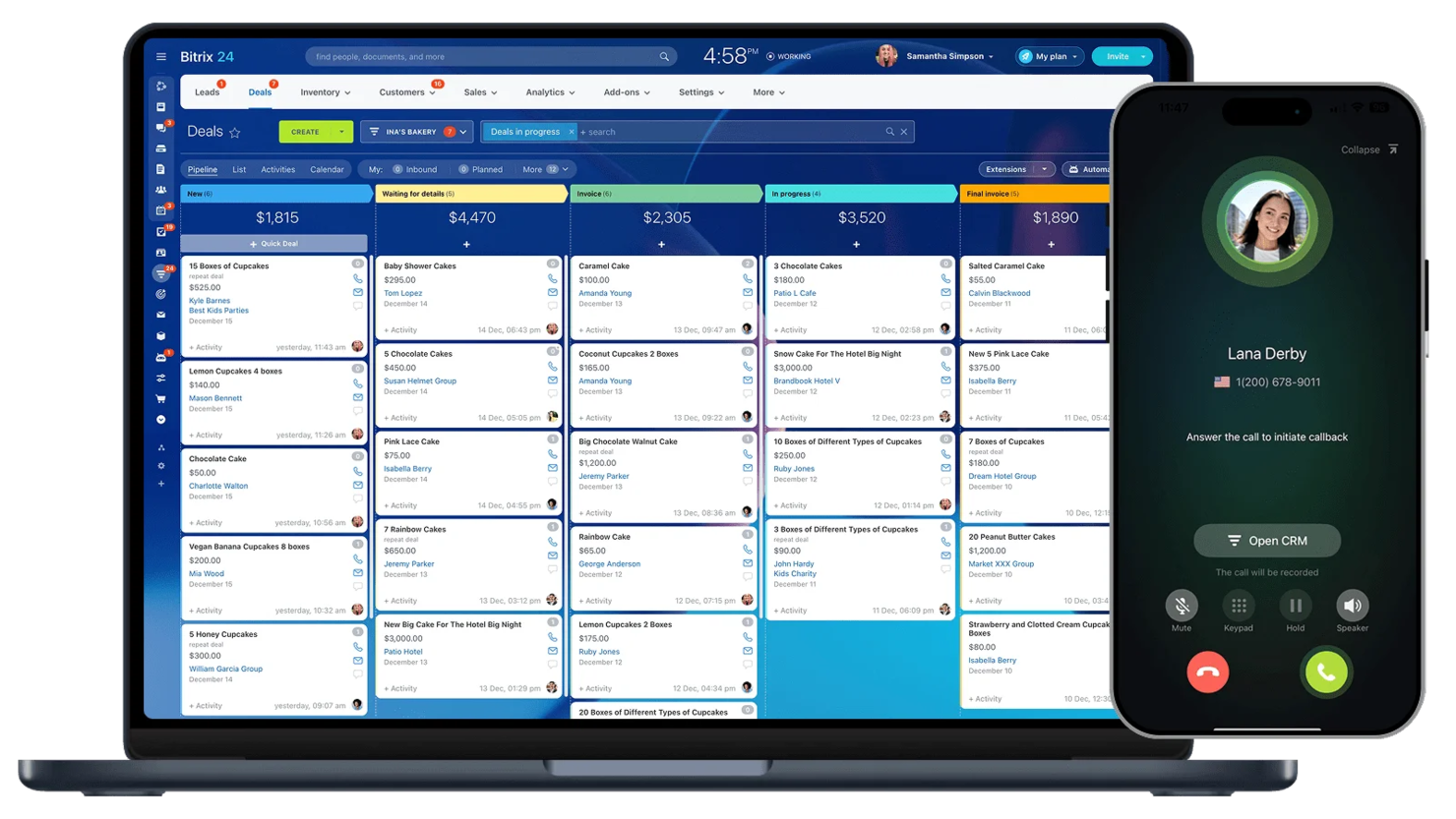
Bitrix24 è pensato per i team che desiderano un software di call center gratuito con funzionalità CRM integrate. La piattaforma aiuta a gestire le comunicazioni con i clienti e le pipeline di vendita in un unico posto. Supporta piccole imprese e team di assistenza che tengono traccia di chiamate, contatti e follow-up senza dover passare da uno strumento all'altro.
Perché ho scelto Bitrix24
Ciò che fa risaltare Bitrix24 come software di call center gratuito è la sua integrazione CRM nativa, che consente al team di gestire interazioni con i clienti e attività di vendita in una sola piattaforma. Ho scelto Bitrix24 perché permette di registrare automaticamente le chiamate, collegarle ai contatti e gestire i follow-up direttamente dalla stessa dashboard.
Le funzionalità CRM gratuite includono monitoraggio delle chiamate, gestione dei lead e storico dei clienti, così avrai sempre il contesto durante le conversazioni. Per i team che vogliono collegare l'attività del call center con i flussi di lavoro di vendita e assistenza, Bitrix24 offre un approccio unificato difficile da trovare in altre soluzioni gratuite.
Funzionalità principali di Bitrix24
Altre funzionalità di Bitrix24 aiutano i team a gestire le operazioni del call center in modo più efficiente:
- Instradamento chiamate: Direziona automaticamente le chiamate in entrata all'agente o al reparto corretto in base a regole preimpostate.
- Telefono via web: Effettua e ricevi chiamate con ID chiamante personalizzato direttamente dal browser, senza bisogno di hardware aggiuntivo.
- Registrazione chiamate: Registra e archivia le chiamate per il monitoraggio della qualità o la formazione.
- Chat del team: Comunica con i colleghi in tempo reale utilizzando i canali chat integrati.
Integrazioni di Bitrix24
Le integrazioni includono Gmail, Xero, Dropbox, Box, Mailchimp e altro ancora.
Cosa è gratuito?
Bitrix24 offre un piano gratuito per sempre. Il piano gratuito include funzionalità base di call center, CRM, chat e video, ma limita lo spazio di archiviazione cloud a 5GB e restringe alcune opzioni avanzate di telefonia e integrazione.
Pros and Cons
Pros:
- CRM integrato con funzionalità di registrazione chiamate
- Include chat di team e videochiamate
- Registrazione delle chiamate disponibile
Cons:
- Il piano gratuito limita lo spazio cloud a 5GB
- Le analisi del call center sono basilari

LiveAgent
Ideale con supporto chat in tempo reale
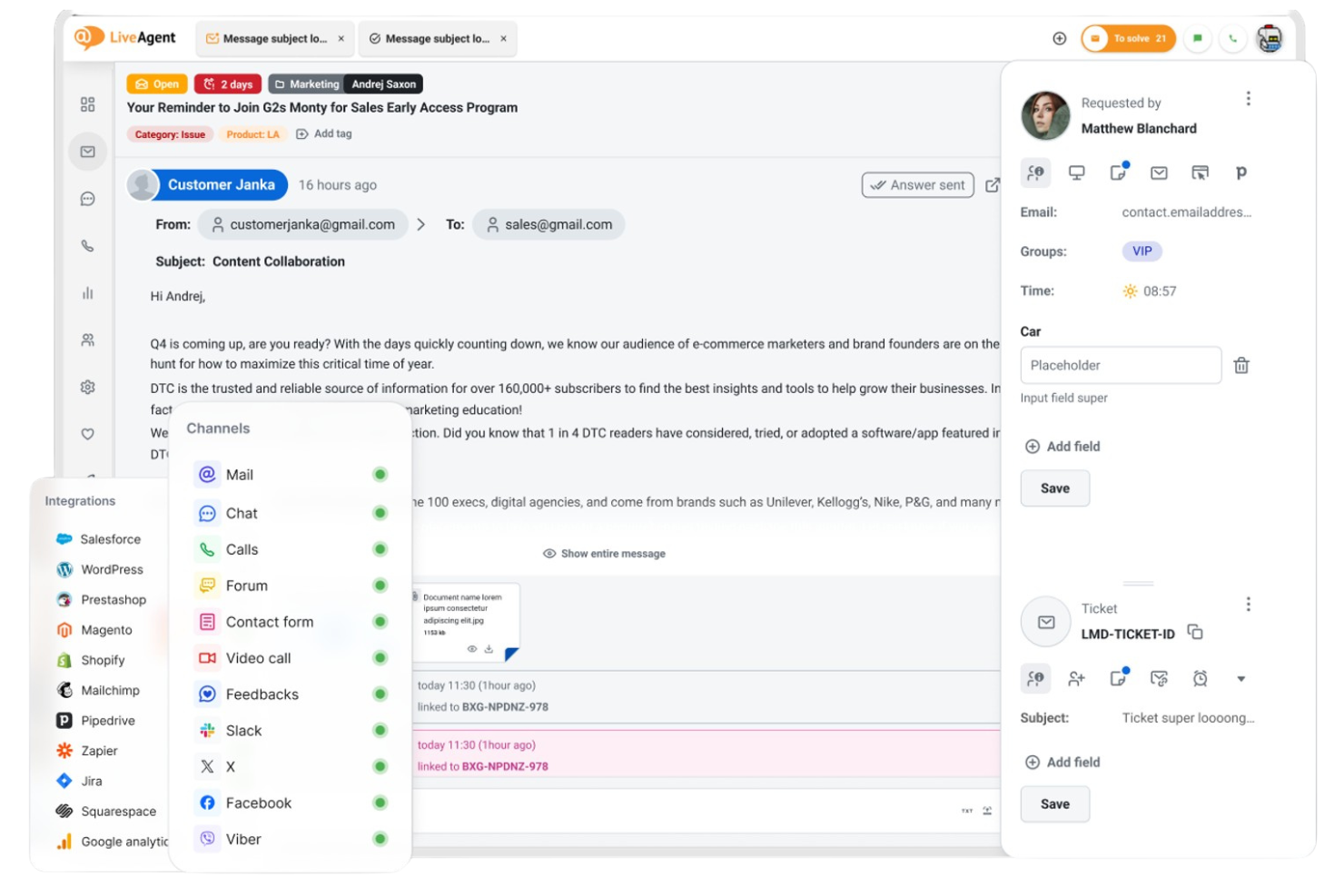
Se stai cercando una piattaforma call center che unisca più canali di supporto, LiveAgent merita considerazione. È pensato per i team che vogliono gestire chiamate, email e chat da un'unica dashboard. LiveAgent può aiutare piccole imprese e team di supporto a gestire grandi volumi di richieste dei clienti senza perdere conversazioni importanti.
Perché ho scelto LiveAgent
Ho scelto LiveAgent perché il suo supporto tramite chat in tempo reale si distingue per i team che devono rispondere rapidamente alle richieste dei clienti. Il widget di live chat della piattaforma consente agli agenti di interagire immediatamente con i visitatori del sito, il che è fondamentale per i call center che vogliono ridurre i tempi di attesa e aumentare la soddisfazione.
Apprezzo anche che LiveAgent unisca chat, chiamate e gestione dei ticket in un'unica interfaccia, così gli agenti possono passare da un canale all'altro senza perdere il contesto. Ciò lo rende una scelta pratica per i team di supporto che danno priorità a comunicazioni rapide e multicanale.
Funzionalità Principali di LiveAgent
Altre funzionalità che rendono LiveAgent utile per i team di call center includono:
- Instradamento chiamate e IVR: Instrada le chiamate in arrivo verso l'agente o il reparto giusto usando menu di risposta vocale interattiva personalizzabili.
- Unione e suddivisione dei ticket: Combina ticket correlati o suddividi problematiche complesse in ticket separati per una migliore tracciabilità e risoluzione.
- Chat interna per gli agenti: Permette agli agenti che utilizzano il compositore automatico di comunicare tra loro per coordinare le risposte.
- Portale clienti: Fornisce ai clienti un portale self-service dove possono seguire lo stato dei ticket e accedere alle risorse di supporto.
Integrazioni LiveAgent
Le integrazioni includono ActiveCampaign, ClickUp, Drupal, Jira, Klaviyo e altro ancora.
Cosa è gratis?
LiveAgent offre un piano gratuito per sempre con funzionalità di ticketing di base e chat dal vivo. Il piano gratuito è limitato a un solo agente e include accesso ristretto alle integrazioni e alle funzioni avanzate per call center.
Pros and Cons
Pros:
- Gestione in tempo reale di chat e chiamate inclusa
- Chat interna per la collaborazione tra agenti
- Portale clienti per il monitoraggio self-service dei ticket
- Nessuna funzione di compositore predittivo in uscita
Cons:
- Il piano gratuito limita il numero di agenti
- 3CX
Ideale per chiamate basate su browser


Come valuto il software per call center gratuito
Osservo due cose: se uno strumento offre davvero funzionalità fondamentali gratuite per il call center—chiamate VoIP, IVR, code per gli agenti—e cosa distingue le migliori opzioni dai semplici periodi di prova travestiti da gratuiti.
Funzionalità di base (requisiti minimi per questa lista)
Quando seleziono gli strumenti per la mia lista, valuto ciascuno su una scala da 0 (non offre la funzionalità) a 5 (eccelle in questa area) per ogni funzionalità di base elencata qui sotto. Poi calcolo il punteggio totale dello strumento in percentuale. Ogni strumento deve raggiungere un punteggio minimo totale del 65% per essere preso in considerazione.
- Disponibilità di un piano gratuito: Controllo che il fornitore offra realmente un piano gratuito che supporti operazioni continuative, non solo una prova di 14 giorni che ti blocca a metà progetto.
- Chiamate in entrata & uscita: Entrambe sono importanti—valuto se gli agenti possono ricevere chiamate dai clienti e fare chiamate in uscita tramite softphone o browser.
- Instradamento chiamate & IVR: Un piano gratuito che mette tutte le chiamate in un'unica coda non è utile, quindi cerco almeno un ACD di base o un semplice menu IVR per indirizzare i chiamanti.
- Gestione di agenti & code: Considero quanti agenti possono accedere, se i supervisori possono monitorare le code, e come lo strumento gestisce le interazioni simultanee.
- Registrazione & archiviazione delle chiamate: I team hanno bisogno di un modo per rivedere le interazioni passate per formazione o controversie, quindi qui hanno molto peso log delle chiamate ricercabili e accesso alle registrazioni.
- Reportistica & analisi: Anche su un piano gratuito, cerco dashboard che evidenziano metriche fondamentali come volume chiamate, tempo medio di attesa e dati di attività per agente.
Una volta creata una lista di strumenti che soddisfano questi criteri, prendo in considerazione ciò che distingue ciascuna piattaforma.
Fattori differenzianti (cosa distingue i fornitori)
Ecco come confronto e metto a contrasto i vari fornitori:
Funzionalità di spicco
L'integrazione con il CRM è una grande discriminante—quando le attività delle chiamate e i record dei contatti si sincronizzano automaticamente, gli agenti non devono cambiare scheda durante le chiamate. Valuto anche se una piattaforma supporta altri canali oltre alla voce, come chat dal vivo, SMS o messaggistica social, così i clienti possono contattare il tuo team come preferiscono. Vale la pena menzionare anche funzionalità di intelligenza artificiale come la trascrizione in tempo reale e il riepilogo delle chiamate, poiché riducono il tempo di chiusura post-chiamata e forniscono ai supervisori un accesso più rapido al contesto delle interazioni.
Oltre le funzionalità
La trasparenza dei piani gratuiti qui conta molto. Controllo se il fornitore comunica chiaramente i limiti di utilizzo—come i limiti di utenti o di minuti di chiamata—così non ci si trova sorpresi a metà mese. La scalabilità è strettamente legata: guardo se l'upgrade preserva configurazioni, numeri e dati esistenti. Anche la velocità di implementazione incide. Uno strumento gratuito che richiede settimane d'installazione perde di senso, quindi do preferenza alle piattaforme in cui un piccolo team può ottenere numeri telefonici e iniziare a ricevere chiamate in giornata grazie a un onboarding self-service.
Come scegliere un software gratuito per call center
È facile perdersi in lunghi elenchi di funzionalità e strutture tariffarie complesse. Per aiutarti a rimanere concentrato mentre affronti il tuo particolare processo di selezione del software, ecco un elenco di fattori da tenere a mente:
| Fattore | Cosa considerare |
|---|---|
| Scalabilità | Il software è in grado di gestire il volume di chiamate previsto e la crescita del numero di operatori senza obbligarti a passare a un piano a pagamento? |
| Integrazioni | Si connette nativamente al tuo sistema CRM, all'help desk o agli altri strumenti essenziali che già utilizzi? |
| Personalizzazione | Puoi modificare i flussi delle chiamate, l'instradamento e i ruoli degli operatori per adattarli ai processi del tuo team? |
| Facilità d'uso | Gli operatori e i supervisori riusciranno a imparare a usare il sistema rapidamente, con una formazione minima? |
| Implementazione e configurazione iniziale | Quanto tempo servirà per iniziare a utilizzare il sistema e quali risorse o forme di assistenza sono disponibili? |
| Costo | Ci sono costi nascosti, come addebiti per numeri di telefono, minuti o componenti aggiuntivi essenziali? |
| Misure di sicurezza | La piattaforma offre l'occultamento dei numeri, la crittografia dei dati e controlli di accesso per proteggere le informazioni? |
| Disponibilità dell'assistenza | Quali canali di assistenza sono disponibili con il piano gratuito e i tempi di risposta sono adeguati alle tue esigenze? |
Che cos'è un software gratuito per call center?
Un software gratuito per call center è una piattaforma basata sul cloud o installata in sede che consente ai team di gestire le chiamate dei clienti in entrata e in uscita senza costi iniziali di licenza. Queste soluzioni includono in genere funzionalità fondamentali come l'instradamento delle chiamate, la gestione degli operatori e la reportistica di base.
I piani gratuiti spesso prevedono limitazioni relative al numero di utenti, alle funzionalità o alle integrazioni, perciò sono più adatti a piccoli team, startup o organizzazioni che vogliono testare le funzionalità di un call center prima di impegnarsi con una soluzione a pagamento.
Funzionalità
Esaminiamo le funzionalità comunemente presenti nei software per call center e quali sono solitamente incluse nei piani gratuiti rispetto a quelli a pagamento.
Funzionalità solitamente gratuite dei software per call center
- Instradamento delle chiamate in entrata: Indirizza le chiamate in arrivo agli agenti disponibili in base a regole preimpostate, aiutando il tuo contact center a gestire il flusso delle chiamate e a ridurre i tempi di attesa.
- Gestione degli agenti: Consente di aggiungere, rimuovere e assegnare gli agenti a code o reparti, così puoi organizzare il tuo team secondo le necessità.
- Accodamento delle chiamate: Inserisce i chiamanti in una coda virtuale quando tutti gli agenti sono occupati, assicurando che nessuna chiamata venga persa e che i clienti sappiano qual è la loro posizione nella coda.
- Registri delle chiamate di base: Registra i dettagli essenziali di ogni chiamata, come ora, durata e agente coinvolto, per il monitoraggio e il monitoraggio successivo.
- Chiamate tramite browser: Consente agli agenti di effettuare e ricevere chiamate direttamente dal browser web, eliminando la necessità di telefoni fisici.
- Menu IVR semplici: Offre menu di risposta vocale interattiva di base per aiutare a indirizzare i chiamanti al reparto o all'agente corretto.
- Trasferimento delle chiamate: Permette agli agenti di trasferire le chiamate in corso a un altro agente o reparto senza disconnettere il cliente.
- Reportistica di base: Fornisce metriche semplici come il numero totale di chiamate, le chiamate perse e i tempi medi di attesa per aiutare a monitorare le prestazioni.
Funzionalità solitamente a pagamento dei software per call center
- Analisi e reportistica avanzate: Fornisce approfondimenti dettagliati sulle tendenze delle chiamate, sulle prestazioni degli agenti e sulla soddisfazione dei clienti, supportando decisioni basate sui dati.
- Registrazione delle chiamate: Registra automaticamente le chiamate per il controllo della qualità, la formazione e la conformità, con opzioni per l'archiviazione e il recupero sicuri.
- Supporto omnicanale: Integra la voce con canali come SMS, e-mail, chat e social media, consentendo agli agenti di gestire tutte le interazioni da un unico posto.
- Composizione automatizzata delle chiamate in uscita: Utilizza sistemi di composizione predittiva o automatica per automatizzare le campagne dei call center in uscita, aumentando la produttività degli agenti.
- Progettazione personalizzata del flusso delle chiamate: Fornisce un'interfaccia visiva per creare percorsi complessi di instradamento delle chiamate, inclusi la logica condizionale e l'IVR multilivello.
- Integrazioni con software CRM e help desk: Si connette ai sistemi di gestione delle relazioni con i clienti o di ticketing per fornire agli agenti il contesto necessario e centralizzare i flussi di lavoro.
- Monitoraggio e ascolto discreto delle chiamate: Consente ai supervisori di ascoltare le chiamate in corso e formare gli agenti in tempo reale senza che il cliente possa sentire.
- Autorizzazioni basate sui ruoli: Permette di controllare in modo granulare ciò a cui i diversi utenti possono accedere o che possono modificare nel sistema, supportando sicurezza e conformità.
- Accesso API: Offre strumenti per sviluppatori destinati a integrazioni e automazioni personalizzate, consentendo ai team di adattare la piattaforma alle proprie esigenze.
Vantaggi
L'implementazione di un software gratuito per call center offre diversi vantaggi al tuo team e alla tua azienda. Ecco alcuni dei vantaggi che puoi aspettarti:
- Nessun costo iniziale: Inizia a gestire le chiamate dei clienti senza pagare licenze o abbonamenti, rendendo la soluzione accessibile a piccoli team e startup.
- Implementazione rapida: Configura le chiamate basate sul cloud e la gestione degli agenti in pochi minuti, così il tuo team può iniziare subito a gestire le chiamate.
- Gestione scalabile degli agenti: Aggiungi o rimuovi agenti al variare delle tue esigenze, senza preoccuparti di costi per utente o contratti complessi.
- Funzionalità essenziali per la gestione delle chiamate: Accedi a strumenti fondamentali come instradamento, accodamento e reportistica di base per supportare le operazioni quotidiane e il servizio clienti.
- Valutazione a basso rischio: Testa i flussi di lavoro, le integrazioni e l'usabilità prima di scegliere una soluzione a pagamento, aiutandoti a prendere decisioni consapevoli.
- Supporto al lavoro da remoto: Consenti agli agenti di lavorare da qualsiasi luogo utilizzando le chiamate tramite browser e semplici strumenti di inserimento iniziale.
- Misure di sicurezza di base: Trai vantaggio da funzionalità come il mascheramento delle chiamate e i controlli degli accessi per contribuire a proteggere le informazioni sensibili dei clienti.
Costi e prezzi
Capisco che sei arrivato a questo articolo cercando le migliori opzioni di software per call center disponibili gratuitamente. Tuttavia, poiché i piani gratuiti offrono solo funzionalità limitate, è molto probabile che in futuro dovrai passare a un piano superiore.
La tabella seguente riassume i piani più comuni, i relativi prezzi medi e le funzionalità tipicamente incluse nei software per call center:
Tabella comparativa dei piani per i software per call center
| Tipo di piano | Prezzo medio | Funzionalità comuni |
|---|---|---|
| Piano gratuito | $0 | Instradamento di base delle chiamate in entrata, gestione di agenti e progetti, accodamento delle chiamate, IVR semplice e reportistica di base. |
| Piano personale | $5-$25/utente/mese | Tutte le funzionalità gratuite, registrazione delle chiamate, analisi limitate, integrazioni di base e semplici chiamate in uscita. |
| Piano aziendale | $25-$60/utente/mese | Tutte le funzionalità del piano personale, analisi avanzate, integrazioni CRM, monitoraggio delle chiamate e flussi di chiamata personalizzati. |
| Piano per grandi aziende | $60-$120/utente/mese | Tutte le funzionalità del piano aziendale, supporto omnicanale, accesso API, sicurezza avanzata e assistenza dedicata. |
Domande frequenti sui software gratuiti per call center
Ecco alcune risposte alle domande comuni sui software gratuiti per call center:
Un software gratuito per call center può gestire sia le chiamate in entrata sia quelle in uscita?
Sì, la maggior parte dei software gratuiti per call center supporta sia le chiamate in entrata sia quelle in uscita. Tuttavia, le funzionalità per le chiamate in uscita possono essere limitate o richiedere la composizione manuale, e alcune piattaforme limitano il numero di minuti o di campagne in uscita nei piani gratuiti.
Esistono limiti al numero di agenti o utenti con un software gratuito per call center?
Sì, i piani gratuiti spesso limitano il numero di agenti o utenti che è possibile aggiungere. Alcune soluzioni consentono un numero illimitato di agenti, ma limitano l’accesso alle funzionalità avanzate, mentre altre impongono un limite rigido al numero di utenti per incentivare il passaggio a un piano superiore.
Cosa succede ai miei dati se passo da un piano gratuito a uno a pagamento?
Il passaggio da un piano gratuito a uno a pagamento solitamente conserva i dati esistenti, inclusi i registri delle chiamate, le impostazioni degli agenti e i flussi di lavoro. È consigliabile verificare le politiche di migrazione dei dati con il fornitore prima di effettuare il passaggio a un piano superiore, per evitare sorprese.
Posso integrare un software gratuito per call center con il mio CRM o con gli strumenti del servizio clienti?
Alcuni software gratuiti per call center offrono integrazioni di base con i CRM o le piattaforme di assistenza più diffuse, ma molti riservano le integrazioni avanzate o personalizzate ai piani a pagamento. Verifica sempre le opzioni di integrazione prima di scegliere una soluzione gratuita.
Un software gratuito per call center è abbastanza sicuro per le informazioni sensibili dei clienti?
I software gratuiti per call center includono generalmente funzionalità di sicurezza di base, come il mascheramento delle chiamate e i controlli degli accessi. Per gestire dati sensibili o soggetti a normative, esamina la documentazione sulla sicurezza del fornitore e valuta se i piani a pagamento offrano ulteriori misure di protezione di cui potresti aver bisogno.
Qual è il prossimo passo:
Se stai cercando un software gratuito per call center, contatta gratuitamente un consulente SoftwareSelect per ricevere consigli.
Compili un modulo e partecipi a una breve conversazione durante la quale il consulente approfondirà le tue esigenze specifiche. In seguito riceverai una selezione di software da esaminare. Ti assisterà inoltre durante l'intero processo di acquisto, comprese le negoziazioni sui prezzi.