

Con così tante soluzioni di software di help desk disponibili, è difficile capire quale sia la più adatta alle tue esigenze — soprattutto se sei determinato a utilizzare un software di help desk gratuito. Sai che vuoi un software che ti aiuti a gestire attività di supporto essenziali e risolvere rapidamente le richieste dei clienti, ma devi capire quale sistema sia il migliore.
In questo articolo, ti aiuterò a semplificare questa scelta condividendo le mie opinioni sui migliori software di help desk gratuiti per gestire le richieste di assistenza clienti senza incidere sui costi aziendali.
Perché fidarsi dei nostri consigli sui software
6,700+
Reviews
20
Industry experts
16+
Evaluation factors
14
Years
Il nostro team testa e recensisce software dal 2012. In quanto leader CX noi stessi, sappiamo quanto sia difficile — e importante — scegliere il software giusto.
Per questa guida, abbiamo valutato gli strumenti attraverso test pratici e ricerche indipendenti, assegnando un punteggio agli strumenti in base ai nostri criteri di selezione.
Le nostre recensioni riflettono il nostro giudizio editoriale umano, non un discorso di vendita.
 Gui DrusinaCreative Director
 Tim FisherVP of AI
Riepilogo dei migliori software di help desk gratuiti
Sebbene tutti i software di help desk presenti nella mia lista offrano versioni gratuite, dispongono anche di piani a pagamento nel caso desiderassi effettuare l’upgrade. Ecco i costi base di ciascuno degli strumenti della mia selezione:rn
| Tool | Best For | Trial Info | Price | ||
|---|---|---|---|---|---|
| 1 | Ideale per software di assistenza clienti omnicanale | Prova gratuita di 15 giorni + demo gratuita disponibile | A partire da $7/utente/mese (fatturato annualmente) | Website | |
| 2 | Ideale per la gestione collaborativa dei ticket basati sulle email | Prova gratuita di 30 giorni disponibile | A partire da $14/utente/mese (fatturato annualmente) | Website | |
| 3 | Ideale per l'automazione dei ticket basata su AI | Prova gratuita disponibile | Da $16/utente/mese (fatturato annualmente) | Website | |
| 4 | Ideale per i suoi 15 anni di presenza sul mercato | Prova gratuita + demo gratuita disponibili | Prezzo su richiesta | Website | |
| 5 | Ideale per il suo mix di supporto live e chatbot | Prova gratuita di 7 giorni + piano gratuito disponibile | Da $24,17/mese (fatturato annualmente) | Website | |
| 6 | Ideale per il controllo qualità automatico dei ticket | Prova gratuita di 14 giorni + demo gratuita disponibile | Da $25/postazione/mese (fatturato annualmente) | Website | |
| 7 | Ideale per le funzionalità di collaborazione | Piano gratuito + demo gratuita disponibile | Da $29/utente/mese | Website | |
| 8 | Ideale per la gestione dei ticket con intelligenza artificiale | Prova gratuita di 14 giorni | Da $9/postazione/mese (fatturato annualmente) | Website | |
| 9 | Ideale per più accordi sul livello di servizio | Piano gratuito disponibile | Gratuito | Website | |
| 10 | Miglior widget di chat per siti web e app | Prova gratuita di 14 giorni + demo gratuita disponibile | Da $29/utente/mese (fatturazione annuale) | Website |


Recensioni dei migliori software di help desk gratuiti
Ecco una breve descrizione di ciascun software di help desk gratuito per evidenziare il miglior caso d’uso per ogni strumento, alcune funzionalità degne di nota e screenshot per mostrare l’interfaccia utente.
 Ideale per software di assistenza clienti omnicanale
- Prova gratuita di 15 giorni + demo gratuita disponibile
- A partire da $7/utente/mese (fatturato annualmente)
Visit WebsiteCustomer Rating:4.4/5
La dashboard di Zoho Desk ti mostra quali ticket sono attualmente in corso. Zoho Desk è una soluzione help desk basata su cloud che ti aiuta a gestire i ticket di supporto tramite un portale di assistenza clienti. Il software raccoglie le interazioni ricevute via email, telefono, chat, social media o moduli. Le funzionalità includono assegnazione dei ticket, regole di notifica, escalation del servizio e azioni basate sul tempo.
Puoi impostare regole di workflow per ridurre la necessità di intervento umano, programmare report e misurare i tassi di soddisfazione del cliente. Una dashboard grafica rende semplice l'analisi dei livelli di soddisfazione dei clienti. Puoi anche personalizzare il sistema rinominando le schede, aggiungendo nuovi reparti o personalizzando i modelli di email.
Questo strumento si integra con applicazioni aziendali come Google Workspace, ScreenMagic, Jira, Slack e Salesforce.
Zoho Desk offre un piano gratuito fino a tre agenti.
Learn more about Zoho Desk: Ideale per la gestione collaborativa dei ticket basati sulle email
- Prova gratuita di 30 giorni disponibile
- A partire da $14/utente/mese (fatturato annualmente)
Visit WebsiteCustomer Rating:4.8/5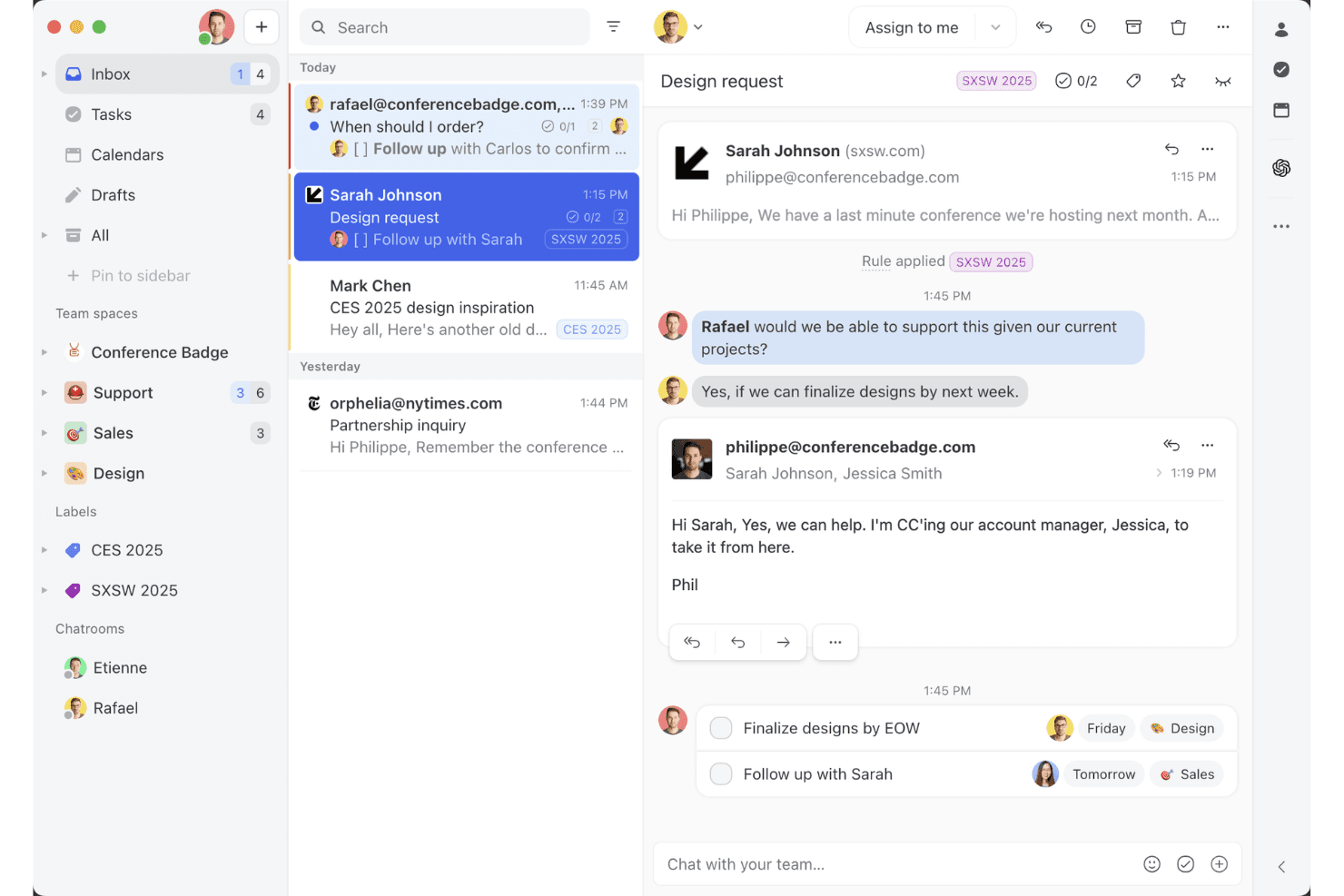
La visualizzazione della casella di posta condivisa di Missive mostra come i team possono collaborare sulle conversazioni email, assegnare attività e gestire le conversazioni con i clienti in un unico spazio di lavoro. Missive è una piattaforma collaborativa di casella di posta del team multicanale che centralizza conversazioni via email, SMS, WhatsApp, messaggistica social, chat dal vivo e voce, con potenti funzionalità di assegnazione, automazione e collaborazione in tempo reale tra gli operatori.
Per chi è più adatto Missive?
Team che desiderano una casella di posta condivisa e collaborativa che centralizzi le conversazioni con i clienti su più canali, all'interno di un'interfaccia familiare in stile email.
Perché ho scelto Missive
Ho scelto Missive perché semplifica la gestione collaborativa dei ticket basati sulle email per i team CX che gestiscono più canali. Utilizzo funzionalità come la redazione collaborativa in tempo reale e la chat interna nelle conversazioni, che aiutano il mio team a risolvere i casi senza il caos delle email. Le assegnazioni, l'instradamento basato su regole e le caselle di posta multicanale mantengono tutto visibile e operativo.
Funzionalità principali di Missive
- Casella di posta multicanale: Centralizza email, SMS, WhatsApp, Instagram, Messenger, chat dal vivo e conversazioni vocali in un unico spazio di lavoro.
- Automazione basata su regole: Consente di creare fino a 1.000 regole personalizzate per l'instradamento, l'etichettatura automatica, le escalation e le risposte automatiche.
- Server MCP di Missive: Collega client IA esterni, come Claude o ChatGPT, a mcp.missiveapp.com per cercare nelle conversazioni CX, controllare i calendari e preparare risposte, mantenendo obbligatoria l'approvazione umana prima dell'invio.
- Registri di controllo in tempo reale: Tracciano ogni azione e assegnazione nelle conversazioni, con registri completi degli utenti e degli orari.
- App per dispositivi mobili e desktop: Offre app native per iOS, Android, macOS e Windows, oltre alla piena parità funzionale sul web per l'accesso in mobilità.
Integrazioni di Missive
Missive offre più di 25 integrazioni native, tra cui Aircall, HubSpot, Salesforce, Asana, Trello, ClickUp, Notion, Dialpad, Shopify, Stripe, Google Drive, Dropbox e Zapier. I piani Productive e Business sbloccano inoltre l'accesso personalizzato all'API REST e il nuovo server MCP, quando attivato da un amministratore.
Cosa è gratuito?
Missive offre una prova gratuita di 30 giorni che sblocca tutte le funzionalità, ma non mette a disposizione un piano gratuito a tempo indeterminato. Al termine della prova, dovrai scegliere un piano a pagamento per continuare a utilizzare la piattaforma.
Pros and Cons
Pros:
- Vera casella di posta condivisa per i messaggi multicanale
- Chat del team in tempo reale su ogni conversazione
- Accesso ospite per collaboratori esterni
Cons:
- Nessun piano gratuito a tempo indeterminato disponibile
- Nessuna base di conoscenza nativa o CSAT
Learn more about Missive: Ideale per l'automazione dei ticket basata su AI
- Prova gratuita disponibile
- Da $16/utente/mese (fatturato annualmente)
Visit WebsiteCustomer Rating:4.6/5
La casella di posta omnicanale di SparrowDesk centralizza le conversazioni con i clienti, lo stato dei ticket, i livelli di priorità e l'assegnazione degli agenti in un'unica dashboard. Per chi cerca una soluzione gratuita di software help desk, SparrowDesk offre un'opzione interessante grazie alle sue funzionalità basate sull'intelligenza artificiale pensate per automatizzare una parte significativa dei ticket di supporto. Se sei un'azienda che punta a migliorare l'efficienza nell'assistenza clienti, questa piattaforma propone un'installazione rapida e potenti agenti AI che possono risolvere le richieste istantaneamente, aiutandoti a mantenere la coerenza e a migliorare i tempi di risposta. Con SparrowDesk puoi affrontare le sfide nella gestione delle interazioni con i clienti su diversi canali, garantendo un'esperienza fluida sia per il tuo team che per i tuoi clienti.
Perché ho scelto SparrowDesk
Ho scelto SparrowDesk per la sua capacità unica di automatizzare i ticket di supporto tramite agenti AI, particolarmente interessante per chi cerca un software help desk gratuito. Questa automazione non solo riduce il carico di lavoro sul team di supporto, ma assicura anche che le richieste dei clienti siano gestite velocemente e con precisione. Inoltre, la funzione di comunicazione omnicanale della piattaforma permette di gestire email e chat in un'unica casella di posta, aumentando l'efficienza delle operazioni di supporto. Queste caratteristiche rendono SparrowDesk un candidato forte per le aziende che vogliono ottimizzare il processo di assistenza clienti.
Caratteristiche principali di SparrowDesk
Oltre all'automazione e alla comunicazione omnicanale, ho trovato degne di nota anche le seguenti funzionalità:
- AI Copilot: Assiste gli agenti con riepiloghi istantanei e risposte contestuali, fornendo loro rapido accesso alle informazioni rilevanti.
- Service Level Agreements (SLA): Permette di impostare e monitorare metriche di performance per assicurarti che il team soddisfi le aspettative dei clienti.
- Supporto multilingue: Offre la possibilità di comunicare con i clienti in più lingue, ampliando il raggio d'azione e migliorando la soddisfazione del cliente.
- Viste personalizzabili: Consente di adattare la dashboard alle esigenze specifiche, offrendo un'esperienza utente personalizzata.
Integrazioni di SparrowDesk
Attualmente SparrowDesk non riporta integrazioni native elencate.
Pros and Cons
Pros:
- Gli agenti AI riducono il lavoro manuale di gestione dei ticket
- La casella di posta omnicanale centralizza le conversazioni con i clienti
- Il monitoraggio SLA supporta le performance di assistenza misurabili
Cons:
- Nessun piano gratuito disponibile per sempre
- Le integrazioni native non sono pubblicamente elencate
Learn more about SparrowDesk: Ideale per i suoi 15 anni di presenza sul mercato
- Prova gratuita + demo gratuita disponibili
- Prezzo su richiesta
Visit WebsiteCustomer Rating:4.2/5
ServiceDesk Plus offre una dashboard unificata che incorpora diversi dati e analitiche, incluse le violazioni SLA e le richieste di modifica. ServiceDesk Plus è il software di gestione dei servizi aziendali full-stack di ManageEngine. Offre un'ampia gamma di soluzioni IT che supportano i flussi di lavoro ITSM (gestione dei servizi IT), personalizzazioni senza codice, reportistica avanzata, integrazioni native e automazione intelligente.
Una delle caratteristiche chiave di ServiceDesk Plus sono le sue 13 pratiche distinte compatibili con ITIL4, tra cui la gestione degli incidenti, l'abilitazione al cambiamento e la gestione delle richieste, per aiutarti a migliorare le operazioni. Il software offre anche funzionalità complete per la gestione dei problemi, che consentono ai team di supporto IT di classificare, analizzare e risolvere le problematiche, oltre a identificare quelle simili o ripetitive, così da poter chiudere i ticket molto più rapidamente.
Il sistema di gestione dei cambiamenti della piattaforma è un'altra funzionalità progettata per aiutare i team IT a implementare meglio le modifiche, riducendo i rischi grazie a processi di pianificazione, approvazione e attuazione più snelli. ServiceDesk Plus dispone inoltre di un sistema integrato di gestione della conoscenza, di una funzione di assistente virtuale e di capacità di intelligenza artificiale.
Dal lato cliente, la piattaforma offre portali self-service dove gli utenti possono creare richieste e monitorarne lo stato. Dispone anche di una chat dal vivo per supporto in tempo reale, una knowledge base dove puoi registrare soluzioni ai problemi frequenti per gli utenti e app mobile dell’help desk che ti permettono di ottenere assistenza ogni volta che ne hai bisogno.
Altre funzionalità di ServiceDesk Plus includono l’instradamento automatico dei ticket e la creazione di regole di escalation per evitare violazioni delle SLA.
Learn more about ManageEngine ServiceDesk Plus: Ideale per il suo mix di supporto live e chatbot
- Prova gratuita di 7 giorni + piano gratuito disponibile
- Da $24,17/mese (fatturato annualmente)
Visit WebsiteCustomer Rating:4.7/5
L'editor drag-and-drop di Tidio permette agli utenti di creare chatbot per diversi flussi di lavoro in base a trigger e condizioni. Tidio è una soluzione software di live chat che aiuta i team dell'esperienza cliente a soddisfare le esigenze e le richieste dei clienti. La piattaforma basata su cloud include un sistema di ticketing, una knowledge base, un costruttore di chatbot e uno strumento di chat live. Fornisce approfondimenti dettagliati sulle interazioni con i clienti, aiutando i team a identificare le aree di miglioramento.
La piattaforma Tidio è progettata per aiutare i team dell'esperienza cliente a gestire tutti gli aspetti del percorso del cliente, dal primo contatto fino alla risoluzione. I suoi chatbot automatizzano compiti ripetitivi come fornire informazioni sulla disponibilità dei prodotti o rispondere alle domande frequenti, consentendo agli utenti di offrire assistenza clienti 24/7.
Tidio offre anche assistenza tramite operatori umani che aiuta a risolvere le questioni più complesse. La funzione di chat dal vivo può monitorare i dati e analizzare il comportamento dei clienti, il che può aiutarti a migliorare l'esperienza del cliente. Inoltre, puoi usare questa funzione per contattare proattivamente i clienti e offrire loro aiuto prima ancora che lo richiedano. Infine, il sistema di ticketing di Tidio ti consente di dare priorità alle richieste e assicurarti che tutti i clienti ricevano una risposta puntuale.
Tidio offre oltre 25 integrazioni, inclusa l'integrazione email, utile per gestire più caselle di posta elettronica. Le integrazioni includono Zendesk, Google Analytics, Pipedrive, Mailchimp, OpenCart e migliaia di altre tramite Zapier.
I prezzi per Tidio partono da $25/mese e offrono una prova gratuita di 7 giorni.
Learn more about Tidio: Ideale per il controllo qualità automatico dei ticket
- Prova gratuita di 14 giorni + demo gratuita disponibile
- Da $25/postazione/mese (fatturato annualmente)
Visit WebsiteCustomer Rating:4.7/5
Collabora sulle email in tempo reale con la casella di posta condivisa di Front—assegna conversazioni, coinvolgi i colleghi e vedi chi sta leggendo o rispondendo, tutto in un unico posto. Front offre funzionalità di casella di posta condivisa e collaborazione per team che cercano una soluzione help desk moderna. È progettato per aziende che desiderano gestire le conversazioni con i clienti su email, chat e canali social in un unico luogo. Se hai bisogno di uno strumento che aiuti il tuo team a organizzare, assegnare e rispondere alle richieste di supporto in modo efficiente, Front è da prendere in considerazione.
Per Chi È Meglio Front?
Front è ideale per team di supporto e assistenza clienti di piccole e medie imprese che devono gestire alti volumi di richieste su più canali.
Perché Ho Scelto Front
La garanzia della qualità è una priorità assoluta per i team di supporto che vogliono mantenere standard elevati in ogni interazione con i clienti. Ho scelto Front perché offre strumenti automatici di controllo qualità sui ticket che esaminano le conversazioni per tono, completezza e aderenza alle linee guida interne. Con funzionalità come controlli qualità basati su regole e analisi delle conversazioni, i team possono identificare rapidamente i ticket che necessitano attenzione o formazione. Queste automazioni aiutano a garantire che ogni risposta rispetti gli standard del team senza richiedere una revisione manuale di ogni ticket.
Funzionalità Principali di Front
Altre funzionalità di Front che aiutano i team a gestire le richieste di supporto in modo efficiente includono:
- Gestione della casella condivisa: Organizza e assegna i messaggi in arrivo da più canali ai membri del team appropriati in un'unica casella di posta unificata.
- Rilevamento delle collisioni: Ricevi avvisi in tempo reale quando un altro collega sta visualizzando o rispondendo alla stessa conversazione per evitare risposte duplicate.
- Risposte predefinite: Salva e riutilizza modelli di messaggi per domande comuni, velocizzando le risposte e mantenendo coerenza.
- Analisi e reportistica: Monitora metriche come tempi di risposta, volume delle conversazioni e performance del team con dashboard e report integrati.
Integrazioni di Front
Le integrazioni includono Salesforce, Slack, Shopify, Aircall, Asana, Pipedrive, Twitter (X), Microsoft Outlook 365, Dialpad e Todoist.
Cosa È Gratuito?
Front offre una prova gratuita di 14 giorni del piano Professional. Al termine della prova, è necessario un abbonamento a pagamento; non è previsto un piano gratuito per sempre.
Pros and Cons
Pros:
- La casella condivisa supporta la collaborazione in tempo reale del team
- Regole di automazione per instradamento e tag dei ticket
- Funzioni AI per scrittura, riepilogo e traduzione
Cons:
- Il sistema di ticketing non offre opzioni avanzate di ordinamento ed esportazione
- Il supporto vocale richiede integrazioni di terze parti
Learn more about Front: Ideale per le funzionalità di collaborazione
- Piano gratuito + demo gratuita disponibile
- Da $29/utente/mese
Visit WebsiteCustomer Rating:4.6/5
Collabora su ticket di supporto nella casella condivisa di HelpDesk. HelpDesk è un software facile da usare con tutte le funzionalità necessarie per gestire il supporto. Lo strumento riunisce email, messaggistica e chat in un'unica dashboard, così puoi rispondere facilmente alle comunicazioni. Inoltre, offre a ogni agente piena visibilità sulla cronologia di supporto del cliente per fornire un contesto ai loro problemi.
Apprezzo le funzionalità di collaborazione. Rendono facile per gli agenti taggare altre persone in un post per ottenere assistenza specialistica. E queste conversazioni sono chiaramente contrassegnate come private, così sai che il cliente non può vederle. È anche semplice per gli agenti vedere quando qualcun altro sta già gestendo un ticket, evitando sovrapposizioni.
Lo strumento presenta diverse funzioni di automazione che velocizzano il supporto. Una utile è la possibilità di automatizzare le risposte in base alle parole chiave nel messaggio. Ad esempio, se il testo contiene la parola “rimborso”, puoi inviare automaticamente un messaggio con le istruzioni su come richiedere un rimborso.
Altre funzionalità per risparmiare tempo includono la possibilità di creare risposte predefinite e di eseguire azioni collettive. HelpDesk si collega con Zapier per permettere integrazioni.
Il costo è di $34 per agente al mese per il piano team. Include anche ruoli di solo visualizzazione illimitati. Puoi registrarti per una prova gratuita sul sito web.
Learn more about HelpDesk: Ideale per la gestione dei ticket con intelligenza artificiale
- Prova gratuita di 14 giorni
- Da $9/postazione/mese (fatturato annualmente)
Visit WebsiteCustomer Rating:4.6/5
La dashboard dei ticket di monday Service offre una panoramica dei ticket e di altri dati rilevanti. monday Service è una piattaforma versatile per la gestione dei servizi progettata per migliorare i flussi di lavoro correlati ai servizi in reparti come IT, HR, legale, approvvigionamento e assistenza clienti. È altamente personalizzabile, permettendoti di automatizzare le attività ripetitive tramite automazioni senza codice, così potrai concentrarti su attività più strategiche.
La sua automazione basata su intelligenza artificiale migliora la gestione dei ticket, assegnando automaticamente tag e instradando i ticket in base a priorità, reparto e urgenza, garantendo così risoluzioni tempestive. La possibilità di personalizzare i flussi di lavoro rende inoltre semplice adattare la piattaforma alle esigenze specifiche del tuo team CX, rendendo i tuoi processi più efficienti.
Grazie alle funzioni di comunicazione in tempo reale, puoi commentare sui ticket, condividere file e aggiornarti con gli altri sull'avanzamento delle problematiche dei clienti, assicurandoti che tutti siano allineati. Le integrazioni della piattaforma con altri strumenti, come Slack, Microsoft Teams e la posta elettronica, aiutano anche a consolidare la comunicazione.
monday Service offre una prova gratuita di 14 giorni.
Learn more about monday service: Ideale per più accordi sul livello di servizio
- Piano gratuito disponibile
- Gratuito
Visit WebsiteCustomer Rating:4.7/5
Raiseaticket offre potenti funzionalità su una piattaforma gratuita. Raiseaticket è una piattaforma help desk basata su cloud che organizza le comunicazioni tra clienti e agenti di supporto. Il software offre flussi di lavoro per eliminare caselle di posta disordinate e richieste di supporto non gestite. Fornisce inoltre approfondimenti sulle prestazioni basati sui dati, riepiloghi dei dati e metriche quantificabili.
Puoi assegnare i ticket ai team o agli agenti, allegare file, aggiungere note e tenere traccia del tempo trascorso su ciascun ticket. Sia le comunicazioni via e-mail che quelle provenienti dal portale possono essere gestite tramite un sistema unificato. Raiseaticket ti consente di creare diversi SLA per diversi clienti.
Raiseaticket offre un piano gratuito che include una gamma completa di funzionalità.
Learn more about Raiseaticket: 10Miglior widget di chat per siti web e app
Intercom
- Prova gratuita di 14 giorni + demo gratuita disponibile
- Da $29/utente/mese (fatturazione annuale)
Visit WebsiteCustomer Rating:4.4/5
La casella di posta dell'help desk Intercom fornisce agli operatori il contesto essenziale. Permette ai clienti di contattare il tuo team di assistenza direttamente dal tuo prodotto o sito web, oltre che tramite canali come i social media e l'email. Nel frattempo, gli operatori possono accedere a informazioni importanti sui clienti, come le conversazioni precedenti e i dettagli dei problemi. Le funzionalità che spiccano sono tutte le opzioni di self-service.
Puoi aggiungere risorse al tuo widget di chat e persino personalizzare ciò che viene mostrato in base alla pagina. Oppure puoi utilizzare la funzione di supporto proattivo per risolvere i problemi dei clienti prima ancora che si verifichino. Ad esempio, puoi inviare messaggi automatici quando gli utenti compiono una determinata azione, come trascorrere un certo tempo su una pagina specifica.
Altre opzioni di self-service includono la possibilità di creare tour guidati del prodotto per aiutare le persone a familiarizzare rapidamente con le sue funzionalità, e messaggi automatici che vengono inviati quando i clienti mostrano segni di difficoltà con il prodotto.
Lo strumento offre anche numerose funzionalità che semplificano l'assistenza dal vivo. Queste comprendono un sistema di gestione dei ticket di supporto, collaborazione, instradamento dei ticket e risposte preimpostate.
Intercom offre un piano iniziale per aziende molto piccole che costa $74 al mese con fatturazione annuale. Le aziende più grandi dovrebbero contattare il team commerciale per informazioni sui prezzi.
Altri software di help desk gratuiti
Ecco alcune alternative aggiuntive di software di help desk che offrono piani o prove gratuite. Pur non essendo entrati nella mia lista principale, sono comunque degni di considerazione:
- 11ProProfs Help DeskIdeale per una casella di posta condivisa per la CX
- 12Spiceworks Help DeskIl miglior software di help desk per team IT
- 13ManageEngine ServiceDesk PlusIdeale per il supporto IT
- 14Jira Service ManagementIdeale per opzioni avanzate di personalizzazione
- 15Odoo HelpdeskIdeale per una visualizzazione Kanban dell’attività del supporto clienti
- 16GladlySoluzione help desk con funzionalità avanzate di telefonia
- 17FrontIdeale per il servizio clienti collaborativo
- 18ngDeskIdeale per combinare vendite, assistenza e marketing
- 1914.aiIl miglior motore di risposta cliente consapevole dell'intento
- 20HiverIdeale per trasformare Gmail in un help desk
- 21LiveAgentIdeale per un widget di chat popolare
- 22LiveChatIl miglior software di help desk gratuito per call center
- 23Help ScoutIdeale per creare automazioni di contatto proattive
- 24ZendeskHelp desk con funzionalità avanzate di servizio
- 25Zoho AssistIdeale per offrire supporto tramite accesso remoto
- 26FreshdeskIdeale per gestione ticket integrata tra email e social
Have an account? Log In
Come valuto il software gratuito di help desk
Valuto gli strumenti gratuiti di help desk su due livelli: i requisiti minimi che ogni strumento deve soddisfare—come un vero sistema di ticketing e un piano gratuito permanente—e i fattori che rendono uno strumento una scelta migliore rispetto a un altro.
Funzionalità di base (requisiti fondamentali per questa lista)
Quando seleziono gli strumenti per la mia lista, valuto ognuno su una scala da 0 (non offre la funzionalità) a 5 (eccelle in quest’area) per ciascuna funzionalità di base elencata qui sotto. Poi calcolo il punteggio totale dello strumento in percentuale. Ogni strumento deve raggiungere un punteggio totale minimo del 65% per essere considerato per l’inclusione.
- Disponibilità di piano gratuito: Verifico se ogni strumento offre un livello gratuito permanente—not solo una prova di 14 o 30 giorni—che permetta a un piccolo team di supporto di avere accesso effettivo e continuativo alle funzionalità principali di help desk.
- Gestione dei ticket: Ogni strumento dovrebbe consentire agli agenti di creare, assegnare, dare priorità e tracciare i ticket fino alla risoluzione, con opzioni come tag, stati e campi personalizzati per organizzare una fila crescente.
- Casella di posta multi-canale: Cerco strumenti che raccolgano i messaggi dei clienti da almeno email e un altro canale—come chat o modulo web—in una sola coda, affinché gli agenti non debbano passare da una piattaforma all’altra.
- Collaborazione tra agenti: Il supporto raramente è delegato a una sola persona, quindi valuto se gli agenti possono lasciare note interne, cedere ticket o utilizzare permessi basati sui ruoli per suddividere il lavoro tra il team.
- Base di conoscenza o self-service: Cerco una pagina FAQ rivolta ai clienti o una base di conoscenza dove i team possano pubblicare risposte alle domande più comuni—come le politiche di spedizione o le procedure di configurazione dell’account—per ridurre il volume dei ticket.
- Reportistica e monitoraggio SLA: Metriche basilari sul volume dei ticket, tempo di prima risposta e tempo di risoluzione aiutano i responsabili a individuare i colli di bottiglia, perciò valuto la reportistica disponibile già nel piano gratuito.
Dopo aver individuato gli strumenti che soddisfano questi criteri, considero cosa distingue ciascuna piattaforma.
Fattori differenzianti (cosa distingue i fornitori)
Ecco come confronto e metto in contrasto i diversi fornitori:
Caratteristiche distintive
Funzionalità alimentate dall’intelligenza artificiale come auto-smistamento e risposte suggerite fanno davvero la differenza quando un team di due persone deve gestire decine di ticket al giorno. Cerco anche un widget di chat dal vivo che gli agenti possano gestire assieme alle email—un canale che i clienti si aspettano sempre più spesso. Contano anche i sondaggi CSAT integrati, visto che permettono ai responsabili di misurare la qualità del servizio subito dopo la risoluzione, senza dover collegare un tool esterno per i sondaggi.
Oltre le funzionalità
Il percorso di upgrade dal piano gratuito a quello a pagamento è importante—verifico se uno strumento consente di passare a livelli superiori senza dover migrare i dati o riqualificare il team. Le integrazioni sono altrettanto rilevanti. Un help desk gratuito che si collega al tuo CRM o a Slack permette agli agenti di lavorare in un unico posto, senza dover copiare dettagli da una scheda all’altra. Valuto anche le risorse per l’onboarding, visto che raramente i piani gratuiti includono un supporto dedicato. Una buona documentazione, forum della community e guide di configurazione in-app fanno la differenza tra un’implementazione fluida e una bloccata.
Come scegliere un software di help desk gratuito
Liste di funzionalità complesse e strutture di prezzi articolate possono rendere difficile capire cosa stai realmente ottenendo da un software di help desk gratuito. Per aiutarti a restare focalizzato nella selezione, ecco alcuni fattori da considerare:
| Fattore | Cosa Considerare |
|---|---|
| FattoreAmbito dell'Offerta Gratuita | Cosa ConsiderareVerifica cosa è incluso nel piano gratuito. Assicurati che copra funzionalità essenziali come ticketing e supporto multicanale senza costi nascosti. |
| FattoreScalabilità | Cosa ConsiderareConsidera se il software può crescere insieme al tuo team. Cerca opzioni che offrano aggiornamenti ai piani a pagamento senza interruzioni, man mano che crescono le tue esigenze. |
| FattoreIntegrazioni | Cosa ConsiderareVerifica la compatibilità con i tuoi strumenti esistenti, come CRM o email. Un'integrazione fluida può far risparmiare tempo al tuo team e ridurre il lavoro manuale. |
| FattoreFacilità d'Uso | Cosa ConsiderareAssicurati che l'interfaccia sia intuitiva e facile da navigare. Un design user-friendly riduce il tempo di formazione e aiuta il team a lavorare velocemente a pieno regime. |
| FattoreOpzioni di Supporto | Cosa ConsiderareValuta il supporto clienti disponibile per gli utenti gratuiti. Cerca live chat, supporto via email e guide complete per assistere il tuo team quando necessario. |
| FattorePersonalizzazione | Cosa ConsiderareDetermina il livello di personalizzazione offerto. Poter adattare il software ai tuoi flussi di lavoro può aumentare la produttività e adattarsi ai processi del tuo team. |
| FattoreLimitazioni utenti | Cosa ConsiderareVerifica se c'è un limite al numero di utenti previsto dal piano gratuito. Assicurati che soddisfi la dimensione del tuo team senza costringerti ad aggiornare. |
| FattoreSicurezza | Cosa ConsiderareValuta le funzionalità di sicurezza offerte. Assicurati che siano presenti misure di protezione dei dati come crittografia e conformità agli standard di settore, per proteggere i dati dei clienti. |
Che cos'è un software di help desk gratuito?
I software di help desk gratuiti sono strumenti cloud che aiutano i team di assistenza clienti a organizzare, tracciare e risolvere le richieste dei clienti, ma senza costi mensili.
Queste soluzioni SaaS gratuite includono le funzionalità base di help desk che ti aspetteresti, tra cui un sistema di ticketing per tracciare i problemi, capacità di automazione di base per attività ripetitive e strumenti di comunicazione che aiutano i team di assistenza clienti a collaborare sui ticket o ad escalarli quando necessario. Sono un modo conveniente per migliorare l’efficienza delle operazioni di assistenza clienti senza sostenere ulteriori costi mensili.
Funzionalità
Vediamo le funzionalità che si trovano comunemente nei software di help desk e quali sono di solito incluse nei piani gratuiti rispetto a quelli a pagamento.
Funzionalità tipiche dei software di help desk gratuiti
- Gestione dei ticket: Organizza le richieste dei clienti in ticket facilmente gestibili per un tracciamento e una risoluzione semplici.
- Integrazione email: Collega la tua email allo strumento help desk per semplificare la comunicazione con i clienti.
- Creazione di knowledge base: Ti consente di creare una raccolta di FAQ e guide per offrire supporto self-service.
- Supporto multicanale: Permette di gestire richieste provenienti da vari canali come email, chat e social media.
- Reportistica di base: Offre panoramiche sulle prestazioni del supporto con semplici report su stato dei ticket e tempi di risposta.
Funzionalità tipiche dei software di help desk a pagamento
- Analisi avanzate: Fornisce approfondimenti dettagliati sulle prestazioni del team e sulle metriche di soddisfazione dei clienti.
- Chatbot basato su AI: Automatizza le risposte alle domande frequenti, liberando gli operatori per gestire i casi più complessi.
- Dashboard personalizzabili: Permette di personalizzare l'interfaccia visualizzando metriche e informazioni rilevanti per il proprio team.
- Integrazione con social media: Consente la gestione diretta delle interazioni dei clienti su piattaforme come Facebook e Twitter.
- Supporto multilingue: Offre la possibilità di fornire assistenza clienti in più lingue, ampliando la portata globale.
Vantaggi
L’implementazione di un software di help desk gratuito porta diversi vantaggi per il tuo team e per la tua azienda. Ecco alcuni benefici a cui puoi guardare con fiducia:
- Soluzione conveniente: Offre funzionalità di supporto essenziali senza la necessità di un budget, rendendola ideale per startup e piccole imprese.
- Migliore organizzazione: La gestione dei ticket aiuta a tenere organizzate le richieste dei clienti, permettendo al tuo team di gestirle in modo più efficiente.
- Comunicazione migliorata: L'integrazione e-mail garantisce che tutte le interazioni con i clienti siano in un unico posto, facilitando una comunicazione migliore.
- Opzioni self-service: Una knowledge base consente ai clienti di trovare autonomamente le risposte alle proprie domande, riducendo il carico sul team di supporto.
- Configurazione rapida: Interfacce intuitive e onboarding semplice permettono al tuo team di iniziare a usare il software con un training minimo.
- Scalabilità: Molti strumenti offrono opzioni di upgrade, consentendoti di crescere insieme alla tua azienda senza perdere i dati iniziali.
- Supporto multi-canale: Gestire richieste provenienti da diverse piattaforme assicura che nessuna domanda dei clienti passi inosservata, migliorando la qualità del servizio.
Costi e prezzi
So che sei arrivato a questo articolo cercando le migliori opzioni di software help desk disponibili gratuitamente. Tuttavia, poiché i piani gratuiti offrono solo funzionalità limitate, è molto probabile che in futuro avrai bisogno di passare a un piano superiore.
La tabella qui sotto riassume i piani più comuni, i loro prezzi medi e le funzionalità tipiche comprese nelle soluzioni di software help desk:
Tabella di confronto dei piani per software Help Desk
| Tipo di piano | Prezzo medio | Funzionalità comuni |
|---|---|---|
| Tipo di pianoPiano gratuito | Prezzo medio$0 | Funzionalità comuniGestione ticket di base, supporto tramite e-mail e knowledge base limitata. |
| Tipo di pianoPiano personale | Prezzo medio$5-$25/user/month | Funzionalità comuniGestione avanzata dei ticket, reportistica di base e integrazioni con piattaforme e-mail e chat. |
| Tipo di pianoPiano business | Prezzo medio$30-$60/user/month | Funzionalità comuniDashboard personalizzabili, supporto multi-canale, analisi e reportistica avanzate. |
| Tipo di pianoPiano enterprise | Prezzo medio$70-$100/user/month | Funzionalità comuniFunzionalità basate su AI, opzioni avanzate di sicurezza e gestione account e supporto dedicato. |
Domande frequenti sul software di help desk gratuito
Ecco le risposte ad alcune domande frequenti sul software di help desk gratuito.
Il software di help desk gratuito può integrarsi con altri strumenti?
Sì, molti strumenti di help desk gratuiti offrono integrazioni con altri software come piattaforme email e CRM. Queste integrazioni aiutano a snellire il flusso di lavoro del tuo team collegando diversi sistemi, rendendo più semplice gestire le interazioni con i clienti senza dover cambiare applicazione.
Come funziona il software di help desk gratuito?
Il software di help desk gratuito offre molte delle stesse funzionalità del software a pagamento. Questi strumenti sono spesso versioni di base di piani che prevedono opzioni a prezzo più elevato man mano che si aggiungono funzionalità o utenti. Alcuni degli strumenti presenti in questo elenco sono piani freemium (quindi gratuiti per sempre), mentre altri offrono una prova gratuita per un periodo di tempo limitato.
Quanto è sicuro il software di help desk gratuito?
Il software di help desk gratuito include spesso funzionalità di sicurezza di base, come la crittografia dei dati e controlli di accesso protetti. Tuttavia, per opzioni di sicurezza più avanzate, potrebbe essere necessario considerare i piani a pagamento. Controlla sempre le politiche di sicurezza del fornitore per assicurarti che soddisfino i requisiti della tua azienda.
C'è un limite al numero di utenti nei piani gratuiti?
La maggior parte delle soluzioni di help desk gratuite prevede un limite al numero di utenti o agenti. Questo limite varia a seconda del fornitore, quindi è importante consultare le specifiche di ciascuno strumento per assicurarsi che sia adeguato alle dimensioni del tuo team senza dover fare un upgrade.
Che tipo di assistenza è disponibile per gli utenti gratuiti?
L’assistenza per gli utenti gratuiti di solito include l’accesso a risorse online come FAQ, knowledge base e forum della community. Alcuni fornitori possono offrire supporto via email, ma chat dal vivo e assistenza telefonica sono di solito riservati ai piani a pagamento.
Ci sono opzioni di personalizzazione nel software di help desk gratuito?
Il software di help desk gratuito offre spesso opzioni di personalizzazione di base, come modificare i campi dei ticket o personalizzare il branding dell’interfaccia. Per una personalizzazione più avanzata, potrebbe essere necessario eseguire un upgrade a un piano a pagamento che consenta una personalizzazione più approfondita per soddisfare le esigenze della tua azienda.
Cosa succede dopo?
Se stai cercando informazioni su software di help desk gratuito, mettiti in contatto con un consulente SoftwareSelect per consigli gratuiti. Compila un modulo e fai una breve chiacchierata in cui vengono approfondite le tue esigenze specifiche. Poi riceverai una lista ristretta di software da valutare. Ti supporteranno anche durante tutto il processo di acquisto, comprese le trattative sui prezzi.
E se hai trovato utile questo articolo, potrebbero interessarti anche i nostri post sul blog dedicati ai migliori software di assistenza clienti.