

10 migliori software di monitoraggio dell’assistenza clienti nel 2026

10 La Migliore Lista di Software per il Monitoraggio del Servizio Clienti


Come responsabile dell’esperienza cliente, ti trovi a gestire molteplici compiti e a fare di tutto per mantenere soddisfatti i tuoi clienti. Diventa difficile quando i tempi di risposta si allungano o quando non riesci a tracciare le interazioni in modo efficace. È qui che entrano in gioco i software per il monitoraggio del servizio clienti.
Nella mia esperienza, questi strumenti trasformano il modo in cui gestisci le interazioni con i clienti, rendendo più semplice rimanere organizzati e reattivi. Ho testato e recensito autonomamente diversi software per offrirti una prospettiva imparziale.
In questo articolo condividerò le mie scelte migliori di software per il monitoraggio del servizio clienti che possono aiutare il tuo team ad affrontare le sfide con decisione. Troverai approfondimenti su funzionalità, usabilità e su come ogni strumento possa rispondere alle tue esigenze particolari. Esploriamo insieme le opzioni che possono fare realmente la differenza per te e il tuo team.
Perché fidarsi dei nostri consigli sui software
Il nostro team testa e recensisce software dal 2012. In quanto leader CX noi stessi, sappiamo quanto sia difficile — e importante — scegliere il software giusto.
Per questa guida, abbiamo valutato gli strumenti attraverso test pratici e ricerche indipendenti, assegnando un punteggio agli strumenti in base ai nostri criteri di selezione.
Le nostre recensioni riflettono il nostro giudizio editoriale umano, non un discorso di vendita.
Tabella riassuntiva dei migliori software per il monitoraggio del servizio clienti
u0026nbsp;rnrnu0026nbsp;
| Tool | Best For | Trial Info | Price | ||
|---|---|---|---|---|---|
| 1 | Ideale per soluzioni omnicanale di gestione dei casi per aziende eCommerce e retail | Prova gratuita di 14 giorni + demo gratuita disponibile | Da $19/agente/mese (fatturazione annuale) | Website | |
| 2 | Ideale per la stesura assistita da AI | Prova gratuita disponibile | Da $25/utente/mese (fatturazione annuale) | Website | |
| 3 | Ideale per il supporto collaborativo su più canali | Prova gratuita di 15 giorni + demo gratuita disponibile | A partire da $7/utente/mese (fatturato annualmente) | Website | |
| 4 | Ideale per una visione a 360 gradi delle informazioni sui clienti | Prova gratuita di 30 giorni disponibile | A partire da $15/utente/mese | Website | |
| 5 | Ideale per il monitoraggio dell'assistenza basato su una casella di posta condivisa | Prova gratuita di 30 giorni | A partire da $24/utente/mese (con fatturazione annuale) | Website | |
| 6 | Ideale per il monitoraggio dei ticket nativo di Microsoft Teams | Prova gratuita di 21 giorni + demo gratuita disponibile | Da $12/agente/mese (fatturato annualmente) | Website | |
| 7 | Ideale per la collaborazione tra team e la gestione dei ticket multi-canale | Prova gratuita di 14 giorni + demo gratuita disponibile | Da $19/agente/mese (fatturazione annuale) | Website | |
| 8 | Ideale per la gestione centralizzata delle interazioni con i clienti ecommerce | Prova gratuita di 14 giorni | Da $39/agente/mese | Website | |
| 9 | Ideale per aziende di medie e grandi dimensioni nei settori vendite, tecnologia e finanza | Not available | Prezzo su richiesta | Website | |
| 10 | Ideale per visualizzare e ottimizzare il flusso dei potenziali clienti | Piano gratuito + dimostrazione gratuita disponibile | A partire da $11.04/utente/mese (con fatturazione biennale) | Website |


Panoramica dei 10 migliori software per il monitoraggio del servizio clienti
Ecco una breve descrizione di ciascuno dei migliori software per il monitoraggio del servizio clienti presenti nella mia lista, evidenziando ciò che ognuno fa meglio. Ho anche aggiunto screenshot per mostrare alcune delle funzionalità.

Ideale per soluzioni omnicanale di gestione dei casi per aziende eCommerce e retail
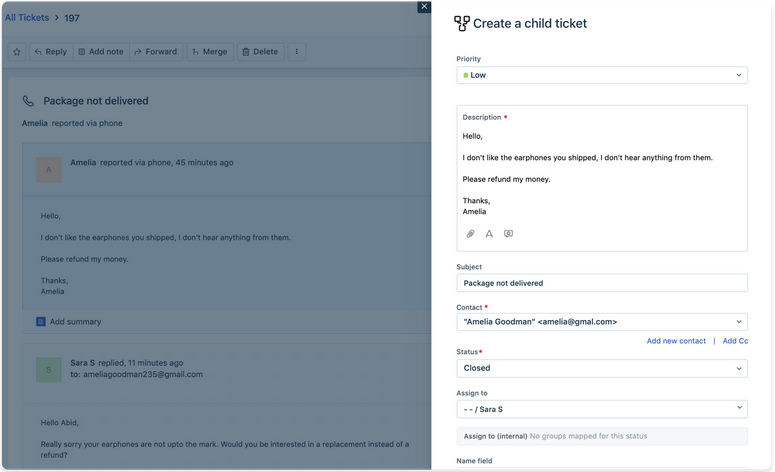
Freshdesk (un prodotto di Freshworks Inc.) è una piattaforma di assistenza clienti progettata per aiutare le piccole e medie imprese a gestire le richieste dei clienti tramite ticketing, automazione e comunicazione multicanale. Fornisce un sistema centralizzato per tracciare le richieste e coordinare le risposte tra i team di supporto.
Perché ho scelto Freshdesk: Ho scelto Freshdesk perché è progettato pensando alle piccole e medie imprese ed è relativamente semplice da configurare e utilizzare. L'interfaccia supporta il lavoro quotidiano di assistenza senza richiedere una configurazione complessa, e gli strumenti di automazione aiutano a ridurre attività ripetitive. Freddy AI è incluso per assistere nei flussi di lavoro, come la categorizzazione dei ticket, che aiuta i team a rimanere organizzati con l'aumentare del volume delle richieste. Il supporto per più canali di comunicazione facilita inoltre la gestione delle conversazioni provenienti da fonti diverse in un unico luogo.
Caratteristiche distintive & integrazioni:
Caratteristiche includono un portale self-service che consente ai clienti di trovare risposte in autonomia, una casella di posta condivisa che aiuta i team a collaborare sui ticket e strumenti di reportistica che offrono visibilità sulle attività di supporto e sulle tendenze di soddisfazione dei clienti.
Le integrazioni includono Slack, Shopify, Google Workspace, Microsoft Teams, Jira, Trello, QuickBooks, Dropbox, Mailchimp e HubSpot.
Pros and Cons
Pros:
- Viste dei ticket personalizzabili
- Instradamento automatico dei ticket
- Supporto multicanale
Cons:
- Reportistica avanzata limitata
- Funzionalità base dell'app mobile
New Product Updates from Freshdesk

Freshdesk Adds Voice AI Agents in Freshcaller
Freshdesk introduces Voice AI Agents available through Freshcaller Marketplace apps to handle routine calls and reduce queues. This feature enables automated call handling with real-time, conversational support. For more information, visit Freshdesk's official site.

Ideale per la stesura assistita da AI
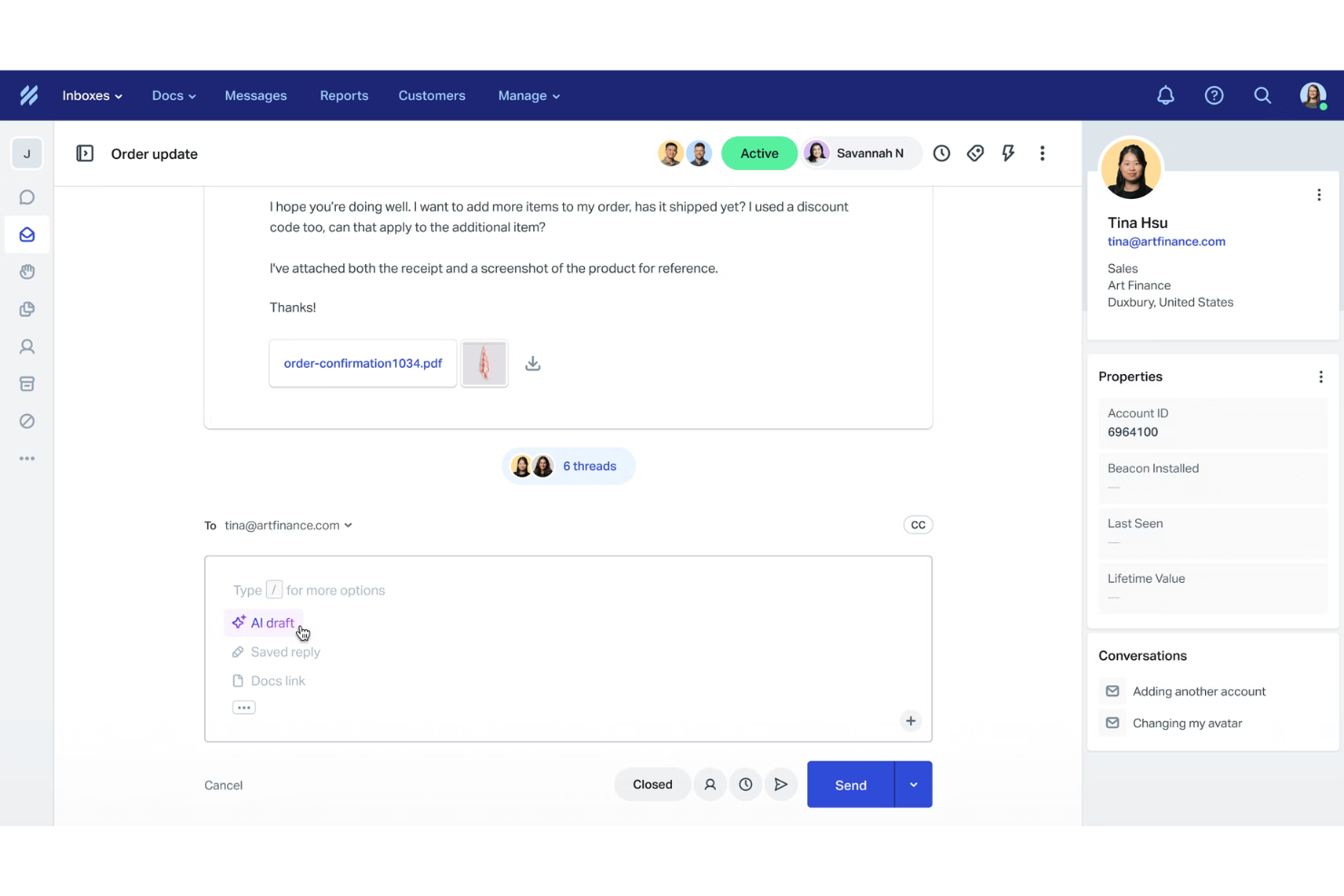
Help Scout è una piattaforma di assistenza clienti progettata per aiutare i team a gestire le richieste attraverso caselle di posta condivise, live chat e un centro assistenza integrato. È popolare tra le organizzazioni che desiderano uno spazio di lavoro intuitivo per monitorare le problematiche dei clienti e fornire supporto coerente.
Perché ho scelto Help Scout: Ho scelto Help Scout perché riunisce in un unico posto caselle di posta condivise, live chat e centro assistenza, rendendo più semplice il monitoraggio delle conversazioni senza dover cambiare strumento. L'assistenza AI può redigere risposte e riassumere i messaggi, il che può aiutare il tuo team a rispondere più rapidamente. Mi piace anche che Help Scout offra il contesto del cliente in ogni conversazione, così sai sempre con chi stai parlando e di cosa ha bisogno. Queste funzionalità aiutano a ottimizzare il monitoraggio quotidiano delle problematiche, soprattutto per i team in crescita.
Funzionalità e integrazioni principali:
Funzionalità includono messaggi proattivi per guidare i clienti durante la navigazione, report dettagliati che aiutano ad analizzare i tempi di risposta e le tendenze di soddisfazione, e un portale clienti dove gli utenti possono rivedere le conversazioni passate per maggiore chiarezza.
Integrazioni includono Salesforce, Shopify, Zapier, Slack, HubSpot, Gmail, Trello, Aircall, Jira, Asana, Mailchimp e WooCommerce.
Pros and Cons
Pros:
- Facile consolidamento dei messaggi su più canali
- Reporting e analisi completi
- Strumenti AI integrati per risposte più rapide
Cons:
- Alcune funzionalità avanzate solo nei piani superiori
- Personalizzazione limitata nei livelli inferiori
New Product Updates from Help Scout

Help Scout Adds Automatic Conversation Reassignment
Help Scout can now automatically unassign conversations when the assigned teammate has been away long enough, keeping replies moving so others can pick them up. For more information, visit Help Scout's official site.
 .
.
Ideale per il supporto collaborativo su più canali
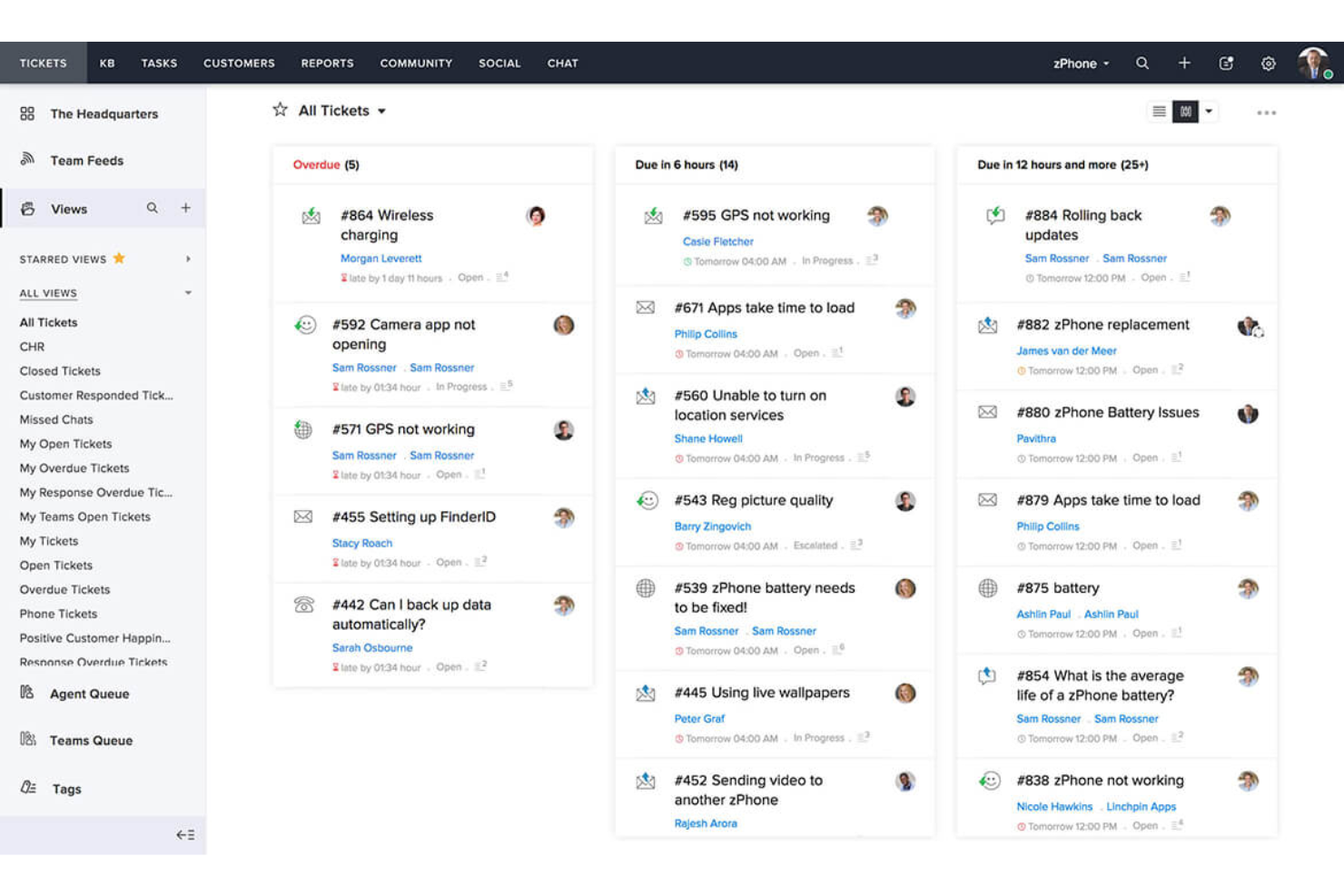
Zoho Desk è un software di assistenza clienti progettato per aziende di tutte le dimensioni, dalle startup alle grandi imprese. Si concentra sul miglioramento del supporto clienti tramite funzionalità omnicanale e automazione dei processi.
Perché ho scelto Zoho Desk: Offre supporto multicanale, consentendo al tuo team di gestire le richieste dei clienti via email, social media e chat in un'unica piattaforma. Questa funzione garantisce che nessuna interazione con i clienti venga persa. Zoho Desk fornisce anche automazione dei processi per ottimizzare le attività ripetitive, risparmiando tempo al tuo team. Le ampie opzioni di personalizzazione ti permettono inoltre di adattare la piattaforma alle esigenze del tuo business.
Funzionalità e integrazioni principali:
Le funzionalità includono un portale self-service che permette ai clienti di trovare autonomamente le risposte, una knowledge base per organizzare e gestire gli articoli di supporto e analisi avanzate per monitorare e migliorare le prestazioni del team.
Le integrazioni includono Salesforce, Slack, Google Workspace, Microsoft 365, Shopify, Mailchimp, Trello, Jira, Dropbox e Zoom.
Pros and Cons
Pros:
- Dashboard personalizzabili
- Forti misure di tutela dei dati
- Comunicazione omnicanale
Cons:
- Funzionalità limitate nell'app mobile
- Richiede formazione per l'utilizzo completo

Ideale per una visione a 360 gradi delle informazioni sui clienti
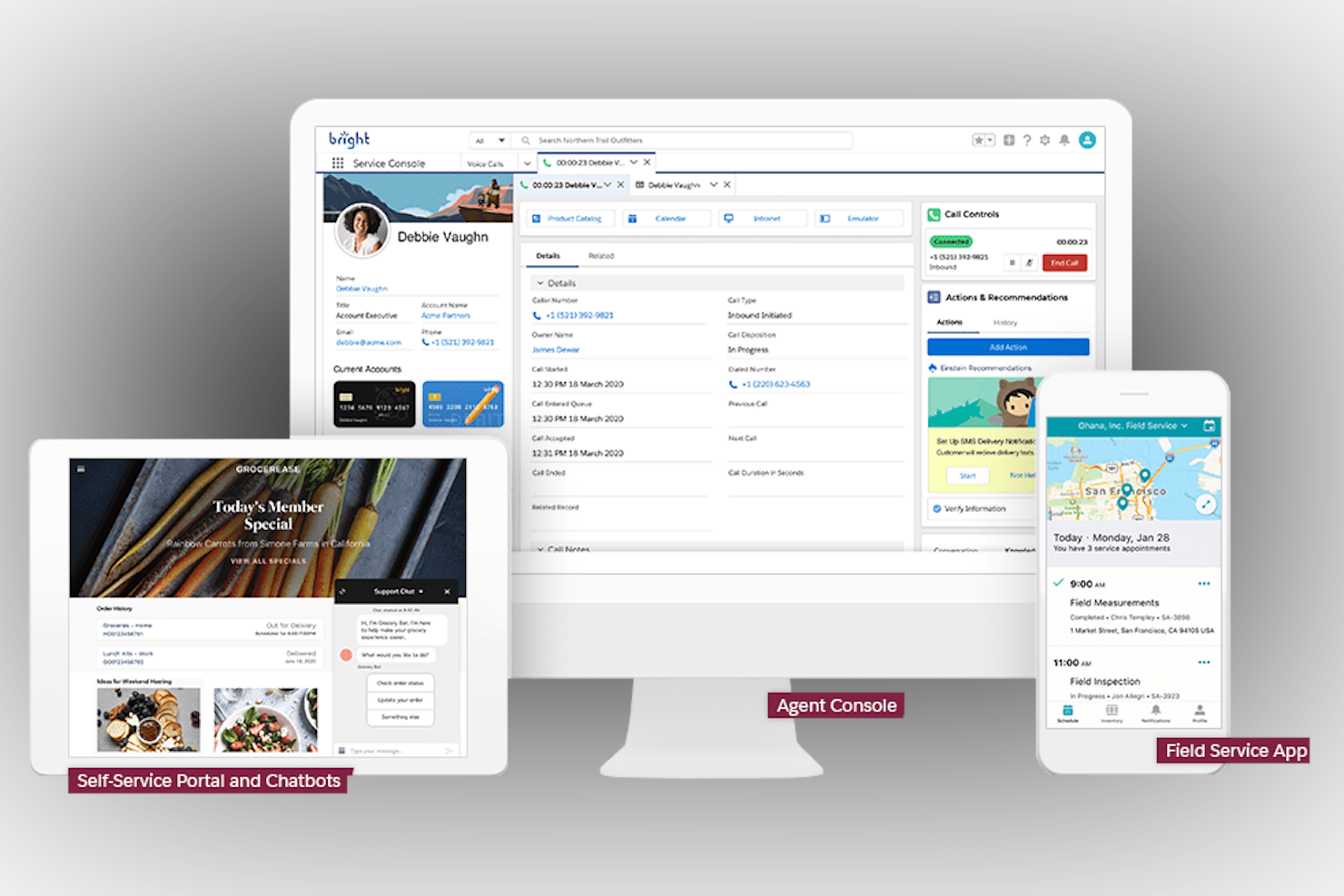
Salesforce Service Cloud è una piattaforma di servizio clienti pensata per le grandi imprese che desiderano ottimizzare le proprie operazioni di assistenza. Offre strumenti per la gestione dei casi, il coinvolgimento dei clienti e l'automazione del supporto.
Perché ho scelto Salesforce Service Cloud: È progettato per soddisfare le complesse esigenze delle grandi aziende, offrendo ampia possibilità di personalizzazione e scalabilità. Il tuo team può gestire i casi in modo efficiente grazie alle funzionalità avanzate di automazione. La piattaforma supporta una vasta gamma di interazioni con i clienti, assicurando la possibilità di rispondere a esigenze diversificate. I suoi strumenti di analisi offrono approfondimenti dettagliati su prestazioni e soddisfazione del cliente.
Funzionalità e integrazioni distintive:
Le funzionalità includono una knowledge base che aiuta il tuo team a condividere informazioni, approfondimenti guidati dall'intelligenza artificiale per migliorare il processo decisionale e un'app mobile che tiene il tuo team connesso ovunque.
Le integrazioni includono Slack, Microsoft Teams, Google Workspace, Dropbox, Mailchimp, QuickBooks, DocuSign, LinkedIn, Zoom e HubSpot.
Pros and Cons
Pros:
- Approfondimenti guidati dall'intelligenza artificiale
- Capacità di reportistica avanzata
- Forte supporto della community
Cons:
- Curva di apprendimento ripida
- Può richiedere competenze tecniche
New Product Updates from Agentforce Service (formerly Service Cloud)
Agentforce Service Keeps Full Agentforce Voice Transcripts After Calls
Agentforce Service now shows the full conversation history in post-call transcripts for Agentforce Voice calls within the Service Console, giving agents better context for follow-ups. For more information, visit Salesforce’s official site.
 .
.
Missive
Ideale per il monitoraggio dell'assistenza basato su una casella di posta condivisa
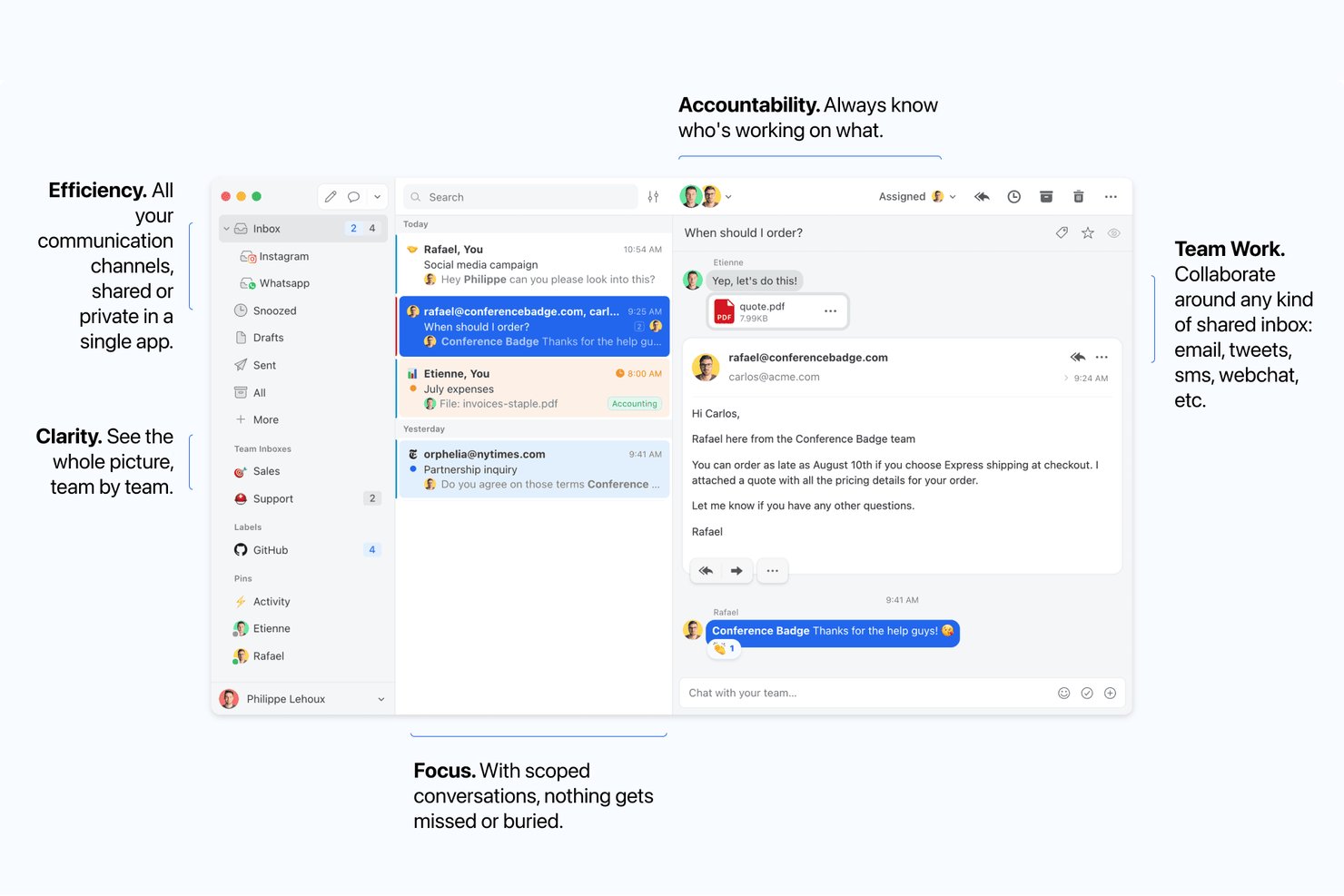
Missive è una piattaforma collaborativa per caselle di posta condivise che riunisce email, chat dal vivo, SMS e canali di messaggistica social in un unico spazio di lavoro, con assegnazione delle conversazioni, thread interni, regole di automazione e report sulle prestazioni del team.
Per chi è più adatto Missive?
Missive è ideale per team di assistenza di piccole e medie dimensioni che desiderano strumenti per caselle di posta collaborative senza la complessità di un sistema formale di gestione dei ticket.
Perché ho scelto Missive
Missive si è guadagnato un posto nella mia rosa ristretta perché colma davvero il divario tra una semplice casella di posta condivisa e un sistema formale di gestione dei ticket, esattamente ciò di cui ha bisogno il monitoraggio dell'assistenza basato su una casella condivisa. Mi piace molto il fatto che le conversazioni possano essere assegnate agli operatori, seguite dai responsabili del team e discusse internamente tramite note organizzate in thread, senza che il cliente veda mai gli scambi interni. La stesura collaborativa, in cui più operatori compongono insieme una risposta in tempo reale, è una funzionalità che raramente ho visto realizzata così bene altrove.
Funzionalità principali di Missive
- Posta in arrivo unificata multicanale: Riunisce email, SMS, chat dal vivo, WhatsApp Business, Facebook Messenger e messaggi diretti di Instagram in un unico spazio di lavoro condiviso.
- Bilanciamento del carico di lavoro: Assegna automaticamente le conversazioni in arrivo agli operatori utilizzando metodi di distribuzione a rotazione, all'operatore meno impegnato, casuale o a tutti contemporaneamente.
- Regole di automazione basate sull'intelligenza artificiale: Analizza il contenuto e l'intento dei messaggi per attivare automaticamente l'assegnazione di etichette, la creazione di bozze, le escalation e i controlli prima dell'invio.
- Registro delle attività: Tiene traccia delle attività relative alle conversazioni, consentendo ai responsabili del team di vedere chi ha agito su una conversazione.
Integrazioni di Missive
Missive offre integrazioni native con Salesforce, HubSpot, Pipedrive, Shopify, Dialpad, Zoom, Asana, ClickUp, Trello, Todoist, Google Drive, Dropbox, GitHub e Retool. Fornisce inoltre accesso API, webhook e connettività Zapier.
Pros and Cons
Pros:
- Chat interna in tempo reale accanto ai thread dei clienti
- Più operatori possono comporre le risposte contemporaneamente
- Regole di intelligenza artificiale per l'assegnazione automatica di etichette e il triage
Cons:
- Nessun ID dei ticket o stato formale integrato
- Mancano funzionalità native di CSAT e di base di conoscenza
New Product Updates from Missive
Missive Adds Conversation Pins
Missive now lets you pin key links, decisions, and notes inside a conversation, keeping them accessible in a dedicated Pins section in the Details sidebar. For more information, visit Missive's official site.
 .
.
Desk365
Ideale per il monitoraggio dei ticket nativo di Microsoft Teams
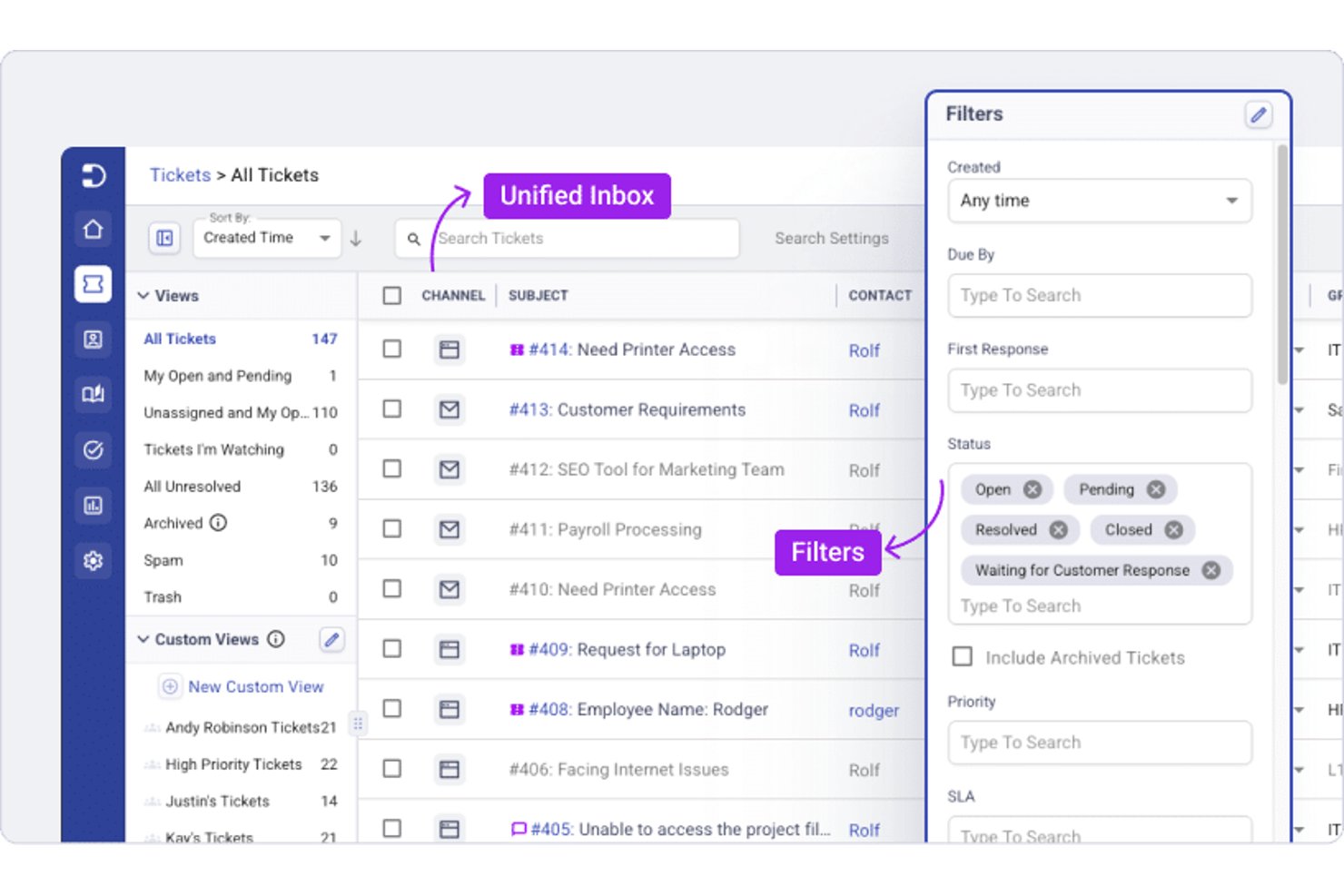
Desk365 è una piattaforma di assistenza e monitoraggio dei ticket sviluppata intorno a Microsoft Teams, che offre gestione dei ticket, monitoraggio degli SLA, automazione dei flussi di lavoro, un Copilot IA e una base di conoscenza integrata.
Per chi è più adatto Desk365?
Desk365 è particolarmente adatto ai team IT e di supporto che lavorano già nell'ecosistema Microsoft 365 e desiderano gestire i ticket senza uscire da Teams.
Perché ho scelto Desk365
Ho incluso Desk365 tra le mie scelte principali perché è stato sviluppato fin dall'inizio per Microsoft Teams, invece di essere semplicemente aggiunto in un secondo momento. Apprezzo molto il fatto che i clienti possano inviare ticket direttamente all'interno di una chat di Teams e che gli agenti possano assegnarli, aggiornarli e risolverli senza mai uscire dall'app. Il Bot di supporto nativo e il Bot per agenti gestiscono l'intero ciclo di vita dei ticket all'interno di Teams, e qualsiasi messaggio di Teams può essere convertito istantaneamente in un ticket.
Funzionalità principali di Desk365
- Configurazione delle politiche SLA: Imposta regole SLA per tipo di ticket, priorità, segmento di clientela e reparto, con avvisi automatici di violazione e notifiche di escalation.
- Copilot IA: Redige risposte, riassume le conversazioni dei ticket, traduce i messaggi e genera articoli della base di conoscenza direttamente dai dati dei ticket.
- Sondaggi CSAT: Sondaggi integrati sulla soddisfazione dei clienti collegati ai ticket risolti, con monitoraggio dei punteggi a livello di agente e di team in pannelli di controllo dedicati.
- Assegnazione dei ticket a rotazione e in base al carico: Distribuisce automaticamente i ticket in arrivo tra gli agenti in base al carico di lavoro o alle regole di rotazione, per bilanciare la capacità del team.
Integrazioni di Desk365
Desk365 offre integrazioni native nell'ecosistema Microsoft, tra cui Teams, Entra ID, Power Automate, Intune e Planner, oltre a Jira, Asana e Azure DevOps. API REST e webhook supportano le integrazioni personalizzate.
Pros and Cons
Pros:
- Integrazione avanzata per la gestione dei ticket in Microsoft Teams
- Copilot IA supporta le risposte e i riepiloghi
- Escalation SLA e dashboard CSAT integrati
Cons:
- Nessun canale nativo per voce o social
- I filtri e le esportazioni dei report presentano alcune limitazioni

Zendesk
Ideale per la collaborazione tra team e la gestione dei ticket multi-canale
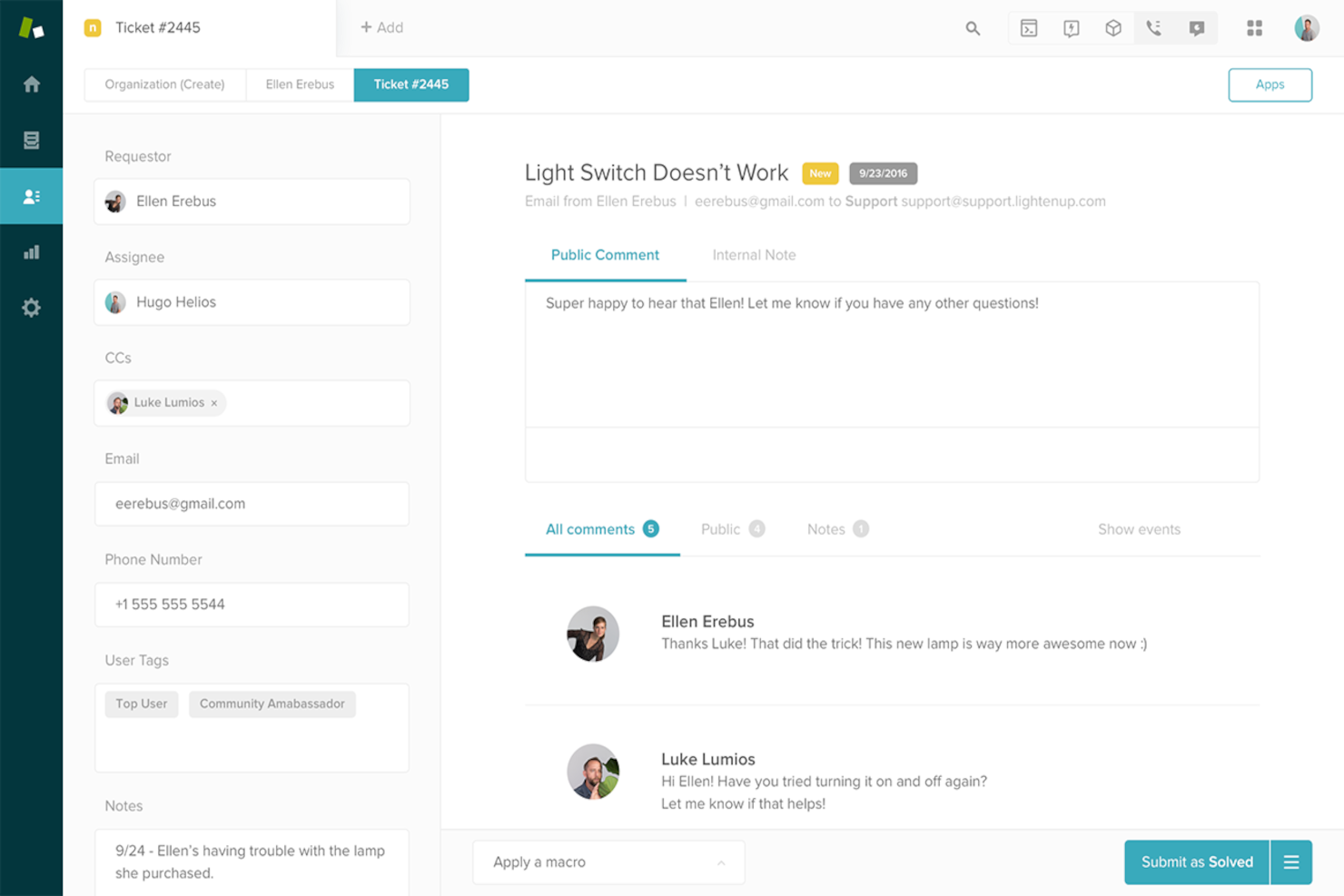
Zendesk è una soluzione software per l'assistenza clienti progettata per aziende di tutte le dimensioni, che offre strumenti per la gestione dei ticket, il coinvolgimento dei clienti e la gestione dell'assistenza. Aiuta i team a gestire in modo efficiente le richieste dei clienti e a migliorare la qualità del servizio.
Perché ho scelto Zendesk: Offre numerose opzioni di personalizzazione, permettendo di adattare la piattaforma alle tue esigenze specifiche. Il tuo team può creare flussi di lavoro personalizzati per riflettere i processi aziendali. Zendesk offre anche una gestione dei ticket flessibile, aiutandoti a organizzare e a dare priorità alle richieste dei clienti in modo efficace. Gli strumenti di reportistica del software ti forniscono informazioni sulle prestazioni del team e sulla soddisfazione dei clienti.
Funzionalità e integrazioni principali:
Le funzionalità includono un portale self-service che consente ai clienti di trovare autonomamente le risposte, un forum della community per interagire con gli utenti e analisi avanzate per monitorare e migliorare le operazioni di supporto.
Le integrazioni includono Salesforce, Slack, Shopify, Google Workspace, Microsoft Teams, Jira, HubSpot, Mailchimp, Trello e QuickBooks.
Pros and Cons
Pros:
- Flussi di lavoro altamente personalizzabili
- Gestione dei ticket flessibile
- Opzioni di portale self-service
Cons:
- Richiede competenze tecniche
- Curva di apprendimento ripida
New Product Updates from Zendesk
Zendesk Adds Email AI Replies and Predictive Routing
Zendesk’s latest email AI agents update brings configurable knowledge and welcome replies and adds predictive routing for email tickets, so you can tailor your automated emails and get inquiries resolved faster. For more information, visit Zendesk’s official site.

eDesk
Ideale per la gestione centralizzata delle interazioni con i clienti ecommerce
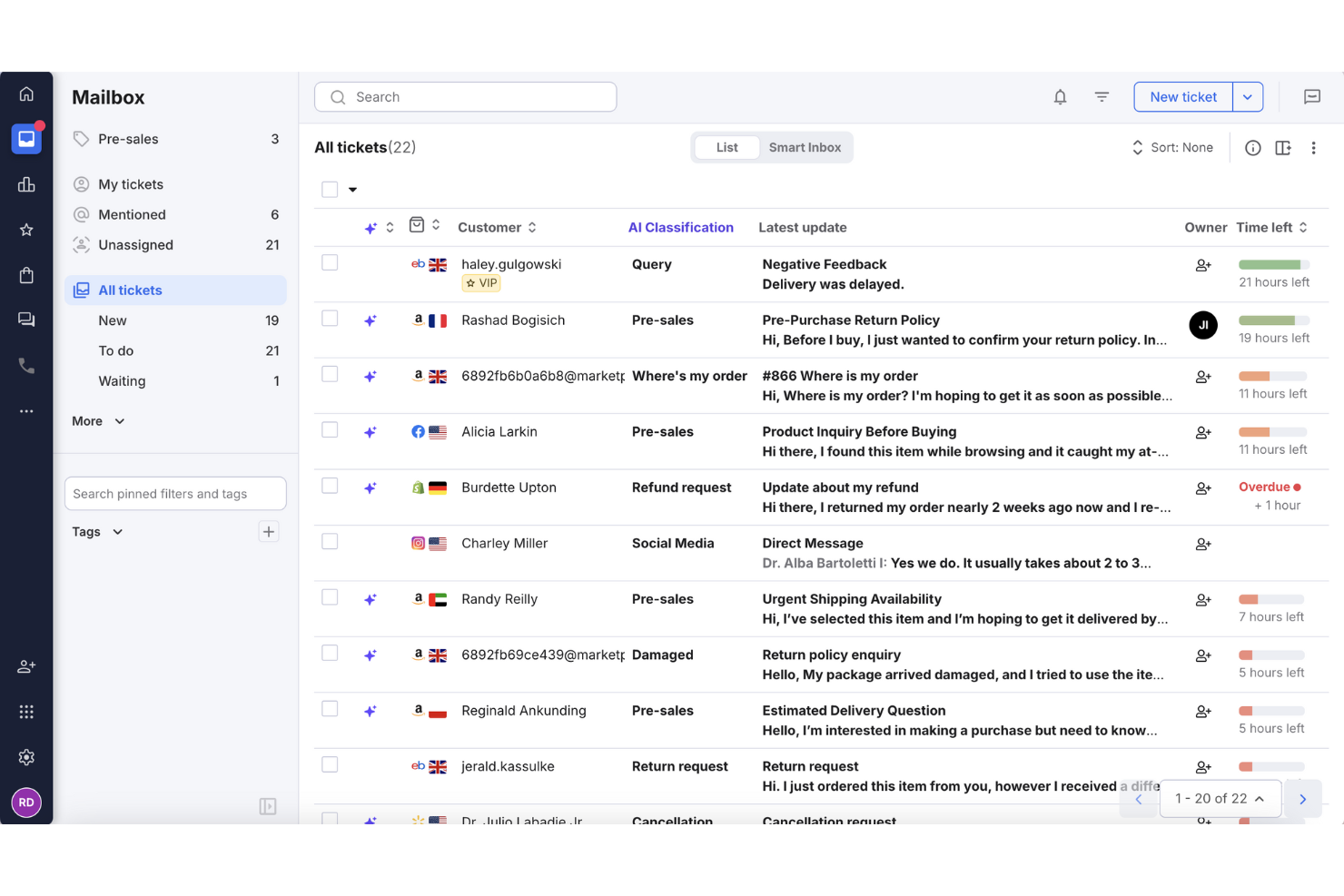
Nell'ecommerce, gestire le domande dei clienti su più piattaforme può essere difficile da amministrare. eDesk aiuta le aziende a monitorare l'attività di assistenza clienti tenendo le conversazioni organizzate e riducendo il lavoro manuale tramite l'automazione. Progettato per i team ecommerce, supporta le attività quotidiane di supporto e aiuta i team a rispondere in modo più coerente, rendendolo una soluzione pratica per le aziende che cercano un maggiore controllo sui flussi di lavoro del servizio clienti.
Perché ho scelto eDesk
Ho scelto eDesk per la sua capacità di centralizzare le interazioni con i clienti tramite una casella di posta unificata. Questa funzione consente ai team di gestire più facilmente i messaggi provenienti da diversi canali e di tenere le richieste ben organizzate. I suoi strumenti di automazione riducono il lavoro manuale di supporto e aiutano a migliorare la coerenza delle risposte. Le funzionalità di reportistica integrate offrono inoltre visibilità sulle prestazioni dell'assistenza, facilitando la modifica dei flussi di lavoro e il miglioramento della qualità del servizio.
Caratteristiche principali di eDesk
Oltre alla centralizzazione delle interazioni con i clienti ecommerce, eDesk offre:
- Chatbot con Intelligenza Artificiale: Fornisce assistenza 24/7, gestendo istantaneamente oltre il 70% delle richieste dei clienti.
- Integrazione con i Marketplace: Si collega a piattaforme come Amazon e Shopify, garantendo un supporto multicanale coerente.
- Gestione del feedback dei clienti: Permette di raccogliere e analizzare il feedback dei clienti per migliorare la qualità del servizio.
- Instradamento intelligente dei ticket: Smista automaticamente le richieste agli agenti appropriati, assicurando una gestione efficiente.
Integrazioni di eDesk
Le integrazioni includono Amazon, eBay, Shopify, Walmart, Facebook, Instagram, Magento, WooCommerce, BigCommerce e PrestaShop.
Pros and Cons
Pros:
- Il chatbot 24/7 può gestire le domande basilari
- Progettato per gestire grandi volumi di richieste ecommerce
- La visualizzazione organizzata dei ticket migliora l'efficienza del flusso lavorativo quotidiano
Cons:
- La reportistica e le analisi, pur presenti, sono meno personalizzabili rispetto ai dashboard aziendali più avanzati
- Progettato principalmente per l'ecommerce, meno flessibile per altri settori
New Product Updates from eDesk
eDesk Adds Galeria and Kaufland Support in Spain and Netherlands
eDesk adds support for Galeria, Kaufland Spain, and Kaufland Netherlands marketplaces. These integrations bring more European buyer messages into eDesk with routing, templates, AI insights, and automated translation. For more information, visit eDesk’s official site.
 .
.
Tenfold
Ideale per aziende di medie e grandi dimensioni nei settori vendite, tecnologia e finanza
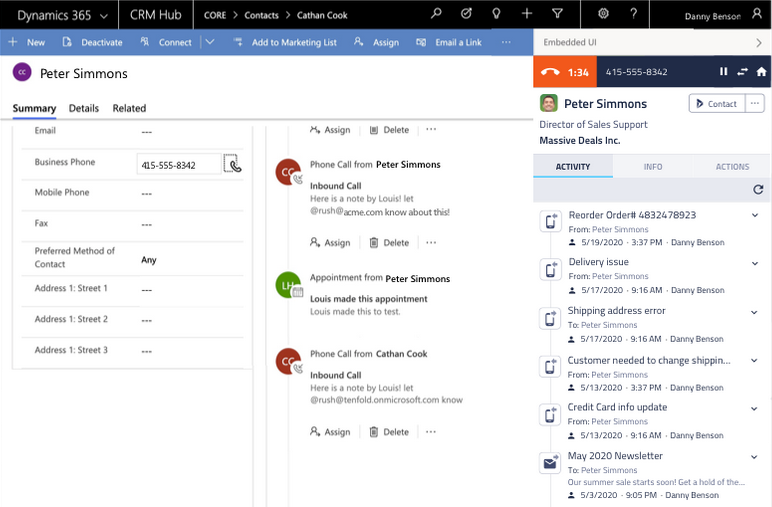
Tenfold è una piattaforma per l'esperienza del cliente progettata per i call center, che offre dati e analisi in tempo reale per migliorare le interazioni con i clienti. È pensata per le aziende che vogliono aumentare l'efficienza delle chiamate e la qualità del servizio clienti.
Perché ho scelto Tenfold: Si concentra sulla gestione dei call center, fornendo funzionalità che si integrano con i sistemi telefonici esistenti. Il tuo team può accedere ai dati dei clienti in tempo reale durante le chiamate, consentendo un servizio personalizzato. Tenfold offre strumenti di registrazione delle chiamate e analisi che aiutano a ottenere informazioni sulle prestazioni del team. L'integrazione fluida con i sistemi CRM assicura che le informazioni sui clienti siano sempre aggiornate.
Caratteristiche principali & integrazioni:
Caratteristiche includono la registrazione automatica delle chiamate, che riduce l'inserimento manuale e fa risparmiare tempo. Le analisi in tempo reale forniscono informazioni sulle metriche delle chiamate e sulle performance del team. La funzione click-to-dial semplifica le chiamate in uscita, aumentando l'efficienza.
Integrazioni includono Salesforce, Microsoft Dynamics, HubSpot, Zendesk, ServiceNow, SugarCRM, Oracle, Cisco, Avaya e Genesys.
Pros and Cons
Pros:
- Analisi dettagliata delle chiamate
- Registrazione automatica delle chiamate
- Funzionalità click-to-dial
Cons:
- Alta dipendenza dal CRM
- Configurazione iniziale complessa

EngageBay
Ideale per visualizzare e ottimizzare il flusso dei potenziali clienti
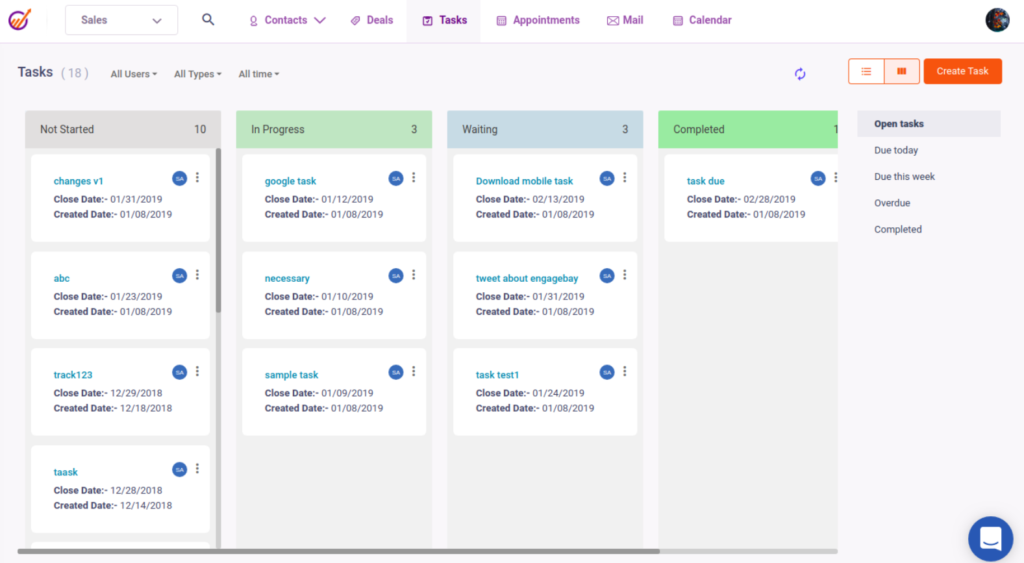
EngageBay è una piattaforma software per il servizio clienti pensata per le startup, che offre strumenti per gestire le interazioni con i clienti e l'assistenza. Si concentra sull'aiutare i piccoli team a ottimizzare in modo efficiente i processi del servizio clienti.
Perché ho scelto EngageBay: È progettata pensando alle startup e offre una soluzione conveniente con funzionalità essenziali. Il tuo team può gestire efficacemente i ticket di assistenza clienti grazie alla sua interfaccia intuitiva. EngageBay offre funzionalità di automazione che aiutano a ridurre le attività manuali, liberando tempo per il tuo team. La piattaforma include anche un pannello di controllo unificato, che offre una panoramica chiara delle interazioni con i clienti.
Funzionalità e integrazioni principali:
Le funzionalità includono un sistema di assistenza che organizza le richieste dei clienti, una chat dal vivo per interagire con i clienti in tempo reale e una base di conoscenza per archiviare e condividere le informazioni di assistenza.
Le integrazioni includono Zapier, Mailchimp, Xero, QuickBooks, Shopify, HubSpot, Stripe, Twilio, SendGrid e Mandrill.
Pros and Cons
Pros:
- Interazione con i clienti in tempo reale
- L'automazione riduce le attività manuali
- Conveniente per i piccoli team
Cons:
- Funzionalità di reportistica di base
- Richiede un impegno iniziale per la configurazione
Altre opzioni di software per il monitoraggio del servizio clienti
Ecco alcuni altri che non sono entrati nella lista principale.
- Front
Il migliore con smistamento e instradamento ticket basati su AI
- monday service
Ideale per flussi di lavoro automatizzati nell'assistenza clienti
- ProProfs Help Desk
La migliore assistenza per piccole aziende IT e software
- Issuetrak
Ideale per l'invio di ticket omnicanale
- Kayako
Ideale per l'esperienza utente e l'interfaccia utente
- Movidesk
Ideale per rispondere ai requisiti complessi di aziende B2B e organizzazioni
- Front
Ideale per la gestione del servizio clienti SaaS
- Creatio CRM
Ideale per la comunicazione omnicanale
- Hiver
Ideale per i team di supporto che necessitano di una help desk integrata in Gmail
- Jitbit Helpdesk
Ideale per grandi organizzazioni educative e tecnologiche
- SparrowDesk
Ideale per automatizzare le richieste dei clienti


Come Valuto il Software di Monitoraggio del Servizio Clienti
Divido la mia valutazione in due livelli: le capacità di base che uno strumento deve avere—come il monitoraggio del ciclo di vita dei ticket e la gestione degli SLA—e i fattori che differenziano le migliori opzioni.
Funzionalità di Base (Requisiti Fondamentali per Questa Lista)
Quando seleziono gli strumenti per la mia lista, valuto ciascuno su una scala da 0 (non offre la funzionalità) a 5 (eccelle in questa area) per ogni funzionalità di base elencata di seguito. Successivamente, calcolo il punteggio totale dello strumento in percentuale. Ogni strumento deve raggiungere un punteggio totale minimo del 75% per essere considerato per l'inclusione.
- Gestione dei Ticket: Esamino l'intero ciclo di vita del ticket—creazione, assegnazione, categorizzazione, definizione delle priorità e risoluzione—e se gli agenti possono unire i duplicati o collegare ticket correlati.
- Raccolta Multicanale: Ogni strumento dovrebbe unificare le richieste provenienti da email, chat, telefono, social e moduli web in un'unica coda affinché gli agenti non debbano alternarsi tra inbox scollegate.
- Monitoraggio SLA: Valuto se è possibile impostare obiettivi di risposta e risoluzione in base a priorità o livello cliente, con escalation automatiche e avvisi di violazione integrati nel workflow.
- Analisi delle Prestazioni & Reportistica: I dashboard dovrebbero evidenziare metriche come tempo di prima risposta, tasso di risoluzione e CSAT per agente o team, e non solo il conteggio grezzo dei ticket.
- Automazione dei Workflow: Verifico la presenza di instradamento basato su regole, assegnazione automatica e azioni attivate come tag o cambi di stato che riducono i passaggi manuali sulle richieste ripetitive.
- Storico & Contesto Cliente: Gli agenti devono avere una visione unificata dei ticket precedenti, interazioni passate e dettagli account al momento della conversazione—non sepolta in un sistema separato.
Una volta che ho una lista di strumenti che soddisfano i criteri, considero cosa distingue ciascuna piattaforma.
Fattori di Differenziazione (Cosa Distingue i Fornitori)
Ecco come confronto e metto a confronto i diversi fornitori:
Funzionalità Distintive
Funzionalità alimentate dall'intelligenza artificiale, come risposte suggerite e auto-tagging, possono ridurre drasticamente i tempi di gestione in code ad alto volume. Cerco anche una knowledge base integrata che consenta ai clienti di risolvere domande comuni—come lo stato di un ordine o il reset della password—prima ancora di aprire un ticket. Sondaggi CSAT a ciclo chiuso collegati direttamente ai ticket risolti forniscono ai responsabili dei team un feedback reale sulle prestazioni degli agenti, e non solo supposizioni basate sulla velocità di risoluzione.
Oltre le Funzionalità
La profondità d'integrazione è importante—verifico se una piattaforma si connette nativamente a CRM come Salesforce o HubSpot, dato che gli agenti non dovrebbero dover uscire dal ticket per accedere ai dettagli dell'account. Anche la trasparenza dei prezzi è un fattore rilevante; alcuni fornitori nascondono funzionalità AI o canali aggiuntivi dietro livelli tariffari più alti, quindi valuto cosa è realmente incluso in ogni piano. Considero anche la scalabilità, in particolare se lo strumento supporta impostazioni multi-brand e permessi basati sui ruoli man mano che il team cresce da pochi agenti a un vero e proprio contact center.
Come scegliere un software per il monitoraggio del servizio clienti
È facile perdersi tra lunghe liste di funzionalità e strutture di prezzo complesse. Per aiutarti a rimanere concentrato durante il tuo processo di selezione del software, ecco una checklist di fattori da tenere in considerazione:
| Fattore | Cosa considerare |
|---|---|
| Scalabilità | Assicurati che il software possa crescere insieme al tuo team. Cerca soluzioni che gestiscano un volume crescente di ticket e che amplino le funzionalità man mano che l’azienda si espande. |
| Integrazioni | Verifica se il software si integra con gli strumenti già in uso dal tuo team, come CRM, piattaforme email e applicazioni di chat, per rendere i flussi di lavoro più fluidi. |
| Personalizzazione | Valuta quanto il software possa essere adattato ai tuoi processi. Scegli opzioni che permettano di configurare i flussi di lavoro e le dashboard. |
| Facilità d’uso | Esamina l’interfaccia utente e valuta quanto sia intuitiva. Il tuo team dovrebbe poter navigare nel sistema senza bisogno di formazione intensiva o frustrazione. |
| Budget | Allinea il costo del software al tuo budget. Considera il valore delle funzionalità offerte a ciascun livello di prezzo ed eventuali costi nascosti. |
| Tutela della sicurezza | Verifica le misure di protezione dei dati del software. Cerca crittografia, aggiornamenti di sicurezza regolari e conformità agli standard di settore. |
| Assistenza | Valuta il livello di supporto clienti fornito. Verifica di avere accesso a assistenza tempestiva tramite più canali, come chat, email o telefono. |
| Funzionalità | Individua le funzionalità indispensabili per il tuo team, come il supporto multicanale o le analisi. Dai priorità alle soluzioni che soddisfano queste esigenze principali. |
Tendenze emergenti nei software per il monitoraggio del servizio clienti
Dalle mie ricerche, ho esaminato innumerevoli aggiornamenti di prodotto, comunicati stampa e log di rilascio da diversi fornitori di software per il monitoraggio del servizio clienti. Ecco alcune delle tendenze emergenti che sto monitorando con attenzione:
- Intelligenza Artificiale e Automazione nel Servizio Clienti: Sempre più fornitori integrano l’IA per fornire approfondimenti pratici dai dati dei clienti. Questo aiuta i team a prevedere le necessità dei clienti e personalizzare le interazioni. Fornitori come Zendesk e Freshdesk sono all’avanguardia con analytics basati su IA.
- Supporto Omnicanale: Le aziende si concentrano sull’offerta di un’esperienza unificata su più canali. Questo significa integrare telefono, chat, social media ed email in un’unica piattaforma. Strumenti come Salesforce Service Cloud stanno potenziando le loro capacità omnicanale.
- Tecnologia Vocale: La crescita degli assistenti vocali sta influenzando il servizio clienti. Alcune piattaforme ora supportano il riconoscimento e la risposta vocale, rendendo le interazioni più rapide. Fornitori come LiveAgent stanno esplorando funzionalità di integrazione vocale.
- Mappatura del Percorso del Cliente: C’è un’attenzione crescente verso la mappatura dell’intero percorso del cliente. Questo permette ai team di comprendere e migliorare ogni punto di contatto. Kayako, ad esempio, offre funzionalità dettagliate di tracciamento del percorso.
- Strumenti di Supporto Remoto: Con più team che lavorano da remoto, cresce la domanda di funzionalità per la collaborazione a distanza. Strumenti come Front offrono funzioni pensate per team distribuiti, come caselle di posta condivise e collaborazione in tempo reale.
Che Cos’è un Software di Tracciamento del Servizio Clienti?
Un software di tracciamento del servizio clienti è uno strumento che aiuta le aziende a gestire e monitorare le richieste dei clienti e i ticket di assistenza. È comunemente utilizzato dai team di supporto clienti, dai dipartimenti IT e dai responsabili dei servizi per migliorare i tempi di risposta e aumentare la soddisfazione dei clienti.
Funzionalità come la gestione dei ticket, il supporto omnicanale e le analytics in tempo reale aiutano a organizzare le richieste, comprendere le esigenze dei clienti e migliorare la qualità del servizio. Nel complesso, questi strumenti consentono alle aziende di offrire un servizio clienti migliore e mantenere forti relazioni con i clienti.
Funzionalità del Software di Tracciamento del Servizio Clienti
Quando scegli un software di tracciamento del servizio clienti, presta attenzione alle seguenti funzionalità chiave:
- Gestione dei ticket: Organizza le richieste dei clienti in ticket gestibili, consentendo al tuo team di assegnare priorità e risolvere i problemi in modo efficiente.
- Call center e supporto telefonico: Include soluzioni software per la gestione delle operazioni di call center che trattano ticketing e tracciamento.
- Supporto omnicanale: Integra diversi canali di comunicazione come email, chat e social media in un’unica piattaforma per un’esperienza cliente unificata.
- Analisi in tempo reale: Offre approfondimenti sulle prestazioni del team e sulle interazioni con i clienti, aiutando a prendere decisioni informate e migliorare la qualità del servizio.
- CRM e gestione delle interazioni con i clienti: Permette di monitorare i clienti nel tempo e identificare rischi di abbandono o opportunità di crescita.
- Portale self-service: Permette ai clienti di trovare autonomamente le risposte, riducendo il numero di ticket che arrivano al supporto.
- Approfondimenti guidati dall’IA: Utilizza l’intelligenza artificiale per offrire consigli pratici dai dati dei clienti, aiutando i team a prevedere le esigenze e personalizzare le interazioni.
- Mappatura del percorso cliente: Traccia e visualizza il percorso del cliente per aiutarti a comprendere e ottimizzare ogni punto di contatto.
- Strumenti di Messaggistica e Comunicazione: Favorisce il lavoro di squadra con funzioni come caselle di posta condivise e commenti interni, migliorando i tempi di risposta.
- Gestione degli SLA: Garantisce risposte tempestive monitorando e facendo rispettare gli accordi sui livelli di servizio con i clienti.
Vantaggi del Software di Tracciamento del Servizio Clienti
L’implementazione di un software di tracciamento del servizio clienti offre numerosi vantaggi per il tuo team e la tua azienda. Eccone alcuni a cui puoi puntare:
- Tempi di risposta migliorati: La gestione dei ticket e l’automazione aiutano il tuo team a rispondere alle richieste dei clienti in modo più rapido ed efficiente.
- Maggiore soddisfazione del cliente: Il supporto omnicanale e le interazioni personalizzate assicurano ai clienti di sentirsi ascoltati e valorizzati.
- Migliore collaborazione nel team: Caselle di posta condivise e commenti interni consentono ai membri del team di lavorare insieme senza intoppi, perfezionando la comunicazione.
- Decisioni più informate: Le analytics in tempo reale e gli approfondimenti dell’IA forniscono dati utili per guidare strategie e azioni del team.
- Opzioni di self-service: Un portale self-service permette ai clienti di trovare risposte in autonomia, riducendo il carico di lavoro del supporto.
- Qualità del servizio costante: La gestione degli SLA consente al team di rispettare gli standard di servizio concordati, mantenendo alta la soddisfazione dei clienti.
Capacità di Integrazione del Software di Tracciamento del Servizio Clienti
L'integrazione senza soluzione di continuità è fondamentale per massimizzare l'efficienza del software di tracciamento dell'assistenza clienti. Collegandosi a diversi strumenti, le aziende possono semplificare i flussi di lavoro di supporto, migliorare la comunicazione e aumentare la soddisfazione del cliente. Ecco alcune integrazioni essenziali:
- Software di chat dal vivo: Consente interazioni in tempo reale con i clienti, aiutando i team di supporto a rispondere rapidamente alle richieste e fornire assistenza immediata.
- Software per la gestione dell'esperienza del cliente: Raccoglie e analizza i feedback per migliorare la qualità del servizio e personalizzare le interazioni con i clienti.
- Chatbot AI: Automatizza le risposte alle richieste comuni, riducendo il carico di lavoro degli operatori e offrendo supporto 24/7; può includere l'integrazione con i social media.
- Software per call center: Gestisce chiamate in entrata e uscita, traccia le interazioni dei clienti e garantisce un servizio costante tramite il supporto telefonico.
- Software per onboarding dei clienti: Guida i nuovi utenti nell'impostazione e nell'adozione del prodotto, migliorando la fidelizzazione e riducendo il tasso di abbandono.
- Software di gestione e-mail: Organizza e dà priorità alle e-mail dei clienti, assicurando risposte tempestive e prevenendo la perdita di messaggi.
- Software help desk: Centralizza i ticket di supporto, automatizza i flussi di lavoro e aiuta i team a risolvere efficacemente le richieste dei clienti.
Costi e prezzi del software di tracciamento dell’assistenza clienti
La scelta di un software per il tracciamento dell’assistenza clienti richiede la comprensione dei diversi modelli e piani tariffari disponibili. I costi variano in base alle funzionalità, alla dimensione del team, agli add-on e altro ancora. La tabella seguente riassume i piani più comuni, i prezzi medi e le caratteristiche tipiche incluse nelle soluzioni di software per il tracciamento dell’assistenza clienti:
Tabella di confronto dei piani per il software di tracciamento dell’assistenza clienti
| Tipo di piano | Prezzo medio | Funzionalità comuni |
|---|---|---|
| Piano gratuito | $0 | Gestione base dei ticket, supporto via email e reportistica limitata. |
| Piano personale | $5-$25/user/month | Gestione avanzata dei ticket, supporto multicanale e automazione di base. |
| Piano business | $30-$60/user/month | Automazione avanzata, analisi in tempo reale e flussi di lavoro personalizzabili. |
| Piano enterprise | $70-$120/user/month | Personalizzazione completa, insight guidati dall’AI e gestione dedicata dell’account. |
Domande frequenti sul tracciamento dell'assistenza clienti
Se il tuo team sta valutando di adottare un software per il tracciamento dell’assistenza clienti, probabilmente avrai alcune domande prima di iniziare. Vediamo alcune delle domande più frequenti riguardanti il software di tracciamento dell’assistenza clienti.
Come si integra il software di tracciamento dell’assistenza clienti con i sistemi CRM?
Il software di tracciamento dell’assistenza clienti si integra spesso con i sistemi CRM per offrire una visione unificata delle interazioni con i clienti. Questa integrazione permette al tuo team di accedere in tempo reale ai dati e allo storico dei clienti, migliorando la qualità del supporto. Inoltre, garantisce che tutte le interazioni con i clienti vengano registrate e monitorate su tutte le piattaforme, facilitando la coerenza del servizio.
Come viene utilizzata l’integrazione con i social media dal software di tracciamento dell’assistenza clienti?
Il software di tracciamento dell’assistenza clienti utilizza l’integrazione con i social media per monitorare e rispondere alle richieste, ai reclami e ai feedback dei clienti in tempo reale. Si collega a piattaforme come Facebook, Twitter e Instagram, permettendo alle aziende di tenere traccia di menzioni, messaggi diretti e commenti in un’unica dashboard. Questo aiuta le aziende a interagire rapidamente con i clienti e a risolvere efficacemente i problemi.
Cosa fare dopo:
Se stai esaminando soluzioni per il tracciamento dell’assistenza clienti, contatta un consulente SoftwareSelect per una consulenza gratuita e ricevere raccomandazioni personalizzate.
Compili un modulo e fai una breve chiacchierata in cui vengono raccolti i dettagli delle tue esigenze. Poi riceverai una lista ristretta di software da valutare. Ti supporteranno anche per tutto il processo d’acquisto, incluse le negoziazioni sul prezzo.