

10 migliori software per la gestione delle email del servizio clienti nel 2026

10 Elenco dei migliori software per la gestione delle email di assistenza clienti


Ti capita di dover gestire molte richieste contemporaneamente, cercando di mantenere bassi i tempi di risposta e assicurandoti che ogni cliente si senta ascoltato. È impegnativo, ed è qui che entra in gioco il software per la gestione delle email di assistenza clienti.
Questi strumenti aiutano il tuo team a rimanere organizzato, rispondere più rapidamente e migliorare l'esperienza complessiva del cliente. Nella mia esperienza, fanno davvero la differenza in termini di efficienza e soddisfazione.
Ho testato e recensito in modo indipendente molte di queste soluzioni. Il mio obiettivo è offrire opinioni imparziali sulle migliori opzioni disponibili. Troverai un elenco ben studiato delle migliori scelte che rispondono alle tue sfide e facilitano il lavoro del tuo team. Esploriamo insieme le soluzioni che potrebbero trasformare il modo in cui gestisci le interazioni con i clienti.
Perché fidarsi dei nostri consigli sui software
Il nostro team testa e recensisce software dal 2012. In quanto leader CX noi stessi, sappiamo quanto sia difficile — e importante — scegliere il software giusto.
Per questa guida, abbiamo valutato gli strumenti attraverso test pratici e ricerche indipendenti, assegnando un punteggio agli strumenti in base ai nostri criteri di selezione.
Le nostre recensioni riflettono il nostro giudizio editoriale umano, non un discorso di vendita.
Tabella riassuntiva dei migliori software per la gestione delle email di assistenza clienti
| Tool | Best For | Trial Info | Price | ||
|---|---|---|---|---|---|
| 1 | Ideale per automatizzare le interazioni con i clienti | Prova gratuita disponibile | Da $16/utente/mese (fatturazione annuale) | Website | |
| 2 | Ideale per help desk di piccole imprese | Prova gratuita di 14 giorni + demo gratuita disponibile | Da $19/agente/mese (fatturazione annuale) | Website | |
| 3 | Ideale per supporto e soddisfazione clienti | Prova gratuita disponibile | Da $25/utente/mese (fatturato annualmente) | Website | |
| 4 | Ideale per la collaborazione tra team tramite casella di posta condivisa | È disponibile una prova gratuita di 30 giorni | A partire da $14/utente/mese (con fatturazione annuale) | Website | |
| 5 | Ideale per la gestione delle email con intelligenza artificiale | Piano gratuito + prova gratuita di 7 giorni + demo gratuita disponibile | Da $25/utente/mese (fatturazione annuale) | Website | |
| 6 | Ideale per l'integrazione con software legacy | Prova gratuita di 30 giorni disponibile | A partire da $15/utente/mese | Website | |
| 7 | Il migliore con analisi integrate | Prova gratuita di 15 giorni + demo gratuita disponibile | Da $7/utente/mese (fatturazione annuale) | Website | |
| 8 | Miglior strumento di gestione delle email per startup | Prova gratuita di 14 giorni + demo gratuita disponibile | Da $19/agente/mese (fatturato annualmente) | Website | |
| 9 | Il miglior software di assistenza clienti per gestire comunicazioni multicanale | Prova gratuita di 7 giorni + piano gratuito disponibile | Da $24.17/mese (fatturato annualmente) | Website | |
| 10 | Ideale per una casella di posta unificata per le operazioni clienti | Prova gratuita di 14 giorni + demo gratuita disponibile | Da $25/postazione/mese (fatturato annualmente) | Website |


Panoramica dei 10 migliori software per la gestione delle email di assistenza clienti
Ecco una breve descrizione di ciascuno dei migliori sistemi di gestione email presenti nel mio elenco: evidenzierò per cosa si distingue ogni soluzione, con screenshot per mostrare alcune delle funzionalità.

Ideale per automatizzare le interazioni con i clienti
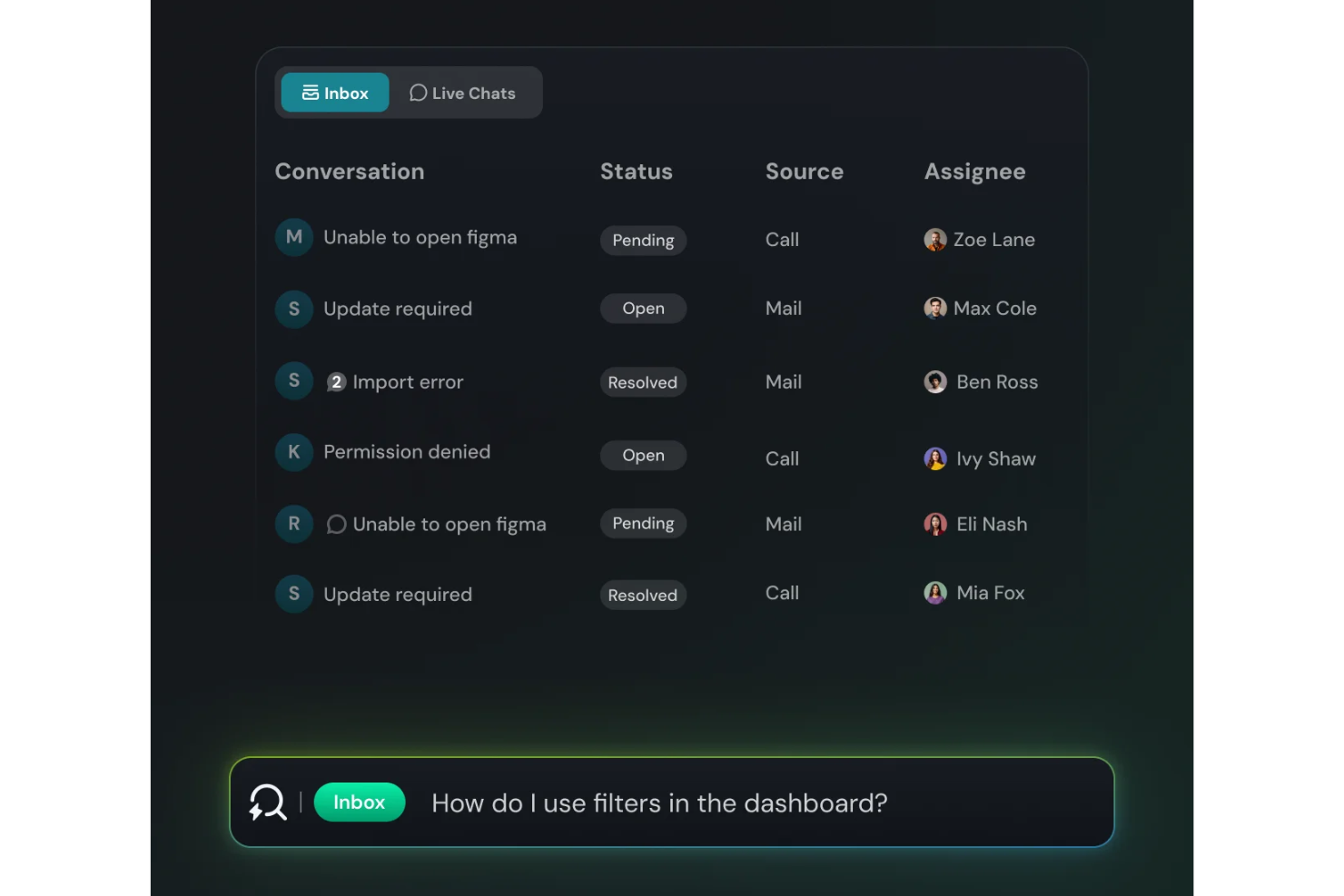
SparrowDesk è una piattaforma di supporto guidata dall’IA progettata per riunire email e chat in un unico spazio di lavoro dove il tuo team può gestire tutta la comunicazione con i clienti con pieno contesto e automazione. Se il tuo team gestisce una combinazione di thread email, supporto via chat e necessita di un sistema che possa instradare, prioritizzare e automatizzare le risposte, SparrowDesk potrebbe essere interessante — specialmente per le aziende di medie dimensioni nell’e-commerce, SaaS o in ruoli ad alto volume di supporto dove ridurre il carico degli agenti e aumentare la coerenza sono prioritari.
Perché ho scelto SparrowDesk
Ho scelto SparrowDesk per il suo approccio unico nell'integrare l’IA nella gestione delle email di assistenza clienti. Gli Agenti AI della piattaforma gestiscono automaticamente la maggior parte delle richieste dei clienti, riducendo il carico di lavoro del tuo team e permettendogli di concentrarsi su compiti più critici. Inoltre, la funzione Copilot AI offre assistenza in tempo reale agli agenti fornendo riepiloghi e suggerimenti intelligenti per le bozze, migliorando ulteriormente rapidità e qualità delle risposte. Questa combinazione di automazione e supporto IA risponde direttamente all’esigenza di una gestione efficiente delle email in ambito customer service.
Caratteristiche principali di SparrowDesk
Oltre alle sue capacità guidate dall’IA, SparrowDesk offre diverse funzionalità che ne aumentano l’utilità come strumento per la gestione delle email di assistenza clienti:
- Posta in arrivo omnicanale: consolida tutte le interazioni con i clienti da chat ed email in un’unica interfaccia gestibile.
- Macro per azioni rapide: automatizza compiti e risposte ripetitive, risparmiando tempo e garantendo coerenza nella comunicazione.
- Analisi interattive: offre insight in tempo reale sulle prestazioni del team e sulle tendenze dei clienti tramite dashboard complete.
- Viste e filtri personalizzati: permette di creare viste personalizzate per prioritizzare e monitorare in modo efficace le conversazioni importanti.
Integrazioni di SparrowDesk
Al momento, SparrowDesk non elenca integrazioni native.
Pros and Cons
Pros:
- Agenti AI progettati per risolvere automaticamente molti ticket ripetitivi
- Le funzioni Copilot riassumono le lunghe conversazioni nella casella agente
- Il builder di flussi di lavoro senza codice automatizza l’instradamento e le notifiche
Cons:
- I canali al momento sono focalizzati su email e chat live, non voce o social
- Le integrazioni native limitate possono ostacolare la connettività senza interruzioni

Ideale per help desk di piccole imprese
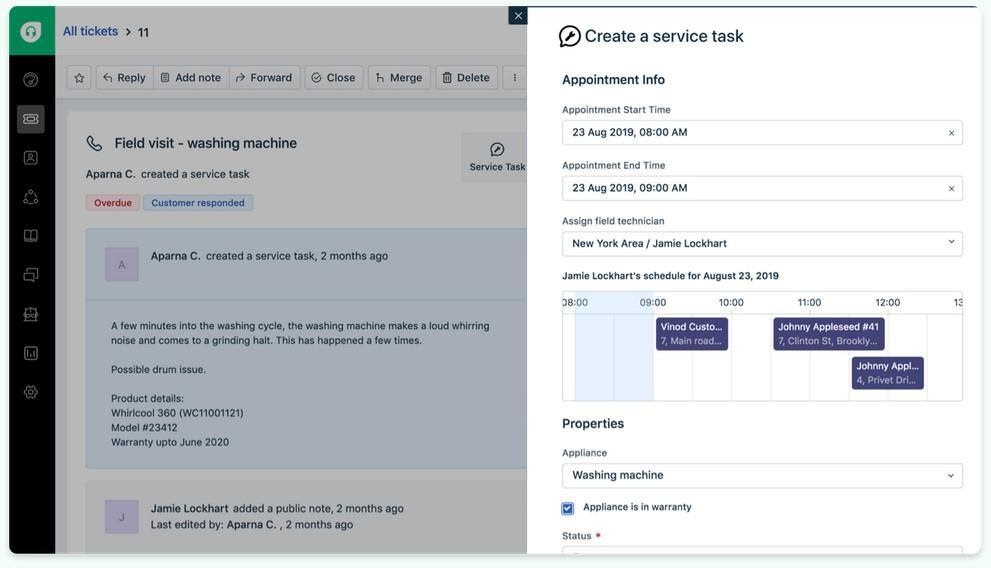
Freshdesk (un prodotto di Freshworks Inc.) è una piattaforma di assistenza clienti progettata per i team che cercano un modo semplice per gestire le richieste dei clienti. Si basa su flussi di lavoro basati su ticket e supporta messaggi provenienti da più canali, aiutando le squadre a mantenere la comunicazione organizzata all'interno di un unico sistema.
Perché ho scelto Freshdesk: Ho scelto Freshdesk per la sua interfaccia, strutturata in modo da rendere più facili le attività di supporto quotidiane. Quando si gestiscono le richieste in arrivo, il sistema di ticketing aiuta a organizzare le conversazioni e tenere traccia del loro stato senza dover ricorrere a diversi strumenti. Include anche Freddy AI, che può assistere nella stesura delle risposte e nella sintesi dei ticket all'interno del flusso di lavoro esistente. La possibilità di gestire le richieste da email, telefono e canali social in un unico posto favorisce risposte più coerenti attraverso i vari canali. Dashboard personalizzabili garantiscono maggiore visibilità sul carico di lavoro e sulle attività di risposta.
Caratteristiche principali e integrazioni:
Le funzionalità includono un sistema di ticketing che aiuta i team a organizzare, dare priorità e risolvere le richieste dei clienti. Il supporto multicanale permette di gestire i messaggi provenienti da diverse piattaforme all'interno dello stesso flusso di lavoro.
Le integrazioni comprendono strumenti come Slack, Microsoft Teams, Salesforce, Shopify, Google Workspace, Trello, Asana, Mailchimp, Dropbox e HubSpot, consentendo di collegare le attività di supporto con strumenti di collaborazione, CRM e produttività.
Pros and Cons
Pros:
- Supporto multicanale
- Gestione efficiente dei ticket
- Workflow dei ticket chiari e facili da seguire
Cons:
- Reportistica avanzata limitata
- Richiede aggiornamenti frequenti
New Product Updates from Freshdesk

Freshdesk Adds Voice AI Agents in Freshcaller
Freshdesk introduces Voice AI Agents available through Freshcaller Marketplace apps to handle routine calls and reduce queues. This feature enables automated call handling with real-time, conversational support. For more information, visit Freshdesk's official site.

Ideale per supporto e soddisfazione clienti
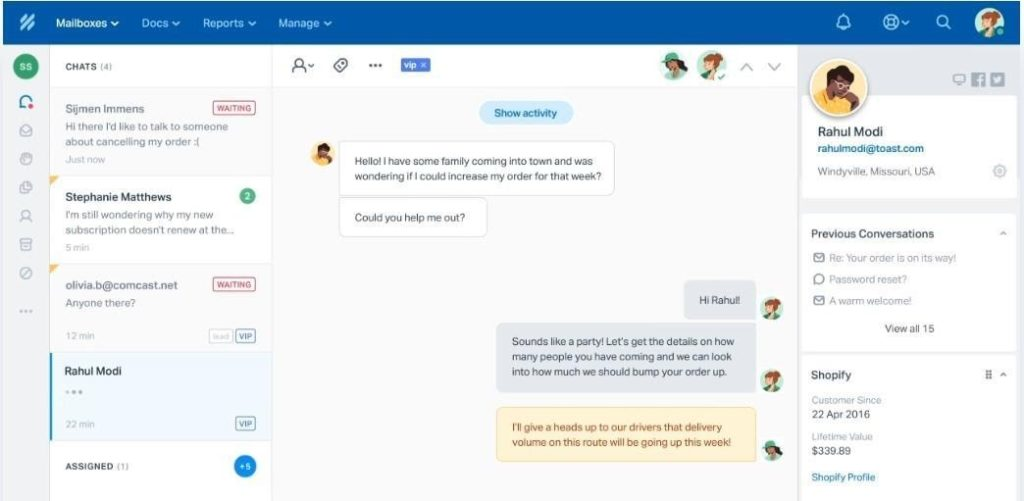
Help Scout è una piattaforma di assistenza clienti rivolta a piccole e medie imprese che desiderano offrire un servizio clienti personalizzato. Si concentra sulla gestione delle email dei clienti e fornisce strumenti per una comunicazione e un supporto efficienti.
Perché ho scelto Help Scout: Si distingue nel fornire un supporto personalizzato grazie a funzionalità che mettono al centro l'interazione e la soddisfazione del cliente. La casella di posta condivisa della piattaforma consente al tuo team di gestire le email in modo collaborativo, assicurando che nulla venga trascurato. I profili cliente di Help Scout offrono al tuo team il contesto necessario per ogni interazione, migliorando così l'esperienza di assistenza. Gli strumenti di reportistica ti aiutano a monitorare le prestazioni e a migliorare l'efficienza del team.
Funzionalità principali e integrazioni:
Le funzionalità includono una casella di posta condivisa che permette la gestione collaborativa delle email. I profili cliente forniscono contesto per ogni interazione, facilitando un supporto personalizzato. Gli strumenti di reportistica monitorano le prestazioni e aiutano a migliorare l'efficienza del team.
Le integrazioni includono Slack, HubSpot, Salesforce, Mailchimp, Shopify, WordPress, WooCommerce, Magento, Google Workspace e Trello.
Pros and Cons
Pros:
- Facile collaborazione all'interno dei team
- Profili cliente dettagliati
- Forte attenzione all'interazione con i clienti
Cons:
- Funzionalità di automazione limitate
- Richiede formazione regolare
New Product Updates from Help Scout

Help Scout Adds Automatic Conversation Reassignment
Help Scout can now automatically unassign conversations when the assigned teammate has been away long enough, keeping replies moving so others can pick them up. For more information, visit Help Scout's official site.
 .
.
Missive
Ideale per la collaborazione tra team tramite casella di posta condivisa
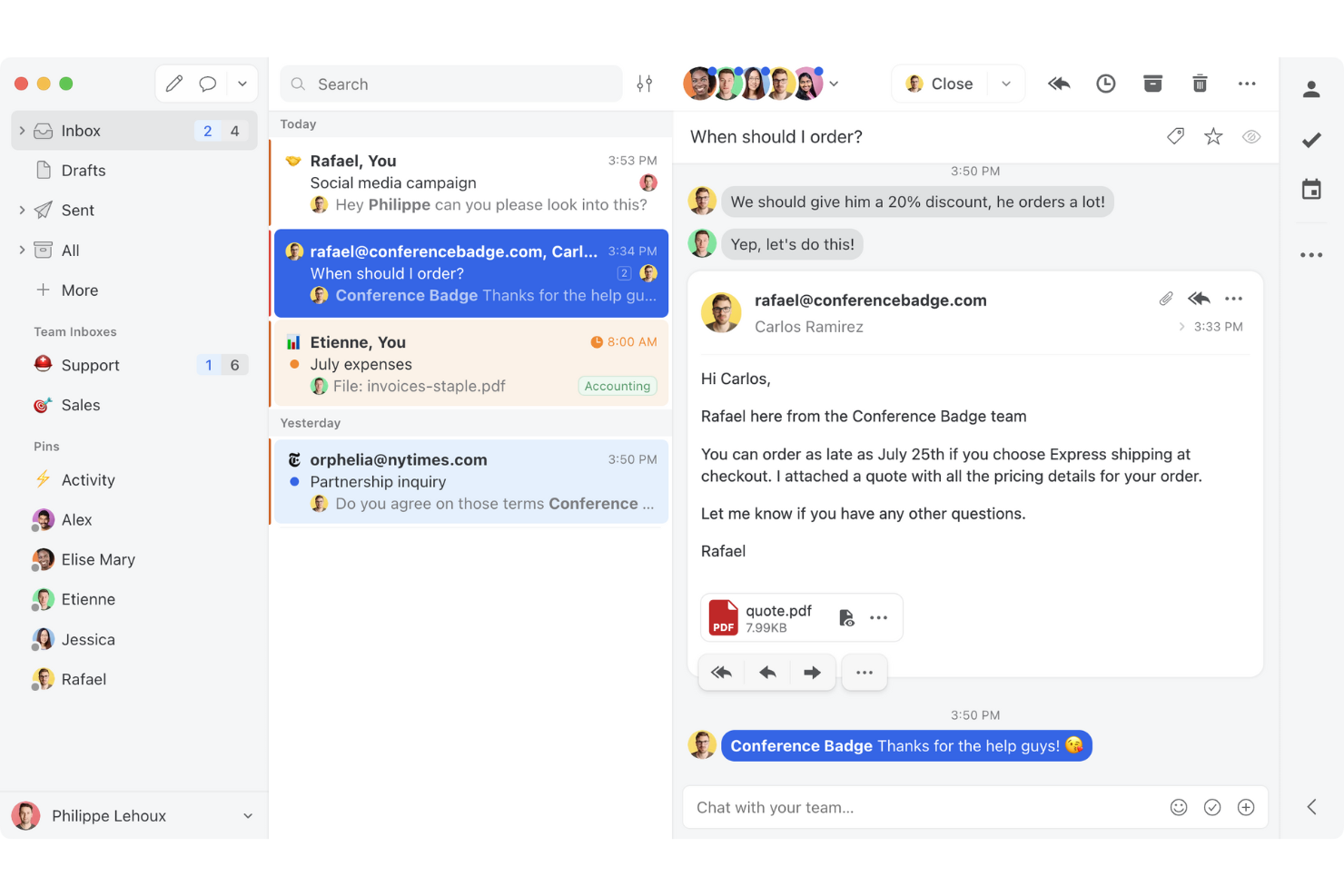
Missive è una piattaforma collaborativa per la gestione delle email che riunisce caselle di posta condivise, messaggistica multicanale, conversazioni interne e automazione basata sull'intelligenza artificiale in un unico spazio di lavoro per i team a contatto con i clienti.
Per chi è più adatto Missive?
Missive è particolarmente adatto ai team di assistenza clienti di piccole e medie dimensioni che gestiscono grandi volumi di email in modo collaborativo e hanno bisogno che tutto il team lavori all'interno di un'unica casella di posta condivisa.
Perché ho scelto Missive
Missive si è guadagnato un posto tra le migliori soluzioni della mia selezione perché la collaborazione tramite casella di posta condivisa è davvero diversa da qualsiasi altra proposta in questa categoria. Mi piace il fatto che più operatori possano modificare insieme una singola risposta in tempo reale, così un responsabile può intervenire e perfezionare una bozza prima ancora che raggiunga il cliente. Le conversazioni interne permettono al mio team di discutere la risposta giusta direttamente nella conversazione email, senza bisogno di catene di messaggi CC o di continui scambi su Slack.
Funzionalità principali di Missive
- Posta in arrivo multicanale: Missive riunisce email, WhatsApp, SMS, Facebook Messenger, messaggi diretti di Instagram e chat dal vivo in un unico spazio di lavoro condiviso.
- Regole di automazione basate sull'intelligenza artificiale: Il motore di regole di Missive rileva il tono, le scadenze e lo spam per attivare azioni automatizzate come escalation, etichette e creazione di attività.
- Barra laterale per CRM ed e-commerce: Le integrazioni native con HubSpot, Salesforce, Pipedrive e Shopify mostrano la cronologia del cliente e i dati delle trattative direttamente accanto alle conversazioni email.
- Assegnazione automatica bilanciata in base al carico di lavoro: Le conversazioni possono essere indirizzate agli operatori utilizzando metodi di distribuzione a rotazione, all'operatore meno impegnato, a tutti contemporaneamente o casuale.
- Server MCP di Missive: Collega strumenti di intelligenza artificiale esterni (come Claude o ChatGPT) per interrogare le conversazioni email del servizio clienti, controllare i calendari e redigere risposte, mantenendo al contempo obbligatoria la revisione dell'operatore prima dell'invio.
Integrazioni di Missive
Missive offre integrazioni native con HubSpot, Salesforce, Pipedrive, Close, Shopify, ChargeDesk, Asana, ClickUp e Google Drive. Offre inoltre un'API REST aperta con webhook, la connessione a Zapier per flussi di lavoro personalizzati e il suo nuovo Server MCP nei piani Productive e Business (richiede l'attivazione da parte di un amministratore).
Pros and Cons
Pros:
- I team possono modificare insieme le risposte in tempo reale
- La chat interna solo via email elimina le complicate catene di messaggi CC
- Le regole basate sull'intelligenza artificiale automatizzano l'etichettatura e l'escalation
Cons:
- Nessuno strumento nativo per CSAT o per i sondaggi sulla soddisfazione
- Il monitoraggio degli SLA dipende dalla configurazione manuale delle regole
New Product Updates from Missive
Missive Adds Conversation Pins
Missive now lets you pin key links, decisions, and notes inside a conversation, keeping them accessible in a dedicated Pins section in the Details sidebar. For more information, visit Missive's official site.
 .
.
Hiver
Ideale per la gestione delle email con intelligenza artificiale
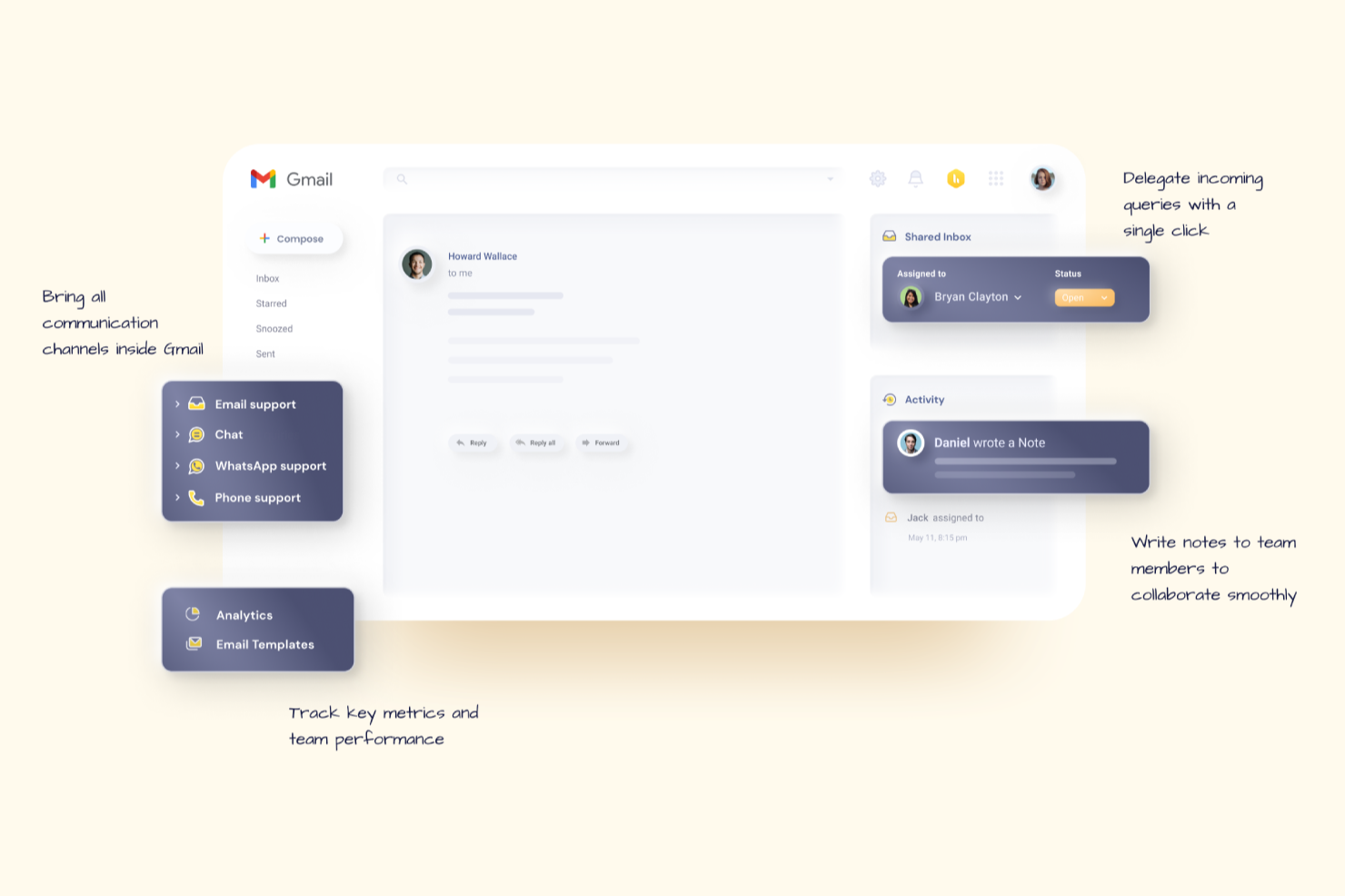
Hiver è una moderna piattaforma di assistenza clienti alimentata dall'intelligenza artificiale che aiuta i team a gestire con facilità le email dei clienti. Consente ai team di gestire tutti i loro canali di assistenza clienti da un pannello laterale sinistro e di ottenere una panoramica completa delle conversazioni in corso, in sospeso e risolte per ciascun canale.
Perché ho scelto Hiver: Hiver è adatto a team dinamici che desiderano le potenti funzionalità di uno strumento completo di help desk senza la complessità e il peso che spesso comporta. C'è una casella di posta condivisa per assegnare e monitorare le richieste, insieme a strumenti di collaborazione come note, @menzioni e bozze condivise che mantengono il team allineato. Ottieni automazioni dei flussi di lavoro e gestione degli SLA per garantire risposte tempestive, oltre ad analisi dettagliate per monitorare le prestazioni e la soddisfazione dei clienti. La knowledge base aiuta gli operatori a evitare di dover gestire le domande più comuni e frequenti.
Funzionalità e integrazioni principali:
Funzionalità includono Hiver AI, che integra funzionalità di intelligenza artificiale in tutti i punti di contatto del percorso di assistenza clienti. Ad esempio, AI Copilot aiuta gli operatori a rispondere ai clienti tramite risposte contestuali, bozze di risposta e altro ancora, mentre gli Agenti AI consentono di impostare flussi di lavoro autonomi per gestire FAQ, follow-up e altre azioni. Dispone anche di AI Insights che utilizza le conversazioni per prevedere problemi e rischi.
Integrazioni includono Aircall, Asana, Jira, Okta, QuickBooks, Salesforce, Slack, WhatsApp, Zapier e oltre 100 altre piattaforme.
Pros and Cons
Pros:
- Potenti funzionalità di collaborazione interna
- Assistenza clienti da persone reali disponibile 24/7 tramite chat o email, per tutti i piani (incluso quello gratuito)
- Funzionalità di intelligenza artificiale presenti in tutte le fasi del percorso di assistenza clienti
Cons:
- L'esperienza mobile non è forte quanto quella desktop
- Rispetto ad alcune altre piattaforme, Hiver offre meno integrazioni di terze parti
New Product Updates from Hiver

Hiver Brings Chat Widget Support to Mobile Apps
Hiver now lets you embed the Hiver Chat Widget in iOS, Android, React Native, and Flutter apps so customers can start chats without leaving your app. For more information, visit Hiver's official site.

Ideale per l'integrazione con software legacy
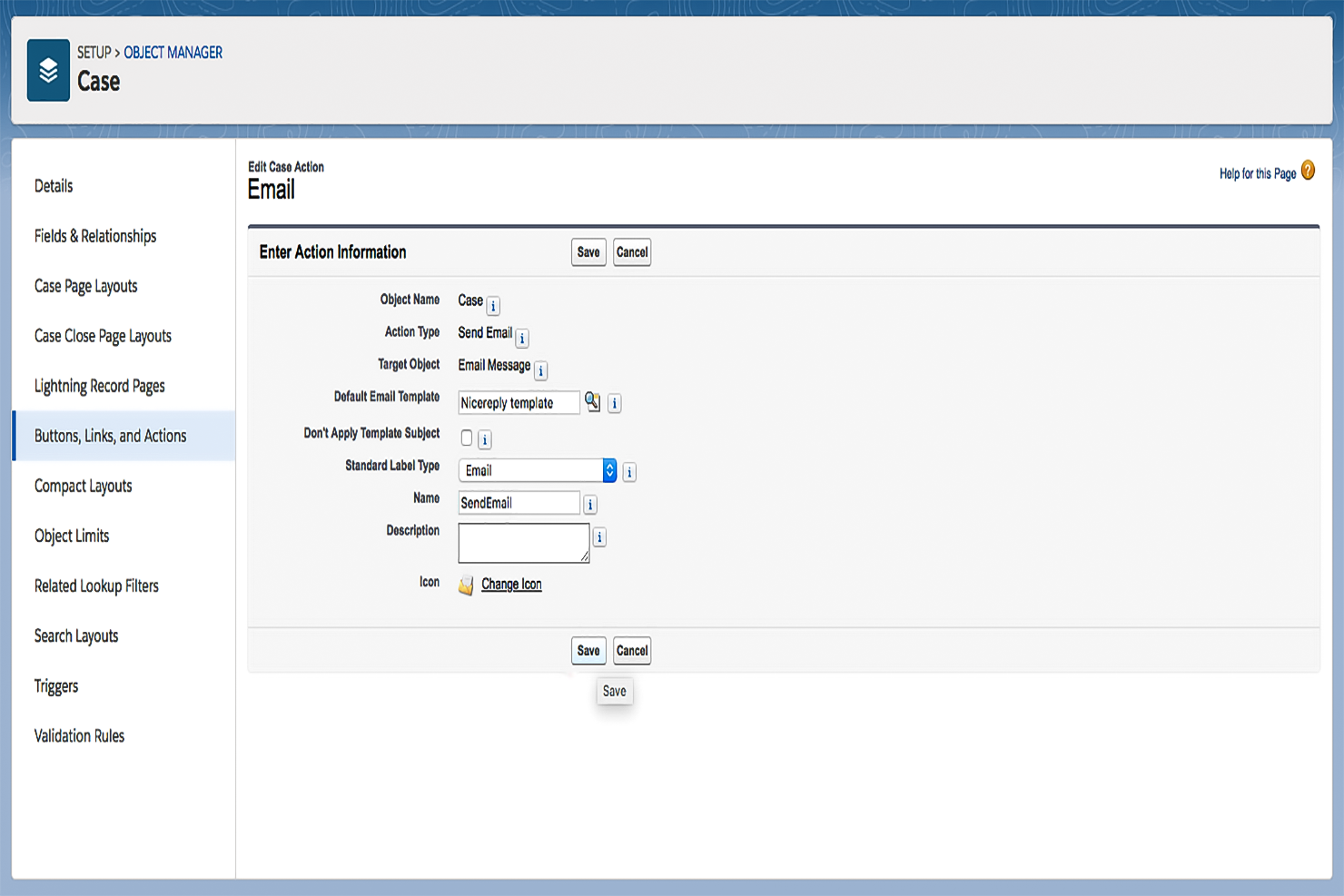
Salesforce Service Cloud è una piattaforma di assistenza clienti progettata per le grandi aziende che desiderano migliorare le proprie operazioni di supporto. Facilita la gestione dei casi, automatizza i flussi di lavoro e offre supporto multicanale per aumentare l'efficienza del servizio.
Perché ho scelto Salesforce Service Cloud: Progettato pensando alle grandi imprese, offre ampie opzioni di personalizzazione per soddisfare esigenze aziendali complesse. Il suo sistema di gestione dei casi gestisce in modo efficiente elevate quantità di interazioni con i clienti. Le funzionalità di automazione della piattaforma contribuiscono a ridurre il lavoro manuale, permettendo al team di concentrarsi sulla risoluzione dei problemi dei clienti. Inoltre, gli strumenti di analisi forniscono preziose informazioni per migliorare il processo decisionale.
Caratteristiche principali & integrazioni:
Le funzionalità includono un sistema completo di gestione dei casi che traccia le richieste dei clienti dall'inizio alla fine. La piattaforma offre strumenti di automazione che aiutano a ridurre le attività ripetitive. Le sue analisi forniscono approfondimenti dettagliati sulle interazioni con i clienti e sulle prestazioni del servizio.
Le integrazioni comprendono Slack, Microsoft Teams, Google Workspace, Mailchimp, HubSpot, Zendesk, Dropbox, QuickBooks, Asana e Trello.
Pros and Cons
Pros:
- Interfaccia altamente personalizzabile
- Forte supporto della community
- Scalabile per aziende in crescita
Cons:
- Curva di apprendimento ripida
- Richiede una personalizzazione significativa
New Product Updates from Agentforce Service (formerly Service Cloud)
Agentforce Service Keeps Full Agentforce Voice Transcripts After Calls
Agentforce Service now shows the full conversation history in post-call transcripts for Agentforce Voice calls within the Service Console, giving agents better context for follow-ups. For more information, visit Salesforce’s official site.
 .
.
Il migliore con analisi integrate
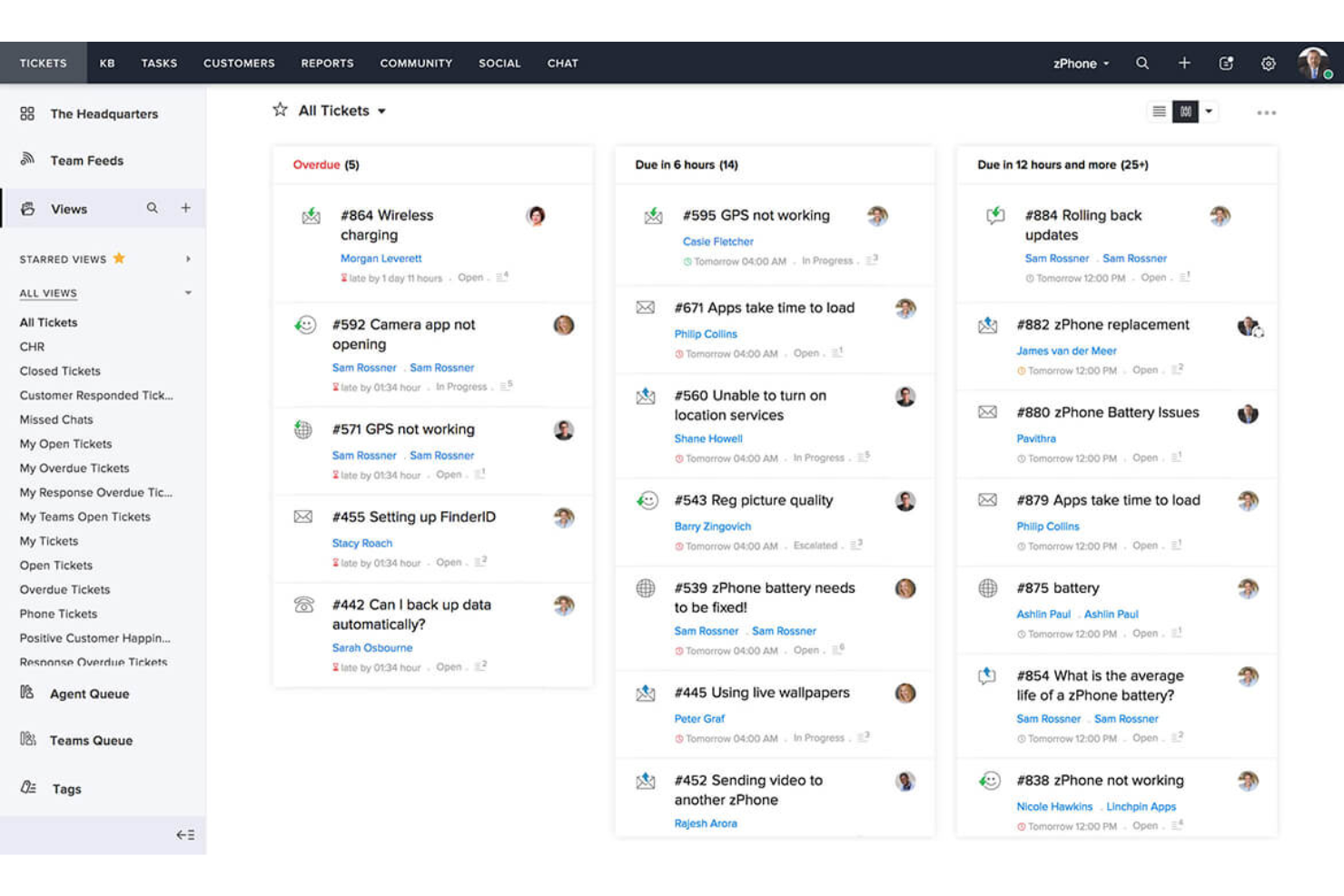
Zoho Desk è una piattaforma di assistenza clienti progettata principalmente per le piccole imprese, aiutandole a gestire in modo efficiente i ticket di supporto e le interazioni con i clienti. Offre strumenti per la gestione dei ticket, comunicazione multicanale e analisi dei clienti per migliorare la qualità del servizio.
Perché ho scelto Zoho Desk: Ideale per le piccole imprese grazie ai suoi prezzi accessibili e alla facilità di configurazione. La piattaforma offre un sistema di ticketing semplice che permette al tuo team di monitorare e risolvere le richieste dei clienti. Il supporto multicanale ti consente di gestire le richieste provenienti da email, social media e telefono in un unico posto. Le analisi integrate offrono informazioni sulle prestazioni del team, aiutandoti a prendere decisioni informate.
Funzionalità e integrazioni principali:
Le funzionalità includono un sistema di ticketing semplice che organizza efficientemente le richieste dei clienti. Il supporto multicanale permette di gestire email, social media e richieste telefoniche in un unico luogo. Gli strumenti di analisi forniscono informazioni sulle prestazioni del team e sulla soddisfazione dei clienti.
Le integrazioni includono Slack, Microsoft Teams, Shopify, Zoho CRM, Google Workspace, Mailchimp, Trello, Asana, QuickBooks e Salesforce.
Pros and Cons
Pros:
- Facile personalizzazione dei flussi di lavoro
- Conveniente per le piccole imprese
- Supporto multicanale
Cons:
- Strumenti di reportistica di base
- Funzionalità offline limitate

Zendesk
Miglior strumento di gestione delle email per startup
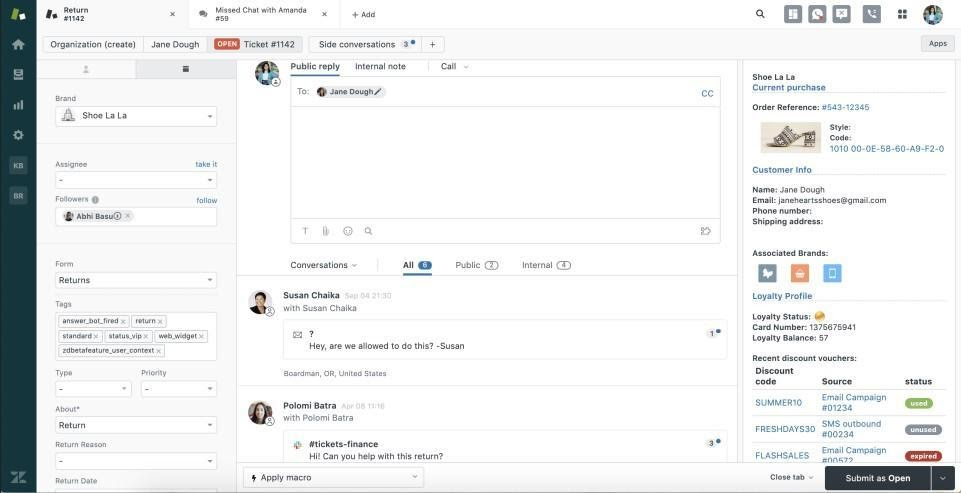
Zendesk è una piattaforma di assistenza clienti progettata per aziende di tutte le dimensioni che necessitano di soluzioni scalabili per gestire le richieste dei clienti. Fornisce strumenti per la gestione dei ticket, il supporto e l'interazione con i clienti, facilitando una comunicazione efficiente e un'erogazione dei servizi ottimale.
Perché ho scelto Zendesk: Offre scalabilità, rendendolo adatto alle aziende in crescita che necessitano di un sistema di supporto flessibile. Il sistema di gestione dei ticket aiuta il tuo team a gestire efficacemente le richieste dei clienti. Con flussi di lavoro personalizzabili, puoi adattare la piattaforma alle esigenze specifiche della tua attività. Gli strumenti di analisi forniscono informazioni sulle interazioni con i clienti, aiutandoti a ottimizzare le operazioni di supporto.
Funzionalità e integrazioni principali:
Funzionalità comprendono un sistema di gestione dei ticket completo che organizza in modo efficiente le richieste dei clienti. I flussi di lavoro personalizzabili ti permettono di adattare la piattaforma alle esigenze della tua azienda. Gli strumenti di analisi offrono insight sulle interazioni dei clienti e sulle prestazioni del servizio.
Le integrazioni includono Salesforce, Slack, Google Workspace, Shopify, Mailchimp, Trello, Asana, HubSpot, Microsoft Teams e SurveyMonkey.
Pros and Cons
Pros:
- Sistema di gestione dei ticket efficiente
- Supporta la comunicazione multicanale
- Altamente scalabile per aziende in crescita
Cons:
- Può risultare complesso da configurare
- Capacità offline limitate
New Product Updates from Zendesk
Zendesk Adds Email AI Replies and Predictive Routing
Zendesk’s latest email AI agents update brings configurable knowledge and welcome replies and adds predictive routing for email tickets, so you can tailor your automated emails and get inquiries resolved faster. For more information, visit Zendesk’s official site.

Tidio
Il miglior software di assistenza clienti per gestire comunicazioni multicanale
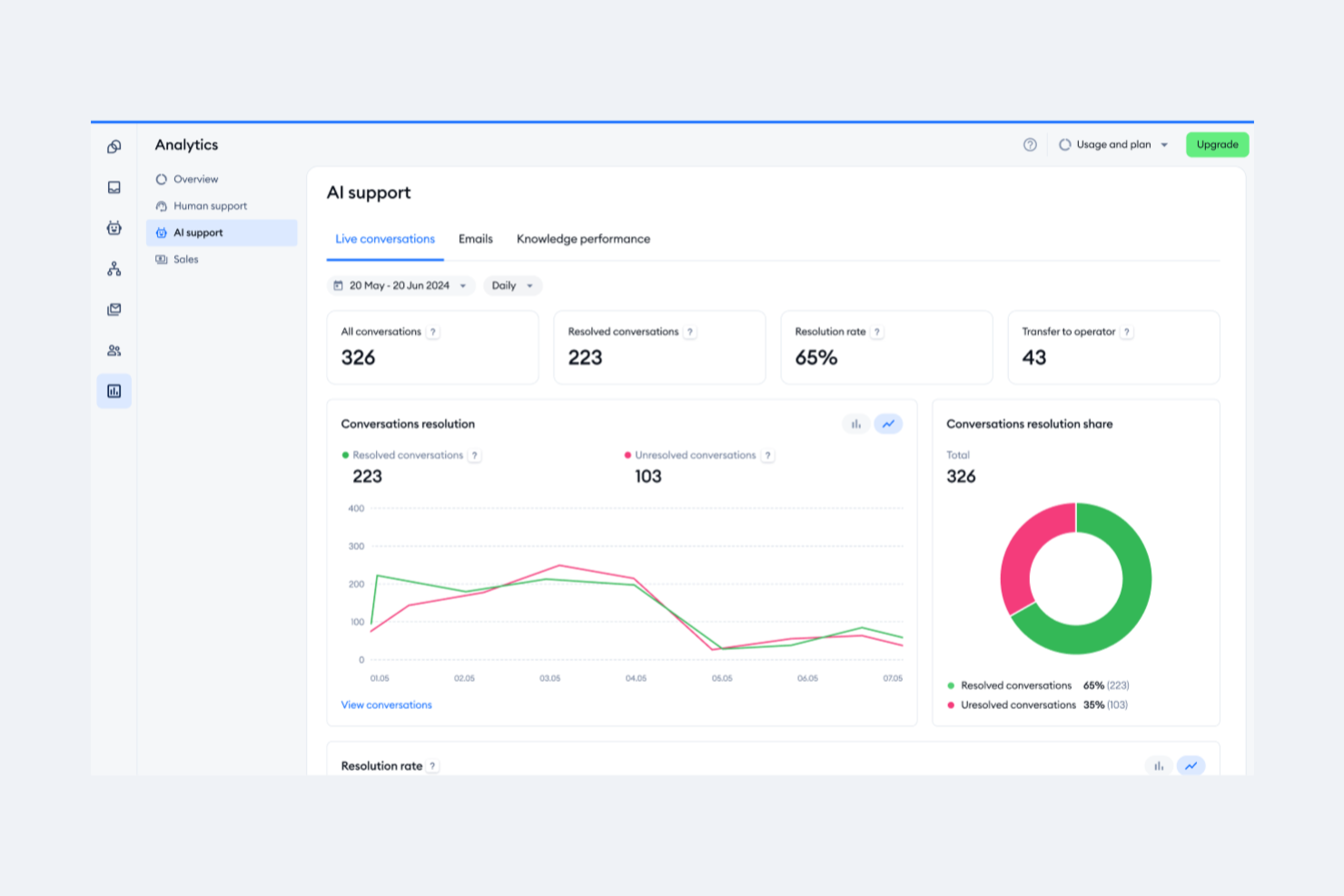
Tidio è una piattaforma di comunicazione con i clienti che si rivolge principalmente a piccole e medie imprese desiderose di migliorare le proprie capacità di supporto tramite chat dal vivo. Offre chat dal vivo, chatbot e gestione delle email per aiutare le aziende a coinvolgere i loro clienti in modo più efficace.
Perché ho scelto Tidio: Eccelle nel supporto tramite chat dal vivo, offrendo un'interazione in tempo reale con i visitatori del tuo sito web. I widget di chat personalizzabili dello strumento consentono di adattarli all'aspetto del tuo brand, migliorando l'esperienza utente. I chatbot di Tidio automatizzano le risposte, permettendo al tuo team di concentrarsi su richieste più complesse. L'integrazione con l'email garantisce che tutte le comunicazioni con i clienti siano gestite in un unico posto.
Caratteristiche e integrazioni principali:
Le funzionalità includono widget di chat personalizzabili che si adattano all'estetica del tuo brand. I chatbot della piattaforma automatizzano le risposte di routine, consentendo al team di concentrarsi su problematiche più complesse. Tidio si integra inoltre con l'email, centralizzando tutte le comunicazioni con i clienti.
Le integrazioni includono Shopify, WordPress, Mailchimp, HubSpot, Zendesk, Google Analytics, Facebook Messenger, Instagram, Wix e Squarespace.
Pros and Cons
Pros:
- Procedura di configurazione semplice
- Gestione centralizzata delle comunicazioni
- Automazione efficiente dei chatbot
Cons:
- Opzioni di personalizzazione limitate
- Strumenti basilari di gestione email

Front
Ideale per una casella di posta unificata per le operazioni clienti
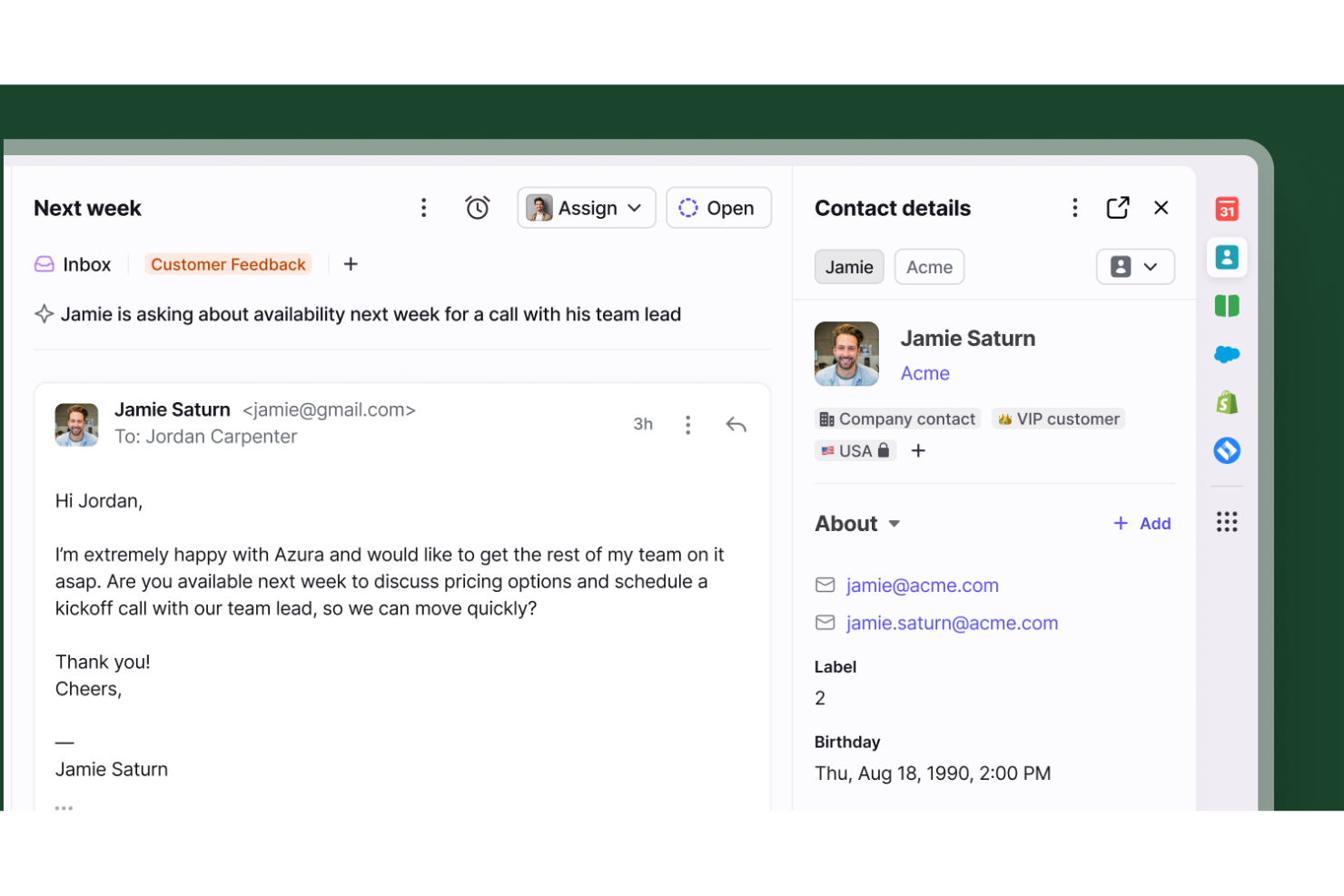
Front funge da spazio di lavoro collaborativo centralizzato che elimina le caselle di posta isolate e i follow-up mancati per i team di assistenza clienti. È progettato specificamente per le organizzazioni che devono coordinare senza interruzioni le comunicazioni con i clienti tra più persone o reparti mantenendo tutti perfettamente allineati.
Per chi è ideale Front?
Front si adatta perfettamente a organizzazioni di medie e grandi dimensioni che gestiscono volumi elevati di richieste dei clienti e fanno forte affidamento sulla collaborazione tra reparti diversi per risolverle.
Perché ho scelto Front
Ho selezionato Front per la sua eccezionale capacità di gestire workflow complessi e multi-team. Permette di assegnare le conversazioni a diversi reparti, stabilire regole di instradamento personalizzate e utilizzare spazi di lavoro condivisi che tengono tutti aggiornati. I passaggi di conversazione integrati nella piattaforma e i commenti interni consentono ai team di collaborare dietro le quinte senza perdere il contesto, garantendo il coinvolgimento dei giusti esperti in ogni interazione con il cliente.
Funzionalità Chiave di Front
Altre capacità di rilievo che supportano le operazioni di assistenza clienti includono:
- Gestione SLA: Imposta e monitora i livelli di servizio per garantire la responsabilità e assicurare risposte tempestive ad ogni richiesta.
- Rilevamento delle Collisioni: Ricevi avvisi in tempo reale quando più operatori stanno visualizzando o scrivendo una risposta allo stesso thread, impedendo completamente lavori duplicati.
- Analisi e Report: Accedi a metriche dettagliate sulle prestazioni del team, tempi di risposta medi e tendenze delle conversazioni per ottimizzare continuamente le operazioni di supporto.
- Messaggistica Omnicanale: Unifica email, chat live, SMS e social media in un'unica interfaccia per una visione completa a 360 gradi del cliente.
Integrazioni di Front
Le integrazioni includono Salesforce, HubSpot, Asana, Jira, Aircall, Slack, Shopify, Intercom, Dialpad e ClickUp.
Pros and Cons
Pros:
- Collaborazione tra reparti
- Previene risposte duplicate degli operatori
- Unisce email personali e condivise
Cons:
- L'app mobile manca di funzionalità della versione desktop
- Analytics disponibili solo nei livelli superiori
Altre opzioni di software per la gestione delle email di assistenza clienti
Se vuoi conoscere qualche altro strumento per la gestione delle email, posso aiutarti.
- HappyFox
Ideale per help desk destinati ai clienti finali
- monday service
Ideale per la gestione centralizzata delle email
- Issuetrak
Ideale per l'invio ticket omnicanale
- Pega
Risposta rapida alle grandi quantità di email
- SAAS First
Ideale per risposte generate dall'IA
- TeamSupport
Ideale per la gestione da email ad attività


Come Valuto i Software di Gestione Email per il Servizio Clienti
Analizzo questi strumenti su due livelli: se gestiscono le basi della casella di posta condivisa—come instradamento dei ticket, rilevamento delle collisioni, SLA—e quali elementi distinguono i singoli fornitori per i team di CX su larga scala.
Funzionalità principali (Requisiti Minimi per Questa Lista)
Quando seleziono gli strumenti per la mia lista, classifico ciascuno su una scala da 0 (non offre la funzionalità) a 5 (eccelle in quest'area) per ognuna delle funzionalità principali elencate di seguito. Poi, calcolo il punteggio totale dello strumento in percentuale. Ogni strumento deve raggiungere un punteggio totale minimo del 65% per essere considerato.
- Casella Postale Condivisa per il Team: Verifico se più agenti possono lavorare dalla stessa casella di posta con rilevamento delle collisioni in tempo reale, così che due persone non rispondano allo stesso cliente contemporaneamente.
- Assegnazione & Instradamento dei Ticket: È importante se uno strumento supporta l'instradamento tramite regole—ad esempio assegnare domande di fatturazione a un team specifico o bilanciare il carico tra agenti durante un turno.
- Automazione & Regole Email: Cerco trigger di workflow, risposte predefinite e auto-etichettatura per gestire attività ripetitive come confermare la ricezione o assegnare priorità alle email con determinate parole chiave.
- Strumenti di Collaborazione Interna: Gli strumenti validi consentono agli agenti di lasciare note interne, menzionare colleghi e avviare conversazioni laterali su un thread senza che il cliente veda nulla.
- SLA & Monitoraggio delle Risposte: Valuto se puoi impostare politiche SLA per priorità o livello cliente, ricevere avvisi di violazione e generare report su tempi di prima risposta e risoluzione.
- Contesto & Cronologia del Cliente: La vista dell'agente dovrebbe mostrare conversazioni passate, dettagli di contatto e informazioni rilevanti sull’account, così il team non chiede ai clienti di ripetersi.
Una volta che ho una lista di strumenti che soddisfano i criteri, considero cosa distingue ogni piattaforma.
Fattori di Differenziazione (Cosa Distingue i Fornitori)
Ecco come confronto e metto a confronto i diversi fornitori:
Funzionalità Eccezionali
La redazione automatica delle risposte tramite AI è un notevole elemento distintivo—verifico se gli agenti ricevono suggerimenti contestuali che effettivamente fanno risparmiare tempo su domande ripetitive come lo stato di un ordine. Una knowledge base integrata amplia questo vantaggio permettendo agli agenti di inserire articoli di supporto rilevanti direttamente nelle risposte. Valuto anche la presenza di sondaggi CSAT o CES integrati associati alle singole conversazioni, poiché collegare i punteggi di soddisfazione a specifici agenti e tipologie di ticket offre ai responsabili dati utili che i sondaggi generici post-interazione non danno.
Oltre alle Funzionalità
La profondità delle integrazioni è importante—verifico se uno strumento si collega nativamente a CRM come Salesforce o HubSpot e a piattaforme ecommerce come Shopify, poiché i team di assistenza hanno bisogno di dati sugli ordini e sugli account senza cambiare scheda. Valuto anche la scalabilità, soprattutto se la piattaforma gestisce caselle per più brand o dipartimenti mentre il team cresce. Infine, esamino il supporto alla migrazione, poiché passare da una casella condivisa Gmail o Outlook a una piattaforma dedicata può frenare l’adozione se il fornitore non offre strumenti di importazione e supporto per l'onboarding.
Come scegliere un software per la gestione delle email di assistenza clienti
È facile perdersi tra lunghe liste di funzionalità e strutture di prezzi complesse. Per aiutarti a restare concentrato durante il tuo processo di selezione, ecco una checklist di fattori da tenere in considerazione:
| Fattore | Cosa considerare |
|---|---|
| Scalabilità | Assicurati che il software sia in grado di crescere con il tuo team, gestendo volumi crescenti di email e un numero maggiore di utenti. |
| Integrazioni | Cerca software che si integri con gli strumenti che il tuo team già utilizza, come i sistemi CRM e il software di help desk. |
| Personalizzazione | Verifica se puoi personalizzare i flussi di lavoro, le dashboard e le funzioni in base alle esigenze specifiche del tuo team. |
| Facilità d’uso | Valuta quanto è intuitiva l’interfaccia e quanto velocemente il tuo team può imparare a utilizzarla. |
| Budget | Valuta se il prezzo è in linea con il tuo budget, considerando eventuali costi nascosti o spese aggiuntive. |
| Sicurezza | Verifica che il software abbia solide misure di protezione dei dati per garantire la sicurezza delle informazioni dei tuoi clienti. |
| Opzioni di supporto | Cerca la disponibilità di assistenza 24/7, più canali di contatto e l’accesso a una knowledge base completa. |
| Analisi | Assicurati che lo strumento offra funzionalità di reportistica che forniscano informazioni sulle prestazioni del team e sulle interazioni con i clienti. |
Tendenze nei software per la gestione delle email di assistenza clienti
Nella mia ricerca, ho raccolto innumerevoli aggiornamenti di prodotto, comunicati stampa e registri di rilascio da diversi fornitori di software per la gestione delle email del servizio clienti. Ecco alcune delle tendenze emergenti che sto monitorando:
- Personalizzazione guidata dall’IA: L'intelligenza artificiale viene utilizzata per adattare le interazioni con i clienti in base ai comportamenti e alle preferenze passate. Questa tendenza aiuta le aziende a offrire supporto più pertinente, migliorando la soddisfazione del cliente. Fornitori come Zendesk hanno integrato l’IA per suggerire risposte personalizzate.
- Integrazione del supporto omnicanale: Le aziende si stanno orientando verso piattaforme che unificano l’email con altri canali di comunicazione come i social media e la chat dal vivo. Questa integrazione offre un'esperienza cliente coesa, permettendo di gestire tutte le interazioni in un unico luogo. Freshdesk è un esempio di piattaforma che abbraccia questa tendenza.
- Analisi in tempo reale: L’analisi dei dati in tempo reale sta diventando cruciale per migliorare l’efficienza del servizio. Queste analisi forniscono informazioni sulle prestazioni del team e sulle interazioni con i clienti mentre accadono, consentendo decisioni rapide. Piattaforme come Salesforce Service Cloud offrono queste funzionalità.
- Funzionalità di collaborazione da remoto: Con sempre più team che lavorano da remoto, gli strumenti che favoriscono la collaborazione sono molto richiesti. Funzionalità come le caselle condivise e i commenti interni permettono ai team di collaborare efficacemente, ovunque si trovino. Front è conosciuta per le sue solide funzionalità di collaborazione remota.
- Focalizzazione sull’esperienza utente: C’è una crescente attenzione a design intuitivi e facilità d’uso per ridurre i tempi di formazione e aumentare l’adozione. I software con interfacce semplici e navigazione user-friendly stanno diventando una priorità per le aziende. Help Scout è nota per il suo impegno a offrire un’eccellente esperienza utente.
Cos’è il software di gestione delle email per il servizio clienti?
Il software di gestione delle email per il servizio clienti è uno strumento che aiuta le aziende a gestire e organizzare le richieste dei clienti ricevute tramite email. Solitamente utilizzati dai team di assistenza clienti, questi strumenti migliorano i tempi di risposta e assicurano una comunicazione coerente.
Funzionalità come la gestione dei ticket, le analisi in tempo reale e il supporto omnicanale aiutano a organizzare le richieste, analizzare le prestazioni e offrire interazioni cliente integrate. Nel complesso, questi strumenti migliorano l’efficienza e l’efficacia delle operazioni di assistenza clienti.
Funzionalità del software di gestione delle email per il servizio clienti
Quando scegli un software di gestione delle email per il servizio clienti, presta attenzione alle seguenti funzionalità chiave:
- Gestione dei ticket: Organizza le richieste dei clienti in ticket gestibili, assicurando che nulla venga trascurato.
- Supporto omnicanale: Integra diversi canali di comunicazione, permettendo interazioni fluide con i clienti su più piattaforme.
- Analisi in tempo reale: Fornisce informazioni sulle prestazioni del team e sulle interazioni cliente, consentendo rapide modifiche e miglioramenti.
- Workflow personalizzabili: Permette ai team di adattare i processi alle esigenze specifiche del business, migliorando l’efficienza.
- Personalizzazione guidata dall’IA: Utilizza l’IA per personalizzare le risposte in base alla cronologia del cliente, aumentando soddisfazione e coinvolgimento.
- Caselle di posta condivise: Facilita la collaborazione consentendo a più membri del team di accedere e gestire le email in una casella unica.
- Strumenti di automazione: Riduce le attività manuali automatizzando processi ripetitivi come le risposte e l’assegnazione dei ticket.
- Profili cliente: Offre dettagli approfonditi su ciascun cliente, aiutando a personalizzare e migliorare la qualità del servizio.
- Strumenti di reportistica: Monitora e analizza le metriche di performance, facilitando decisioni strategiche e ottimizzazione dei risultati.
- Garanzie di sicurezza: Assicura la protezione dei dati dei clienti grazie a solide misure di sicurezza, mantenendo fiducia e conformità.
Vantaggi del software di gestione delle email per il servizio clienti
L’implementazione di un software di gestione delle email per l’assistenza clienti offre molti vantaggi al tuo team e alla tua azienda. Eccone alcuni a cui puoi guardare con interesse:
- Tempi di risposta migliorati: Gli strumenti di automazione aiutano il tuo team a rispondere più rapidamente alle richieste dei clienti, aumentando la soddisfazione del cliente.
- Collaborazione potenziata: Le caselle di posta condivise e le funzioni di commento interno facilitano il lavoro di squadra nella gestione delle richieste dei clienti.
- Migliori approfondimenti sul cliente: I profili cliente e le analisi in tempo reale forniscono informazioni preziose, aiutando a personalizzare il supporto secondo le esigenze individuali.
- Maggiore efficienza: La gestione dei ticket e i flussi di lavoro personalizzabili semplificano i processi, riducendo il carico di lavoro al team.
- Comunicazione coerente: Il supporto omnicanale garantisce che i clienti ricevano un servizio uniforme su tutti i canali, migliorando l’esperienza.
- Decisioni basate sui dati: Gli strumenti di reportistica e analisi offrono informazioni sulle prestazioni, aiutando nella pianificazione strategica e nei miglioramenti.
- KPI migliorati: Migliori metriche di soddisfazione del cliente, come CSAT, NPS e CES per misurare la soddisfazione, migliorare le esperienze e rafforzare la fedeltà.
Costi e prezzi dei software di gestione email per il servizio clienti
La selezione di un software di gestione email per il servizio clienti richiede una comprensione dei diversi modelli di prezzo e piani disponibili. I costi variano in base alle funzionalità, alle dimensioni del team, agli extra e altro ancora. La tabella sottostante riepiloga i piani più comuni, i loro prezzi medi e le funzionalità tipiche incluse nelle soluzioni di gestione email per il servizio clienti:
Tabella di confronto dei piani per i software di gestione email del servizio clienti
| Tipo di piano | Prezzo medio | Funzionalità comuni |
|---|---|---|
| Piano gratuito | $0 | Gestione base dei ticket, supporto email limitato e reportistica di base. |
| Piano personale | $5-$25/user/month | Gestione dei ticket, supporto email, personalizzazione limitata e analisi di base. |
| Piano business | $30-$75/user/month | Gestione avanzata dei ticket, supporto multicanale, flussi di lavoro personalizzabili e analisi in tempo reale. |
| Piano enterprise | $80-$150/user/month | Personalizzazione completa, reportistica avanzata, approfondimenti guidati dall’AI e account manager dedicato. |
Le persone chiedono anche: Tutto sulla gestione delle email per il servizio clienti
Se sei interessato a lavorare con una piattaforma di gestione email per il servizio clienti, probabilmente hai alcune domande prima di iniziare. Qui sotto trovi le risposte alle domande più frequenti.
A cosa serve un software di gestione email per il servizio clienti?
Il software di gestione email per il servizio clienti viene utilizzato per semplificare il processo di risposta alle email dei clienti. Questi strumenti aiutano a creare flussi di lavoro che indirizzano le email ai team e alle persone appropriate, sviluppare ed eseguire template di risposta che fanno risparmiare tempo e favorire la collaborazione tra i membri del team nella risoluzione delle problematiche dei clienti.rnrnVuoi più alternative? Dai un’occhiata al nostro articolo su u003ca href=u0022https://thecxlead.com/tools/best-email-help-desk-software/u0022u003esoftware help desk emailu003c/au003e per altri strumenti che possono aiutare il tuo team di supporto nella gestione della casella di posta.
Quali tipi di aziende utilizzano un software di gestione email per il servizio clienti?
Secondo un rapporto di Statista del 2022, l’email ha superato la chat web e i social media di oltre il 15% come canale di assistenza preferito dai consumatori negli Stati Uniti. Di conseguenza, il software di gestione email per il servizio clienti può essere sicuramente vantaggioso per organizzazioni di diversi settori e dimensioni. Che tu sia una multinazionale o una startup in rapida crescita, questi strumenti consentono di migliorare i tempi di risposta alle email e offrire un servizio clienti migliorato.rnrnu003c!u002du002d /wp:paragraph u002du002du003e u003c!u002du002d wp:paragraph u002du002du003ernrnGli strumenti elencati coprono una varietà di fasce di prezzo e funzionalità. Alcuni sono più completi e adatti a realtà più grandi. Altri offrono la possibilità di scegliere solo le funzioni necessarie, avere un prezzo più accessibile e risultare più indicati per PMI.
E ora?
Se sei alla ricerca di un software di gestione email per il servizio clienti, collegati a un consulente SoftwareSelect per avere consigli gratuiti.
Compila un modulo e fai una breve chiacchierata per approfondire le tue necessità. Riceverai quindi una lista ristretta di software da valutare. Ti supporteranno anche lungo tutto il processo d’acquisto, incluse le negoziazioni sul prezzo.