

10 migliori software di gestione ticket per l’assistenza clienti del 2026

10 Migliori Software di Ticketing per il Servizio Clienti - Shortlist


Il software di ticketing per il servizio clienti aiuta i team di supporto a tracciare, dare priorità e risolvere i problemi dei clienti in modo efficiente. Se ti capita di perdere dei follow-up, rispondere due volte alla stessa richiesta o di avere una casella di posta sopraffatta, non sei solo. La giusta piattaforma di ticketing porta ordine dove c'è caos organizzando le conversazioni, semplificando i flussi di lavoro e dando al tuo team il contesto necessario per offrire un supporto rapido ed efficace.
In questo articolo, ho testato e recensito in modo indipendente i migliori software di ticketing per servizio clienti per aiutarti a migliorare la produttività del team, ridurre i tempi di risposta e scalare il supporto senza sacrificare la qualità.
Perché fidarsi dei nostri consigli sui software
Il nostro team testa e recensisce software dal 2012. In quanto leader CX noi stessi, sappiamo quanto sia difficile — e importante — scegliere il software giusto.
Per questa guida, abbiamo valutato gli strumenti attraverso test pratici e ricerche indipendenti, assegnando un punteggio agli strumenti in base ai nostri criteri di selezione.
Le nostre recensioni riflettono il nostro giudizio editoriale umano, non un discorso di vendita.
Tabella Comparativa dei Migliori Software di Ticketing per il Servizio Clienti
Questa tabella comparativa riassume le informazioni di base su ciascuna delle mie migliori scelte di software di ticketing per il servizio clienti. Puoi confrontare i dettagli dei prezzi e la disponibilità di prove gratuite o demo fianco a fianco, per trovare il miglior software in base al tuo budget e alle tue necessità aziendali.
| Tool | Best For | Trial Info | Price | ||
|---|---|---|---|---|---|
| 1 | Il miglior software di ticketing per l’assistenza clienti enterprise con motore AI | Prova gratuita di 14 giorni + demo gratuita disponibile | A partire da $19/agente/mese (fatturazione annuale) | Website | |
| 2 | Ideale con un'opzione gratuita per sempre | Piano gratuito + prova gratuita di 7 giorni + demo gratuita disponibile | Da $25/utente/mese (fatturato annualmente) | Website | |
| 3 | Ideale per la collaborazione nella casella di posta condivisa | Prova gratuita disponibile | Da $25/utente/mese (fatturato annualmente) | Website | |
| 4 | Ideale per il supporto omnicanale B2B | Demo gratuita disponibile | A partire da $45/mese (fatturazione annuale) | Website | |
| 5 | Ideale per flussi di ticket ibridi | Prova gratuita di 30 giorni + demo gratuita disponibile | Da $15/mese (fatturazione annuale) | Website | |
| 6 | Miglior software di assistenza clienti con automazione del flusso di lavoro basata sul contesto | Prova gratuita di 15 giorni + demo gratuita disponibile | Da $7/utente/mese (fatturazione annuale) | Website | |
| 7 | Ideale per la raccolta automatica dei feedback | Prova gratuita di 14 giorni | Da $39/agente/mese | Website | |
| 8 | Ideale per funzionalità dettagliate di reporting sui ticket del cliente | Prova gratuita di 7 giorni + piano gratuito disponibile | A partire da $24.17/mese (fatturato annualmente) | Website | |
| 9 | Ideale per l'automazione dei flussi di lavoro con IA | Prova gratuita di 30 giorni disponibile | Da $15/utente/mese | Website | |
| 10 | Ideale con ampie opzioni di integrazione e API | Prova gratuita di 21 giorni | Da $29/mese | Website |


Recensioni dei Migliori Software di Ticketing per il Servizio Clienti
Per aiutarti a trovare il miglior software di ticketing per il servizio clienti, ho fornito sintesi dettagliate delle mie principali scelte ed ho spiegato perché ciascun sistema è stato incluso in questa lista. Ho anche evidenziato le loro funzionalità principali per aiutarti a determinare quale soluzione si adatti meglio alle esigenze della tua azienda.

Il miglior software di ticketing per l’assistenza clienti enterprise con motore AI
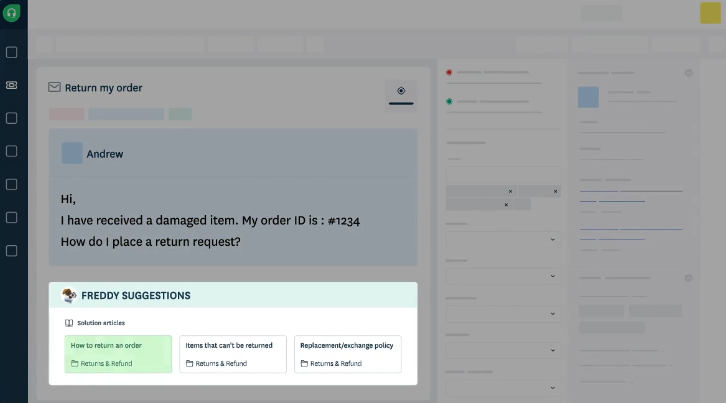
Freshdesk è una piattaforma di assistenza clienti basata su cloud progettata per i team di supporto di aziende in rapida crescita e grandi imprese che devono gestire alti volumi di richieste clienti su più canali, automatizzando le attività ripetitive e mantenendo alta la qualità del servizio.
Per chi è più indicato Freshdesk?
Freshdesk è particolarmente adatto a team di supporto di medie e grandi dimensioni che gestiscono grandi volumi di ticket su diversi canali e necessitano di automazione per mantenere rapidi i tempi di risposta.
Perché ho scelto Freshdesk
Freshdesk merita il suo posto tra i migliori della mia lista per il modo in cui il suo motore AI, Freddy AI, è profondamente integrato nel flusso di lavoro del ticketing. Apprezzo in particolare Freddy AI Copilot, che offre agli agenti suggerimenti di risposta in tempo reale, traduzioni live e riassunti delle conversazioni direttamente nella vista del ticket—così il mio team non deve cambiare scheda o intuire il tono. Freddy AI Agent gestisce in autonomia le richieste ripetitive in entrata, risolvendole dall’inizio alla fine senza l’intervento di un agente umano. Per i team aziendali che gestiscono migliaia di ticket al giorno, l’instradamento in base alle competenze e l’assegnazione bilanciata assicurano che il ticket giusto arrivi automaticamente all’agente giusto.
Caratteristiche principali di Freshdesk
- Posta in arrivo condivisa omnicanale: Gestisci i ticket provenienti da email, chat, telefono e social media in una singola casella unificata.
- Gestione multipla delle politiche SLA: Imposta regole SLA diverse per segmenti di clientela, prodotti o orari di servizio per rispettare diversi livelli di impegno.
- Base di conoscenza: Crea un portale self-service multilingue con versionamento degli articoli, modelli di ticket e una gerarchia dei contenuti flessibile.
- Dashboard personalizzabili in tempo reale: Monitora le operazioni di assistenza in tempo reale con dashboard configurabili che tracciano la disponibilità degli agenti, le tendenze dei ticket e lo stato delle code.
Integrazioni di Freshdesk
Le integrazioni includono Playvox, Slack, MS Teams, Shopify, Salesforce e Jira, oltre ad app connettore per il collegamento con strumenti esterni tramite API.
Pros and Cons
Pros:
- Ticketing multicanale
- Instradamento automatico dei ticket
- Portale self-service
Cons:
- Opzioni di reportistica limitate
- Curva di apprendimento per i nuovi utenti
New Product Updates from Freshdesk

Freshdesk Adds Voice AI Agents in Freshcaller
Freshdesk introduces Voice AI Agents available through Freshcaller Marketplace apps to handle routine calls and reduce queues. This feature enables automated call handling with real-time, conversational support. For more information, visit Freshdesk's official site.

Hiver
Ideale con un'opzione gratuita per sempre
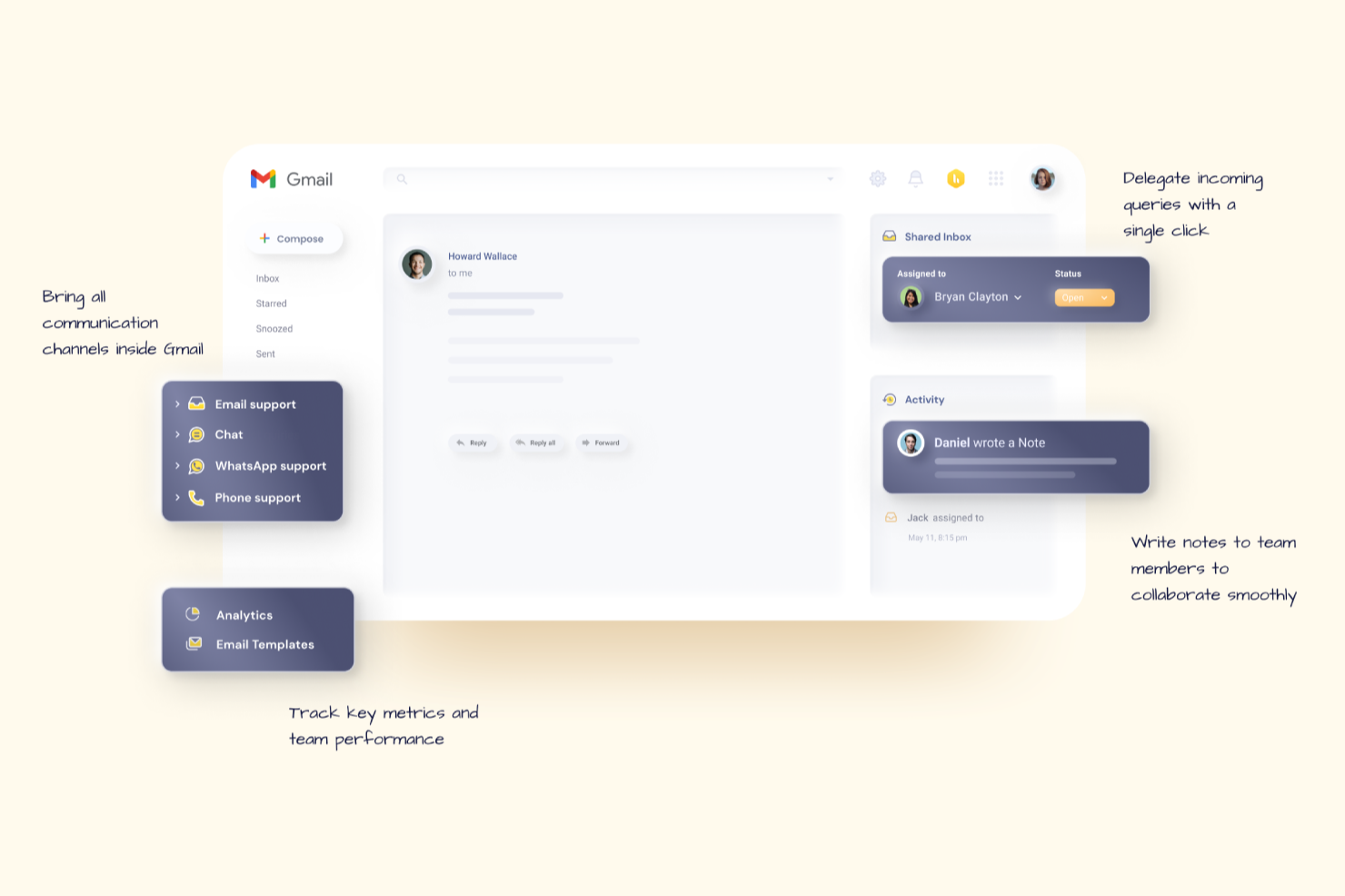
Hiver trasforma Gmail in un sistema di ticketing per l'assistenza clienti, aiutando i team di supporto di piccole e medie imprese a gestire, assegnare e monitorare le richieste dei clienti direttamente dalla loro casella di posta.
Per chi è ideale Hiver?
Hiver è particolarmente adatto per team piccoli o di medie dimensioni che già lavorano su Google Workspace e desiderano gestire l'assistenza clienti senza uscire da Gmail.
Perché ho scelto Hiver
Hiver si guadagna un posto nella mia shortlist perché è uno dei pochi strumenti di ticketing per l'assistenza clienti che offre un vero piano gratuito utilizzabile—non solo una prova. Il livello gratuito supporta fino a 10 utenti e include caselle di posta condivise, assegnazione delle email e notifiche di collisione, consentendo ai piccoli team di gestire reali flussi di lavoro di supporto senza spese. Mi piace anche che passando al piano superiore si sbloccano la gestione delle SLA e le regole di automazione, permettendo allo strumento di crescere insieme al team. È una soluzione rara in cui il piano gratuito non è una semplice anteprima limitata, ma un vero punto di partenza funzionale.
Funzionalità principali di Hiver
- Widget di chat dal vivo: Incorpora un widget di chat sul tuo sito web per gestire conversazioni con clienti in tempo reale direttamente da Hiver.
- Sondaggi CSAT: Invia automaticamente sondaggi di soddisfazione cliente dopo la risoluzione di un ticket per raccogliere feedback sulla qualità del supporto.
- Analisi e reportistica: Monitora le prestazioni del team con report su tempi di risposta, tassi di risoluzione e distribuzione del carico di lavoro.
- Supporto multicanale: Gestisci le richieste dei clienti da e-mail, chat e voce all'interno di un'unica area di lavoro condivisa.
Integrazioni di Hiver
Le integrazioni includono Salesforce, HubSpot, Slack, Asana, Jira, QuickBooks, Shopify, NetSuite, Okta, Aircall e un'API aperta per integrazioni personalizzate.
Pros and Cons
Pros:
- Assistenza clienti da operatori reali disponibile 24/7 via chat o e-mail
- Gratuito per utenti illimitati
- Conforme a SOC 2 Type II, ISO 27001 e GDPR
Cons:
- Rispetto ad altre piattaforme, Hiver offre meno integrazioni di terze parti
- L'esperienza su mobile non è forte come quella su desktop
New Product Updates from Hiver

Hiver Brings Chat Widget Support to Mobile Apps
Hiver now lets you embed the Hiver Chat Widget in iOS, Android, React Native, and Flutter apps so customers can start chats without leaving your app. For more information, visit Hiver's official site.

Ideale per la collaborazione nella casella di posta condivisa
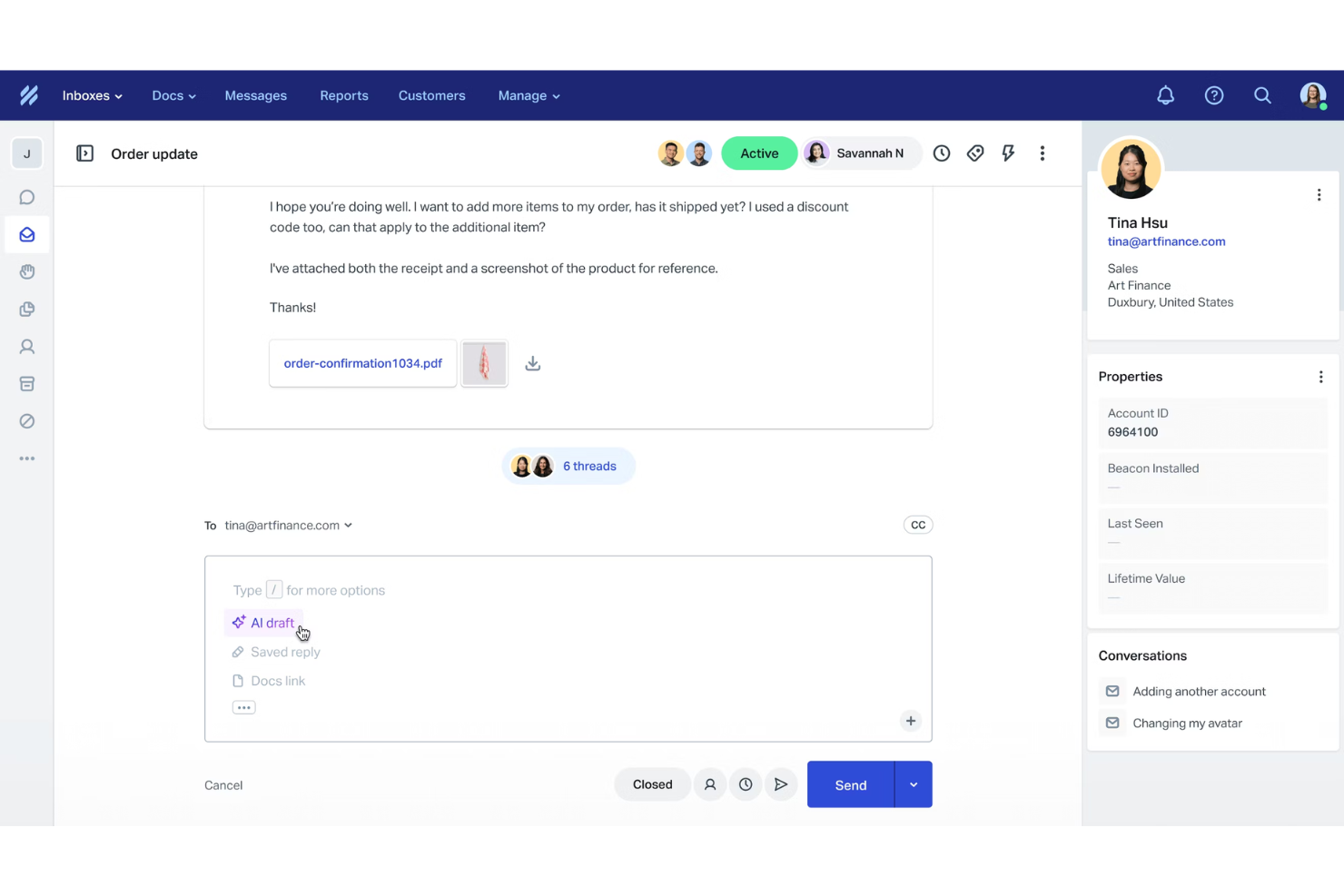
Help Scout è una piattaforma di assistenza clienti creata per i team di supporto che desiderano gestire email, chat e conversazioni con i clienti in un unico posto, facilitando alle aziende l'erogazione di un supporto rapido, organizzato e personalizzato senza la complessità dei tradizionali sistemi di ticketing.
Per chi è ideale Help Scout?
Help Scout è perfetto per piccole e medie imprese con team di supporto dedicati che necessitano di uno strumento collaborativo e semplice per gestire le conversazioni con i clienti tramite email e chat.
Perché ho scelto Help Scout
Help Scout si guadagna un posto nella mia lista per la sua eccellente gestione della collaborazione nella casella di posta condivisa per i team di supporto. Apprezzo il fatto che più agenti possano lavorare nella stessa casella senza pestarsi i piedi a vicenda: il sistema di rilevamento delle collisioni avvisa quando un collega sta già visualizzando o rispondendo a una conversazione. Utilizzo anche le note private per coinvolgere colleghi su ticket complessi senza che il cliente veda le discussioni interne. Per i team che gestiscono grandi volumi di conversazioni, la possibilità di assegnare, etichettare e lasciare note direttamente nel thread permette a tutti di rimanere aggiornati senza dover cambiare strumenti.
Funzionalità principali di Help Scout
- Flussi di lavoro automatizzati: Imposta automazioni basate su regole per instradare, etichettare o chiudere conversazioni in base a condizioni come parole chiave, mittente o casella di posta.
- Base di conoscenza Docs: Crea e pubblica un centro assistenza self-service affinché i clienti possano trovare risposte senza contattare il supporto.
- Profili cliente: Visualizza la cronologia completa delle conversazioni e i dati di profilo di un cliente direttamente accanto a qualsiasi ticket aperto.
- Widget di chat live (Beacon): Integra un widget di chat sul tuo sito che permette ai clienti di cercare nella base di conoscenza o avviare una conversazione in tempo reale.
Integrazioni Help Scout
Le integrazioni includono Salesforce, HubSpot, Shopify, Jira, Slack, Stripe, Mailchimp, WhatsApp, FullStory e Trello.
Pros and Cons
Pros:
- Facile consolidamento dei messaggi da più canali
- Reportistica e analisi complete
- Strumenti AI integrati per risposte più rapide
Cons:
- Alcune funzionalità avanzate solo nei piani superiori
- Personalizzazione limitata nei piani base
New Product Updates from Help Scout

Help Scout Adds Automatic Conversation Reassignment
Help Scout can now automatically unassign conversations when the assigned teammate has been away long enough, keeping replies moving so others can pick them up. For more information, visit Help Scout's official site.
 .
.
Ideale per il supporto omnicanale B2B
TeamSupport è una piattaforma di gestione ticket per l'assistenza clienti progettata per le aziende B2B che devono gestire rapporti complessi con i clienti, semplificare i flussi di lavoro di supporto e mantenere allineati i team attraverso molteplici canali di comunicazione.
Per Chi è Ideale TeamSupport?
TeamSupport è particolarmente adatto ai team di supporto B2B di aziende di piccole e medie dimensioni che gestiscono rapporti continuativi con i clienti e necessitano di visibilità a livello di account, non solo sui singoli ticket.
Perché Ho Scelto TeamSupport
Ho scelto TeamSupport tra i migliori perché apprezzo come gestisce il supporto omnicanale con una mentalità orientata al B2B. Il suo sistema di ticketing unificato riunisce le conversazioni da email, chat live, telefono e social media in un unico luogo, così il mio team non deve passare da uno strumento all'altro per ricostruire la storia del cliente. Fornisce un contesto a livello di account—quando arriva un ticket, posso vedere la storia completa del cliente, non solo il singolo messaggio isolato. Il Customer Distress Index è una funzionalità utile perché monitora i comportamenti e il sentiment sulle varie piattaforme, segnalando gli account a rischio prima che la situazione peggiori.
Funzionalità Principali di TeamSupport
- Gestione SLA: Imposta e monitora gli accordi sui livelli di servizio, con avvisi automatici che notificano il team quando un ticket si avvicina alla scadenza o ha superato i termini stabiliti.
- Strumenti di collaborazione interna: Aggiungi note private, menziona i colleghi con @ e collega richieste correlate, così il team può collaborare su problematiche complesse senza uscire dalla piattaforma.
- Reportistica e dashboard personalizzabili: Crea report su volume dei ticket, tempi di risposta e prestazioni degli operatori utilizzando filtri e metriche specifiche per il tuo servizio clienti.
- Portale self-service per i clienti: Fornisci ai clienti un portale personalizzato dove possono inviare ticket, controllare gli aggiornamenti di stato e consultare una knowledge base per trovare risposte in autonomia.
Integrazioni di TeamSupport
Le integrazioni includono Salesforce, HubSpot CRM, Zoho CRM, Microsoft Dynamics 365, Jira Software, Slack, Microsoft Teams, Azure DevOps, Mailchimp e Dropbox.
Pros and Cons
Pros:
- Automazione dei ticket potenziata dall'AI
- Insight in tempo reale sul sentiment
- Hub self service cliente personalizzabile
Cons:
- La knowledge base è poco configurabile
- Funzionalità limitata dell'app mobile

Ideale per flussi di ticket ibridi
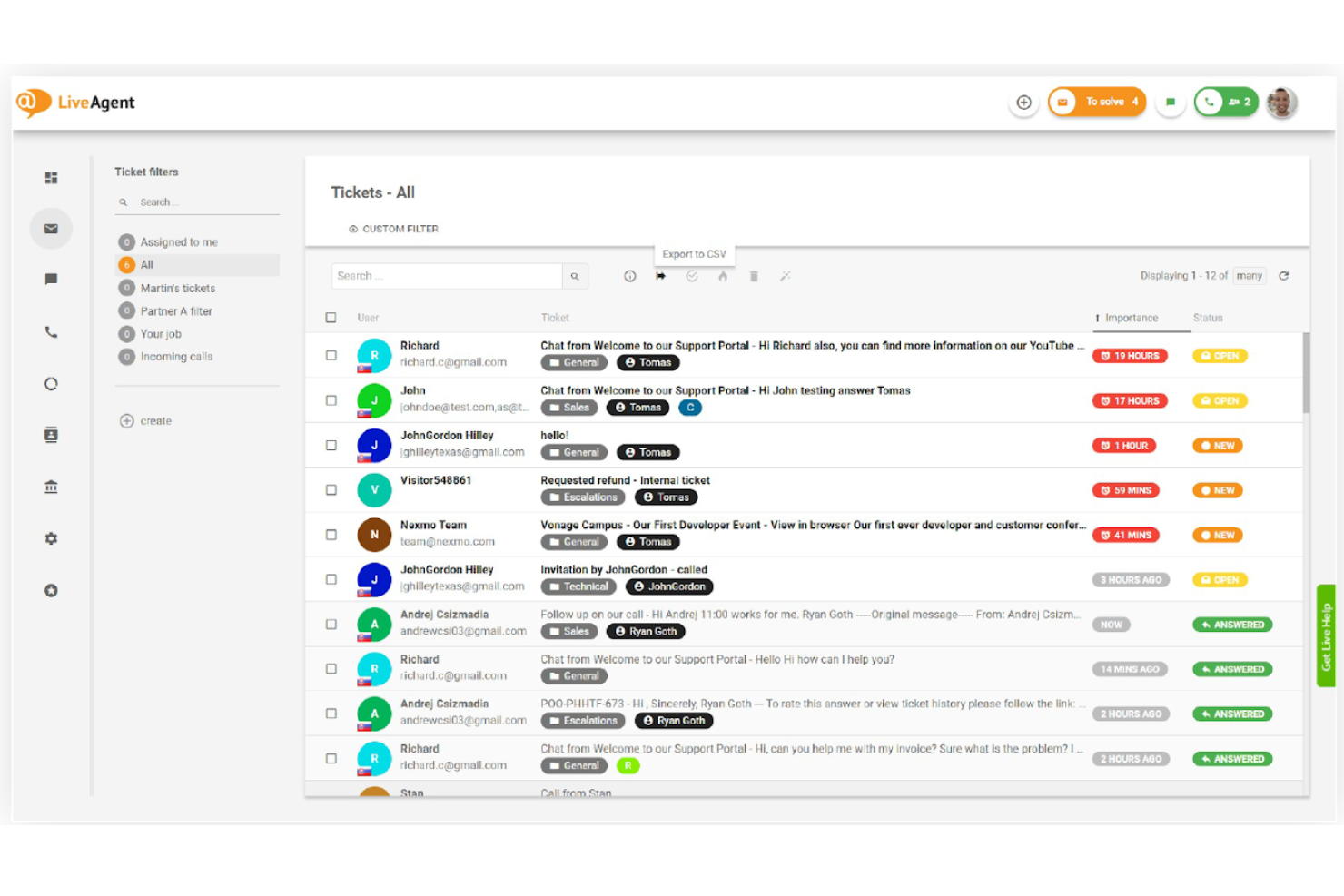
LiveAgent riunisce email, chat, telefono e messaggi dai social in un'unica piattaforma di ticketing per team di supporto che devono gestire un alto volume di richieste clienti su più canali.
Per chi è ideale LiveAgent?
LiveAgent è una buona soluzione per team di supporto di piccole e medie dimensioni che gestiscono richieste clienti tramite email, chat, telefono e social media da una casella condivisa.
Perché ho scelto LiveAgent
LiveAgent si merita un posto nella mia selezione per la sua capacità di gestire flussi di ticket ibridi: riunisce conversazioni da email, live chat, telefonate e social media in un'unica conversazione. Apprezzo in particolare la funzione di flusso ibrido dei ticket, che collega i messaggi correlati provenienti da diversi canali in un unico ticket, evitando duplicati o smarrimenti di informazioni. In questo modo il mio team può seguire la cronologia completa delle conversazioni di un cliente, indipendentemente dal canale di inizio (ad esempio, chat seguita da email), senza cambiare strumento o perdere il contesto.
Funzionalità principali di LiveAgent
- Instradamento automatico dei ticket: Assegna automaticamente i ticket in arrivo all'agente o reparto più adatto in base alle regole che definisci.
- Gestione dei SLA: Imposta obiettivi di tempo per risposta e risoluzione, con avvisi che notificano gli agenti quando le scadenze si avvicinano.
- Note interne: Gli agenti possono lasciare note private sui ticket per condividere il contesto con i colleghi senza che il cliente le veda.
- Rilevamento collisione agenti: Avvisa in tempo reale quando un altro membro del team sta già visualizzando o rispondendo allo stesso ticket.
Integrazioni di LiveAgent
Le integrazioni includono ActiveCampaign, 3CX, BigCommerce, Braintree, Facebook, ClickUp, Clockify, CloudApp, Drupal e AWeber.
Pros and Cons
Pros:
- Gestisce la comunicazione su più canali
- La funzione note interne facilita le discussioni private tra colleghi
- Funzionalità self-service, incluso un database di conoscenza
Cons:
- Il filtro antispam potrebbe essere migliorato
- L'interfaccia utente può risultare complessa per i nuovi utenti

Miglior software di assistenza clienti con automazione del flusso di lavoro basata sul contesto
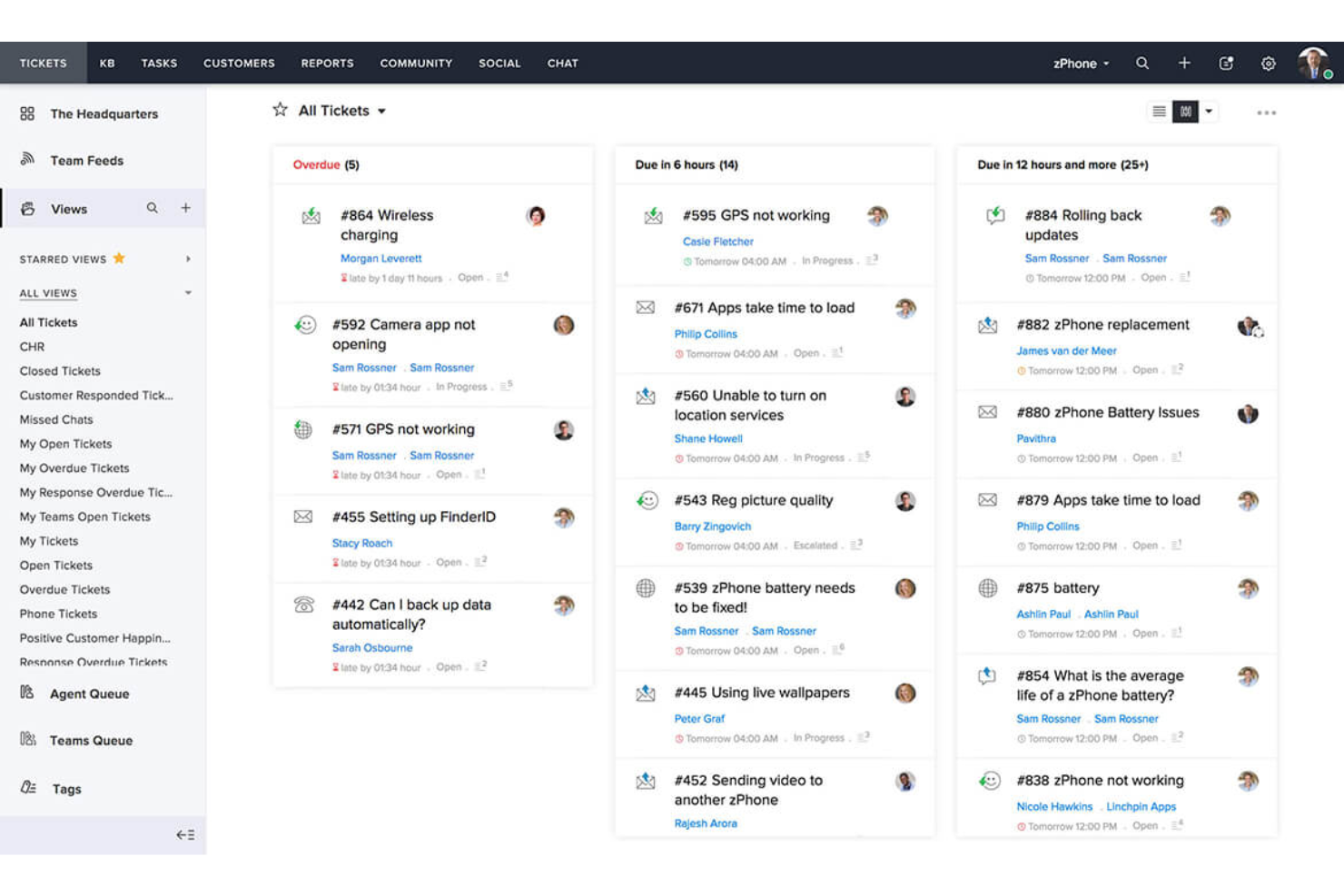
Zoho Desk è una piattaforma di ticketing per l'assistenza clienti basata su cloud, creata per i team di supporto nelle aziende in crescita che devono gestire un elevato volume di richieste su più canali e fornire risposte rapide e organizzate.
Per chi è ideale Zoho Desk?
Zoho Desk è adatto a piccole e medie imprese che necessitano di una piattaforma di supporto multi-canale scalabile e che già utilizzano—o pianificano di utilizzare—altri strumenti nell'ecosistema Zoho.
Perché ho scelto Zoho Desk
Ho scelto Zoho Desk come uno dei migliori grazie all'efficacia delle sue automazioni contestuali. Le regole di workflow non si attivano solo su condizioni di base, ma entrano in gioco in base al contesto del ticket, come la storia del cliente, il sentiment e il dipartimento. Quando Zia assegna automaticamente tag a un ticket in entrata e aggiorna campi come categoria e priorità, questi aggiornamenti attivano immediatamente i giusti processi automatici senza bisogno di intervento manuale. Apprezzo anche Blueprint, che consente al mio team di mappare visivamente processi di supporto multi-step, definendo chiaramente chi fa cosa e quando in ogni fase della risoluzione. Questo livello di controllo dei processi è qualcosa che la maggior parte degli strumenti di ticketing non offre di default.
Funzionalità principali di Zoho Desk
- Gestione ticket omnicanale: Consolida i ticket provenienti da email, chat dal vivo, telefono, social media e form web in un'unica casella di posta condivisa.
- Gestione SLA: Imposta tempi obiettivo di risposta e risoluzione in base alla priorità del ticket, con escalation automatiche quando le scadenze sono a rischio.
- Portale self-service: Offri ai clienti l’accesso a un help center personalizzato con knowledge base, forum della community e ricerca assistita da AI.
- Valutazioni della soddisfazione clienti (CSAT): Raccogli feedback post-risoluzione direttamente dai clienti per monitorare la soddisfazione a livello di ticket.
Integrazioni di Zoho Desk
Le integrazioni includono Zoho CRM, Jira, Slack, Salesforce, Trello, Microsoft Teams, HubSpot, Asana, Mailchimp e Pipedrive.
Pros and Cons
Pros:
- Approfondimenti sui clienti basati sul contesto
- Scalabile per aziende in crescita
- App mobile per la gestione dei ticket
Cons:
- Funzionalità di reportistica di base
- Richiede una configurazione iniziale

eDesk
Ideale per la raccolta automatica dei feedback
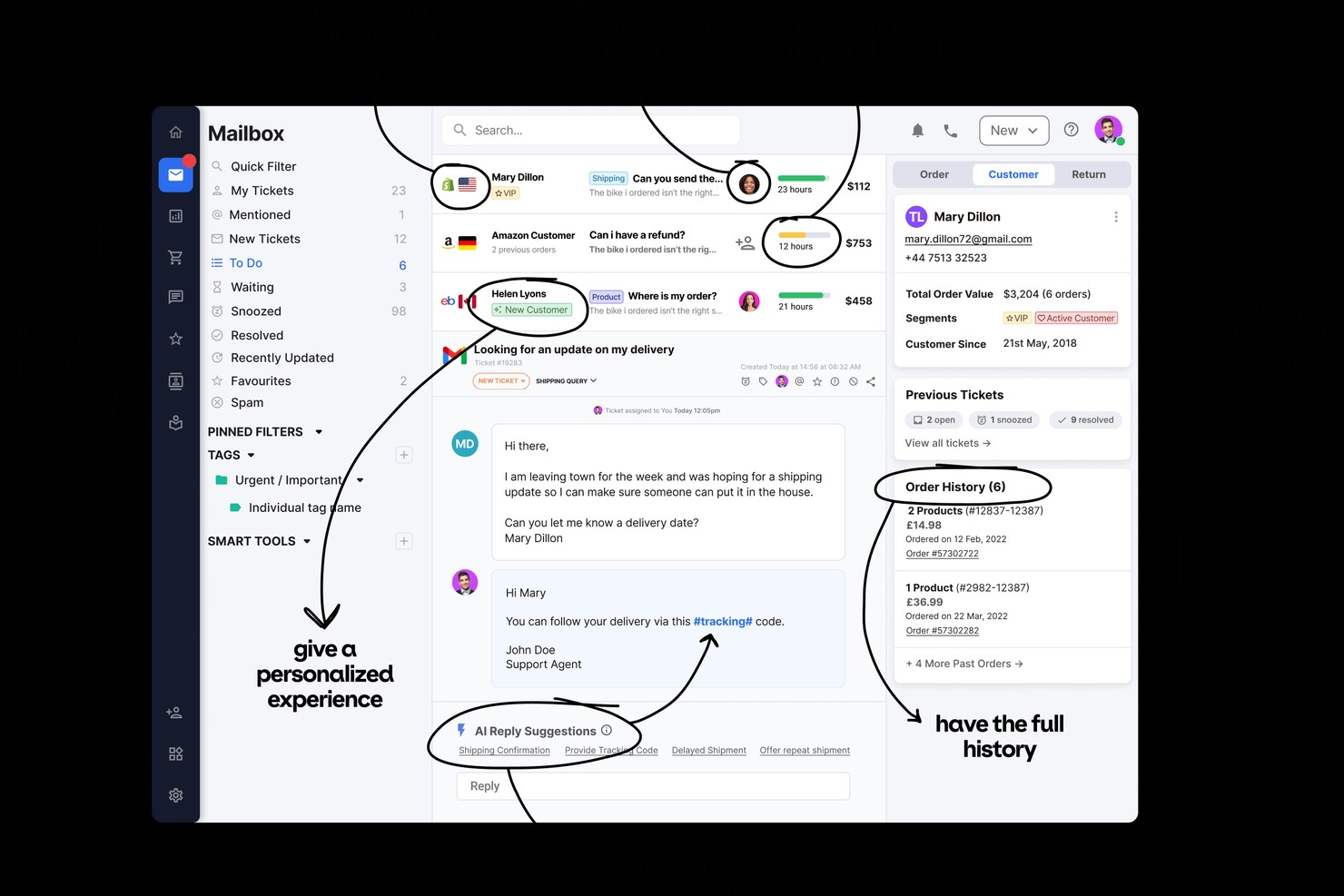
eDesk è una piattaforma di ticketing per l'assistenza clienti progettata per le attività di ecommerce e rivenditori online che necessitano di gestire il supporto multicanale, automatizzare le attività ripetitive e mantenere organizzate le conversazioni dei clienti tra marketplace, email, chat e canali social.
Per chi è più indicato eDesk?
eDesk è particolarmente adatto per le aziende ecommerce che vendono su più marketplace online e hanno bisogno di un luogo centralizzato per gestire il supporto clienti su larga scala.
Perché ho scelto eDesk
eDesk si guadagna un posto nella mia shortlist grazie a come gestisce la raccolta automatica del feedback dopo la risoluzione di un ticket. Mi piace il fatto che consenta di impostare richieste di feedback automatizzate che vengono inviate appena si chiude un'interazione di supporto, permettendo di raccogliere il sentiment senza alcun follow-up manuale da parte del team. Inoltre collega i dati di feedback direttamente ai singoli ticket e agenti, il che significa che posso vedere esattamente dove cala la soddisfazione e quali interazioni la influenzano. Questo tipo di visibilità a ciclo chiuso è davvero utile quando si vuole migliorare la qualità del supporto in un'operazione ecommerce ad alto volume.
Funzionalità principali di eDesk
- Casella smart: Consolida messaggi da marketplace, email, social e live chat in un'unica interfaccia con il contesto completo dell'ordine collegato a ciascun ticket.
- Instradamento ticket con IA: Assegna automaticamente i ticket in arrivo all'agente o al team giusto in base a regole che si possono configurare, riducendo la gestione manuale.
- Casella pre-vendita: Separa le richieste pre-acquisto dai ticket di supporto post-vendita così il team può dare priorità e rispondere subito alle intenzioni di acquisto.
- Knowledge base: Consente di pubblicare articoli di aiuto self-service direttamente sul tuo sito per ridurre la mole di ticket in arrivo.
Integrazioni di eDesk
Le integrazioni includono Amazon, eBay, Shopify, Magento, BigCommerce, WooCommerce, Walmart, Facebook, Instagram e Klaviyo.
Pros and Cons
Pros:
- Centralizza i ticket da marketplace e webstore
- Monitoraggio dei ricavi collegato ai ticket di supporto
- Gestione SLA e analisi delle performance incluse
Cons:
- Alcune integrazioni richiedono piani di livello superiore
- La funzionalità dell'app mobile è limitata rispetto alla versione desktop
New Product Updates from eDesk
eDesk Adds Galeria and Kaufland Support in Spain and Netherlands
eDesk adds support for Galeria, Kaufland Spain, and Kaufland Netherlands marketplaces. These integrations bring more European buyer messages into eDesk with routing, templates, AI insights, and automated translation. For more information, visit eDesk’s official site.
 .
.
Tidio
Ideale per funzionalità dettagliate di reporting sui ticket del cliente
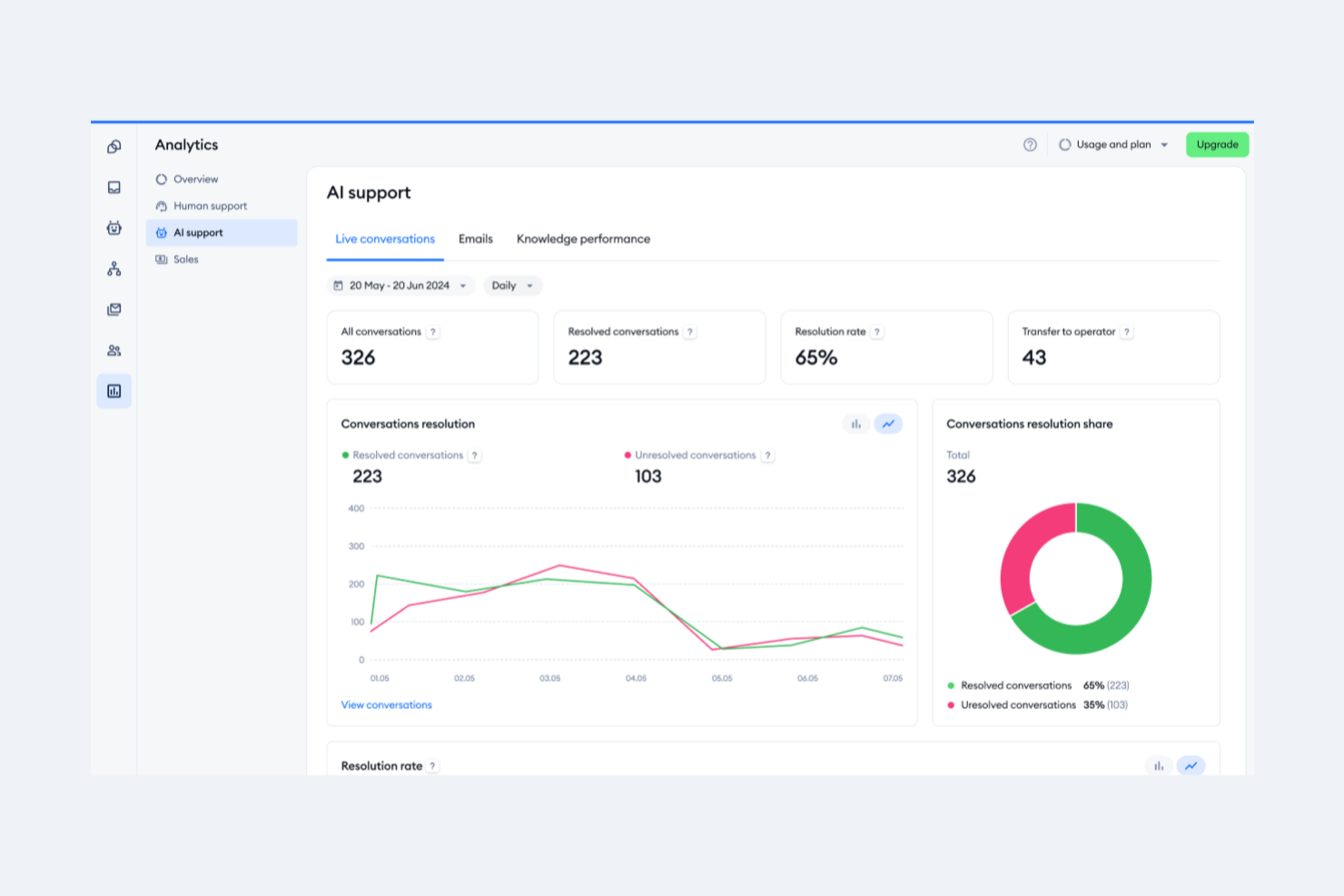
Tidio riunisce chat dal vivo, ticketing e automazione per le piccole imprese e i team ecommerce che desiderano gestire le conversazioni con i clienti, risolvere i problemi e mantenere tutte le richieste di supporto organizzate in un unico posto.
Per chi è Tidio?
Tidio è una scelta ideale per aziende ecommerce di piccole e medie dimensioni che necessitano di uno strumento di supporto accessibile e completo senza la complessità delle piattaforme aziendali.
Perché ho scelto Tidio
Ho incluso Tidio tra le mie scelte migliori perché il suo cruscotto di analisi offre ai responsabili del supporto una panoramica realmente utile sulle prestazioni di ticket e conversazioni. Mi piace il fatto che si possano monitorare metriche a livello di operatore—come quanti ticket aperti ogni agente sta gestendo, i tempi di risposta individuali e le valutazioni della soddisfazione dei clienti—tutto dallo stesso posto. La funzione Smart Views inoltre permette al mio team di monitorare in tempo reale determinati argomenti delle richieste, cosa utile per individuare schemi ricorrenti nelle domande dei clienti. Se si aggiungono grafici di confronto tra periodi e suggerimenti di miglioramento integrati direttamente nell’interfaccia dei report, si ottiene una reportistica che va oltre i semplici conteggi dei ticket.
Funzionalità principali di Tidio
- Posta in arrivo unificata: Gestisci tutte le conversazioni con i clienti provenienti da chat dal vivo, email e canali social in una singola coda.
- Assegnazione automatica dei ticket: Instrada i ticket in arrivo a specifici agenti o team sulla base di regole predefinite.
- Risposte preimpostate: Salva e riutilizza risposte già scritte per gestire le domande più comuni dei clienti.
- Chatbot Lyro AI: Risolve automaticamente le richieste dei clienti grazie all’AI prima che vengano assegnate a un operatore umano.
Integrazioni di Tidio
Le integrazioni includono Instagram, Messenger, Shopify, WhatsApp, WordPress, Zendesk, ActiveCampaign, Adobe Commerce e WooCommerce.
Pros and Cons
Pros:
- App mobile per il supporto
- Widget di chat personalizzabili
- Capacità di invio messaggi proattivi
Cons:
- Funzionalità di analisi di base
- Potrebbe richiedere tempo per la configurazione iniziale

Ideale per l'automazione dei flussi di lavoro con IA
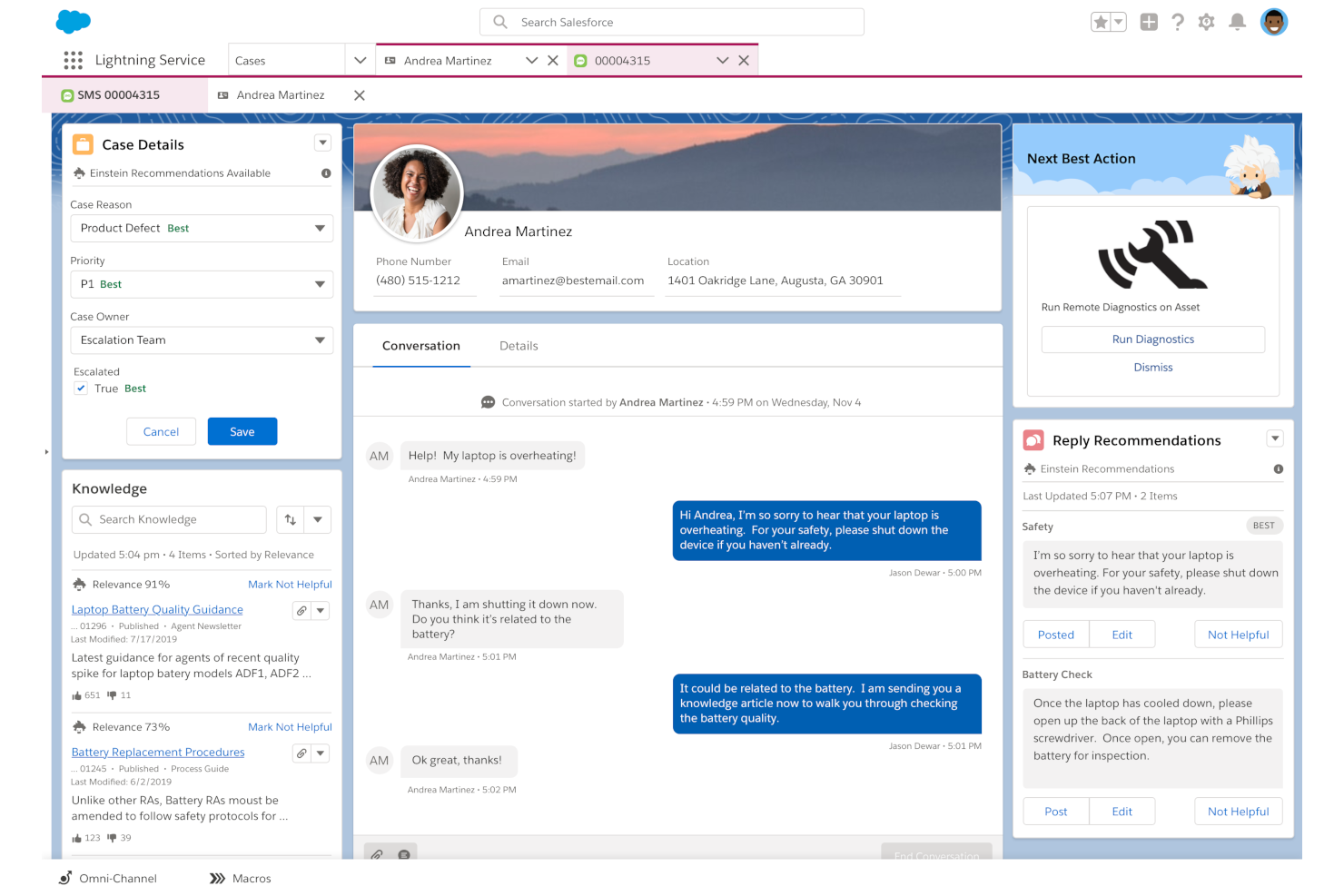
Salesforce Service Cloud offre ai team di assistenza clienti nei settori ad alta dinamicità una piattaforma unificata per gestire ticket, automatizzare i flussi di lavoro dei casi e fornire supporto su tutti i canali.
Per chi è Salesforce Service Cloud?
Salesforce Service Cloud si adatta perfettamente a team di medie e grandi dimensioni che necessitano di una piattaforma di supporto scalabile e connessa al CRM per gestire operazioni di assistenza clienti complesse e ad alto volume.
Perché ho scelto Salesforce Service Cloud
Ho selezionato Salesforce Service Cloud tra i migliori grazie all'integrazione profonda dell'IA nei flussi di lavoro dei casi, non solo come semplice chatbot. Il Service Rep Assistant utilizza i dati dei casi in ingresso e la cronologia dei clienti per generare in tempo reale piani d’azione dinamici e dettagliati per gli operatori, così il mio team non deve più smistare manualmente né decidere i prossimi passi per ogni ticket. Apprezzo anche la funzionalità di classificazione automatica dei casi alimentata da IA, che analizza i casi risolti per categorizzare e indirizzare automaticamente i nuovi alla persona o coda più adatta. Inoltre, Agentforce for Service gestisce autonomamente le conversazioni con i clienti su canali come WhatsApp ed SMS, risolvendo i casi di routine senza intervento umano.
Funzionalità principali di Salesforce Service Cloud
- Instradamento omnicanale: Instrada automaticamente i ticket in arrivo da email, chat, telefono e social media all’operatore giusto in base alle competenze e alla disponibilità.
- Gestione della knowledge base: Permette agli operatori di creare, gestire e suggerire articoli di supporto direttamente all’interno dei ticket per risolverli più rapidamente.
- Gestione degli accordi sul livello di servizio (SLA): Tiene traccia delle scadenze di risposta e risoluzione per ogni ticket ed esegue escalation automatica dei casi a rischio di sforamento dei livelli di servizio.
- Portale self-service clienti: Offre ai clienti un portale personalizzato dove possono inviare ticket, monitorare lo stato dei casi e trovare risposte senza contattare un operatore.
Integrazioni di Salesforce Service Cloud
Le integrazioni includono Slack, Jira, Microsoft Teams, Zoom, Genesys, Five9, Vonage, DocuSign, QuickBooks e SAP.
Pros and Cons
Pros:
- Chatbot alimentati da IA
- Solida reportistica e analisi
- Estremamente scalabile per aziende in crescita
Cons:
- Processo di configurazione complesso
- Elevato consumo di risorse
New Product Updates from Agentforce Service (formerly Service Cloud)
Agentforce Service Keeps Full Agentforce Voice Transcripts After Calls
Agentforce Service now shows the full conversation history in post-call transcripts for Agentforce Voice calls within the Service Console, giving agents better context for follow-ups. For more information, visit Salesforce’s official site.
 .
.
Ideale con ampie opzioni di integrazione e API
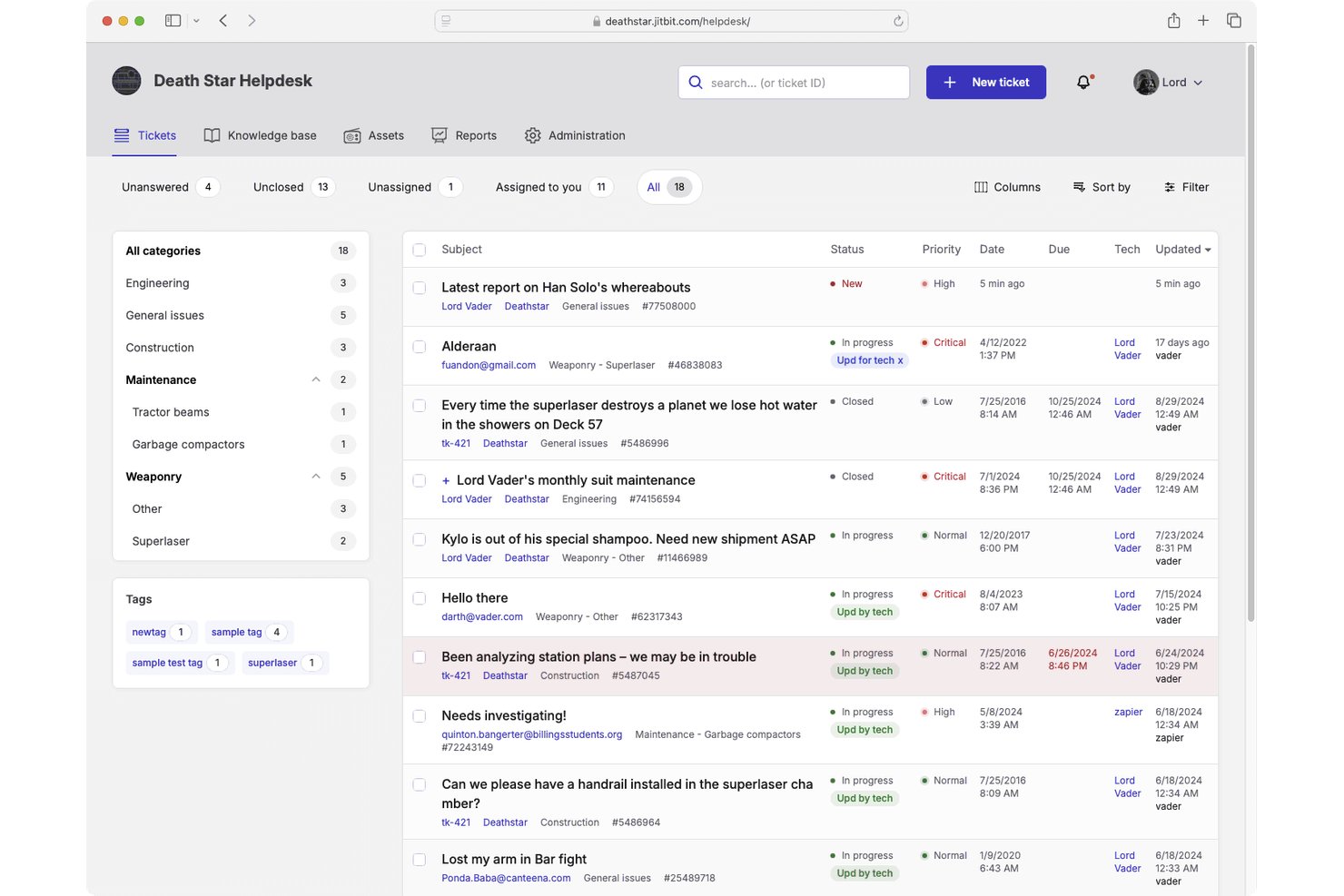
Jitbit Helpdesk è un sistema di ticketing orientato all'email che combina la gestione di caselle di posta condivise, flussi di lavoro automatizzati, una knowledge base rivolta ai clienti, il tracciamento degli asset e suggerimenti per le risposte basati sull'intelligenza artificiale per i team di supporto.
Per chi è consigliato Jitbit Helpdesk?
Team IT e di supporto in piccole e medie imprese che necessitano di un sistema di ticketing semplice, basato su email, con grande flessibilità API e opzioni di distribuzione self-hosted.
Perché ho scelto Jitbit Helpdesk
Ho incluso Jitbit Helpdesk tra le mie scelte principali perché la sua REST API e il supporto nativo ai webhook permettono al mio team di collegarlo direttamente agli strumenti interni, non solo alle app di una lista pre-approvata. Quando un cliente invia un ticket, posso attivare richieste HTTP verso server di terze parti in modo automatico tramite il modulo di automazione. Le integrazioni native con Jira, GitHub e Slack coprono i collegamenti quotidiani del flusso di lavoro, mentre oltre 500 app connesse tramite Zapier gestiscono i casi particolari che il mio team incontra.
Funzionalità principali di Jitbit Helpdesk
- Tracciamento asset: Gestisci hardware e asset IT all'interno della stessa interfaccia dei ticket di supporto.
- Knowledge base rivolta ai clienti: Offri articoli di aiuto ricercabili per deviare le domande più comuni e ridurre il volume dei ticket.
- App mobili: Accedi, aggiorna e gestisci i ticket di supporto sia da dispositivi iOS che Android.
- Trigger di automazione: Crea regole per assegnare automaticamente gli operatori, impostare priorità o inviare avvisi in base ai criteri dei ticket.
Integrazioni di Jitbit Helpdesk
Jitbit Helpdesk offre integrazioni native con Jira, Slack, GitHub, Microsoft 365, Active Directory e Azure DevOps, e si collega a Zapier. È inoltre disponibile un'API per integrazioni personalizzate.
Pros and Cons
Pros:
- Disponibile l'opzione di distribuzione self-hosted
- Le regole di automazione sono facili da configurare
- Installazione leggera e rapido avvio
Cons:
- I report non sono abbastanza dettagliati per la leadership CX
- Nessun canale chat dal vivo nativo
Altri Software di Ticketing per il Servizio Clienti
Ecco alcune altre opzioni interessanti:
- Zendesk
Ideale per la gestione dei ticket multicanale
- Desk365
Ideale per risposte ai ticket guidate dall'intelligenza artificiale
- Missive
Ideale per le caselle email collaborative dei team
- EngageBay
Ideale per piccoli team che vogliono far crescere la propria azienda
- Front
Ideale per un sistema di ticketing in stile email
- HappyFox
Miglior software di ticketing per team di help desk IT moderni
- monday service
Ideale per la personalizzazione dei flussi di lavoro senza codice
- CoSupport AI
Ideale per supporto ticketing e business intelligence in un'unica soluzione.
- Issuetrak
Ideale per la gestione centralizzata delle segnalazioni
- InvGate Service Management
Ideale per la prioritizzazione dei ticket
- NinjaOne
Ideale per la gestione integrata dei servizi IT
- SAAS First
Miglior chatbot integrato guidato dall'intelligenza artificiale
- 14.ai
Miglior motore di risposta sensibile all’intento
- Creatio CRM
Ideale per la gestione intelligente delle code
- SparrowDesk
Ideale per un assistente Copilot con IA


Che cos'è il Software di Ticketing per il Cliente?
Il software di ticketing per il cliente è uno strumento che organizza e traccia le richieste dei clienti per aiutare i team di supporto a gestire e risolvere i problemi in modo efficiente. Migliora i tempi di risposta e la qualità del servizio semplificando la comunicazione tra i diversi canali e automatizzando i principali flussi di lavoro del supporto.
Come valuto i software di ticketing per l'assistenza clienti
Divido la mia valutazione in due livelli: la base che ogni strumento deve soddisfare—gestione del ciclo di vita del ticket, rispetto delle SLA, intake omnicanale—e i fattori differenzianti che determinano la compatibilità con uno specifico team.
Funzionalità chiave (requisiti minimi per questa lista)
Quando seleziono gli strumenti per la mia lista, valuto ciascuno su una scala da 0 (funzionalità non offerta) a 5 (eccellente in quest'area) per ogni funzionalità chiave elencata di seguito. Successivamente, calcolo il punteggio totale dello strumento in percentuale. Ogni strumento deve raggiungere un punteggio totale minimo del 75% per essere incluso.
- Gestione del ciclo di vita del ticket: Valuto come ogni strumento gestisce un ticket dalla creazione fino alla risoluzione, inclusi stati personalizzati, azioni di unione/divisione e note interne per i passaggi di consegna tra agenti.
- Intake omnicanale: Ogni strumento viene valutato su quanti canali unifica—email, chat, telefono, social, moduli web—e se le conversazioni sono raggruppate in una singola cronologia per ogni cliente.
- Instradamento e assegnazione: Controllo se l'instradamento va oltre il semplice round-robin per supportare assegnazioni basate su competenze, priorità o carico di lavoro, mantenendo le code bilanciate nei periodi di picco.
- Gestione delle politiche SLA: Qui conta la capacità di definire più politiche SLA—ad esempio, impostare obiettivi di risposta diversi per account VIP rispetto a richieste generali, con trigger di escalation quando i timer stanno per essere violati.
- Knowledge base e self-service: Valuto se la piattaforma offre un centro assistenza rivolto ai clienti con ricerca, suggerimenti di articoli all’interno del flusso ticket e monitoraggio della deflessione per misurare l’impatto sul volume.
- Reportistica e analisi: Le dashboard dovrebbero coprire le tendenze del volume dei ticket, tempi di prima risposta e risoluzione, utilizzo degli agenti e i punteggi CSAT—con abbastanza flessibilità per filtri per canale, team o periodo.
Dopo aver ottenuto un elenco di strumenti che soddisfano i criteri, osservo cosa distingue ciascuna piattaforma.
Fattori differenzianti (cosa distingue i fornitori)
Ecco come confronto i diversi fornitori:
Funzionalità distintive
Funzionalità alimentate dall'AI come la stesura delle risposte e la sintesi dei ticket possono ridurre significativamente i tempi di lavorazione, quindi valuto quanto profondamente ogni strumento integra l'automazione nel flusso di lavoro degli agenti. Un pannello contestuale per il cliente è un altro grande differenziatore—quando gli agenti possono vedere la cronologia ordini, le conversazioni passate e la salute dell’account senza cambiare scheda, la risoluzione è più rapida. Considero anche i sondaggi CSAT e NPS integrati direttamente nei ticket, che permettono ai responsabili della CX di ottenere feedback a ciclo chiuso senza bisogno di uno strumento di sondaggio separato.
Oltre le funzionalità
La profondità dell’integrazione conta molto—controllo se ogni strumento si connette nativamente a CRM, piattaforme ecommerce e app di comunicazione che il team già utilizza quotidianamente. La struttura dei prezzi è ugualmente importante, poiché i modelli per agente possono diventare rapidamente costosi per i team in crescita, mentre alcuni fornitori offrono piani basati sul volume o a livelli che scalano in modo più prevedibile. Valuto anche il time-to-value: quanto velocemente un team può migrare da un sistema legacy, configurare le code e far sì che gli agenti gestiscano i ticket senza settimane di setup.
Come Scegliere il Software di Ticketing per il Cliente
È facile perdersi tra lunghe liste di funzionalità e strutture di prezzo complesse. Per aiutarti a rimanere focalizzato durante la tua personale selezione del software, ecco una checklist di fattori da considerare:
| Fattore | Cosa Considerare |
|---|---|
| Scalabilità | Assicurati che il software possa crescere con il tuo team. Cerca opzioni che gestiscano un aumento del volume dei ticket senza rallentare. |
| Integrazioni | Verifica se il software si integra con gli strumenti già utilizzati dal tuo team, come sistemi CRM, client email o piattaforme di chat. |
| Personalizzazione | Cerca workflow e dashboard personalizzabili. Il tuo team dovrebbe poter adattare il software ai propri processi. |
| Semplicità d’uso | Scegli un software intuitivo e facile da apprendere per il tuo team. Un’interfaccia complicata può rallentare la produttività. |
| Budget | Considera i vincoli di budget. Cerca software con piani tariffari flessibili che si adattino alla tua situazione finanziaria. |
| Sicurezza e Privacy | Assicurati che il software disponga di solide funzionalità di sicurezza, come la crittografia dei dati e backup regolari, per proteggere le informazioni dei clienti. |
| Opzioni di supporto | Valuta i servizi di supporto disponibili, come chat dal vivo o assistenza telefonica, per aiutare il tuo team quando sorgono problemi. |
| Strumenti di reportistica | Verifica la presenza di opzioni di reportistica avanzate che ti permettano di monitorare le metriche di performance e individuare aree di miglioramento. |
Tendenze nel software di gestione ticket per clienti
Nella mia ricerca ho consultato innumerevoli aggiornamenti di prodotto, comunicati stampa e log delle release di vari fornitori di software per la gestione dei ticket. Ecco alcune delle tendenze emergenti che sto monitorando:
- Chatbot con intelligenza artificiale: Molti fornitori stanno integrando chatbot AI per gestire le richieste di routine, liberando il team per compiti più complessi. Questi bot imparano dalle interazioni e migliorano nel tempo, offrendo risposte più rapide e accurate.
- Supporto omnicanale: Gli utenti vogliono collegarsi attraverso i canali preferiti, che siano social media, email o live chat. I fornitori offrono piattaforme unificate che aiutano il team a gestire tutte queste interazioni da un’unica soluzione.
- Analisi del sentiment: Il software sta iniziando a includere l’analisi del sentiment per valutare in tempo reale le emozioni dei clienti. Questo aiuta il team a identificare tempestivamente i problemi e a migliorare la soddisfazione del cliente. Alcuni fornitori utilizzano questi dati per dare la priorità ai ticket urgenti.
- Portali self-service: C’è una crescente domanda di opzioni self-service come FAQ e knowledge base. I clienti apprezzano trovare soluzioni autonomamente e questo riduce il carico di lavoro del team. I fornitori stanno migliorando questi portali con funzioni di ricerca e personalizzazione.
- Miglioramenti per il lavoro da remoto: Con più team che lavorano da remoto, il software aggiunge funzionalità come strumenti di collaborazione virtuale e accesso remoto sicuro. Questo garantisce che il team possa fornire supporto costante ovunque si trovi.
Funzionalità del software di gestione ticket clienti
Quando selezioni un software per la gestione dei ticket clienti, presta attenzione alle seguenti funzionalità chiave:
- Instradamento automatico dei ticket: Smista le richieste ai membri corretti del team, assicurando risposte rapide ed efficienti.
- Supporto omnicanale: Permette al team di gestire le interazioni su più canali come email, chat e social media da un unico luogo.
- Portali self-service: Dà ai clienti accesso a FAQ e knowledge base, riducendo il carico di lavoro del team.
- Chatbot con intelligenza artificiale: Gestisce le richieste di routine e migliora nel tempo, liberando il team da problematiche più complesse.
- Workflow personalizzabili: Permette di adattare i processi alle esigenze dell’azienda, migliorando produttività ed efficienza.
- Analisi del sentiment: Valuta le emozioni dei clienti per aiutare a dare priorità ai ticket urgenti e migliorare la soddisfazione.
- Accesso mobile: Consente al team di gestire i ticket e supportare i clienti anche in mobilità.
- Analisi avanzate: Offre approfondimenti sulle metriche di performance, aiutando il team a prendere decisioni basate sui dati.
- Supporto multi-brand: Consente di gestire diversi marchi o divisioni da un unico account, centralizzando le operazioni.
- Funzionalità di integrazione: Si connette con strumenti già esistenti come sistemi CRM e piattaforme di marketing, assicurando un flusso di lavoro senza interruzioni.
Vantaggi del software di gestione ticket clienti
L’implementazione di un software per la gestione dei ticket offre numerosi vantaggi per il tuo team e la tua azienda. Ecco alcuni dei benefici a cui puoi puntare:
- Tempi di risposta migliorati: L'instradamento automatico dei ticket garantisce che le richieste arrivino rapidamente al membro del team giusto, riducendo i tempi di attesa per i clienti.
- Soddisfazione del cliente aumentata: Il supporto omnicanale e i portali self-service offrono ai clienti opzioni comode per ricevere assistenza, migliorando la loro esperienza complessiva.
- Aumento della produttività: I flussi di lavoro personalizzabili e i chatbot basati su IA si occupano delle attività di routine, permettendo al tuo team di concentrarsi su questioni più importanti.
- Migliore processo decisionale: Le analisi avanzate offrono informazioni dettagliate sulle metriche di performance, aiutando il tuo team a prendere decisioni informate per migliorare il servizio.
- Consegna del servizio coerente: Il supporto multibrand e le capacità di integrazione assicurano che il tuo team possa gestire più marchi in modo efficiente senza perdere colpi.
- Risparmio sui costi: I portali self-service e i chatbot IA riducono la necessità di personale aggiuntivo, abbattendo i costi operativi.
- Scalabilità: La capacità del software di gestire volumi crescenti di ticket supporta la tua azienda mentre cresce, garantendo efficienza continua.
Costi e prezzi dei software di gestione ticket clienti
La scelta di un software di gestione ticket clienti richiede la comprensione dei diversi modelli e piani tariffari disponibili. I costi variano in base alle funzionalità, alla dimensione del team, agli add-on e ad altri fattori. La tabella seguente riassume i piani più comuni, i loro prezzi medi e le tipiche caratteristiche incluse nelle soluzioni di software di gestione ticket clienti:
Tabella di confronto dei piani per software di gestione ticket clienti
| Tipo di piano | Prezzo medio | Caratteristiche comuni |
|---|---|---|
| Piano gratuito | $0/user/ month | Gestione ticket di base, supporto email e integrazioni limitate. |
| Piano personale | $5-$25/ user/month | Gestione ticket, reportistica di base e supporto email. |
| Piano business | $30-$60/ user/month | Reportistica avanzata, supporto multicanale e flussi di lavoro personalizzati. |
| Piano enterprise | $70-$150/ user/month | Funzionalità basate su IA, supporto clienti 24/7 e protezioni di sicurezza avanzate. |