

I 10 migliori software per il servizio clienti omnicanale del 2026

Elenco dei migliori software per il servizio clienti omnicanale


I clienti non si limitano a un solo canale di assistenza. Potrebbero iniziare una conversazione tramite chat dal vivo, proseguirla via email e ricontattarvi sui social media. Il software per il servizio clienti omnicanale riunisce queste interazioni, così il vostro team può gestirle senza perdere il contesto.
Come ha rilevato una recente indagine di Gartner, un incredibile 93% dei clienti ha dichiarato una maggiore soddisfazione del cliente (CSAT) quando ha potuto passare facilmente da un canale di assistenza all'altro. Ho testato e analizzato in modo indipendente diverse di queste soluzioni. Questa guida vi aiuterà a restringere le opzioni e a trovare la piattaforma giusta per il vostro team di assistenza.
Perché fidarsi dei nostri consigli sui software
Il nostro team testa e recensisce software dal 2012. In quanto leader CX noi stessi, sappiamo quanto sia difficile — e importante — scegliere il software giusto.
Per questa guida, abbiamo valutato gli strumenti attraverso test pratici e ricerche indipendenti, assegnando un punteggio agli strumenti in base ai nostri criteri di selezione.
Le nostre recensioni riflettono il nostro giudizio editoriale umano, non un discorso di vendita.
Tabella comparativa dei software per il servizio clienti omnicanale
Questa tabella comparativa riassume i dettagli sui prezzi delle mie migliori selezioni di software per il servizio clienti omnicanale:
| Tool | Best For | Trial Info | Price | ||
|---|---|---|---|---|---|
| 1 | Ideale per l'automazione basata sull'intelligenza artificiale nei settori regolamentati | Prova gratuita di 30 giorni | A partire da $31/operatore/mese (con fatturazione annuale) | Website | |
| 2 | Ideale per la collaborazione interna nel servizio clienti | Piano gratuito + prova gratuita di 7 giorni + dimostrazione gratuita disponibile | A partire da $25/utente/mese (con fatturazione annuale) | Website | |
| 3 | Ideale per centralizzare le interazioni con i clienti | È disponibile una prova gratuita di 14 giorni | A partire da $19/utente/mese (con fatturazione annuale) | Website | |
| 4 | Ideale per caselle di posta multicanale organizzate | Prova gratuita di 15 giorni disponibile | A partire da $25/utente/mese (con fatturazione annuale) | Website | |
| 5 | Ideale per la comunicazione B2B | Demo gratuita disponibile | A partire da $45/mese (con fatturazione annuale) | Website | |
| 6 | Ideale per la distribuzione automatizzata delle richieste | Prova gratuita di 30 giorni disponibile | A partire da $15/utente/mese (fatturato annualmente) | Website | |
| 7 | Ideale per comunicazioni clienti ecommerce unificate | Prova gratuita di 14 giorni | A partire da $39/agente/mese | Website | |
| 8 | Ideale per un'escalation AI intelligente | Piano gratuito disponibile | A partire da $32/mese (con fatturazione annuale) | Website | |
| 9 | Ideale per spazi di posta elettronica collaborativi | Prova gratuita di 30 giorni disponibile | A partire da $14/utente/mese (con fatturazione annuale) | Website | |
| 10 | Ideale per un assistente basato sull'IA | Prova gratuita di 7 giorni + piano gratuito + demo gratuita | A partire da $24.17/mese (fatturato annualmente) | Website |


Recensione dei migliori software per il servizio clienti omnicanale
Di seguito sono riportati i miei riepiloghi dettagliati dei migliori software per il servizio clienti omnicanale inclusi nel mio elenco. Le mie recensioni offrono un’analisi approfondita delle funzionalità principali, dei pro e dei contro, delle integrazioni e dei casi d’uso ideali di ogni strumento, per aiutarvi a trovare quello più adatto alle vostre esigenze.

Comm100
Ideale per l'automazione basata sull'intelligenza artificiale nei settori regolamentati
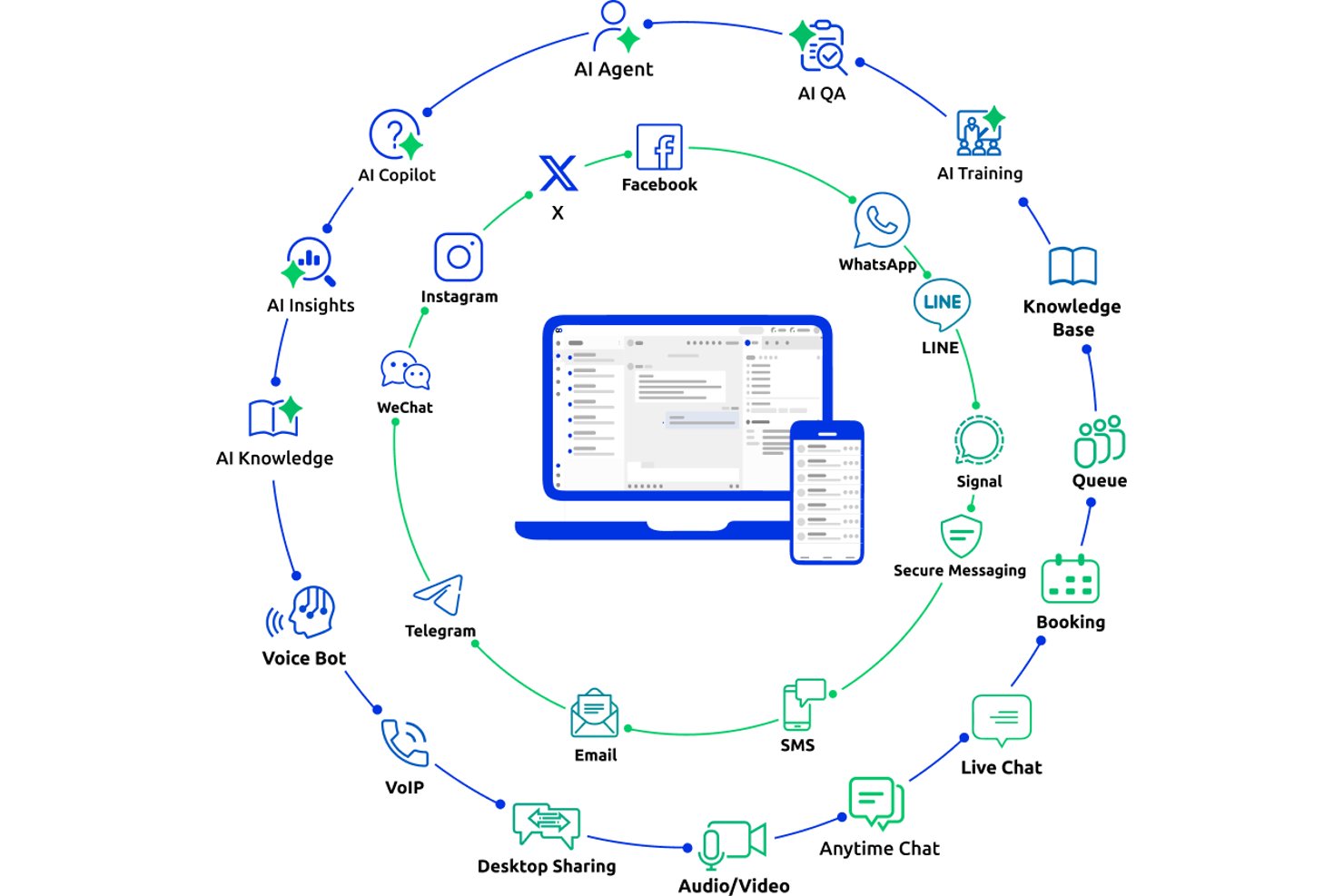
Comm100 è una piattaforma di assistenza clienti omnicanale che unifica chat dal vivo, email, voce, SMS e oltre 12 canali social e di messaggistica in un'unica console per gli operatori, con una suite di intelligenza artificiale integrata, gestione dei ticket su più canali e supporto per la distribuzione locale.
Per chi è più adatto Comm100?
Comm100 è particolarmente adatto ai team di grandi aziende e medie imprese nei settori sanitario, governativo, finanziario e dell'istruzione superiore che necessitano di un'automazione dell'assistenza basata sull'intelligenza artificiale, con rigorosi requisiti di conformità e sovranità dei dati.
Perché ho scelto Comm100
Ho scelto Comm100 come una delle soluzioni migliori perché il suo insieme di certificazioni e funzionalità di conformità è davvero raro a questo livello: SOC 2 Type II, HIPAA con BAA, PCI DSS, ISO 27001 e certificazione TX-RAMP, oltre alla distribuzione completamente locale per i team con rigorose esigenze di sovranità dei dati. Mi piace anche il fatto che il suo agente di intelligenza artificiale risolva autonomamente fino all'80% delle richieste su chat, SMS, social e voce, con prove concrete tratte da casi di studio di organizzazioni come Global Affairs Canada a conferma di questo dato.
Funzionalità principali di Comm100
- Agente di intelligenza artificiale: Utilizza l'elaborazione del linguaggio naturale per rispondere alle domande dei clienti sulla base delle fonti di conoscenza collegate.
- Azioni personalizzate: Configura l'agente di intelligenza artificiale per completare attività durante le conversazioni, tra cui prenotare appuntamenti, verificare saldi e attivare flussi di lavoro personalizzati.
- Distribuzione locale: Supporta la distribuzione locale per le organizzazioni con specifici requisiti di localizzazione dei dati o normativi.
- Pannello dei report: Monitora i tassi di risoluzione dell'assistente virtuale, i tempi di risposta degli operatori e i punteggi di soddisfazione dei clienti da un pannello centralizzato.
Integrazioni di Comm100
Comm100 dispone di integrazioni documentate con Salesforce, HubSpot, Microsoft Dynamics 365, Zendesk, ServiceNow, Twilio, Telnyx, Cisco UCCX/UCCE e Webex Contact Center. Supporta inoltre Google Drive, SharePoint Online, Confluence Cloud, Calendly, Microsoft Bookings, un'API aperta, webhook e Zapier.
Pros and Cons
Pros:
- Supporta toni configurabili e istruzioni in linguaggio naturale
- Supporta la conformità a SOC 2 Type II, HIPAA, ISO 27001 e GDPR
- Copertura nativa di Telegram, X, LINE e WeChat
Cons:
- Alcuni utenti segnalano difficoltà con le integrazioni CRM
- Le risposte dell'intelligenza artificiale dipendono dalla qualità delle fonti di conoscenza collegate

Hiver
Ideale per la collaborazione interna nel servizio clienti
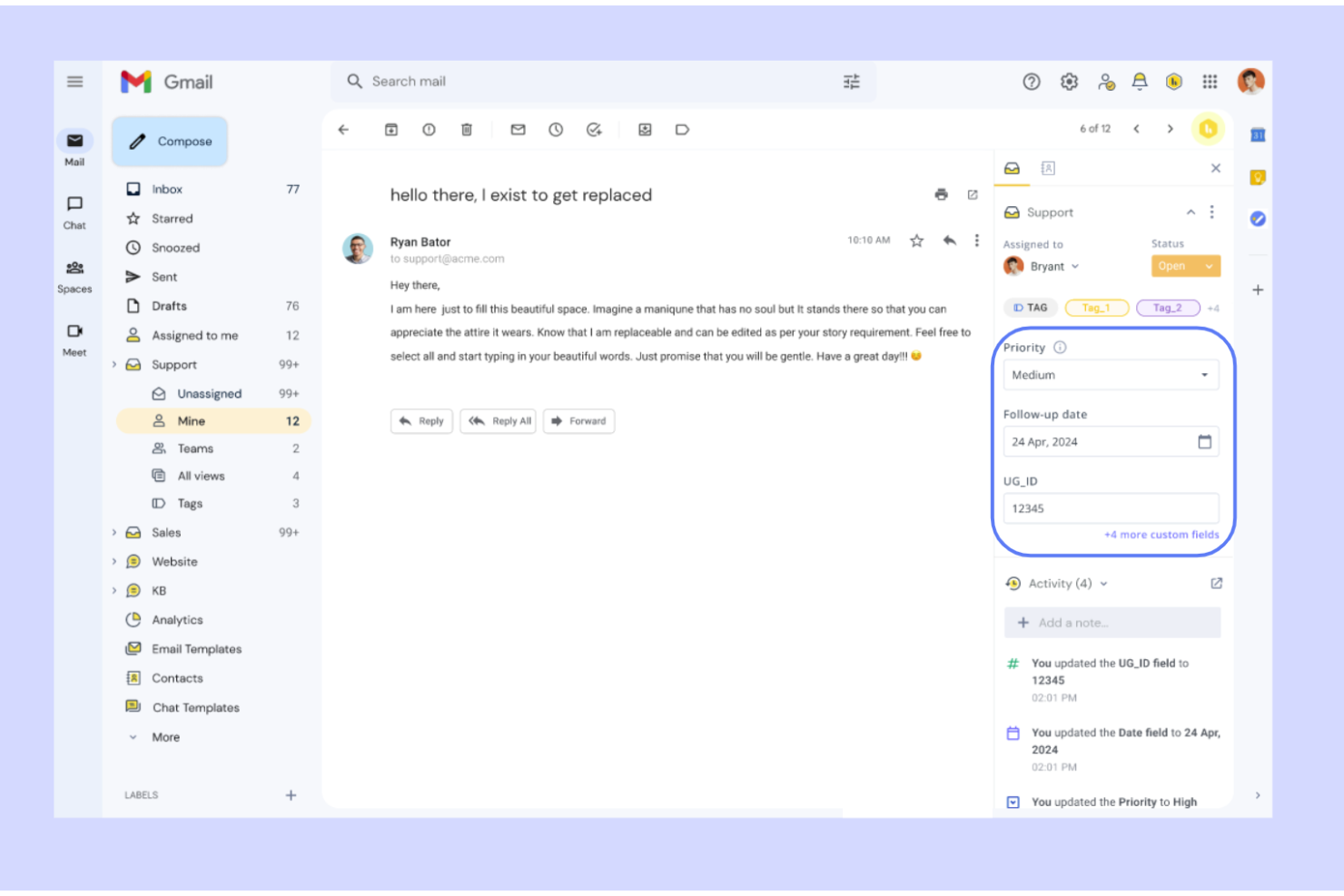
Hiver è una piattaforma omnicanale per il servizio clienti che funziona nativamente all'interno di Gmail e Outlook, unificando e-mail, chat dal vivo, voce, WhatsApp, SMS e canali social in un'unica casella di posta con strumenti di gestione delle richieste di assistenza, automazione e intelligenza artificiale.
Per chi è più adatto Hiver?
Hiver è adatto ai team di supporto di piccole e medie dimensioni che desiderano un servizio di assistenza collaborativo e integrato nella casella di posta, senza la complessità di una piattaforma aziendale dedicata.
Perché ho scelto Hiver
Ho incluso Hiver tra le mie scelte principali perché nessun'altra piattaforma omnicanale è all'altezza del suo livello di collaborazione interna. Gli agenti possono lasciare note private sulle conversazioni per condividere il contesto o chiedere aiuto, assicurandosi che il collega giusto venga coinvolto immediatamente. Ciò che trovo davvero utile è il fatto che queste funzionalità siano integrate nativamente in Gmail, così non è necessario cambiare contesto quando una richiesta di assistenza attiva richiede un secondo parere o un'escalation.
Funzionalità principali di Hiver
- Casella di posta omnicanale: Unifica e-mail, chat dal vivo, SMS, WhatsApp, Slack, voce e messaggi social in un unico spazio di lavoro.
- Copilota basato sull'intelligenza artificiale: Redige risposte, riassume le richieste di assistenza e suggerisce i passaggi successivi agli agenti sui canali collegati.
- Portale clienti: Fornisce ai clienti un portale sicuro e personalizzato per monitorare lo stato delle richieste di assistenza e inviare nuove richieste.
- Strumento per la creazione di centri assistenza: Consente di creare e gestire una base di conoscenza pubblica con suggerimenti di articoli basati sull'intelligenza artificiale.
Integrazioni di Hiver
Hiver offre integrazioni native con Aircall, Asana, Jira, Okta, QuickBooks, Salesforce, Slack, WhatsApp e Zapier, oltre che con più di 100 altre piattaforme.
Pros and Cons
Pros:
- Funziona nativamente all'interno di Gmail e Outlook
- Assistenza clienti da parte di persone reali disponibile 24 ore su 24, 7 giorni su 7
- Copre e-mail, chat, SMS, WhatsApp e voce
Cons:
- Meno integrazioni di terze parti
- L'esperienza sui dispositivi mobili non è all'altezza di quella sui computer
New Product Updates from Hiver

Hiver Brings Chat Widget Support to Mobile Apps
Hiver now lets you embed the Hiver Chat Widget in iOS, Android, React Native, and Flutter apps so customers can start chats without leaving your app. For more information, visit Hiver's official site.

Ideale per centralizzare le interazioni con i clienti
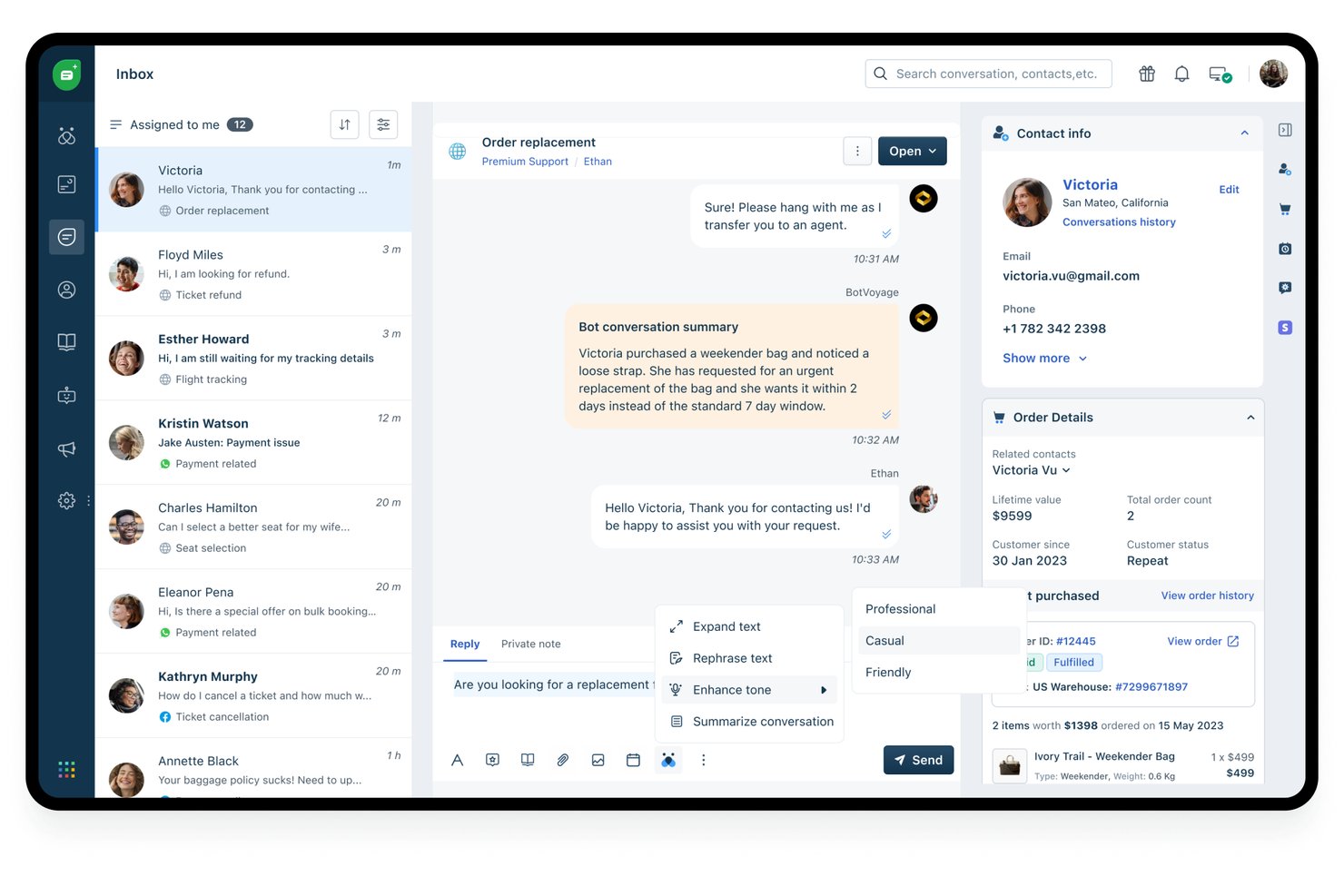
Freshdesk è una piattaforma di assistenza clienti omnicanale basata sull'intelligenza artificiale che unifica i canali email, chat, voce, social e messaggistica in un unico spazio di lavoro per gli agenti, con sistema di ticket integrato, instradamento intelligente e Freddy AI per la risoluzione autonoma e l'assistenza agli agenti.
Per chi è più indicato Freshdesk?
Freshdesk è particolarmente adatto ai team di assistenza di aziende di medie e grandi dimensioni che gestiscono elevati volumi di interazioni con i clienti su più canali digitali e vocali.
Perché ho scelto Freshdesk
Freshdesk è entrato nella mia selezione perché il Centro di comando riunisce ogni conversazione con i clienti (email, chat, WhatsApp, voce, Instagram) in un unico spazio di lavoro, senza obbligare gli agenti a passare da uno strumento all'altro. Apprezzo in particolare il fatto che l'Agente Freddy AI sia integrato direttamente nello stesso spazio di lavoro e risolva autonomamente una parte significativa delle richieste prima che raggiungano un agente umano. In questo modo il mio team gestisce un volume maggiore senza aprire schede aggiuntive o cambiare piattaforma durante la conversazione.
Funzionalità principali di Freshdesk
- Base di conoscenza e portale clienti: Agenti e clienti accedono ad articoli, domande frequenti e forum direttamente dal centro assistenza.
- Pannello analitico omnicanale: Monitora CSAT, SLA, tendenze dei ticket e produttività degli agenti su tutti i canali collegati in tempo reale.
- Instradamento basato sulle competenze e sugli SLA: Assegna automaticamente i ticket agli agenti in base alle competenze e agli accordi sui livelli di servizio.
- Servizio di assistenza multilingue: Supporta i clienti in più lingue con portali localizzati e flussi di lavoro per gli agenti.
Integrazioni di Freshdesk
Freshdesk Omni offre oltre 100 integrazioni native, tra cui Salesforce, HubSpot, Slack, Shopify, Microsoft Teams, Jira, Mailchimp, Zoom, Google Workspace e WhatsApp. È disponibile un'API per le integrazioni personalizzate.
Pros and Cons
Pros:
- L'automazione degli scenari riduce il carico delle attività manuali
- Posta in arrivo unificata che include nativamente più di sette canali
- Strumenti integrati per i sondaggi CSAT e NPS
Cons:
- Le funzionalità AI avanzate sono disponibili solo nei piani superiori
- La configurazione del canale vocale può essere complessa
New Product Updates from Freshdesk

Freshdesk Adds Voice AI Agents in Freshcaller
Freshdesk introduces Voice AI Agents available through Freshcaller Marketplace apps to handle routine calls and reduce queues. This feature enables automated call handling with real-time, conversational support. For more information, visit Freshdesk's official site.

Ideale per caselle di posta multicanale organizzate
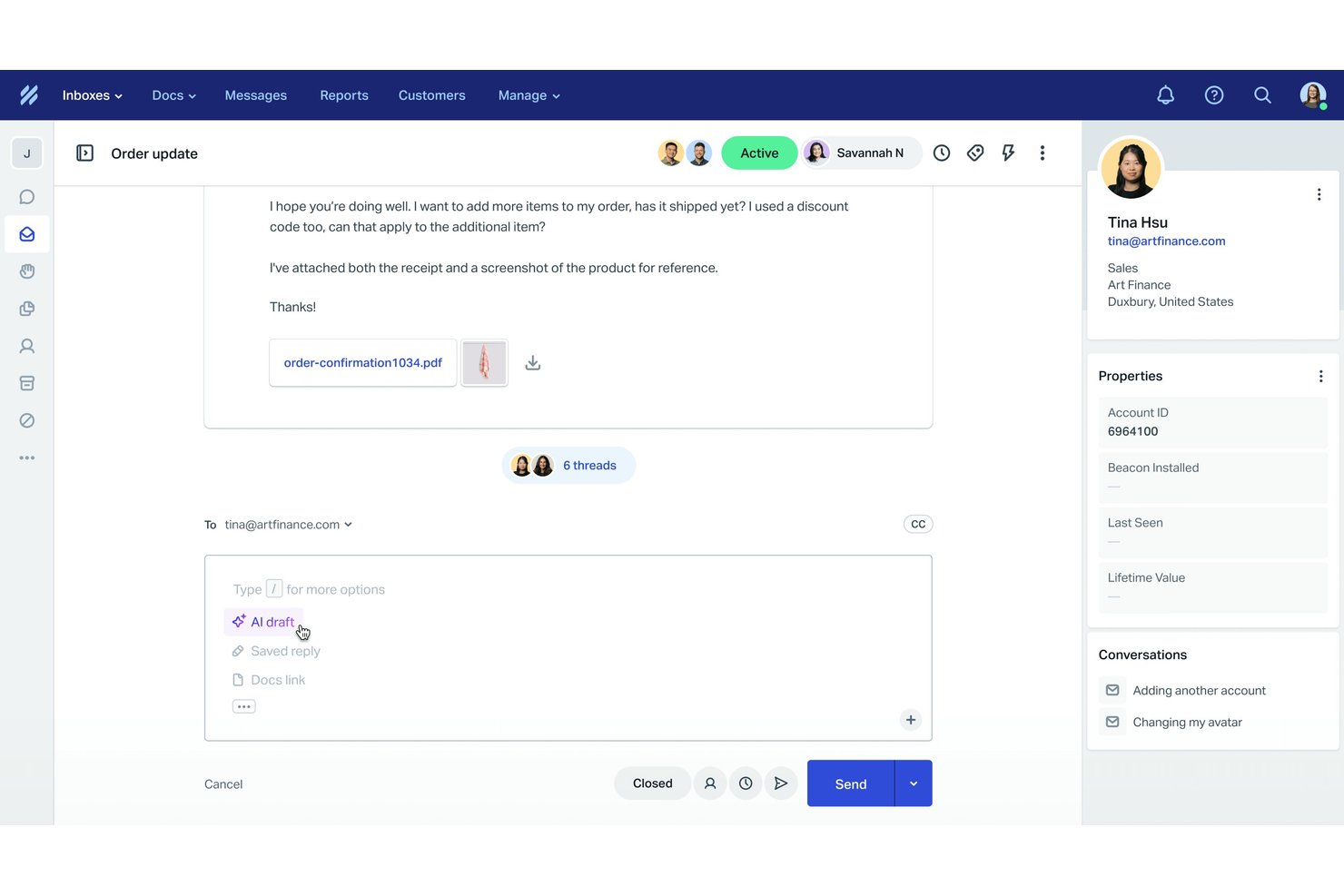
Help Scout è una piattaforma di assistenza clienti che riunisce email, chat dal vivo, messaggistica sui social e interazioni della base di conoscenza in un ambiente con casella di posta condivisa per i team di supporto.
Per chi è più adatto Help Scout?
Help Scout è particolarmente adatto alle piccole e medie imprese con team di supporto in crescita che devono andare oltre le caselle di posta elettronica condivise.
Perché ho scelto Help Scout
Ho scelto Help Scout come uno dei migliori strumenti perché nessun'altra soluzione basata su casella di posta gestisce l'organizzazione multicanale allo stesso modo. Il rilevamento delle collisioni impedisce a due agenti di rispondere contemporaneamente allo stesso cliente, mentre le visualizzazioni personalizzate consentono al mio team di ordinare le conversazioni per canale, tag o stato a colpo d'occhio. Beacon integra la chat dal vivo e l'accesso alla base di conoscenza in un unico hub incorporabile, così i clienti possono trovare risposte o avviare una conversazione senza mai lasciare la pagina.
Funzionalità principali di Help Scout
- Strumenti basati sull'intelligenza artificiale per creare e sintetizzare bozze: Gli agenti possono generare o condensare rapidamente le risposte su tutti i canali utilizzando l'assistenza integrata dell'intelligenza artificiale.
- Base di conoscenza multicanale (documentazione): Crea, organizza e pubblica articoli di assistenza per il self-service su canali web e chat.
- Automazione avanzata dei flussi di lavoro: Configura regole per assegnare, applicare tag o inoltrare le conversazioni in base al canale, alle parole chiave o alle proprietà del cliente.
- Sondaggi CSAT e NPS pronti all'uso: Raccogli, monitora e analizza la soddisfazione dei clienti direttamente nell'area di lavoro dell'agente.
Integrazioni di Help Scout
Help Scout offre integrazioni native con HubSpot, Salesforce, Slack, Mailchimp, Shopify, Jira e Aircall, si collega a Zapier e dispone di un'API per integrazioni personalizzate.
Pros and Cons
Pros:
- Strumenti di intelligenza artificiale integrati per risposte più rapide
- Integra chat e self-service in un'unica soluzione
- Facile consolidamento dei messaggi multicanale
Cons:
- Nessun supporto nativo per il canale telefonico
- Personalizzazione limitata nei piani inferiori
New Product Updates from Help Scout

Help Scout Adds Automatic Conversation Reassignment
Help Scout can now automatically unassign conversations when the assigned teammate has been away long enough, keeping replies moving so others can pick them up. For more information, visit Help Scout's official site.
 .
.
Ideale per la comunicazione B2B
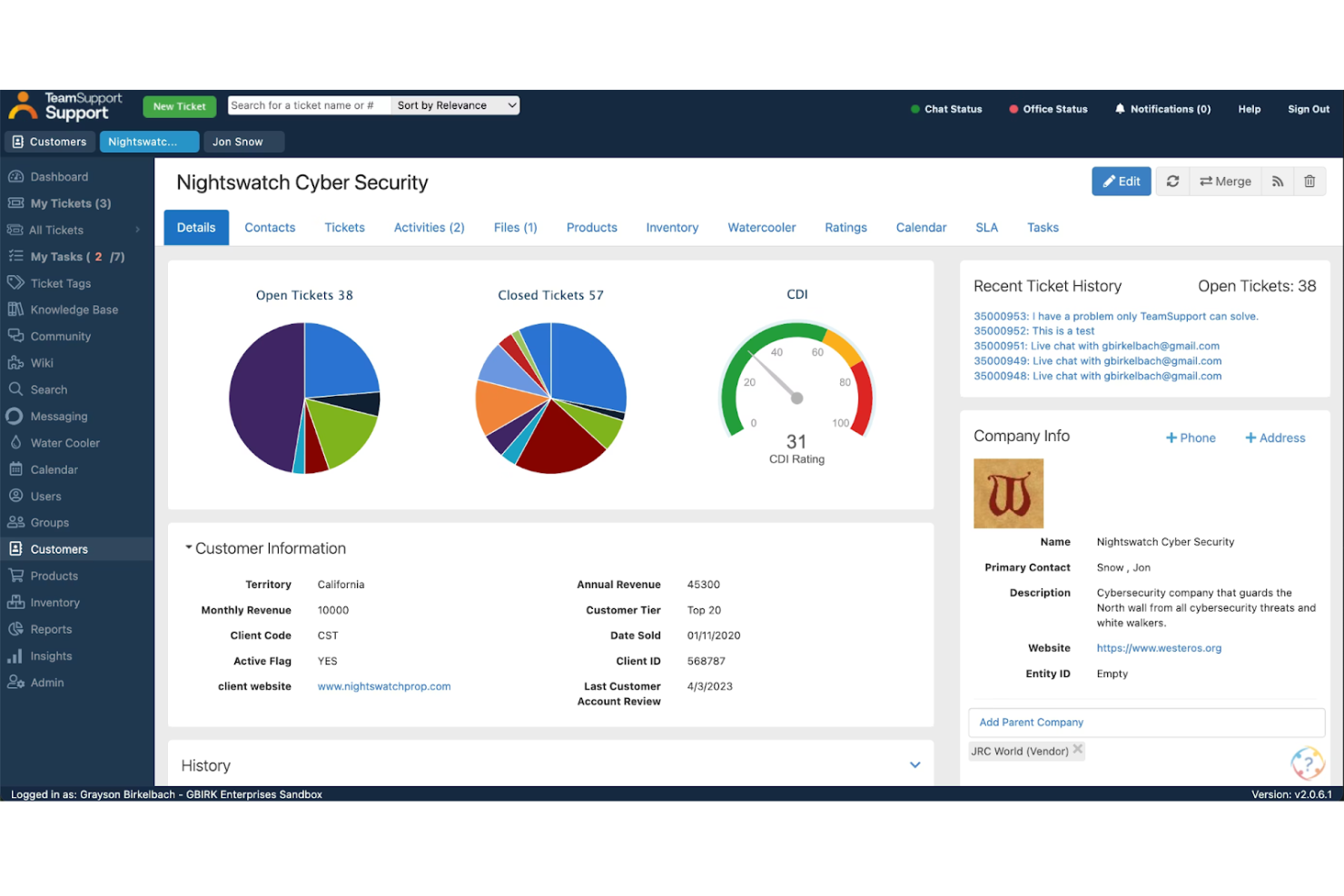
TeamSupport è una piattaforma di assistenza clienti focalizzata sul B2B che unifica la gestione dei ticket, la chat dal vivo, gli SMS e la messaggistica, insieme all'intelligence sui clienti a livello di account e a strumenti assistiti dall'IA, in un'unica area di lavoro per gli agenti.
Per chi è più adatto TeamSupport?
TeamSupport è una soluzione particolarmente adatta alle aziende tecnologiche e SaaS B2B del mercato medio, i cui team di assistenza gestiscono account con più contatti anziché singoli consumatori.
Perché ho scelto TeamSupport
TeamSupport si è guadagnato un posto nella mia lista ristretta perché nessun altro strumento di assistenza omnicanale che ho utilizzato tiene traccia delle comunicazioni a livello di account nello stesso modo. L'Indice di criticità del cliente monitora il sentiment e il coinvolgimento in ogni conversazione, così il mio team può individuare gli account a rischio prima che sia in gioco un rinnovo. Apprezzo anche il fatto che i ticket vengano raggruppati tra i diversi canali in base all'account, non solo al contatto: in questo modo non si perde nulla quando sono coinvolti più interlocutori della stessa azienda.
Funzionalità principali di TeamSupport
- Messaggistica e chat dal vivo: Comunica con i clienti utilizzando chat, SMS, WhatsApp e Facebook Messenger da un'unica area di lavoro.
- Integrazione con i sistemi aziendali: Collegati nativamente a Salesforce, HubSpot, Microsoft Teams e JIRA per sincronizzare i dati e coordinare i flussi di lavoro.
- Base di conoscenza e portale clienti: Pubblica risorse per i clienti e mostra agli agenti gli articoli pertinenti direttamente nell'interfaccia di assistenza.
- Analisi e report avanzati: Accedi a dashboard che monitorano CSAT, SLA e prestazioni degli agenti su tutti i canali.
Integrazioni di TeamSupport
TeamSupport offre integrazioni native con Salesforce, HubSpot, Jira, Microsoft Teams e Slack, oltre a un'API per le integrazioni personalizzate.
Pros and Cons
Pros:
- Analisi del sentiment in tempo reale
- Hub di autoassistenza per i clienti personalizzabile
- Automazione dei ticket basata sull'IA
Cons:
- Supporto limitato nativo per i canali dei social media
- Funzionalità limitate dell'app mobile

Ideale per la distribuzione automatizzata delle richieste
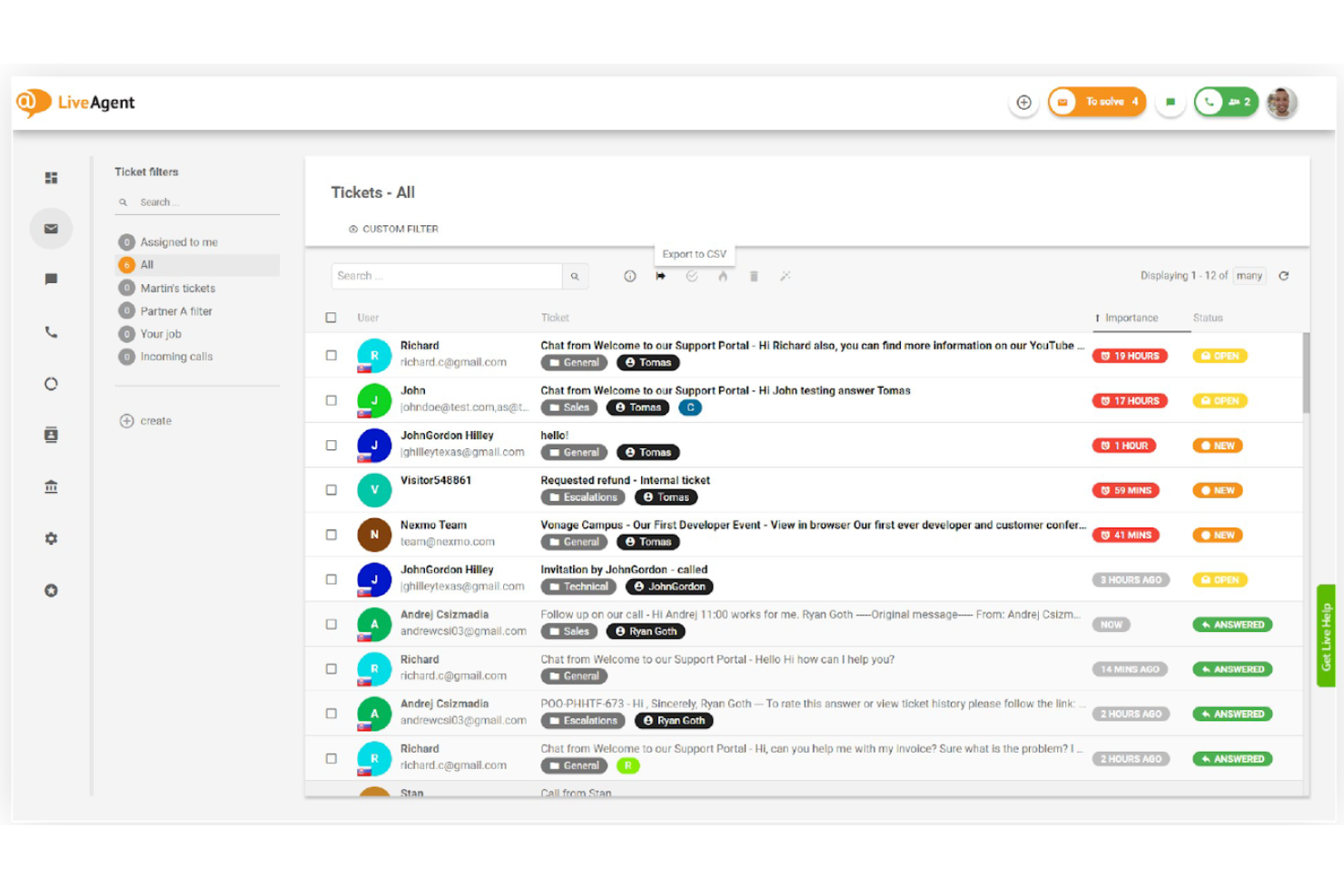
LiveAgent è una piattaforma di assistenza e di servizio clienti omnicanale che riunisce i canali e-mail, chat dal vivo, voce e messaggistica social in un'unica area di lavoro per gli operatori, con gestione integrata delle richieste, un centro assistenza telefonica nativo e strumenti di automazione.
Per chi è più adatto LiveAgent?
LiveAgent è una soluzione particolarmente adatta ai team di assistenza delle PMI e delle aziende di medie dimensioni che necessitano di una copertura multicanale—e-mail, chat, telefono e social—senza la complessità o i costi delle piattaforme aziendali.
Perché ho scelto LiveAgent
Ho incluso LiveAgent tra le mie scelte principali perché la sua distribuzione automatizzata delle richieste va ben oltre la semplice assegnazione a rotazione. Le richieste in arrivo vengono indirizzate automaticamente in base al reparto, alle competenze dell'operatore e al carico di lavoro attuale, così una chat relativa a un problema di fatturazione non finisce in una coda dell'assistenza tecnica. Apprezzo anche il fatto che le regole SLA possano attivare riassegnazioni automatiche quando una richiesta rimane inattiva troppo a lungo, mantenendo sotto controllo i tempi di risposta senza alcun intervento manuale.
Funzionalità principali di LiveAgent
- Flusso di richieste ibrido: Riunisce le conversazioni provenienti da e-mail, chat, telefono e social in un'unica richiesta per ogni cliente.
- Centro assistenza telefonica integrato: Offre IVR, gestione delle code di chiamata, registrazione delle chiamate e assistenza telefonica direttamente all'interno della piattaforma.
- Integrazione della base di conoscenza: Offre basi di conoscenza interne e pubbliche con portali personalizzabili e strumenti di autoassistenza.
- Report multicanale: Fornisce pannelli di controllo predefiniti che monitorano richieste, operatori, SLA e riscontri dei clienti su tutti i canali supportati.
Integrazioni di LiveAgent
LiveAgent offre integrazioni native con Slack, Facebook, Instagram, WhatsApp, Shopify, Salesforce, Google Analytics, Mailchimp e Zapier, oltre a un'API per le integrazioni personalizzate.
Pros and Cons
Pros:
- Centro assistenza telefonica integrato senza costi aggiuntivi
- Include strumenti di IA per aiutare nella stesura delle risposte
- Automazione SLA efficace su tutti i canali
Cons:
- Alcuni utenti ritengono che l'interfaccia sia obsoleta
- I canali dei social media sono limitati ai piani di livello superiore

eDesk
Ideale per comunicazioni clienti ecommerce unificate
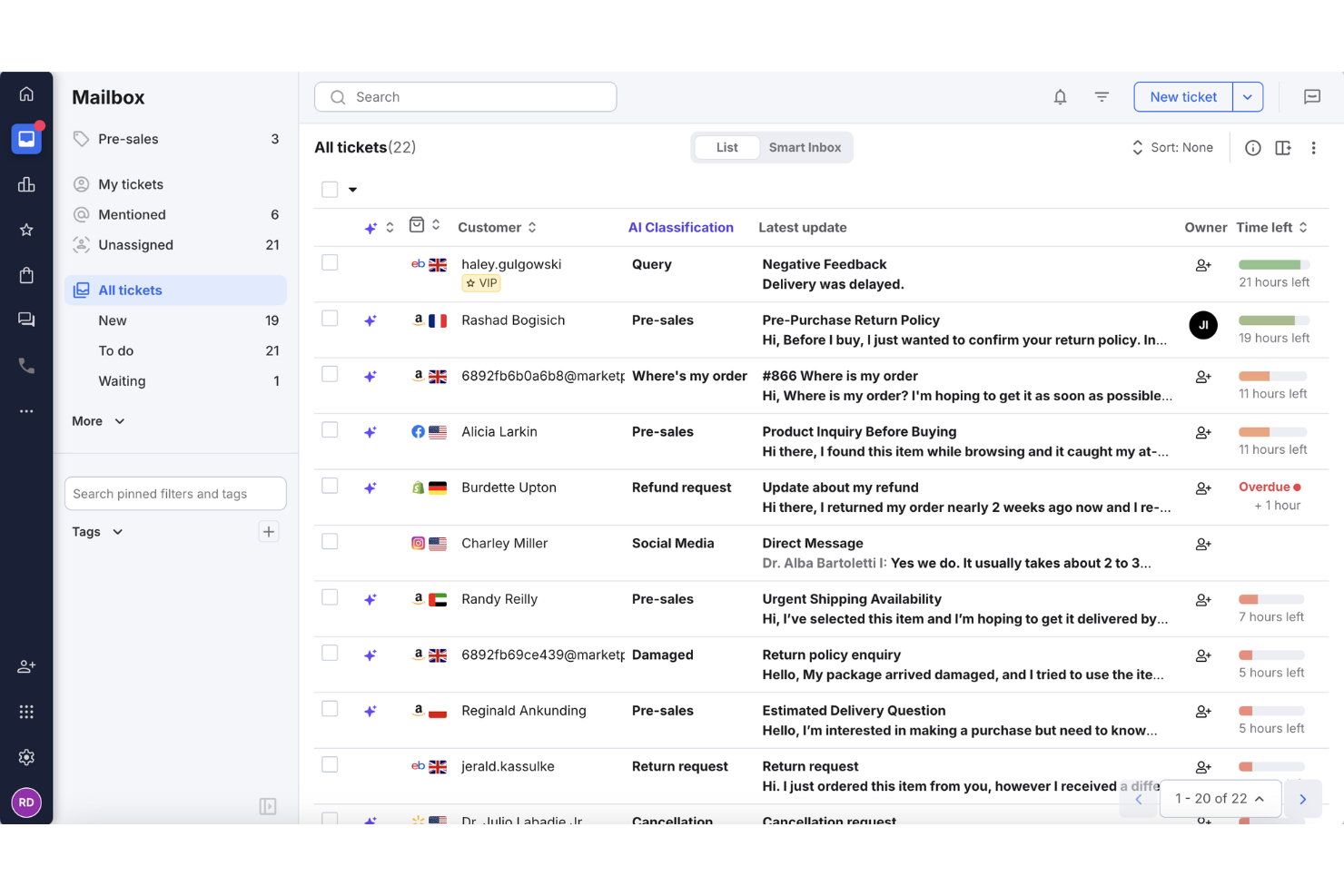
Per i rivenditori online che desiderano migliorare il supporto clienti, eDesk offre una soluzione helpdesk pratica che consolida i messaggi provenienti da diversi canali di vendita. Progettato per i team di ecommerce, automatizza le attività di supporto di routine e offre strumenti di reportistica per monitorare le prestazioni delle risposte. Grazie alle integrazioni su molte piattaforme, eDesk aiuta i team a gestire le richieste dei clienti in modo più efficiente e a mantenere flussi di lavoro di supporto coerenti.
Perché ho scelto eDesk
Ho scelto eDesk per la sua capacità di unificare le comunicazioni con i clienti dell'ecommerce tra marketplace e canali di vendita online, facilitando così la gestione del supporto su diversi canali. I suoi strumenti di automazione riducono la gestione manuale delle attività di routine, consentendo agli agenti di concentrarsi su problematiche clienti più complesse. Gli strumenti integrati per il pre-vendita aiutano inoltre i team ecommerce a rispondere alle domande sui prodotti e supportare le decisioni di acquisto.
Funzionalità principali di eDesk
Oltre alle sue capacità distintive, eDesk offre altre funzionalità di valore:
- Chatbot AI: Fornisce assistenza automatizzata 24/7, coinvolgendo i visitatori e gestendo le richieste dei clienti.
- Gestione delle recensioni: Automatizza la richiesta di recensioni da parte dei clienti soddisfatti per migliorare la reputazione del marchio.
- Approfondimenti e reportistica: Offre analisi in tempo reale su metriche di supporto e interazioni con i clienti, aiutandoti a perfezionare le tue operazioni.
- Supporto multilingua: Supporta le operazioni internazionali di eCommerce grazie alla gestione di più lingue.
Integrazioni di eDesk
Le integrazioni includono Amazon, eBay, Walmart, Shopify, Magento, WooCommerce, Facebook, WhatsApp, Instagram e Google Shopping.
Pros and Cons
Pros:
- Integra dati ordini dettagliati per un servizio clienti avanzato
- Progettato per gestire elevati volumi di richieste ecommerce
- Automazioni potenziate dall'IA migliorano l'efficienza delle risposte
Cons:
- Creato principalmente per l'ecommerce, meno flessibile per altri settori
- La personalizzazione dei report è limitata per analisi complesse
New Product Updates from eDesk
eDesk Adds Galeria and Kaufland Support in Spain and Netherlands
eDesk adds support for Galeria, Kaufland Spain, and Kaufland Netherlands marketplaces. These integrations bring more European buyer messages into eDesk with routing, templates, AI insights, and automated translation. For more information, visit eDesk’s official site.
 .
.
Chatbase
Ideale per un'escalation AI intelligente
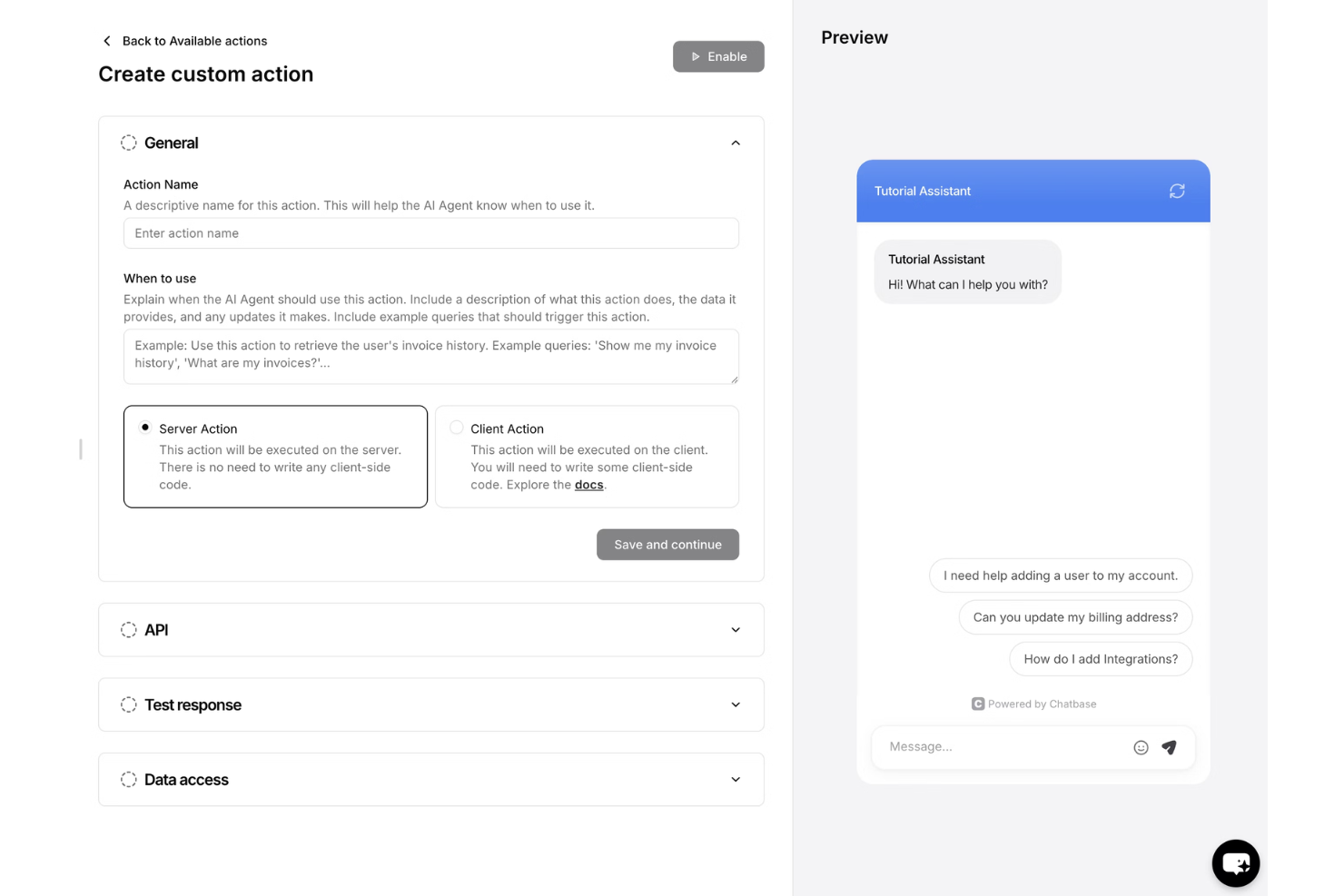
Chatbase è una piattaforma basata sull'IA che aiuta il tuo team a offrire un'assistenza clienti coerente e omnicanale tramite agenti virtuali intelligenti. Implementa agenti di assistenza autonomi su canali di chat, email, voce e messaggistica sui social, con un modulo di assistenza integrato per la collaborazione tra IA e operatori umani.
Per chi è più adatto Chatbase?
Chatbase è particolarmente adatto alle piccole e medie imprese che vogliono implementare agenti di assistenza basati sull'IA senza disporre di un team di sviluppo.
Perché ho scelto Chatbase
Ho scelto Chatbase come una delle migliori soluzioni perché la sua logica di escalation dell'IA è davvero precisa. Grazie alla funzione Barriere di sicurezza, posso definire esattamente quali argomenti deve gestire l'agente e quali deve inoltrare a un operatore umano, ad esempio indirizzando direttamente le richieste di rimborso all'assistenza per la fatturazione. Apprezzo soprattutto il fatto che il modulo di assistenza mantenga intatto l'intero filo della conversazione quando avviene questo passaggio, così i miei operatori umani possono riprendere la conversazione dal punto in cui era stata interrotta, disponendo di tutto il contesto e non trovandosi davanti a una pagina vuota.
Funzionalità principali di Chatbase
- Implementazione multicanale: Avvia agenti di assistenza su chat del sito web, email, voce, WhatsApp, Messenger, Instagram e Slack.
- Generatore di procedure: Crea flussi di lavoro passo dopo passo usando un linguaggio semplice per automatizzare le azioni e le risposte degli agenti.
- Modulo di assistenza: Gestisci le conversazioni con i clienti in una posta in arrivo condivisa, con assegnazione agli operatori e cronologia delle conversazioni.
- Pannello analitico: Monitora gli argomenti delle conversazioni, il sentiment e le tendenze su tutti i canali supportati.
Integrazioni di Chatbase
Chatbase offre integrazioni native con Shopify, Stripe, WhatsApp, Slack, Messenger e Notion. È disponibile un'API per le integrazioni personalizzate.
Pros and Cons
Pros:
- Configurazione delle azioni semplice
- Implementa agenti su oltre 7 canali
- Automatizza risposte composte da più passaggi senza scrivere codice
Cons:
- Richiede formazione per l'ottimizzazione
- Supporto nativo limitato per il canale vocale

Missive
Ideale per spazi di posta elettronica collaborativi
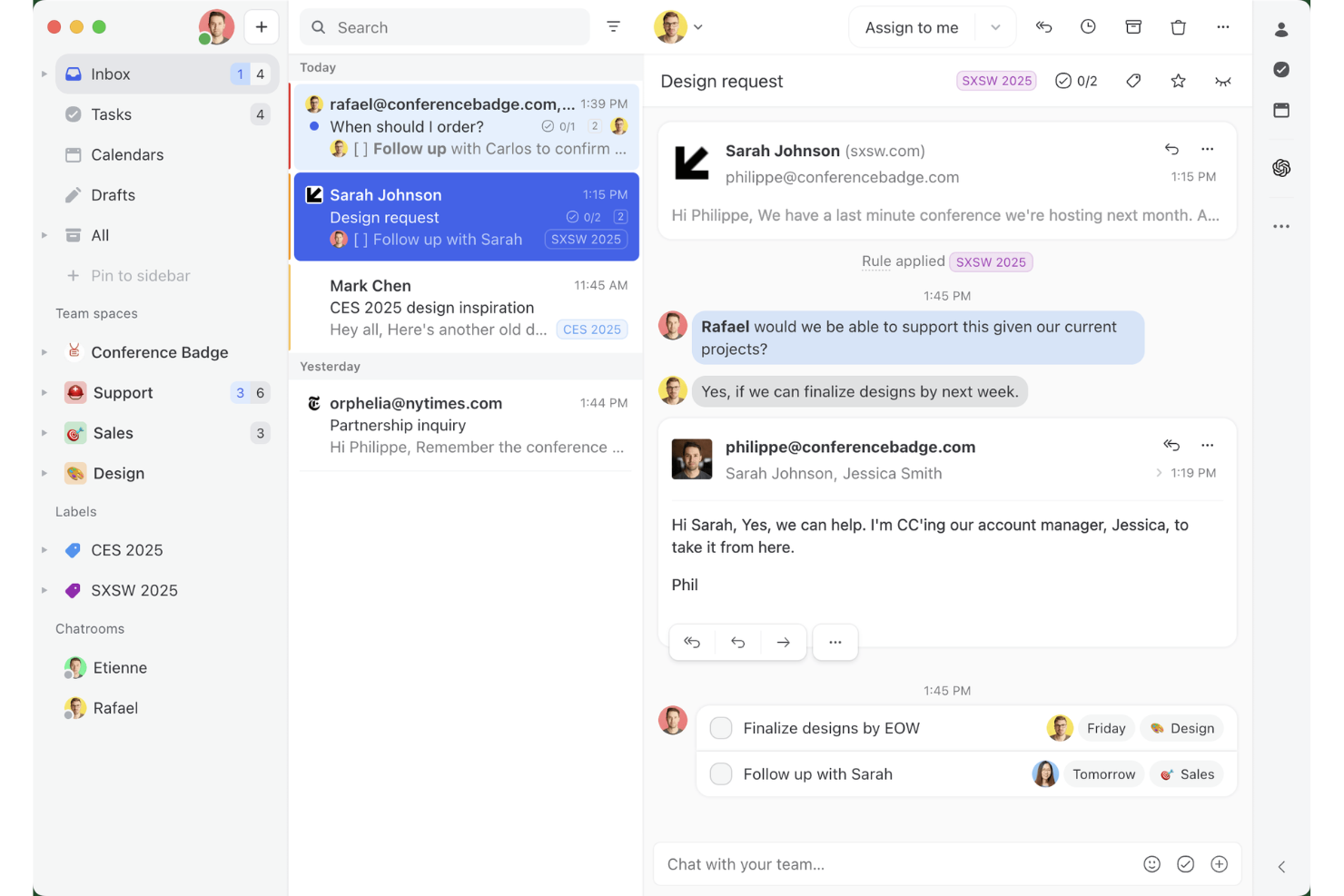
Missive è una casella di posta omnicanale collaborativa che riunisce email, SMS, WhatsApp, Messenger, Instagram e chat dal vivo in un unico spazio di lavoro condiviso, con comunicazione interna al team integrata, instradamento assistito dall'IA e automazione tra i diversi canali.
Per chi è più adatto Missive?
Missive è particolarmente adatto ai team delle PMI e delle aziende di medie dimensioni che gestiscono le conversazioni con i clienti tramite email, SMS e canali social e desiderano una collaborazione integrata direttamente nella casella di posta.
Perché ho scelto Missive
Ho incluso Missive tra le mie scelte principali perché il suo modello di casella di posta collaborativa offre una funzionalità che la maggior parte degli strumenti omnicanale non ha: inserisce la discussione del team direttamente nel thread della conversazione con il cliente, così gli operatori possono coinvolgere uno specialista o inoltrare la richiesta durante la risposta senza passare a Slack. Mi piace anche il modo in cui il suo instradamento basato sull'IA classifica i messaggi in arrivo in base al sentimento e alla lingua su ogni canale collegato contemporaneamente, che si tratti di WhatsApp, SMS o messaggi diretti di Instagram. Questa coerenza delle regole tra i diversi canali è davvero rara in questa fascia di prezzo.
Funzionalità principali di Missive
- Risposte predefinite: I modelli di risposta preimpostati con campi variabili consentono agli operatori di inviare messaggi coerenti e in linea con il brand tramite email, SMS e WhatsApp senza doverli riscrivere da zero.
- Unione delle conversazioni: I thread dello stesso cliente su canali diversi possono essere uniti manualmente in un'unica conversazione, mantenendo l'intera cronologia delle interazioni in una sola visualizzazione.
- Regole di assegnazione automatica: Le conversazioni vengono distribuite tra gli operatori usando una logica a rotazione, basata sul minor carico di lavoro o casuale, riducendo il triage manuale per i responsabili del team.
- Server MCP di Missive: Collega strumenti di IA esterni (come Claude o ChatGPT) per consultare i thread del servizio clienti, controllare i calendari e preparare risposte, mantenendo tuttavia obbligatoria la revisione dell'operatore prima dell'invio.
Integrazioni di Missive
Missive si integra con HubSpot, Salesforce, Shopify, Aircall, Dialpad, Twilio e Zapier. La sua API REST e i webhook supportano integrazioni personalizzate, insieme al nuovo server MCP nei piani Productive e Business (richiede l'attivazione da parte dell'amministratore).
Pros and Cons
Pros:
- Tutti i canali riuniti in un'unica casella di posta
- Chat interna al team in ogni conversazione
- Instradamento multicanale flessibile basato sull'IA
Cons:
- Nessun chatbot IA integrato per ridurre il volume delle richieste
- Nessun sondaggio nativo sulla soddisfazione dei clienti
New Product Updates from Missive
Missive Adds Conversation Pins
Missive now lets you pin key links, decisions, and notes inside a conversation, keeping them accessible in a dedicated Pins section in the Details sidebar. For more information, visit Missive's official site.
 .
.
Tidio
Ideale per un assistente basato sull'IA
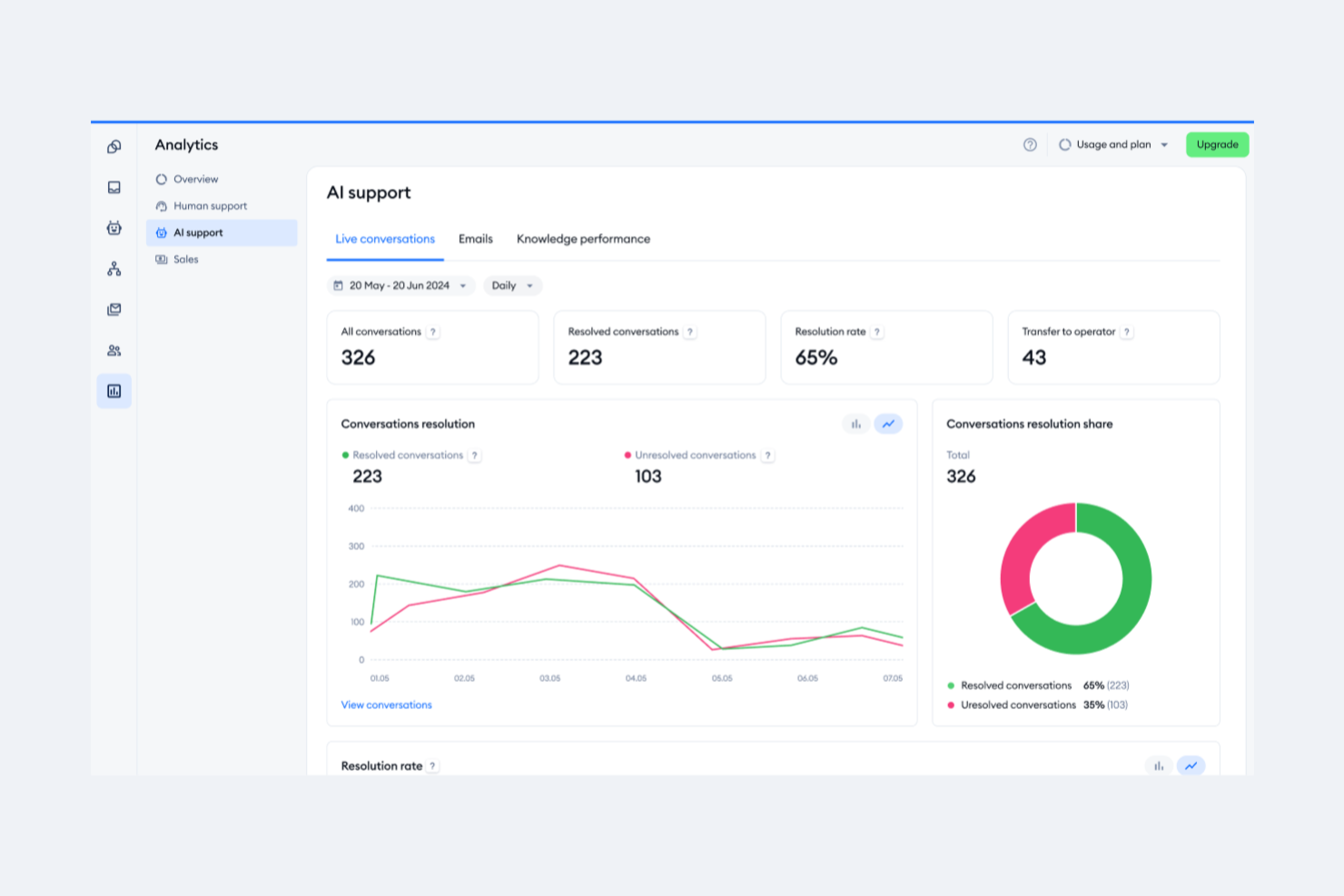
Tidio è una piattaforma per il servizio clienti che combina chat in tempo reale, gestione dei ticket dell'help desk, automazione di chatbot senza codice e un agente IA in una casella di posta unificata che consolida le conversazioni provenienti da chat web, email, Facebook Messenger, Instagram e WhatsApp.
A chi è più adatto Tidio?
Tidio è particolarmente adatto alle piccole e medie imprese di commercio elettronico, soprattutto quelle che utilizzano Shopify o WooCommerce e hanno bisogno di un unico strumento per gestire le conversazioni con i clienti attraverso i canali di chat e social.
Perché ho scelto Tidio
Tidio è entrato nella mia rosa dei preferiti grazie a Lyro, il suo agente IA conversazionale che risolve una grande parte delle richieste dei clienti senza l'intervento degli operatori. Mi piace il fatto che Lyro attinga direttamente ai contenuti di assistenza esistenti per mantenere l'accuratezza su ogni canale collegato, dalla chat web a WhatsApp. L'Assistente per le risposte IA, che utilizza GPT-4 per proporre risposte suggerite, fa sì che i miei operatori non debbano partire da zero quando la coda delle richieste è molto intensa.
Caratteristiche principali di Tidio
- Casella di posta omnicanale: riunisce le conversazioni di chat in tempo reale, email, Facebook Messenger, Instagram e WhatsApp in un'unica dashboard.
- Creazione visiva dei flussi: consente di creare flussi di lavoro personalizzati per i chatbot con un'interfaccia senza codice basata sul trascinamento.
- Integrazioni per il commercio elettronico: si collega direttamente a Shopify e WooCommerce per recuperare i dati degli ordini e aggiornare i ticket.
- Supporto per più operatori: consente di avere fino a 10 operatori per spazio di lavoro nei piani standard, con assegnazione degli operatori e gestione delle autorizzazioni.
Integrazioni di Tidio
Tidio offre integrazioni native con Shopify, WooCommerce, WhatsApp, HubSpot, Google Analytics e Zapier. È disponibile un'API per le integrazioni personalizzate.
Pros and Cons
Pros:
- Supporta 12 lingue per i team internazionali
- Implementazione rapida con configurazione minima
- Casella di posta unificata per chat, email e social
Cons:
- Nessun supporto nativo per il canale vocale
- Funzionalità limitate nel piano gratuito
Altri software per il servizio clienti omnicanale
Ecco alcune ulteriori opzioni di software per il servizio clienti omnicanale che non sono state incluse nel mio elenco, ma che vale comunque la pena valutare:
- Front
Ideale per il monitoraggio della qualità dei messaggi
- Intercom
Ideale per startup
- Bright Pattern
Ideale per approfondimenti guidati dall'AI
- Talkdesk
Ideale per call center
- Kustomer
Ideale per l'integrazione CRM
- Assembled AI
Ideale per sistemi di instradamento intelligente dei casi
- Sprinklr
Ideale per l'assistenza sui social media
- Crescendo
Ideale per generare dati conversazionali utili e azionabili
- Freshworks
Ideale per facilità d'uso
- Zendesk
Ideale per la scalabilità


Come valuto il software di assistenza clienti omnicanale
Quando un cliente inizia a chattare e poi passa a una chiamata, mi aspetto che un unico record agente lo segua: questa è la base che verifico prima di valutare ciò che distingue una piattaforma dalle altre.
Funzionalità core (requisiti fondamentali per questa lista)
Quando seleziono gli strumenti per la mia lista, valuto ognuno su una scala da 0 (non offre la funzionalità) a 5 (eccelle in quest'area) per ciascuna funzione fondamentale elencata di seguito. Poi, calcolo il punteggio totale dello strumento in percentuale. Ogni strumento deve raggiungere un punteggio minimo totale del 75% per essere considerato per l'inclusione.
- Inbox multicanale: Verifico se email, chat, social, SMS e voce vengono tutti gestiti in un unico spazio di lavoro per agenti — così gli operatori non devono passare da una scheda del browser all'altra.
- Profilo cliente unificato: Ogni strumento dovrebbe mostrare tutta la cronologia delle interazioni di un cliente su tutti i canali in un'unica vista, inclusi i ticket passati, gli acquisti e le note.
- Smistamento e assegnazione omnicanale: Analizzo come vengono assegnate le conversazioni — se la piattaforma supporta l'instradamento basato sulle competenze, regole di priorità SLA e bilanciamento del carico tra i canali.
- Gestione ticket cross-canale: Un cliente che inizia con una chat e poi prosegue via email dovrebbe rimanere su un unico thread di ticket, con tutto il contesto intatto per qualsiasi agente lo prenda in carico.
- Automazione e assistenza AI: Valuto se i trigger di flusso di lavoro, chatbot e funzioni AI come suggerimenti di risposta o auto-tagging funzionano su tutti i canali connessi.
- Analytics cross-canale: I cruscotti dovrebbero aggregare metriche come CSAT, tempo di prima risposta e tasso di risoluzione su ogni canale invece di tenerli separati.
Una volta che ho una lista di strumenti che rispettano i criteri, considero cosa distingue ogni piattaforma.
Fattori differenzianti (cosa rende unici i fornitori)
Ecco come confronto e metto a confronto i diversi fornitori:
Funzionalità di spicco
I messaggi proattivi per me contano molto. Le piattaforme che permettono di avviare una chat o un SMS in base all'abbandono del carrello o a tappe del percorso di onboarding trasformano il supporto da reattivo a strategico. Valuto anche se una knowledge base integrata propone articoli suggeriti dall’intelligenza artificiale agli agenti durante la conversazione e alimenta un portale self-service rivolto ai clienti. Per i responsabili dei contact center che gestiscono grandi team, strumenti nativi di gestione del personale per la programmazione dei turni e la previsione dei volumi possono eliminare la necessità di una piattaforma WFM separata.
Oltre le funzionalità
La profondità delle integrazioni è una delle prime cose che controllo. Una piattaforma che si connette nativamente al tuo CRM e sistema ecommerce consente agli agenti di visualizzare lo stato degli ordini o i dettagli dell'account senza cambiare strumento. Presto anche molta attenzione al costo totale di proprietà, soprattutto se le funzioni AI, i canali premium come WhatsApp o l’utilizzo delle API comportano costi aggiuntivi che fanno aumentare il prezzo su larga scala. Per i team che operano in settori regolamentati come sanità o finanza, certificazioni di conformità come HIPAA o PCI-DSS possono restringere rapidamente l’elenco dei candidati.
Come scegliere il software per il servizio clienti omnicanale
Per scegliere il software per il servizio clienti omnicanale, concentratevi sulla sua capacità di collegare i vostri principali canali di assistenza, i dati dei clienti e i flussi di lavoro. Dovrebbe fornire agli operatori il contesto di cui hanno bisogno per gestire le conversazioni senza costringere i clienti a ripetersi.
Considerate questi fattori:
| Da considerare | Cosa privilegiare |
|---|---|
| Canale principale | Un supporto solido per i canali con il volume più elevato. Se il telefono genera la maggior parte delle conversazioni, date priorità alle funzionalità del contact center. Se invece si tratta della messaggistica, privilegiate WhatsApp, SMS, i social e la chat dal vivo. |
| Dimensioni del team | Funzionalità adatte al modo in cui opera il vostro team. I team piccoli potrebbero aver bisogno solo di una casella di posta unificata e di un instradamento semplice. I team più grandi potrebbero aver bisogno di instradamento basato sulle competenze, autorizzazioni, controllo qualità, gestione della forza lavoro e reportistica avanzata. |
| Volume dei clienti | Automazione e instradamento in grado di gestire il volume delle richieste di assistenza. I team con volumi più elevati dovrebbero dare priorità all'instradamento automatizzato, alla gestione delle code, all'intelligenza artificiale e agli strumenti che riducono il lavoro ripetitivo degli operatori. |
| Complessità dell'assistenza | Strumenti per gestire i passaggi di consegne e le escalation. Se i casi passano regolarmente da un operatore o reparto all'altro, date priorità a un contesto condiviso sul cliente, alla collaborazione interna e ai flussi di lavoro per le escalation. |
| Settore | Funzionalità che soddisfano i requisiti del vostro settore. I team di commercio elettronico potrebbero aver bisogno dei dati sugli ordini e di integrazioni commerciali, mentre i settori regolamentati potrebbero necessitare di maggiore sicurezza, conformità e controlli di audit. |
Tendenze nei software per il servizio clienti omnicanale
Durante la mia ricerca, ho raccolto innumerevoli aggiornamenti sui prodotti, comunicati stampa e registri delle versioni di diversi fornitori di software per il servizio clienti multicanale. Ecco alcune delle tendenze emergenti che sto tenendo d'occhio:
- Personalizzazione basata sull'intelligenza artificiale: molti fornitori utilizzano l'intelligenza artificiale per offrire interazioni personalizzate con i clienti. Questa tendenza è in crescita poiché le aziende mirano ad adattare le esperienze alle esigenze dei singoli clienti. Ad esempio, l'intelligenza artificiale può analizzare l'intera cronologia delle interazioni con un cliente per suggerire risposte personalizzate e garantire la continuità del servizio.
- Tecnologia di riconoscimento vocale: il riconoscimento vocale sta diventando sempre più comune e consente ai clienti di interagire con i servizi senza usare le mani. Questa tendenza migliora l'accessibilità e la praticità, e alcuni fornitori integrano i comandi vocali nelle loro piattaforme per un migliore coinvolgimento dei clienti.
- Coinvolgimento proattivo dei clienti: gli strumenti si stanno evolvendo per coinvolgere i clienti prima che questi segnalino eventuali problemi. Questa tendenza prevede l'utilizzo dell'analisi dei dati per prevedere le esigenze dei clienti e offrire soluzioni in modo proattivo, migliorando la soddisfazione e riducendo i ticket di assistenza.
- Analisi omnicanale: i fornitori si concentrano sulla fornitura di informazioni che consentano alle aziende di comprendere il comportamento e le preferenze dei clienti sulle diverse piattaforme, contribuendo a perfezionare le strategie e migliorare i servizi.
- Assistenza tramite videochat: la videochat sta guadagnando terreno come strumento di assistenza, offrendo un approccio più personale. È utile per i problemi complessi che richiedono una guida visiva e alcuni fornitori stanno integrando questa funzionalità per migliorare le interazioni con i clienti.
Che cos'è il software per il servizio clienti omnicanale?
Il software per il servizio clienti omnicanale è uno strumento che consente alle aziende di gestire le interazioni con i clienti senza soluzione di continuità attraverso diversi canali di comunicazione da un'unica piattaforma. I professionisti del servizio clienti e i team di assistenza utilizzano generalmente questi strumenti per migliorare i tempi di risposta e fornire un'assistenza coerente.
Funzionalità come la personalizzazione basata sull'intelligenza artificiale, il coinvolgimento proattivo e l'analisi omnicanale aiutano ad adattare le esperienze dei clienti, prevederne le esigenze e comprenderne il comportamento. Nel complesso, questi strumenti migliorano la soddisfazione dei clienti garantendo un servizio efficiente e personalizzato su tutti i canali.
Funzionalità del software per il servizio clienti omnicanale
Quando scegli un software per il servizio clienti omnicanale, presta attenzione alle seguenti funzionalità chiave:
- Personalizzazione basata sull'intelligenza artificiale: questa funzionalità utilizza l'intelligenza artificiale per adattare le interazioni in base ai dati dei clienti, migliorando l'esperienza del cliente e rendendo le conversazioni più pertinenti.
- Instradamento avanzato delle chiamate: indirizza le chiamate all'agente più adatto, migliorando i tempi di risposta e garantendo che i clienti ricevano rapidamente l'aiuto di cui hanno bisogno.
- Analisi multicanale: fornisce informazioni su tutti i canali di comunicazione, aiutando le aziende a comprendere il comportamento dei clienti e a ottimizzare le strategie di servizio.
- Coinvolgimento proattivo dei clienti: utilizza i dati per anticipare le esigenze dei clienti e offrire soluzioni prima che si verifichino problemi, riducendo i ticket di assistenza e aumentando la soddisfazione.
- Cronologia unificata del cliente: riunisce tutte le interazioni provenienti da diversi canali in un'unica visualizzazione, fornendo agli agenti il contesto necessario per offrire un'assistenza informata e personalizzata.
- Assistenza tramite videochat: offre un modo più personale per assistere i clienti; è particolarmente utile per i problemi complessi che richiedono una guida visiva.
- Dashboard personalizzabili: consentono ai team di adattare il proprio spazio di lavoro alle proprie esigenze, migliorando l'efficienza e la concentrazione.
- Automazione dei flussi di lavoro: semplifica le attività ripetitive, consentendo al team di gestire interazioni più complesse con i clienti.
- Supporto multilingue: consente di comunicare con una clientela diversificata, ampliando la portata e migliorando l'accessibilità.
- Misure di sicurezza: proteggono i dati dei clienti rispettando gli standard del settore e mantenendo fiducia e affidabilità.
Vantaggi del software per il servizio clienti omnicanale
L'implementazione di un software per il servizio clienti omnicanale, comprese le soluzioni di servizio clienti sui social, offre diversi vantaggi al tuo team e alla tua azienda. Ecco alcuni dei vantaggi che puoi aspettarti:
- Maggiore soddisfazione dei clienti: I clienti ricevono un'assistenza tempestiva, pertinente e coerente su tutti i canali, migliorando la loro esperienza complessiva e, di conseguenza, la fidelizzazione.
- Maggiore efficienza: L'automazione dei flussi di lavoro e l'instradamento avanzato delle chiamate aiutano il team a gestire un numero maggiore di interazioni con meno sforzo, aumentando la produttività.
- Informazioni più approfondite: Le analisi omnicanale offrono una visione completa del comportamento dei clienti, consentendo di prendere decisioni basate sui dati che migliorano la qualità del servizio.
- Personalizzazione avanzata: Le funzionalità basate sull'IA adattano le interazioni alle preferenze dei singoli clienti, rendendo i contatti più significativi ed efficaci.
- Risparmio sui costi: Le aziende possono ridurre i costi operativi diminuendo la necessità di utilizzare più piattaforme e ottimizzando l'allocazione delle risorse.
- Portata più ampia: Il supporto multilingue e le opzioni di videochat consentono di entrare in contatto con un pubblico più vasto, ampliando la base clienti.
- Maggiore sicurezza: La conformità agli standard del settore garantisce la protezione dei dati dei clienti, favorendo fiducia e affidabilità.
Costi e prezzi del software per il servizio clienti omnicanale
La scelta di un software per il servizio clienti omnicanale richiede la conoscenza dei vari modelli di prezzo e dei piani disponibili. I costi variano in base alle funzionalità, alle dimensioni del team, agli extra e ad altri fattori. La tabella seguente riassume i piani più comuni, i relativi prezzi medi e le funzionalità tipicamente incluse nelle soluzioni di assistenza clienti omnicanale:
Tabella di confronto dei piani per il software per il servizio clienti omnicanale
| Tipo di piano | Prezzo medio | Funzionalità comuni |
| Piano gratuito | $0 | Gestione di base dei ticket, supporto via e-mail e analisi limitate. |
| Piano personale | $5-$25/utente/mese | Supporto via e-mail e chat, report di base e opzioni di personalizzazione limitate. |
| Piano aziendale | $30-$75/ utente/mese | Supporto multicanale, automazione dei flussi di lavoro e strumenti avanzati per la reportistica. |
| Piano per grandi aziende | $80-$150/ utente/mese | Personalizzazione completa, analisi basate sull'IA e gestione dedicata dell'account. |
Domande frequenti sul software per il servizio clienti omnicanale
Ecco alcune risposte alle domande comuni sul software per l’assistenza clienti omnicanale:
Qual è la differenza tra il servizio clienti omnicanale e multicanale?
Il servizio clienti multicanale offre assistenza attraverso più canali, mentre il servizio clienti omnicanale collega questi canali in un’unica esperienza continua. Ad esempio, con l’assistenza multicanale, un cliente che inizia una conversazione tramite chat dal vivo e in seguito telefona potrebbe dover spiegare nuovamente il problema. Con l’assistenza omnicanale, l’operatore telefonico può vedere la chat precedente e riprendere la conversazione da dove era stata interrotta.
Quanti canali dovrebbe supportare una piattaforma per il servizio clienti omnicanale?
Non esiste un numero ideale. Una piattaforma omnicanale dovrebbe supportare i canali effettivamente utilizzati dai clienti e collegarli, così gli operatori possono passare da una conversazione all’altra senza perdere il contesto. Per molte aziende, ciò significa iniziare con e-mail, chat dal vivo, telefono e social network o app di messaggistica.
Quali canali dovrebbero essere inclusi in una strategia omnicanale?
Analizza i canali attraverso i quali i clienti ti contattano già e dai priorità a quelli con la domanda più elevata. Per molti team, ciò include e-mail, telefono, chat dal vivo, social media, SMS e app di messaggistica come WhatsApp, ma il mix di canali dovrebbe riflettere le esigenze dei tuoi clienti.
È necessario sostituire il CRM per implementare il servizio clienti omnicanale?
Di solito no. Una buona piattaforma omnicanale dovrebbe integrarsi con il CRM esistente, così gli operatori possono accedere ai dati dei clienti insieme alle conversazioni di assistenza. Ciò che conta è la qualità dell’integrazione: verifica quali dati vengono sincronizzati, se gli aggiornamenti avvengono in tempo reale e se gli operatori possono accedere alle informazioni di cui hanno bisogno senza passare da un sistema all’altro.
Qual è il principale svantaggio del software per il servizio clienti omnicanale?
Il principale svantaggio del software omnicanale è la complessità dell’implementazione. Richiede un sistema ben coordinato che funzioni su più canali. Un approccio omnicanale può essere difficile da implementare nelle organizzazioni in cui esistono silos di dati. Garantire esperienze cliente coerenti ovunque può essere complesso, soprattutto senza la tecnologia e i processi adeguati.
Come si implementa il servizio clienti omnicanale?
Per implementare il servizio clienti omnicanale, inizia comprendendo le aspettative dei clienti e identificando i canali che utilizzerai (suggerimento: analizza i canali utilizzati dai tuoi clienti). Investi nella tecnologia giusta per supportare questi canali e forma ulteriormente il tuo team affinché li gestisca in modo efficace. Valuta inoltre la possibilità di creare opzioni self-service e garantisci la sicurezza dei dati dei clienti durante tutto il processo.
Quali sono le 4 C del servizio clienti omnicanale?
Le 4 C del servizio clienti omnicanale sono esperienza del cliente, contesto, contenuti e collaborazione. Questi elementi lavorano insieme per creare un’esperienza cliente coerente e coinvolgente su tutti i canali, garantendo interazioni pertinenti e uniformi.
In che modo il software omnicanale migliora la soddisfazione dei clienti (CSAT)?
Il software per il servizio omnicanale migliora la soddisfazione dei clienti offrendo un’assistenza coerente su più canali e consentendo interazioni più personalizzate ed efficienti. Funzionalità come il coinvolgimento proattivo e le cronologie unificate dei clienti garantiscono che i clienti ricevano un’assistenza tempestiva e pertinente, migliorando la loro esperienza complessiva.