

Le 10 migliori alternative a Odoo per la gestione aziendale nel 2026

Le migliori alternative a Odoo in sintesi


Le migliori alternative a Odoo per il servizio clienti offrono una gestione flessibile dei ticket, supporto multicanale e strumenti di automazione che si adattano davvero allo stile del tuo team di assistenza. Se stai cercando alternative a Odoo, probabilmente hai bisogno di un software più facile da adottare, che cresca insieme alla tua base clienti o che offra un'esperienza più moderna per operatori e clienti. Conosco gli ostacoli che devi affrontare, come flussi di lavoro lenti, una proliferazione di strumenti, integrazioni scadenti e difficoltà nella creazione di report. In questo elenco scoprirai quali piattaforme possono aiutarti a semplificare le operazioni di assistenza, collegare tutti i tuoi canali e risolvere i casi più rapidamente, così il tuo team potrà concentrarsi sulla costruzione di relazioni migliori con i clienti.
Che cos'è Odoo?
Odoo è una suite di applicazioni aziendali open source che comprende funzioni come servizio clienti, CRM, contabilità, gestione dell'inventario e gestione dei progetti. Puoi utilizzare Odoo come software ERP e anche per gestire i ticket di assistenza, automatizzare i flussi di lavoro del servizio e centralizzare le comunicazioni con i clienti. Si tratta principalmente di una soluzione ERP che può essere utilizzata anche per diversi aspetti della gestione finanziaria, della gestione dell'inventario, della catena di approvvigionamento e della pianificazione delle risorse aziendali. La piattaforma è modulare e ti consente di aggiungere funzionalità man mano che la tua azienda cresce. Odoo è apprezzato dalle organizzazioni che desiderano una soluzione personalizzabile e completa per gestire un'ampia gamma di esigenze operative, tra cui il servizio clienti.
Tabella comparativa delle alternative a Odoo
Questa tabella comparativa riassume i dettagli sui prezzi delle mie migliori alternative a Odoo:
| Tool | Best For | Trial Info | Price | ||
|---|---|---|---|---|---|
| 1 | Ideale per il servizio clienti omnicanale | Demo gratuita disponibile | Prezzo su richiesta | Website | |
| 2 | Ideale per ticketing help desk | Demo gratuita disponibile | Prezzo su richiesta | Website | |
| 3 | Il migliore per l’assistenza clienti ecommerce | Prova gratuita di 7 giorni + demo gratuita disponibile | Da $10/mese | Website | |
| 4 | Ideale per il supporto AI a team in crescita | Demo gratuita disponibile | A partire da $59/postazione/mese (fatturazione annuale) | Website | |
| 5 | Ideale per l’assistenza clienti potenziata dall’IA | Prova gratuita di 14 giorni + demo disponibile | Da $29/utente/mese (fatturazione annuale) | Website | |
| 6 | Ideale per flussi di lavoro di servizi digitali | Demo gratuita disponibile | Prezzo su richiesta | Website | |
| 7 | Ideale per assistenza clienti tutto-in-uno | Prova gratuita di 14 giorni + piano gratuito + demo gratuita disponibile | A partire da $20/mese per utente | Website | |
| 8 | Ideale per il coinvolgimento clienti open source | Prova gratuita di 15 giorni + piano gratuito disponibile | Da $19/agente/mese (fatturati annualmente) | Website | |
| 9 | Ideale per la gestione dei servizi IT | Prova gratuita di 7 giorni + piano gratuito disponibile | Da $20/mese | Website | |
| 10 | Ideale per CRM e collaborazione di squadra | Prova di 15 giorni + piano gratuito + demo gratuita disponibile | Da $49/organizzazione/mese (fatturazione annuale) | Website |
Perché fidarsi dei nostri consigli sui software
Il nostro team testa e recensisce software dal 2012. In quanto leader CX noi stessi, sappiamo quanto sia difficile — e importante — scegliere il software giusto.
Per questa guida, abbiamo valutato gli strumenti attraverso test pratici e ricerche indipendenti, assegnando un punteggio agli strumenti in base ai nostri criteri di selezione.
Le nostre recensioni riflettono il nostro giudizio editoriale umano, non un discorso di vendita.
Recensioni delle migliori alternative a Odoo
Di seguito trovi i miei riepiloghi dettagliati delle migliori alternative a Odoo incluse nella mia selezione. Le mie recensioni offrono un’analisi approfondita delle funzionalità, delle integrazioni e dei prezzi di ciascuna piattaforma, per aiutarti a trovare quella più adatta a te.

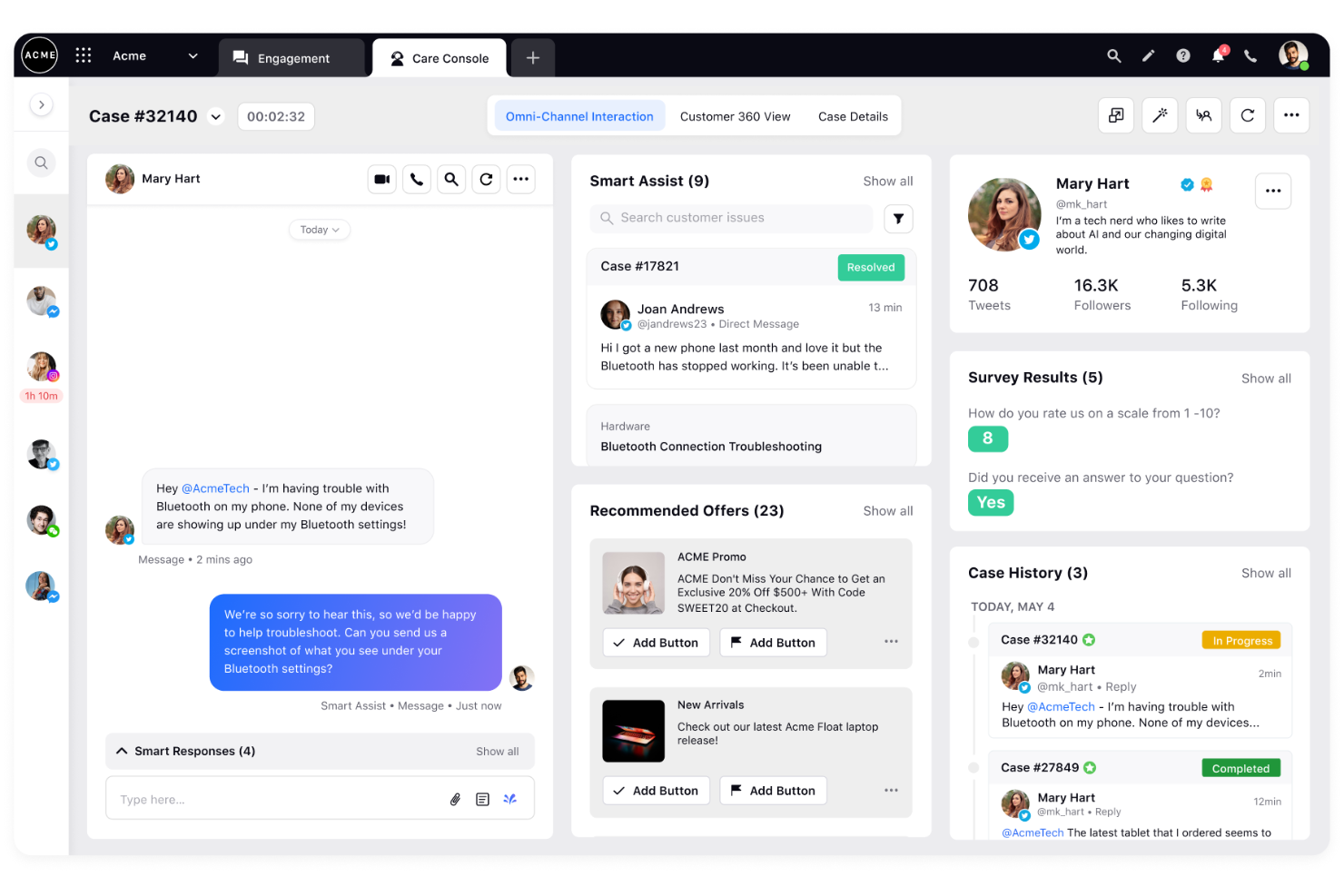
Sprinklr Service è una piattaforma pensata per grandi team che desiderano gestire l'assistenza clienti su canali social, vocali e digitali in un unico luogo. Penso sia una scelta solida per le aziende che necessitano di instradamento avanzato, automazione e analisi per supportare clienti a livello globale.
Per chi è ideale Sprinklr Service?
Responsabili dell'assistenza clienti in aziende globali che gestiscono interazioni ad alto volume e su più canali, attraverso team e regioni differenti.
Perché Sprinklr Service è una buona alternativa a Odoo
Ho scelto Sprinklr Service perché l'IA è integrata nelle fondamenta della piattaforma, non aggiunta come componente separata. In pratica, ciò significa che ogni canale – dalla voce a Instagram fino all'email – viene analizzato e instradato tramite lo stesso livello di intelligenza artificiale, così il mio team ha sempre la piena visione del contesto senza cambiare strumento. Mi piace in particolare la funzione Agent Copilot, che suggerisce risposte in tempo reale e riassume automaticamente i casi durante la conversazione, riducendo i tempi di gestione per i ticket complessi. Il motore di analisi conversazionale esamina anche il 100% delle interazioni su tutti i canali, fornendo al mio team una panoramica completa delle prestazioni e del sentiment senza dover ricorrere a campionamenti manuali.
- Desktop unificato per gli agenti: Fornisce agli agenti una visione a 360 gradi del cliente, il contesto completo della richiesta e l'accesso alla knowledge base su un'unica schermata
- Instradamento omnicanale: Utilizza l'IA per abbinare ogni conversazione all'agente più adatto in base all'intento del cliente, al contesto e alle competenze dell'agente
- Gestione della forza lavoro: Prevede il volume delle interazioni e crea i turni degli agenti per assegnare le persone giuste ai casi giusti
- Gestione della qualità basata su IA: Valuta automaticamente ogni interazione secondo criteri di performance e conformità per individuare opportunità di coaching
Integrazioni di Sprinklr Service
Sprinklr Service offre integrazioni native con Salesforce, Zendesk, Microsoft Teams, Facebook, Twitter, WhatsApp, Instagram, Google Business Messages, Google Analytics e YouTube. È disponibile un'API per integrazioni personalizzate.
Pros and Cons
Pros:
- Reportistica unificata su canali digitali e vocali
- Gestione degli SLA integrata per team globali
- Moduli dedicati per operazioni di contact center
Cons:
- La configurazione dell'automazione richiede competenze avanzate
- Personalizzazione limitata del layout della postazione agente

HappyFox
Ideale per ticketing help desk

HappyFox è una piattaforma di help desk progettata per i team che desiderano un sistema unificato per gestire ticket di supporto, attività e flussi di lavoro su tutti i canali. A mio avviso, è particolarmente indicata per aziende di medie dimensioni e team di servizio che vogliono centralizzare le conversazioni con i clienti e automatizzare processi di supporto ripetitivi.
Per chi è ideale HappyFox?
Responsabili del supporto clienti di aziende di medie dimensioni che devono gestire ticket multicanale e automatizzare i flussi di lavoro senza sviluppi su misura.
Perché HappyFox è una buona alternativa a Odoo
Ho scelto HappyFox perché il suo vero punto di forza è ciò di cui la maggior parte dei team di supporto ha bisogno: un sistema di ticketing in cui l'automazione funziona su ogni canale senza dover coinvolgere sviluppatori. Il motore Smart Rules è ciò che lo rende davvero efficace. Posso impostare trigger con condizioni multiple—basate su priorità, categoria e tipo di cliente—per assegnare, intensificare o chiudere i ticket automaticamente, senza scrivere nemmeno una riga di codice. In pratica, significa che il mio team impiega meno tempo nel triage e più tempo a risolvere. Apprezzo anche il modo in cui HappyFox gestisce il supporto multi-dipartimento da un'unica piattaforma, consentendo a CS, IT e HR di operare ciascuno con i propri SLA, categorie e flussi di lavoro, pur dando all'amministrazione una visibilità unificata su tutti.
Funzionalità principali di HappyFox
- Gestione ticket omnicanale: Consolida le richieste di supporto provenienti da email, chat, telefono e social media in una singola coda di ticket
- Portale clienti self-service: Offre ai clienti un portale 24/7 per inviare ticket, monitorarne lo stato e consultare articoli della knowledge base senza contattare un operatore
- Gestione SLA: Consente ai team di configurare obiettivi di risposta e risoluzione in base a dipartimento, categoria di ticket o livello cliente
- Controlli di accesso basati sui ruoli: Gli amministratori possono definire ruoli personalizzati e permessi granulari per gestire cosa ogni agente o team può visualizzare e su cui può agire
Integrazioni di HappyFox
HappyFox offre integrazioni native con Slack, Salesforce, Jira, Microsoft Teams, Shopify, Twilio, WhatsApp, Facebook, Google Sheets e Zoom. È disponibile un’API per integrazioni personalizzate.
Pros and Cons
Pros:
- Automazione personalizzabile per instradamento ticket e SLA
- Builder di workflow semplice per processi ricorrenti
- Knowledge base integrata con portale clienti
Cons:
- Supporto multilingue limitato per i ticket
- Le opzioni di esportazione della cronologia ticket sono limitate

Gorgias
Il migliore per l’assistenza clienti ecommerce

Se gestisci un ecommerce in crescita e desideri un supporto rapido strettamente integrato con il tuo negozio online, Gorgias potrebbe essere la tua prossima piattaforma di assistenza clienti. È progettata per i team ecommerce che hanno bisogno di gestire conversazioni, automatizzare risposte e recuperare informazioni sugli ordini per ogni ticket.
Per chi è più indicato Gorgias?
Team di assistenza clienti di brand ecommerce che desiderano un supporto veloce e collegato agli ordini su chat, email e canali social.
Perché Gorgias è una buona alternativa a Odoo
Ho scelto Gorgias perché è costruito attorno a un elemento spesso trascurato dagli helpdesk generici: collegare direttamente le conversazioni di supporto ai dati ecommerce. Il mio team può accedere ai dettagli degli ordini dei clienti, gestire richieste e risolvere problemi senza uscire dal ticket, il che aiuta sia il reparto vendite sia l’assistenza a lavorare in modo più efficiente. Trovo particolarmente utile l’AI Agent, che automatizza le richieste di routine e riduce il lavoro manuale. La piattaforma è particolarmente efficace per aziende ecommerce di media dimensione e brand con esigenze di supporto specifiche per settore. Apprezzo anche la reportistica, che aiuta a giustificare i costi d’implementazione, mentre la sua struttura di prezzi flessibile e le integrazioni supportano flussi di lavoro legati ad approvvigionamento ed altri servizi professionali.
- Posta in arrivo omnicanale: Gestisce email, chat, SMS, WhatsApp, messaggi Instagram e Facebook da un’unica casella di posta
- Azioni in-conversazione: Permette agli agenti di annullare ordini, applicare sconti o proporre upsell direttamente all’interno di un ticket senza cambiare tool
- Modelli macro: Risposte predefinite che si compilano automaticamente con i dati di cliente e ordine per risposte più rapide
- Suggerimenti di coaching AI: Suggerimenti in tempo reale per aiutare gli agenti a migliorare la qualità delle risposte durante le conversazioni live
Integrazioni Gorgias
Gorgias offre integrazioni native con Shopify, BigCommerce, Recharge, Klaviyo, Yotpo, Instagram, Facebook, Slack e Gmail, e si collega anche con Zapier. È disponibile una API per integrazioni personalizzate.
Pros and Cons
Pros:
- Integrazioni approfondite con Shopify e BigCommerce
- Risposte automatizzate con AI Agent specializzato per ecommerce
- Dettagli e azioni sugli ordini all’interno dei ticket di supporto
Cons:
- Le analisi avanzate sono disponibili solo nei piani superiori
- La configurazione dell’automazione può richiedere tempo
Pylon
Ideale per il supporto AI a team in crescita
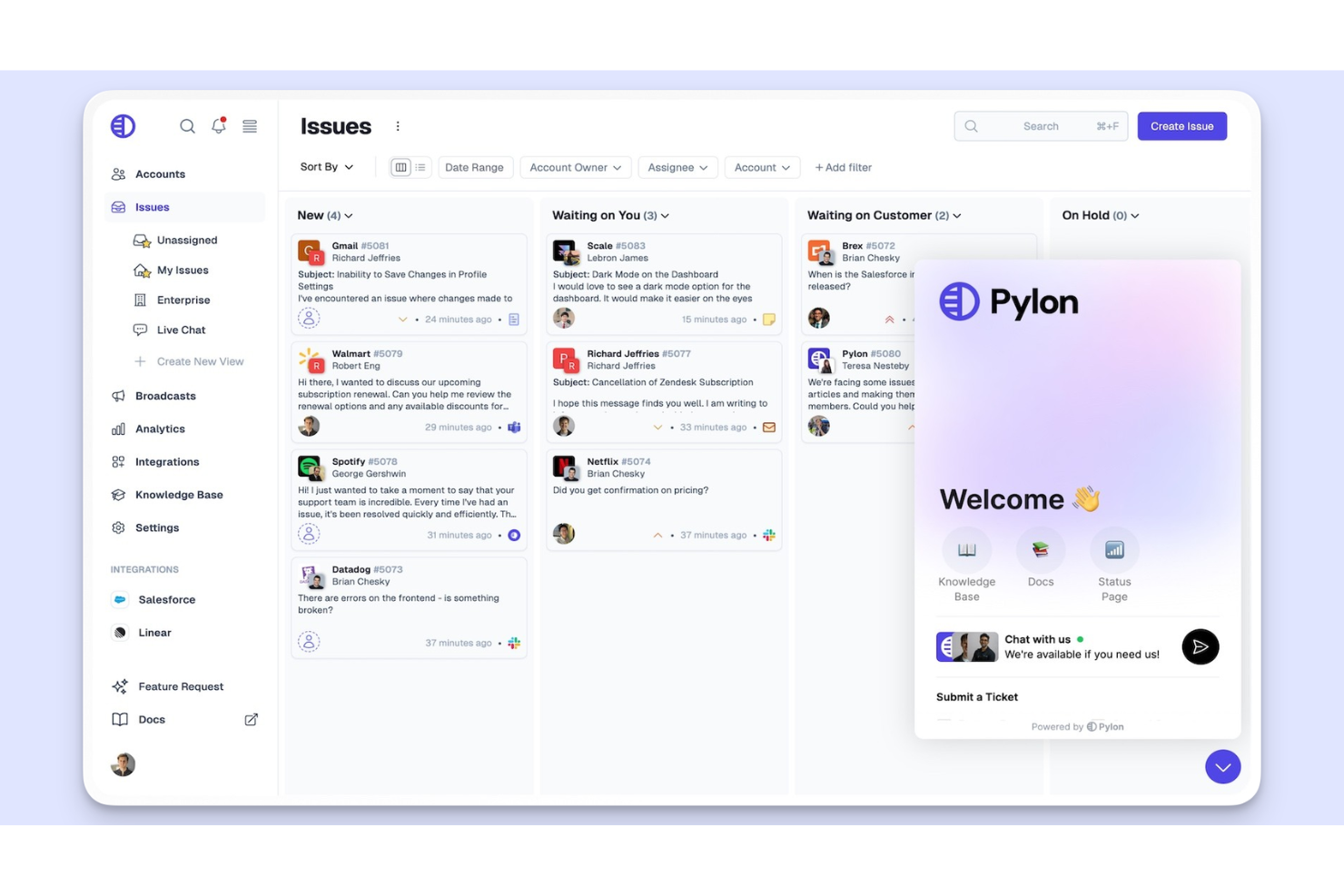
Pylon è pensato per i team di prodotto e le organizzazioni a contatto con i clienti che devono organizzare e analizzare il feedback proveniente da canali di supporto, vendita e community. Credo sia adatto a team che vogliono trasformare input di prodotto frammentati in insight significativi e decisioni operative.
Per chi è ideale Pylon?
Team di customer experience, supporto e prodotto che desiderano centralizzare, analizzare e agire sul feedback proveniente da diversi workspace e canali di comunicazione.
Perché Pylon è una buona alternativa a Odoo
Ho scelto Pylon perché è uno dei pochi strumenti B2B di supporto costruiti attorno all'idea che il feedback dei clienti viva su molti canali contemporaneamente. Apprezzo il modo in cui Pylon unisce le conversazioni da Slack Connect, Microsoft Teams, Discord ed email in una vista unificata, così i team di supporto non devono cercare tra vari strumenti per ricostruire il contesto degli account. Inoltre, la funzione Account Intelligence individua automaticamente segnali di abbandono e richieste di funzionalità da quelle conversazioni, il che significa che il mio team non deve etichettare o indirizzare manualmente il feedback per renderlo utile. Per i team che hanno bisogno sia di una casella di supporto sia di un ciclo di feedback nello stesso posto, questa combinazione è difficile da trovare altrove. Le funzionalità di livello enterprise aiutano le organizzazioni a gestire gli insight dei clienti su larga scala, eliminando la necessità di tracciare manualmente il feedback in Excel o su sistemi scollegati.
Funzionalità principali di Pylon
- Autocompilazione AI: Popola automaticamente i campi personalizzati come priorità, area di prodotto e tipo di problema in base al contenuto della conversazione.
- Riepiloghi dei problemi: Genera panoramiche concise dei ticket aperti per velocizzare il passaggio di consegne tra operatori.
- Widget di chat: Raccoglie domande in-app con contesto come URL della pagina, fuso orario ed email dell’utente allegata ad ogni conversazione.
- Moduli per ticket: Permette di creare moduli accessibili tramite portale clienti, link autonomi o un modulo personalizzato attraverso l’API.
Integrazioni di Pylon
Pylon offre integrazioni native con Slack, Microsoft Teams, Salesforce, Intercom, Zendesk, HubSpot, Linear, Discord e Gmail. È disponibile un’API per integrazioni personalizzate.
Pros and Cons
Pros:
- Centralizza dati di feedback dei clienti frammentati
- Insight sugli account e segnali di abbandono guidati dall’AI
- Funziona bene con gli strumenti di workspace moderni
Cons:
- Automazione dei workflow più limitata rispetto a Odoo
- Opzioni limitate per il deployment on-premise

Intercom
Ideale per l’assistenza clienti potenziata dall’IA

Intercom è pensato per i team che desiderano unire chat dal vivo, help desk e automazione per offrire un supporto rapido e personalizzato. Se cerchi una soluzione che semplifichi le conversazioni con i clienti su più canali e riduca il lavoro ripetitivo, Intercom si distingue come un'alternativa moderna a Odoo.
Per chi è più indicato Intercom?
Team di assistenza clienti in aziende SaaS e realtà online che necessitano di un supporto conversazionale, multicanale e automatizzato.
Perché Intercom è una valida alternativa a Odoo
Ho scelto Intercom perché è realmente una piattaforma di assistenza clienti nativa per l’IA, non un help desk tradizionale con l’intelligenza artificiale aggiunta in seguito. L’agente Fin AI gestisce le conversazioni con i clienti dall’inizio alla fine, risolvendo le problematiche senza richiedere un intervento umano costante. Apprezzo anche la funzione Copilota AI, che suggerisce risposte e risorse utili in tempo reale, aiutando i team a lavorare in modo più efficiente. Intercom si integra con i sistemi di gestione aziendale, operativa e risorse umane, rendendo più semplice collegare le interazioni dei clienti ai processi dell’organizzazione. Supporta inoltre attività di coinvolgimento dei clienti che si affiancano alle automazioni di marketing, diventando così una risorsa preziosa per l’intero stack tecnologico aziendale.
Funzionalità chiave di Intercom
- Posta in arrivo omnicanale: Gestisci le conversazioni con i clienti da email, chat dal vivo, telefono, WhatsApp e SMS in una casella condivisa, configurabile.
- Centro assistenza: Crea una base di conoscenza self-service a cui i clienti possono accedere direttamente da qualsiasi canale, incluso il widget di chat.
- Costruttore di workflow: Automatizza l'instradamento dei ticket, i follow-up e le attività ricorrenti tramite un editor visuale senza codice, con trigger, condizioni e regole.
- Messaggistica in uscita: Invia messaggi proattivi e automatizzati per l'onboarding dei clienti o per prevenire problemi noti prima che generino ticket in entrata.
Integrazioni di Intercom
Intercom offre integrazioni native con Salesforce, Slack, HubSpot, Zendesk, Shopify, Google Analytics, Mailchimp, Jira, WooCommerce e Stripe. È inoltre disponibile un'API per integrazioni personalizzate.
Pros and Cons
Pros:
- L’agente IA risolve le richieste in autonomia
- La posta in arrivo omnicanale unifica i canali cliente
- La messaggistica in uscita automatizzata favorisce il servizio proattivo
Cons:
- Le risposte dell’IA possono non cogliere tutte le sfumature del contesto
- L’automazione dei flussi di lavoro è piuttosto limitata
Ideale per flussi di lavoro di servizi digitali
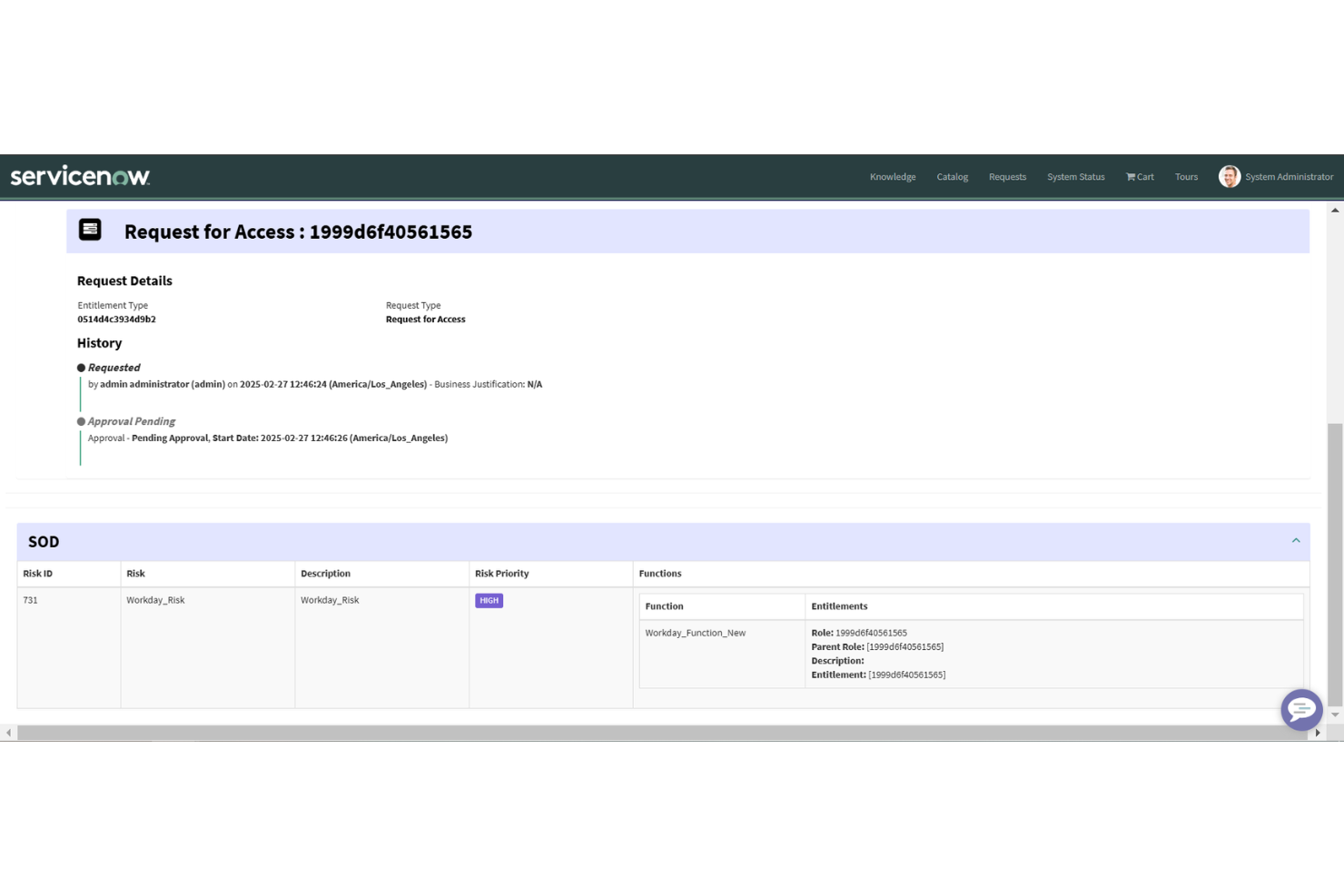
ServiceNow è una piattaforma cloud progettata per organizzazioni che necessitano di automazione avanzata dei flussi di lavoro e gestione dei servizi su grandi team o più reparti. Ritengo sia particolarmente adatta alle imprese che cercano un unico sistema per orchestrare complesse operazioni di assistenza clienti, IT e supporto HR.
Per chi è indicato ServiceNow?
Grandi aziende con esigenze di supporto complesse per le operazioni IT, HR e servizio clienti.
Perché ServiceNow è una valida alternativa a Odoo
Ciò che distingue ServiceNow come alternativa a Odoo è il modo in cui gestisce i flussi di lavoro trasversali tra i reparti. L'ho scelto perché il suo Flow Designer permette ai team di creare automazioni complesse e multi-step—senza scrivere codice—che abbracciano contemporaneamente il servizio clienti, l'IT e le risorse umane. In pratica, significa che un singolo problema del cliente può generare la creazione di un caso, notificare il team di back-office appropriato ed essere escalato automaticamente se non vengono rispettati i tempi SLA, tutto all'interno della stessa piattaforma. Apprezzo anche la funzionalità dei playbook guidati nell'Agent Workspace, che indirizza gli operatori nei passaggi esatti per risolvere uno specifico tipo di caso—mantenendo la coerenza del servizio anche quando l'esperienza del team varia. Per le aziende che vogliono sostituire le operazioni frammentate di Odoo, questa orchestrazione configurabile tra i reparti è davvero difficile da eguagliare.
Funzionalità principali di ServiceNow
- Database di gestione della configurazione (CMDB): Tiene traccia di tutte le risorse IT e delle loro relazioni per aiutare i team di servizio a identificare rapidamente l'origine e l'impatto dei problemi.
- Agente virtuale: Un chatbot integrato che gestisce le richieste di routine dei clienti e indirizza i problemi più complessi agli operatori umani.
- Catalogo dei servizi: Consente ai team di pubblicare un menu strutturato di servizi richiedibili che clienti o dipendenti possono inviare direttamente.
- Analisi delle prestazioni: Monitora e visualizza KPI come volume dei casi, tempi di risoluzione e rispetto degli SLA attraverso dashboard dedicate.
Integrazioni con ServiceNow
ServiceNow offre integrazioni native con Salesforce, Jira, Microsoft Teams, Slack, SAP, Oracle, Google Workspace, Adobe Sign, DocuSign e Twilio. È disponibile un'API per integrazioni personalizzate.
Pros and Cons
Pros:
- Automazione granulare dei flussi di lavoro tra i reparti
- Solide tracce di audit e controlli di governance
- Si adatta a settori altamente regolamentati
Cons:
- La configurazione iniziale richiede un notevole sforzo
- La personalizzazione può richiedere competenze tecniche specializzate

Ideale per assistenza clienti tutto-in-uno
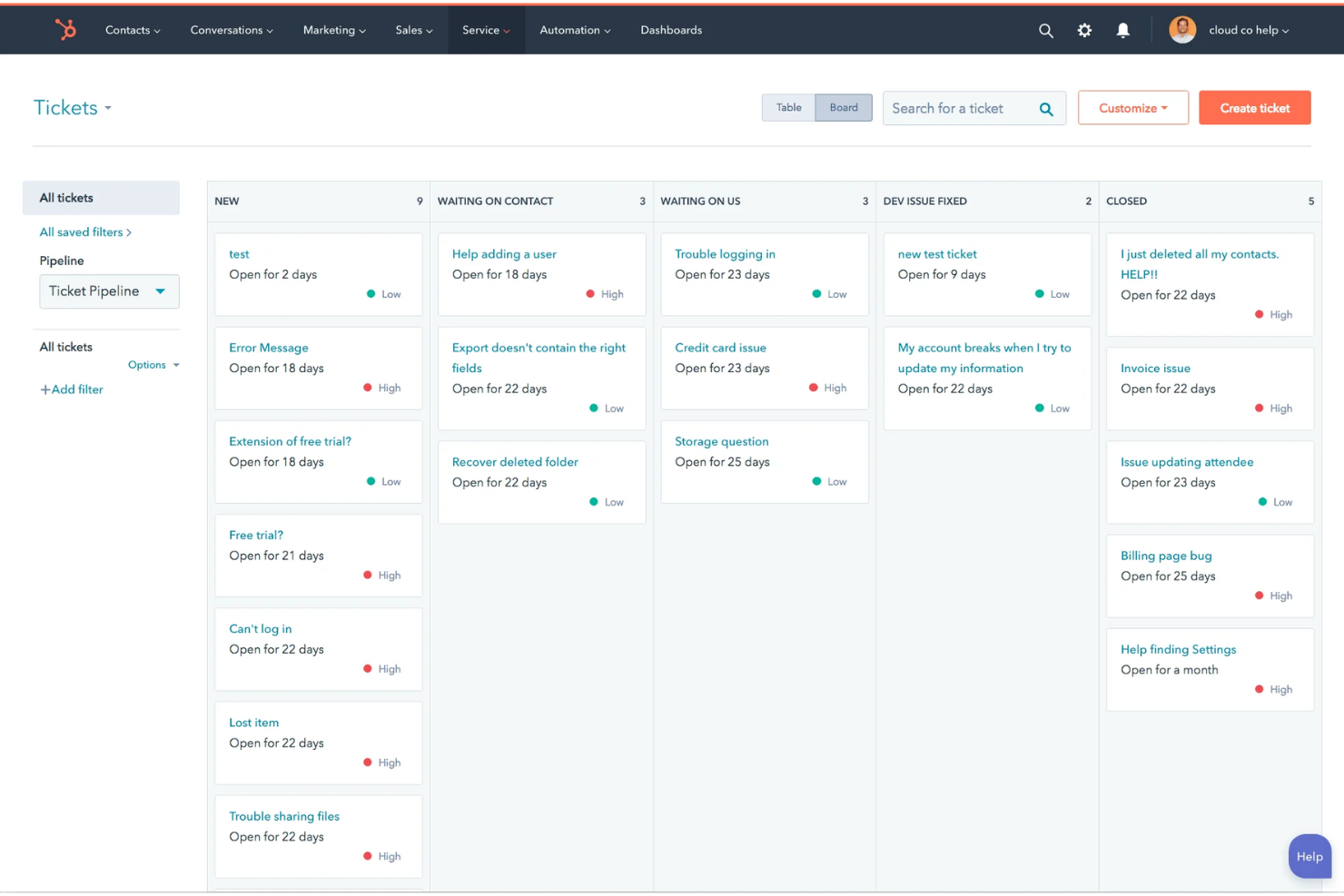
HubSpot Service Hub è ideale per le aziende che desiderano riunire strumenti di assistenza clienti, supporto e coinvolgimento in un’unica piattaforma integrata. Lo troverai particolarmente utile se il tuo team ha bisogno di semplificare la gestione dei ticket, consolidare i feedback e fornire risorse informative direttamente dal CRM.
Per chi è ideale HubSpot Service Hub?
Pensato per aziende di medie dimensioni e in crescita che vogliono unificare l’assistenza clienti e i dati CRM in un’unica piattaforma.
Perché HubSpot Service Hub è una valida alternativa a Odoo
Ho scelto HubSpot Service Hub perché centralizza ticket, articoli della knowledge base e feedback dei clienti in un unico posto, risultando particolarmente accessibile per le piccole aziende che vogliono evitare di gestire sistemi separati. La piattaforma è estremamente intuitiva, permettendo ai team di supporto di accedere rapidamente alle informazioni sui clienti e di agire sui segnali di coinvolgimento. Breeze Customer Agent gestisce email e chat live di routine 24 ore su 24, alleggerendo sensibilmente le code dell’assistenza. E poiché Service Hub fa parte dell’ecosistema HubSpot, i dati del supporto sono automaticamente collegati ai touchpoint di vendita e marketing, offrendo agli agenti un quadro completo dei clienti senza cambiare strumenti.
- Workspace help desk: Un ambiente condiviso di gestione ticket dove gli agenti gestiscono, indirizzano e risolvono le richieste dei clienti con tracciamento SLA e reportistica in tempo reale.
- Messaggistica omnicanale: Raggiungi i clienti tramite chat live, email, telefono e social media da una sola casella di posta.
- Sondaggi di feedback: Invia e analizza sondaggi NPS, CSAT e moduli personalizzati di feedback dei clienti direttamente dalla piattaforma.
- Conversational intelligence: Analisi delle chiamate basate su AI che evidenziano informazioni da ogni interazione con il cliente registrata sulla piattaforma.
Integrazioni di HubSpot Service Hub
HubSpot Service Hub offre oltre 100 integrazioni native, tra cui Salesforce, Slack, Gmail, Microsoft Teams, Zoom, Shopify, Jira, Mailchimp, Zendesk e Facebook Messenger. È disponibile un’API per integrazioni personalizzate.
Pros and Cons
Pros:
- Gestione unificata di ticket e knowledge base
- Strumenti integrati per sondaggi di feedback e reportistica
- Integrazione diretta con CRM per il contesto cliente
Cons:
- La configurazione dell'automazione dei ticket è a volte restrittiva
- La casella di posta omnicanale talvolta non sincronizza tutti i canali

Chatwoot
Ideale per il coinvolgimento clienti open source
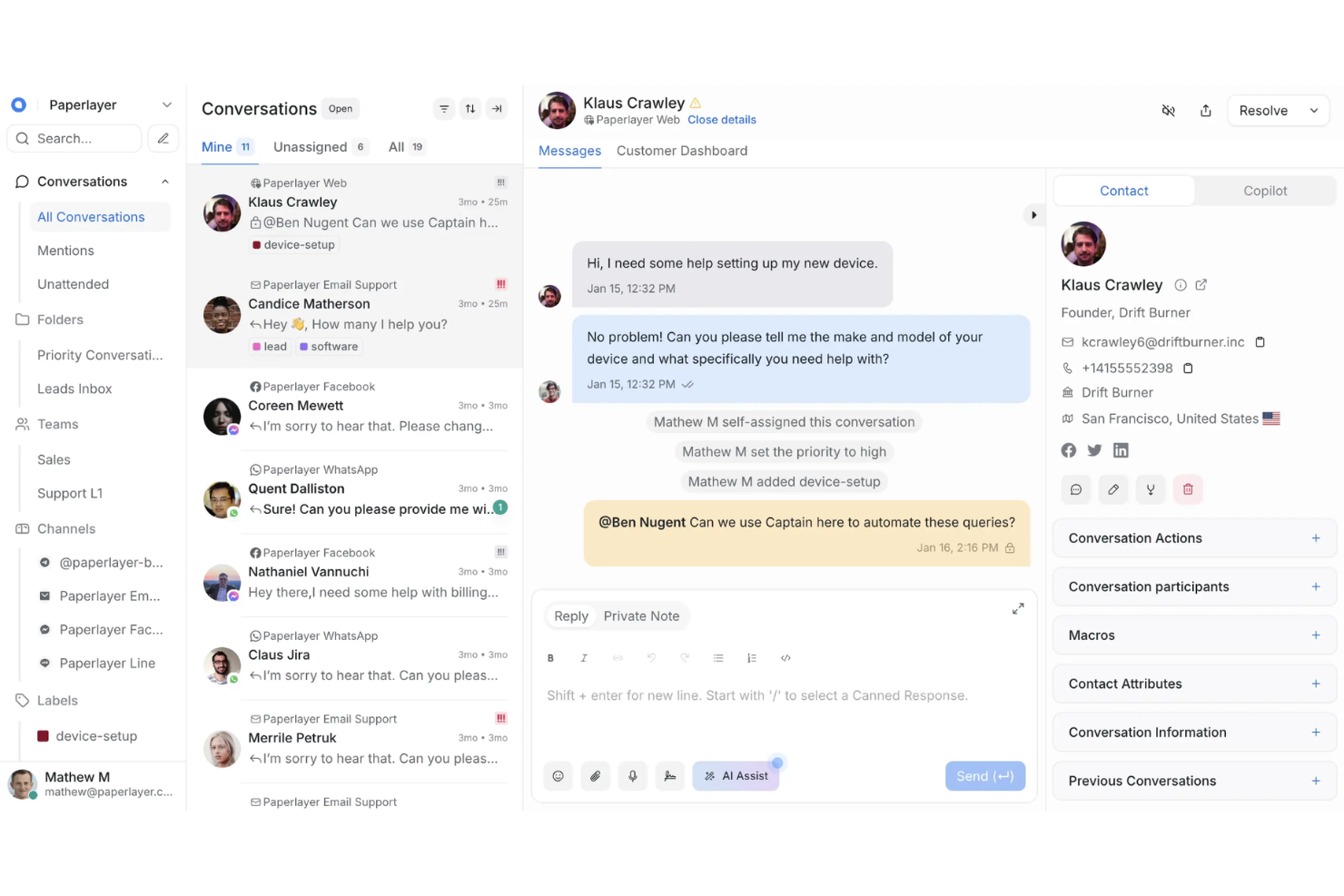
Chatwoot è una piattaforma open source per il coinvolgimento dei clienti progettata per aziende e team che desiderano il pieno controllo sui canali di messaggistica e sui dati dei clienti. La considero particolarmente adatta ai team di supporto che necessitano di un software di supporto personalizzabile e auto-ospitato, con flussi di lavoro moderni e omnicanale.
Per chi è ideale Chatwoot?
Team di supporto e dipartimenti IT di aziende in rapida crescita che vogliono una messaggistica omnicanale open source e auto-ospitata.
Perché Chatwoot è una valida alternativa a Odoo
Ho scelto Chatwoot perché la sua architettura open source offre ai team di supporto la piena proprietà dei dati dei clienti e la flessibilità di auto-ospitare la soluzione sulla propria infrastruttura. Questo è particolarmente prezioso per le organizzazioni con stringenti requisiti di conformità che preferiscono una distribuzione cloud sotto il loro controllo. Apprezzo anche Captain, l'agente AI integrato di Chatwoot, che aiuta ad automatizzare le risposte utilizzando la conoscenza di conversazioni precedenti e i contenuti del centro assistenza. Ciò migliora la facilità d'uso per i team di supporto, riducendo al tempo stesso il lavoro ripetitivo. Un altro vantaggio è il modello di prezzi trasparente, che dà alle aziende maggiore controllo sui costi rispetto a molte piattaforme di assistenza clienti proprietarie.
Funzionalità principali di Chatwoot
- Rilevamento delle collisioni: Segnala quando due agenti stanno visualizzando o rispondendo alla stessa conversazione contemporaneamente, per evitare risposte duplicate.
- Gestione SLA: Imposta obiettivi di tempo per risposta e risoluzione per ogni inbox, con avvisi quando le conversazioni si avvicinano o superano questi limiti.
- Risposte predefinite: Salva modelli di messaggio già scritti che gli agenti possono cercare e inserire nelle risposte con un solo clic.
- Report CSAT: Invia sondaggi automatizzati sulla soddisfazione dopo la chiusura delle conversazioni e aggrega i punteggi tra agenti e inbox.
Integrazioni di Chatwoot
Chatwoot offre integrazioni native con WhatsApp, Facebook Messenger, Instagram, Telegram, Line, Twilio, Slack e Salesforce. È disponibile un'API per integrazioni personalizzate.
Pros and Cons
Pros:
- Opzione di auto-ospitare per il pieno controllo dei dati
- Comunità open source attiva per supporto e plugin
- Automazioni per l'assegnazione delle inbox e i flussi di lavoro degli agenti
Cons:
- Le opzioni di reportistica sono meno personalizzabili
- La funzionalità dell'app mobile è inferiore rispetto alla versione web
Ideale per la gestione dei servizi IT
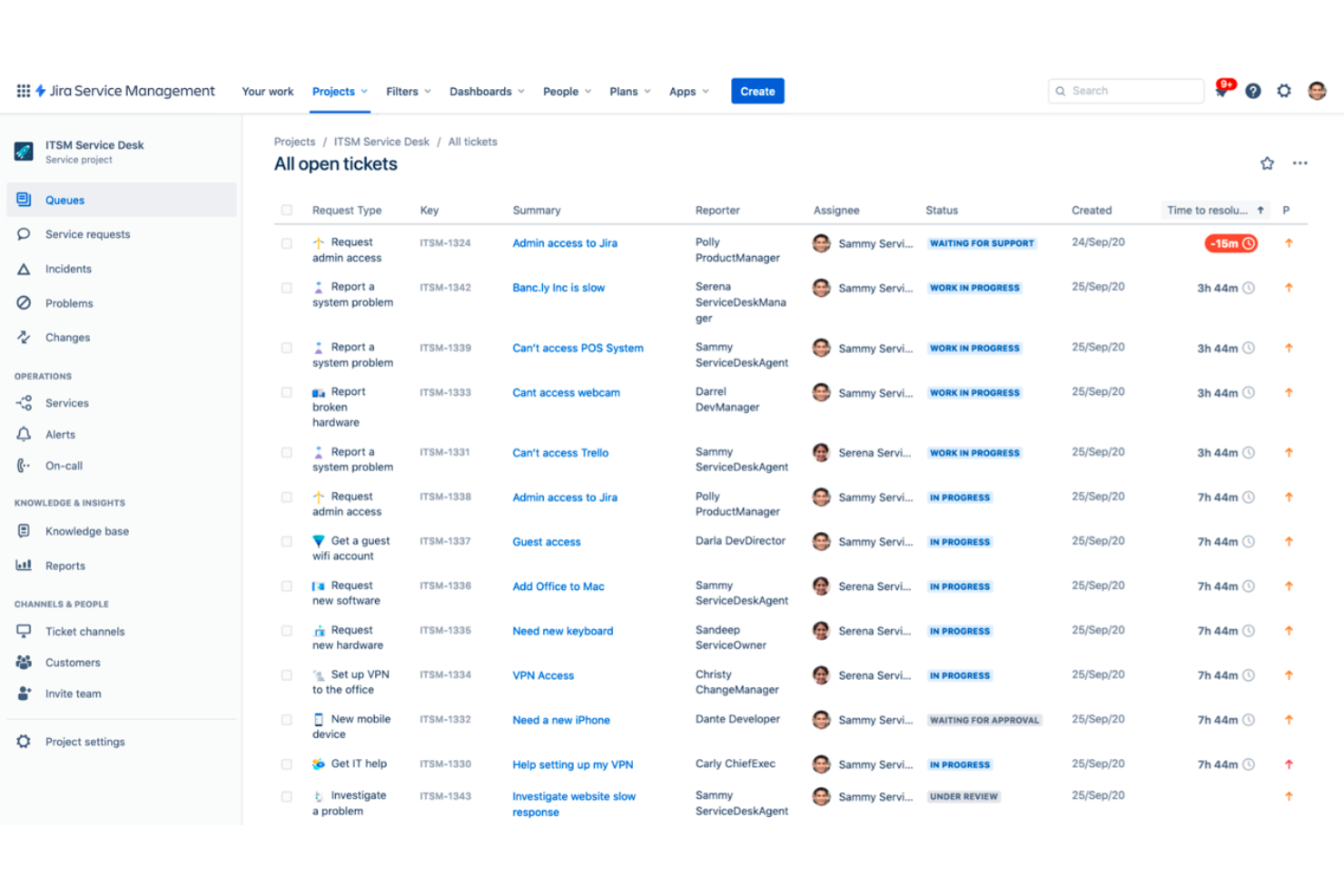
Jira Service Management è una piattaforma ITSM moderna progettata per i team che desiderano connettere IT, sviluppo e funzioni aziendali per offrire un supporto clienti più rapido e coordinato. È una scelta solida per le organizzazioni che necessitano di flussi di lavoro avanzati, automazione e gestione degli incidenti in un unico posto.
Per chi è ideale Jira Service Management?
Pensato per i team IT di aziende di medie e grandi dimensioni che richiedono flussi di lavoro personalizzabili e un controllo diretto sulla fornitura dei servizi e sulla gestione degli incidenti.
Perché Jira Service Management è una buona alternativa a Odoo
Ho scelto Jira Service Management perché è stato sviluppato appositamente per i team che necessitano della collaborazione tra IT, sviluppo e supporto clienti. I suoi flussi di lavoro aiutano le organizzazioni a ottimizzare l’erogazione dei servizi e a migliorare i processi aziendali chiave mantenendo incidenti, modifiche e richieste in un unico sistema. Apprezzo anche il modo in cui supporta sia le startup in crescita sia le PMI di dimensioni più grandi, offrendo visibilità sui problemi e automatizzando le risposte in caso di incidenti. Grazie alla stretta integrazione con l’ecosistema Atlassian, collega le operazioni di servizio con le attività di gestione della relazione con il cliente, garantendo ai team il contesto necessario per risolvere rapidamente ed efficacemente i problemi.
- Gestione delle richieste: Un portale condiviso dove dipendenti e clienti inviano richieste di servizio e gli operatori le gestiscono, assegnano e monitorano fino alla risoluzione.
- Gestione dei problemi: Raggruppa gli incidenti correlati in un unico record per accelerare l’analisi della causa principale e registrare le soluzioni temporanee.
- Gestione degli asset: Monitora l’inventario hardware e software, inclusi proprietà, cicli di vita e dipendenze nell’ambiente.
- Gestione della conoscenza: Una base di conoscenza integrata che suggerisce articoli rilevanti durante la creazione di ticket per ridurre le richieste e favorire il self-service.
Integrazioni di Jira Service Management
Jira Service Management offre oltre 1.000 integrazioni native tramite l’Atlassian Marketplace, tra cui Slack, Microsoft 365, Confluence, GitHub, Zendesk, Opsgenie, PagerDuty, Salesforce, Trello e Google Workspace. È disponibile un’API per integrazioni personalizzate.
Pros and Cons
Pros:
- Funzionalità approfondite di gestione degli incidenti e dei problemi
- Automazione personalizzabile per i flussi di supporto
- Portale centralizzato per collaborazione tra team
Cons:
- I menu di configurazione possono risultare complessi per i nuovi utenti
- La personalizzazione dei report richiede ulteriori configurazioni

Bitrix24
Ideale per CRM e collaborazione di squadra

Bitrix24 riunisce CRM, gestione delle attività e comunicazione omnicanale, diventando una scelta popolare per i team di piccole e medie dimensioni che desiderano avere tutto in un'unica piattaforma. Penso che sia particolarmente adatto alle aziende che vogliono sostituire strumenti di assistenza clienti disconnessi con uno spazio di lavoro unificato e collaborativo.
A Chi È Destinato Bitrix24?
Team vendite e assistenza di piccole e medie imprese che desiderano gestire relazioni e comunicazioni con i clienti da un'unica piattaforma integrata.
Perché Bitrix24 È una Buona Alternativa a Odoo
Ho scelto Bitrix24 perché il suo Contact Center raccoglie tutti i canali dei clienti—live chat, WhatsApp, Instagram, email e moduli web—in un unico spazio, convertendo automaticamente ogni interazione in un lead o in una trattativa CRM. Questa è una risposta diretta a una delle maggiori lacune di Odoo: la comunicazione frammentata con i clienti. Apprezzo anche il modo in cui CoPilot, l'assistente AI integrato di Bitrix24, trascrive le chiamate telefoniche e compila automaticamente i campi delle trattative nel CRM, riducendo l'inserimento manuale dei dati dopo le chiamate con i clienti. Per i team che necessitano di vendite, assistenza e collaborazione interna integrati, il collegamento stretto tra Contact Center e pipeline CRM è ciò che lo rende efficace nella pratica.
- Gestione della pipeline di vendita: Crea e sposta trattative attraverso pipeline personalizzabili con fasi, contatti assegnati e valori delle vendite tracciati nel CRM.
- Monitoraggio del tempo delle attività: Registra il tempo dedicato a compiti e progetti relativi ai clienti direttamente all'interno di ogni attività.
- Kanban board: Visualizza attività di assistenza clienti e richieste di supporto come schede su una bacheca drag-and-drop.
- Regole di automazione e trigger: Imposta condizioni che spostano automaticamente le trattative, assegnano attività o inviano notifiche in base all'attività del cliente.
Integrazioni Bitrix24
Bitrix24 offre integrazioni native con WhatsApp, Instagram, Facebook Messenger, Telegram, Viber, Google Workspace, Microsoft 365, Mailchimp, Zoom e Stripe. È disponibile anche un'API per integrazioni personalizzate.
Pros and Cons
Pros:
- CRM, contact center e attività in un'unica piattaforma
- Gestione nativa di canali chat e messaggistica social
- Utenti illimitati nel piano gratuito
Cons:
- Personalizzazione limitata nell'automazione dei flussi di lavoro CRM
- Occasionali ritardi nelle risposte dell'assistenza clienti
Altre alternative a Odoo
Ecco alcune ulteriori alternative a Odoo che non sono entrate nella mia selezione, ma che vale comunque la pena prendere in considerazione:
- Gladly
Ideale per conversazioni clienti unificate
- Zendesk
Ideale per la gestione scalabile dell'assistenza clienti
- Agentforce Service (formerly Service Cloud)
Ideale per l'automazione dei servizi aziendali
- Freshdesk
Ideale per la gestione dei ticket alimentata dall'IA


Come valuto le alternative a Odoo
Valuto le alternative a Odoo su due livelli: le funzionalità indispensabili, come gestione delle richieste di assistenza, CRM e supporto multicanale, e gli elementi distintivi che contano maggiormente giorno per giorno per i team CX.
Funzionalità fondamentali (requisiti minimi per questo elenco)
Quando seleziono gli strumenti da inserire nel mio elenco, assegno a ciascuno un punteggio su una scala da 0 (non offre la funzionalità) a 5 (eccelle in quest'area) per ogni funzionalità fondamentale elencata di seguito. Poi converto il punteggio totale dello strumento in una percentuale. Ogni strumento deve raggiungere un punteggio totale minimo del 65% per essere preso in considerazione.
- CRM integrato: verifico la presenza della gestione delle pipeline, delle schede dei contatti e del monitoraggio delle trattative, ovvero la visione completa del ciclo di vita del cliente che Odoo integra nella propria app CRM.
- Assistenza e gestione delle richieste: ogni strumento deve offrire una corretta creazione e distribuzione delle richieste, livelli di priorità e monitoraggio degli SLA, in modo che gli agenti possano gestire le code dei casi senza soluzioni alternative.
- Supporto omnicanale: cerco una casella di posta unificata in grado di gestire e-mail, chat dal vivo, social network e moduli online: i team non dovrebbero dover passare da un'app all'altra per rispondere ai clienti.
- Automazione dei flussi di lavoro: qui valuto gli attivatori basati su regole per l'assegnazione delle richieste, le escalation e le notifiche di ricontatto, non soltanto i promemoria di base per le attività.
- Suite aziendale modulare: poiché Odoo copre vendite, marketing, fatturazione e altro, cerco piattaforme che offrano più moduli integrati, oltre alle sole funzionalità CX.
- Reportistica e analisi: i cruscotti che includono CSAT, tempo di prima risposta, tassi di risoluzione e metriche della pipeline mi indicano se uno strumento supporta decisioni realmente efficaci nell'ambito CX.
Una volta ottenuto un elenco di strumenti che soddisfano questi criteri, valuto ciò che distingue ciascuna piattaforma.
Fattori distintivi (ciò che differenzia i fornitori)
Ecco come confronto i diversi fornitori:
Funzionalità di rilievo
Le funzionalità basate sull'IA, come la stesura delle risposte e il rilevamento del sentiment, fanno davvero la differenza quando gli agenti gestiscono volumi elevati di richieste. Valuto anche i portali autonomi che offrono ai clienti una base di conoscenza e un monitoraggio delle richieste, poiché riducono il volume delle richieste in entrata prima che raggiungano la coda. Un'altra caratteristica che considero è la visione a 360° del cliente. Le piattaforme che riuniscono la cronologia delle vendite, della fatturazione e del supporto in un'unica linea temporale visibile all'agente aiutano i team a personalizzare le interazioni senza passare da un modulo all'altro.
Oltre le funzionalità
Il costo totale di proprietà è importante in questo caso, perché i prezzi modulari di Odoo possono aumentare rapidamente man mano che si aggiungono app. Confronto i costi per utente, ma verifico anche cosa è incluso nel pacchetto e cosa invece è vincolato a componenti aggiuntivi. Anche l'ecosistema di integrazioni è un fattore importante: i team CX hanno in genere bisogno di connettori per piattaforme di commercio elettronico, strumenti di marketing e canali di messaggistica come WhatsApp. Valuto inoltre la velocità di implementazione, in particolare le risorse per l'inserimento iniziale e i modelli predefiniti, poiché la migrazione dalla configurazione multi-modulo di Odoo può rallentare i team se la nuova piattaforma non offre procedure guidate per la configurazione.
Perché cercare un'alternativa a Odoo?
Sebbene Odoo sia una buona scelta come software per il servizio clienti, ci sono diversi motivi per cui alcuni utenti cercano soluzioni alternative. Potresti essere alla ricerca di un'alternativa a Odoo perché…
- Hai bisogno di strumenti più avanzati per l'automazione dei ticket
- Le opzioni di integrazione con applicazioni di terze parti sono limitate
- Andare oltre i moduli principali comporta delle difficoltà
- Mancano analisi specializzate per il supporto
- La configurazione dell'interfaccia utente è meno flessibile
- È importante avere accesso al supporto 24 ore su 24, 7 giorni su 7
Se ti riconosci in una di queste situazioni, sei nel posto giusto. Il mio elenco contiene diverse opzioni di software per il servizio clienti più adatte ai team che affrontano queste difficoltà con Odoo e cercano soluzioni alternative.
Funzionalità principali di Odoo
Ecco alcune delle funzionalità principali di Odoo, per aiutarti a confrontare ciò che offrono le soluzioni alternative:
- Gestione dei ticket: consente di monitorare, assegnare e risolvere i problemi dell'assistenza clienti utilizzando un pannello di controllo centralizzato che organizza i ticket dei clienti in base a priorità, stato e agente responsabile.
- Base di conoscenza: offre una libreria consultabile in cui il gruppo e i clienti possono trovare articoli utili, guide e domande frequenti per risolvere le richieste comuni, riducendo il volume dei ticket.
- Chat dal vivo: consente di conversare in tempo reale con i clienti direttamente dal sito web, permettendo al gruppo di fornire assistenza immediata e rispondere alle domande sul momento.
- Flussi di lavoro automatizzati: permette di configurare l'automazione dei processi per attività come l'assegnazione dei ticket e i ricontatti, aiutando il gruppo a eliminare il lavoro manuale ripetitivo e ad accelerare i tempi di risposta.
- Assistenza multicanale: centralizza ticket e richieste provenienti da canali come e-mail, chat dal vivo e moduli del sito web, consentendo al gruppo di gestire tutte le conversazioni da un'unica interfaccia.
- Gestione degli SLA: consente di impostare accordi sui livelli di servizio che monitorano automaticamente i tempi di risposta e risoluzione, così da poter misurare le prestazioni e rispettare gli standard promessi.
- Portale clienti: offre ai clienti un pannello di controllo sicuro e autonomo per monitorare le richieste, leggere gli articoli della guida e inviare nuovi ticket senza contattare direttamente il gruppo.
- Report e analisi: offre pannelli di controllo personalizzabili e report predefiniti per monitorare le prestazioni del gruppo, tenere sotto controllo le metriche principali e individuare le aree di miglioramento.
- Risposte predefinite: consente agli agenti di salvare e riutilizzare risposte comuni per le domande frequenti, accelerando i tempi di risposta e garantendo coerenza nella comunicazione.
- Integrazione con altre app Odoo: collega senza interruzioni il servizio clienti ai moduli CRM, vendite e inventario di Odoo, offrendo al gruppo una visione unificata di ogni cliente e semplificando la condivisione delle informazioni tra i reparti.