

Le 10 migliori piattaforme di autoassistenza clienti basate sull’IA nel 2026

Elenco ristretto delle piattaforme di self-service per i clienti basate sull'AI


Le piattaforme di self-service per i clienti basate sull'AI sono strumenti software che utilizzano l'intelligenza artificiale per aiutare i clienti a trovare risposte, risolvere problemi e completare attività senza dover parlare con un operatore umano. Se stai cercando modi per gestire elevati volumi di richieste di assistenza, fornire soluzioni più rapide o offrire supporto 24 ore su 24, 7 giorni su 7, queste piattaforme possono aiutare il tuo team a soddisfare le crescenti aspettative dei clienti. In questo elenco troverai soluzioni affidabili basate sull'AI che automatizzano le richieste più comuni, si integrano con i sistemi esistenti e offrono ai tuoi clienti un maggiore controllo, così potrai concentrarti sui casi complessi e ottenere risultati migliori.
Perché fidarsi dei nostri consigli sui software
Il nostro team testa e recensisce software dal 2012. In quanto leader CX noi stessi, sappiamo quanto sia difficile — e importante — scegliere il software giusto.
Per questa guida, abbiamo valutato gli strumenti attraverso test pratici e ricerche indipendenti, assegnando un punteggio agli strumenti in base ai nostri criteri di selezione.
Le nostre recensioni riflettono il nostro giudizio editoriale umano, non un discorso di vendita.
Tabella comparativa delle piattaforme di self-service per i clienti basate sull'AI
Questa tabella comparativa riassume i dettagli sui prezzi delle mie migliori piattaforme di self-service per i clienti basate sull’AI:
| Tool | Best For | Trial Info | Price | ||
|---|---|---|---|---|---|
| 1 | Ideale per agenti AI testati su dati reali | Demo gratuita disponibile | Tariffe su richiesta | Website | |
| 2 | Migliore per integrazioni dati in tempo reale | Piano gratuito disponibile | A partire da $32/mese (fatturazione annuale) | Website | |
| 3 | Il migliore per la personalizzazione dei workflow senza codice | Piano gratuito disponibile | A partire da $29/mese (fatturato annualmente) | Website | |
| 4 | Ideale per risposte istantanee del chatbot AI | Prova gratuita di 7 giorni + piano gratuito disponibile | Da $24.17/mese (fatturazione annuale) | Website | |
| 5 | Ideale per workflow di ticket automatizzati | Demo gratuita disponibile | Prezzo su richiesta | Website | |
| 6 | Ideale per l'automazione del supporto clienti e-commerce | Prova gratuita di 7 giorni + demo gratuita disponibile | Da $10/mese | Website | |
| 7 | Ideale per il supporto clienti unificato con IA | Demo gratuita disponibile | Prezzo su richiesta | Website | |
| 8 | Ideale per l'automazione del supporto basato su AI | Piano gratuito + prova gratuita di 14 giorni + demo gratuita disponibile | A partire da $9/postazione/mese (fatturazione annuale) | Website | |
| 9 | Ideale per il supporto clienti unificato e guidato dall'IA | Demo gratuita disponibile | Prezzo su richiesta | Website | |
| 10 | Ideale per supporto self-service IA multilingue | Demo gratuita disponibile | Da $1.25/solve | Website |
Recensioni delle piattaforme di self-service per i clienti basate sull'AI
Di seguito sono riportati i miei riepiloghi dettagliati delle migliori piattaforme di self-service per i clienti basate sull’AI incluse nel mio elenco ristretto. Le mie recensioni offrono una panoramica dettagliata delle caratteristiche, delle funzionalità e delle integrazioni di ciascuna piattaforma per aiutarti a trovare quella più adatta alle tue esigenze.

Cresta
Ideale per agenti AI testati su dati reali
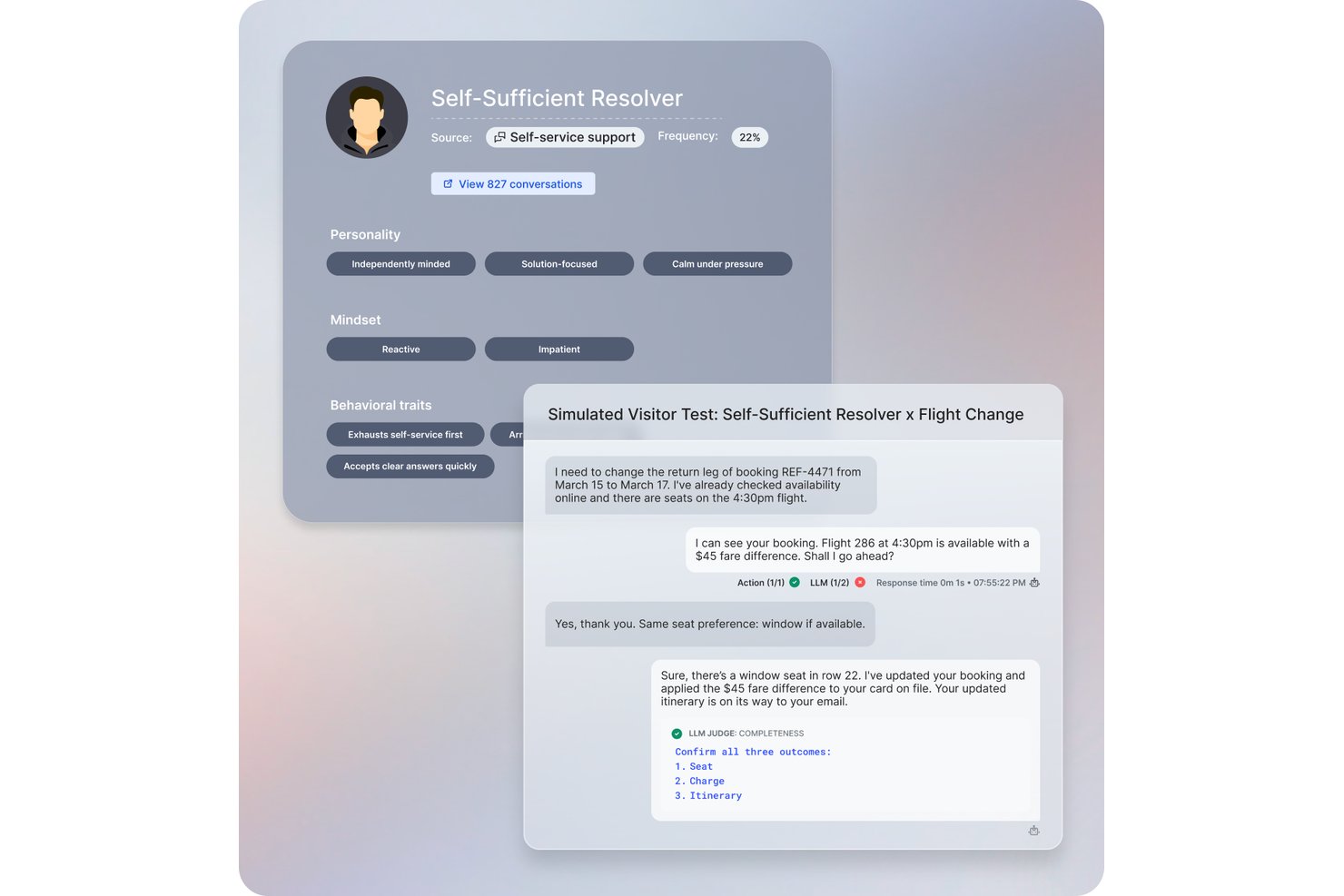
Cresta è una piattaforma per il self-service clienti basata su intelligenza artificiale che utilizza AI conversazionale, assistenza in tempo reale per gli agenti e analisi delle conversazioni per automatizzare e ottimizzare le interazioni di servizio su chat, voce e canali di messaggistica.
Per chi è ideale Cresta?
Cresta è particolarmente adatto per i team aziendali dell'esperienza cliente che gestiscono grandi volumi di interazioni su più canali.
Perché ho scelto Cresta
Ho scelto Cresta tra i migliori perché si distingue per agenti AI testati utilizzando dati reali dei clienti. Mi piace avere accesso ad agenti autonomi per le conversazioni e a coaching in tempo reale per gli agenti che si adattano sulla base di reali conversazioni di servizio in produzione.
Caratteristiche principali di Cresta
- Supporto multicanale: Gestisci le conversazioni con i clienti su chat, voce e messaggistica da un'unica piattaforma centralizzata.
- Intelligenza conversazionale: Analizza le interazioni utilizzando l'elaborazione del linguaggio naturale per individuare tendenze e sentimenti dei clienti.
- Gestione automatizzata della qualità: Valuta e revisiona automaticamente ogni conversazione per verificarne la conformità e gli standard di servizio.
- Automazione del flusso di lavoro live: Attiva flussi di lavoro predefiniti durante le interazioni con i clienti per snellire i processi e ridurre le attività manuali.
Integrazioni di Cresta
Cresta offre integrazioni native con Salesforce, Twilio, Pipedrive, BigCommerce, Five9, Zendesk e altri ancora. È disponibile un'API per integrazioni personalizzate.
Pros and Cons
Pros:
- L'AI si adatta in base alle conversazioni reali
- Analisi avanzate ad ogni interazione
- Feedback in tempo reale per gli agenti live
Cons:
- Flussi di lavoro complessi possono richiedere configurazioni aggiuntive
- Riconoscimento delle intenzioni a volte impreciso

Chatbase
Migliore per integrazioni dati in tempo reale
Chatbase è una piattaforma di chatbot basata sull'intelligenza artificiale pensata per aziende e team di supporto che desiderano automatizzare le interazioni con i clienti, fornire risposte immediate e ridurre il lavoro manuale su siti web e canali di messaggistica.
Per chi è ideale Chatbase?
Chatbase è adatto ai team di supporto e operativi di aziende in crescita che vogliono automatizzare il servizio clienti attraverso i canali digitali.
Perché ho scelto Chatbase
Ho scelto Chatbase tra i migliori perché posso collegare i miei chatbot direttamente a database e API in tempo reale, permettendo loro di recuperare per i clienti informazioni aggiornate al minuto. Il mio team utilizza le integrazioni dati in tempo reale per rispondere immediatamente alle domande sullo stato degli ordini, verificare l'inventario o fornire aggiornamenti sull'account. Mi piace il fatto che possiamo configurare webhooks e fonti dati personalizzate, così i nostri bot rispondono sempre con i dettagli più recenti.
Caratteristiche principali di Chatbase
- Costruttore di chatbot senza codice: Crea e distribuisci chatbot con un'interfaccia drag-and-drop, senza bisogno di programmare.
- Supporto multilingue: Servi i clienti in più lingue grazie alle funzionalità di traduzione integrate.
- Analisi delle conversazioni: Monitora le prestazioni dei chatbot e consulta registri dettagliati delle conversazioni e delle metriche.
- Azioni IA personalizzabili: Definisci azioni e flussi di lavoro specifici per i tuoi agenti IA, in modo che gestiscano richieste complesse.
Integrazioni di Chatbase
Chatbase offre integrazioni native con WhatsApp, Facebook Messenger, Telegram, Slack, Google Sheets, Shopify e Zapier. È disponibile anche un'API per integrazioni personalizzate.
Pros and Cons
Pros:
- Consente azioni IA multi-step, condizionate
- Fornisce analisi dettagliate delle conversazioni e registri
- Distribuisce chatbot su più piattaforme di messaggistica
Cons:
- Non integra un assistente vocale nativo
- Le opzioni di branding personalizzato sono disponibili solo con i piani a pagamento

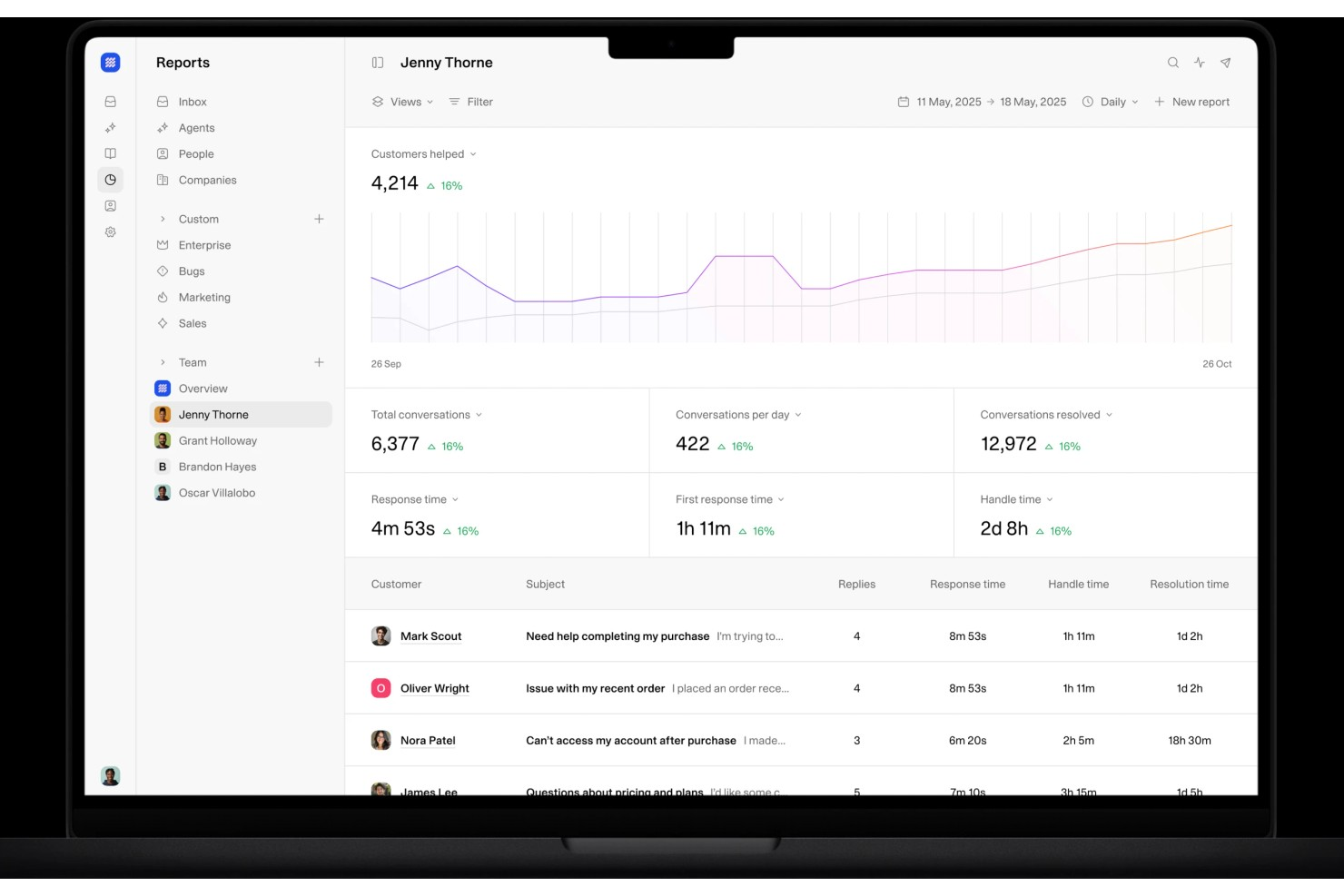
Weav è una piattaforma di self-service clienti basata su IA, costruita attorno ad agenti AI addestrati sul prodotto, chatbot, una casella di posta unificata uomo-IA, ricerca interna delle conoscenze e report automatizzati sulle risoluzioni.
Per chi è indicato Weav?
Weav è una scelta ideale per team ecommerce e SaaS di piccole e medie dimensioni che desiderano automatizzare l'assistenza clienti senza dover contare su un grande staff di supporto.
Perché ho scelto Weav
Ho incluso Weav tra le mie scelte principali perché la personalizzazione no-code degli agenti la distingue davvero dalle altre piattaforme. Si può impostare il tono della conversazione, limitare la lunghezza delle risposte, definire frasi proibite e arricchire gli agenti di ulteriori contesti usando semplici prompt testuali, senza alcun coinvolgimento degli sviluppatori. Mi piace anche che si possano creare agenti specializzati per scenari specifici, come la fatturazione rispetto all'assistenza tecnica, ciascuno addestrato separatamente sul contenuto pertinente. La configurazione di addestramento con un solo clic permette al tuo team di creare e modificare agenti senza scrivere una sola riga di codice.
Funzionalità principali di Weav
- Addestramento della knowledge base: Allena il tuo agente IA importando contenuti da siti web, file caricati, coppie di domande e risposte e trascrizioni video.
- Casella di posta unificata: Gestisci le conversazioni con i clienti su più canali in una sola visuale, con suggerimenti di risposta redatti dall'IA per gli operatori umani.
- Chiedi a Weav: Uno strumento di ricerca interna con IA che consente ai membri del supporto di recuperare immediatamente risposte dalle fonti di conoscenza collegate.
- Report sulle risoluzioni: Tieni traccia dei tassi di risoluzione IA, del volume dei ticket e delle performance degli agenti su tutte le operazioni di supporto.
Integrazioni Weav
Weav offre integrazioni native con Stripe e Shopify, permettendo agli agenti IA di gestire flussi di lavoro relativi a fatturazione, abbonamenti e fatture direttamente nelle conversazioni con i clienti. Si integra anche con Google Drive. Oltre a queste, Weav supporta azioni personalizzate che collegano gli agenti a qualsiasi API HTTPS di terze parti, così puoi creare integrazioni con il tuo backend o con strumenti come sistemi di gestione ordini e prenotazioni.
Pros and Cons
Pros:
- Addestramento con un clic dalla documentazione esistente
- Apprendimento continuo dai ticket risolti
- Punteggio di affidabilità automatizzato integrato
Cons:
- Integrazioni native di terze parti limitate
- Il piano gratuito limita i messaggi IA a 20

Tidio
Ideale per risposte istantanee del chatbot AI

Se vuoi aggiungere chat AI e automazione al tuo supporto clienti, Tidio merita considerazione. È pensato per negozi e-commerce e piccole aziende che necessitano di gestire rapidamente le richieste dei clienti tramite chat, email e Messenger. Tidio ti aiuta ad automatizzare le domande frequenti e a mantenere le conversazioni organizzate in un unico posto.
A Chi è Destinato Tidio?
Tidio è ideale per le piccole attività e-commerce e i team di supporto che vogliono automatizzare le conversazioni con i clienti e gestire la chat dal vivo su più canali.
Perché Ho Scelto Tidio
Ciò che mi attrae di Tidio per l’auto-servizio clienti con AI è la sua attenzione all’integrazione di chat dal vivo e automazione basata sull’intelligenza artificiale in un’unica piattaforma. Il chatbot AI di Tidio può rispondere istantaneamente alle domande più comuni dei clienti, riducendo la necessità di intervento umano e aiutando i team a gestire volumi maggiori. Apprezzo anche la possibilità di impostare flussi di lavoro automatizzati per qualificare i lead o indirizzare le conversazioni in base alle risposte dei clienti. Per le aziende che desiderano offrire supporto in tempo reale automatizzando richieste ripetitive, l’approccio di Tidio a chat dal vivo e automazione si distingue.
Funzionalità Principali di Tidio
Altre funzionalità che rendono Tidio utile per piattaforme di auto-servizio clienti AI includono:
- Posta in arrivo multicanale: Gestisci le conversazioni provenienti da chat dal vivo, email, Instagram e Messenger in un’unica dashboard unificata.
- Monitoraggio dei visitatori: Visualizza in tempo reale l’attività dei visitatori sul sito web e attiva messaggi automatici in base al comportamento.
- Risposte rapide: Crea e utilizza risposte predefinite per rispondere rapidamente alle domande frequenti dei clienti.
- Personalizzazione del widget: Adatta l’aspetto e il marchio del widget chat per abbinarlo al design del tuo sito.
Integrazioni di Tidio
Le integrazioni includono Shopify, WordPress, Messenger, Instagram, WhatsApp, Zendesk, HubSpot, Salesforce, Microsoft Dynamics e altre.
Pros and Cons
Pros:
- Template chatbot preimpostati per scenari e-commerce
- Monitoraggio visitatori in tempo reale per un coinvolgimento proattivo
- Widget chat personalizzabile in base allo stile del brand
Cons:
- Statistiche limitate sulle performance del chatbot
- Il chatbot può non gestire domande complesse

HappyFox
Ideale per workflow di ticket automatizzati
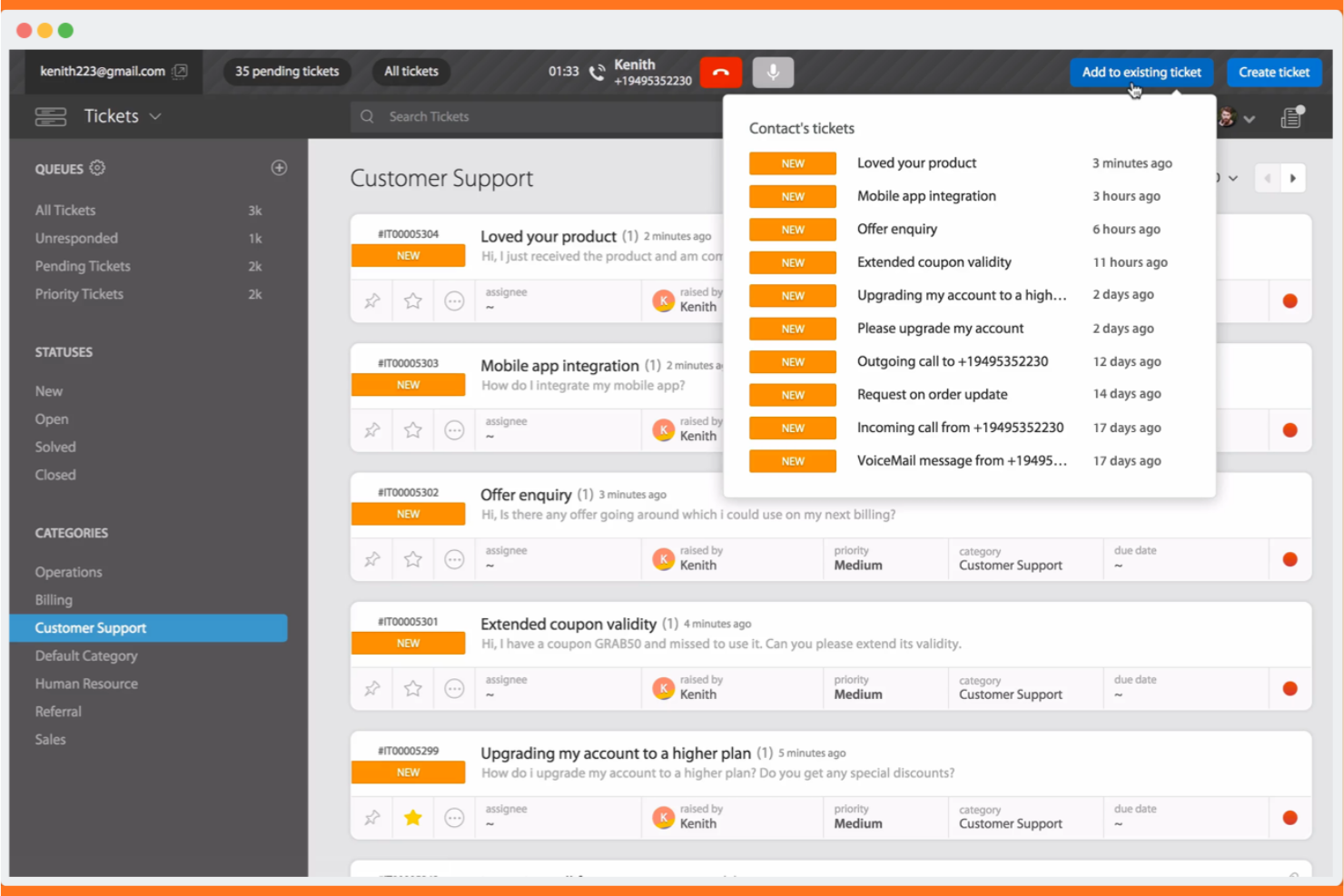
Se il tuo team ha bisogno di una gestione dei ticket guidata dall'IA con supporto multilingue, HappyFox merita attenzione. È progettato per le organizzazioni che vogliono automatizzare i flussi di lavoro dell'assistenza clienti e offrire opzioni di self-service in più lingue. HappyFox aiuta i team di supporto a gestire richieste complesse riducendo il lavoro manuale e migliorando la coerenza delle risposte.
Per chi è ideale HappyFox?
HappyFox si adatta a organizzazioni di medie e grandi dimensioni che necessitano di ticketing AI multilingue e automazione dei flussi di lavoro per l'assistenza clienti.
Perché ho scelto HappyFox
Quello che mi ha colpito di HappyFox è la sua attenzione al ticketing potenziato dall'IA combinato con il self-service multilingue e l'automazione dei flussi di lavoro. L'IA della piattaforma può categorizzare, dare priorità e instradare automaticamente i ticket, particolarmente utile per i team che gestiscono un grande volume di richieste in più lingue. Mi piace anche che HappyFox offra una knowledge base multilingue e un portale di self-service, facilitando ai clienti globali la ricerca autonoma delle risposte. I suoi strumenti per l'automazione dei flussi di lavoro aiutano i team di supporto a ridurre le attività manuali e mantenere uno standard di servizio coerente su tutti i canali.
Funzionalità principali di HappyFox
Altre funzionalità che rendono HappyFox una scelta valida per le piattaforme di self-service clienti AI includono:
- Azioni predefinite: Crea e utilizza risposte già pronte per le richieste più comuni dei clienti per velocizzare la gestione dei ticket.
- Campi ticket personalizzati: Aggiungi campi dati specifici ai ticket per raccogliere informazioni rilevanti per la tua azienda o il tuo flusso di lavoro.
- Sondaggi sulla soddisfazione del cliente: Invia automaticamente dei sondaggi dopo la risoluzione del ticket per raccogliere feedback e misurare la qualità del servizio.
- Permessi basati sui ruoli: Controlla l'accesso a funzionalità e dati assegnando ruoli e permessi ai vari membri del team.
Integrazioni di HappyFox
Le integrazioni native non sono attualmente elencate.
Pros and Cons
Pros:
- La classificazione AI dei ticket migliora la precisione nelle risposte
- Il portale self-service multilingue supporta gli utenti globali
- L'automazione dei workflow riduce la gestione manuale dei ticket
Cons:
- Le funzionalità IA sono limitate ai piani di livello superiore
- Ritardi nella sincronizzazione dei ticket segnalati su alcuni canali

Gorgias
Ideale per l'automazione del supporto clienti e-commerce
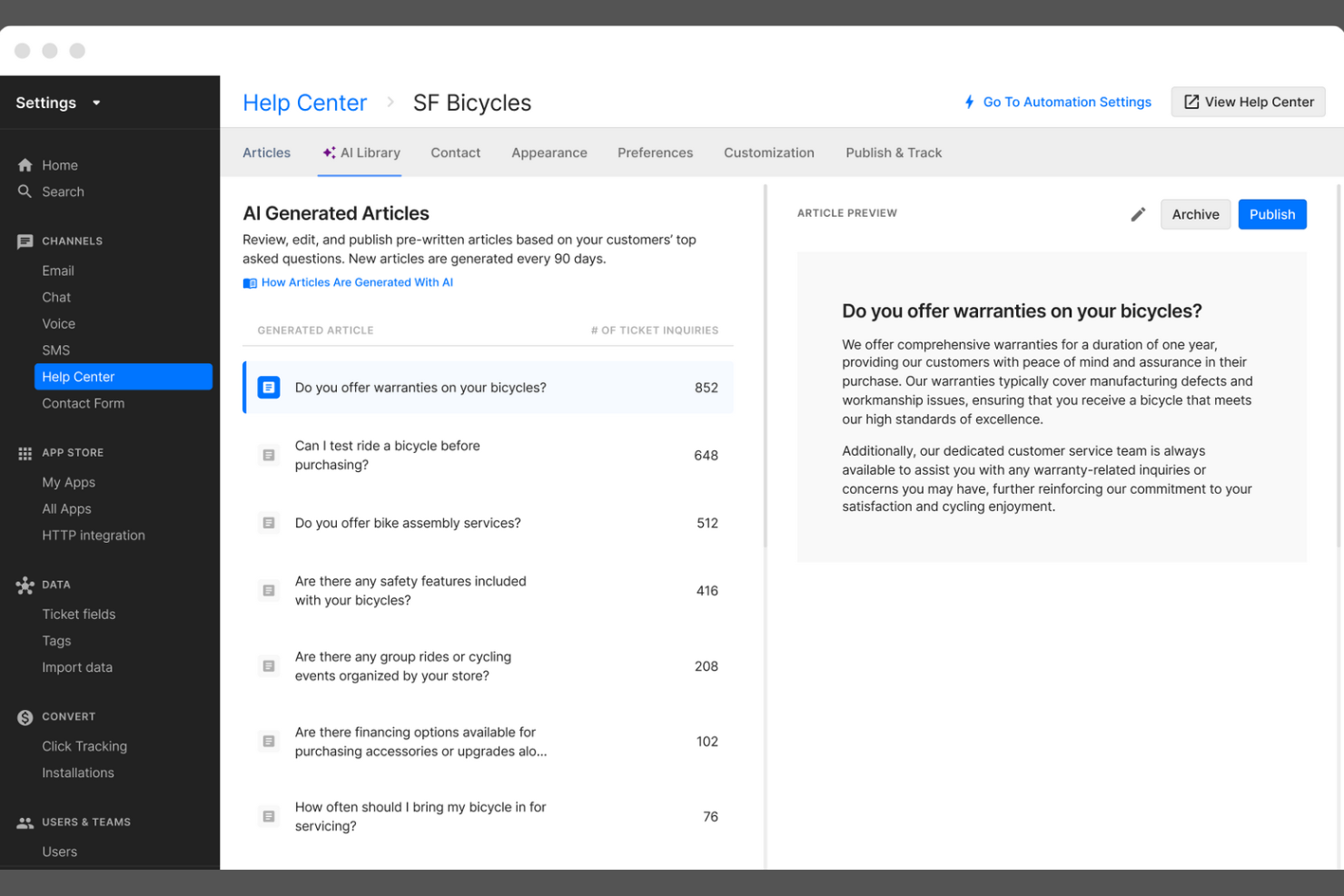
Gorgias è una piattaforma di assistenza clienti progettata per i marchi di ecommerce che desiderano automatizzare e personalizzare il supporto su larga scala. È particolarmente utile per i rivenditori online che vogliono centralizzare le conversazioni con i clienti e automatizzare le attività ripetitive. Con Gorgias, i team di supporto possono gestire i ticket da più canali e offrire risposte più rapide e coerenti agli acquirenti.
Per chi è ideale Gorgias?
Gorgias è una scelta eccellente per i team di assistenza di brand direct-to-consumer e rivenditori online.
Perché ho scelto Gorgias
Ho scelto Gorgias perché la sua integrazione profonda con Shopify lo rende particolarmente prezioso per i brand di ecommerce che vogliono automatizzare e personalizzare l'assistenza clienti. La piattaforma importa direttamente da Shopify i dettagli degli ordini, lo stato delle spedizioni e i dati dei clienti, permettendo agli operatori di supporto e ai flussi di lavoro basati su AI di risolvere le domande comuni dell'e-commerce senza cambiare strumento. Gorgias consente anche risposte automatiche alle richieste ripetitive, come il tracciamento degli ordini o i resi, aiutando i team a gestire alti volumi di ticket in modo efficiente. Questa attenzione all'automazione e all'accesso ai dati specifici dell'e-commerce distingue Gorgias da piattaforme di self-service clienti AI più generiche.
Funzionalità principali di Gorgias
Altre funzionalità che rendono Gorgias un'ottima opzione tra le piattaforme di self-service clienti AI includono:
- Rilevamento delle intenzioni tramite AI: identifica automaticamente il motivo di ogni richiesta dei clienti, per instradare i ticket e attivare le automazioni pertinenti.
- Macro e risposte predefinite: consentono ai team di creare risposte riutilizzabili per le domande comuni, garantendo coerenza e risparmiando tempo.
- Supporto multicanale: centralizza le conversazioni dei clienti da email, live chat, social media, SMS e WhatsApp in un'unica dashboard.
- Centro assistenza self-service: permette alle aziende di creare e gestire una knowledge base con il proprio marchio a cui i clienti possono accedere 24/7.
Integrazioni Gorgias
Le integrazioni includono Shopify, Magento, BigCommerce, WooCommerce, Facebook, Instagram, Slack, Klaviyo, Yotpo e altre ancora.
Pros and Cons
Pros:
- L'AI suggerisce risposte per le domande ripetitive
- Centralizza chat, email e messaggi social
- Le macro velocizzano i flussi di risoluzione dei ticket
Cons:
- Nessuna funzione di supporto vocale o telefonico AI
- Manca una logica avanzata di ramificazione dei flussi di lavoro

Kustomer
Ideale per il supporto clienti unificato con IA
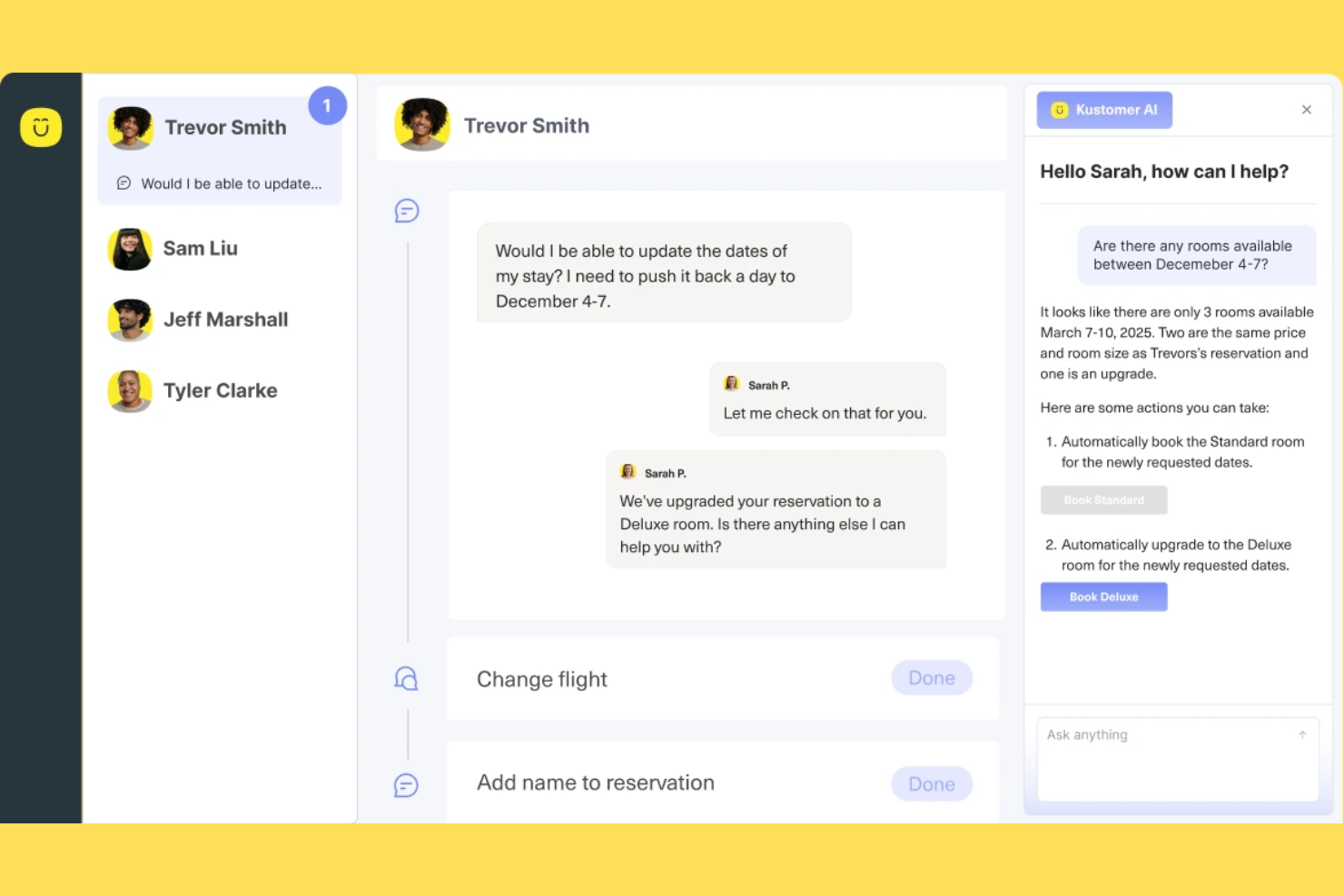
Se il tuo team ha bisogno di una piattaforma di assistenza clienti che riunisca tutti i canali e i dati dei clienti, Kustomer merita attenzione. È pensata per team di supporto nel retail, e-commerce e aziende in rapida crescita che vogliono automatizzare e personalizzare l'assistenza su larga scala. Kustomer ti aiuta a gestire le conversazioni, automatizzare le attività ripetitive e offrire risposte più rapide e informate tramite l'IA.
Per chi è ideale Kustomer?
Kustomer è adatto a team di supporto di medie e grandi dimensioni nel retail e nell'e-commerce che devono gestire elevati volumi di interazioni omnicanale con i clienti.
Perché ho scelto Kustomer
Quello che mi colpisce di Kustomer è la capacità di unire il supporto omnicanale e l'automazione basata sull'IA in un'unica piattaforma. L'ho scelto per questa lista perché permette di gestire le conversazioni provenienti da chat, email, social e voce in un'unica cronologia, così gli agenti hanno sempre il contesto completo. Le funzionalità IA di Kustomer possono automatizzare le attività routinarie, suggerire risposte e persino indirizzare le conversazioni in base all'intento, aiutando i team a gestire grandi volumi senza perdere un tocco personale. Per le aziende che desiderano unificare i dati dei clienti e automatizzare il servizio su tutti i canali, Kustomer offre una base solida.
Funzionalità principali di Kustomer
Altre funzionalità che rendono Kustomer utile per piattaforme di self-service clienti IA includono:
- Gestione della knowledge base: Crea e mantieni un centro assistenza ricercabile dove i clienti possono trovare autonomamente le risposte.
- Vista cronologica del cliente: Visualizza in un unico posto il registro cronologico di ogni interazione, ordine e attività dei clienti.
- Workflow personalizzati: Progetta processi automatizzati per la gestione ticket, escalation e follow-up tramite un editor di workflow visuale.
- Analisi del sentiment: Rileva automaticamente il sentiment delle conversazioni per dare priorità e personalizzare le risposte.
Integrazioni di Kustomer
Le integrazioni includono Shopify, TikTok Shop, Facebook, WhatsApp, Instagram, Gmail, Twilio, AfterShip, Narvar e altro.
Pros and Cons
Pros:
- La knowledge base supporta self-service e chatbot
- L'analisi del sentiment segnala le conversazioni urgenti
- Editor di workflow visuale per automazioni personalizzate
Cons:
- Le funzionalità AI avanzate richiedono piani di livello superiore
- Ritardi occasionali nella sincronizzazione con piattaforme e-commerce

Ideale per l'automazione del supporto basato su AI

Se stai cercando una piattaforma di assistenza clienti basata su AI che collega ticket, chat e una knowledge base in un unico posto, HubSpot Service Hub merita sicuramente attenzione. È particolarmente indicato per aziende in crescita e team che desiderano automatizzare l'assistenza mantenendo tutti i dati dei clienti unificati. Con HubSpot Service Hub, puoi centralizzare le conversazioni con i clienti e permettere agli utenti di trovare autonomamente le risposte di cui hanno bisogno.
Per chi è HubSpot Service Hub?
HubSpot Service Hub è indicato per piccole e medie imprese e team di supporto che vogliono unificare l'assistenza clienti, automatizzare i processi e gestire tutte le interazioni su un'unica piattaforma.
Perché ho scelto HubSpot Service Hub
Ciò che mi colpisce di HubSpot Service Hub è il modo in cui riunisce ticketing, live chat e strumenti di knowledge base in un'unica piattaforma unificata alimentata da automazione AI. Questo approccio consente al tuo team di automatizzare le attività ripetitive di assistenza, instradare i ticket in modo intelligente e fornire articoli di supporto pertinenti ai clienti senza cambiare sistema. Apprezzo anche che gli strumenti AI di HubSpot possano analizzare le conversazioni e suggerire risposte, aiutando i team a offrire un supporto più rapido e coerente. Per le aziende che vogliono centralizzare l'assistenza e automatizzare il self-service, HubSpot Service Hub offre una solida soluzione tutto in uno.
Caratteristiche principali di HubSpot Service Hub
Altre funzionalità che rendono HubSpot Service Hub prezioso come piattaforma di assistenza clienti self-service con AI includono:
- Sondaggi di feedback cliente: Raccogli e analizza la soddisfazione cliente, NPS e risposte a sondaggi personalizzati direttamente nella piattaforma.
- SLA e regole di automazione: Imposta accordi sui livelli di servizio e automatizza la priorità dei ticket, l'escalation e le azioni di follow-up.
- Messaggistica omnicanale: Gestisci le conversazioni da email, chat, Facebook Messenger e altro ancora in una singola inbox.
- Dashboard di reportistica: Monitora le prestazioni del team, il volume dei ticket e le tendenze dei clienti con report e analisi personalizzabili.
Integrazioni di HubSpot Service Hub
Le integrazioni includono Salesforce, Gmail, Outlook, Slack, Zoom, Microsoft Teams, Google Calendar, WordPress, Google Meet e altri.
Pros and Cons
Pros:
- I chatbot AI gestiscono richieste clienti multi-step
- La knowledge base si integra con la live chat
- Instradamento automatico dei ticket basato su regole
Cons:
- La personalizzazione del chatbot richiede configurazione manuale
- Analisi AI limitate per l’uso self-service

Sprinklr
Ideale per il supporto clienti unificato e guidato dall'IA
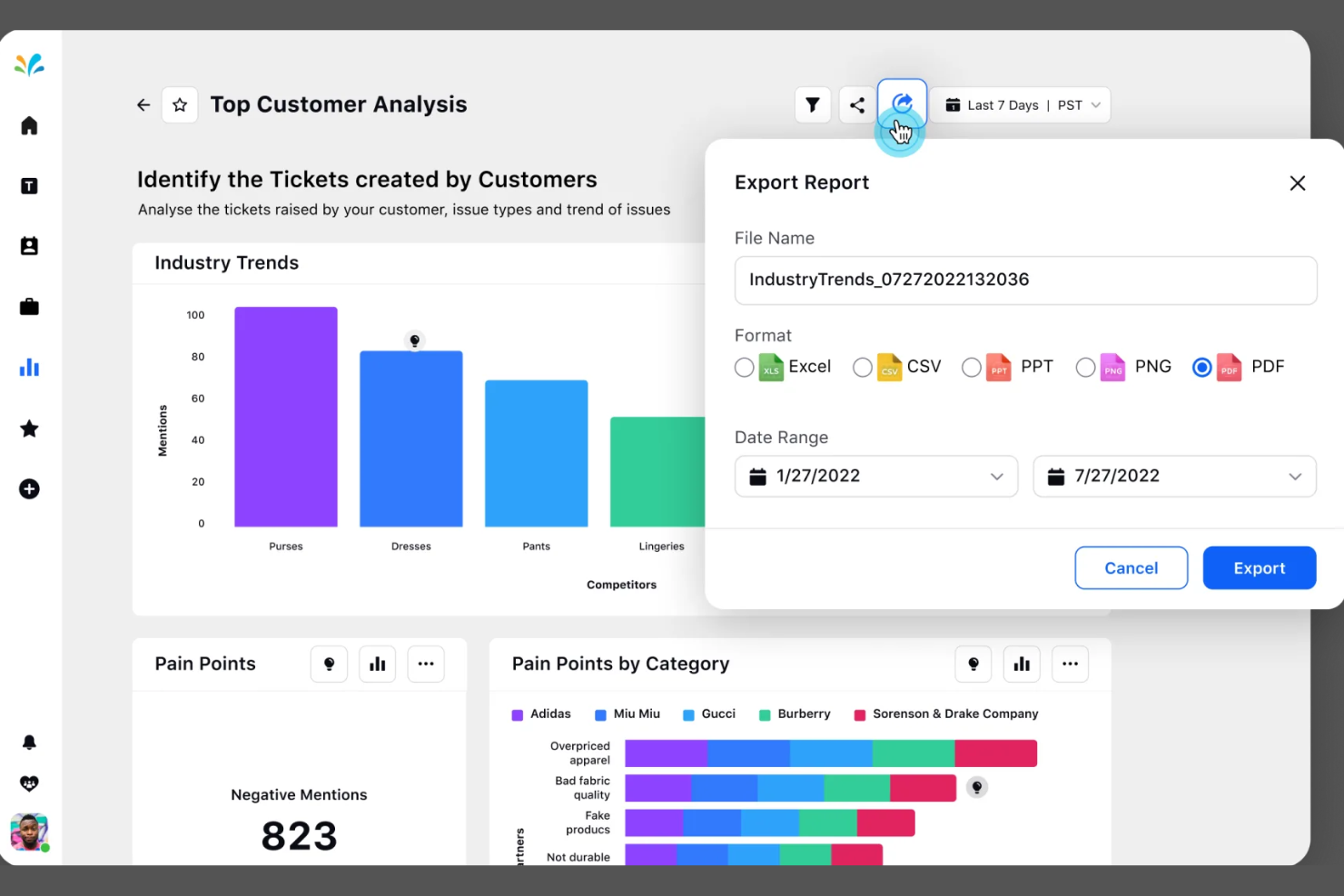
Sprinklr offre una piattaforma unificata per le aziende che desiderano gestire il self-service clienti su più canali digitali. È una soluzione particolarmente adatta per grandi imprese e marchi globali che necessitano di un'IA avanzata per automatizzare e personalizzare il supporto su larga scala. Se il tuo team gestisce volumi elevati di interazioni con i clienti e desidera centralizzare le operazioni di assistenza, Sprinklr merita di essere preso in considerazione.
Per chi è ideale Sprinklr?
Sprinklr è pensato per grandi imprese e marchi globali che necessitano di un self-service unificato, basato su IA, su diversi canali digitali.
Perché ho scelto Sprinklr
Ciò che mi ha attirato di Sprinklr è la sua capacità di unificare il self-service basato su IA attraverso un'ampia gamma di canali digitali. Per i team che gestiscono interazioni con i clienti su web, social, messaggistica e voce, la piattaforma di Sprinklr riunisce tutto in un unico posto. Apprezzo come la sua IA possa automatizzare le risposte, indirizzare le richieste e personalizzare le esperienze di self-service in base al contesto del cliente. Questo approccio unificato consente alle grandi organizzazioni di offrire un supporto coerente e scalabile senza dover utilizzare più strumenti o flussi di lavoro frammentati.
Caratteristiche principali di Sprinklr
Altre funzionalità che rendono Sprinklr utile per le piattaforme di self-service clienti basate su IA includono:
- Gestione della knowledge base: Crea e gestisci una libreria centralizzata di articoli e domande frequenti per il self-service clienti.
- Gestione dei casi: Monitora, assegna e risolvi i problemi dei clienti con flussi di lavoro automatizzati e regole di escalation.
- Analisi del sentiment: Analizza in tempo reale i messaggi dei clienti per rilevare tono e urgenza.
- Supporto multilingue: Fornisci self-service e risposte automatizzate basati su IA in più lingue.
Integrazioni Sprinklr
Le integrazioni includono Salesforce, ServiceNow, Zendesk, Microsoft Teams, Slack, HubSpot, Google Analytics, Adobe Experience Manager, Freshdesk e altro ancora.
Pros and Cons
Pros:
- La smart inbox consolida i messaggi su tutte le piattaforme social
- L'ascolto sui social alimentato dall'IA evidenzia tendenze e approfondimenti
- Analisi avanzate collegano le prestazioni ai risultati aziendali
Cons:
- La configurazione dei flussi di lavoro richiede di navigare tra più moduli
- I report personalizzati richiedono la creazione manuale della dashboard

Crescendo
Ideale per supporto self-service IA multilingue

Crescendo offre un self-service clienti potenziato dall'IA, progettato per i team che devono supportare utenti in più lingue e canali. È particolarmente adatto per aziende con un pubblico globale o basi di conoscenza complesse che desiderano automatizzare le risposte e ridurre la gestione manuale dei ticket. Crescendo aiuta i team dedicati all'esperienza cliente a fornire informazioni consistenti e accurate, liberando gli operatori per attività di maggior valore.
A chi si rivolge Crescendo?
Crescendo è ideale per team di supporto globali e organizzazioni che necessitano di un self-service IA multilingue per gestire richieste complesse dei clienti in diverse regioni.
Perché ho scelto Crescendo
Ho scelto Crescendo per questa lista perché il suo self-service basato sull'IA si distingue per il supporto avanzato multilingue e la gestione automatica della base di conoscenza. La piattaforma utilizza l'elaborazione del linguaggio naturale per comprendere e rispondere alle domande dei clienti in più lingue, una caratteristica essenziale per le aziende che servono pubblici diversificati. Apprezzo anche il modo in cui Crescendo automatizza la creazione e l'aggiornamento degli articoli della base di conoscenza, riducendo il lavoro manuale per i team di supporto. Queste capacità lo rendono una soluzione solida per le organizzazioni che necessitano di un self-service scalabile e preciso in diverse regioni e lingue.
Funzionalità principali di Crescendo
Altre funzionalità che rendono Crescendo una scelta versatile per le piattaforme di self-service clienti IA includono:
- Supporto omnicanale: Gestisci le interazioni con i clienti su chat, email e app di messaggistica da un'unica piattaforma.
- Smistamento automatico dei ticket: Instrada le richieste in arrivo verso i giusti flussi di lavoro o operatori sulla base del rilevamento dell'intento guidato dall'IA.
- Workflow personalizzabili: Progetta e automatizza processi di supporto su misura per le esigenze aziendali senza scrivere codice.
- Dashboard di analisi: Monitora l'utilizzo del self-service, i tassi di risoluzione e la soddisfazione del cliente con strumenti di reportistica in tempo reale.
Integrazioni di Crescendo
Le integrazioni includono Grindr, Miro, Headway, Loom e altro ancora.
Pros and Cons
Pros:
- Il supporto omnicanale copre chat, email e messaggistica
- Implementazione rapida con minimo coinvolgimento IT
- La dashboard analitica traccia le performance del self-service
Cons:
- Personalizzazione limitata per la logica avanzata dei workflow
- Le funzionalità di reportistica non consentono personalizzazioni approfondite
Altre piattaforme di self-service per i clienti basate sull'AI
Ecco alcune ulteriori opzioni di piattaforme di self-service per i clienti basate sull’AI che non sono state incluse nel mio elenco ristretto, ma che vale comunque la pena valutare:
- Zendesk
Ideale per strumenti di assistenza clienti basati su IA
- Zoho Desk
Ideale per assegnazione e risoluzione ticket tramite AI
- Freshdesk
Ideale per l'automazione del service desk tramite IA
- Zowie
Ideale per supporto clienti tramite chatbot AI
- Hiver
Ideale per gestire l'assistenza clienti tramite Gmail
- Comm100
Ideale per engagement omnicanale dei clienti con l’IA


Come Valuto le Piattaforme di Self-Service Clienti con AI
Prendo in considerazione solo le piattaforme in cui l’AI risolve effettivamente i problemi dei clienti—gestendo un reso, rispondendo a domande di fatturazione o guidando un flusso di risoluzione dei problemi—senza indirizzare tutto a un operatore umano. Da lì, valuto ogni strumento su due livelli: la funzionalità di base necessaria per qualificarsi e i fattori che differenziano le opzioni buone da quelle eccellenti.
Funzionalità di Base (Requisiti Fondamentali per Questa Lista)
Quando seleziono gli strumenti per la mia lista, valuto ciascuno su una scala da 0 (non offre la funzionalità) a 5 (eccelle in quest'area) per ogni funzionalità di base elencata di seguito. Poi converto il punteggio totale dello strumento in una percentuale. Ogni strumento deve ottenere un punteggio totale minimo del 65% per essere preso in considerazione.
- Agenti AI Conversazionali: Valuto se l’AI è in grado di gestire conversazioni multi-turno che risolvano davvero i problemi, come guidare il cliente passo-passo nel cambio di abbonamento.
- Risposte Generative AI: Ogni strumento deve generare risposte precise e basate sui tuoi contenuti anziché limitarsi ad abbinare parole chiave a risposte preconfezionate di una FAQ statica.
- Integrazione con la Base di Conoscenza: Esamino come la piattaforma acquisisce sorgenti come articoli di Zendesk Guide, pagine Confluence o documentazione PDF e mantiene sincronizzati quei contenuti.
- Distribuzione Multi-Canale: L’esperienza AI deve essere coerente su chat web, mobile, email e app di messaggistica, così che il cliente riceva sempre lo stesso livello di assistenza a prescindere dal canale.
- Passaggio all'Operatore Umano: Verifico se la piattaforma trasmette tutto il contesto della conversazione e i dati sull’intento all’operatore, così il cliente non deve ripetersi dopo l’escalation.
- Analisi Self-Service: Un reporting dettagliato su tassi di deviazione, richieste non risolte e lacune dei contenuti è fondamentale qui—queste informazioni aiutano i team CX a chiudere continuamente le lacune di copertura.
Dopo aver selezionato gli strumenti che soddisfano i criteri, considero ciò che distingue ciascuna piattaforma.
Fattori di Differenziazione (Cosa Distingue i Fornitori)
Ecco come paragono e metto a confronto i vari fornitori:
Funzionalità Distintive
L’esecuzione agentica delle azioni è un importante elemento distintivo. Alcune piattaforme si limitano a rispondere alle domande, ma cerco AI che possa elaborare un rimborso, annullare un abbonamento o aggiornare i dettagli di spedizione tramite connessioni API di backend. Un builder di bot no-code è importante perché consente ai team CX di modificare i flussi conversazionali senza dover inoltrare ticket agli sviluppatori. Controllo anche la presenza di barriere AI—prevenzione delle allucinazioni, controllo della voce del brand e restrizione degli argomenti garantiscono risposte accurate e coerenti con il marchio.
Oltre le Funzionalità
Valuto attentamente l’ecosistema di integrazione di ogni piattaforma—i connettori nativi a strumenti come Zendesk, Salesforce o Intercom determinano quanto facilmente l’AI si inserisce nel flusso di lavoro di supporto esistente. Anche la trasparenza dei prezzi è importante, soprattutto se il fornitore applica tariffe per risoluzione, conversazione o utente, poiché costi imprevedibili possono ridurre il ROI mano a mano che cresce il volume dei ticket. Sicurezza e conformità completano la mia analisi. Verifico la presenza di certificazione SOC 2 Tipo II, prontezza GDPR e politiche chiare sull’eventuale utilizzo dei dati dei clienti per l’addestramento di modelli condivisi.
Come scegliere le piattaforme di self-service per i clienti basate sull'AI
È facile perdersi tra lunghi elenchi di funzionalità e strutture tariffarie complesse. Per aiutarti a rimanere concentrato mentre affronti il tuo specifico processo di selezione del software, ecco una lista di fattori da tenere a mente:
| Fattore | Cosa considerare |
|---|---|
| Scalabilità | La piattaforma sarà in grado di gestire i volumi di richieste di assistenza attuali e previsti senza problemi di prestazioni? |
| Integrazioni | Si connette nativamente al tuo CRM, agli strumenti di gestione dei ticket, di analisi e di comunicazione? |
| Personalizzazione | Puoi adattare i flussi di lavoro, il marchio e i contenuti della base di conoscenza alle esigenze della tua organizzazione? |
| Facilità d'uso | Il tuo team e i tuoi clienti troveranno l'interfaccia intuitiva o sarà necessaria una formazione approfondita? |
| Implementazione e onboarding | Quanto tempo sarà necessario per implementare la piattaforma, migrare i dati e rendere operativo il tuo team? |
| Costo | I livelli di prezzo sono chiari e in linea con i tuoi modelli di utilizzo e i vincoli di budget? |
| Misure di sicurezza | La piattaforma soddisfa i tuoi requisiti in materia di privacy dei dati, crittografia e controllo degli accessi? |
| Disponibilità dell'assistenza | Quali canali di assistenza e tempi di risposta offre il fornitore, soprattutto durante i problemi critici? |
Cosa sono le piattaforme di self-service per i clienti basate sull'AI?
Le piattaforme di self-service clienti basate sull'IA sono software per il servizio clienti che utilizzano l'IA generativa, gli agenti IA e i copiloti per aiutare i clienti a risolvere problemi o trovare informazioni senza l'assistenza diretta di una persona. Queste piattaforme includono generalmente chatbot, agenti virtuali e basi di conoscenza automatizzate che supportano l'intero percorso del cliente, gestiscono le domande più comuni, guidano gli utenti attraverso i processi ed escalano i casi complessi quando necessario. Grazie a funzionalità come la configurazione senza codice e l'orchestrazione dei flussi di lavoro, aiutano i team a ottimizzare le operazioni di assistenza, migliorare i tempi di risoluzione e monitorare metriche chiave come il CSAT. Fornendo informazioni preziose e imparando dalle storie dei clienti e dai casi di studio, queste piattaforme migliorano il servizio clienti basato sull'IA, pur rimanendo intuitive e scalabili.
Funzionalità delle piattaforme di self-service clienti basate sull'IA
Quando scegli le piattaforme di self-service clienti basate sull'IA, presta attenzione alle seguenti funzionalità chiave:
- Chatbot basati sull'IA: questi agenti virtuali utilizzano l'elaborazione del linguaggio naturale per rispondere alle domande dei clienti, guidare gli utenti e risolvere i problemi più comuni in tempo reale.
- Base di conoscenza automatizzata: una raccolta ricercabile di articoli e domande frequenti a cui i clienti possono accedere in qualsiasi momento, spesso aggiornata automaticamente in base alle nuove richieste e alle tendenze.
- Assistenza omnicanale: la possibilità di offrire esperienze di self-service coerenti sul web, sui dispositivi mobili, sui social media, sulle app di messaggistica e altro ancora.
- Escalation dei casi: rilevamento e instradamento automatici dei problemi complessi o sensibili agli agenti umani quando il self-service non riesce a risolverli.
- Analisi del sentiment: strumenti di IA che analizzano i messaggi dei clienti per rilevare tono, urgenza e soddisfazione, aiutando a dare priorità alle risposte e a personalizzarle.
- Funzionalità multilingue: supporto per più lingue, che consente ai clienti di regioni diverse di accedere al self-service nella lingua preferita.
- Automazione dei flussi di lavoro: strumenti per progettare e automatizzare processi di assistenza ripetitivi, come la creazione di ticket, i solleciti e gli aggiornamenti di stato.
- Integrazione con strumenti CRM e di assistenza: connessioni native ai sistemi di gestione delle relazioni con i clienti e di help desk per sincronizzare i dati e mantenere il contesto.
- Analisi e reportistica: dashboard e report che monitorano l'utilizzo, i tassi di risoluzione e la soddisfazione dei clienti, identificando le aree di miglioramento.
- Branding personalizzabile: opzioni per adattare l'aspetto, la percezione e il tono delle interfacce di self-service al marchio e alla voce della propria organizzazione.
Vantaggi delle piattaforme di self-service clienti basate sull'IA
L'implementazione di piattaforme di self-service clienti basate sull'IA offre numerosi vantaggi al team e all'azienda. Eccone alcuni:
- Riduzione del volume dei ticket di assistenza: i chatbot e le basi di conoscenza automatizzati risolvono le domande più comuni, diminuendo il numero di ticket inoltrati agli agenti umani.
- Tempi di risposta più rapidi: gli strumenti di self-service basati sull'IA forniscono risposte e indicazioni immediate, aiutando i clienti a ottenere soluzioni senza dover attendere in coda.
- Esperienze cliente coerenti: l'assistenza omnicanale e i flussi di lavoro automatizzati garantiscono ai clienti la stessa qualità del servizio su ogni canale.
- Maggiore produttività degli agenti: gestendo le richieste ripetitive, queste piattaforme consentono ai team di assistenza di concentrarsi sui casi complessi o di alto valore.
- Informazioni utili per agire: l'analisi dei dati e del sentiment fornisce informazioni sulle esigenze, sulla soddisfazione e sulle tendenze dei clienti, favorendo il miglioramento continuo.
- Operazioni di assistenza scalabili: le piattaforme di self-service basate sull'IA possono gestire grandi volumi di interazioni senza personale aggiuntivo, rendendo più semplice la crescita.
- Accessibilità globale: le funzionalità multilingue e le interfacce personalizzabili consentono di servire basi di clienti diversificate in tutto il mondo.
Costi e prezzi delle piattaforme di self-service clienti basate sull'IA
La scelta delle piattaforme di self-service clienti basate sull'IA richiede la comprensione dei diversi modelli di prezzo e dei piani disponibili. I costi variano in base alle funzionalità, alle dimensioni del team, agli extra e ad altri fattori. La tabella seguente riepiloga i piani più comuni, i relativi prezzi medi e le funzionalità tipicamente incluse nelle soluzioni di piattaforme di self-service clienti basate sull'IA:
Tabella comparativa dei piani per le piattaforme di self-service clienti basate sull'IA
| Tipo di piano | Prezzo medio | Funzionalità comuni |
|---|---|---|
| Piano gratuito | $0 | Funzionalità di base del chatbot, accesso limitato alla base di conoscenze, supporto per un singolo canale e analisi di base. |
| Piano personale | $10-$30/utente/mese | Funzionalità ampliate del chatbot, supporto multicanale, integrazioni limitate e automazione di base dei flussi di lavoro. |
| Piano aziendale | $40-$80/utente/mese | Funzionalità avanzate di IA, supporto omnicanale, integrazioni CRM, dashboard di analisi e branding personalizzabile. |
| Piano per grandi aziende | $100-$200/utente/mese | Suite completa per l'automazione, sicurezza avanzata, supporto multilingue, gestione dedicata dell'account e integrazioni personalizzate. |
Domande frequenti sulle piattaforme di assistenza clienti self-service basate sull'IA
Ecco alcune risposte alle domande comuni sulle piattaforme di assistenza clienti self-service basate sull’IA:
In che modo le piattaforme di assistenza clienti self-service basate sull'IA migliorano la soddisfazione dei clienti?
Le piattaforme di assistenza clienti self-service basate sull’IA migliorano la soddisfazione dei clienti fornendo risposte immediate e accurate e assistenza 24 ore su 24, 7 giorni su 7. I clienti possono risolvere rapidamente i problemi senza dover attendere un operatore umano, ottenendo così soluzioni più rapide e un’esperienza più positiva.
Le piattaforme di assistenza clienti self-service basate sull'IA possono integrarsi con gli strumenti di supporto esistenti?
Sì, la maggior parte delle piattaforme di assistenza clienti self-service basate sull’IA offre integrazioni con i più diffusi strumenti CRM, di assistenza e comunicazione. Ciò consente di sincronizzare i dati dei clienti, mantenere il contesto tra i diversi canali e semplificare i flussi di lavoro senza interrompere i sistemi attuali.
Quali tipi di problemi possono gestire le piattaforme di assistenza clienti self-service basate sull'IA?
Le piattaforme di assistenza clienti self-service basate sull’IA gestiscono domande di routine, reimpostazioni delle password, tracciamento degli ordini e altre richieste comuni. Possono inoltre guidare gli utenti nelle procedure di risoluzione dei problemi e inoltrare agli operatori umani i problemi complessi o sensibili quando necessario.
Le piattaforme di assistenza clienti self-service basate sull'IA sono sicure?
Sì, le piattaforme affidabili includono misure di sicurezza come la crittografia dei dati, i controlli degli accessi e la conformità alle normative sulla privacy. Esamina sempre la documentazione sulla sicurezza del fornitore per assicurarti che soddisfi i requisiti della tua organizzazione.
Quanto tempo occorre per implementare una piattaforma di assistenza clienti self-service basata sull'IA?
I tempi di implementazione variano, ma molte piattaforme offrono risorse per l’avvio, come tour del prodotto, modelli e video di formazione. Le configurazioni semplici possono richiedere alcuni giorni, mentre le integrazioni o personalizzazioni più complesse possono richiedere diverse settimane.