

I 10 migliori software di analisi dei call center nel 2026

Elenco dei migliori software di analisi dei call center


Il software di analisi dei call center monitora, misura e analizza le interazioni con i clienti per aiutare il tuo team a comprendere le prestazioni, individuare le tendenze e migliorare la qualità del servizio. Se stai cercando la soluzione di analisi più adatta, probabilmente devi affrontare difficoltà legate a dati frammentati, report incoerenti o alla complessità di identificare informazioni utili e attuabili tra i diversi canali. La piattaforma giusta può aiutarti a monitorare l'attività degli operatori, rilevare il sentiment dei clienti e collegare le analisi ai risultati aziendali. In questa guida troverai opzioni di software di analisi dei call center valutate da esperti, così potrai confrontare le funzionalità e scegliere quella più adatta alle esigenze del tuo team nel 2026.
Perché fidarsi dei nostri consigli sui software
Il nostro team testa e recensisce software dal 2012. In quanto leader CX noi stessi, sappiamo quanto sia difficile — e importante — scegliere il software giusto.
Per questa guida, abbiamo valutato gli strumenti attraverso test pratici e ricerche indipendenti, assegnando un punteggio agli strumenti in base ai nostri criteri di selezione.
Le nostre recensioni riflettono il nostro giudizio editoriale umano, non un discorso di vendita.
Tabella di confronto dei software di analisi dei call center
Questa tabella di confronto riassume i dettagli sui prezzi delle mie migliori selezioni di software di analisi dei call center.
| Tool | Best For | Trial Info | Price | ||
|---|---|---|---|---|---|
| 1 | Ideale per le metriche delle chiamate in entrata e in uscita | Prova gratuita di 14 giorni | A partire da $25/utente/mese (fatturazione annuale) | Website | |
| 2 | Ideale per la scalabilità agile del team e l'espansione globale | Demo gratuita disponibile | Da $15/mese (fatturazione annuale) | Website | |
| 3 | Ideale per dashboard di analisi personalizzabili | Demo gratuita | Da $85/utente/mese | Website | |
| 4 | Ideale per l'automazione conversazionale con IA | Demo gratuita disponibile | Prezzi su richiesta | Website | |
| 5 | Ideale per l'analisi integrata di voce e messaggistica | Prova gratuita di 14 giorni + demo gratuita | Da $80/utente/mese (fatturazione annuale) | Website | |
| 6 | Ideale per l'analisi vocale multilingue | Demo gratuita disponibile | Da $3,000/mese | Website | |
| 7 | Ideale per le capacità di reportistica omnicanale | Demo gratuita disponibile | Da $75/utente/mese (fatturato annualmente) | Website | |
| 8 | Ideale per l'analisi automatica del sentiment | Demo gratuita disponibile | Prezzi su richiesta | Website | |
| 9 | Ideale per la gestione delle prestazioni guidata dall'IA | Demo gratuita disponibile | Prezzi su richiesta | Website | |
| 10 | Ideale per insight di coaching in tempo reale agli agenti | Demo gratuita disponibile | Prezzo su richiesta | Website |
Recensioni dei software di analisi dei call center
Di seguito trovi i miei riepiloghi dettagliati dei software di analisi dei call center inclusi nel mio elenco dei migliori strumenti. Le mie recensioni offrono una panoramica dettagliata delle funzionalità, delle capacità e dei casi d’uso ideali di ciascuna piattaforma, per aiutarti a trovare quella più adatta a te.

Ideale per le metriche delle chiamate in entrata e in uscita
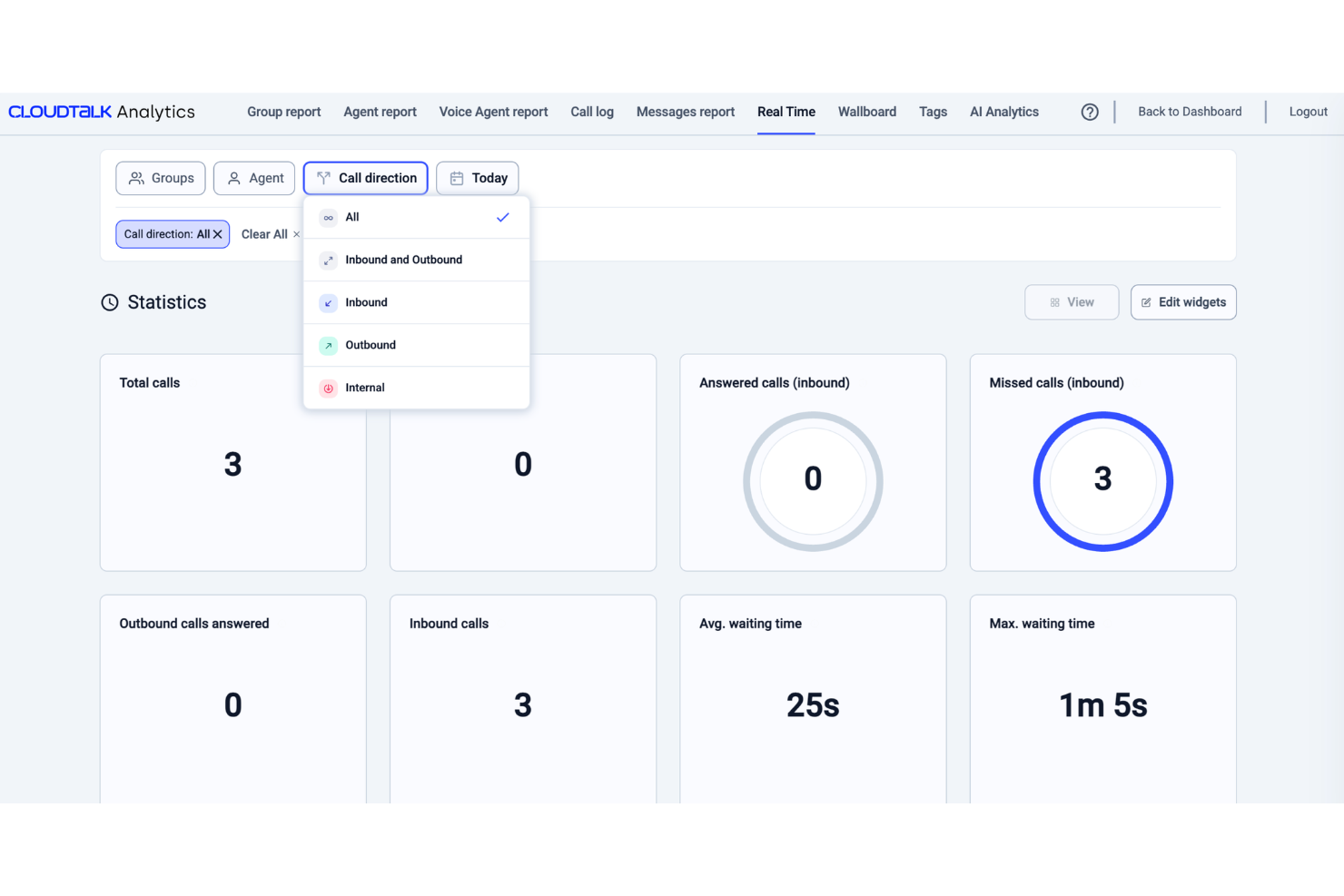
Progettato per i team a contatto con i clienti, CloudTalk è una piattaforma di call center VoIP che abbina le chiamate in entrata e in uscita a strumenti di analisi come l'analisi del sentiment, dashboard in tempo reale e tagging delle chiamate.
Per chi è più adatto CloudTalk?
CloudTalk è ideale per i team di vendita e assistenza di piccole e medie imprese che necessitano di un call center VoIP con analisi integrate e monitoraggio delle prestazioni.
Perché ho scelto CloudTalk
Ho scelto CloudTalk per il suo monitoraggio delle statistiche delle chiamate VoIP che offre ai team una visione dettagliata e in tempo reale delle prestazioni delle chiamate. La dashboard in tempo reale mostra KPI dal vivo come volume delle chiamate, tempi di attesa, occupazione degli agenti e tassi di abbandono, tutto in un unico posto. Apprezzo anche i livelli di reportistica per gruppi e agenti, che consentono di suddividere i dati delle chiamate VoIP per singoli rappresentanti o team, così da individuare dove esistono lacune nelle prestazioni invece di affidarsi a medie aggregate.
Funzionalità principali di CloudTalk
- Intelligenza conversazionale AI: Analizza le chiamate rilevando sentimento, rapporto parola/ascolto e argomenti di tendenza per individuare schemi nelle conversazioni con i clienti.
- Registrazione delle chiamate: Registra le chiamate in entrata e in uscita e le archivia per la revisione, il controllo qualità e la formazione.
- Tagging chiamate obbligatorio: Richiede agli agenti di categorizzare le chiamate prima di chiuderle per mantenere i dati dei report organizzati.
- Monitoraggio delle chiamate: Consente ai manager di ascoltare le chiamate e rivedere le interazioni per sostenere l'assicurazione qualità e gli agenti.
Integrazioni CloudTalk
CloudTalk offre oltre 70 integrazioni, tra cui Salesforce, HubSpot, Zendesk, Pipedrive, Intercom, Zoho CRM, Microsoft Teams, Freshdesk, Gorgias e Shopify. Si collega anche con Zapier e Make per l'automazione dei flussi di lavoro e l'accesso API supporta integrazioni personalizzate.
Pros and Cons
Pros:
- Analisi in tempo reale per monitorare le prestazioni degli agenti
- Numeri locali disponibili in oltre 160 paesi
- Il tagging delle chiamate mantiene il contesto delle conversazioni tra i team
Cons:
- Le opzioni di personalizzazione dei report possono risultare limitate rispetto ai concorrenti
- L'app mobile ha meno funzionalità rispetto alla versione desktop
New Product Updates from CloudTalk
CloudTalk Adds Campaign Statistics to MCP
CloudTalk adds campaign statistics to MCP with funnel, call, conversion, disposition, and duration metrics. This helps reporting assistants review campaign performance using read-only aggregate data. For more information, visit CloudTalk’s official site.
 .
.
Ideale per la scalabilità agile del team e l'espansione globale
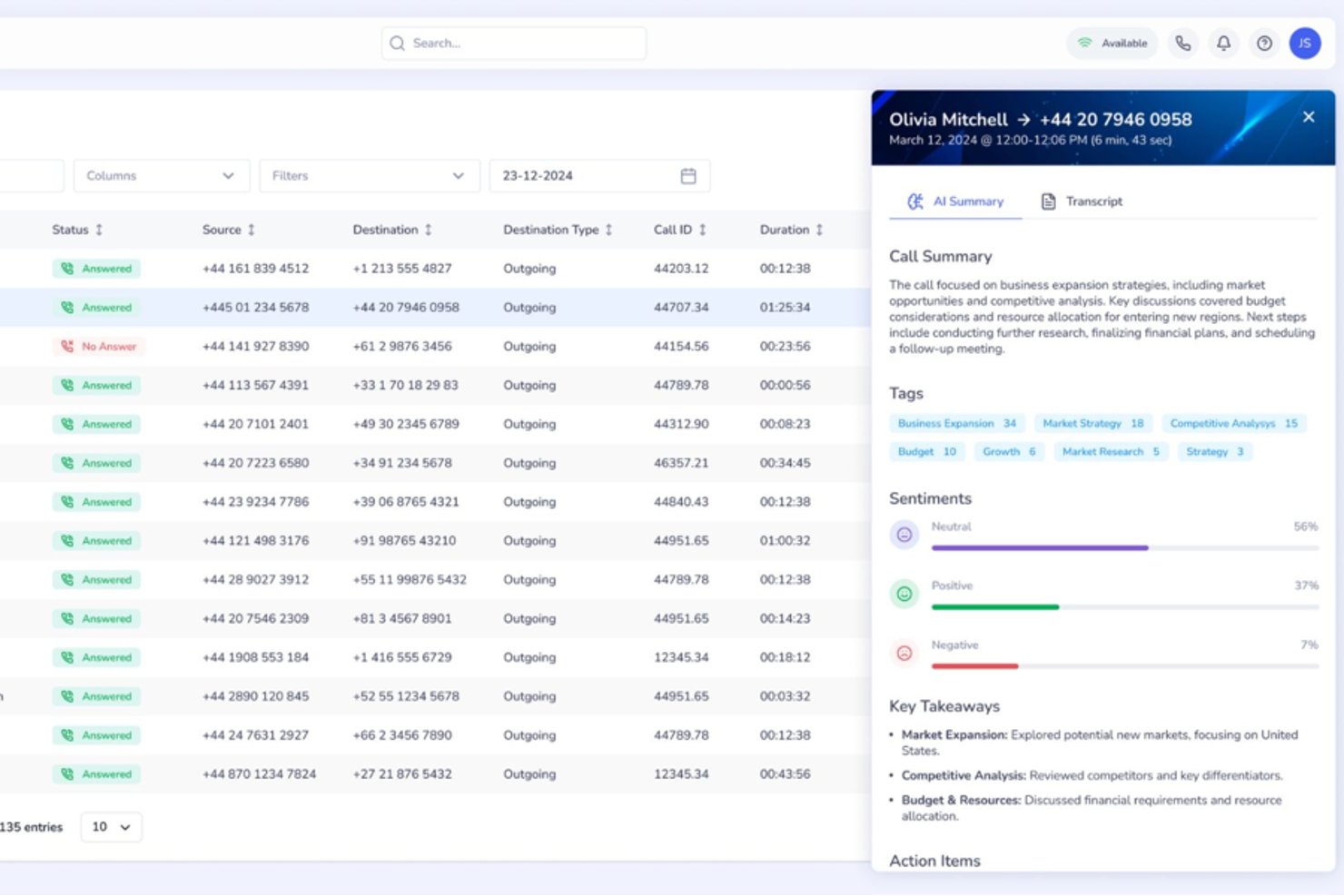
Squaretalk è una piattaforma per contact center basata su cloud che offre analisi conversazionali potenziate dall'IA, comunicazione omnicanale, composizione predittiva e monitoraggio in tempo reale delle prestazioni su canali vocali e di messaggistica.
Per chi è ideale Squaretalk?
Squaretalk è adatto a team di vendita e assistenza di PMI e aziende di medie dimensioni che operano in più paesi e necessitano di aggiungere rapidamente agenti o numeri di telefono senza procedure di approvvigionamento complesse.
Perché ho scelto Squaretalk
Squaretalk si è guadagnato un posto tra i migliori nella mia lista perché combina analisi in tempo reale su oltre 80 metriche con trascrizione automatica in più di 100 lingue, consentendo di mantenere la coerenza degli insight conversazionali mentre il mio team si espande in nuove regioni. Quando aggiungo agenti o numeri locali in più di 150 destinazioni, il livello di analisi cresce insieme alle operazioni. L'analisi del sentiment e l'etichettatura delle parole chiave funzionano su voce e messaggistica fin dal primo giorno, senza bisogno di riconfigurazione.
Funzionalità chiave di Squaretalk
- Messaggistica omnicanale: Gestisci chiamate vocali, WhatsApp Business, email, SMS, Viber e Telegram da un'unica piattaforma.
- Compositore predittivo: Chiama automaticamente i lead e salta le chiamate senza risposta, collegando gli agenti solo ai potenziali clienti attivi.
- Monitoraggio delle chiamate in tempo reale: Ascolta le chiamate in diretta, supervisiona le conversazioni degli agenti e usa la modalità bisbiglio per fornire coaching immediato.
- Integrazioni CRM: Si connette con Salesforce, HubSpot, Zoho CRM, Zendesk, monday.com e altri per un flusso dati senza interruzioni.
Integrazioni di Squaretalk
Squaretalk offre integrazioni native con Salesforce, Zoho CRM, Freshworks, Pipedrive e altri, e fornisce un'API per integrazioni personalizzate.
Pros and Cons
Pros:
- Analisi omnicanale su voce e messaggistica
- Monitoraggio in tempo reale con modalità bisbiglio e barge
- Trascrizione e analisi del sentiment in oltre 100 lingue
Cons:
- Nessun strumento di valutazione QA automatizzato integrato
- Mancano funzionalità di previsione e gestione della forza lavoro
New Product Updates from Squaretalk
Squaretalk Adds TradeCore Integration for Brokerage Workflows
Squaretalk adds a TradeCore integration that connects customer conversations with BrokerIQ CRM workflows. This helps brokerage teams trigger AI-driven follow-ups, tasks, and other actions from calls and messages. For more information, visit Squaretalk’s official site.
 .
.
Talkdesk
Ideale per dashboard di analisi personalizzabili
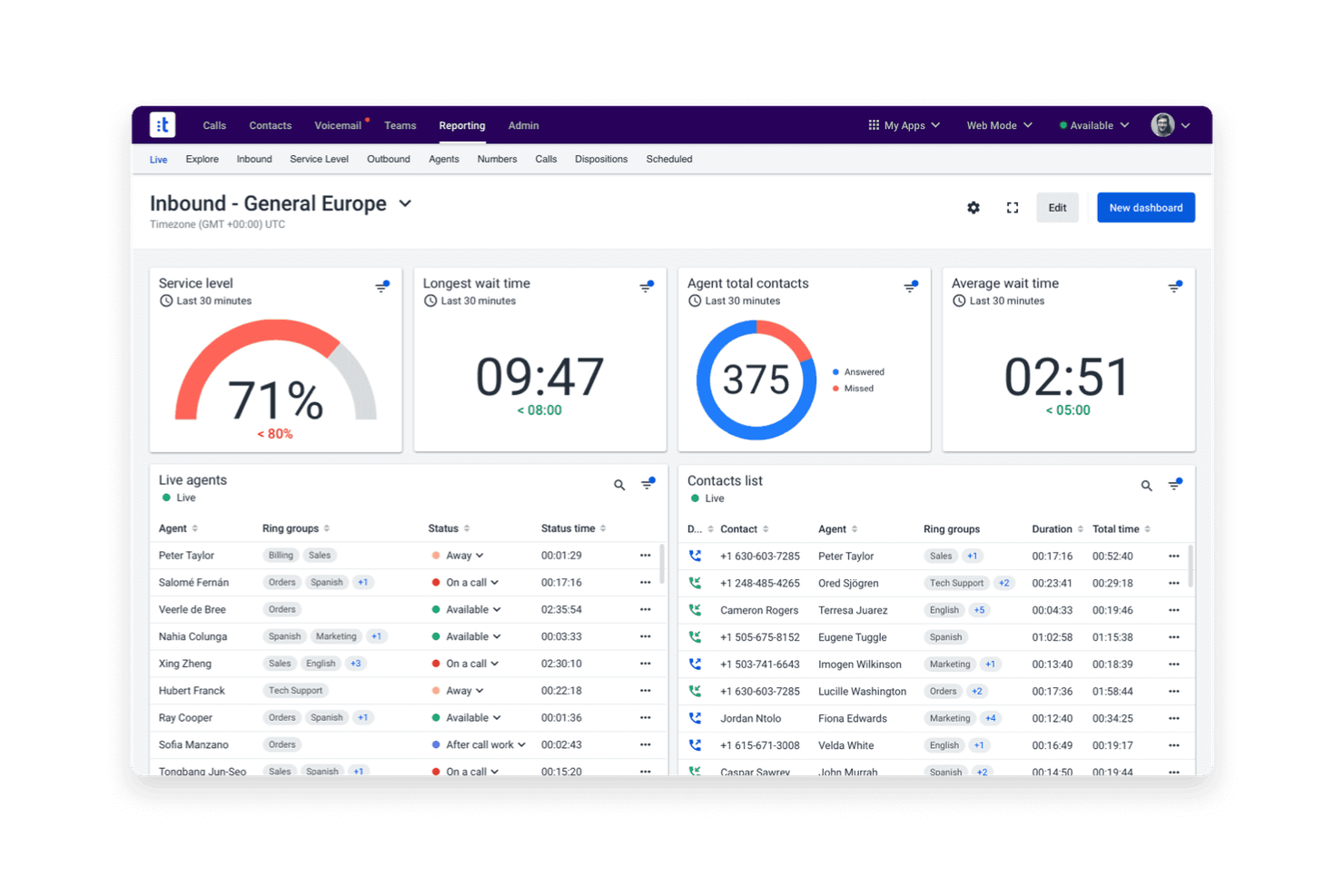
Se hai bisogno di dashboard di analisi che si adattino agli specifici KPI del tuo team, Talkdesk offre una soluzione flessibile per i contact center. La piattaforma è pensata per responsabili operativi e analisti che vogliono visualizzare, filtrare ed esaminare dati storici e in tempo reale. Con Talkdesk, puoi progettare dashboard che rispecchiano le tue esigenze di reportistica e individuare rapidamente tendenze attraverso i vari canali.
Perché ho scelto Talkdesk
Le dashboard di analisi personalizzabili sono ciò che distingue Talkdesk nell’analisi dei call center. La piattaforma consente di creare dashboard da zero, scegliendo metriche e visualizzazioni che contano di più per il tuo team. Apprezzo la possibilità di filtrare, segmentare ed esaminare i dati per agente, coda o canale in tempo reale. Questa flessibilità rende Talkdesk la scelta ideale per i team che hanno bisogno di analisi su misura per i loro flussi di lavoro e requisiti di reportistica specifici.
Caratteristiche principali di Talkdesk
Altre funzionalità che rendono Talkdesk utile per i team di analisi includono:
- Analisi conversazionale: Analizza le registrazioni delle chiamate per parole chiave, sentiment e trigger di conformità.
- Reportistica automatizzata: Pianifica e invia report ricorrenti agli stakeholder direttamente dalla piattaforma.
- Monitoraggio agenti in tempo reale: Visualizza l’attività degli agenti e le metriche di performance in tempo reale mentre avvengono le chiamate.
- Avvisi personalizzati: Imposta notifiche per soglie metriche specifiche o eventi operativi.
Integrazioni Talkdesk
Le integrazioni comprendono Salesforce, Zendesk, Microsoft Teams, ServiceNow, HubSpot, Microsoft Dynamics 365, Zoom, Slack, Shopify e Freshdesk.
Pros and Cons
Pros:
- I widget della dashboard supportano la disposizione drag-and-drop
- Gli aggiornamenti delle analisi in tempo reale sono immediati durante le chiamate
- L’analisi vocale include il rilevamento di parole chiave e sentiment
Cons:
- L’esportazione dei dati storici è limitata al formato CSV
- La creazione di report personalizzati richiede una configurazione avanzata
Ideale per l'automazione conversazionale con IA
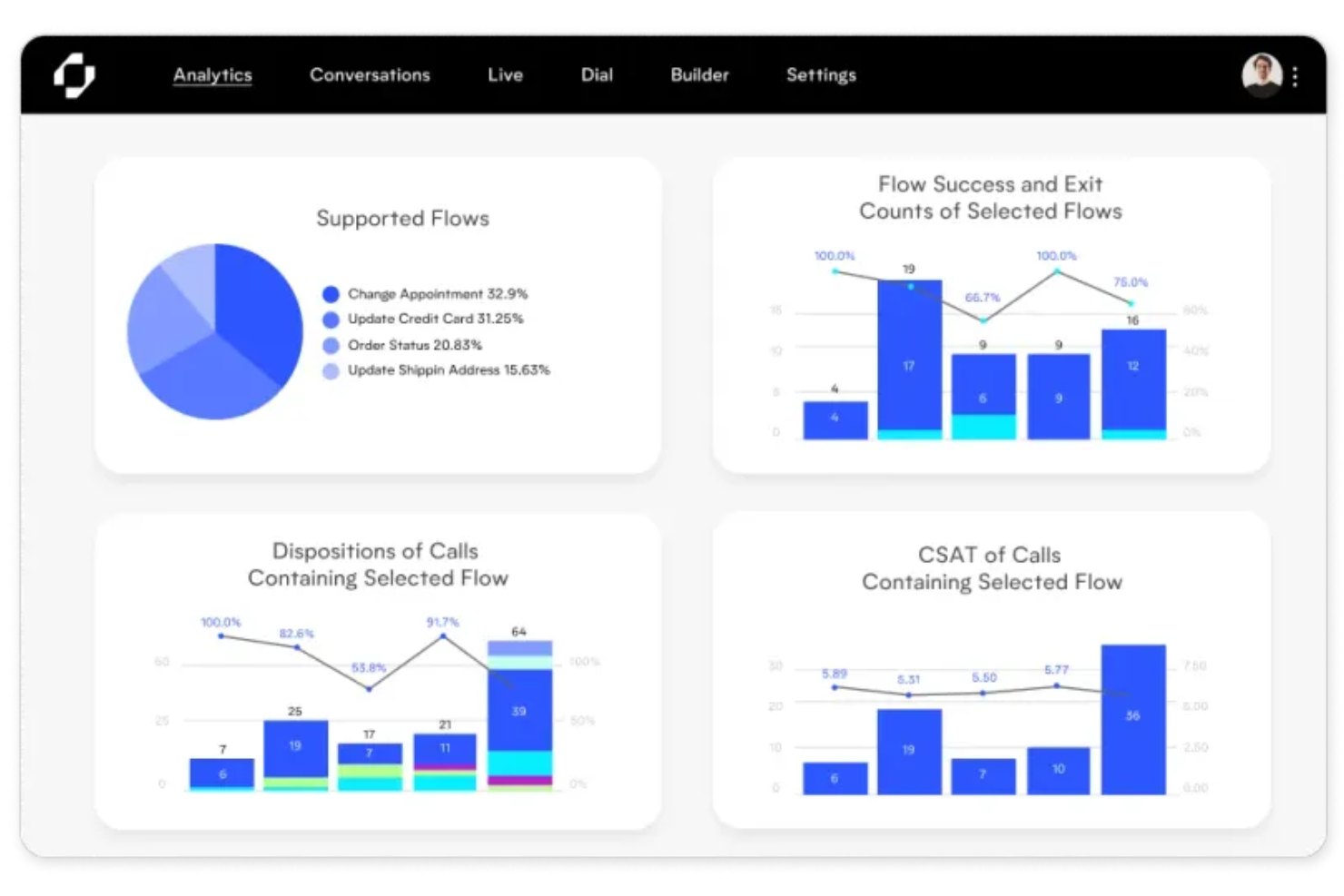
Replicant offre una piattaforma di intelligenza artificiale conversazionale progettata per i contact center che desiderano automatizzare le interazioni vocali ad alto volume. È una soluzione ideale per i team di supporto aziendali e i responsabili delle operazioni che vogliono ridurre i tempi di attesa e gestire le richieste ripetitive senza agenti umani. L’IA di Replicant può risolvere autonomamente le problematiche comuni dei clienti, liberando il tuo team per compiti più complessi.
Perché ho scelto Replicant
Replicant si distingue per il suo focus sull’automazione delle interazioni complesse e conversazionali nei call center grazie all’IA. L’ho scelto perché la sua piattaforma è in grado di gestire intere conversazioni con i clienti, non solo il semplice instradamento o le risposte basilari. L’IA di Replicant ascolta, comprende l’intento e risponde in tempo reale, permettendo di risolvere problematiche comuni come lo stato di un ordine, l’aggiornamento di account o la risoluzione di problemi senza l’intervento umano. Questo livello di automazione conversazionale è particolarmente prezioso per i team che desiderano scalare il supporto e ridurre il carico di lavoro degli agenti.
Funzionalità principali di Replicant
Altre funzionalità che rendono Replicant interessante per l’analisi dei call center includono:
- Trascrizione delle chiamate: Trascrive automaticamente ogni conversazione con i clienti per una successiva revisione e analisi.
- Dashboard di analisi: Visualizza metriche delle chiamate, tendenze e performance dell’IA in un’unica dashboard centralizzata.
- Riconoscimento degli intenti: Rileva e categorizza gli intenti dei clienti per aiutare a identificare problematiche e richieste più comuni.
- Strumenti di monitoraggio qualità: Fornisce strumenti ai supervisori per revisionare, valutare e guidare le interazioni gestite dall’IA.
Integrazioni Replicant
Le integrazioni includono Salesforce, Zendesk, ServiceNow, Genesys, NICE inContact, Five9, Talkdesk, Amazon Connect, Cisco e Shopify.
Pros and Cons
Pros:
- L’IA conversazionale risolve le chiamate senza agenti
- Dashboard di analisi in tempo reale monitora gli esiti delle chiamate
- Il rilevamento degli intenti evidenzia le problematiche più ricorrenti dei clienti
Cons:
- Supporto limitato per le lingue diverse dall’inglese
- Nessuno strumento di personalizzazione autonoma per l'analisi

Dialpad
Ideale per l'analisi integrata di voce e messaggistica
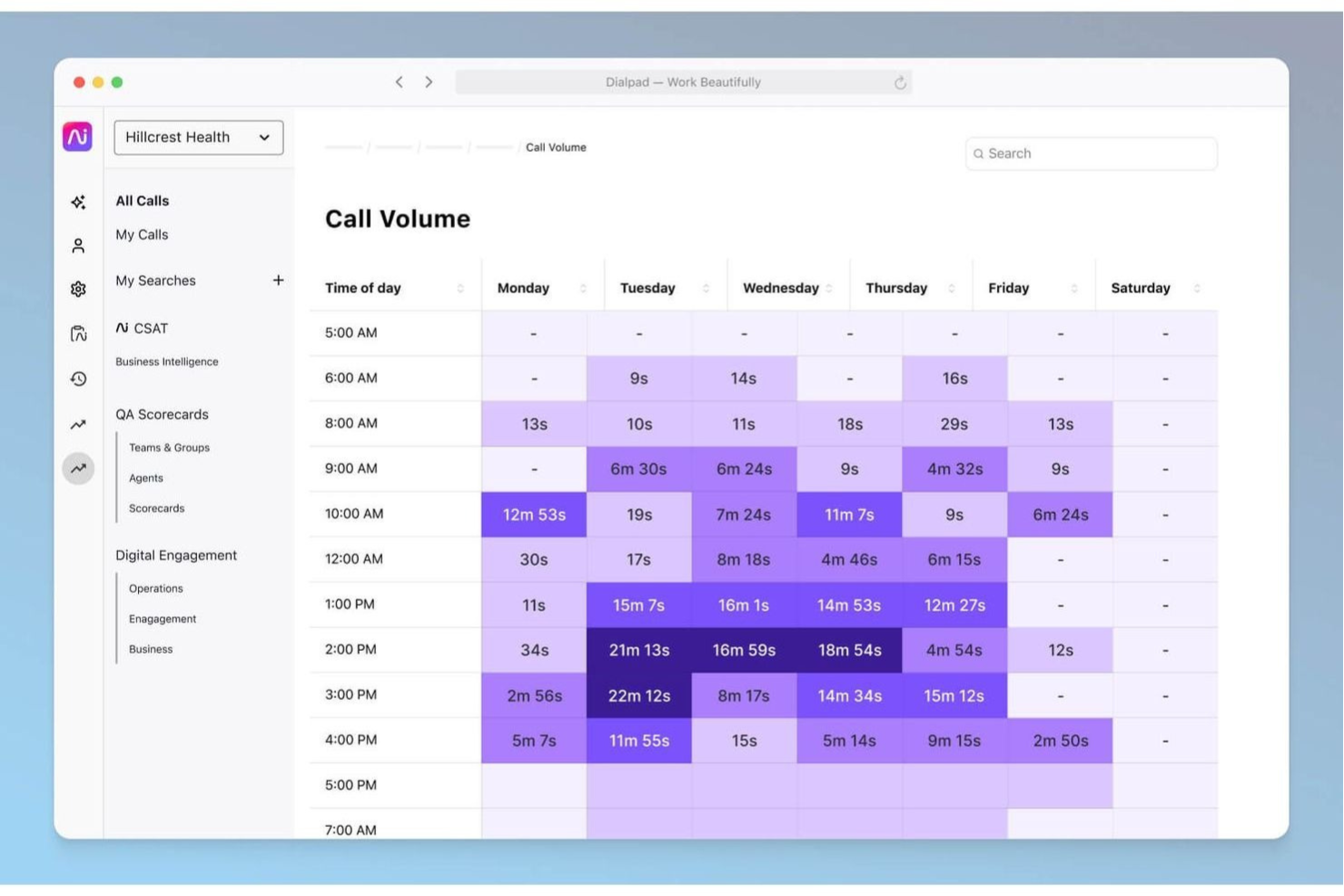
Dialpad riunisce le analisi di voce e messaggistica in un'unica piattaforma, rendendolo una scelta eccellente per i team che gestiscono contact center multicanale. È pensato per supervisori e analisti che vogliono tracciare le conversazioni tramite chiamate, SMS e chat senza cambiare strumento. Con Dialpad, puoi monitorare le prestazioni degli agenti e il sentiment dei clienti in tempo reale, indipendentemente dal canale utilizzato dai clienti.
Perché ho scelto Dialpad
Ciò che rende Dialpad particolarmente adatto all'analisi dei call center è la sua capacità di unificare i dati di voce e messaggistica in un unico luogo. Ho scelto Dialpad perché trascrive automaticamente chiamate e messaggi, quindi applica l'analisi del sentiment alimentata dall'intelligenza artificiale su entrambi i canali. Puoi visualizzare tendenze delle conversazioni, menzioni di parole chiave e metriche sulle prestazioni degli agenti relative a chiamate, SMS e chat insieme. Questo approccio integrato aiuta i team a individuare problemi e opportunità su tutti i punti di contatto con il cliente senza dover gestire più strumenti di analytics.
Caratteristiche principali di Dialpad
Altre funzionalità che rendono Dialpad utile per i team di analisi includono:
- Monitoraggio chiamate in tempo reale: Ascolta le chiamate attive e fornisci supporto dal vivo in tempo reale.
- Dashboard di analisi personalizzabili: Crea dashboard con widget dei parametri più rilevanti per il tuo team.
- Riepiloghi automatici delle chiamate: Ricevi riepiloghi generati dall'intelligenza artificiale dopo ogni chiamata, con i principali argomenti e le azioni da intraprendere.
- Avvisi in tempo reale: Imposta notifiche per parole chiave specifiche o eventi delle chiamate, non appena si verificano.
Integrazioni Dialpad
Le integrazioni includono Salesforce, HubSpot, Zendesk, Microsoft 365, Google Workspace, Zoho CRM, Intercom, Outreach, Okta e Rippling.
Pros and Cons
Pros:
- Le dashboard analitiche si aggiornano istantaneamente durante le conversazioni
- I riepiloghi automatici delle chiamate evidenziano i punti chiave della discussione
- Il tracciamento delle parole chiave funziona sia per voce che SMS
Cons:
- Analisi storica limitata a un anno
- Nessuno strumento integrato per il punteggio della qualità delle chiamate

SentiSum
Ideale per l'analisi vocale multilingue
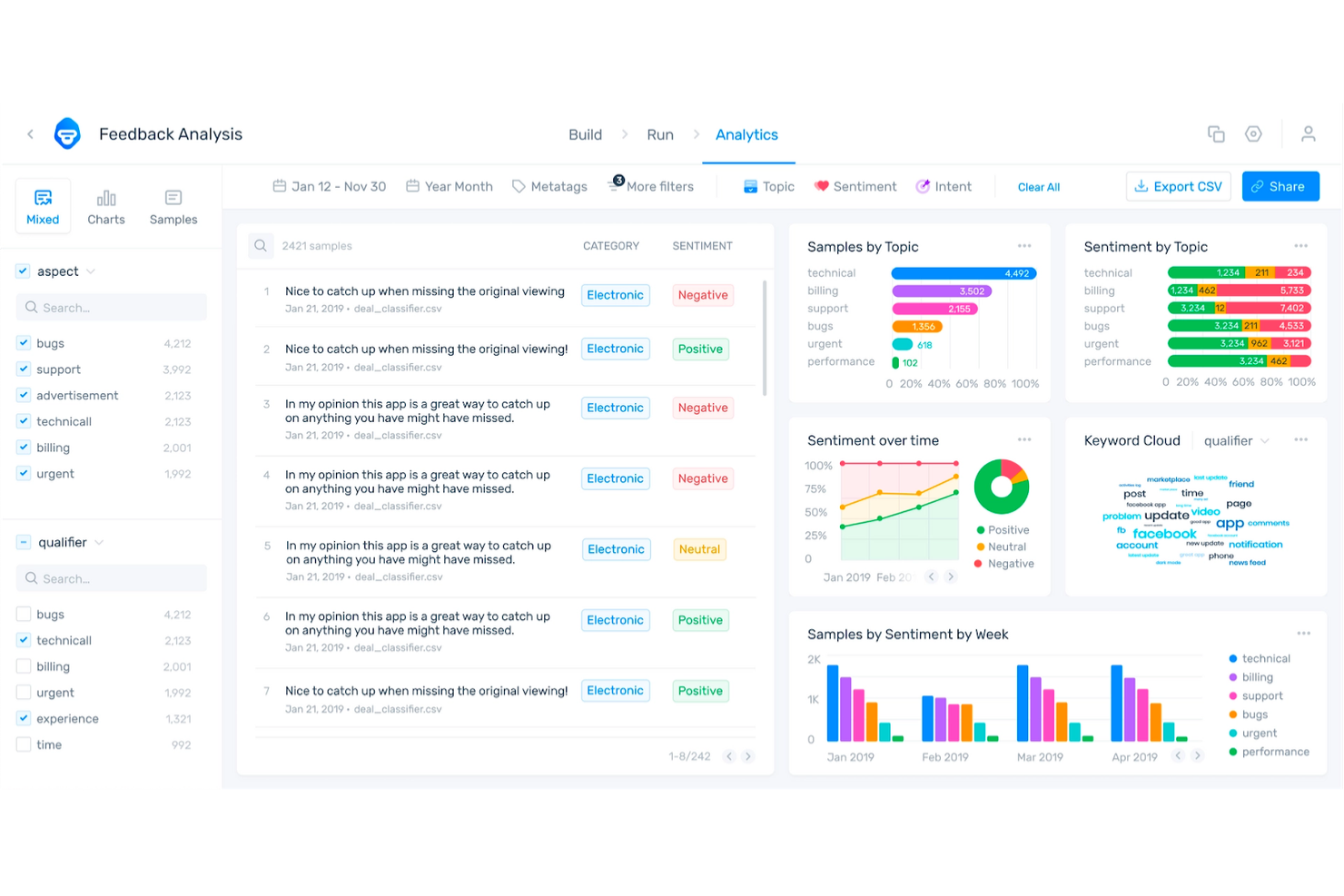
SentiSum è stato creato per i contact center che devono analizzare le chiamate in più lingue senza sforzo manuale. È particolarmente utile per i team CX globali e i responsabili delle operazioni che desiderano ricavare informazioni sui clienti da regioni diverse. Con SentiSum, puoi rilevare automaticamente argomenti, sentiment e intenzioni in ogni conversazione, indipendentemente dalla lingua.
Perché ho scelto SentiSum
Ciò che distingue SentiSum è la capacità di analizzare dati vocali in oltre 100 lingue, rendendolo una scelta eccellente per i call center multilingue. La piattaforma trascrive e cataloga automaticamente le chiamate per argomenti, sentiment e intenzioni, così puoi monitorare le tendenze dell’esperienza cliente tra le regioni senza bisogno di traduzioni manuali. Mi piace che i modelli di intelligenza artificiale di SentiSum siano addestrati per gestire le sfumature linguistiche, il che aiuta a far emergere insight utili anche dalle conversazioni non in inglese. Questa attenzione alle analisi multilingue lo rende particolarmente prezioso per i team di supporto globali e i responsabili CX.
Funzionalità principali di SentiSum
Oltre alle capacità di analisi multilingue, SentiSum offre altre funzionalità degne di nota:
- Analisi automatica delle cause principali: Identifica le ragioni sottostanti agli aumenti di volume delle chiamate o ai sentimenti negativi.
- Avvisi in tempo reale: Ricevi notifiche istantanee quando vengono rilevati argomenti o problemi specifici nelle chiamate.
- Dashboard di report personalizzabili: Crea e condividi report su misura per le metriche e gli obiettivi del tuo team.
- Accesso API: Integra le analisi di SentiSum con i sistemi esistenti per un’analisi dei dati più approfondita.
Integrazioni di SentiSum
Le integrazioni includono Zendesk, Freshdesk, Intercom, Dixa, Gorgias e Survey Monkey.
Pros and Cons
Pros:
- Analisi vocale multilingue che copre oltre 100 lingue
- Rilevamento automatico degli argomenti per ogni conversazione
- Avvisi in tempo reale per problemi emergenti dei clienti
Cons:
- Manca collegamento diretto agli store di app
- L'accuratezza dell'analisi del sentiment varia in base alla lingua
Genesys
Ideale per le capacità di reportistica omnicanale
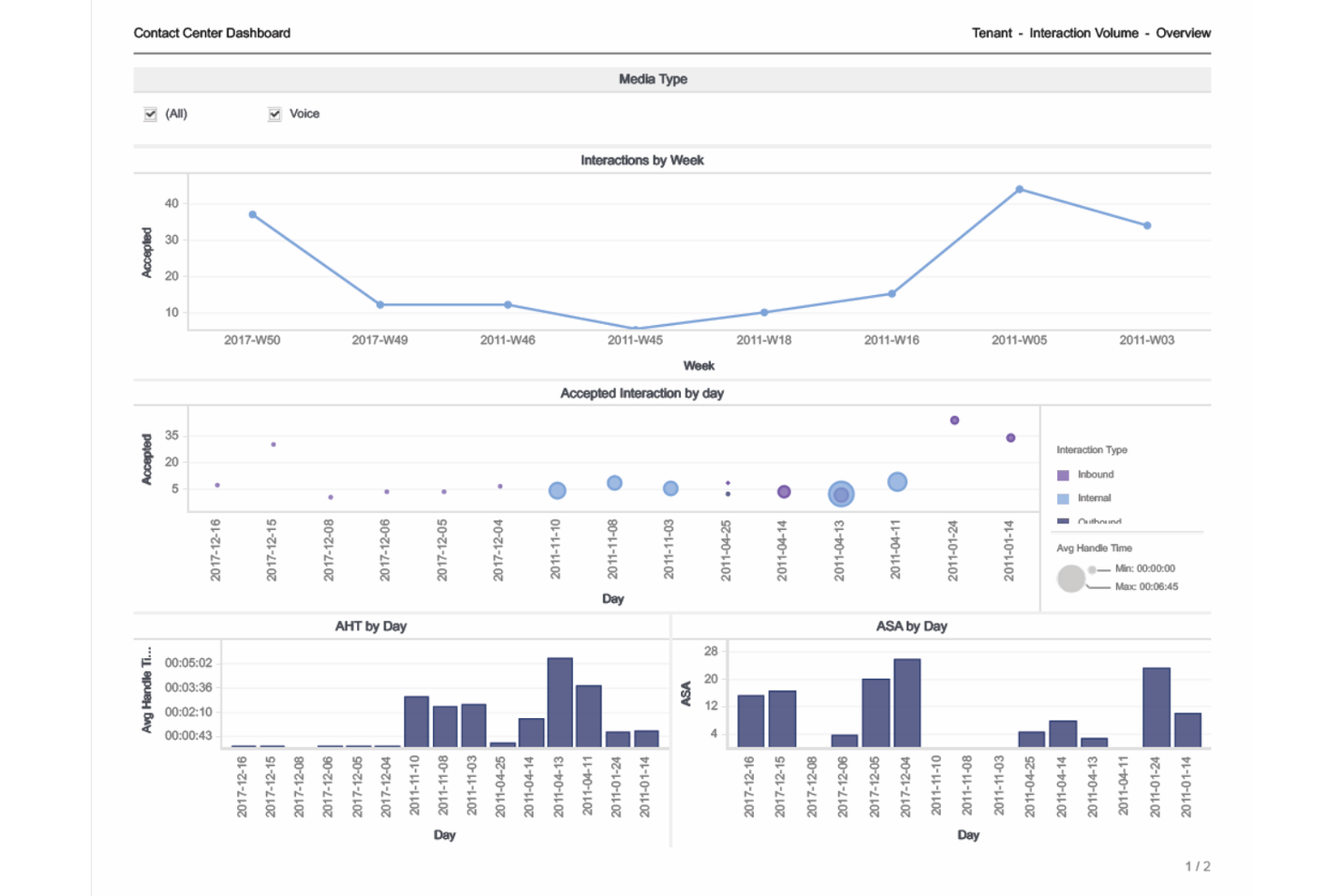
Genesys è progettato per le organizzazioni che devono tracciare le interazioni con i clienti attraverso voce, chat, email e canali social in un unico luogo. È particolarmente utile per i responsabili dell'esperienza cliente e per i team operativi che desiderano report e analisi unificati per ogni punto di contatto. Con Genesys, puoi abbattere i silos tra i canali e ottenere una visione completa delle prestazioni del tuo contact center.
Perché ho scelto Genesys
Ciò che distingue Genesys per l'analisi dei call center è la sua capacità di riunire i dati di ogni canale cliente in un unico ambiente di reportistica. Ho scelto Genesys perché permette di tracciare e confrontare le metriche tra voce, chat, email e social media senza cambiare piattaforma. Le dashboard omnicanale e i report personalizzabili della piattaforma ti aiutano a individuare tendenze e lacune di performance su tutti i punti di contatto. Questo approccio unificato è particolarmente prezioso per i team che gestiscono percorsi cliente complessi e multicanale.
Funzionalità principali di Genesys
Altre funzionalità che rendono Genesys prezioso per i team di analisi includono:
- Dashboard di performance in tempo reale: Monitora le metriche in diretta per agenti, code e canali mentre l’attività è in corso.
- Analisi di parlato e testo: Analizza le registrazioni delle chiamate e le interazioni scritte per sentiment, parole chiave e conformità.
- Costruttore di report personalizzati: Crea e programma report su misura per gli specifici KPI e bisogni di dati del tuo team.
- Integrazione con la gestione della forza lavoro: Collega l’analisi con strumenti di previsione, pianificazione e rispetto degli orari degli agenti.
Integrazioni di Genesys
Le integrazioni includono Salesforce, Microsoft Teams, Zendesk, ServiceNow, Zoom, Okta, Amazon Lex, Google CCAI, eMite e Brightmetrics.
Pros and Cons
Pros:
- L’analisi omnicanale unifica tutte le interazioni con i clienti
- Le dashboard in tempo reale mostrano le prestazioni degli agenti in diretta
- L’analisi vocale consente il monitoraggio di sentiment e conformità
Cons:
- La configurazione iniziale dell’analisi può richiedere tempo
- Alcune integrazioni richiedono abbonamenti aggiuntivi di terze parti


Verint è pensato per i contact center che desiderano analizzare automaticamente il sentiment dei clienti in ogni interazione. È particolarmente adatto ai team CX e ai responsabili della qualità che devono individuare rapidamente le tendenze nell'emozione dei clienti e nelle performance degli agenti. Con Verint, puoi andare oltre le revisioni manuali delle chiamate e utilizzare analisi guidate dall'IA per individuare opportunità di coaching e problemi di servizio.
Perché ho scelto Verint
Ciò che mi ha colpito di Verint per l'analisi dei call center è la sua attenzione all'analisi automatizzata del sentiment tramite IA. La piattaforma valuta automaticamente ogni interazione con il cliente in base a emozione, intento e soddisfazione, così non devi più affidarti al campionamento manuale delle chiamate. Apprezzo come il cruscotto analitico di Calabrio metta in evidenza le nuove tendenze nel sentimento dei clienti e segnali le interazioni che richiedono attenzione. Questo rende più semplice per i responsabili della qualità individuare le necessità di coaching e affrontare i problemi di servizio prima che si aggravino.
Funzionalità principali di Verint
Altre funzionalità che rendono Verint utile per i team di analisi includono:
- Cattura delle interazioni omnicanale: Raccogli e analizza dati da chiamate, email, chat e canali social in un unico luogo.
- Cruscotti personalizzabili: Crea cruscotti su misura per i KPI e i bisogni di reporting del tuo team.
- Valutazione automatica della qualità: Valuta automaticamente le prestazioni degli agenti in base a criteri prestabiliti e analisi.
- Trascrizione da voce a testo: Converte le interazioni vocali in registrazioni testuali ricercabili e analizzabili.
Verint Integrazioni
Le integrazioni includono Twilio, Amazon Connect, Genesys, NICE, Avaya, Cisco, Five9, RingCentral, Mitel e Talkdesk.
Pros and Cons
Pros:
- Valutazione automatica del sentiment per ogni interazione
- Trascrizione da voce a testo per analisi delle chiamate
- Cruscotti personalizzabili per il monitoraggio dei KPI
Cons:
- La precisione dell'analisi del sentiment varia in base alla lingua
- Per alcune funzionalità analitiche sono necessari moduli aggiuntivi


AmplifAI porta la gestione delle prestazioni guidata dall'IA ai contact center che vogliono personalizzare il coaching e automatizzare lo sviluppo degli agenti. Questa piattaforma è particolarmente adatta a responsabili operativi e supervisori che hanno bisogno di individuare lacune nelle prestazioni e fornire interventi mirati su larga scala. Se desideri utilizzare dati e automazione per migliorare i risultati e il coinvolgimento degli agenti, AmplifAI offre strumenti pensati appositamente per questo scopo.
Perché ho scelto AmplifAI
Ciò che mi ha attratto di AmplifAI è la sua attenzione alla gestione delle prestazioni tramite intelligenza artificiale, particolarmente rilevante per i call center che vogliono automatizzare e personalizzare il coaching degli agenti. La piattaforma utilizza l'IA per analizzare i dati sulle prestazioni degli agenti e consigliare azioni di coaching mirate, aiutando i supervisori ad affrontare rapidamente le lacune di competenze. Apprezzo come AmplifAI automatizza il riconoscimento e i premi per i migliori agenti, rendendo più semplice motivare i team sulla base di metriche reali. Queste funzionalità rendono AmplifAI particolarmente adatto alle organizzazioni che vogliono utilizzare l'analisi dei dati per promuovere il miglioramento continuo delle prestazioni degli agenti.
Caratteristiche principali di AmplifAI
Altre funzionalità che rendono AmplifAI interessante per i team di analisi dei call center includono:
- Assegnazione automatica dei compiti: Assegna coaching, formazione e attività di follow-up agli agenti in base ai dati sulle prestazioni.
- Dashboard delle prestazioni: Visualizza metriche chiave e tendenze per singoli, team e l'intera organizzazione.
- Analisi di discorsi e testi: Analizza le interazioni con i clienti su chiamate, chat ed email per ottenere approfondimenti più dettagliati.
- Strumenti di gamification: Utilizza classifiche e il monitoraggio dei risultati per incoraggiare una sana competizione tra gli agenti.
Integrazioni di AmplifAI
Le integrazioni includono NICE, Genesys, Five9, Talkdesk, Salesforce, Amazon Connect, RingCentral, Avaya, Cisco e Zendesk.
Pros and Cons
Pros:
- Raccomandazioni di coaching personalizzate basate su analisi
- Riconoscimento e premi automatizzati per gli agenti
- Dashboard delle prestazioni in tempo reale per i supervisori
Cons:
- Personalizzazione limitata delle visualizzazioni delle dashboard
- Alcune integrazioni richiedono supporto aggiuntivo per la configurazione

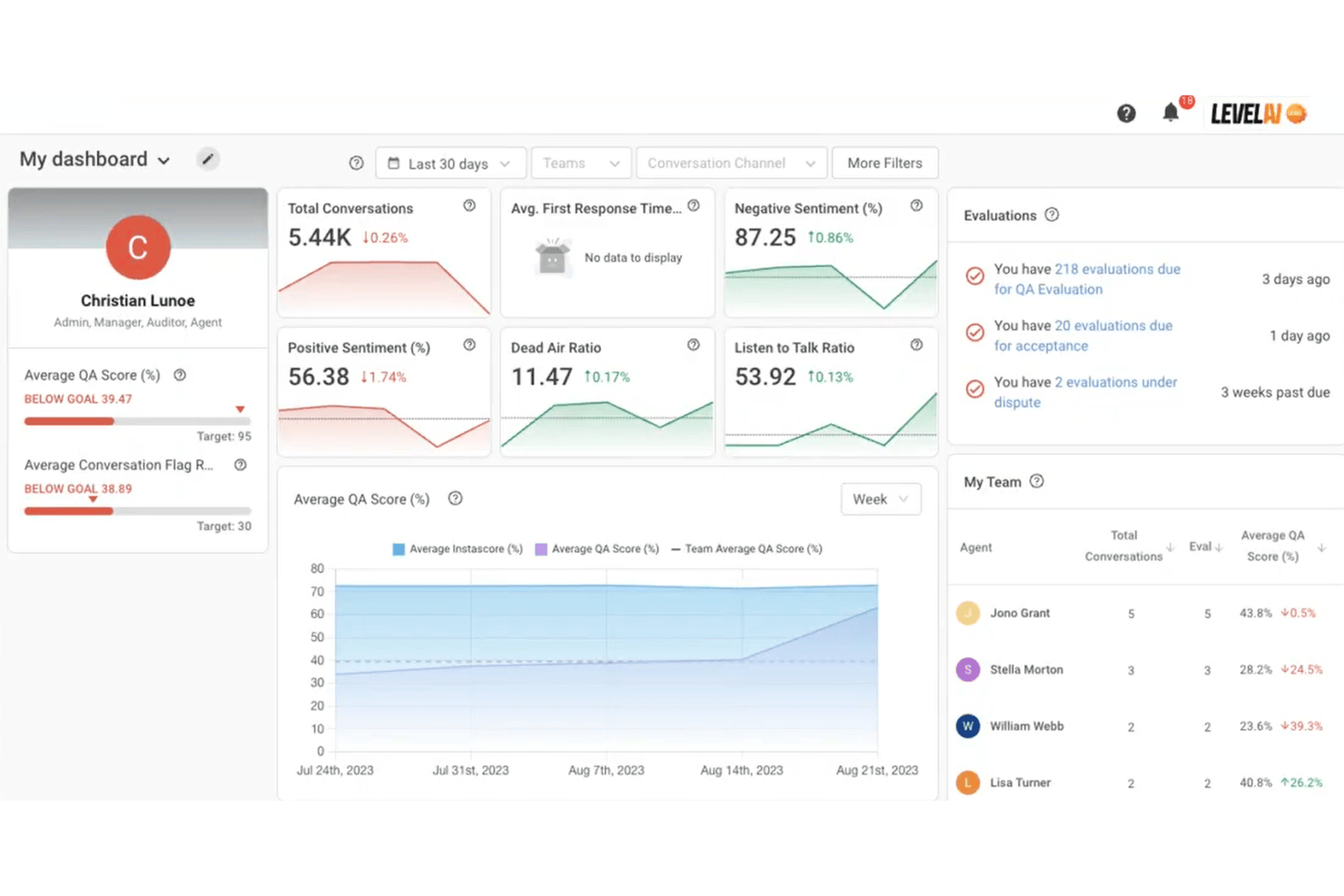
Level AI offre coaching in tempo reale per gli agenti e intelligenza delle conversazioni, pensato per i contact center che desiderano migliorare le prestazioni degli agenti nell'immediato. Questa piattaforma è particolarmente adatta ai team che vogliono ottenere informazioni utili dalle interazioni con i clienti e fornire feedback immediati agli agenti. Se hai bisogno di colmare rapidamente i divari di performance e garantire una qualità di servizio costante, Level AI integra strumenti di analisi mirata e coaching nel tuo flusso di lavoro.
Perché ho scelto Level AI
Level AI si distingue per le sue intuizioni di coaching in tempo reale, particolarmente preziose per i contact center che puntano a migliorare le prestazioni degli agenti durante le interazioni dal vivo. Ho scelto questa piattaforma perché utilizza l'intelligenza artificiale per analizzare le conversazioni mentre avvengono e fornire feedback istantanei agli agenti, aiutandoli ad adattare il loro approccio sul momento. Le schede di coaching in tempo reale e il monitoraggio automatico della qualità permettono ai supervisori di individuare le opportunità di formazione senza dover aspettare la revisione delle chiamate. Questa attenzione a intuizioni immediate e operative rende Level AI una scelta forte per i team che vogliono migliorare costantemente le interazioni tra agenti e clienti.
Funzionalità principali di Level AI
Altre funzionalità che rendono Level AI un'opzione interessante per i team di analisi dei call center includono:
- Analisi conversazionale omnicanale: Analizza le interazioni con i clienti su canali voice, chat ed email tramite un'unica dashboard.
- Schede di valutazione personalizzabili: Crea e adatta i moduli di valutazione secondo gli standard di assicurazione qualità del tuo team.
- Monitoraggio automatico della conformità: Segnala le conversazioni che potrebbero violare i requisiti di conformità tramite rilevamento AI.
- Integrazione con knowledge base: Fornisce agli agenti articoli di conoscenza pertinenti durante le conversazioni live, in base al contesto.
Integrazioni di Level AI
Le integrazioni includono Salesforce, Zendesk, Freshworks, Kustomer, Five9, Twilio, Talkdesk, Genesys, Amazon Connect e Slack.
Pros and Cons
Pros:
- Suggerimenti di coaching in tempo reale durante le chiamate
- Analisi conversazionale AI su tutti i canali
- Valutazione automatica della qualità per gli agenti
Cons:
- Profondità limitata dei report storici per l'analisi
- Nessuna app mobile per accesso in movimento
Altri software di analisi dei call center
Ecco alcune opzioni aggiuntive di software di analisi dei call center che non sono entrate nel mio elenco dei migliori strumenti, ma che vale comunque la pena prendere in considerazione:
- Tethr
Ideale per ottenere intelligenza conversazionale azionabile
- Cresta
Ideale per la guida alle conversazioni in tempo reale
- Zoom Contact Center
Ideale per interazioni con video


Come Valuto i Software di Analisi per Call Center
Divido la mia valutazione in elementi essenziali che non possono mancare—come analisi vocale e QA automatizzato—e i fattori che differenziano gli strumenti costruiti per vere operazioni di contact center dagli altri.
Funzionalità di Base (Requisiti Minimi per Questa Lista)
Quando seleziono gli strumenti per la mia lista, valuto ciascuno su una scala da 0 (non offre la funzionalità) a 5 (eccelle in quest'area) per ciascuna delle funzionalità principali elencate di seguito. Poi, calcolo il punteggio totale dello strumento in percentuale. Ogni strumento deve raggiungere un punteggio minimo totale del 65% per essere preso in considerazione.
- Analisi del Parlato e del Testo: Verifico se lo strumento trascrive e analizza sia le interazioni vocali che digitali, inclusa la capacità di individuare parole chiave, raggruppare argomenti e assegnare tag personalizzati alle categorie tra i vari canali.
- Dashboard di Prestazioni in Tempo Reale: Valuto come una piattaforma mostra KPI in tempo reale e storici come AHT, FCR e tasso di abbandono, e se i supervisori possono approfondire per coda, squadra o periodo di tempo.
- Rilevamento di Sentimenti ed Emozioni: Qui conta la capacità di attribuire un punteggio al sentimento del cliente a livello di interazione o frase, specialmente per individuare chiamate a rischio escalation prima che arrivino sulla scrivania di un supervisore.
- Analisi delle Prestazioni degli Agenti: Cerco strumenti che vadano oltre il semplice conteggio delle chiamate, offrendo scorecard, benchmarking tra pari e la possibilità di collegare le metriche di ogni agente ad aree specifiche di coaching.
- Gestione della Qualità Automatizzata: Il controllo qualità manuale copre solo una frazione delle chiamate. Valuto se una piattaforma può valutare automaticamente il 100% delle interazioni in base a criteri configurabili come aderenza allo script o linguaggio conforme.
- Integrazione CCaaS e Telefonia: Il valore di uno strumento dipende da quanto bene si integra con piattaforme come Genesys, Five9, Amazon Connect o Talkdesk. Cerco connettori nativi e ingestione di dati in tempo reale.
Una volta che ho una lista di strumenti che soddisfano questi criteri, considero cosa distingue ciascuna piattaforma.
Fattori di Differenziazione (Cosa Distingue i Fornitori)
Ecco come confronto e metto a paragone diversi fornitori:
Caratteristiche Distintive
La sintesi automatica tramite IA generativa è un aspetto fondamentale per me. Gli strumenti che generano automaticamente i riepiloghi delle chiamate e gli esiti riducono notevolmente il lavoro post chiamata per gli agenti. Esamino anche le capacità di analisi predittiva, in particolare se una piattaforma può prevedere il rischio di abbandono o flessioni nel CSAT in base alle tendenze delle interazioni. Strumenti di coaching conversazionale completano il quadro: le migliori implementazioni collegano i punteggi QA direttamente a piani di coaching personalizzati, offrendo ai supervisori un percorso chiaro dall'insight all'azione.
Oltre le Caratteristiche
La conformità e la sicurezza dei dati hanno un peso molto importante nella mia valutazione. I contact center nel settore sanitario e finanziario gestiscono dati sensibili dei clienti, quindi verifico la presenza di redazione PCI-DSS, supporto HIPAA e certificazione SOC 2 Type II. La profondità dell'ecosistema di integrazioni conta altrettanto. Uno strumento che si collega al tuo CRM, piattaforma WFM e strumenti BI come Tableau o Power BI diventa molto più prezioso rispetto a uno che opera in isolamento. Valuto anche il time-to-value, considerando se i fornitori offrono scorecard preconfigurate e supporto all'onboarding per permettere ai team di produrre rapidamente insight.
Come scegliere un software di analisi dei call center
È facile perdersi in lunghi elenchi di funzionalità e strutture tariffarie complesse. Per aiutarti a rimanere concentrato mentre affronti il tuo processo di selezione del software, ecco un elenco di fattori da tenere a mente:
| Fattore | Cosa considerare |
|---|---|
| Scalabilità | Il software è in grado di gestire i volumi di chiamate attuali e previsti? Informati sui limiti, sui livelli tariffari e sull'impatto della crescita sui costi. |
| Integrazioni | Si collega nativamente al tuo CRM, agli strumenti di telefonia e di gestione della forza lavoro? Verifica la compatibilità con il tuo ecosistema esistente. |
| Possibilità di personalizzazione | Puoi adattare i pannelli di controllo, i rapporti e le analisi ai flussi di lavoro del tuo team? Considera quanta flessibilità ti serve per i tuoi processi. |
| Semplicità d'uso | I tuoi operatori e manager lo adotteranno rapidamente? Cerca una navigazione intuitiva, visualizzazioni chiare dei dati e requisiti minimi di formazione. |
| Implementazione e inserimento | Quanto tempo richiederà la configurazione e quali risorse saranno necessarie? Informati sul supporto alla migrazione, sui programmi di inserimento e sulle tempistiche tipiche per l'entrata in funzione. |
| Costo | Le strutture tariffarie sono trasparenti e prevedibili? Fai attenzione ai costi nascosti, agli extra necessari e alla durata minima dei contratti. |
| Misure di sicurezza | La piattaforma soddisfa i tuoi standard di privacy e sicurezza dei dati? Verifica la crittografia, i controlli degli accessi e le certificazioni di conformità. |
| Disponibilità dell'assistenza | Quali canali e orari di assistenza sono disponibili? Valuta se ti serve supporto 24 ore su 24, 7 giorni su 7, responsabili degli account dedicati o assistenza multilingue. |
Che cos'è un software di analisi dei call center?
Il software di analisi dei call center è una categoria di strumenti che acquisisce, elabora e analizza i dati delle interazioni con i clienti attraverso i canali vocali e digitali. Queste piattaforme aiutano i team a monitorare le prestazioni degli agenti, tenere traccia del sentiment dei clienti e identificare tendenze o problemi di conformità. Trasformando i dati grezzi delle conversazioni in informazioni utili, il software di analisi dei call center favorisce il miglioramento continuo della qualità del servizio, dell'efficienza operativa e dell'esperienza del cliente.
Funzionalità del software di analisi dei call center
Quando scegli il software di analisi dei call center, presta attenzione alle seguenti funzionalità chiave:
- Registrazione delle chiamate: acquisisce e archivia l'audio delle chiamate dei clienti, consentendo ai supervisori di esaminare le interazioni per scopi di controllo della qualità e formazione.
- Dashboard personalizzabili: consentono agli utenti di visualizzare in tempo reale metriche e tendenze chiave, adattando la visualizzazione per mettere in evidenza i dati più rilevanti per i diversi ruoli.
- Analisi del sentiment: valuta il tono e l'emozione nelle conversazioni con i clienti, aiutando i team a comprendere la soddisfazione dei clienti e a identificare tempestivamente potenziali problemi.
- Monitoraggio delle prestazioni degli agenti: monitora le metriche individuali e del team, come il tempo di gestione delle chiamate, i tassi di risoluzione e il rispetto di script o protocolli.
- Monitoraggio della conformità: segnala le chiamate che potrebbero violare gli standard normativi o interni, supportando la gestione dei rischi e la preparazione agli audit.
- Reportistica automatizzata: genera report programmati o su richiesta che riepilogano l'attività del call center, facilitando la condivisione delle informazioni con le parti interessate.
- Analisi omnicanale: aggrega i dati provenienti da voce, chat, e-mail e altri canali per fornire una visione unificata delle interazioni con i clienti.
- Strumenti di controllo della qualità: fornisce schede di valutazione, moduli di valutazione e flussi di lavoro per standardizzare e documentare le valutazioni degli agenti.
- Avvisi in tempo reale: notifica immediatamente ai supervisori o agli agenti quando vengono rilevate parole chiave, frasi o comportamenti specifici durante le interazioni in corso.
Vantaggi del software di analisi dei call center
L'implementazione del software di analisi dei call center offre numerosi vantaggi al tuo team e alla tua azienda. Ecco alcuni dei vantaggi che puoi aspettarti:
- Migliore qualità del servizio: l'accesso alle registrazioni delle chiamate, all'analisi del sentiment e agli strumenti di controllo della qualità aiuta i team a identificare le opportunità di coaching e a mantenere standard elevati.
- Risoluzione più rapida dei problemi: gli avvisi in tempo reale e l'analisi omnicanale consentono ai supervisori di affrontare i problemi non appena si presentano, riducendo i tempi di attesa dei clienti e le escalation.
- Processo decisionale basato sui dati: le dashboard personalizzabili e la reportistica automatizzata forniscono ai responsabili informazioni utili per guidare la pianificazione del personale, la formazione e il miglioramento dei processi.
- Migliore gestione della conformità: le funzionalità di monitoraggio della conformità contribuiscono a garantire il rispetto dei requisiti normativi e a ridurre il rischio di violazioni costose.
- Maggiore efficienza operativa: la valutazione automatizzata, il monitoraggio delle prestazioni e gli strumenti per i flussi di lavoro riducono al minimo le attività manuali e liberano tempo per attività a maggior valore aggiunto.
- Visione unificata del cliente: l'aggregazione dei dati provenienti da più canali offre ai team una comprensione completa dei percorsi dei clienti e dei loro punti critici.
- Maggiore coinvolgimento degli agenti: metriche trasparenti sulle prestazioni e meccanismi di feedback favoriscono lo sviluppo e il riconoscimento degli agenti.
Costi e prezzi del software di analisi dei call center
La scelta del software di analisi dei call center richiede la comprensione dei vari modelli e piani tariffari disponibili. I costi variano in base alle funzionalità, alle dimensioni del team, ai componenti aggiuntivi e ad altri fattori. La tabella seguente riassume i piani più comuni, i relativi prezzi medi e le funzionalità tipicamente incluse nelle soluzioni software di analisi dei call center:
Tabella comparativa dei piani per il software di analisi dei call center
| Tipo di piano | Prezzo medio | Funzionalità comuni |
|---|---|---|
| Piano gratuito | $0 | Registrazione di base delle chiamate, reportistica limitata e dashboard semplici. |
| Piano personale | $20–$40/utente/mese | Registrazione delle chiamate, analisi di base, monitoraggio del sentiment e assistenza standard. |
| Piano aziendale | $50–$100/utente/mese | Analisi avanzate, dashboard personalizzabili, monitoraggio delle prestazioni, monitoraggio della conformità e opzioni di integrazione. |
| Piano per grandi aziende | $120–$200/utente/mese | Analisi omnicanale, avvisi in tempo reale, automazione dei flussi di lavoro, assistenza dedicata e controlli di sicurezza avanzati. |
Domande frequenti sul software di analisi dei call center
Ecco alcune risposte alle domande frequenti sul software di analisi dei call center:
In che modo il software di analisi dei call center aiuta a gestire le prestazioni degli operatori?
Il software di analisi dei call center monitora metriche chiave come il tempo medio di gestione, la risoluzione alla prima chiamata e il rispetto dello script, migliorando notevolmente la produttività degli operatori. Questi dati sui call center aiutano i responsabili a identificare le esigenze di formazione, riconoscere i migliori operatori e definire indicatori chiave di prestazione chiari per gli operatori. Monitorando le prestazioni del call center, i responsabili possono garantire il mantenimento di punteggi elevati di soddisfazione dei clienti.
Il software di analisi dei call center può analizzare le interazioni su più canali?
Sì, la maggior parte dei software può aggregare e analizzare i dati provenienti da telefonate vocali, chat, e-mail e talvolta social media per misurare l’FCR complessivo. Questa visione unificata di tutti i canali di comunicazione aiuta i team a comprendere l’intero percorso del cliente, individuare tendenze in tutti i punti di contatto e scoprire informazioni preziose sul comportamento dei clienti.
Cosa devo valutare per garantire la sicurezza dei dati nel software di analisi dei call center?
Cerca funzionalità come la crittografia da un capo all’altro, i controlli degli accessi basati sui ruoli e le certificazioni di conformità come SOC 2 o GDPR per proteggere i dati sensibili dei clienti. Chiedi ai fornitori informazioni sulle loro pratiche di archiviazione, su come gestiscono le informazioni riservate e su come proteggono i dati che passano attraverso i sistemi IVR o di instradamento, così da mantenere un solido punteggio netto di promozione.
Quanto tempo occorre per implementare il software di analisi dei call center?
I tempi di implementazione variano, ma la maggior parte dei team può aspettarsi che la configurazione richieda da pochi giorni a diverse settimane. Tra i fattori da considerare rientrano le esigenze di migrazione dei dati, la complessità delle integrazioni e la disponibilità delle risorse per l’avviamento. Dedicare il tempo necessario alla corretta configurazione di strumenti come l’analisi predittiva e l’apprendimento automatico aiuta a prevedere con precisione il tasso di abbandono e a delineare le esigenze dei clienti.
È possibile personalizzare i report e i cruscotti nel software di analisi dei call center?
Sì, la maggior parte delle soluzioni offre cruscotti e strumenti di reportistica personalizzabili per ottimizzare i flussi di lavoro. Di solito è possibile adattare le visualizzazioni per mettere in evidenza le metriche specifiche del call center, come le tendenze relative alla fidelizzazione, all’NPS o alla gestione della qualità, più rilevanti per gli obiettivi aziendali.