

Gestire un centro di contatto può essere difficile. Devi conciliare le esigenze dei clienti, le prestazioni del team e la pressione costante per migliorare il servizio. È qui che entra in gioco il software per centri di contatto misti. Ti aiuta a bilanciare le chiamate in entrata e in uscita, rendendo più semplice il lavoro del tuo team e aumentando la soddisfazione dei clienti.
Ho dedicato del tempo a testare e recensire questi strumenti per offrirti una panoramica imparziale delle migliori opzioni disponibili. In questo articolo condividerò le mie scelte migliori, concentrandomi sui punti di forza di ciascuna soluzione e su come possano adattarsi alle tue esigenze.
Che tu voglia migliorare l'efficienza o aumentare la soddisfazione dei clienti, qui troverai la soluzione giusta. Scopriamo insieme le opzioni per trovare quella perfetta per il tuo team.
Perché fidarsi dei nostri consigli sui software
6,700+
Reviews
20
Industry experts
16+
Evaluation factors
14
Years
Il nostro team testa e recensisce software dal 2012. In quanto leader CX noi stessi, sappiamo quanto sia difficile — e importante — scegliere il software giusto.
Per questa guida, abbiamo valutato gli strumenti attraverso test pratici e ricerche indipendenti, assegnando un punteggio agli strumenti in base ai nostri criteri di selezione.
Le nostre recensioni riflettono il nostro giudizio editoriale umano, non un discorso di vendita.
 Gui DrusinaCreative Director
 Tim FisherVP of AI
Tabella comparativa dei software per centri di contatto misti
Questa tabella comparativa riassume i dettagli sui prezzi delle mie migliori selezioni di software per centri di contatto misti:
| Tool | Best For | Trial Info | Price | ||
|---|---|---|---|---|---|
| 1 | Ideale per la collaborazione in team | Demo gratuita disponibile | Da $15/utente/mese (fatturazione annuale) | Website | |
| 2 | Ideale per il monitoraggio delle chiamate in tempo reale | Prova gratuita di 14 giorni | A partire da $25/utente/mese (fatturazione annuale) | Website | |
| 3 | Ideale per costruire agenti AI personalizzati su larga scala | Demo gratuita disponibile | Prezzo su richiesta | Website | |
| 4 | Ideale per team remoti | Prova gratuita di 7 giorni + demo gratuita disponibile | Da $15/utente/mese (fatturato annualmente) | Website | |
| 5 | Ideale per le funzionalità di intelligenza artificiale | Demo gratuita | Da $85/utente/mese | Website | |
| 6 | Ideale per i team di vendita | Demo gratuita disponibile | Prezzo su richiesta | Website | |
| 7 | Ideale per le piccole imprese | Prova gratuita di 14 giorni + demo gratuita | Da $80/utente/mese (fatturazione annuale) | Website | |
| 8 | Ideale per l'integrazione con CRM | Prova gratuita di 14 giorni disponibile | Da $14/postazione/mese (fatturato annualmente) | Website | |
| 9 | Ideale per il tracciamento delle chiamate | Demo gratuita disponibile | Da $79/utente/mese (fatturazione annuale) | Website | |
| 10 | Ideale per soluzioni enterprise | Demo gratuita | Da $119/utente/mese | Website |


Recensioni dei migliori software per centri di contatto misti
Di seguito trovi le mie analisi dettagliate dei migliori software per centri di contatto misti inclusi nel mio elenco. Le mie recensioni offrono una panoramica approfondita delle funzionalità principali, dei pro e & contro, delle integrazioni e dei casi d’uso ideali di ogni strumento, per aiutarti a trovare quello più adatto a te.
 Ideale per la collaborazione in team
- Demo gratuita disponibile
- Da $15/utente/mese (fatturazione annuale)
Visit WebsiteCustomer Rating:4.5/5
Comunicazioni unificate AI di Nextiva con voce, video, chat e strumenti per contact center. Nextiva è una piattaforma cloud di comunicazione unificata e gestione dell'esperienza cliente (CXM) potenziata dall'intelligenza artificiale per aziende di tutte le dimensioni. Riunisce in un'unica piattaforma il servizio telefonico VoIP, videoconferenze, chat, SMS e strumenti per il contact center guidati dall’AI.
Perché ho scelto Nextiva: La piattaforma unifica tutte le interazioni con i clienti tramite voce, video, chat, SMS, email, social e altro ancora, offrendo ai team una visione a 360° del cliente. Il contact center intelligente potenziato dall’AI e l’instradamento intelligente migliorano l’efficienza e supportano la personalizzazione su larga scala. La flessibilità e scalabilità della piattaforma la rendono adatta sia per piccole imprese che per grandi aziende.
Funzionalità di rilievo e integrazioni:
Le funzionalità includono instradamento delle chiamate basato su AI, analisi in tempo reale e strumenti di comunicazione unificata che riuniscono telefono, video, messaggistica e operazioni di contact center in un unico posto. Gli strumenti di automazione e workflow della piattaforma aiutano il tuo team a gestire in modo efficiente le interazioni con i clienti e a mantenere una qualità del servizio costante.
Le integrazioni includono Salesforce, HubSpot, Zendesk, Zoho CRM, Microsoft Teams, Outlook e Google Workspace.
Pros and Cons
Pros:
- Piattaforma unificata per voce e messaggistica
- Instradamento e analisi potenziati dall’AI
- Scalabile per team di tutte le dimensioni
Cons:
- Può risultare troppo complesso per team molto piccoli
- I prezzi possono essere elevati nei piani di fascia alta
 Ideale per il monitoraggio delle chiamate in tempo reale
- Prova gratuita di 14 giorni
- A partire da $25/utente/mese (fatturazione annuale)
Visit WebsiteCustomer Rating:4.4/5
CloudTalk offre una dashboard del call center in tempo reale per monitorare le prestazioni degli operatori e le statistiche delle chiamate. Per le aziende che desiderano migliorare la gestione delle chiamate, CloudTalk offre una soluzione per i team di supporto e vendita con il monitoraggio delle chiamate in tempo reale. Aiuta i team a gestire chiamate in entrata e in uscita in modo più efficace, rendendolo adatto a organizzazioni di diversi settori. Che venga utilizzato in ambito finanziario, immobiliare o retail, CloudTalk facilita una gestione più chiara delle chiamate e delle operazioni quotidiane.
Perché ho scelto CloudTalk
Ho scelto CloudTalk per il suo monitoraggio delle chiamate in tempo reale, che consente ai team di supervisionare le chiamate in entrata e in uscita mentre avvengono. Questo rende più facile per i supervisori monitorare la qualità delle chiamate e intervenire quando sorgono problemi. L'instradamento intelligente delle chiamate e la composizione automatica aiutano inoltre gli operatori a gestire le chiamate in modo più efficiente, supportando le esigenze quotidiane dei call center misti. Queste funzionalità sono fondamentali per le aziende che vogliono migliorare l'efficienza dei call center e coinvolgere meglio i clienti.
Caratteristiche principali di CloudTalk
Oltre al monitoraggio in tempo reale, CloudTalk offre:
- Registrazione delle chiamate: Registra le chiamate per il controllo di qualità e la formazione, garantendo standard di servizio al cliente costanti.
- Risposta vocale interattiva (IVR): Questo strumento aiuta a gestire grandi volumi di chiamate indirizzando i chiamanti al dipartimento o all'informazione appropriata.
- SMS internazionali e messaggistica WhatsApp: Queste funzionalità consentono la comunicazione globale, permettendo di raggiungere i clienti in tutto il mondo.
Integrazioni CloudTalk
Le integrazioni includono HubSpot, Salesforce, Zoho, Zendesk, Odoo, Intercom, Salesloft, Outreach, Bullhorn, Monday e Shopify.
Pros and Cons
Pros:
- Si integra con i principali CRM per registrare automaticamente le chiamate
- Analisi utili delle chiamate per monitorare l'attività degli agenti e i risultati delle chiamate
- Offre numeri locali, mobili o verdi in oltre 140 paesi
Cons:
- Segnalate occasionali problematiche di connessione alle chiamate dagli utenti
- Opzioni di personalizzazione limitate nelle dashboard
 Ideale per costruire agenti AI personalizzati su larga scala
- Demo gratuita disponibile
- Prezzo su richiesta
Visit WebsiteCustomer Rating:5/5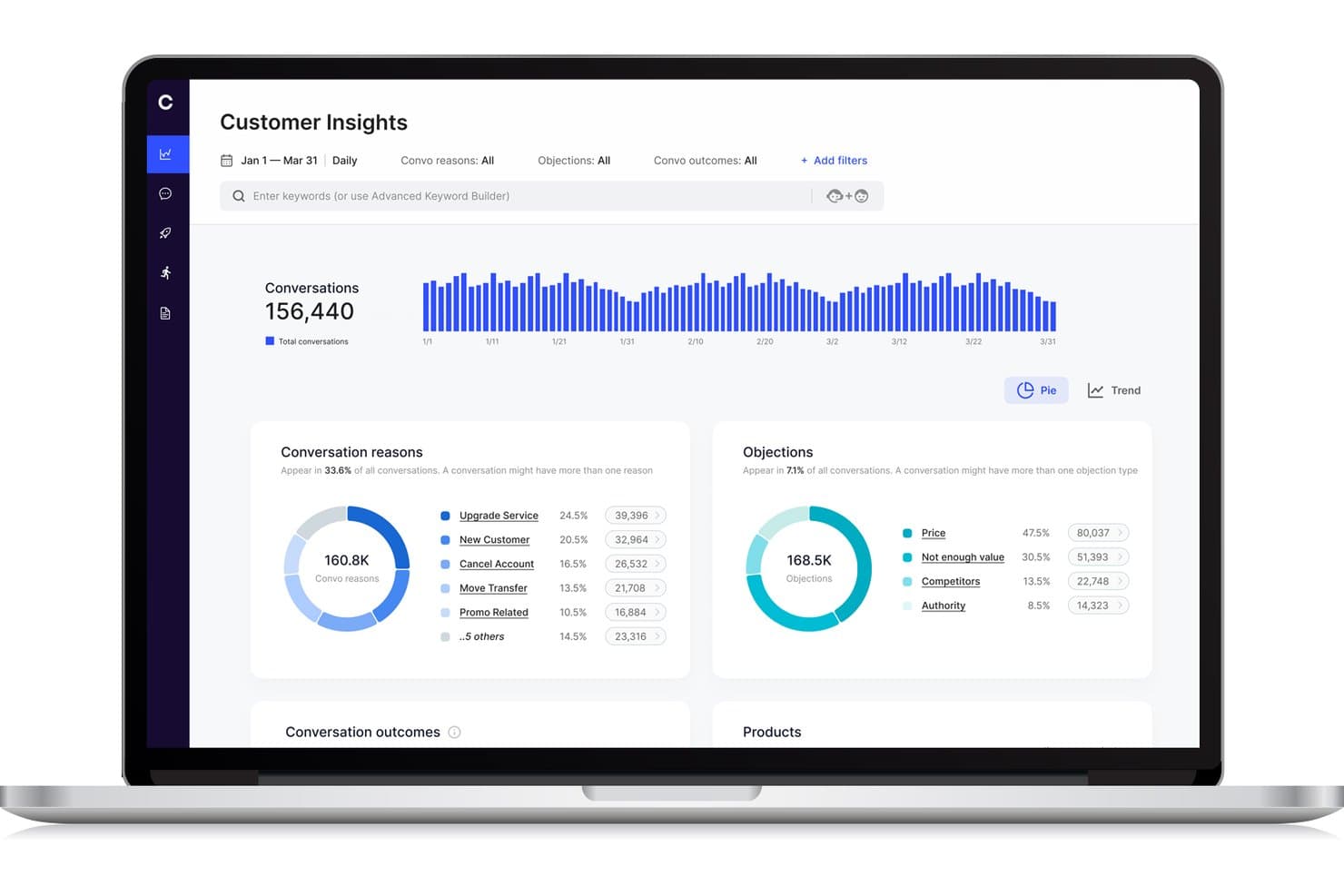
Cresta offre una dashboard Customer Insights che mostra i motivi delle conversazioni, le obiezioni e le tendenze tra le varie conversazioni per analitica delle chiamate miste nel call center. Cresta è una piattaforma di contact center alimentata da intelligenza artificiale che unifica le operazioni in entrata e in uscita tramite flussi di lavoro dinamici per gli agenti, intelligenza conversazionale in tempo reale e integrazione senza soluzione di continuità con gli attuali strumenti del call center.
Per chi è ideale Cresta?
Cresta è ideale per contact center aziendali che necessitano di una gestione delle chiamate scalabile basata su AI e di flussi di lavoro dinamici per agenti in ambienti complessi e multicanale.
Perché ho scelto Cresta
Ho scelto Cresta come una delle migliori soluzioni perché consente di creare e implementare agenti AI personalizzati in grado di gestire code di chiamate miste, automatizzare l’assegnazione dinamica degli agenti e analizzare ogni conversazione in tempo reale su scala aziendale.
Funzionalità principali di Cresta
- Desktop unificato per agenti: Gli agenti gestiscono tutte le interazioni miste da un’unica interfaccia senza cambiare strumento.
- Controlli per supervisori in tempo reale: I supervisori possono monitorare le attività dal vivo e modificare immediatamente i flussi di lavoro degli agenti.
- Instradamento basato sulle competenze: Il sistema assegna i contatti in entrata e in uscita agli agenti in base a competenze e attributi definiti.
- Dashboard di reportistica personalizzabili: Gli utenti accedono a analisi miste su occupazione agenti, produttività e performance delle campagne.
Integrazioni di Cresta
Cresta offre integrazioni native con Salesforce, Twilio, Pipedrive, BigCommerce, Five9, Zendesk e altri. È disponibile un’API per integrazioni personalizzate.
Pros and Cons
Pros:
- Coaching AI durante chiamate e chat in tempo reale
- Analisi avanzata delle conversazioni per i supervisori
- Gestione dinamica delle code tra canali e team
Cons:
- Le funzionalità di predictive dialer non sono esplicitamente supportate
- Knowledge Assist richiede costante ottimizzazione del modello
Learn more about Cresta: Ideale per team remoti
- Prova gratuita di 7 giorni + demo gratuita disponibile
- Da $15/utente/mese (fatturato annualmente)
Visit WebsiteCustomer Rating:4.7/5
La comunicazione cloud di Ringover potenzia il lavoro di squadra da remoto con chiamate e strumenti di collaborazione. Ringover è una piattaforma di comunicazione basata sul cloud progettata per le aziende che necessitano di una gestione efficiente delle chiamate e strumenti di collaborazione. Serve i team remoti offrendo funzionalità che migliorano la connettività e la produttività.
Perché ho scelto Ringover: La piattaforma è pensata per i team remoti, fornendo strumenti che facilitano una comunicazione senza interruzioni. Le sue funzionalità di gestione delle chiamate aiutano il tuo team a rimanere organizzato ed efficiente, anche lavorando da remoto. Gli strumenti di collaborazione di Ringover assicurano che tutti restino collegati e aggiornati. La capacità di effettuare e ricevere chiamate da qualsiasi luogo aumenta flessibilità e adattabilità.
Caratteristiche principali & integrazioni:
Le caratteristiche includono trasferimento di chiamata e gestione delle code, che aiutano il tuo team a gestire efficacemente volumi elevati di chiamate. La piattaforma offre la registrazione delle chiamate per garantire qualità e conformità. Inoltre, le analisi forniscono informazioni sulle prestazioni delle chiamate e sulla produttività del team.
Le integrazioni includono Salesforce, HubSpot, Zoho CRM, Pipedrive, Slack, Zendesk, Freshdesk, monday.com e Helpscout.
Pros and Cons
Pros:
- Integrazioni avanzate
- Gestione flessibile delle chiamate
- Supporta elevati volumi di chiamate
Cons:
- Occasionali problemi di connessione
- Le funzionalità avanzate sono limitate ai piani superiori
 Ideale per le funzionalità di intelligenza artificiale
- Demo gratuita
- Da $85/utente/mese
Visit WebsiteCustomer Rating:4.4/5
Contact center cloud di Talkdesk con insight basati su IA, automazione e supporto clienti scalabile. Talkdesk è una piattaforma per call center basata su cloud che si rivolge ad aziende di tutte le dimensioni desiderose di migliorare le interazioni con i clienti. Offre una varietà di soluzioni di comunicazione, concentrandosi sul miglioramento dell'esperienza del cliente e dell'efficienza operativa.
Perché ho scelto Talkdesk: Le funzionalità di intelligenza artificiale della piattaforma sono il suo punto di forza, fornendo strumenti che supportano insight predittivi e flussi di lavoro automatizzati. Gli agenti virtuali dotati di intelligenza artificiale di Talkdesk aiutano il tuo team a gestire le attività ripetitive, liberando tempo per interazioni più complesse. Le analisi in tempo reale offrono approfondimenti dettagliati sul comportamento dei clienti e sulle prestazioni del team. La sua scalabilità garantisce che, man mano che la tua azienda cresce, Talkdesk possa crescere con te.
Caratteristiche principali e integrazioni:
Le caratteristiche includono la registrazione e il monitoraggio delle chiamate, che ti aiutano a mantenere la qualità e la conformità. La piattaforma offre supporto omnicanale, consentendo la comunicazione attraverso più canali. Gli strumenti di gestione della forza lavoro aiutano a ottimizzare i turni degli operatori e la produttività.
Le integrazioni includono Salesforce, Zendesk, Microsoft Teams, Slack, Zoom, HubSpot e ServiceNow.
Pros and Cons
Pros:
- Instradamento e automazione basati su IA
- Integrazioni robuste con CRM e terze parti
- Analytics e reportistica avanzati
Cons:
- L'interfaccia può sembrare complessa
- Costoso per piccoli team
Learn more about Talkdesk: Ideale per i team di vendita
- Demo gratuita disponibile
- Prezzo su richiesta
Visit WebsiteCustomer Rating:4.5/5
La composizione IA di Convoso aumenta l'efficacia delle vendite grazie a valutazione in tempo reale e conformità. Convoso è un software per call center basato sull'IA, pensato per team di vendita in settori come BPO, finanza e immobiliare. Migliora le prestazioni di vendita grazie a funzionalità come la valutazione DID in tempo reale e l'ottimizzazione della composizione tramite IA, aumentando i tassi di contatto e conversione.
Perché ho scelto Convoso: Convoso rafforza le prestazioni di qualsiasi call center outbound ottimizzando le chiamate telefoniche attraverso le sue funzionalità di composizione basate sull'intelligenza artificiale. Con strumenti come compositore predittivo e compositore automatico, i team possono gestire le campagne outbound più efficacemente e concentrarsi sulle chiamate in uscita con maggiore probabilità di conversione.
La valutazione DID in tempo reale ti permette di dare priorità ai potenziali clienti più preziosi monitorando allo stesso tempo le metriche e i KPI più importanti. Basato su una infrastruttura telefonica scalabile, la piattaforma si adatta alla crescita del team e la gestione della conformità ti aiuta a restare allineato ai requisiti normativi. Inoltre, le funzionalità di previsione offrono maggiore visibilità sulle tendenze delle prestazioni, consentendoti di pianificare le campagne future con sicurezza.
Caratteristiche salienti & integrazioni:
Le funzionalità includono la composizione multimodale che supporta sia le vendite in entrata che quelle in uscita. L'automazione dei flussi di lavoro aiuta il team a gestire le attività in modo efficiente. Una gestione superiore del caller ID garantisce che le tue chiamate vengano riconosciute e risposte.
Le integrazioni possono essere effettuate tramite API e Zapier.
Pros and Cons
Pros:
- Ottimizzazione della composizione con IA
- Scalabilità ad alta velocità
- Valutazione DID in tempo reale
Cons:
- Impostazione complessa
- Richiede conoscenze tecniche
Learn more about Convoso: Ideale per le piccole imprese
- Prova gratuita di 14 giorni + demo gratuita
- Da $80/utente/mese (fatturazione annuale)
Visit WebsiteCustomer Rating:4.3/5
Dialpad organizza le conversazioni con i clienti grazie a strumenti integrati di chiamate, messaggistica e segreteria. Dialpad è una piattaforma di comunicazione con i clienti basata su intelligenza artificiale, progettata per le piccole imprese che cercano soluzioni efficienti per il servizio clienti e le vendite. Offre strumenti di intelligenza artificiale in tempo reale che aumentano la produttività, inclusi la presa di appunti automatica e la generazione di insight.
Perché ho scelto Dialpad: Il focus della piattaforma sulle piccole imprese la rende accessibile e facile da implementare. Le funzionalità basate sull'intelligenza artificiale, come la presa di appunti automatica, aiutano il tuo team a rimanere organizzato. La scalabilità consente di crescere senza doversi preoccupare di limiti tecnici. Con una sicurezza di livello aziendale, Dialpad garantisce la protezione dei tuoi dati.
Funzionalità e integrazioni principali:
Le funzionalità includono agenti potenziati dall'intelligenza artificiale in grado di gestire flussi di lavoro complessi come rimborsi e nuove prenotazioni, supportando al contempo un coinvolgimento ad alto volume dei clienti su diversi canali. Che i team gestiscano chiamate in entrata, rispondano alle chiamate dei gruppi di assistenza oppure interagiscano con i clienti tramite i social media, la piattaforma aiuta a mantenere un'esperienza affidabile e coerente.
In quanto soluzione ibrida per contact center, garantisce anche che chiamate telefoniche e interazioni digitali ricevano la stessa attenzione. Dietro le quinte, Dialpad offre sicurezza e conformità di livello enterprise, incluse le certificazioni HIPAA e SOC 2, per proteggere le informazioni sensibili.
Le integrazioni includono Salesforce, Microsoft Teams, Google Workspace, Zendesk, Slack, HubSpot, Zoho CRM e ServiceNow.
Pros and Cons
Pros:
- Scalabile per supportare la crescita
- Nativa sul cloud e ottimizzata per dispositivi mobili
- Gestisce flussi di lavoro complessi
Cons:
- Molte funzionalità avanzate richiedono piani di livello superiore
- Potrebbe necessitare di supporto tecnico
 Ideale per l'integrazione con CRM
- Prova gratuita di 14 giorni disponibile
- Da $14/postazione/mese (fatturato annualmente)
Visit WebsiteCustomer Rating:4.4/5
Il CRM di vendita Pipedrive semplifica le pipeline con automazione, reportistica e monitoraggio facile. Pipedrive è uno strumento CRM focalizzato sulle vendite, progettato per piccole e medie imprese. Aiuta i team a gestire lead e trattative, offrendo una panoramica chiara delle attività e delle prestazioni di vendita.
Perché ho scelto Pipedrive: Lo strumento è ideale per l'integrazione del CRM, facilitando la gestione delle relazioni con i clienti da parte del tuo team. La sua visualizzazione intuitiva della pipeline di vendita aiuta a monitorare trattative e progressi. Le funzionalità di automazione riducono le attività manuali, permettendo al team di concentrarsi sulla vendita. Le capacità di reportistica forniscono informazioni sulle prestazioni di vendita, aiutando il processo decisionale.
Funzionalità e integrazioni principali:
Le funzionalità includono pipeline personalizzabili che ti permettono di adattare il processo di vendita alle tue esigenze. I promemoria delle attività assicurano che il team non perda mai un importante follow-up. Inoltre, la funzione di impostazione e monitoraggio degli obiettivi mantiene il team allineato agli obiettivi aziendali.
Le integrazioni includono Mailchimp, Trello, Slack, Microsoft Teams, Zapier, Xero, Asana, QuickBooks e HubSpot.
Pros and Cons
Pros:
- L'automazione riduce le attività manuali
- Eccellenti capacità di reportistica
- Processi di vendita personalizzabili
Cons:
- Le funzioni avanzate possono essere complesse
- Richiede una gestione continua per l'ottimizzazione
Learn more about Pipedrive: Ideale per il tracciamento delle chiamate
- Demo gratuita disponibile
- Da $79/utente/mese (fatturazione annuale)
Visit WebsiteCustomer Rating:4.7/5
Il contact center cloud DialedIn migliora la produttività con instradamento, tracciamento e analisi. DialedIn è un software per contact center basato su cloud progettato per le aziende nei settori come sanità, finanza e ospitalità. Si concentra sul miglioramento della produttività degli agenti e del coinvolgimento dei clienti attraverso una gestione efficiente delle chiamate.
Perché ho scelto DialedIn: Il punto di forza di DialedIn risiede nelle sue capacità di tracciamento delle chiamate, che aiutano il tuo team a gestire e analizzare le chiamate in modo efficace. La comunicazione omnicanale garantisce l'interazione con i clienti su più piattaforme. Le analisi dettagliate della piattaforma offrono approfondimenti per migliorare l'efficienza operativa.
Funzionalità e integrazioni principali:
Le funzionalità includono il compositore predittivo e l'instradamento basato sulle competenze che migliorano la gestione delle chiamate, insieme alla distribuzione automatica delle chiamate e alla risposta vocale interattiva. Il compositore predittivo aiuta il tuo team a raggiungere più clienti in modo efficiente. Analisi approfondite supportano il processo decisionale e il miglioramento delle prestazioni.
Le integrazioni includono Salesforce, Microsoft Teams, HubSpot, Zoho, Slack, Zendesk e Google Workspace.
Pros and Cons
Pros:
- Potenti funzionalità predictive-dialer e capacità miste inbound/outbound
- Compositore predittivo efficiente
- Supporto per comunicazione omnicanale
Cons:
- Opzioni di personalizzazione limitate
- Complessità nella configurazione iniziale
Learn more about DialedIn: 10Ideale per soluzioni enterprise
Five9
- Demo gratuita
- Da $119/utente/mese
Visit WebsiteCustomer Rating:4.1/5
Contact center AI di Five9 per supporto personalizzato e percorsi cliente senza interruzioni. Five9 è una soluzione per contact center basata su cloud pensata per le imprese che desiderano migliorare il coinvolgimento dei clienti. Fornisce strumenti basati sull'intelligenza artificiale per personalizzare le interazioni e potenziare l'erogazione del servizio.
Perché ho scelto Five9: Five9 offre un’esperienza di orchestrazione del percorso cliente guidata dall’IA, supportando una soluzione per call center ibrida che aiuta i team a gestire interazioni sia in entrata che in uscita con chiarezza ed efficienza. Aiuta con approfondimenti in tempo reale, migliorando le decisioni su instradamento ACD, code di chiamata e campagne ad alto volume. La piattaforma supporta inoltre strumenti come dialer intelligente e richiamate automatiche, offrendo al team un maggiore controllo sulle prestazioni e il coinvolgimento dei clienti.
Funzionalità e integrazioni principali:
Le funzionalità includono l'orchestrazione del percorso cliente guidata dall’IA, garantendo al vostro team una gestione efficiente delle interazioni. L’IA centrata sull’uomo della piattaforma fornisce agli operatori approfondimenti in tempo reale. Inoltre, le sue API aperte permettono una facile personalizzazione per adattarsi alle esigenze aziendali.
Le integrazioni includono Salesforce, Zendesk, Microsoft Dynamics 365, Oracle e ServiceNow.
Pros and Cons
Pros:
- Scalabile per grandi imprese
- Personalizzabile con API aperte
- Strumenti di IA centrati sull’uomo
Cons:
- Potrebbe non essere adatto alle piccole imprese
- Le funzionalità IA possono risultare complesse
Learn more about Five9:
Altri software per centri di contatto misti
Ecco alcune opzioni aggiuntive di software per centri di contatto misti che non sono entrate nel mio elenco, ma che vale comunque la pena considerare:
Come Valuto il Software per Call Center Blended
Divido la mia valutazione in due livelli: la base che ogni strumento deve superare—vero blending inbound/outbound, un dialer reale, desktop unificato per l'agente—e i fattori che distinguono davvero le piattaforme migliori.
Funzionalità di Base (Requisiti Fondamentali per Questa Lista)
Quando seleziono gli strumenti per la mia lista, valuto ciascuno su una scala da 0 (la funzionalità non è presente) a 5 (eccelle in quest’area) per ciascuna delle funzionalità chiave elencate di seguito. Poi, trasformo il punteggio totale dello strumento in percentuale. Ogni strumento deve raggiungere un punteggio minimo totale del 65% per essere preso in considerazione.
- Blending Inbound/Outbound: Verifico se gli agenti passano automaticamente tra le code e le campagne in base al volume in tempo reale, o se occorre che qualcuno cambi modalità manualmente.
- Dialer Outbound Automatico: Qui sono importanti le modalità del dialer. Cerco opzioni predittive, progressive e preview così che i team possano adattare il ritmo al tipo di campagna.
- ACD & Routing Basato sulle Competenze: Il routing deve abbinare i chiamanti agli agenti per competenza, lingua o livello di priorità—non solo inoltrare le chiamate al prossimo disponibile.
- Desktop Unificato per l'Agente: Valuto se gli agenti gestiscono il lavoro inbound e outbound da un'unica schermata con tutto il contesto, oppure se devono usare strumenti separati durante la chiamata.
- Controlli in Tempo Reale per i Supervisori: I supervisori devono poter monitorare le code, regolare i rapporti di blending e riassegnare gli agenti in tempo reale—specialmente durante picchi imprevisti di volume.
- Reportistica e Analytics Integrati: Cerco dashboard consolidate che monitorino sia gli SLA inbound che le metriche delle campagne outbound e l’occupazione totale degli agenti in un’unica vista.
Una volta che ho una lista di strumenti che soddisfano questi criteri, considero cosa distingue ogni piattaforma.
Fattori di Differenziazione (Cosa Distingue i Fornitori)
Ecco come confronto e metto a confronto i diversi fornitori:
Caratteristiche Distintive
L’assistenza agenti tramite IA è una differenza sostanziale. Cerco trascrizione in tempo reale e suggerimenti di prossima azione che aiutano gli agenti a gestire rapidamente i cambi di contesto tra le chiamate inbound di assistenza e il lavoro outbound di campagna. Anche la gestione delle risorse integrata è importante—previsione e pianificazione per team blended sono una sfida unica, e le piattaforme con modelli di turni adattivi nativi risolvono molte complicazioni. La conformità è fondamentale, soprattutto per l’outbound: rimozione automatica di numeri in DNC e gestione del consenso permettono di lavorare senza rischi legali.
Oltre le Caratteristiche
Le integrazioni con CRM e helpdesk sono una delle prime cose che controllo. Gli agenti blended hanno bisogno di contesto cliente in tempo reale quando passano da inbound a outbound, quindi i connettori nativi con piattaforme come Salesforce, Zendesk o HubSpot sono importanti. Anche la scalabilità conta molto—le campagne stagionali possono raddoppiare il numero di postazioni nottetempo, e cerco piattaforme in grado di gestire questo cambiamento senza lunghi iter di approvvigionamento. I modelli di prezzo variano molto: valuto se la licenza è per postazione, concorrente o basata sull’utilizzo, poiché i team blended con rotazioni di turno rischiano di pagare troppo con una struttura inadatta.
Come scegliere un software per centri di contatto misti
È facile perdersi in lunghi elenchi di funzionalità e strutture tariffarie complesse. Per aiutarti a rimanere concentrato mentre affronti il tuo processo di selezione del software, ecco un elenco di fattori da tenere a mente:
| Fattore | Cosa considerare |
|---|---|
| FattoreScalabilità | Cosa considerareIl software crescerà insieme alla tua attività? Cerca limiti utente flessibili e funzionalità che supportino l'espansione senza richiedere una revisione completa. |
| FattoreIntegrazioni | Cosa considerareFunziona con i sistemi che utilizzi già? Verifica la compatibilità con strumenti essenziali come CRM, posta elettronica e piattaforme di comunicazione per evitare interruzioni nei flussi di lavoro. |
| FattorePossibilità di personalizzazione | Cosa considerarePuoi adattarlo alle tue esigenze? Assicurati che il software consenta di modificare flussi di lavoro, cruscotti e autorizzazioni degli utenti per adattarsi ai processi specifici del tuo team. |
| FattoreFacilità d'uso | Cosa considerareL'interfaccia è intuitiva? Testa l'esperienza utente per assicurarti che il tuo team possa utilizzarla senza lunghi periodi di apprendimento o formazione approfondita. |
| FattoreImplementazione e avvio | Cosa considerareQuanto tempo servirà per essere operativi? Considera i tempi di configurazione, il supporto disponibile e le risorse formative per garantire una transizione agevole per il tuo team. |
| FattoreCosto | Cosa considerareQual è il costo totale di proprietà? Valuta la struttura dei prezzi, incluse le commissioni nascoste, per assicurarti che sia in linea con il tuo budget. Considera i costi a lungo termine oltre all'investimento iniziale. |
| FattoreMisure di sicurezza | Cosa considerareLe misure di protezione dei dati sono adeguate? Cerca la conformità agli standard del settore e i protocolli di crittografia per proteggere le informazioni sensibili. |
| FattoreDisponibilità dell'assistenza | Cosa considerareQuando puoi ricevere aiuto, se necessario? Verifica gli orari, i canali e i tempi di risposta dell'assistenza del fornitore per assicurarti che soddisfino le esigenze del tuo team. |
Cos'è un software per centri di contatto misti?
Il software per call center misti è uno strumento che gestisce sia le chiamate in entrata sia quelle in uscita all'interno di un'unica piattaforma. Gli operatori del servizio clienti, i team di vendita e il personale di supporto utilizzano generalmente questi strumenti per migliorare l'efficienza della comunicazione e l'interazione con i clienti. Le funzionalità di instradamento delle chiamate, monitoraggio in tempo reale e integrazione con i sistemi CRM aiutano a gestire i flussi delle chiamate e a migliorare la produttività degli operatori. Nel complesso, questi strumenti aumentano l'efficienza operativa e migliorano la soddisfazione dei clienti.
Funzionalità
Quando selezioni un software per call center misti, presta attenzione alle seguenti funzionalità chiave:
- Instradamento delle chiamate: indirizza le chiamate all'operatore più adatto, contribuendo a ridurre i tempi di attesa e a migliorare la soddisfazione dei clienti.
- Monitoraggio in tempo reale: consente ai supervisori di ascoltare le chiamate e fornire indicazioni, migliorando le prestazioni e la formazione degli operatori.
- Integrazione con i sistemi CRM: si collega agli strumenti di gestione delle relazioni con i clienti per fornire agli operatori informazioni dettagliate e lo storico dei chiamanti.
- Comunicazione omnicanale: supporta le interazioni attraverso più canali, come telefono, e-mail e chat, garantendo un'esperienza cliente coerente.
- Composizione predittiva: automatizza le chiamate in uscita, aumentando il numero di chiamate effettuate e migliorando l'efficienza degli operatori.
- Analisi e rapporti: offre informazioni sulle prestazioni delle chiamate e sulla produttività degli operatori, favorendo decisioni consapevoli.
- Risposta vocale interattiva (IVR): guida i chiamanti attraverso le opzioni autonome, riducendo la necessità dell'intervento degli operatori per le richieste di routine.
- Pannelli di controllo personalizzabili: consentono agli utenti di adattare la propria interfaccia per visualizzare le informazioni più rilevanti, migliorando l'efficienza del flusso di lavoro.
- Registrazione delle chiamate: registra le chiamate per finalità di controllo della qualità e conformità, fornendo un riferimento per la formazione e la risoluzione delle controversie.
- Gestione della forza lavoro: contribuisce a ottimizzare la pianificazione e il personale in base alla domanda, garantendo un uso efficace delle risorse.
Vantaggi
L'implementazione di un software per call center misti offre diversi vantaggi al tuo team e alla tua azienda. Ecco alcuni dei vantaggi che puoi aspettarti:
- Maggiore efficienza: gestendo le chiamate in entrata e in uscita su un'unica piattaforma, il tuo team può gestire le attività in modo più efficace e ridurre i tempi di inattività.
- Maggiore soddisfazione dei clienti: funzionalità come l'instradamento delle chiamate e l'IVR garantiscono che i clienti raggiungano rapidamente l'operatore giusto, portando a tempi di risoluzione più brevi.
- Decisioni migliori: le analisi e i rapporti forniscono informazioni sulle prestazioni, aiutandoti a prendere decisioni consapevoli per ottimizzare le operazioni.
- Maggiore flessibilità: la comunicazione omnicanale consente al tuo team di interagire con i clienti sulle piattaforme che preferiscono, migliorando il coinvolgimento.
- Risparmio sui costi: gli strumenti di gestione della forza lavoro aiutano a ottimizzare il personale, garantendo un'assegnazione efficiente delle risorse e riducendo le spese non necessarie.
- Scalabilità: il software può crescere insieme alla tua azienda, adattandosi all'aumento dei volumi di chiamate senza richiedere modifiche sostanziali.
- Qualità costante: la registrazione delle chiamate e il monitoraggio in tempo reale aiutano a mantenere standard di servizio elevati e forniscono risorse preziose per la formazione.
Costi e prezzi
La scelta di un software per call center misti richiede la comprensione dei vari modelli e piani tariffari disponibili. I costi variano in base alle funzionalità, alle dimensioni del team, agli elementi aggiuntivi e ad altri fattori. La tabella seguente riassume i piani più comuni, i relativi prezzi medi e le funzionalità generalmente incluse nelle soluzioni software per call center misti:
Tabella di confronto dei piani per il software per call center misti
| Tipo di piano | Prezzo medio | Funzionalità comuni |
|---|---|---|
| Tipo di pianoPiano gratuito | Prezzo medio$0 | Funzionalità comuniGestione di base delle chiamate, integrazioni limitate e rapporti minimi. |
| Tipo di pianoPiano personale | Prezzo medio$5-$25/utente/mese | Funzionalità comuniInstradamento delle chiamate, analisi di base, integrazione con i sistemi CRM e funzionalità di supporto essenziali. |
| Tipo di pianoPiano aziendale | Prezzo medio$30-$75/utente/mese | Funzionalità comuniGestione avanzata delle chiamate, supporto omnicanale, gestione della forza lavoro e rapporti avanzati. |
| Tipo di pianoPiano aziendale avanzato | Prezzo medio$80-$150/utente/mese | Funzionalità comuniPannelli di controllo personalizzabili, informazioni basate sull'intelligenza artificiale, integrazione completa con i sistemi CRM e servizi di supporto di livello superiore. |
Domande frequenti sul software per contact center misti
Ecco alcune risposte alle domande più comuni sul software per contact center misti:
In che modo il software per contact center misti differisce da quello per contact center tradizionali?
Il software per contact center misti gestisce sia le chiamate in entrata sia quelle in uscita su un’unica piattaforma, a differenza del software tradizionale, che in genere si concentra su un solo tipo di chiamata. Questa integrazione consente al team di passare da un tipo di chiamata all’altro in base alla domanda, migliorando l’efficienza. Offre inoltre funzionalità come l’instradamento delle chiamate e l’integrazione con il CRM, che potrebbero mancare nei sistemi tradizionali. Adottando un approccio misto, è possibile ottimizzare l’allocazione delle risorse e migliorare il servizio clienti.
È difficile passare dal software per contact center tradizionali a quello per contact center misti?
No, il passaggio può essere semplice con il supporto adeguato. Molti fornitori offrono assistenza per la migrazione e formazione per aiutare il team ad adattarsi. Inizia valutando la configurazione attuale e individuando le esigenze principali. Coinvolgi tempestivamente il fornitore per comprendere il processo di transizione e assicurati di utilizzare le risorse disponibili, come video di formazione e team di supporto, per garantire una transizione fluida.
Il software per contact center misti può integrarsi con gli strumenti aziendali esistenti?
Sì, la maggior parte dei software per contact center misti può integrarsi con strumenti aziendali diffusi, come CRM, piattaforme di posta elettronica e app di comunicazione. Verifica la compatibilità con i sistemi esistenti prima dell’acquisto. Le integrazioni aiutano a centralizzare i dati e a semplificare i flussi di lavoro, rendendo più facile il lavoro del team. Se disponi di strumenti personalizzati, valuta le funzionalità API del software per garantire un’integrazione fluida.
Che tipo di supporto posso aspettarmi durante e dopo l'implementazione?
Puoi aspettarti diverse opzioni di supporto, tra cui guide all’implementazione, sessioni di formazione e account manager dedicati. Molti fornitori offrono assistenza 24 ore su 24, 7 giorni su 7, attraverso diversi canali, come chat, e-mail e telefono. Utilizza queste risorse per affrontare eventuali difficoltà durante la fase di configurazione e nell’utilizzo quotidiano. Avere un supporto affidabile garantisce al team la possibilità di risolvere rapidamente i problemi e mantenere la produttività.