

Gestire un'attività significa destreggiarsi tra innumerevoli attività, e gestire le informazioni in modo efficiente è spesso una delle sfide principali. In qualità di responsabile a contatto con i clienti, conosci il valore di risposte rapide e accurate per i tuoi clienti e il tuo team. Un software gratuito per basi di conoscenza può essere una vera salvezza, aiutandoti a organizzare e condividere le informazioni senza gravare sul budget.
Ho testato e recensito numerose opzioni per proporti le mie scelte migliori. Queste soluzioni offrono funzionalità essenziali e ti aiutano ad affrontare problemi comuni come informazioni sparse, wiki non aggiornati e ricerche che richiedono molto tempo. Troverai i migliori piani gratuiti e periodi di prova adatti alle tue esigenze.
In questo articolo ti guiderò tra le varie opzioni e ti aiuterò a scegliere quella più adatta al tuo team.
Perché fidarsi dei nostri consigli sui software
6,700+
Reviews
20
Industry experts
16+
Evaluation factors
14
Years
Il nostro team testa e recensisce software dal 2012. In quanto leader CX noi stessi, sappiamo quanto sia difficile — e importante — scegliere il software giusto.
Per questa guida, abbiamo valutato gli strumenti attraverso test pratici e ricerche indipendenti, assegnando un punteggio agli strumenti in base ai nostri criteri di selezione.
Le nostre recensioni riflettono il nostro giudizio editoriale umano, non un discorso di vendita.
 Gui DrusinaCreative Director
 Tim FisherVP of AI
Riepilogo dei migliori software gratuiti per basi di conoscenza
Sebbene tutti i software per basi di conoscenza presenti nella mia lista offrano piani gratuiti, dispongono anche di piani a pagamento qualora desiderassi effettuare un upgrade. Ecco i costi di base di ciascuno degli strumenti inclusi nella mia selezione:
| Tool | Best For | Trial Info | Price | ||
|---|---|---|---|---|---|
| 1 | Ideale per i portali self-service dei clienti | Prova gratuita di 14 giorni | Da $19/utente/mese (con fatturazione annuale) | Website | |
| 2 | Ideale per documenti tutto-in-uno e wiki collegati alle attività | Piano gratuito disponibile | A partire da $7/utente/mese (con fatturazione annuale) | Website | |
| 3 | Il migliore con instradamento ticket basato su AI | Prova gratuita di 14 giorni + demo gratuita disponibile | Da $25/postazione/mese (fatturato annualmente) | Website | |
| 4 | Ideale per la collaborazione sociale | Piano gratuito disponibile | Prezzi su richiesta | Website | |
| 5 | Ideale per la personalizzazione open source | Piano gratuito + prova gratuita di 30 giorni disponibile | A partire da €2.50/utente/mese (con fatturazione annuale) | Website | |
| 6 | Ideale per RBAC e SSO gratuiti su una base di conoscenza personale | Piano gratuito disponibile | A partire da $49/autore/mese (con fatturazione annuale) | Website | |
| 7 | Ideale per l'analisi della base di conoscenza collegata a una casella di posta attiva | Piano gratuito disponibile | A partire da $25/utente/mese (fatturato annualmente) | Website | |
| 8 | Ideale per la pubblicazione di basi di conoscenza con documentazione come codice | Prova gratuita di 14 giorni + piano gratuito disponibile | A partire da $65/site/month + $12/user/month (con fatturazione annuale) | Website | |
| 9 | Ideale per articoli della knowledge base generati dall'intelligenza artificiale a partire dai ticket | Piano gratuito disponibile | A partire da $95/mese | Website | |
| 10 | Ideale per la documentazione su larga scala | Gratuito | Gratuito | Website |


Recensioni dei migliori software gratuiti per basi di conoscenza
Di seguito trovi i miei riepiloghi dettagliati dei migliori software gratuiti per basi di conoscenza inclusi nella mia selezione. Le mie recensioni offrono un’analisi dettagliata delle funzionalità principali, dei pro e dei contro, delle integrazioni e degli scenari d’uso ideali di ogni strumento, per aiutarti a trovare quello più adatto a te. Sebbene alcuni di questi strumenti offrano una versione completamente gratuita, altri offrono un periodo di prova gratuito. In ciascuna recensione ho aggiunto una nota su ciò che è gratuito.
 Ideale per i portali self-service dei clienti
- Prova gratuita di 14 giorni
- Da $19/utente/mese (con fatturazione annuale)
Visit WebsiteCustomer Rating:4.4/5
La base di conoscenza di Freshdesk supporta i portali self-service dei clienti con articoli di assistenza organizzati. Freshdesk è una piattaforma per il servizio clienti con una base di conoscenza integrata, che combina la gestione dei ticket, i portali self-service, la redazione degli articoli e l'analisi dei dati in un unico sistema.
Per chi è più adatto Freshdesk?
Team che stanno sperimentando un centro assistenza rivolto ai clienti e desiderano la gestione dei ticket e un portale self-service pubblico in un'unica piattaforma.
Perché ho scelto Freshdesk
Ho scelto Freshdesk come una delle soluzioni migliori perché ho configurato portali self-service personalizzati per i clienti utilizzando la sua base di conoscenza integrata, la stretta integrazione con i ticket e gli strumenti per la redazione degli articoli. Mi affido alla sua struttura gerarchica dei contenuti per organizzare le domande frequenti e le guide alla risoluzione dei problemi, e apprezzo il fatto che i controlli di pubblicazione del portale mi consentano di definire la visibilità dei contenuti per i clienti e gli agenti.
Funzionalità principali di Freshdesk
- Sistema integrato di gestione dei ticket: Gestisci i ticket di assistenza clienti, l'assegnazione e le risposte direttamente insieme agli articoli della base di conoscenza.
- Redazione degli articoli basata sull'intelligenza artificiale: Utilizza Freddy AI per suggerire e generare articoli della base di conoscenza a partire dalle risposte ai ticket e da altre interazioni.
- API REST e webhook: Collega Freshdesk ad applicazioni di terze parti e automatizza i flussi di lavoro utilizzando API intuitive per gli sviluppatori.
- Integrazioni con le app del mercato: Accedi a oltre 1.000 integrazioni native per strumenti come Slack, Salesforce, Shopify e WhatsApp, così da ampliare le funzionalità del tuo centro assistenza.
Integrazioni di Freshdesk
Freshdesk si collega a oltre 1.000 integrazioni del mercato, tra cui Slack, Microsoft Teams, Salesforce, HubSpot, Shopify, Atlassian Jira, WhatsApp, Zoom e Google Calendar. Le API REST e i webhook intuitivi per gli sviluppatori supportano integrazioni personalizzate tra CRM, strumenti di collaborazione e canali di comunicazione con i clienti.
Cosa è gratuito?
Freshdesk offre una prova gratuita di 14 giorni con tutte le funzionalità, ma non include un piano gratuito a tempo indeterminato. Al termine della prova, dovrai scegliere un piano a pagamento per mantenere attivo il tuo centro assistenza. Alcune funzionalità e integrazioni potrebbero essere limitate o non disponibili durante il periodo di prova.
Pros and Cons
Pros:
- Portale self-service personalizzato per i clienti incluso
- L'intelligenza artificiale può redigere articoli della base di conoscenza
- Il portale supporta l'organizzazione gerarchica dei contenuti
Cons:
- Il piano gratuito è limitato a 6 mesi
- La maggior parte delle funzionalità avanzate richiede un piano a pagamento
Learn more about Freshdesk: Ideale per documenti tutto-in-uno e wiki collegati alle attività
- Piano gratuito disponibile
- A partire da $7/utente/mese (con fatturazione annuale)
Visit WebsiteCustomer Rating:4.6/5
ClickUp offre un editor con elenchi di attività integrati per la gestione della base di conoscenze. ClickUp è una piattaforma per la produttività che riunisce documenti collaborativi, wiki interni, organizzazione delle conoscenze e gestione delle attività in un unico spazio di lavoro per gestire e condividere le conoscenze del team.
Per chi è più indicato ClickUp?
Team di formazione interna e successo dei clienti che devono collegare direttamente la documentazione e le SOP ai flussi di lavoro, alle attività e al monitoraggio dei progetti.
Perché ho scelto ClickUp
Ho scelto ClickUp perché la funzione Documenti ClickUp riunisce documenti collaborativi, gestione delle attività e condivisione interna delle conoscenze in stile wiki in un unico posto. Utilizzo documenti nidificati per creare wiki strutturati per il mio team, collego direttamente le SOP alle attività e mi affido alla modifica in tempo reale per aggiornamenti rapidi. Il piano gratuito, con documenti e membri illimitati, aiuta il mio team a centralizzare le conoscenze senza costi aggiuntivi.
Funzionalità principali di ClickUp
- Cronologia delle versioni: Tieni traccia delle modifiche e ripristina le versioni precedenti dei documenti ogni volta che è necessario.
- Hub dei documenti: Accedi a un archivio centralizzato e consultabile per tutta la documentazione del tuo spazio di lavoro.
- Condivisione pubblica dei documenti: Condividi qualsiasi documento tramite un link pubblico per un facile accesso esterno e, facoltativamente, per l'indicizzazione nei motori di ricerca.
- Autorizzazioni dettagliate: Imposta i diritti di visualizzazione, commento o modifica a livello di singolo documento per un controllo preciso degli accessi.
Integrazioni di ClickUp
ClickUp supporta oltre 30 integrazioni, tra cui connessioni native con Slack, Microsoft Teams, Google Drive, OneDrive, Dropbox, Box, Zendesk, HubSpot, GitHub, Figma e Zapier. La piattaforma offre anche un'API aperta per integrazioni personalizzate.
Cosa è gratuito?
ClickUp offre un piano gratuito a tempo indeterminato con documenti e membri illimitati. Alcune funzionalità avanzate, impostazioni delle autorizzazioni e integrazioni sono limitate ai piani a pagamento, ma la maggior parte dei team può collaborare e creare wiki interni senza costi.
Pros and Cons
Pros:
- Documenti e membri illimitati nel piano gratuito
- Documenti nidificati e collegamento delle attività per i flussi di lavoro
- Collaborazione in tempo reale con cronologia delle versioni
Cons:
- Il limite di archiviazione penalizza le basi di conoscenza ricche di file
- Nessun centro assistenza pubblico con marchio nel piano gratuito
Learn more about ClickUp: Il migliore con instradamento ticket basato su AI
- Prova gratuita di 14 giorni + demo gratuita disponibile
- Da $25/postazione/mese (fatturato annualmente)
Visit WebsiteCustomer Rating:4.7/5
Front consente ai team di collaborare sulle conversazioni con i clienti e accedere rapidamente alla conoscenza condivisa. Front unisce funzionalità di casella di posta condivisa e gestione della conoscenza per i team che gestiscono grandi volumi di comunicazioni con i clienti. Se cerchi una soluzione che combini email collaborativa, gestione dei ticket e un help center di base, Front potrebbe adattarsi al tuo flusso di lavoro. È particolarmente utile per i team di supporto, operazioni o gestione clienti che vogliono centralizzare conversazioni e conoscenza interna in un unico posto.
Per chi è ideale Front?
Front è adatto ai team di supporto clienti e operazioni nelle medie imprese che devono gestire caselle di posta condivise e centralizzare la conoscenza sui clienti.
Perché ho scelto Front
Ho scelto Front per questa lista perché il suo instradamento dei ticket basato su AI si distingue per i team che devono gestire efficacemente le richieste dei clienti mantenendo una base di conoscenza. La piattaforma utilizza l'intelligenza artificiale per assegnare automaticamente i messaggi in arrivo al membro del team più appropriato in base all'argomento, all'urgenza o alla storia del cliente, aiutando così a prevenire colli di bottiglia e garantire risposte più rapide. Questo sistema di instradamento funziona insieme alle funzioni di casella condivisa e knowledge base di Front, permettendo ai team di consultare o aggiornare rapidamente articoli di aiuto mentre risolvono i ticket. Per i team di supporto che gestiscono grandi volumi di richieste, questa combinazione di workflow guidato dall'AI e risorse di conoscenza accessibili è particolarmente preziosa.
Funzionalità principali di Front
Altre funzionalità di Front a supporto della gestione della conoscenza e collaborazione includono:
- Commenti interni: Aggiungi note e contesto privati alle conversazioni senza uscire dalla casella di posta condivisa.
- Costruttore di help center: Crea e organizza articoli di aiuto pubblici o privati per clienti o team interni.
- Dashboard di analisi: Monitora volume dei messaggi, tempi di risposta e performance del team con strumenti di reporting integrati.
- Libreria di template: Archivia e riutilizza risposte predefinite e articoli di conoscenza per mantenere coerenza nelle interazioni con i clienti.
Integrazioni di Front
Le integrazioni includono Salesforce, HubSpot, Asana, Slack, Microsoft Dynamics 365, Aircall, Twilio, ClickUp, Zendesk Sell, GitHub, Zoom e altro ancora.
Cosa è gratuito?
Front offre una prova gratuita di 14 giorni del suo piano Professional. Dopo la prova, per continuare a utilizzare è necessario un abbonamento a pagamento e non esiste un piano gratuito per sempre.
Pros and Cons
Pros:
- Consente commenti interni sugli articoli della knowledge base
- Fornisce analisi sull'utilizzo della knowledge base
- Permette la creazione di guide di onboarding all'interno della piattaforma
Cons:
- Opzioni di personalizzazione della knowledge base limitate
- Non supporta una knowledge base multilingue integrata
Learn more about Front: Ideale per la collaborazione sociale
- Piano gratuito disponibile
- Prezzi su richiesta
Visit WebsiteCustomer Rating:4.5/5
eXo Platform consente agli utenti di cercare e filtrare i contenuti per tipo negli spazi. eXo Platform è una suite open source per il luogo di lavoro digitale che combina una base di conoscenza, un wiki, la gestione dei documenti, la collaborazione sociale e la ricerca basata sull'AI all'interno di un'unica piattaforma collaborativa.
Per chi è più adatta eXo Platform?
Squadre che necessitano di un centro interno per la conoscenza con collaborazione integrata, funzionalità sociali e autorizzazioni personalizzabili, in particolare nei settori sensibili alla privacy o regolamentati.
Perché ho scelto eXo Platform
Ho scelto eXo Platform perché riconosco il valore concreto della combinazione tra base di conoscenza, wiki e gestione dei documenti, collegata direttamente a funzionalità di collaborazione sociale come flussi di attività, commenti e ludicizzazione. Questo approccio è adatto alle squadre che vogliono integrare la collaborazione nei propri flussi di lavoro basati sulla conoscenza, anziché aggiungerla in un secondo momento. La creazione guidata dall'AI e le autorizzazioni granulari offrono alla mia squadra un controllo flessibile e orientato alla privacy senza sacrificare il coinvolgimento.
Funzionalità principali di eXo Platform
- Funzionalità di ricerca unificata: Cerca tra articoli, documenti, persone e spazi con rilevanza basata sull'AI e funzionalità semantiche.
- Autorizzazioni dettagliate: Controlla l'accesso a livello di ruolo, gruppo e pagina per una gestione sicura della conoscenza interna.
- Gestione di spazi e tassonomie: Organizza i contenuti utilizzando spazi, cartelle, categorie, tag e metadati per una navigazione semplice.
- Supporto multilingue: Crea e gestisci contenuti della base di conoscenza in più lingue, inclusa la compatibilità con le lingue da destra a sinistra.
Integrazioni di eXo Platform
eXo Platform offre integrazioni tramite LDAP, SAMLv2, OAuth2, OpenID Connect, WebDAV, CMIS e iCal. I connettori nativi per OnlyOffice e Jitsi sono disponibili nell'edizione Enterprise. Gli sviluppatori possono creare integrazioni personalizzate utilizzando le API REST e il gestore dei componenti aggiuntivi. Non sono disponibili integrazioni native con Zendesk, Intercom o Freshdesk.
Cosa è gratuito?
eXo Platform offre un'edizione Community gratuita per sempre, con funzionalità essenziali di base di conoscenza, wiki e collaborazione. Questo piano è autogestito, quindi la tua squadra è responsabile dell'installazione, degli aggiornamenti e dell'assistenza; le integrazioni avanzate e l'assistenza ufficiale richiedono un piano a pagamento.
Pros and Cons
Pros:
- Combina wiki, base di conoscenza e collaborazione sociale
- Utenti e articoli illimitati gratuitamente
- AI integrata per la ricerca e la creazione di contenuti
Cons:
- Richiede hosting autonomo e risorse IT
- Nessun tema per il centro assistenza né analisi della riduzione delle richieste di supporto
Learn more about eXo Platform: Ideale per la personalizzazione open source
- Piano gratuito + prova gratuita di 30 giorni disponibile
- A partire da €2.50/utente/mese (con fatturazione annuale)
Visit WebsiteCustomer Rating:4.4/5
XWiki organizza i contenuti della guida con tutorial, funzionalità e link di supporto. XWiki è una piattaforma open source per basi di conoscenza che consente ai team di creare, organizzare e pubblicare articoli con collaborazione in tempo reale, autorizzazioni granulari, gerarchie di pagine e supporto multilingue.
Per chi è più adatto XWiki?
XWiki è ideale per i team con risorse tecniche che desiderano il pieno controllo per personalizzare e ospitare autonomamente una potente piattaforma per basi di conoscenza.
Perché ho scelto XWiki
Ho scelto XWiki come una delle migliori soluzioni perché la sua personalizzazione open source mi consente di adattare completamente le gerarchie delle pagine, le autorizzazioni e i flussi di lavoro degli articoli per qualsiasi scenario di base di conoscenza. Ho utilizzato il suo strumento di creazione AppWithinMinutes per creare tipi di contenuti strutturati e ho sfruttato l'assistente AI per automatizzare la traduzione degli articoli per i team internazionali.
Caratteristiche principali di XWiki
- Sistema avanzato di autorizzazioni: Assegna diritti granulari a livello di pagina, spazio, gruppo o utente per controllare l'accesso alla base di conoscenza.
- Struttura gerarchica dei contenuti: Organizza le informazioni con pagine nidificate, menu con trascinamento e rilascio e tag per una navigazione intuitiva.
- Modifica collaborativa in tempo reale: Più utenti possono modificare insieme gli articoli e lasciare commenti o annotazioni direttamente sulle pagine.
- Importazione ed esportazione di documenti Office: Allega, visualizza in anteprima e converti documenti Word, Excel, PowerPoint e PDF all'interno della tua base di conoscenza.
Integrazioni di XWiki
XWiki offre oltre 700 integrazioni dal marketplace, tra cui REST API per l'automazione personalizzata, LDAP/Active Directory, Google Drive, SAML, Entra ID (Azure AD), Confluence Migration Toolkit, SharePoint e MediaWiki. Supporta i diagrammi draw.io e si connette ai file di Microsoft 365 tramite Pro Apps.
Cosa è gratuito?
XWiki offre una versione gratuita e open source che puoi ospitare autonomamente, con utenti illimitati e funzionalità principali. L'hosting cloud è a pagamento, ma avrai a disposizione una prova gratuita di 30 giorni per testare tutte le funzionalità prima di impegnarti.
Pros and Cons
Pros:
- Versione gratuita con hosting autonomo e utenti illimitati
- Funzionalità avanzate di modifica collaborativa in tempo reale
- Assistente AI nativo per la traduzione e la ricerca
Cons:
- La configurazione e la personalizzazione avanzata richiedono competenze tecniche
- L'interfaccia utente sembra complessa e in qualche modo obsoleta
Learn more about XWiki: Ideale per RBAC e SSO gratuiti su una base di conoscenza personale
- Piano gratuito disponibile
- A partire da $49/autore/mese (con fatturazione annuale)
Visit WebsiteCustomer Rating:4.5/5
ProProfs Knowledge Base consente agli utenti di modificare e pubblicare articoli con un editor di testo avanzato. ProProfs Knowledge Base è una piattaforma di gestione della conoscenza basata sul cloud che consente ai team di creare centri assistenza pubblici e basi di conoscenza interne con creazione di contenuti WYSIWYG, RBAC, SSO, analisi e integrazioni native per piattaforme di ticketing e chat.
Per chi è più adatta ProProfs Knowledge Base?
Responsabili CX singoli o piccoli team che hanno bisogno di un modo rapido e gratuito per lanciare basi di conoscenza sia pubbliche sia interne con RBAC e SSO integrati.
Perché ho scelto ProProfs Knowledge Base
Ho scelto ProProfs Knowledge Base perché posso configurare basi di conoscenza sia pubbliche sia interne con controlli RBAC e SSO reali nel piano gratuito. Configurare SAML o JWT per siti veramente privati con un solo utente è raro senza costi. Posso anche importare contenuti da Word e PDF direttamente nella mia FAQ personale senza imbattermi in un blocco a pagamento.
Caratteristiche principali di ProProfs Knowledge Base
- Gerarchia di cartelle multilivello: Organizza articoli e FAQ in cartelle e categorie nidificate per una struttura del sito chiara.
- Editor WYSIWYG con cronologia delle revisioni: Crea, modifica e ripristina facilmente gli articoli della base di conoscenza con funzionalità di confronto tra versioni e rollback.
- Widget di assistenza e moduli per i ticket: Integra widget e moduli nella pagina per ridurre i ticket e offrire assistenza contestuale direttamente dal tuo sito di assistenza.
- Integrazioni di terze parti: Collegati a strumenti come Zendesk, Freshdesk, HubSpot, Salesforce e Google Analytics per flussi di lavoro di assistenza più efficienti.
Integrazioni di ProProfs Knowledge Base
ProProfs Knowledge Base offre oltre 30 integrazioni native, tra cui Zendesk, Freshdesk, Salesforce, HubSpot, Google Analytics, Hotjar, JIRA, Tidio Chat, Slack e Microsoft Clarity. Fornisce inoltre un'API per le integrazioni personalizzate e si collega nativamente alla più ampia suite ProProfs.
Cosa è gratuito?
ProProfs Knowledge Base offre un piano gratuito a tempo indeterminato per utenti singoli. Include un autore, RBAC, SSO e integrazioni di base, ma le funzionalità avanzate, un numero maggiore di utenti o le analisi avanzate richiedono un piano a pagamento.
Pros and Cons
Pros:
- Il piano gratuito include controlli SSO e RBAC
- Consente di creare basi di conoscenza sia pubbliche sia interne
- Supporta l'importazione di contenuti da Word e PDF
Cons:
- Il piano gratuito è limitato a un autore
- Le funzionalità di ricerca basate sull'IA sono disponibili solo nei piani a pagamento
Learn more about ProProfs Knowledge Base: Ideale per l'analisi della base di conoscenza collegata a una casella di posta attiva
- Piano gratuito disponibile
- A partire da $25/utente/mese (fatturato annualmente)
Visit WebsiteCustomer Rating:4.5/5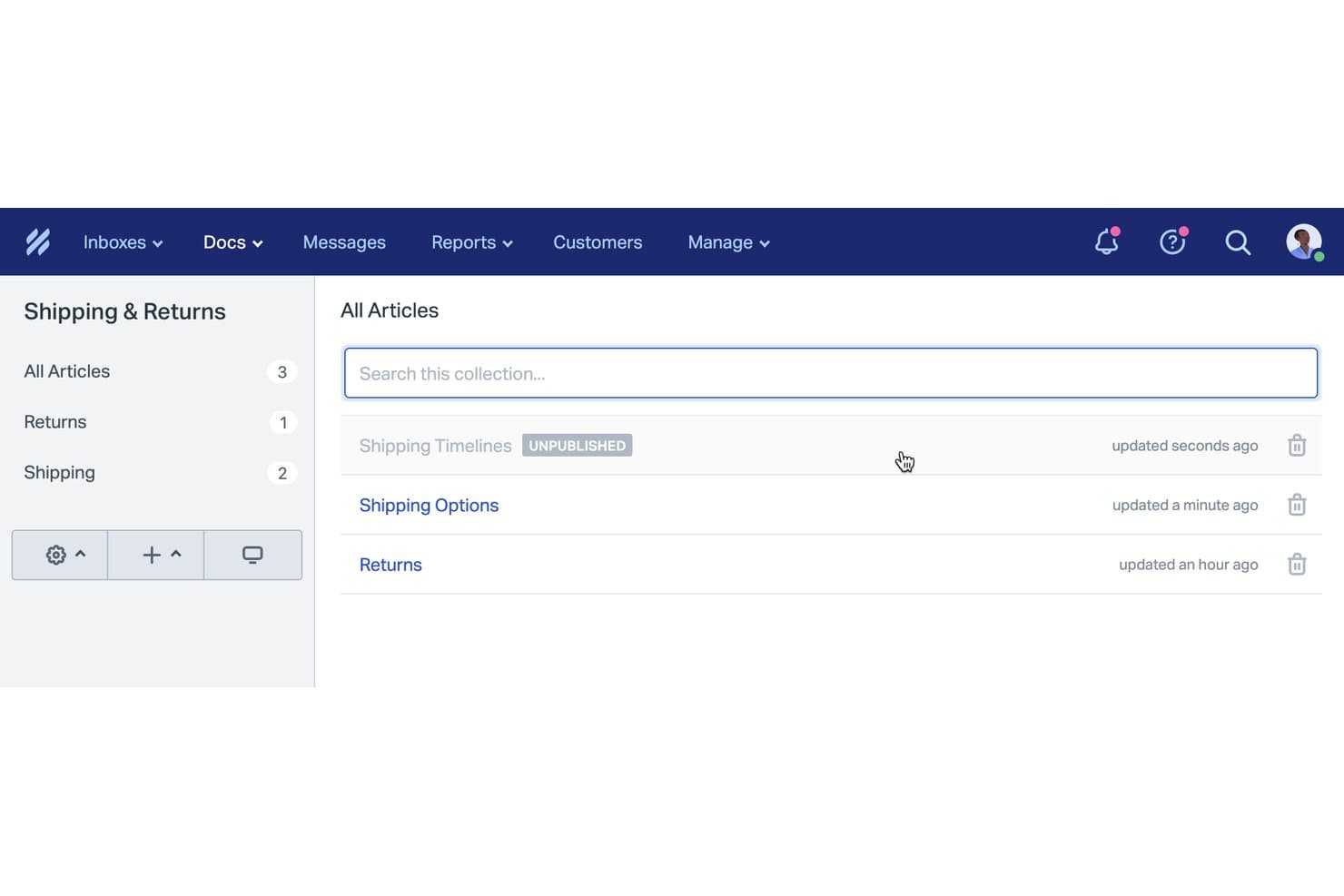
Help Scout organizza gli articoli della base di conoscenza in raccolte categorizzate. Help Scout Docs è una piattaforma di base di conoscenza basata sul cloud che consente di creare centri assistenza pubblici o interni, organizzare gli articoli in raccolte e gestire i contenuti insieme a una casella di posta condivisa, con strumenti di analisi e di creazione basati sull'IA.
Per chi è più adatto Help Scout?
Help Scout è una scelta valida per i piccoli team di assistenza che desiderano un centro assistenza strettamente integrato con la loro casella di posta condivisa e con gli strumenti di analisi.
Perché ho scelto Help Scout
Ho scelto Help Scout perché gli strumenti di analisi della base di conoscenza sono strettamente collegati alla casella di posta attiva del team, consentendo di vedere le ricerche senza risultati e le domande reali dei clienti mentre si verificano. Mi piace la possibilità di utilizzare queste informazioni per migliorare rapidamente gli articoli e colmare le lacune. Il mio team apprezza la possibilità di distribuire sia contenuti pubblici sia interni, con gli strumenti di analisi a supporto dei miglioramenti continui del centro assistenza.
Funzionalità principali di Help Scout
- Editor di articoli WYSIWYG: Crea e formatta visivamente i contenuti di assistenza, con supporto per immagini, video e contenuti multimediali incorporati.
- Gerarchia di raccolte e categorie: Organizza gli articoli in raccolte e categorie per ottenere una struttura chiara e facilmente consultabile.
- Hosting su dominio personalizzato: Pubblica il tuo sito Docs sul tuo sottodominio con il tuo marchio senza configurazioni aggiuntive.
- Widget di assistenza Beacon: Incorpora gli articoli direttamente nella tua app o nel tuo sito web, così gli utenti possono trovare le risposte senza lasciare la pagina.
Integrazioni di Help Scout
Help Scout offre oltre 100 integrazioni native, tra cui Slack, HubSpot, Salesforce, Jira, Shopify, Aircall, Mailchimp e Crowdin. Il piano gratuito supporta 1 integrazione con un'app. È disponibile un'API per le integrazioni personalizzate e Beacon può essere incorporato in siti web o app.
Cosa include il piano gratuito?
Help Scout offre un piano gratuito senza scadenza, ma consente di collegare un solo utente e una sola integrazione con un'app. Il piano gratuito offre funzionalità limitate rispetto ai piani a pagamento, quindi potresti superarne rapidamente i limiti se il tuo team cresce.
Pros and Cons
Pros:
- Gli strumenti di analisi evidenziano le lacune nei contenuti e le ricerche senza risultati
- Gli operatori inseriscono gli articoli direttamente nelle conversazioni
- L'assistenza alla scrittura tramite IA migliora la qualità degli articoli
Cons:
- Il piano gratuito è limitato a 10 articoli
- Nessun commento dei clienti sugli articoli
Learn more about Help Scout: Ideale per la pubblicazione di basi di conoscenza con documentazione come codice
- Prova gratuita di 14 giorni + piano gratuito disponibile
- A partire da $65/site/month + $12/user/month (con fatturazione annuale)

GitBook segnala automaticamente i collegamenti non funzionanti nella documentazione. GitBook è una piattaforma software per basi di conoscenza con modifica basata su blocchi, integrazione con Git e funzionalità avanzate di pubblicazione basate sull'intelligenza artificiale, progettata sia per la documentazione dei prodotti sia per i centri assistenza.
Per chi è più adatto GitBook?
Fondatori indipendenti, sviluppatori indipendenti e team tecnici che desiderano un'esperienza di documentazione come codice o che devono pubblicare basi di conoscenza rivolte agli sviluppatori senza dover ottenere l'approvazione del budget.
Perché ho scelto GitBook
Ho scelto GitBook perché il suo flusso di lavoro per la documentazione come codice, con sincronizzazione GitHub/GitLab e modifica basata su blocchi, mi consente di pubblicare rapidamente basi di conoscenza pronte per gli sviluppatori. Mi piace utilizzare lo strumento integrato di controllo della documentazione basato sull'intelligenza artificiale per verificare la qualità dei contenuti e i blocchi di contenuto riutilizzabili per distribuire gli aggiornamenti su larga scala nella documentazione dei prodotti. Il piano gratuito senza scadenza offre ai creatori indipendenti funzionalità di creazione realmente pronte per la produzione.
Funzionalità principali di GitBook
- Editor visivo basato su blocchi: Crea documentazione visivamente con pieno supporto per Markdown, contenuti incorporati, immagini, diagrammi e componenti personalizzati.
- Sincronizzazione bidirezionale con GitHub e GitLab: Sincronizza i contenuti con i repository Git per supportare i flussi di lavoro di documentazione come codice anche con il piano gratuito.
- Autorizzazioni basate sui ruoli: Assegna i ruoli di amministratore, editor, revisore, commentatore e visualizzatore per un controllo granulare degli accessi nei piani a pagamento.
- Integrazioni con piattaforme di assistenza e analisi: Collega GitBook a piattaforme come Intercom, Freshdesk, Google Analytics e Mixpanel per centralizzare l'assistenza e i report.
Integrazioni di GitBook
GitBook offre oltre 30 integrazioni native, tra cui GitHub, GitLab, Intercom, Freshdesk, HelpScout, Front, Google Analytics, Mixpanel, Amplitude, HubSpot e Slack. Fornisce inoltre un'API per le integrazioni personalizzate e supporta l'incorporamento di contenuti da fonti come Canva, Loom, Figma e Mermaid.
Cosa è gratuito?
GitBook offre un piano gratuito senza scadenza con spazi di lavoro pubblici, modifica basata su blocchi e sincronizzazione Git. Il piano gratuito è limitato a un solo spazio di lavoro privato e non include le autorizzazioni avanzate né la maggior parte delle integrazioni: per accedere a queste funzionalità è necessario un piano a pagamento.
Pros and Cons
Pros:
- Esperienza di modifica basata su blocchi tra le migliori della categoria
- Sincronizzazione Git per un vero flusso di lavoro di documentazione come codice
- Contenuti pronti per l'intelligenza artificiale per l'utilizzo con chatbot intelligenti
Cons:
- Il piano gratuito supporta un solo utente
- Le funzionalità chiave di intelligenza artificiale sono disponibili solo nei piani a pagamento
Learn more about GitBook: 9Ideale per articoli della knowledge base generati dall'intelligenza artificiale a partire dai ticket
Enjo
- Piano gratuito disponibile
- A partire da $95/mese
Visit WebsiteCustomer Rating:4.8/5
Enjo consente agli utenti di generare istantaneamente documenti del centro assistenza a partire da un URL. Enjo è una soluzione di knowledge base basata sull'intelligenza artificiale che offre un centro assistenza self-service, genera automaticamente articoli a partire da ticket e documenti e si integra con strumenti come Confluence, Notion, Google Drive e Zendesk.
Per chi è più indicato Enjo?
Enjo è ideale per i team che desiderano lanciare un centro assistenza pubblico o interno basato sull'intelligenza artificiale, con collaboratori umani illimitati e senza necessità di approvazione del budget iniziale.
Perché ho scelto Enjo
Ho scelto Enjo perché posso generare automaticamente articoli della knowledge base a partire da ticket di supporto e documenti, quindi lanciare rapidamente un centro assistenza self-service con ricerca basata sull'intelligenza artificiale e risposte dirette. Nel mio flusso di lavoro, ho utilizzato la modifica in blocco e la stesura degli articoli tramite richieste in linguaggio naturale per mantenere aggiornati i contenuti di assistenza ai clienti senza interventi manuali.
Funzionalità principali di Enjo
- Ricerca semantica basata sull'intelligenza artificiale: Restituisce risposte dirette dai tuoi contenuti utilizzando l'elaborazione del linguaggio naturale invece della semplice corrispondenza tra parole chiave.
- Centri multi-brand e multilingue: Lancia centri assistenza separati per prodotti o aree geografiche diverse, con supporto per oltre 100 lingue.
- Dominio personalizzato e controlli SEO: Personalizza gli URL, aggiungi impostazioni SEO e utilizza il tuo branding anche con il piano gratuito.
- Integrazioni approfondite con servizi di terze parti: Sincronizza le conoscenze da Confluence, SharePoint, Google Drive, Notion, Zendesk e altri strumenti in un unico indice unificato.
Integrazioni di Enjo
Enjo offre integrazioni native con Confluence, SharePoint, Google Drive, Notion, Zendesk, Jira, Salesforce, ServiceNow, Slack, Microsoft Teams, Guru, HubSpot, Okta, Stripe, Azure DevOps, Bitbucket Cloud e Box. Offre inoltre un'API per le integrazioni personalizzate.
Cosa è gratuito?
Enjo offre un piano gratuito a tempo indeterminato con collaboratori umani illimitati, così puoi lanciare un centro assistenza e provare le funzionalità principali senza approvazione del budget. Alcune funzionalità e integrazioni avanzate potrebbero essere riservate ai piani a pagamento.
Pros and Cons
Pros:
- L'IA redige automaticamente articoli a partire dai ticket
- Il piano gratuito offre collaboratori umani illimitati
- Supporta nativamente oltre 100 lingue
Cons:
- Il piano gratuito limita il volume delle risposte generate dall'IA
- Il rilevamento dei contenuti obsoleti negli articoli è limitato
Learn more about Enjo:

MediaWiki organizza i contenuti del wiki con strumenti di navigazione, ricerca e modifica. MediaWiki è una piattaforma open source per basi di conoscenza che alimenta wiki pubblici e interni con strumenti avanzati per la redazione degli articoli, l'organizzazione dei contenuti strutturati, una potente funzione di ricerca e controlli granulari degli accessi.
Per chi è più adatto MediaWiki?
MediaWiki è adatto a team tecnici o organizzazioni con risorse interne per l'amministrazione che necessitano di una base di conoscenza scalabile e personalizzabile per una documentazione estesa.
Perché ho scelto MediaWiki
Ho scelto MediaWiki come una delle opzioni migliori perché è insuperabile per la documentazione su larga scala: consente al mio team di creare un numero illimitato di articoli, sfruttare una potente strutturazione dei contenuti con spazi dei nomi e modelli e gestire risorse multilingue in un'unica piattaforma davvero gratuita. In base alla mia esperienza, nient'altro gestisce wiki estesi e con più autori a questa scala.
Funzionalità principali di MediaWiki
- Editor WYSIWYG VisualEditor: consente di modificare e formattare gli articoli con immagini, tabelle e modelli senza dover imparare la sintassi wiki.
- Controlli granulari degli accessi: le autorizzazioni integrate per gruppi e per singola pagina permettono agli amministratori di gestire chi può leggere, modificare o amministrare specifiche aree di contenuto.
- Ampio ecosistema di estensioni: migliaia di componenti aggiuntivi realizzati dalla community consentono di aggiungere funzionalità di ricerca personalizzata, flussi di lavoro, autenticazione e gestione dei dati strutturati.
- Supporto multilingue: offre la localizzazione completa dell'interfaccia e collegamenti interlinguistici, facilitando la gestione di basi di conoscenza globali.
Integrazioni di MediaWiki
MediaWiki offre integrazioni tramite estensioni per LDAP, SAML, OAuth (inclusi Google e Azure Active Directory), Wikimedia Commons e la sua API Action/REST. Estensioni come Semantic MediaWiki, Cargo e Wikibase aggiungono dati strutturati. Non sono disponibili connettori nativi per i sistemi di assistenza.
Cosa è gratuito?
MediaWiki è completamente gratuito e open source, senza limiti per utenti o funzionalità. Puoi ospitare autonomamente un numero illimitato di wiki, articoli e utenti senza pagare costi di licenza o abbonamento.
Pros and Cons
Pros:
- Articoli e utenti illimitati senza limiti massimi
- Gestisce wiki multilingue immediatamente
- Autorizzazioni granulari avanzate per l'accesso ai contenuti
Cons:
- L'hosting autonomo richiede competenze di amministrazione dei server web
- L'interfaccia predefinita ricorda quella di Wikipedia
Learn more about MediaWiki:
Altri software gratuiti per basi di conoscenza
Ecco alcune opzioni aggiuntive di software per basi di conoscenza che offrono anch’esse piani gratuiti o periodi di prova. Sebbene questi strumenti non siano entrati nella mia selezione, vale comunque la pena consultarli:
- 11phpMyFAQIdeale per il supporto multilingue
- 12Zoho DeskIdeale per evitare i ticket direttamente dall'helpdesk
- 13NuclinoIdeale per la modifica collaborativa in tempo reale
- 14FlowluIdeale per wiki collegati alla gestione dei progetti
- 15StonlyIdeale per guide interattive passo-passo
- 16NotionIdeale per la gestione integrata delle attività
- 17Bitrix24 Ideale per le basi di conoscenza interne collegate al CRM
- 18SlabIdeale per il wiki del team interno
- 19BookStackIdeale per un'organizzazione simile a un libro
- 20DokuWikiIdeale per archiviare file wiki senza database
Come valuto il software gratuito di knowledge base
Valuto questi strumenti su due livelli: i requisiti fondamentali che ogni knowledge base gratuita deve soddisfare, come la modifica degli articoli, la ricerca e i controlli di pubblicazione, e poi i fattori differenzianti come la redazione tramite IA e le analisi statistiche.
Funzionalità di base (Requisiti minimi per questa lista)
Quando seleziono gli strumenti per la mia lista, valuto ciascuno con un punteggio da 0 (non offre la funzionalità) a 5 (eccelle in quest'area) per ogni funzionalità di base indicata qui sotto. Poi calcolo il punteggio totale dello strumento in percentuale. Ogni tool deve raggiungere un punteggio minimo totale del 65% per essere considerato per l'inclusione.
- Disponibilità del piano gratuito: Verifico se il fornitore offre un vero piano gratuito per sempre che includa funzionalità di knowledge base e non solo una prova di 14 giorni che poi ti esclude.
- Redazione e editor degli articoli: Un buon editor permette di formattare gli articoli, inserire screenshot e aggiungere link senza dover passare all'HTML o coinvolgere uno sviluppatore.
- Organizzazione dei contenuti: Valuto come ogni strumento gestisce categorie, sottocategorie e raccolte, in particolare se consente di costruire una struttura logica del centro assistenza facilmente navigabile dai clienti.
- Funzionalità di ricerca: La barra di ricerca è spesso la prima cosa che un cliente frustrato utilizza, quindi valuto se i risultati sono accurati, rapidi e vanno oltre una semplice corrispondenza del titolo.
- Pubblicazione pubblica e interna: Alcuni team hanno bisogno sia di un centro assistenza rivolto ai clienti che di una base interna per gli operatori; verifico se lo strumento supporta entrambe le opzioni o limita a un solo pubblico.
- Controlli di accesso e permessi: Valuto se è possibile assegnare ruoli distinti così gli autori possono redigere gli articoli, i revisori possono approvarli e gli utenti finali vedono solo ciò che è rilevante.
Una volta raccolta la lista di strumenti che soddisfano questi criteri, considero ciò che rende unica ciascuna piattaforma.
Fattori differenzianti (Cosa distingue i fornitori)
Ecco come confronto i diversi fornitori:
Funzionalità che emergono
Le analisi sono fondamentali qui. Cerco strumenti che tracciano quali articoli ricevono visualizzazioni, quali ricerche non restituiscono risultati e dove i clienti abbandonano. Queste lacune indicano esattamente quali contenuti creare in seguito. I cicli di feedback degli utenti—come la valutazione degli articoli o le richieste del tipo "è stato utile?"—si combinano bene con questi dati aggiungendo un riscontro diretto dagli utenti. Valuto anche le integrazioni con il helpdesk, poiché proporre articoli della knowledge base direttamente nella vista ticket dell’operatore di supporto riduce i tempi di risoluzione. La redazione assistita dall’IA è un recente fattore differenziante da tenere d’occhio, presente in strumenti come Zendesk e Freshdesk.
Oltre le funzionalità
La generosità dei piani gratuiti è molto variabile. Verifico quanti articoli, utenti e amministratori ogni fornitore include prima che vengano applicate restrizioni a pagamento, e se branding o watermark invadono il centro assistenza. Anche il tempo necessario a ottenere valore è importante quando si avvia una knowledge base senza budget. Strumenti come HelpDocs e Document360 offrono template che ti fanno partire rapidamente, mentre altri richiedono una configurazione più manuale. La SEO è facile da trascurare, ma valuto se nei piani gratuiti sono inclusi domini personalizzati, meta tag e sitemap, così che i tuoi articoli siano effettivamente raggiungibili nei risultati di ricerca dove i clienti iniziano a cercare.
Come scegliere un software gratuito per basi di conoscenza
Gli elenchi complessi di funzionalità e le strutture dei prezzi possono rendere difficile capire cosa si ottiene davvero da un software gratuito per basi di conoscenza. Per aiutarti a rimanere concentrato mentre porti avanti il processo di selezione del software, ecco alcuni fattori da tenere a mente:
| Fattore | Cosa considerare |
|---|---|
| FattoreAmbito dell'offerta gratuita | Cosa considerareVerifica le limitazioni del piano gratuito, come il numero di utenti e lo spazio di archiviazione, per assicurarti che soddisfi le esigenze del tuo team senza costi imprevisti. |
| FattoreScalabilità | Cosa considerareConsidera se il software può crescere insieme al tuo team. Cerca opzioni che offrano facili aggiornamenti ai piani a pagamento quando le tue esigenze aumentano. |
| FattoreIntegrazioni | Cosa considerareAssicurati che il software si integri con gli strumenti che già utilizzi, come Slack o Google Workspace, per mantenere i flussi di lavoro fluidi e connessi. |
| FattoreSemplicità d'uso | Cosa considerareCerca un'interfaccia intuitiva che il tuo team possa utilizzare facilmente. Una curva di apprendimento ripida può rallentare l'adozione e ridurre la produttività. |
| FattoreSicurezza | Cosa considerareVerifica le misure di protezione dei dati del software. Assicurati che sia conforme agli standard del settore per mantenere le tue informazioni sicure e protette. |
| FattorePersonalizzazione | Cosa considerareVerifica se puoi adattare il software alle tue esigenze con modelli personalizzabili o opzioni di identità visiva, in modo che corrisponda al flusso di lavoro e allo stile del tuo team. |
| FattoreAssistenza | Cosa considerareValuta la disponibilità dell'assistenza clienti, incluse la chat dal vivo e i centri assistenza, per aiutare il tuo team quando si verificano problemi. |
| FattoreAccesso da dispositivi mobili | Cosa considerareAssicurati che il software offra un'app mobile o un design reattivo, così che il tuo team possa accedere alle informazioni ovunque si trovi, mantenendo la produttività anche fuori dall'ufficio. |
Che cos'è un software gratuito per basi di conoscenza?
Il software per basi di conoscenza è uno strumento che aiuta le organizzazioni ad archiviare, gestire e condividere le informazioni in modo efficiente. Questi strumenti spesso includono piani o versioni di prova gratuite che offrono funzionalità di base senza costi. Solitamente utilizzati dai team di assistenza clienti, dai reparti IT e dalle aziende di qualsiasi dimensione, offrono valore migliorando l'accessibilità alle informazioni e la collaborazione. Funzionalità come la creazione di articoli, la ricerca e le autorizzazioni degli utenti aiutano a organizzare le informazioni, aumentare la produttività dei team interni e garantire un accesso sicuro.
Funzionalità dei software gratuiti per basi di conoscenza
Esaminiamo le funzionalità comunemente presenti nei software per basi di conoscenza e quali sono generalmente incluse nei piani gratuiti rispetto a quelli a pagamento.
Funzionalità tipiche dei software gratuiti per basi di conoscenza
- Creazione di articoli: consente agli utenti di scrivere e organizzare i contenuti in modo efficiente, rendendo le informazioni facilmente accessibili.
- Funzionalità di ricerca: permette di recuperare rapidamente le informazioni, risparmiando tempo e aumentando la produttività.
- Autorizzazioni degli utenti: controllano l'accesso ai contenuti, assicurando che solo gli utenti autorizzati possano visualizzare o modificare le informazioni.
- Controllo delle versioni: tiene traccia delle modifiche ai documenti, consentendo agli utenti di tornare alle versioni precedenti quando necessario.
- Accesso da dispositivi mobili: offre la possibilità di accedere alla base di conoscenza tramite dispositivi mobili, assicurando che le informazioni siano disponibili ovunque.
- Modelli di base: offrono disposizioni predefinite per aiutare gli utenti a creare rapidamente documenti coerenti e dall'aspetto professionale.
- Analisi di base: forniscono informazioni sul coinvolgimento degli utenti e sulle prestazioni dei contenuti, aiutando a identificare gli articoli più popolari.
- Supporto multilingue: consente di creare e consultare contenuti in più lingue, adattandosi a team eterogenei.
Funzionalità tipiche dei software a pagamento per basi di conoscenza
- Analisi avanzate: offrono informazioni approfondite sul comportamento degli utenti e sull'efficacia dei contenuti per ottimizzare le strategie di gestione della conoscenza.
- Ricerca basata sull'intelligenza artificiale: migliora le capacità di ricerca con suggerimenti e raccomandazioni intelligenti, ottimizzando il recupero delle informazioni.
- Identità visiva personalizzata: consente di personalizzare l'interfaccia in base all'identità aziendale, offrendo un'esperienza utente coerente.
- Integrazione con il CRM: collega la base di conoscenza ai sistemi CRM per potenziare l'assistenza clienti e migliorare l'erogazione del servizio.
- Personalizzazione avanzata: offre la possibilità di adattare ampiamente la piattaforma alle esigenze e ai flussi di lavoro aziendali specifici.
- Automazione dei flussi di lavoro: automatizza le attività ripetitive, migliorando l'efficienza e riducendo il carico di lavoro manuale degli utenti.
- Assistenza prioritaria: offre tempi di risposta più rapidi e canali di assistenza dedicati per aiutare a risolvere problemi tecnici e richieste.
- Accesso singolo (SSO): semplifica l'autenticazione degli utenti consentendo l'accesso con credenziali esistenti, migliorando la sicurezza e la praticità per gli utenti.
Vantaggi dei software gratuiti per basi di conoscenza
Implementare un software gratuito per la base di conoscenza offre diversi vantaggi al tuo team e alla tua azienda. Eccone alcuni che puoi aspettarti:
- Risparmio sui costi: I piani gratuiti ti permettono di gestire e condividere le informazioni senza un impegno finanziario, rendendoli ideali per i team attenti al budget.
- Accessibilità migliorata: Grazie all'accesso da dispositivi mobili e alla funzionalità di ricerca, il tuo team può trovare e utilizzare le informazioni indipendentemente dal luogo in cui si trova.
- Collaborazione più efficace: La modifica in tempo reale e le autorizzazioni degli utenti aiutano il tuo team a lavorare insieme in modo efficace, garantendo a tutti l'accesso corretto alle informazioni.
- Informazioni organizzate: Funzionalità come la creazione di articoli e il controllo delle versioni mantengono la tua base di conoscenza ben organizzata e aggiornata, riducendo ridondanze e confusione.
- Implementazione rapida: I modelli di base e le interfacce intuitive consentono una configurazione veloce, così il tuo team può iniziare subito a trarre vantaggio dal software.
- Scalabilità: I piani gratuiti spesso includono opzioni di aggiornamento, consentendo alla tua base di conoscenza di crescere insieme all'espansione del tuo team e delle tue esigenze.
- Supporto multilingue: Pensato per team diversificati, questo supporto garantisce che le differenze linguistiche non ostacolino la condivisione delle informazioni e la collaborazione.
Costi e prezzi dei software gratuiti per la base di conoscenza
Capisco che tu sia arrivato a questo articolo cercando le migliori opzioni di software per la base di conoscenza con piani gratuiti. Tuttavia, poiché i piani gratuiti offrono solo funzionalità limitate, è molto probabile che in futuro dovrai passare a un piano superiore.
La tabella seguente riassume i piani più comuni, i relativi prezzi medi e le funzionalità tipicamente incluse nelle soluzioni software per la base di conoscenza:
Tabella comparativa dei piani per i software della base di conoscenza
| Tipo di piano | Prezzo medio | Funzionalità comuni |
|---|---|---|
| Tipo di pianoPiano gratuito | Prezzo medio$0 | Funzionalità comuniCreazione di articoli di base, funzionalità di ricerca, autorizzazioni degli utenti, accesso da dispositivi mobili e modelli di base. |
| Tipo di pianoPiano personale | Prezzo medio$0.83-$10/utente/mese | Funzionalità comuniCapacità di archiviazione massimizzata, opzioni di personalizzazione, integrazioni e assistenza prioritaria. |
| Tipo di pianoPiano aziendale | Prezzo medio$10-16/utente/mese | Funzionalità comuniAnalisi avanzate, ricerca basata sull'IA, branding personalizzato e automazione dei flussi di lavoro. |
| Tipo di pianoPiano aziendale avanzato | Prezzo medio$20+/utente/mese | Funzionalità comuniAccesso singolo (SSO), un account manager dedicato, funzionalità di sicurezza avanzate e ampie possibilità di personalizzazione. |
Domande frequenti sul software gratuito per basi di conoscenza
Ecco alcune risposte alle domande comuni sul software gratuito per basi di conoscenza:
Posso utilizzare un software gratuito per basi di conoscenza senza un sistema di help desk?
Sì, puoi utilizzare un software gratuito per basi di conoscenza indipendentemente da un sistema di help desk. È progettato per archiviare e condividere informazioni, risultando utile per i team che desiderano fornire supporto self-service o organizzare la documentazione interna senza strumenti aggiuntivi.
Quanto è sicuro un software gratuito per basi di conoscenza?
La sicurezza varia in base al fornitore, ma la maggior parte dei software gratuiti per basi di conoscenza include funzionalità di sicurezza di base, come le autorizzazioni degli utenti e la crittografia dei dati. È importante esaminare le misure di sicurezza di ogni piattaforma per assicurarsi che soddisfino i requisiti della propria organizzazione.
Esistono limiti al numero di utenti nei piani gratuiti?
Sì, molti piani gratuiti di software per basi di conoscenza prevedono limiti al numero di utenti. Questi limiti variano, quindi verifica i dettagli del piano gratuito di ogni fornitore per assicurarti che possa supportare le dimensioni del tuo team senza richiedere un upgrade.
Quali sono i limiti di archiviazione del software gratuito per basi di conoscenza?
I piani gratuiti spesso prevedono limiti di archiviazione che possono influire sulla quantità di contenuti che puoi ospitare. È importante comprendere questi limiti per assicurarti che il software soddisfi le tue esigenze attuali e valutare un upgrade se i requisiti di archiviazione aumentano.
Posso integrare un software gratuito per basi di conoscenza con altri strumenti?
Molte opzioni di software gratuito per basi di conoscenza offrono integrazioni con piattaforme popolari come Slack o Google Workspace, anche se il numero e il tipo di integrazioni possono essere limitati rispetto ai piani a pagamento. Verifica le opzioni di integrazione per assicurarti che siano compatibili con i flussi di lavoro esistenti.
È disponibile l'assistenza clienti per il software gratuito per basi di conoscenza?
L’assistenza clienti per i piani gratuiti è generalmente limitata. Alcuni fornitori offrono assistenza di base tramite forum della community o documentazione online, ma l’accesso ai canali di assistenza dedicati spesso richiede un piano a pagamento.
Cosa succede ora:
Se stai cercando un software gratuito per basi di conoscenza, contatta gratuitamente un consulente SoftwareSelect per ricevere consigli.
Compili un modulo e fai una breve conversazione durante la quale vengono analizzate nel dettaglio le tue esigenze. In seguito riceverai una selezione di software da valutare. Ti assisteranno anche durante l'intero processo di acquisto, comprese le negoziazioni sul prezzo.