

10 concorrenti di Freshworks per il servizio clienti nel 2026

10 Elenco ristretto dei concorrenti di Freshworks


Una valida alternativa a Freshworks offre una gestione flessibile dei ticket, supporto multicanale e automazione dei flussi di lavoro senza codice, adattandosi alle esigenze del tuo team. Se stai cercando un software di assistenza clienti basato sul cloud che eguagli o superi le funzionalità di Freshworks, probabilmente desideri migliori capacità di integrazione, personalizzazione o scalabilità per ottimizzare i processi aziendali.
Questo elenco ti aiuterà a confrontare i principali concorrenti di Freshworks, così potrai scegliere con sicurezza una piattaforma SaaS adatta alle tue operazioni di supporto, in linea con i tuoi obiettivi di coinvolgimento dei clienti e in grado di supportare la gestione complessiva delle relazioni con i clienti.
Che cos'è Freshworks?
Freshworks è una piattaforma CRM che aiuta le aziende a gestire i ticket di supporto, automatizzare i flussi di lavoro e interagire con i clienti attraverso più canali. Offre moduli per l'instradamento dei ticket, la gestione della knowledge base e la reportistica, semplificando il lavoro dei team di supporto e aiutandoli a gestire e risolvere le richieste dei clienti.
Strumenti come Freshdesk vengono utilizzati dai team del servizio clienti, dell'assistenza e della fidelizzazione dei clienti che desiderano migliorare i tempi di risposta e offrire esperienze di servizio coerenti sia alle startup sia ai clienti aziendali.
Tabella di confronto delle alternative a Freshworks
Questa tabella di confronto riassume i dettagli dei prezzi delle principali alternative a Freshworks che ho selezionato:
| Tool | Best For | Trial Info | Price | ||
|---|---|---|---|---|---|
| 1 | Ideale per gestire il supporto dalla casella di posta Gmail | Piano gratuito + prova gratuita di 7 giorni + demo gratuita disponibile | Da $25/utente/mese (fatturazione annuale) | Website | |
| 2 | Ideale per la creazione di chatbot AI personalizzati | Piano gratuito disponibile | A partire da $32/mese (fatturazione annuale) | Website | |
| 3 | Ideale per l'automazione dei workflow personalizzabili | Prova gratuita di 14 giorni | Da $9/postazione/mese (fatturazione annuale) | Website | |
| 4 | Ideale per team che utilizzano strumenti CRM integrati | Prova gratuita di 14 giorni + piano gratuito + demo gratuita disponibile | Da $20/mese/postazione | Website | |
| 5 | Ideale per acquisizione lead e integrazione con l'assistenza | Demo gratuita disponibile | Da $60/utente/mese | Website | |
| 6 | Ideale per gestire flussi di lavoro di servizio complessi | Demo gratuita disponibile | Prezzo su richiesta | Website | |
| 7 | Ideale per funzionalità di collaborazione integrate | Prova di 15 giorni + piano gratuito + demo gratuita disponibili | Da $49/organizzazione/mese (fatturazione annuale) | Website | |
| 8 | Ideale per le capacità di supporto omnicanale | Prova gratuita + demo gratuita disponibile | Da $19/agente/mese (fatturato annualmente) | Website | |
| 9 | Ideale per la prioritizzazione dei ticket basata su IA | Prova gratuita di 15 giorni | Da $14/utente/mese (fatturato annualmente) | Website | |
| 10 | Ideale per la gestione delle caselle di posta condivise | Prova gratuita di 14 giorni + demo gratuita disponibile | Da $25/utente/mese (fatturazione annuale) | Website |

Perché fidarsi dei nostri consigli sui software
Il nostro team testa e recensisce software dal 2012. In quanto leader CX noi stessi, sappiamo quanto sia difficile — e importante — scegliere il software giusto.
Per questa guida, abbiamo valutato gli strumenti attraverso test pratici e ricerche indipendenti, assegnando un punteggio agli strumenti in base ai nostri criteri di selezione.
Le nostre recensioni riflettono il nostro giudizio editoriale umano, non un discorso di vendita.
Recensioni delle alternative a Freshworks
Di seguito trovi i miei riepiloghi dettagliati delle migliori alternative a Freshworks incluse nel mio elenco ristretto. Le mie recensioni offrono una panoramica dettagliata delle funzionalità, dei casi d’uso ideali e delle integrazioni di ciascuna piattaforma, per aiutarti a trovare quella più adatta a te.

Hiver
Ideale per gestire il supporto dalla casella di posta Gmail

Hiver trasforma la tua casella di posta Gmail in un help desk completo per i team che gestiscono richieste dei clienti via email. Se ti affidi a Google Workspace e desideri strumenti semplici per la collaborazione, l'assegnazione e l'automazione dei flussi di lavoro direttamente nella posta in arrivo, Hiver può aiutare il tuo team a mantenere il supporto email organizzato ed efficiente.
Per chi è più adatto Hiver?
Team di assistenza clienti che utilizzano Google Workspace e desiderano gestire le email di supporto in modo collaborativo senza uscire da Gmail.
Perché Hiver è un valido concorrente di Freshworks
Ho scelto Hiver perché permette ai team di supporto di gestire un help desk completo direttamente da Gmail. Il mio team utilizza le caselle di posta condivise di Hiver per assegnare, tracciare e rispondere alle email dei clienti senza dover passare da una piattaforma all'altra. Apprezzo anche la funzione di rilevamento delle collisioni, che ci avvisa quando due operatori stanno rispondendo contemporaneamente allo stesso thread di email. In pratica, questo significa meno risposte duplicate e un'esperienza più pulita per i clienti.
Funzionalità principali di Hiver
- Tag email: categorizza le email in arrivo utilizzando etichette personalizzate per ordinare e filtrare le richieste in base a tipo, priorità o stato.
- Gestione SLA: imposta obiettivi di tempo per risposte e risoluzioni in modo che il team possa verificare se le email vengono gestite entro le tempistiche concordate.
- Regole di automazione: attiva assegnazioni automatiche o cambi di stato in base a condizioni come mittente, oggetto o parola chiave.
- Cruscotto di analisi: visualizza metriche a livello di team come conversazioni aperte, tempi di risposta e distribuzione del carico di lavoro tra gli operatori.
Integrazioni con Hiver
Hiver offre integrazioni native con Salesforce, HubSpot, Jira, Asana, Slack, Shopify e NetSuite. Si connette anche con Zapier e offre un'API per integrazioni personalizzate.
Pros and Cons
Pros:
- Automatizza l'invio delle note di ringraziamento
- Permette una rapida assegnazione delle email tra team
- Non è necessario passare da una piattaforma all'altra
Cons:
- Ambienti limitati fuori da Gmail
- Meno opzioni di automazione avanzate
New Product Updates from Hiver

Hiver Brings Chat Widget Support to Mobile Apps
Hiver now lets you embed the Hiver Chat Widget in iOS, Android, React Native, and Flutter apps so customers can start chats without leaving your app. For more information, visit Hiver's official site.

Chatbase
Ideale per la creazione di chatbot AI personalizzati
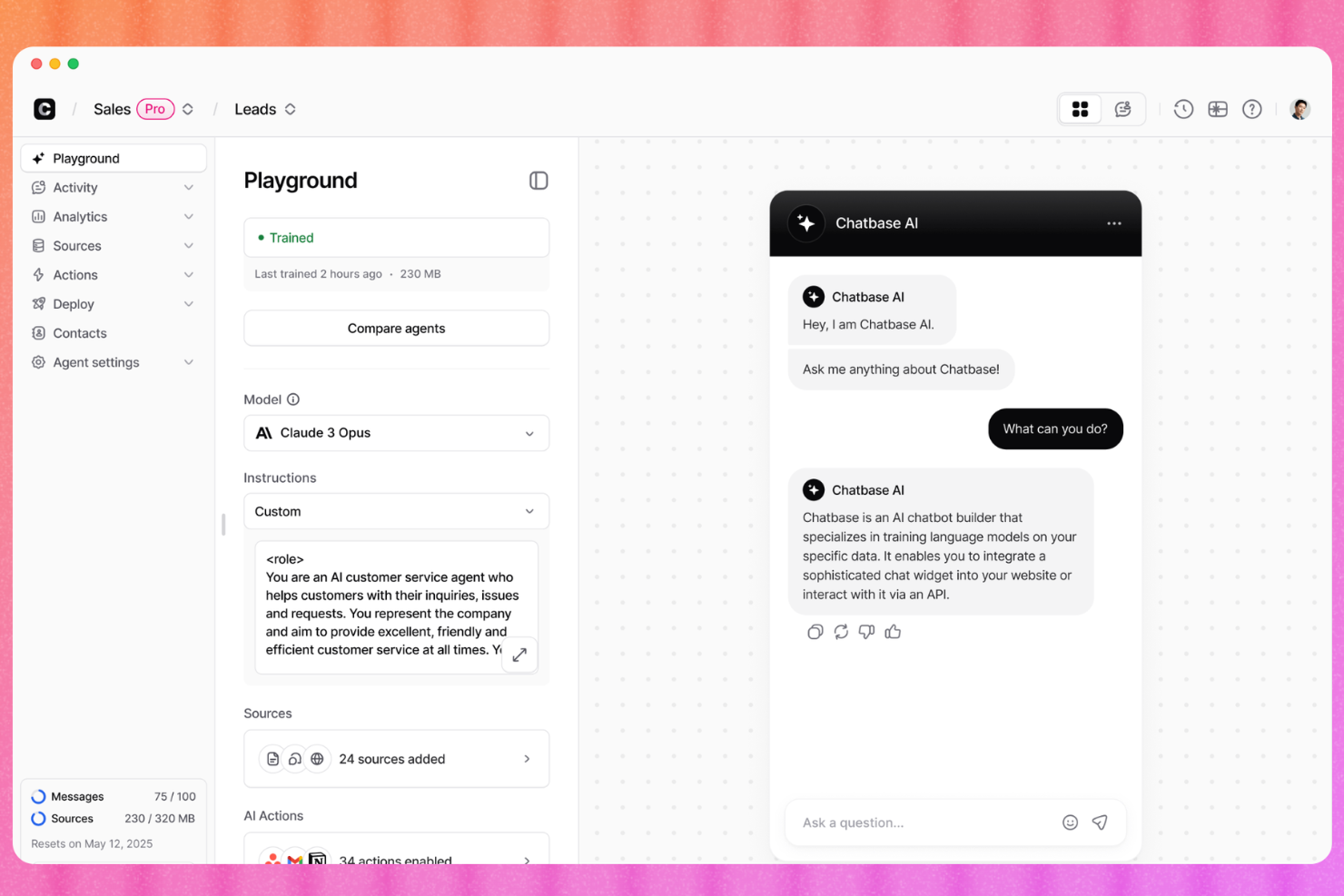
Chatbase è una piattaforma di chatbot AI progettata per team di supporto e aziende che desiderano offrire conversazioni automatizzate e intelligenti su larga scala. È un'opzione solida se vuoi sviluppare soluzioni di chat rivolte ai clienti in grado di gestire richieste e migliorare le esperienze di self-service.
Per chi è ideale Chatbase?
Chatbase è particolarmente adatto a team CX e piccole e medie imprese che desiderano creare e lanciare chatbot basati su AI senza competenze tecniche.
Perché Chatbase è un valido concorrente di Freshworks
Ho scelto Chatbase perché rende davvero accessibile la creazione di un chatbot AI personalizzato: lo si può addestrare direttamente sulle proprie fonti di dati, come documenti caricati, URL di siti web o contenuti della knowledge base. Apprezzo che il tono, il comportamento e l'ambito delle risposte del chatbot possano essere adattati per rispecchiare il tuo brand, cosa spesso difficile da ottenere con piattaforme di supporto più rigide. Nella pratica, il mio team può passare da documentazione grezza a un chatbot di supporto implementato nel giro di poche ore. Per i team CX che vogliono allontanarsi da Freshworks e desiderano maggiore controllo su come la loro AI gestisce le conversazioni con i clienti, questa flessibilità è fondamentale.
Caratteristiche principali di Chatbase
- Confronto fra modelli AI: Testa diversi modelli e configurazioni AI fianco a fianco per trovare la soluzione ideale per il tuo caso d'uso nel supporto.
- Escalation intelligente: Imposta istruzioni in linguaggio naturale per stabilire quando l'agente deve passare la conversazione a un umano tramite live chat o ticket di assistenza.
- Supporto multilingue: Rileva e risponde automaticamente in oltre 80 lingue utilizzando l'AI generativa.
- Barriere guidate dall'AI: Previeni risposte fuori tema o inaccurate impostando limiti su ciò di cui l'agente può o non può parlare.
Integrazioni di Chatbase
Le integrazioni includono Shopify, WhatsApp, Instagram, Messenger, Slack, Calendly e WordPress.
Pros and Cons
Pros:
- Facile da addestrare utilizzando i tuoi dati
- Implementazione rapida per scenari di supporto clienti
- Interfaccia no-code per utenti non tecnici
Cons:
- Analisi e insight sugli utenti limitati
- Poche opzioni per personalizzazioni avanzate
Ideale per l'automazione dei workflow personalizzabili
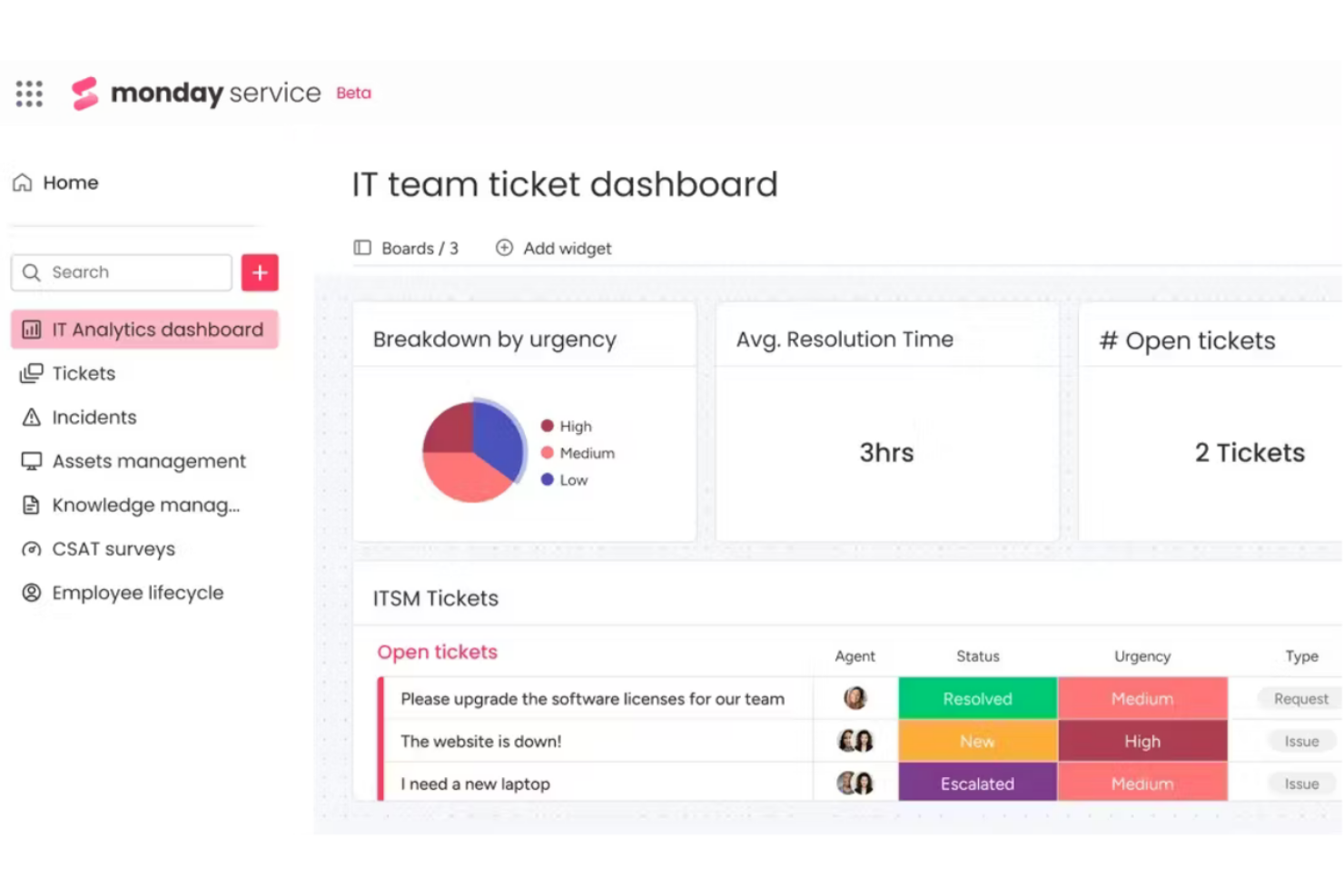
Se il tuo team ha bisogno di progettare flussi di lavoro per i servizi che si adattino a processi unici, monday service offre opzioni flessibili di automazione e personalizzazione. Questa piattaforma è una scelta ideale per le organizzazioni che desiderano adattare l'instradamento dei ticket, le approvazioni e le notifiche alle proprie esigenze specifiche. monday service si distingue per il suo costruttore visivo di workflow e le profonde capacità di automazione, aiutando i team di assistenza a reagire rapidamente quando cambiano i requisiti.
Perché monday service è una valida alternativa a Freshworks
Per i team che desiderano costruire processi di servizio attorno ai propri flussi di lavoro, monday service offre un livello di personalizzazione difficilmente eguagliabile. Ho scelto monday service perché il suo costruttore visivo di workflow ti consente di progettare l'instradamento dei ticket, le escalation e le approvazioni esattamente come funziona la tua squadra. Il motore di automazione della piattaforma supporta trigger e azioni personalizzati, così puoi automatizzare compiti e notifiche ripetitivi senza bisogno di codice. Queste funzionalità rendono monday service una scelta solida per le organizzazioni che hanno bisogno di operazioni di assistenza clienti flessibili e adattabili, oltre ciò che normalmente offre Freshworks.
Funzionalità principali di monday service
Altre funzionalità di monday service che supportano i team di assistenza clienti includono:
- Portale clienti: Offri ai clienti uno spazio dedicato per inviare e monitorare le richieste.
- Integrazione con knowledge base: Collega knowledge base interne o esterne per supportare agenti e clienti.
- Monitoraggio del tempo: Monitora quanto tempo viene speso su ogni ticket o attività.
- Permessi basati sui ruoli: Controlla l'accesso a board, dati e azioni in base ai ruoli utente.
Integrazioni di monday service
Le integrazioni includono Slack, Gmail, Microsoft Teams, GitLab, Mailchimp, Excel, Outlook, DocuSign, Google Drive e Trello.
Pros and Cons
Pros:
- Ottima collaborazione inter-team
- Processo di onboarding rapido
- Visualizzazioni delle board flessibili
Cons:
- Gestione SLA basilare
- Non adatto all'instradamento complesso

Ideale per team che utilizzano strumenti CRM integrati
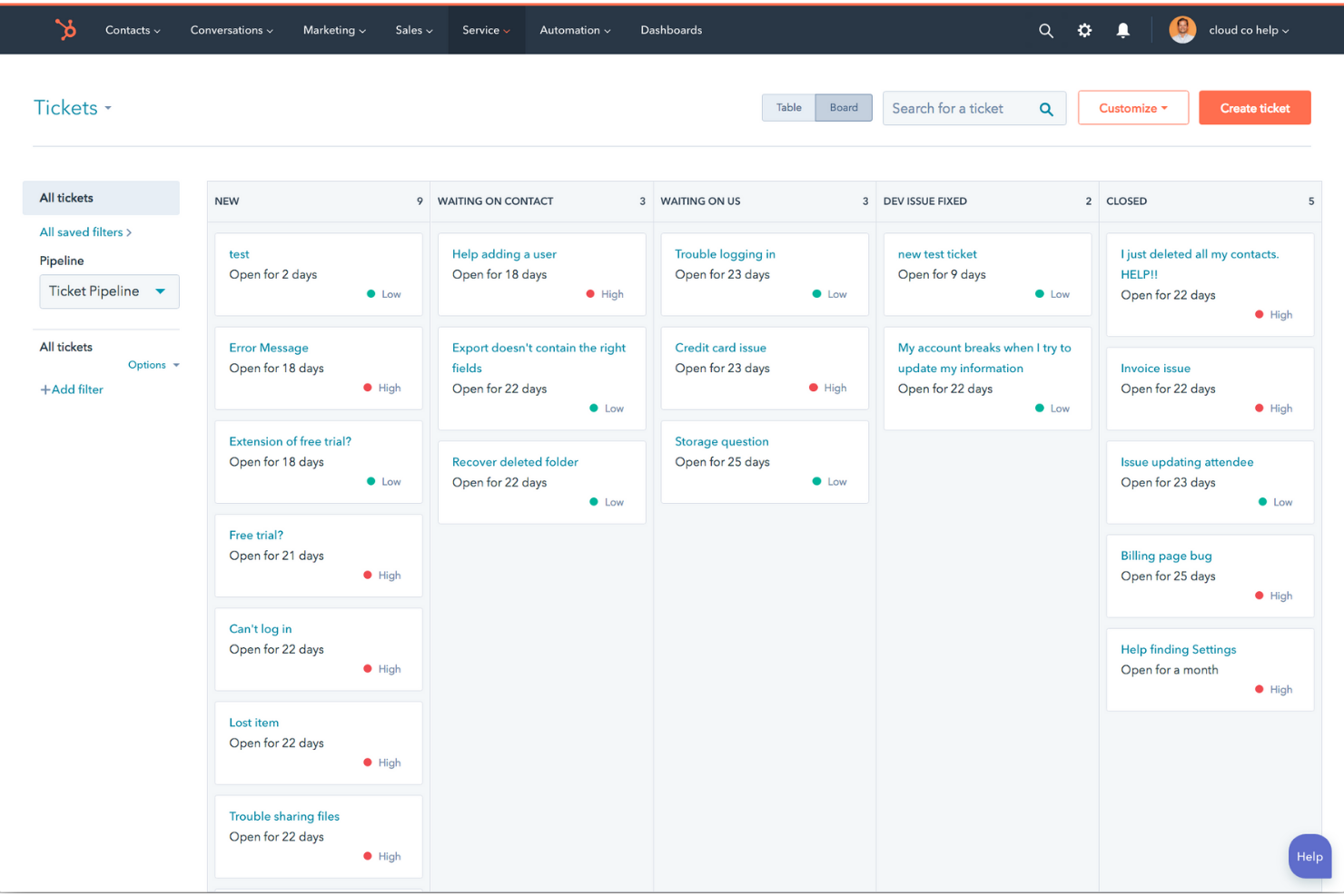
Se il tuo team si affida ai dati CRM per offrire assistenza ai clienti, HubSpot Service Hub riunisce supporto e vendite in un'unica piattaforma. Questo strumento è particolarmente adatto alle aziende che desiderano unificare le schede cliente, automatizzare la gestione dei ticket e gestire le conversazioni su diversi canali. HubSpot Service Hub si distingue per la sua profonda integrazione con il CRM di HubSpot, rendendo più semplice offrire un supporto personalizzato e tracciare ogni interazione con i clienti.
Perché HubSpot Service Hub è una valida alternativa a Freshworks
Per i team che desiderano un software di assistenza clienti strettamente collegato al proprio CRM, HubSpot Service Hub è una scelta solida. L'ho selezionato perché le sue funzionalità di ticketing, live chat e knowledge base sono tutte integrate direttamente con il CRM di HubSpot, quindi gli agenti hanno sempre il contesto del cliente a portata di mano. La piattaforma consente inoltre di automatizzare i flussi di lavoro basati sui dati del CRM, aiutando i team a offrire un'assistenza più personalizzata ed efficiente. Questo rende HubSpot Service Hub particolarmente utile per le aziende che vogliono allineare servizio, vendite e marketing.
Funzionalità principali di HubSpot Service Hub
Altre funzionalità di HubSpot Service Hub che supportano i team di assistenza clienti includono:
- Sondaggi di feedback dei clienti: Raccogli feedback direttamente dai clienti utilizzando gli strumenti di sondaggio integrati per misurare la soddisfazione e individuare aree di miglioramento.
- Automazione dell'help desk: Imposta regole per assegnare, prioritizzare ed escalare automaticamente i ticket in base a criteri personalizzati.
- Dashboard di reportistica: Accedi ad analisi in tempo reale e report personalizzabili per monitorare le prestazioni del team e le metriche di servizio.
- Portale clienti: Offri ai clienti un portale self-service dove possono visualizzare lo stato dei ticket, inviare nuove richieste e accedere agli articoli della knowledge base.
Integrazioni di HubSpot Service Hub
Le integrazioni includono Gmail, Salesforce, Google Chat, Slack, Microsoft Teams, Zoom, Google Calendar, Outlook, WordPress e Meta Ads.
Pros and Cons
Pros:
- Visione unificata del cliente
- Interfaccia facile da usare
- Solido portale self-service
Cons:
- I livelli premium sono costosi
- Potenzialità limitate se usato da solo

Ideale per acquisizione lead e integrazione con l'assistenza

Se la tua squadra ha bisogno di acquisire, tracciare e gestire lead su più canali, LeadSquared merita attenzione. Questa piattaforma è progettata per le aziende che desiderano collegare in modo stretto la gestione dei lead con i flussi di lavoro dell'assistenza clienti. LeadSquared si distingue per le organizzazioni che necessitano di acquisizione avanzata dei lead, follow-up automatizzati e integrazione fluida tra i team di vendita e supporto.
Perché LeadSquared è una valida alternativa a Freshworks
A differenza di molte piattaforme di assistenza clienti, LeadSquared mette al centro della sua offerta l'acquisizione dei lead e l'integrazione del servizio. Ho scelto LeadSquared perché consente di creare moduli personalizzati per i lead, automatizzare l'assegnazione dei lead e innescare flussi di lavoro di assistenza in base alle attività dei lead. Il journey builder della piattaforma collega i punti di contatto tra vendite e supporto, così i team possono rispondere a lead e clienti senza interruzioni. Se la tua azienda fa affidamento sia sulla gestione dei lead che sull'assistenza clienti, l'approccio unificato di LeadSquared offre qualcosa che Freshworks non ha.
Funzionalità chiave di LeadSquared
Altre funzionalità interessanti di LeadSquared includono:
- Gestione delle attività: Assegna, traccia e monitora le attività di vendita e supporto all’interno della piattaforma.
- Comunicazione omnicanale: Connettiti con lead e clienti tramite email, SMS, telefono e WhatsApp da un'unica interfaccia.
- Dashboard personalizzabili: Crea dashboard per visualizzare in tempo reale le metriche di vendita, assistenza ed engagement.
- Controlli di accesso basati sui ruoli: Imposta permessi e livelli di accesso per i diversi membri del team per proteggere i dati sensibili.
Integrazioni LeadSquared
Le integrazioni includono Microsoft Teams, WhatsApp, Zoom, Facebook Lead Ads, Google Ads, JustCall, Exotel, Shopify, Razorpay e Twilio.
Pros and Cons
Pros:
- Buone regole di automazione
- Funziona offline su mobile
- Implementazione veloce del portale
Cons:
- Strumenti omnicanale deboli
- Manca di un'IA assistenziale robusta

Ideale per gestire flussi di lavoro di servizio complessi

Quando il tuo team deve coordinare flussi di lavoro di servizio complessi tra diversi reparti, Adobe Workfront offre strumenti avanzati per la gestione di progetti e risorse. Questa piattaforma è particolarmente adatta per grandi organizzazioni o team di servizio che gestiscono grandi volumi di richieste, approvazioni e progetti trasversali. Adobe Workfront si distingue per l'automazione dei flussi di lavoro, le code di richiesta configurabili e le avanzate capacità di reportistica che aiutano i team a gestire operazioni di servizio articolate.
Perché Adobe Workfront è una valida alternativa a Freshworks
Se il tuo team di assistenza gestisce flussi di lavoro complessi e a più fasi, Adobe Workfront offre struttura e visibilità in ogni fase. L'ho scelto perché le sue code di richiesta configurabili e l'instradamento automatico dei flussi di lavoro aiutano i team a gestire alti volumi di richieste senza perdere di vista le priorità. Gli strumenti avanzati di gestione delle risorse della piattaforma consentono inoltre di allocare il personale e monitorare la capacità nei vari progetti, un aspetto particolarmente utile per le organizzazioni con carichi di lavoro variabili. Queste funzionalità rendono Adobe Workfront una scelta solida per i team che necessitano di maggiore controllo su processi di servizio complessi rispetto a ciò che Freshworks normalmente offre.
Funzionalità principali di Adobe Workfront
Altre funzionalità di Adobe Workfront che supportano i team di assistenza includono:
- Moduli personalizzati: Crea moduli di raccolta dati su misura per acquisire tutte le informazioni necessarie per ogni tipo di richiesta di servizio.
- Gestione documentale: Archivia, condividi e collabora sui file direttamente all'interno dei progetti per tenere tutti gli asset organizzati.
- Monitoraggio del tempo: Registra le ore impiegate su attività e progetti per monitorare il carico di lavoro e migliorare le previsioni.
- Audit trail: Mantieni un registro dettagliato di tutte le azioni e modifiche per la conformità e la responsabilità.
Integrazioni di Adobe Workfront
Le integrazioni includono Adobe Experience Manager, Adobe Creative Cloud, Adobe Express, Frame.io, GenStudio, Microsoft Teams, Microsoft Outlook, Jira, Slack e Salesforce.
Pros and Cons
Pros:
- Integrazione con la suite Adobe
- Alta visibilità delle risorse
- Opzioni di instradamento personalizzate
Cons:
- Prezzi elevati per aziende
- Interfaccia ticketing macchinosa

Bitrix24
Ideale per funzionalità di collaborazione integrate
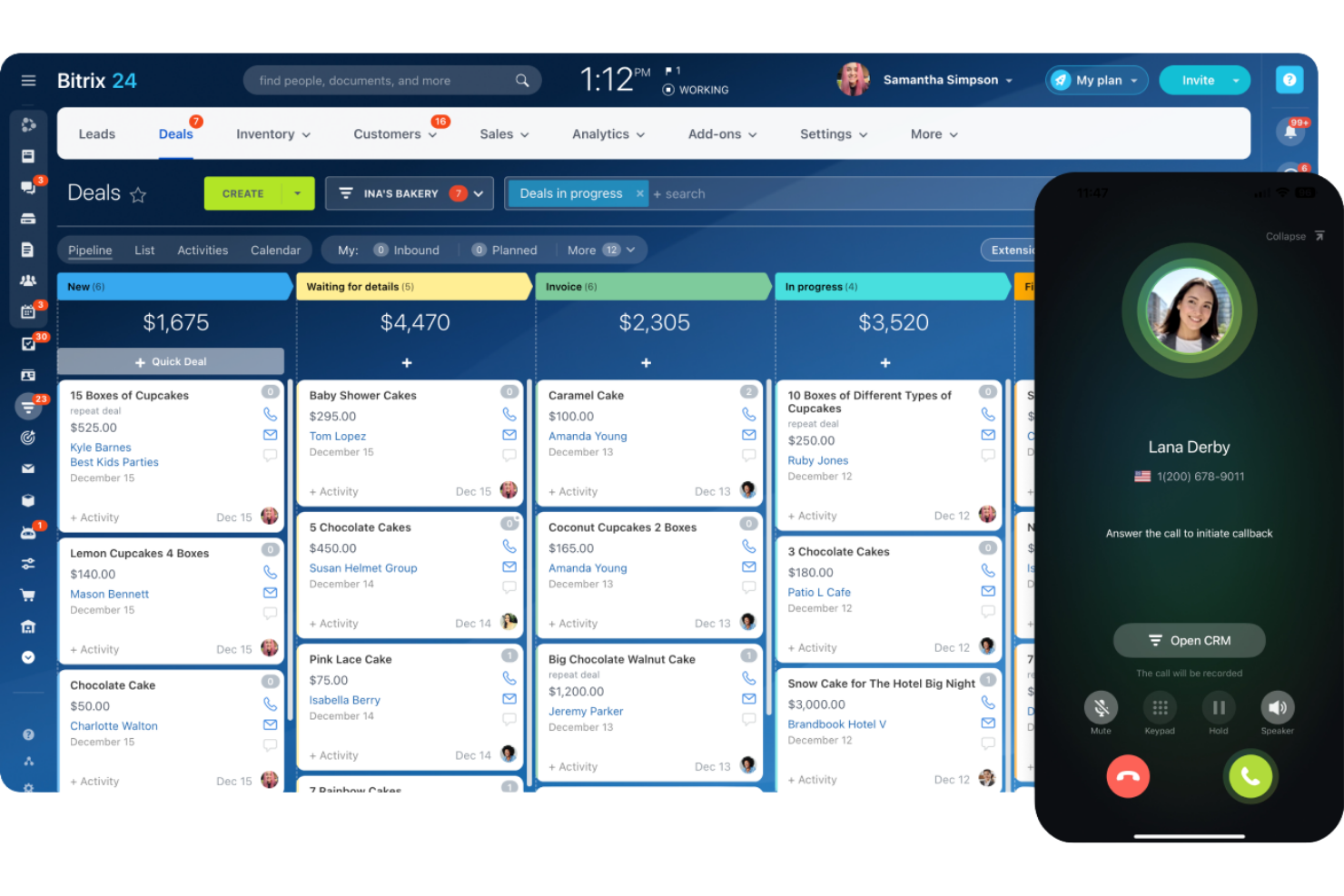
I team che cercano un software per il servizio clienti con solidi strumenti di collaborazione spesso considerano Bitrix24. Questa piattaforma combina gestione dei ticket, chat dal vivo e funzionalità di comunicazione interna in un unico ambiente di lavoro, risultando ideale per le aziende che vogliono mantenere il supporto clienti e il lavoro di squadra strettamente connessi. Bitrix24 è particolarmente utile per le organizzazioni che hanno bisogno di coordinarsi tra dipartimenti mentre gestiscono le richieste dei clienti.
Perché Bitrix24 è una buona alternativa a Freshworks
Se il tuo team ha bisogno di un software per il servizio clienti con collaborazione integrata, Bitrix24 merita attenzione. Ho scelto Bitrix24 perché unisce strumenti di assistenza clienti a funzionalità come aree di lavoro condivise, chat di gruppo e gestione delle attività, tutto su un'unica piattaforma. Questi strumenti di collaborazione aiutano gli operatori dell'assistenza a comunicare internamente e a risolvere più velocemente i problemi dei clienti. Per le aziende che vogliono superare le barriere tra supporto e altri dipartimenti, Bitrix24 offre un ambiente unificato che Freshworks non è in grado di eguagliare.
Funzionalità principali di Bitrix24
Altre funzionalità che rendono Bitrix24 interessante includono:
- Contact Center omnicanale: Gestisci i messaggi dei clienti da email, chat dal vivo, social media e app di messaggistica in un'unica casella.
- Integrazione CRM: Tieni traccia delle interazioni e della cronologia dei clienti direttamente nell'ambiente di supporto.
- Flussi di lavoro automatizzati: Imposta regole per smistare ticket, assegnare attività e inviare notifiche automaticamente.
- Portale self-service: Permetti ai clienti di trovare risposte e inviare richieste tramite un portale online con il tuo marchio.
Integrazioni di Bitrix24
Le integrazioni comprendono WordPress, WooCommerce, Stripe, Twilio, CallGear, LexOffice, WhatsApp, Telegram e Instagram.
Pros and Cons
Pros:
- Intranet sociale molto efficace
- CRM e gestione delle attività integrati
- Disponibile opzione on-premise
Cons:
- Troppa dispersione di funzioni
- Ticketing dedicato debole

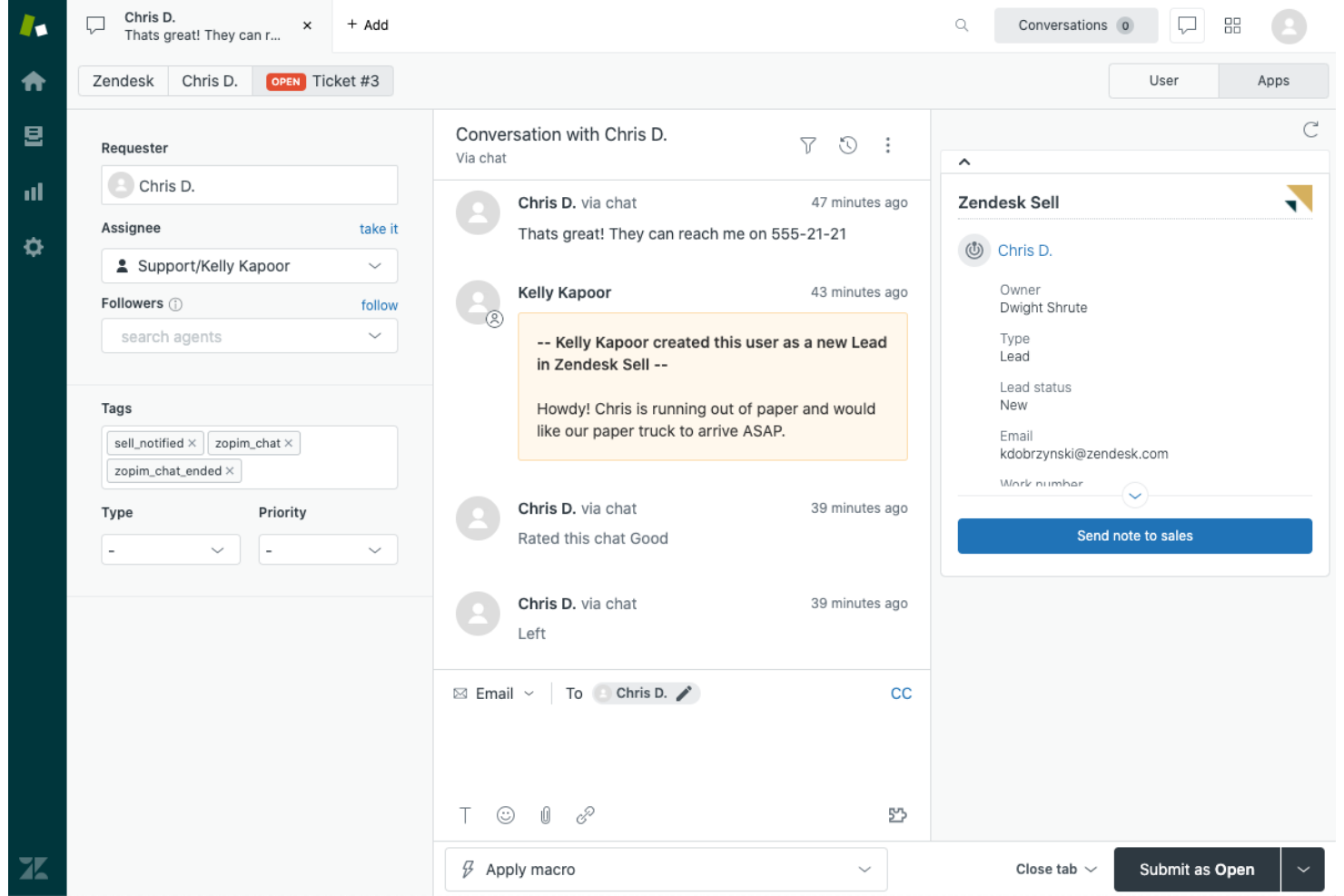
Per i team che devono gestire conversazioni con i clienti su più canali, Zendesk riunisce tutte le interazioni di supporto in un'unica workspace unificata. Questa piattaforma è particolarmente adatta alle aziende che vogliono offrire assistenza tramite chat, email, social e voce senza dover gestire strumenti separati. Zendesk si distingue per il ticketing omnicanale, la messaggistica integrata e le funzioni di automazione che aiutano i team di assistenza a offrire esperienze coerenti ovunque i clienti si mettano in contatto.
Perché Zendesk è una valida alternativa a Freshworks
Quando il tuo team deve supportare i clienti tramite chat, email, social e voce, Zendesk unifica ogni canale in un'unica workspace. Ho scelto Zendesk perché il suo sistema di ticketing omnicanale consente agli agenti di gestire tutte le conversazioni senza cambiare strumento o perdere il contesto. La messaggistica integrata della piattaforma e i profili cliente unificati aiutano i team a fornire assistenza coerente e personalizzata, indipendentemente dal canale scelto dal cliente. Queste caratteristiche rendono Zendesk una scelta forte per le aziende che desiderano centralizzare e coordinare il servizio su più canali, un'esigenza spesso espressa dagli utenti di Freshworks.
Funzionalità principali di Zendesk
Altre funzionalità di Zendesk che supportano i team di assistenza includono:
- Costruttore di Help Center: Crea e gestisci una knowledge base self-service con il brand aziendale per i clienti.
- Suggerimenti AI per i ticket: Utilizza l’intelligenza artificiale per proporre articoli e risposte pertinenti agli agenti durante la gestione dei ticket.
- Workflow personalizzabili: Imposta trigger, automazioni e macro per standardizzare i processi di supporto ripetitivi.
- Gestione SLA: Monitora e applica gli accordi sul livello di servizio direttamente nel sistema di ticketing.
Integrazioni Zendesk
Le integrazioni includono Salesforce, Slack, Microsoft Teams, Shopify, Jira, Mailchimp, Google Analytics, Zoom, Trello e Talkdesk.
Pros and Cons
Pros:
- Interfaccia altamente personalizzabile
- Strumenti avanzati di macro AI
- Ottima scalabilità per le aziende enterprise
Cons:
- L'assistenza può essere lenta
- Può risultare complesso per le PMI

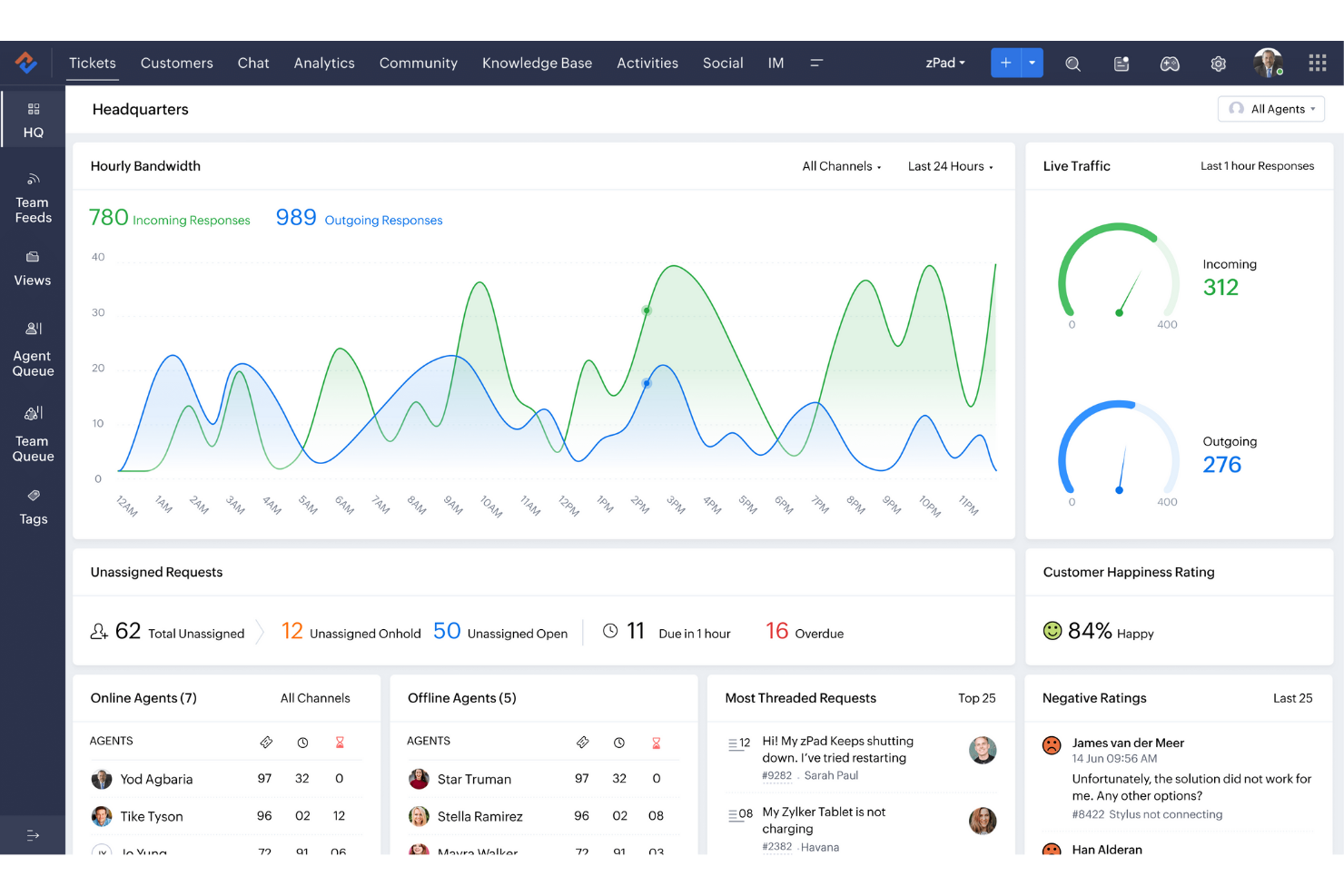
Zoho Desk è un software di assistenza clienti che aiuta le aziende a gestire in modo efficiente le attività di supporto. Viene utilizzato principalmente da team di supporto e responsabili che desiderano migliorare le proprie operazioni di servizio.
Perché Zoho Desk è una buona alternativa a Freshworks
Zoho Desk offre assistenza con intelligenza artificiale, fornendo al tuo team aiuti contestuali e risposte automatiche alle domande comuni. Il supporto multicanale garantisce la possibilità di gestire richieste provenienti da email, telefono e social media in un unico luogo. I portali self-service consentono ai clienti di trovare le risposte in modo autonomo. Queste funzionalità lo rendono una scelta solida per i team che cercano una gestione del servizio intelligente ed efficiente.
Caratteristiche principali di Zoho Desk
Altre funzionalità di Zoho Desk che aiutano i team di supporto includono:
- Centro assistenza multi-brand: gestisci basi di conoscenza e portali separati per diversi marchi da un unico account.
- Layout dei ticket personalizzabili: personalizza i campi e i moduli dei ticket in base al flusso di lavoro del tuo team.
- Monitoraggio del tempo: registra e monitora il tempo che gli agenti dedicano a ciascun ticket.
- Automazione dei workflow: imposta regole per automatizzare attività ripetitive come l'assegnazione dei ticket e l'aggiornamento degli stati.
Integrazioni di Zoho Desk
Le integrazioni includono Zoho CRM, Jira, Slack, Salesforce, Microsoft Teams e HubSpot.
Pros and Cons
Pros:
- Ecosistema Zoho perfettamente integrato
- Buona analisi del sentiment
- Interfaccia altamente personalizzabile
Cons:
- Configurazione più lunga
- Integrazione limitata fuori dall'ecosistema Zoho

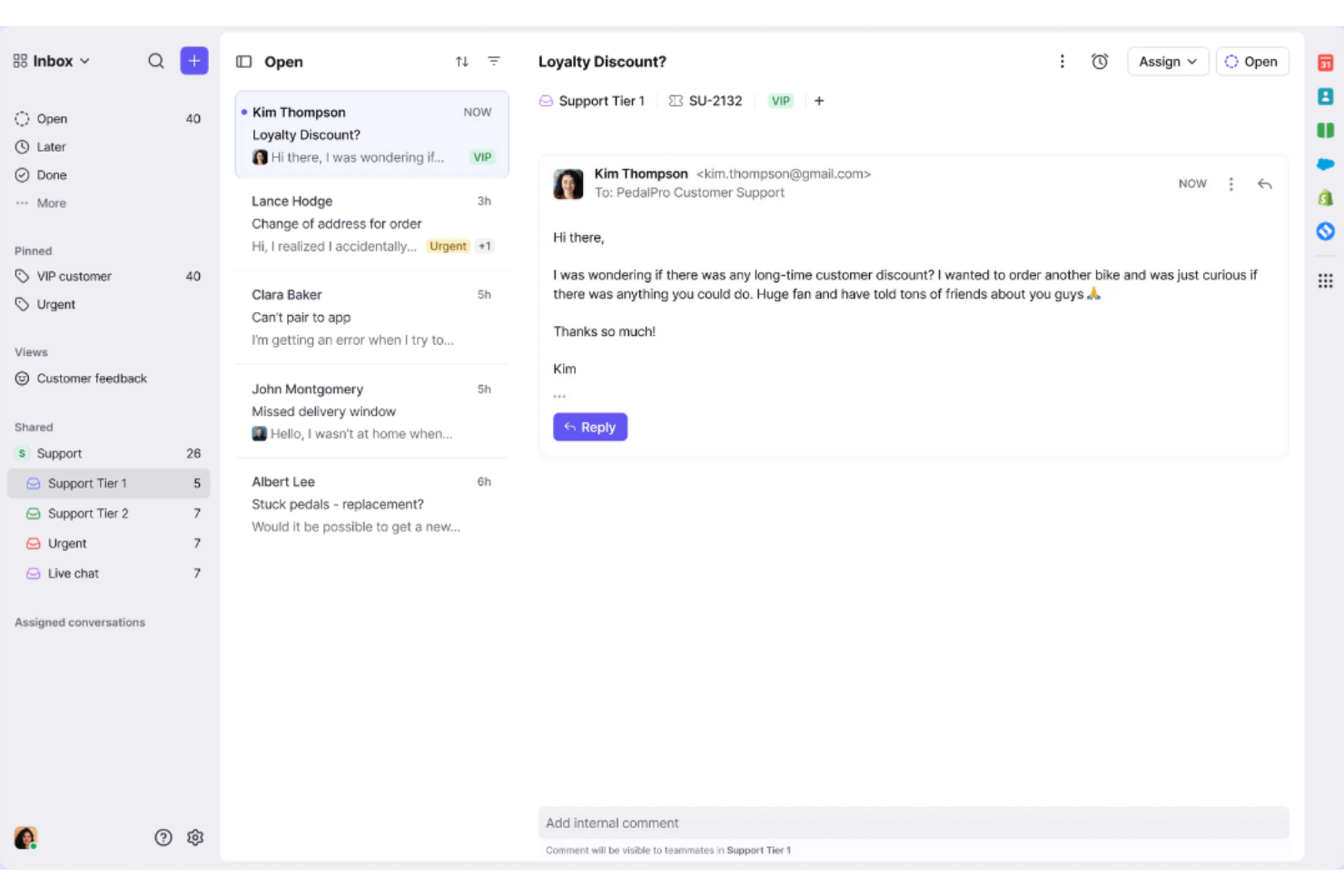
Gestire grandi volumi di email e messaggi dei clienti è più semplice con Front. Questa piattaforma è progettata per i team che devono organizzare, assegnare e collaborare su caselle di posta condivise senza perdere traccia delle conversazioni. Front si distingue per le aziende che desiderano un controllo granulare sui flussi di lavoro delle email e una visibilità in tempo reale su ogni interazione con i clienti.
Perché Front è una buona alternativa a Freshworks
Per i team che necessitano di una gestione avanzata delle caselle di posta condivise, Front offre una soluzione mirata che Freshworks non eguaglia. Ho scelto Front perché permette di assegnare, commentare e tracciare le email dei clienti in tempo reale, tutto all'interno di uno spazio di lavoro collaborativo. Funzionalità come la proprietà della conversazione e i thread di discussione interna aiutano i team a evitare risposte duplicate e a mantenere tutti allineati. Se la tua azienda si affida all'email come canale principale di supporto, gli strumenti di casella condivisa di Front offrono il controllo e la trasparenza che spesso gli utenti Freshworks cercano.
Funzionalità principali di Front
Altre caratteristiche che rendono Front interessante includono:
- Cruscotto di analisi: Monitora la performance del team e i tempi di risposta con strumenti di reportistica integrati.
- Risposte predefinite: Crea e utilizza risposte pre-scritte per rispondere rapidamente alle domande più frequenti dei clienti.
- Automazione basata su regole: Imposta regole personalizzate per indirizzare, etichettare o archiviare automaticamente i messaggi in base a criteri specifici.
- Messaggistica multicanale: Gestisci le conversazioni provenienti da email, SMS e social media in un'unica casella di posta unificata.
Integrazioni di Front
Le integrazioni includono Salesforce, Jira, Trello, Aircall, Dialpad, Instagram, Zoho CRM, Microsoft SharePoint e OnePageCRM.
Pros and Cons
Pros:
- Ottima collaborazione di squadra
- Blocca le risposte duplicate
- Facile da adottare rapidamente
Cons:
- Manca di instradamento avanzato
- Costoso per quello che offre
Altri concorrenti di Freshworks
Ecco alcune ulteriori alternative a Freshworks che non sono state incluse nel mio elenco ristretto, ma che vale comunque la pena valutare:
- Agentforce Service
Ideale per la scalabilità a livello aziendale
- LiveAgent
Ideale per il ticketing multicanale in tempo reale
- ServiceNow Customer Service Management
Ideale per la risoluzione dei casi guidata dai flussi di lavoro


Come valuto le alternative a Freshworks
Valuto ogni alternativa a Freshworks in due fasi: prima verifico se copre gli elementi fondamentali della CX—gestione dei ticket omnicanale, automazione e IA—e poi cosa la rende davvero degna di un cambio di piattaforma.
Funzionalità fondamentali (requisiti essenziali per questo elenco)
Quando seleziono gli strumenti da inserire nel mio elenco, assegno a ciascuno un punteggio su una scala da 0 (non offre la funzionalità) a 5 (eccelle in quest'area) per ogni funzionalità fondamentale indicata di seguito. Poi converto il punteggio totale dello strumento in una percentuale. Ogni strumento deve raggiungere un punteggio totale minimo del 75% per essere preso in considerazione.
- Sistema di gestione dei ticket omnicanale: verifico se una piattaforma riunisce email, chat dal vivo, social, telefono e app di messaggistica in un'unica casella di posta, così gli agenti non devono passare da una scheda all'altra per gestire un'unica conversazione con il cliente.
- Automazione dei flussi di lavoro: il motore di automazione di ogni strumento è importante. Valuto se è in grado di gestire sequenze in più passaggi, come l'escalation di un ticket scaduto, l'assegnazione in base alle competenze o alla lingua e l'attivazione di attività successive.
- Funzionalità di IA e chatbot: analizzo in che modo l'IA sia effettivamente utile, verificando se offre un creatore di chatbot, suggerimenti di assistenza agli agenti durante le conversazioni dal vivo o funzionalità generative come la sintesi dei ticket.
- Base di conoscenza e self-service: una solida base di conoscenza consente ai clienti di risolvere autonomamente i problemi più comuni. Valuto la funzionalità di ricerca, l'organizzazione dei contenuti e la possibilità di supportare più marchi o lingue.
- Reportistica e analisi della CX: i cruscotti che monitorano CSAT, tempo di prima risposta e conformità agli SLA sono requisiti di base. Cerco la possibilità di creare report personalizzati e segmentare le metriche per team, canale o livello di priorità.
- CRM ed ecosistema di integrazioni: i team di supporto lavorano raramente in isolamento, quindi verifico la presenza di connettori CRM nativi (Salesforce, HubSpot), integrazioni con strumenti di collaborazione (Slack, Teams) e un accesso API ben documentato.
Dopo aver stilato un elenco di strumenti che soddisfano questi criteri, valuto ciò che distingue ogni piattaforma.
Fattori distintivi (ciò che distingue i fornitori)
Ecco come confronto i diversi fornitori:
Funzionalità di rilievo
Un profilo cliente unificato è un importante elemento distintivo: voglio vedere la cronologia delle conversazioni, i dati sugli acquisti e l'utilizzo del prodotto riuniti in un'unica visualizzazione, così gli agenti non devono chiedere ai clienti di ripetere le proprie informazioni. Anche la messaggistica proattiva è una funzionalità che valuto, poiché gli strumenti che attivano suggerimenti nell'app o messaggi in uscita basati sul comportamento possono ridurre il volume dei ticket prima che i problemi si aggravino. Considero inoltre le opzioni di personalizzazione a basso codice, come i creatori di app con funzionalità di trascinamento o gli oggetti personalizzati, che consentono ai team operativi della CX di adattare la piattaforma senza dipendere dagli sviluppatori.
Oltre le funzionalità
La trasparenza dei prezzi è importante quando si cambia piattaforma: verifico se un fornitore limita funzionalità fondamentali come l'automazione o l'IA ai piani aziendali, poiché questo modifica il costo effettivo per i team in crescita. Anche la rapidità di implementazione è un fattore che valuto. Gli strumenti di migrazione e i modelli predefiniti possono ridurre di settimane i tempi di implementazione, soprattutto per i team che abbandonano Freshdesk dopo anni di cronologia dei ticket. Anche la conformità svolge un ruolo importante; verifico la presenza di SOC 2 Type II, la conformità al GDPR e le opzioni di residenza dei dati, requisiti essenziali per i team che gestiscono dati sensibili dei clienti.
Perché cercare un'alternativa a Freshworks?
Sebbene Freshworks sia una buona scelta per il software del servizio clienti, esistono diversi motivi per cui alcuni utenti cercano soluzioni alternative. Potresti cercare un'alternativa a Freshworks perché…
- Hai bisogno di un'integrazione più approfondita con gli strumenti di vendita o marketing
- Il tuo team richiede un'automazione dei flussi di lavoro più avanzata
- Desideri prezzi o condizioni contrattuali più flessibili
- Hai bisogno di un supporto più efficace per le lingue diverse dall'inglese
- La tua azienda opera in regioni in cui il supporto di Freshworks è limitato
- Desideri una maggiore personalizzazione per processi di servizio specifici
Se ti riconosci in una di queste situazioni, sei nel posto giusto. Il mio elenco comprende diverse opzioni di software per il servizio clienti più adatte ai team che affrontano queste difficoltà con Freshworks e sono alla ricerca di soluzioni alternative.
Funzionalità principali di Freshworks
Ecco alcune delle principali funzionalità di Freshworks, per aiutarti a mettere a confronto ciò che offrono le soluzioni alternative:
- Gestione dei ticket omnicanale
- Chatbot e automazione basati sull'intelligenza artificiale
- Base di conoscenza integrata
- Gestione degli SLA e regole di escalation
- Sondaggi personalizzabili sulla soddisfazione dei clienti
- Strumenti per la collaborazione del team
- Reportistica e analisi avanzate
- Portale clienti self-service
- Marketplace con integrazioni predefinite
- Controlli degli accessi basati sui ruoli