

I sistemi di monitoraggio dei call center aiutano i responsabili dell’esperienza del cliente e i manager dei team ad affrontare sfide come il bilanciamento tra la soddisfazione dei clienti e le prestazioni degli operatori, l’individuazione in tempo reale delle opportunità di coaching e la semplificazione delle operazioni tra i diversi canali. Con la piattaforma giusta, puoi migliorare la qualità del servizio, ridurre le inefficienze e fornire agli operatori del call center gli strumenti necessari per offrire esperienze costantemente eccellenti.
Ho esaminato e testato questi sistemi in base a funzionalità, facilità d’uso, integrazioni, scalabilità e rapporto qualità-prezzo. In questo articolo ti illustrerò le mie scelte migliori, ciò che distingue ciascuna soluzione e come scegliere quella più adatta alle dimensioni, al budget e agli obiettivi del tuo team.
Perché fidarsi dei nostri consigli sui software
6,700+
Reviews
20
Industry experts
16+
Evaluation factors
14
Years
Il nostro team testa e recensisce software dal 2012. In quanto leader CX noi stessi, sappiamo quanto sia difficile — e importante — scegliere il software giusto.
Per questa guida, abbiamo valutato gli strumenti attraverso test pratici e ricerche indipendenti, assegnando un punteggio agli strumenti in base ai nostri criteri di selezione.
Le nostre recensioni riflettono il nostro giudizio editoriale umano, non un discorso di vendita.
 Gui DrusinaCreative Director
 Tim FisherVP of AI
Tabella comparativa dei sistemi di monitoraggio dei call center
Questa tabella comparativa riassume i dettagli sui prezzi delle mie migliori selezioni di sistemi di monitoraggio dei call center.
| Tool | Best For | Trial Info | Price | ||
|---|---|---|---|---|---|
| 1 | Ideale per approfondimenti sulle chiamate alimentati dall'IA | Prova gratuita di 14 giorni | Da $25/utente/mese (fatturato annualmente) | Website | |
| 2 | Ideale per l'orchestrazione dei workflow IA senza codice | Demo gratuita disponibile | Prezzo su richiesta | Website | |
| 3 | Ideale per l'analisi delle prestazioni | Demo gratuita disponibile | Da $15/mese (fatturazione annuale) | Website | |
| 4 | Ideale per approfondimenti basati sull'AI | Demo gratuita | Da $85/utente/mese | Website | |
| 5 | Ideale per trascrizioni in tempo reale | Prova gratuita di 14 giorni + demo gratuita | Da $80/utente/mese (fatturato annualmente) | Website | |
| 6 | Ideale per startup e PMI | Demo gratuita + prova gratuita di 10 giorni disponibile | Da $1/utente/mese (fatturazione annuale) | Website | |
| 7 | Ideale per grandi aziende | Demo gratuita | Da $110/utente/mese | Website | |
| 8 | Ideale per capacità analitiche avanzate | Demo gratuita disponibile | Disponibile su richiesta | Website | |
| 9 | Ideale per team remoti | Prova gratuita di 14 giorni + piano gratuito + demo gratuita disponibile | Da $15/agente/mese (fatturato annualmente) | Website | |
| 10 | Ideale per piccoli e medi team | Prova gratuita + demo gratuita disponibile | Da $19/agente/mese (fatturato annualmente) | Website |


Recensioni dei migliori sistemi di monitoraggio dei call center
Di seguito trovi i miei riepiloghi dettagliati dei migliori strumenti di monitoraggio dei call center inclusi nella mia selezione. Le mie recensioni offrono un’analisi approfondita delle funzionalità principali, dei pro e dei contro, delle integrazioni e dei casi d’uso ideali di ogni strumento, per aiutarti a trovare quello più adatto a te.
 Ideale per approfondimenti sulle chiamate alimentati dall'IA
- Prova gratuita di 14 giorni
- Da $25/utente/mese (fatturato annualmente)
Visit WebsiteCustomer Rating:4.4/5
La dashboard di CloudTalk offre una panoramica chiara dell’attività delle chiamate e delle prestazioni degli agenti in tempo reale. CloudTalk è un sistema di monitoraggio dei call center basato su cloud che aiuta i team di vendita e assistenza a gestire le chiamate in modo efficiente. Combina analisi basate sull'intelligenza artificiale, monitoraggio in tempo reale e funzionalità di chiamata globale per migliorare la visibilità sulle prestazioni degli operatori e sulla qualità complessiva delle chiamate.
Perché ho scelto CloudTalk: Ho scelto CloudTalk per gli approfondimenti avanzati basati sull'IA che aiutano a valutare le prestazioni degli agenti e il sentiment dei clienti senza dover rivedere manualmente le chiamate. Funzionalità come i riepiloghi delle chiamate, l'analisi del sentiment e l'estrazione degli argomenti trasformano dati complessi delle chiamate in feedback utili, così puoi formare il tuo team in modo più efficace.
Mi piace anche il modo in cui CloudTalk supporta le operazioni globali, permettendo di ottenere numeri locali in oltre 160 paesi e utilizzare ID chiamante personalizzati per rafforzare la presenza locale. Unito a una qualità delle chiamate affidabile e a dashboard di monitoraggio intuitive, è una scelta solida per i team che necessitano sia di scalabilità sia di intelligenza nel loro sistema di call center.
Funzionalità principali e integrazioni
Le funzionalità comprendono il monitoraggio delle chiamate in tempo reale, la classificazione e trascrizione delle chiamate tramite IA e la protezione dallo spam per mantenere l'integrità delle chiamate. I manager possono anche utilizzare l'ascolto live e dashboard di analisi per il monitoraggio delle prestazioni e l'attività di coaching.
Le integrazioni includono HubSpot, Pipedrive, Zoho CRM, Salesforce, MS Dynamics, OdooCRM, Intercom, Zendesk, Salesloft, Outreach, Bullhorn, Monday.com e MS Teams.
Pros and Cons
Pros:
- Offre analisi delle chiamate basate sull'IA
- Disponibilità di numeri globali
- Interfaccia facile da usare
Cons:
- Curva di apprendimento per gli strumenti avanzati
- Problemi occasionali con l'app mobile
 Ideale per l'orchestrazione dei workflow IA senza codice
- Demo gratuita disponibile
- Prezzo su richiesta
Visit WebsiteCustomer Rating:5/5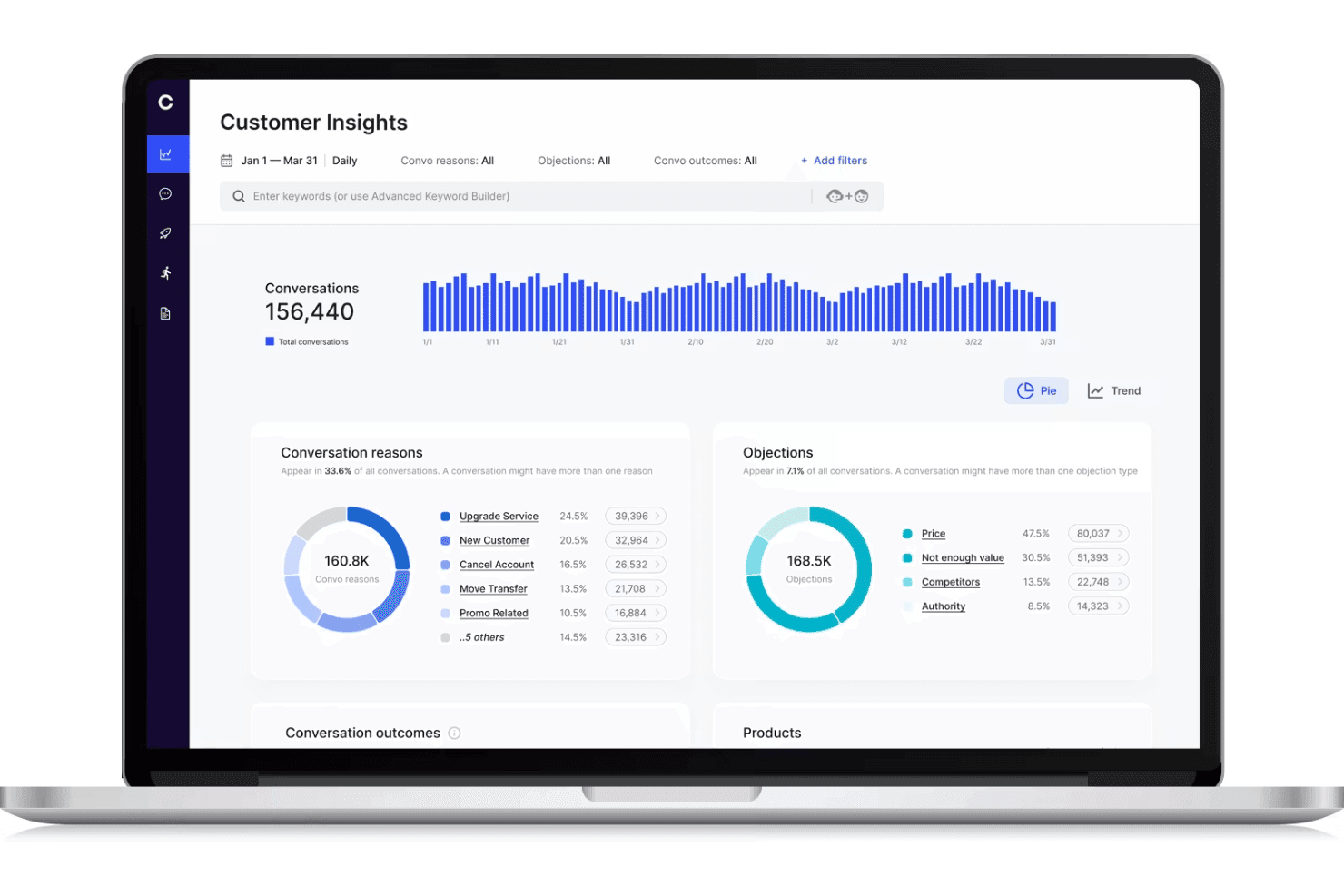
Cresta mostra una dashboard di monitoraggio del call center con analisi delle conversazioni con i clienti, tracciamento delle obiezioni e andamento delle conversazioni. Cresta è una piattaforma di monitoraggio dei call center basata sull'intelligenza artificiale che offre intelligenza conversazionale in tempo reale, orchestrazione dei workflow e gestione della qualità automatizzata per i canali vocali e digitali.
Per chi è migliore Cresta?
Team di supporto aziendale e contact center che cercano un monitoraggio della qualità e un'automazione dei workflow alimentati da intelligenza artificiale, scalabili su più canali.
Perché ho scelto Cresta
Ho scelto Cresta tra i migliori perché la sua orchestrazione dei workflow con IA senza codice consente al mio team di creare e aggiornare rapidamente automazioni per coaching e conformità in tempo reale. Utilizzo gli strumenti drag-and-drop di Cresta per automatizzare il monitoraggio della qualità e attivare interventi proattivi durante le chiamate.
Funzionalità principali di Cresta
- Trascrizione in tempo reale: Converte istantaneamente chiamate e chat in testo per analisi e archiviazione.
- Punteggio qualità automatizzato: Valuta il 100% delle interazioni con i clienti in base a criteri personalizzati senza revisione manuale.
- Monitoraggio multicanale: Monitora voce, chat e canali digitali da un'unica interfaccia centralizzata.
- Dashboard per supervisori: Permette ai supervisori di accedere a metriche di performance in tempo reale e storiche, trascrizioni e interazioni segnalate.
Integrazioni Cresta
Cresta offre integrazioni native con Salesforce, Twilio, Pipedrive, BigCommerce, Five9, Zendesk e altri. È disponibile un'API per integrazioni personalizzate.
Pros and Cons
Pros:
- Coaching in tempo reale per gli operatori delle chiamate
- Punteggio qualità automatizzato su tutti i canali
- Monitoraggio dell'aderenza agli script e della conformità
Cons:
- Le indicazioni dell'IA possono richiedere interventi manuali
- Knowledge Assist necessita di un continuo adattamento del modello
Learn more about Cresta: Ideale per l'analisi delle prestazioni
- Demo gratuita disponibile
- Da $15/mese (fatturazione annuale)
Visit WebsiteCustomer Rating:4.8/5
La dashboard di Squaretalk tiene traccia in tempo reale del volume delle chiamate, dell'attività degli agenti e delle metriche di performance. Squaretalk è un sistema di monitoraggio dei call center progettato per supportare i team di assistenza clienti e tracciare l'attività quotidiana delle chiamate, con un focus sull'analisi delle prestazioni. Offre strumenti di monitoraggio in tempo reale che aiutano i supervisori a visualizzare le metriche delle chiamate, l'attività degli agenti e le performance delle code. Sia che tu gestisca un piccolo team o una grande operazione, Squaretalk include anche opzioni di reportistica e integrazioni con strumenti esistenti per aiutare i team a rivedere le prestazioni del call center e gestire le operazioni.
Perché ho scelto Squaretalk
Ho scelto Squaretalk per le sue analisi delle prestazioni, che aiutano a monitorare l'attività delle chiamate, la produttività degli agenti e le performance delle code. Include inoltre strumenti di monitoraggio in tempo reale che permettono ai supervisori di rivedere le chiamate live e identificare i problemi mentre si verificano. Le dashboard presentano le metriche delle chiamate in un unico posto, rendendo più semplice esaminare le tendenze e valutare la performance del team.
Caratteristiche principali di Squaretalk
Oltre alle analisi delle prestazioni, Squaretalk offre:
- Report personalizzabili: Adatta i report per monitorare le metriche più importanti per la tua attività.
- Capacità di integrazione: Connettiti facilmente con strumenti già esistenti per ottimizzare i flussi di lavoro e aumentare la produttività.
- Dashboard intuitivi: Visualizza facilmente i dati e ottieni informazioni sulle prestazioni degli agenti e sulle interazioni con i clienti.
- Automazione dei processi: Automatizza le attività ripetitive in modo che il tuo team possa concentrarsi su questioni più complesse.
Integrazioni Squaretalk
Le integrazioni includono Zoho, Salesforce, Freshworks CRM, Pipedrive, Antelope CRM e WhatsApp Business.
Pros and Cons
Pros:
- I dialer predittivi aumentano la produttività e l'efficienza degli agenti
- Completi strumenti di analisi forniscono preziose informazioni per il processo decisionale
- Offre trascrizioni, riepiloghi e analisi del sentiment alimentati dall'IA
Cons:
- Le procedure avanzate richiedono tempo per una corretta configurazione
- Possono verificarsi problemi di connettività o ritardi in caso di uso intensivo
Learn more about Squaretalk: Ideale per approfondimenti basati sull'AI
- Demo gratuita
- Da $85/utente/mese
Visit WebsiteCustomer Rating:4.4/5
Talkdesk utilizza l'AI per offrire approfondimenti basati sui dati e migliorare le interazioni con i clienti. Talkdesk è un sistema di monitoraggio dei call center progettato per le aziende che desiderano approfondimenti avanzati grazie alla tecnologia AI. È ideale per i team che vogliono migliorare le interazioni con i clienti utilizzando approfondimenti basati sui dati per prendere decisioni.
Perché ho scelto Talkdesk: Talkdesk offre approfondimenti guidati dall'AI che aiutano il tuo team a prendere decisioni informate. Lo strumento fornisce analisi in tempo reale e analisi del sentiment, permettendoti di comprendere le emozioni dei clienti durante le chiamate.
Include funzionalità come la gestione della qualità automatizzata e la previsione predittiva per migliorare l'erogazione del servizio. Queste capacità lo rendono una scelta eccellente per i team focalizzati sull'utilizzo dell'AI per offrire migliori esperienze ai clienti.
Funzionalità distintive & integrazioni:
Caratteristiche includono la registrazione e la trascrizione delle chiamate, che ti assicurano di avere una registrazione completa delle interazioni con i clienti. Il software offre anche dashboard personalizzabili, così puoi adattare la visualizzazione alle esigenze del tuo team. Inoltre, fornisce strumenti per la gestione del personale per ottimizzare le pianificazioni e l'allocazione delle risorse.
Integrazioni includono Salesforce, Zendesk, Slack, Microsoft Teams, Google Workspace, Shopify, HubSpot, ServiceNow, Okta e Zoom.
Pros and Cons
Pros:
- Offre analisi del sentiment in tempo reale
- Fornisce gestione della qualità automatizzata
- Include strumenti di previsione predittiva
Cons:
- Richiede formazione continua per il personale
- Potrebbe richiedere supporto IT per l'integrazione
Learn more about Talkdesk: Ideale per trascrizioni in tempo reale
- Prova gratuita di 14 giorni + demo gratuita
- Da $80/utente/mese (fatturato annualmente)
Visit WebsiteCustomer Rating:4.3/5
Dialpad offre trascrizione in tempo reale delle chiamate per migliorare la comunicazione del team. Dialpad è un sistema di monitoraggio dei call center pensato per le aziende che necessitano di servizi di trascrizione delle chiamate in tempo reale. È progettato per i team che desiderano migliorare la comunicazione catturando e analizzando le chiamate man mano che avvengono.
Perché ho scelto Dialpad: Dialpad offre trascrizioni in tempo reale che aiutano il tuo team a cogliere dettagli importanti durante le chiamate. Questa funzione è impagabile per la formazione e il controllo qualità, permettendoti di rivedere le conversazioni istantaneamente.
La piattaforma include anche instradamento delle chiamate e analisi, per aiutare il tuo team a gestire e comprendere i dati delle chiamate. Il suo focus sugli approfondimenti in tempo reale la rende ideale per i team che vogliono potenziare l’efficienza della comunicazione.
Funzionalità principali e integrazioni:
Funzionalità includono la trascrizione della segreteria telefonica, che converte i messaggi vocali in testo per una facile lettura. La piattaforma offre analisi delle chiamate per fornirti approfondimenti sulle prestazioni del team e sulle interazioni con i clienti. Inoltre, dispone di una funzione di instradamento intelligente delle chiamate per garantire che le chiamate raggiungano rapidamente i membri giusti del team.
Integrazioni disponibili con Salesforce, Slack, Microsoft Teams, Google Workspace, HubSpot, Zendesk, ServiceNow, Okta, LinkedIn e Zoho CRM.
Pros and Cons
Pros:
- Fornisce trascrizioni delle chiamate in tempo reale
- Offre instradamento intelligente delle chiamate
- Include la trascrizione della segreteria telefonica
Cons:
- Errori occasionali nella trascrizione
- Può risultare complesso per i nuovi utenti
 Ideale per startup e PMI
- Demo gratuita + prova gratuita di 10 giorni disponibile
- Da $1/utente/mese (fatturazione annuale)
Visit WebsiteCustomer Rating:4.4/5
CallHippo offre strumenti essenziali per le chiamate a startup e team in crescita. CallHippo è un sistema di monitoraggio dei call center pensato per startup e piccole e medie imprese. Offre funzionalità essenziali di gestione delle chiamate che aiutano i team a gestire le interazioni con i clienti in modo efficiente.
Perché ho scelto CallHippo: CallHippo è progettato pensando a startup e PMI, fornendo funzionalità essenziali senza complessità inutili. Include strumenti come numeri di telefono virtuali e registrazione delle chiamate, fondamentali per i piccoli team.
La piattaforma è facile da configurare, così il tuo team può iniziare a usarla rapidamente. La sua convenienza e l’attenzione alle funzionalità principali la rendono una scelta intelligente per le piccole aziende che vogliono crescere.
Funzionalità e integrazioni principali:
Funzionalità includono analisi delle chiamate che ti forniscono approfondimenti sulle prestazioni e sulle tendenze delle chiamate. La piattaforma offre anche l’inoltro delle chiamate, così il tuo team può indirizzare facilmente le chiamate alla persona giusta. Inoltre, dispone di funzionalità di segreteria telefonica per garantire che nessuna richiesta dei clienti rimanga senza risposta.
Integrazioni includono Zoho CRM, Slack, HubSpot, Pipedrive, Zendesk, Salesforce, Shopify, Zapier, Freshdesk e Intercom.
Pros and Cons
Pros:
- Processo di configurazione semplice
- Offre numeri di telefono virtuali
- Fornisce registrazione essenziale delle chiamate
Cons:
- Possono verificarsi occasionali cadute di chiamata
- Richiede una connessione internet stabile


NICE CXone supporta le grandi aziende con strumenti scalabili per l'interazione con i clienti. NiCE CXone è una piattaforma completa per contact center pensata per le grandi aziende che desiderano migliorare le interazioni con i clienti. È rivolta alle imprese che necessitano di una soluzione scalabile per gestire in modo efficiente operazioni di call center complesse.
Perché ho scelto NiCE CXone: NiCE CXone è progettato per le grandi aziende che hanno bisogno di una soluzione scalabile in grado di gestire grandi volumi di chiamate. Offre funzionalità come la distribuzione automatica delle chiamate e la gestione delle risorse umane, elementi fondamentali per i team numerosi.
La piattaforma fornisce analisi in tempo reale per aiutare il tuo team a prendere decisioni basate sui dati. La sua attenzione alla scalabilità ed efficienza la rende ideale per le grandi organizzazioni che desiderano ottimizzare le operazioni del proprio contact center.
Funzionalità e integrazioni principali:
Funzionalità includono il routing omnicanale, che consente al tuo team di gestire senza interruzioni le interazioni con i clienti su vari canali. La piattaforma offre anche strumenti di gestione della qualità per garantire standard di servizio elevati. Inoltre, dispone di un sistema di composizione predittiva per ottimizzare l'efficienza delle chiamate e ridurre i tempi di attesa.
Integrazioni includono Salesforce, Microsoft Dynamics, Zendesk, ServiceNow, Oracle, SAP, Google Cloud, Amazon Web Services, Zoom e Genesys.
Pros and Cons
Pros:
- Offre composizione predittiva
- Supporta il routing omnicanale
- Include strumenti per la gestione della qualità
Cons:
- Richiede competenze tecniche per l'installazione
- Sono necessari occasionali aggiornamenti delle funzionalità
Learn more about NiCE CXone: Ideale per capacità analitiche avanzate
- Demo gratuita disponibile
- Disponibile su richiesta
Visit WebsiteCustomer Rating:4.2/5
Calabrio ONE migliora le prestazioni dei call center grazie a insight basati su analytics. Calabrio ONE è una suite per l'ottimizzazione della forza lavoro progettata per i call center che desiderano sfruttare l'analisi dati per migliorare le prestazioni. È pensata per i team che vogliono potenziare le decisioni grazie a informazioni approfondite e analisi basate sui dati.
Perché ho scelto Calabrio ONE: Calabrio ONE eccelle nelle capacità analitiche, fornendo strumenti che aiutano il tuo team a comprendere meglio le interazioni con i clienti. Offre funzionalità di analisi vocale e gestione della qualità, consentendo di ottenere informazioni sul sentiment dei clienti.
La piattaforma include anche strumenti di gestione della forza lavoro per ottimizzare la pianificazione dei turni e l'allocazione delle risorse. Queste caratteristiche la rendono perfetta per i team che vogliono utilizzare le analisi per migliorare le prestazioni.
Funzionalità e integrazioni principali:
Le funzionalità includono strumenti avanzati di reporting che offrono un'analisi approfondita delle operazioni del call center. Il software propone anche analisi della voce del cliente per aiutarti a comprendere bisogni e preferenze dei clienti. Inoltre, supporta la gestione delle prestazioni con dashboard personalizzabili per monitorare in modo efficace i principali indicatori.
Le integrazioni includono Salesforce, Microsoft Dynamics, Cisco, Avaya, Genesys, Amazon Connect, Five9, RingCentral, NICE e Zoom.
Pros and Cons
Pros:
- Offre analisi vocali
- Fornisce strumenti di reporting approfonditi
- Include funzionalità di gestione delle prestazioni
Cons:
- Può risultare complesso per i principianti
- Richiede tempo per una piena implementazione
Learn more about Calabrio ONE: Ideale per team remoti
- Prova gratuita di 14 giorni + piano gratuito + demo gratuita disponibile
- Da $15/agente/mese (fatturato annualmente)
Visit WebsiteCustomer Rating:4.1/5
Freshcaller supporta i team remoti con strumenti per una gestione efficiente delle chiamate. Freshcaller è un sistema di monitoraggio del call center basato su cloud progettato per team remoti. Aiuta le aziende a gestire le chiamate in modo efficiente con funzionalità che supportano le forze lavoro distribuite.
Perché ho scelto Freshcaller: Freshcaller è stato sviluppato per supportare i team remoti, offrendo soluzioni cloud che non richiedono infrastrutture fisiche. Fornisce funzionalità come il mascheramento delle chiamate e la portabilità dei numeri, essenziali per le operazioni a distanza.
Freshcaller offre anche code di chiamata e instradamento per garantire che il tuo team gestisca le chiamate in modo efficiente. La sua attenzione all'accessibilità remota lo rende una scelta eccellente per le aziende con team distribuiti.
Funzionalità principali & integrazioni:
Funzionalità includono la registrazione delle chiamate, che aiuta a tenere traccia di tutte le conversazioni per il controllo qualità. Il sistema offre anche il monitoraggio delle chiamate in tempo reale, consentendo ai supervisori di ascoltare e fornire feedback immediato. Questo assicura tassi di risoluzione delle chiamate più elevati e il rispetto degli standard di qualità. Inoltre, supporta IVR multilivello per indirizzare i clienti al reparto giusto in modo fluido.
Integrazioni: includono Freshdesk, Slack, HubSpot, Salesforce, Zendesk, Shopify, Google Contacts, Office 365, Pipedrive e Zapier.
Pros and Cons
Pros:
- Supporta ambienti di lavoro remoti
- Offre funzionalità di mascheramento delle chiamate
- IVR multilivello disponibile
Cons:
- Analisi avanzate limitate
- Problemi occasionali di qualità delle chiamate
Learn more about Freshcaller: 10Ideale per piccoli e medi team
Zendesk
- Prova gratuita + demo gratuita disponibile
- Da $19/agente/mese (fatturato annualmente)

Zendesk aiuta i piccoli team a gestire le chiamate e tracciare le interazioni con i clienti. Zendesk è un sistema di monitoraggio dei call center progettato per le aziende che desiderano offrire esperienze clienti personalizzate. È ampiamente utilizzato da team di piccole e medie dimensioni per gestire le chiamate in modo efficiente e tracciare le interazioni con i clienti.
Perché ho scelto Zendesk: Zendesk è pensato per team piccoli e medi grazie a funzionalità come l'instradamento delle chiamate e le analisi basate sull'intelligenza artificiale. Consente di gestire tutte le chiamate in un unico posto, offrendo al team una visione completa di ogni interazione.
Il sistema offre strumenti come IVR e instradamento di gruppo per supportare un servizio clienti più rapido. Gli agenti IA di Zendesk aiutano a risolvere le chiamate velocemente, rendendolo ideale per i team più piccoli che vogliono aumentare l'efficienza senza complessità eccessiva.
Caratteristiche e integrazioni principali:
Funzionalità includono il monitoraggio delle chiamate che traccia tutte le conversazioni, permettendoti di individuare le tendenze di performance. Gli agenti IA forniscono informazioni immediate aiutando il team a risolvere le chiamate più velocemente. Il sistema offre anche riepiloghi post-chiamata direttamente nello spazio di lavoro per ottimizzare il flusso di lavoro.
Integrazioni disponibili con Salesforce, Slack, Shopify, Mailchimp, Google Analytics, HubSpot, Microsoft Teams, Jira, Trello e Asana.
Pros and Cons
Pros:
- Monitoraggio delle chiamate in tempo reale
- Riepiloghi delle chiamate basati su IA
- Opzioni flessibili di instradamento delle chiamate
Cons:
- Alcune funzionalità richiedono acquisti aggiuntivi
- Segnalati occasionali rallentamenti del sistema
Learn more about Zendesk:
Altri sistemi di monitoraggio dei call center
Ecco alcune opzioni aggiuntive di sistemi di monitoraggio dei call center che non sono entrate nella mia selezione, ma che vale comunque la pena prendere in considerazione:
- 11Twilio FlexIdeale per la personalizzazione
- 12PlayvoxIdeale per l'engagement della forza lavoro
- 13ComputerTalk iceIdeale per l'integrazione con Microsoft
- 14LiveAgentIdeale per il supporto multicanale
- 15Zoho DeskIdeale per utenti attenti al budget
Come Valuto i Sistemi di Monitoraggio dei Call Center
Divido la mia valutazione tra i requisiti di base—come il monitoraggio in tempo reale e la registrazione delle chiamate—e i fattori di differenziazione, come il coaching tramite IA e la QA omnicanale, che distinguono gli strumenti buoni da quelli eccezionali.
Funzionalità Principali (Requisiti Indispensabili per Questa Lista)
Quando seleziono gli strumenti per la mia lista, valuto ognuno su una scala da 0 (non offre la funzionalità) a 5 (eccelle in questo ambito) per ogni funzionalità principale sottoelencata. Poi calcolo il punteggio totale dello strumento trasformandolo in percentuale. Ogni strumento deve raggiungere un punteggio minimo totale del 65% per essere considerato per l'inclusione.
- Registrazione e Conservazione delle Chiamate: Controllo se le registrazioni sono automatiche, ricercabili e dotate di controllo della conservazione—particolarmente importante per i team che riascoltano le chiamate durante controversie o escalation.
- Monitoraggio delle Chiamate in Tempo Reale: I supervisori devono avere almeno le opzioni di ascolto, suggerimento e intervento. Esamino la facilità con cui un manager può intervenire in una chiamata dal vivo per formare un agente durante la conversazione.
- Punteggi di Qualità e Valutazioni: In questo caso contano le schede di valutazione personalizzabili. Valuto se lo strumento permette agli analisti QA di creare moduli di valutazione collegati a specifici tipi di chiamata, come richieste di fatturazione o reclami.
- Analisi del Parlato e delle Interazioni: Gli strumenti validi vanno oltre la trascrizione. Cerco il riconoscimento di parole chiave e l’analisi del sentiment, che aiutano i team a individuare modelli su migliaia di chiamate.
- Dashboard di Prestazione e Reportistica: Valuto se le dashboard offrono viste in tempo reale e storiche e se i supervisori possono filtrare per agente, team o coda senza dover costruire report da zero.
- Controlli di Conformità e Sicurezza: Funzionalità come oscuramento PCI, accesso basato sui ruoli e archiviazione crittografata sono essenziali, in particolare per i team che gestiscono dati sensibili dei clienti in settori regolamentati.
Una volta ottenuta una lista di strumenti che soddisfano i criteri, considero cosa distingue ciascuna piattaforma.
Fattori Distintivi (Cosa Distingue i Fornitori)
Ecco come confronto e metto a paragone i diversi fornitori:
Funzionalità di Spicco
Il monitoraggio omnicanale è un importante elemento di differenziazione. I team che gestiscono chat, email e voce hanno bisogno di visibilità QA su tutti i canali, non solo sulle chiamate. Cerco anche strumenti di coaching IA che offrano raccomandazioni mirate per gli agenti, dato che fanno risparmiare ore di revisione manuale ai supervisor. La riproduzione del percorso cliente è un valore aggiunto: permette ai valutatori di vedere l’intera sequenza di interazioni che un cliente ha avuto prima della chiamata, offrendo punteggi QA con un contesto molto più ricco.
Oltre le Funzionalità
Valuto quanto bene ogni strumento si integra con il resto della tecnologia aziendale. Un sistema di monitoraggio che si collega alla tua piattaforma CCaaS, CRM e agli strumenti di gestione della forza lavoro garantisce che i dati QA vengano utilizzati dove i supervisori lavorano davvero. Anche conformità e governance dei dati sono molto rilevanti: verifico la presenza di regole di registrazione configurabili e controlli sulla residenza dei dati, poiché i team che operano in settori regolamentati necessitano di un controllo granulare su dove e per quanto tempo le registrazioni vengono conservate. Anche la trasparenza dei prezzi è importante. I costi di archiviazione e le tariffe aggiuntive per i moduli di analisi possono aumentare silenziosamente il costo totale di proprietà.
Come scegliere un sistema di monitoraggio dei call center
Con così tanti sistemi di monitoraggio dei call center disponibili sul mercato, è facile rimanere bloccati a confrontare elenchi di funzionalità o a confondersi tra i diversi livelli di prezzo. Invece di perdersi nel rumore, concentrati sui fattori che influiranno concretamente sulla capacità del tuo team di monitorare le chiamate in modo efficace e migliorare la qualità del servizio.
| Fattore | Cosa considerare |
|---|---|
| FattoreScalabilità | Cosa considerareLo strumento crescerà insieme alle esigenze della tua azienda? È in grado di gestire volumi di chiamate più elevati, nuovi operatori o un’espansione multicanale con la crescita dell’azienda? |
| FattoreIntegrazioni | Cosa considerareIl sistema di monitoraggio si collega perfettamente al tuo CRM, al sistema di assistenza e agli strumenti di collaborazione, evitando la creazione di silos nei flussi di lavoro? |
| FattorePersonalizzazione | Cosa considerarePuoi adattare i pannelli di controllo, i rapporti e i flussi di lavoro per il monitoraggio delle chiamate in base alle tue metriche delle prestazioni e alle esigenze di coaching? |
| FattoreFacilità d’uso | Cosa considerareL’interfaccia è abbastanza intuitiva da consentire a supervisori e operatori di adottarla rapidamente senza una formazione approfondita? |
| FattoreImplementazione e inserimento | Cosa considerareQuanto tempo occorrerà per configurarlo? Considera il tempo e le risorse necessari per una distribuzione completa e verifica se il fornitore offre supporto durante questa fase. |
| FattoreCosto | Cosa considerareRientra nel tuo budget? Oltre ai costi dell’abbonamento, sono previsti costi aggiuntivi per funzionalità come la registrazione delle chiamate o l’analisi? Confronta i modelli di prezzo con le funzionalità di cui hai effettivamente bisogno. |
| FattoreMisure di sicurezza | Cosa considerareI tuoi dati e le tue chiamate sono protetti? Cerca funzionalità come la crittografia e la conformità agli standard del settore per proteggere le informazioni sensibili. |
| FattoreDisponibilità dell’assistenza | Cosa considerarePuoi ricevere aiuto quando ne hai bisogno? Verifica se il fornitore offre assistenza 24 ore su 24, 7 giorni su 7, e diverse opzioni di contatto, come telefono, chat ed e-mail, per risolvere rapidamente i problemi. |
Che cos’è un sistema di monitoraggio dei call center?
Un sistema di monitoraggio dei call center è un software che traccia, registra e analizza le chiamate dei clienti, consentendo ai manager di migliorare le prestazioni degli operatori e la qualità del servizio. Grazie a funzionalità come il monitoraggio in tempo reale, la registrazione delle chiamate e l’analisi, questi sistemi forniscono informazioni utili per formare gli operatori dei centri di contatto, garantire la coerenza e offrire esperienze migliori ai clienti.
Funzionalità di un sistema di monitoraggio del call center
Quando scegli un software per il monitoraggio della qualità del call center, presta attenzione alle seguenti funzionalità chiave:
- Registrazione delle chiamate: acquisisce e archivia le conversazioni telefoniche per garantire la qualità e per la formazione.
- Monitoraggio in tempo reale: consente ai responsabili del call center di ascoltare le chiamate in corso e fornire feedback e supporto agli operatori in tempo reale.
- Funzionalità di analisi: fornisce informazioni sulle prestazioni, aiutando i team a prendere decisioni basate sui dati per migliorare l'efficienza del call center.
- Dashboard personalizzabili: consentono agli utenti di adattare l'interfaccia per visualizzare le metriche e le informazioni più rilevanti in base alle proprie esigenze specifiche.
- Distribuzione automatica delle chiamate: indirizza le chiamate in arrivo agli operatori più adatti, riducendo il tempo medio di gestione e i tempi di attesa.
- Gestione della qualità: offre strumenti per valutare e migliorare le prestazioni degli operatori, garantendo elevati standard di servizio.
- Supporto omnicanale: gestisce le interazioni con i clienti attraverso più canali, come telefono, e-mail e chat, da un'unica piattaforma.
- Composizione predittiva: automatizza le chiamate in uscita e ottimizza la disponibilità degli operatori componendo i numeri in base ad algoritmi predittivi.
- Analisi del sentiment: analizza le emozioni dei clienti durante le chiamate per fornire informazioni sulla soddisfazione dei clienti e sulle aree di miglioramento.
- Gestione della forza lavoro: aiuta a ottimizzare i turni e le risorse degli operatori in linea con le esigenze del call center, migliorando la produttività.
Vantaggi di un sistema di monitoraggio del call center
L'implementazione di un sistema di monitoraggio del call center offre diversi vantaggi al tuo team e alla tua azienda. Ecco alcuni dei benefici che puoi aspettarti:
- Miglioramento delle prestazioni degli operatori: grazie al monitoraggio e al feedback in tempo reale, gli operatori ricevono indicazioni immediate per migliorare le proprie competenze e la qualità del servizio.
- Maggiore soddisfazione dei clienti: la gestione della qualità e l'analisi del sentiment garantiscono che le interazioni con i clienti rispettino standard elevati, contribuendo a renderli più soddisfatti.
- Decisioni basate sui dati: le funzionalità di analisi forniscono informazioni sulle operazioni del call center, aiutando i responsabili a prendere decisioni consapevoli per aumentare l'efficienza.
- Gestione efficiente delle chiamate: funzionalità come la distribuzione automatica delle chiamate e la composizione predittiva garantiscono che le chiamate vengano indirizzate e gestite rapidamente, riducendo i tempi di attesa.
- Ottimizzazione delle risorse: gli strumenti di gestione della forza lavoro aiutano ad allineare i turni degli operatori alla domanda, migliorando la produttività e riducendo i costi.
- Informazioni personalizzate: le dashboard personalizzabili consentono ai team di concentrarsi sulle metriche più importanti, adattando le informazioni ai propri obiettivi specifici.
- Garanzia della qualità costante: gli strumenti di registrazione delle chiamate e di gestione della qualità mantengono un livello di servizio uniforme, rafforzando la fiducia dei clienti.
Costi e prezzi di un sistema di monitoraggio del call center
La scelta di un sistema di monitoraggio del call center richiede la comprensione dei vari modelli tariffari e dei piani disponibili. I costi variano in base alle funzionalità, alle dimensioni del team, agli elementi aggiuntivi e ad altri fattori. La tabella seguente riassume i piani più comuni, i relativi prezzi medi e le funzionalità tipicamente incluse nelle soluzioni di monitoraggio del call center:
Tabella comparativa dei piani per il sistema di monitoraggio del call center
| Tipo di piano | Prezzo medio | Funzionalità comuni |
|---|---|---|
| Tipo di pianoPiano gratuito | Prezzo medio$0 | Funzionalità comuniMonitoraggio di base delle chiamate, analisi limitate e reportistica essenziale. |
| Tipo di pianoPiano personale | Prezzo medio$15-$30/utente/mese | Funzionalità comuniRegistrazione delle chiamate, monitoraggio in tempo reale e analisi di base. |
| Tipo di pianoPiano aziendale | Prezzo medio$50-$75/utente/mese | Funzionalità comuniAnalisi avanzate, distribuzione automatica delle chiamate e dashboard personalizzabili. |
| Tipo di pianoPiano aziendale avanzato | Prezzo medio$100-$150/utente/mese | Funzionalità comuniSupporto omnicanale, composizione predittiva e strumenti completi per la gestione della qualità. |
Domande frequenti sul sistema di monitoraggio del call center
Ecco alcune risposte alle domande comuni sui sistemi di monitoraggio del call center:
Qual è la regola 80/20 in un call center?
La regola 80/20 in un call center significa che l’80 percento delle chiamate dovrebbe ricevere risposta entro 20 secondi. Questo standard contribuisce a garantire tempi di risposta rapidi e migliora la soddisfazione dei clienti. È un parametro di riferimento comunemente utilizzato per stabilire gli obiettivi di prestazione delle attività del call center.
Come funziona il monitoraggio delle chiamate?
Il monitoraggio delle chiamate consiste nell’osservare e ascoltare le chiamate in tempo reale o tramite registrazioni. Viene utilizzato per valutare le prestazioni degli agenti, assegnare punteggi di qualità e migliorare il servizio clienti. Monitorando le chiamate, è possibile fornire feedback agli agenti e identificare le aree in cui sono necessari formazione e sviluppo.
Quali sono i 5 principali indicatori chiave di prestazione di un call center?
Gli indicatori chiave di prestazione (KPI) di un call center includono i punteggi di soddisfazione dei clienti, il tasso di risoluzione alla prima chiamata, il tempo di prima risposta, il tasso di utilizzo degli agenti e il tasso di abbandono delle chiamate. Queste metriche aiutano a valutare l’efficacia delle attività del call center e a identificare le aree da migliorare.
Quali sono le 7 competenze importanti che ogni agente di call center dovrebbe possedere?
Le competenze essenziali per gli agenti di call center includono ascolto attivo, comunicazione efficace, empatia, capacità di risolvere i problemi, conoscenza del prodotto, gestione del tempo e capacità di svolgere più attività contemporaneamente. Queste competenze consentono agli agenti di gestire in modo efficiente le richieste dei clienti e di offrire un servizio di alta qualità.
In che modo il monitoraggio del call center può migliorare la qualità del servizio?
Il monitoraggio del call center consente di esaminare le interazioni e fornire feedback mirati agli agenti. Identificando i punti di forza e le aree di miglioramento, è possibile personalizzare i programmi di formazione e migliorare la qualità complessiva del servizio. Il processo di monitoraggio contribuisce inoltre a mantenere standard di servizio coerenti all’interno del team.
Quali strumenti vengono comunemente utilizzati per il monitoraggio del call center?
Gli strumenti comunemente utilizzati per il monitoraggio del call center includono software per la registrazione delle chiamate, sistemi di monitoraggio in tempo reale, piattaforme di analisi e strumenti di gestione della qualità. Gli strumenti giusti per il monitoraggio del call center aiutano a monitorare le prestazioni, analizzare i dati e garantire che il team soddisfi le aspettative relative al servizio e risolva rapidamente i problemi dei clienti.