
46 Best Customer Service Software For 2026

20 Best Customer Service Software Shortlist
Here's my pick of the 20 best software from the 46 tools reviewed.


Customer service software helps CX and support teams deliver fast, personalized, omnichannel service that scales. Great customer service isn’t just about answering tickets faster. It’s about building trust, reducing friction, improving agent productivity, and creating experiences your customers remember.
And it matters more than ever: 88% of customers are more likely to make a repeat purchase after a superior service experience, according to Salesforce’s State of the Connected Customer report.
Whether you're dealing with rising ticket volumes, fragmented channels, or stretched resources, finding the right customer service software is critical. In this guide, I've evaluated and reviewed tools through a CX lens—prioritizing real-world usability, automation, collaboration, and measurable impact.
Why Trust Our Software Reviews
We’ve been testing and reviewing customer service software since 2021. As CX professionals ourselves, we know how critical and difficult it is to make the right decision when selecting software.
We invest in deep research to help our audience make better software purchasing decisions. We’ve tested more than 2,000 tools for different customer experience use cases and written over 1,000 comprehensive software reviews. Learn how we stay transparent & our software review methodology.
Best Customer Service Software: Pricing Comparison Chart
This comparison chart summarizes basic details about each of my top customer service software selections. You can view pricing details and the availability of free trials or demos side-by-side to help you find the right customer service software for your budget and business needs.
| Tool | Best For | Trial Info | Price | ||
|---|---|---|---|---|---|
| 1 | Best for unifying email and chat | 14-day free trial available | From $16/user/month (billed annually) | Website | |
| 2 | Best for AI assisted inbox management | Free trial available | From $25/user/month (billed annually) | Website | |
| 3 | Best for self-service knowledge base | 14-day free trial available | From $25/user/month | Website | |
| 4 | Best all-in-one customer service software | Free trial + free demo available | From $19/agent/month (billed annually) | Website | |
| 5 | Best for customer service automation | 15-day free trial + free plan | From $7/user/month (billed annually) | Website | |
| 6 | Best for B2B companies | Free demo available | From $45/month (billed annually) | Website | |
| 7 | Best for gamification-driven agent motivation | 30-day free trial | From $4/user/month (billed annually) | Website | |
| 8 | Best for large enterprises | Free trial + free demo available | From $25/user/month (billed annually) | Website | |
| 9 | Best for AI-driven customer support automation | Free plan available | From $32/month (billed annually) | Website | |
| 10 | Best for ticket categorization and routing | 14-day free trial + free demo available | From $25/user/month (billed annually) | Website | |
| 11 | Best live visitor tracking for websites | 7-day free trial + free plan available | From $25/user/month | Website | |
| 12 | Best for collaborative inbox management | 30-day free trial + free plan available | From $14/user/month (billed annually) | Website | |
| 13 | Best for AI-powered omnichannel customer service | Free plan available | From $25/user/month (billed annually) | Website | |
| 14 | Best for no-code AI setup | Free trial available | From $99/month | Website | |
| 15 | Best for Microsoft Teams | 21-day free trial + free demo available | From $12/user/month (billed annually) | Website | |
| 16 | Best for third-party integrations | Free demo + 14-day free trial available | From $19/user/month (billed annually) | Website | |
| 17 | Best for cross-team ticket collaboration | 14-day free trial + free demo available | From $25/seat/month (billed annually) | Website | |
| 18 | Best for SaaS companies | Free demo available | Pricing upon request | Website | |
| 19 | Best for AI-powered video guides | Free 7-day trial + free plan + free demo available | From $18/creator/month (billed annually) | Website | |
| 20 | Best customizable customer portal | Free demo available | From $24/user/month (billed annually) | Website |


-

SupportYourApp
Visit WebsiteThis is an aggregated rating for this tool including ratings from Crozdesk users and ratings from other sites.4.7 -
Freshdesk
Visit WebsiteThis is an aggregated rating for this tool including ratings from Crozdesk users and ratings from other sites.4.4 -
Hiver
Visit WebsiteThis is an aggregated rating for this tool including ratings from Crozdesk users and ratings from other sites.4.6


Best Customer Service Software Reviews
Here are brief descriptions of my top 20 selections for the best customer service software available today. I’ve included best use cases, feature descriptions, pricing information, and even screenshots to show off the UX where possible.
Plus, I’ve included additional bonus options below if you’d like a few more to consider.


If you’re managing a support team that’s juggling emails, chat messages and growing customer expectations, SparrowDesk offers a fresh take on customer service software built around AI and human-agent collaboration. You’ll find it particularly useful if your team supports multiple brands or products, handles lots of routine questions, and wants to shift focus to higher-value interactions.
Why I Picked SparrowDesk
I picked SparrowDesk because it automates customer inquiries and provides a unified inbox for email and chat, which can significantly alleviate the workload of your support team. Its AI agent handles the majority of interactions, allowing your team to focus on more complex issues. Additionally, the AI Copilot feature assists agents by providing smart drafts and summaries, which can improve response times and accuracy. These capabilities are particularly beneficial for businesses that manage high volumes of customer inquiries and aim to maintain a high standard of service.
SparrowDesk Key Features
In addition to its impressive AI capabilities, I also found several other features that contribute to its effectiveness as a customer service solution.
- Service Level Agreements (SLA): Establish clear response and resolution targets to ensure timely support for your customers.
- Business Hours Management: Define and manage working hours to set proper customer expectations and streamline ticket routing.
- Custom Views & Filters: Personalize agent interfaces to prioritize and manage important conversations effectively.
- Quick-Action Macros: Automate repetitive tasks with pre-set macros to save time and enhance productivity.
SparrowDesk Integrations
Native integrations are not currently listed by SparrowDesk.
Pros and Cons
Pros:
- No code workflow builder automates routing and notifications
- Copilot features summarize long conversations inside the agent inbox
- AI agents designed to auto resolve many repetitive tickets
Cons:
- Limited native integrations could hinder seamless connectivity
- Channels currently focus on email and live chat, not voice or social

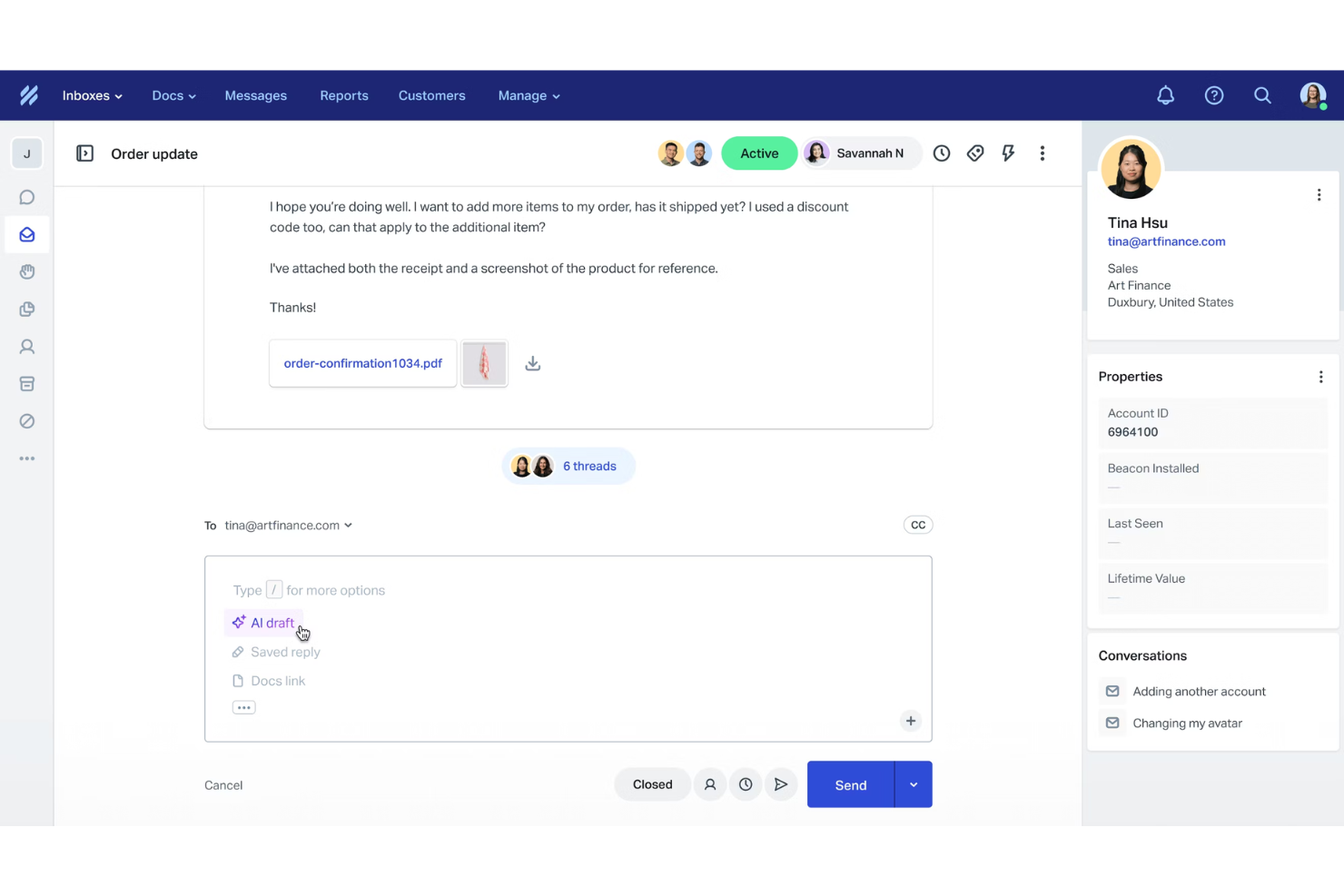
Help Scout provides a customer service platform designed to help teams manage conversations with clarity and a personal touch. It offers tools like a shared inbox, live chat, and a help center, giving you a unified space to support customers without relying on ticket numbers. By incorporating AI features that assist with drafting responses and summarizing conversations, Help Scout helps reduce repetitive work so your team can focus on meaningful customer interactions.
Why I Picked Help Scout
I picked Help Scout for its AI assisted inbox management, which helps your team stay organized while keeping responses fast and accurate. The platform’s AI tools provide suggestions, translations, and summaries, giving you better control over busy queues. Features such as conversation assignments and customer profiles ensure that you always know who owns what, helping your team maintain consistent, personal support. This structure keeps communication smooth for both customers and agents.
Help Scout Key Features
In addition to its AI assisted inbox, Help Scout offers several features designed to enhance your customer service operations.
- Proactive Messaging: Use targeted messages, in app prompts, and NPS surveys to engage customers and gather feedback at the right moments.
- Customer Portal: Allows customers to access their past conversations easily, improving transparency and reducing repeated questions.
- Live Chat and Help Center: Provide real time support and self service options so customers can get help in the way that suits them best.
- Workflow Automation: Prioritizes and routes conversations automatically, helping your team stay focused on the most important messages.
Help Scout Integrations
Integrations include Salesforce, Zapier, Shopify, Slack, Asana, HubSpot, Mailchimp, Stripe, Jira, Trello, Pipedrive, and Intercom. include Salesforce, Zapier, Shopify, Slack, Asana, HubSpot, Mailchimp, Stripe, Jira, Trello, Pipedrive, and Intercom.
Pros and Cons
Pros:
- Built-in AI tools for faster replies
- Comprehensive reporting and analytics
- Easy multi-channel message consolidation
Cons:
- Limited customization in lower tiers
- Some advanced features on higher plans
New Product Updates from Help Scout

Help Scout Enhances Support Management With AI and Integrations
Help Scout introduces smarter routing, WhatsApp and Aircall integrations, and new AI enhancements to help teams manage conversations, automate workflows, and support customers across more channels. For more information, visit Help Scout’s official site.
 .
.
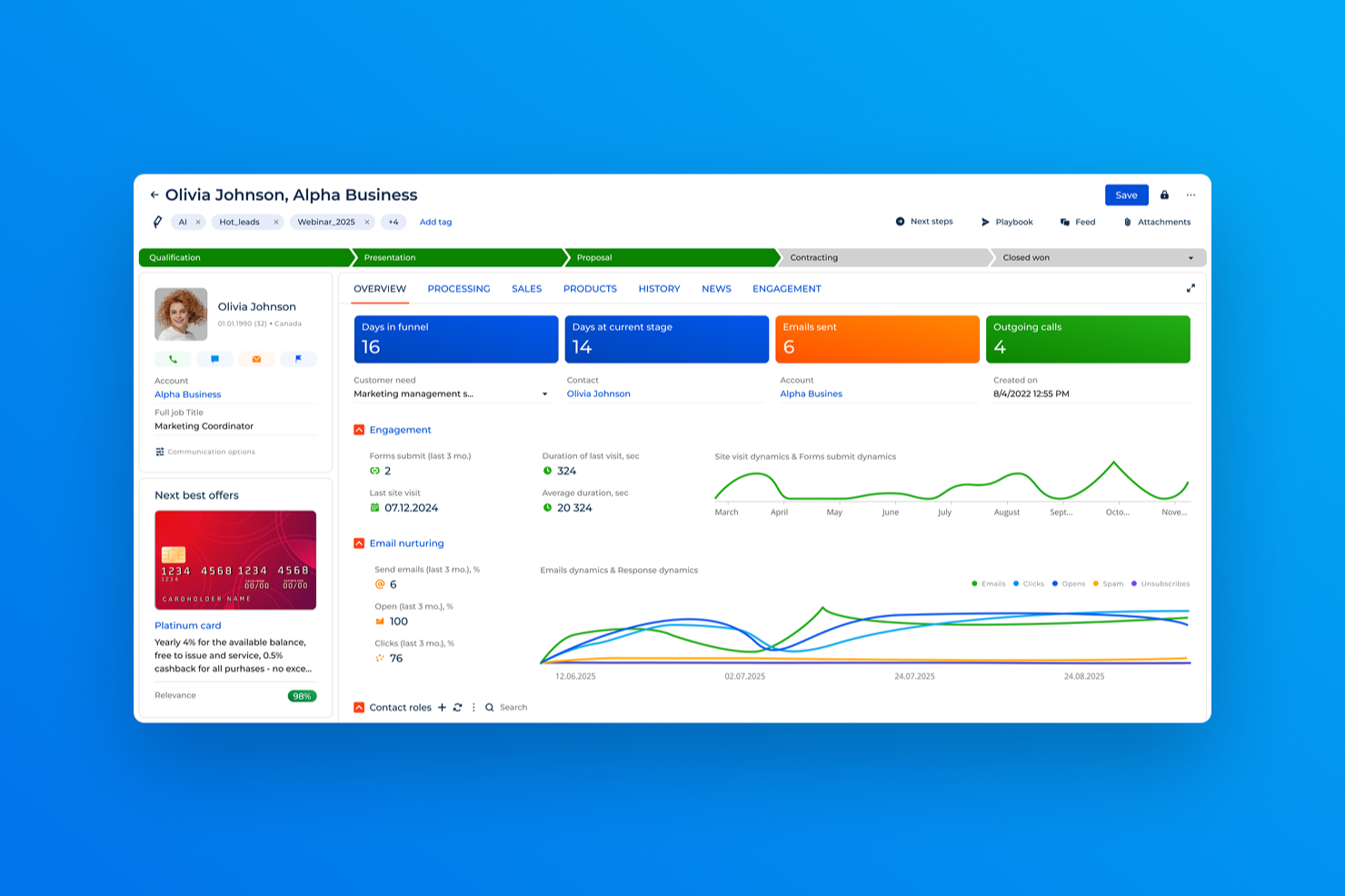
Creatio CRM provides a versatile platform for businesses looking to elevate their customer service capabilities. It is particularly appealing to organizations that prioritize personalized and efficient customer interactions, offering solutions for sectors like retail, finance, and healthcare. By integrating automation and multi-channel communication, Creatio CRM addresses the challenge of maintaining consistent and high-quality customer service.
Why I Picked Creatio CRM
I picked Creatio CRM for its standout feature of customer service automation, which is crucial for businesses aiming to enhance service delivery. The platform's case management system allows you to track and resolve customer issues swiftly. Additionally, its knowledge management feature empowers your team to provide solutions quickly, leveraging a comprehensive self-service knowledge base. These functionalities are vital for ensuring that your team can handle customer inquiries with speed and accuracy.
Creatio CRM Key Features
In addition to its strong automation capabilities, Creatio CRM offers several other features that make it suitable for customer service:
- Service Level Management: This feature allows you to manage and store different service agreements centrally, ensuring compliance and quality service delivery.
- Unified Service Center: It enables effective case management by organizing case queues, allowing agents to prioritize tasks and manage workflows efficiently.
- AI Tools: Utilizing machine learning, this feature predicts case details and assists agents in finding solutions, enhancing problem-solving capabilities.
- Creatio Marketplace: Access a variety of plugins, addons, and templates to extend the functionality of your customer service operations.
Creatio CRM Integrations
Integrations include Microsoft Outlook, Google Calendar, Mailchimp, Slack, Twilio, DocuSign, Zoom, Facebook Messenger, LinkedIn, and Twitter. Additionally, an API is available for custom integrations.
Pros and Cons
Pros:
- Omnichannel case management across email, chat, phone, social
- AI-powered workflow automation reduces manual ticket handling
- Low-code customization adapts workflows to business needs
Cons:
- Advanced features may require significant configuration time
- Pricing and add-ons can increase total cost
New Product Updates from Creatio CRM

CRM Creatio Delivers Major AI, Mobile, and UI Enhancements
CRM Creatio introduces Creatio.ai upgrades, custom LLM support, Freedom UI improvements, and enhanced mobile design tools to modernize CRM workflows and automation. For more information, visit CRM Creatio's official site.
 .
.

For businesses prioritizing customer interaction, Zendesk provides a flexible solution tailored to streamline your service operations. It offers AI-powered messaging and live chat, allowing your team to handle customer queries with ease and personalization. This makes Zendesk an attractive option for industries looking to enhance user experiences through seamless integration across various platforms.
Why I Picked Zendesk
I picked Zendesk as the best all-in-one customer service software primarily because of its capabilities in AI-driven customer support. With features like automated workforce management and messaging for instant support, Zendesk allows your team to handle diverse customer interactions in a unified workspace. I appreciate how it leverages comprehensive analytics, providing actionable insights to optimize agent performance and service quality. The platform's ability to streamline workflows and ensure data privacy sets it apart, making it a preferred choice for businesses seeking to enhance customer satisfaction while managing costs effectively.
Zendesk Key Features
In addition to its AI-driven support and unified workspace, Zendesk offers several other features that enhance its appeal as a customer service solution:
- Centralized Inbox: Consolidates messages from various channels like email, social media, and live chat into a single platform for easier management.
- Knowledge Base: Enables the creation and organization of help center articles, allowing customers to find answers independently.
- Live Chat and Messaging: Offers real-time customer interactions across multiple platforms, enhancing the customer experience.
- Community Forums: Allows the creation of online communities for customer interaction and feedback, fostering a sense of community and engagement.
Zendesk Integrations
Integrations include Slack, Salesforce, Shopify, Mailchimp, Google Analytics, JIRA, Zoom, Microsoft Teams, HubSpot, and Trello.
Pros and Cons
Pros:
- Provides omnichannel support to unify customer interactions
- Offers automation for reducing repetitive support tasks
- Provides detailed insights through customizable analytics
Cons:
- Limited ticket search queries
- It can be difficult to prioritize requests


For businesses seeking a versatile customer service software, Zoho Desk offers a tailored solution that caters to support teams across various industries, from banking to retail. This platform not only provides omnichannel support and self-service options to enhance customer satisfaction, but it also integrates intelligent automation through Zia AI, helping streamline your support operations. With a strong emphasis on user privacy and data ownership, Zoho Desk ensures that your customer interactions are managed securely and effectively, making it an appealing choice for companies of all sizes.
Why I Picked Zoho Desk
I picked Zoho Desk as an ideal choice for customer service automation because of its AI-driven assistant, Zia, which automates responses and offers 24/7 support to your customers. The platform's omnichannel support allows you to manage interactions across multiple platforms, such as email and social media, all from a single interface. Additionally, Zoho Desk's automation tools enable you to automate ticket assignments and workflows, reducing manual efforts and improving response times. These features are designed to address challenges faced by support teams, making Zoho Desk a compelling solution for enhancing service efficiency.
Zoho Desk Key Features
In addition to its advanced automation capabilities, Zoho Desk offers several other features that can enhance your customer service operations:
- Guided Conversations: This feature allows your team to create interactive, step-by-step guidance for customers, making complex processes easier to navigate.
- Blueprint: This tool helps you design and automate workflows, ensuring that every ticket follows a structured process, which can improve consistency and efficiency in handling customer queries.
- Custom Modules: With this feature, you can tailor the software to fit your unique business needs by creating custom fields and modules that align with your specific processes.
- Instant Messaging: This feature provides real-time communication with customers directly from the Zoho Desk interface, helping you offer quick and direct support.
Zoho Desk Integrations
Integrations include Zoho FSM, Zoho Assist, Zoho BugTracker, Zoho Analytics, Zoho Books, Zoho SalesIQ, Zoho Projects, Zoho Meeting, Zoho Invoice, and Zoho Forms. Outside of the Zoho ecosystem, the software also integrates with Zendesk, ServiceNow, Jira, Spiceworks, Freshdesk, Slack, MS Teams, and you can build custom integrations using the Zoho Assist API.
Pros and Cons
Pros:
- Provides sentiment analysis and ticket management insights with AI assistance
- Multi-channel communication for seamless support
- Clean, intuitive interface that is easy to navigate
Cons:
- Performance issues may arise during peak usage times
- Limited customization options compared to competitors


For medium to large B2B organizations looking to enhance their customer support processes, TeamSupport offers a unique solution that can improve team collaboration and service efficiency. The platform addresses challenges like inefficient collaboration and poor ticket management with features such as robust ticket management, advanced reporting tools, and a comprehensive customer database. Designed for businesses that require detailed customer insights and efficient internal communication, TeamSupport is ideal for those seeking more than just a basic ticketing system.
Why I Picked TeamSupport
I picked TeamSupport for its exceptional capability in addressing the complex needs of B2B customer service. Its account-level management feature allows you to track and support entire organizations, providing a holistic view of client interactions rather than focusing on individual users. This is complemented by its robust 360-degree view of account activity, giving your team the insights needed for proactive support. Additionally, the platform's customizable workflows are perfect for tailoring support processes to each customer, ensuring that your service approach aligns with unique business requirements.
TeamSupport Key Features
In addition to its B2B-focused capabilities, TeamSupport offers a range of features designed to enhance your customer service operations.
- Linked Tickets: This feature allows your team to connect related tickets, ensuring that issues are resolved comprehensively and communication remains clear across different customer interactions.
- Customizable Self-Service Portals: You can tailor self-service portals to fit your company's branding and customer needs, empowering customers to find solutions independently and reducing the load on your support team.
- Integrated Real-Time Chat: This feature facilitates immediate communication with customers, enabling your team to address inquiries and resolve issues swiftly, enhancing customer satisfaction.
- Native CRM Integrations: Seamlessly connect TeamSupport with popular CRM systems, allowing for a unified view of customer data and streamlined workflows across platforms.
TeamSupport Integrations
It integrates with major CRM platforms like Salesforce and HubSpot, live chat and messaging tools like Slack and Microsoft Teams, project management tools like JIRA and Asana, and major email platforms.
Pros and Cons
Pros:
- User-friendly interface facilitates easy navigation and use
- Robust customer database supports comprehensive customer management
- Knowledge base is good for customer documentation
Cons:
- Users report slow search functionality affecting efficiency
- Mobile application functionality is limited

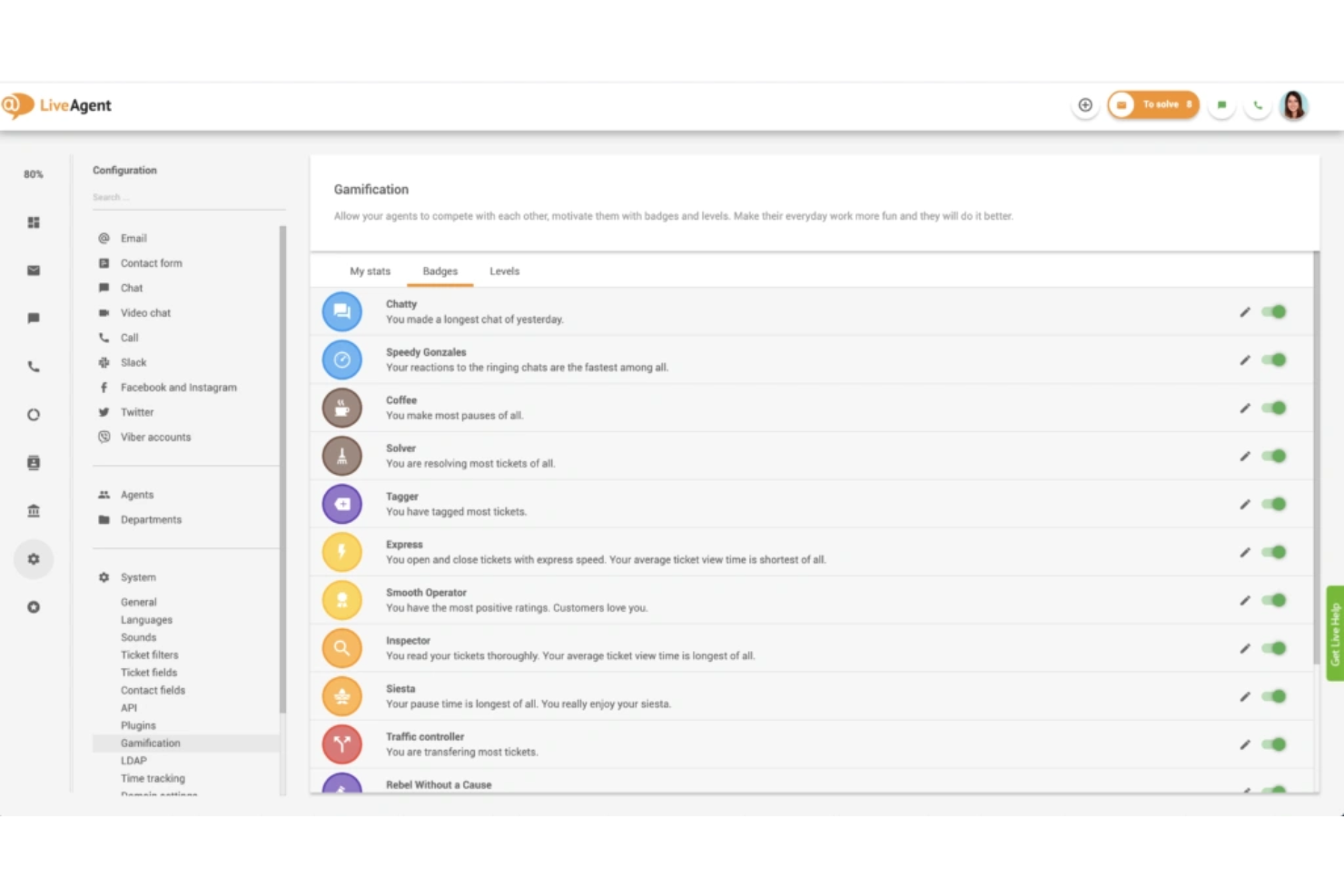
LiveAgent brings together multichannel support tools for teams that need to manage customer conversations across email, chat, social, and phone. It’s designed for customer support teams in small to midsize businesses that want to centralize their customer service operations and improve response times. If you’re looking for a platform that combines ticketing, automation, and reporting in one place, LiveAgent offers a flexible solution.
Why I Picked LiveAgent
When evaluating customer service software, I looked for tools that help keep support teams engaged and motivated. LiveAgent stands out for its built-in gamification features, including agent leaderboards, achievement badges, and performance tracking. These elements encourage friendly competition and recognize top performers, which can boost morale and productivity in busy support environments.
LiveAgent Key Features
Some other features in LiveAgent that support customer service teams include:
- Omnichannel ticketing: Manage customer inquiries from email, chat, social media, and phone in a single unified inbox.
- Knowledge base management: Build and maintain a searchable self-service portal for customers and agents.
- Automated ticket routing: Assign tickets to the right agents or departments based on custom rules and workflows.
- Real-time chat widget: Add a customizable live chat widget to your website for instant customer support.
LiveAgent Integrations
Integrations include ActiveCampaign, Adobe Business Catalyst, Agile CRM, Asana, AWeber, BigCommerce, Braintree, ClickUp, Clockify, and Facebook.
Pros and Cons
Pros:
- Over 200 native integrations with popular tools
- Supports 43 languages for global teams
- Content editor has a WYSIWYG interface
Cons:
- Reporting features lack advanced customization
- Mobile app interface can feel outdated
New Product Updates from LiveAgent

LiveAgent Enhances Ticket Management and Integrations
LiveAgent introduces major improvements, including a more intuitive ticket field system, customizable spam thresholds, and Telegram integration to boost communication and efficiency. For more information, visit LiveAgent's official site.
 .
.

Salesforce Service Cloud can transform your customer interactions by providing a versatile solution that caters to the diverse needs of your industry. With its omnichannel capabilities, your team can manage interactions across multiple platforms, ensuring no customer query goes unanswered. The platform's AI-driven insights and real-time support tools empower your agents to deliver personalized service, boosting customer satisfaction and loyalty.
Why I Picked Salesforce Service Cloud
I picked Salesforce Service Cloud because it stands out as an optimal choice for large enterprises seeking a comprehensive customer service solution. Its omni-channel routing and AI-powered instant replies ensure your team can manage high volumes of customer interactions across multiple platforms without missing a beat. The platform's integration capabilities with tools like Slack and Jira allow for seamless operations and enhanced team productivity. Additionally, its proactive incident detection feature helps your team anticipate and address issues before they escalate, making it a robust choice for enterprises looking to improve service efficiency and customer satisfaction.
Salesforce Service Cloud Key Features
In addition to the capabilities that make Salesforce Service Cloud ideal for large enterprises, there are several other features that enhance its utility for customer service teams.
- In-App Chat: This feature allows your agents to engage with customers directly through your app, providing real-time assistance and enhancing the customer experience.
- Knowledge Base: Your team can create and manage a comprehensive repository of information that customers and agents can access for quick answers to common questions.
- Case Management: This tool helps your team track and manage customer issues from start to finish, ensuring that every case is resolved efficiently.
- Service Analytics: With this feature, you gain insights into customer service performance through detailed reports and dashboards, helping you make data-driven decisions.
Salesforce Service Cloud Integrations
Native integrations with Slack, Mailchimp, QuickBooks, Zendesk, HubSpot, Dropbox, Google Workspace, Microsoft Teams, SurveyMonkey, and JIRA.
Pros and Cons
Pros:
- Customizable workflows allow adaptation to specific business needs
- AI-powered tools improve service efficiency and customer interactions
- Includes pre-built integrations
Cons:
- Performance issues may arise during peak usage times
- Complexity in setup and customization can require external help


For businesses aiming to elevate their customer service experience, Chatbase provides an AI-driven platform that allows you to build and manage intelligent support agents. This user-friendly tool is ideal for companies seeking to enhance customer interactions without extensive technical expertise. Chatbase's integration capabilities with various platforms ensure data security and personalized service, making it a compelling choice for modern enterprises.
Why I Picked Chatbase
I picked Chatbase because it excels in AI-driven customer support automation by resolving 80% of queries automatically, which significantly reduces the workload on your support team. Its 24/7 support availability ensures your customers always receive assistance, enhancing their experience and satisfaction. The platform's ability to integrate seamlessly with existing systems allows you to maintain continuity in operations while personalizing customer interactions. I appreciate how Chatbase prioritizes security with SOC 2 Type II and GDPR compliance, ensuring your data remains private and secure.
Chatbase Key Features
In addition to its AI-driven automation capabilities, Chatbase offers several other features that enhance customer service.
- Action Configuration: Agents can perform tasks like updating subscriptions or changing addresses through integrations.
- AI Model Comparison: Users have the flexibility to experiment with different AI models to optimize performance for specific use cases.
- Multilingual Support: Provides real-time assistance in over 80 languages with seamless language detection and translation.
- Cross-Channel Integration: Easily integrates with platforms like Slack, WhatsApp, and Messenger for consistent functionality.
Chatbase Integrations
Integrations include Zendesk, Slack, Salesforce, WhatsApp, and APIs for deeper integration.
Pros and Cons
Pros:
- Smart escalation feature efficiently manages complex customer queries
- Allows for easy AI model comparison to optimize performance
- Supports 80+ global languages to enhance global customer reach and satisfaction
Cons:
- Initial AI setup takes time
- Limited advanced CRM analytics


For those seeking a customer service software solution that integrates AI-driven insights with a human touch, Front presents a compelling option. Designed to enhance communication and manage support effectively, it caters to diverse businesses across technology, finance, and more. By centralizing communication channels like email, SMS, and live chat into one platform, Front clarifies complex inquiries and allows your team to focus on delivering exceptional service, making it an ideal partner for businesses aiming to boost customer satisfaction and operational efficiency.
Why I Picked Front
I picked Front because its advanced ticket categorization and routing capabilities directly address the needs of businesses handling high volumes of customer inquiries. With AI-driven ticket triage, Front automatically routes tickets based on topic, ensuring that your team can manage complex queries. The platform's load balancing feature distributes workloads evenly, enhancing overall productivity. Additionally, Front's internal collaboration tools, like tagging and shared drafts, facilitate communication among team members, making it an excellent choice for support teams aiming to deliver timely and effective customer service.
Front Key Features
In addition to its ticket categorization and routing capabilities, Front offers several features that enhance your customer service operations.
- Omnichannel Inbox: This feature consolidates communications from email, SMS, social media, and live chat into a single platform, ensuring your team never misses a customer interaction.
- Knowledge Base: Front provides a built-in knowledge base, allowing your team to deflect common inquiries and provide self-service options to customers.
- Real-Time Collaboration: With tools for commenting and editing email threads, your team can collaborate directly within the platform to address customer issues swiftly.
- Workflow Automation: Automate routine tasks and streamline processes with Front's automation tools, enabling your team to focus on more complex customer inquiries.
Front Integrations
Integrations include Aircall, Asana, ClickUp, Autohive, Chatra, and HubSpot.
Pros and Cons
Pros:
- Robust customization and automation
- Easy multi-channel integration
- In-chat private messaging between agents
Cons:
- Merging threads can be tricky
- Large feature set creates learning curve for new users
New Product Updates from Front

Front Adds Asyntai, InstantDocs, and KnowBe4 Integrations
Front introduces integrations with Asyntai, InstantDocs, and KnowBe4, enhancing user experience and efficiency. For more information, visit Front's official site.
 .
.

For businesses seeking to elevate their customer interactions, Tidio offers an AI-driven platform designed to refine communication and improve response times. It caters to companies aiming to streamline interactions through chatbots and live chat, allowing your team to concentrate on crucial tasks while automating routine exchanges. With integration capabilities for over 120 tools and insightful analytics, Tidio helps ensure a personalized customer experience that aligns with your brand's voice.
Why I Picked Tidio
I picked Tidio for its exceptional live visitor tracking, which is crucial for businesses aiming to elevate customer service. With Tidio, you can monitor website visitors in real-time, gaining insights into their browsing patterns and last visited pages. This empowers your team to engage customers at the right moment, offering personalized support and recommendations. The feature to segment visitors based on location and activity ensures timely and relevant interactions, enhancing customer satisfaction and conversion rates.
Tidio Key Features
In addition to live visitor tracking, Tidio offers several other features that enhance its value as customer service software:
- Lyro AI Agent: Engages users in natural conversations and redirects complex inquiries to your support team.
- Ticketing System: Efficiently manages customer requests by creating tickets from chats and emails, allowing for prioritization and workflow automation.
- Flows: A no-code automation tool that facilitates lead generation and sales through customizable automation paths.
- Order Management: Enables real-time management of customer orders directly from the chat window, enhancing customer interaction during conversations.
Tidio Integrations
Integrations include Shopify, WordPress, Squarespace, WooCommerce, Jimdo, Webydo, Drupal, Shift4Shop, Site123, and HubSpot.
Pros and Cons
Pros:
- Provides detailed analytics for customer interaction insights
- Tidio offers real-time visitor tracking to improve engagement
- The Lyro AI chatbot handles complex queries without coding
Cons:
- May lack depth in AI capabilities compared to some competitors
- Lack of flow analytics limits chatbot performance optimization


For those looking to boost their customer service operations, Missive offers a unified inbox and collaboration platform that helps teams manage customer conversations across email, chat, and social channels. Designed for teams that rely on shared communication workflows, it enables real-time collaboration on messages and task management within a single interface. With features like automation, multi-channel support, and integrated chatrooms, Missive helps ensure your customer service team stays organized and responsive across all touchpoints.
Why I Picked Missive
I chose Missive because of its strong focus on collaborative inbox management, which allows your team to handle customer communications together instead of in silos. Shared inboxes, conversation assignments, and real-time co-editing make it easy to maintain consistent, accurate responses across multiple channels. The built-in task management tools help you link tasks directly to conversations, ensuring nothing falls through the cracks. I also appreciate how Missive’s workflow automation can take care of repetitive actions like sorting or labeling messages, freeing your team to focus on providing thoughtful, personalized support.
Missive Key Features
In addition to its collaborative inbox capabilities, Missive offers several other features that enhance your customer service operations:
- Task Management: Turn conversations into actionable tasks and assign them to team members for clear accountability.
- Automation Rules: Create rules that automatically organize messages or send prewritten replies to recurring inquiries.
- Multi-Channel Communication: Manage emails, live chat, SMS, and social media messages all in one interface.
- Workload Balancing: Distribute incoming messages evenly among agents to maintain efficient service.
- Multi-Language Spell Check: Helps teams communicate accurately across regions and languages.
Missive Integrations
Integrations include Google Workspace, Office 365, WhatsApp, iCloud, SMS, Instagram, Messenger, ChatGPT, Zapier, HubSpot, Salesforce, and Pipedrive.
Pros and Cons
Pros:
- Integrates with 25+ major tools
- Turns emails into actionable tasks
- Centralized team inbox collaboration
Cons:
- Slight learning curve for beginners
- Offline functionality is limited


For teams looking to improve customer service operations, Hiver offers a solution that integrates directly with Gmail to enhance email management and support across multiple channels. Designed to improve collaboration and efficiency, it allows you to manage emails, live chats, and support tickets all in one place. With features like automated workflows and insightful analytics, Hiver helps deliver personalized service, making it ideal for industries such as technology, healthcare, and education.
Why I Picked Hiver
I picked Hiver because it excels in AI-powered omnichannel customer service, unifying various communication channels into one interface. With its omnichannel inbox, your team can manage emails, chats, voice, and WhatsApp seamlessly, reducing the complexity of juggling multiple tools. Hiver's AI Copilot aids in drafting responses and analyzing sentiment, enhancing the accuracy and speed of customer interactions. Additionally, its workflow automation and analytics offer insights into customer interactions, helping you optimize operations and improve service delivery.
Hiver Key Features
In addition to its AI-powered omnichannel service, Hiver offers a range of features designed to enhance your team's customer service capabilities.
- Collision Alerts: Prevent duplicate responses by notifying team members when someone else is replying to the same customer query.
- Shared Drafts: Collaborate in real-time by allowing multiple team members to edit and review email drafts before sending them out.
- SLA Management: Set specific response time goals and track compliance to ensure your team meets customer expectations.
- Approval Workflows: Streamline the process of reviewing and approving responses, ensuring quality and consistency in communication.
Hiver Integrations
Integrations include Salesforce, HubSpot, Shopify, Jira, WhatsApp, Aircall, Slack, Netsuite, QuickBooks, and Okta.
Pros and Cons
Pros:
- SLA management ensures timely responses and tracks compliance
- AI Copilot assists in drafting responses and sentiment analysis
- Collision alerts prevent duplicate responses by team members
Cons:
- Subscription cancellation process is cumbersome for users
- Mobile experience isn’t as strong as the desktop one

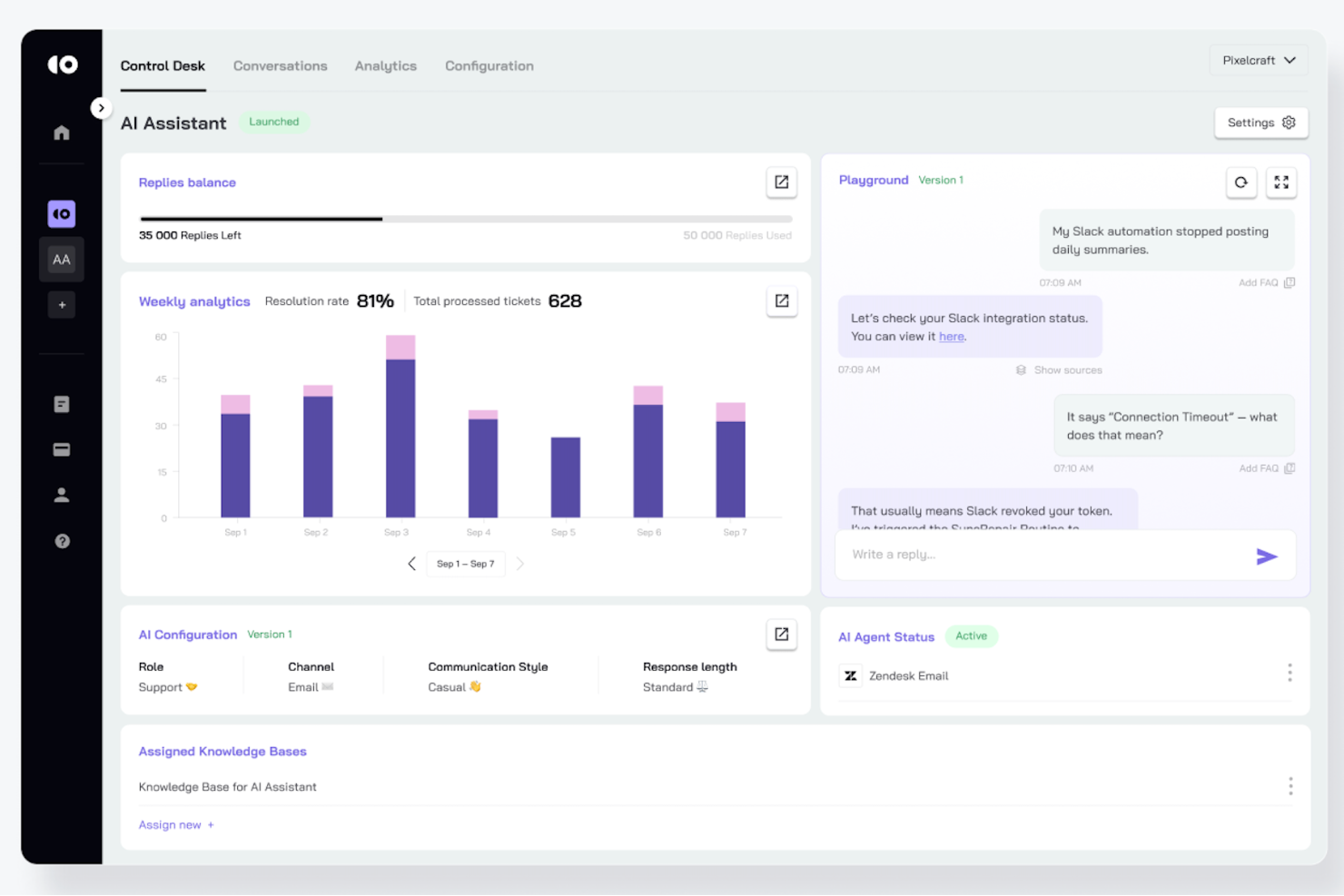
CoSupport AI is tailored for businesses seeking to enhance their customer service operations through automation and multilingual support. Designed to cater to various industries, it tackles challenges such as reducing response times and managing high volumes of customer inquiries. By integrating seamlessly with popular helpdesk systems, CoSupport AI ensures your team can focus on delivering exceptional customer experiences without being bogged down by repetitive tasks.
Why I Picked CoSupport AI
I picked CoSupport AI for its ability to automate a significant portion of customer support tasks, freeing up your team to handle complex issues. Its standout feature is the no-code AI setup, which allows for quick deployment without technical expertise. Additionally, CoSupport AI's multilingual capabilities ensure you can communicate effectively with a global customer base. The integration with existing helpdesks, providing seamless synchronization of past interactions and knowledge bases, further enhances its value as a customer service software solution.
CoSupport AI Key Features
In addition to its automation and multilingual support, I also found that CoSupport AI offers several other valuable features:
- AI-Powered Insights: The platform provides actionable insights by analyzing customer interactions, helping you improve service quality.
- Customizable AI Models: You can tailor the AI to fit your specific business needs, ensuring more accurate and relevant responses.
- Enterprise-Grade Data Security: With compliance to ISO 27001, GDPR, and CCPA standards, you can trust that your data is well-protected.
- Pre-Sales Automation: The tool assists in pre-sales by answering inquiries and capturing leads, enhancing your sales funnel.
CoSupport AI Integrations
Integrations include Zendesk, Freshdesk, Zoho, Google Drive, Slack, Intercom, Salesforce, Stripe, and Microsoft Teams. Custom integrations are available for unique systems.
Pros and Cons
Pros:
- Customizable models and automation for routine tasks
- Broad integrations and AI insights
- Multilingual and no-code friendly
Cons:
- Heavy AI reliance can reduce the human touch and struggle with nuanced queries
- Ongoing training needed for best AI performance

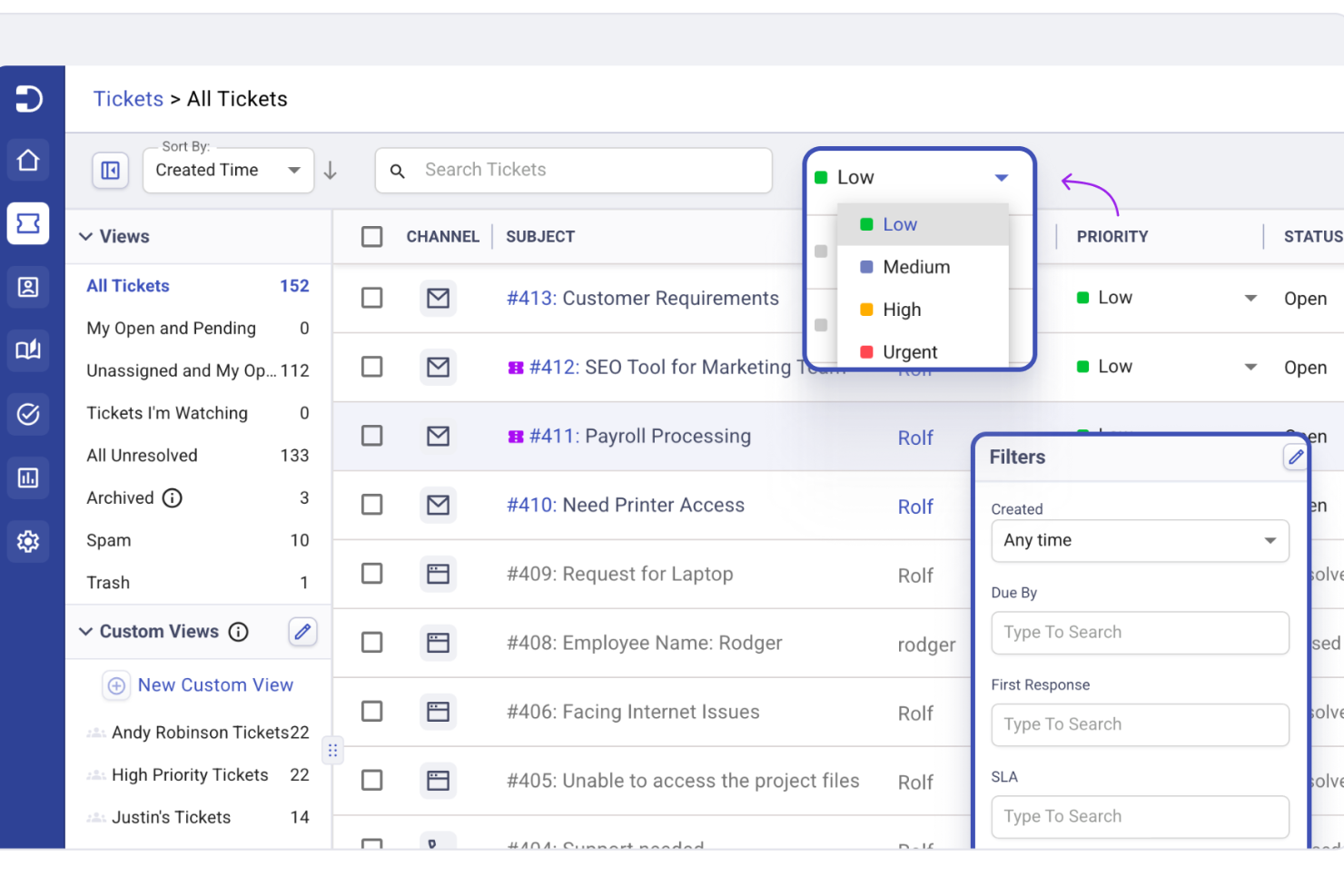
If you're seeking a customer service software solution that effortlessly integrates with your existing tools, Desk365 may be the answer. It appeals to businesses that value streamlined communication and efficient problem-solving, particularly those already utilizing Microsoft Teams. This AI-powered platform can help your team manage support tickets more effectively, reducing response times and enhancing customer satisfaction.
Why I Picked Desk365
I picked Desk365 for its integration with Microsoft Teams, which is pivotal for businesses that rely on this platform for internal communication. The software's AI-driven ticketing system stands out, as it allows for automated responses and efficient ticket routing, ensuring that customer inquiries are handled swiftly. Additionally, Desk365 offers a unified inbox that consolidates support requests from various channels, making it easier for your team to manage customer interactions without missing a beat.
Desk365 Key Features
In addition to its AI-driven ticketing and Microsoft Teams integration, Desk365 offers other valuable features for your customer service needs.
- Customizable SLAs: Allows your team to set specific service level agreements tailored to your business needs, ensuring timely resolutions.
- Knowledge Base: Provides a centralized repository for solution articles, making it easier for both your team and customers to find answers quickly.
- Mobile Responsiveness: Enables your team to manage tickets and customer interactions on the go, ensuring that support is always available.
- Automation Tools: Streamlines repetitive tasks and processes, freeing up your team to focus on more complex customer issues.
Desk365 Integrations
Integrations include Microsoft Teams, Microsoft 365, and other third-party applications.
Pros and Cons
Pros:
- Offers customizable SLAs to tailor service agreements.
- Mobile accessibility allows ticket management on the go.
- AI-driven ticketing system automates responses effectively.
Cons:
- Limited in advanced features compared to other software.
- Not ideal if you're looking for more native integrations outside of the Microsoft ecosystem


Freshdesk (a product of Freshworks Inc.) is a customer service platform designed to help teams manage customer interactions across multiple communication channels, including email, chat, and voice. It combines ticketing, automation, and reporting tools to give teams a consolidated view of customer conversations and support activity.
Why I Picked Freshdesk
I picked Freshdesk for how well it supports integrations with third party tools commonly used in customer service operations. The platform connects with a wide range of ecommerce, collaboration, and CRM systems, which can help teams keep support workflows aligned with existing processes. Pre built connectors and API access make it easier to automate data sharing between systems, reducing the need for manual updates. Freddy AI is also available to support workflows within the platform, such as assisting with ticket handling alongside these integrations.
Freshdesk Key Features
In addition to its strong integration capabilities, Freshdesk offers several other features that enhance its utility as a customer service software:
- Ticketing System: Streamlines support with intelligent ticketing, shared inboxes, and multilingual support, enhancing agent productivity and speeding up issue resolution.
- Freddy AI: Automates tasks and provides personalized self-service options to improve both customer and agent experiences.
- Self-Service Tools: Empowers your customers with a multilingual knowledge base and customizable customer portals, allowing them to find answers independently.
- Security Features: Protects customer data with role-based access control, single sign-on, and IP whitelisting, ensuring compliance and data security.
Freshdesk Integrations
Integrations include Shopify, Slack, Microsoft Teams, Playvox, Google Workspace, Jira, Trello, Zoom, Salesforce, and HubSpot.
Pros and Cons
Pros:
- Integrates AI-powered automation for efficient ticket management
- Features a user-friendly interface that enhances workflow
- Provides robust reporting and analytics tools for insights
Cons:
- Customization options are limited, hindering full personalization
- Account creation and login process may be cumbersome for users

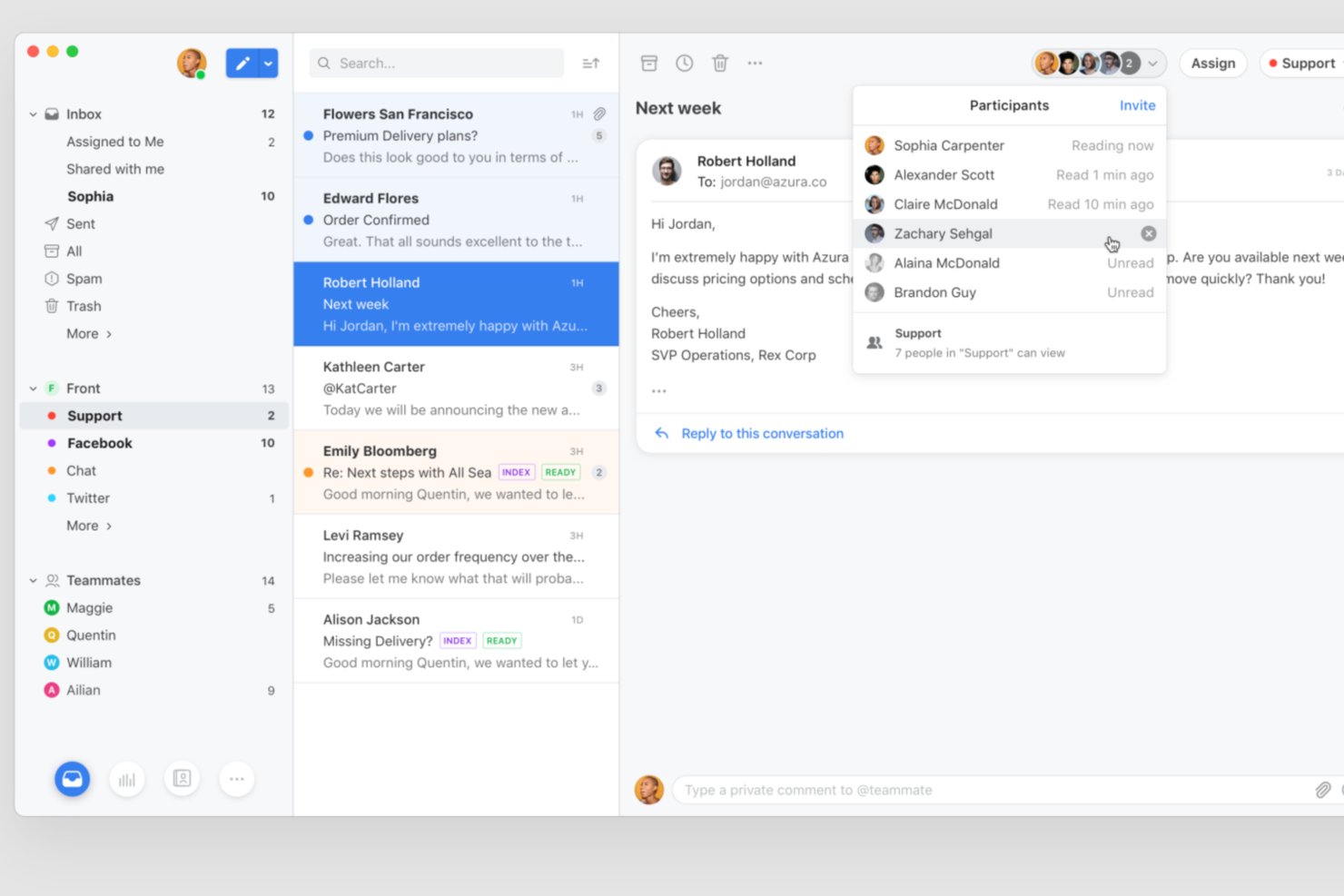
Front brings together email, chat, and other customer messages into a single collaborative workspace for support teams. It’s designed for organizations that need to coordinate across multiple channels and departments without losing track of conversations. If you’re looking for a customer service platform that emphasizes transparency, accountability, and team-based workflows, Front is worth considering.
Who Is Front Best For?
Front is a good fit for customer support and service teams in mid-sized to large organizations that need to manage high volumes of customer inquiries across multiple channels.
Why I Picked Front
When evaluating customer service software, I picked Front because it stands out for enabling cross-team ticket collaboration. The platform lets multiple team members work together on a single conversation using shared inboxes, internal comments, and conversation assignments. This makes it easy to loop in colleagues from other departments or escalate issues without losing context. For teams that need to coordinate responses and ensure nothing falls through the cracks, Front’s collaboration tools are especially valuable.
Front Key Features
Some other features in Front that support customer service teams include:
- Analytics and reporting: Track team performance, response times, and customer satisfaction with built-in dashboards and customizable reports.
- Workflow automation: Set up rules to automatically assign, tag, or escalate messages based on custom criteria.
- Multi-channel messaging: Manage email, SMS, live chat, and social media messages from a single unified inbox.
- Knowledge base integration: Connect your internal or external knowledge base to quickly share resources and answers within conversations.
Front Integrations
Integrations include Salesforce, Microsoft Dynamics 365, Shopify, Slack, Drift, Dialpad, Asana, monday.com, Outreach, and Twitter (X).
Pros and Cons
Pros:
- SLA management tools for tracking response targets
- Internal comments enable private agent collaboration
- Built-in workflow templates for fast setup
Cons:
- Limited customization for analytics dashboards
- No built-in voice calling feature


For businesses seeking a solution to enhance customer engagement and drive growth, Custify offers a platform tailored to SaaS companies. With features like automated workflows and comprehensive customer insights, Custify empowers your team to focus on nurturing customer relationships rather than getting bogged down in data management. By reducing churn and identifying opportunities for upselling and renewals, Custify helps transform customer success metrics into actionable growth strategies.
Why I Picked Custify
I picked Custify because it offers a suite of features specifically designed to address the needs of SaaS companies in managing customer relationships. With its automated workflows, your team can save significant time by streamlining routine tasks, allowing you to focus on strategic customer interactions. The platform's customer health scoring provides real-time insights into customer engagement, which helps you proactively address potential churn before it impacts your bottom line. Additionally, Custify's customer journey mapping and reporting tools enable you to visualize and optimize customer experiences, ensuring that your SaaS business can foster long-term customer loyalty and satisfaction.
Custify Key Features
In addition to its unique benefits for SaaS companies, Custify offers a range of features that cater to the needs of customer service software users.
- Dynamic Task Management: Assigns tasks based on team capacity and client needs, ensuring that your team can address customer issues promptly and efficiently.
- AI-Powered Tools: Utilizes artificial intelligence to generate customer summaries and automate note-taking, saving your team time while maintaining accuracy in customer records.
- Customer Portal: Centralizes collaboration and enhances transparency, allowing your clients easy access to their information and fostering a more engaging customer service experience.
- Surveys: Enables your team to gather valuable customer feedback through targeted surveys, helping you enhance your products and customer interactions based on direct input.
Custify Integrations
Integrations include Salesforce, HubSpot, Microsoft Teams, Zendesk, Slack, Jira Service Management, Outlook, Gmail, Chargebee, and Stripe.
Pros and Cons
Pros:
- Real-time notifications and health scores reduce churn
- Centralized data consolidates operations and improves productivity
- Quick integration setup often completed in less than a day
Cons:
- The dashboard could use more metrics
- Learning the UI takes some time


Guidde empowers your team to enhance customer service by transforming communication and knowledge sharing with its intuitive platform. It's designed for businesses aiming to streamline customer interactions through polished video tutorials, which simplify onboarding and reduce support tickets. By centralizing information and providing quick access, Guidde ensures your team can deliver an improved customer experience, making it an invaluable tool for any organization focused on elevating their service standards.
Why I Picked Guidde
I picked Guidde because it excels in creating AI-powered video guides, which is crucial for enhancing customer service interactions. With the Magic Mic feature, you can easily capture workflows and add polished narration, turning complex processes into simple, engaging tutorials. The Broadcasting feature ensures that your team receives tailored content at the right time, increasing engagement and reducing support queries. Additionally, Guidde's integration with platforms like Microsoft Dynamics 365 and Salesforce means you can seamlessly incorporate these video guides into your existing workflows, minimizing errors and improving efficiency.
Guidde Key Features
In addition to its AI-powered video guides, Guidde offers a range of features designed to enhance your customer service operations.
- Instant Video Creation: Quickly produce step-by-step videos that provide instant responses to customer queries, reducing the need for lengthy written explanations.
- Centralized Knowledge Sharing: Allow your team to create and access a centralized repository of video content, ensuring that everyone has the latest information at their fingertips.
- Custom Branding Tools: Incorporate your company's branding into video guides, maintaining a consistent and professional image throughout all customer interactions.
- Integration with Popular Platforms: Seamlessly integrate with tools like Microsoft Dynamics 365 and Salesforce, allowing your team to enhance their existing workflows without disruption.
Guidde Integrations
Integrations include Microsoft Dynamics 365, SAP, NetSuite, Salesforce, HubSpot, ServiceNow, and Workday.
Pros and Cons
Pros:
- Magic Capture allows easy screen recording for guides
- Includes interactive elements and professional voiceovers
- Utilizes AI for automatic storyline creation
Cons:
- Limited natural voice options for AI voiceovers
- Some users may find the editing features slightly restrictive


HappyFox is a versatile customer service software solution designed to meet the needs of businesses across various industries like education, healthcare, and eCommerce. By providing tools such as a help desk for ticket management, AI-driven support, and live chat, it empowers your team to consolidate customer queries efficiently, enhancing the overall interaction experience. With seamless integration into platforms like MS Teams and Salesforce, HappyFox helps tackle the challenge of maintaining operational efficiency while improving customer interactions.
Why I Picked HappyFox
I picked HappyFox because its customizable customer portal addresses the needs of businesses looking to enhance their customer service experience. The portal allows you to tailor interfaces with your branding, using your logo and colors, which helps create a cohesive customer interaction. With Smart Rules, you can automate routine tasks, allowing your team to focus on more complex issues. These features make HappyFox a versatile choice for industries like e-commerce and education, integrating smoothly into existing workflows.
HappyFox Key Features
In addition to the customizable customer portal, HappyFox offers a variety of features that enhance the customer service experience.
- Ticket Management: HappyFox provides an intuitive ticketing system that allows your team to manage and prioritize customer queries from multiple channels efficiently.
- AI-Powered Support: With HappyFox AI, you can leverage advanced AI tools to provide superior support and automate repetitive tasks, freeing up your team for more critical issues.
- Knowledge Base: The platform includes a comprehensive knowledge base, enabling you to offer self-service options to your customers and reduce the volume of support tickets.
- Multilingual Support: HappyFox's multilingual capabilities allow you to cater to a diverse customer base, ensuring that language barriers do not hinder effective communication.
HappyFox Integrations
Integrations include Microsoft Teams, Slack, Jira, Shopify, Salesforce, Aircall, WhatsApp, Google Suite, Azure Boards, and Pipedrive.
Pros and Cons
Pros:
- Powerful automation streamlines repetitive tasks and workflows
- Strong security measures ensure data privacy and protection
- User-friendly interface enhances navigation and usability
Cons:
- Lack of ticket update notifications and issues with CC functionality
- Limited reporting features compared to other platforms
Other Customer Service Software
Here are a few more worthwhile options that didn’t make the best customer service software shortlist but are still worth considering:
- Kustomer
No-code AI chatbot
- LiveHelpNow
AI-powered features
- Kayako
For SMBs
- SAAS First
For omnichannel communication
- Compass
For interactive walkthroughs
- 14.ai
Intent-aware customer response engine
- Zoho Assist
For remote access and troubleshooting
- monday service
For customizable customer service workflows
- Comm100
For AI-driven customer insights
- eDesk
For ecommerce support task automation
- LiveChat
For live chats
- Sprinklr
For customer feedback insights
- Issuetrak
For omnichannel ticket submission
- HelpCrunch
Customer communication software for sales/support
- Avochato
Mobile API customer solution
- Zoho CRM
Enterprise CRM
- Wix Answers
Support article solution
- Gorgias
Customer helpdesk for Shopify
- Gladly
All-in-one customer service solution
- Front
Collaborative customer support software
- Quiq Messaging
SMS/text messaging customer solution
- SysAid
Cloud customer solution
- HubSpot Service Hub
Internal employee support system
- Jira Service Management
Fully-customizable support desk management software
- Synthetix
Most accessible live help desk software
- AzureDesk
For email automations


What is Customer Service Software?
Customer service software is a platform that centralizes and automates how businesses manage customer support across channels. It streamlines tasks like ticketing, live chat, and feedback collection to help teams resolve issues efficiently and deliver consistent, high-quality service.
Customer Service Software Selection Criteria
When selecting the best customer service software to include in this list, I considered common buyer needs and pain points like response time efficiency and multi-channel integration. I also used the following framework to keep my evaluation structured and fair:
Core Functionality (25% of total score)
To be considered for inclusion in this list, each solution had to fulfill these common use cases:
- Manage support tickets
- Provide live chat support
- Enable email support
- Offer self-service portals
- Track customer interactions
Additional Standout Features (25% of total score)
To help further narrow down the competition, I also looked for unique features, such as:
- AI-driven insights
- Customizable dashboards
- Integrated knowledge base
- Advanced analytics
- Omnichannel support
Usability (10% of total score)
To get a sense of the usability of each system, I considered the following:
- Intuitive interface
- Easy navigation
- Minimal learning curve
- Responsive design
- Clear user guides
Onboarding (10% of total score)
To evaluate the onboarding experience for each platform, I considered the following:
- Availability of training videos
- Interactive product tours
- Access to templates
- AI chatbot assistance tools
- Live webinars for guidance
Customer Support (10% of total score)
To assess each software provider’s customer support services, I considered the following:
- 24/7 support availability
- Multiple support channels
- Quick response times
- Access to a knowledge base
- Dedicated account managers
Value For Money (10% of total score)
To evaluate the value for money of each platform, I considered the following:
- Competitive pricing
- Flexible subscription plans
- Features included in basic plans
- Discounts for annual billing
- Free trial availability
Customer Reviews (10% of total score)
To get a sense of overall customer satisfaction, I considered the following when reading customer reviews:
- Positive feedback on functionality
- Satisfaction with customer support
- Ease of use ratings
- Value for money opinions
- Comparison with similar tools
How to Choose Customer Service Software
It’s easy to get bogged down in long feature lists and complex pricing structures. To help you stay focused as you work through your unique software selection process, here’s a checklist of factors to keep in mind:
| Factor | What to Consider |
|---|---|
| Scalability | Ensure the software can grow with your team. Look for flexible plans and features that adapt as your business expands. |
| Integrations | Check for compatibility with existing tools like CRMs and email platforms. This saves time and reduces disruption. |
| Customizability | Consider how much you can tailor the software to fit your workflow. Custom fields and dashboards are helpful. |
| Ease of Use | Look for intuitive interfaces and simple navigation to minimize training time for your team. |
| Budget | Align the software costs with your financial constraints. Consider total costs, including hidden fees and upgrades. |
| Security Safeguards | Make sure the software includes robust security measures to protect customer data, like encryption and compliance with regulations. |
| Support Options | Evaluate the types of support available, such as live chat or phone support, to assist your team when needed. |
| Reporting Tools | Look for software that offers insightful analytics and reporting to help you track performance and identify trends. |
Here are a few things to consider when shopping around for customer service software:
- What are your team’s primary communication channels? If social communication is the norm for your business, consider getting specialized social customer service software.
- What is the structure of your customer support system, and how will the software fit into it?
- Are you looking for a help desk solution, a service hub solution, or a contact center software?
- Could your team benefit from implementing customer service chatbots?
- Would an outsourced customer service company be a better option?
- What is your budget, and what are your non-negotiable features?
- What are your must-have integrations?
Trends in Customer Service Software
In my research, I sourced countless product updates, press releases, and release logs from different customer service software vendors. Here are some of the emerging trends I’m keeping an eye on:
- AI and automation in customer service: AI tools are being used to analyze customer interactions and offer actionable insights. This helps teams understand customer needs better and improve service. For example, some vendors use AI to predict customer satisfaction scores.
- Voice Recognition Technology: More software is integrating voice recognition to handle customer queries. This trend is useful for businesses that receive high volumes of calls and want to automate some of the initial interactions.
- Omnichannel experiences: Providing a consistent experience across all customer touch-points is becoming standard. Companies are focusing on integrating chat, email, phone, and social media support into one platform to enhance customer engagement.
- Self-service enhancements: Customer demand for self-service options is growing. Vendors are improving knowledge bases and community forums to help customers find answers without needing agent assistance, reducing support load.
- Conversational commerce: Using messaging apps, chatbots, voice assistants, or other conversational platforms to interact with customers and facilitate purchases. It blends communication and shopping by allowing customers to ask questions, get recommendations, and complete transactions all within a chat or voice interface.
Features of Customer Service Software
When selecting customer service software, keep an eye out for the following key features:
- Omnichannel support: Handle customer conversations across multiple channels—like email, chat, social media, and phone—all in one place. This keeps your team organized, helps you respond faster, and lets customers reach you however they prefer.
- Ticket management: Automatically turn customer inquiries into trackable tickets. Assign, prioritize, and resolve each request efficiently so nothing falls through the cracks and everyone gets the help they need.
- Knowledge base integration: Build and maintain a self-service library of FAQs and guides. This empowers customers to quickly find answers on their own while reducing the workload for your support team.
- Automation tools: Set up rules to automate common tasks, such as ticket assignment or sending follow-up emails. This streamlines repetitive work and helps you deliver consistent, timely service.
- Customer feedback collection: Gather feedback directly through surveys or rating systems built into the software. Use these insights to spot trends, improve your processes, and show customers you care about their opinions.
- Reporting and analytics: Access real-time dashboards and detailed reports that track key metrics like response times and customer satisfaction. This data helps you spot opportunities for improvement and celebrate your team’s wins.
- Collaboration features: Use shared inboxes, internal notes, or team chat tools to collaborate with your coworkers. This makes it easy to loop in the right expert and resolve complex issues faster.
- Customizable workflows: Tailor workflows to match how your team operates, whether you need unique ticket categories, approval processes, or custom forms. This flexibility lets the software work for you, not the other way around.
- Integration capabilities: Connect your customer service software with other tools you use—like CRM systems or e-commerce platforms—to bring all your customer data together and simplify your workflow.
- Security features: Protect sensitive customer information with permissions, encryption, and audit logs. This safeguards both your business and your customers’ trust.
Common Customer Service Software AI Features
Beyond the standard customer service software features listed above, many of these solutions are incorporating AI with features like:
- AI-powered chatbots: Provide instant answers to customer questions using intelligent chatbots that work around the clock. This helps you handle high volumes without overloading your team.
- Sentiment analysis: Automatically scan messages to gauge customer emotions and urgency. This allows your team to prioritize unhappy customers and intervene before issues escalate.
- Predictive analytics: Use AI to anticipate customer needs, like predicting which tickets are likely to escalate or which customers might churn. This helps you take proactive steps to improve satisfaction and retention.
- Automated ticket routing: Let AI assign incoming tickets to the right team or agent based on topic, language, or complexity. This ensures faster and more accurate responses.
- Smart response suggestions: Get AI-generated reply drafts or knowledge base article recommendations during live conversations. This speeds up response times and maintains quality.
- Voice analysis: Use AI to transcribe calls and analyze tone, helping you surface actionable insights from phone support interactions and train your team more effectively.
Benefits of Customer Service Software
Implementing customer service software provides several benefits for your team and your business. Here are a few you can look forward to:
- Improved efficiency: Automation tools handle repetitive tasks, allowing your team to focus on more complex customer issues.
- Enhanced customer satisfaction: Features like live chat and ticket management ensure quick and organized responses to customer queries.
- Better insights: Analytics and reporting provide data-driven insights into team performance and customer interactions.
- Increased self-service options: A knowledge base empowers customers to find solutions on their own, reducing the workload on your support team.
- Consistent customer experience: Omnichannel support integrates various communication platforms, ensuring customers receive consistent service regardless of the channel.
- Stronger customer relationships: Customer journey mapping helps identify pain points and opportunities, improving overall service and customer retention.
- Improved satisfaction: When issues are resolved faster and more effectively, customers feel valued and are more likely to stick around.
- Efficiency and collaboration among teams: With centralized tools, teams can work together seamlessly, share updates, and resolve issues faster.
Costs and Pricing of Customer Service Software
Selecting customer service software requires an understanding of the various pricing models and plans available. Costs vary based on features, team size, add-ons, and more. The table below summarizes common plans, their average prices, and typical features included in customer service software solutions:
Plan Comparison Table for Customer Service Software
| Plan Type | Average Price | Common Features |
|---|---|---|
| Free Plan | $0 | Basic ticket management, email support, and access to a knowledge base. |
| Personal Plan | $5-$25/ user/month | Live chat, basic automation, and limited analytics and reporting. |
| Business Plan | $30-$60/ user/month | Advanced ticketing, multi-channel support, and customizable dashboards. |
| Enterprise Plan | $70-$150/ user/month | Comprehensive automation, full analytics suite, and personalized support options. |
Customer Service Software: Customer Success Stories
Implementing customer service software has led to significant improvements for various companies across industries. Here are some notable success stories:
Kawasaki Engines
Kawasaki Engines utilized Salesforce's customer service solutions to unify their data, leading to substantial improvements in team productivity and customer satisfaction. According to a case study published by Salesforce, by centralizing information, Kawasaki enhanced their Customer Satisfaction (CSAT) scores, demonstrating the effectiveness of integrated data management in elevating service quality.
Amica
Amica, an insurance company, adopted MicroStrategy's HyperIntelligence to streamline data access for their representatives. As per a success story on MicroStrategy's website, this integration empowered them to provide unmatched customer service and maintain a 98% customer retention rate, showcasing the role of efficient data utilization in fostering customer loyalty.
Hubo
Hubo, a home improvement retailer, utilized customer service software to onboard new products and suppliers ten times faster. According to Informatica, this efficiency enabled them to plan an expansion from 50,000 to a projected 1 million product SKUs within five years, demonstrating how streamlined processes can support significant business growth.
These examples illustrate how effective implementation of customer service software can enhance efficiency, improve customer satisfaction, and drive substantial business growth.
Customer Service Software: Frequently Asked Questions
Here are some answers to popular FAQs for some top-of-mind customer service software topics:
How can I integrate customer service software with my existing business systems?
Integrating customer service software with your existing business systems hinges on the use of APIs and third-party integration platforms. Many customer service platforms offer native integrations with popular CRM systems, email platforms, social media, and more, ensuring a seamless flow of data across your business tools.
The key to a successful integration is understanding your software’s API capabilities and utilizing integration platforms to connect your tools effectively.
What's the average setup time for customer service software?
In my experience, the average setup time for customer service software varies by platform and business size. Most cloud-based tools can be up and running within a day for small teams, but larger organizations or enterprise rollouts with custom integrations can take several weeks. Ask your vendor about onboarding resources, support, and best practices to minimize disruptions during implementation.
What customer service software features help prevent agent burnout?
Features that help prevent agent burnout include automated ticket routing, AI-powered suggestions, collaboration tools, and workflow automation. These tools reduce repetitive tasks and ensure agents aren’t overloaded with tickets. Access to an internal knowledge base and smart workload distribution also help keep your team informed, efficient, and supported.
What are the most important customer service metrics to track?
Using defined metrics will help you measure the success or failure of your customer support team’s performance. They generally fall into two main categories: operational and experiential.
Here’s a list of the most important customer service metrics you should be tracking to ensure success:
Operational customer service metrics:
- Customer churn rates
- Overall resolution rate
- First contact resolution rate
- Ticket reopens
- First response time
- Average resolution time
- Ticket volume
- Contacts per issue
- Ticket backlog
- Customer retention rate
- Rate of answered calls
- Social media metrics
Experiential customer service metrics:
- Net Promoter Score (NPS)
- Customer Effort Score (CES)
- Customer Satisfaction Score (CSAT)
Are there any free customer service software?
Freshdesk and Zoho CRM are examples of free customer service software. However, both are limited in how many team members you can add to a free plan before upgrading to a premium bundle. For startups and small businesses, a free software might be all you need. But generally, as you scale, you’ll want those premium features that come with a paid plan.
How can I measure the ROI and impact of implementing customer service software?
To measure the ROI of new customer service software, track changes in team productivity, first response time, resolution rates, and customer satisfaction scores before and after deployment. Compare support costs and volume of tickets handled. Regularly survey both customers and agents to get feedback on efficiency and experience improvements.
Do small businesses and startups need customer service tools?
Yes! I would argue that small businesses need them the most.
When you’re operating with lean teams and limited resources, a customer service tool becomes your force multiplier. It helps you stay organized, respond faster, and deliver consistent support without burning out your team. Plus, first impressions matter. Early-stage companies that prioritize great customer experiences build stronger loyalty and stand out from the competition.
The right customer service software can scale with you, offering automation, knowledge base tools, and omnichannel support without the enterprise price tag. In other words: you don’t need a massive team to deliver big-league service.
How do I evaluate customer service software vendors for long-term partnerships?
Evaluate vendors for long-term partnerships by looking at their customer support track record, update frequency, user community, and roadmap transparency. Ask for reference clients and case studies. Consider service level agreements (SLAs), uptime guarantees, and the vendor’s commitment to ongoing training and support for your team.
What are the different types of customer service software?
There are several types of customer service software, each tackling a different part of the support experience.
- Knowledge bases let customers self-serve with searchable articles.
- Live chat and messaging tools like WhatsApp or in-app chat help you offer real-time support.
- Help desk software organizes emails and tickets so nothing slips through the cracks.
- CRMs give your team the full context behind every customer.
- If your business requires phone support, call center platforms can streamline it with call recording and ticketing.
- Social media monitoring tools can track brand mentions.
- Survey tools capture direct feedback and improve as you grow.
How does AI in customer service software impact team workflows?
AI features in customer service software can dramatically streamline agent workflows. AI-powered tools can auto-tag tickets, generate response suggestions, and even resolve simple queries without agent input. This allows your team to focus on complex, high-value interactions and can lead to higher job satisfaction and faster customer resolutions.
Related CX Software Reviews
If you still haven't found what you're looking for here, check out these related customer experience management tools that we've tested and evaluated.
- Help Desk Software
- Call Center Software
- Customer Messaging Platform
- Digital Experience Platform
- Sentiment Analysis Tools
- Customer Experience Management Software
Customer Service Equals Customer Loyalty
The best customer service software allows your team to meet customer needs without overloading individual agents. Automatic systems and tracking databases save valuable time that you can share with clients. The longer you spend with customers the more your business grows. Opportunities, profits, sales, and relationships all benefit from an enhanced focus on customer needs.
If you found this article useful, consider signing up for our CX Lead newsletter. We'll deliver the latest updates on trends CX professionals care about, including tips and tricks to optimize your customer service and surpass your biggest competitors.