

I 10 migliori software per gli script dei call center del 2026

10 Elenco dei migliori software per script dei call center


Quando gestisci le operazioni di un call center, devi sempre conciliare le esigenze di offrire un servizio coerente e di qualità con il mantenimento dell'efficienza del tuo team. I software per gli script dei call center possono contribuire ad affrontare queste difficoltà guidando i tuoi operatori nelle interazioni con i clienti e garantendo che forniscano informazioni accurate e un'esperienza fluida.
In base alla mia esperienza, scegliere il software giusto può aumentare la produttività del tuo team e la soddisfazione dei clienti. Ho testato e recensito in modo indipendente diverse soluzioni per offrirti un elenco imparziale delle migliori opzioni.
In questo articolo troverai una recensione approfondita e basata su un'attenta ricerca dei migliori software per script dei call center disponibili sul mercato. Analizzerò le funzionalità distintive, i vantaggi e gli aspetti da considerare per ciascuna soluzione, aiutandoti a prendere una decisione consapevole per il tuo team.
Perché fidarsi dei nostri consigli sui software
Il nostro team testa e recensisce software dal 2012. In quanto leader CX noi stessi, sappiamo quanto sia difficile — e importante — scegliere il software giusto.
Per questa guida, abbiamo valutato gli strumenti attraverso test pratici e ricerche indipendenti, assegnando un punteggio agli strumenti in base ai nostri criteri di selezione.
Le nostre recensioni riflettono il nostro giudizio editoriale umano, non un discorso di vendita.
Tabella comparativa dei software per script dei call center
Questa tabella comparativa riassume i dettagli sui prezzi delle mie migliori selezioni di software per script dei call center:
| Tool | Best For | Trial Info | Price | ||
|---|---|---|---|---|---|
| 1 | Ideale per coaching e guida degli agenti in tempo reale | Demo gratuita disponibile | Prezzi su richiesta | Website | |
| 2 | Ideale per call center orientati all’utente con scripting multicanale | Prova gratuita di 14 giorni | Da $25/utente/mese (fatturato annualmente) | Website | |
| 3 | Ideale per creare script a partire da dati dei lead generati dinamicamente | Demo gratuita disponibile | A partire da $199/utente/mese | Website | |
| 4 | Ideale per trasformare la customer experience attraverso l'intelligenza artificiale | Demo gratuita | Da $75/utente/mese (fatturato annualmente) | Website | |
| 5 | Ha una leggera curva di apprendimento | Demo gratuita | Da $110/utente/mese | Website | |
| 6 | Ideale per un call center tutto-in-uno con gamification | Demo gratuita disponibile | Prezzo su richiesta | Website | |
| 7 | Ideale per un call center cloud con supporto agli script | Demo gratuita | Da $119/utente/mese | Website | |
| 8 | Ideale per scripting automatizzato di SMS bot | Prova gratuita di 14 giorni + demo gratuita | Da $29/utente/mese (fatturato annualmente) | Website | |
| 9 | Ideale per migliorare il tempo di formazione degli operatori | Prova gratuita + demo gratuita disponibili | Da $30/mese | Website | |
| 10 | Ideale per guide interattive guidate da alberi decisionali per gli operatori | Prova gratuita di 30 giorni disponibile | I piani partono da $20/utente/mese | Website |
Recensioni dei migliori software per script dei call center
Di seguito sono riportati i miei riepiloghi dettagliati dei migliori software per script dei call center inclusi nella mia selezione. Le mie recensioni offrono uno sguardo approfondito alle funzionalità principali, ai pro \u0026 contro, alle integrazioni e ai casi d’uso ideali di ogni strumento, per aiutarti a trovare quello migliore per i tuoi operatori.

Cresta
Ideale per coaching e guida degli agenti in tempo reale

Cresta è una piattaforma per contact center alimentata dall'Intelligenza Artificiale che offre guida in tempo reale nelle conversazioni, suggerimenti dinamici sulle conoscenze, richiami per la conformità e proposte della prossima miglior azione da intraprendere per gli agenti attraverso canali vocali, chat ed email.
Per chi è Cresta?
Cresta è adatta a contact center aziendali con grandi team di agenti che necessitano di guida in tempo reale basata sull'IA per mantenere la coerenza nelle conversazioni ad alto volume.
Perché ho scelto Cresta
Ho incluso Cresta tra le mie scelte principali perché il suo prodotto Agent Assist gestisce il coaching in tempo reale in modo che i copioni statici non possono eguagliare. Durante le chiamate in diretta, gli agenti ricevono suggerimenti specifici per il contesto, promemoria sui comportamenti e raccomandazioni sulle prossime azioni da compiere che si adattano a quanto viene effettivamente detto. Apprezzo anche la funzione Knowledge Agent, che lavora continuamente durante la conversazione, combinando il contesto parlato con i dati visualizzati sullo schermo per proporre risposte supportate da fonti in modo istantaneo, così che gli agenti non debbano mai mettere un cliente in attesa per cercare informazioni.
Caratteristiche principali di Cresta
- Smart compose: Suggerisce risposte ai messaggi generate dall'IA per i canali chat ed email in base al contesto della conversazione in tempo reale.
- Auto-riassunto: Genera sommari post-chiamata e compila i campi del lavoro dopo la chiamata, riducendo la documentazione manuale.
- Auto-valutazione della qualità: Valuta il 100% delle interazioni in base a rubriche personalizzate per monitorare l'aderenza degli agenti ai comportamenti conversazionali definiti.
- Opera workflow builder: Uno strumento no-code che consente ai team CX di progettare e aggiornare i flussi guida per gli agenti senza il supporto degli ingegneri.
Cresta si integra con soluzioni telefoniche e di chat come Five9, Amazon Connect e Genesys, oltre a piattaforme CRM e di engagement clienti come Salesforce e Zendesk. Si collega anche con NICE CXone e Twilio. Ulteriori integrazioni comprendono strumenti di marketing come HubSpot e Marketo e piattaforme dati tra cui Databricks. Cresta mette a disposizione un'API per integrazioni personalizzate.
Pros and Cons
Pros:
- Auto-valutazione di tutte le conversazioni su tutti i canali
- Fornisce guida in tempo reale in meno di 200 millisecondi
- Strumenti no-code per creare casi d'uso personalizzati
Cons:
- La funzione di knowledge assist può identificare erroneamente l'intento del chiamante
- La precisione nella trascrizione richiede una personalizzazione avanzata

Ideale per call center orientati all’utente con scripting multicanale
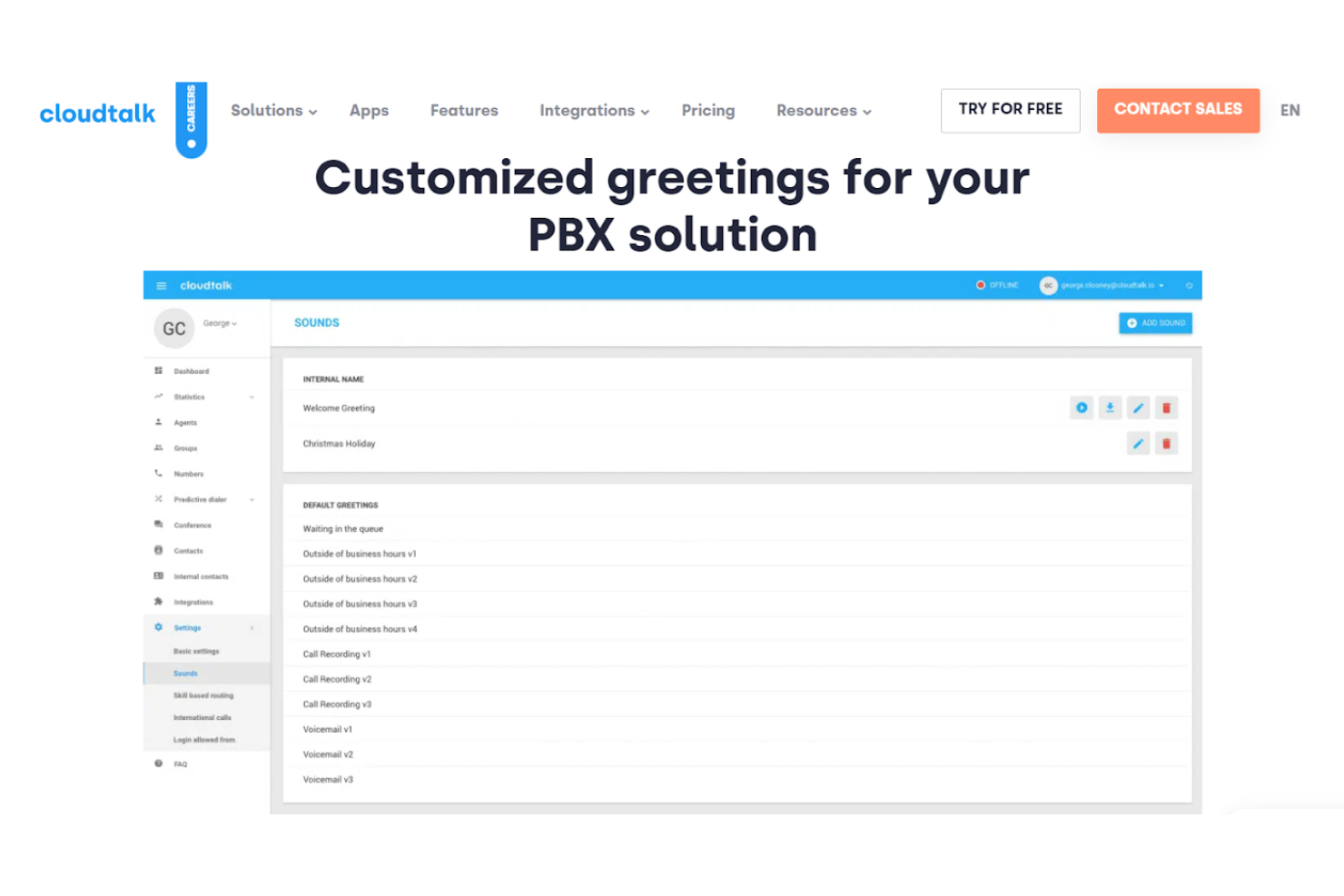
CloudTalk offre agli utenti un'intelligenza artificiale che guida flussi di lavoro per call center intuitivi con risposta vocale interattiva (IVR), risposta automatica per giornate intense, messaggistica cloud con risposte predefinite e messaggi di benvenuto personalizzati per soluzioni PBX.
Perché ho scelto CloudTalk: Grazie ai messaggi di benvenuto personalizzati, gli utenti possono registrare diversi tipi di script, inclusi messaggi di accoglienza, messaggi menu IVR, messaggi d'attesa, caselle vocali personalizzate, saluti per le festività e messaggi fuori orario lavorativo. Gli utenti possono anche monitorare come questi strumenti influenzano i dati aziendali in tempo reale tramite le analisi del call center.
CloudTalk supporta le chiamate di assistenza per help desk, supporto clienti e team di vendita di ogni dimensione aziendale, incluse startup e PMI. Questa piattaforma è inoltre specializzata in soluzioni per l'ecommerce.
Funzionalità e integrazioni principali di CloudTalk
Funzionalità includono scripting delle chiamate, IVR, numeri internazionali, chatbot, messaggi personalizzati e una suite completa ViOP. CloudTalk è accessibile tramite browser web e app desktop.
Integrazioni includono ActiveCampaign, Dataddo, Freshsales, Freshservice, Front, Gong, HubSpot, Intercom, MS Dynamics e Zoho Desk.
Pros and Cons
Pros:
- Navigazione semplice
- Monitoraggio in tempo reale delle performance degli agenti
- Flussi e regole personalizzabili
Cons:
- Informazioni limitate in dashboard per gli agenti
- Alcuni problemi nella generazione di numeri locali

Ideale per creare script a partire da dati dei lead generati dinamicamente
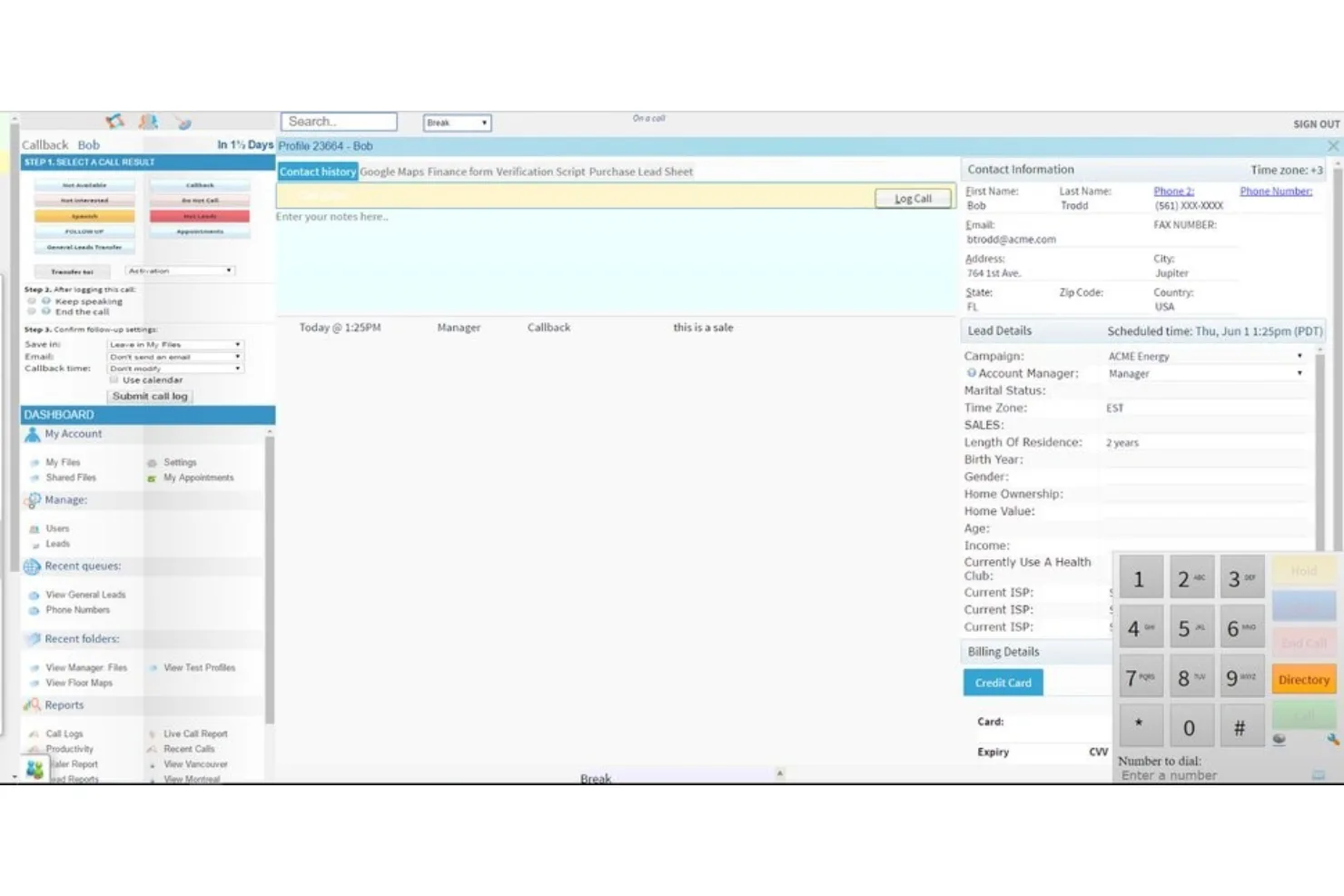
ReadyMode, precedentemente chiamato Xencall, è un software di supporto e un dialer predittivo di livello aziendale che collega in modo intelligente gli operatori del servizio clienti ai lead.
Perché ho scelto ReadyMode: Oltre a offrire velocità di composizione incredibilmente elevate, ReadyMode propone un software dinamico per la creazione di script destinati agli agenti di vendita, con i dati dei lead incorporati direttamente nello script. Gli utenti possono inoltre creare e personalizzare una varietà di risposte vocali interattive basate su diverse regole, tra cui le opzioni del chiamante e l'ora del giorno.
ReadyMode offre soluzioni a PMI e aziende di livello enterprise con piani a più livelli che forniscono assistenza in base alle licenze degli agenti e alle dimensioni dell'organizzazione. Supporta inoltre team di diversi settori, tra cui call center, energia solare, assicurazioni sanitarie, BPO, immobiliare, viaggi e turismo.
Funzionalità e integrazioni distintive di ReadyMode
Le funzionalità includono l'instradamento intelligente delle chiamate, la composizione predittiva, gli strumenti per la creazione di script, la registrazione delle chiamate, l'inoltro delle chiamate e il monitoraggio in tempo reale dell'attività degli operatori. Il monitoraggio dell'attività consente ai responsabili di supportare gli agenti con istruzioni in modalità “sussurro”, che forniscono supporto alle guide degli script.
Le integrazioni includono ActiveCampaign, ActiveProspect, ClickSend, Google Maps, HubSpot, leadsquared, REISift, Salesforce, Sherpa e Zoho. Tutte le integrazioni sono native e consentono la condivisione bidirezionale dei dati.
Pros and Cons
Pros:
- Ottimo servizio clienti
- Adattabile a qualsiasi settore
- Facile da comprendere
Cons:
- Interfaccia utente datata
- Piattaforma basata sul Web — nessuna app per Android o iPhone

Ideale per trasformare la customer experience attraverso l'intelligenza artificiale
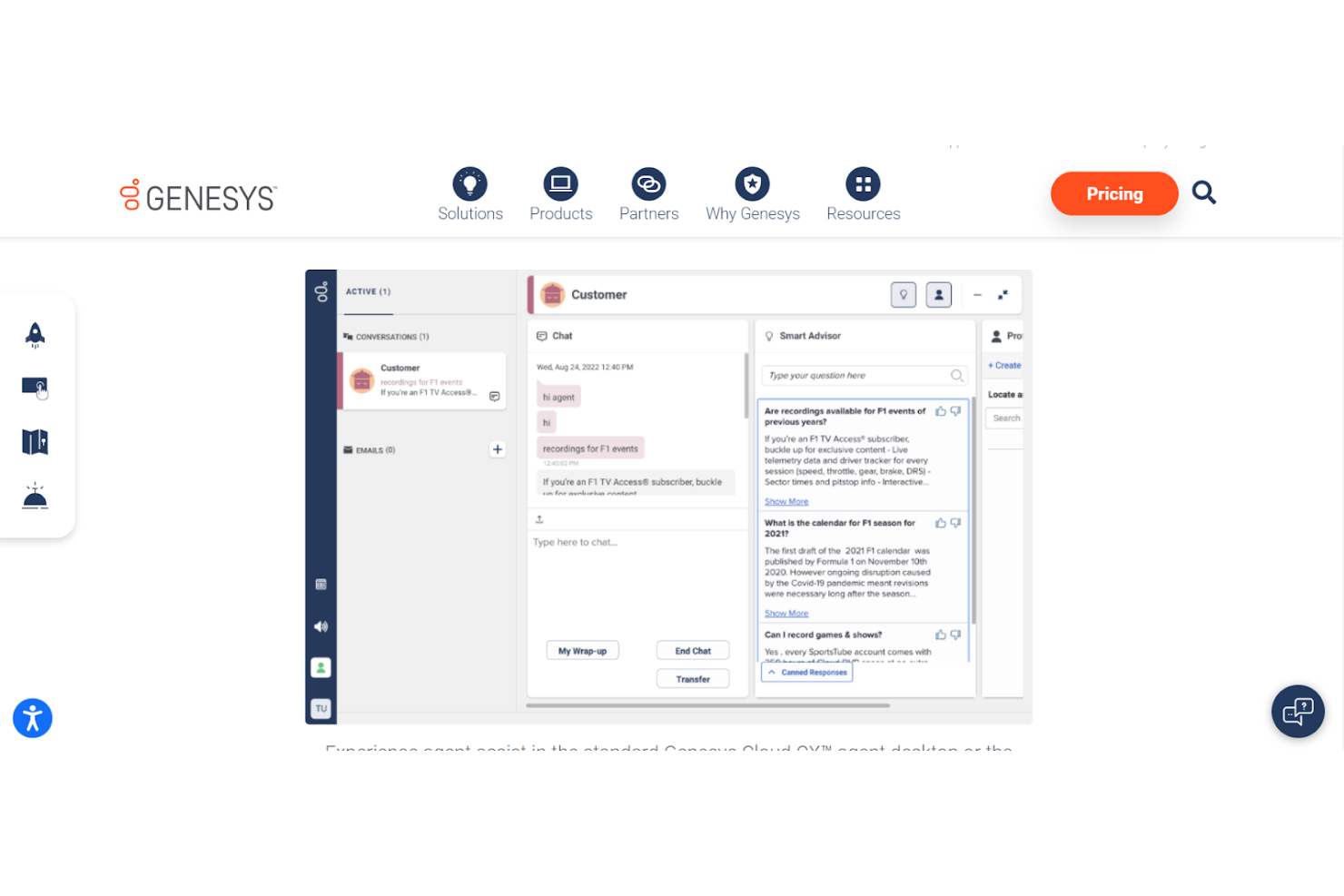
Genesys Cloud CX è un software per call center unico con funzionalità di scripting che includono assistenza agli agenti, gestione della conoscenza, coinvolgimento predittivo e chatbot. Questa piattaforma offre un'orchestrazione intelligente dell'esperienza per analizzare il sentiment dei clienti e guidare gli operatori del servizio clienti grazie ad un'architettura componibile.
Perché ho scelto Genesys Cloud CX: Lo strumento di assistenza agli agenti offre uno Smart Advisor che suggerisce azioni durante la chiamata per risolvere più velocemente al primo contatto e migliorare i KPI. Questo strumento potenzia gli operatori, facilitando la ricerca delle risposte, sostituendo le attività manuali con l'automazione e consentendo di concentrarsi sulle analisi dei clienti. Ogni chiamata termina con un riepilogo automatico dell'interazione per ridurre le note manuali.
Genesys Cloud CX offre soluzioni in base a settore, caso d’uso e tipologia di organizzazione, dimostrando di poter supportare PMI, aziende di medie dimensioni e realtà enterprise che operano in banca, governo, sanità, retail e assicurazioni.
Caratteristiche e integrazioni di spicco di Genesys Cloud CX
Caratteristiche includono Smart Advisor, reportistica automatica, Robotic Process Automation, conoscenza integrata e integrazione dell'esperienza degli agenti. La piattaforma dispone di un'IA integrata ma supporta anche Google CCAI e altri partner di IA.
Integrazioni includono Azure Active Directory, Gong.io, Google Workspace, Jenkins, OneLogin, Microsoft Azure, Salesforce Service Cloud, Shelf, Qualtrics CoreXM e Zendesk Suite.
Pros and Cons
Pros:
- Gestione WFM semplice
- Cruscotti di reportistica facili da usare
- Analisi istantanee
Cons:
- Poca trasparenza sui prezzi
- Lieve latenza nei display in tempo reale

Ha una leggera curva di apprendimento
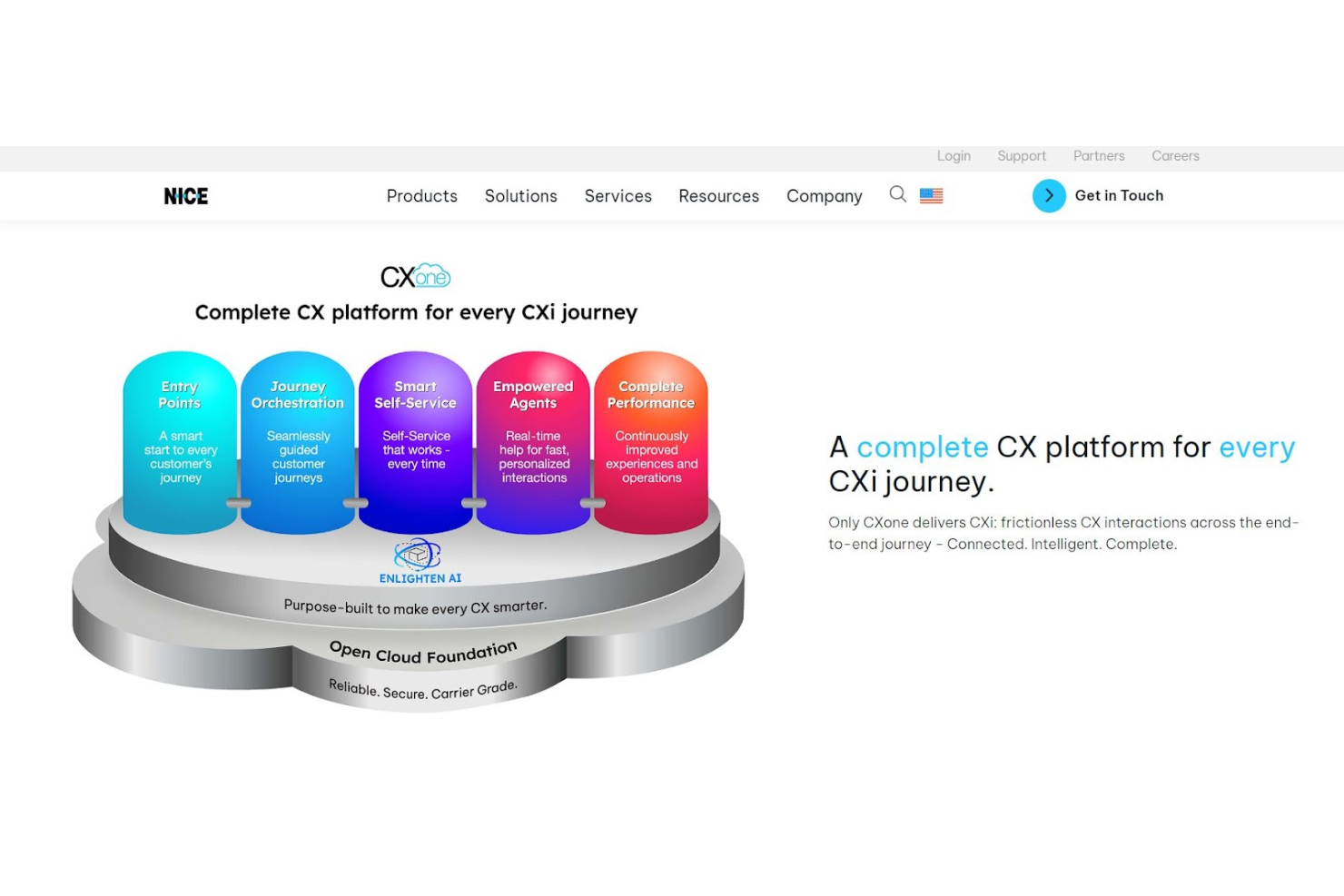
NICE CXone è un software per call center con scripting che si concentra sull’avvio rapido dei nuovi operatori e sul miglioramento dell’esperienza del cliente. Grazie a script che includono introduzioni e indicazioni proattive per la conversazione, gli operatori sono in grado di stimolare le risposte dei clienti e garantire di comprendere esattamente le loro esigenze.
Perché ho scelto NICE CXone: La creazione di script intelligenti da parte dei responsabili offre anche ai nuovi operatori una base di riferimento per le interazioni con i clienti e assicura che non debbano cercare continuamente risposte nella base di conoscenza aziendale. Con questo strumento, gli utenti possono creare un flusso di conversazione naturale e ottimizzare il percorso del cliente.
NICE CXone può supportare sia piccole che grandi aziende in settori che vanno dall’assistenza sanitaria e i servizi finanziari ai fornitori di servizi di processo aziendale, telecomunicazioni e servizi no profit.
Caratteristiche e integrazioni principali di NICE CXone
Caratteristiche includono intelligenza artificiale conversazionale e chatbot, risposta vocale interattiva, scripting della conversazione, costruttore self-service e gestione della conoscenza.
Integrazioni includono Bullhorn, Microsoft Dynamics, Netsuite, Oracle Service Cloud, Salesforce, SAP Cloud for Customer, ServiceNow, e Zendesk. NICE CXone offre anche integrazioni restful API.
Pros and Cons
Pros:
- Navigazione intuitiva
- Offre capacità predittive per voce e chat
- Facile da utilizzare
Cons:
- Non ci sono molte soluzioni pronte all’uso
- I dati in tempo reale richiedono un aggiornamento

Convoso
Ideale per un call center tutto-in-uno con gamification
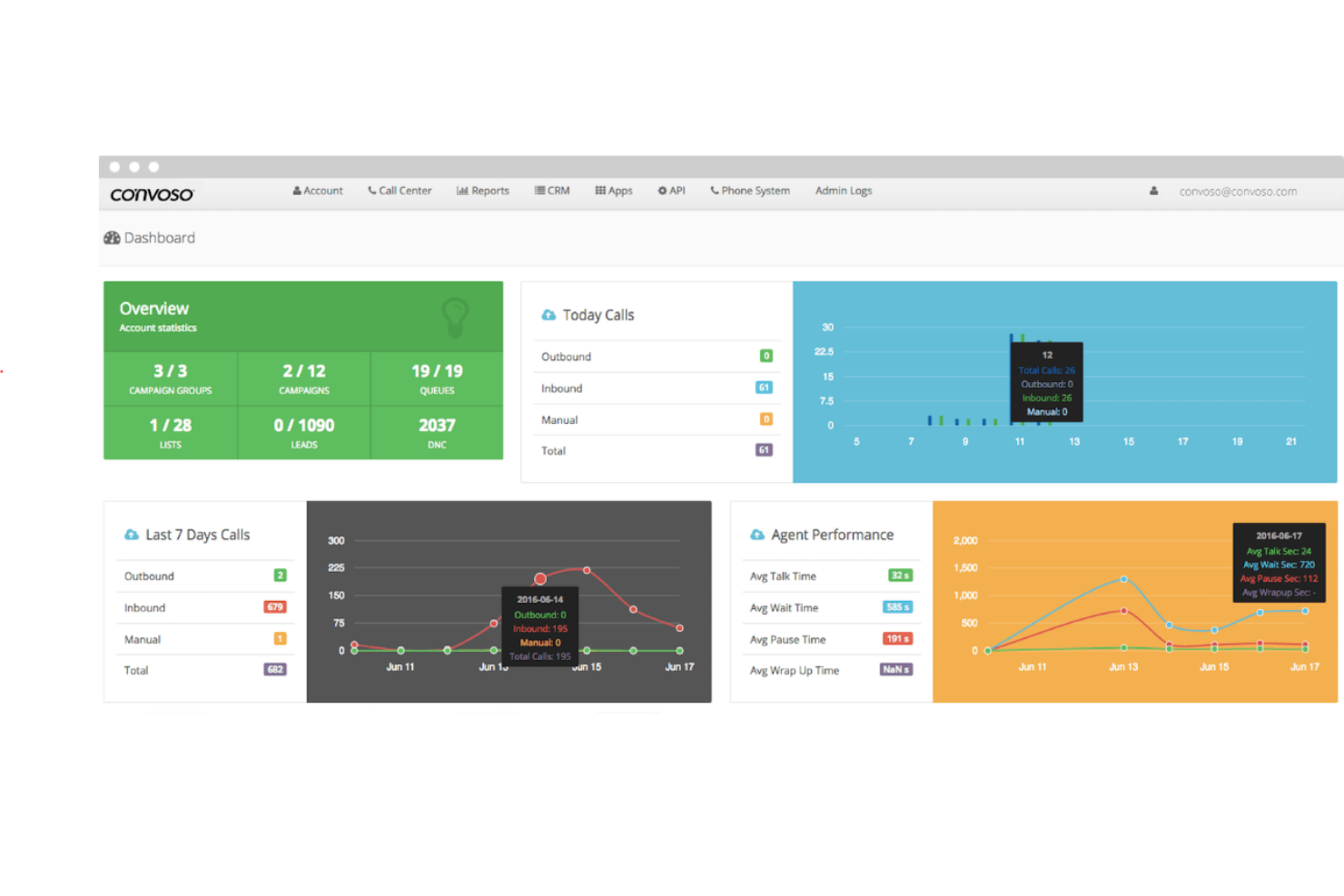
Convoso offre una suite tutto-in-uno per call center con potenti strumenti di scripting per le chiamate che aiutano gli operatori lungo l’intero percorso del cliente, e analisi automatizzate che condividono i dati migliorati per un sistema di gamification che incentiva il coinvolgimento.
Perché ho scelto Convoso: La funzione di scripting delle chiamate di Convoso lavora insieme al loro agente virtuale intelligente per filtrare le chiamate e garantire lead di alta qualità. L’agente virtuale trae beneficio da machine learning, programmazione del linguaggio naturale e avanzato riconoscimento vocale, riuscendo a rispondere alle domande dei clienti per ridurre il tempo di gestione da parte degli operatori.
Convoso supporta organizzazioni di tutte le dimensioni in una varietà di settori. Offre inoltre soluzioni specializzate per diversi tipi di organizzazioni, tra cui marketing, settore solare, assicurazioni, servizi per la casa e aziende finanziarie.
Caratteristiche e integrazioni principali di Convoso
Caratteristiche includono rilevamento delle segreterie telefoniche, gestione della reputazione del Caller ID, scripting dinamico, reportistica avanzata, chiamate follow-the-sun, risposte intelligenti e agenti virtuali. Gli agenti virtuali possono gestire sia interazioni vocali che SMS.
Integrazioni includono ActiveProspect, Balto, Blueink, boberdoo.com, Campaign Registry, DebtPay Pro, Google Maps, Journaya, Shopify e Zapier. Le integrazioni CRM sono disponibili tramite open API.
Pros and Cons
Pros:
- Strumenti di reportistica personalizzabili
- Il passaggio è semplice
- Facile da usare
Cons:
- Gli script semplificati non sono ideali per clienti esigenti
- Nessuna app mobile
Five9
Ideale per un call center cloud con supporto agli script
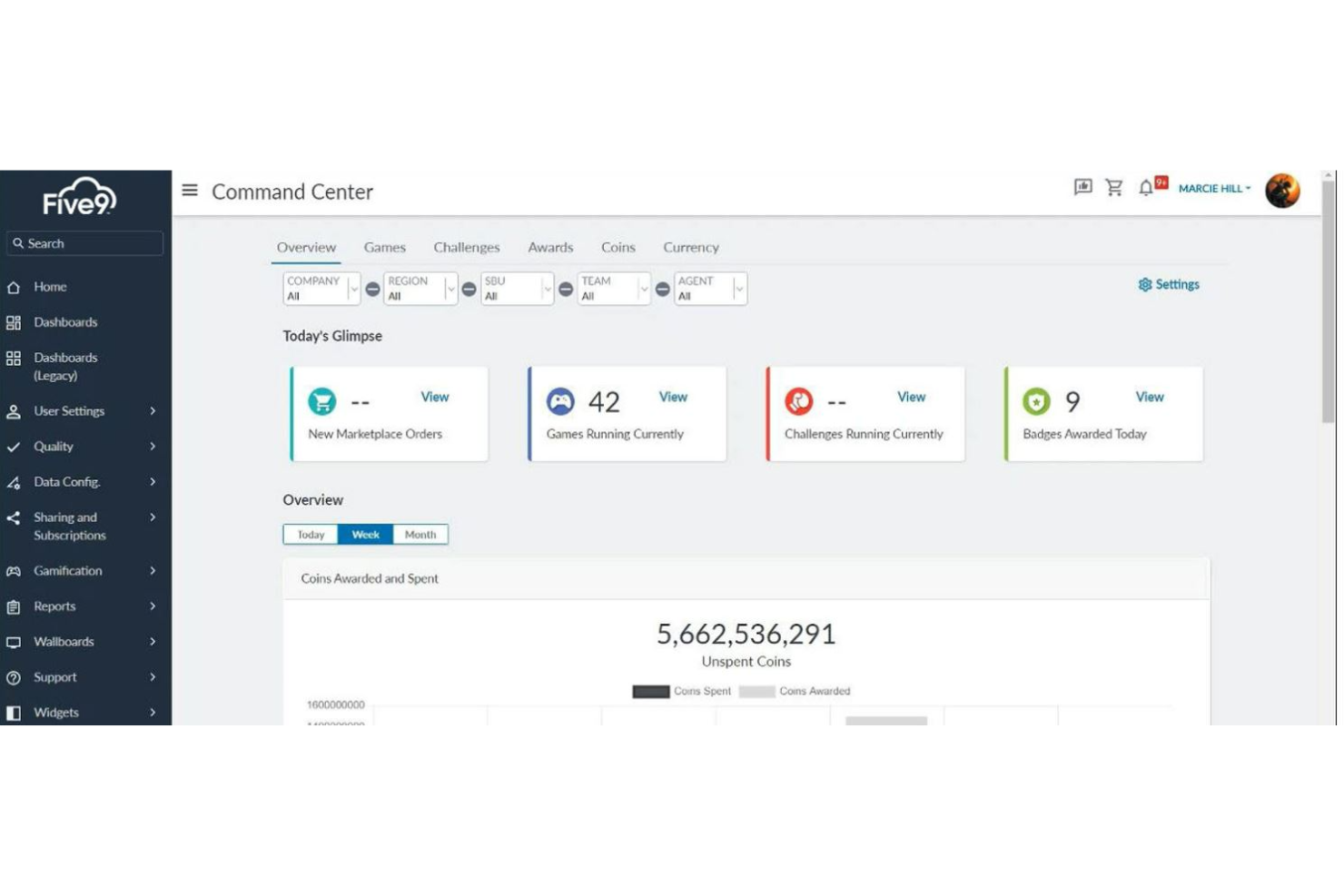
Five9 offre sia assistenza agli agenti sia supporto agli agenti virtuali, per fornire script e prompt necessari sia agli agenti reali che ai servizi self-service basati su IA.
Perché ho scelto Five9: Grazie alla presenza di rappresentanti virtuali e assistenti per gli agenti, Five9 ha dimostrato di aumentare i punteggi di soddisfazione dei clienti e ridurre i costi del personale. La funzione Intelligent Virtual Agent (IVA) permette agli utenti di implementare il supporto self-service per i clienti, con un passaggio fluido agli agenti dal vivo supportati da schede e checklist in tempo reale.
Five9 supporta aziende di tutte le forme e dimensioni grazie a piani personalizzati in base alle esigenze degli utenti. Puoi trovare soluzioni per ruolo — per migliorare agenti, supervisori e strategia aziendale — oppure per settore, tra cui sanità, vendita al dettaglio, servizi finanziari, istruzione superiore, telemarketing e vendite.
Caratteristiche principali e integrazioni di Five9
Funzionalità includono agenti virtuali via telefono o testo, self-service, assistenza agli agenti, automazione dei workflow e soluzioni per l'ottimizzazione del personale, come gamification, gestione della forza lavoro e analisi delle interazioni. Gli agenti virtuali sono disponibili con 25 voci naturali e umane.
Integrazioni includono Microsoft, Microsoft Teams, Oracle, RingCentral, Salesforce CTI, Salesforce Service Cloud Voice, ServiceNow, Zendesk e ZoomPhone. Le integrazioni coprono le esigenze di CRM e UC.
Pros and Cons
Pros:
- Report personalizzati disponibili
- Facile da imparare come costruire
- Esperienza utente intuitiva
Cons:
- Nessun accesso diretto ai fogli di lavoro
- Tempi di attesa per report speciali

JustCall
Ideale per scripting automatizzato di SMS bot
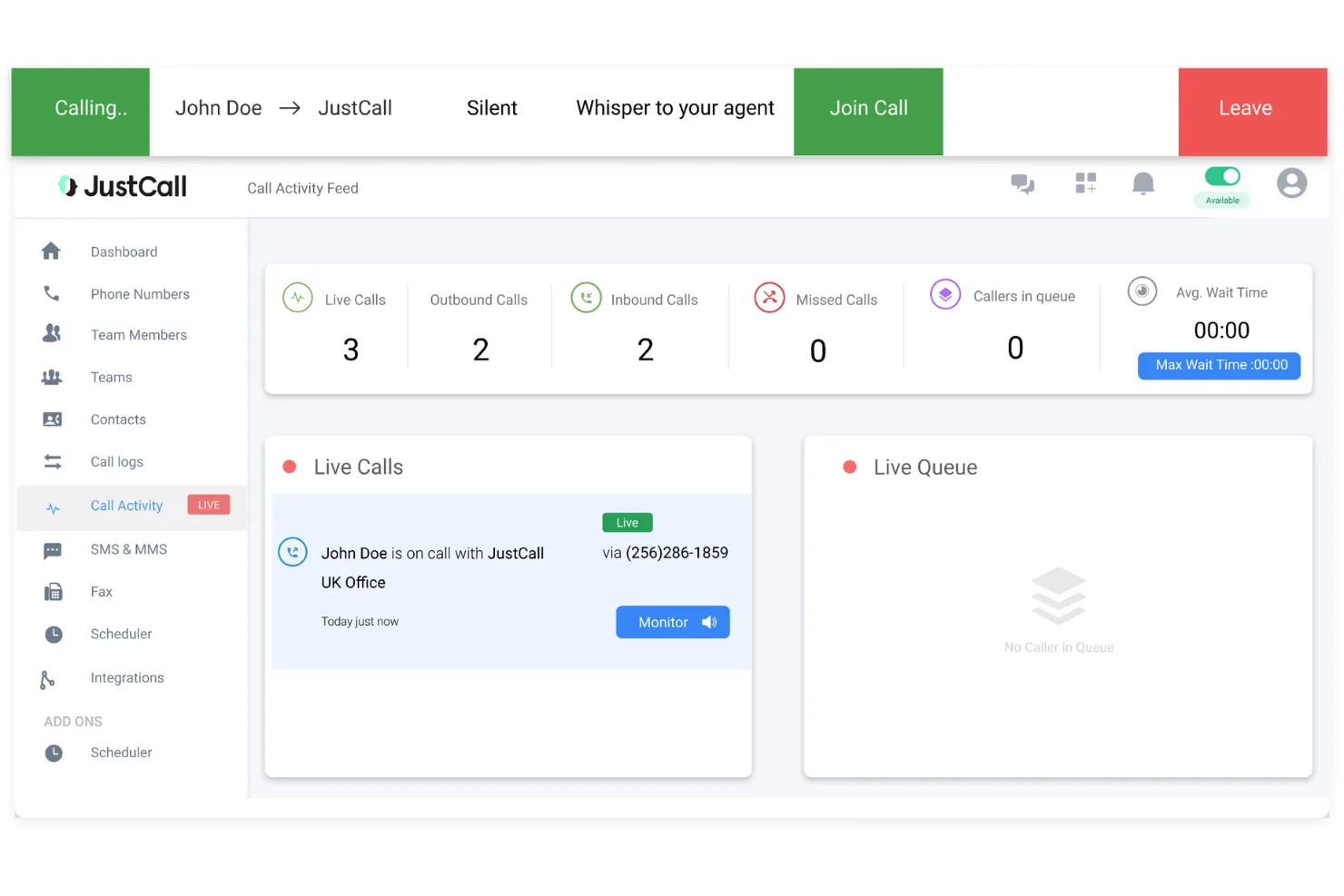
JustCall offre diversi servizi di scripting per applicazioni di call center, inclusi SMS Bot per rispondere automaticamente ai clienti e suggerimenti AI per gli agenti basati su chiamate in tempo reale e script personalizzati dalla dirigenza.
Perché ho scelto JustCall: L'app SMS risponde in modo intelligente tramite regole e schemi definiti dall'utente, mentre l'AI aiuta gli agenti a gestire le chiamate con risultati definiti dai creatori degli script. L'AI per le chiamate telefoniche avvisa anche il management quando gli agenti necessitano di ulteriore supporto e coaching durante una chiamata, in modo da essere presenti quando conta davvero.
JustCall è progettato per supportare aziende di ogni dimensione, incluse PMI e organizzazioni a livello enterprise. L'azienda è specializzata in diversi settori, dalla sanità ai servizi finanziari, fino al settore immobiliare.
Funzionalità e integrazioni principali di JustCall
Funzionalità includono intelligence nelle conversazioni, IVR multilivello, coaching delle chiamate, chatbot e automazione SMS, e scripting delle chiamate. JustCall è disponibile via web e su dispositivi iOS e Android.
Integrazioni includono ActiveCampaign, Agile, Close, Copper, Freshdesk, Front, Groove, Helpwise, Help Scout e Zendesk Sell. JustCall offre integrazioni native per software CRM e Helpdesk.
Pros and Cons
Pros:
- Soluzioni SMS personalizzate
- Facile integrazione con i sistemi esistenti
- Elevato livello di reattività
Cons:
- Può presentare dei bug
- Richiede un po' di apprendimento

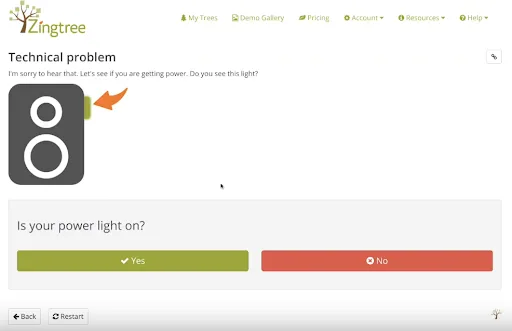
Zingtree è una soluzione per contact center che offre alberi decisionali interattivi, senza necessità di codice, per creare script per gli operatori, gestire processi interni e guidare i clienti. Questo software affronta la complessità della creazione di diagrammi di flusso, semplificandola per interazioni più naturali in tempo reale.
Perché ho scelto Zingtree: La soluzione di scripting decisionale di Zingtree afferma di poter ridurre dell’85% il tempo di formazione degli operatori grazie a flussi di lavoro che aiutano ogni rappresentante a sembrare un esperto. Dispone anche di una funzione che può automatizzare fino al 50% dei ticket grazie a un sistema di self-help che permette ai clienti di risolvere autonomamente i propri problemi.
Zingtree è pensato per soddisfare le esigenze di piccole e grandi aziende con due opzioni di abbonamento. Una è progettata per supportare fino a 25 utenti, mentre l'altra è destinata a un numero illimitato di operatori e all'uso aziendale. Questa piattaforma si specializza nel fornire esempi di script per diversi settori, tra cui servizi per la casa, sanità, assicurazioni e beni fisici.
Caratteristiche distintive e integrazioni di Zingtree
Funzionalità includono un approccio su tre fronti: strumenti di scripting e workflow per gli operatori, soluzioni per processi interni e guide di auto-aiuto per i clienti. L'automazione interna consente di costruire alberi di programma per inviare email, inserire dati e creare documenti automaticamente.
Integrazioni includono Avaya Workspaces, Cisco Webex Contact Center, Freshdesk, Intercom, Kustomer, Nectar Desk, Talkdesk, Zapier, Zendesk Suite e Zoho Flow. Le integrazioni native permettono uno scambio dati bidirezionale, mentre quelle di base funzionano in una sola direzione.
Pros and Cons
Pros:
- Non è richiesta conoscenza di programmazione
- Si possono creare diagrammi di flusso dettagliati quanto necessario
- Interfaccia utente semplice
Cons:
- Tempo di ritardo nell'invio delle email tramite la piattaforma
- La knowledge base si concentra solo su argomenti per principianti

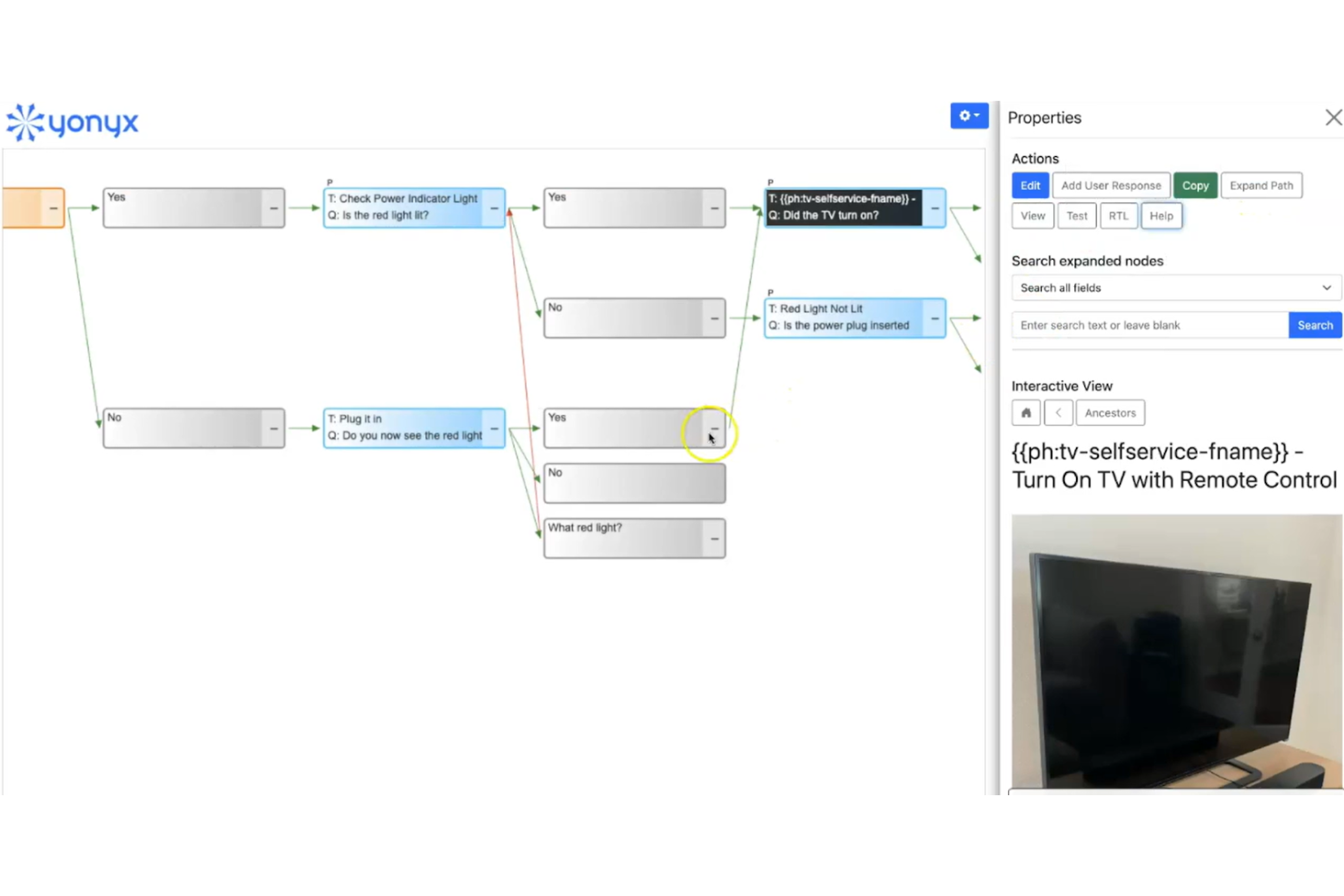
Yonyx è un software di scripting per call center unico che offre flowchart multimediali per creare guide interattive destinate al supporto decisionale. Questo strumento si differenzia dagli script tradizionali per call center perché fornisce un aiuto alla navigazione più interattivo per gli operatori del servizio clienti.
Perché ho scelto Yonyx: La funzione di flowchart multimediale viene fornita con una varietà di strumenti che supportano la semplice creazione, tra cui guide gerarchiche, passaggi di guida multimediali e convergenza di percorsi multipli dei clienti. Con le visualizzazioni Interattiva e Mappa sincronizzate, gli autori possono creare alberi decisionali con risposte dell’utente e passaggi guida.
Yonyx supporta aziende di tutte le dimensioni con un unico piano scalabile basato sugli utenti. Questa piattaforma offre anche piani personalizzati a livello enterprise con un’integrazione che comprende strumenti e funzionalità aggiuntive, come REST APIs, Javascript APIs, comandi personalizzati e guide multilingue.
Caratteristiche distintive e integrazioni di Yonyx
Funzionalità includono creazione intuitiva delle guide, passaggi multimediali, alberi decisionali rispetto a reti e copia/incolla dei nodi.
Integrazioni includono Freshdesk, Netsuite, Oracle Service, Salesforce Service Cloud, ServiceNow e Zendesk Suite.
Pros and Cons
Pros:
- Facile da navigare
- Layout visivamente gradevole
- Progettato per la risoluzione dei problemi
Cons:
- Opzioni di integrazione limitate
- Il self service per i clienti non è abbastanza avanzato
Altri software per script dei call center
Ecco alcune altre opzioni valide che non sono entrate nell’elenco dei migliori software per script dei call center, ma che vale comunque la pena considerare:
- CallTools
Ideale per soluzioni di call center globali e virtuali
- CallShaper
Ideale per call center orientati alle vendite
- LiveAgent
Ideale per gli script IVR
- Nextiva
Ideale per la gestione unificata dell'esperienza cliente


Cosa sono i software per script dei call center?
I software per script dei call center sono strumenti che forniscono script predefiniti per guidare gli operatori dei call center durante le interazioni con i clienti. Gli addetti al servizio clienti, i team di vendita e il personale del supporto tecnico utilizzano generalmente questi strumenti per garantire una comunicazione coerente, migliorare l'efficienza e ottimizzare l'esperienza del cliente.
Gli script predefiniti, la guida in tempo reale e i suggerimenti automatizzati basati sull'intelligenza artificiale aiutano gli operatori a gestire le richieste con precisione e a mantenere un approccio uniforme nelle diverse chiamate. Nel complesso, questi strumenti migliorano la qualità del servizio e aumentano la soddisfazione dei clienti.
Come Valuto i Software di Scripting per Call Center
Divido la mia valutazione tra i requisiti di base—come la ramificazione dinamica e i punti di controllo per la conformità—e i fattori che distinguono un buon strumento da quello giusto per il tuo team.
Funzionalità Principali (Requisiti Fondamentali per Questa Lista)
Quando seleziono gli strumenti per la mia lista, valuto ognuno su una scala da 0 (non offre la funzionalità) a 5 (eccelle in quest’area) per ogni funzionalità principale elencata di seguito. Poi converto il punteggio totale dello strumento in percentuale. Ogni strumento deve raggiungere un punteggio minimo totale del 65% per essere preso in considerazione.
- Ramificazione Dinamica degli Script: Valuto quanto bene lo strumento adatta i flussi di chiamata in tempo reale—ad esempio, indirizzando un agente attraverso uno script per resi in modo diverso in base al valore dell’ordine o alla categoria del cliente.
- Interfaccia Script per l’Agente: L’esperienza visiva è importante. Cerco suggerimenti guidati e indicazioni sul prossimo passo che mantengano gli agenti sulla giusta strada senza bisogno di scorrere o cercare durante la chiamata.
- Integrazione con CRM & Telefonia: Verifico se i dati dei clienti derivanti da piattaforme come Salesforce o Zendesk vengono popolati automaticamente negli script così che gli agenti non debbano passare continuamente da una scheda all’altra.
- Costruttore ed Editor di Script: Qui ricerco un builder visuale e senza codice—qualcosa che un responsabile operativo possa utilizzare per aggiornare uno script senza dover creare una richiesta al reparto IT.
- Controlli di Conformità e di Dichiarazione: I settori regolamentati necessitano di punti di controllo obbligatori. Valuto se lo strumento può imporre dichiarazioni da recitare obbligatoriamente e registrare l’accettazione dell’agente per eventuali audit.
- Raccolta Dati e Reportistica: Osservo quali parametri monitora lo strumento—tassi di completamento degli script, punti di abbandono e aderenza degli agenti—e se è possibile produrre report su queste metriche senza configurazioni aggiuntive.
Una volta ottenuta una lista di strumenti che rispettano i criteri, considero cosa rende ciascuna piattaforma unica.
Fattori Differenzianti (Cosa Distingue i Fornitori)
Ecco come confronto e metto a paragone i diversi fornitori:
Funzionalità Distintive
I suggerimenti basati su intelligenza artificiale possono fare davvero la differenza durante le chiamate in tempo reale—cerco strumenti che propongano risposte o suggerimenti per up-selling in base alla conversazione in corso. Anche il test A/B degli script è una funzione importante perché permette di misurare quale versione ottiene risultati migliori prima di estenderla a tutto il team. Valuto inoltre la capacità di scripting multicanale, dato che molte squadre hanno bisogno di messaggi coerenti tra voce, chat ed email da un’unica piattaforma.
Oltre le Funzionalità
L’ecosistema di integrazione è fondamentale. Verifico se una piattaforma si connette nativamente con i CCaaS e con gli strumenti CRM già utilizzati dal tuo team—passare da sistemi scollegati in una chiamata vanifica lo scopo dello scripting guidato. Le certificazioni di conformità come SOC 2 e HIPAA sono importanti da verificare a priori, specialmente se i tuoi agenti gestiscono dati di pagamento o sanitari. Valuto anche il supporto all’onboarding, perché un builder di script è utile solo se il tuo team sa come progettare e mantenere flussi efficaci sin dal primo giorno.
Come scegliere un software per script dei call center
Quando confronti i software per call center, è facile perdersi in lunghi elenchi di funzionalità e strutture tariffarie complesse. Per aiutarti a rimanere concentrato durante il tuo particolare processo di selezione del software, ecco una lista di fattori da tenere a mente:
| Fattore | Cosa considerare |
|---|---|
| Scalabilità | Assicurati che il software possa crescere insieme alla tua attività. Cerca soluzioni in grado di gestire un aumento del volume delle chiamate, utenti aggiuntivi e più lingue. |
| Integrazioni | Verifica se il software si integra con gli strumenti già in uso, come CRM, e-mail e piattaforme di chat, per semplificare le operazioni e il flusso dei dati. |
| Personalizzazione | Scegli uno strumento che consenta di adattare script e flussi di lavoro alle tue esigenze specifiche. Cerca modelli flessibili e funzionalità di modifica semplici. |
| Semplicità d’uso | Valuta l’interfaccia utente e la navigazione. Il software dovrebbe essere intuitivo per il tuo team, così da ridurre i tempi di formazione e favorirne l’adozione. |
| Budget | Considera il costo totale, inclusi configurazione, costi di abbonamento ed eventuali addebiti aggiuntivi. Assicurati che rientri nei tuoi limiti finanziari. |
| Misure di sicurezza | Verifica che il software sia conforme alle normative pertinenti sulla protezione dei dati e offra funzionalità come crittografia e controlli degli accessi per proteggere le informazioni sensibili. |
| Assistenza | Cerca fornitori che offrano un’assistenza clienti rapida e affidabile, inclusi chat dal vivo, supporto telefonico e assistenza via e-mail. Controlla gli orari di assistenza del fornitore, i tempi di risposta e la disponibilità di risorse come i materiali di formazione. |
| Reportistica | Considera la capacità del software di fornire analisi e report dettagliati per aiutarti a monitorare le prestazioni e prendere decisioni informate. |
Tendenze dei software per gli script dei call center
Nella mia ricerca ho esaminato innumerevoli aggiornamenti di prodotto, comunicati stampa e registri delle versioni di diversi fornitori di software per gli script dei call center. Ecco alcune delle tendenze emergenti che sto monitorando:
- Suggerimenti basati sull’IA: Sempre più strumenti utilizzano l’IA per fornire suggerimenti sugli script in tempo reale, basati sulle interazioni con i clienti. Questa tendenza aiuta gli operatori a offrire un servizio più personalizzato.
- Supporto omnicanale: I fornitori stanno ampliando le loro piattaforme per gestire le interazioni attraverso vari canali, come i social media e le app di messaggistica. Questo garantisce una comunicazione coerente indipendentemente dalla piattaforma utilizzata dai clienti.
- Analisi in tempo reale: Gli strumenti offrono analisi avanzate che forniscono informazioni mentre le chiamate sono in corso. Ciò consente ai responsabili di prendere decisioni rapide e migliorare al volo le prestazioni degli operatori.
- Riconoscimento vocale: Alcuni software includono ora il riconoscimento vocale per modificare automaticamente gli script sulla base delle parole chiave rilevate. Questa funzionalità può migliorare l’accuratezza delle risposte e l’efficienza durante le chiamate.
- Funzionalità di intelligenza emotiva: Gli strumenti emergenti analizzano il tono e il sentiment del chiamante per guidare gli operatori in tempo reale. Questo li aiuta ad adattare il proprio approccio e a migliorare la soddisfazione dei clienti.
Funzionalità dei software per gli script dei call center
Quando scegli un software per gli script dei call center, presta attenzione alle seguenti funzionalità chiave:
- Personalizzazione degli script: Consente di adattare gli script a scenari ed esigenze aziendali specifici, garantendo una comunicazione pertinente ed efficace.
- Personalizzazione degli script: Personalizza gli script delle chiamate sulla base dei dati dei clienti, migliorando il coinvolgimento grazie a un approccio personalizzato.
- Suggerimenti basati sull’IA: Offre indicazioni intelligenti basate sulle interazioni con i clienti, aiutando gli operatori a fornire un servizio più personalizzato.
- Riconoscimento vocale: Modifica gli script sulla base delle parole chiave rilevate, migliorando l’accuratezza delle risposte e l’efficienza delle chiamate.
- Analisi del sentiment: Analizza il tono e il sentiment del chiamante per guidare gli operatori, migliorando la soddisfazione e il coinvolgimento dei clienti.
- Supporto multilingue: Facilita la comunicazione con clienti che parlano lingue diverse, risultando ideale per le aziende internazionali.
- Script dinamici: Adatta automaticamente gli script sulla base dei dati in tempo reale, garantendo la fornitura di informazioni pertinenti e aggiornate.
- Automazione dei flussi di lavoro: Semplifica attività ripetitive come la registrazione delle chiamate e i promemoria, riducendo il carico di lavoro degli operatori e migliorando l’efficienza.
- Gestione delle obiezioni: Fornisce risposte predefinite alle obiezioni comuni dei clienti, aiutando gli operatori a gestire le difficoltà senza intoppi.
- Modifica degli script in tempo reale: Consente di aggiornare gli script durante le chiamate, assicurando che gli operatori dispongano sempre delle informazioni più pertinenti.
- Sviluppo di script personalizzati: Consente alle aziende di creare script su misura da zero, in linea con processi e obiettivi specifici.
- Gestione della conformità: Garantisce il rispetto delle normative di settore integrando negli script linee guida legali e informative obbligatorie.
Vantaggi dei software per gli script dei call center
L'implementazione di un software per gli script dei call center offre numerosi vantaggi al tuo team e alla tua azienda. Eccone alcuni che puoi aspettarti:
- Comunicazione coerente: Garantisce che tutti gli operatori trasmettano lo stesso messaggio, migliorando l'affidabilità del marchio e la fiducia dei clienti.
- Maggiore efficienza: Riduce i tempi di gestione delle chiamate grazie a indicazioni in tempo reale e suggerimenti basati sull'IA, rendendo il tuo team più produttivo.
- Formazione migliorata: Fornisce ai nuovi operatori script strutturati, riducendo i tempi di apprendimento e aumentando la sicurezza.
- Maggiore soddisfazione dei clienti: Utilizza l'analisi del sentiment e script personalizzati per adattarsi alle esigenze dei clienti, contribuendo a renderli più soddisfatti.
- Conformità normativa: Aiuta la tua azienda a rispettare le linee guida del settore, riducendo il rischio di problemi legali.
- Scalabilità: Supporta l'aumento dei volumi delle chiamate e delle dimensioni del team senza compromettere le prestazioni, rendendolo adatto alle aziende in espansione.
- Decisioni basate sui dati: Offre strumenti di analisi e reportistica che forniscono informazioni sulle prestazioni, aiutandoti ad apportare miglioramenti consapevoli.
Costi e prezzi dei software per gli script dei call center
La scelta di un software per gli script dei call center richiede la comprensione dei vari modelli e piani tariffari disponibili. I costi variano in base alle funzionalità, alle dimensioni del team, ai componenti aggiuntivi e ad altri fattori. La tabella seguente riassume i piani più comuni, i relativi prezzi medi e le funzionalità tipicamente incluse nelle soluzioni software per gli script dei call center:
Tabella di confronto dei piani per i software degli script dei call center
| Tipo di piano | Prezzo medio | Funzionalità comuni |
|---|---|---|
| Piano gratuito | $0 | Creazione di script di base, assistenza limitata e personalizzazione minima. |
| Piano personale | $5-$25/utente/mese | Personalizzazione degli script, analisi di base e assistenza via e-mail. |
| Piano aziendale | $30-$60/utente/mese | Analisi avanzate, suggerimenti basati sull'IA e opzioni di integrazione. |
| Piano per grandi imprese | $70-$100/utente/mese | Supporto omnicanale, analisi in tempo reale, responsabile dell'account dedicato e funzionalità di conformità. |
Domande frequenti sul software per script dei centri di contatto
Per chiunque sia alle prime armi con il software per script dei centri di contatto, ho raccolto alcune risposte alle domande più frequenti.
Come funziona il software per script dei centri di contatto?
Il software per script dei centri di contatto fornisce uno script scritto che include suggerimenti per garantire interazioni migliori con i clienti. Questi script e suggerimenti incorporano la logica conversazionale e la terminologia di cui gli operatori hanno bisogno per rispondere alle domande e fornire soluzioni in tempo reale. Offre agli operatori una guida strutturata, garantendo risposte coerenti, accurate ed efficienti alle richieste dei clienti.
Il software odierno può fornire risposte e suggerimenti agli operatori in tempo reale. Molti sistemi utilizzano anche script dinamici per suggerire agli operatori le risposte alle domande dei clienti, facendo risparmiare tempo a entrambe le parti.
Che cos'è la gestione delle obiezioni nel software per script dei centri di contatto?
\u003cstrong\u003eLa gestione delle obiezioni\u003c/strong\u003e nel software per script dei centri di contatto è una funzionalità che aiuta gli operatori a rispondere efficacemente alle preoccupazioni o ai rifiuti dei clienti durante una chiamata. Fornisce risposte predefinite, indicazioni e buone pratiche per affrontare le obiezioni più comuni, come dubbi sul prezzo, sul prodotto o esitazioni riguardo al servizio. Il software garantisce che gli operatori rimangano professionali, sicuri e persuasivi, mantenendo al contempo la conversazione sul giusto percorso. Utilizzando la gestione delle obiezioni, i centri di contatto possono migliorare la soddisfazione dei clienti, aumentare le vendite e migliorare la qualità complessiva delle chiamate.
Come si integra il software per script dei centri di contatto con altri strumenti?
Il software per script dei centri di contatto spesso si integra perfettamente con i sistemi CRM, i software di assistenza tecnica e altri strumenti aziendali. Questa integrazione consente di avere una visione unificata delle interazioni e dei dati dei clienti. Collegando questi sistemi, il tuo team può fornire ai clienti un’assistenza più personalizzata e informata.
Quali sono le difficoltà più comuni nell'implementazione del software per script dei centri di contatto?
L’implementazione del software per script dei centri di contatto può presentare difficoltà come la resistenza al cambiamento da parte degli operatori, la necessità di una formazione approfondita e la garanzia che gli script rimangano aggiornati. Per superarle, coinvolgi il tuo team nel processo di implementazione, fornisci una formazione completa e rivedi e aggiorna regolarmente gli script affinché riflettano le esigenze aziendali attuali.
Quali altri software sono rilevanti per chiamate ottimali con i clienti?
\u003c!– wp:paragraph –\u003e
Se stai cercando altre soluzioni per centri di contatto, dai un’occhiata anche a queste opzioni:
\u003c!– /wp:paragraph –\u003e \u003c!– wp:list –\u003e
\u003cul\u003e
\t\u003cli style=\u0022list-style-type: none\u0022\u003e
\u003cul\u003e\u003c!– wp:list-item –\u003e
\t\u003cli\u003e\u003ca href=\u0022https://thecxlead.com/tools/best-customer-relationship-management-software/\u0022\u003eSoftware per la gestione delle relazioni con i clienti (CRM)\u003c/a\u003e\u003c/li\u003e
\u003c/ul\u003e
\u003c/li\u003e
\u003c/ul\u003e
\u003c!– /wp:list-item –\u003e \u003c!– wp:list-item –\u003e
\u003cul\u003e
\t\u003cli style=\u0022list-style-type: none\u0022\u003e
\u003cul\u003e
\t\u003cli\u003e\u003ca href=\u0022https://thecxlead.com/tools/best-call-center-workforce-management-software/\u0022\u003eSoftware per la gestione della forza lavoro dei centri di contatto\u003c/a\u003e\u003c/li\u003e
\u003c/ul\u003e
\u003c/li\u003e
\u003c/ul\u003e
\u003c!– /wp:list-item –\u003e \u003c!– wp:list-item –\u003e
\u003cul\u003e
\t\u003cli style=\u0022list-style-type: none\u0022\u003e
\u003cul\u003e
\t\u003cli\u003e\u003ca href=\u0022https://thecxlead.com/tools/best-outbound-call-center-software/\u0022\u003eSoftware per centri di contatto in uscita\u003c/a\u003e\u003c/li\u003e
\u003c/ul\u003e
\u003c/li\u003e
\u003c/ul\u003e
\u003c!– /wp:list-item –\u003e \u003c!– wp:list-item –\u003e
\u003cul\u003e
\t\u003cli style=\u0022list-style-type: none\u0022\u003e
\u003cul\u003e
\t\u003cli\u003e\u003ca href=\u0022https://thecxlead.com/tools/best-enterprise-call-center-software/\u0022\u003eSoftware per centri di contatto aziendali\u003c/a\u003e o \u003ca href=\u0022https://thecxlead.com/tools/best-call-center-software-for-small-business/\u0022\u003esoftware per centri di contatto per piccole imprese\u003c/a\u003e, a seconda delle dimensioni della tua azienda.\u003c/li\u003e
\u003c/ul\u003e
\u003c/li\u003e
\u003c/ul\u003e
\u003c!– /wp:list-item –\u003e
Che cos'è la modifica al volo degli script nel software per script dei centri di contatto?
\u003cstrong\u003eLa modifica al volo degli script\u003c/strong\u003e nel software per script dei centri di contatto consente ai supervisori o agli operatori di modificare gli script delle chiamate in tempo reale senza interrompere le chiamate in corso. Questa funzionalità è utile per adattarsi rapidamente a nuove informazioni, alle obiezioni dei clienti o ai cambiamenti nelle politiche. Garantisce che gli operatori dispongano sempre di risposte aggiornate e pertinenti, migliorando l’efficienza della comunicazione e la soddisfazione dei clienti. Apportando modifiche immediate, i centri di contatto possono aumentare la flessibilità, ridurre gli errori e mantenere la coerenza in tutte le interazioni.
Che cos'è lo sviluppo di script personalizzati nel software per script dei centri di contatto?
\u003cstrong\u003eLo sviluppo di script personalizzati\u003c/strong\u003e nel software per script dei centri di contatto consente alle aziende di creare script per le chiamate su misura, adatti alle proprie esigenze specifiche, al settore e alle interazioni con i clienti. Invece di utilizzare modelli generici, le aziende possono progettare script in linea con il proprio marchio, le strategie di vendita o i processi di assistenza. Questa funzionalità aiuta gli operatori a gestire le chiamate in modo più efficace, fornendo suggerimenti, domande e risposte pertinenti in base ai diversi scenari. Gli script personalizzati migliorano il coinvolgimento dei clienti, garantiscono coerenza e migliorano le prestazioni complessive del centro di contatto.
Piattaforma software per script dei centri di contatto basata sul cloud rispetto al software per script dei centri di contatto installato localmente
\u003cstrong\u003eSoftware per script dei centri di contatto basato sul cloud:\u003c/strong\u003e ospitato online, accessibile da qualsiasi luogo e senza necessità di installazione in sede. Offre aggiornamenti automatici, scalabilità e costi iniziali inferiori, ma dipende da una connessione Internet stabile.
\u003cstrong\u003eSoftware per script dei centri di contatto installato localmente:\u003c/strong\u003e installato e gestito sui server aziendali, garantisce il pieno controllo sui dati e sulla personalizzazione. Richiede un investimento iniziale maggiore, manutenzione informatica e infrastruttura, ma offre maggiore sicurezza e affidabilità alle aziende con politiche sui dati rigorose.
Come funziona la gestione della conformità nel software per script dei centri di contatto?
La gestione della conformità nel software per script dei centri di contatto garantisce che gli operatori seguano le linee guida legali, normative e aziendali durante le interazioni con i clienti. Include script integrati conformi alle normative di settore (come GDPR, HIPAA o TCPA), suggerimenti automatici per le informative obbligatorie e monitoraggio in tempo reale per prevenire violazioni della conformità. Questa funzionalità aiuta le aziende a ridurre i rischi legali, mantenere la fiducia dei clienti e garantire comunicazioni coerenti e conformi alle regole durante tutte le chiamate.